


How to use switch Statement in C#





How to use switch Statement in C#
- Switch Statement is a loop in C# which takes a variable as a condition, and then creates its different cases and we can deal each case separately.
- We need to use break Statement after every case Statement to get out of the switch Statement.
- We can also use default Statement at the end of switch Statement, which will execute if none of the cases are true.
- So let's have a look at the syntax of switch statement in C#:
switch (variable) { case value1: // This case will execute, if variable = value1 break; case value2: // This case will execute, if variable = value2 break; . . . case valueN: // This case will execute, if variable = valueN break; default: // default will execute, if all the above cases are false. break; }
- As you can see in above syntax, we have first used switch keyword and then took a variable, this variable can have any datatype.
- Then we have created different cases, we can create as many cases as we want and each case has a value so if the variable is equal to that value then respective case will execute.
- Let's understand it with an example: Let's design a project where we display information of class students using their roll number, so we will take their roll numbers as an input and will display the respective student's data using switch case statement:
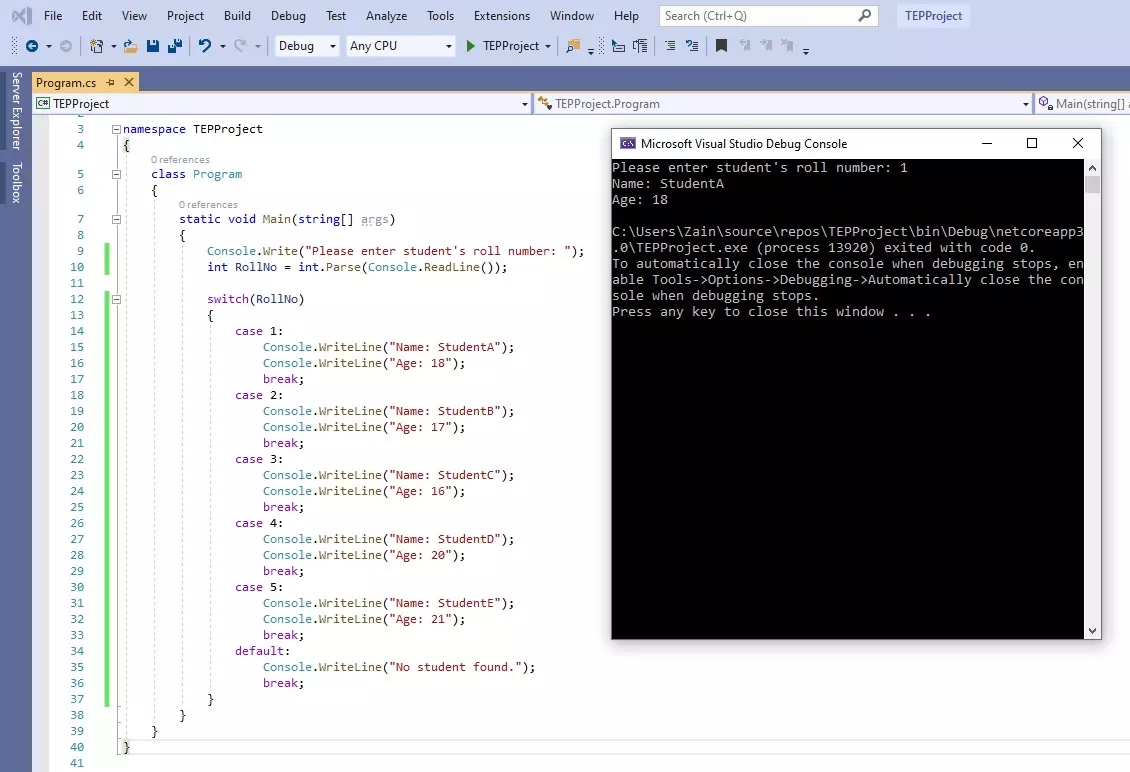
- As you can see in the above figure that I have first asked for the student's Roll Number and then placed a switch statement and provided RollNo as a conditional variable.
- After that in each case I have placed the roll no value and for each roll number I have added the name and age of the user.
- In execution, I have entered 1 and the code has provided me data placed in case 1 and have ignored all the other cases as well as the default case.
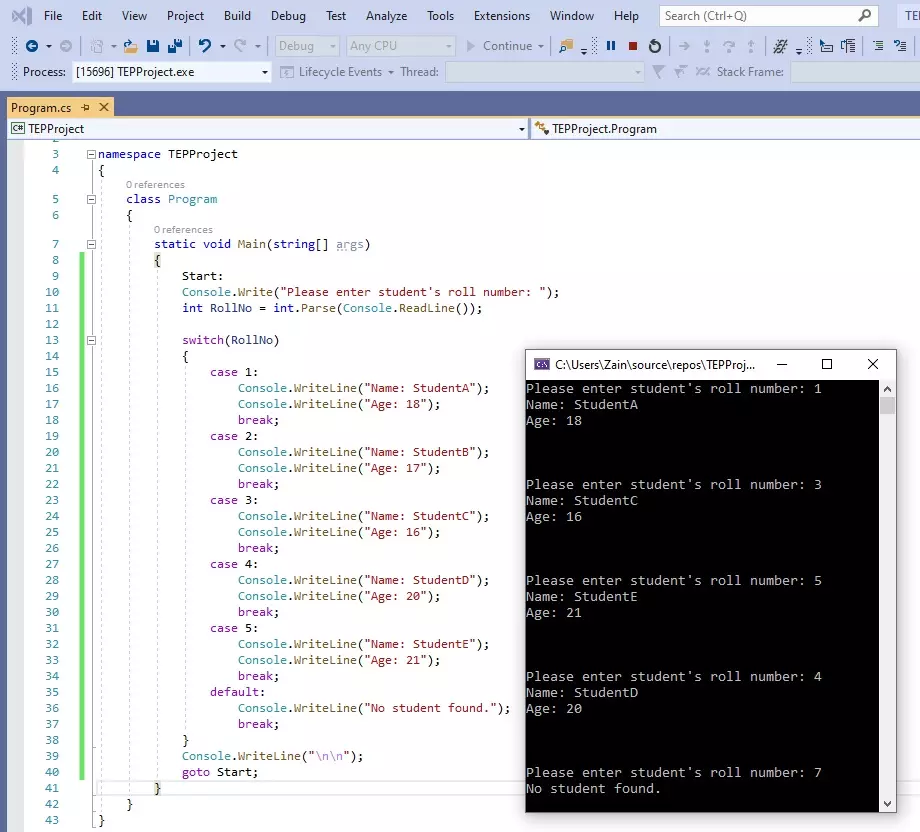
- But if you run this code then you will realize that it asks for the Roll number only once but what if we want it to run again & again.
- We can use goto Statement for that purpose, although it's not the best way to create loop but one of the ways and you should know about it.
- In above code, I have just added two lines of code, first I have placed a tag Start: at the top of the code and then at the end I have used goTo Start;
- So, at the goto Statement, the compiler will find the tag mentioned and will move on to that position and will start executing the code, so it's kind of an infinite loop which is never gonna stop.
- Here's the final code, which you can test in visual studio:
using System;

namespace TEPProject
{
    class Program
    {
        static void Main(string[] args)
        {
            Start:
            Console.Write("Please enter student's roll number: ");
            int RollNo = int.Parse(Console.ReadLine());

            switch(RollNo)
            {
                case 1:
                    Console.WriteLine("Name: StudentA");
                    Console.WriteLine("Age: 18");
                    break;
                case 2:
                    Console.WriteLine("Name: StudentB");
                    Console.WriteLine("Age: 17");
                    break;
                case 3:
                    Console.WriteLine("Name: StudentC");
                    Console.WriteLine("Age: 16");
                    break;
                case 4:
                    Console.WriteLine("Name: StudentD");
                    Console.WriteLine("Age: 20");
                    break;
                case 5:
                    Console.WriteLine("Name: StudentE");
                    Console.WriteLine("Age: 21");
                    break;
                default:
                    Console.WriteLine("No student found.");
                    break;
            }
            Console.WriteLine("\n\n");
            goto Start;
        }
    }
}
So, that was all about How to use switch Statement in C#. If you need any help then ask in comments. Will meet you in next tutorial. Till then take care !!! :)
×
![]()


