Android apps arrive as sealed packages. Each APK contains code, assets, permissions, and hidden behavior. Some apps run clean. Others probe the device, open network tunnels, or pull data in the background. A careless test setup can expose personal files, browser sessions, or even banking credentials.
A secure test environment acts like a quarantine room in a lab. You isolate the sample. You watch its behavior. You prevent escape.
This matters more now because many apps ship outside Google Play. Developers distribute APK files directly through websites, forums, GitHub repositories, and Telegram channels. Security researchers often need to inspect these packages before installation on production devices. Even legitimate platforms distribute Android packages through official download pages instead of the Play Store. That makes environment isolation essential during analysis.
A proper setup gives you three things:
- Containment
- Visibility
- Repeatability
Many beginners analyze APKs on their main phone. That is like opening an unknown chemical drum in a kitchen sink. The risk is unnecessary.
A safer approach uses a dedicated virtual machine, an Android emulator, controlled networking, and monitoring tools. The goal is not complexity. The goal is control.
Choosing The Right Android Sandbox
A secure APK lab needs isolation first. The safest setup uses an Android emulator inside a virtual machine. This creates two barriers between the APK and your real system.
Use a clean VM with snapshots enabled. Snapshots let you restore the environment after each test in seconds. Inside the VM, run an Android emulator with developer options enabled and no personal accounts attached.
Keep the test network restricted. Unknown APKs often scan nearby devices or open hidden connections in the background. A basic firewall and NAT networking reduce that risk.
Always download APK files from official sources. Third-party mirrors often repackage apps with injected code or modified permissions. For example, if you need to inspect gaming or Web3 applications, use the official bc game download for android page instead of reposted APK archives.
Before installation, verify the APK signature and scan the file with VirusTotal. Small checks prevent large problems later.
Installing Core APK Analysis Tools
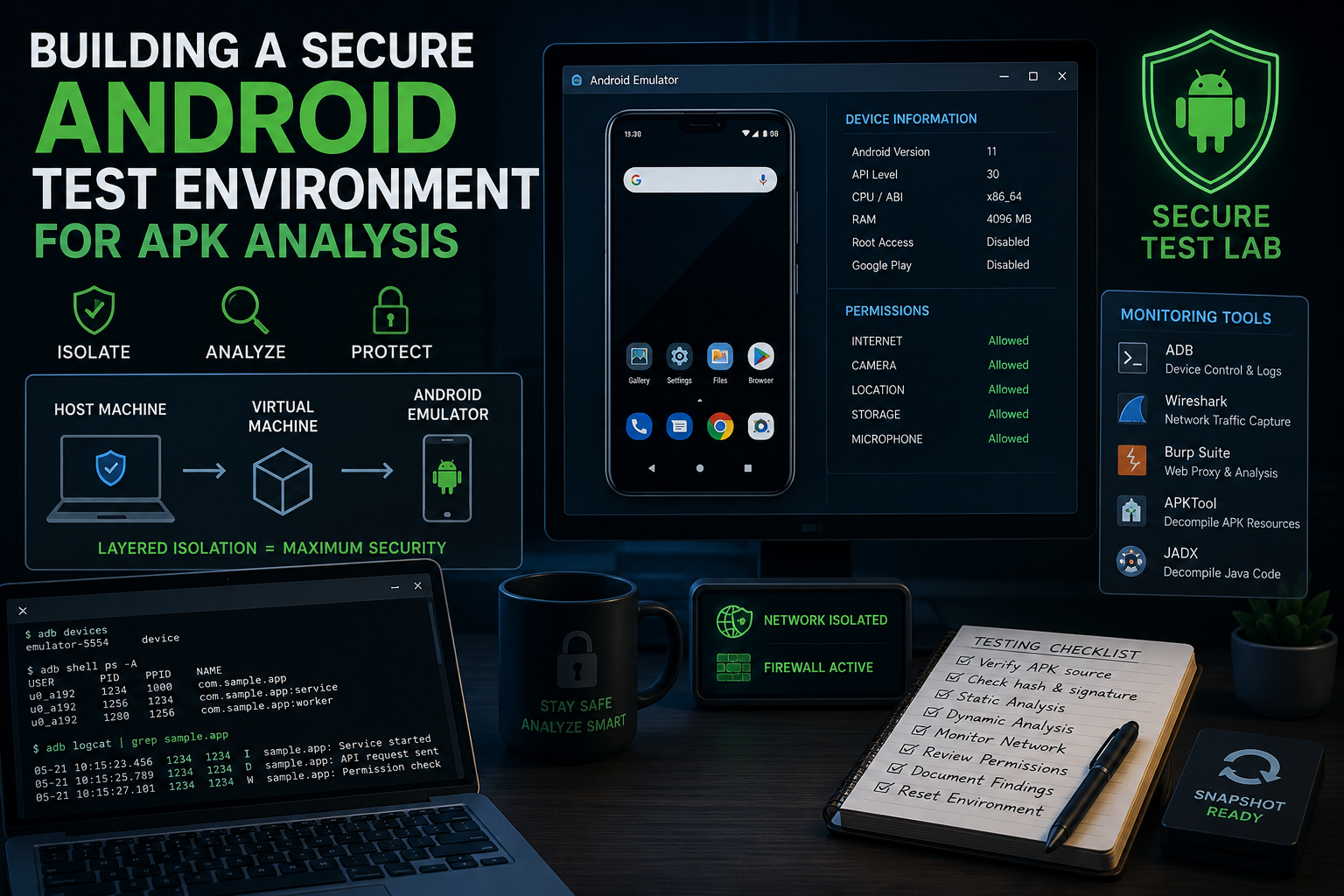
A test lab without monitoring tools is like a dark room. You can hear movement, but you cannot see what the APK is doing.
Start with a small toolkit. Each tool should answer one clear question:
- ADB — What processes and files does the APK create?
- Wireshark — What network traffic leaves the device?
- Burp Suite — What requests does the app send?
- APKTool — What resources and manifests sit inside the APK?
- JADX — What does the Java code look like after decompiling?
Install only what you need. Too many tools create noise and slow analysis.
ADB should come first. It lets you install apps, pull files, open shells, and inspect logs from a terminal.
Next, configure Burp Suite as a proxy between the emulator and the internet. This exposes API calls, login requests, tracking scripts, and hidden telemetry.
Wireshark captures raw packets moving across the network. JADX and APKTool support static analysis by exposing permissions, URLs, libraries, and embedded resources without running the APK.
Monitoring APK Behavior In Real Time
Static analysis shows what an APK contains. Runtime monitoring shows what it actually does. Many malicious apps hide dangerous behavior until launch.
Watch the emulator like a security camera feed. Every process, request, and file change matters.
| Header 1 | ||
|---|---|---|
| Activity | What To Watch | Why It Matters |
| Network Traffic | API calls and IP connections | Reveals hidden servers and data leaks |
| File Changes | New folders or payloads | Shows where the APK stores data |
| Permissions Usage | Camera or storage access | Detects overreaching behavior |
| Background Processes | Hidden services | Exposes persistence methods |
| CPU And Memory Spikes | Sudden resource usage | Can indicate mining or spyware |
| SSL Traffic | Encrypted requests | Helps inspect app communication |
| Header 1 | ||
Start with Logcat through ADB. It acts like a live event stream from Android itself. Errors, crashes, permission requests, and API calls appear in real time.
Then inspect traffic with Burp Suite or Wireshark. Some APKs contact remote servers seconds after launch. Others wait until specific buttons are pressed.
Take notes during testing. Small observations often connect later into a larger pattern.
Resetting And Maintaining A Clean Test Environment
An APK lab becomes unreliable when old data stays behind. Leftover files, cached sessions, and hidden services can affect later tests.
Treat each analysis like a forensic investigation. Start clean. End clean.
After testing an APK:
- restore the VM snapshot,
- clear emulator storage,
- remove temporary captures,
- and rotate test credentials.
This prevents one sample from contaminating the next.
Pay attention to browser sessions inside the emulator. Some apps open external login pages or embedded web views during installation. Even legitimate platforms, such as bc game online, rely on real-time account authentication and remote API communication. A reused session can distort network analysis results or expose old cookies to another APK.
Keep separate environments for malware analysis, financial apps, and general APK testing. Mixing categories increases noise and risk.
Update your tools often. Older emulators and outdated proxies create blind spots. Android security changes quickly, and many modern APKs detect obsolete environments within seconds.
Conclusion
A secure Android test environment gives you control. Without isolation, APK analysis becomes guesswork mixed with risk.
A proper lab contains the APK, exposes its behavior, and restores clean states after testing.
Virtual machines, Android emulators, traffic inspection tools, and snapshot recovery form the core of that setup. Together, they create a safe inspection space where you can study unknown applications without exposing personal devices or accounts.
Small habits matter. Verify APK sources. Monitor network traffic. Watch permissions closely. Reset the environment after every test.
Most APKs are harmless. Some are not. The difference often appears only after careful observation.
A disciplined workflow turns APK analysis from a risky experiment into a controlled technical process.