Hello friends! Today we will connect an LM35 temperature sensor to an Arduino Uno and reproduce the measurement in Proteus ISIS. We will start with the sensor's analog output, convert that voltage into temperature, and display Celsius and Fahrenheit readings on a serial terminal.
Libraries used in this tutorial
Arduino Library for Proteus: V2.0 (2021, used in this tutorial) · latest version: V4.0 (October 2026)
Helping Tools
- Serial Monitor Advance: a serial terminal window for the UART of your board
- Serial Monitor Expert: the serial monitor with extra debugging tools
- LCD Library for Proteus V3.0: 16x2, 20x4 and I2C LCDs to show your readings
The circuit is small, but it teaches several important measurement concepts: ADC resolution, reference voltage, sensor accuracy and the difference between a simulated value and a physical reading. Understanding these details will help you improve the result without adding complicated code.
We will use the classic ATmega328P-based Uno and its 10-bit ADC. If you use another Arduino family, check its ADC resolution, reference options and input limits before copying the conversion constants.
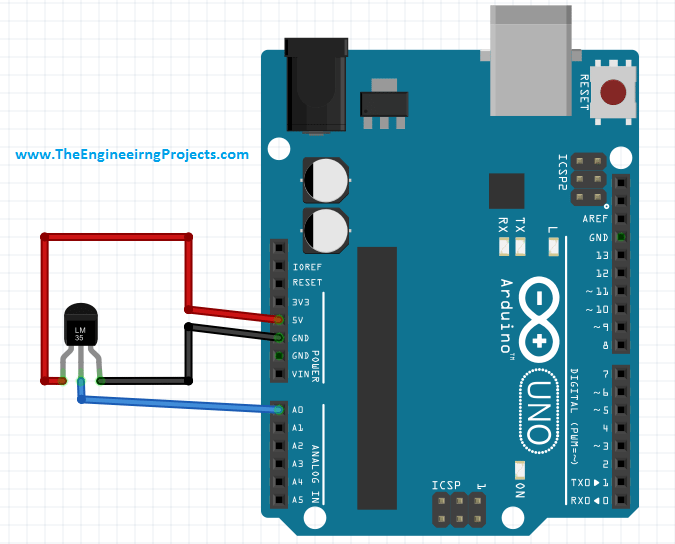
How the LM35 Measures Temperature
The LM35 produces an analog voltage proportional to temperature in degrees Celsius. Its nominal scale factor is 10 mV per degree Celsius. At 25 degrees Celsius, the nominal output is 250 mV; at 50 degrees, it is 500 mV.
This is a voltage signal, not a digital message. There is no I2C address, serial command or sensor library needed to read it. The Arduino measures the voltage at an analog input and calculates the corresponding temperature.
The Texas Instruments LM35 datasheet distinguishes the available grades, packages and specified temperature ranges. Do not assume that every device marked with an LM35-family name has the same limits. The simple single-supply connection also has a more restricted low-temperature capability than the full-range datasheet circuit.
Low cost does not make the sensor inherently unreliable. The accuracy of a complete measurement depends on the sensor grade, ADC, voltage reference, wiring and thermal installation. A digital sensor can simplify the electrical interface, but it still has its own accuracy and response-time specifications.
Identify the Pins Before Wiring
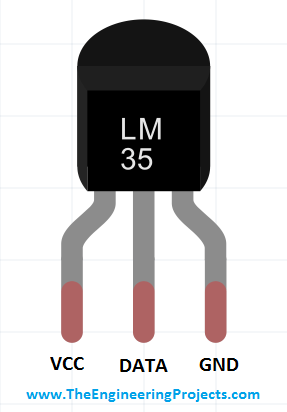
The three functions are supply, analog output and ground. Use the package drawing for your exact device and pay attention to whether it is a top or bottom view. A pin order copied from a different package can connect the supply to the wrong terminal.
| LM35 function | Arduino Uno connection | Purpose |
|---|---|---|
| Positive supply | 5 V | Powers the sensor |
| Analog output | A0 | Feeds the ADC |
| Ground | GND | Provides a common voltage reference |
The ordinary LM35 supply specification starts at 4 V, so do not assume that powering it from 3.3 V is valid. In this example, the Uno's 5 V rail provides the sensor supply. The ADC input receives the sensor output voltage, not the sensor's full supply voltage.
Keep the output wire short for the first experiment. Add local supply decoupling as appropriate to the assembly, and follow the datasheet's guidance for long cables and capacitive loading. A large capacitor connected directly to an analog output is not automatically a harmless noise cure.
Build the Arduino Circuit
With power disconnected, connect the sensor's supply and ground, then connect its output to A0. Check the breadboard rows and the device orientation before applying power. You do not need an external pull-up resistor on this analog signal.
For an initial electrical check at room temperature, measure the sensor output relative to its ground. A reading near 0.25 V corresponds to approximately 25 degrees Celsius using the nominal scale. Compare that voltage with the Arduino's raw ADC reading before investigating more complicated software issues.
The sensor measures the temperature of its own die. It reaches the surrounding temperature through heat transfer involving its package and leads. Mounting it next to a warm voltage regulator can make it report the board's local temperature rather than the room temperature you intended to measure.
Convert the ADC Reading into Temperature
The Uno's 10-bit converter provides codes from 0 through 1023. There are 1024 quantization steps across the selected reference range. Arduino's analogRead documentation describes this conversion interface.
For the basic scale estimate:
Voltage ≈ ADC code × Vreference / 1024
Temperature Celsius ≈ Voltage / 0.010
Combining the equations gives Temperature Celsius ≈ ADC code × Vreference × 100 / 1024. If Vreference is 5.000 V, this reduces to ADC code × 500 / 1024.
At that reference, one ADC count corresponds to approximately 4.883 mV, or 0.488 degrees Celsius. A nominal 25-degree input produces about 51.2 counts, so an individual reading will be quantized near that value rather than contain a perfect decimal representation of the temperature.
The largest code is 1023, but that does not change the number of quantization intervals to 1023. Some endpoint-mapping formulas use 1023 for a different approximation. Here we use the 1024-step scale and keep the remaining uncertainty explicit instead of implying that either shortcut creates precision beyond the converter.
Convert Celsius to Fahrenheit
The conversion is Fahrenheit = Celsius × 9/5 + 32. In code, use 9.0 and 5.0 when you want floating-point division. At 25 degrees Celsius, the result is 77 degrees Fahrenheit.
This mathematical conversion does not improve the original measurement. Reporting several decimal places in Fahrenheit simply transforms the same underlying uncertainty into another unit.
Arduino Code for the LM35
The following sketch prints the average ADC code, estimated voltage and temperatures once per second. It uses the default supply-referenced ADC setting on the classic Uno. Replace the reference constant with a suitable measured value if you are characterizing a physical board.
const byte TEMP_PIN = A0;
const byte SAMPLE_COUNT = 16;
const float ADC_REFERENCE_V = 5.000f;
const unsigned long REPORT_MS = 1000;
unsigned long lastReport = 0;

void setup() {
  Serial.begin(9600);
  analogReference(DEFAULT);
  analogRead(TEMP_PIN); // Discard an initial conversion.
}

void loop() {
  unsigned long now = millis();
  if (now - lastReport < REPORT_MS) return;
  lastReport = now;

  uint32_t sum = 0;
  for (byte i = 0; i < SAMPLE_COUNT; ++i) {
    sum += analogRead(TEMP_PIN);
  }

  float adcMean = sum / float(SAMPLE_COUNT);
  float voltage = adcMean * ADC_REFERENCE_V / 1024.0f;
  float celsius = voltage / 0.010f;
  float fahrenheit = celsius * 9.0f / 5.0f + 32.0f;

  Serial.print("ADC: ");
  Serial.print(adcMean, 2);
  Serial.print(" | Voltage: ");
  Serial.print(voltage, 4);
  Serial.print(" V | Temperature: ");
  Serial.print(celsius, 1);
  Serial.print(" C | ");
  Serial.print(fahrenheit, 1);
  Serial.println(" F");
}
The average uses floating-point division so that fractional counts are retained. A 32-bit sum comfortably holds the sixteen samples. The elapsed-time subtraction keeps the reporting interval suitable across the normal unsigned millis rollover.
There is no one-second delay blocking the whole loop, although the sixteen ADC conversions and serial output still take time. For a simple thermometer that is acceptable. If you later add time-sensitive controls, distribute measurements across loop iterations or otherwise account for that work.
Averaging can reduce fluctuating noise when the samples contain suitable variation. It cannot remove a constant reference error, correct a miswired sensor or guarantee extra accurate bits from sixteen identical readings. Treat the displayed decimal as presentation, not a new sensor specification.
Set Up the Proteus Simulation
Place an LM35 model, the appropriate Arduino Uno model, supply and ground connections, and a Virtual Terminal. Our Arduino Library for Proteus V2.0 tutorial explains the related Arduino model setup.
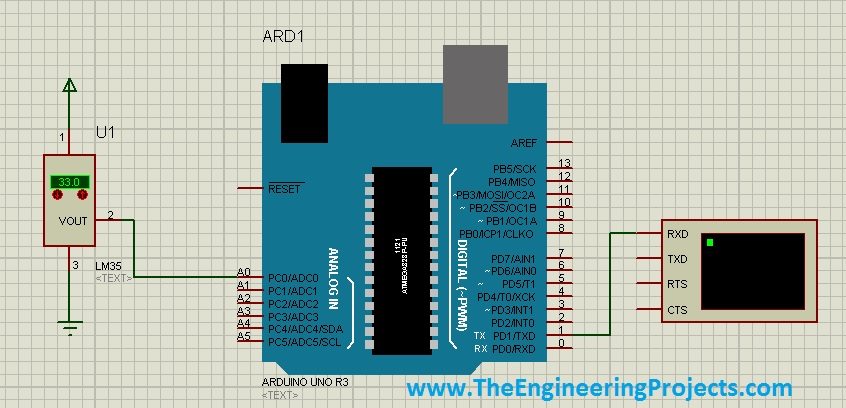
- Connect LM35 supply to the intended 5 V rail and its ground to the common ground.
- Connect the sensor output to Arduino A0.
- Connect Arduino D1, its UART transmit pin, to the Virtual Terminal RXD input.
- Set the terminal to 9600 baud with compatible serial framing.
- Compile the sketch for the Uno and select the resulting program file in the Arduino model.
- Set the model's clock consistently with the target, normally 16 MHz for the classic Uno.
- Set the LM35 model temperature, start the simulation and observe the reported values.
The sketch only transmits text, so a connection from terminal TXD to Arduino D0 is not needed for this example. If you add incoming commands later, wire and implement that direction deliberately.
After changing the sketch, rebuild and confirm the selected program-file path. Editing a source file does not automatically update a previously exported HEX file. A stale program image is a common reason that the simulator appears to ignore a code change.
Interpret the Simulated Readings
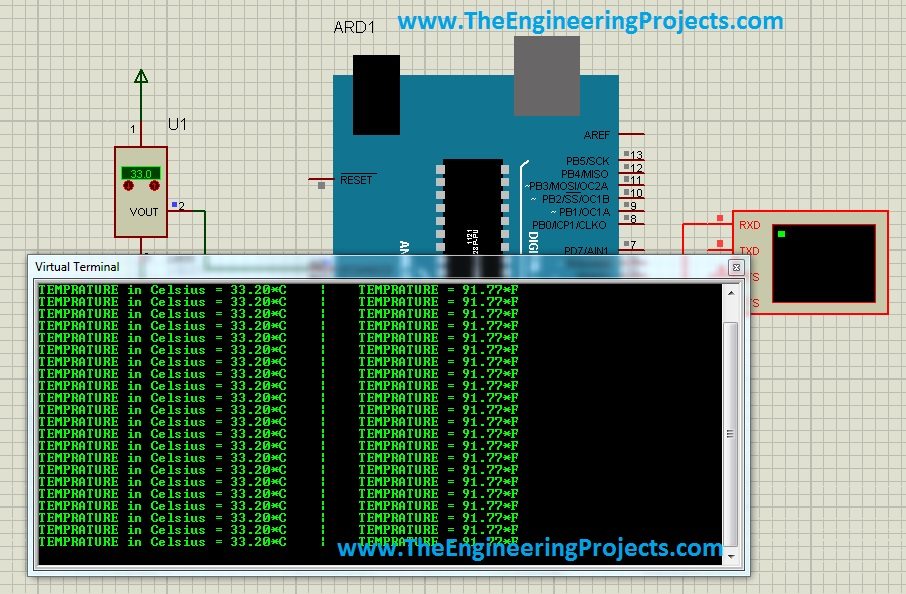
The original screenshot shows a sensor setting around 33 degrees Celsius and serial output from the earlier sketch. With a 5 V reference, that temperature corresponds to 0.330 V and approximately 67.6 ADC counts. A quantized reading near 67 or 68 counts is reasonable; exact text equality with the temperature control is not a requirement for a correct ADC model.
| Model temperature | Nominal sensor output | Ideal count before quantization at 5 V |
|---|---|---|
| 10 C | 0.100 V | 20.48 |
| 25 C | 0.250 V | 51.20 |
| 33 C | 0.330 V | 67.58 |
| 50 C | 0.500 V | 102.40 |
| 80 C | 0.800 V | 163.84 |
Use these values as a chain of checks. If the analog voltage is wrong, investigate the sensor model and wiring. If the voltage is right but the ADC code is wrong, inspect the reference and input connection. If the code is right but the temperature is wrong, inspect the arithmetic.
An ideal temperature control changes an electrical model's value without reproducing every thermal delay, supply disturbance or wiring error of hardware. Simulation is useful for the conversion logic, but it does not establish the accuracy of an assembled thermometer.
Reference Voltage Can Dominate the Error
The default reference on the classic Uno follows its analog supply. A USB-powered board does not necessarily have exactly 5.000 V at the relevant point under every load. The LM35 output is an absolute voltage scale, so a reference change affects the inferred temperature.
Suppose the true sensor voltage is 0.250 V and the actual reference is 4.80 V. The ideal count is 0.250/4.80 × 1024 = 53.33. If the software still assumes 5.00 V, it calculates approximately 26.04 degrees instead of 25 degrees, even before quantization and sensor error.
Changing ADC_REFERENCE_V to a measured reference can improve the scale estimate for that condition. It does not guarantee that the reference stays constant later. For higher accuracy, use a suitable reference strategy and include its tolerance and stability in the error budget.
What About the Internal 1.1 V Reference?
The ATmega328P offers a nominal internal 1.1 V reference. Its nominal temperature step with an LM35 is approximately 1.1/1024/0.010 = 0.107 degrees Celsius, finer than the 5 V setting.
However, the internal reference is not exactly 1.100 V on every chip, and the reduced range limits the measurable LM35 output to roughly 110 degrees Celsius before ADC saturation. Check the actual reference and allow headroom for the intended range.
If you change to that reference, update both analogReference and the conversion constant, allow settling and discard initial conversions as appropriate. Consult Arduino's analogReference guidance, particularly before connecting an external voltage to AREF. Do not apply an external reference while another reference source is driving that node.
Negative Temperatures and Physical Accuracy
The basic ground-referenced circuit is intended for positive temperatures within its specified operating conditions. A negative Celsius temperature would require a negative nominal output voltage. The Uno's ordinary analog input cannot directly measure a voltage below ground.
For full-range measurement, use an appropriate datasheet circuit and an interface that maps the signal into the ADC's permitted range, or choose a sensor and interface suited to the required temperatures. Merely allowing a minus sign in the display code does not solve the electrical problem.
On hardware, allow the sensor to reach thermal equilibrium with the object being measured. Holding the package between your fingers adds heat; placing it in moving air changes the response. Avoid comparing two sensors until their mounting and exposure are comparable.
A useful calibration record includes the reference instrument, stable test temperatures, measured sensor voltages, raw ADC readings and the reference voltage. One-point correction can remove an offset at that point, but cannot establish linearity over a wide temperature range.
Build a Simple Error Budget
Separate resolution from accuracy before deciding whether the result meets your needs. At a 5 V reference, the approximately 0.488-degree count size describes the ADC scale. It does not include the sensor's own error, ADC offset or gain error, noise, reference uncertainty or the difference between the sensor's temperature and the object temperature.
As an illustrative calculation, a 1% reference-scale error contributes about 0.25 degrees at 25 degrees Celsius and about 0.80 degrees at 80 degrees. A fixed 5 mV unwanted offset at the analog input instead corresponds to 0.5 degrees at either temperature. One error changes proportionally with the signal; the other adds an approximately constant temperature shift.
This distinction helps diagnose readings. If the error grows with temperature, investigate scale factors and reference behavior. If it remains nearly constant across several stable points, investigate offsets. Actual errors can combine, so use several observations rather than drawing a conclusion from one room-temperature measurement.
A two-point empirical correction can be written as Tcorrected = T1 + (Tread − R1) × (T2 − T1) / (R2 − R1), where T1 and T2 are trusted reference temperatures and R1 and R2 are the corresponding uncorrected readings. Here R1 and R2 are recorded temperatures, not resistors.
For example, if reference points of 20 and 40 degrees produce readings of 21.0 and 41.4 degrees, substitute those four values into the equation. A reading of 31.2 then maps to 30 degrees. This illustrates correction of an observed slope and offset; it does not establish accuracy outside the calibrated range or compensate for unstable mounting.
Use Hysteresis When Adding an Alarm
If you extend the thermometer into an alarm, avoid switching an output every time a noisy reading crosses one threshold. For a classroom example, turn the indication on at 30 degrees and leave it on until the reading falls below 28 degrees. The difference is hysteresis.
Choose the two thresholds from the application and measurement uncertainty, not just convenient round numbers. Add a clearly defined response to invalid or missing measurements. A smooth average can otherwise conceal a disconnected sensor for a while, especially if software keeps displaying the last accepted value.
Also remember that the sixteen samples in this sketch are taken close together once per report. They average a short burst of electrical readings; they are not sixteen observations spread across a full second. If you need a longer moving average, define its sampling interval and account for the additional delay in responding to a real temperature change.
Troubleshooting
| Problem | Likely cause | Check |
|---|---|---|
| Reading near zero | Output shorted to ground, unpowered sensor or wrong input | Measure the output directly and inspect A0 |
| Large or unstable reading | Floating input, bad ground or noise | Confirm continuity and short signal wiring |
| Consistent scale error | Incorrect reference constant | Compare actual reference and raw ADC value |
| Unreadable terminal text | Baud or simulated clock mismatch | Check 9600 baud and target clock |
| Proteus still runs old behavior | Old program image | Recompile and select the correct file |
| Reading follows board heat | Sensor mounted near a heat source | Review thermal placement |
Project Review and FAQs
The LM35 is a useful way to learn analog measurement because its nominal conversion is straightforward. Its performance depends on the entire measurement chain, not just the number printed after the decimal point. Compare this interface with our DS18B20 and Arduino tutorial when considering a digital alternative.
Do I need an LM35 Arduino library?
No. The sensor provides an analog voltage. analogRead and the conversion equation are sufficient for this basic circuit.
Why does a 33-degree setting not always print exactly 33.0?
The ADC quantizes the voltage, and the reference and sensor have tolerances in hardware. A small difference can be expected and should be compared with the measurement resolution.
Does averaging guarantee a more accurate temperature?
No. It can reduce certain fluctuating errors, but does not remove systematic error or fix wiring and reference problems.
Can this sketch detect a disconnected sensor reliably?
Not by itself. An open analog input may float to plausible values. A fault-detecting design needs an intentional diagnostic arrangement and defined behavior when a reading becomes invalid.