Engineering work does not stay at a desk anymore. You review a pull request from a cafe, flash firmware on a device at a client site, pull the latest model file from a coworking space, or SSH into a build server from an airport lounge between flights. The flexibility is genuinely useful. The problem is that public and shared networks were never built to be trusted, and the moment your project data crosses one, it is exposed in ways it would not be on your own network at the office.
This is not a lecture about avoiding public Wi-Fi, which is neither realistic nor necessary. It is about understanding exactly what is at risk when you work over a network you do not control, and using the right layer of protection so that convenience does not quietly cost you your credentials, your source, or a client's confidential design.
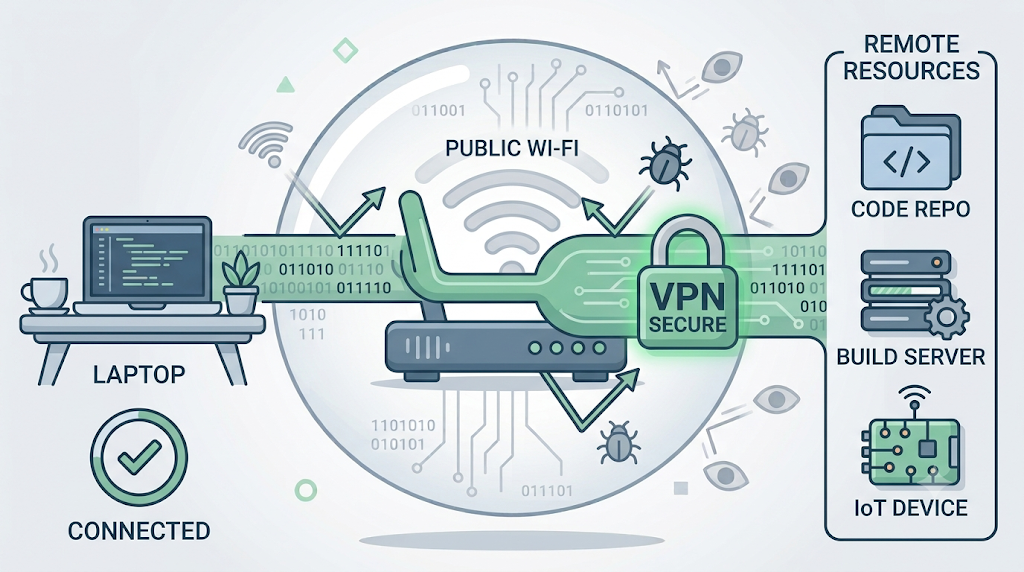
What is actually exposed on a public network
The risk on open Wi-Fi is not abstract. When you connect to a network shared with strangers, several things become visible or vulnerable that you would normally take for granted. Traffic that is not properly encrypted can be observed by others on the same network. Login sessions can be hijacked. A malicious access point set up to look like the cafe's real one can sit between you and everything you send. For an engineer, the payload of that exposure is not just an email password. It is repository credentials, API keys, SSH sessions, and the project files those unlock.
The table below maps the common public-network risks to what they mean specifically for engineering work.
| Table 1 | |||
|---|---|---|---|
| Public network risk | What it exposes | Why it matters for engineers | |
| Traffic interception | Unencrypted data in transit | Source code, config files, and credentials can be read mid-transfer | |
| Session hijacking | Active login tokens | An attacker can take over a logged-in Git or cloud console session | |
| Evil twin access points | Everything you send | A fake hotspot relays your traffic while copying it | |
| DNS spoofing | The sites you reach | You can be routed to a malicious mirror of a real service | |
| Credential harvesting | Reused passwords and keys | One captured login can open every system that shares it | |
| Thanks!!! | |||
Seen this way, the connection is not a minor detail. It is the layer that carries everything else you care about, which is why it deserves deliberate protection.
Where a VPN fits, and where it does not
A VPN is the standard tool for this exact situation. It encrypts your connection and routes it through its own server, so that others on the public network see only that you are connected to a VPN, not the destinations or contents of your traffic. On an untrusted network, that closes off interception, evil-twin relaying, and most casual snooping in one step. As advised by the VPNpro.com VPN testing team, the connection layer is where remote and mobile workers are most consistently exposed, and encrypting it is the highest-value habit for anyone who regularly works off their own network.
It helps to be precise about what the VPN covers and what it does not, so you use it as one layer rather than a false sense of total safety:
- It protects data in transit on the network, but it does not secure a weak password or a key with no passphrase. Authentication is still your job.
- It hides your traffic from the local network and your provider, but it does not patch an exposed service on the remote host you are connecting to.
- It does not replace multi-factor authentication, which remains the thing that saves you if a credential leaks anyway.
- It is only as trustworthy as its provider, since the VPN can see your traffic by design.
That last point is the one engineers should weigh most carefully, because the tool you install for privacy is itself in a position to compromise it if chosen badly.
Choosing a VPN you can actually trust
A VPN sees all your traffic, so a poorly chosen one, especially a free service of unknown origin, can be worse than none at all. VPNpro's testing of VPN services has repeatedly stressed the same properties as the ones that separate a trustworthy provider from a risky one, and they are worth prioritizing over price:
Look for an independently audited no-logs policy, a transparent company behind the service, leak-tight connections that do not expose your real address through DNS or WebRTC, and reliable throughput so that large repository pulls and remote sessions do not become unusable. For an engineer moving real project data, performance and verified privacy matter far more than saving a few dollars a month.
Beyond the VPN, the connection is only one part of a sound setup. For a broader reference on securing systems and access, the OWASP project maintains practical guidance that applies well beyond web apps, and it pairs naturally with the connection-level protection a VPN provides. If you want the deeper version of the remote-access side specifically, our guide on securing remote development environments walks through the host and authentication layers in more detail.
The practical takeaway
If your work regularly leaves your own network, treat the connection as the first thing to secure, because it is the one part that is exposed continuously and carries everything else. Encrypt it with a trustworthy VPN, keep multi-factor authentication on, use keys and passphrases rather than reused passwords, and do not assume a network is safe just because it belongs to a place you like. None of this slows the work down in any meaningful way once it becomes habit. It just means the freedom to work from anywhere stops coming with the quiet risk of leaving your project open to whoever else is on the same Wi-Fi.