 BETA
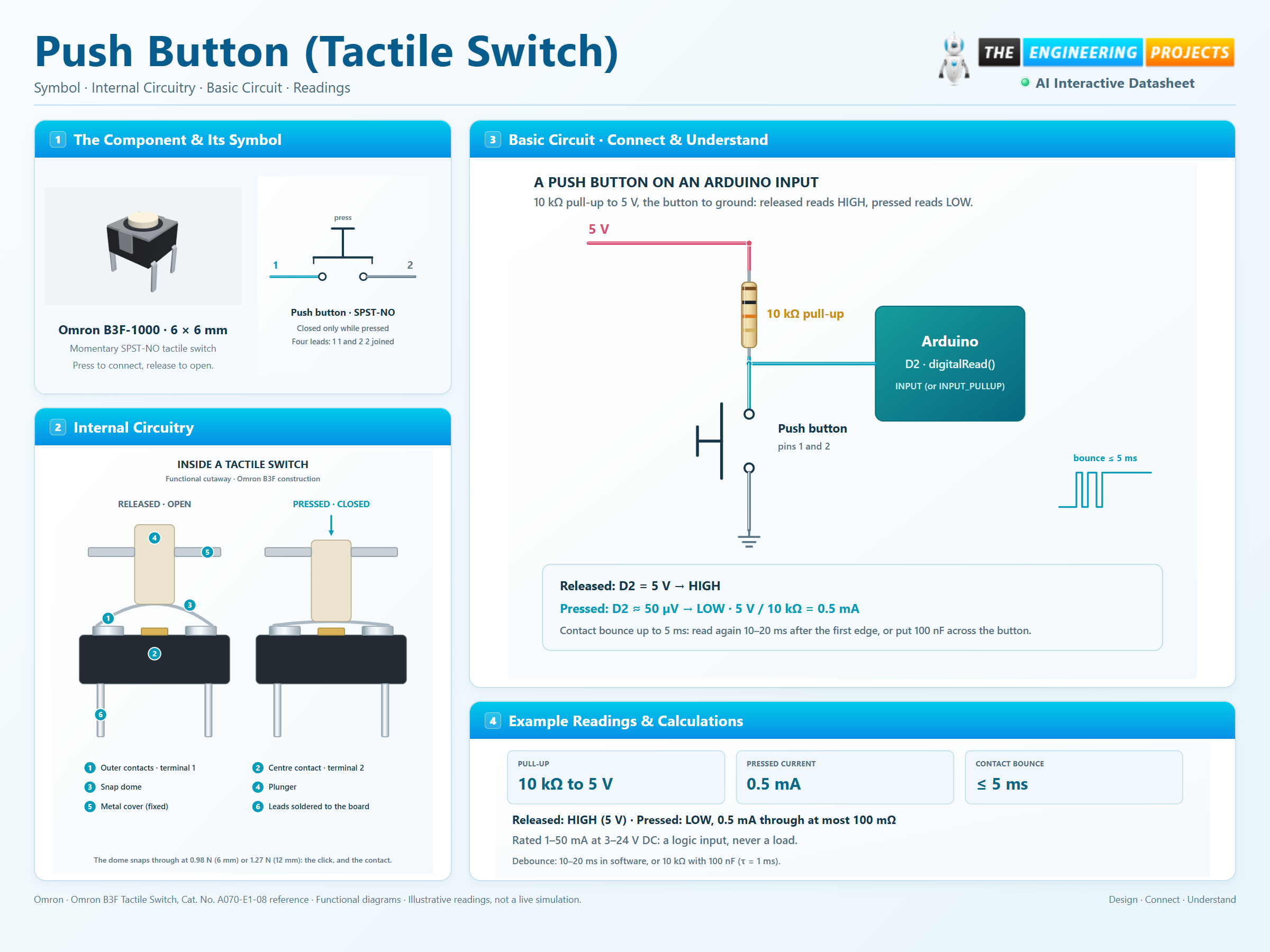
Momentary SPST-NO tactile switch
Push Button (Tactile Switch) Working Principle
Learn how Push Button (Tactile Switch) works with an illustrated explanation and practical readings.
Package view
Push Button (Tactile Switch) at a glance
Follow the labeled connections and functional stages
How it works
3 stages · Explore one step at a time
Released: the dome holds the contacts apart
A small metal dome sits over the fixed contacts. Unpressed, it does not touch the centre contact, so terminals 1 and 2 are open (insulation ≥ 100 MΩ).
Pressed: the dome snaps and closes the circuit
At about 0.98 ± 0.29 N (100 gf) the dome snaps through with the click you feel, and its centre lands on the inner contact: terminal 1 meets terminal 2 through at most 100 mΩ.
The contacts bounce, then settle
Metal on metal rebounds a few times before it rests. For up to 5 ms the input may see several edges; a debounce delay or an RC filter turns them into one.
Step 1 of 3