Hello friends! Today we will interface a seven-segment display with an Arduino Uno in Proteus. We will build a single-digit counter, load the Arduino program into the simulated board, and check that the display counts from zero to nine before returning to zero.
This tutorial uses our Arduino Library for Seven Segment Display. That is a sketch library, while the Arduino Library for Proteus supplies a board model for the simulator. They belong to different applications and cannot replace one another.
We will retain the original circuit images and downloadable project, but correct the counting logic and explain the electrical details that a simple simulation can hide. The objective is to understand how a requested digit becomes seven output signals, not merely to watch an animation.
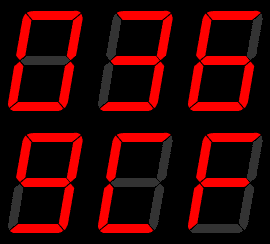
Understand the Seven Segments
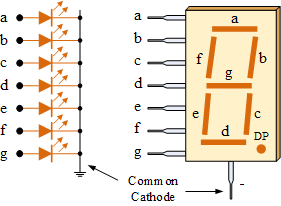
A seven-segment LED display arranges seven illuminated bars into a shape that can represent decimal digits. The usual labels are a at the top, b at the upper-right, c at the lower-right, d at the bottom, e at the lower-left, f at the upper-left and g across the middle.
To display zero, illuminate a through f and leave g off. To display one, illuminate b and c. Eight uses all seven bars. A decimal point, if provided, is an additional LED and is not included in those seven labels.
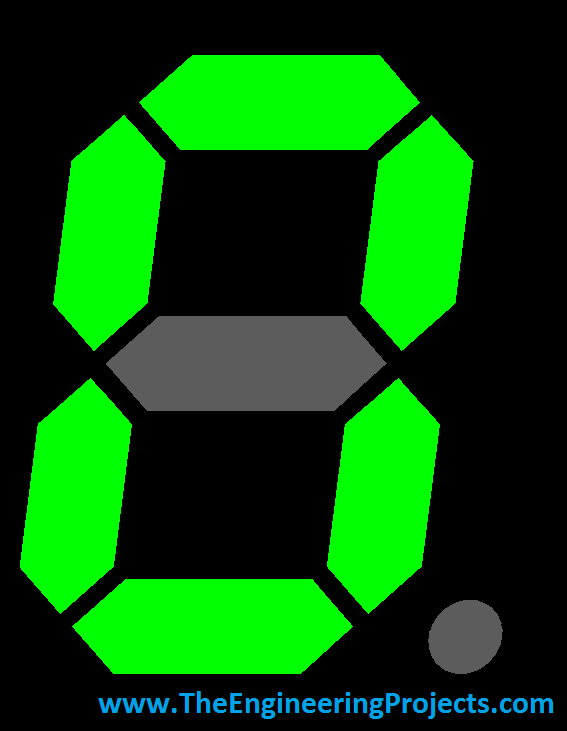
This is an LED display, not an LCD. Its segment current, polarity and drive requirements follow the LEDs inside the package. The physical terminal numbers vary between components, so the letters in a schematic should be mapped to the actual package datasheet when building hardware.
Common cathode and common anode
In a common-cathode display, the segment cathodes share a common connection. With that common connection grounded, a positive segment drive illuminates the corresponding LED through its resistor. A common-anode display shares the anodes and normally illuminates a segment when its individual cathode is pulled low.
The supplied TEP library uses HIGH for an illuminated segment and LOW for an unlit segment. Therefore, this direct-drive example requires the common-cathode arrangement. Choosing a visually similar common-anode model changes the electrical behavior.
Prepare Arduino and Proteus
- Install the TEP SevenSegment sketch library in your Arduino sketchbook libraries folder.
- Confirm that SevenSegment.h and SevenSegment.cpp are inside the actual library folder.
- Make sure your Proteus installation has a suitable simulated Arduino Uno or compatible ATmega328P board model.
- Create an Arduino Uno sketch and compile the corrected example given below.
- Create a Proteus schematic with the board, common-cathode display, current-limiting resistors and ground reference.
The historical Arduino model may need installation in Proteus's configured library directory. Follow the model package's own instructions and your installed version's library path. Copying an Arduino C++ header into the Proteus library folder does not install a simulator component.
Similarly, a board symbol must have an appropriate executable simulation model. A drawing that resembles an Uno is not sufficient by itself. Proteus VSM simulates supported microcontroller programs and peripherals; its peripheral information explains the broader simulation environment.
Wire the Original Pin Assignment
The preserved schematic connects Arduino D0 through D6 to segments a through g. We will keep that assignment in the first corrected sketch so readers can match the existing project. The connection labeled h on D7 is outside the seven segment signals used by this library.
| Segment | Arduino output | Example illuminated digit |
|---|---|---|
| a | D0 | 0 |
| b | D1 | 1 |
| c | D2 | 1 |
| d | D3 | 0 |
| e | D4 | 0 |
| f | D5 | 0 |
| g | D6 | 8 |
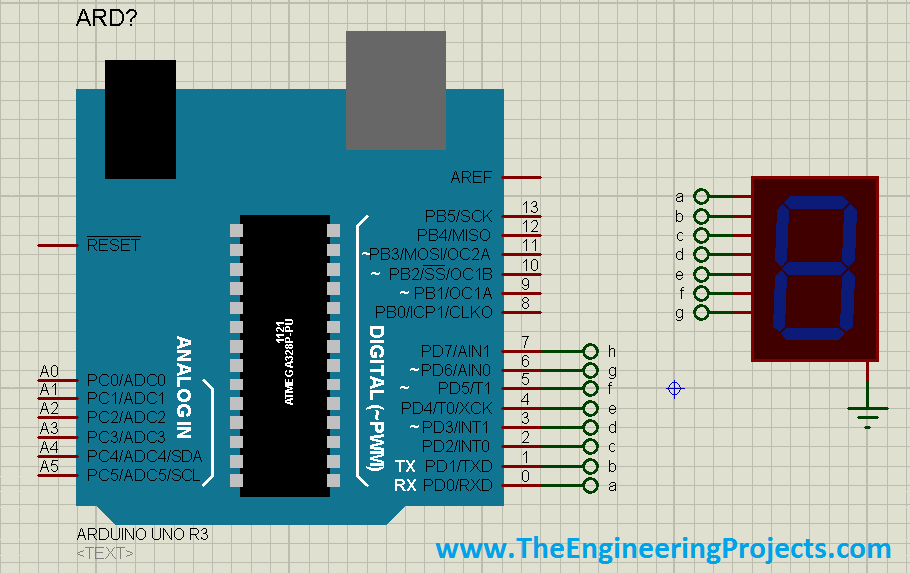
The original screenshot omits explicit series resistors. Add one resistor in each segment line in a physically meaningful implementation, and connect the common cathode to ground. An idealized simulation that appears bright without resistors does not establish a suitable hardware current.
On an actual Uno, D0 and D1 are also RX and TX. A display attached to them can interfere with uploading or serial communication. For new hardware, D2 through D8 is a better starting assignment when those pins are otherwise free; change both the constructor and every corresponding wire.
Check connections hidden behind net labels
Proteus schematics often use matching terminal labels instead of long wires. Check spelling carefully: a terminal named a must connect to the intended segment a net. A nearby label that is not electrically attached to a wire does not create a connection merely because the drawing looks aligned.
Use the schematic's connection inspection facilities when uncertain. It is easier to resolve a mislabeled segment before running the complete counter than to infer the mistake from several malformed digits.
Use the Corrected Counting Sketch
The original downloadable Counting example contains ten array entries but resets after index eleven. That reads outside the array after digit nine. The revised code below uses a bounded numeric digit and converts it to the character expected by the library.
#include <SevenSegment.h>

// Matches the historical Proteus wiring: a through g.
SevenSegment tep(0, 1, 2, 3, 4, 5, 6);
byte digit = 0;

void setup() {
  tep.display('0');
}

void loop() {
  tep.display(char('0' + digit));
  delay(1000);
  digit++;
  if (digit >= 10) {
    digit = 0;
  }
}
The library accepts characters such as '0', not the numeric byte zero. Adding a validated digit to '0' produces the correct character in the decimal sequence. The bounds check ensures that the value used by the next iteration stays between zero and nine.
Do not add Serial.begin and diagnostic serial printing while retaining this D0/D1 segment wiring. Those pins already have display responsibilities. Move the display to nonconflicting pins before adding a serial terminal.
For the alternative D2-to-D8 arrangement, replace only the constructor in the sketch with SevenSegment tep(2, 3, 4, 5, 6, 7, 8), then update the schematic to match. Compilation cannot detect a wire that no longer matches the pin list.
Compile and Load the Program File
- Select the board target matching the simulated Uno.
- Compile the sketch and resolve any missing-library errors first.
- Use the IDE's compiled-binary export or compiler output to locate the resulting program file.
- Open the simulated Arduino or microcontroller properties in Proteus.
- Set Program File to the newly compiled application image supported by that model.
- Check the processor clock setting against the selected board model.
- Start simulation and observe the display for more than one complete counting cycle.
For a conventional Uno simulation, the application HEX is generally the relevant output. Some board-model packages have specific loading instructions, so use those if they differ. Do not confuse an older file included in a download with the file produced by your latest compilation.
A useful habit is to record the build location and modification time. If a source change has no visible effect, first confirm that Proteus loaded the new binary. Editing a sketch does not automatically replace a previously selected HEX file.
Observe and Explain the Simulation
The display should show zero initially and advance approximately once per second. After nine it should return directly to zero. Watch at least two transitions through that boundary because an indexing fault may not be visible during the first few digits.
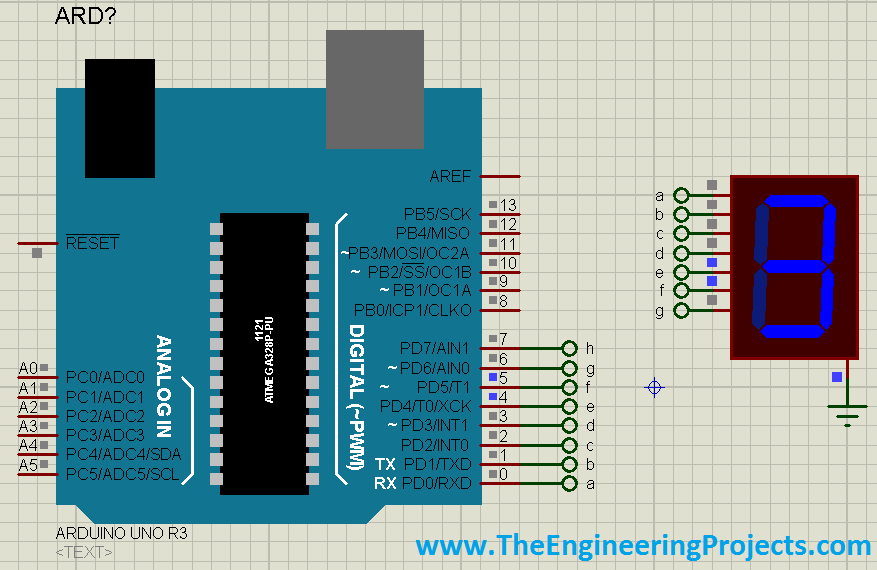
The library clears all segment outputs before enabling the requested pattern. Its output is static between calls, so one digit remains lit while delay waits. This is different from a multiplexed display, where each digit is enabled briefly and repeatedly.
Digit nine in the supplied library uses a, b, c, f and g, omitting the bottom bar d. That is the archive's open-bottom glyph. If you prefer the more familiar closed-bottom nine, add d to that character's pattern in your local library copy and rebuild the sketch.
Calculate the LED Resistors
Use R = (Vdrive - VF) / I as a first approximation. For an assumed 5 V output, 2 V red segment and 5 mA target current, R = 600 ohms. Selecting 680 ohms gives approximately (5 - 2) / 680 = 4.4 mA before accounting for GPIO voltage drop.
For digit eight, seven segments at 4.4 mA draw about 30.8 mA in total. Check the MCU's individual pin, port-group and package current limits as well as the display ratings. The common terminal carries the sum of the segment currents.
These assumed values are an example calculation, not a specification for every display. Segment forward voltage depends on color and construction. Larger digits can contain several LEDs per segment and may require external drivers instead of direct GPIO drive.
The resistor power in this example is I squared times R, approximately 0.0044 squared × 680 = 0.013 W per illuminated segment. Choose a suitable resistor rating with margin, but remember that adequate resistor power rating does not establish adequate MCU current capacity.
Inspect Segment States Instead of Guessing
A readable number is the final result of several intermediate states. When the digit looks wrong, compare the intended pattern with the logic level on each segment net. This separates a software pattern error from a schematic connection error.
| Requested digit | Expected HIGH segments | What it checks |
|---|---|---|
| 1 | b and c | Right-side mapping |
| 0 | a, b, c, d, e and f | Outer loop with middle off |
| 8 | All seven | Every output and largest load |
| 2 | a, b, d, e and g | Upper-right and lower-left paths |
| 5 | a, c, d, f and g | Lower-right and upper-left paths |
If a segment net has the correct level but its bar does not light, investigate the display model, polarity and common connection. If the net itself has the wrong level, inspect the loaded program, pin assignment and library implementation.
Understand Simulation Time and Counter Timing
The one-second delay belongs to simulated processor time. A heavily loaded computer may take more or less wall-clock time to advance the simulation, depending on the simulator's execution state. Check the simulation clock before diagnosing a timing fault from a stopwatch alone.
For a ten-digit sequence, the nominal complete cycle is ten seconds plus small instruction overhead. A blinking or counting exercise is not automatically a calibrated clock. The MCU clock configuration, delay implementation and any added work influence the timing.
If you later add buttons or sensors, replace blocking delays with elapsed-time scheduling. Keep the currently displayed digit independent from the acquisition task so that waiting for an input does not unnecessarily disturb the display.
Download and Review the Original Project
The original Proteus project and HEX remain attached for historical reproduction. They were prepared with the older example, so loading their precompiled binary does not apply the revised bounds correction. Compile the corrected source yourself and select that binary for the updated behavior.
Download Proteus Simulation of Seven Segment with Arduino
Keeping this distinction visible helps when two readers obtain different results: one may be running the historical archive while the other runs the revised sketch. Record which source, library copy and program file produced a particular simulation.
Move from Simulation to Hardware Methodically
Begin by identifying the physical display rather than copying package pin numbers from a visually similar part. Mark its common terminal and segment terminals, then use a current-limited test to confirm the mapping. A correct simulator symbol cannot certify an unrelated component's pinout.
Build the common connection and one segment first. After confirming the drive polarity and resistor value, connect the remaining segments. This approach leaves fewer possible causes when a segment fails than assembling every wire before taking the first measurement.
Use eight to inspect the highest simultaneous load and one to compare brightness with a smaller load. Significant brightness changes may reveal a shared resistor, supply drop or output-driver limitation. Measure current instead of compensating immediately by reducing resistance.
For several digits, do not simply connect all common pins together and expect independent numbers. Shared segment lines require individual digit selection and multiplexing, or a dedicated driver. Peak current, duty cycle and refresh behavior become additional design decisions.
Represent a Digit as a Seven-Bit Pattern
After understanding the GPIO implementation, it is useful to describe the same display mathematically. Assign bit zero to a, bit one to b, and continue through bit six for g. A set bit means an illuminated segment in this common-cathode convention.
Zero then uses binary 0111111, hexadecimal 0x3F. One uses 0000110, hexadecimal 0x06. Eight uses 1111111, hexadecimal 0x7F. These values encode shapes; they are not ASCII characters and cannot be passed directly to the supplied display function expecting '0' through '9'.
This distinction explains why two libraries can represent the same visible digit with different values. One may use characters, another may accept a segment mask, and another may send controller-specific commands. Always identify the API's meaning before copying a constant from a different example.
A lookup-table implementation could store ten masks and apply each bit to its mapped output. The supplied TEP library instead uses a switch statement with individual digitalWrite calls. Both approaches can produce the same segment states when the mapping and polarity agree.
Do not replace those individual writes with an unconditional assignment to a complete MCU port register without checking the board mapping. Arduino pin numbers are an abstraction, and a port can include unrelated outputs. Accidentally changing another peripheral's pin while updating a digit creates a fault outside the display itself.
For an educational comparison, write down the expected seven-bit pattern for each observed digit and compare it with the measured segment states. This turns the simulation into a small digital-logic exercise and gives you a precise description of a wrong glyph.
Troubleshooting and Review
| Problem | Check first |
|---|---|
| Nothing displays | Program File, simulation state, power and common cathode |
| Wrong digit shapes | a-to-g mapping and common-anode versus common-cathode selection |
| Extra blank or random state after nine | Historical array-index bug and whether the corrected HEX was loaded |
| Changes in source are ignored | Recompile and update the selected binary path |
| Serial output corrupts segments | D0 and D1 are shared with the display in the original circuit |
| Hardware behaves differently | Current limiting, actual pinout, supply and GPIO loading |
The complete exercise has three agreements: the library's segment order must match the sketch, the sketch's pins must match the schematic, and the schematic's electrical arrangement must match the display type. Checking those agreements is more effective than repeatedly reinstalling software.
This revision is based on inspection of the original library and circuit materials. It does not claim a new Proteus or breadboard execution. The steps above provide a repeatable way for you to check the behavior in your own installation.
Frequently Asked Questions
Do both libraries belong in the Arduino IDE?
No. SevenSegment is an Arduino sketch library. The Arduino model library belongs to Proteus and supplies simulator components.
Why does the circuit use D0 and D1?
That is the historical assignment. It works as a dedicated simulation mapping, but conflicts with the Uno's serial interface. New hardware can use a different seven-pin assignment.
Can the supplied code show 25?
It controls one digit. Showing a two-digit value simultaneously requires additional display hardware and control logic.
Can I omit resistors because the simulator still works?
No. Add current limiting appropriate to the actual display and driver. A simulator's visible output is not a substitute for an electrical current calculation.
Does the attached HEX contain the corrected loop?
The retained archive is historical. Compile the revised sketch to obtain a binary containing the corrected counting behavior.