


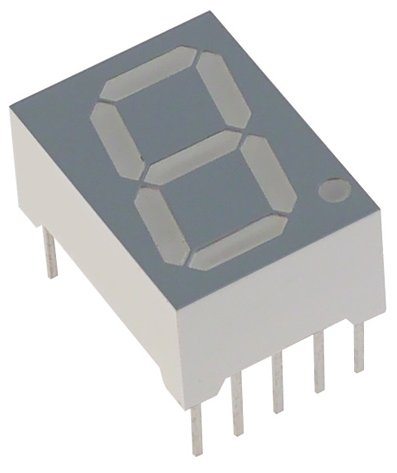
Arduino Library for Seven Segment Display


Hello friends! Today I am sharing our Arduino library for a single seven-segment display. The original library was written for a small project that needed to show decimal digits without introducing a complicated display framework. Its interface is deliberately simple: assign seven Arduino pins, then pass the character you want to display.
We will keep that straightforward approach while explaining the actual capabilities of the download. A library can choose which LEDs should light, but the display type, segment wiring and current-limiting resistors still determine whether the circuit works correctly.
We will install the library, examine its two public operations and build a corrected counting example. For the complete simulator circuit, continue with Interfacing a Seven-Segment Display with Arduino in Proteus.
What This Library Controls
A seven-segment LED display contains seven independently controlled illuminated bars. Conventionally, a is the top bar, b the upper-right, c the lower-right, d the bottom, e the lower-left, f the upper-left and g the middle. Different combinations form the digits zero through nine.
The downloaded TEP implementation drives seven GPIO pins directly. It does not communicate with an I2C display module or a serial display controller. It also does not multiplex several digits, format a decimal number or control a separate decimal-point LED.
Those limits are useful to understand before choosing it for a project. One directly driven digit is a good teaching exercise. A four-digit clock needs additional digit selection, refresh timing and suitable current drivers, or a different library and display interface.
The download uses active-high segment outputs
The actual SevenSegment.cpp file first drives every segment output LOW and then drives the selected segments HIGH. This matches a directly driven common-cathode display whose common connection is grounded.
A common-anode display needs the opposite segment polarity for direct drive. Simply connecting its common terminal to the positive supply does not make the unchanged library compatible. Both the cleared state and the illuminated state would need to be inverted, with the resulting current paths checked.
Download and Install the Library
The original archive is attached below. It contains SevenSegment.h, SevenSegment.cpp and an examples folder with the Counting sketch. This revision explains and corrects the example in the article; the historical downloadable archive has not been rebuilt.
Download Arduino Library for Seven Segment Display
- Download the archive and extract it with a tool that supports its format.
- Locate the SevenSegment folder containing the header and implementation files.
- Copy that folder into the libraries directory inside your Arduino sketchbook.
- Avoid an extra nested folder such as SevenSegment/SevenSegment/SevenSegment.h.
- Restart the IDE if needed, then look for the Counting example under the library's examples.
- Compile a sketch containing the include statement below to confirm that the library can be found.
#include <SevenSegment.h>The archive is a RAR download, so do not assume that an IDE command specifically intended for ZIP libraries can install it directly. Manual extraction keeps the folder layout visible and makes installation problems easier to diagnose.
If another installed package has a similar name, inspect the compiler's library-selection message. A header called SevenSegment.h from an unrelated project may define a different constructor or function. Matching the displayed library name is not enough to guarantee API compatibility.
Understand the Constructor
The first public operation creates a display object and records which GPIO pin controls each segment:
SevenSegment(int a, int b, int c, int d, int e, int f, int g);The parameters are Arduino pin numbers in segment order. They are not the display package's physical pin numbers. Package pinouts differ, so identify the terminal for each segment from your display's own datasheet.
The original example used D0 through D6. On an Uno, D0 and D1 also serve the hardware serial interface. For a new breadboard exercise, the following assignment leaves those pins available for serial communication and uploads:
SevenSegment tep(2, 3, 4, 5, 6, 7, 8);| Segment | Position | Arduino pin |
|---|---|---|
| a | Top | D2 |
| b | Upper-right | D3 |
| c | Lower-right | D4 |
| d | Bottom | D5 |
| e | Lower-left | D6 |
| f | Upper-left | D7 |
| g | Middle | D8 |
Place a separate current-limiting resistor in each segment path. Connect the common cathode as required by the display package. If it exposes two common terminals, follow its manufacturer wiring information rather than assuming that an unused pin is another segment.
Use the display Function
The second public operation accepts a character:
void display(char c);

// Show the character 1:
tep.display('1');
The single quotes matter. The character '1' and the integer 1 have different numeric representations in C++. The library's switch statement compares characters '0' through '9', so tep.display(1) does not select the same case as tep.display('1').
When a digit is already stored as a number from zero to nine, convert it deliberately:
byte value = 7;
if (value <= 9) {
  tep.display(char('0' + value));
}
This conversion is only for a single decimal digit. Passing 42 does not display 42 on one digit and does not automatically produce a scrolling number. Decide whether a larger value should be rejected, scaled, split across several displays or presented through another interface.
What happens to the previous digit?
Each display call clears all seven outputs before setting the new pattern. This avoids leaving segments from the previous digit illuminated. The clearAll operation is private in the supplied header, so it is not a public function you should call from your sketch.
An unsupported character reaches no digit case after the clearing operation, leaving the display blank. For this exact implementation, tep.display(' ') can therefore blank the digit. Treat that as behavior of the supplied code, not a promise shared by every library with the same name.
Corrected Counting Example
The original Counting example has an array of ten characters but resets its index when it reaches eleven. That permits an out-of-bounds array read. The corrected sketch below counts a numeric value from zero through nine and converts it to a character, removing that indexing mistake.
#include <SevenSegment.h>

SevenSegment tep(2, 3, 4, 5, 6, 7, 8);
byte digit = 0;

void setup() {
  tep.display('0');
}

void loop() {
  tep.display(char('0' + digit));
  delay(1000);
  digit++;
  if (digit > 9) {
    digit = 0;
  }
}
Each digit remains displayed for approximately one second. The output pins retain their states during delay, so this single static digit does not require continuous refresh calls. The delay blocks other sketch work, but it does not turn off the LEDs.
Use the revised D2-to-D8 wiring table with this sketch. If you load a historical Proteus circuit wired to D0-to-D6, either update the circuit or change the constructor to match it. Mixing the two assignments produces incorrect patterns even when the code compiles.
Review the Actual Digit Patterns
| Digit | Illuminated segments |
|---|---|
| 0 | a, b, c, d, e, f |
| 1 | b, c |
| 2 | a, b, d, e, g |
| 3 | a, b, c, d, g |
| 4 | b, c, f, g |
| 5 | a, c, d, f, g |
| 6 | a, c, d, e, f, g |
| 7 | a, b, c |
| 8 | a, b, c, d, e, f, g |
| 9 | a, b, c, f, g |
The supplied pattern for nine leaves out the bottom segment d. This produces an open-bottom style. If you want the common six-segment nine, add the d output to the '9' case in your local library copy and document the change.
The implementation also writes segment c twice for seven. That repeated write is unnecessary, but it does not illuminate an additional segment. Distinguishing a redundant instruction from an actual wrong pattern helps keep debugging focused.
Calculate Segment Current Before Building Hardware
For an approximate resistor calculation, use R = (Vdrive - VF) / I. Assume a 5 V drive, a red LED segment with a 2 V forward drop, and a target of 5 mA. The result is (5 - 2) / 0.005 = 600 ohms, so 680 ohms is a conservative nearby standard choice for that assumed example.
Actual GPIO output voltage falls under load, and LED forward voltage varies with current and device. Check the display and microcontroller specifications rather than treating 680 ohms as a universal value. Blue or large multi-LED segments may need a different supply or driver.
At an approximate 5 mA per segment, digit eight requires seven times that current, or 35 mA. Both per-pin and total port/package current limits matter. A current limit quoted as an absolute maximum is not a preferred operating target.
A single resistor in the common connection does not provide independent segment current control. The total current then divides among whichever segments are illuminated, changing brightness with the digit. Individual resistors make the circuit's behavior more predictable.
Replace delay When Adding Other Tasks
A temperature display or user interface often needs to read buttons while maintaining the shown digit. Because the segment outputs are static, you can update only when the number changes. Use elapsed-time scheduling when a periodic count is required.
// Alternative loop for the same global tep and digit variables:
unsigned long lastChange = 0;

void loop() {
  const unsigned long now = millis();
  if (now - lastChange >= 1000UL) {
    lastChange = now;
    digit = (digit + 1) % 10;
    tep.display(char('0' + digit));
  }
  // Other short tasks can run here.
}
Use this loop instead of the earlier one; a sketch cannot contain two definitions of loop. setup still displays zero initially. The unsigned subtraction is the standard pattern for an elapsed interval across the millis counter's rollover, provided the interval and checking frequency are appropriate.
Setting lastChange to now avoids a burst of catch-up updates after a long pause. If the application needs an exact event count or a clock, define the timekeeping requirement separately rather than assuming that a visual counter is an accurate time reference.
Test the Wiring in a Useful Order
- Begin with digit one, which uses only b and c.
- Show zero to check the outer segments without g.
- Show eight to confirm that every segment can illuminate.
- Compare two and five to detect left-right wiring swaps.
- Run the full count repeatedly and inspect the transition from nine back to zero.
- Check current and brightness with eight, the largest simultaneous segment load.
If a segment never lights, temporarily test its path with an appropriate resistor and a known drive level. If it lights for the wrong digit, inspect the constructor order and package pin mapping. Reinstalling the library will not correct a wire connected to the wrong segment.
Record the board, display part number, polarity and pin assignment alongside the sketch. Seven small integer arguments are easy to copy into another project while forgetting that the wiring was different.
Troubleshooting and Library Review
| Symptom | Check |
|---|---|
| SevenSegment.h not found | Extraction, sketchbook location and folder nesting |
| Constructor arguments rejected | Whether the selected library is this TEP implementation |
| Blank after display(3) | Use character '3' or convert a validated numeric digit |
| Unexpected segments | Segment order, display polarity and physical pinout |
| Upload or serial interference | Connections using Uno D0 and D1 |
| Strange behavior after nine | Replace the historical out-of-bounds counting example |
This library's strength is its small, readable implementation. You can follow the path from a requested character to specific GPIO writes. Its limitation is equally clear: it is a direct-drive, single-digit helper rather than a general display system.
Before extending it, decide whether the new behavior belongs in the sketch or library. Counting, button handling and application limits usually belong in the sketch. Reusable glyph selection, blanking and polarity configuration are reasonable library responsibilities when implemented and documented consistently.
The code and archive were inspected for this revision, but a new hardware or Proteus run is not claimed. Keep the original archive as a historical reference and use the corrected counting logic above when reproducing the tutorial.
Frequently Asked Questions
Can the library display letters?
The supplied switch handles only decimal digit characters. Some letters can be approximated with seven segments, but they require additional defined patterns.
Does the decimal point count as one of the seven outputs?
No. A decimal point is an additional LED on displays that provide it. This constructor and implementation do not manage it.
Can I use different Arduino pins?
Yes, if they support the required digital output operation and do not conflict with other hardware. Change the constructor and wiring together.
Will this library drive a TM1637 or MAX7219 module?
No. Those modules use controller protocols rather than seven independent GPIO segment signals. Use a library written for the actual controller.
Why does nine look different from my calculator?
The archive uses a five-segment pattern without the bottom bar. Add segment d to its nine case if you prefer a closed-bottom glyph.


Comments
2