Hello friends! In this project, we will build an interrupt-based digital clock with an 8051 microcontroller and display the time on a character LCD. A hardware timer will provide the timing events, while the main program handles the display.
We will start with the timer calculation, then build the seconds, minutes and hours counters. We will also correct two problems that commonly appear in beginner clocks: using the wrong timer reload and reading shared time counters while an interrupt is changing them.
The original circuit images and downloadable project remain attached. The revised example assumes a classic twelve-clock 8051 running at 12 MHz. It starts at 00:00:00 after initialization and demonstrates elapsed-time counting; it does not retain the time when power is removed.
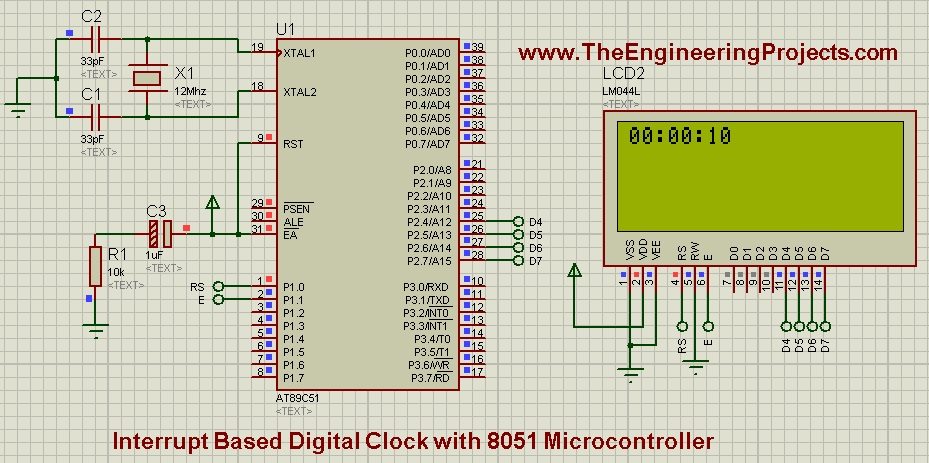
How the Digital Clock Is Organized
The project has three distinct jobs. Timer 0 produces regular overflows, the interrupt routine converts those events into time counters, and the foreground program copies and displays the counters. Keeping those jobs separate prevents slow LCD operations from becoming part of the timing calculation.
If timer interrupts are new to you, first read how to use timer interrupts in the 8051. For the display wiring and four-bit transfers, see interfacing an LCD with the 8051.
The processor executes the ISR instead of the foreground while an interrupt is being serviced. It does not run both functions simultaneously. The timer hardware continues counting according to its configuration, which is why a short ISR can maintain timing while the main program performs other work.
Calculate a One-Second Timebase
For a classic timer clocked at one-twelfth of the oscillator frequency, a 12 MHz oscillator gives a 1 MHz timer clock. One timer count therefore lasts one microsecond. This assumption must be checked against the exact device; some 8051 derivatives use different timer clock divisions.
Timer 0 mode 2 is an eight-bit auto-reload mode. To overflow after 250 counts, load 256 - 250 = 6 into TH0 and TL0. Each overflow then represents a nominal 250 microseconds.
4000 overflows × 250 microseconds = 1,000,000 microseconds = 1 second
The earlier article incorrectly described 1000 microseconds as one second. It is one millisecond. There are 1000 milliseconds in a second. Keeping the units explicit prevents a factor-of-one-thousand mistake from hiding inside otherwise reasonable-looking counters.
The earlier reload value of 5 also produces 251 counts, not 250. If software treats each such interval as 250 microseconds, 4000 events actually take 1.004 seconds at the stated clock. That error is already significant before oscillator tolerance is considered.
| Quantity | Value in this example |
|---|---|
| Oscillator | 12 MHz |
| Timer clock division | 12 |
| Timer tick | 1 microsecond |
| Mode 2 reload | 6, or 0x06 |
| Overflow interval | 250 microseconds |
| Overflows per second | 4000 |
Build the Clock Circuit in Proteus
Use a supported classic 8051 processor, such as an AT89C51, and a compatible character LCD. Keep the original four-bit LCD mapping: P2.4 through P2.7 carry D4 through D7, P1.0 carries RS and P1.1 carries Enable. Connect R/W to ground for this write-only driver.
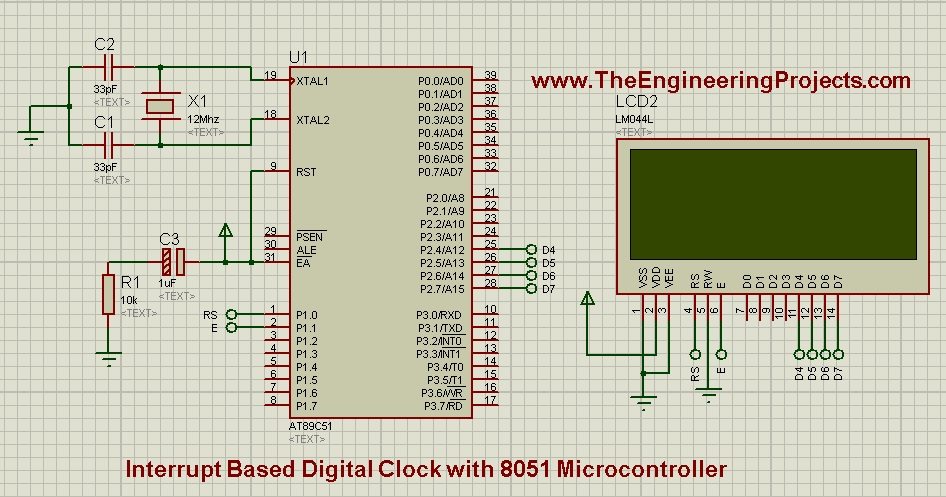
Provide the required supply, reset and oscillator connections, and configure the simulated processor for 12 MHz. Adjust LCD contrast so that characters can be seen. A blank LCD can be a contrast or wiring problem even when the time counters are operating correctly.
The upper half of Port 2 is reserved for the display in this example. The driver preserves the lower half when writing a nibble. Do not add another peripheral to P2.4 through P2.7 unless you redesign the interface and its ownership deliberately.
Complete Keil C51 Example
The following program uses a short Timer 0 ISR and takes a protected snapshot before updating the LCD. Its LCD waits are conservative instruction-based delays for the stated classic 12 MHz target. They are not the clock's timebase; the hardware timer supplies that timebase.
#include <REG51.H>
#include <INTRINS.H>

sbit LCD_RS = P1^0;
sbit LCD_E = P1^1;

volatile unsigned char hours = 0;
volatile unsigned char minutes = 0;
volatile unsigned char seconds = 0;
volatile unsigned char displayDirty = 1;
unsigned int quarterMillisecondTicks = 0;

void wait_us(unsigned int n) {
  while (n--) { _nop_(); }
}

void lcd_nibble(unsigned char upper) {
  P2 = (P2 & 0x0F) | (upper & 0xF0);
  LCD_E = 1;
  wait_us(2);
  LCD_E = 0;
  wait_us(2);
}

void lcd_byte(unsigned char value, unsigned char isData) {
  LCD_RS = isData;
  lcd_nibble(value);
  lcd_nibble(value << 4);
  wait_us(60);
}

void lcd_init(void) {
  LCD_E = 0;
  LCD_RS = 0;
  wait_us(20000);
  lcd_nibble(0x30);
  wait_us(5000);
  lcd_nibble(0x30);
  wait_us(200);
  lcd_nibble(0x30);
  wait_us(200);
  lcd_nibble(0x20);
  lcd_byte(0x28, 0);
  lcd_byte(0x0C, 0);
  lcd_byte(0x01, 0);
  wait_us(2000);
  lcd_byte(0x06, 0);
}

void lcd_two_digits(unsigned char value) {
  lcd_byte('0' + value / 10, 1);
  lcd_byte('0' + value % 10, 1);
}

void display_time(unsigned char h, unsigned char m,
                  unsigned char s) {
  lcd_byte(0x80, 0);
  lcd_two_digits(h);
  lcd_byte(':', 1);
  lcd_two_digits(m);
  lcd_byte(':', 1);
  lcd_two_digits(s);
}

void timer0_init(void) {
  TR0 = 0;
  ET0 = 0;
  TMOD = (TMOD & 0xF0) | 0x02;
  TH0 = 6;
  TL0 = 6;
  TF0 = 0;
  ET0 = 1;
  EA = 1;
  TR0 = 1;
}

void timer0_isr(void) interrupt 1 {
  if (++quarterMillisecondTicks == 4000) {
    quarterMillisecondTicks = 0;
    if (++seconds == 60) {
      seconds = 0;
      if (++minutes == 60) {
        minutes = 0;
        if (++hours == 24) hours = 0;
      }
    }
    displayDirty = 1;
  }
}

void main(void) {
  unsigned char h, m, s, refresh;
  bit previousEA;
  lcd_init();
  timer0_init();
  while (1) {
    previousEA = EA;
    EA = 0;
    refresh = displayDirty;
    h = hours;
    m = minutes;
    s = seconds;
    displayDirty = 0;
    EA = previousEA;
    if (refresh) display_time(h, m, s);
  }
}
Why the time counters stay inside the ISR
Every 4000 timer events, the ISR advances seconds and handles the carries into minutes and hours. The foreground does not need to notice a particular intermediate millisecond value before the next interrupt arrives. That avoids an equality-check race in which foreground code can miss a value while occupied with the LCD.
The quarter-millisecond counter belongs only to the ISR. The foreground never reads or modifies it, so there is no shared-access problem for that variable. The displayed counters and update flag are shared and are declared volatile for the compiler.
On the classic 8051 timer interrupt, the overflow flag is cleared when the interrupt is accepted. The ISR does not need to clear it again. Verify flag behavior in the selected derivative's documentation before reusing the pattern with a different peripheral.
Why the display uses a snapshot
Imagine the foreground reading hours immediately before midnight and minutes immediately afterward. Without a consistent snapshot, it could display a combination that never existed as a complete time. Even though each individual counter fits in one byte, the three-byte time needs to be copied coherently.
The main loop briefly disables interrupts, copies all three fields and clears the display flag. It then restores the previous interrupt-enable state before calling any LCD function. Keeping LCD activity outside that protected section is essential because its delays are much longer than the timer interval.
The flag requests a refresh rather than counting elapsed seconds. If the foreground is briefly busy, the ISR still advances the time and the next display update shows the latest snapshot. We do not need to replay every intermediate screen image to keep the clock correct.
Compile and Run the Simulation
- Select the intended 8051 device in Keil C51.
- Build the program and generate its HEX file.
- Assign the HEX to the processor in Proteus.
- Set the processor clock to 12 MHz for this example.
- Check the LCD's four-bit data and control connections.
- Start the simulation and observe 00:00:00 after initialization.
- Let the simulation advance and observe the seconds changing.
The archived screenshot illustrates the clock display after the simulation has run. Compare the clock with Proteus's simulated time, allowing for the initial LCD setup before Timer 0 starts. Wall-clock time on your computer may differ if the simulator is running slower or faster than real time.
The original project files are retained below. They document the earlier implementation, including its original reload and foreground-update approach. Use the revised code above when following the corrected timing and shared-data explanation.
Download Proteus Simulation and Code for Digital ClockTest Rollover Without Waiting a Whole Day
A clock that displays the first ten seconds correctly has not yet demonstrated minute or hour rollover. For a focused test, initialize the counters to a value near a boundary before starting the timer. Restore the normal starting values afterward.
| Initial time | Expected next second | What it checks |
|---|---|---|
| 00:00:58 | 00:00:59 | Ordinary increment |
| 00:00:59 | 00:01:00 | Seconds carry |
| 00:59:59 | 01:00:00 | Minutes carry |
| 23:59:59 | 00:00:00 | 24-hour rollover |
Also test a deliberately slow foreground operation with interrupts left enabled. The display may update less frequently, but the time counters should continue to advance. Then inspect the generated code or timing if added work causes interrupts to be masked for long periods.
Do not insert a long delay inside the ISR as a test of normal foreground load. That changes the interrupt service itself and can lose overflows. A pending overflow flag is not a queue capable of remembering an unlimited number of timer events.
Accuracy and Long-Term Drift
The arithmetic gives a nominal second, not an absolute guarantee of real-world accuracy. Oscillator tolerance, temperature dependence and interrupt servicing all affect the result. A simulation with an ideal clock can hide these physical limitations.
For an illustrative oscillator error of 50 parts per million, the daily drift is 86400 × 50 / 1,000,000 = 4.32 seconds. A fast oscillator makes the clock gain time; a slow oscillator makes it lose time. This error persists even when the reload calculation is mathematically correct.
The timer continues running during foreground LCD operations, which is desirable. However, if interrupt servicing is blocked through several overflows, software cannot necessarily recover the number of missed events from a single flag. Keep critical sections short and check the worst-case ISR duration.
At 4000 interrupts per second, even a small ISR consumes measurable processing time. This mode-2 design is useful for explaining the earlier timer tutorial, but a practical clock can use a longer hardware interval or a dedicated real-time clock to reduce overhead.
Elapsed clock versus real-time clock
This example starts from a software-defined value after each reset. It does not know the date, time zone or current civil time. It also has no independent backup source that continues counting when the microcontroller loses power.
A dedicated real-time clock can provide a separate timekeeping domain and, depending on the device and circuit, backup operation. Adding one changes the architecture: the microcontroller reads the time instead of deriving every second from its own instruction-clock source.
Add Time-Setting Buttons Carefully
A useful next extension is a pair of hour and minute buttons. Debounce each button and define whether a held button repeats. Perform the small shared-counter update inside a short protected section, then request a display refresh.
Decide what happens to seconds and the fractional-second counter when the time is changed. Resetting only minutes while leaving a nearly complete second can make the new display advance almost immediately. That may be acceptable, but it should be a deliberate user-interface rule.
For a clean setting operation, stop or protect the timebase, update all relevant counters, reload the timer if your policy requires a fresh interval and clear any stale pending overflow before restarting. Avoid leaving a mixture of the previous and new time state.
Understand the LCD Timing Separately
The LCD interface sends the upper nibble of a byte first, followed by the lower nibble. RS distinguishes a command from character data, and the Enable pulse transfers each nibble. The pin mapping must preserve that order; exchanging D4 and D7 is not something the timekeeping code can correct.
The initial sequence establishes four-bit operation before ordinary two-nibble commands are sent. The Hitachi HD44780U datasheet describes the controller's initialization and instruction timing. Check the actual display controller if you replace the module with a compatible-looking alternative.
The waits in this teaching driver are intentionally conservative for the stated processor. Loop overhead makes them longer than their minimum no-operation count. That is acceptable for the LCD's minimum waiting requirements, but would be a poor way to define the clock's seconds.
Interrupts may extend a foreground wait further. Since the driver is waiting before its next LCD action, that extension does not make the pulse or instruction wait too short. The important boundary is that those waits occur with the timekeeping interrupt enabled.
Notice that the display routine returns the cursor to the first position and overwrites eight characters. It does not clear the whole display every second. Repeated clear commands can cause visible flicker and unnecessary waiting, while a fixed-width HH:MM:SS field is straightforward to overwrite.
Estimate the processing budget
At 4000 interrupts per second, a hypothetical 20-microsecond average ISR consumes 80 milliseconds of CPU time each second, or 8%. The once-per-second carry path takes longer than the ordinary tick path, so inspect both paths when evaluating the worst case.
This estimate is illustrative; the compiler's generated instructions and the actual core determine execution time. Optimization level, register preservation and memory placement can change the result. Keil's interrupt-latency documentation is useful when inspecting that overhead.
If you add another interrupt source, check whether it can delay Timer 0 long enough to miss an overflow. Raising Timer 0's priority may change the symptom, but priority does not create additional processor time. Reducing unnecessary work and selecting an appropriate hardware interval are often more effective.
Measure drift over a useful interval
For a simulation check, record the simulator time when the software clock crosses a known boundary, then record it again after many displayed seconds. Dividing the elapsed simulator interval by the number of software seconds gives an average period that is easier to assess than one edge.
For physical hardware, compare against a suitable reference over a longer duration. A stopwatch measurement of one second is dominated by human reaction time. An hour-long comparison can reveal a consistent frequency error, although the reference itself must be accurate enough for the conclusion you intend to draw.
Keep reload errors separate from oscillator errors. Correct the arithmetic and configuration first. Only then consider a calibration scheme that occasionally adjusts the count schedule. Otherwise, a calibration constant can hide a software mistake and become invalid as soon as the code or clock configuration changes.
Record the direction of the drift as well as its magnitude. If the clock gains five seconds per hour, it needs a longer average software second; if it loses five seconds, it needs a shorter one. This simple sign check prevents a correction from doubling the original error.
Troubleshooting and Project Review
If the LCD is blank, first display a fixed test string without the timer. Check contrast, data-line order and control wiring. Once the display works, restore the timer code. This separates a display-driver problem from a timekeeping problem.
If the clock runs at a consistent wrong speed, check the oscillator and timer-clock assumption before adjusting software counters. If it loses time only during other activities, look for long disabled-interrupt sections or an ISR that takes too long.
The revised architecture is useful because timekeeping is owned by one routine, shared reads are consistent and display work remains in the foreground. Its limitations are the high interrupt rate, oscillator-dependent accuracy and lack of persistence across power loss. Those are design tradeoffs to evaluate before turning a teaching example into a practical clock.
When documenting the finished clock, include the processor, oscillator, reload, event count per second and observed drift interval. Also state that time begins after initialization. These details let another reader reproduce the experiment and explain why an initial screen capture may not match the simulator's elapsed time exactly. A useful project record describes the timing assumptions, not only the final LCD appearance.
Include any later button-setting policy in those notes as well.
Frequently Asked Questions
Why does the clock use 4000 timer events per second?
Each event represents 250 microseconds under the stated clock assumptions. Four thousand such intervals make one million microseconds, which is one second.
Why not update the LCD inside the interrupt?
LCD transfers and waits take time. Keeping them in the foreground allows the ISR to finish promptly and avoids tying the timebase to display activity.
Does volatile make the complete time read atomic?
No. It controls compiler assumptions about access. The protected snapshot ensures that hours, minutes and seconds are copied from one consistent state.
Will the clock keep time when power is removed?
No. This project has no independent backed-up clock. It restarts from its initialized values after reset.
Can I change the oscillator frequency?
Yes, but recalculate the timer interval and review the LCD driver's delay assumptions. Matching only the Proteus clock without updating the timing design changes the behavior.