


How to use Timer Interrupt in 8051 Microcontroller


Hello friends! In this tutorial, we will use timer interrupts in an 8051 microcontroller to generate a regular output without placing a delay in the main loop. We will start with Timer 0, calculate its reload value and observe the resulting signal in Proteus.
We will then repeat the example with Timer 1 and discuss how to turn a short hardware interval into a slower application task. The calculations below assume a classic twelve-clock 8051 timer and a 12 MHz oscillator. Check those assumptions whenever you select a different 8051-compatible device.
The original simulations and screenshots remain attached. One detail in the earlier example needs correction: loading 5 into an eight-bit timer produces 251 counts before overflow, not 250. The revised code uses 6 for a nominal 250-microsecond interval under the stated clock conditions.
How a Timer Interrupt Works
A timer peripheral counts clock events in hardware. The foreground program does not need to execute an increment instruction for each timer count. When the timer reaches the end of its range and wraps, it sets an overflow flag.
If that timer's interrupt is enabled and the global interrupt enable is set, the processor can respond by entering an interrupt service routine, usually abbreviated ISR. After the routine finishes, execution returns to the interrupted program.
The ISR is not a second program running simultaneously on another processor. It temporarily takes control of the same CPU. This distinction explains why a long interrupt routine can delay foreground work and other interrupt processing even though the timer itself counts in hardware.
The MIKROE timer reference describes the classic timer modes. For this exercise we use mode 2, in which TL0 is the active eight-bit counter and TH0 holds its automatic reload value.
Timer Registers and Control Bits
| Register or bit | Role in the Timer 0 example |
|---|---|
| TMOD | Selects timer mode, timer/counter operation and gating |
| TL0 | Holds the current eight-bit count in mode 2 |
| TH0 | Holds the value reloaded into TL0 after overflow |
| TR0 | Starts or stops Timer 0 counting |
| TF0 | Indicates Timer 0 overflow |
| ET0 | Enables the Timer 0 interrupt source |
| EA | Enables interrupt handling globally |
These controls do different jobs. Setting ET0 does not start the timer; TR0 controls counting. Clearing ET0 can leave the timer running while preventing its ISR from executing. Clearing EA prevents interrupt servicing globally without necessarily stopping any timer peripheral.
TMOD contains settings for both timers. The lower nibble controls Timer 0 and the upper nibble controls Timer 1. When changing one timer, preserve the other nibble so that an unrelated timer configuration is not accidentally overwritten.
Calculate the Timer 0 Reload Value
For the classic timing assumption used here, the timer clock is the oscillator frequency divided by twelve. With a 12 MHz oscillator, the timer therefore receives one million count pulses each second.
Timer tick = 12 / oscillator frequency
Timer tick = 12 / 12,000,000 = 1 microsecond
An eight-bit counter has 256 states, numbered 0 through 255. Overflow occurs when the count advances beyond 255 and wraps. Starting at a reload value R therefore requires 256 - R increments to overflow.
Mode 2 interval = (256 - reload) × timer tick
For a desired 250-microsecond interval, we need 250 counts. The reload is 256 - 250 = 6, which is 0x06 in hexadecimal. Load this value into both TH0 and TL0 so that the first interval matches subsequent intervals.
| Reload | Counts | Interval at 12 MHz, divide-by-12 |
|---|---|---|
| 0 | 256 | 256 microseconds |
| 5 | 251 | 251 microseconds |
| 6 | 250 | 250 microseconds |
| 156 | 100 | 100 microseconds |
| 206 | 50 | 50 microseconds |
Changing the clock changes every entry in the final column. At 11.0592 MHz, a classic timer tick is approximately 1.08507 microseconds, so 250 counts take about 271.27 microseconds. A reload copied from a 12 MHz example is not a universal time constant.
Timer interval versus output frequency
Our ISR toggles P2.0 on every overflow. One overflow changes LOW to HIGH; the next changes HIGH to LOW. A complete square-wave period therefore requires two timer intervals.
Output period = 2 × 250 microseconds = 500 microseconds
Output frequency = 1 / 0.0005 = 2000 Hz
The interrupt rate is 4000 events per second, while the ideal output frequency is 2000 Hz. Confusing these two rates is a common reason for thinking that a correctly configured output is running at half the expected frequency.
Build the Proteus Circuit
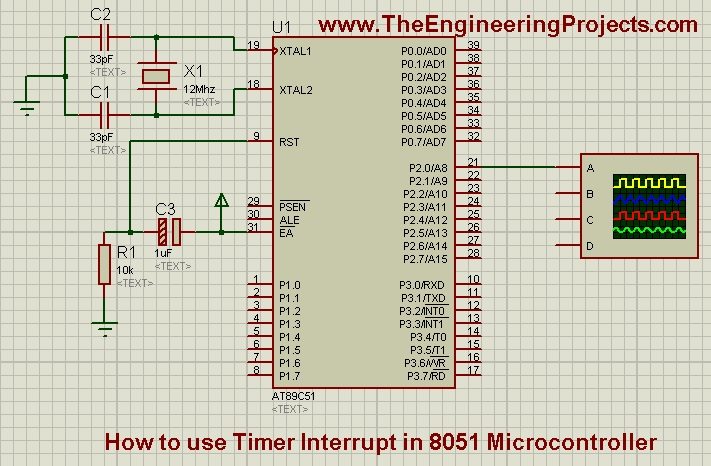
Use a classic 8051-compatible processor supported by your Proteus installation, such as the AT89C51 for this register-level example. Connect its supply and reset arrangement as required by the model, set the oscillator frequency to 12 MHz and connect P2.0 to an oscilloscope channel.
An oscilloscope or logic analyzer is more useful than an LED at this frequency. A physical LED driven by a 2 kHz square wave will appear steadily illuminated rather than visibly blink. Add a current-limiting resistor if you include an LED in the circuit.
For hardware, consult the selected processor's datasheet for reset, oscillator, supply and port requirements. Do not assume that a connection hidden by a simulation symbol can be omitted from the physical circuit.
Timer 0 Interrupt Code in Keil C51
Create a Keil C51 project for the chosen processor and compile the following program. The interrupt 1 declaration selects the classic Timer 0 interrupt vector in Keil's 8051 C syntax; it is not standard desktop C syntax.
#include <REG51.H>

sbit Out = P2^0;

void Timer0_Init(void) {
  TR0 = 0;
  ET0 = 0;
  TMOD = (TMOD & 0xF0) | 0x02;
  TH0 = 0x06;
  TL0 = 0x06;
  TF0 = 0;
  ET0 = 1;
  EA = 1;
  TR0 = 1;
}

void Timer0_ISR(void) interrupt 1 {
  Out = !Out;
}

void main(void) {
  Out = 0;
  Timer0_Init();
  while (1) {
    /* Foreground work can be added here. */
  }
}
The initialization stops Timer 0 while its settings are changed. It selects mode 2, internal timer operation and ungated counting, then sets the reload and initial count. Clearing TF0 before enabling the interrupt avoids servicing an old pending overflow from an earlier configuration.
For the classic 8051 timer interrupt, hardware clears the overflow flag when the interrupt is accepted. The ISR therefore does not need to clear TF0 again. Check your particular derivative's interrupt documentation when transferring the example, rather than assuming every peripheral flag follows this rule.
The code changes only the output bit it uses. It does not clear all four ports as the earlier demonstration did. Clearing unrelated ports can drive connected devices into unwanted states and becomes especially troublesome when several examples are combined.
Load and observe the program
- Enable HEX-file generation in the compiler project.
- Build the program and resolve compilation errors.
- Open the processor properties in Proteus.
- Select the newly generated application HEX.
- Confirm the 12 MHz processor clock.
- Run the simulation and view P2.0 on the oscilloscope.
- Measure both an edge-to-edge interval and a complete waveform period.
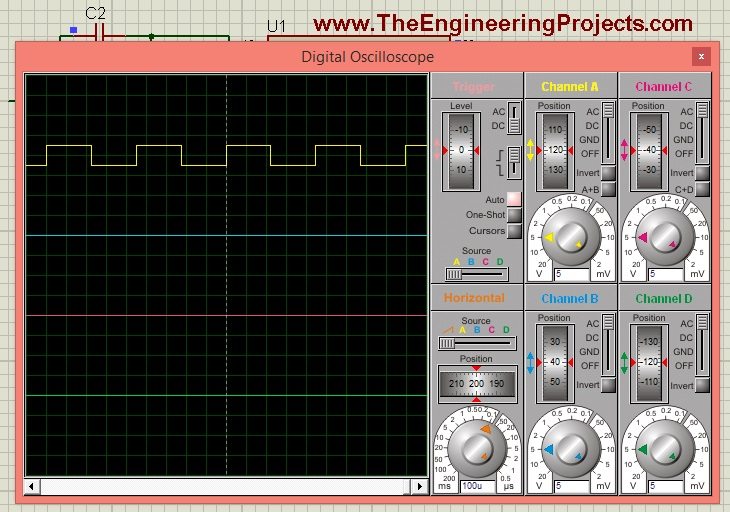
The archived waveform illustrates the measurement arrangement. With the revised reload value and stated clock, the nominal edge spacing is 250 microseconds. Measure a full LOW-plus-HIGH cycle when checking the expected 2 kHz frequency.
The original Timer 0 simulation and source download are retained below. If you use the archived source unchanged, inspect its reload value and clock rather than assuming it already contains the correction shown above.
Download Timer0 Code and SimulationRepeat the Example with Timer 1
Timer 1 uses the same mode-2 idea, but its configuration occupies the upper nibble of TMOD. Its registers are TH1 and TL1, its run control is TR1 and its interrupt enable is ET1. In Keil C51, the classic Timer 1 vector uses interrupt 3.
#include <REG51.H>

sbit Out = P2^0;

void Timer1_Init(void) {
  TR1 = 0;
  ET1 = 0;
  TMOD = (TMOD & 0x0F) | 0x20;
  TH1 = 0x06;
  TL1 = 0x06;
  TF1 = 0;
  ET1 = 1;
  EA = 1;
  TR1 = 1;
}

void Timer1_ISR(void) interrupt 3 {
  Out = !Out;
}

void main(void) {
  Out = 0;
  Timer1_Init();
  while (1) { }
}
Use this as a separate alternative program. Do not paste both complete examples together and let both ISRs toggle the same output. Two timers controlling one signal would produce a different experiment and obscure the relationship between a timer overflow and an output edge.
With the same timer clock and reload, Timer 1 should produce the same nominal interval. The repeated archived waveform is retained for comparison with the original tutorial. The associated Timer 1 download is below.
Download Timer1 Code and SimulationBefore allocating Timer 1 in a larger project, check whether the serial port already uses it as a baud-rate generator. A timer cannot generally provide two independently chosen rates merely because two functions configure it in different places.
Generate Longer Intervals
Mode 2 is limited to at most 256 timer counts per overflow. At the stated clock, that is only 256 microseconds. To obtain a visible half-second toggle, count a suitable number of overflows in software instead of trying to load a number larger than an eight-bit register can hold.
Required overflows = 0.5 seconds / 0.00025 seconds = 2000
Replace the direct-toggle ISR with a short divider such as the following. The static counter retains its value between interrupt calls. Toggling every 2000 events gives a nominal 500 ms HIGH interval and 500 ms LOW interval.
void Timer0_ISR(void) interrupt 1 {
  static unsigned int ticks = 0;
  if (++ticks == 2000) {
    ticks = 0;
    Out = !Out;
  }
}
This makes the output visible, but still generates 4000 interrupts per second. If the application only needs a slow tick, consider a longer-period timer mode or a suitable auto-reload peripheral on the chosen derivative. Reducing unnecessary interrupt frequency leaves more CPU time for useful work.
Interrupt Latency, CPU Load and Missed Events
The hardware overflow and the output-pin change are not the same instant. The processor must finish the required instruction handling, enter the interrupt and execute the compiler-generated entry code before reaching the toggle. Keil's interrupt-latency note discusses the effect of ISR entry overhead.
A nearly constant latency shifts edges without necessarily changing their steady spacing. Variable latency introduces jitter. Another interrupt, a protected section that disables interrupts or a longer instruction sequence can change when the toggle occurs relative to the overflow.
If one ISR takes an illustrative 25 microseconds and runs every 250 microseconds, it consumes about 25 / 250 × 100 = 10% of the available time. Measure or inspect the generated code before using that estimate for a real program; source-line count is not an execution-time measurement.
An overflow flag is not an unlimited queue. If interrupts remain unserviced through several overflows, the flag cannot represent every missed event separately. A timer can continue counting while your software loses the number of elapsed periods.
Keep LCD writes, formatted printing, floating-point calculations and deliberate waits out of a high-rate ISR. Set a flag or update a small counter and let the foreground perform slower work. If repeated events must not be lost, use a counter with an explicit overflow policy rather than a single boolean flag.
Share data safely with the foreground
A variable changed by an ISR and inspected by ordinary code should be declared with the compiler's appropriate visibility qualifier, commonly volatile. That prevents the compiler from assuming it cannot change unexpectedly. It does not make a multi-byte operation indivisible.
An eight-bit processor may read a sixteen-bit counter in separate byte accesses. If an interrupt changes the value between those accesses, the foreground can obtain an inconsistent result. Take a brief protected snapshot, preserving the previous interrupt-enable state, then process the copied value after protection ends.
Choose Between Timer Modes and Counter Operation
Mode 1 combines TH and TL into a sixteen-bit counter. At a one-microsecond tick, its full range spans 65.536 milliseconds, which is much longer than mode 2. For a nominal 50 ms interval, the initial value is 65536 - 50000 = 15536, or 0x3CB0.
However, classic mode 1 does not automatically restore that value after overflow. Software must reload the timer. If the timer is stopped while the registers are rewritten, the stopped interval extends the period. If it continues running, register-write timing and the treatment of counts accumulated after overflow must be considered. Do not describe an uncorrected software reload as an exact periodic timebase.
Mode 2 trades range for convenient automatic reload. That makes it useful for the short, repetitive interval demonstrated here. Some 8051 derivatives provide additional timers or sixteen-bit auto-reload facilities, but those are device-specific resources. Read the selected part's timer chapter before designing around them.
The timer/counter selection is another independent decision. In timer operation, the peripheral counts an internal clock derived from the oscillator. In counter operation, it counts qualifying transitions on an external input. An external pulse counter therefore measures events rather than elapsed time unless the external pulse frequency is itself a known reference.
For this tutorial, the C/T setting remains zero so the internal timer clock is used. Accidentally selecting counter operation can make the register appear frozen when no external transitions are connected. Changing the reload repeatedly will not solve that missing clock source.
Handle intervals that are not an integer number of ticks
A timer reload is an integer, so not every requested interval can be represented exactly. At 11.0592 MHz with divide-by-twelve timing, a 250-microsecond interval corresponds to 230.4 counts. A fixed reload must choose either 230 or 231 counts, giving a small systematic timing error.
For a simple indicator, that error may be acceptable if it is documented. For a timekeeping application, repeated rounding can accumulate. One approach is to distribute different integer intervals over a longer cycle so their average matches the desired count total. For example, a five-interval pattern containing three 230-count intervals and two 231-count intervals averages 230.4 counts.
Such a pattern improves the average interval but introduces deliberate interval-to-interval variation. It is therefore not interchangeable with a perfectly uniform clock. Choose according to whether the application cares most about average elapsed time, individual edge placement or both.
Record the requested interval, selected count, calculated actual interval and resulting error before writing the register value. That small calculation prevents hexadecimal constants from becoming unexplained magic numbers. It also makes later clock changes much easier to review, because the original assumptions remain visible beside the implementation.
Troubleshooting and Practical Review
| Observation | Likely check |
|---|---|
| Timer does not count | TR bit, clock source, gating and simulation clock |
| Timer counts but ISR never runs | ET bit, EA and interrupt-vector declaration |
| First interval differs from later intervals | Initialize TL as well as TH in mode 2 |
| Output frequency is half the interrupt rate | Expected when toggling once per interrupt |
| Timing differs after changing boards | Oscillator frequency and timer clock division |
| Serial communication breaks | Timer 1 may have been reassigned from baud generation |
| Irregular edges under load | Interrupt latency, disabled intervals and competing ISRs |
Mode 2 is a clear introduction to periodic interrupts because the hardware reload removes a software-reload step from every overflow. Its short range and possible interrupt load are the tradeoffs. Choose the interval according to the task rather than treating the fastest possible interrupt as the best design.
For a final check, repeat the measurement after adding representative foreground work. If the timing changes unexpectedly, inspect interrupt masking and shared resources rather than compensating by guessing a different reload value. A corrected constant should follow an identified timing model.
Frequently Asked Questions
Does the timer stop while the main program executes?
No. Once enabled, it counts according to its selected clock and control settings. The main program only needs to configure it and handle the resulting events.
Why is the reload 6 instead of 5?
There are 256 possible eight-bit states. Starting at 6 gives 250 increments before overflow; starting at 5 gives 251.
Can I use this code on a one-clock 8051 derivative?
Only after checking its timer clock selection and recalculating the reload. Architecture compatibility does not guarantee the classic divide-by-twelve timing.
Why does an LED not visibly blink?
The direct-toggle example produces a nominal 2 kHz signal. Use an oscilloscope to inspect it or add the software divider for a visible interval.
Can an interrupt routine contain ordinary application code?
It can, but execution time and shared-state effects must remain controlled. A short ISR that records an event usually makes the complete application easier to schedule and troubleshoot.

Tags


Hi Sir.
Thank you so much for the easy explanation for the timer interrupt discussed above. In your code.
TMOD &= 0xF0; // Clear 4bit field for timer0
TMOD |= 0x02; // Set timer0 in mode 2
What are the other modes of this timer0 interrupt and how does each mode works.
Thanks,
Cris
Comments
1