


How to Generate PWM in 8051 Microcontroller


Hello friends! Today, we will generate a PWM signal with an 8051 microcontroller and inspect it in Proteus. We will begin with frequency and duty cycle, then use Timer 0 interrupts to control P2.0 without placing a long delay in the main program.
The original project demonstrates software-generated PWM, which is useful for a classic device such as the AT89C51 that does not provide a dedicated PWM peripheral. Other 8051-compatible devices can include hardware PWM, so check the exact processor before deciding that software generation is necessary.
We will keep the original circuit, waveforms and download, but make the timing assumptions and endpoint behavior explicit. The revised example uses a fixed timer interval and twenty duty steps, making the relationship between interrupt rate, PWM frequency and resolution easy to calculate.
What Is Pulse Width Modulation?
PWM repeatedly switches a digital output between its active and inactive states. The fraction of each period spent HIGH is called the duty cycle. Changing that fraction changes how long the connected circuit receives the active signal during each cycle.
Duty cycle = HIGH time / total period
Frequency = 1 / total period
For a five-millisecond period, the frequency is 200 Hz. If the output remains HIGH for 2.5 ms and LOW for 2.5 ms, the duty cycle is 50%. If it remains HIGH for 1 ms and LOW for 4 ms, the duty cycle is 20% while the frequency remains 200 Hz.
PWM is still a digital waveform. It does not automatically turn a processor pin into a steady analog-voltage source. A load or filter responds to the switching waveform according to its electrical and mechanical properties.
For an ideal waveform switching between zero and 5 V, the average voltage is 5 × duty fraction. At 20% duty that average is 1 V. The instantaneous pin voltage still switches between its two levels; a circuit that needs a smooth voltage requires suitable filtering and loading.
Software PWM and Hardware PWM
Hardware PWM peripherals generate edges from timers and compare registers with little CPU involvement. Software PWM uses program execution to change the pin. That makes software generation flexible, but edge timing depends on interrupt latency and available processing time.
The AT89C51 datasheet lists its classic timers and port resources. This tutorial uses those resources directly. If your chosen derivative includes a dedicated PWM peripheral, evaluate it before spending a large part of the CPU budget on frequent interrupts.
Review the 8051 timer-interrupt tutorial before continuing. Its mode-2 calculation supplies the fixed tick used below. For a comparison with a board that exposes hardware PWM through a higher-level API, see using Arduino PWM pins.
Choose Frequency and Duty Resolution Together
Our revised example assumes a classic divide-by-twelve timer and a 12 MHz oscillator. Timer 0 mode 2 reloads from 6, giving 250 counts of one microsecond each. The interrupt interval is therefore nominally 250 microseconds.
We divide each PWM period into twenty equal time slots. The complete period is 20 × 250 microseconds = 5 milliseconds, so the PWM frequency is 200 Hz. One slot represents 5% duty cycle.
| Requested HIGH slots | Duty cycle | Nominal HIGH time |
|---|---|---|
| 0 | 0% | Always LOW |
| 1 | 5% | 0.25 ms |
| 5 | 25% | 1.25 ms |
| 10 | 50% | 2.5 ms |
| 15 | 75% | 3.75 ms |
| 20 | 100% | Always HIGH after the update is applied |
Frequency and resolution compete for interrupt processing time. In this approach, interrupt frequency = PWM frequency × number of slots. A 1 kHz waveform with 256 slots would require 256,000 interrupts per second, which is not a sensible assumption for a classic 12 MHz 8051 executing a C ISR.
The twenty-slot example is a teaching compromise. It makes 0%, 50% and 100% behavior explicit and leaves a more manageable 4000 interrupts per second. It is not a claim that 200 Hz is the best switching frequency for every LED, motor or filtered-output application.
Build the Proteus Circuit
Place the supported 8051 processor and connect P2.0 to a Proteus oscilloscope channel. Set the simulated clock to 12 MHz and provide the supply, reset and oscillator connections required by the model.
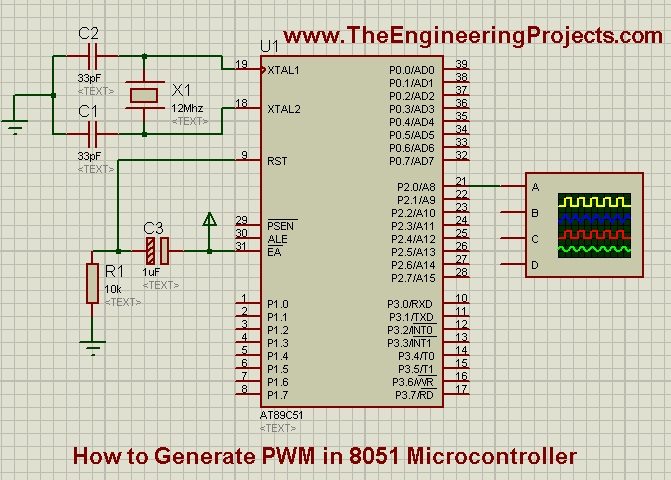
The oscilloscope lets us inspect individual edges. An LED may show a change in apparent brightness, but it cannot tell us whether the frequency remains constant or whether an unwanted narrow pulse appears at an endpoint.
If you add an LED, include its current-limiting resistor and check the port's electrical capabilities. The logic-level PWM pin should not directly power a motor, relay coil or high-current lamp. Those loads need an appropriate driver stage.
Keil C51 Program for Fixed-Tick PWM
Compile the following program for the intended classic 8051 device. The main program requests ten HIGH slots, giving nominal 50% duty. The ISR applies a new requested value only at the start of a PWM period, so a foreground change does not alter the middle of the current cycle.
#include <REG51.H>

sbit PWM_Pin = P2^0;
#define PWM_STEPS 20

volatile unsigned char requestedDuty = 10;
unsigned char activeDuty = 10;
unsigned char phase = 0;

void pwm_init(void) {
  TR0 = 0;
  ET0 = 0;
  PWM_Pin = 0;
  phase = 0;
  TMOD = (TMOD & 0xF0) | 0x02;
  TH0 = 6;
  TL0 = 6;
  TF0 = 0;
  ET0 = 1;
  EA = 1;
  TR0 = 1;
}

void timer0_isr(void) interrupt 1 {
  if (phase == 0) {
    activeDuty = requestedDuty;
    if (activeDuty > PWM_STEPS) activeDuty = PWM_STEPS;
  }

  PWM_Pin = (phase < activeDuty);
  phase++;
  if (phase == PWM_STEPS) phase = 0;
}

void main(void) {
  pwm_init();
  while (1) {
    /* Set requestedDuty to an integer from 0 to 20. */
  }
}
phase runs from zero through nineteen. For a requested duty of ten, phases zero through nine produce HIGH and phases ten through nineteen produce LOW. The next interrupt starts another twenty-slot period.
The endpoint cases follow directly from the comparison. With zero HIGH slots, no phase satisfies the condition and the output remains LOW. With twenty HIGH slots, every valid phase satisfies it and the output remains HIGH. There is no attempt to create a zero-duration timer interval by loading an overflowing value.
The requested value is one byte, matching the classic processor's natural data width. It is marked volatile because the foreground may change it while the ISR reads it. If you later replace it with a multi-byte command or several related settings, add a coherent update mechanism rather than assuming volatile makes a whole structure atomic.
Compile and inspect the waveform
- Build the program and generate its application HEX.
- Assign the HEX to the processor in Proteus.
- Confirm the oscillator and timer-clock assumptions.
- Run the simulation with requestedDuty equal to ten.
- Measure the HIGH time, LOW time and total period.
- Change the requested slot count and rebuild, or use the debugger to change the variable.
- Check that the nominal period stays at five milliseconds while the HIGH fraction changes.
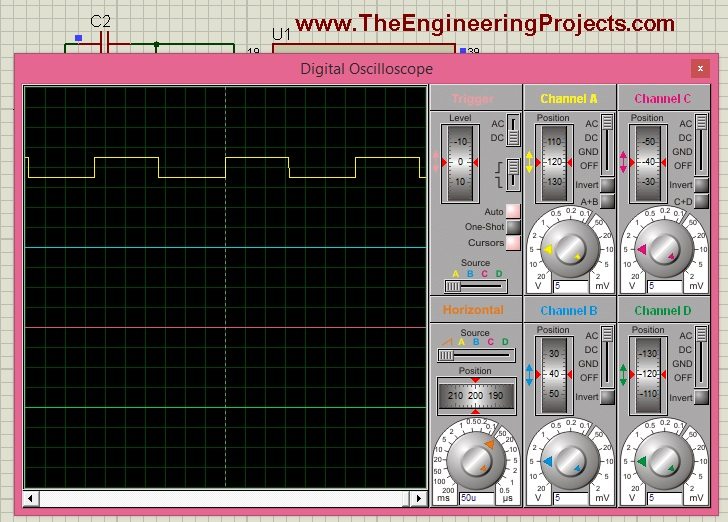
The first archived waveform shows the approximately half-duty result from the older implementation. Use it as a visual example of the HIGH/LOW relationship, not as a timing measurement of the revised twenty-slot code.
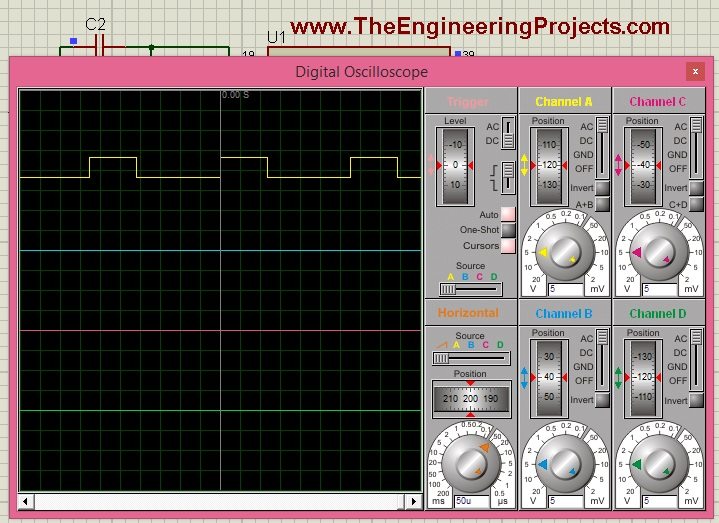
The second archived waveform shows a smaller duty cycle. In the original 0-to-255 scale, a value of 85 represents one-third of 255. The revised twenty-slot example cannot represent exactly one-third: six slots give 30% and seven slots give 35%.
What Changed from the Original Timer-Reload Method?
The original program alternated a HIGH interval and a LOW interval by stopping and reloading a sixteen-bit timer inside the ISR. That approach can reduce the number of interrupts per PWM cycle, but it requires careful treatment of reload arithmetic, software overhead and very short intervals.
For N desired counts in a sixteen-bit up-counter, the preload is 65536 - N. Subtracting N from 65535 instead introduces an additional count. The calculation should be performed as a complete value before splitting it into high and low bytes.
At 0% or 100%, one requested interval becomes zero. A zero interval is not equivalent to a useful ordinary timer preload, so those cases need explicit constant-output handling. Otherwise, a supposedly fully off or fully on output can contain unintended pulses or a long unexpected interval.
The timer also stops during part of the original ISR. The elapsed output period includes that stopped time and the time spent reaching the edge-changing instruction. A formula based only on timer counts therefore understates the complete period unless that overhead is included.
The revised fixed-tick version makes the arithmetic easier to follow and handles endpoints directly. Its tradeoff is a regular interrupt even when the output remains unchanged. For a practical design, compare that CPU cost with hardware PWM or a carefully implemented edge-scheduled method.
Measure Duty Cycle and Jitter
Measure the waveform across several periods rather than trusting a single screen image. At nominal 50% duty, a 2.5 ms HIGH interval in a 5 ms period gives 2.5 / 5 × 100 = 50%. Repeat at a different duty setting and check that the period has not changed unintentionally.
Interrupt latency delays the software pin update relative to the hardware overflow. Different ISR branches can take different numbers of instructions, and another interrupt can introduce additional delay. Consequently, the measured waveform is nominally determined by the timer but can contain software timing error and jitter.
Keil's interrupt-latency note explains why compiler-generated entry code matters. Inspect the generated instructions or measure the result when edge placement is important. A short C function is not automatically a constant-time function.
As an illustrative load calculation, a 30-microsecond ISR called 4000 times per second consumes 120 milliseconds per second, or 12% of the CPU time. This is an example, not a measurement of the code above. The selected compiler, optimization and processor determine the actual duration.
Use PWM with an LED, Motor or Filter
LED brightness
For an LED, duty controls the time spent conducting. The peak current still needs a resistor or current-regulated driver. Do not increase the peak current beyond the component ratings merely because the average duty is low.
Perceived brightness is not perfectly linear with duty cycle. If you want evenly spaced visible brightness levels, test the visual response and consider an appropriate mapping between a user control and duty. Camera banding and visible flicker also depend on frequency and observation conditions.
DC motor control
A DC motor requires a driver sized for its supply and current, including startup or stall conditions. PWM duty influences the applied electrical drive, but duty is not a direct command for an exact speed under every load. Friction, supply voltage, load torque and back electromotive force all affect the result.
For controlled speed, measure speed and use feedback. The software PWM generator is only one part of that system. The driver also needs an appropriate current path during switching, and bidirectional operation requires a suitable topology such as an H-bridge.
Filtered analog output
A resistor-capacitor low-pass filter can smooth PWM into an approximate average voltage. Its cutoff is f = 1 / (2πRC). For 10 kilohms and 1 microfarad, the cutoff is about 15.9 Hz and the time constant is 10 ms.
A lower cutoff reduces switching ripple but slows the response to a changed duty. The following load can also alter the filter response and average voltage. Buffering may be needed if the load is not high impedance. Choose the filter from acceptable ripple and settling requirements rather than from the average-voltage equation alone.
Choose an Update Policy Before Adding Controls
The example separates requested duty from active duty for a reason. A button, serial command or control algorithm can request a new value at any point in a cycle. Applying it immediately can shorten or lengthen the current pulse in a way that depends on when the command arrived.
By copying the request only when phase is zero, every complete period uses one duty setting. The command-to-output delay can therefore be almost one full period in the worst case. At 200 Hz, that is approximately five milliseconds, plus the relevant interrupt timing. This delay is predictable enough for many simple indicators, but it should be included in a faster control-loop design.
If several PWM channels must update together, copy their requested settings at the same boundary. Updating each channel independently can create a temporary combination that the application never intended. The same principle applies to a requested frequency and duty pair: define which values belong to one complete configuration.
Active-HIGH and active-LOW loads
The code defines duty as the fraction of time the pin is HIGH. A driver that turns its load on when the input is LOW reverses the relationship between that pin duty and the load's on-time. Check the driver polarity before interpreting a brightness or speed response.
For example, 25% HIGH duty corresponds to 75% LOW time. An active-LOW indicator connected to that signal may appear brighter as the requested HIGH duty decreases. The PWM generator is not necessarily wrong; the application has used a different definition of the active state.
Name settings according to their meaning. A variable called requestedHighSlots describes this example more precisely than an unexplained speed variable. Convert a user-facing percentage or control demand into the electrical duty at one clear point in the program.
Plan the startup and stop states
Before interrupts start, the example explicitly drives P2.0 LOW. The first ISR then applies the requested pattern. If LOW is not the safe inactive state for your driver, change the electrical arrangement or initialization policy accordingly.
Stopping the timer does not automatically drive the output LOW. It can freeze the pin in whichever state was last written. A stop routine should disable the relevant interrupt and timer, then explicitly set the output to the intended inactive level. On restart, reset the phase and pending timer flag so the new cycle has a defined beginning.
These startup and stop decisions matter even in a small demonstration. They explain why a waveform can look correct during continuous operation yet leave an attached load energized when the application pauses its timing peripheral.
Troubleshooting and Review
| Problem | Check |
|---|---|
| No PWM transitions | Timer run bit, interrupt enables, HEX and output connection |
| Frequency consistently wrong | Oscillator, timer division, reload and slot count |
| Duty changes during a period | Apply requested updates at a defined cycle boundary |
| Unexpected pulses at endpoints | Explicit 0% and 100% behavior |
| Jitter increases with other tasks | Interrupt masking, competing ISRs and execution time |
| Motor does not follow duty proportionally | Driver, load and absence of speed feedback |
Test zero, one, ten, nineteen and twenty HIGH slots. The extreme values reveal problems that a 50% demonstration can hide. Also test changing directly from zero to full duty and back, observing when the new command takes effect.
The original source and simulation remain available below. They are useful for studying the alternative two-interval approach, while the revised example makes a simpler starting point for learning frequency, duty resolution and interrupt costs.
Download PWM Code & SimulationRecord the selected timer clock and duty scale with the project so later changes preserve the meaning of each requested value.
Frequently Asked Questions
Do all 8051 devices lack PWM hardware?
No. The classic device used for this example lacks a dedicated PWM peripheral, but many derivatives add one. Check the exact part's peripheral list.
Is PWM a true analog voltage?
The pin produces switching logic levels. A suitable filter can create an approximate average voltage, subject to ripple, settling and load effects.
Can I obtain finer duty steps?
Yes, but more slots at the same frequency require a faster interrupt rate. Evaluate CPU time or use a hardware PWM peripheral instead.
Why is 127 not exactly 50% of 255?
It gives about 49.8%. Half of 255 is 127.5, which an integer setting cannot represent. The scale and denominator must be defined before interpreting a duty value.
Can this signal drive a motor directly?
No. Use a driver appropriate to the motor's voltage, current and switching requirements, and connect the logic signal to that driver's control input.

Tags


Hi Sir,
If I am going to use this PWM program to control my DC motor, how would the circuit looks like in Proteus. When I tried to connect the DC Motor to the same pin in simulation, the DC Motor just rotate and rotate and the status of the microcontroller pin is gray (undefined).
Can you please provide me the schematic diagram.
Thanks,
Cris
1 reply
Hi sir,
I already got the answer of the above question. I used a driver (ULN2003) to drive my DC Motor. In the code above which I show below,
if(PWM_Pin) // if PWM_Pin is high
{
PWM_Pin = 0;
temp = (255-PWM)*PWM_Freq_Num;
TH0 = 0xFF - (temp>>8)&0xFF;
TL0 = 0xFF - temp&0xFF;
}
else // if PWM_Pin is low
{
PWM_Pin = 1;
temp = PWM*PWM_Freq_Num;
TH0 = 0xFF - (temp>>8)&0xFF;
TL0 = 0xFF - temp&0xFF;
}
Can you explain this in detail?
Thanks,
Cris
sir i have to varymy duty cycle according to ldr to get required output in led, so how can i get that type of program which will change interms of ldr and how the code will modified then?
I am doing a project on street light sensing system, i need the led switch on in a dim brightness at night and become very bright when detected a vehicle, i haven't learn this before,please help me?
sir,how to control the brightness of the led using pwm?
1 reply
Simply Follow this tutorial and with your PWM Pin connect a 10k ohm resistor and then an LED and make it GND on the other side.
hello sir actually i wanted to produce pwm wave and i wanted to increse or decrease the duty cycle based on the status of input pins , whether the switch is pressed on input pins or not like that , so how can we do it???
Comments
9