Hello friends! Today we will interface an RC522 RFID reader with Arduino and read the identifier of a compatible card. We will begin with the radio and wiring requirements, install the MFRC522 library and then build a complete sketch that prints the whole UID and compares it with a demonstration record.
The original tutorial used this idea as the starting point for an attendance project. That is a useful learning exercise, but reading a card identifier is only one part of such a system. We must also handle repeated scans, unknown cards, reliable records and the difference between identification and secure authentication.
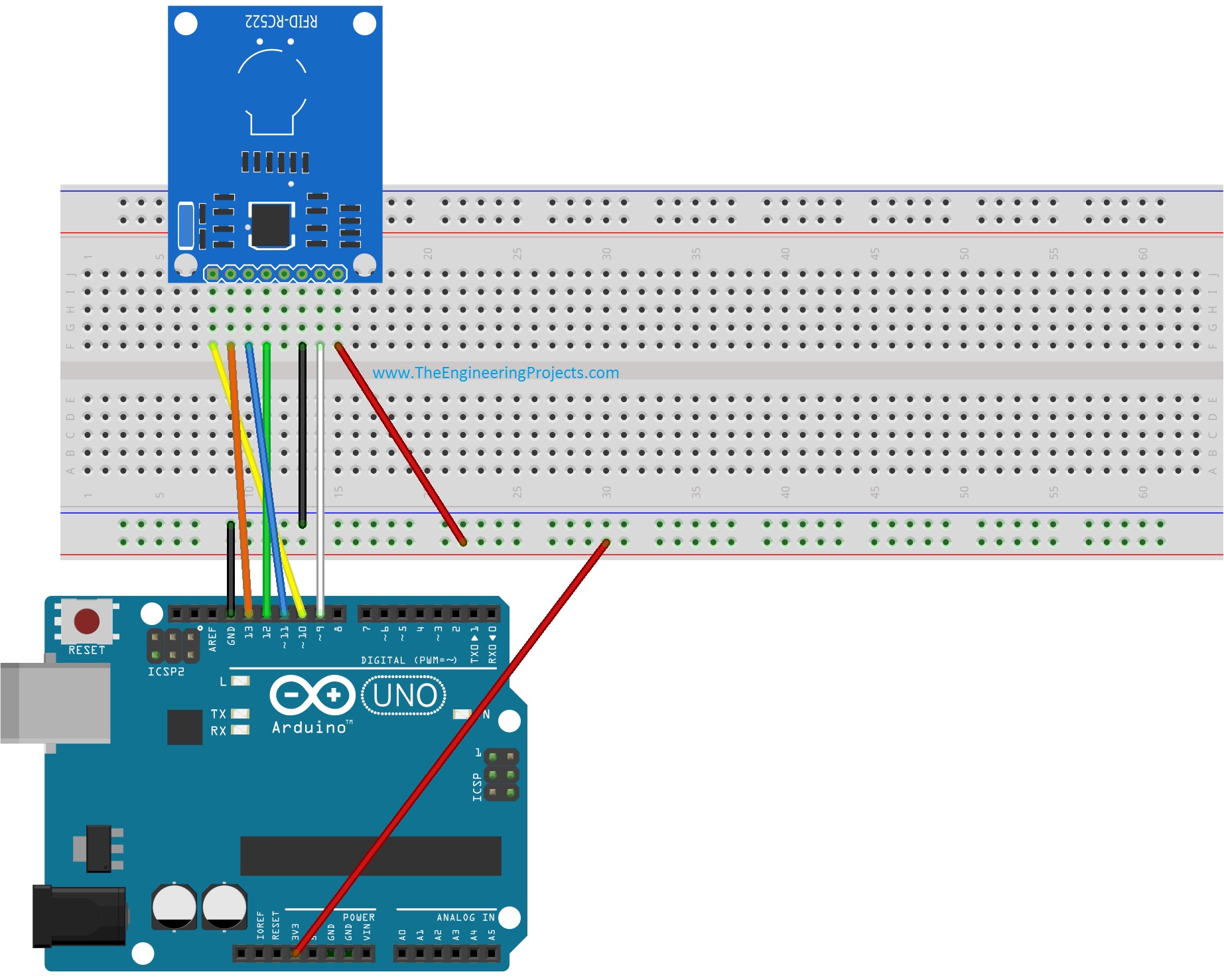
Our example uses an Uno R3 and an MFRC522-based RC522 module communicating over SPI. The original module and connection images remain below. Because the Uno uses 5 V logic while the reader is a 3.3 V device, the revised wiring discussion explicitly includes logic-level compatibility rather than assuming that every inexpensive module contains protection or level shifting.
How RFID Works in This Project
RFID stands for radio-frequency identification. A reader exchanges information with a compatible tag through an electromagnetic field. A passive contactless card can obtain operating energy from the reader's field, so it does not require its own battery for this interaction.
The MFRC522 operates at 13.56 MHz and supports specified ISO/IEC 14443 Type A, MIFARE and NTAG interactions. It is not a universal reader for every product sold as RFID. A 125 kHz access tag, for example, is not made compatible by changing the Arduino code. NXP's MFRC522 datasheet defines the device's supported interfaces and radio operation.
Unlike a printed barcode, the card does not need a visible line of sight to the reader. That does not mean it can be read through every material or at any orientation. Distance, antenna alignment, nearby metal and the actual tag all influence coupling. Start with the card close to the reader antenna and parallel to it, then characterize your own arrangement.
Reader, Card and UID
The reader is the powered module connected to Arduino. The card is the object presented to its field. A UID is an identifier obtained during card selection. In library terminology, PCD refers to the reader and PICC refers to the contactless card; those abbreviations appear in function names later.
A UID is an array of bytes, not necessarily a single four-byte integer. Depending on the card type, identifiers can have different lengths. Preserve the reported length and every byte. Converting the identifier to a decimal int on an Uno loses information because that int cannot hold an arbitrary multi-byte UID.
Checking only the first byte is even less reliable. One byte has only 256 possible values, so many different cards can share it. For a classroom lookup, compare the complete byte sequence and its length. For an actual access-control design, even a full UID comparison is not sufficient authentication.
Parts and Electrical Connections
Prepare an Uno R3, an RC522 module, a compatible card or key fob, short wires and a suitable 3.3 V supply. Use level conversion for controller-to-reader signals unless the exact board explicitly provides compatible input conditioning. A regulator on a module does not automatically imply that its signal pins tolerate 5 V.
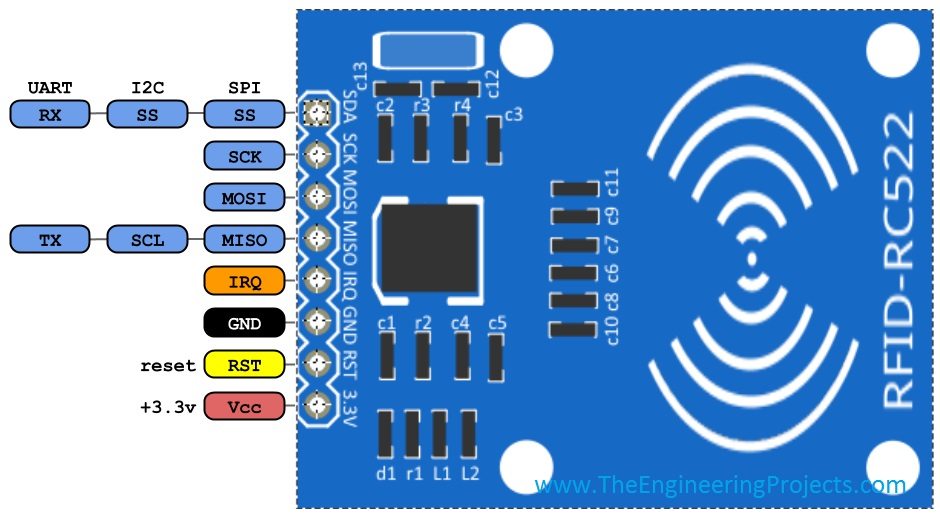
RC522 boards commonly expose eight pins. In SPI operation, the pin often marked SDA acts as the chip-select input. Its label does not mean you should connect it to Arduino's I2C SDA pin while using the SPI library.
| RC522 signal | Uno signal | Connection detail |
|---|---|---|
| 3.3V | Regulated 3.3 V supply | Do not substitute 5 V |
| GND | GND | Common reference for supply and logic |
| SDA / SS | Digital 10 | Chip select through appropriate level conversion |
| SCK | Digital 13 | SPI clock through appropriate level conversion |
| MOSI | Digital 11 | Arduino-to-reader data through appropriate level conversion |
| MISO | Digital 12 | Reader-to-Arduino data; check input-level compatibility |
| RST | Digital 9 | Reset control through appropriate level conversion |
| IRQ | Unconnected | Not used by this polling example |
The historical wiring illustration is useful for tracing signal names, but it should not be taken as proof that direct 5 V drive is electrically appropriate. Use a translator or buffer specified for the chosen supply voltages, directions and SPI speed. Generic bidirectional I2C level-shifter boards are not automatically the best solution for fast push-pull SPI signals.
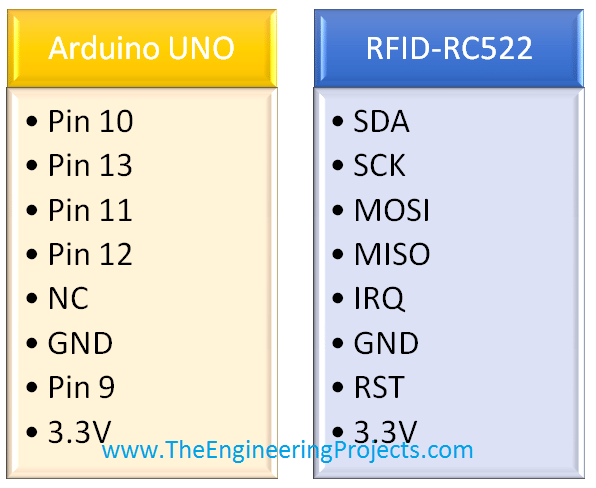
Disconnect power while wiring, verify the supply pin first and keep the SPI leads short. On a different Arduino board, use that board's actual SPI pins. Changing SS_PIN and RST_PIN in the sketch changes only those control pins; it does not remap the hardware SPI bus.
Install the Matching Arduino Library
Install the MFRC522 library associated with the miguelbalboa RFID project using Arduino Library Manager. Its official repository documents the supported features, pin mapping and examples. The original library is in a maintenance/freeze state; the project points to a newer library for further development. The example here intentionally uses the original MFRC522 API so its function names remain consistent with the tutorial.
Do not combine headers from one library with examples written for another library of a similar name. If the compiler cannot find MFRC522.h, confirm installation and the selected library path. If a member function is missing, inspect which version is being used before altering hardware.
The SPI library comes with the Arduino board core. After installation, open a small supplied example and compile for the Uno before adding application logic. This isolates dependency problems from your own edits.
Read and Compare the Complete UID
The sketch below prints each UID byte as two hexadecimal digits. It then compares both the length and contents with an example four-byte record. Replace the example record only after reading your own card. The printed label is a demonstration result; this sketch does not energize a door lock or mark an authoritative attendance database.
#include <SPI.h>
#include <MFRC522.h>

constexpr byte SS_PIN = 10;
constexpr byte RST_PIN = 9;
MFRC522 reader(SS_PIN, RST_PIN);

const byte DEMO_UID[] = {0xDE, 0xAD, 0xBE, 0xEF};
byte previousUid[10] = {};
byte previousSize = 0;
unsigned long lastPrintedAt = 0;
constexpr unsigned long REPEAT_MS = 3000UL;

bool sameUid(const byte *a, byte aSize, const byte *b, byte bSize) {
  if (aSize != bSize) return false;
  for (byte i = 0; i < aSize; ++i) {
    if (a[i] != b[i]) return false;
  }
  return true;
}

void printUid(const byte *uid, byte size) {
  for (byte i = 0; i < size; ++i) {
    if (i != 0) Serial.print(' ');
    if (uid[i] < 0x10) Serial.print('0');
    Serial.print(uid[i], HEX);
  }
}

void setup() {
  Serial.begin(9600);
  SPI.begin();
  reader.PCD_Init();
  delay(4);
  const byte version = reader.PCD_ReadRegister(MFRC522::VersionReg);
  if (version == 0x00 || version == 0xFF) {
    Serial.println(F("Reader communication failed; check power and SPI."));
    while (true) { delay(1000); }
  }
  Serial.println(F("Present a compatible card, then remove it before rescanning."));
}

void loop() {
  if (!reader.PICC_IsNewCardPresent()) return;
  if (!reader.PICC_ReadCardSerial()) return;

  const byte size = reader.uid.size;
  const unsigned long now = millis();
  if (size > sizeof(previousUid)) {
    Serial.println(F("Unsupported UID length."));
  } else {
    const bool repeated = sameUid(reader.uid.uidByte, size,
                                  previousUid, previousSize) &&
                          now - lastPrintedAt < REPEAT_MS;
    if (!repeated) {
      Serial.print(F("UID["));
      Serial.print(size);
      Serial.print(F("]="));
      printUid(reader.uid.uidByte, size);
      Serial.println(sameUid(reader.uid.uidByte, size, DEMO_UID,
                            sizeof(DEMO_UID))
                     ? F(" | demo record matched")
                     : F(" | unknown record"));
      for (byte i = 0; i < size; ++i) previousUid[i] = reader.uid.uidByte[i];
      previousSize = size;
      lastPrintedAt = now;
    }
  }
  reader.PICC_HaltA();
  reader.PCD_StopCrypto1();
}
Why These Changes Matter
Serial.begin initializes the console before printing. The original code printed without explicitly starting Serial, which made the intended output unreliable. The revised initialization also checks for obviously invalid reader register responses before repeatedly attempting to scan cards.
A version register other than zero or 0xFF is only a basic communication check. It does not prove that the antenna circuit is working, that a card is compatible or that every module function is healthy. Treat startup success as permission to proceed with the next test, not as a complete hardware certification.
The helper sameUid compares lengths before reading the bytes. A seven-byte UID beginning with the same four bytes as the demonstration record will therefore not match. The print function includes leading zeroes so that an identifier can be copied without ambiguity.
The earlier example also contained a call to an unrelated fingerprint function inside an endless loop. That prevented it from being a self-contained RFID example. This revision removes that dependency and returns to normal scanning after handling each card.
Halting a Card and Handling Repeated Reads
PICC_HaltA places the selected Type A card into its halt state for this interaction. PCD_StopCrypto1 ends reader-side cryptographic state if it has been used. The example does not read protected memory blocks or perform an application authentication exchange; obtaining a UID is a different operation.
The usual new-card polling sequence is intended for presentation events. After a scan, remove the card from the field and present it again. Holding the card against the antenna is not a reliable request for a new event on every loop iteration.
The additional three-second rule suppresses a quick repetition of the most recently printed UID. It is deliberately limited: presenting another card changes the remembered UID, and a board reset clears the record. A full attendance system needs a persistent event policy rather than relying on this small demonstration buffer.
Enroll a Demonstration Card
- Compile and upload the sketch with the example UID unchanged.
- Open Serial Monitor at 9600 baud and check the startup message.
- Present a compatible card close to the reader.
- Copy the entire UID and its reported byte count.
- Replace DEMO_UID with that exact byte sequence using 0x-prefixed hexadecimal values.
- Upload again, present the same card and inspect the match message.
- Present a different card and confirm that it is reported as unknown.
For example, a printed UID of 04 2A 00 8C 51 66 80 requires seven array entries, including the 00 byte. Dropping a leading zero or comparing a decimal representation with hexadecimal text changes the identifier. Let sizeof(DEMO_UID) supply the array length instead of hardcoding four elsewhere.
These are procedures for testing your assembly. The revised code is not presented as a newly executed hardware result. Record the board, module and library version with your observations so that a later change can be evaluated against a known configuration.
Turn Card Reads into Attendance Events Carefully
A useful attendance record needs more than the last scanned number. At minimum, define a card-to-person mapping, a timestamp source, a reader identifier and an event result. Decide whether a scan means arrival, departure or simply presentation, and how a user corrects an accidental scan.
Arduino millis measures elapsed time since startup; it is not a calendar clock. If records need dates and times, obtain them from a suitable real-time clock or a trusted connected system. Also define what the application does when that time source is unavailable.
Separate successful card reading from successful record storage. A serial message can leave the board without being durably stored by the computer. If the user sees a confirmation LED or message, decide whether it means the reader recognized a card or the attendance system accepted and saved the event.
For example, assign each event a sequence number and require the receiving application to acknowledge storage. A retry of the same event identifier can then be recognized as a duplicate. Without that distinction, a lost acknowledgment may cause two attendance records for a single presentation.
Why the Whole UID Is Still Not a Password
Reading every byte avoids accidental truncation, but it does not make the UID secret. Some cards have identifiers that can be copied, changed or presented through compatible emulation techniques. Other products may use non-unique or changing identifier behavior. NXP discusses identifier sizes and handling in AN10927, MIFARE product and handling of UIDs.
For an actual access-control requirement, choose a supported card technology and a properly designed authentication protocol. Do not label this UID demonstration secure simply because an unknown card prints a different message. The original MFRC522 library also documents limitations in its support for newer cryptographic card families.
For a classroom attendance prototype, clearly label the exercise as identification by presented UID. Avoid collecting unnecessary personal details in the embedded sketch. Keep the mapping in the system designed to manage it, with an intentional enrollment and correction process.
Troubleshooting the Reader
Keep Identifier Formatting Consistent
If a computer stores the printed UID as text, choose one canonical format. Two hexadecimal characters per byte with single spaces between bytes require 3N − 1 characters for an N-byte UID. A seven-byte identifier therefore occupies 20 characters in that representation, while a ten-byte identifier occupies 29. Allocate room for a terminator when using a C character buffer, and do not silently truncate a longer card identifier to fit a four-byte record.
Hexadecimal letter case does not change the underlying byte, but a case-sensitive text comparison can treat two spellings differently. Parse and compare bytes where possible, or normalize text deliberately at the receiving application. Preserve leading zeroes and the original byte order instead of turning the entire string into a loosely formatted number.
Test the record lookup with an enrolled card, an unknown card, a quick repeated presentation and a restart between presentations. Record which events should be accepted before running the test. This exposes policy mistakes that a single successful scan cannot reveal, particularly when the same physical card is presented again after volatile memory has been cleared.
| Symptom | Check | Interpretation |
|---|---|---|
| No Serial Monitor output | Port, baud rate, uploaded sketch and Serial initialization | The console path must work before judging card reads |
| Reader communication failed | 3.3 V rail, ground, SS, reset and SPI connections | The local reader interface is not responding properly |
| Reader responds but no card is found | Card technology, antenna alignment and distance | SPI success does not establish radio compatibility |
| Only some cards match | Complete UID bytes and length | Enrollment or encoding may differ |
| Card reads once and then stops | Remove and re-present the card | The selected card was halted after its presentation |
| Unstable operation after adding other devices | Power budget and shared SPI chip selects | Another peripheral can disturb the bus or supply |
When several SPI devices share the bus, each needs a correctly controlled chip-select line. A peripheral that continues driving MISO while it should be deselected can corrupt another device's transfers. Begin with the reader alone, then reconnect additional peripherals one at a time.
Long breadboard leads and poor solder joints can produce intermittent failures that look like software timing problems. Inspect physical connections before increasing delays throughout the program. Delays may make a symptom less frequent without correcting signal integrity or an out-of-range input voltage.
Practical Review and Further Projects
The RC522 is a useful teaching platform for SPI communication, contactless card selection and byte-array handling. Its strengths are an accessible interface and widely available examples. Its limits include specific card-family support, short-range coupling and the need for an application-level policy around identity and records.
Keep the first project focused on reading and displaying an identifier. Add enrollment, logging and user feedback only after that path behaves consistently. If you later add a lock, buzzer or other load, use an appropriate driver and keep its supply disturbances away from the reader.
Related interfaces include XBee with Arduino, EasyVR with Arduino and GPS with Arduino. They involve different communication and power requirements, so use their own wiring guidance rather than reusing the RC522 connection table.
Frequently Asked Questions
Is the SDA pin an I2C connection in this example?
No. On the commonly used RC522 module in SPI mode, that label identifies the chip-select connection. The sketch uses SPI, not I2C.
Can the reader scan a 125 kHz key fob?
No. The MFRC522 uses a 13.56 MHz interface with specific supported card protocols. A different operating frequency requires appropriate reader hardware.
Why compare the UID length?
Different cards can return different-length identifiers. A prefix match is not the same as an exact identifier match, even if the first few bytes agree.
Can I use the first UID byte as a student number?
That would create avoidable collisions because the byte has only 256 possible values. Use a complete identifier-to-record mapping for the demonstration and a suitable authentication design for stronger requirements.
Does this code modify the card?
No. It selects the card, reads its identifier and ends the interaction. It does not write card memory or change its access keys.
Why does a matched UID not prove who presented it?
The program recognizes a byte sequence. It does not establish that the authorized person is holding the card or that the identifier cannot be copied. Those are separate system requirements.