Hello friends! In this tutorial, we will design a DC motor control demonstration in Proteus ISIS and then connect its control logic to a PIC16F877A. We will begin by observing how voltage polarity changes the direction of a simulated motor, then explain the driver stage needed between a microcontroller and a physical motor.
The original article used Logic State sources and a simplified direct connection to illustrate direction changes. We will preserve those screenshots, but label their purpose clearly. Logic sources and PIC output pins are not substitutes for a motor power driver. The updated practical interface uses an L293D bridge example, with separate logic and motor supplies.
We will also correct the relationship between the original schematic and code, add explicit stopping behavior for the buttons, and discuss current, braking, and PWM. If you need supply background, our 5 V supply tutorial and LM317 supply example are useful companion reading.
How a Brushed DC Motor Changes Direction
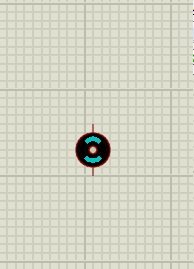
A brushed DC motor develops torque when current flows through its winding in a magnetic field. Reversing the applied polarity reverses the direction of current and the resulting torque. The direction you call clockwise depends on the shaft viewing direction and the order of the motor leads.
The important electrical quantity is the voltage difference between the motor terminals. If one terminal is at 5 V and the other at 0 V, the applied difference is 5 V. Swapping those levels reverses its sign. Setting both terminals to the same voltage gives zero terminal difference, but the way a rotating motor slows depends on the connected circuit.
Inertia means a motor does not necessarily become stationary the instant the applied difference reaches zero. Coasting and electrical braking are different behaviors. We will keep that distinction visible when we move from ideal logic sources to a bridge driver.
Explore the Original Logic-State Demonstration
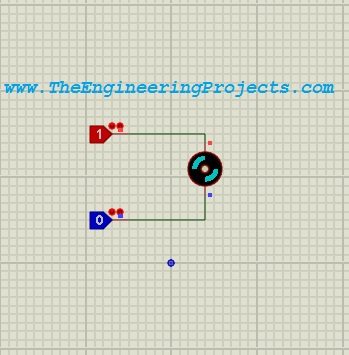
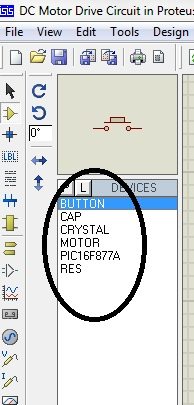
Add the motor model and Logic State components shown in the original device-selection screenshot. This first circuit is a conceptual simulation of terminal polarity. It is useful for learning how the model responds, but it does not represent the output-current capability of a real logic pin.
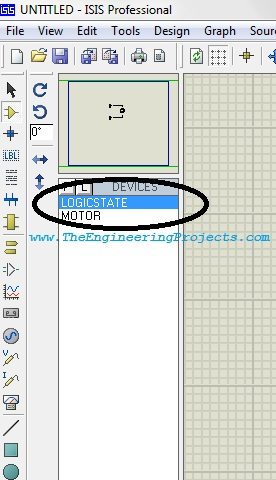
Connect a Logic State source to each motor terminal as in the original drawing. During simulation, change one source at a time and observe the motor's indicated direction. The numerical voltage associated with a logic level depends on the selected model and configuration; do not treat every HIGH indication in every circuit as a universal 5 V power source.
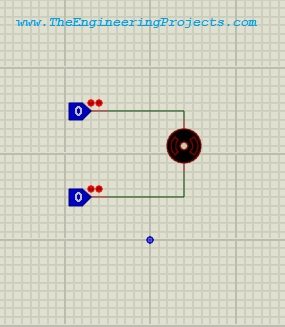
| Terminal A | Terminal B | Applied difference | Interpretation |
|---|---|---|---|
| LOW | LOW | Approximately zero | No commanded driving voltage |
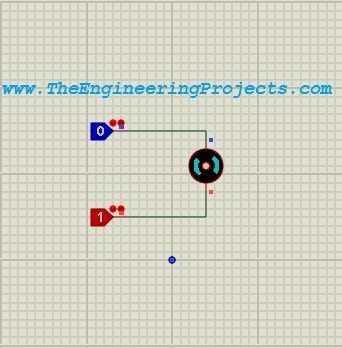
| HIGH | LOW | Positive | One rotation direction |
| LOW | HIGH | Negative | Opposite rotation direction |
| HIGH | HIGH | Approximately zero | No commanded driving voltage |
The two original screenshots below show opposite polarity selections. Use them to understand direction reversal, not to infer a motor's guaranteed speed or its real starting current. A simulation result depends on the chosen model parameters.
Why the Motor Needs a Driver
A PIC output is intended to carry a limited logic signal, while a motor can demand a much larger current, particularly at startup or when stalled. The winding also stores magnetic energy. Interrupting its current produces a transient that must have a controlled path.
A bridge driver provides the switching power stage between the logic and motor. For this teaching example, we will use one half of an L293D's paired driver arrangement to control both terminals of one motor. Select a different driver if the motor's voltage, current, efficiency, or thermal requirements exceed what that device can support.
The Texas Instruments L293/L293D datasheet distinguishes the two versions, their output ratings, enable behavior, and clamp arrangements. The L293D includes output clamp diodes and is rated for lower continuous output current than the L293. Do not assume that similar part names make their protection requirements interchangeable.
Estimate Starting Current
A useful first approximation for a stationary motor is Istall ≈ Vsupply / Rwinding, before including driver voltage drops and other resistance. A hypothetical 6 V motor with a 3 Ω winding could initially demand about 2 A. That would be unsuitable for an L293D channel rated for 600 mA continuous operation.
The example values are illustrative; measure or obtain the actual motor specifications before choosing a driver. Running current after the motor reaches speed can be much lower than starting or stalled current. Selecting a driver only from the no-load current can therefore produce a circuit that fails when the shaft is loaded.
Review the Original PIC Schematic
The original design selects PIC16F877A and two pushbuttons. Those parts remain useful for learning the control program. The component screenshot is preserved below, followed by the old simplified wiring diagram.
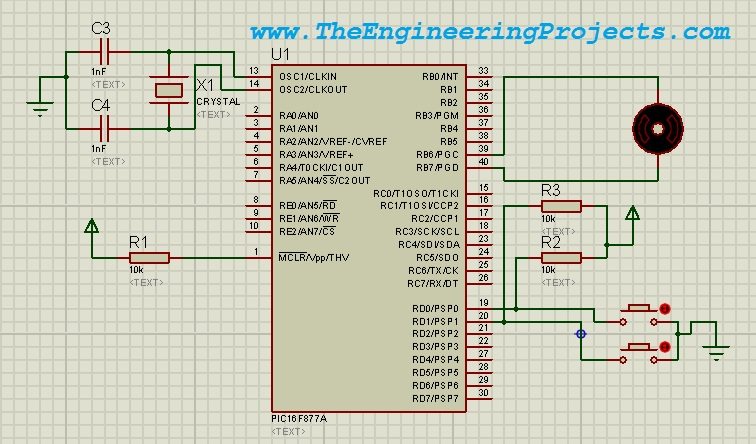
The old motor drawing connects directly to PIC pins and must not be reproduced as a physical motor-power circuit. It also places the two motor connections on RB0 and RB7, while the old source declared a different pair of names and wrote broad alternating patterns to PORTB. The revised mapping below explicitly uses RB0 and RB7 as driver inputs, with RB1 added as Enable.
Keep the two buttons on RD0 and RD1 with separate pull-up resistors and switches to ground. An unpressed button then reads HIGH, while a pressed button reads LOW. Floating inputs do not reliably represent an unpressed state.
Connect the PIC to an L293D
| Signal | Connection | Purpose |
|---|---|---|
| PIC RB0 | L293D 1A, pin 2 | First direction input |
| PIC RB7 | L293D 2A, pin 7 | Second direction input |
| PIC RB1 | L293D 1,2EN, pin 1 | Enables the selected driver pair |
| Motor terminals | L293D 1Y and 2Y, pins 3 and 6 | Power outputs to the motor |
| Logic supply | L293D VCC1, pin 16 | 5 V logic supply |
| Motor supply | L293D VCC2, pin 8 | Supply suitable for both driver and motor |
| Common ground | Pins 4, 5, 12, and 13 | Driver and controller reference |
| Unused driver pair | Disable its Enable input and define unused inputs | Avoid floating control inputs |
Use the datasheet pin diagram for the package you actually select. Add supply decoupling near the driver and PIC, and provide a suitable motor-supply return path. A pull-down on Enable can help keep the bridge disabled while the microcontroller pins are not yet configured.
The physical PIC also needs all supply connections, a valid reset network, and an appropriate oscillator arrangement. Do not copy the old screenshot's crystal-capacitor values without checking the selected crystal's requirements. Match the compiler frequency and simulated processor clock.
Driver Truth Table
| Enable | 1A | 2A | Result |
|---|---|---|---|
| LOW | Either | Either | Outputs disabled; motor can coast |
| HIGH | HIGH | LOW | Drive in one direction |
| HIGH | LOW | HIGH | Drive in the opposite direction |
| HIGH | LOW | LOW | Both terminals driven low; braking condition |
| HIGH | HIGH | HIGH | Both terminals driven high; braking condition |
The updated program uses Enable LOW as its stop request. That disables the bridge; it does not promise an instantaneous mechanical stop. A design that needs controlled deceleration or braking requires further analysis of the motor, load, supply, and driver.
PIC16F877A Program in mikroC
Create a mikroC PRO for PIC project for PIC16F877A and select a clock appropriate to your oscillator; use the same value in Proteus. Disable the watchdog for this introductory example and review the oscillator and low-voltage-programming options. The PIC16F87XA datasheet documents PORTD, PORTB, and their alternate functions.
The example below reserves PORTB for the three driver controls and keeps all its other outputs low. RD0 and RD1 are the active-low button inputs. If your larger project uses other PORTB pins, replace the whole-port assignments with a reviewed output-state scheme that preserves those functions.
unsigned char firstSample;
unsigned char buttons;
unsigned char requested;
unsigned char previousDirection = 0;
unsigned char blocked = 0;

void main()
{
    PORTB = 0x00;
    TRISB = 0x00;
    TRISD = 0xFF;
    TRISE = 0x07; // Keep PORTD out of parallel-slave mode.

    while (1) {
        firstSample = PORTD & 0x03;
        Delay_ms(10);
        buttons = PORTD & 0x03;

        if (buttons != firstSample) {
            PORTB = 0x00;
            continue;
        }

        if (buttons == 0x03) { // Both buttons released.
            PORTB = 0x00;
            previousDirection = 0;
            blocked = 0;
            continue;
        }

        if (buttons == 0x00) { // Conflicting requests.
            PORTB = 0x00;
            blocked = 1;
            continue;
        }

        requested = (buttons == 0x02) ? 1 : 2;
        if (blocked ||
            (previousDirection != 0 &&
             requested != previousDirection)) {
            PORTB = 0x00;
            blocked = 1;
            continue;
        }

        previousDirection = requested;
        // RB1 is Enable; RB0 and RB7 are direction inputs.
        PORTB = (requested == 1) ? 0x03 : 0x82;
    }
}
Build the project and load its HEX file into the simulated PIC. This program is for the driver connections in the table, not for the old direct-motor schematic. It is a small control example rather than a complete motor-protection system.
Explain the Button Logic
With pull-ups, the low two bits read binary 11 when neither button is pressed. Pressing RD0 gives binary 10, while pressing RD1 gives binary 01. Both pressed gives binary 00. The program reads those bits together so that conflicting requests can be handled explicitly.
Two samples separated by 10 ms provide a simple stability check. If they disagree, the bridge is disabled for that pass through the loop. This is a basic debounce approach for a demonstration, not a guarantee against every switch waveform. A more demanding application can use a timer-based input filter without blocking the main loop.
Holding the first button requests one direction. Holding the second requests the other. Releasing both disables the driver. Pressing both also disables it and blocks a new request until both are released. Changing directly from one requested direction to the other invokes the same release interlock.
This release requirement prevents an immediate reversal command in the demonstrated button sequence, but it does not measure shaft speed. The operator must allow the motor to stop before requesting the opposite direction during a physical test. A controller that must enforce a complete stop needs feedback or a properly justified deceleration strategy.
Understand the Output Values
The forward pattern 0x03 sets RB0 and RB1 high while leaving RB7 low. The reverse pattern 0x82 sets RB7 and RB1 high while leaving RB0 low. Zero clears all three signals and disables the driver. These values correspond directly to the revised table.
The original 0xAA and 0x55 patterns changed every other PORTB bit, including pins unrelated to the motor example. Explicitly defining the used signals makes the program easier to extend and reduces the chance of unintentionally changing another peripheral.
Test the Simulation in Stages
- Start with the driver disabled and confirm the PIC executes the intended program.
- Observe RB0, RB7, and Enable with logic probes.
- Press the first button and compare the signals with the truth table.
- Release both buttons and confirm Enable becomes LOW.
- Press the second button and confirm the opposite input combination.
- Press both buttons and check that the conflict disables the outputs.
- Inspect the motor voltage and current only after the control logic is understood.
If the displayed direction is opposite to your intended label, review the motor-lead orientation. Swapping the two motor terminals reverses the meaning of the same electrical command. Document which physical direction corresponds to each button instead of relying on an unexplained clockwise label.
Use separate observations for controller outputs and motor-terminal voltage. A HIGH logic input does not mean the motor receives the full supply voltage. The L293D's output transistors introduce voltage drops, and those drops also contribute to heating.
Speed Control with PWM
The button program provides direction control only. To vary the applied drive, a suitable design can pulse an Enable input while holding the desired direction inputs stable. Pulse-width modulation changes the fraction of time that the drive is active.
duty cycle = active time / period × 100 percent
For an idealized 6 V drive with a 40 percent active duty cycle, the simple average-voltage estimate is 6 × 0.40 = 2.4 V. A real bridge, winding inductance, recirculating current, load torque, and motor speed make the full behavior more involved. Do not equate 40 percent duty cycle with exactly 40 percent of maximum shaft speed.
PWM frequency also matters. Choose it with the driver, motor, switching losses, acoustic behavior, and available timer in mind. Confirm the actual output frequency and duty cycle with the Proteus oscilloscope instead of judging PWM solely from an animated motor symbol.
Common Problems and Their Causes
Estimate Driver Loss Before Choosing the Supply
Suppose the two conducting output stages together drop 2 V at the operating current. With a 6 V motor supply, the motor would receive roughly 4 V during the driven interval. At 0.3 A, the corresponding driver dissipation would be approximately 2 × 0.3 = 0.6 W. These are hypothetical values used to demonstrate the calculation; obtain the actual voltage drops from the selected driver's characteristics at the relevant current and temperature.
This loss explains why increasing the supply voltage to recover motor voltage is not an automatic solution. It changes the possible motor current and the voltage stress elsewhere in the circuit. Review the motor rating, driver rating, and thermal budget together. A more efficient driver may be a better fit than forcing a marginal part to operate hotter.
Record the motor model's winding resistance and mechanical parameters when comparing simulations. If those values are left at unrelated defaults, the indicated speed and current may describe a different motor from the one on your bench. The control truth table can still be useful, but its numerical performance predictions need a model that represents the intended load.
| Problem | First checks | Why it matters |
|---|---|---|
| Motor does not turn | Enable, motor supply, and output connections | Correct logic alone does not provide motor power |
| Wrong direction | Motor lead order and input mapping | Direction depends on terminal polarity |
| Motor continues after button release | Whether code explicitly disables the driver | An output retains its previous state unless changed |
| Button state is unreliable | Pull-ups, switch wiring, and debounce | Unconnected inputs are not valid command sources |
| Physical driver becomes hot | Starting current, voltage drop, and thermal limits | A successful idealized simulation does not establish thermal suitability |
| Controller resets when the motor starts | Supply integrity, grounding, and noise suppression | Motor transients can disturb the logic supply |
Keep the motor supply and logic wiring organized, with the required common reference and suitable decoupling. Avoid routing the motor's high-current return through a fragile signal-ground path. When testing hardware, begin with a low-energy setup and a supply appropriate to the expected current.
Project Review
We have kept the original polarity demonstration while separating it from a practical power interface. The PIC reads two buttons, applies defined direction requests, and disables an L293D pair when no valid request is present. The motor's actual performance still depends on its supply, load, and driver ratings.
The next tutorial covers a different control problem: driving a stepper motor in Proteus. There we will replace simple polarity selection with an ordered sequence of winding states.
Frequently Asked Questions
Can I connect the motor directly to the PIC as in the old image?
No. That image is preserved as a simplified simulation demonstration. Use an appropriate driver between the logic outputs and a physical motor, with ratings that cover the actual load.
Does Enable LOW brake the motor?
For the selected L293D pair, it disables the outputs, allowing a coasting stop. Driving both motor terminals to the same level is a different electrical condition. Neither should be described as an instantaneous mechanical stop.
Why are there separate logic and motor supply pins?
The control interface and power outputs have different supply roles. Configure both according to the driver datasheet and provide the required common ground. Supplying only the logic section does not power the motor output stage.
Is the L293D suitable for every small motor?
No. Check the motor's startup and stall demand as well as normal running current. Also account for driver voltage drop and package heating. The physical size of a motor is not a reliable current specification.
Does the updated code provide speed feedback?
No. It implements button-controlled direction requests and disabling behavior. Closed-loop speed regulation requires a speed measurement and a control algorithm in addition to the driver.