Hello friends, I hope you all are doing great. Today, I am going to share the new LM393 Speed Sensor Library for Proteus V1.0. If you have ever built a robot car, you have met this little module: a black U-shaped slot on a blue board, with a slotted encoder disc on the motor shaft turning through it. Every slot that passes the beam gives one pulse, and an Arduino counts the pulses to get the wheel's speed. It is the cheapest speed sensor there is, and one of the most popular.
LM393 Speed Sensor Library for Proteus
Latest version: V1.0 (October 2026, this tutorial)
Other motors: SG90 Servo · TT Gear Motor · 28BYJ-48 Stepper · NEMA 17 Stepper · MG996R Servo · N20 Encoder Motor · JGA25-370 Encoder Motor · FS90R 360 Servo · 130 DC Motor · A2212 Brushless · X27.168 Gauge · Analog Panel Meter · DC Tachogenerator · MG90S Servo · DS3218 Servo · L12 Linear Servo · JGB37-520 Motor · RS-775 Motor · JGY-370 Worm Motor · 12V Linear Actuator · Coin Vibration Motor · Mini Submersible Water Pump · 12V Peristaltic Pump · 4-Pin PC Fan · 12V Push-Pull Solenoid · NEMA 23 Stepper Motor · Micro Linear Stepper · TYJ50 Synchronous Motor · Quartz Clock Movement · Air-Core Gauge · Electromechanical Counter · Split-Flap Display · Electric Bell · Wind Turbine · 8520 Coreless Motor · Car Wiper Motor · Car Door Lock Actuator · 12V Solenoid Water Valve · 12V Holding Electromagnet
Motor drivers: L298 · L9110S · TB6612FNG · BTS7960 · A4988 / DRV8825 · 28BYJ-48 + ULN2003 · PCA9685 Servo · Relay Module · 30A Brushless ESC · TB6600 Stepper Driver
Helping Tools
- Serial Monitor Advance: a serial terminal window for the UART of your board
- Serial Monitor Expert: the serial monitor with extra debugging tools
- LCD Library for Proteus V3.0: 16x2, 20x4 and I2C LCDs to show your readings
It is also famous for a problem: at slow speeds the count comes out far too high. This library brings the module into Proteus with that problem included. The disc belongs to the machine and you set its speed on the pop-up; the D0 output pulses once a slot, and below about 200 RPM its comparator chatters - extra short pulses on every edge - just like the real board. The demo runs on our Arduino UNO V4.0: it counts the pulses twice, once raw and once with a short lockout, so you can watch the chatter appear and the cure work.
NOTICE: a speed sensor that simply gave perfect pulses would teach you nothing you would not learn on the bench the hard way. So we modelled the part that confuses everybody: the comparator without hysteresis. It took our team a lot of hard work. Your feedback is the fuel that keeps us going, so please tell us what you think in the comments below or in the Motor Driver board of our forum. And if our free libraries help you, you can buy us a coffee. So, let's get started with the LM393 Speed Sensor Library for Proteus V1.0:
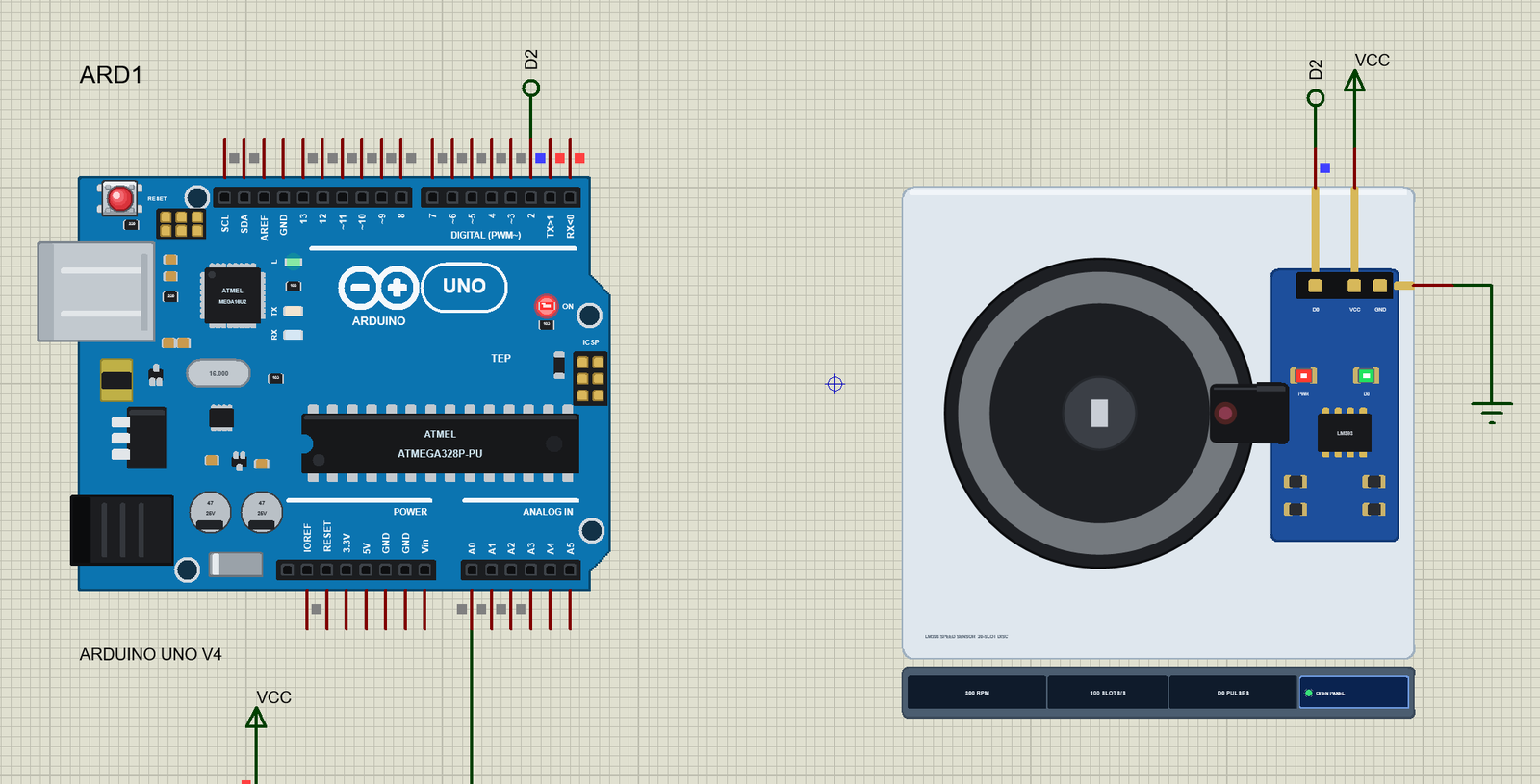
What is an LM393 Speed Sensor?
The LM393 speed sensor is a slotted optical sensor on a small breakout board. Inside the black U-shaped housing an infrared LED and a phototransistor face each other across the slot. When nothing is in the slot, the light reaches the phototransistor; when something opaque blocks the slot, the light stops. An LM393 comparator on the board compares the phototransistor's voltage with a threshold and turns it into a clean logic signal on the pin D0.
On its own the sensor only sees light or no light. The trick is the encoder disc: a black plastic wheel with 20 slots round its rim, pressed on the motor shaft so that the rim runs through the slot of the sensor. As the disc turns, slot and spoke pass the beam in turn, and D0 goes LOW and HIGH once for every slot.
| LM393 speed sensor (the model) | |
|---|---|
| Sensor | an infrared LED and a phototransistor across the slot, an LM393 comparator |
| Output D0 | LOW while light passes through a slot (the D0 LED on), HIGH while a spoke blocks the beam |
| Encoder disc | 20 slots as wide as the spokes: 20 pulses a turn, 1 pulse = 18 deg |
| Supply | VCC 3.3 - 5 V, GND |
| LEDs | PWR (red) and D0 (green) |
| Weak point | no hysteresis: D0 chatters at slow speeds |
From Slots to RPM
With 20 slots, one turn gives 20 pulses. Count the falling edges of D0 for one second, and the speed is the count times 60 seconds divided by 20 slots - in short, RPM = pulses a second x 3. At 300 RPM, the disc gives 100 pulses a second, one every 10 ms; at 1500 RPM it gives 500 a second, one every 2 ms. Both are easy for an interrupt on an Arduino, which can count tens of thousands of edges a second.
Why the Comparator Chatters
The LM393 on these modules is wired as a plain comparator, with no hysteresis - no gap between the level where the output switches one way and the level where it switches back. At high speed that does not matter: each slot edge sweeps across the beam in a few microseconds, and the phototransistor's voltage crosses the threshold once. At slow speed the edge creeps across the beam. The voltage creeps through the threshold too, and the smallest noise pushes it back and forth: D0 toggles several times before it settles.
Those extra pulses are short - 15 to 50 microseconds - and invisible on a slow oscilloscope sweep. But an interrupt counts every one of them. In the model, below about 200 RPM every edge carries up to 2 extra pairs, more the slower the disc turns. At 30 RPM a plain count gives a speed five times too high. That is the classic forum question: "my speed sensor reads 150 RPM when the wheel barely turns".
What's New in LM393 Speed Sensor Library for Proteus V1.0
- A real slot sensor: D0 LOW through a slot and HIGH on a spoke, with the weak HIGH of the board's pull-up.
- The chatter: the comparator without hysteresis, with short extra pulses on every slow edge (property CHATTER).
- A machine to measure: the disc's speed set on the pop-up, by property RPM or by a click on the disc, with the machine's run-up.
- The direction it cannot see: backwards gives exactly the same pulses, as on the real module.
- Exact timing: every slot edge and every chatter pulse is scheduled at its own moment, not sampled.
- A turning disc on the schematic that blurs into a band at speed, as a camera sees it.
- A pop-up window with four pages - Sensor, Graphs, Event log and Check - and the last edge zoomed in to 1 ms.
- A full release: the zip with the library, our Arduino UNO V4.0 and an A4 demo, tested in Proteus.
The Speed Sensor in Proteus
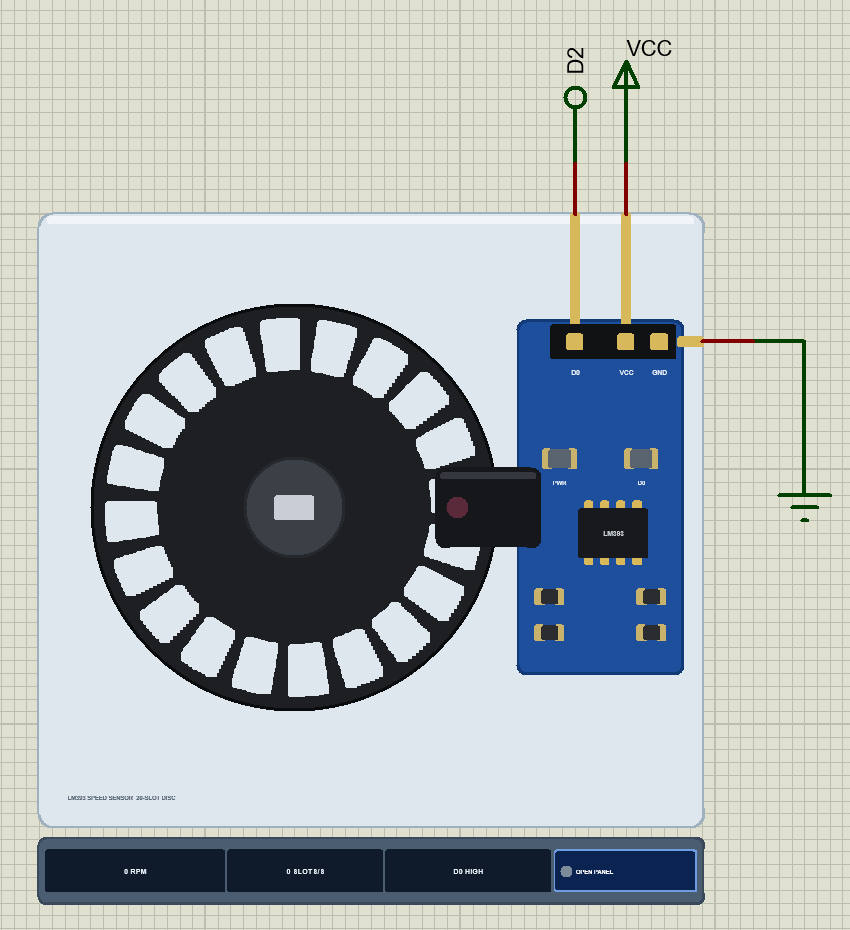
Search LM393 or SPEED in Pick Devices; the device LM393SPEEDTEP is in TEPLM393.LIB (category Sensors, Speed) and its model is TEPLM393.DLL. It is drawn as you would see it on a robot car: the black 20-slot encoder disc on the double-flat shaft of a TT gear motor, the black U-shaped sensor across its rim, and the blue module board with the LM393 chip, its resistors, the PWR and D0 LEDs and the three-pin header.
At Run the disc turns. Above a few dozen RPM the slots become a blur and at higher speeds a uniform band - what a camera with a 50 ms exposure would show. The PWR LED lights while VCC and GND are powered, and the D0 LED lights with every slot in the beam. Under the plate the strip shows the speed, the slots a second, the state of D0 and the OPEN PANEL button. The plate and the strip are TEP additions; the real module has none of them.
The Pins and the Properties
| Pin | What the model does with it |
|---|---|
| D0 | the digital output: LOW through a slot, HIGH on a spoke; it floats without power |
| VCC | the supply: must be HIGH |
| GND | ground: must be LOW |
| Property | Default | What it does |
|---|---|---|
| RPM | 300 | the disc's speed at the start (minus = backwards, up to 3000): the machine runs up to it at Run |
| CHATTER | YES | YES: the comparator chatters at slow speeds, as on the real module; NO: an ideal sensor |
Download LM393 Speed Sensor Library for Proteus
Click the button below to download LM393-Speed-Sensor-Library-for-Proteus-v1.0.zip (about 1.3 MB, without the source code of the models):
LM393 Speed Sensor Library for Proteus V1.0- README.txt: installation, the demo, the wiring, the properties, real hardware, troubleshooting and the limits.
- Proteus Library Files:
TEPLM393.LIBandArduinoV4TEP.LIBfrom our Arduino Library for Proteus V4.0. - Proteus Model Files:
TEPLM393.DLLandTEPARDUINO.DLL. - Proteus Simulation:
LM393-Speed-Sensor-ArduinoUnoV4.pdsprj,Speed_Sensor_Demo.hexand copies of the two DLLs. - Arduino Code:
Speed_Sensor_Demo.ino(no library needed).
No Proteus yet? Read How to Download and Install Proteus 7 and 8. New to libraries? Follow How to Install a New Library in Proteus.
How to Install LM393 Speed Sensor Library for Proteus
- Close Proteus and extract the whole zip file, for example to your Desktop.
- Copy
TEPLM393.LIBandArduinoV4TEP.LIBfrom Proteus Library Files into the LIBRARY folder of Proteus (usuallyC:\Program Files (x86)\Labcenter Electronics\Proteus 8 Professional\LIBRARY). - Copy
TEPLM393.DLLandTEPARDUINO.DLLfrom Proteus Model Files into the MODELS folder. The two Arduino files are the ones of our Arduino Library V4.0; if you have it, they are the same. - Delete
TEPLM393.IDXfrom the LIBRARY folder if it is there. - Start Proteus, press P and search for LM393.
Tip: keep the Proteus Simulation folder together, because the project needs its .hex file and the DLLs beside it. The library is tested in Proteus 8.5; Proteus 7 is not supported.
The Demo Circuit
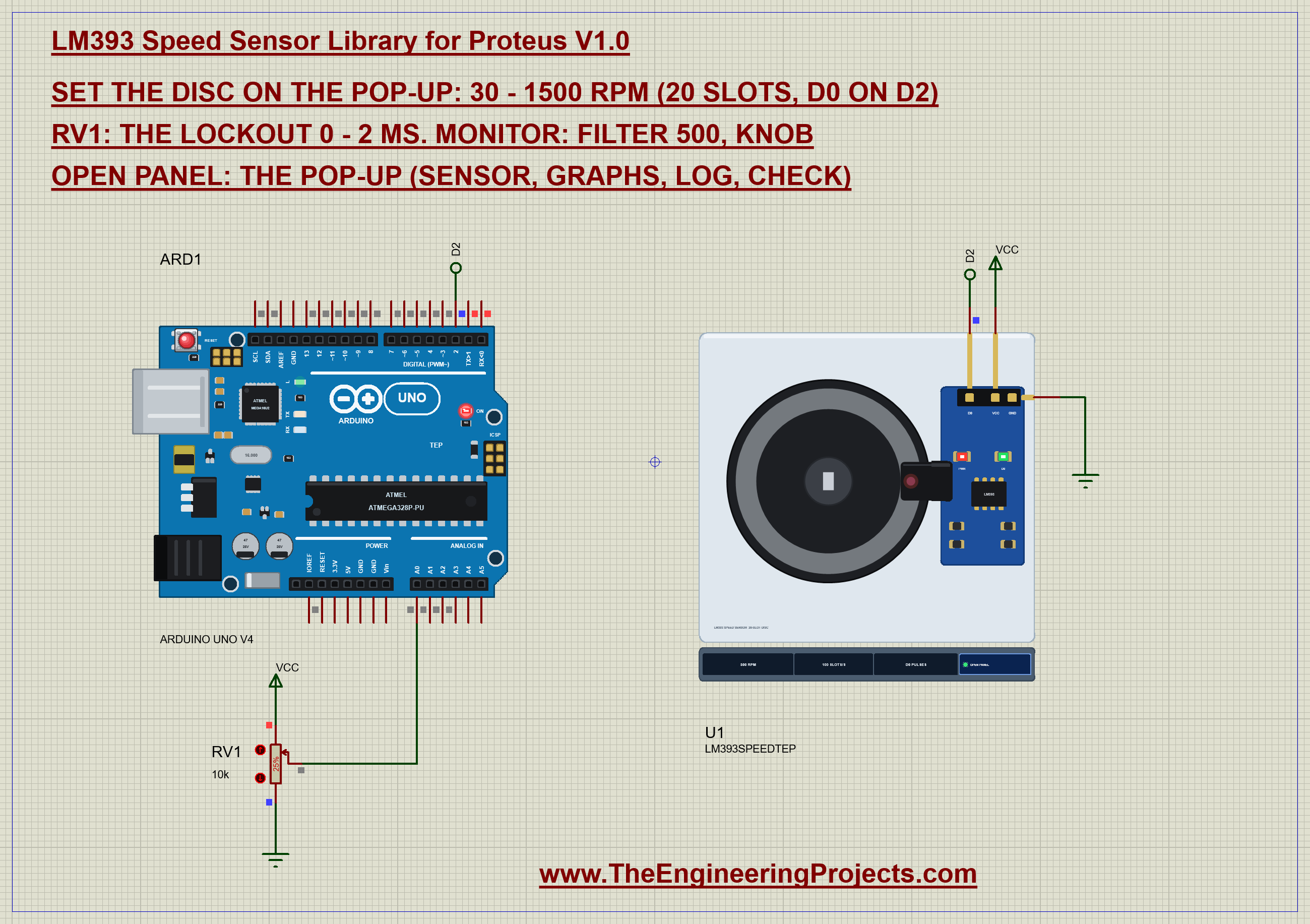
Open LM393-Speed-Sensor-ArduinoUnoV4.pdsprj. ARD1 is an Arduino UNO V4.0 from our Arduino UNO Library for Proteus V4.0, running Speed_Sensor_Demo.hex with its serial monitor built in. U1 is the speed sensor, and RV1, a 10k potentiometer, sets how the sketch filters the pulses.
| Part | Connection | Note |
|---|---|---|
| U1 D0 | D2 (net label D2) | INT0 - an interrupt on every change |
| U1 VCC | 5V (the VCC terminal) | 3.3 - 5 V on a real board |
| U1 GND | GND | |
| RV1 ends / wiper | 5V and GND / A0 | the lockout, 0 - 2 ms (25 % = 0.5 ms) |
Pin D2 is not a random choice: on the UNO only D2 and D3 have their own external interrupts, INT0 and INT1. A pulse counter must use one of them, because polling the pin in loop() would miss the short pulses - and at high speed, the slots themselves. RV1 is not part of the sensor at all. It is a knob for the sketch, so you can change the filter while the disc turns.
The Arduino Code
The demo needs no library. New to Arduino? Start with Arduino Tutorial for Beginners and Introduction to Arduino UNO. The declarations say what the sketch measures: two counters, the time of the last accepted change and the lockout:
const byte SENSOR_PIN = 2;                               // D0 of the module (INT0)
const int POT_PIN = A0;
int slots = 20;
volatile unsigned long raw = 0, filtered = 0;            // falling edges: all of them / the accepted ones
volatile unsigned long lastChange = 0;                   // micros() of the last accepted change
volatile unsigned int lockoutUs = 500;
The counters are volatile because the interrupt changes them behind the back of loop(). In setup() the pin gets an interrupt on every change, rising and falling:
  pinMode(SENSOR_PIN, INPUT);
  attachInterrupt(digitalPinToInterrupt(SENSOR_PIN), onChange, CHANGE);
The interrupt routine is the heart of the demo. It reads the new level straight from the port register - faster than digitalRead(), and fast enough to catch a 15 microsecond glitch - and counts every falling edge in raw. Then it applies the lockout: a change that comes within the lockout time of the last accepted change is chatter and is ignored. Only an accepted falling edge counts in filtered:
void onChange() {
  const unsigned long now = micros();
  const bool low = (PIND & _BV(PD2)) == 0;
  if (low) raw++;
  if (now - lastChange < lockoutUs) return;              // within the lockout of the last change: chatter - ignored
  lastChange = now;
  if (low) filtered++;
}
Why a lockout on any change, and not just on falling edges? Because chatter comes in pairs: a glitch on a falling edge goes HIGH and LOW again within microseconds. If the routine only remembered the last counted fall, the end of a glitch would look like a fresh slot. Watching every change and starting the timer only on accepted ones lets the first edge through and holds the whole burst of chatter behind it.
RV1 sets the lockout, read in loop() and scaled to 0 - 2000 microseconds. The interrupts are switched off for the moment of the write, so the routine never reads half a value:
  if (knob) {
    const unsigned int us = (unsigned long)analogRead(POT_PIN) * 2000 / 1023;
    noInterrupts(); lockoutUs = us; interrupts();
  }
Once a second the loop takes both counts and clears them, again with the interrupts off, and prints them with the speed they give:
  static unsigned long at = 0;
  if (millis() - at >= 1000) {
    at += 1000;
    noInterrupts();
    const unsigned long r = raw, f = filtered;
    raw = 0; filtered = 0;
    const unsigned int lo = lockoutUs;
    interrupts();
Serial.print(F("raw ")); Serial.print(r); Serial.print(F(" -> ")); Serial.print(r * 60.0 / slots, 0);
Serial.print(F(" RPM | filtered ")); Serial.print(f); Serial.print(F(" -> ")); Serial.print(f * 60.0 / slots, 0);
Serial.print(F(" RPM (lockout ")); Serial.print(lo); Serial.println(F(" us)"));The serial monitor takes commands. filter 500 sets the lockout in microseconds and takes it away from RV1; knob gives it back; slots 20 changes the slots of the disc if yours has a different number:
  if (!strncmp(s, "filter", 6)) {
    knob = false; lockoutUs = constrain(atol(s + 6), 0, 2000);
Note what the sketch does not do: it never sets the disc's speed. That is set on the sensor's pop-up, because on a real machine the Arduino only measures. The HEX file is in the package. To change the sketch, open it in the Arduino IDE and export the compiled binary, as in How to get the HEX file from Arduino. It needs 6,672 bytes of flash (20 % of the UNO) and 282 bytes of RAM.
Running the Demo
Press Run. The UNO's serial monitor and the sensor's pop-up open over the schematic; move them aside. The machine starts and the disc runs up to 300 RPM - property RPM - in a little over a second. Each second the sketch prints both counts:
raw 99 -> 297 RPM | filtered 99 -> 297 RPM (lockout 500 us)
raw 100 -> 300 RPM | filtered 100 -> 300 RPM (lockout 500 us)
raw 100 -> 300 RPM | filtered 100 -> 300 RPM (lockout 500 us)
At 300 RPM the two counts agree: 100 slots a second, 300 RPM, raw and filtered. The edges are fast and clean, there is nothing to filter, and the 0.5 ms lockout set by RV1 at 25 % does no harm - the next slot comes 10 ms later.
The Pop-Up Window
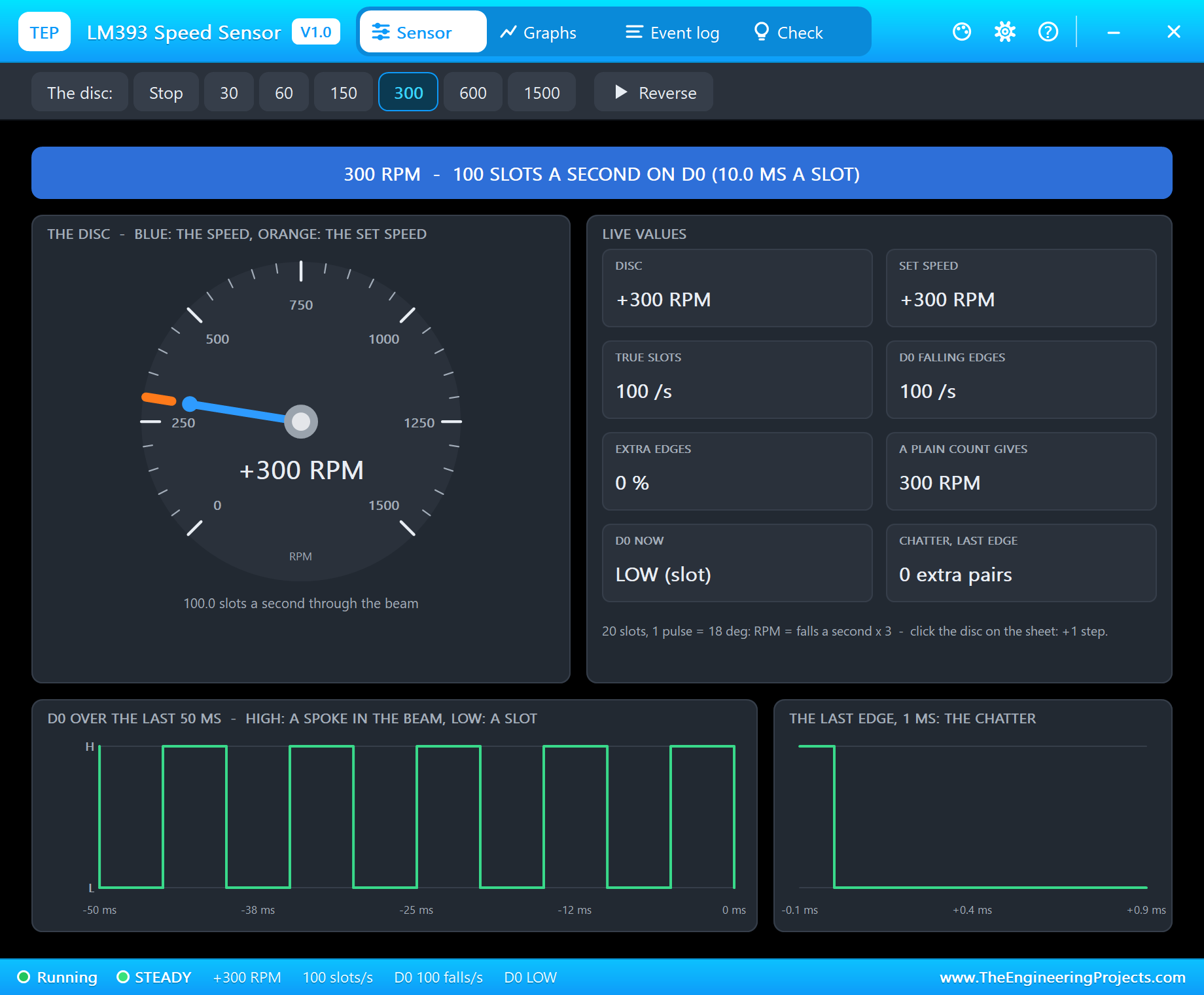
At Run the sensor opens TEP LM393 Speed Sensor, a window in the look of our TEP Serial Monitor Advance for Proteus. It has four tabs - Sensor, Graphs, Event log and Check - plus Settings and Help behind the gear and question mark icons; the palette icon switches between the dark and the light theme. If you close it, the OPEN PANEL button on the strip brings it back.
The banner gives the state in plain words: here 300 RPM - 100 SLOTS A SECOND ON D0 (10.0 MS A SLOT). The dial shows the disc (blue) against the set speed (orange). The live values put the truth next to what D0 gives: the true slots a second, D0's falling edges a second, the extra edges, the speed a plain count would give, the level of D0 now and the chatter of the last edge. At the bottom, D0 over the last periods - a square wave - and the last edge zoomed in to 1 ms. The toolbar is the machine's control: Stop, 30, 60, 150, 300, 600 and 1500 RPM, and Reverse.
Slow Down: the Chatter Appears
Now click 60 on the pop-up's toolbar. The disc slows to 60 RPM, which should give exactly 20 slots a second. Watch the monitor:
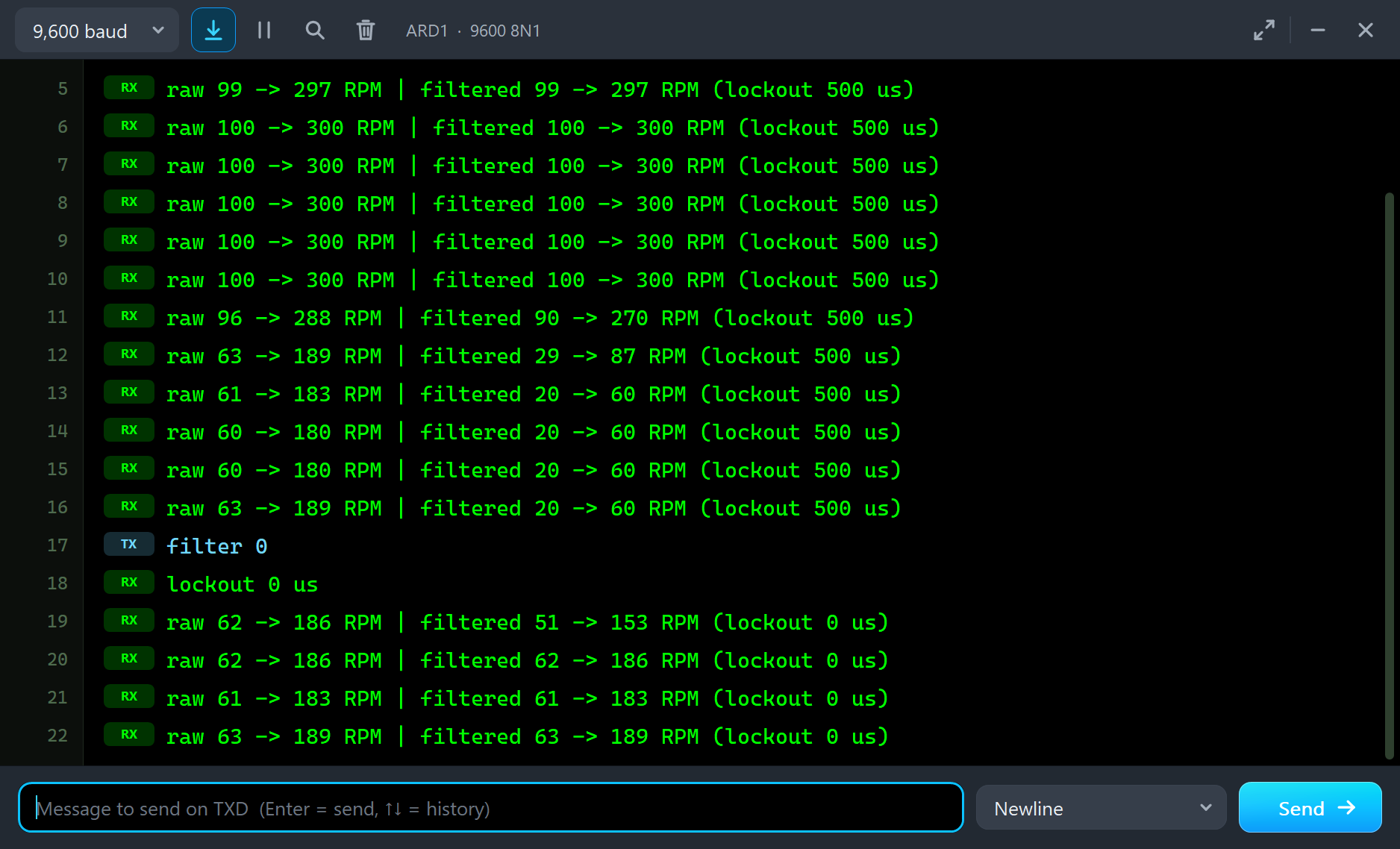
raw 96 -> 288 RPM | filtered 90 -> 270 RPM (lockout 500 us)
raw 63 -> 189 RPM | filtered 29 -> 87 RPM (lockout 500 us)
raw 61 -> 183 RPM | filtered 20 -> 60 RPM (lockout 500 us)
raw 60 -> 180 RPM | filtered 20 -> 60 RPM (lockout 500 us)
raw 60 -> 180 RPM | filtered 20 -> 60 RPM (lockout 500 us)
raw 63 -> 189 RPM | filtered 20 -> 60 RPM (lockout 500 us)
The filtered count settles at 20 slots, 60 RPM - right. The raw count settles at 60 to 63 falling edges a second and claims about 180 RPM: three times the truth. The disc did not speed up. Every slot edge now creeps through the beam slowly enough for the comparator to toggle on the way, and each falling edge brings a glitch or two with it.
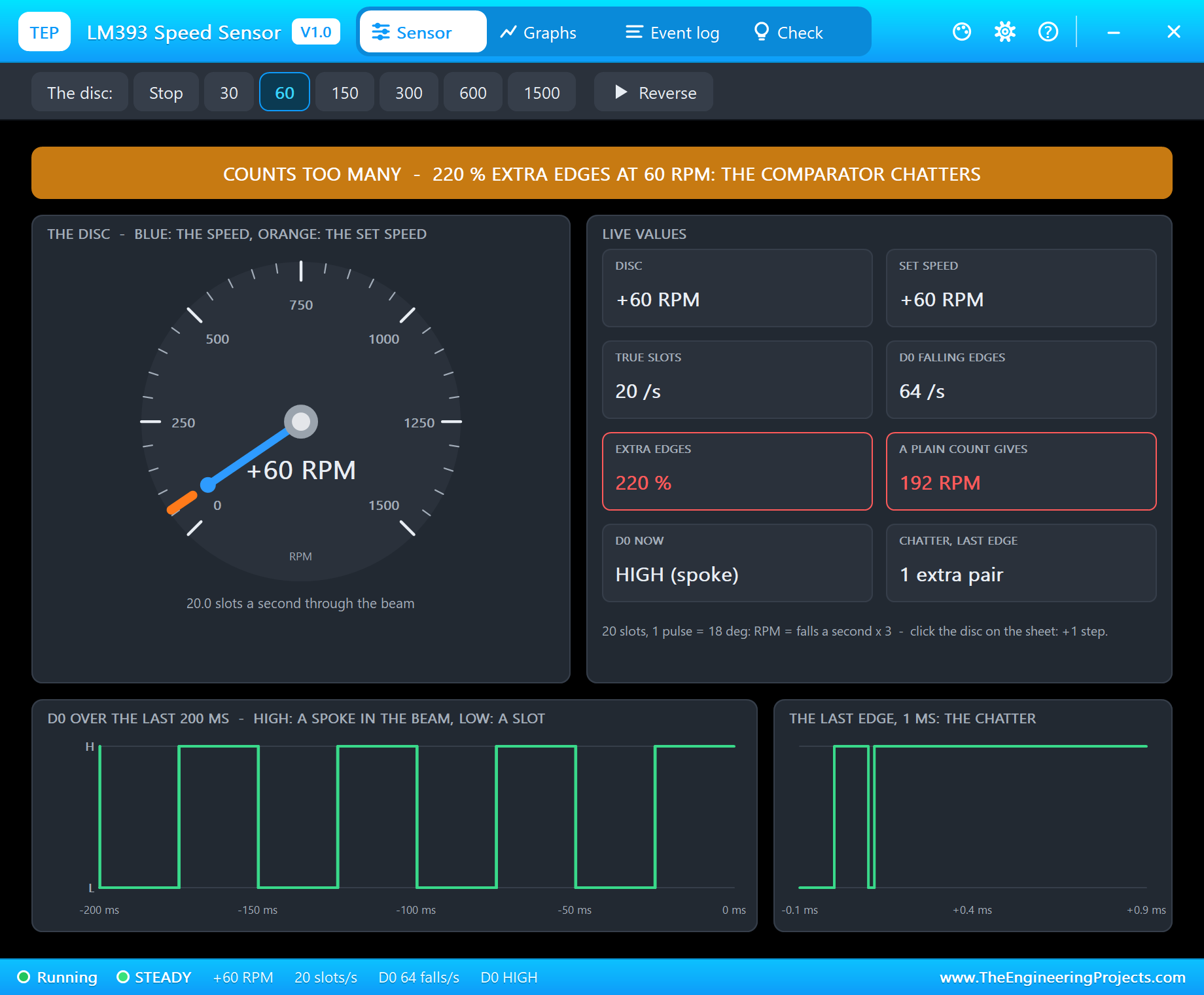
The pop-up says the same in its own words. The banner turns amber: COUNTS TOO MANY - 220 % EXTRA EDGES AT 60 RPM: THE COMPARATOR CHATTERS. The true slots are 20 a second, but D0 falls 64 times, and a plain count gives 192 RPM - both values framed in red. The share moves a little from second to second, between about 200 and 220 %, because the chatter depends on the noise at the moment of each edge.
Look at the two traces at the bottom. Over 200 ms, D0 looks like a perfect square wave - the glitches are far too short to show at that scale. That is exactly why chatter is so hard to find with a slow oscilloscope sweep. The panel on the right zooms into the last edge, 1 ms wide: D0 falls, jumps back HIGH for a few microseconds, and falls again. One extra pair - one extra count.
Take the Filter Away
Type filter 0 in the monitor. The lockout drops to zero, and now the filtered count is just as wrong as the raw one:
filter 0
lockout 0 us
raw 62 -> 186 RPM | filtered 51 -> 153 RPM (lockout 0 us)
raw 62 -> 186 RPM | filtered 62 -> 186 RPM (lockout 0 us)
raw 61 -> 183 RPM | filtered 61 -> 183 RPM (lockout 0 us)
The first line still has half a second of filtering in it; from the second line on, both counts say about 186 RPM. This is what a plain sketch - the one in most tutorials, with attachInterrupt(..., FALLING) and a counter - shows on this module.
30 RPM: Five Times Too High
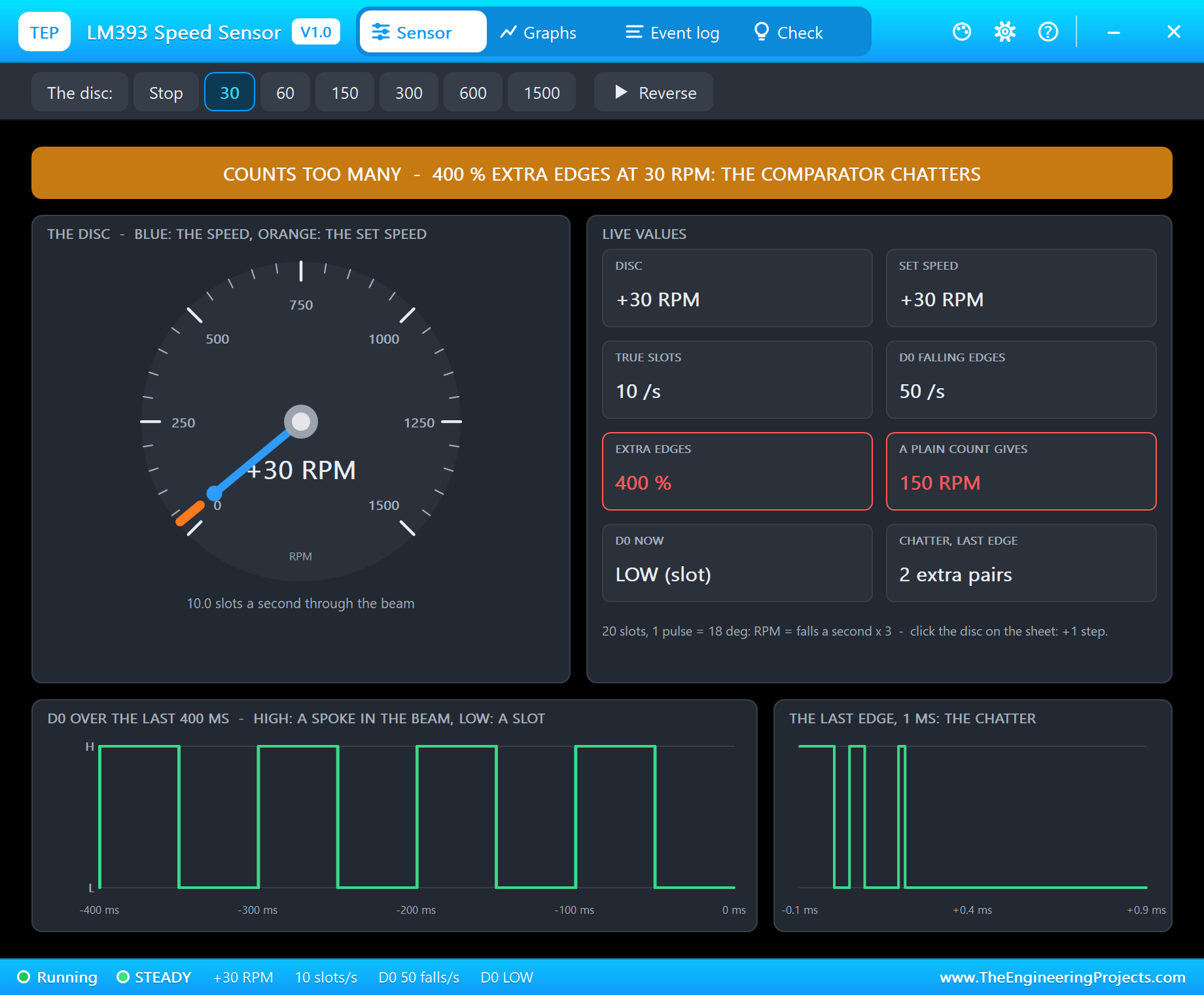
Click 30. The disc turns twice a second now, 10 slots a second. The edges are slower still, and every one of them brings 2 extra pairs. The pop-up shows 400 % extra edges, and a plain count gives 150 RPM - five times the truth. With no lockout, the monitor agrees:
raw 50 -> 150 RPM | filtered 50 -> 150 RPM (lockout 0 us)
raw 50 -> 150 RPM | filtered 50 -> 150 RPM (lockout 0 us)
raw 47 -> 141 RPM | filtered 47 -> 141 RPM (lockout 0 us)
raw 53 -> 159 RPM | filtered 53 -> 159 RPM (lockout 0 us)
The Cure: a Short Lockout
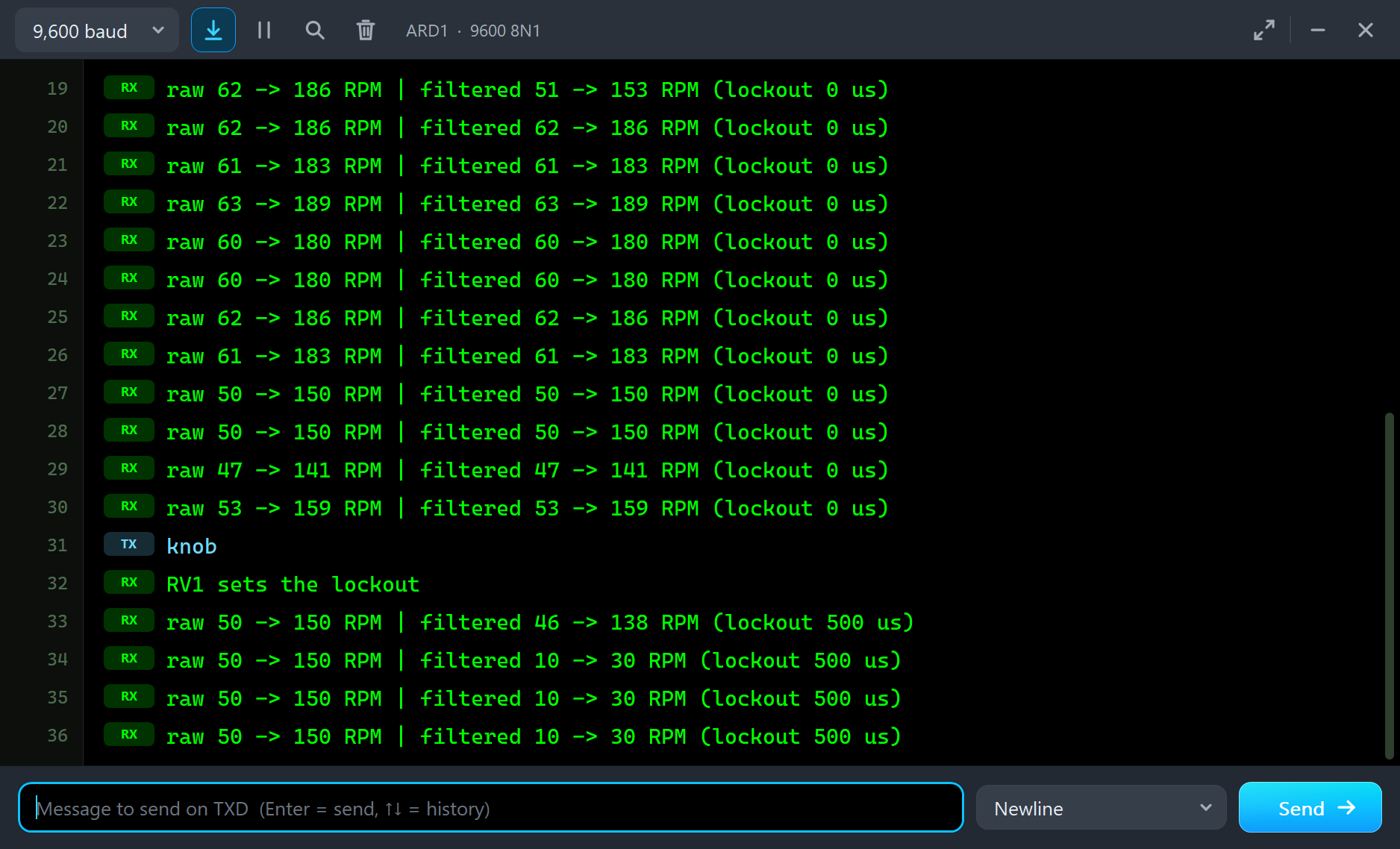
Type knob. RV1 takes the lockout back - 25 % of its travel, 0.5 ms - and one second later the filtered count is right again:
knob
RV1 sets the lockout
raw 50 -> 150 RPM | filtered 46 -> 138 RPM (lockout 500 us)
raw 50 -> 150 RPM | filtered 10 -> 30 RPM (lockout 500 us)
raw 50 -> 150 RPM | filtered 10 -> 30 RPM (lockout 500 us)
The raw count stays at 150 RPM, the filtered one says 30 RPM. Half a millisecond is long compared with the chatter (15 to 50 microseconds) and short compared with the slots. The rule is to keep the lockout under half a slot period. A 0.5 ms lockout therefore works up to 1000 slots a second - 3000 RPM with this 20-slot disc. Turn RV1 and watch the edge: too little lockout and the chatter leaks through; far too much, at high speed, and real slots are lost.
Fast and Backwards
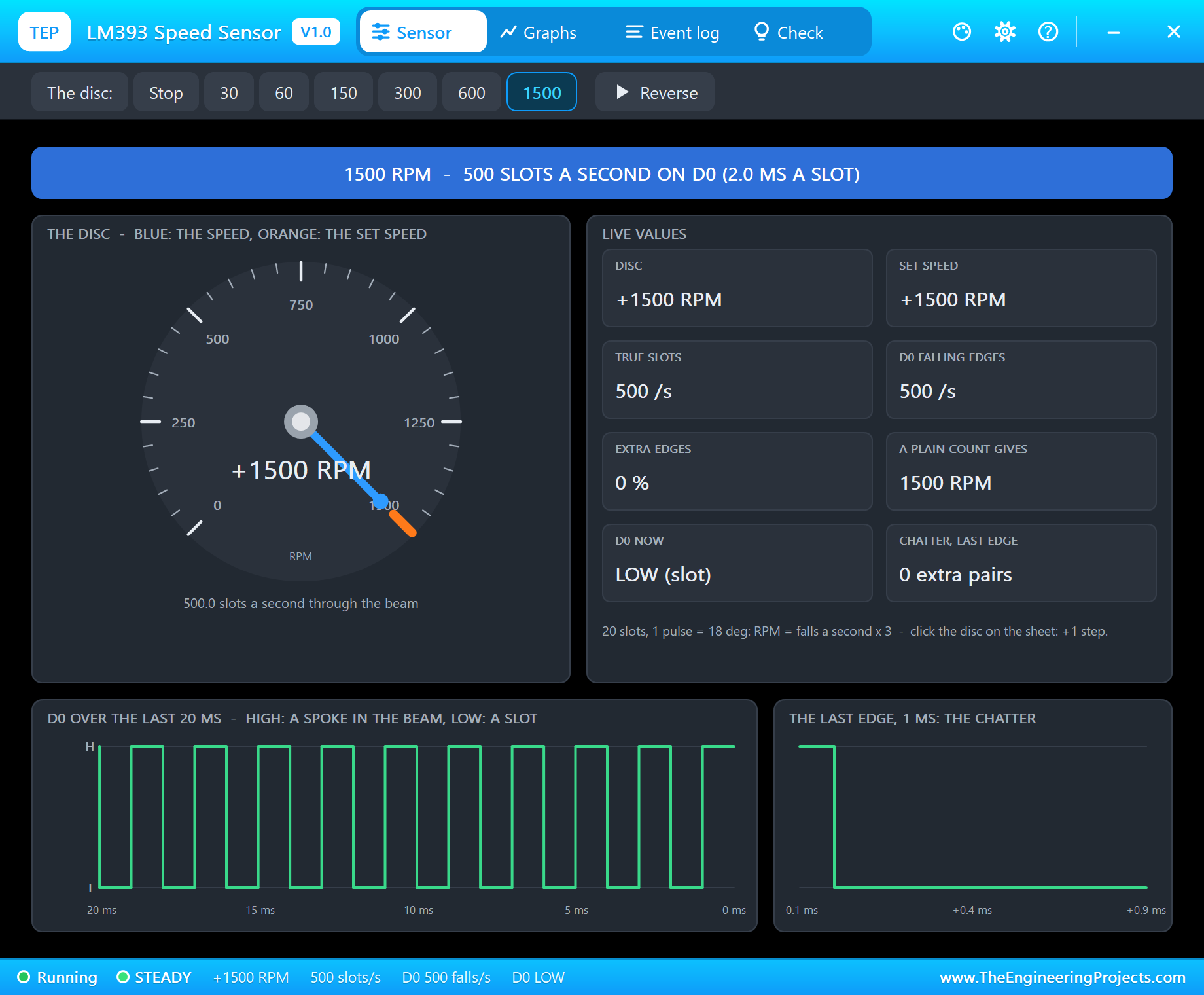
Click 1500. The disc runs up in about 1.2 s and gives 500 slots a second, 2.0 ms a slot. Fast edges do not chatter: 500 falling edges a second, 0 % extra, and both counts in the monitor say 1500 RPM. On the schematic, the disc is now a uniform band.
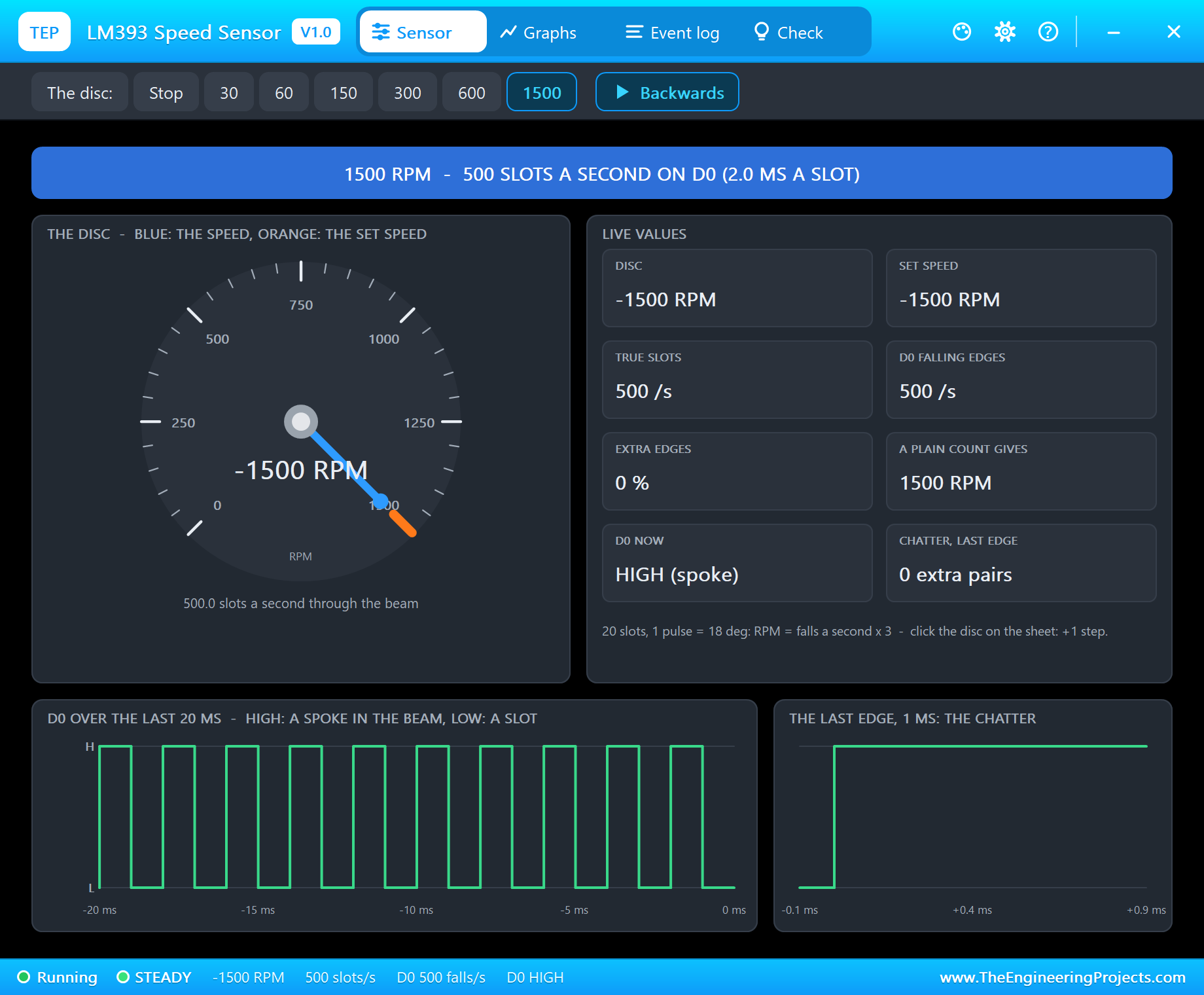
Now click Reverse. The disc slows, passes through zero and runs up the other way to -1500 RPM. The disc and set speed show the minus sign - but look at D0: still 500 slots a second, still the same square wave. The banner says 1500 RPM, and the Arduino prints 1500 RPM. One slot sensor cannot tell the direction: a slot passing the beam looks the same both ways. Encoders that know the direction use two sensors a quarter of a slot apart - a quadrature pair, as on the motor of our N20 Encoder Gear Motor Library for Proteus.
Graphs, Stop and the Event Log
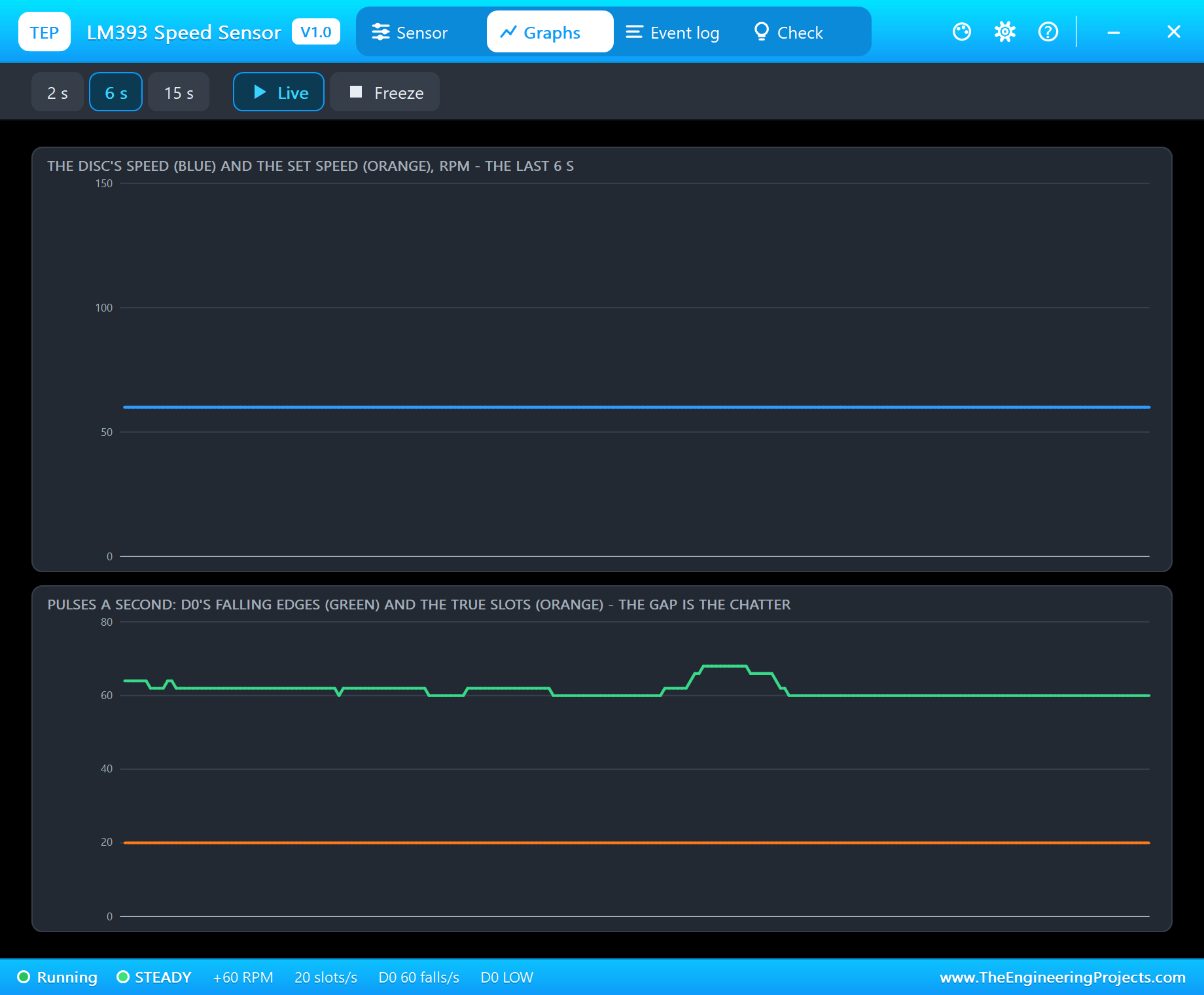
Graphs draws the disc's speed against the set speed, and below it the pulses a second: D0's falling edges in green and the true slots in orange, over the last 2, 6 or 15 seconds. When the two lines lie on top of each other, every pulse is a slot. When they part, the gap is the chatter. At 60 RPM the orange line sits flat at 20 while the green one wanders between 60 and 68. During a run-up the green line runs ahead of the orange one while the disc is still slow, and joins it as the speed rises.
At the end of the run we clicked Reverse once more, back to +1500 RPM, then Stop, then 300 RPM. The monitor tells the whole story:
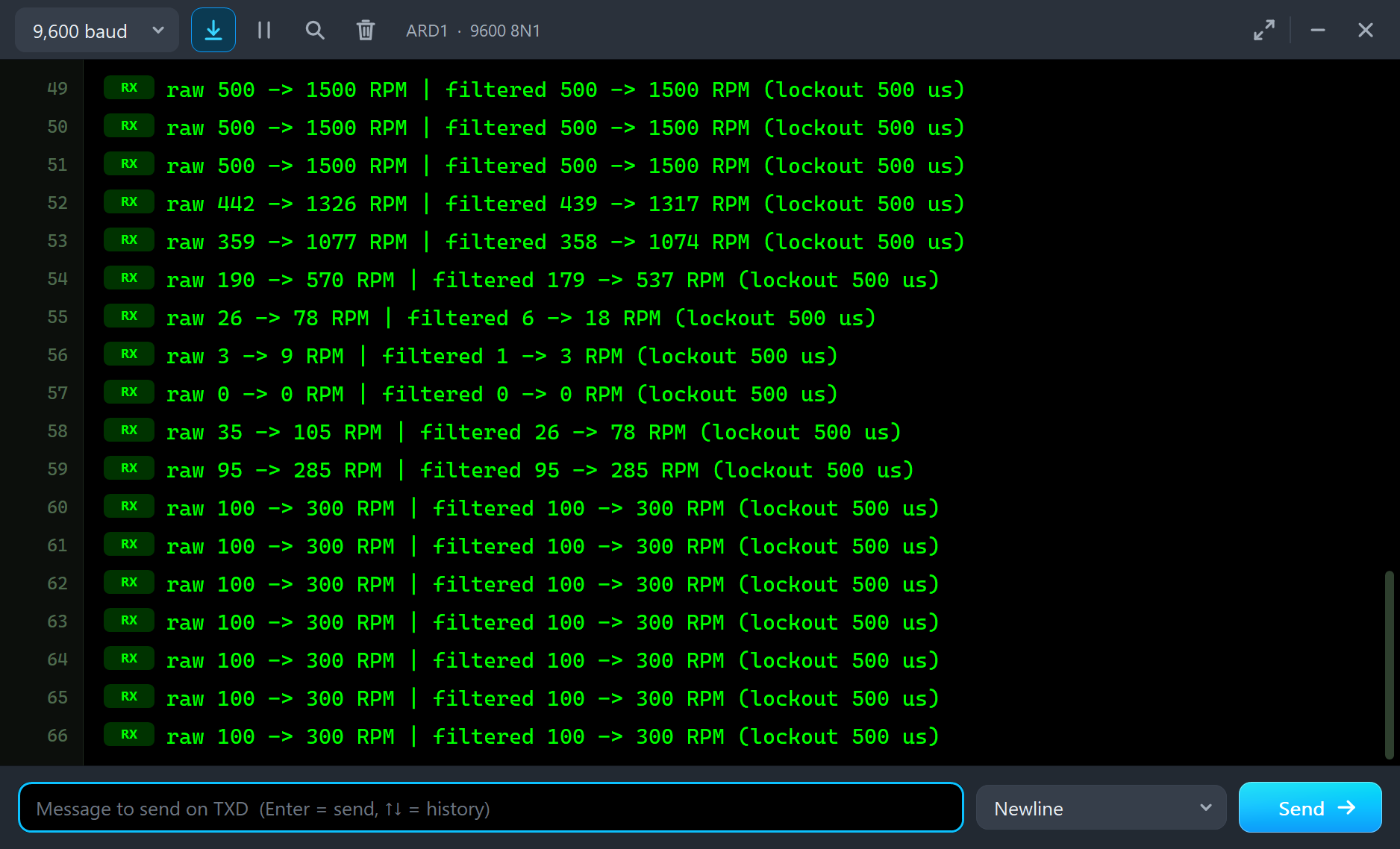
raw 500 -> 1500 RPM | filtered 500 -> 1500 RPM (lockout 500 us)
raw 442 -> 1326 RPM | filtered 439 -> 1317 RPM (lockout 500 us)
raw 359 -> 1077 RPM | filtered 358 -> 1074 RPM (lockout 500 us)
raw 190 -> 570 RPM | filtered 179 -> 537 RPM (lockout 500 us)
raw 26 -> 78 RPM | filtered 6 -> 18 RPM (lockout 500 us)
raw 3 -> 9 RPM | filtered 1 -> 3 RPM (lockout 500 us)
raw 0 -> 0 RPM | filtered 0 -> 0 RPM (lockout 500 us)
raw 35 -> 105 RPM | filtered 26 -> 78 RPM (lockout 500 us)
raw 95 -> 285 RPM | filtered 95 -> 285 RPM (lockout 500 us)
raw 100 -> 300 RPM | filtered 100 -> 300 RPM (lockout 500 us)
Read the slow seconds. While the disc runs down through the last hundred RPM, the raw count says 26 slots and the filtered one 6 - the chatter returns every time the disc is slow, even for a moment. The same happens on the way back up: 35 against 26 in the first second, then 95 and 95 once the disc is fast. When the disc stops, D0 simply stays where it is: the Event log notes that it stopped with a slot in the beam, so D0 stays LOW.
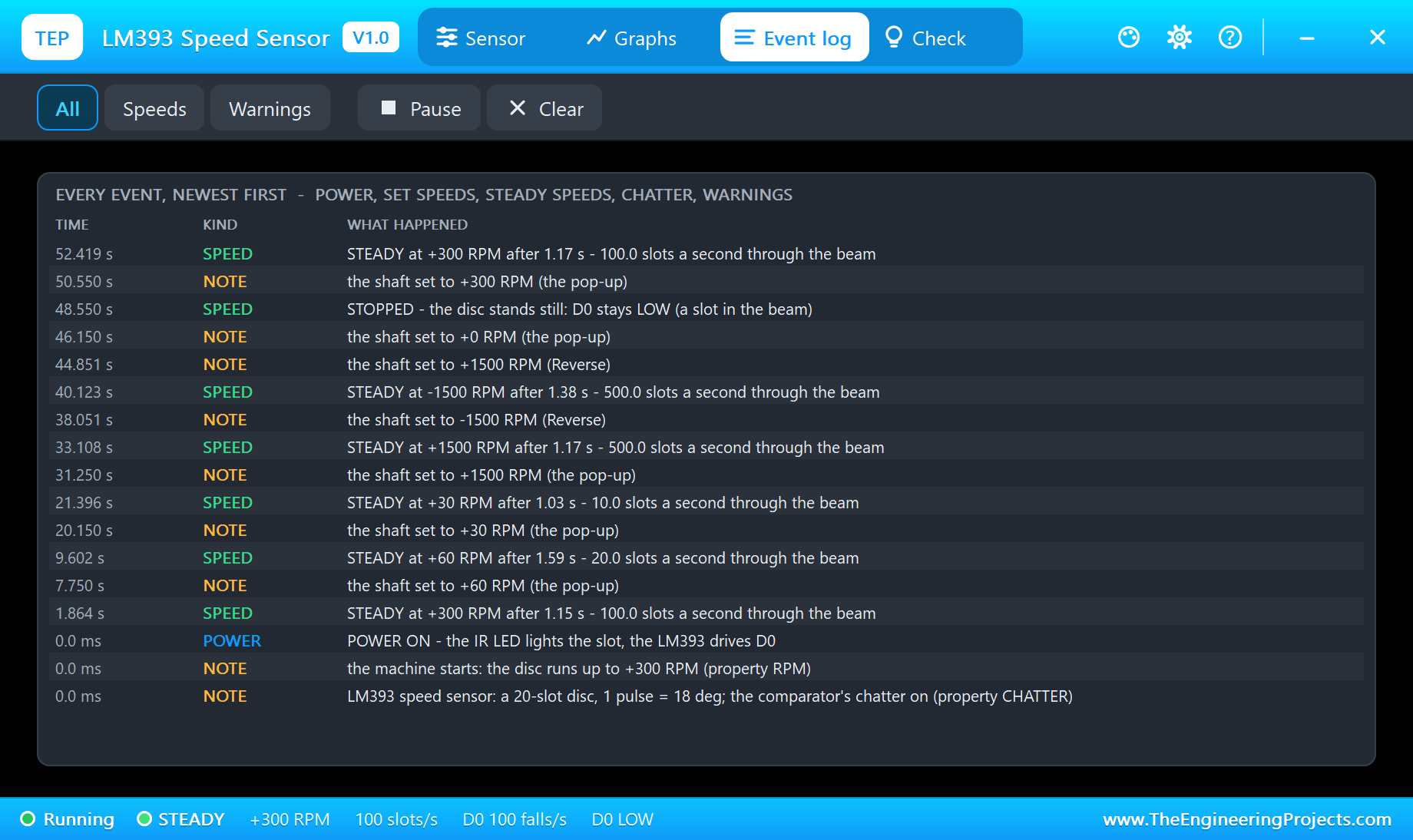
The Event log keeps the run with the simulation time: POWER ON, every set speed and where it came from (property RPM, the pop-up, Reverse or a click on the disc), every steady speed with its run-up time - the disc reached 300 RPM after 1.15 s, 60 RPM after 1.59 s, 30 RPM after 1.03 s and -1500 RPM after 1.38 s - and STOPPED. Filter it by speeds or warnings, pause it or clear it.
The Check Page
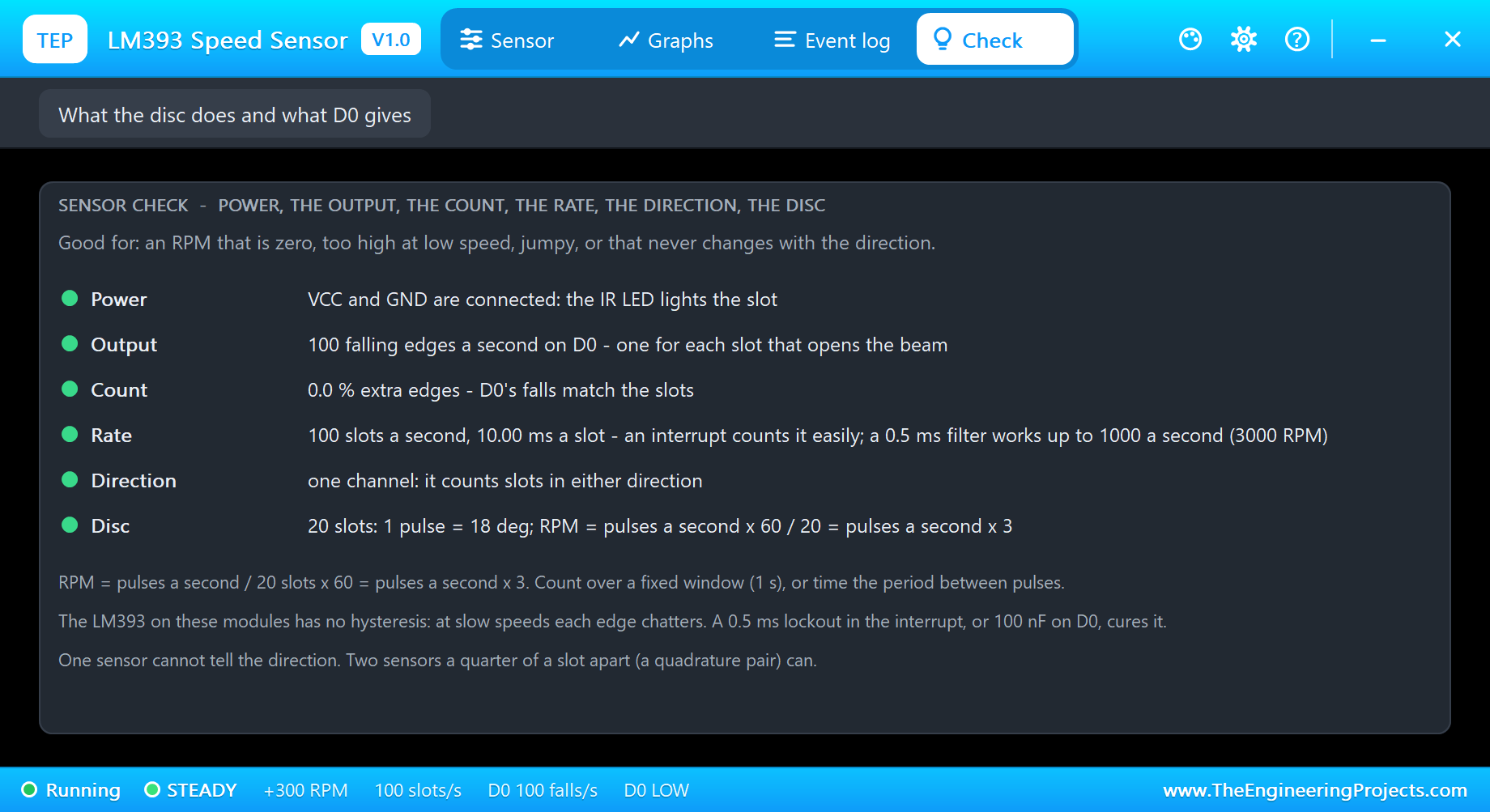
The Check page answers the forum questions in one look, each row with a verdict - green for fine, amber to check, red for wrong. Power checks VCC and GND. Output counts D0's falling edges. Count compares them with the true slots and turns amber when the chatter adds edges. Rate gives the time per slot and the limit of a 0.5 ms filter. Direction reminds you that one channel counts slots either way, and Disc gives the formula for 20 slots.
Underneath are the three rules of this sensor: RPM is pulses a second times 3; the LM393 has no hysteresis, and a 0.5 ms lockout or 100 nF on D0 cures the chatter; and one sensor cannot tell the direction. If your RPM is zero, too high at low speed, jumpy, or never changes sign, start here.
How the Model Works
The model is a digital one, and it does not sample D0 - it predicts it. From the disc's angle and speed it works out the exact moment of the next slot edge and schedules D0's change for that moment. When chatter is on and the disc is slow, it adds the glitch train to the edge: up to 2 short pairs, each toggle at its own scheduled time. Only one event is pending at a time, so even 500 slots a second cost Proteus almost nothing. A 50 ms poll moves the shaft toward the set speed with the machine's 0.3 s lag, reads the pop-up's clicks and writes the log.
We checked it on a PC with 14 automatic tests on the module: 300 RPM gives 100 slots a second and no chatter even with CHATTER on; at 60 RPM D0 falls 3.05 times per slot and a plain count gives 180 RPM, while a 0.5 ms lockout gives exactly 1.000 times; 30 RPM gives 400 % extra edges; -300 RPM gives the same 100 a second; without power D0 floats; and the run-up to 1500 RPM takes 1.0 - 1.3 s. Three more tests render the pop-up pages, and the demo project is read back from disk with 51 checks.
Troubleshooting
- No pulses (STOPPED): the disc stands still - pick a speed on the pop-up or click the disc.
- NO POWER: VCC or GND is not connected, and D0 floats.
- The RPM is far too high at low speed: the chatter - use a lockout of about 0.5 ms (filter 500), or set CHATTER to NO for an ideal sensor.
- The RPM is too low at high speed: the lockout is longer than half a slot period - shorten it.
- The RPM does not change sign backwards: one sensor cannot tell the direction.
- The disc never turns, no UNO or no monitor:
TEPLM393.DLLorTEPARDUINO.DLLis missing from MODELS and the project folder; a closed monitor opens again with a click on the UNO's USB port.
Things to Know Before Using a Real LM393 Speed Sensor
- The chatter is real: these modules use the LM393 without hysteresis. A 0.5 ms lockout in software, or a 100 nF capacitor from D0 to GND, cures it.
- Keep the lockout under half a slot period: 0.5 ms works up to 1000 slots a second.
- Use an interrupt pin: D2 or D3 on the UNO, never polling in
loop(). - Direction needs two sensors: a quarter of a slot apart, read as a quadrature pair.
- Shield the slot from daylight: sunlight holds the phototransistor on and D0 stays LOW.
- Want a motor to put the disc on? Our TT Gear Motor Library for Proteus is the yellow motor these discs are made for, and our DC Tachogenerator Library for Proteus measures a shaft's speed the analog way.
Limitations of the Simulation
- Not modelled: the analog output (A0) of 4-pin boards, the threshold trimmer, ambient light, a dirty or misaligned slot and the 100 nF capacitor fix - use CHATTER NO for a filtered module.
- The plate, the strip, the speed chips and the clickable disc are TEP additions.
- The model is our own, written from the typical behaviour of LM393 slotted optical speed sensor modules; this library is not made or endorsed by any module maker, Arduino or Labcenter.
- Licences: the demo HEX contains the Arduino AVR core 1.8.6 (LGPL); the sketch is included and the README gives the source link. The potentiometer is Proteus's own.
- Tested in Proteus 8.5 in October 2026 with the demo as shipped: 300, 60 and 30 RPM, filter 0, knob, 1500 RPM, Reverse, Stop and all four pages of the pop-up. Proteus 7 is not supported.
So, that was all about the LM393 Speed Sensor Library for Proteus V1.0. I hope it helps you get your speed measurement right in Proteus first - the interrupt, the lockout and the limits of a single sensor - before you mount a real disc on a real motor. If you have any questions, ask in the comments and I will help you out. Till the next tutorial, take care and have fun!