


28BYJ-48 Stepper Motor Library for Proteus V1.0 (Any Driver, ULN2003)


Hello friends, I hope you all are doing great. Today, I am going to share the new 28BYJ-48 Stepper Motor Library for Proteus V1.0. The 28BYJ-48 is the little silver stepper with the blue cable that comes in almost every Arduino starter kit. It costs less than a coffee, runs from 5 V and turns its shaft in tiny, exact steps, which makes it the first motor most of us use for a pointer, a clock hand, a camera turntable or a smart blind.
28BYJ-48 Stepper Motor Library for Proteus
Latest version: V1.0 (October 2026, this tutorial)
Helping Tools
- Serial Monitor Advance: a serial terminal window for the UART of your board
- Serial Monitor Expert: the serial monitor with extra debugging tools
- LCD Library for Proteus V3.0: 16x2, 20x4 and I2C LCDs to show your readings
This library gives the 28BYJ-48 a part of its own in Proteus. The model is analog: its four half-coils are 50 ohm windings in your circuit, so any driver that pulls the wires low runs it - Proteus's own ULN2003A chip in the demo, transistors, MOSFETs or an L293D. Inside it has the real gearbox of 63.68 : 1, the detent torque, the inertia and the friction, so it turns at the real speed, stalls when it is driven too fast and loses steps when the load is too heavy. A dial on the shaft turns on your schematic, and a pop-up window shows the coils, the angle and every lost step. The demo runs on our Arduino UNO V4.0 with the standard Stepper.h library.
NOTICE: a stepper in a simulator is only honest if it can fail like a real one. So we built the coils, the magnetic steps, the gears and the load, and the motor slips when it should. It took our team a lot of hard work. Your feedback is the fuel that keeps us going, so please tell us what you think in the comments below or in the Motor Driver board of our forum. And if our free libraries help you, you can buy us a coffee. So, let's get started with the 28BYJ-48 Stepper Motor Library for Proteus V1.0:
What is the 28BYJ-48 Stepper Motor?
A stepper motor turns in steps instead of spinning freely. Its rotor is a magnet, its stator has several coils, and every time the driver switches the next coil on, the rotor jumps to line up with it. Count the steps and you know where the shaft is - no sensor needed. That is why steppers move printer heads, camera sliders and gauge needles.
The 28BYJ-48 is a small 28 mm stepper with a plastic gearbox on top. Its rotor makes 32 full steps per turn, and the gears slow it down by about 64 times, so the output shaft needs about 2048 steps for one turn - a fine resolution of about 0.18 degrees per step, with a lot of torque for its size. The price is speed: the shaft tops out near 15 - 20 RPM.
| 28BYJ-48 5 V stepper (the model) | |
|---|---|
| Type | unipolar, 4 phases (four half-coils with a common RED wire) |
| Supply | 5 V on RED |
| Coils | 50 ohm per half-coil, about 90 mA each when on |
| Rotor | 32 full steps (64 half steps) per turn |
| Gearbox | 63.68 : 1 - so 2037.9 full or 4075.8 half steps per turn of the shaft |
| Holding torque | about 55 mN.m at 5 V |
| Top speed | about 15 - 20 RPM at the shaft |
| Wires | RED common, ORANGE coil A, YELLOW coil B, PINK coil C, BLUE coil D |
Unipolar Coils and the ULN2003
The 28BYJ-48 is a unipolar stepper: the red wire is the common end of all four half-coils and goes to +5 V, and each of the other four wires is the far end of one half-coil. A coil switches on when its wire is pulled to ground. That needs no H-bridge, only four low-side switches, and the classic choice is the ULN2003: seven Darlington transistors with clamp diodes in one chip. Bipolar steppers like the NEMA 17 have no common wire and need an H-bridge driver instead.
Full Steps, Half Steps and Wave Drive
There are three ways to walk the coils. Wave drive switches one coil on at a time: simple, but weak. Full steps switch two neighbouring coils on together: more torque, the same step size, and this is what the Arduino Stepper library does. Half steps alternate between one and two coils, so the rotor stops halfway between full steps: twice the resolution, 4075.8 half steps per turn. The model recognises all three from the coil pattern.
Why 2048 Is Not Quite One Turn
Almost every tutorial says the 28BYJ-48 takes 2048 steps per turn: 32 steps times a 64 : 1 gearbox. The real gearbox is 63.68 : 1, so one turn is 2037.9 full steps. The difference is only 10 steps, but it adds up: a motor told to turn 2048 steps goes 1.8 degrees too far, and after ten turns a clock hand is 18 degrees off. Our model has the real gearbox, so you see this in the simulation exactly as on the bench.
What's New in 28BYJ-48 Stepper Motor Library for Proteus V1.0
- A part of its own: the motor no longer needs our ULN2003 board. Wire it to Proteus's ULN2003A, transistors, MOSFETs or an L293D.
- Coils in the circuit: each half-coil is a 50 ohm winding from RED to its wire, so an output that lets go is pulled back up to RED, as on the real motor, and the driver carries the real current.
- The real gearbox: 2037.9 full steps per turn, not 2048 - the creep you meet on the bench is in the simulation.
- Real limits: the detent torque, inertia, friction and a load - it stalls above its speed and loses steps under a heavy load.
- A dial that turns on the schematic to the simulated shaft angle, and four coil LEDs in the wire colours.
- It reads your sketch: full steps, half steps and wave drive are recognised, and the wrong pin order is named.
- A pop-up window with four pages - Stepper, Graphs, Event log and Check.
- An A4 demo on our Arduino UNO V4.0 with the Arduino Stepper library, a ULN2003A and a potentiometer.
If you already use our 28BYJ-48 Stepper Motor and ULN2003 Driver Library for Proteus, that library stays as it is: its motor is made for our green ULN2003 board and runs only on it. The new motor is a standalone part for any driver, with a pop-up of its own.
The 28BYJ-48 in Proteus
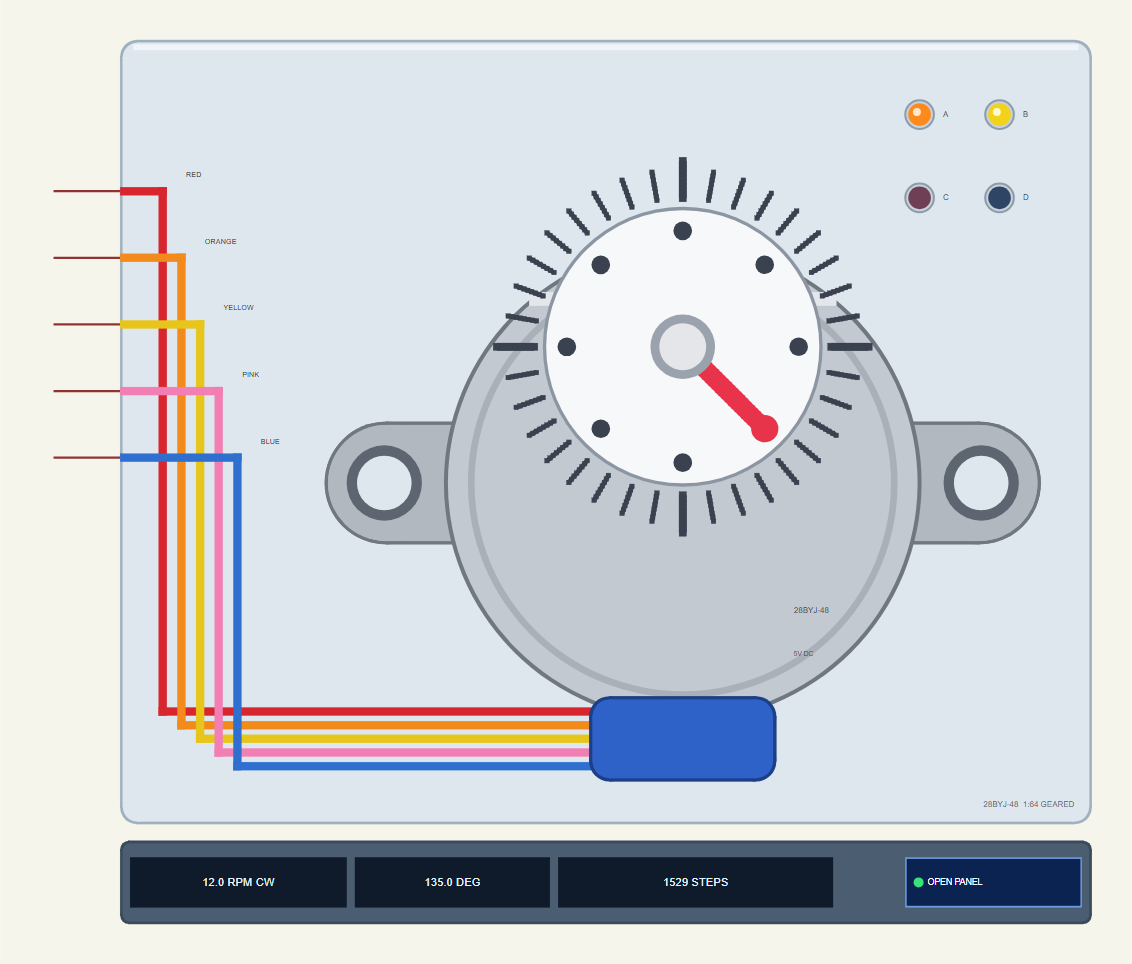
Search 28BYJ in Pick Devices; the device BYJ48STEPPERTEP is in TEPBYJ48.LIB (category Electromechanical, Stepper Motors) and its model is TEPBYJ48.DLL. It is drawn from the shaft end: the silver can with its two mounting ears, the off-centre output shaft with a white dial over a degree scale, and the blue cable exit with the red, orange, yellow, pink and blue wires running to the five pins on the left.
The red hand on the dial turns to the simulated shaft angle. Four coil LEDs in the wire colours - A orange, B yellow, C pink, D blue - light while their coil is on, so you can watch the step pattern walk round. Under the plate the strip shows the speed with its direction, the angle and the step count, and the OPEN PANEL button. The plate, the LEDs and the strip are TEP additions; the real motor has none of them.
The Pins and the Properties
| Pin | What the model does with it |
|---|---|
| RED | the common of the four half-coils: 5 V |
| ORANGE, YELLOW, PINK, BLUE | coils A - D: a 50 ohm winding from RED; on while the wire is pulled more than half the supply below RED |
| Property | Default | What it does |
|---|---|---|
| LOAD | 0 | a constant load on the shaft in mN.m (it holds about 55 mN.m at 5 V, less while it turns) |
| START | 0 | the dial's angle at the start, in degrees |
A Click on the Dial: the Brake
Click the dial while the simulation runs and you hold the shaft with an 80 mN.m brake - stronger than the motor. Now ask for a move: the coils step on, but the rotor cannot follow, and every step is lost. This is the best way to see what an open-loop stepper does when it is overloaded, and we use it in the demo below.
Download 28BYJ-48 Stepper Motor Library for Proteus
The download link of 28BYJ-48-Stepper-Motor-Library-for-Proteus-v1.0.zip (without the source code) will be added here soon. The zip file will contain:
- README.txt: installation, the demo, the wiring, the properties, real hardware, troubleshooting and the limits.
- Proteus Library Files:
TEPBYJ48.LIBandArduinoV4TEP.LIBfrom our Arduino Library for Proteus V4.0. - Proteus Model Files:
TEPBYJ48.DLLandTEPARDUINO.DLL. - Proteus Simulation:
28BYJ-48-Stepper-ULN2003A-ArduinoUnoV4.pdsprj,BYJ48_Stepper_Demo.hexand copies of the two DLLs. - Arduino Code:
BYJ48_Stepper_Demo.ino(the Stepper library comes with the Arduino IDE).
The driver of the demo is Proteus's own ULN2003A, so there is nothing else to install. No Proteus yet? Read How to Download and Install Proteus 7 and 8. New to libraries? Follow How to Install a New Library in Proteus.
How to Install 28BYJ-48 Stepper Motor Library for Proteus
- Close Proteus and extract the whole zip file, for example to your Desktop.
- Copy
TEPBYJ48.LIBandArduinoV4TEP.LIBfrom Proteus Library Files into the LIBRARY folder of Proteus (usuallyC:\Program Files (x86)\Labcenter Electronics\Proteus 8 Professional\LIBRARY). - Copy
TEPBYJ48.DLLandTEPARDUINO.DLLfrom Proteus Model Files into the MODELS folder. The two Arduino files are the ones of our Arduino Library V4.0; if you have it, they are the same. - Delete
TEPBYJ48.IDXfrom the LIBRARY folder if it is there. - Start Proteus, press P and search for 28BYJ.
Tip: keep the Proteus Simulation folder together, because the project needs its .hex file and the DLLs beside it. The library is tested in Proteus 8.5; Proteus 7 is not supported.
The Demo Circuit
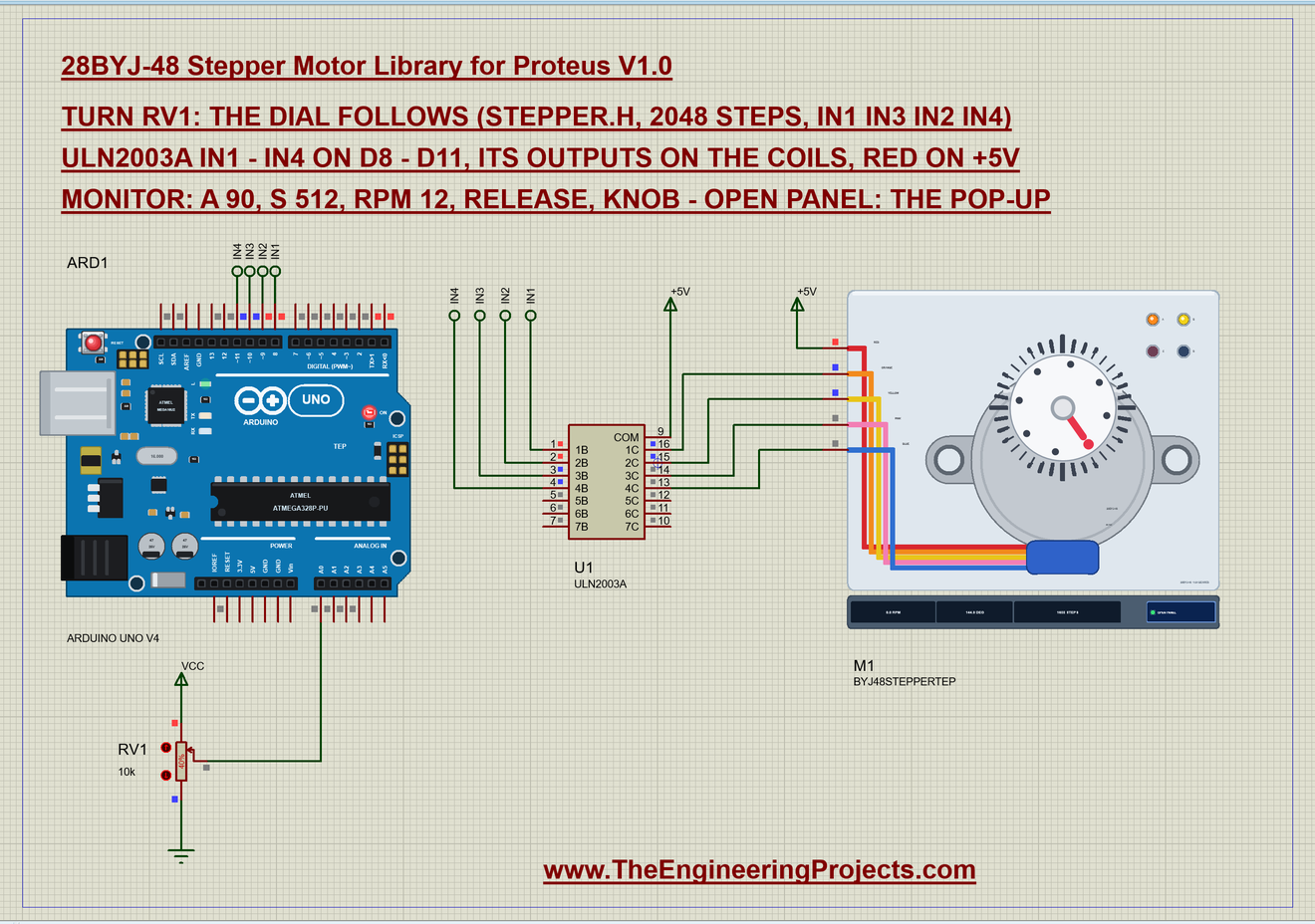
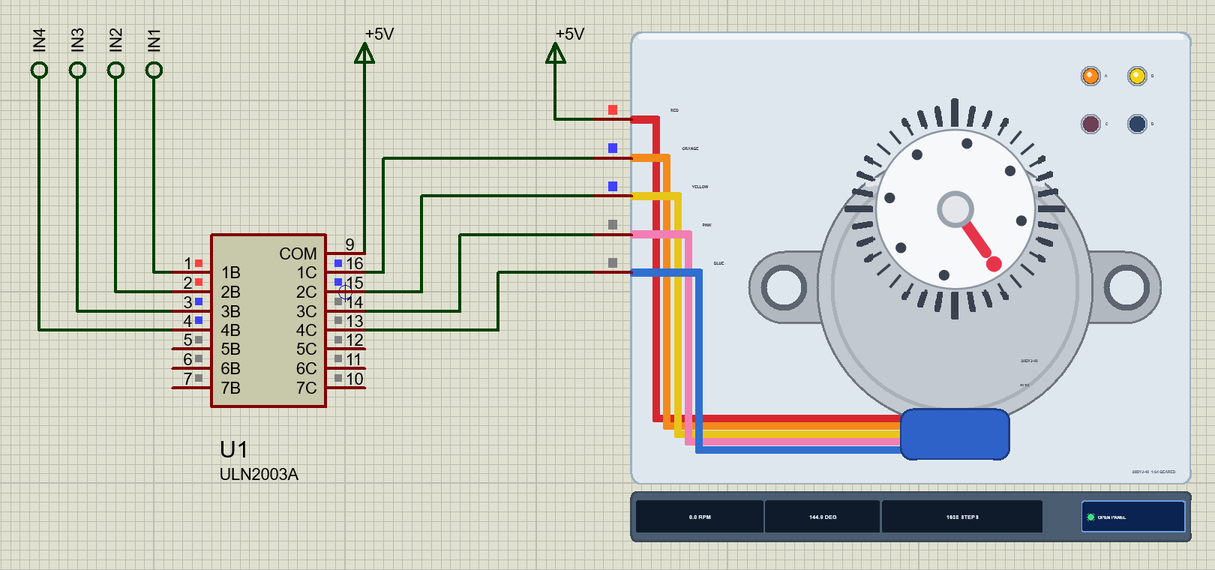
Open 28BYJ-48-Stepper-ULN2003A-ArduinoUnoV4.pdsprj. ARD1 is an Arduino UNO V4.0 from our Arduino UNO Library for Proteus V4.0, running BYJ48_Stepper_Demo.hex with its serial monitor built in. U1 is Proteus's own ULN2003A: its inputs 1B - 4B come from D8 - D11 through the net labels IN1 - IN4, its outputs 1C - 4C pull the orange, yellow, pink and blue wires, and COM sits on +5V for the clamp diodes. M1 is the 28BYJ-48 with RED on +5V. RV1 is a 10k potentiometer on A0: the dial follows it from 0 to 360 degrees.
| ULN2003 | Arduino UNO / motor | Note |
|---|---|---|
| IN1 (1B) | D8 | coil A |
| IN2 (2B) | D9 | coil B |
| IN3 (3B) | D10 | coil C |
| IN4 (4B) | D11 | coil D |
| OUT1 - OUT4 (1C - 4C) | ORANGE, YELLOW, PINK, BLUE | the four coil wires |
| COM | +5V | the clamp diodes |
| GND | GND | common with the Arduino |
| RED (the motor) | +5V | the motor's supply |
Proteus's ULN2003A has open-collector outputs: when a transistor switches off, nothing in the chip pulls the wire back up. On a real motor the coil does it - the wire floats up to RED through the winding - and our model does the same, which is why it works with any open-collector driver.
The Arduino Code
The demo uses the Stepper library that comes with the Arduino IDE. New to Arduino? Start with Arduino Tutorial for Beginners and Introduction to Arduino UNO; our older Stepper Motor Speed Control using Arduino tutorial explains the basics too. The sketch starts with the library, the pins and one Stepper object:
#include <Stepper.h>

const int STEPS = 2048;                       // per turn, as the library counts it (the real gearbox: 2037.9)
const int IN1 = 8, IN2 = 9, IN3 = 10, IN4 = 11, POT = A0;
Stepper motor(STEPS, IN1, IN3, IN2, IN4);
Look at the order of the pins: IN1, IN3, IN2, IN4. The Stepper library expects the coils in the order of its four-wire sequence, and on a 28BYJ-48 that means the middle two swapped. Write IN1, IN2, IN3, IN4 and the motor only buzzes in place - the most common 28BYJ-48 mistake of all, and one the model names on its pop-up as WRONG ORDER.
void setup() {
  Serial.begin(9600);
  motor.setSpeed(rpm);
setSpeed(12) asks for 12 RPM: the library waits 60 s / (2048 x 12) between steps, about 2.4 ms, which is 409 steps per second. The knob reads the pot and turns it into a target in steps:
  if (mode == KNOB) {
    int raw = analogRead(POT);
    if (abs(raw - lastPot) > 4) {
      lastPot = raw;
      target = map(raw, 0, 1023, 0, STEPS - 1);
motor.step(n) blocks until all n steps are done, so a long move would freeze the serial monitor. The sketch takes one step per pass of loop() instead and keeps its own position count:
  if (position != target) {                  // one step per loop: the monitor stays responsive
    int d = target > position ? 1 : -1;
    motor.step(d);
    position += d;
An angle typed in the monitor becomes steps with the same 2048 per turn:
if (s[0] == 'a' && s[1] == ' ') { mode = FIXED; target = lround(atof(s + 2) * STEPS / 360.0); report(F("angle")); return; }The speed can be changed from the monitor too. The sketch lets you go up to 20 RPM, beyond what a 28BYJ-48 can do, so you can watch it stall:
if (!strncmp(s, "rpm", 3)) { rpm = constrain(atoi(s + 3), 1, 20); motor.setSpeed(rpm); Serial.print(F("Speed ")); Serial.print(rpm); Serial.println(F(" RPM")); return; }And release switches all four coils off, because a held 28BYJ-48 draws its current all the time and gets warm:
void release() { digitalWrite(IN1, LOW); digitalWrite(IN2, LOW); digitalWrite(IN3, LOW); digitalWrite(IN4, LOW); }The HEX file is in the package. To change the sketch, open it in the Arduino IDE and export the compiled binary, as in How to get the HEX file from Arduino. It needs 8,968 bytes of flash (27 % of the UNO) and 302 bytes of RAM.
Running the Demo
Press Run. The UNO's serial monitor and the motor's pop-up open over the schematic; move them aside. RV1 starts at 40 %, so the first reading asks for 144.1 degrees:
Commands: a 90 | s 512 | rpm 12 | release | knob | help
Pot 410 -> target 820 steps = 144.1 deg
At 144.1 deg - holding
The dial turns at 12 RPM - 409 steps per second - and stops at 144.9 degrees with coils A and B on. Their two LEDs stay lit, and the motor draws 163 mA from RED: a stepper at rest still holds its position with full current. Click the arrows of RV1 and the dial follows the pot, the coil LEDs stepping round as it goes.
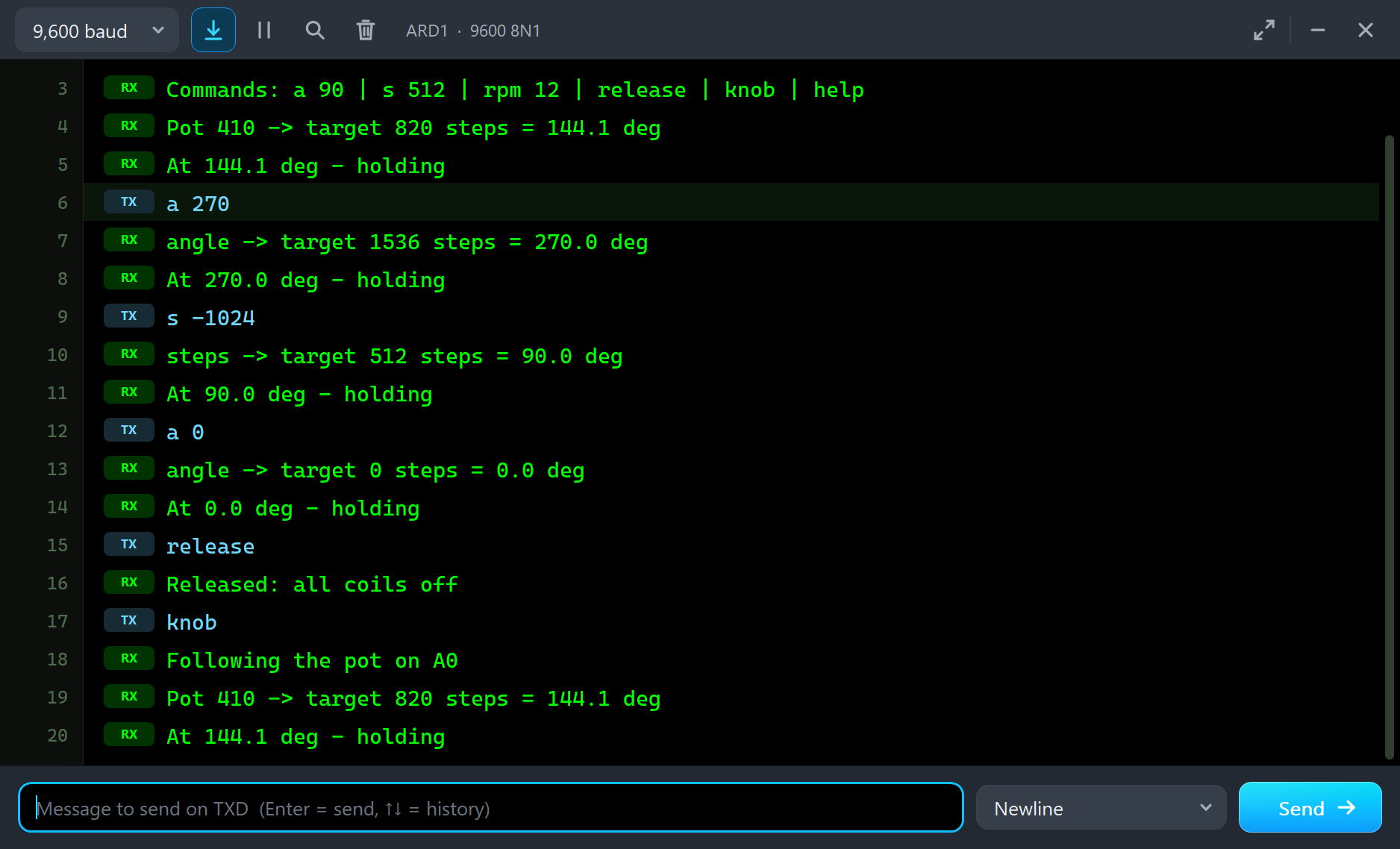
Now type a 270 and then s -1024:
a 270
angle -> target 1536 steps = 270.0 deg
At 270.0 deg - holding
s -1024
steps -> target 512 steps = 90.0 deg
At 90.0 deg - holding
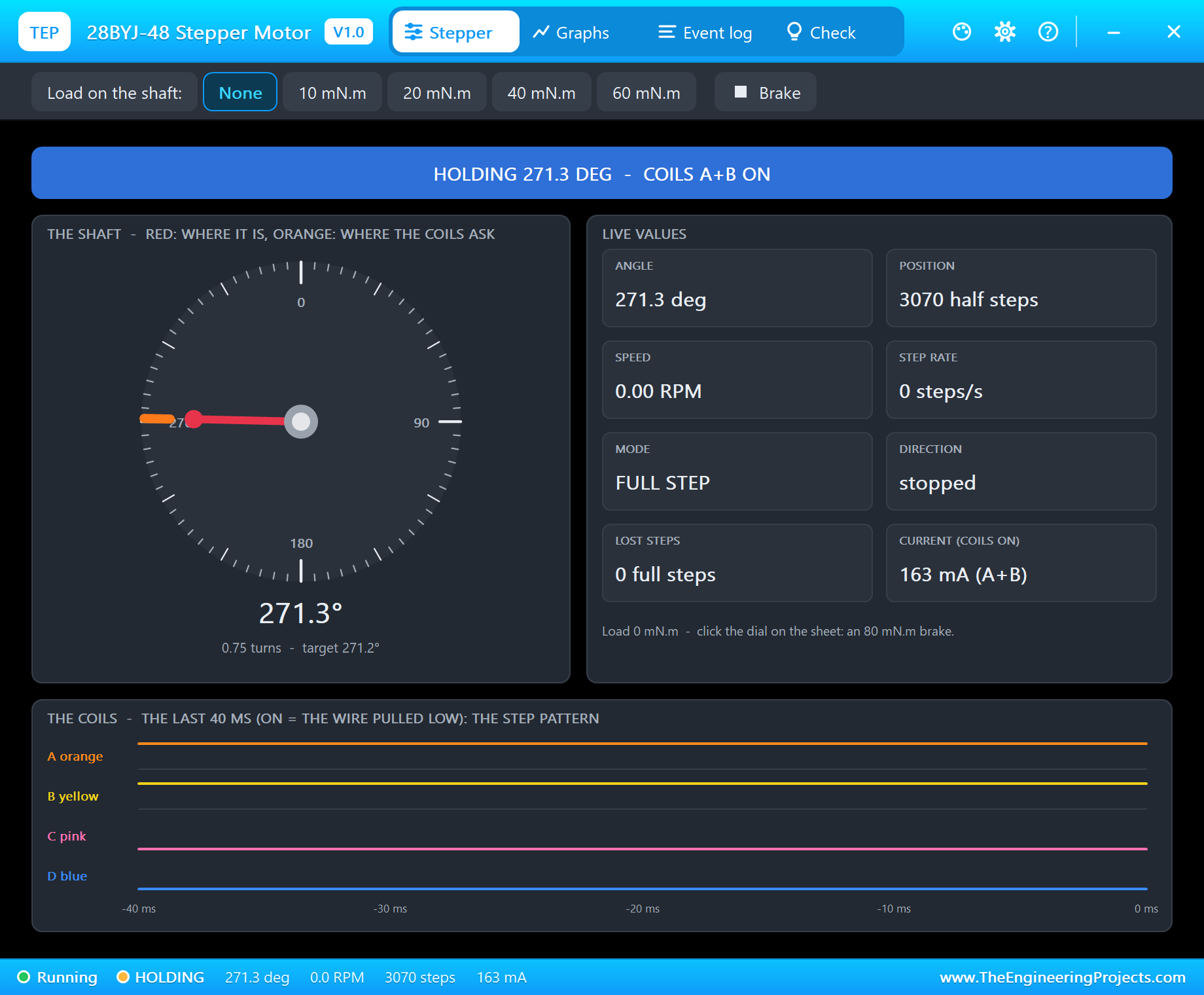
The sketch says 270.0 degrees, but the dial stops at 271.3 degrees. That is the gearbox: 1536 steps of 2048 per turn would be 270 degrees, but with 2037.9 steps per turn the shaft goes 1.3 degrees further. Then 1024 steps back bring it to 90.4 degrees. A real 28BYJ-48 does exactly the same.
| Type | What it does | What the run showed |
|---|---|---|
| a 90 | go to that angle and stay | a 270: the dial at 271.3 degrees (3070 half steps) |
| s 512 | that many steps from here; minus goes back | s -1024: back at 12 RPM to 90.4 degrees |
| rpm 12 | the speed, 1 - 20 RPM | about 15 RPM is the limit of a 28BYJ-48 |
| release | all coils off | RELEASED, 0 mA |
| knob | follow the pot on A0 again | the dial follows - but see the lost steps below |
| help | the list of commands |
The Pop-Up Window
At Run the motor opens TEP 28BYJ-48 Stepper Motor, a window in the look of our TEP Serial Monitor Advance for Proteus. It has four tabs - Stepper, Graphs, Event log and Check - plus Settings and Help behind the gear and question mark icons. If you close it, the OPEN PANEL button on the strip brings it back.
Stepper
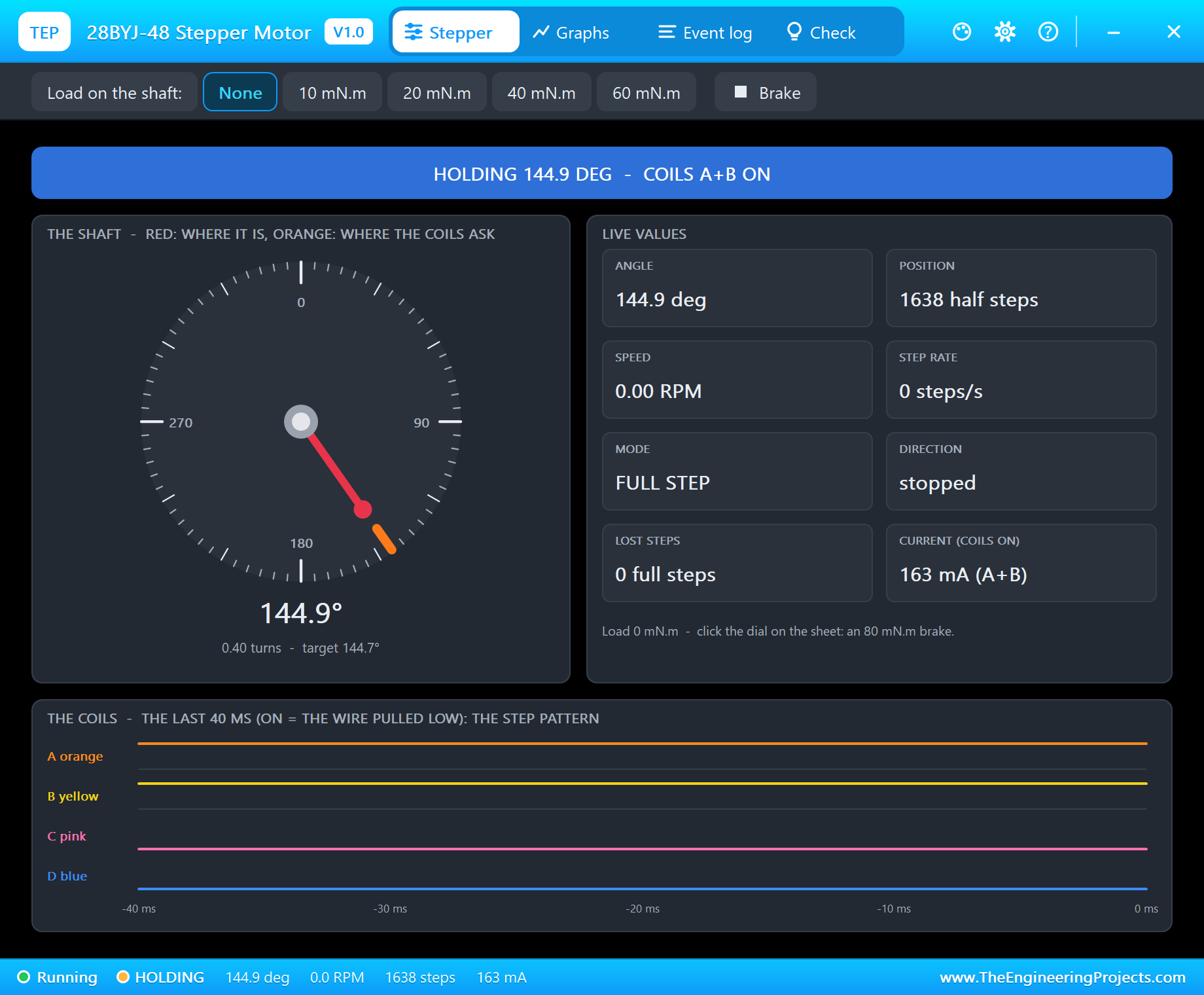
The banner gives the state in big letters: RUNNING, HOLDING, RELEASED, NO POWER, WRONG ORDER or LOST STEPS. The dial shows where the shaft is in red and where the coils ask it to be in orange; when they part, the motor has slipped. The live values are the angle, the position in half steps, the speed, the step rate, the mode (FULL, HALF or WAVE STEP), the direction, the lost steps and the current. At the bottom the four coils are drawn over the last 40 ms, so you see the step pattern itself. The toolbar puts a load on the shaft - None, 10, 20, 40 or 60 mN.m - or the brake.
Graphs
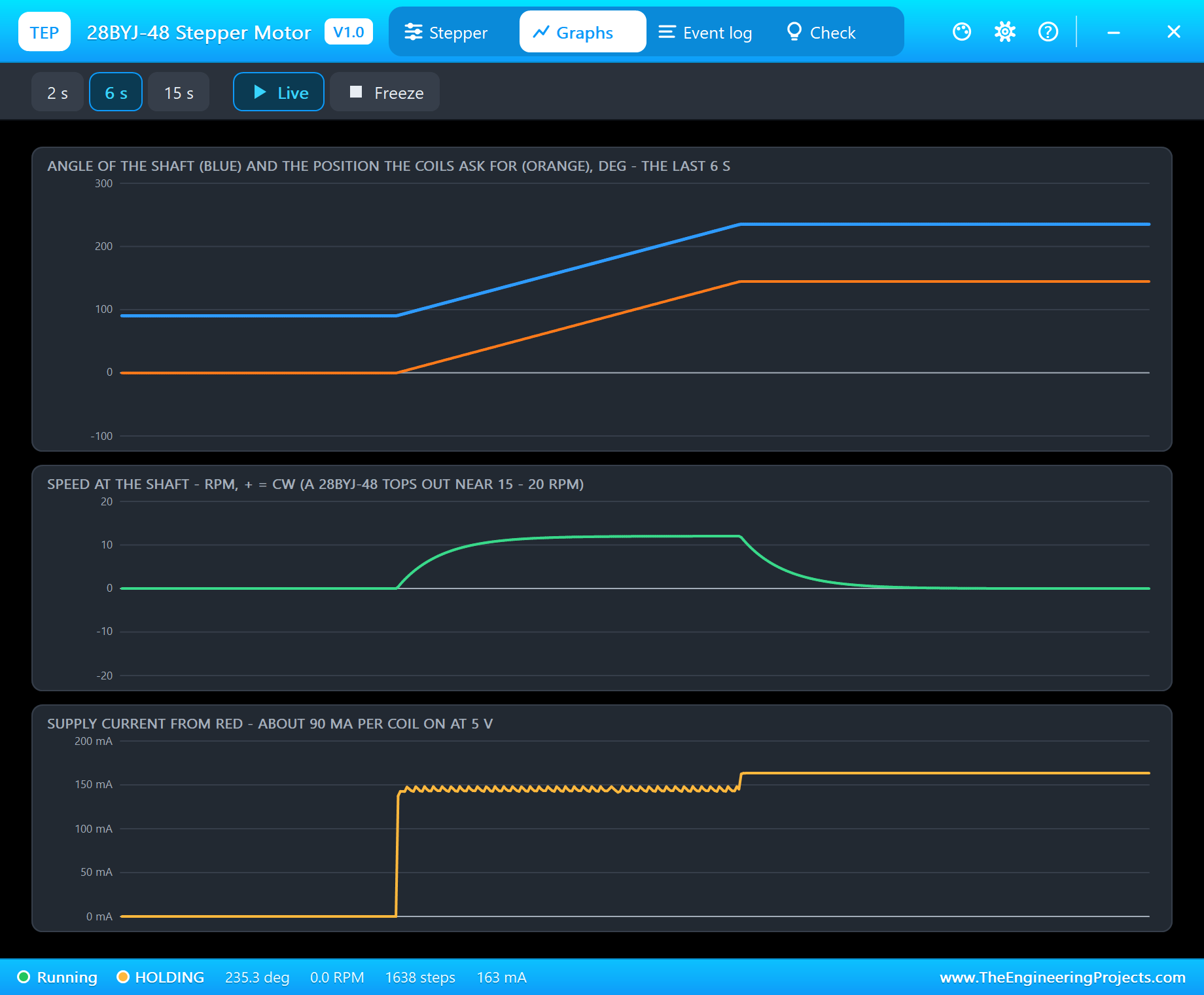
Graphs draws the angle of the shaft against the position the coils ask for, the speed and the current from RED over the last 2, 6 or 15 seconds. The speed curve shows the start of each move and the slow-down, and the current shows the step pattern: about 90 mA for each coil that is on. Freeze holds the page.
Event Log
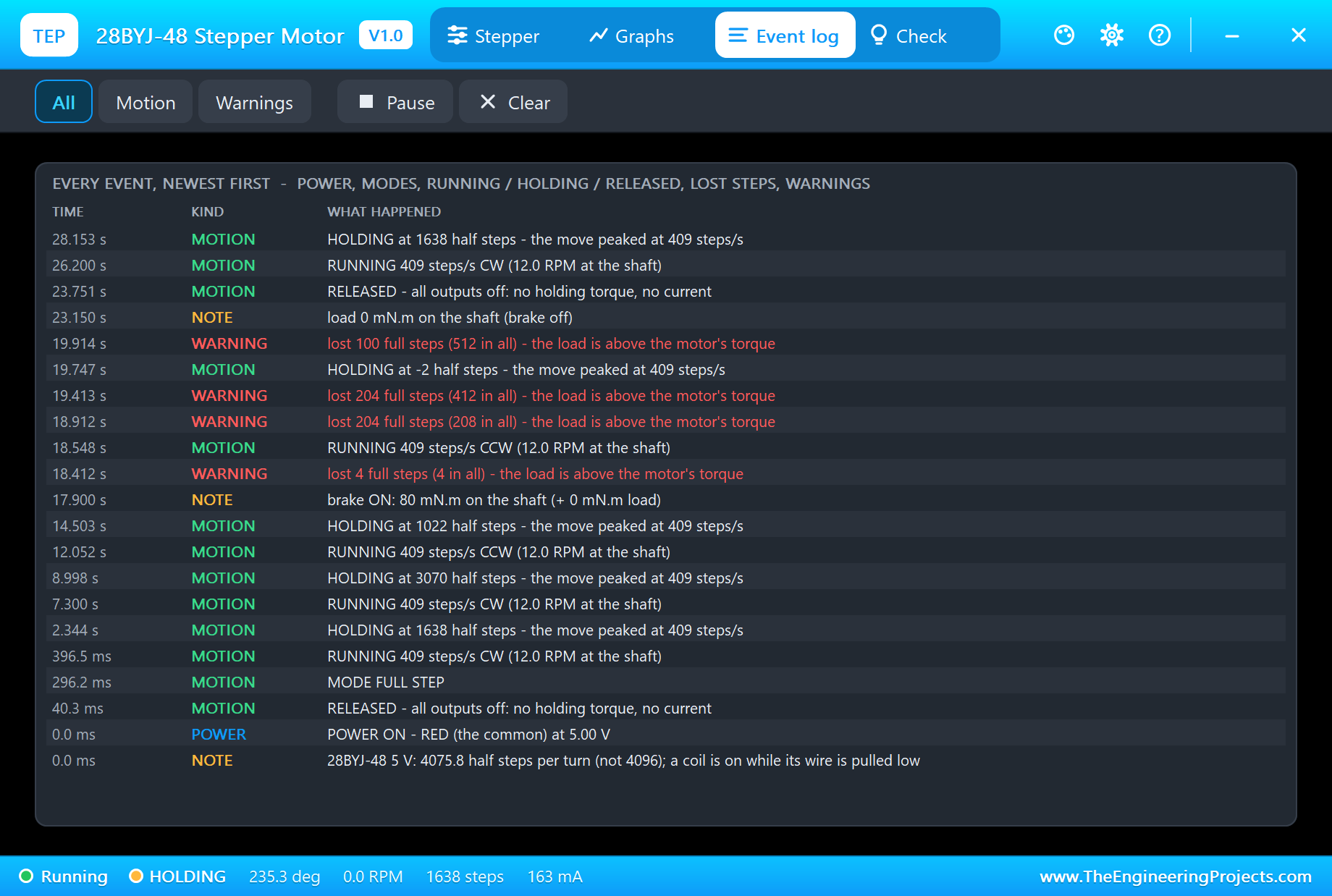
The Event log keeps the run: power on, the mode, every move ("RUNNING 409 steps/s CW (12.0 RPM at the shaft)"), every stop ("HOLDING at 3070 half steps"), the release, the load and the warnings. Filter it by motion or warnings, pause it or clear it.
An Open-Loop Stepper Never Knows
A stepper has no sensor. The sketch counts the steps it sends and assumes the shaft followed. Most of the time it does - but not always, and the demo shows what happens then.
Click the dial (or the Brake chip on the pop-up) and type a 0. The sketch sends its 512 steps back to zero and reports success:
a 0
angle -> target 0 steps = 0.0 deg
At 0.0 deg - holding
release
Released: all coils off
knob
Following the pot on A0
Pot 410 -> target 820 steps = 144.1 deg
At 144.1 deg - holding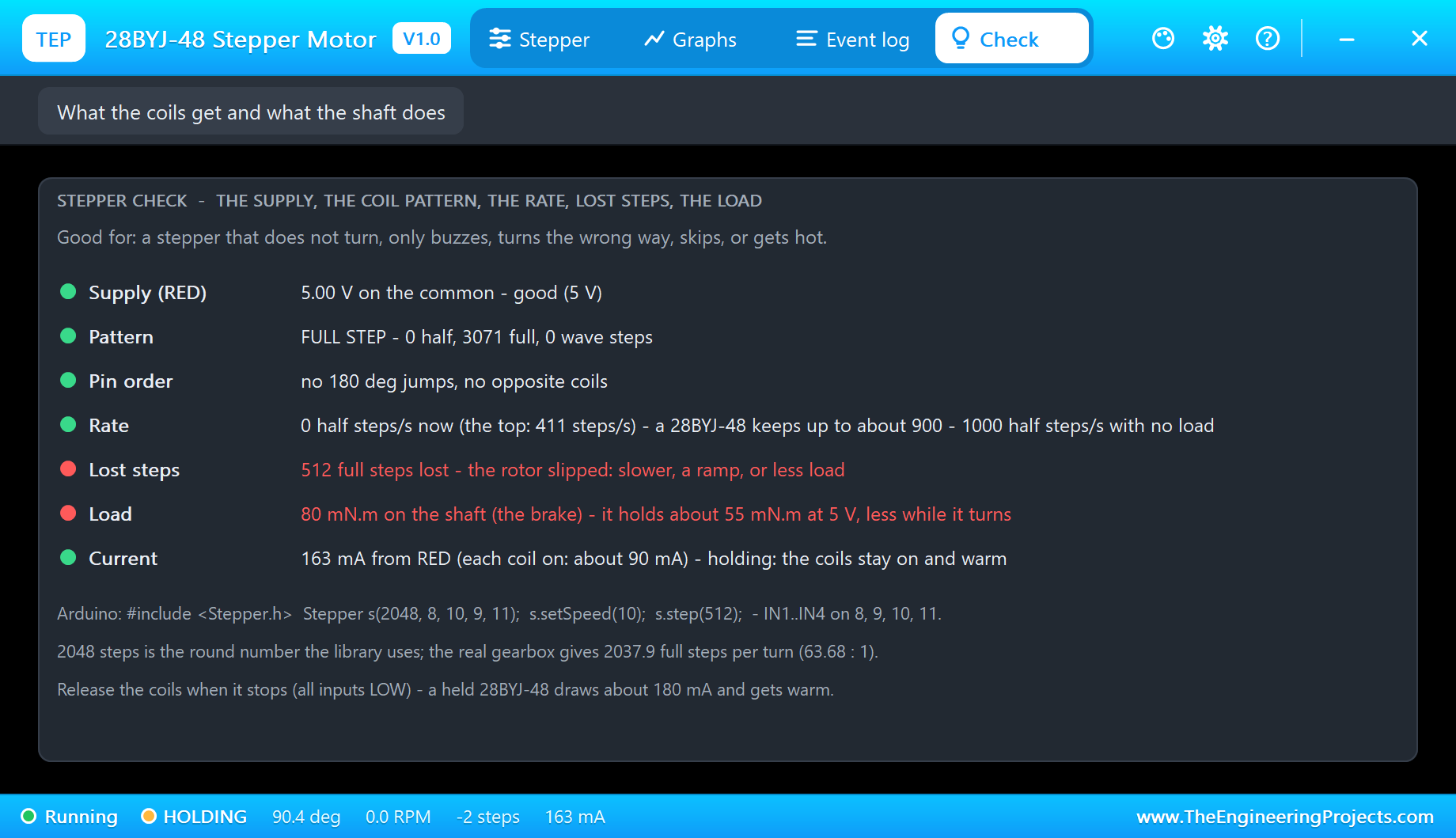
The monitor says "At 0.0 deg - holding", but the shaft never moved: it is still at 90.4 degrees. The pop-up knows better - the Event log says "lost 100 full steps (512 in all) - the load is above the motor's torque", and the Check page shows the lost steps and the 80 mN.m load in red, next to the supply, the pattern, the pin order, the rate and the current, each with its verdict.
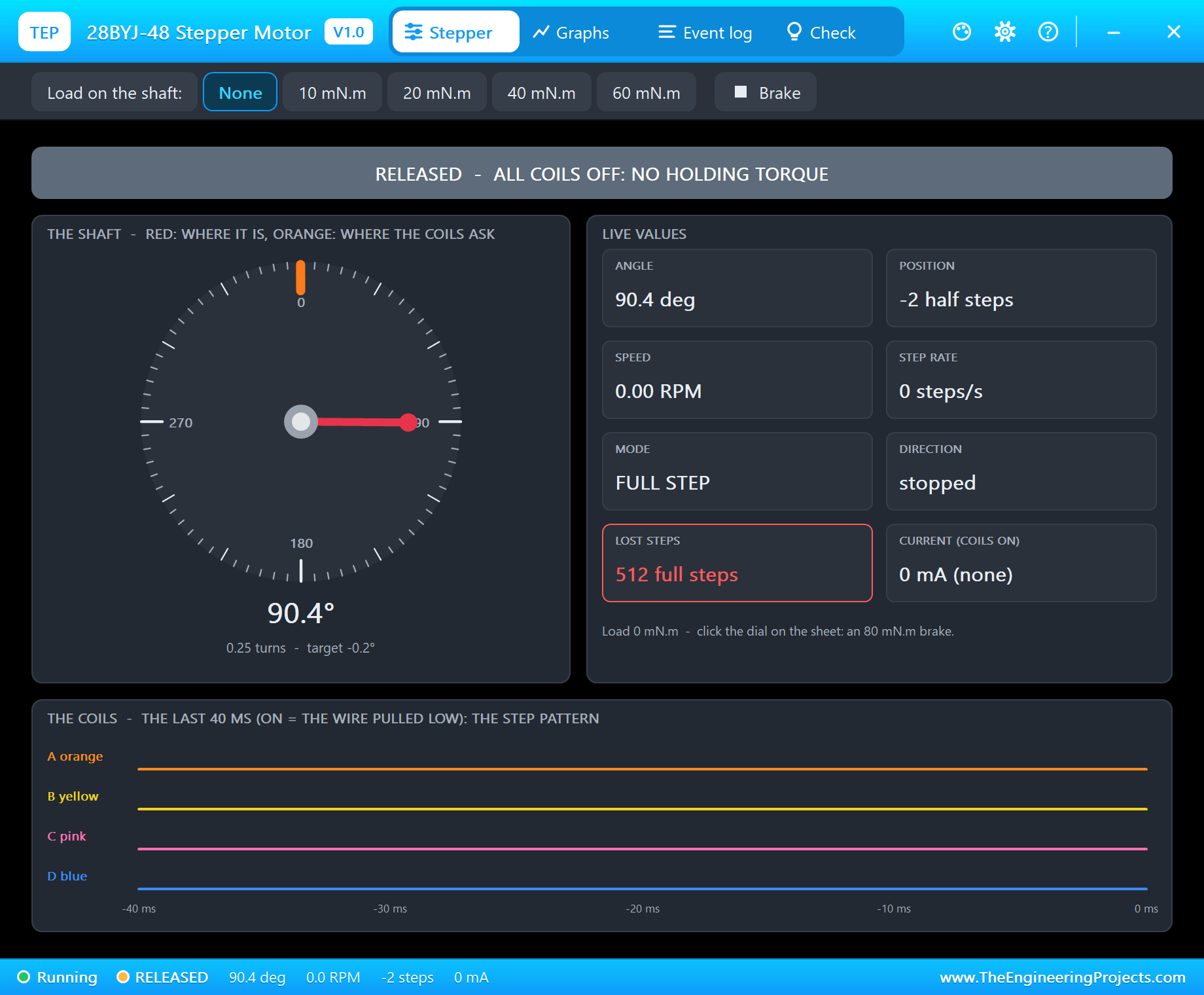
Type release and the four coils switch off: the banner says RELEASED and the current drops to 0 mA. Then type knob. The sketch believes the shaft is at 0 and steps 820 steps to the pot's 144.1 degrees. The shaft goes the same 144 degrees - from where it really was:
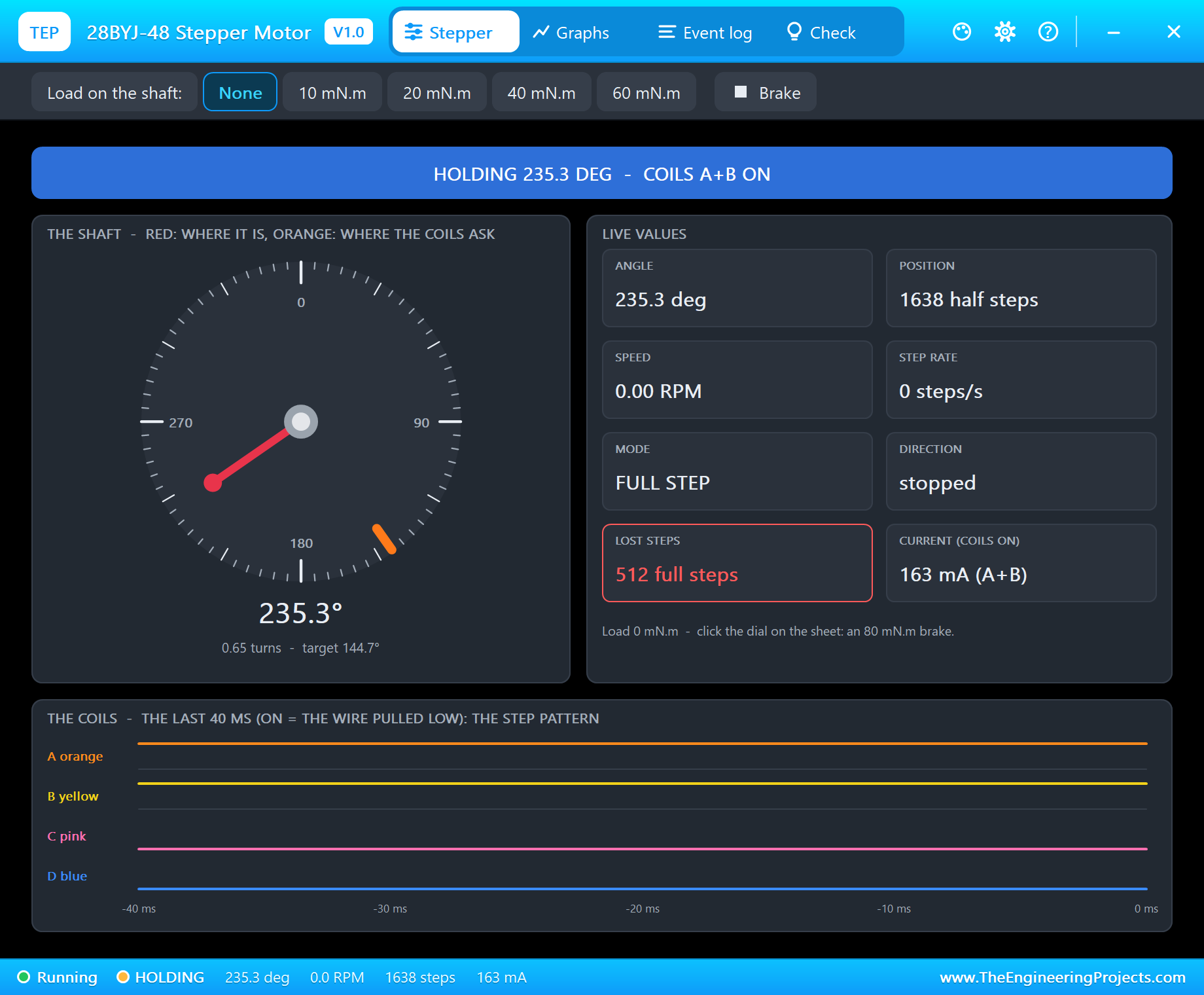
The dial stops at 235.3 degrees, a quarter of a turn away from the target. Nothing will fix that until the sketch finds its zero again. That is why 3D printers and CNC machines drive every axis against a limit switch when they start: a homing run that gives the step count a true reference.
How the Model Works
On the circuit each half-coil is a 50 ohm winding from RED to its wire. When the driver pulls a wire more than half the supply below RED, that coil is on; the moment is time-stamped. Between two analog steps of the simulation the rotor follows those coil changes in 10 us slices: the coils' inductance and back-EMF, the magnetic pull of the energised coils, the detent torque of the magnets, the inertia, the friction of the gearbox and the load. If the coils run away faster than the rotor can follow, or the load is stronger than the pull, the rotor falls behind by a whole step and the step is lost - exactly the way a real stepper misses.
We checked it on a PC with automatic tests: 512 full steps turn the shaft 90.45 degrees and back to zero, half steps land at 89.99 degrees for a quarter turn, 30 RPM stalls, the wrong pin order only buzzes and the 80 mN.m brake holds the shaft.
Troubleshooting
- The dial never moves and the pop-up says NO POWER: RED is not on 5 V.
- It only buzzes (WRONG ORDER): the coils are driven in the wrong order - use Stepper(2048, IN1, IN3, IN2, IN4) or swap the middle two wires.
- All four LEDs on, no motion: the four inputs are HIGH together (a sketch bug), or a driver output is shorted.
- It ends short of the target (LOST STEPS): too fast - above about 15 RPM - too much load, or the brake.
- No dial, no UNO or no monitor:
TEPBYJ48.DLLorTEPARDUINO.DLLis missing from MODELS and the project folder; a closed monitor opens again with a click on the UNO's USB port. - No pop-up: click OPEN PANEL on the strip, or switch "Open the panel at Run" back on in its Settings.
Things to Know Before Using a Real 28BYJ-48
- Holding current: a held 28BYJ-48 draws about 160 - 180 mA all the time and gets warm. Write all four inputs LOW when it does not need to hold.
- Power: the UNO's 5V pin can feed one motor; for two or more use a separate 5 V supply with GND common.
- 2048 versus 2037.9: a motor told to turn whole turns creeps by 1.8 degrees per turn. For a clock, count with 2037.9 or correct the error every turn.
- The 12 V version: there is also a 12 V 28BYJ-48 with higher-resistance coils; this model is the common 5 V one, so check the label on your motor.
Limitations of the Simulation
- Not modelled: the inductive kick on the circuit (the driver's clamp diodes see no spike), heating, gear backlash and the differences between real motors.
- The plate, the coil LEDs, the strip and the brake are TEP additions.
- The model is our own, written from the typical data of the 28BYJ-48; this library is not made or endorsed by Arduino or Labcenter.
- Licences: the demo HEX contains the Arduino Stepper library 1.1.3 (LGPL 2.1) and the Arduino AVR core 1.8.6 (LGPL); the sketch is included and the README gives the source links. The ULN2003A and the potentiometer are Proteus's own.
- Tested in Proteus 8.5 in October 2026 with the demo as shipped: the knob, a 270, s -1024, the brake with a 0, release, knob and all four pages of the pop-up. Proteus 7 is not supported.
So, that was all about the 28BYJ-48 Stepper Motor Library for Proteus V1.0. I hope it shows you what your stepper code really does - the pattern, the speed, the 2037.9 steps and the steps that get lost - before you build the real thing. If you have any questions, ask in the comments and I will help you out. Till the next tutorial, take care and have fun!

Comments
0