


nRF24L01 PA LNA Proteus Library | Arduino Range Simulation


Hello friends, I hope you are doing well. In today's tutorial, I am going to share our nRF24L01 PA LNA Proteus Library. This is the long-range version of the nRF24L01 module, with a power amplifier, a low noise amplifier and an external antenna. With this library, we can place two of these modules in one Proteus design, connect each of them to an Arduino Uno and send messages from one board to the other. A row of distance buttons moves the two radios from 1 m to 2 km apart.
First, we will see what the two amplifiers do and how this module differs from the plain nRF24L01. Then we will install the library files, wire the circuit and run the supplied simulation. The main part of this tutorial is the control panel of the module. We will test how the distance, the data rate and the power level decide whether a message is acknowledged. We will also see why two of these modules fail when they are too close to each other. Finally, we will understand both Arduino sketches and repeat the calculations of the model by hand.
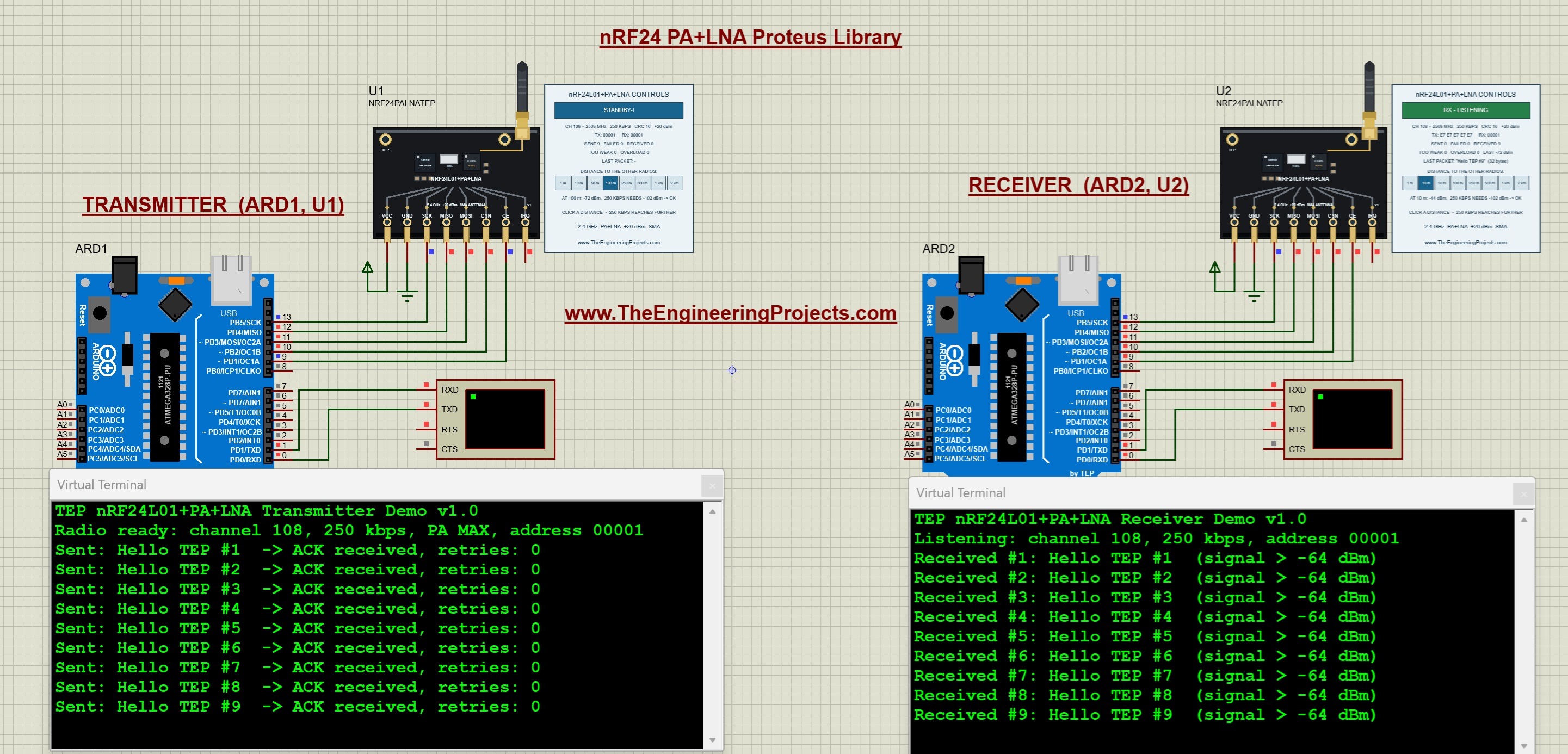
This tutorial uses our V1.0 package, the TEP Arduino UNO V3 and a 16 MHz clock. The package notes record a test of the supplied project in Proteus 8.5 SP0. In the running screenshot below, the transmitter is on the left and the receiver is on the right. The panel of the transmitter is set to 100 m. Nine messages have been sent, and every one of them was acknowledged without a retry. The panel of the receiver shows the level of the last packet, which is -72 dBm.
What Is the nRF24L01 PA LNA Module?
The nRF24L01 PA LNA module is a 2.4 GHz radio transceiver for longer distances. It is built around the same nRF24L01+ chip from Nordic Semiconductor as the small module with the printed antenna. We have explained this chip in our Introduction to NRF24L01, and Nordic describes it in the nRF24L01+ Product Specification. The long-range module adds three parts to the chip:
- PA: a power amplifier. It makes the transmitted signal stronger before it reaches the antenna.
- LNA: a low noise amplifier. It makes the received signal stronger before it reaches the chip.
- SMA connector: a connector for an external antenna, which replaces the printed antenna of the small module.
Both amplifiers are usually inside one small front-end chip. Our board artwork shows the RFX2401C, which is a common choice for these modules. Its data sheet lists a saturated output power of +22 dBm, a receive gain of 12 dB and a noise figure of 2.5 dB.
Main Features of the nRF24L01+ Chip
- It works in the 2.4 GHz band with 126 channels. The frequency of a channel is 2400 MHz plus the channel number.
- It supports the data rates 250 kbps, 1 Mbps and 2 Mbps.
- Its sensitivity is -94 dBm at 250 kbps, -85 dBm at 1 Mbps and -82 dBm at 2 Mbps.
- Its output power has four levels, which are 0, -6, -12 and -18 dBm.
- Its Enhanced ShockBurst protocol acknowledges every packet and repeats a packet that was not acknowledged.
- Its supply range is 1.9 to 3.6 V, and its inputs are 5 V tolerant.
Plain Module and PA LNA Module
The following table compares the two modules as our model simulates them.
| Property | Plain nRF24L01 | nRF24L01 PA LNA |
|---|---|---|
| Component name | NRF24L01TEP | NRF24PALNATEP |
| Antenna | Printed antenna, 0 dBi | External antenna on SMA, 2 dBi |
| Output power at the highest level | 0 dBm | +20 dBm |
| Sensitivity at 250 kbps | -94 dBm | -102 dBm |
| Strongest usable signal | 0 dBm | -20 dBm |
| Largest distance at 250 kbps | 50 m | 1 km |
| Largest distance at 1 Mbps | 10 m | 500 m |
| Largest distance at 2 Mbps | 10 m | 250 m |
The table also shows the price of the amplifiers. The PA LNA module cannot handle a very strong signal, so two of them must not be too close at full power. We will test this case in detail.
Important Terms
- dBm: a unit of signal power. A value of 0 dBm is 1 mW, and +20 dBm is 100 mW. Negative values are weaker signals.
- Sensitivity: the weakest signal that the receiver can still decode.
- Overload: the state of a receiver whose input signal is too strong. The amplifier saturates, and the packet is lost.
- ACK: a short answer of the receiver. It tells the transmitter that the packet has arrived.
- Retry: a repeated transmission of a packet that was not acknowledged.
- RPD: the received power detector of the chip. It is a single bit that tells us whether the signal at the chip was stronger than -64 dBm.
- Link budget: the calculation of the signal at the receiver from the output power, the antennas and the losses on the way.
Features of Our Proteus Model
- The component is named NRF24PALNATEP and has eight pins in the same order as our plain nRF24L01 component.
- Every nRF24L01 module placed in the same design shares one virtual 2.4 GHz band, so no wire is needed between the two sides.
- A control panel beside each module shows its live mode, its settings, its addresses, its counters and the last packet.
- Eight distance buttons, from 1 m to 2 km, set the distance to the other radios.
- The model calculates the signal at the receiver and compares it with the sensitivity and with the overload limit.
- The ACK is checked on its way back, with the power level of the receiver.
- The Arduino communicates with the model through real SPI commands and registers, so the unmodified RF24 library works with it.
Keep one distinction in mind. This is a functional model of the chip with a simple range calculation. It does not simulate antennas in detail, walls, reflections or the Wi-Fi networks that share the 2.4 GHz band. The distance buttons teach us how the settings and the distance are related, but they do not predict the range of a real installation.
Download the nRF24L01 PA LNA Library for Proteus
First of all, download the V1.0 package using the button below. Extract the complete ZIP into a normal folder before opening the project, and keep the files of the simulation folder together.
Download nRF24L01 PA LNA Proteus Library V1.0 and Arduino Simulation| Folder or file | Contents and purpose |
|---|---|
| Proteus Library Files | TEPNRF24PALNA.LIB for the radio module, and the TEP Arduino UNO V3 LIB/IDX files. |
| Proteus Model Files | TEPNRF24L01.DLL in version 1.1, which is the model of our nRF24 family. |
| Proteus Simulation | NRF24PALNA-ArduinoUnoV3.pdsprj, PALNA_Transmitter.hex, PALNA_Receiver.hex and a local copy of the DLL. |
| Arduino Code | Both sketches, the RF24 1.6.2 driver, the AVR core archive and a firmware rebuild script. |
| Model Source | The chip model with the link budget, the SPI transport, the shared radio band and the Proteus adapter. |
| Documentation | Model notes, third-party notices, a preview of the board artwork and a screenshot of the running example. |
| README.txt and SHA256SUMS.txt | Quick-start instructions and checksums of the packaged files. |
One Model File for Both nRF24L01 Modules
The model file of this package has the same name as the file of our plain nRF24L01 library. The device name tells the model which module it has to be. All nRF24L01 modules of a design must use the same file, because only then do they share one radio band.
- This package contains version 1.1 of the file. Version 1.0 does not know the PA LNA module.
- Version 1.1 also runs the plain module. Its example works as before at the default distance of 10 m.
- With version 1.1, the panel of the plain module shows the distance buttons of this tutorial. They replace the switch between IN RANGE and OUT OF RANGE of version 1.0.
The Proteus library and the Arduino library have different jobs. The LIB file defines the component that we place on the schematic, and the DLL gives it its behavior. The RF24 library gives our sketch the functions for talking to the radio. Installing the Arduino library alone will not make NRF24PALNATEP appear in Proteus.
How to Install the nRF24L01 PA LNA Library in Proteus
Copy the Library and Model Files
Save your work and close Proteus before copying the files. Then follow these steps:
- Open the extracted Proteus Library Files folder.
- Copy
TEPNRF24PALNA.LIBinto the library directory configured for your Proteus installation. - Copy
ArduinoV3TEP.LIBandArduinoV3TEP.IDXfrom the same folder if our TEP Arduino UNO V3 library is not installed already. - Open Proteus Model Files and copy
TEPNRF24L01.DLLinto your configured ProteusMODELSdirectory. Replace an older file of the same name. - Restart Proteus, open Pick Devices and search for NRF24PALNATEP. A search for nRF24 finds the module as well.
- Place the module on the schematic, or open the supplied project to use the completed circuit.
Points to Remember
- Use the library and model folders that your installation actually searches. Their locations differ between installations.
- The module is supplied as a LIB file without a separate IDX. The included IDX belongs to the Arduino board.
- Keep the extra DLL beside the project in the Proteus Simulation folder.
- If the panel still shows IN RANGE and OUT OF RANGE, the older DLL is installed. Copy the file of this package into MODELS.
- The two HEX files are programs for the two Arduino boards. The radio module does not need a HEX file.
- Proteus 7 has not been tried.
The Arduino board in this project comes from our Arduino Library for Proteus V3.0. Start with the supplied project, so that the boards, wiring and firmware match the demonstration.
nRF24L01 PA LNA Pinout and Arduino Uno Wiring
The TEP module has eight pins along its lower edge. From left to right, they are VCC, GND, SCK, MISO, MOSI, CSN, CE and IRQ. This is the order of our plain nRF24L01 component, so its wiring carries over. Start each wire at the exposed pin endpoint below the board artwork.
| Module pin | Connection | Purpose |
|---|---|---|
| VCC | Positive supply terminal | Powers the digital model. |
| GND | Ground | Provides the shared reference. |
| SCK | Arduino Uno D13 | SPI clock from the Arduino. |
| MISO | Arduino Uno D12 | Data from the module to the Arduino. |
| MOSI | Arduino Uno D11 | Data from the Arduino to the module. |
| CSN | Arduino Uno D10 | Selects the module for an SPI command. It is active low. |
| CE | Arduino Uno D9 | Starts a transmission, or keeps the receiver listening. |
| IRQ | Not connected | Interrupt output. It is active low, and the example does not use it. |
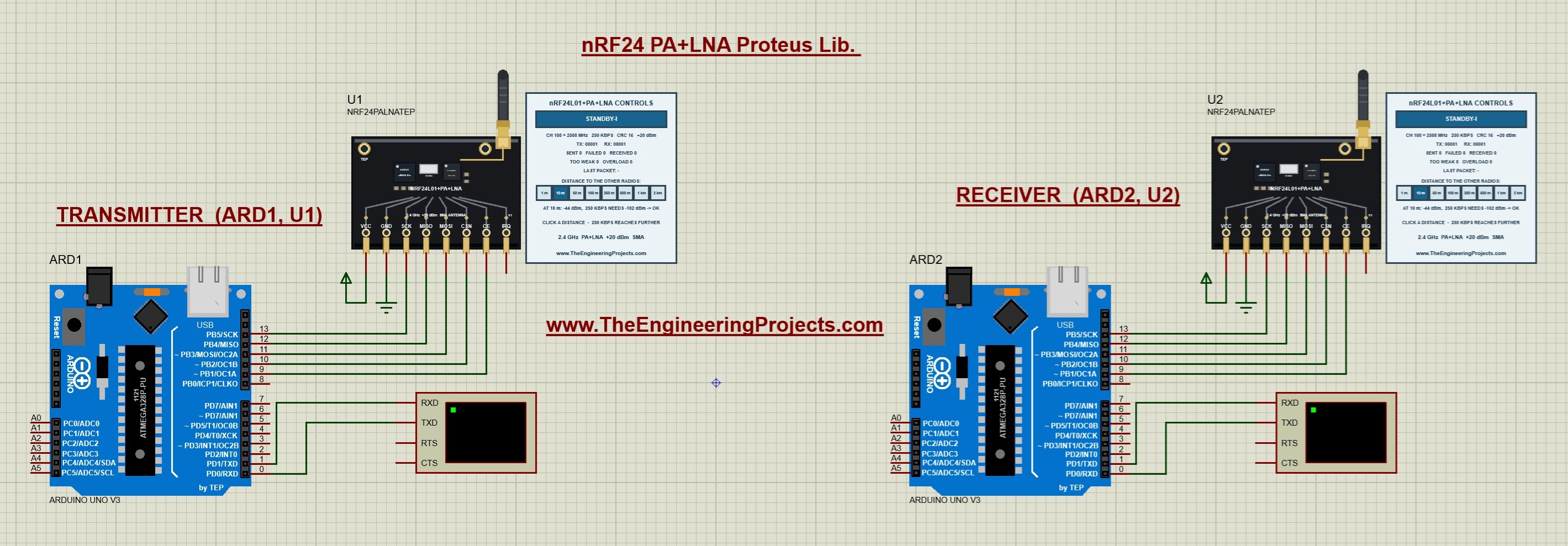
Both boards use the same wiring. The Arduino named ARD1 works with module U1 as the transmitter, and ARD2 works with U2 as the receiver. Before the simulation starts, both panels show STANDBY-I, the default distance of 10 m and counters at zero.
- CE and CSN are given to the driver in this order. In both sketches, the line is
RF24 radio(9, 10). - There is no wire between U1 and U2. The two modules are connected only through the simulated radio band.
Virtual Terminal Connections
- Connect Arduino D1/TX to RXD on the Virtual Terminal of each board.
- Set both terminals to 9600 baud, eight data bits, no parity and one stop bit.
- The return connection to D0/RX is shown in the circuit, but these sketches do not read typed commands.
Notes for Physical Hardware
- The real module is a 3.3 V part. The supply range of the chip is 1.9 to 3.6 V, and a supply of 5 V can damage it.
- The power amplifier needs much more current than the plain module. The package notes give about 115 mA while the module sends.
- Add a capacitor of 10 to 100 microfarads directly across VCC and GND of the module. A weak or noisy supply is the usual reason for a PA LNA module that does not work.
- The model does not check the supply voltage or the current, so a working simulation does not prove that your hardware supply is correct.
- Connect the antenna before you transmit.
- Use
RF24_PA_LOWwhile the two modules lie on the same desk. We will see the reason in the overload test. - The license-free 2.4 GHz band ends at 2483.5 MHz in most countries. Channel 108 of the example is 2508 MHz. Check the local rules and choose a permitted channel before you use real hardware.
Run the Two-Arduino Simulation
Start the Simulation
- Open
Proteus Simulation/NRF24PALNA-ArduinoUnoV3.pdsprjfrom the extracted package. - Keep both HEX files and
TEPNRF24L01.DLLin that folder. - Double-click ARD1 and confirm that its Program File is
PALNA_Transmitter.hex. - Double-click ARD2 and confirm that its Program File is
PALNA_Receiver.hex. - Confirm the 16 MHz clock on both boards and 9600 baud on both terminals.
- Press Run. If the two terminal windows open on top of each other, drag them apart.
Read the Terminal Output
- The transmitter prints its heading and then Radio ready: channel 108, 250 kbps, PA MAX, address 00001.
- Once per second, the transmitter prints a line such as
Sent: Hello TEP #1 -> ACK received, retries: 0. - The receiver prints Listening: channel 108, 250 kbps, address 00001.
- For every message, the receiver prints a line such as
Received #1: Hello TEP #1 (signal > -64 dBm). - For a weaker signal, the end of this line changes to (weak signal).
- When no ACK arrives, the transmitter prints FAILED, no ACK.
In the running screenshot at the top, the transmitter has printed the messages 1 to 9, all with an ACK and 0 retries. The receiver has printed the same nine messages. The two panels agree with the terminals. The panel of the transmitter shows SENT 9 and FAILED 0, and the panel of the receiver shows RECEIVED 9.
Read the Simulation Log
The model also writes short messages into the Simulation Log of Proteus. Each message starts with TEP nRF24L01+PA+LNA and the name of the module, such as U1.
| Message | Meaning |
|---|---|
| model started, with the amplifiers, the antenna and the distance | The model has been loaded for this component. |
| powered | The model accepts the VCC and GND connections. |
| NOT powered (check VCC/GND) | VCC is low or GND is high. |
| first packet received, with the pipe and the level | This radio has received its first packet. |
| packet heard but too weak, with the level and the required level | A packet with the right settings was below the sensitivity. |
| receiver overloaded, with the level | The radios are too close for this power level. |
| no ACK after 15 retries | The transmitter has given up a packet. |
| distance set to, with the new distance | A distance button was clicked. |
Understand the nRF24L01 PA LNA Control Panel
The control panel is the most interesting part of this library. It shows what the radio is doing at every moment, and its distance buttons let us test the link without changing the code. The following picture shows the receiver's module U2 and its panel after 40 messages.
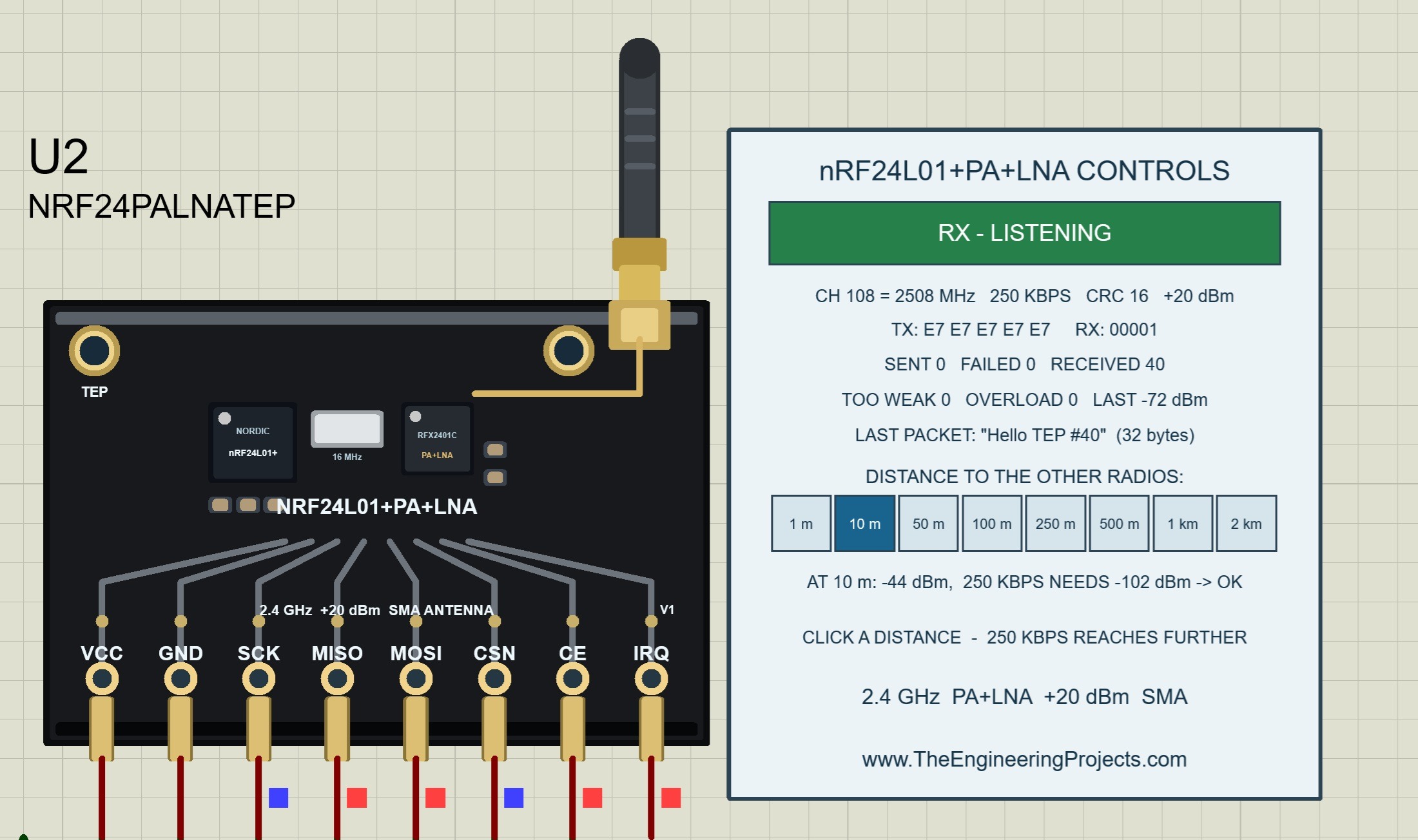
The title of the panel is nRF24L01+PA+LNA CONTROLS. Let us go through the panel from top to bottom.
The Mode Banner and Its Colors
| Banner text | Color | Meaning |
|---|---|---|
| POWER DOWN | Blue | The chip is switched off by the sketch. |
| STANDBY-I | Blue | The chip is on and waits. CE is low. |
| STANDBY-II | Blue | The transmitter has CE high, but it has no packet to send. |
| RX - SETTLING | Blue | The receiver is starting. It is not listening yet. |
| RX - LISTENING | Green | The receiver is listening. |
| TX - SENDING | Orange | A packet is on its way, or the transmitter waits for the ACK. |
| A mode with the addition (MAX_RT) | The color of the mode | The last packet was given up, and the sketch has not cleared this flag yet. |
| NO POWER - CHECK VCC / GND | Red | The module is not powered. |
- The receiver's banner is green and shows RX - LISTENING for the whole simulation.
- The transmitter's banner is blue and shows STANDBY-I. A successful message needs less than 2 ms, so the orange banner is hardly visible.
- When the ACK is missing, the transmitter repeats the packet 15 times. This takes about 45 ms, and the orange banner flashes once per second.
The Settings Line
The first line below the banner shows the radio settings. In our example, it reads CH 108 = 2508 MHz, 250 KBPS, CRC 16 and +20 dBm. The values are read from the registers of the chip, so they show what the sketch has really written.
| Value in our example | Meaning | Driver function |
|---|---|---|
| CH 108 = 2508 MHz | Channel and its frequency | radio.setChannel() |
| 250 KBPS | Data rate, 250 KBPS, 1 MBPS or 2 MBPS | radio.setDataRate() |
| CRC 16 | Length of the checksum in bits | radio.setCRCLength() |
| +20 dBm | Output power at the antenna connector | radio.setPALevel() |
The output power is the level of the chip plus the 20 dB of the power amplifier. The four levels of the driver give these values:
| Level in the sketch | Output of the chip | Panel of the PA LNA module |
|---|---|---|
| RF24_PA_MIN | -18 dBm | +2 dBm |
| RF24_PA_LOW | -12 dBm | +8 dBm |
| RF24_PA_HIGH | -6 dBm | +14 dBm |
| RF24_PA_MAX | 0 dBm | +20 dBm |
The Address Line
The second line shows the address for sending and the address for receiving. An address of readable characters is shown as text, and any other address is shown in hexadecimal form.
- The transmitter shows TX: 00001 and RX: 00001. The driver writes the address into both registers, because the ACK comes back on the same address.
- The receiver shows TX: E7 E7 E7 E7 E7 and RX: 00001. The receiver never opens a pipe for sending, so its TX address keeps the reset value of the chip.
The Counters
- SENT counts the packets that were sent with success. For a packet with ACK, this means that the ACK has arrived.
- FAILED counts the packets that were given up after the last retry.
- RECEIVED counts the packets that this radio has received. A repeated packet is counted only once.
- TOO WEAK counts the transmissions that matched the settings of this radio but were below its sensitivity.
- OVERLOAD counts the transmissions that were too strong for this radio.
- LAST shows the level of the last transmission that this radio has heard, in dBm. It appears after the first one.
The last three values belong to the radio that listens. In the picture above, the receiver shows RECEIVED 40, TOO WEAK 0, OVERLOAD 0 and LAST -72 dBm.
| Transmitter panel | Receiver panel | Meaning |
|---|---|---|
| SENT increases. | RECEIVED increases. | The link works in both directions. |
| FAILED increases. | TOO WEAK increases. | The distance is too large for the data rate and the power. |
| FAILED increases. | OVERLOAD increases. | The radios are too close for the power level. |
| FAILED increases. | RECEIVED increases. | The packet arrives, but the ACK does not come back. |
| FAILED increases. | No counter changes. | The channel, the data rate or the address is different, or the receiver is not listening. |
The Last Packet Line
Before the first packet arrives, this line shows a dash. After that, it shows the payload in quotation marks, followed by its length. In the picture above, the receiver shows "Hello TEP #40" with 32 bytes. The text is shorter than 32 characters, but the sketch always sends the complete buffer of 32 bytes. A payload that is not readable text is shown as hexadecimal bytes.
The Distance Buttons and the Prediction Line
Below the heading DISTANCE TO THE OTHER RADIOS, there are eight buttons: 1 m, 10 m, 50 m, 100 m, 250 m, 500 m, 1 km and 2 km. The selected button is dark blue, and the default is 10 m. Click a button while the simulation runs.
The line below the buttons is a prediction. In the picture above, it reads AT 10 m: -44 dBm, 250 KBPS NEEDS -102 dBm -> OK. It has three parts:
- AT 10 m: -44 dBm is the signal that a packet from this radio has at the selected distance, at an identical module.
- 250 KBPS NEEDS -102 dBm is the sensitivity at the present data rate.
- The result is OK, TOO WEAK or OVERLOAD.
The prediction uses the settings and the distance button of its own panel only. The hint below it says that 250 kbps reaches further, and the last line names the module.
Panel Combinations: Distance, Data Rate and Power Level
Now comes the exciting part. The result of a transmission depends on several settings together, and the panel lets us try them one after the other. The level of -72 dBm agrees with the screenshots of this tutorial. The package notes record the tests at 10 m, 1 km and 2 km and the overload test at 1 m in Proteus. The other values are calculated with the formulas of the model, which we will work through after the code.
Combination 1: The Distances on the Two Panels
Each radio has its own distance buttons. For a packet between two radios, the model uses the larger of the two selected distances.
| Transmitter panel | Receiver panel | Link distance | Level at the receiver | Result |
|---|---|---|---|---|
| 10 m | 10 m | 10 m | -44 dBm | ACK received |
| 100 m | 10 m | 100 m | -72 dBm | ACK received |
| 10 m | 1 km | 1 km | -100 dBm | ACK received |
| 1 m | 10 m | 10 m | -44 dBm | ACK received |
| 1 m | 1 m | 1 m | -16 dBm | Overload |
The second row is the state of our screenshots. The transmitter's panel is set to 100 m, the receiver's panel is set to 10 m, and the receiver shows LAST -72 dBm. This rule has three consequences:
- To move the radios apart, one click on either panel is enough.
- To bring them together again, both panels must show a short distance.
- The prediction line of one panel can show OK while the packets fail, because the other panel has a larger distance. The LAST value of the receiver always shows the real level.
Combination 2: Walk Through the Distance Buttons
Keep the settings of the example, which are PA MAX and 250 kbps. Set both panels to the same distance and watch the two terminals.
| Distance on both panels | Level at the receiver | Transmitter terminal | Receiver terminal |
|---|---|---|---|
| 1 m | -16 dBm | FAILED, no ACK | Nothing |
| 10 m | -44 dBm | ACK received | signal > -64 dBm |
| 50 m | -64 dBm | ACK received | signal > -64 dBm |
| 100 m | -72 dBm | ACK received | signal > -64 dBm |
| 250 m | -84 dBm | ACK received | weak signal |
| 500 m | -92 dBm | ACK received | weak signal |
| 1 km | -100 dBm | ACK received | weak signal |
| 2 km | -109 dBm | FAILED, no ACK | Nothing |
- The link works from 10 m to 1 km. At 1 km, the signal is only 1.6 dB above the sensitivity of -102 dBm.
- The link fails at both ends of the row. At 2 km the signal is too weak, and at 1 m it is too strong.
- The text of the receiver changes between 100 m and 250 m. We will see the reason in the combination about the RPD.
Combination 3: Too Close at Full Power
This test shows a problem that many beginners meet with real PA LNA modules. The two modules lie on the same desk, the sketches use the highest power level, and nothing is received.
- Let the simulation run at 10 m with an ACK for every message.
- Click 1 m on the panel of the transmitter. Nothing changes, because the receiver's panel still shows 10 m.
- Click 1 m on the panel of the receiver as well.
- The prediction line now reads AT 1 m: -16 dBm and OVERLOAD.
- The transmitter prints FAILED, no ACK for every message, and its FAILED counter increases.
- The OVERLOAD counter of the receiver increases, and its LAST value shows -16 dBm.
- Click 10 m on either panel. The link recovers with the next message.
The limit of the model is -20 dBm at the antenna. The following table shows the four power levels at a distance of 1 m.
| Level in the sketch | Output power | Level at the receiver | Result |
|---|---|---|---|
| RF24_PA_MAX | +20 dBm | -16 dBm | Overload |
| RF24_PA_HIGH | +14 dBm | -22 dBm | ACK received |
| RF24_PA_LOW | +8 dBm | -28 dBm | ACK received |
| RF24_PA_MIN | +2 dBm | -34 dBm | ACK received |
So the cure is a lower power level. Use RF24_PA_LOW for tests on the desk, and change to RF24_PA_MAX when the modules are installed at their final distance.
Combination 4: Distance and Data Rate
The hint on the panel says that 250 kbps reaches further. A lower data rate gives the receiver more time for every bit, so it can work with a weaker signal.
| Data rate | Sensitivity of the chip | Sensitivity of the module | Largest distance | Time on air of one packet |
|---|---|---|---|---|
| 250 kbps | -94 dBm | -102 dBm | 1 km | 1.32 ms |
| 1 Mbps | -85 dBm | -93 dBm | 500 m | 0.33 ms |
| 2 Mbps | -82 dBm | -90 dBm | 250 m | 0.17 ms |
- To change the data rate, change the parameter of
radio.setDataRate()in both sketches. The values are RF24_250KBPS, RF24_1MBPS and RF24_2MBPS. - The data rate must be the same on both sides. A packet with a different data rate is not received and not counted.
- After the change, the settings line shows the new rate, and the prediction line shows the new sensitivity.
- The low noise amplifier improves every sensitivity by 8 dB in the model.
Combination 5: Distance and Power Level
| Level in both sketches | Level at 100 m | Range at 250 kbps | Range at 1 Mbps | Range at 2 Mbps |
|---|---|---|---|---|
| RF24_PA_MAX, +20 dBm | -72 dBm | 10 m to 1 km | 10 m to 500 m | 10 m to 250 m |
| RF24_PA_HIGH, +14 dBm | -78 dBm | 1 m to 500 m | 1 m to 250 m | 1 m to 250 m |
| RF24_PA_LOW, +8 dBm | -84 dBm | 1 m to 250 m | 1 m to 100 m | 1 m to 100 m |
| RF24_PA_MIN, +2 dBm | -90 dBm | 1 m to 250 m | 1 m to 100 m | 1 m to 50 m |
Every step of the power level changes the signal by 6 dB. Only the highest level reaches 1 km, and only the highest level fails at 1 m. The buttons of the panel have fixed distances, so two neighboring levels can end at the same button.
Combination 6: The Way Back of the ACK
A message counts as sent only when its ACK has arrived. The ACK travels from the receiver to the transmitter, and it is sent with the power level of the receiver. For this reason, the receiver sketch also calls radio.setPALevel(RF24_PA_MAX).
| Level of the receiver | Distance | Data packet | ACK on the way back | Transmitter terminal | Receiver terminal |
|---|---|---|---|---|---|
| RF24_PA_MAX | 1 km | -100 dBm, received | -100 dBm, received | ACK received | Message printed |
| RF24_PA_HIGH | 1 km | -100 dBm, received | -106 dBm, too weak | FAILED, no ACK | Message printed once |
| RF24_PA_LOW | 500 m | -92 dBm, received | -104 dBm, too weak | FAILED, no ACK | Message printed once |
| RF24_PA_LOW | 250 m | -84 dBm, received | -96 dBm, received | ACK received | Message printed |
The second and the third row show a link that works in one direction only. The transmitter reports a failure, although the message has arrived. Two details of the model are important here:
- The transmitter repeats the packet 15 times. The receiver recognizes the repeated packets by their packet number and stores the message only once, as the real chip does.
- The panel of the receiver shows RECEIVED, and the panel of the transmitter shows FAILED. No TOO WEAK counter increases, because the data packets themselves were strong enough.
Combination 7: The Counters During a Failure
When a packet is not acknowledged, the chip repeats it. The RF24 library sets 15 retries with a delay of 1500 microseconds. One message therefore causes 16 transmissions.
| Case | Transmitter panel | Receiver panel | Time until the failure |
|---|---|---|---|
| 2 km, too weak | FAILED plus 1 | TOO WEAK plus 16 | About 45 ms |
| Both panels at 1 m, overload | FAILED plus 1 | OVERLOAD plus 16 | About 45 ms |
| ACK too weak on the way back | FAILED plus 1 | RECEIVED plus 1 | About 45 ms |
With the driver function radio.setRetries(), you can change the delay and the number of the retries. After radio.setRetries(5, 3), a failed message causes 4 transmissions, and the TOO WEAK counter increases by 4.
Combination 8: The Received Power Detector
The nRF24L01+ does not measure the signal strength as a number. It only has the RPD bit, which tells us whether the signal at the chip was stronger than -64 dBm. The receiver sketch reads this bit with radio.testRPD() and prints one of two texts.
- In the PA LNA module, the low noise amplifier raises the signal by 12 dB before it reaches the chip.
- A level of -64 dBm at the chip is therefore a level of -76 dBm at the antenna.
- At 100 m, the antenna receives -72 dBm, and the chip sees -60 dBm. The RPD bit is set, and the receiver prints signal > -64 dBm.
- At 250 m, the antenna receives -84 dBm, and the chip sees -72 dBm. The RPD bit is not set, and the receiver prints weak signal.
This explains our screenshots. The panel shows LAST -72 dBm, which is the level at the antenna, and the terminal shows signal > -64 dBm, which refers to the level at the chip. The LAST value of the panel is a help of the simulation. A real module gives you only the RPD bit.
Combination 9: A PA LNA Module and a Plain Module
Both components can be placed in one design. The link between them is not the same in both directions, because only one side has the amplifiers.
| Distance | Data packet at the plain module | ACK at the PA LNA module | Result for the transmitter |
|---|---|---|---|
| 10 m | -46 dBm, received | -66 dBm, received | ACK received |
| 100 m | -74 dBm, received | -94 dBm, received | ACK received |
| 250 m | -86 dBm, received | -106 dBm, too weak | FAILED, although the message arrived |
| 1 km | -102 dBm, too weak | Not sent | FAILED |
- The plain module needs -94 dBm at 250 kbps, and the PA LNA module needs -102 dBm.
- The data packet is sent with +20 dBm, and the ACK of the plain module is sent with 0 dBm. The ACK is therefore 20 dB weaker.
- For a long link in both directions, use a PA LNA module at both ends.
- For a link in one direction, the sketch can send without an ACK. The driver offers
radio.enableDynamicAck()and the third parameter ofradio.write()for this.
Combination 10: Settings That Must Agree
| Setting | Result of a difference |
|---|---|
| Channel | Nothing is received, and no counter of the receiver changes. The transmitter counts FAILED. |
| Data rate | Nothing is received, and no counter of the receiver changes. The transmitter counts FAILED. |
| Address | Nothing is received, and no counter of the receiver changes. The transmitter counts FAILED. |
| Length of the CRC | Nothing is received, and no counter of the receiver changes. The transmitter counts FAILED. |
| Payload size | Nothing is received, and no counter of the receiver changes. The transmitter counts FAILED. |
| Power level | The link works as long as both directions are strong enough. |
Put the two panels side by side when nothing is received. The settings line and the RX address of the receiver must fit the settings line and the TX address of the transmitter.
Arduino Code for the nRF24L01 PA LNA Transmitter
The following is the exact transmitter sketch included in the download. It uses the bundled RF24 library, version 1.6.2. Use the supplied copy for your first build, so that your firmware matches the packaged HEX file.
// TEP nRF24L01+PA+LNA Transmitter Demo v1.0
// The Engineering Projects - www.TheEngineeringProjects.com
//
// Sends "Hello TEP #n" once a second to address "00001" at 250 kbps with the PA at
// maximum (+20 dBm on a PA+LNA module) and reports whether the receiver acknowledged
// it, and after how many retries. Pair it with PALNA_Receiver on a second Arduino.
//
// Wiring (Arduino UNO): VCC -> 3.3V, GND -> GND, SCK -> D13, MISO -> D12,
//                       MOSI -> D11, CSN -> D10, CE -> D9, IRQ -> not used
// Real PA+LNA modules draw up to ~115 mA while sending: give them a clean 3.3 V supply
// with a 10-100 uF capacitor across VCC/GND, and use RF24_PA_LOW when the two
// modules are close together (the receiver's LNA overloads at PA_MAX).
// Library: RF24 by TMRh20 / nRF24 (Arduino Library Manager: "RF24")

#include <SPI.h>
#include <RF24.h>

RF24 radio(9, 10);                    // CE, CSN
const byte address[6] = "00001";
unsigned long counter = 0;

void setup() {
  Serial.begin(9600);
  Serial.println(F("TEP nRF24L01+PA+LNA Transmitter Demo v1.0"));
  if (!radio.begin()) {
    Serial.println(F("nRF24L01 not responding - check the SPI wiring and power"));
    while (true) {}
  }
  radio.setPALevel(RF24_PA_MAX);      // +20 dBm with the module's PA
  radio.setDataRate(RF24_250KBPS);    // best sensitivity = longest range
  radio.setChannel(108);              // 2508 MHz, above most Wi-Fi channels
  radio.openWritingPipe(address);
  radio.stopListening();              // transmitter mode
  Serial.println(F("Radio ready: channel 108, 250 kbps, PA MAX, address 00001"));
}

void loop() {
  char message[32] = "";
  snprintf(message, sizeof message, "Hello TEP #%lu", ++counter);
  bool ok = radio.write(message, sizeof message);
  Serial.print(F("Sent: "));
  Serial.print(message);
  if (ok) {
    Serial.print(F("  -> ACK received, retries: "));
    Serial.println(radio.getARC());
  } else {
    Serial.println(F("  -> FAILED, no ACK"));
  }
  delay(1000);
}
Start the Radio
RF24 radio(9, 10)creates the radio object with the pins for CE and CSN.radio.begin()starts the SPI interface and the chip. If the chip does not answer, the sketch prints nRF24L01 not responding and stops.radio.setPALevel(RF24_PA_MAX)selects the highest level of the chip. With the amplifier of the module, this gives +20 dBm.radio.setDataRate(RF24_250KBPS)selects the data rate with the best sensitivity.radio.setChannel(108)selects the frequency of 2508 MHz.radio.openWritingPipe(address)sets the address of the receiver.radio.stopListening()puts the radio into the transmitter mode.
The driver knows nothing about the amplifiers. It sets the level of the chip, and the module adds its 20 dB. For this reason, the same sketch works with the plain module and with the PA LNA module.
Send a Message
- The sketch writes the text and the counter into a buffer of 32 bytes.
radio.write()sends the complete buffer. It returns true when the ACK has arrived, and false when the chip has given up.radio.getARC()returns the number of retries that the last packet needed. At a good link, it is 0.- The sketch waits for one second.
Arduino Code for the nRF24L01 PA LNA Receiver
The settings of the receiver are the same as in the transmitter. Here is the exact sketch from the package:
// TEP nRF24L01+PA+LNA Receiver Demo v1.0
// The Engineering Projects - www.TheEngineeringProjects.com
//
// Listens on address "00001" (channel 108, 250 kbps) and prints every message it
// receives, with the nRF24's Received Power Detector (RPD: signal above -64 dBm).
// Pair it with PALNA_Transmitter on a second Arduino.
//
// Wiring (Arduino UNO): VCC -> 3.3V, GND -> GND, SCK -> D13, MISO -> D12,
//                       MOSI -> D11, CSN -> D10, CE -> D9, IRQ -> not used
// Library: RF24 by TMRh20 / nRF24 (Arduino Library Manager: "RF24")

#include <SPI.h>
#include <RF24.h>

RF24 radio(9, 10);                    // CE, CSN
const byte address[6] = "00001";
unsigned long counter = 0;

void setup() {
  Serial.begin(9600);
  Serial.println(F("TEP nRF24L01+PA+LNA Receiver Demo v1.0"));
  if (!radio.begin()) {
    Serial.println(F("nRF24L01 not responding - check the SPI wiring and power"));
    while (true) {}
  }
  radio.setPALevel(RF24_PA_MAX);      // the ACKs go back at +20 dBm too
  radio.setDataRate(RF24_250KBPS);    // must match the transmitter
  radio.setChannel(108);
  radio.openReadingPipe(0, address);
  radio.startListening();             // receiver mode
  Serial.println(F("Listening: channel 108, 250 kbps, address 00001"));
}

void loop() {
  if (radio.available()) {
    bool strong = radio.testRPD();    // received power above -64 dBm?
    char message[32] = "";
    radio.read(message, sizeof message);
    Serial.print(F("Received #"));
    Serial.print(++counter);
    Serial.print(F(": "));
    Serial.print(message);
    Serial.println(strong ? F("  (signal > -64 dBm)") : F("  (weak signal)"));
  }
}
Listen for Messages
radio.openReadingPipe(0, address)sets the address on which the radio listens.radio.startListening()puts the radio into the receiver mode. The banner of the panel changes to RX - LISTENING.radio.available()tells the loop whether a packet is waiting.
Read the Message and the RPD Bit
radio.testRPD()reads the received power detector. The sketch calls it before it reads the packet.radio.read()copies the 32 bytes of the packet into the buffer.- The sketch prints its own counter, the text of the message and one of the two texts for the signal.
The receiver does not send the ACK in the sketch. The chip sends it on its own, directly after the packet has arrived.
Calculate the Link Budget
A link budget tells us whether the signal at the receiver is inside the limits. The model uses four steps, and we can repeat them with a calculator.
Step 1: Calculate the Frequency and the Path Loss
The frequency of channel 108 is 2400 + 108 = 2508 MHz. The model uses the free-space loss for the first metre, and then a loss that grows with 28 dB for every ten-fold increase in distance:
Path loss in dB = 20 × log10(4 × pi × f / c) + 28 × log10(distance in metres)
Here, f is the frequency in Hz and c is the speed of light. At 2508 MHz, the first part is 40.43 dB.
| Distance | Second part of the formula | Path loss |
|---|---|---|
| 1 m | 0 dB | 40.43 dB |
| 10 m | 28.00 dB | 68.43 dB |
| 50 m | 47.57 dB | 88.01 dB |
| 100 m | 56.00 dB | 96.43 dB |
| 250 m | 67.14 dB | 107.58 dB |
| 500 m | 75.57 dB | 116.01 dB |
| 1 km | 84.00 dB | 124.43 dB |
| 2 km | 92.43 dB | 132.86 dB |
Step 2: Calculate the Level at the Receiver
Level = output power + gain of both antennas - path loss
The output power is +20 dBm, and each antenna has a gain of 2 dBi in the model. The sum of the first two parts is 24 dBm.
- 10 m: 24 - 68.43 = -44.43 dBm, which the panel shows as -44 dBm.
- 100 m: 24 - 96.43 = -72.43 dBm, which the panel shows as -72 dBm.
- 1 km: 24 - 124.43 = -100.43 dBm.
- 2 km: 24 - 132.86 = -108.86 dBm.
- 1 m: 24 - 40.43 = -16.43 dBm.
Step 3: Calculate the Sensitivity of the Module
Sensitivity of the module = sensitivity of the chip - 8 dB
At 250 kbps, this is -94 - 8 = -102 dBm. The low noise amplifier has a gain of 12 dB, but it also amplifies the noise. The model therefore counts 8 dB as the improvement of the sensitivity.
Step 4: Compare the Level With Both Limits
- 1 km: -100.43 dBm is above -102 dBm and below -20 dBm. The packet is received.
- 2 km: -108.86 dBm is below -102 dBm. The packet is too weak.
- 1 m: -16.43 dBm is above -20 dBm. The receiver is overloaded.
Calculate the Time on Air and the Time of a Failure
- A packet has 8 bits of preamble, 40 bits of address, 9 control bits, 256 bits of payload and 16 bits of CRC. This gives 329 bits.
- At 250 kbps, one bit takes 4 microseconds. The packet needs 329 × 4 = 1316 microseconds.
- An ACK without a payload has 73 bits and needs 292 microseconds.
- The chip needs 130 microseconds before it sends and before it listens. A successful exchange takes 130 + 1316 + 130 + 292 = 1868 microseconds in the model.
- For a failure, the chip sends the packet 16 times. After every transmission, it waits for 1500 microseconds.
- The total is 130 + 1316 + 15 × (1500 + 1316) + 1500 = 45,186 microseconds, which is about 45 ms.
Experiments to Try in Proteus
Change one thing at a time and predict the result before you press Run. The results below follow from the model's rules. The supplied project and the distances 10 m, 1 km, 2 km and 1 m were tested in Proteus. The package notes list the other cases as tests of the model on a PC, so check them in your own simulation.
| Change | Expected result |
|---|---|
| Click 1 km on either panel. | The ACK still arrives, and the receiver prints weak signal. |
| Click 2 km on either panel. | The transmitter prints FAILED, no ACK. The TOO WEAK counter of the receiver increases by 16 for every message. |
| Click 1 m on both panels. | The transmitter prints FAILED, no ACK. The OVERLOAD counter of the receiver increases. |
| Use RF24_PA_LOW in both sketches, and click 1 m on both panels. | The link works. The panels show +8 dBm, and the receiver shows LAST -28 dBm. |
| Use RF24_1MBPS in both sketches, and click 1 km. | The transmitter prints FAILED, no ACK. At 500 m, the link works. |
| Use RF24_1MBPS in one sketch only. | Nothing is received, and the panels show different data rates. |
| Use RF24_PA_HIGH in the receiver only, and click 1 km. | The receiver prints every message once, but the transmitter prints FAILED, no ACK. |
| Change the channel to 76 in one sketch only. | Nothing is received, and the panels show different channels. |
| Change the address to 00002 in the receiver. | Nothing is received. The RX address of the receiver and the TX address of the transmitter are different. |
| Connect VCC of the receiver's module to ground. | The banner of this module turns red and shows NO POWER - CHECK VCC / GND. |
After each experiment, compare both panels before reading the code again. The counters of the receiver tell you whether the packets were too weak, too strong or not heard at all.
Compile and Load Your Own Arduino Changes
- Open
Arduino Code/PALNA_Transmitter/PALNA_Transmitter.inoor the receiver sketch in Arduino IDE. - Install the RF24 library by TMRh20 from the Library Manager. For the same version as the example, copy
Arduino Code/libraries/RF24into your sketchbook's libraries folder. - Select Arduino Uno as the board.
- Compile the sketch and use the Export Compiled Binary command.
- Select the new application HEX in the Program File property of the correct Arduino.
- Restart the simulation.
Remember that the project has two programs. If you change a radio setting, rebuild both sketches and load each HEX into its own board. The package also contains a rebuild script and the AVR core source archive.
Common Problems and Their Solutions
| Problem | What to check |
|---|---|
| NRF24PALNATEP is missing from Pick Devices. | Check that TEPNRF24PALNA.LIB is in the active library folder and restart Proteus. |
| The module is placed, but it is not simulated. | Check TEPNRF24L01.DLL in MODELS and beside the project. It must be the file of this package. |
| The panel shows IN RANGE and OUT OF RANGE. | The older DLL of version 1.0 is installed. Copy the file of this package into MODELS. |
| The terminal prints nRF24L01 not responding. | Check SCK, MISO, MOSI, CSN and CE, then VCC and GND. |
| FAILED, no ACK at a short distance. | Both panels show 1 m at the highest power level. Use RF24_PA_LOW or a larger distance. |
| FAILED, no ACK at a long distance. | Use 250 kbps and RF24_PA_MAX in both sketches. The ACK travels back with the level of the receiver. |
| FAILED, no ACK, and no counter of the receiver changes. | Compare the channel, the data rate and the addresses on both panels. Check that the receiver shows RX - LISTENING. |
| The prediction line shows OK, but the packets fail. | Check the distance button of the other panel. The larger distance counts. |
| A terminal is blank or unreadable. | Check the Program File, the 16 MHz clock, D1/TX to RXD and 9600 baud. |
| The real module works on the desk only with a low power level. | This is the overload of the receiver. Raise the level when the modules are further apart. |
| The real module does not answer, or it works only sometimes. | Check the 3.3 V supply and add the capacitor across VCC and GND. |
If a problem remains, return to the unmodified project and change one thing at a time. When you ask for help, include both terminal windows and a screenshot of both control panels.
Practical Review and Model Limitations
This library is useful for understanding what the amplifiers of the PA LNA module change. The panel turns the link budget into an experiment, and it shows three lessons that are hard to see on real hardware. The range depends on the data rate, two modules at full power can be too close, and a link can work in one direction only.
What the Model Supports
- The registers and all SPI commands of the nRF24L01+.
- The transmit and receive buffers with three levels.
- Enhanced ShockBurst with automatic ACK, retries and packet numbers.
- Dynamic payloads, ACK payloads and six receive pipes.
- The IRQ pin, the CE timing and the power-down mode.
- The link budget with power level, amplifier, antennas, distance, sensitivity and overload.
- The received power detector.
- Designs with PA LNA modules and plain modules together.
What the Model Does Not Simulate
- Collisions between radios that send at the same moment.
- Interference from Wi-Fi and from other devices in the 2.4 GHz band.
- The supply current of the module and the dips of its supply voltage.
- The test modes of the chip with a constant carrier.
- Real antennas, walls, terrain and fading.
Treat the range values as teaching examples. The model uses one path loss rule for an outdoor link with some obstacles. The range of real hardware depends on the antennas, their height and the surroundings, so it must be measured with the actual devices.
More Proteus Libraries of This Series
This library belongs to a series of wireless and RFID libraries for Proteus. Every library has its own control panel and its own tutorial:
- nRF24L01 Proteus Library: a 2.4 GHz link between two Arduino Uno boards with the RF24 library.
- SX1278 LoRa Proteus Library: a LoRa link at 433 MHz with the Ra-02 module.
- RFM95W LoRa Proteus Library: a LoRa link at 868 MHz with RSSI, SNR and spreading factor.
- SX1262 LoRa Proteus Library: a LoRa link with up to +22 dBm, the Arduino Mega 2560 and RadioLib.
- CC1101 Proteus Library: a link at 433.92 MHz with signal strength and distance buttons.
- RFM69HCW Proteus Library: a node and a gateway at 433 MHz with acknowledgements.
- MFRC522 RFID Proteus Library: a 13.56 MHz RFID reader with virtual MIFARE cards.
- EM-18 RFID Proteus Library: a 125 kHz RFID reader with serial output.
- PN532 NFC Proteus Library: an NFC reader for I2C and SPI with MIFARE Classic and NTAG213 cards.
Frequently Asked Questions
Do I Need a Different Arduino Library for the PA LNA Module?
No. The module uses the same nRF24L01+ chip, so the RF24 library and the functions of the plain module work without a change. Only the meaning of the power levels is different, because the module adds 20 dB.
Why Do Two PA LNA Modules Fail on the Same Desk?
At the highest power level, the signal is too strong for the low noise amplifier of the receiver. In the model, this happens when both panels show 1 m. Use RF24_PA_LOW for short distances.
Why Does the Terminal Show signal > -64 dBm When the Panel Shows -72 dBm?
The panel shows the level at the antenna. The RPD bit of the chip is measured behind the low noise amplifier, which adds 12 dB. A level of -72 dBm at the antenna is -60 dBm at the chip.
Why Does the Transmitter Report a Failure Although the Message Arrived?
The ACK did not come back. This happens when the receiver sends with a lower power level, or when the receiver is a plain module without an amplifier. The receiver stores the message only once, although the transmitter repeats it.
Which Data Rate Should I Use?
Use 250 kbps for the largest range. Use 1 Mbps or 2 Mbps when the distance is short and the packets must be fast.
Can the PA LNA Module Talk to the Plain nRF24L01 in Proteus?
Yes. Both components share one radio band when the DLL of this package is installed. Keep in mind that the plain module reaches a much shorter distance, so the ACK of a plain module is the weak part of the link.
Do I Need Arduino IDE to Run the Supplied Circuit?
No. Both compiled HEX files are included. You need Arduino IDE, or the documented build tools, only when you change a sketch.
That completes our nRF24L01 PA LNA Proteus Library tutorial. Start with the supplied project, watch both panels and then click through the distance buttons. Once the levels make sense, change the data rate or the power level and compare the results with your own calculation. Share your questions and simulation results in the comments below.
Comments
0