


WT32-ETH01 Library for Proteus: ESP32 Ethernet Board (LAN8720)


Hello friends, I hope you all are doing great. Today, I am going to share the WT32-ETH01 Library for Proteus. The WT32-ETH01 from Wireless-Tag is a small ESP32 board with wired Ethernet built in: the ESP32 module, a Microchip LAN8720A Ethernet PHY with its 50 MHz oscillator and an RJ45 jack, all on one board of 60 x 26 mm. It is a favourite for relay boxes, gateways and anything that must stay on the network without trusting Wi-Fi.
WT32-ETH01 Library for Proteus
Latest version: V1.0 (October 2026, this tutorial)
Helping Tools
- Laptop WiFi Monitor: a laptop on the Wi-Fi of your design: a browser, a TCP / UDP terminal and ping
- Mobile WiFi Monitor: a smartphone that opens the pages of your ESP32 and sends it commands
- Serial Monitor Advance: a serial terminal window for the UART of your board
This is the thirty-sixth library of our Wi-Fi / Ethernet series and the ninth of its Ethernet group. In Proteus the board works as the real one does: ETH.begin() needs no arguments, the ETH events arrive as on a real ESP32, and the demo switches two outputs from a web page on our Mobile WiFi Monitor and a TCP terminal on our Laptop WiFi Monitor - at a fixed address, with the cable pulled out and plugged back in.
NOTICE: the PANEL and SERIAL pads, the panel and the virtual router are TEP additions. The board in Proteus runs your sketch on a hidden ATmega2560 (Proteus has no ESP32 model), so the sketch is compiled with our free TEP Boards for Proteus add-on (included). Your feedback is the fuel that keeps us going, so please tell us what you think in the comments below or in the WT32-ETH01 board of our forum. And if our free libraries help you, you can buy us a coffee. So, let's get started with the WT32-ETH01 Library for Proteus:
What is the WT32-ETH01?
The WT32-ETH01 is an ESP32 board made by Wireless-Tag for wired networks. Its ESP32 sits inside the WT32-S1 module (with 4 MB flash and a PCB antenna, so Wi-Fi and Bluetooth are still there), and next to it the board carries everything an Ethernet port needs: the LAN8720A PHY, the 50 MHz oscillator that clocks it, a HanRun RJ45 MagJack with a green and a yellow LED, and an AMS1117 regulator so the board can run from 5 V. Two 13-pin headers bring out the power, the serial ports and the free GPIOs.
The ESP32 has its own Ethernet controller (the MAC) inside. On a plain ESP32 board you would add a separate LAN8720 module and wire ten pins - that is our LAN8720 Ethernet Module Library for Proteus. On the WT32-ETH01 these wires are already on the board, so the sketch only calls ETH.begin().
| Real WT32-ETH01 | This library in Proteus | |
|---|---|---|
| Processor | ESP32 in the WT32-S1 module | the board as one part; your sketch on a hidden ATmega2560 |
| Ethernet | LAN8720A PHY, 50 MHz oscillator, RJ45 | the same, as the ETH driver sees it - 100 Mbit/s full duplex |
| ESP32 library | ETH (Arduino-ESP32 core) | ETH in our TEP Boards for Proteus add-on 1.15.0 |
| Programming | TXD / RXD with a USB-serial adapter (no USB) | the HEX file in the board's Program File |
| Network | an RJ45 cable to your router | a virtual cable to our router, shared with our Wi-Fi parts |
| LEDs | link / activity, speed, power | LINK / ACT, 100M and PWR, all working |
The Board's Own Ethernet Wiring
Inside the board, the LAN8720A sits on the ESP32's fixed RMII pins (GPIO19, 21, 22, 25, 26 and 27) and its 50 MHz clock goes into GPIO0. The management bus uses MDC on GPIO23 and MDIO on GPIO18, and the PHY answers at address 1. One more pin matters: GPIO16 switches the oscillator on. GPIO0 is also the ESP32's boot pin, and a clock already running at power-up could hold the chip in its download mode - so the oscillator stays off until the ETH driver turns it on with GPIO16.
These GPIOs are used inside the board and are not on the headers. For the ETH library they are six settings: ETH_PHY_ADDR 1, ETH_PHY_POWER 16, MDC 23, MDIO 18, the LAN8720 type and ETH_CLOCK_GPIO0_IN. Our board WT32-ETH01 (TEP Proteus) has them as its defaults, so ETH.begin() needs no arguments.
No USB on the Board
The real WT32-ETH01 has no USB socket. You program it through TXD / RXD (IO1 / IO3) with a 3.3 V USB-serial adapter, holding IO0 low during reset for the download mode. In Proteus you simply give the board the HEX file; our SERIAL pad opens its built-in serial monitor on the same TXD / RXD pins.
Features of the WT32-ETH01 Library for Proteus
- The board as it looks: the black board, the silver RJ45 jack with its LEDs at the left end, the LAN8720A, its 50 MHz oscillator and the AMS1117 in the middle, the WT32-S1 module with its antenna at the right end, a red PWR LED and both 13-pin headers, each pin named.
- ETH.begin() as on the real board: no arguments with the board's defaults; the model checks the PHY address, MDC, MDIO and ETH_PHY_POWER 16, and Proteus's simulation log says what is wrong.
- The ETH events: ETH_START, ETH_CONNECTED, ETH_GOT_IP, ETH_DISCONNECTED, ETH_LOST_IP and ETH_STOP reach
WiFi.onEvent()orNetwork.onEvent()handlers. - DHCP or a fixed address:
ETH.config()gives the board a static IP at once; mDNS answers its.localname. - Working LEDs: LINK / ACT (it blinks with the traffic), the 100 Mbit/s LED and PWR.
- The cable: pull it with a click on the jack, the CABLE property or the panel; the connections wait 20 s for it.
- The header GPIOs: IO2, IO4, IO12, IO14, IO15, IO32 (CFG), IO33 (485_EN), the input-only IO35, IO36 and IO39 with their ADC, touch, Serial and Serial2, and EN.
- Our Laptop and Mobile WiFi Monitors: a laptop with a browser and a TCP terminal and a phone with a browser, on the same network - included in the package.
- Our pop-up panel: a phone, the BOARD and ETHERNET cards, a Pins page, a Test page, Settings and Help - with our TEP header, not a Windows title bar.
- A complete package: about 2.51 MB with two demo projects and the add-on, without the C++ source code of the models.
The WT32-ETH01 in Proteus
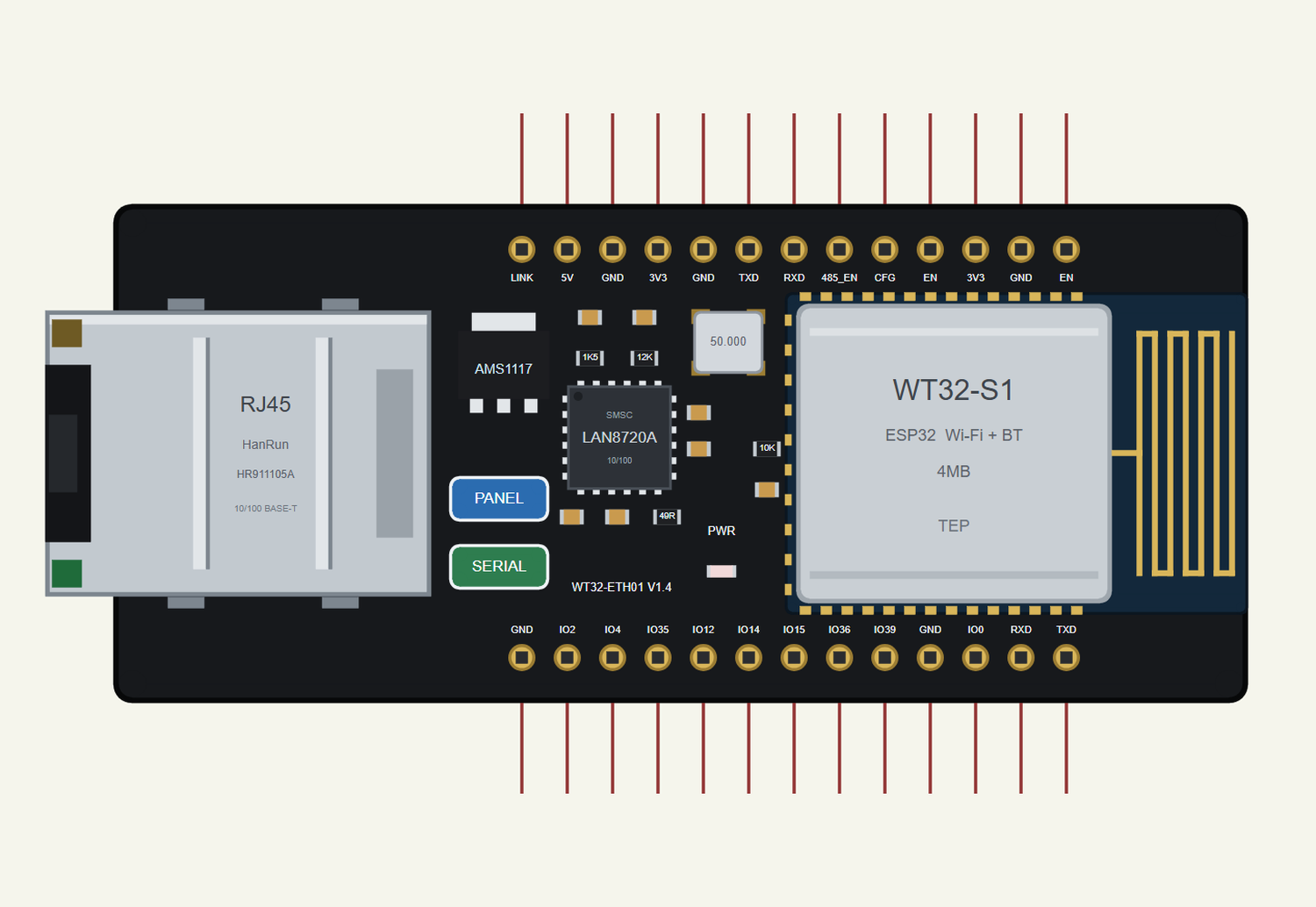
Search WT32 in Pick Devices; the device WT32-ETH01 is in TEPWT32ETH01.LIB (category Microprocessor ICs, ESP32 Boards). The board is drawn on its side, the RJ45 jack at the left: the real board's left header is the top row and its right header the bottom row. Click PANEL to open the panel, SERIAL to open the serial monitor and the RJ45 jack to pull or plug the cable.
| Row | Pins, left to right |
|---|---|
| Top | LINK, 5V, GND, 3V3, GND, TXD (IO17), RXD (IO5), 485_EN (IO33), CFG (IO32), EN, 3V3, GND, EN |
| Bottom | GND, IO2, IO4, IO35, IO12, IO14, IO15, IO36, IO39, GND, IO0, RXD (IO3), TXD (IO1) |
Every State of the Board
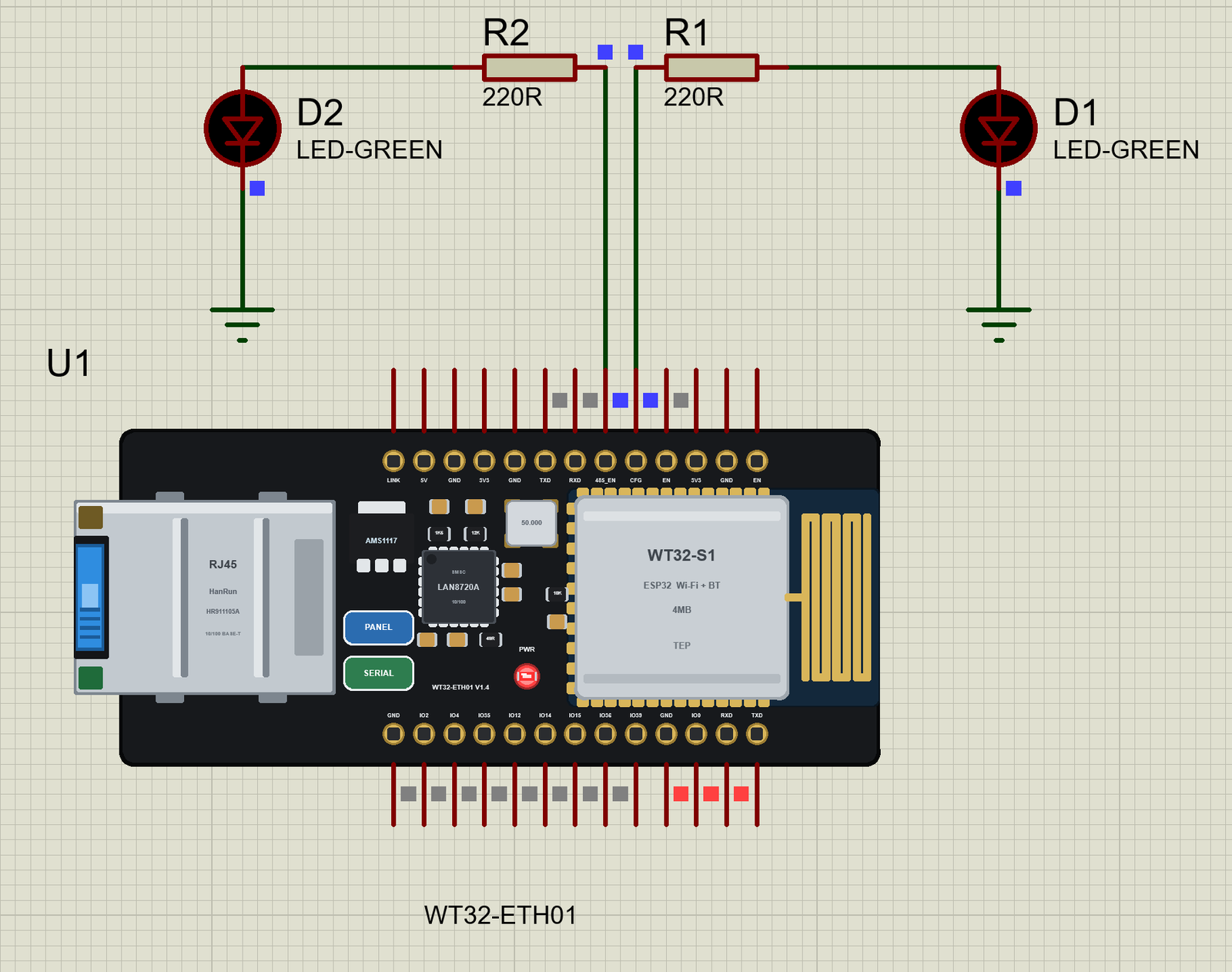
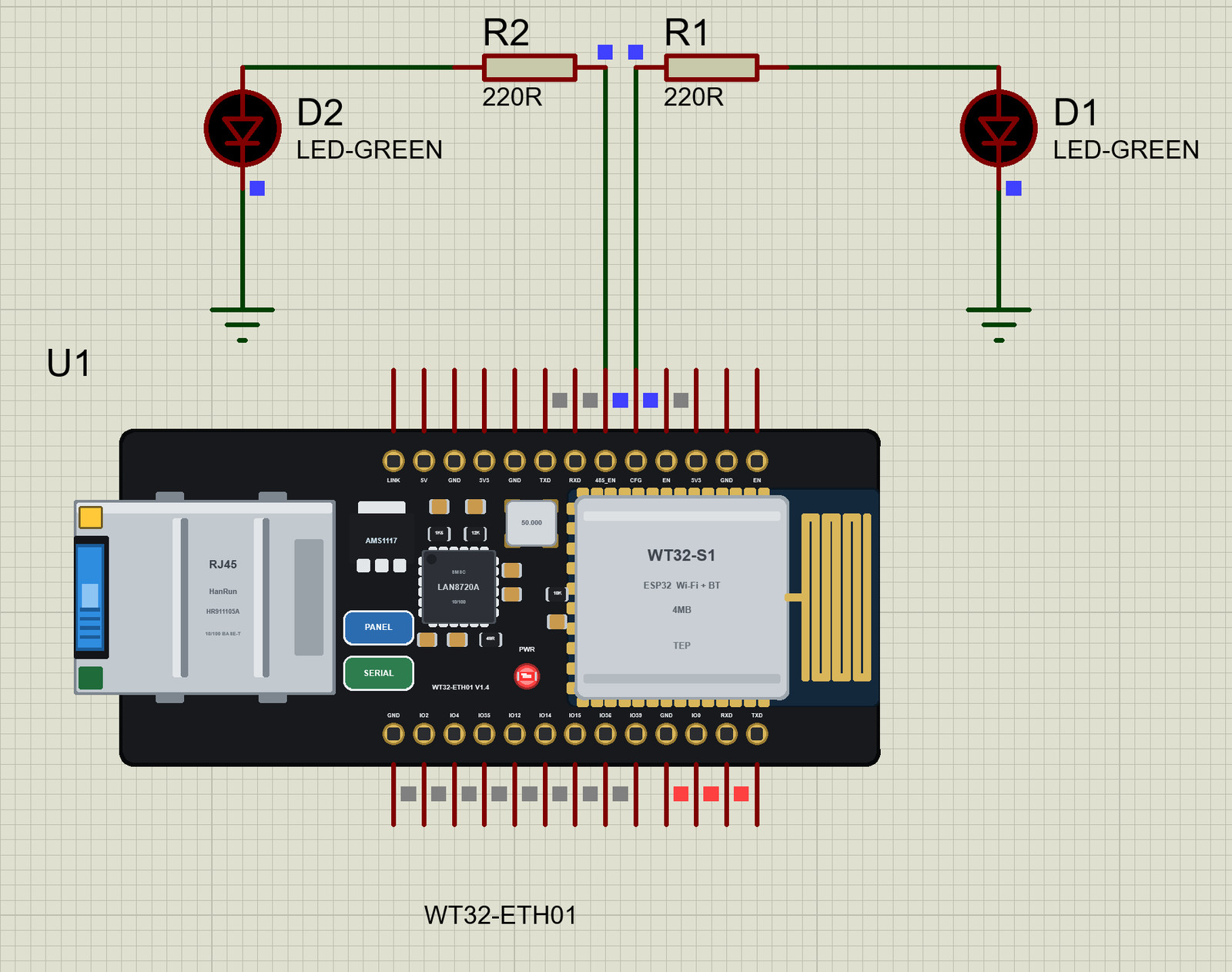
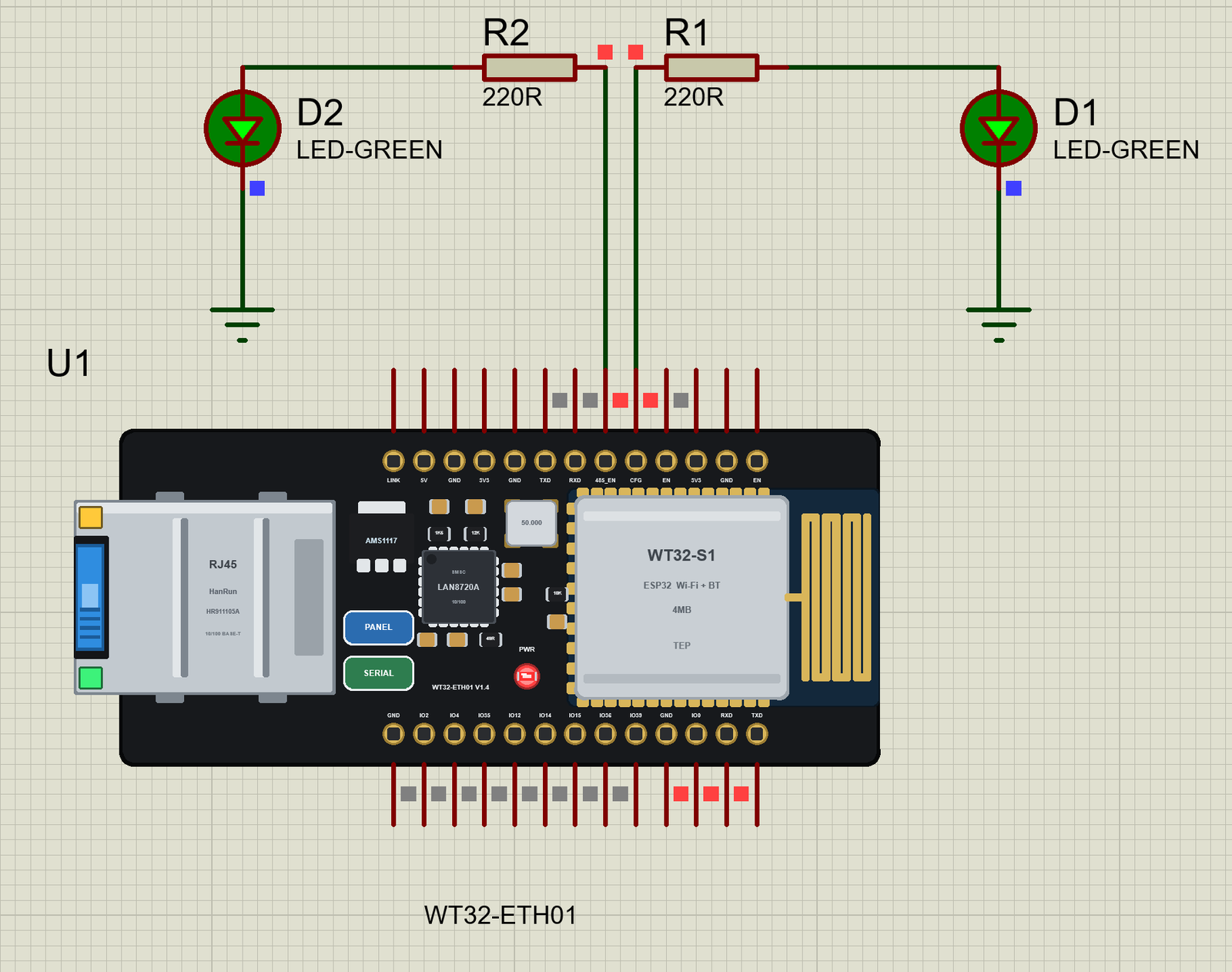
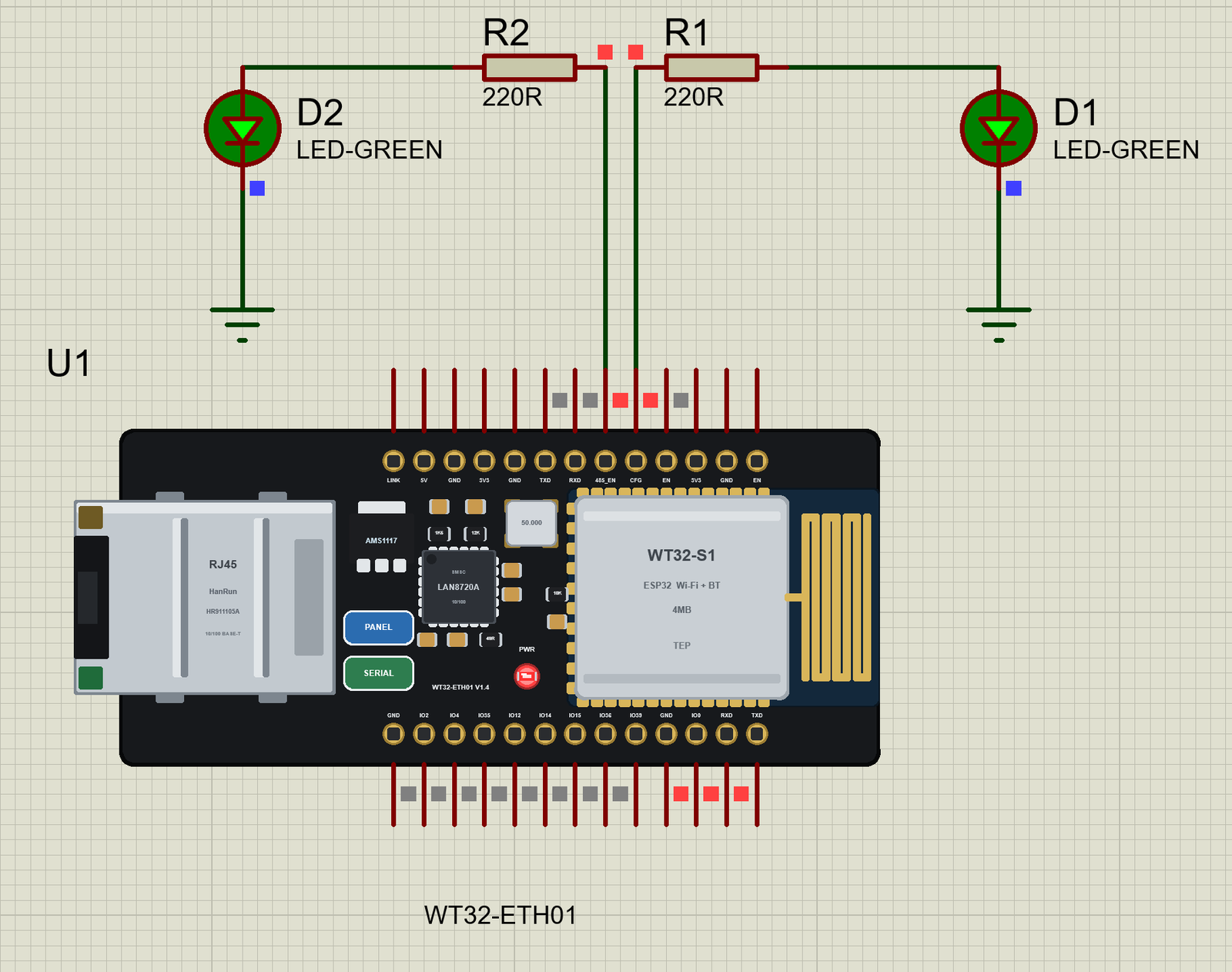
We ran the demo and paused the simulation for each picture. As soon as the sketch calls ETH.begin(), the PWR LED is on and the cable's plug appears in the port; the PHY then negotiates the link:
Download WT32-ETH01 Library for Proteus
Click the button below to download WT32-ETH01-Library-for-Proteus-v1.0.zip (about 2.51 MB, without the C++ source code of the models):
WT32-ETH01 Library for Proteus V1.0- README.txt: the device, installation, the demos, the pins, the properties, troubleshooting and the limits.
- Proteus Library Files:
TEPWT32ETH01.LIB(the board),TEPLAPTOP.LIBandTEPMOBILE.LIB(our Laptop and Mobile WiFi Monitors). - Proteus Model Files:
TEPNET.DLL(the board, the two monitors and the network). - Proteus Simulation: the two demo projects (the board alone, and the relay controller with the laptop and the phone), their HEX file and a copy of the DLL.
- Arduino Code: the demo sketch and the TEP Boards for Proteus add-on 1.15.0 for the Arduino IDE, with the WT32-ETH01 board and the ETH library.
No Proteus yet? Read How to Download and Install Proteus 7 and 8. New to libraries? Follow How to Install a New Library in Proteus.
How to Install WT32-ETH01 Library for Proteus
- Close Proteus and extract the whole zip file, for example to your Desktop.
- Copy the three files from Proteus Library Files into the LIBRARY folder of Proteus (usually
C:\Program Files (x86)\Labcenter Electronics\Proteus 8 Professional\LIBRARY). - Copy
TEPNET.DLLfrom Proteus Model Files into the MODELS folder - replace older copies (this TEPNET.DLL is the first one with the WT32-ETH01, and it still runs every part of the series). - Delete
TEPWT32ETH01.IDX,TEPLAPTOP.IDXandTEPMOBILE.IDXfrom the LIBRARY folder if they are there. - Start Proteus, press P and search for WT32.
For your own sketches, copy the hardware folder from Arduino Code\TEP Boards for Proteus into your sketchbook folder (Documents\Arduino\hardware\tep\avr\boards.txt is the result) and replace any older copy - version 1.15.0 is the first one with the WT32-ETH01. Restart the IDE, choose Tools > Board > TEP Boards for Proteus > WT32-ETH01 (TEP Proteus) and use Sketch > Export Compiled Binary. Double-click the board in Proteus and set its Program File to the HEX (see How to get the HEX file from Arduino).
Demo: a Two-Output Relay Controller on the LAN
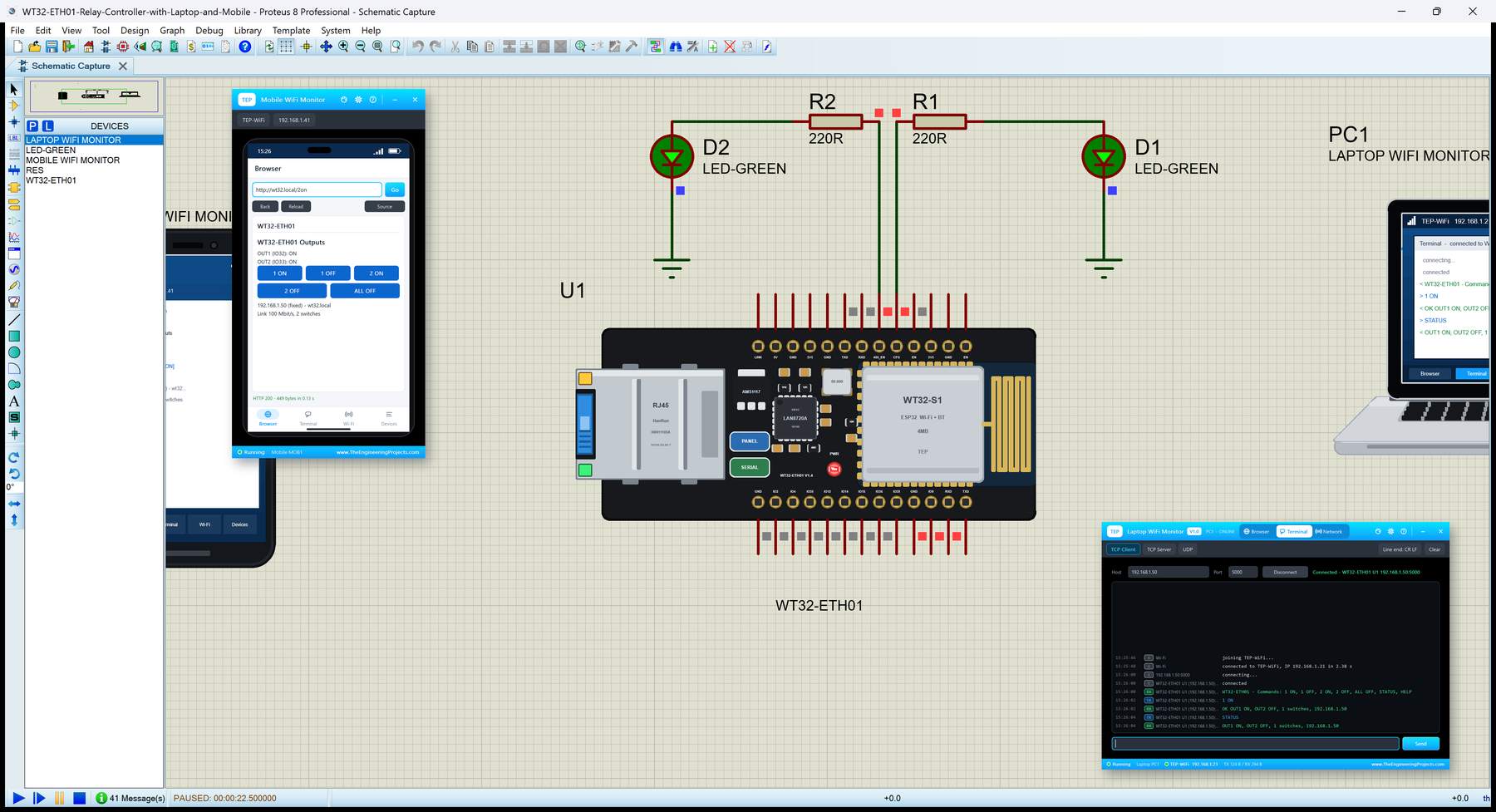
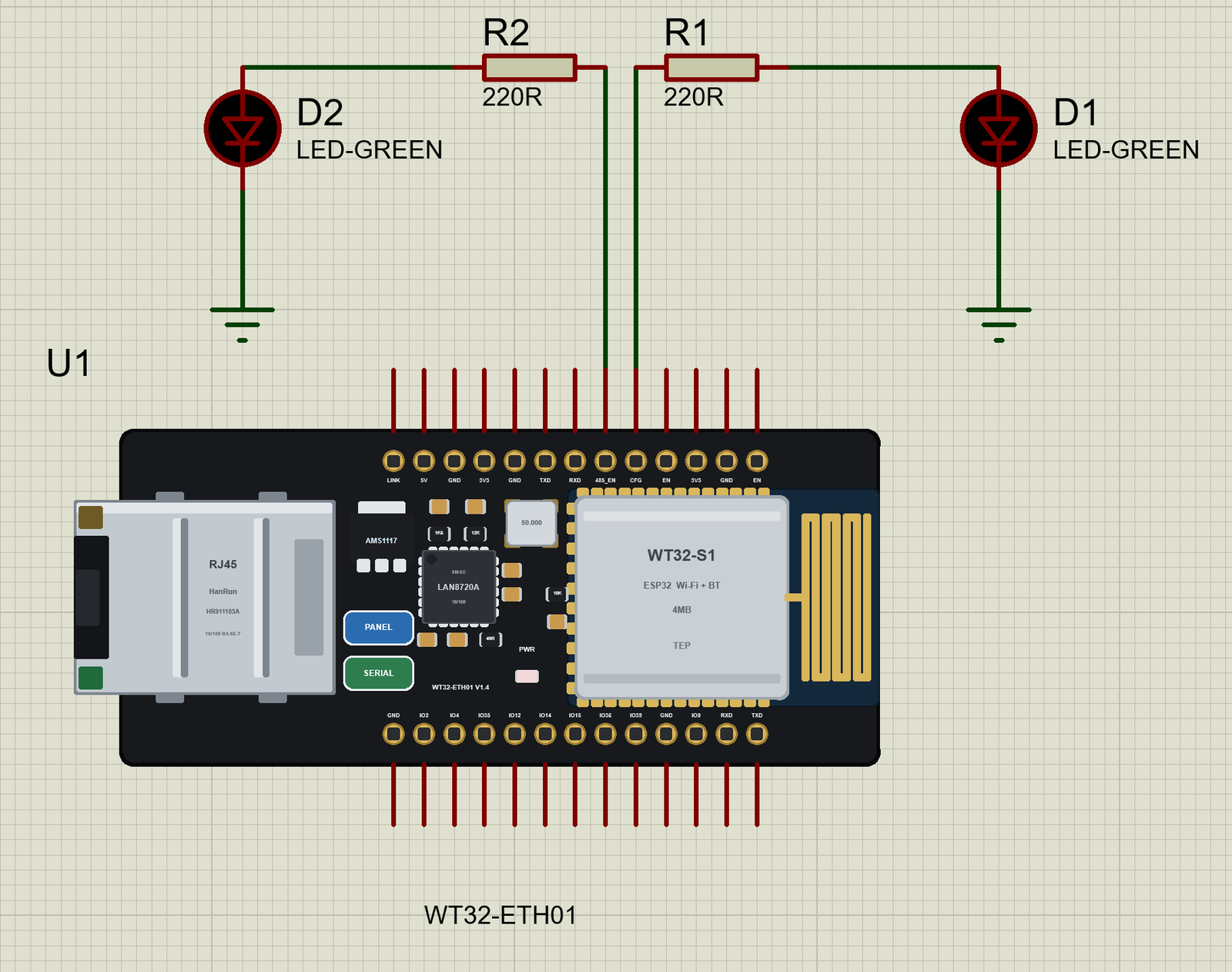
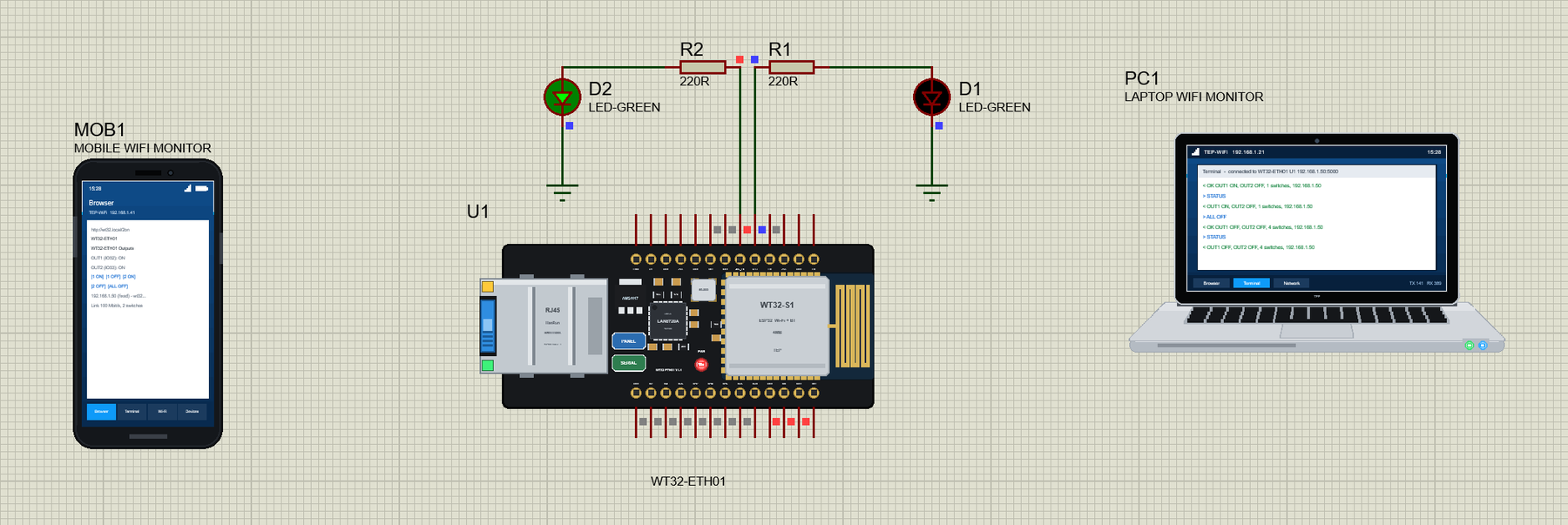
Open WT32-ETH01-Relay-Controller-with-Laptop-and-Mobile.pdsprj. The WT32-ETH01 (U1) is in the middle with two LEDs above it, the phone (MOB1) on the left and the laptop (PC1) on the right. The laptop and the phone are on the router's network, like the real ones, so they have no wires; the board reaches the router through its own RJ45 jack.
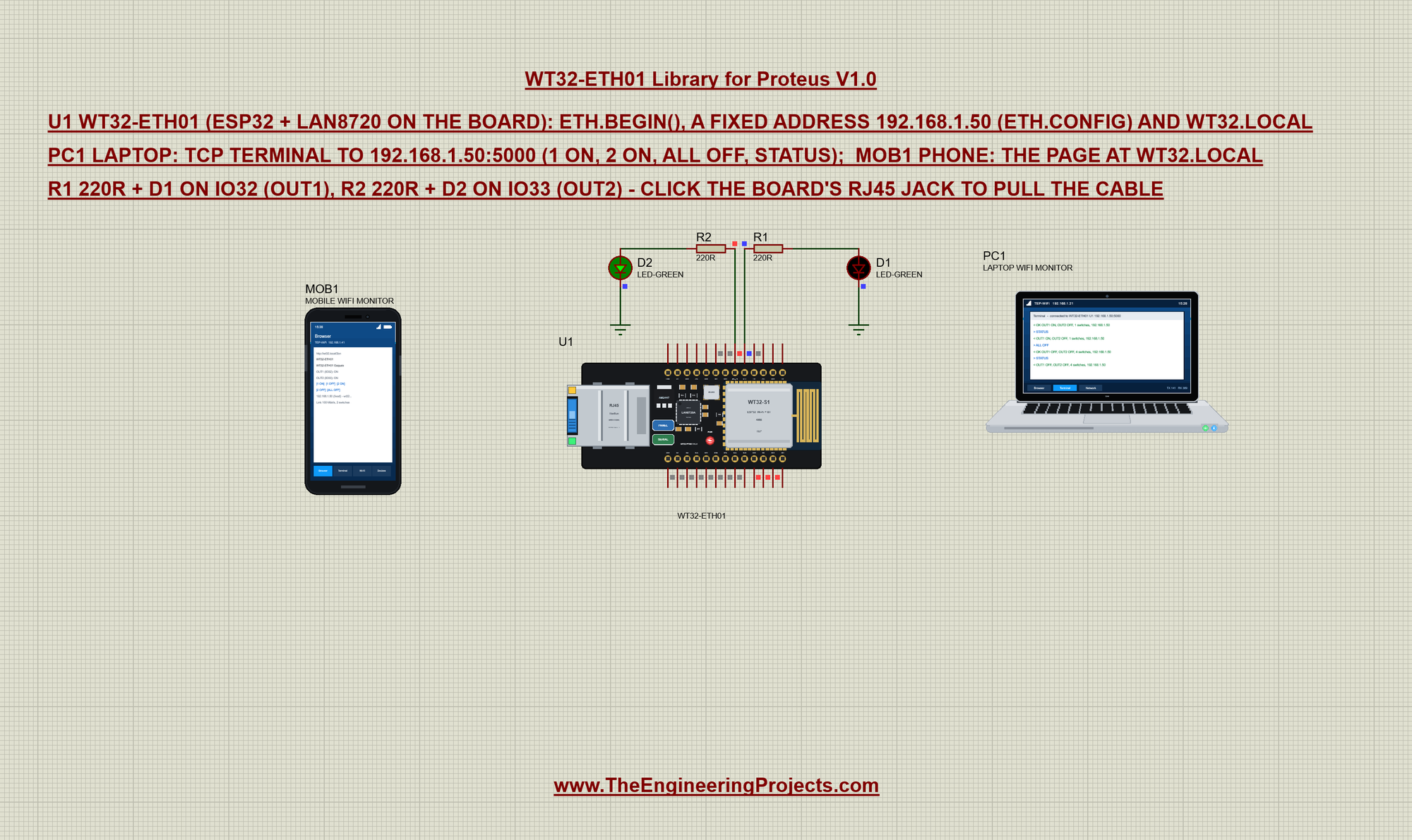
The two outputs are IO32 and IO33 - the pins the board prints as CFG and 485_EN. Those names come from Wireless-Tag's serial-to-Ethernet firmware; with your own sketch they are free GPIOs. Each drives a 220R resistor and an LED; on a real build they would drive two relay modules:
| Output | Pin | Part | Switched by |
|---|---|---|---|
| OUT1 | IO32 (CFG) | R1 220R + D1 LED-GREEN | the web page, the TCP terminal, the serial monitor |
| OUT2 | IO33 (485_EN) | R2 220R + D2 LED-GREEN | the web page, the TCP terminal, the serial monitor |
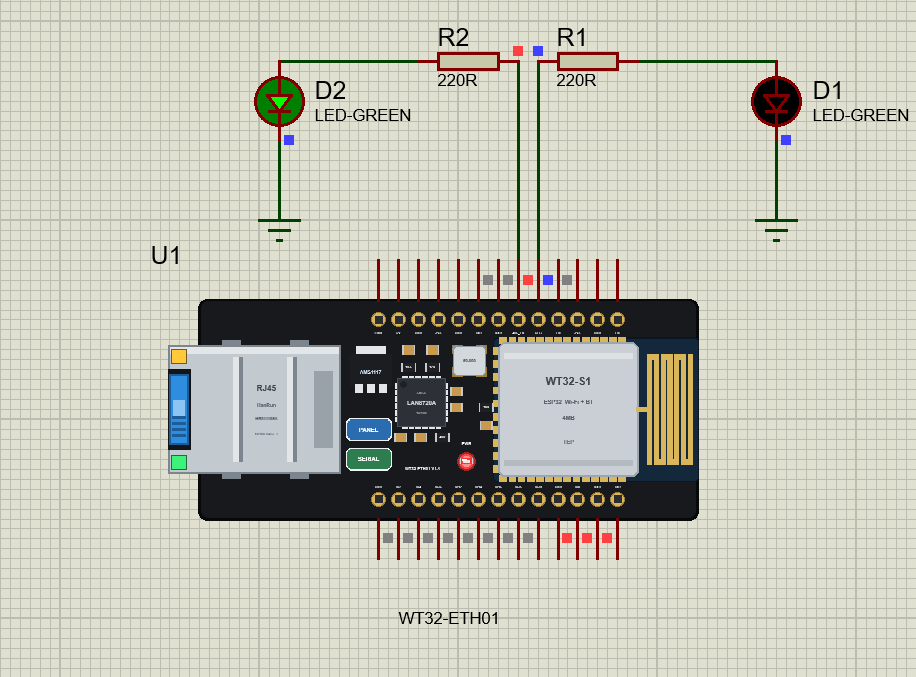
The laptop and the phone come from our Laptop WiFi Monitor Library for Proteus and Mobile WiFi Monitor Library for Proteus. In this project the laptop's home page is http://192.168.1.50/status and its TCP terminal is set to 192.168.1.50, port 5000; the phone's home page is http://wt32.local/. The laptop is 192.168.1.21 and the phone 192.168.1.41.
There is also WT32-ETH01-Board.pdsprj, the board alone with the same HEX file - press Run and watch the events in the monitor, then click the jack.
The Sketch: ETH.begin() with No Arguments
The sketch includes three libraries - ETH for the cable, WebServer for the page and ESPmDNS for the name - and sets the two output pins and the fixed address:
#include <ETH.h>
#include <WebServer.h>
#include <ESPmDNS.h>
const int OUT_PIN[2] = {32, 33};
IPAddress localIp(192, 168, 1, 50), gateway(192, 168, 1, 1), subnet(255, 255, 255, 0), dns(192, 168, 1, 1);The event handler prints what happens on the cable. At ETH_START it sets the host name; at ETH_GOT_IP the board is online:
void onEvent(arduino_event_id_t event) {
  switch (event) {
    case ARDUINO_EVENT_ETH_START:
      Serial.println("ETH started");
      ETH.setHostname("wt32-eth01");
      break;
    case ARDUINO_EVENT_ETH_CONNECTED:
      Serial.printf("ETH link up: %u Mbit/s\n", (unsigned)ETH.linkSpeed());
      break;
    case ARDUINO_EVENT_ETH_GOT_IP:
      Serial.print("ETH address ");
      Serial.print(ETH.localIP());
      Serial.println(" (fixed, ETH.config)");
      online = true;
      break;
    case ARDUINO_EVENT_ETH_DISCONNECTED:
      Serial.println("ETH link down - the cable is out");
      online = false;
      break;
    default:
      break;
  }
}
setup() adds the handler first, then starts Ethernet. With the board WT32-ETH01 selected, ETH.begin() uses the board's own PHY settings. ETH.config() then fixes the address, so no DHCP is needed:
  WiFi.onEvent(onEvent);
  if (!ETH.begin()) {                    // the board's LAN8720 (its ETH_PHY_* defaults)
    Serial.println("ETH.begin() failed");
    while (true) delay(1000);
  }
  ETH.config(localIp, gateway, subnet, dns);
  if (MDNS.begin("wt32")) Serial.println("mDNS: http://wt32.local/");
Press Run. The monitor opens with the board's start and its three Ethernet events:
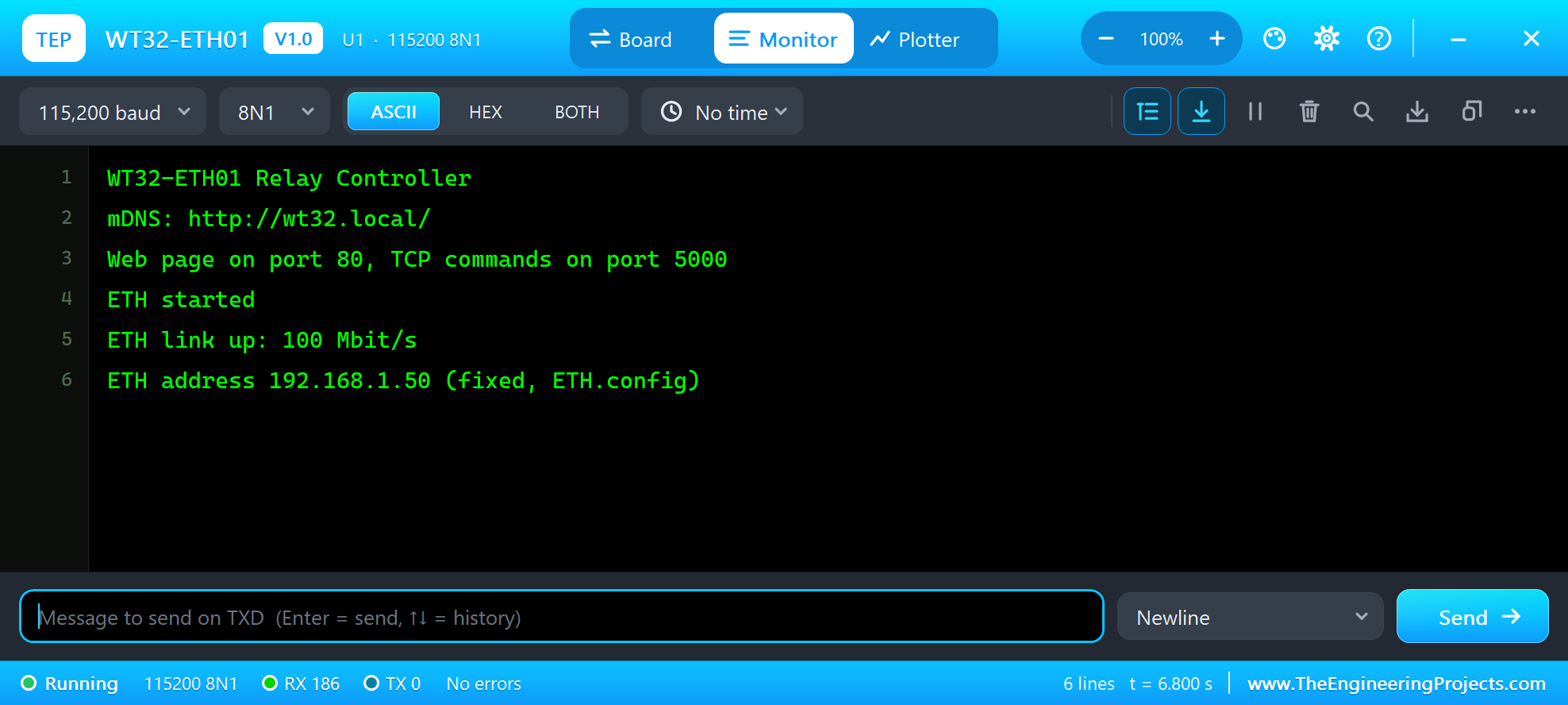
WT32-ETH01 Relay Controller
mDNS: http://wt32.local/
Web page on port 80, TCP commands on port 5000
ETH started
ETH link up: 100 Mbit/s
ETH address 192.168.1.50 (fixed, ETH.config)
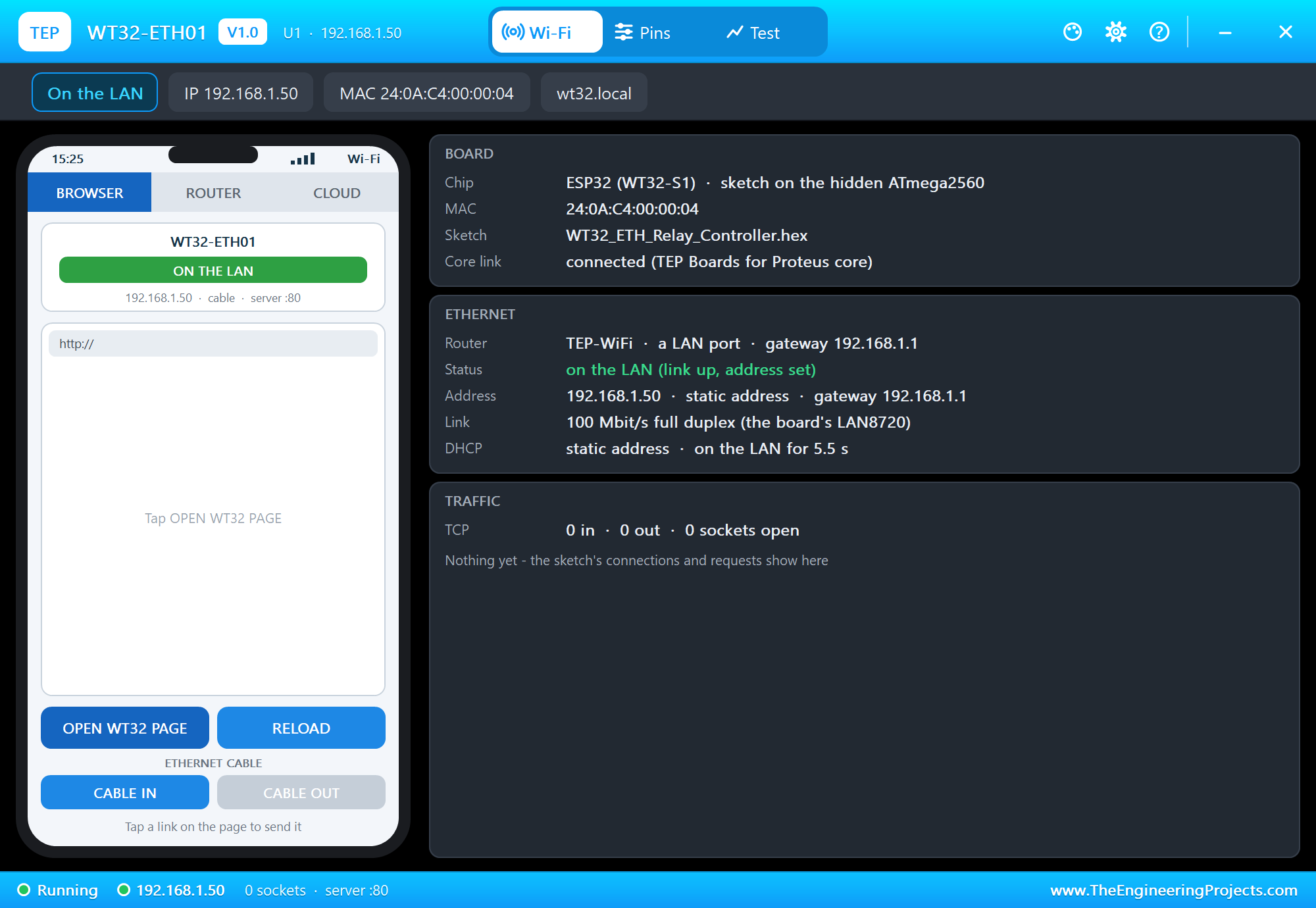
The panel opens at Run and shows the board on the LAN - a static address, the link 100 Mbit/s full duplex through the board's LAN8720:
One Set of Commands for Every Input
The outputs can be switched from three places, so the sketch keeps one function that runs a command line and returns the answer. setOut() switches a pin and counts the switches:
void setOut(int n, bool on, const char *why) {
  out[n] = on;
  digitalWrite(OUT_PIN[n], on ? HIGH : LOW);
  switches++;
  Serial.printf("OUT%d %s (%s)\n", n + 1, on ? "ON" : "OFF", why);
}
String status() {
return String("OUT1 ") + (out[0] ? "ON" : "OFF") + ", OUT2 " + (out[1] ? "ON" : "OFF") + ", " + switches + " switches, " +
ETH.localIP().toString();
}String command(String c, const char *from) {
c.trim();
c.toUpperCase();
if (c == "1 ON" || c == "1 OFF" || c == "2 ON" || c == "2 OFF") {
setOut(c[0] - '1', c.endsWith(" ON"), from);
return "OK " + status();
}
if (c == "ALL OFF") {
setOut(0, false, from);
setOut(1, false, from);
return "OK " + status();
}
if (c == "STATUS") return status();
return "Commands: 1 ON, 1 OFF, 2 ON, 2 OFF, ALL OFF, STATUS, HELP";
}The Laptop: /status and a TCP Terminal
/status sends the state as one line of plain text - easy for a program to read:
void handleRoot() { sendPage(); }
void handle1On() { setOut(0, true, "the web page"); sendPage(); }
void handle1Off() { setOut(0, false, "the web page"); sendPage(); }
void handle2On() { setOut(1, true, "the web page"); sendPage(); }
void handle2Off() { setOut(1, false, "the web page"); sendPage(); }
void handleAllOff() { setOut(0, false, "the web page"); setOut(1, false, "the web page"); sendPage(); }
void handleStatus() { web.send(200, "text/plain", status() + "\n"); }
The laptop's home page is /status, so its Go button shows it:
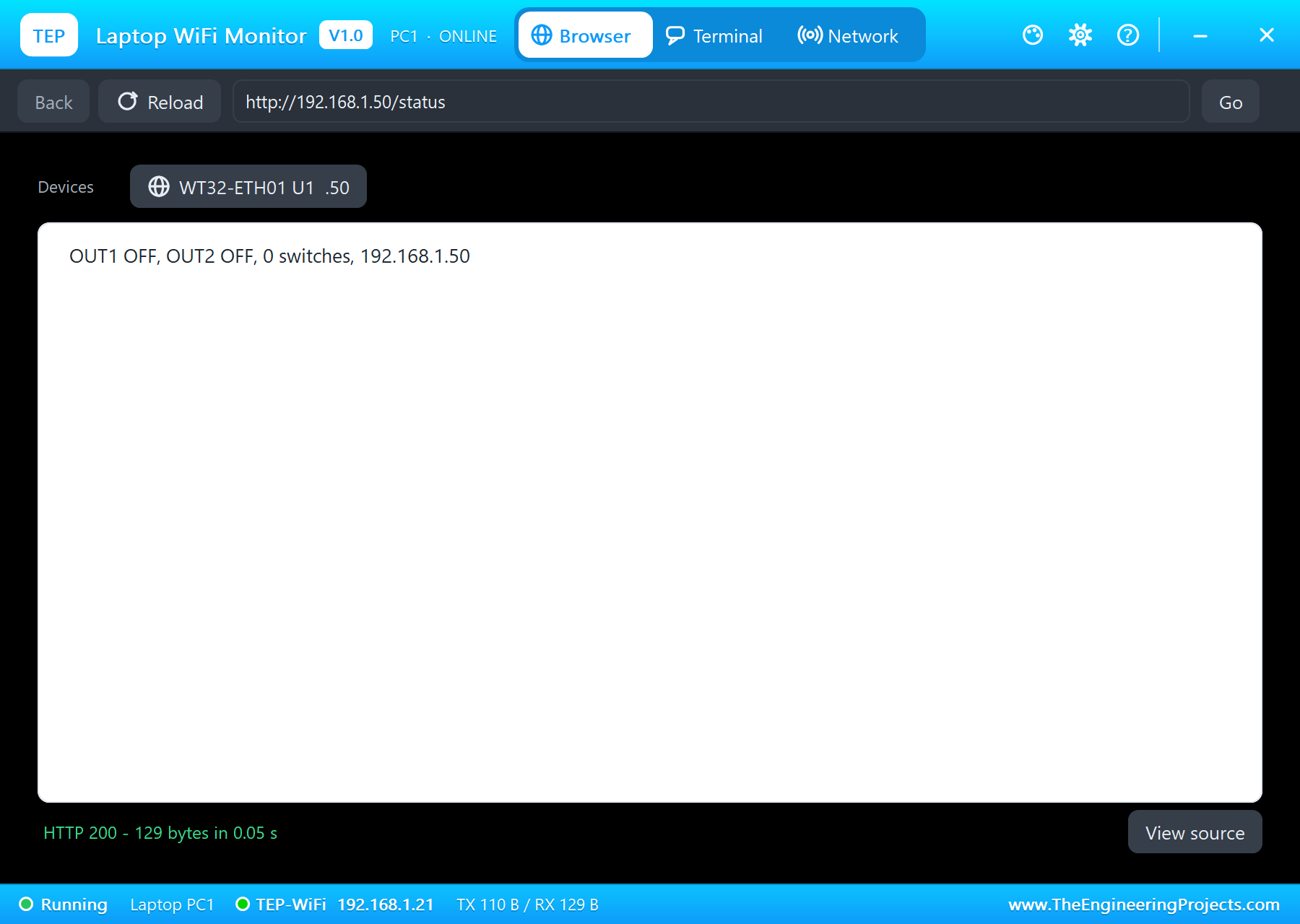
OUT1 OFF, OUT2 OFF, 0 switches, 192.168.1.50The TCP terminal on port 5000 takes one client at a time and one command per line. A new client gets the command list first:
void serveTerminal() {
  if (!term || !term.connected()) {
    WiFiClient c = tcp.available();
    if (c) {
      term = c;
      Serial.print("TCP terminal from ");
      Serial.println(term.remoteIP());
      term.println("WT32-ETH01 - " + command("HELP", "the terminal"));
    }
  }
  while (term && term.available()) {
    const char ch = term.read();
    if (ch == '\n') {
      term.println(command(termLine, "the terminal"));
      termLine = "";
    } else if (ch != '\r' && termLine.length() < 30) {
      termLine += ch;
    }
  }
}
Open the laptop's Terminal tab, press Connect and type 1 ON, then STATUS. D1 lights up on the sheet:
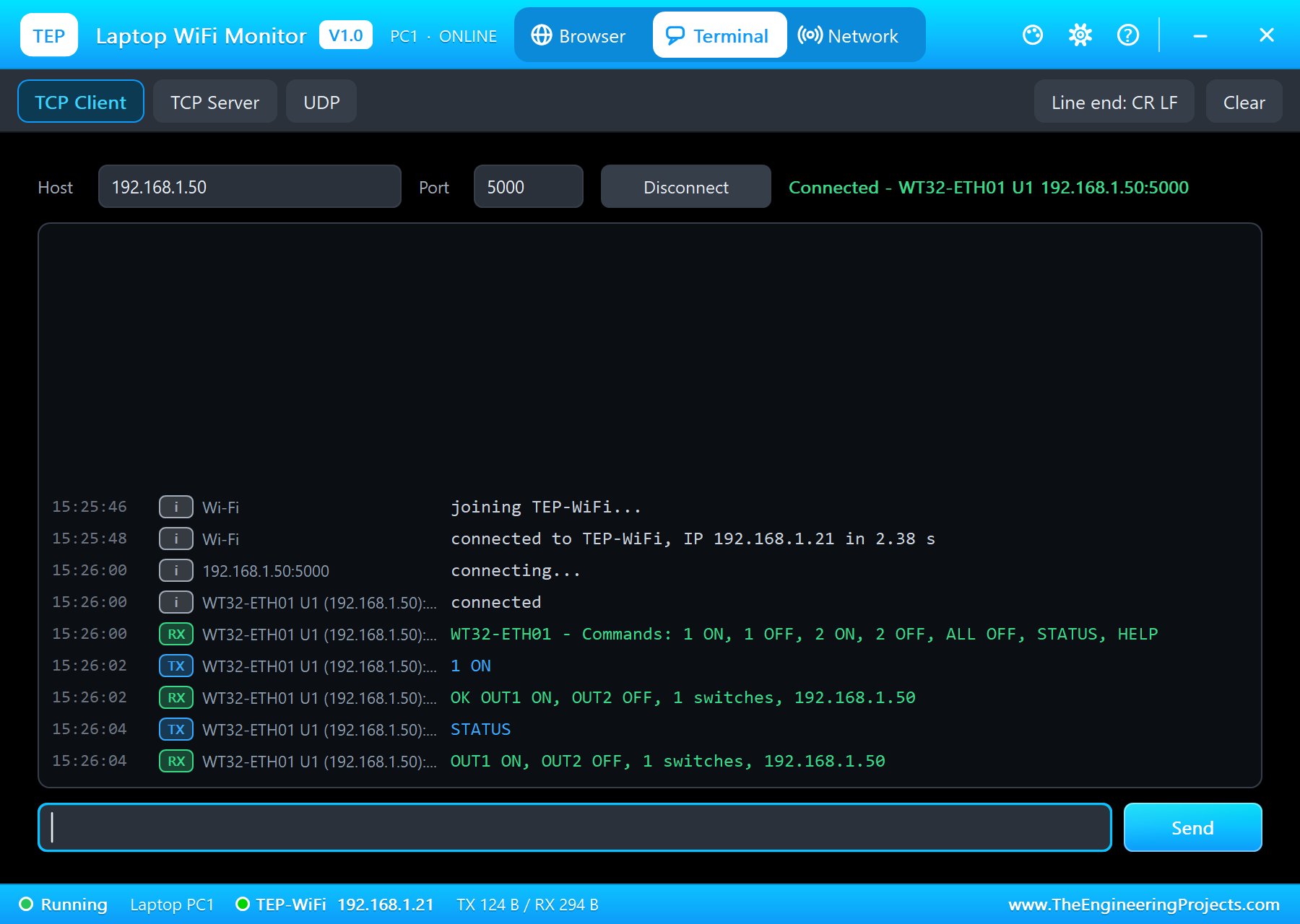
WT32-ETH01 - Commands: 1 ON, 1 OFF, 2 ON, 2 OFF, ALL OFF, STATUS, HELP
1 ON
OK OUT1 ON, OUT2 OFF, 1 switches, 192.168.1.50
STATUS
OUT1 ON, OUT2 OFF, 1 switches, 192.168.1.50
The Phone: a Web Page
The page shows both outputs, five links and the link state from the ETH library itself:
void sendPage() {
  String h = F("<html><head><title>WT32-ETH01</title></head><body><h1>WT32-ETH01 Outputs</h1>");
  for (int n = 0; n < 2; n++) {
    h += F("<p>OUT");
    h += n + 1;
    h += F(" (IO");
    h += OUT_PIN[n];
    h += F("): <b>");
    h += out[n] ? F("ON") : F("OFF");
    h += F("</b></p>");
  }
  h += F("<p><a href=\"/1on\">1 ON</a> <a href=\"/1off\">1 OFF</a> <a href=\"/2on\">2 ON</a></p>");
  h += F("<p><a href=\"/2off\">2 OFF</a> <a href=\"/alloff\">ALL OFF</a></p><p>");
  h += ETH.localIP().toString();
  h += F(" (fixed) - wt32.local</p><p>Link ");
  h += ETH.linkUp() ? String(ETH.linkSpeed()) + " Mbit/s" : String("down");
  h += F(", ");
  h += switches;
  h += F(" switches</p></body></html>");
  web.send(200, "text/html", h);
}
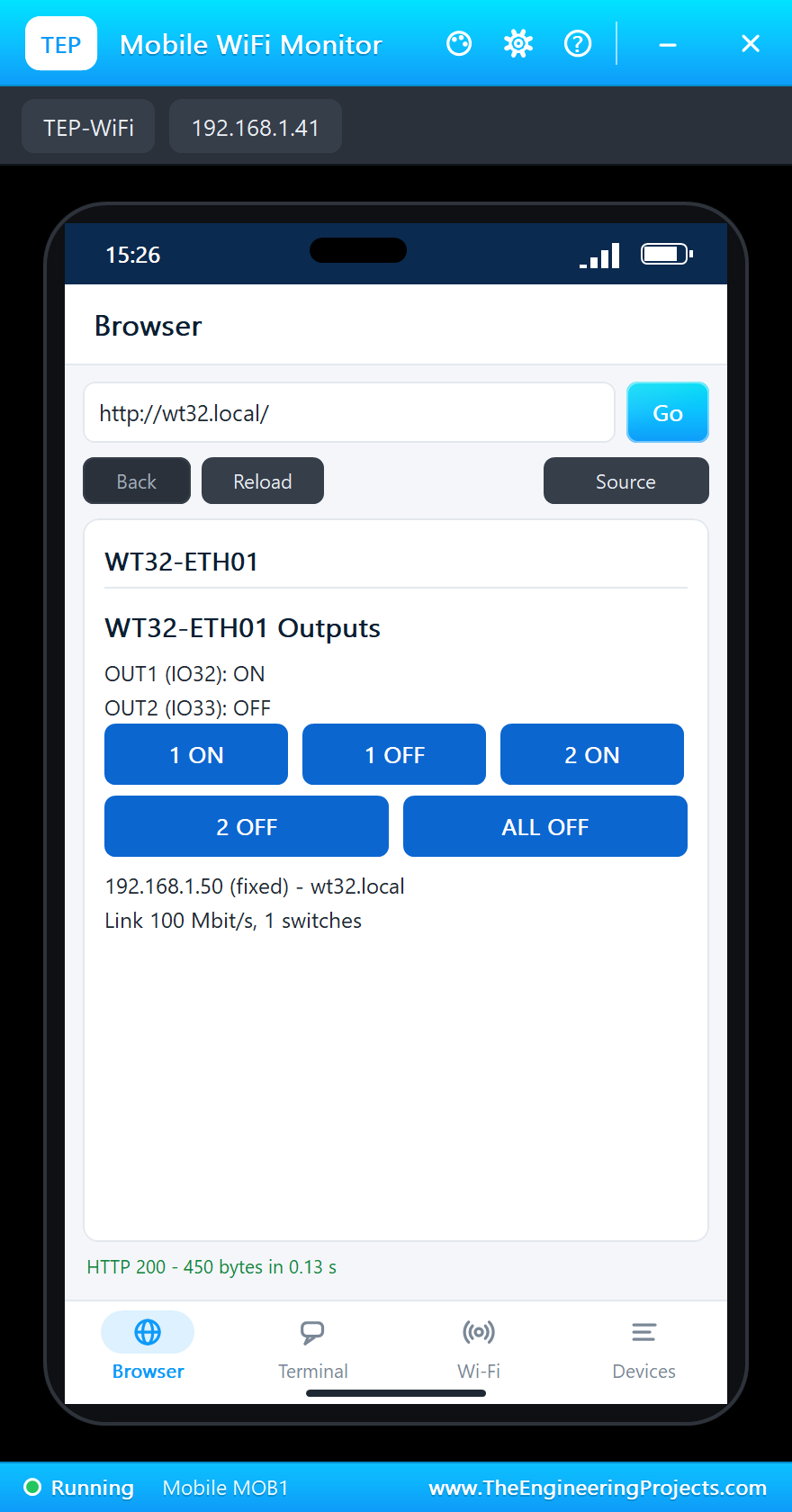
Press Go in the phone's Browser. The name wt32.local is answered by mDNS - the phone does not need to know the address:
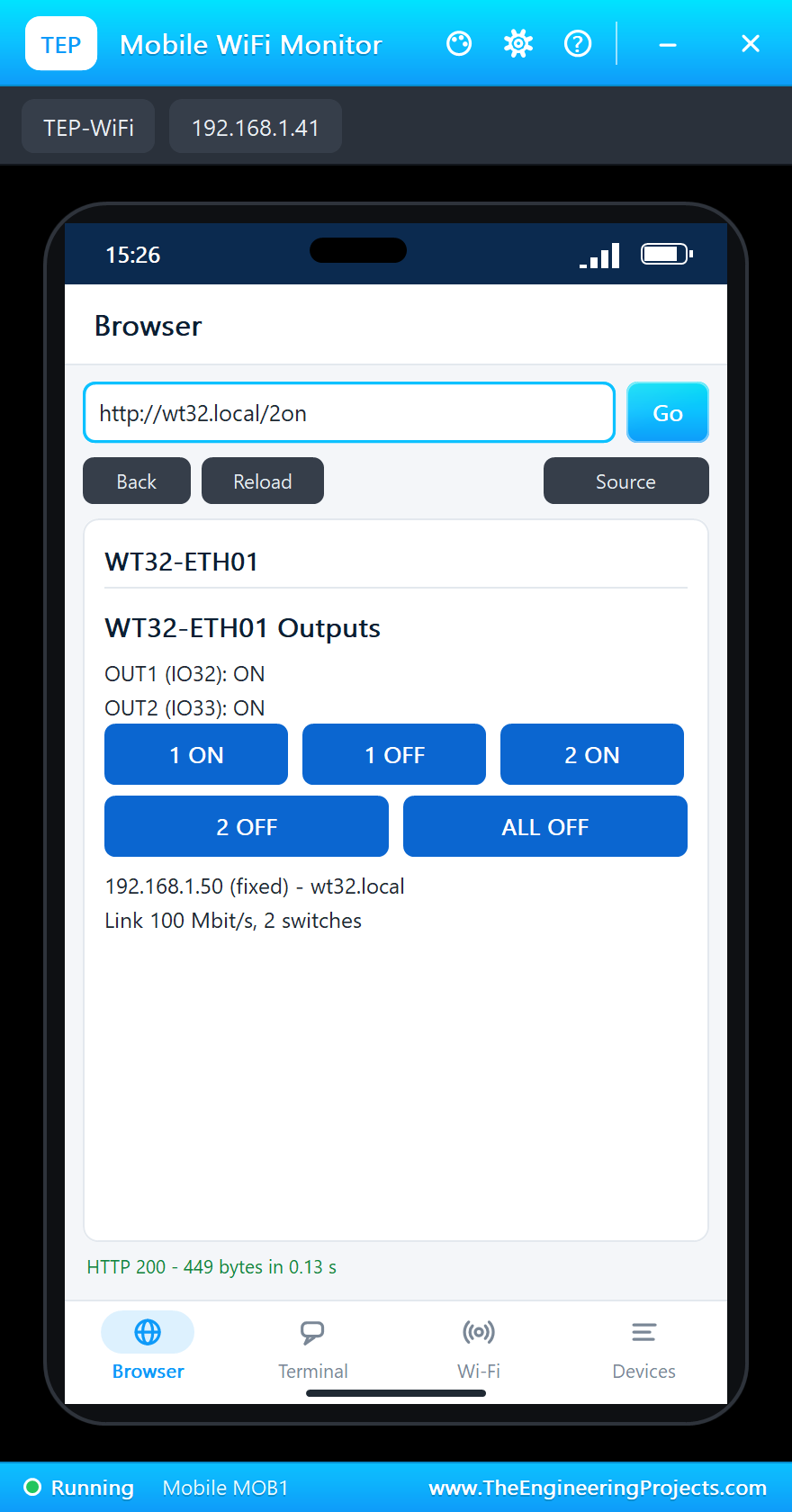
Tap 2 ON. The page comes back with both outputs on, and D2 lights up:
The monitor logs who switched what:
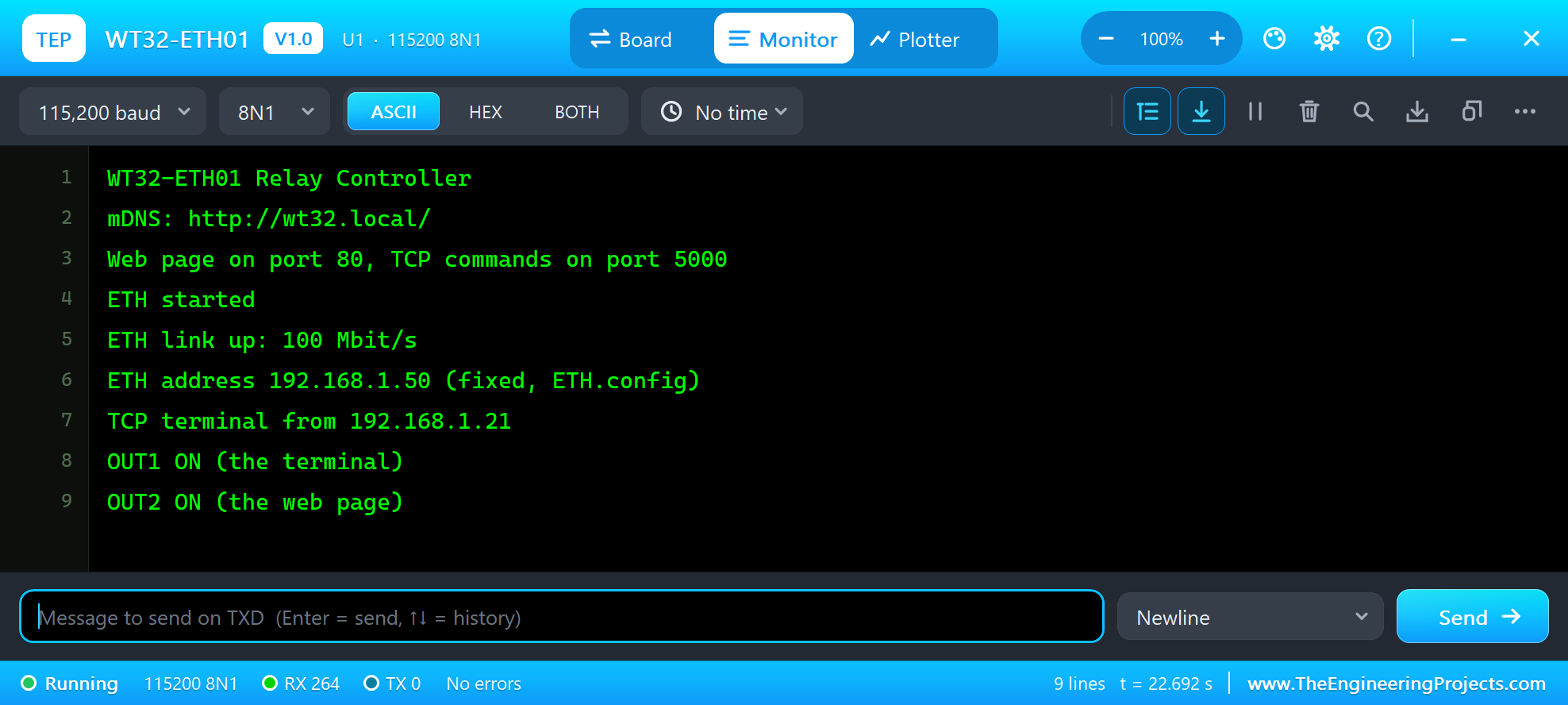
TCP terminal from 192.168.1.21
OUT1 ON (the terminal)
OUT2 ON (the web page)
Pull the Cable
Now click CABLE OUT in the panel (or the RJ45 jack). The PHY loses the link at once, both jack LEDs go dark and the sketch gets ETH_DISCONNECTED:
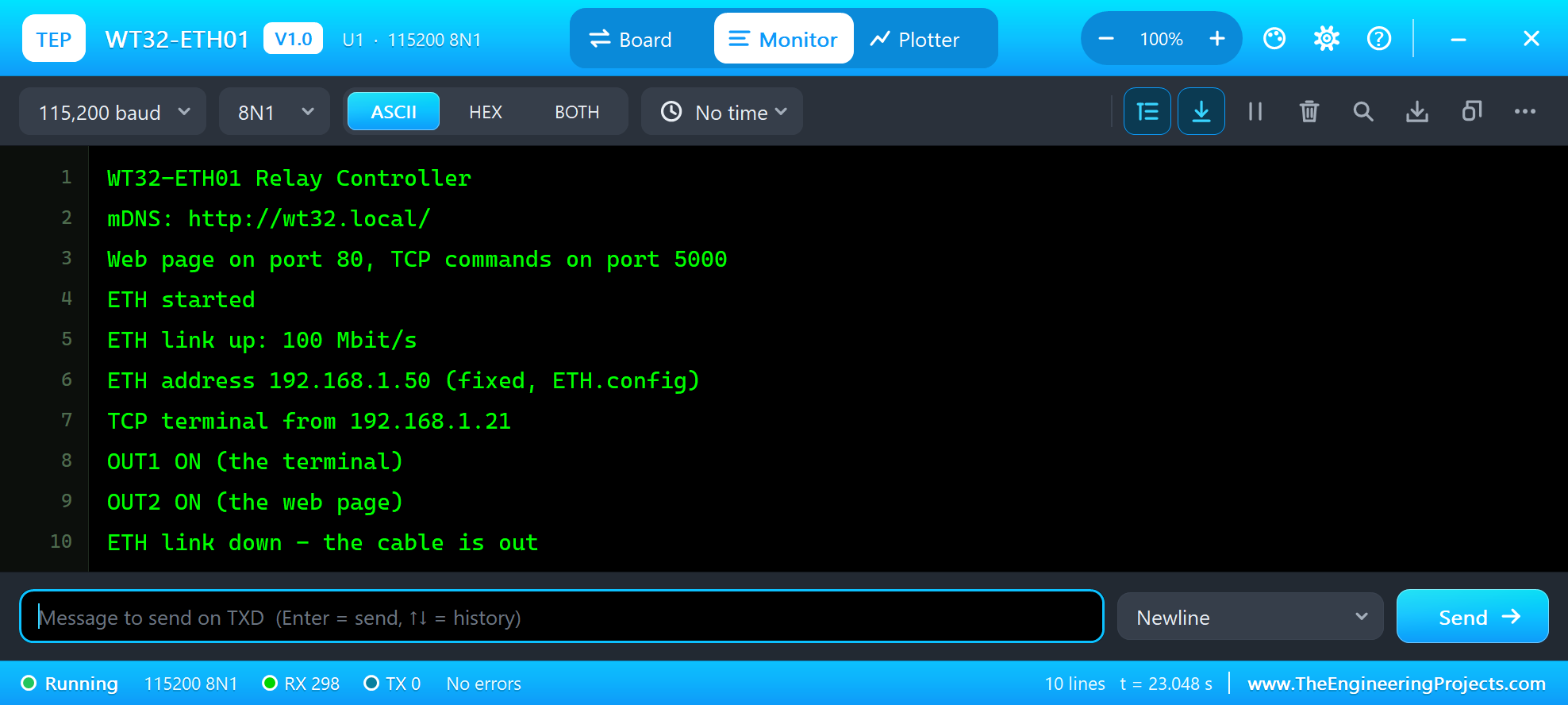
ETH link down - the cable is outThe address stays and open connections wait. Put the cable back with CABLE IN: after the 1.2 s auto-negotiation the link is up, and with a fixed address the board is online again at once - no DHCP to wait for. If the cable stays out for more than 20 s, the connections are dropped and ETH_LOST_IP arrives. Here it was back in time, so the laptop's terminal is still connected - type ALL OFF and STATUS without pressing Connect again:
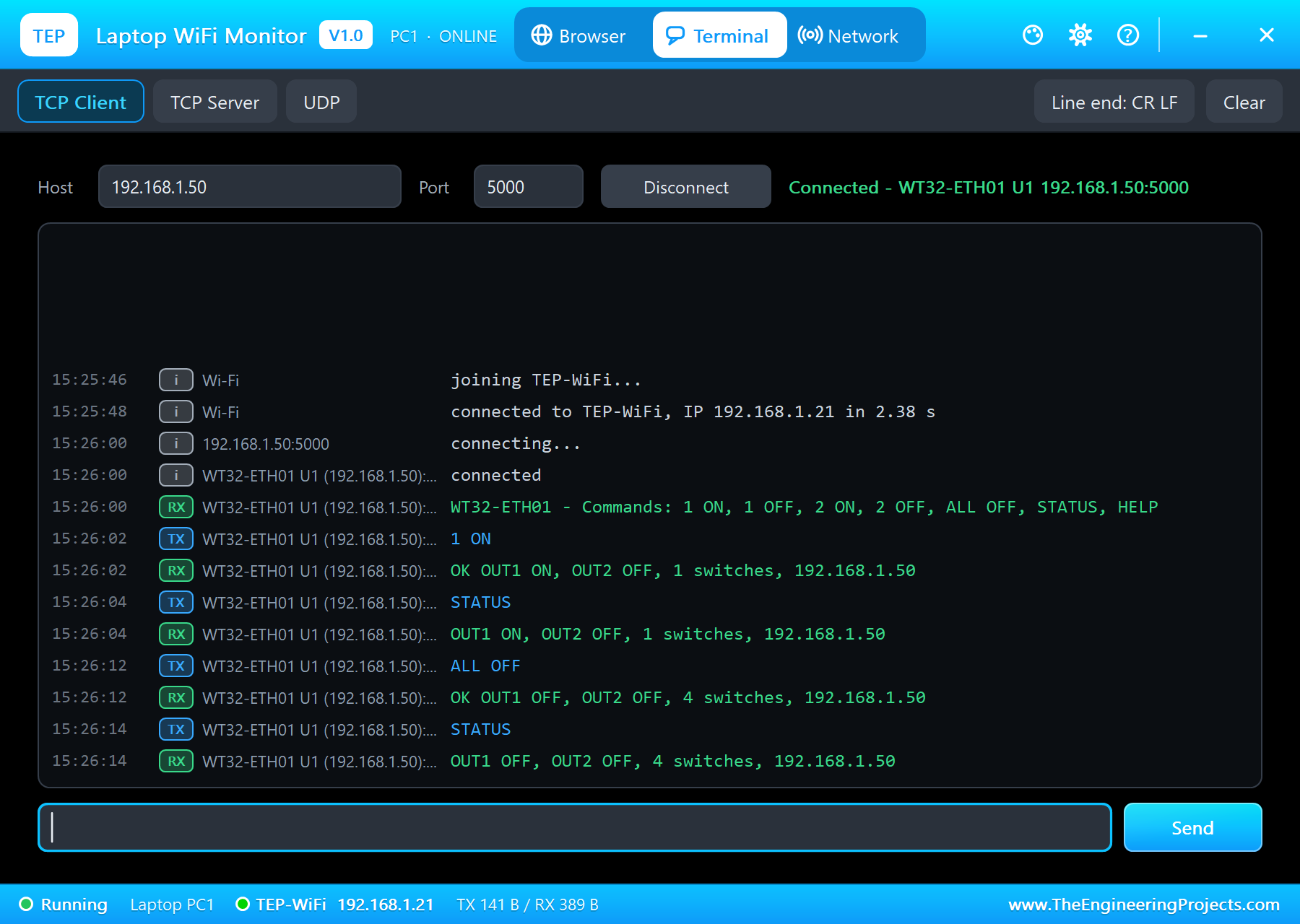
ALL OFF
OK OUT1 OFF, OUT2 OFF, 4 switches, 192.168.1.50
STATUS
OUT1 OFF, OUT2 OFF, 4 switches, 192.168.1.50
The Monitor's Commands
The serial monitor takes the same commands. The loop only serves the web page, the terminal and the monitor; the ETH events come by themselves:
void monitor() {
  while (Serial.available()) {
    const char ch = Serial.read();
    if (ch == '\n' || ch == '\r') {
      if (serialLine.length()) Serial.println(command(serialLine, "the monitor"));
      serialLine = "";
    } else if (serialLine.length() < 30) {
      serialLine += ch;
    }
  }
}
void loop() {
web.handleClient();
serveTerminal();
monitor();
}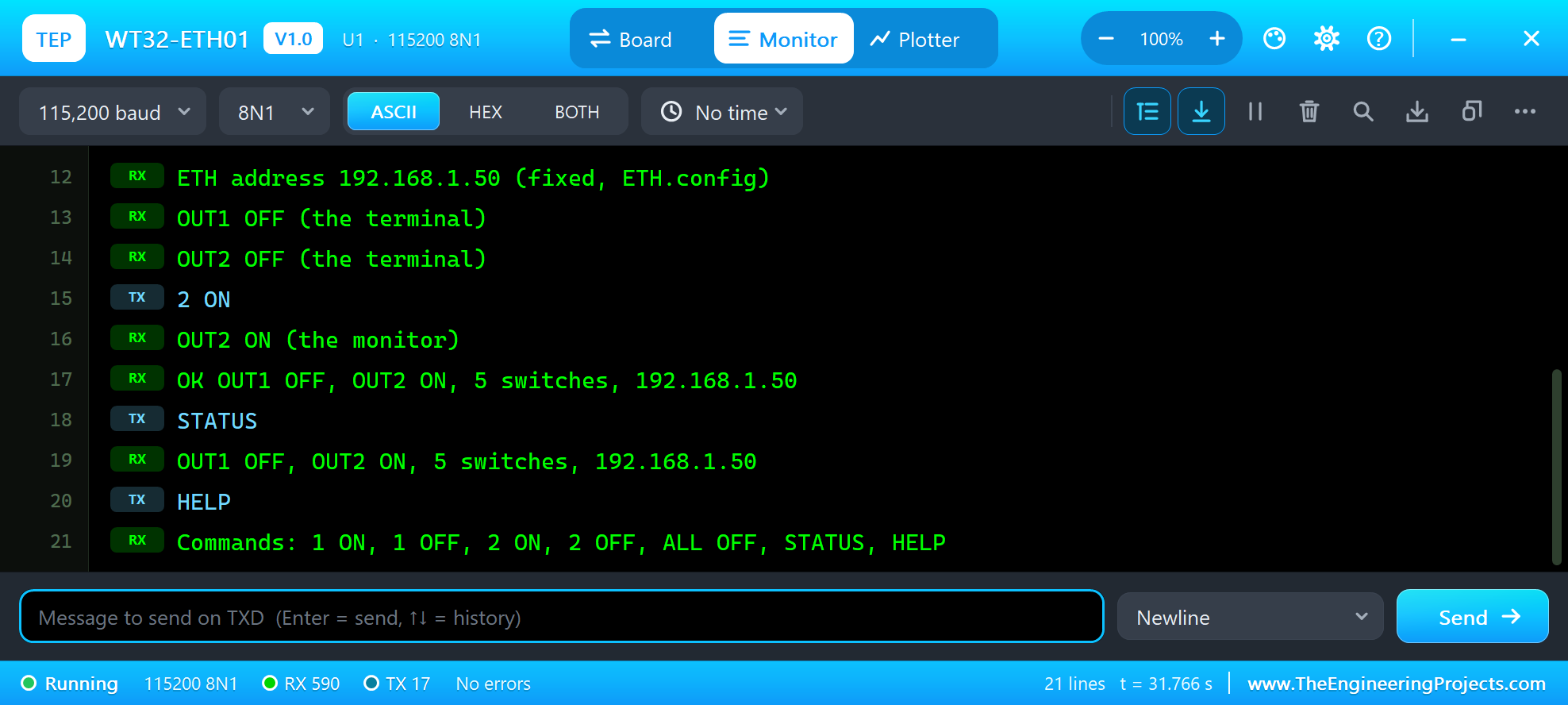
ETH address 192.168.1.50 (fixed, ETH.config)
OUT1 OFF (the terminal)
OUT2 OFF (the terminal)
2 ON
OUT2 ON (the monitor)
OK OUT1 OFF, OUT2 ON, 5 switches, 192.168.1.50
STATUS
OUT1 OFF, OUT2 ON, 5 switches, 192.168.1.50
HELP
Commands: 1 ON, 1 OFF, 2 ON, 2 OFF, ALL OFF, STATUS, HELP
The WT32-ETH01 Panel
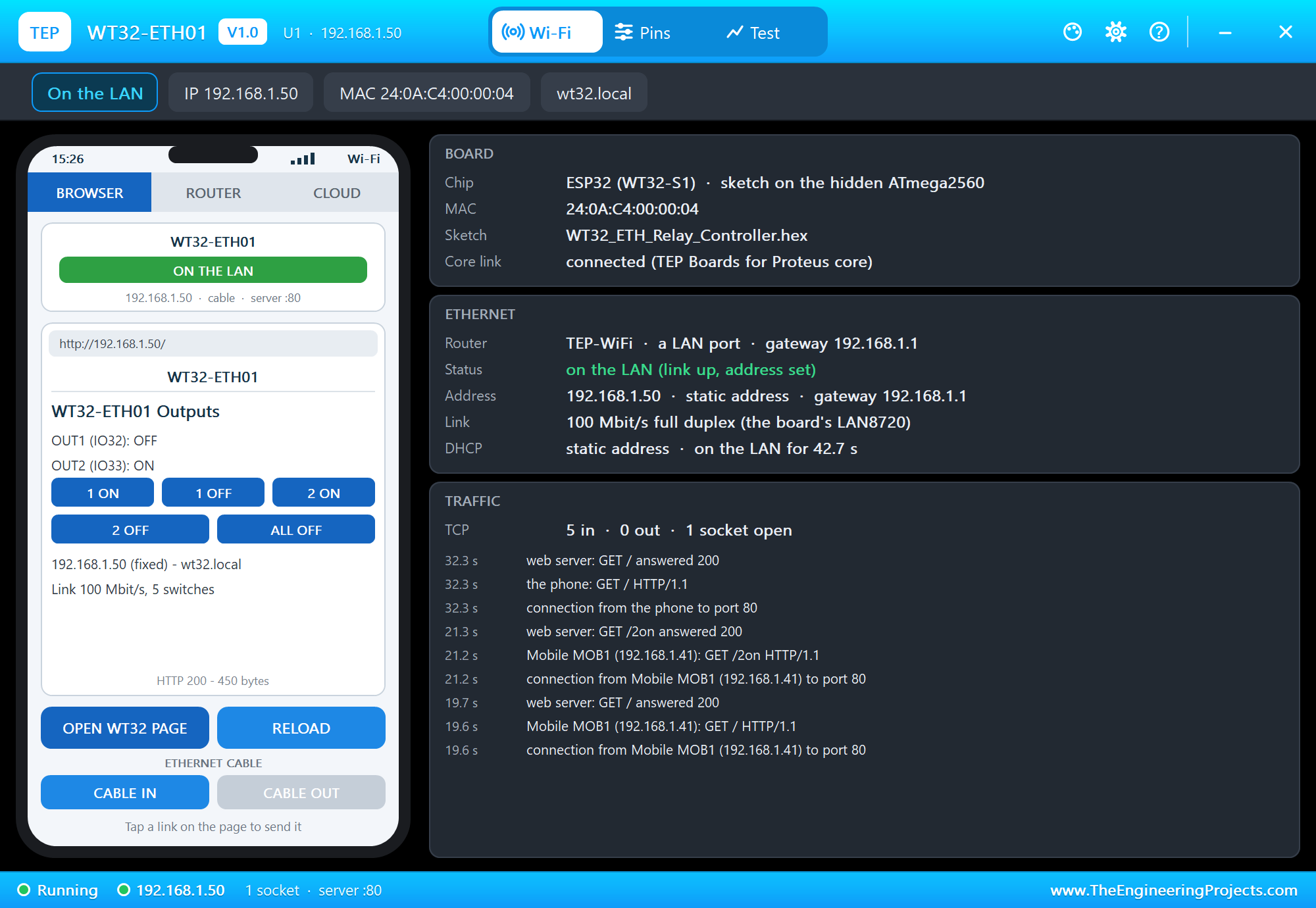
The panel opens at Run, in the look of our TEP Serial Monitor Advance for Proteus - our own TEP header, no Windows title bar. Its first page has a small phone of its own with the CABLE IN and CABLE OUT buttons, and three cards: BOARD with the chip, the MAC and the sketch, ETHERNET with the router, the status, the address, the link and how long the board has been on the LAN, and TRAFFIC with every connection and request:
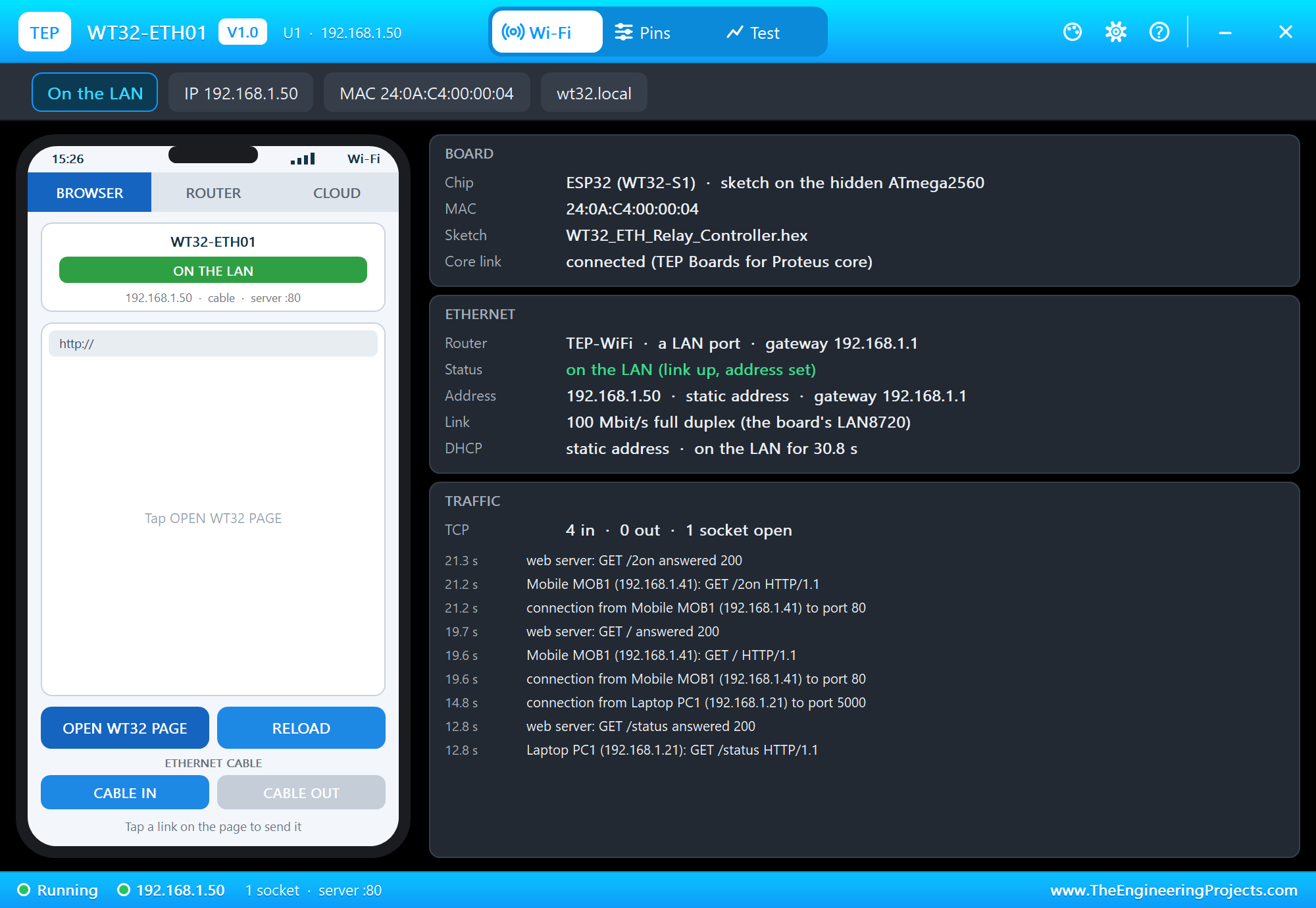
OPEN WT32 PAGE lets the panel's phone open the page the board serves:
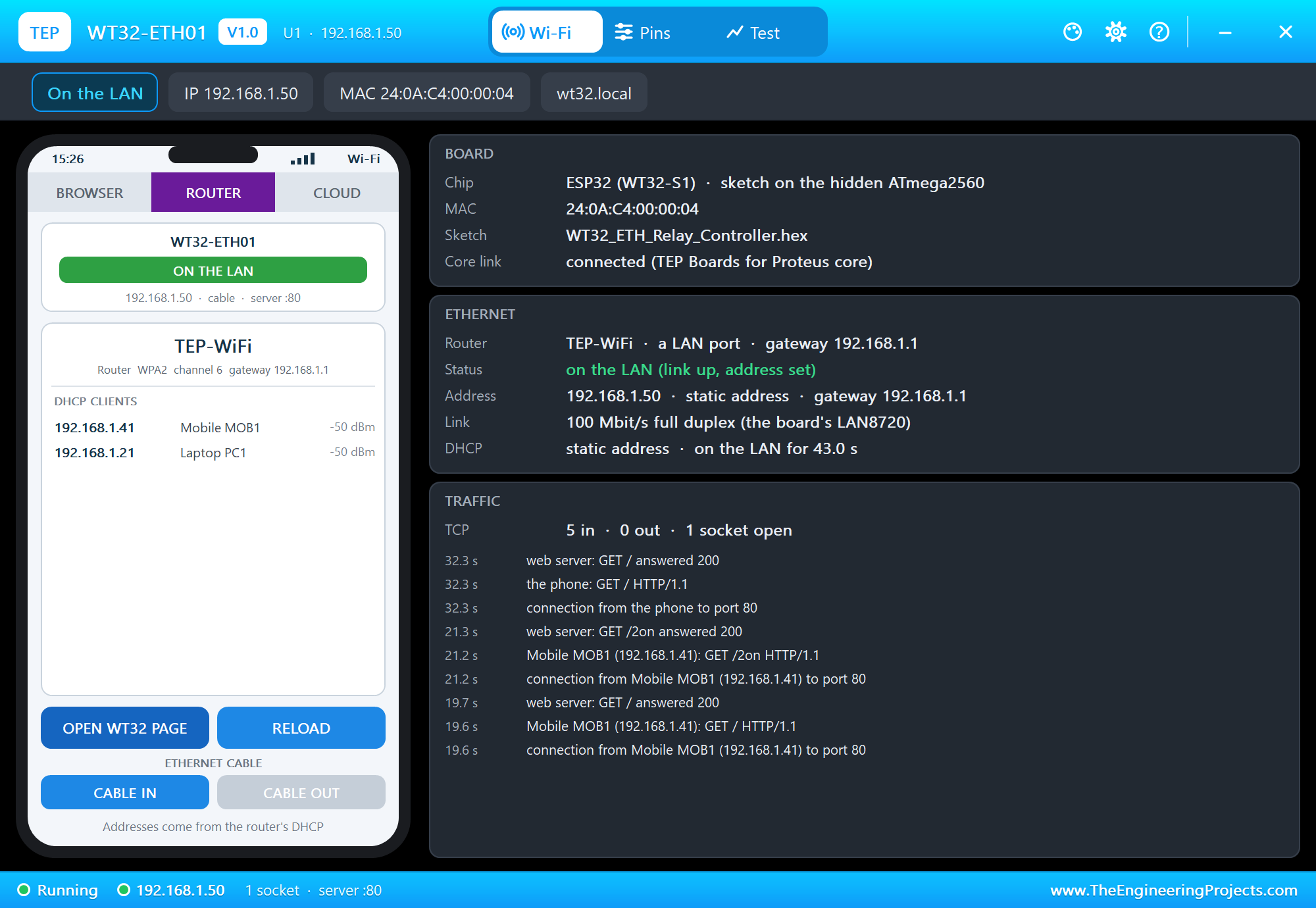
The ROUTER tab lists the router's DHCP clients. The phone and the laptop are there; the WT32-ETH01 is not, because its address is fixed:
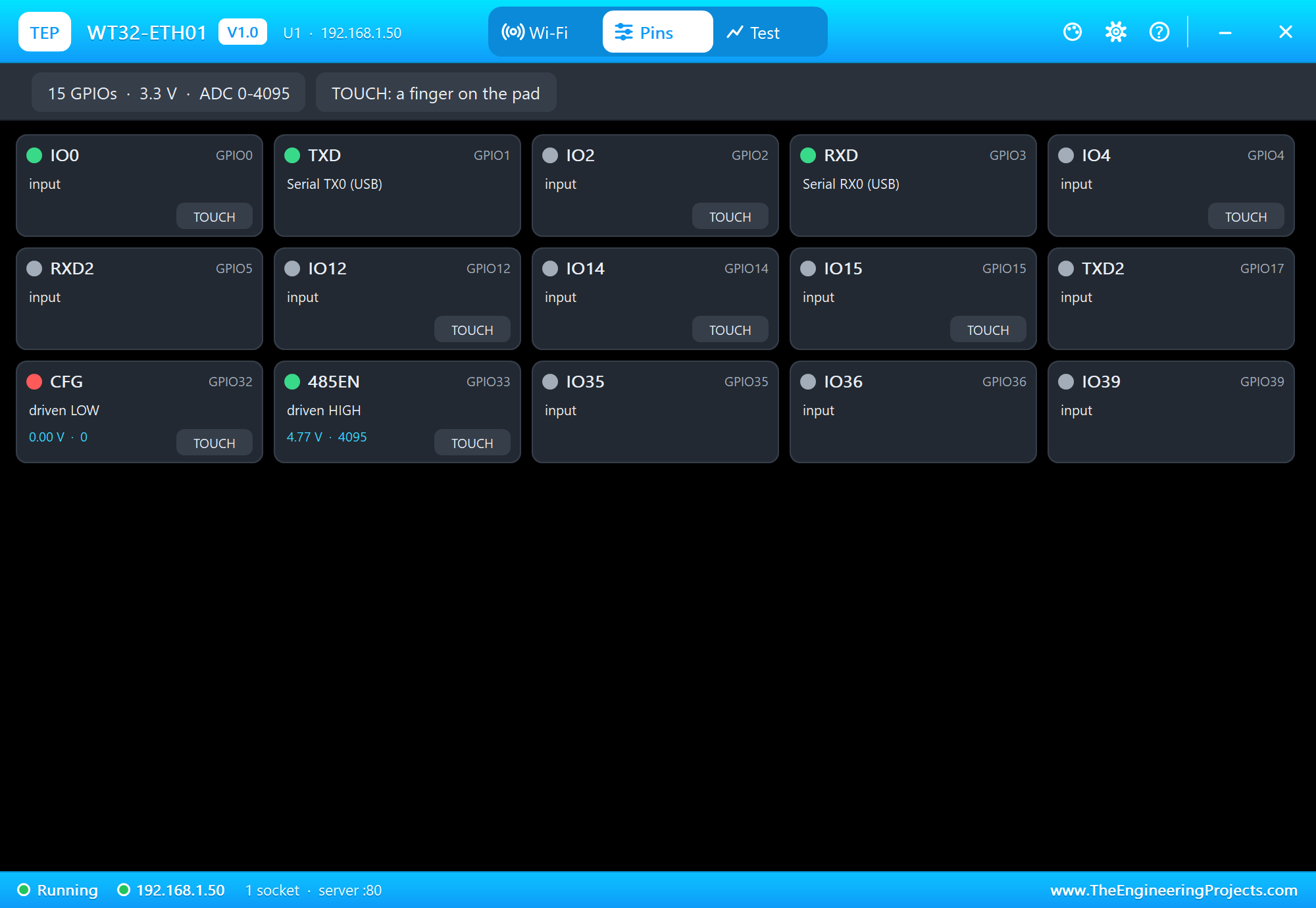
The Pins page shows the 15 GPIOs of the headers live. CFG (IO32) and 485EN (IO33) are the two outputs:
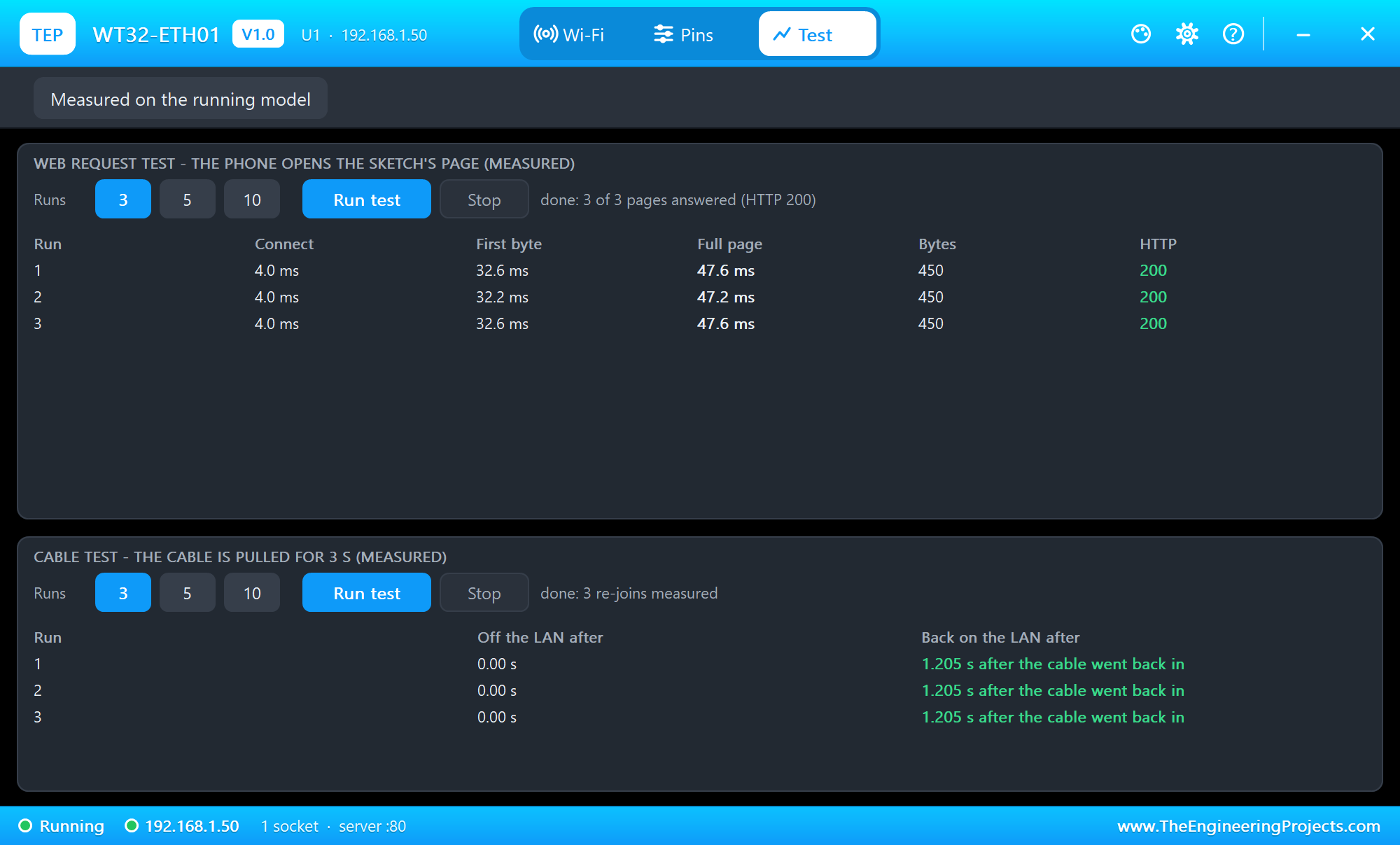
The Test page measures the running model: the web request test lets the panel's phone open the page three times, and the cable test pulls the cable for 3 seconds, three times:
Pins of the WT32-ETH01
| Pin | What it does |
|---|---|
| 5V, 3V3, GND | power: 5 V into the AMS1117, or 3.3 V straight to the 3V3 pins |
| EN (two pins) | the ESP32's enable: LOW holds the board in reset |
| TXD / RXD (IO1 / IO3) | Serial - the monitor, and the programming port of the real board |
| TXD / RXD (IO17 / IO5) | Serial2 |
| CFG (IO32), 485_EN (IO33) | free GPIOs for your sketch - the two outputs of the demo |
| IO2, IO4, IO12, IO14, IO15 | GPIOs with ADC and touch |
| IO35, IO36, IO39 | inputs only (ADC) |
| IO0 | the boot pin and the LAN8720's 50 MHz clock input - leave it free |
| LINK | the LAN8720's link LED signal (not driven in the simulation) |
Properties of the WT32-ETH01
| Property | What it does |
|---|---|
| Program File | the sketch's HEX from the TEP Boards for Proteus add-on |
| CABLE | the Ethernet cable at Run: IN or OUT |
| WIFISSID, WIFIPASS | the router in range and its password - the cable goes to the same router |
| MONITOR, BAUD, AUTOOPEN | the built-in serial monitor on TXD / RXD, its speed (115200) and whether it opens at Run |
| TIME | the clock NTP gives the sketch: the PC's clock or a fixed start time |
With DHCP the address follows the board's number: U1 gets 192.168.1.101, U2 .102 and so on. In this model a board uses one network at a time - the cable (ETH) or Wi-Fi.
Troubleshooting
- ETH.begin() returns false: read Proteus's simulation log - it names the reason. With the board WT32-ETH01 (TEP Proteus) the defaults are right; if you set your own, ETH_PHY_ADDR, MDC, MDIO and ETH_PHY_POWER must be 1, 23, 18 and 16.
- No events at all: add the handler with
WiFi.onEvent()beforeETH.begin(), and letloop()return or calldelay()now and then - the events are delivered there. - The page never opens: the cable is out (the panel shows CABLE OUT) or the board is not on the LAN yet.
- The laptop's terminal does not connect: press Connect after the board is on the LAN (192.168.1.50, port 5000).
- The board is missing in the IDE: the TEP Boards for Proteus add-on is older than 1.15.0 - replace it with the one in the zip.
- No panel: click the PANEL pad, or turn "Open the panel at Run" back on in Settings.
Things to Know Before Using a Real WT32-ETH01
- Programming: connect a 3.3 V USB-serial adapter to TXD / RXD (IO1 / IO3) and GND, hold IO0 to GND and pulse EN for the download mode, then release IO0 and reset to run.
- The core: with Espressif's core 3.x choose the board "WT32-ETH01 Ethernet Module" and
ETH.begin()works as in the demo. On the core 2.x the defaults are another board's, so writeETH.begin(1, 16, 23, 18, ETH_PHY_LAN8720, ETH_CLOCK_GPIO0_IN). - Power: 5 V on the 5V pin or a solid 3.3 V supply on 3V3 - the Ethernet PHY and the ESP32 together need more current than many USB-serial adapters give.
- IO0: it carries the 50 MHz clock once Ethernet runs - do not use it in your circuit.
- Board versions: the labels differ a little between versions of the board - wire by the names printed on yours.
Limitations of the Simulation
- The board in Proteus is NOT a real ESP32 chip: your sketch runs on a hidden ATmega2560 at 16 MHz with 8 KB of RAM, int is 16 bits, and there are no FreeRTOS tasks.
- The LAN8720A is the board's link to the LAN, not a bit-by-bit RMII model: the 50 MHz clock and the MDIO waveform are not simulated, the link is always 100 Mbit/s full duplex, and Bluetooth, IPv6 and the download mode are not modelled.
- The router, the phone, the internet host, the PANEL and SERIAL pads, the panel and the two monitors are TEP additions.
- WT32-ETH01 and WT32-S1 are names of Shenzhen Wireless-Tag Technology, LAN8720 and Microchip of Microchip Technology, ESP32 of Espressif Systems; this library is not made or endorsed by Wireless-Tag, Microchip, Espressif or Labcenter.
- Tested in Proteus 8.5 in October 2026 (both demos as shipped, the board, the laptop and the phone together at about 0.3 x real time on our PC). Proteus 7 is not supported.
So, that was all about the WT32-ETH01 Library for Proteus. I hope it helps you build a wired ESP32 project before you touch the hardware - ETH.begin() with the board's own LAN8720, a fixed address, a web page, a TCP terminal and every ETH event, with the cable pulled and plugged back in. If you use a plain ESP32 board, our ESP32-DevKitC V4 Library for Proteus and LAN8720 Ethernet Module Library for Proteus do the same with a separate module, and for an Arduino our W5500 Ethernet Module Library for Proteus brings Ethernet over SPI. If you use the WT32-ETH01 Library for Proteus in a project, please share it in the comments or in our forum, and if you have any questions, ask in the comments and I will help you out. Till the next tutorial, take care and have fun!

Comments
0