


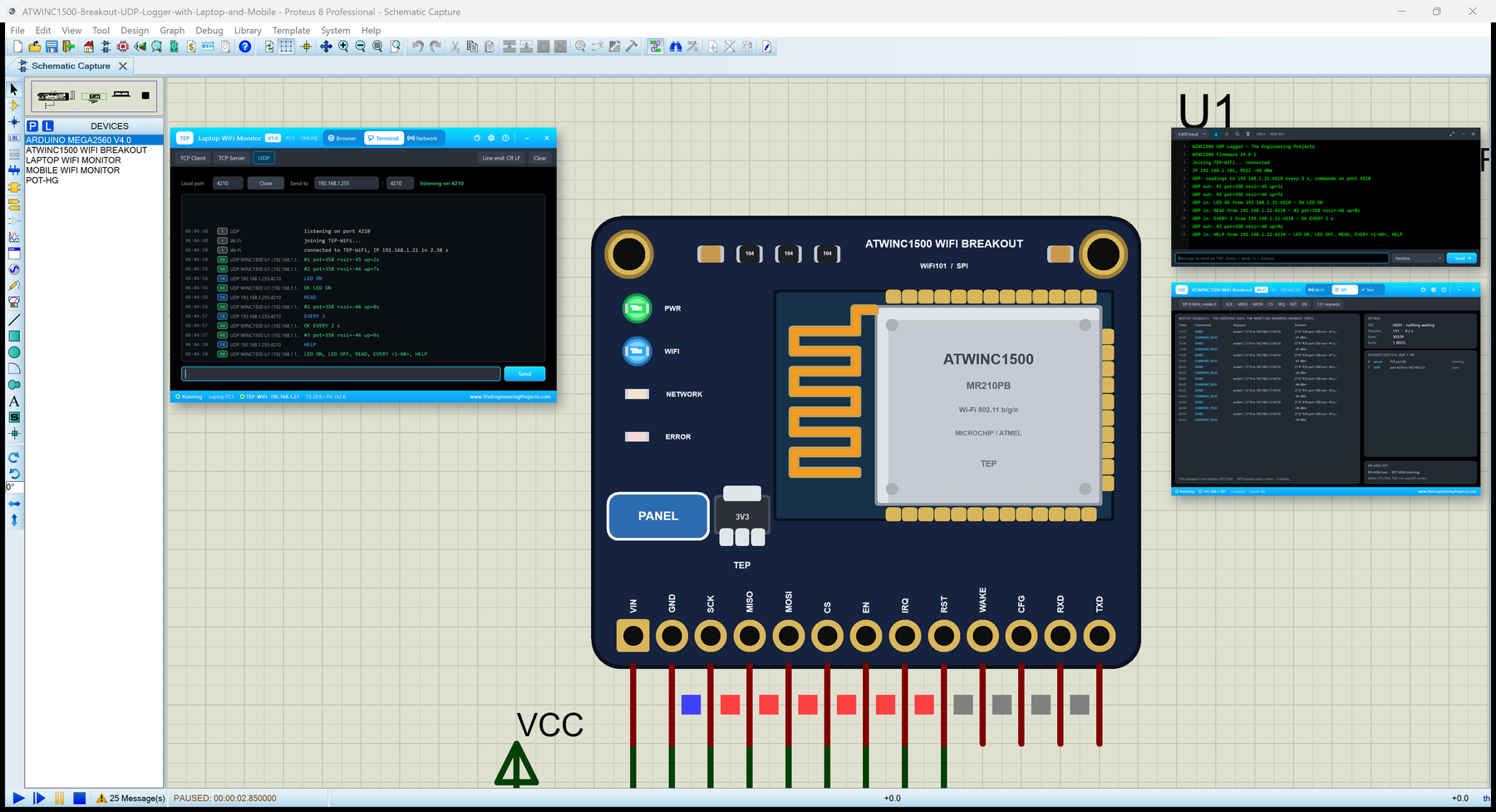
ATWINC1500 WiFi Breakout Library for Proteus: WiFi101 and UDP


Hello friends, I hope you all are doing great. Today, I am going to share the ATWINC1500 WiFi Breakout Library for Proteus. The ATWINC1500 breakout is a small board with Microchip's (Atmel's) ATWINC1500 Wi-Fi network controller that any microcontroller can use over SPI with the WiFi101 library. You choose its pins with WiFi.setPins(), and then WiFi.begin(), WiFiUDP, WiFiServer and the rest work as on a WiFi Shield 101. With this library you can place the breakout in Proteus, wire it to our Arduino Mega and run a WiFi101 sketch as it is.
ATWINC1500 WiFi Breakout Library for Proteus
Latest version: V1.0 (October 2026, this tutorial)
Helping Tools
- Laptop WiFi Monitor: a laptop on the Wi-Fi of your design: a browser, a TCP / UDP terminal and ping
- Mobile WiFi Monitor: a smartphone that opens the pages of your ESP32 and sends it commands
- Serial Monitor Advance: a serial terminal window for the UART of your board
This is the seventeenth library of our Wi-Fi series and the breakout twin of our WiFi Shield 101 Library for Proteus: the same chip and the same model, but on a breakout you wire yourself, with its EN and RST pins pulled LOW until you drive them. Its demo shows the UDP side of WiFi101: a reading goes to our Laptop WiFi Monitor every five seconds, and the laptop and our Mobile WiFi Monitor send commands back by UDP - LED ON, LED OFF, READ, EVERY and HELP - each answered to its sender, with a status page for the browsers too.
NOTICE: the PWR LED, the antenna colours and the PANEL pad of our breakout are TEP additions; the access point mode, real TLS, WAKE, CFG and the UART are not simulated (see the limits at the end). In Proteus, wire IRQ to an external interrupt pin and use a Mega - the article explains why. Your feedback is the fuel that keeps us going, so please tell us what you think in the comments below or in the ATWINC1500 WiFi Breakout board of our forum. And if our free libraries help you, you can buy us a coffee. So, let's get started with the ATWINC1500 WiFi Breakout Library for Proteus:
What is the ATWINC1500 WiFi Breakout?
The ATWINC1500 is a Wi-Fi network controller: the radio, the Wi-Fi stack and a TCP/IP stack in one chip that takes requests over SPI. The ATWINC1500-MR210PB module (the chip, its flash and a printed antenna under one can) sits on the Arduino WiFi Shield 101 and the MKR1000, and on Adafruit's breakout - a small board with a 3.3 V regulator for 3.3 - 5.5 V supplies, level-shifted inputs for 5 V boards and three LEDs. The microcontroller only sends requests and reads the answers, so a small board gets Wi-Fi without a Wi-Fi stack of its own.
| Real ATWINC1500 breakout | This library in Proteus | |
|---|---|---|
| Wi-Fi chip | ATWINC1500-MR210PB, firmware 19.x | our WINC1500 model (firmware 19.6.1, a property) |
| Link | SPI + CS, IRQ, RST, EN (level-shifted inputs) | the same pins; the demo: D52 / D50 / D51, CS D8, IRQ D2, RST D4 |
| Arduino library | WiFi101 with WiFi.setPins() | the same library, unchanged (0.16.1 in the demo) |
| Pull resistors | CS 100k up, EN and RST 100k down | the same: EN or RST open means off / in reset |
| LEDs | three LEDs the library switches | WIFI, NETWORK and ERROR, plus a PWR LED (a TEP addition) |
| WAKE, CFG, RXD, TXD | wake-up, SPI / UART select, the UART | drawn only (the library does not use them) |
| Supply | VIN 3.3 - 5.5 V, up to 300 mA bursts | VIN and GND |
The Pins of the Breakout
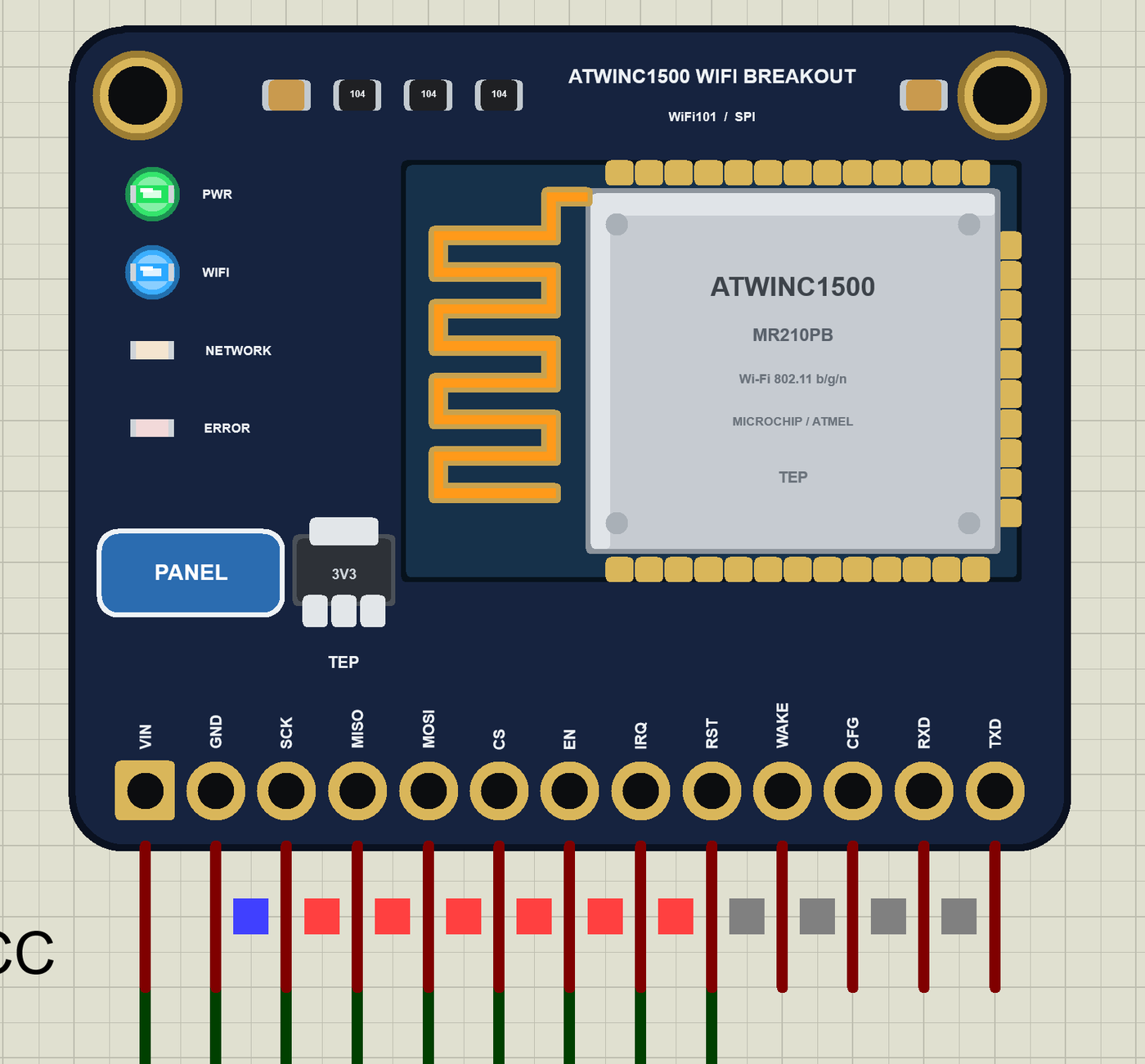
Thirteen pins sit along one edge: VIN and GND, the SPI pins SCK, MISO, MOSI, the chip select CS, EN, the interrupt output IRQ, the reset RST, then WAKE, CFG, RXD and TXD. Two of them catch everyone once: EN has a 100k pull-down, so an open EN means the module is off - tie it to VIN or drive it from a pin - and RST has one too, so the WINC1500 stays in reset until the library drives it HIGH. Our model does the same, and the panel tells you which one is LOW.
WiFi.setPins() and the IRQ Pin
Unlike the shield, the breakout has no fixed pins: the sketch names them before the first WiFi call with WiFi.setPins(cs, irq, rst). Adafruit's guide uses 8, 7 and 4 and recommends an interrupt-capable pin for IRQ. In Proteus that advice matters: on a pin without an external interrupt WiFi101 falls back to a pin-change interrupt on an UNO - and Proteus 8's AVR model does not run those - or, on a Mega, to a timer that looks at the pin every 0.255 ms (our WiFi Shield 101 demo works that way). Our demo puts IRQ on D2, an external interrupt on the Mega, so the library's ISR runs on every falling edge of IRQ and no polling is needed.
Why a Mega
Adafruit's guide says it plainly: the WiFi101 library will not work on a 328P. With a useful sketch it needs more than an UNO's 32 KB of flash and 2 KB of RAM - our demo takes about 38 KB of flash and 2.4 KB of RAM - so the demo uses our Arduino Mega 2560 Library for Proteus V4.0. Any board with enough memory works the same way.
Features of the ATWINC1500 WiFi Breakout Library for Proteus
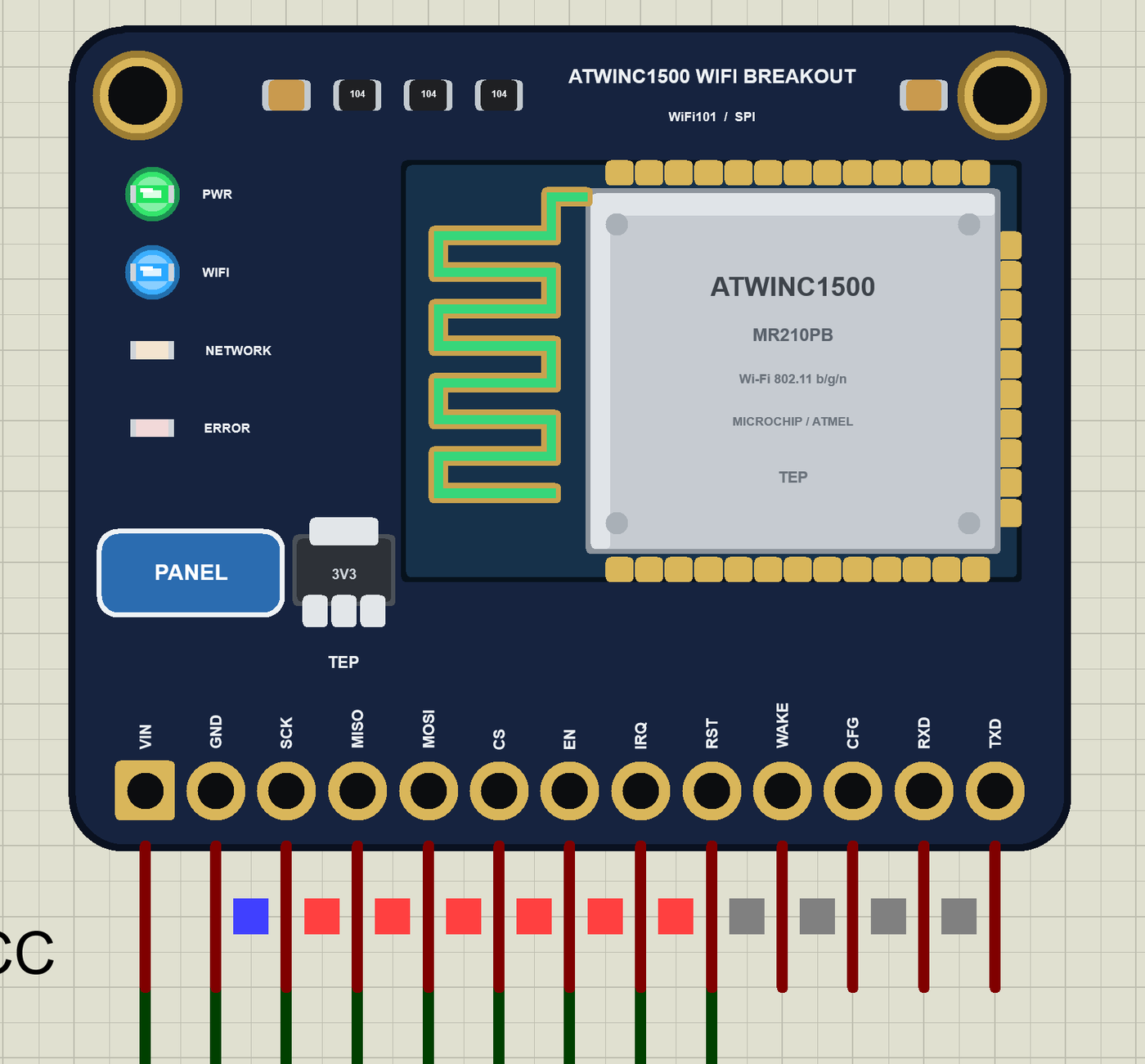
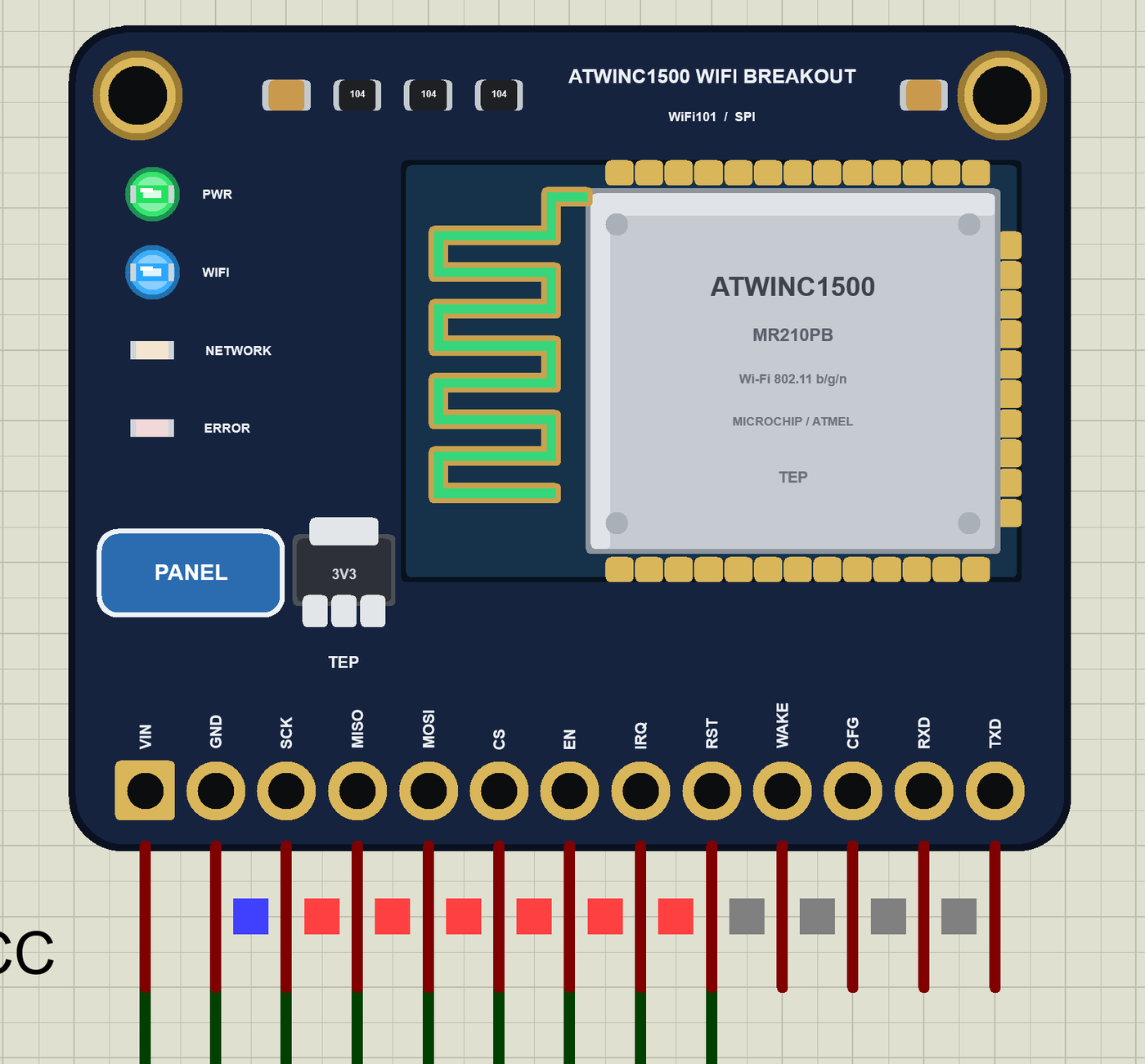
- The breakout as it looks: the dark board with the ATWINC1500 module and its printed antenna, the four LEDs, the regulator, two mounting holes and the 13-pin header with its names.
- The real WiFi101 library: our model answers the chip's registers and requests exactly as the library expects - we ran the library and the demo sketch unchanged against the model on the PC (16 checks) and in Proteus.
- EN and RST as on the real board: both pulled LOW, so the module is off or in reset until they are HIGH; MISO floats while CS is HIGH.
- The boot and the IRQ handshake: the chip ID, the firmware start and version, the MAC, the messages announced on IRQ.
- Wi-Fi and sockets: join, status, IP, RSSI, scan, DNS and ping; TCP sockets 0 - 6 for WiFiClient, WiFiServer and WiFiSSLClient, UDP sockets 7 - 10 for WiFiUDP - broadcasts included.
- The LEDs WiFi101 switches: WIFI while joined, NETWORK during DNS, ping and socket writes, ERROR for the library's errors - and PWR for the supply.
- Wi-Fi in Proteus: a virtual router with DHCP and two neighbours for scans, a phone in the panel, an internet host, and TCP / UDP to every TEP Wi-Fi part in the design.
- Our Laptop and Mobile WiFi Monitors: a laptop and a phone on the same network, with a browser, TCP and UDP terminals and ping - included in the package.
- Our pop-up panel: the phone, the breakout card, an SPI page with every WiFi101 request and the chip's answers, the sockets and the EN / RST card, a Test page, Settings and Help.
- A compact package: about 2.81 MB, without the C++ source code of the models.
The ATWINC1500 WiFi Breakout in Proteus
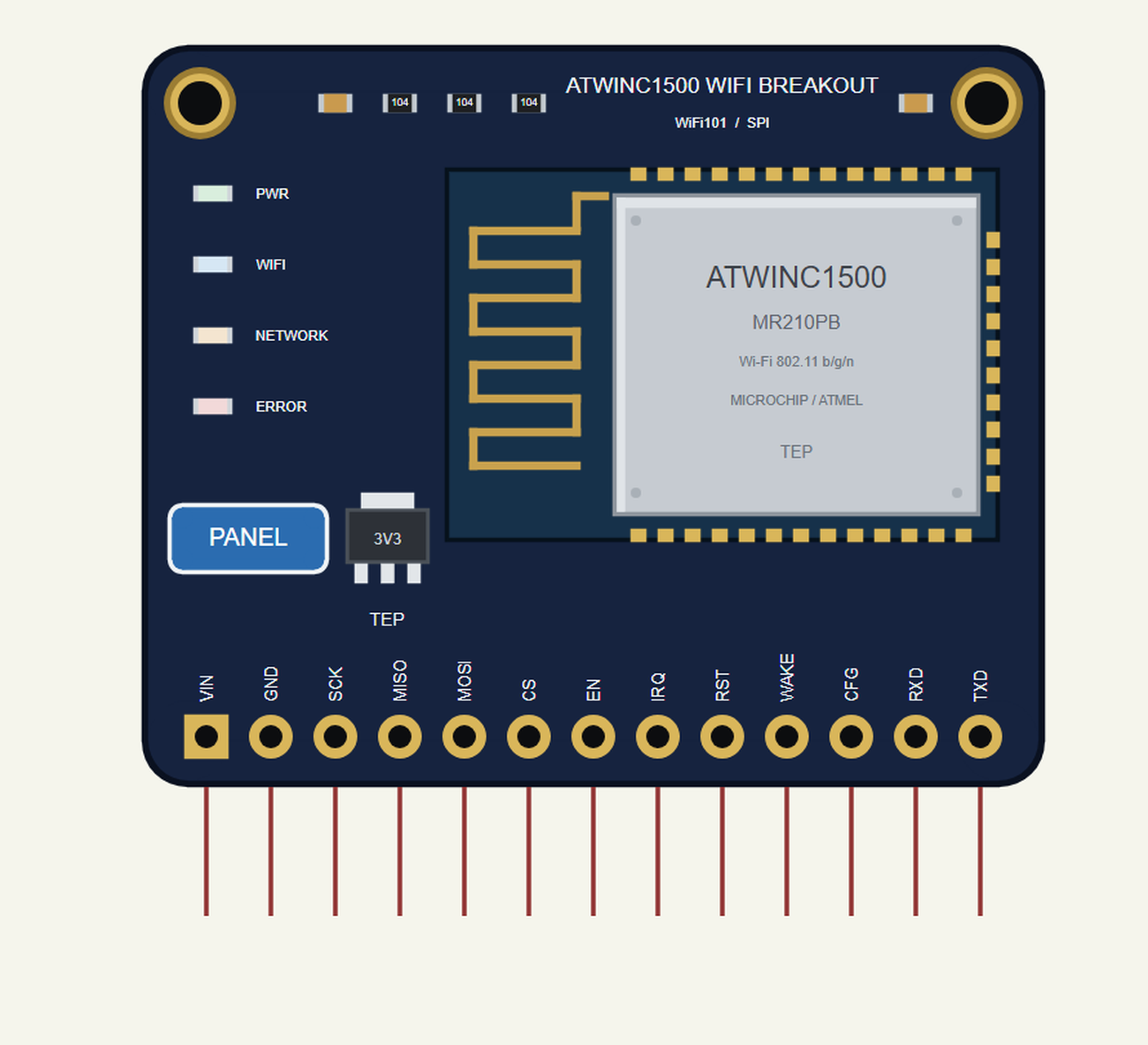
Search WINC1500 in Pick Devices; the device ATWINC1500 WIFI BREAKOUT is in TEPWINCBO.LIB. Its pins point down from the header like the pins of the real board. Click the PANEL pad or the WINC1500 module to open the panel.
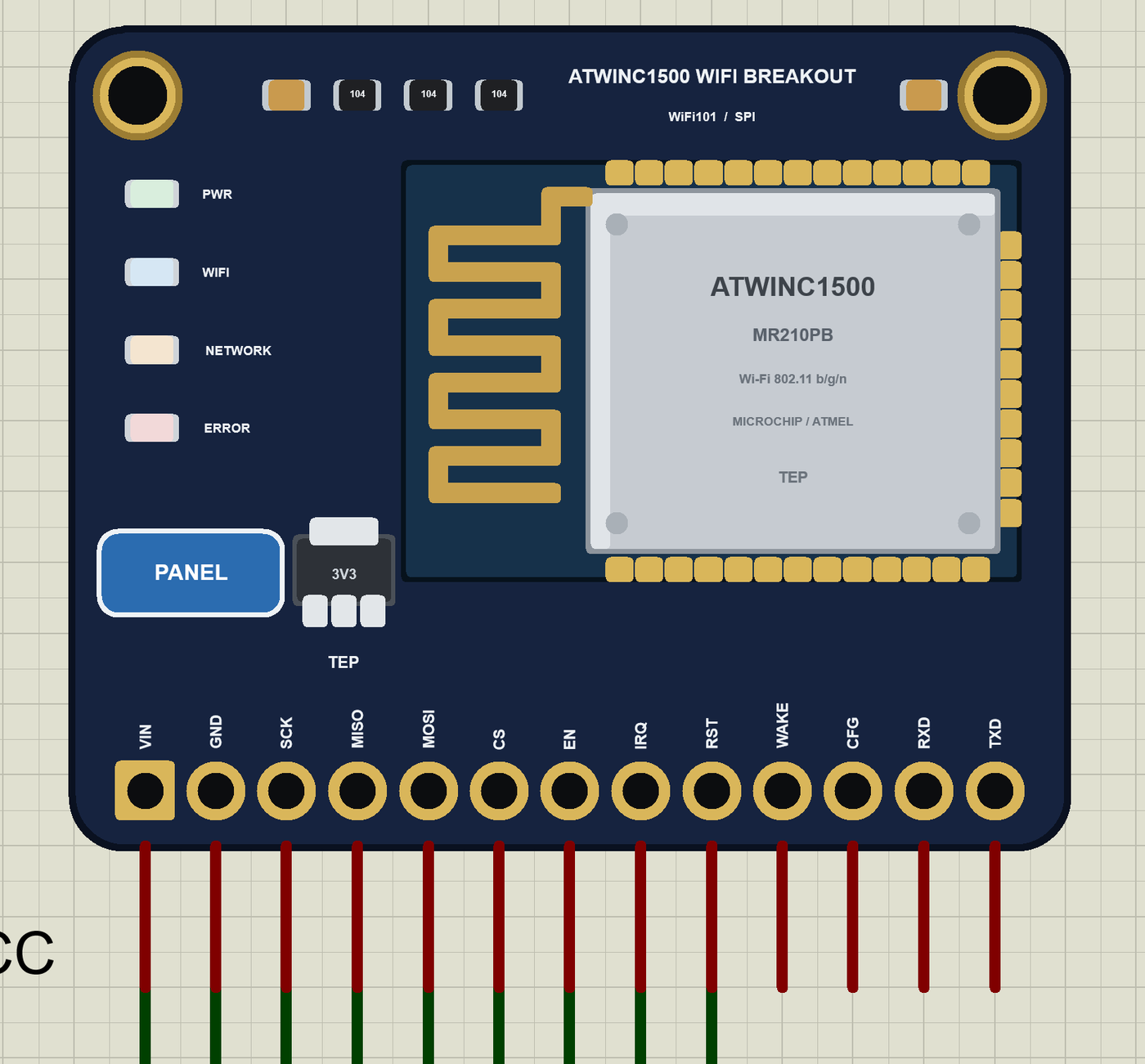
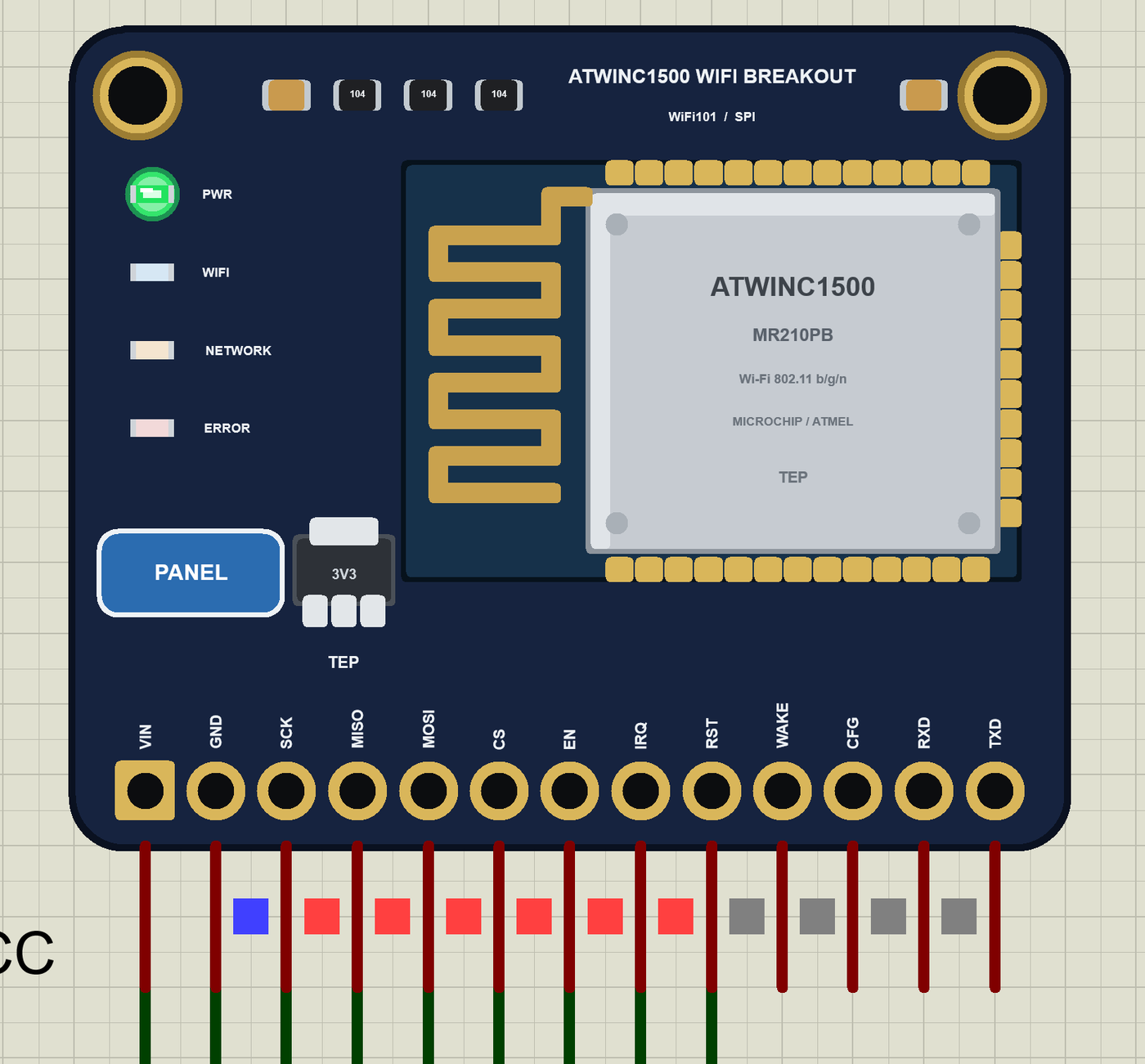
Every State of the ATWINC1500 WiFi Breakout
We ran the demo and paused the simulation for each picture. At Run the breakout gets VIN and EN; the Mega drives RST HIGH, resets the WINC1500, starts its firmware and calls WiFi.begin():
Download ATWINC1500 WiFi Breakout Library for Proteus
Click the button below to download ATWINC1500-WiFi-Breakout-Library-for-Proteus-v1.0.zip (about 2.81 MB, without the C++ source code of the models):
ATWINC1500 WiFi Breakout Library for Proteus V1.0- README.txt: the device, installation, the demo, the pins, the properties, troubleshooting and the limits.
- Proteus Library Files:
TEPWINCBO.LIB(the breakout),ArduinoV4TEP.LIB(our Arduino boards V4.0 - the Mega 2560 of the demo),TEPLAPTOP.LIBandTEPMOBILE.LIB(our Laptop and Mobile WiFi Monitors). - Proteus Model Files:
TEPNET.DLL(the breakout, the two monitors and the Wi-Fi network) andTEPARDUINO.DLL(the Arduino boards). - Proteus Simulation: the demo project, its HEX file and copies of the DLLs.
- Arduino Code: the demo sketch. WiFi101 is not included - install it from the Library Manager.
No Proteus yet? Read How to Download and Install Proteus 7 and 8. New to libraries? Follow How to Install a New Library in Proteus.
How to Install ATWINC1500 WiFi Breakout Library for Proteus
- Close Proteus and extract the whole zip file, for example to your Desktop.
- Copy the four files from Proteus Library Files into the LIBRARY folder of Proteus (usually
C:\Program Files (x86)\Labcenter Electronics\Proteus 8 Professional\LIBRARY). - Copy
TEPNET.DLLandTEPARDUINO.DLLfrom Proteus Model Files into the MODELS folder - replace older copies (this TEPNET.DLL is the first one that knows the ATWINC1500 breakout, and it still runs the WiFi Shield 101, the AirLift boards, all our ESP32 boards, the ESP8266 and ESP32 modules and the two monitors). - Delete
TEPWINCBO.IDX,ArduinoV4TEP.IDX,TEPLAPTOP.IDXandTEPMOBILE.IDXfrom the LIBRARY folder if they are there. - Start Proteus, press P and search for WINC1500.
The sketch is a normal Mega sketch: select Arduino Mega or Mega 2560 in the Arduino IDE, install WiFi101, write your sketch and use Sketch > Export Compiled Binary; then double-click the Mega in Proteus and set its Program File to the HEX (see How to get the HEX file from Arduino).
Demo: A UDP Logger with the Laptop and the Phone
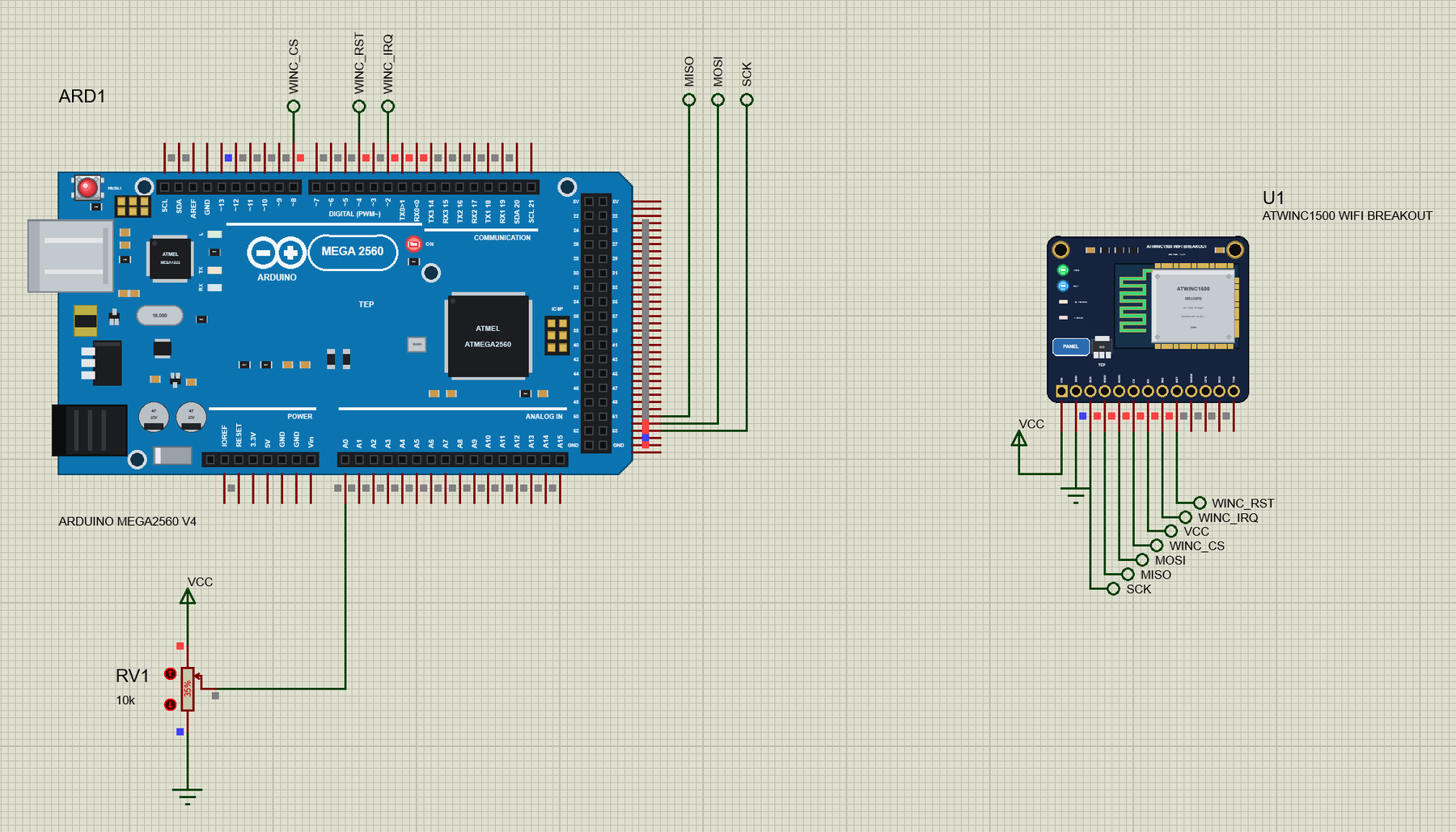
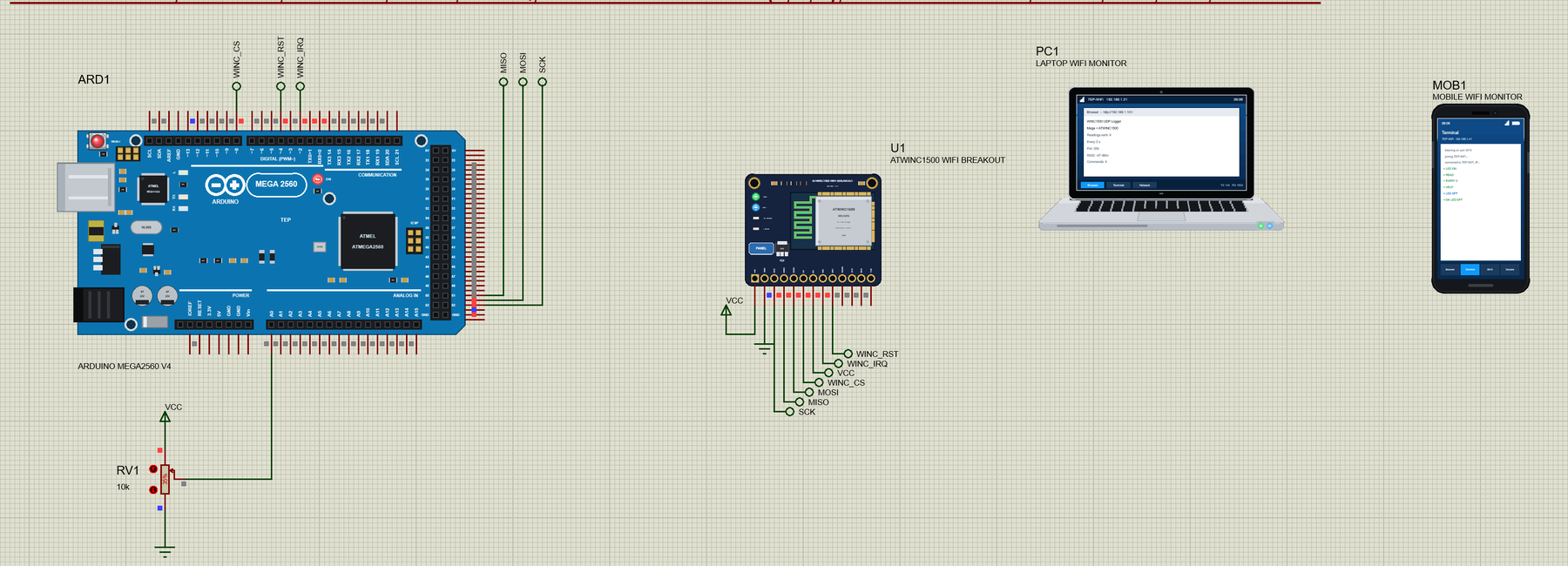
Open ATWINC1500-Breakout-UDP-Logger-with-Laptop-and-Mobile.pdsprj. On the left is our Mega 2560 V4.0 (ARD1) with its built-in serial monitor and a pot on A0, in the middle the ATWINC1500 breakout (U1), and on the right the laptop (PC1) and the phone (MOB1) - no wires to them, they are on the TEP-WiFi network like the real ones.
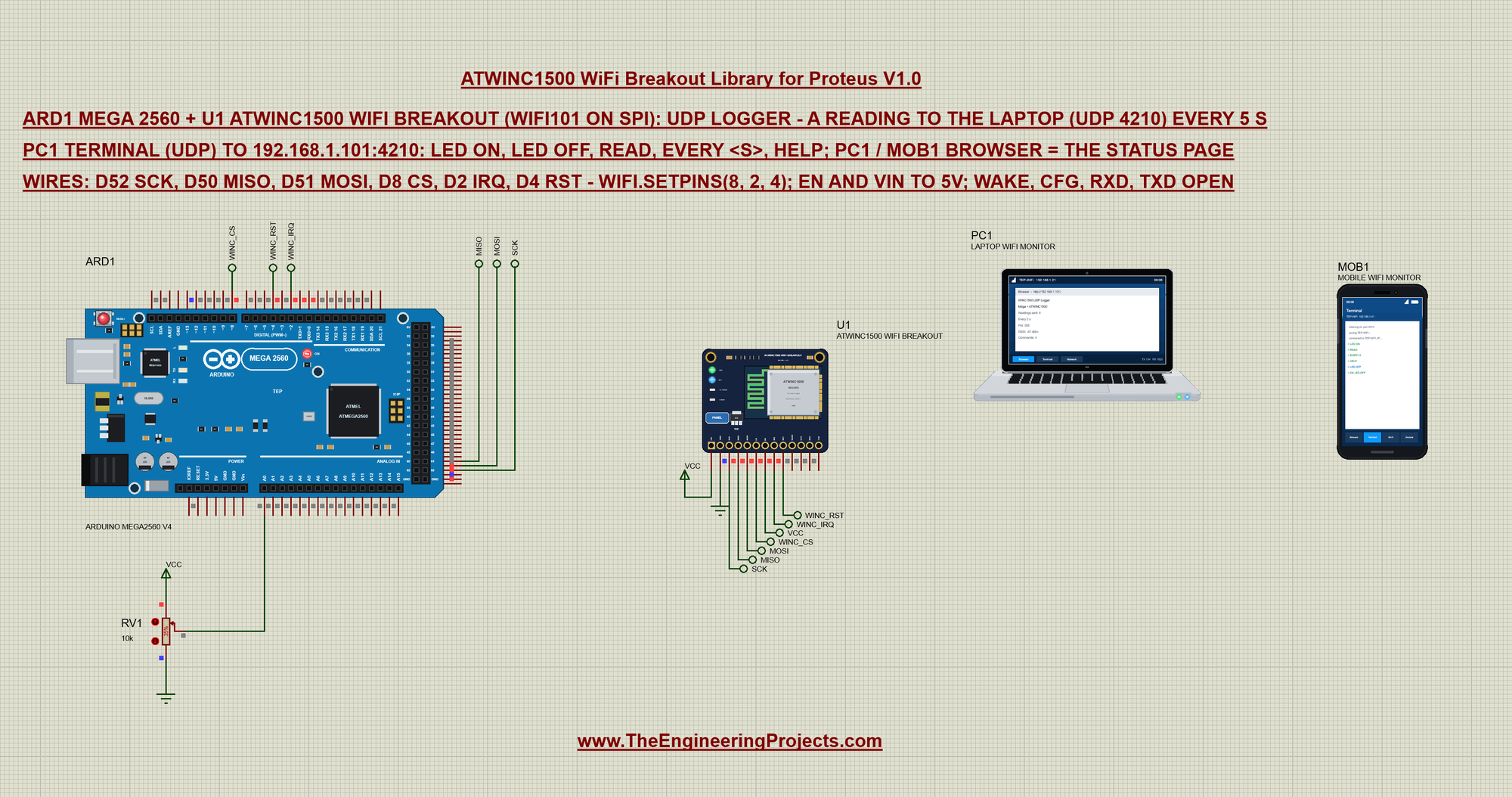
Net labels join the Mega and the breakout. SCK, MISO and MOSI come from the Mega's D52, D50 and D51 (its SPI pins); WINC_CS (D8), WINC_IRQ (D2) and WINC_RST (D4) go to CS, IRQ and RST. EN gets a VCC label and VIN goes to VCC, so the module is always enabled; WAKE, CFG, RXD and TXD stay open. RV1 (10k, at 35 %) on A0 gives the value the readings carry:
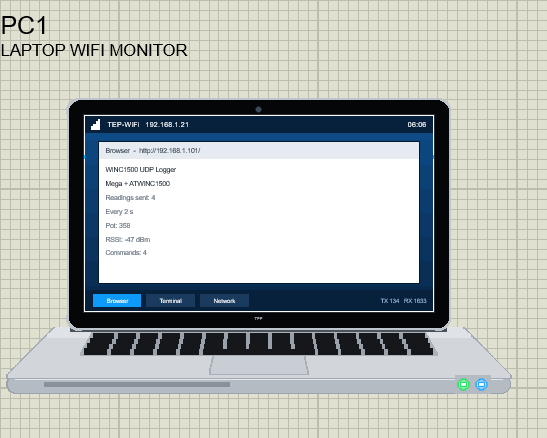
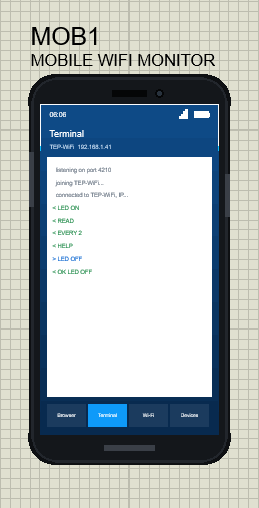
The two tools come from our Laptop WiFi Monitor Library for Proteus and Mobile WiFi Monitor Library for Proteus. In this project both have UDP port 4210 open and their browsers open http://192.168.1.101/. The laptop is 192.168.1.21 and the phone 192.168.1.41:
The Sketch: WiFi101 and WiFiUDP
The sketch names the breakout's pins and the two UDP ends - our port for the commands and the laptop's port for the readings:
const int WINC_CS = 8, WINC_IRQ = 2, WINC_RST = 4;               // EN is tied to 5V
const unsigned int PORT = 4210;                                  // our UDP port: commands in
IPAddress logger(192, 168, 1, 21);                               // the laptop: readings out to its UDP port
const unsigned int LOGGER_PORT = 4210;
WiFi.setPins() comes before anything else; WL_NO_SHIELD means the chip did not answer on SPI:
  WiFi.setPins(WINC_CS, WINC_IRQ, WINC_RST);                     // the breakout's wiring (EN tied to 5V)
  if (WiFi.status() == WL_NO_SHIELD) {
    Serial.println(F("No ATWINC1500 found - check SPI, CS D8, IRQ D2, RST D4, EN and VIN"));
    while (true) delay(1000);
  }
After the join, udp.begin() opens a UDP socket on port 4210 and web.begin() the web server on port 80. WiFi101's WiFi.localIP() returns a plain number, so the sketch puts it into an IPAddress first:
  IPAddress ip = WiFi.localIP();                                 // (WiFi101 gives the address as a number)
  Serial.print(F("IP ")); Serial.print(ip); Serial.print(F(", RSSI ")); Serial.print(WiFi.RSSI()); Serial.println(F(" dBm"));
  udp.begin(PORT);
  web.begin();
A Reading by UDP
A UDP packet is built with beginPacket(), filled with write() and sent with endPacket(). The reading carries its number, the pot, the RSSI and the uptime:
snprintf(out, size, "#%u pot=%d rssi=%ld up=%lus", sent, pot, WiFi.RSSI(), millis() / 1000); udp.beginPacket(logger, LOGGER_PORT);
udp.write((const uint8_t*)msg, strlen(msg));
udp.endPacket();Press Run and watch the Mega's monitor: the firmware version, the join, the address, the UDP set-up and the first reading:
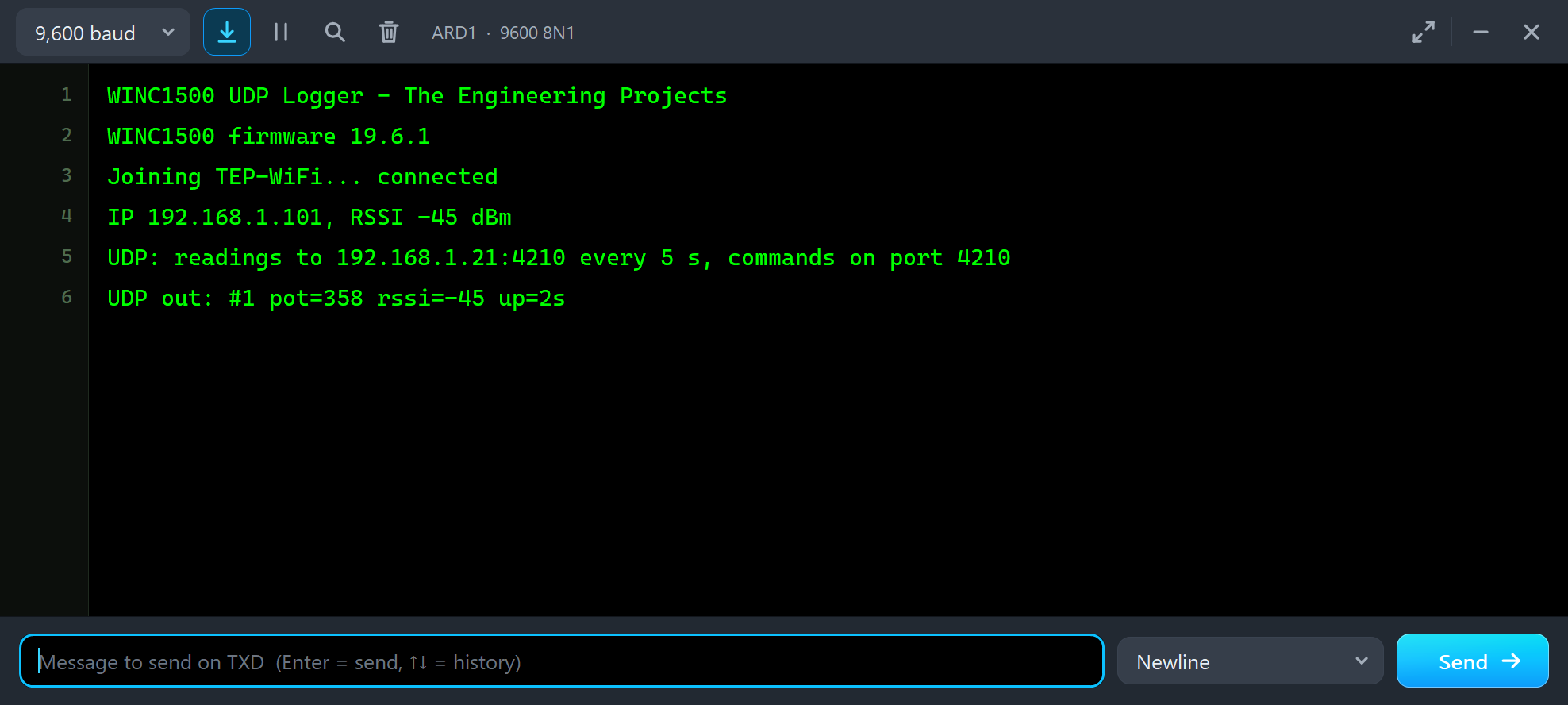
WINC1500 UDP Logger - The Engineering Projects
WINC1500 firmware 19.6.1
Joining TEP-WiFi... connected
IP 192.168.1.101, RSSI -45 dBm
UDP: readings to 192.168.1.21:4210 every 5 s, commands on port 4210
UDP out: #1 pot=358 rssi=-45 up=2s
The firmware is up 0.55 s after Run and the first reading leaves at about 2.8 s of simulation time.
The Laptop's UDP Terminal
In the laptop, open the Terminal and choose UDP: the local port is 4210 and the readings arrive every five seconds from "WINC1500 U1":
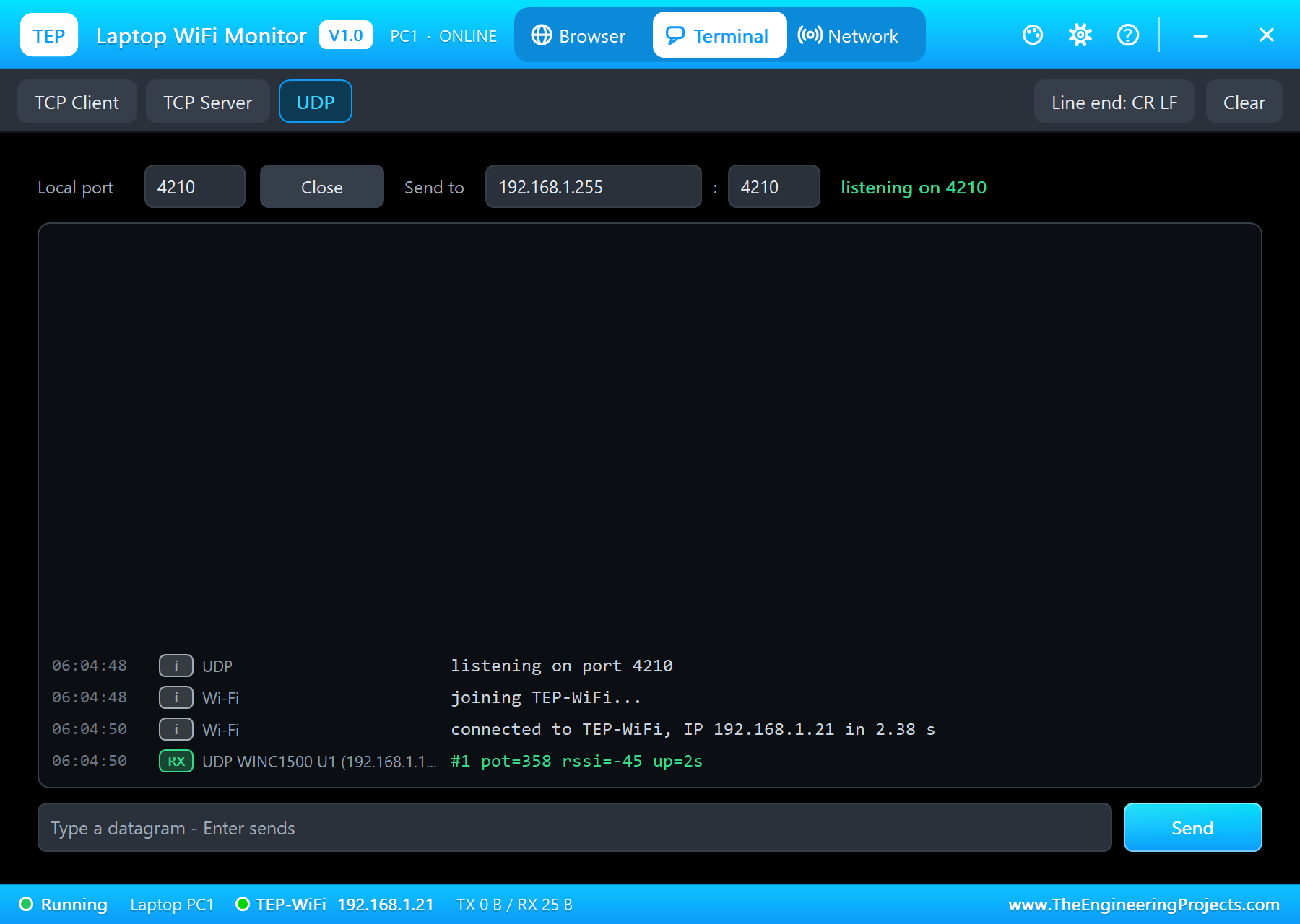
Its Send to field holds 192.168.1.255 - the broadcast address of TEP-WiFi - and port 4210. Type a command and press Enter: every device listening on port 4210 gets it, the breakout too. parsePacket() tells the sketch a packet is there, read() takes its bytes:
  const int n = udp.parsePacket();
  if (n <= 0) return;
  char text[32]; int k = 0;
  while (udp.available()) {
    const int ch = udp.read();
    if (ch == '\r' || ch == '\n') continue;
    if (k < (int)sizeof text - 1) text[k++] = ch;
  }
  text[k] = 0;
The command is done and the answer goes back to the sender - udp.remoteIP() and udp.remotePort() say who that is:
if (!strcasecmp(text, "LED ON")) { setLed(true); strcpy(answer, "OK LED ON"); } udp.beginPacket(from, port);
udp.write((const uint8_t*)answer, strlen(answer));
udp.endPacket();We typed LED ON, READ, EVERY 2 and HELP. The Mega's L LED came on, READ answered with a reading, EVERY 2 made the readings come every two seconds:
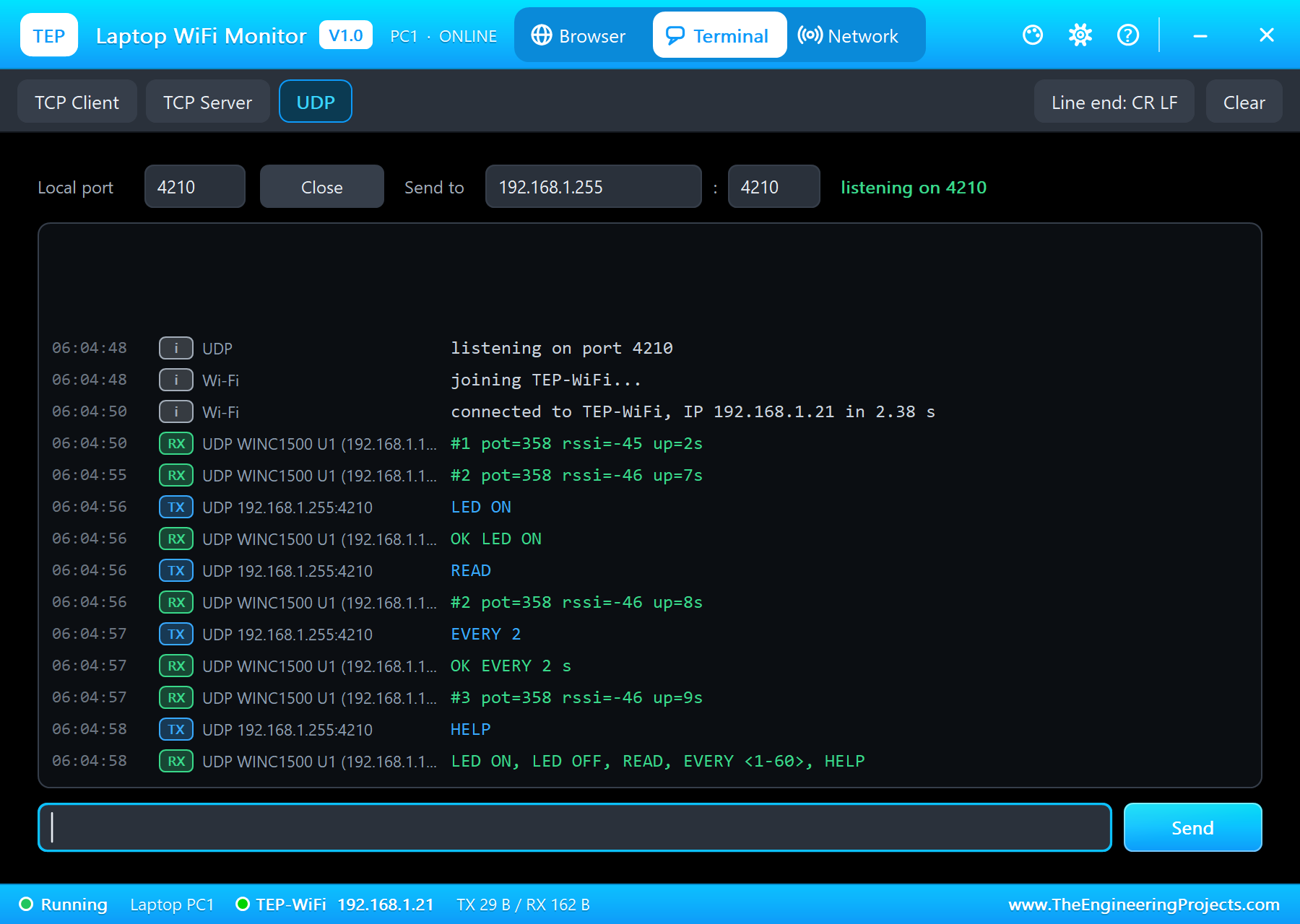
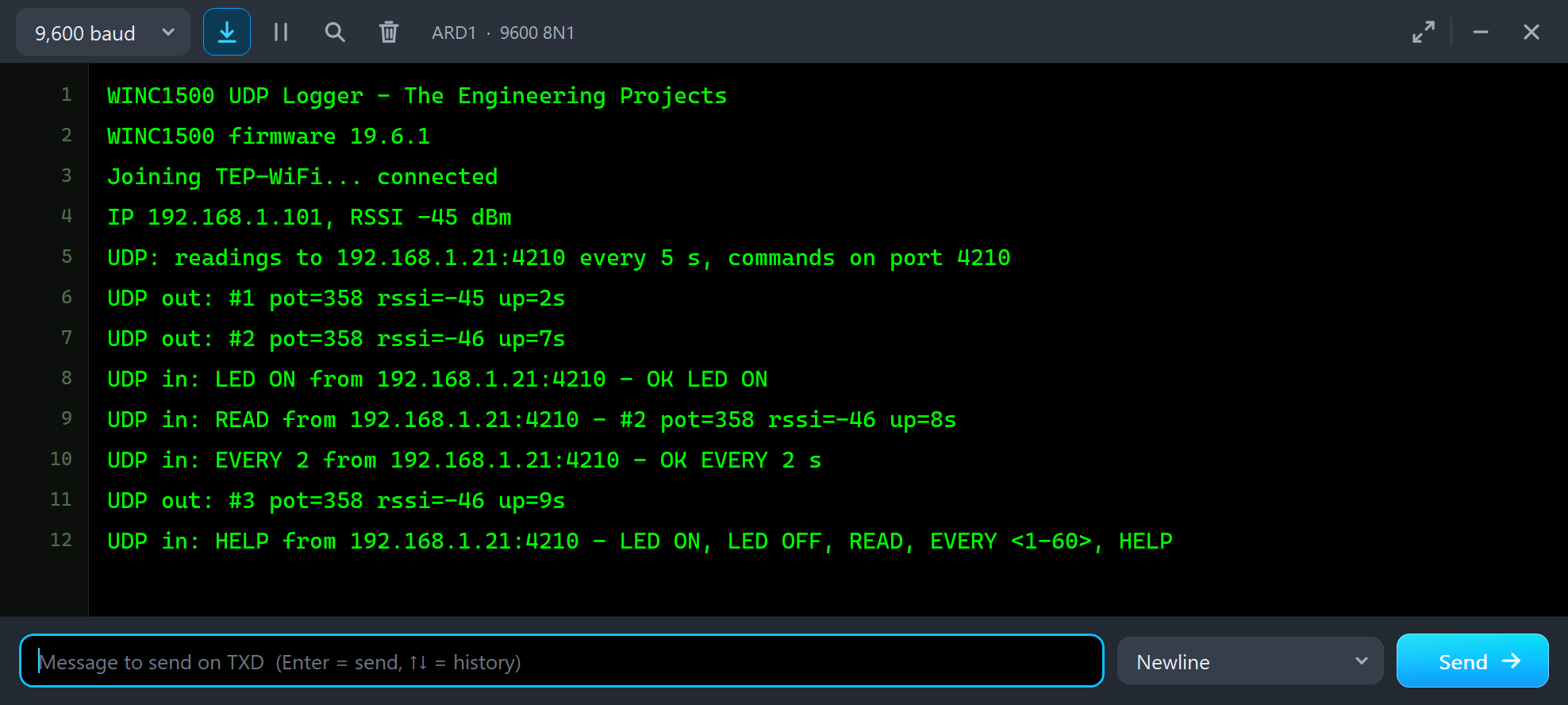
UDP out: #2 pot=358 rssi=-46 up=7s
UDP in: LED ON from 192.168.1.21:4210 - OK LED ON
UDP in: READ from 192.168.1.21:4210 - #2 pot=358 rssi=-46 up=8s
UDP in: EVERY 2 from 192.168.1.21:4210 - OK EVERY 2 s
UDP out: #3 pot=358 rssi=-46 up=9s
UDP in: HELP from 192.168.1.21:4210 - LED ON, LED OFF, READ, EVERY <1-60>, HELP
The Status Page
The laptop's Browser opens http://192.168.1.101/ with Go: the readings so far, the interval, the pot, the RSSI, the commands, the last one and the L LED, with LED ON / LED OFF / REFRESH links:
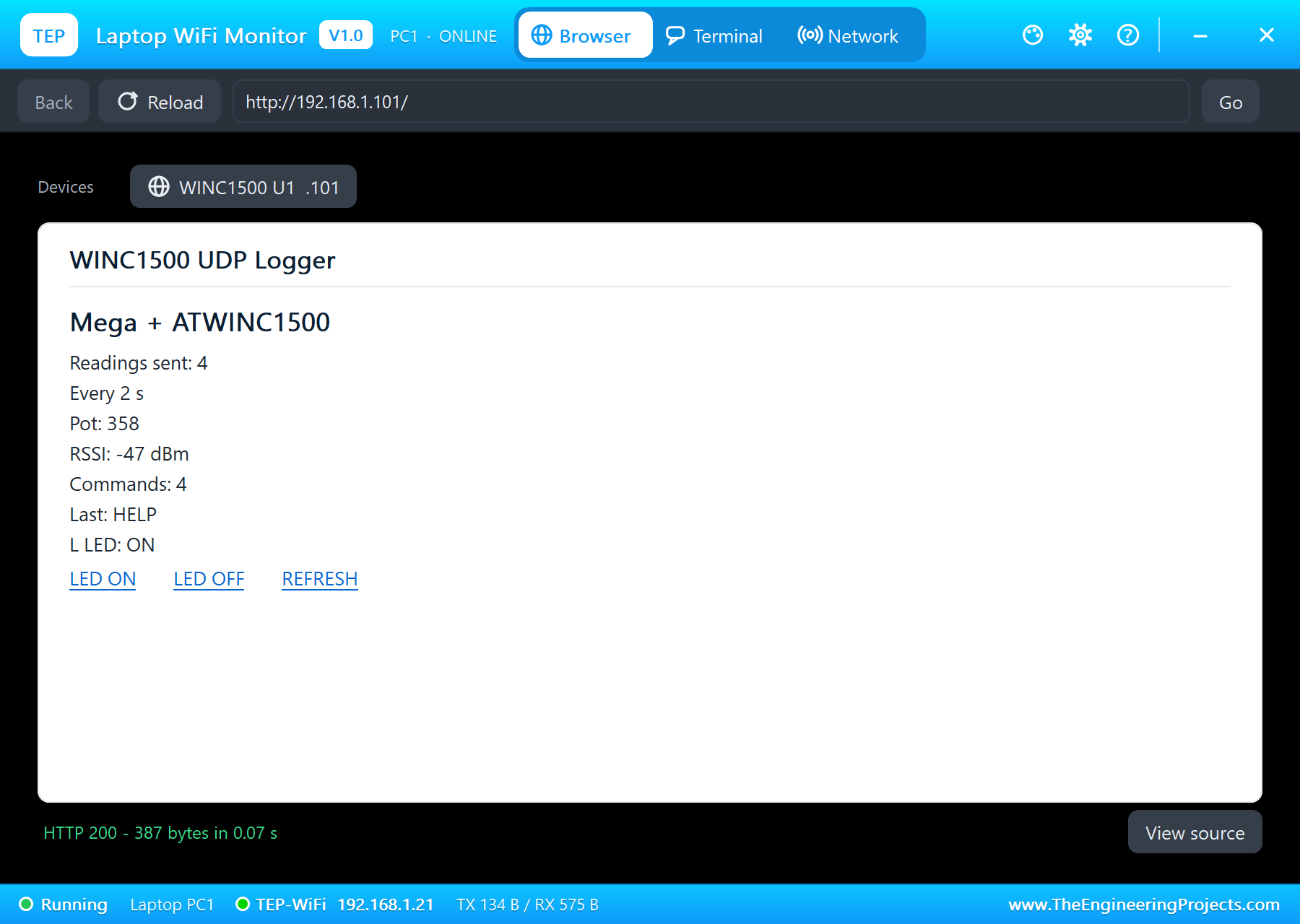
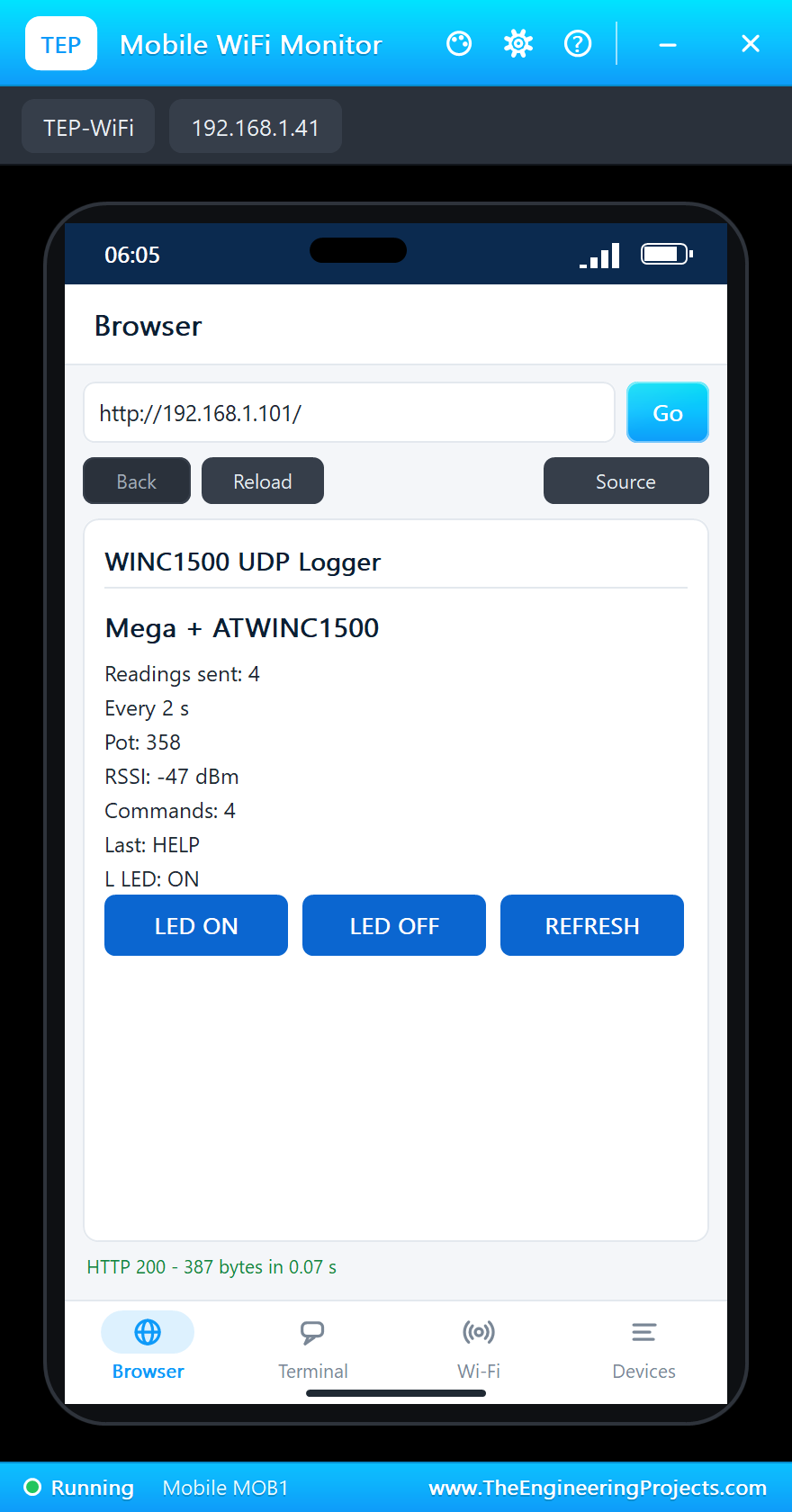
The page's links set the LED too, through the web server:
  if (!strncmp(req, "GET /on", 7)) setLed(true);
  if (!strncmp(req, "GET /off", 8)) setLed(false);
WiFi101 sends each print(F(...)) to a client one byte at a time - one socket request per byte - so the sketch sends the fixed parts of the page in pieces of up to 64 bytes:
void sendP(Print& p, const __FlashStringHelper* s) {
  PGM_P q = reinterpret_cast<PGM_P>(s);
  char buf[64];
  for (;;) {
    size_t n = 0; char ch;
    while (n < sizeof buf && (ch = pgm_read_byte(q + n)) != 0) buf[n++] = ch;
    if (n) p.write((const uint8_t*)buf, n);
    if (n < sizeof buf) return;
    q += n;
  }
}
The Phone's UDP Terminal
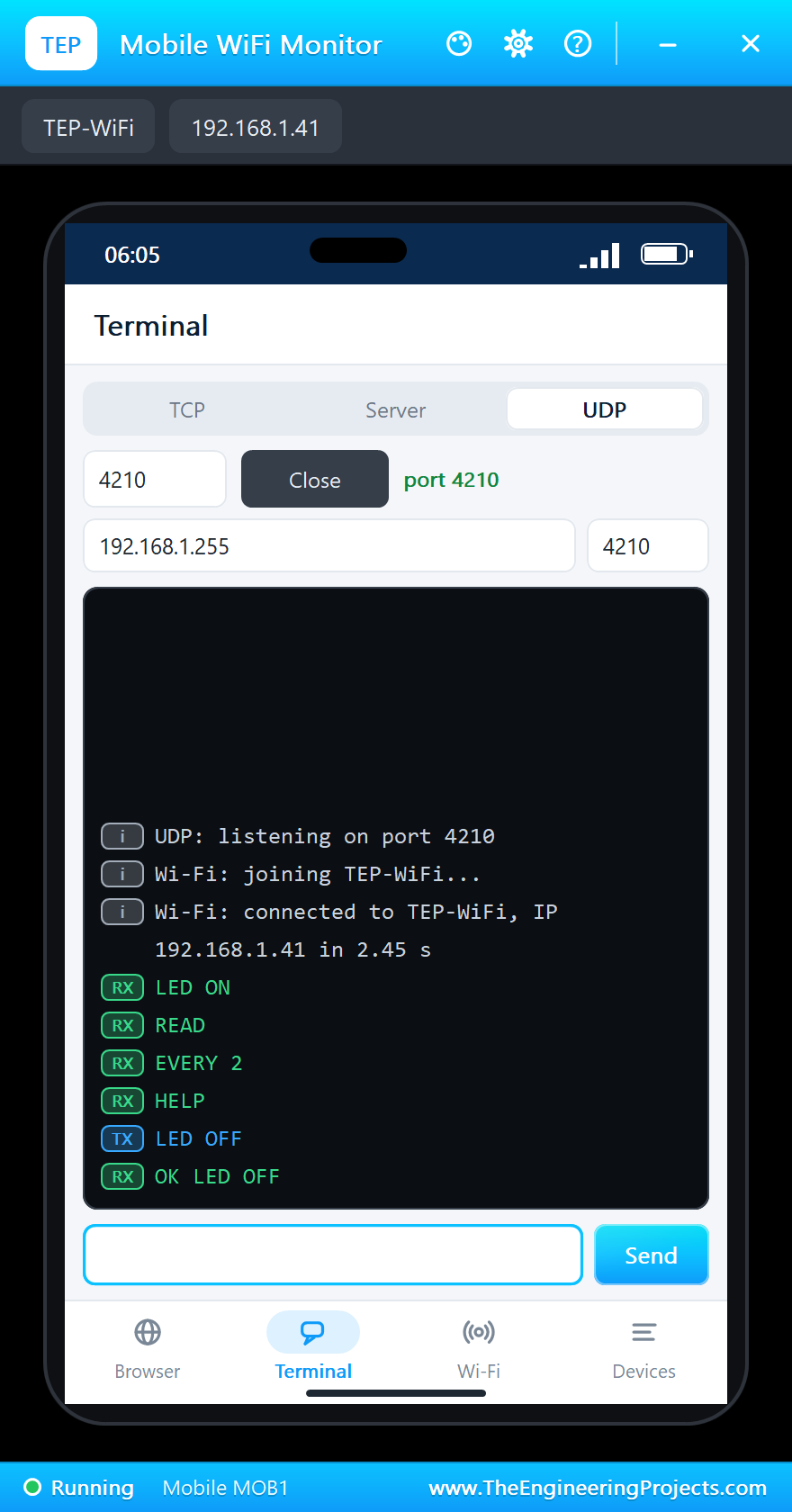
The phone has a UDP terminal as well, also on port 4210 - so it received the laptop's broadcast commands too. We sent LED OFF from it; the answer came back to the phone, 192.168.1.41:
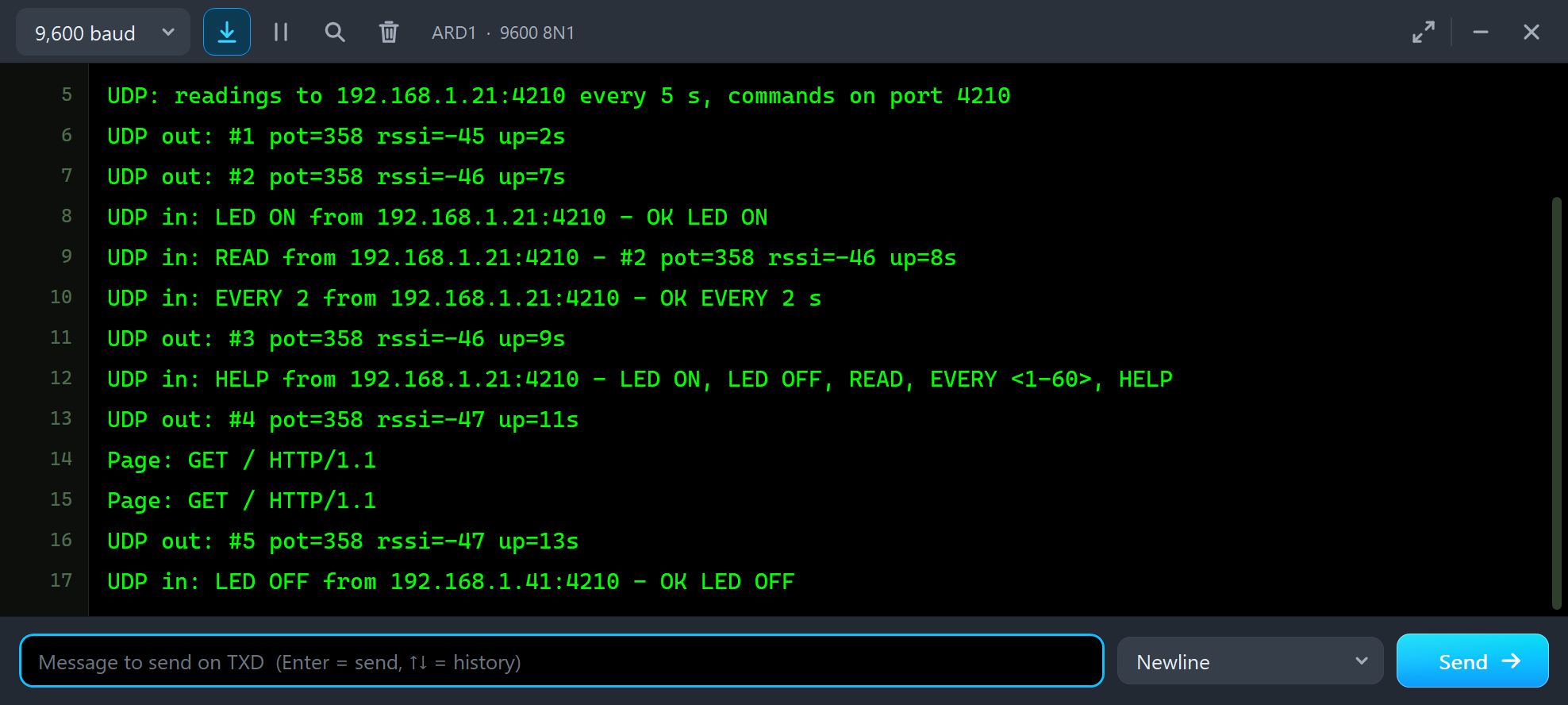
Page: GET / HTTP/1.1
Page: GET / HTTP/1.1
UDP out: #5 pot=358 rssi=-47 up=13s
UDP in: LED OFF from 192.168.1.41:4210 - OK LED OFF
The Serial Monitor
The monitor takes commands too: /status, /send (a reading now) and /help:
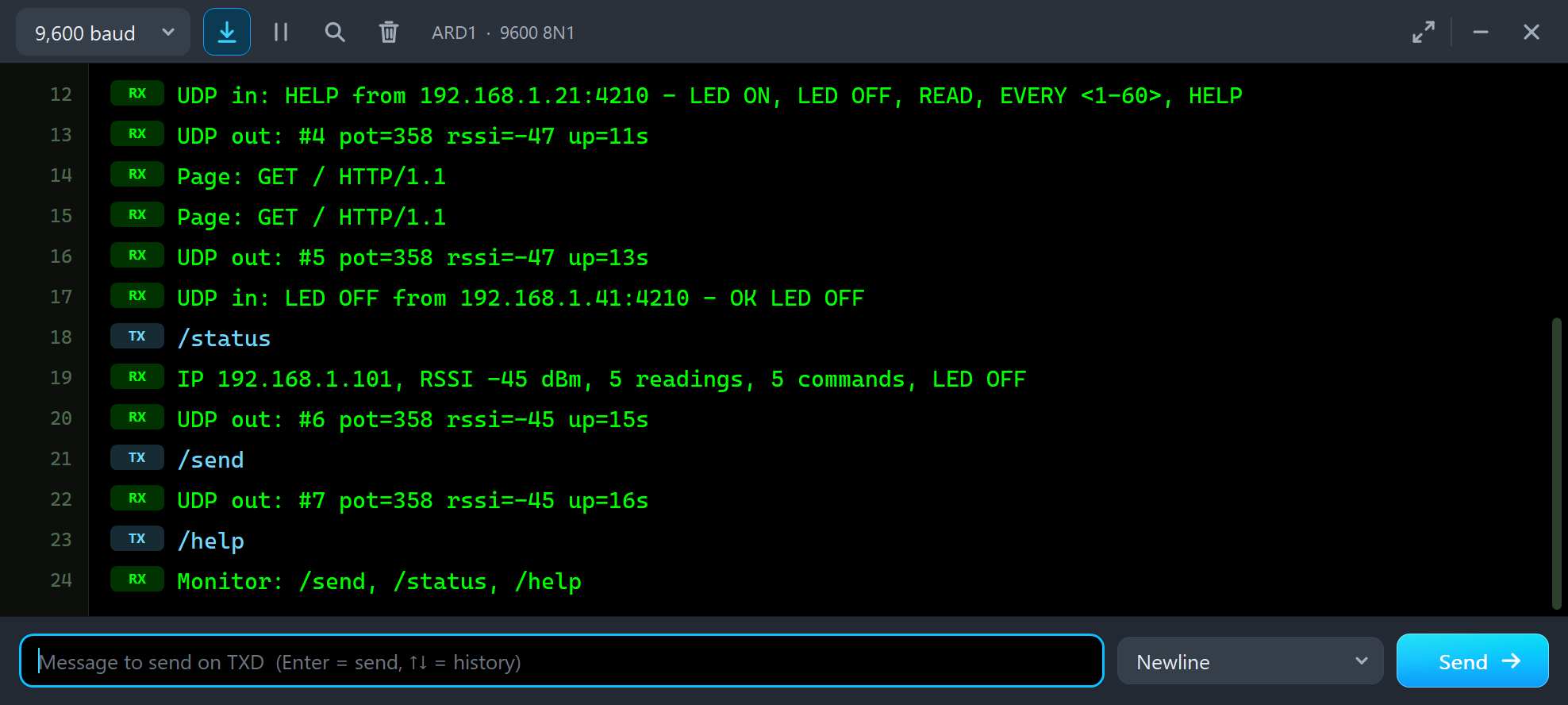
/status
IP 192.168.1.101, RSSI -45 dBm, 5 readings, 5 commands, LED OFF
UDP out: #6 pot=358 rssi=-45 up=15s
/send
UDP out: #7 pot=358 rssi=-45 up=16s
/help
Monitor: /send, /status, /help
And the whole demo running:
The ATWINC1500 WiFi Breakout Panel
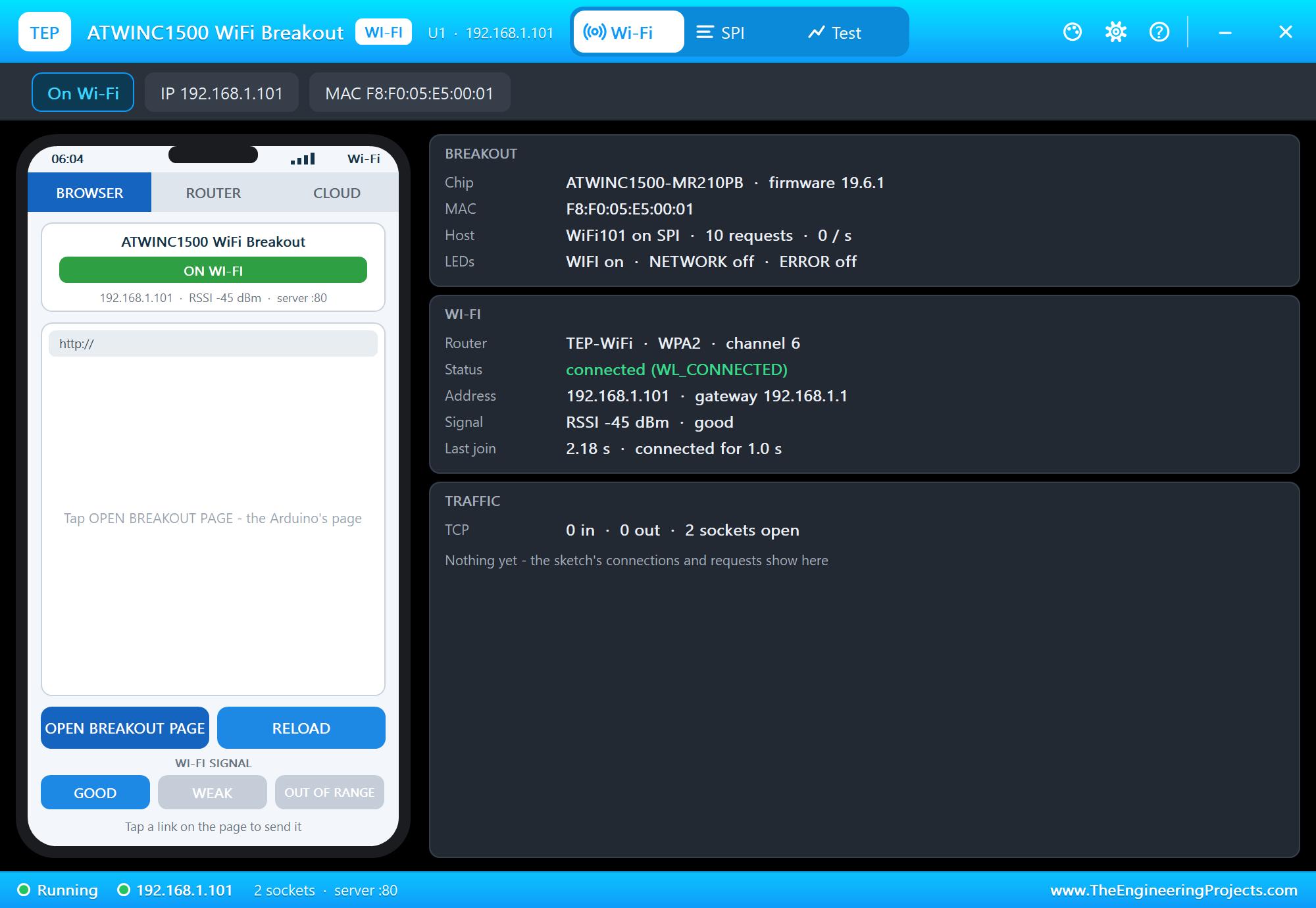
The panel opens at Run, in the look of our TEP Serial Monitor Advance for Proteus. Its Wi-Fi page has a small phone of its own and three cards: the BREAKOUT card with the chip and firmware, the MAC address, the host link with its request rate and the LEDs, the WI-FI card and the TRAFFIC card:
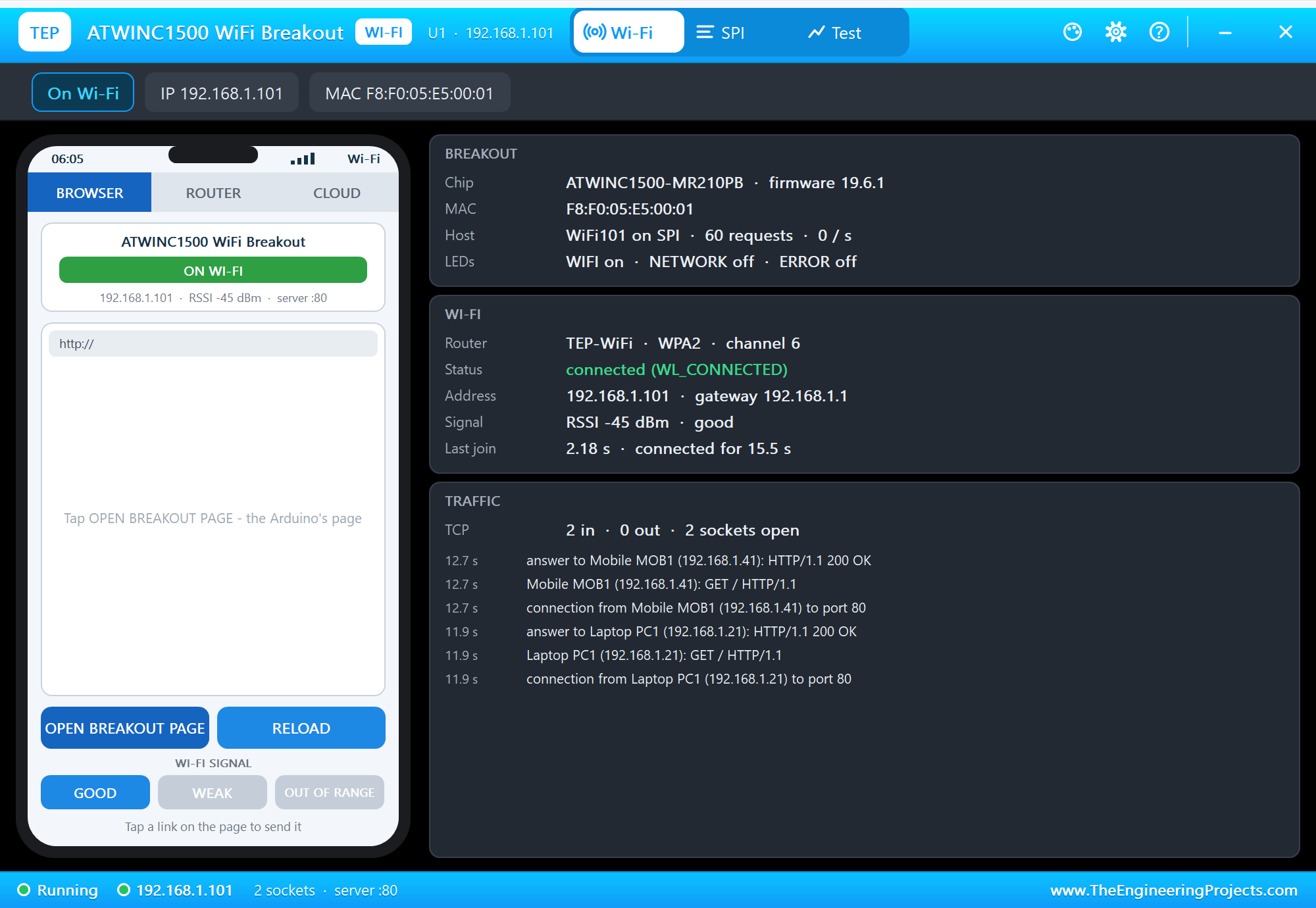
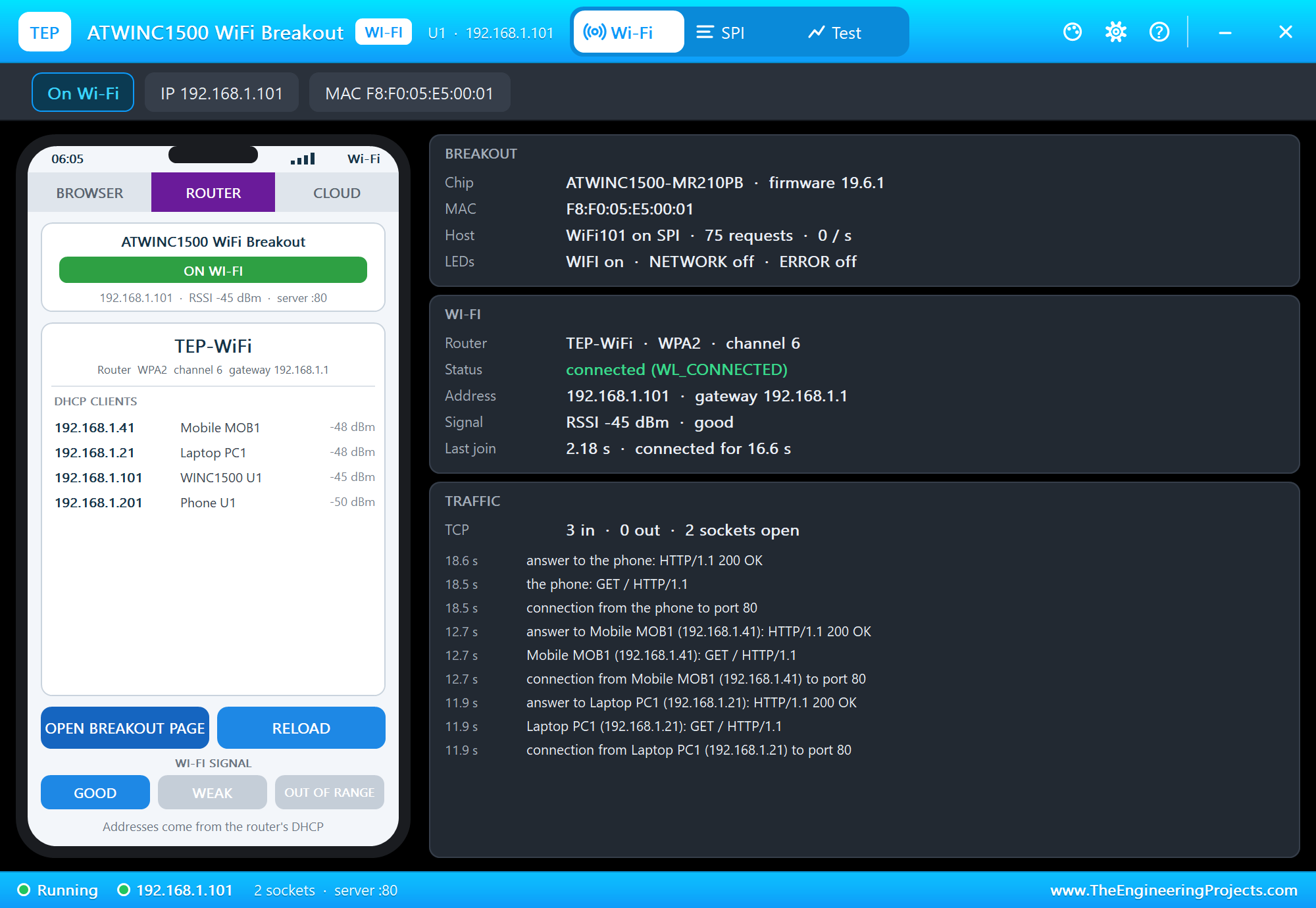
The TRAFFIC card lists every TCP connection with its first line: here the laptop's and the phone's page requests, each answered with HTTP 200. OPEN BREAKOUT PAGE on the panel's phone asks the breakout for the same page, and the ROUTER tab lists the DHCP clients:
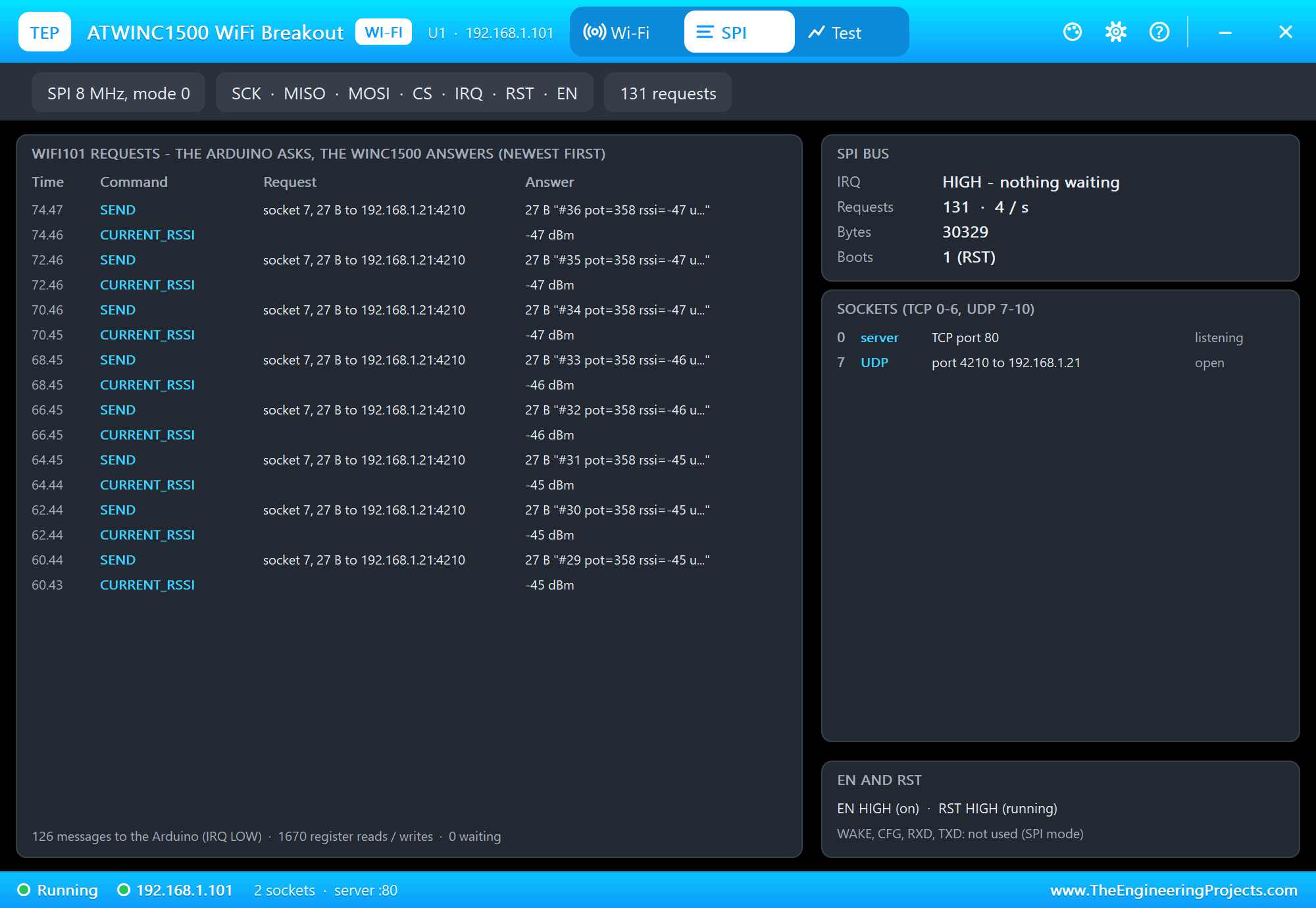
The SPI page lists the WiFi101 requests and the chip's messages, newest first: each reading is a CURRENT_RSSI request (the sketch asks for the RSSI) and a SEND on UDP socket 7 to 192.168.1.21:4210. The sockets card shows the web server on socket 0 and the UDP socket 7, and the EN / RST card says whether the module is on and out of reset:
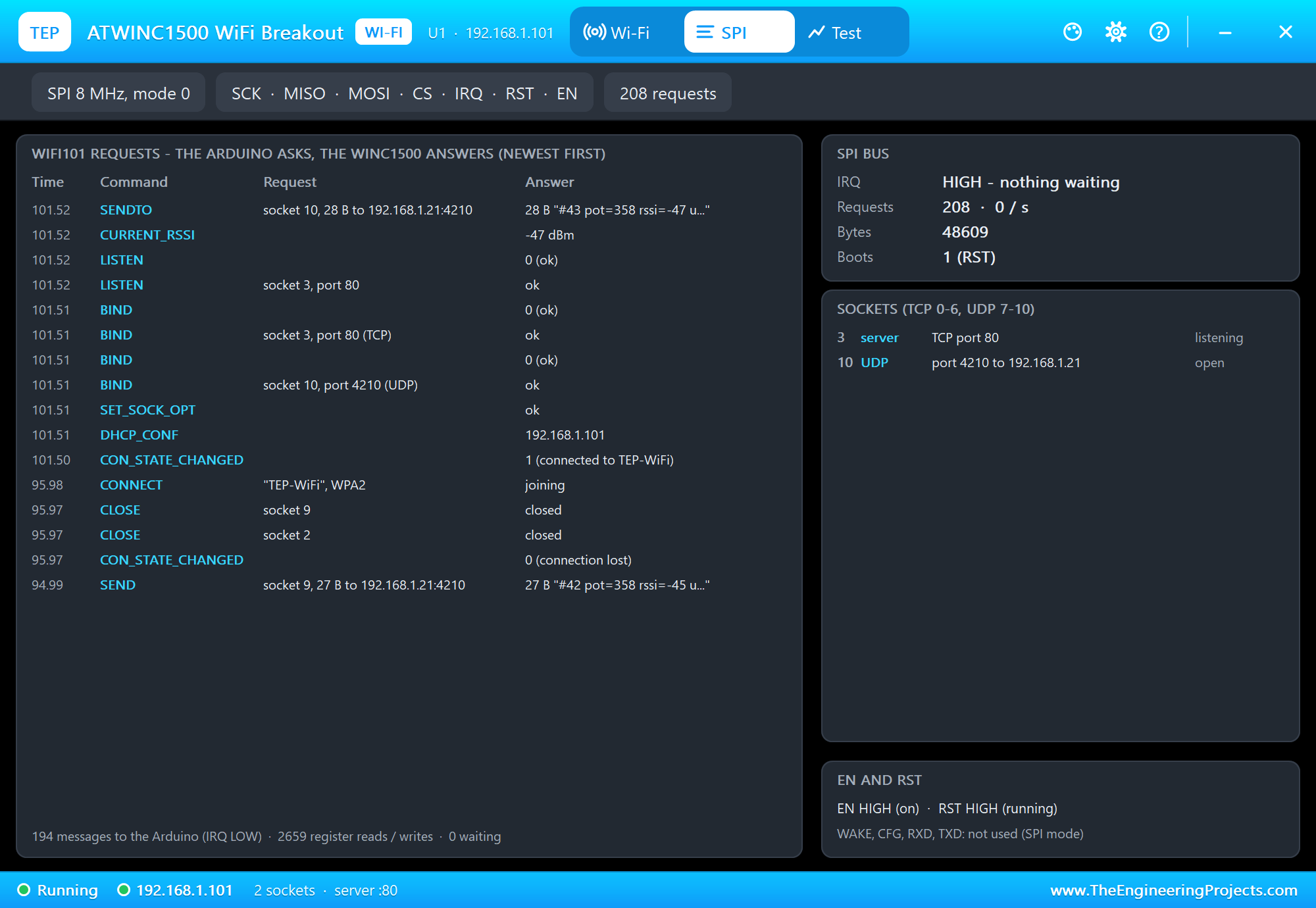
OUT OF RANGE on the phone takes the router away; WiFi.status() stops saying WL_CONNECTED, so the sketch joins again and opens its UDP socket and its server again:
  if (WiFi.status() != WL_CONNECTED) {                              // lost the router: join again
    Serial.println(F("Wi-Fi lost - joining again"));
    while (WiFi.begin(ssid, pass) != WL_CONNECTED) delay(2000);
    udp.begin(PORT);
    web.begin();
    Serial.println(F("Back on Wi-Fi"));
  }
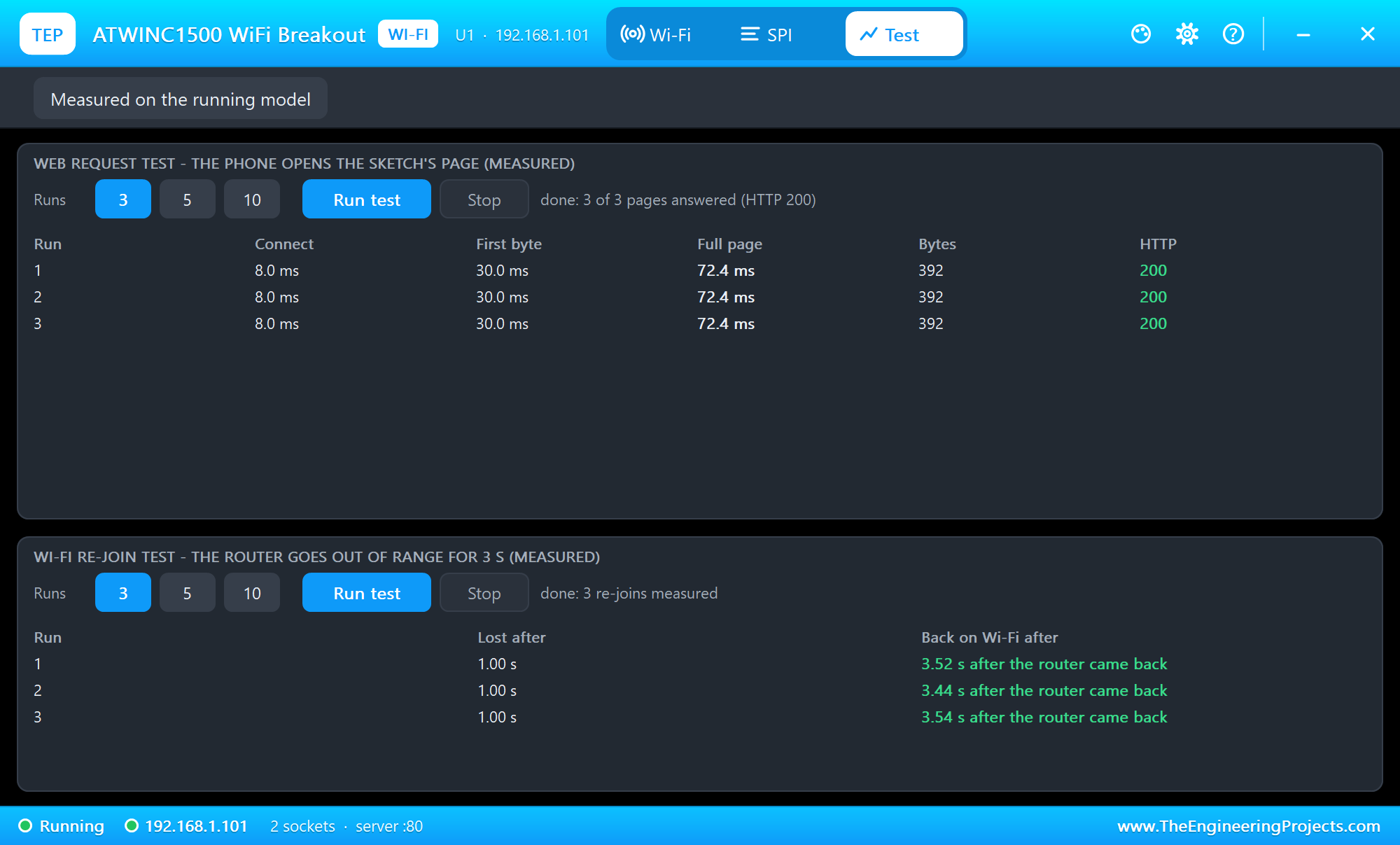
The Test page measures the running model: the phone opens the page several times, and the router goes out of range for 3 seconds to time the re-join:
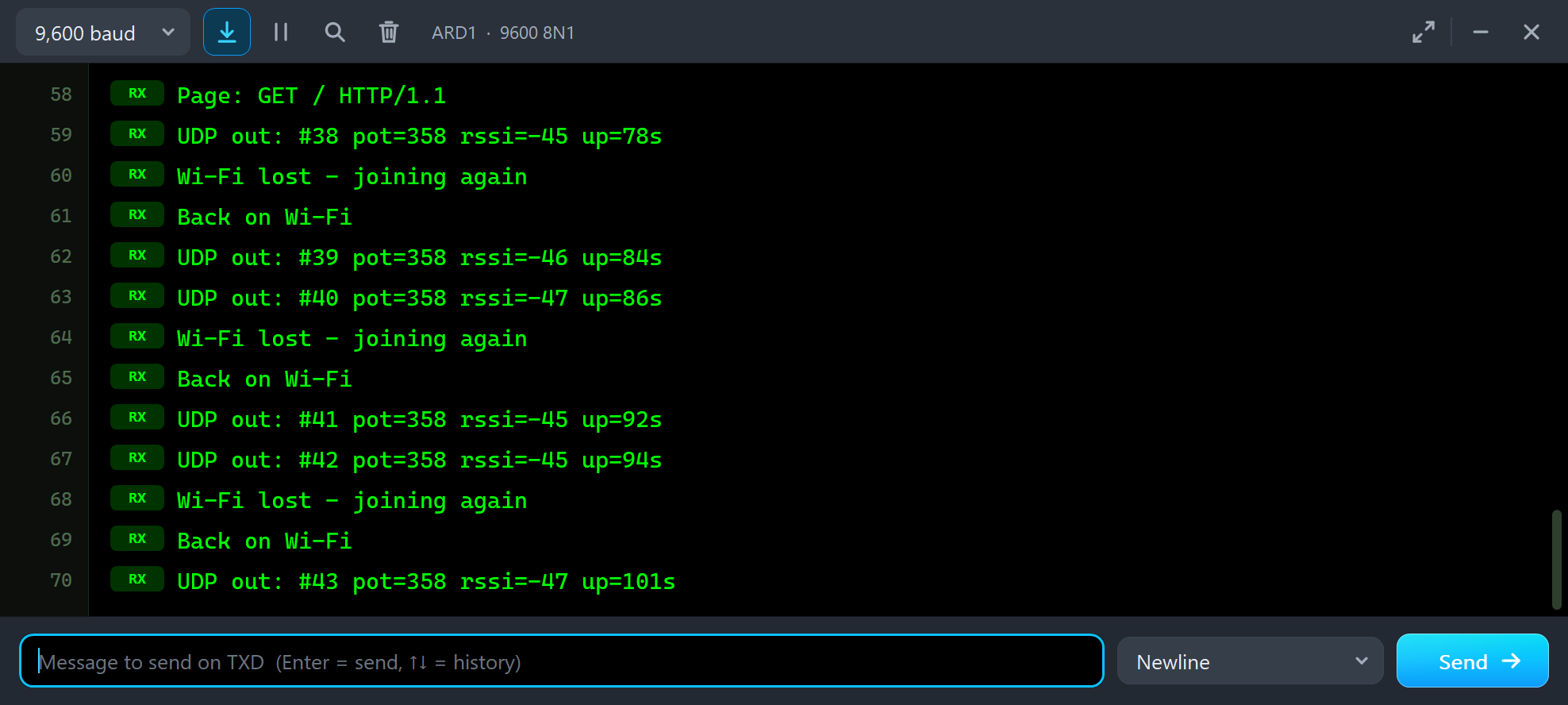
UDP out: #38 pot=358 rssi=-45 up=78s
Wi-Fi lost - joining again
Back on Wi-Fi
UDP out: #39 pot=358 rssi=-46 up=84s
UDP out: #40 pot=358 rssi=-47 up=86s
Wi-Fi lost - joining again
Back on Wi-Fi
UDP out: #41 pot=358 rssi=-45 up=92s
Pins of the ATWINC1500 WiFi Breakout
| Pin | In the demo | What it does |
|---|---|---|
| VIN | VCC | the supply, 3.3 - 5.5 V - without it the breakout is off |
| GND | ground | ground |
| SCK | D52 | the SPI clock |
| MISO | D50 | data to the Arduino; floats while CS is HIGH |
| MOSI | D51 | data from the Arduino |
| CS | D8 | the WINC1500's chip select (LOW = selected; 100k pull-up) |
| EN | VCC | enable: HIGH = on (100k pull-down: open = off) |
| IRQ | D2 | the WINC1500's interrupt output: LOW = a message waits |
| RST | D4 | the WINC1500's reset: LOW = reset (100k pull-down: open = in reset) |
| WAKE, CFG | open | wake-up input and SPI / UART select (not used) |
| RXD, TXD | open | the UART (not used) |
Properties of the ATWINC1500 WiFi Breakout
| Property | What it does |
|---|---|
| WIFISSID / WIFIPASS | the router in range (TEP-WiFi / 12345678) |
| FIRMWARE | the version WiFi.firmwareVersion() reports (19.6.1) |
| PANEL | the phone's tab at start (BROWSER, ROUTER, CLOUD) |
| PAGEPORT | the port OPEN BREAKOUT PAGE opens (80) |
| CLOCK | the clock of the panel and of the firmware's system time: PC or a start time |
The IP address follows the part's number: U1 gets 192.168.1.101, U2 .102 and so on, so give every Wi-Fi part its own number. The laptop is always 192.168.1.21 and the phone 192.168.1.41.
Troubleshooting
- "No ATWINC1500 found" (WL_NO_SHIELD): check SCK, MISO, MOSI, CS, IRQ, RST, EN and VIN / GND, and call
WiFi.setPins()with your pins before the first WiFi call. - Nothing at all: EN or RST left open - both are pulled LOW on the breakout; the panel's SPI page says which.
- The sketch stops at the first WiFi call on an UNO: IRQ is on a pin that needs a pin-change interrupt, which Proteus does not run. Use an external interrupt pin - D2 or D3 on an UNO (which is short of memory anyway), D2, D3 or D18 - D21 on a Mega.
- WiFi.localIP() prints a number: put it in an
IPAddressfirst. - A paused simulation shows the log: the AVR model notes "Clock frequency changed while in the Master mode" when WiFi101 sets its SPI speed - harmless; click the Schematic Capture tab.
- No UDP in the laptop: its Terminal must be in UDP mode with port 4210 open.
- No panel: click the PANEL pad or the WINC1500 module, or turn "Open the panel at Run" back on in Settings.
Things to Know Before Using a Real ATWINC1500 Breakout
- The board: a 32-bit board (an M0 or M4 Feather, a Zero) or a Mega has the memory WiFi101 needs; Adafruit's guide says the library will not work on a 328P or a 32u4.
- The firmware: check it with the CheckWifi101Firmware sketch; 19.5.2 and 19.5.4 are fine, 19.3 and older need the firmware updater of the Arduino IDE.
- The supply: VIN 3.3 - 5.5 V with up to 300 mA bursts while it transmits.
- EN: tie it to VIN to keep the module on, or drive it from a pin to switch the module off and save power.
- UDP: UDP has no delivery check - a reading or a command can be lost on a real network; send again or add numbers, as the readings here do.
- Same code, other boards: on the WiFi Shield 101 or the MKR1000 the same sketch works - only
WiFi.setPins()changes. Our ESP-12E Library for Proteus shows UDP with an ESP8266 and AT commands.
Limitations of the Simulation
- The WINC1500 runs our model of its firmware as WiFi101 (0.16.x) uses it - not the real firmware.
- Not modelled: WAKE, CFG and the UART; the access point and provisioning modes (
WiFi.beginAP()is not simulated), WEP and WPA2-Enterprise (joined as WPA2), real TLS (WiFiSSLClient connects as plain TCP), firmware updates and the SPI flash, power saving, the supply's voltage and current, the radio itself - the join and network times are realistic values, not a radio simulation; UDP packets are never lost in the simulation. - The internet host is a stand-in for the internet: every internet name is 203.0.113.10, and it answers HTTP, pings and the time.
- The PWR LED, the antenna colours, the PANEL pad, the panel, its phone, the router, the two neighbour networks, the internet host and the two monitors are TEP additions.
- Adafruit is a name of Adafruit Industries, ATWINC1500 of Microchip Technology; this library is not made or endorsed by Adafruit, Arduino, Microchip or Labcenter.
- Tested in Proteus 8.5 in October 2026 (the demo as shipped, the Mega, the breakout, the laptop and the phone together at least 0.25 x real time on our PC). Proteus 7 is not supported.
So, that was all about the ATWINC1500 WiFi Breakout Library for Proteus. I hope it helps you try WiFi101 sketches in Proteus before you wire the real breakout - UDP both ways, a web server and the EN / RST pins included - and watch every request to the WINC1500 on the panel while you do. The same chip on a shield is our WiFi Shield 101 Library for Proteus, and the Laptop and Mobile WiFi Monitors talk to every one of our Wi-Fi boards and modules. If you use the ATWINC1500 WiFi Breakout Library for Proteus in a project, please share it in the comments or in our forum, and if you have any questions, ask in the comments and I will help you out. Till the next tutorial, take care and have fun!

Comments
0