


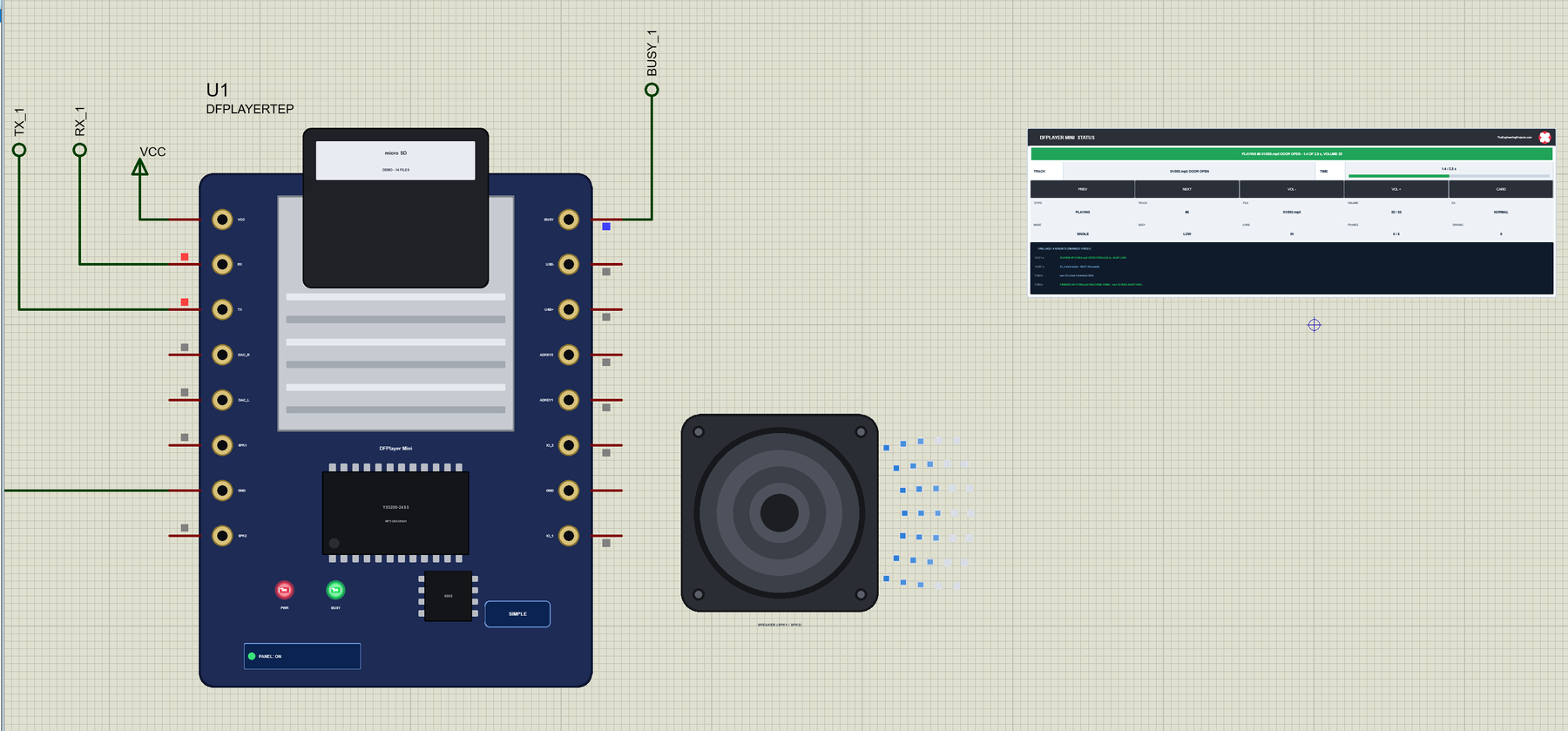
DFPlayer Mini Library for Proteus V1.0: MP3 Player Module + Arduino


Hello friends, I hope you all are doing great. Today, I am going to share the new DFPlayer Mini Library for Proteus V1.0. The DFPlayer Mini is the tiny MP3 player module with a micro SD card slot that so many Arduino projects use for a voice that says "welcome home", a door bell, an alarm or background music. The Arduino sends it short serial commands - play file 4, volume 20, next - and the module does the rest: it reads the card, decodes the MP3 and drives a speaker. In a simulation it was hard to try, because Proteus has no such part and no card to read.
Behind the parts sits our own model, written from the datasheet of the module. It answers the 10-byte 7E FF 06 frames at 9600 baud, needs its 0.8 s to start, plays the files of a demo micro SD card - 14 short tracks in folders 01 and 02, MP3 and ADVERT - each for its real length, pulls its BUSY pin LOW while a track plays, and sends the 3D message when a track has finished. The unmodified DFRobotDFPlayerMini library on the Arduino drives it as it would a real module. You get a Simple device with a live STATUS panel and an Advance device with a pop-up window that shows the card, the player and every frame on the UART. The demo runs on our Arduino UNO V4.0.
NOTICE: an MP3 module is easy to fake: a part that lights an LED when a pin goes LOW. We wanted more. Our module speaks the serial protocol of its datasheet byte by byte on its RX and TX pins - so the DFRobot library talks to it as it would to a real module, a wrong checksum is answered with an error, a command sent before the module is ready is refused, and a track that is not on the card is not found. It took our team a lot of hard work. Your feedback is the fuel that keeps us going, so please tell us what you think in the comments below or in the DFPlayer Mini board of our forum. And if our free libraries help you, you can buy us a coffee. So, let's get started with the DFPlayer Mini Library for Proteus V1.0:
What is the DFPlayer Mini?
The DFPlayer Mini is a small MP3 module, about 21 x 21 mm, with a micro SD card slot on top. Its decoder chip (a YX5200-24SS on most boards) reads MP3 and WAV files from the card, a 24-bit DAC turns them into sound, and a small amplifier drives a speaker directly. The host - an Arduino here - only sends commands over a serial port, so playing a sound takes one line of code. The FN-M16P and MP3-TF-16P modules are the same design with the same protocol.
| DFPlayer Mini (FN-M16P datasheet) | |
|---|---|
| Supply | 3.2 V - 5.0 V on VCC (4.2 V typical), under 15 mA without a USB drive |
| Interface | UART 9600 baud 8N1, 3.3 V TTL levels (1 kohm in series from a 5 V MCU) |
| Files | MP3 and WAV on a micro SD card (FAT16 / FAT32, up to 32 GB) |
| Folders | 01 - 99 with up to 255 files each by serial command; MP3 and ADVERT with up to 3000 |
| Sound | 24-bit DAC on DAC_L / DAC_R, a 3 W amplifier for a 4 / 8 ohm speaker on SPK_1 / SPK_2 |
| Volume, EQ | 30 levels (30 at power-on), 6 EQs: normal, pop, rock, jazz, classic, bass |
| BUSY | LOW while a track plays, HIGH in standby |
| Arduino library | DFRobotDFPlayerMini (1.0.6 in the demo) |
How the Module Works
At power-on the module reads its card - the datasheet allows 0.5 - 1.5 s for that - and then reports the online devices: 3F 0002, the SD card. Commands sent before that are refused. Then it waits: a play command picks a file, BUSY goes LOW and the track plays to its end; the module sends 3D with the track number and BUSY goes HIGH again. Pull the card out and it sends 3B (and an error 08), put it back and it sends 3A.
The files have numbers, and how a command finds a file matters. play(n) plays the n-th file copied to the card - in the order they were copied, not by name. playFolder(f, n) plays file 001 - 255 of folder 01 - 99 by its name, playMp3Folder(n) the file nnnn.mp3 in the MP3 folder, and advertise(n) plays a file from ADVERT in the middle of a track, which goes on afterwards.
The Frames
Every command and every message is a frame of 10 bytes: 7E FF 06, the command, the feedback byte (1 asks for an ACK, 41), the parameter in two bytes, a two-byte checksum and EF. The checksum is 0 minus the sum of the six bytes after 7E. A frame of 8 bytes without the checksum works too.
| Code | Command | DFRobotDFPlayerMini |
|---|---|---|
| 01 / 02 | next / previous | next(), previous() |
| 03 | play the n-th file on the card | play(n) |
| 06 | volume 0 - 30 | volume(n) |
| 07 | EQ 0 - 5 | EQ(n) |
| 08 / 11 / 18 | repeat a track / repeat all / random | loop(n), enableLoopAll(), randomAll() |
| 09 / 0A / 0C | the device (SD) / sleep / reset | outputDevice(), sleep(), reset() |
| 0D / 0E / 16 | play / pause / stop | start(), pause(), stop() |
| 0F | folder + file | playFolder(f, n) |
| 12 / 13 | the MP3 folder / an advertisement | playMp3Folder(n), advertise(n) |
| 42 - 4F | queries: status, volume, EQ, files, folders | readState(), readVolume(), readFileCounts() ... |
| Message | Meaning |
|---|---|
| 3F 0002 | ready - the SD card is online |
| 3D nnnn | track nnnn has finished |
| 3A / 3B 0002 | the card was put in / pulled out |
| 40 01 | busy - still starting |
| 40 02 | asleep |
| 40 03 / 40 04 | a frame not received completely / a wrong checksum |
| 40 05 / 40 06 | the track is out of range / not found |
| 40 07 | an advertisement while nothing plays |
| 40 08 | the card failed (pulled out) |
What's New in DFPlayer Mini Library for Proteus V1.0
- The serial protocol of the datasheet: the 7E FF 06 frames with and without the checksum, the ACK, every command and query, the errors 40 01 - 40 08, at 9600 baud 8N1.
- A demo micro SD card: 14 files in the root, in folders 01 and 02, in MP3 and in ADVERT - BEEP, DOORBELL, WELCOME HOME, ALARM, LOW BATTERY, MORNING SONG, ATTENTION PLEASE and more -, each with its own length.
- Real playback: a track plays for its length, BUSY is LOW meanwhile, 3D comes at its end; repeat a track, repeat all, a folder or random; advertisements that pause the track and resume it; pause, sleep and wake.
- The card: click it while the simulation runs to pull it out (3B and error 08) and once more to put it back (3A).
- The start-up: 0.8 s to read the card, then 3F; commands before that are refused with 40 01.
- The keys: IO_1 and IO_2 to GND - a short press plays the previous / next file, a long press steps the volume - and the same keys on the panel.
- A speaker with sound waves beside the module: more waves with more volume.
- Every frame in the Advance pop-up: the bytes from the host and from the module, with what each one says.
- Three test tools on the Advance device: Card & numbers, Frames and Settings.
- A two-node demo on our Arduino UNO V4.0 with the DFRobot library and AltSoftSerial: it plays WELCOME HOME at the start, and PLAY, FOLDER, MP3, ADVERT, VOL, EQ, PAUSE, STATUS, SLEEP, ALL and more from the serial monitor.
- A compact package: about 1.25 MB, without the C++ source code of the model.
Two Devices: Simple and Advance
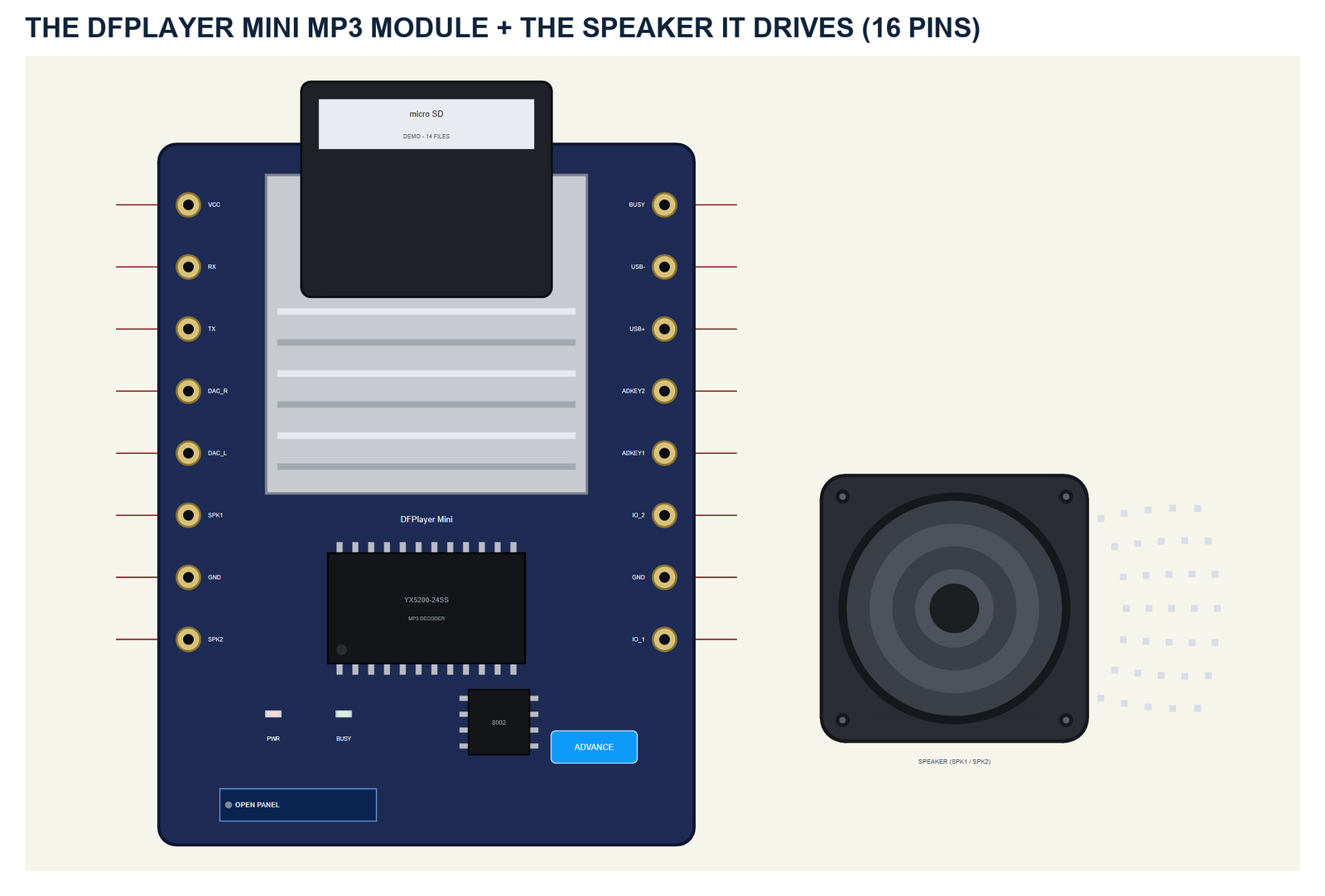
One part holds the module and the speaker. The module is the board seen from above, about three times its real size: the micro SD slot with the card sticking out, the YX5200-24SS decoder, the 8002 amplifier and the two rows of eight pins - VCC RX TX DAC_R DAC_L SPK_1 GND SPK_2 on the left, BUSY USB- USB+ ADKEY_2 ADKEY_1 IO_2 GND IO_1 on the right, as on the real board. The SIMPLE / ADVANCE badge, the PWR and BUSY LEDs, the panel button and the speaker with its waves are TEP additions: PWR lights with power, BUSY while a track plays.
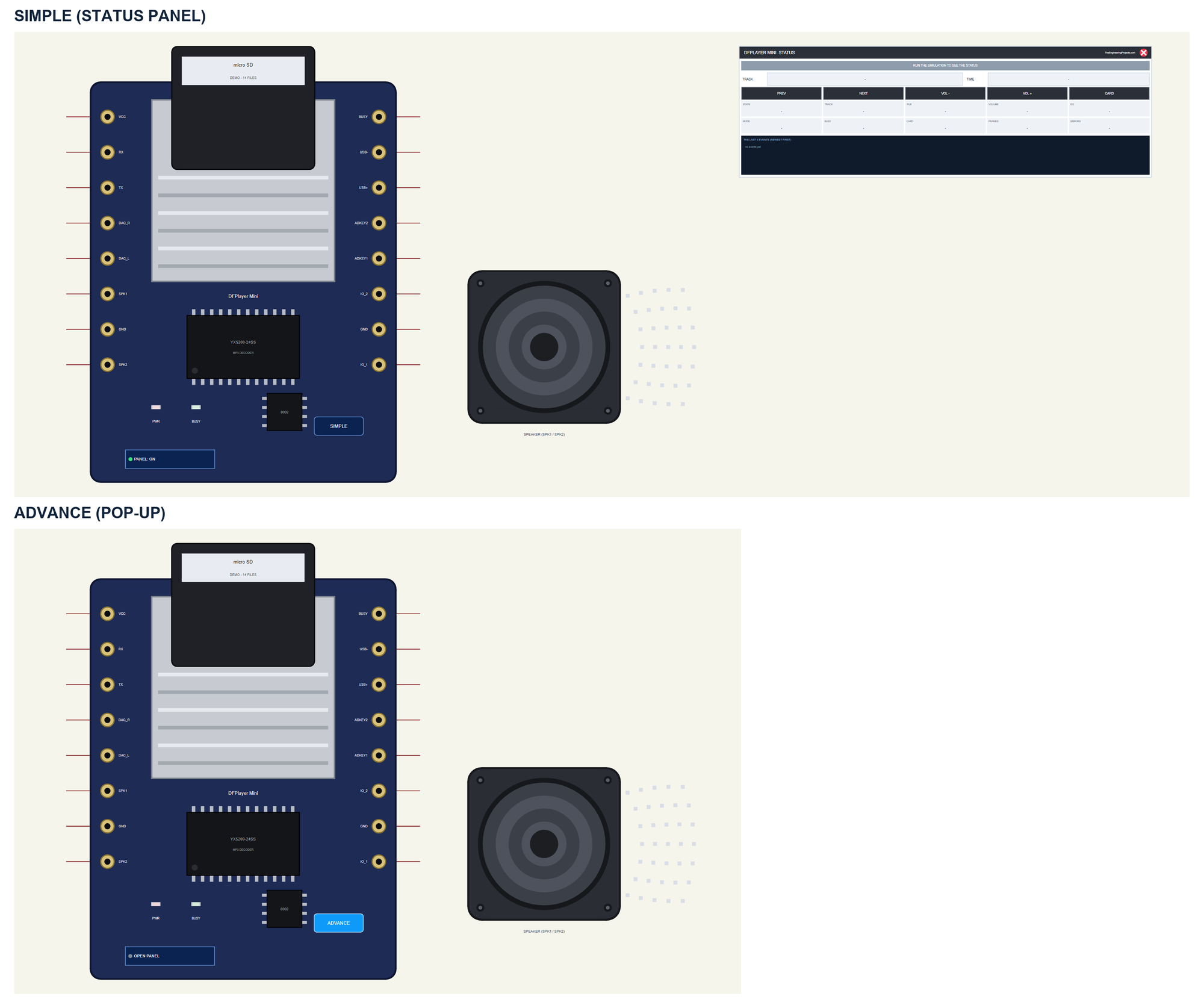
| Simple | Advance | |
|---|---|---|
| Device | DFPLAYERTEP | DFPLAYERADVTEP |
| On the schematic | The module, the speaker and the STATUS panel | The module and the speaker |
| The card | Click it on the schematic | Click it on the schematic or CARD OUT / IN in the pop-up |
| The keys | PREV, NEXT, VOL -, VOL + on the panel | The same on the pop-up's toolbar |
| Status | Banner, the track and its time, 10 readouts, the last 4 events | A pop-up: Player, Event log, Tests |
Download DFPlayer Mini Library for Proteus
Click the button below to download DFPlayer-Mini-Library-for-Proteus-v1.0.zip (about 1.25 MB, without the C++ source code of the model):
DFPlayer Mini Library for Proteus V1.0- README.txt: the devices, installation, the demo, wiring, the test tools, the properties and real hardware.
- Proteus Library Files:
TEPDFPLAYER.LIBandArduinoV4TEP.LIBfrom our Arduino Library for Proteus V4.0. - Proteus Model Files:
TEPDFPLAYER.DLLandTEPARDUINO.DLL. - Proteus Simulation:
DFPlayer-Mini-MP3-ArduinoUnoV4.pdsprj,DFPlayer_Demo.hexand copies of the two DLLs. - Arduino Code:
DFPlayer_Demo.ino- it needs the DFRobotDFPlayerMini library and AltSoftSerial (not included; install both with the Library Manager).
No Proteus yet? Read How to Download and Install Proteus 7 and 8. New to libraries? Follow How to Install a New Library in Proteus.
How to Install DFPlayer Mini Library for Proteus
- Close Proteus and extract the whole zip file, for example to your Desktop.
- Copy the two files from Proteus Library Files into the LIBRARY folder of Proteus (usually
C:\Program Files (x86)\Labcenter Electronics\Proteus 8 Professional\LIBRARY). - Copy
TEPDFPLAYER.DLLandTEPARDUINO.DLLfrom Proteus Model Files into the MODELS folder. - Delete
TEPDFPLAYER.IDXfrom the LIBRARY folder if it is there. - Start Proteus, press P and search for DFPlayer.
Tip: keep the Proteus Simulation folder together, because the project needs its .hex file and the DLLs beside it. The library is tested in Proteus 8.5; Proteus 7 is not supported.
The DFPlayer Mini Part in Proteus
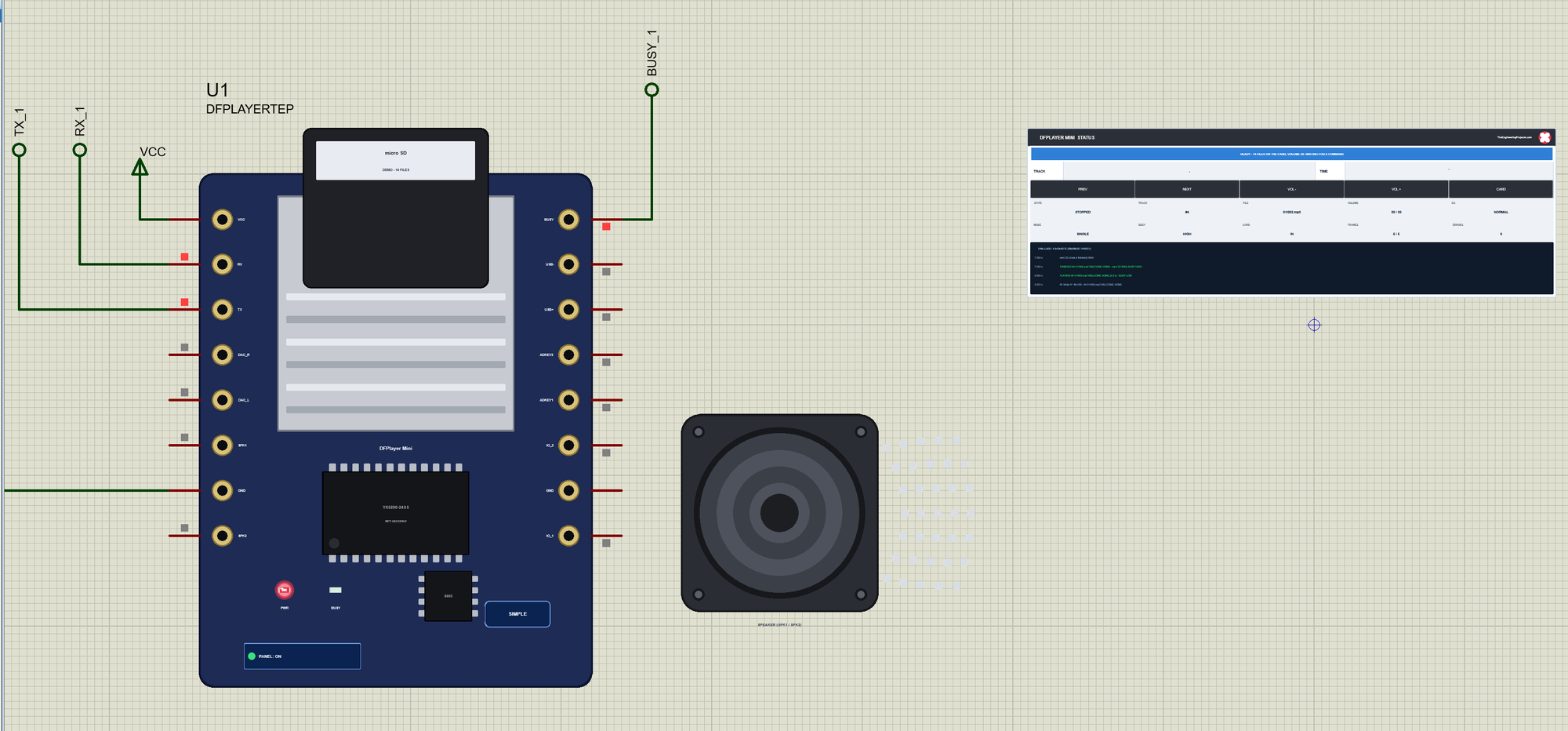
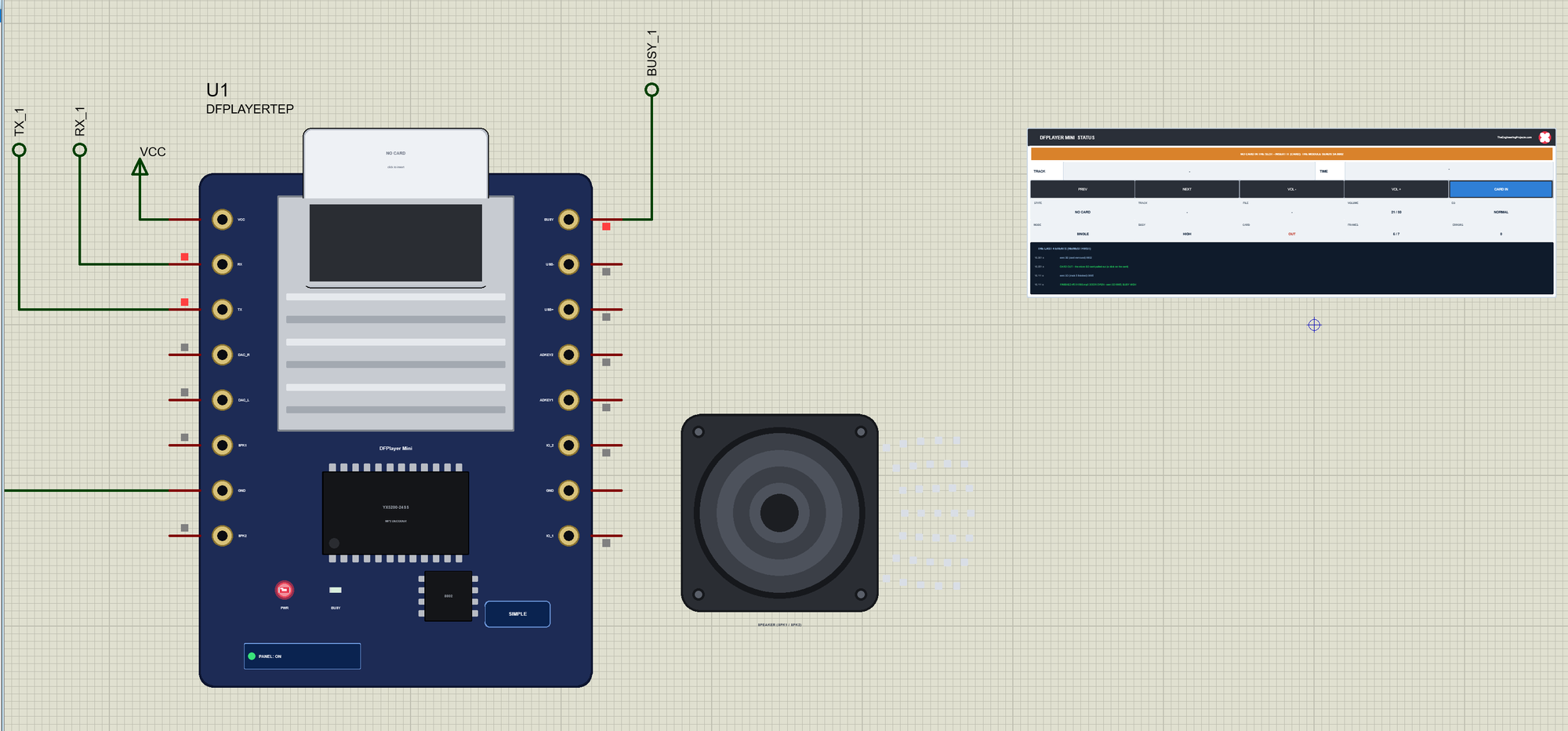
The Simple device adds the STATUS panel beside the speaker. Its banner says what the module is doing: green while a track plays, blue while it starts or waits, amber for an error, a pause or no card, red for no power. Below it are the TRACK playing and its TIME as a bar, five actions, ten readouts and the last four events:
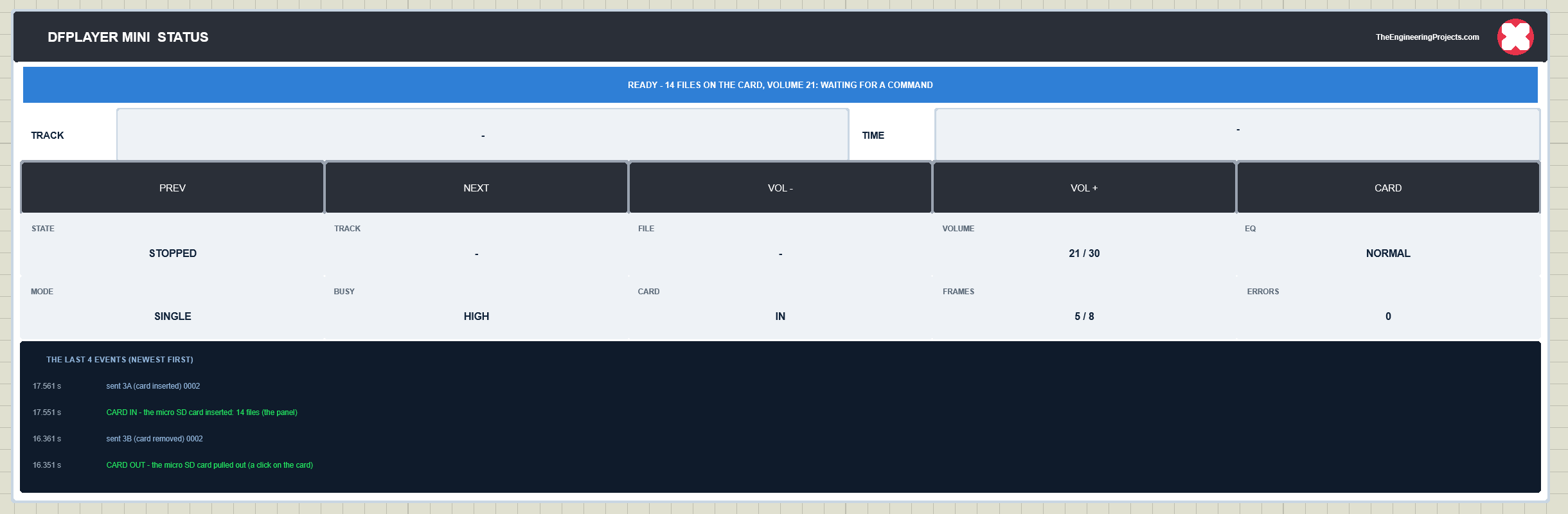
The readouts are the state, the track number, the file, the volume, the EQ, the playback mode, BUSY, the card, the frames in and out and the errors sent. The actions are the module's own keys and the card: PREV and NEXT play the previous / next file, VOL - and VOL + step the volume, CARD pulls the card out or puts it back. The red X closes the STATUS panel, and the PANEL button on the board opens it again.
While a track plays, the BUSY LED is lit and the speaker sends out its sound waves - more of them with more volume. The Advance device keeps the schematic clean: only the module and the speaker. The live data opens in a pop-up window at Run, and the OPEN PANEL button on the board brings the window back:
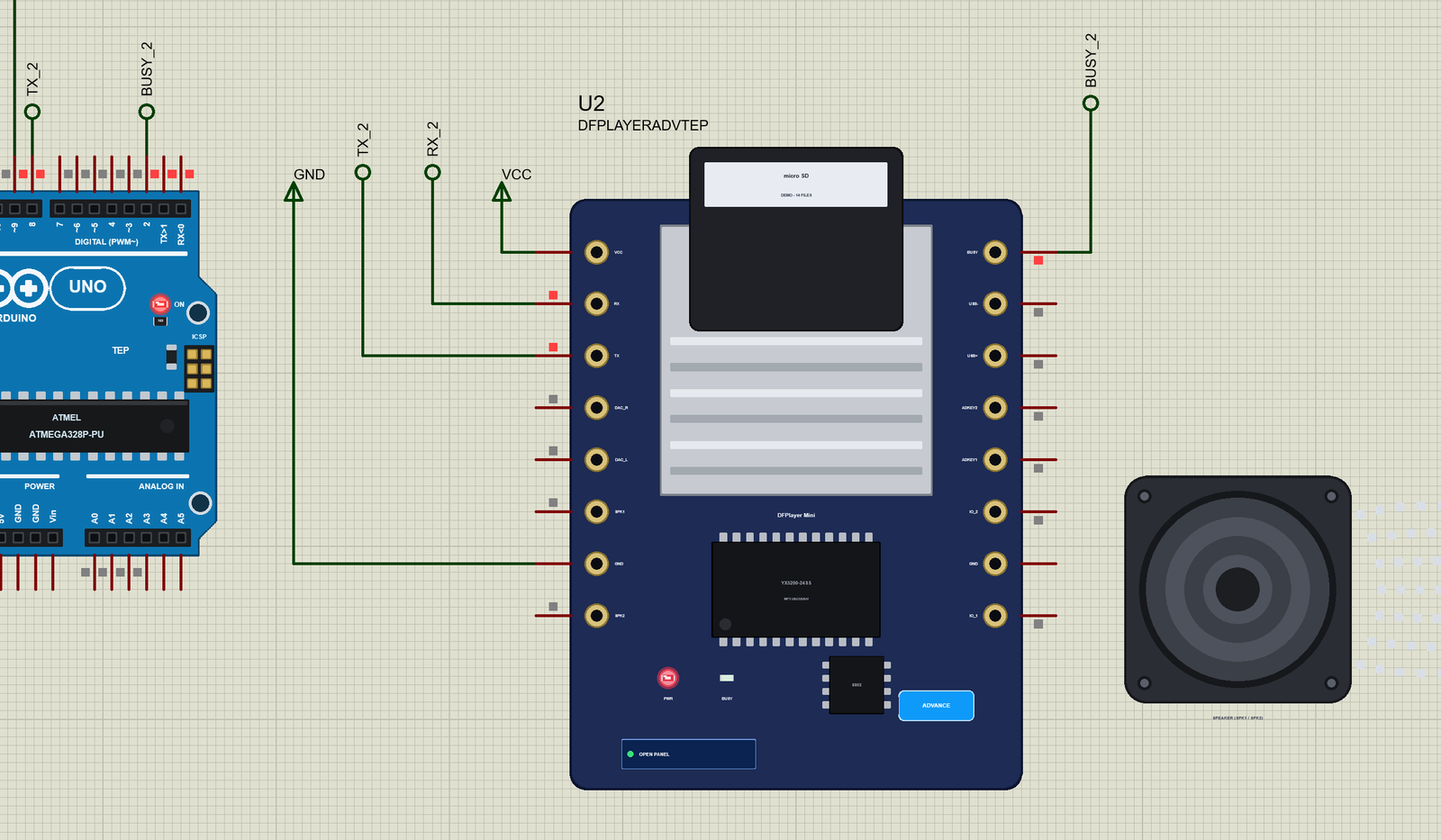
The properties set the start: CARD - DEMO, the card with 14 files, or NONE, an empty slot - and, on the Simple device, PANEL (open or closed). Every run starts again from the properties, so the volume and the EQ start at 30 and normal, as on a real module after power-on.
The Demo Circuit
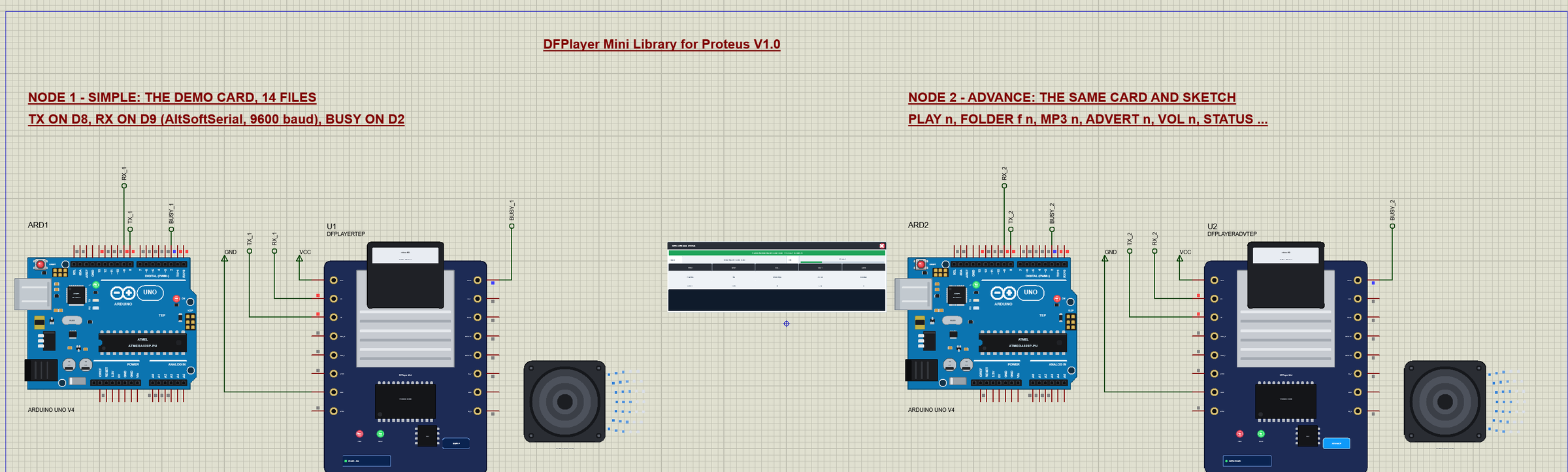
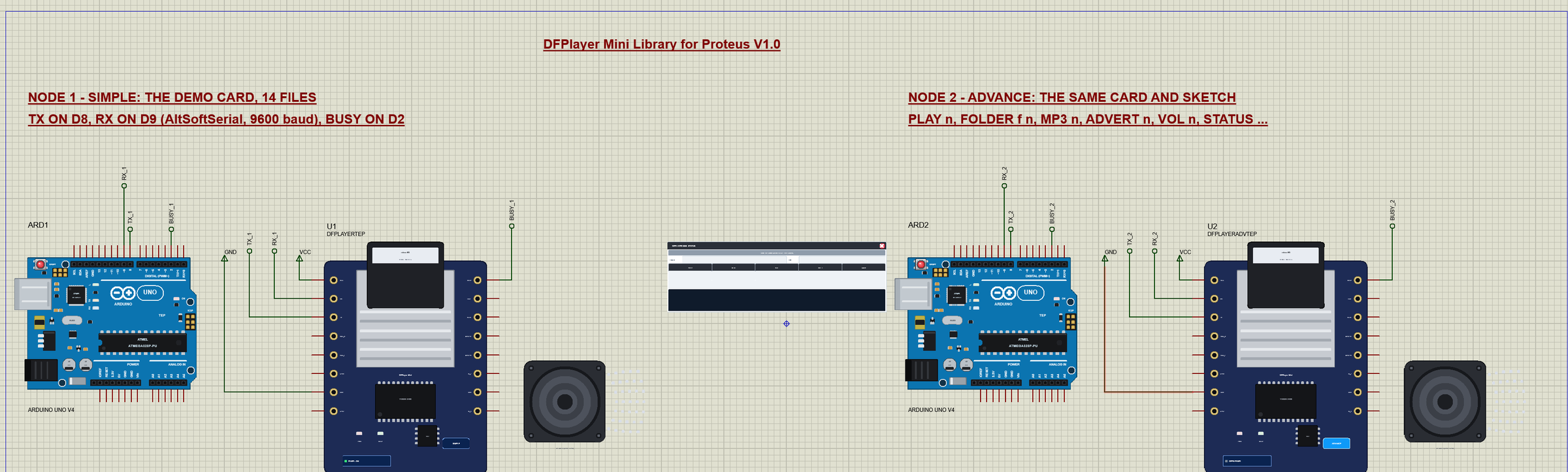
The demo project has two nodes, each an Arduino UNO V4.0 from our Arduino UNO Library for Proteus V4.0 with a DFPlayer Mini and the DEMO card. Node 1 has the Simple part, to play with the keys and the card on the schematic; node 2 the Advance part, to send commands from the monitor and watch the pop-up. Both UNOs run the same DFPlayer_Demo.hex.
Wiring
| Module pin | Arduino UNO (the demo) | Notes |
|---|---|---|
| VCC | 5V | 3.2 V - 5.0 V |
| GND | GND | |
| TX | D8 | AltSoftSerial's RX: the module talks, the UNO listens |
| RX | D9 | AltSoftSerial's TX - on a real board through 1 kohm |
| BUSY | D2 | LOW while a track plays |
| SPK_1 / SPK_2 | a speaker | under 3 W, 4 / 8 ohm - not simulated |
In the demo VCC and GND go to power terminals, and TX, RX and BUSY run to labels (TX_1, RX_1, BUSY_1 and TX_2, RX_2, BUSY_2) at the UNO's header. The serial monitor needs no wires at all, because it is built into the UNO V4.0. Why AltSoftSerial on D8 and D9? SoftwareSerial cannot receive in Proteus - the simulated UNO has no pin-change interrupts - and on a real UNO AltSoftSerial keeps the hardware port free for the monitor. On a Mega, use Serial1 - Serial3. The 1 kohm resistor of the datasheet is left out in Proteus, where it would only turn a digital line into an analog one.
The Arduino Code
The demo sketch uses the DFRobotDFPlayerMini library 1.0.6 by DFRobot (LGPL licence) and AltSoftSerial 1.4 by Paul Stoffregen (MIT licence) - install both with the Library Manager to rebuild it. New to Arduino? Start with Arduino Tutorial for Beginners and Introduction to Arduino UNO. The module sits on AltSoftSerial, and the DFRobot object talks through it:
AltSoftSerial mp3Serial;                 // RX on D8 (the module's TX), TX on D9 (the module's RX)
DFRobotDFPlayerMini player;
const byte BUSY_PIN = 2;                 // LOW while a track plays
setup() first waits 1.5 s, the longest start-up time of the datasheet, and only then opens the port - so the module's power-on message does not wait in the buffer. begin() resets the module and waits for its card; the sketch then asks for the number of files and folders:
  delay(1500);                           // the module needs 0.5 - 1.5 s after power-on: earlier commands are refused
  mp3Serial.begin(9600);                 // (after the wait: its power-on 3F must not wait in the buffer for begin())
  player.begin(mp3Serial, false, true);  // reset it and wait for the card - without ACK
  int files = player.readFileCounts();
  if (files < 0) {
    Serial.println(F("no answer - check TX / RX, the 1k resistor, the power and the card"));
  } else {
    Serial.print(F("DFPlayer online: "));
    Serial.print(files);
    Serial.print(F(" files in "));
    Serial.print(player.readFolderCounts());
    Serial.println(F(" folders"));
  }
Why begin(mp3Serial, false, true)? The second parameter is the ACK. With ACK on, DFRobotDFPlayerMini waits for a message after every acknowledged command, so the next command leaves only after a 500 ms time-out, with a "Time Out" message in between. The demo turns ACK off and checks the module with a query instead. Then it sets the volume and plays file 002 of folder 01, WELCOME HOME:
  player.volume(20);
  Serial.println(F("Commands: PLAY n, FOLDER f n, MP3 n, ADVERT n, NEXT, PREV, PAUSE, RESUME, STOP, VOL n, EQ n, LOOP n, ALL, RANDOM, SLEEP, WAKE, STATUS, HELP"));
  player.playFolder(1, 2);
  stamp();
  Serial.println(F("> FOLDER 1 2"));
Messages, BUSY and Commands
In loop() the sketch reads the commands typed in the monitor, prints every message of the module and every change of BUSY, and lights the UNO's L LED while a track plays:
void loop() {
  while (Serial.available()) {
    char ch = Serial.read();
    if (ch == '\r' || ch == '\n') { line[len] = 0; command(line); len = 0; }
    else if (len < sizeof(line) - 1) line[len++] = ch;
  }
  if (player.available()) report(player.readType(), player.read());
  bool busy = digitalRead(BUSY_PIN) == LOW;
  if (busy != busyWas) {
    busyWas = busy;
    digitalWrite(LED_BUILTIN, busy);
    stamp();
    Serial.println(busy ? F("BUSY LOW - playing") : F("BUSY HIGH - idle"));
  }
}
The messages - a finished track, an error, the card - are printed as words:
void report(uint8_t type, uint16_t value) {
  switch (type) {
    case DFPlayerPlayFinished: stamp(); Serial.print(F("finished track #")); Serial.println(value); break;
    case DFPlayerError: stamp(); Serial.print(F("error ")); Serial.print(value); Serial.print(F(": ")); Serial.println(errorText(value)); break;
    case DFPlayerCardInserted: stamp(); Serial.println(F("card inserted")); break;
    case DFPlayerCardRemoved: stamp(); Serial.println(F("card removed")); break;
    case DFPlayerCardOnline: stamp(); Serial.println(F("card online")); break;
    default: break;                      // TimeOut / WrongStack / a late answer
  }
}
Each command of the monitor is one call of the library, for example:
  if (!strncmp(c, "PLAY", 4)) player.play(n);
  else if (!strncmp(c, "FOLDER", 6)) player.playFolder(n, m);
  else if (!strncmp(c, "MP3", 3)) player.playMp3Folder(n);
else if (!strncmp(c, "ADVERT", 6)) player.advertise(n);NEXT, PREV, PAUSE, RESUME, STOP, VOL n, EQ n, LOOP n, ALL, RANDOM, SLEEP, WAKE and STATUS work the same way. The HEX file is in the package, so you do not need the Arduino IDE to run the demo. To change the sketch, open it in the Arduino IDE and export the compiled binary, as in How to get the HEX file from Arduino. It needs 10,956 bytes of flash and 621 bytes of RAM.
The Start: WELCOME HOME
At Run, U2 opens its own window, DFPlayer Mini MP3 Module, with the look of our TEP Serial Monitor Advance for Proteus. It has three tabs, Player, Event log and Tests, plus Settings and Help behind the gear and question mark icons. ARD2's monitor shows the start of the sketch:
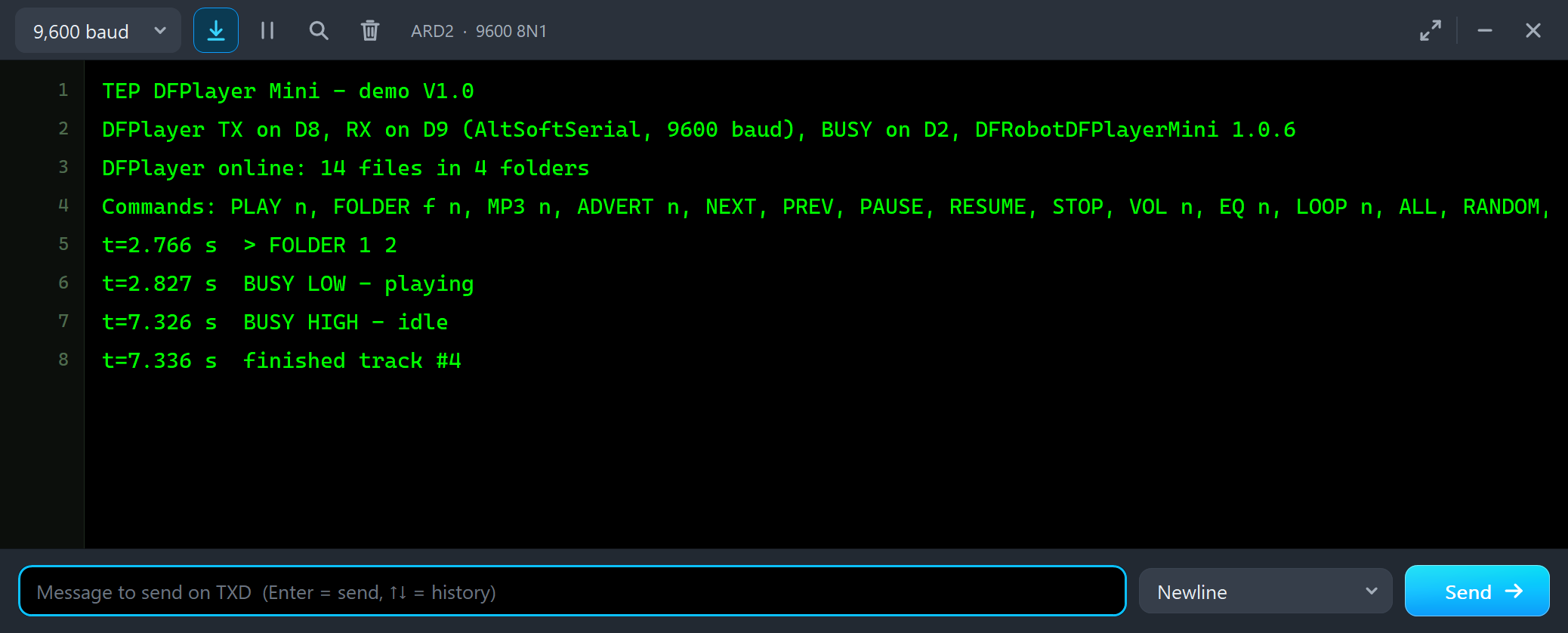
TEP DFPlayer Mini - demo V1.0
DFPlayer TX on D8, RX on D9 (AltSoftSerial, 9600 baud), BUSY on D2, DFRobotDFPlayerMini 1.0.6
DFPlayer online: 14 files in 4 folders
After the line with the commands, the sketch plays WELCOME HOME:
t=2.766 s  > FOLDER 1 2
t=2.827 s  BUSY LOW - playing
t=7.326 s  BUSY HIGH - idle
t=7.336 s  finished track #4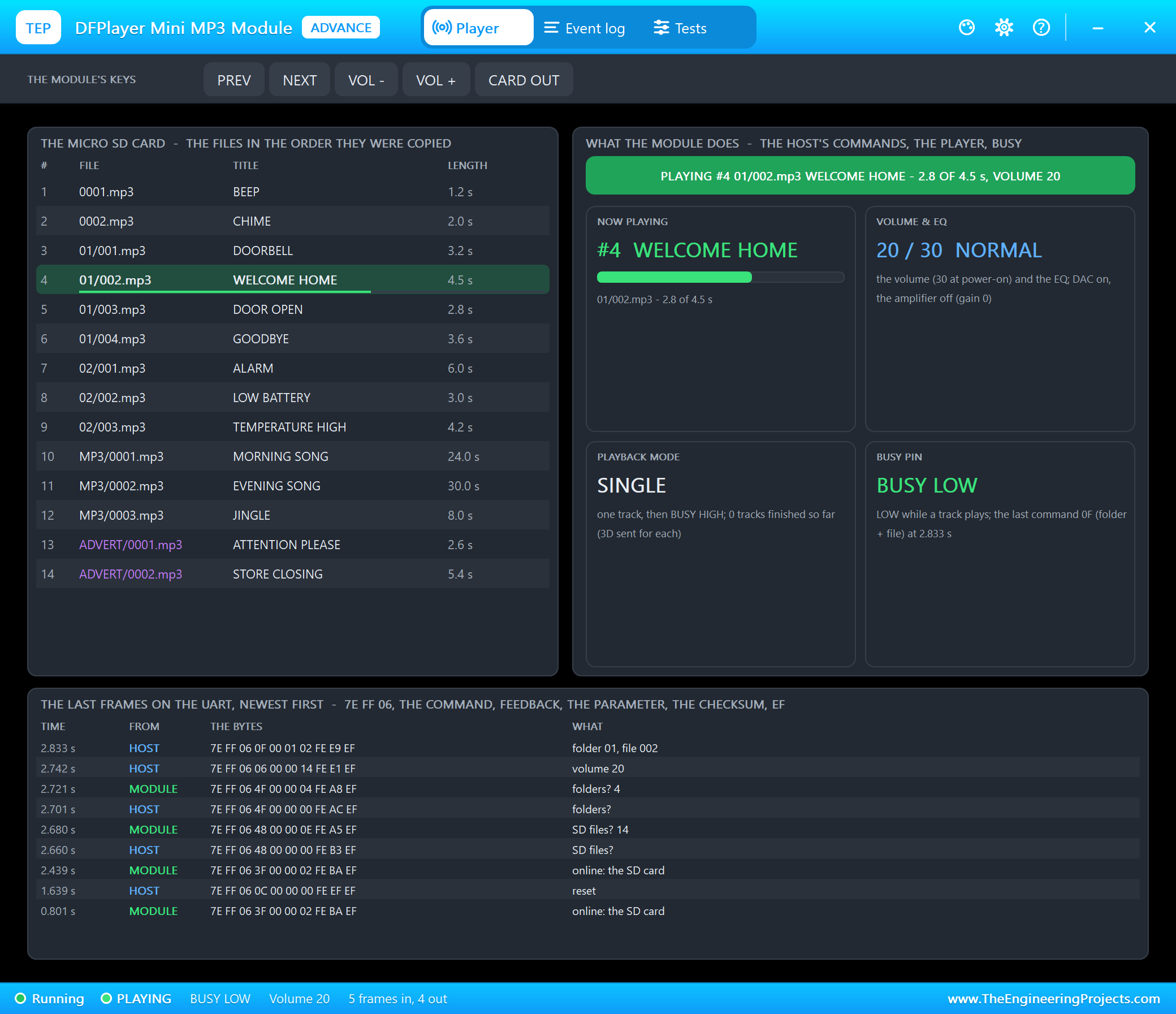
The Player page shows the micro SD card - every file in the order it was copied, the one playing marked with its time -, what the module does - the banner and four tiles: now playing, volume and EQ, the playback mode and the BUSY pin -, and the last frames on the UART, newest first. Read them from the bottom up: the module reports the SD card (3F) at 0.8 s; begin() sends a reset (0C) and waits for the next 3F; then the sketch asks for the files (48 answers 14) and the folders (4F answers 4), sets the volume (06, 20) and plays folder 01, file 002 (0F).
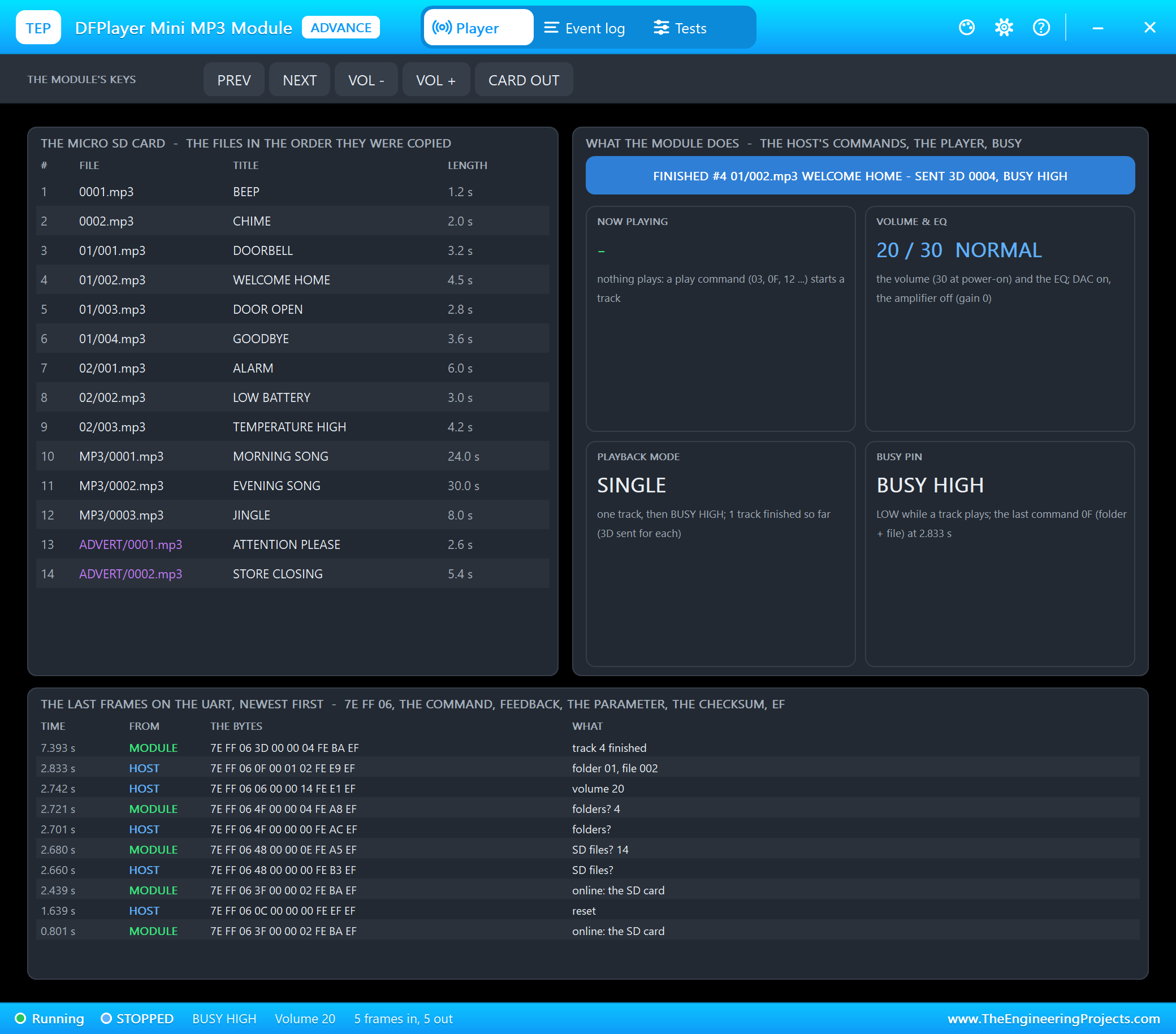
WELCOME HOME is 4.5 s long. At its end the module sends 7E FF 06 3D 00 00 04 FE BA EF - track 4 finished -, BUSY goes HIGH, and the sketch prints "finished track #4". Note that the number in 3D is the play(n) number of the file, 4, not its name 002.
The MP3 Folder and an Advertisement
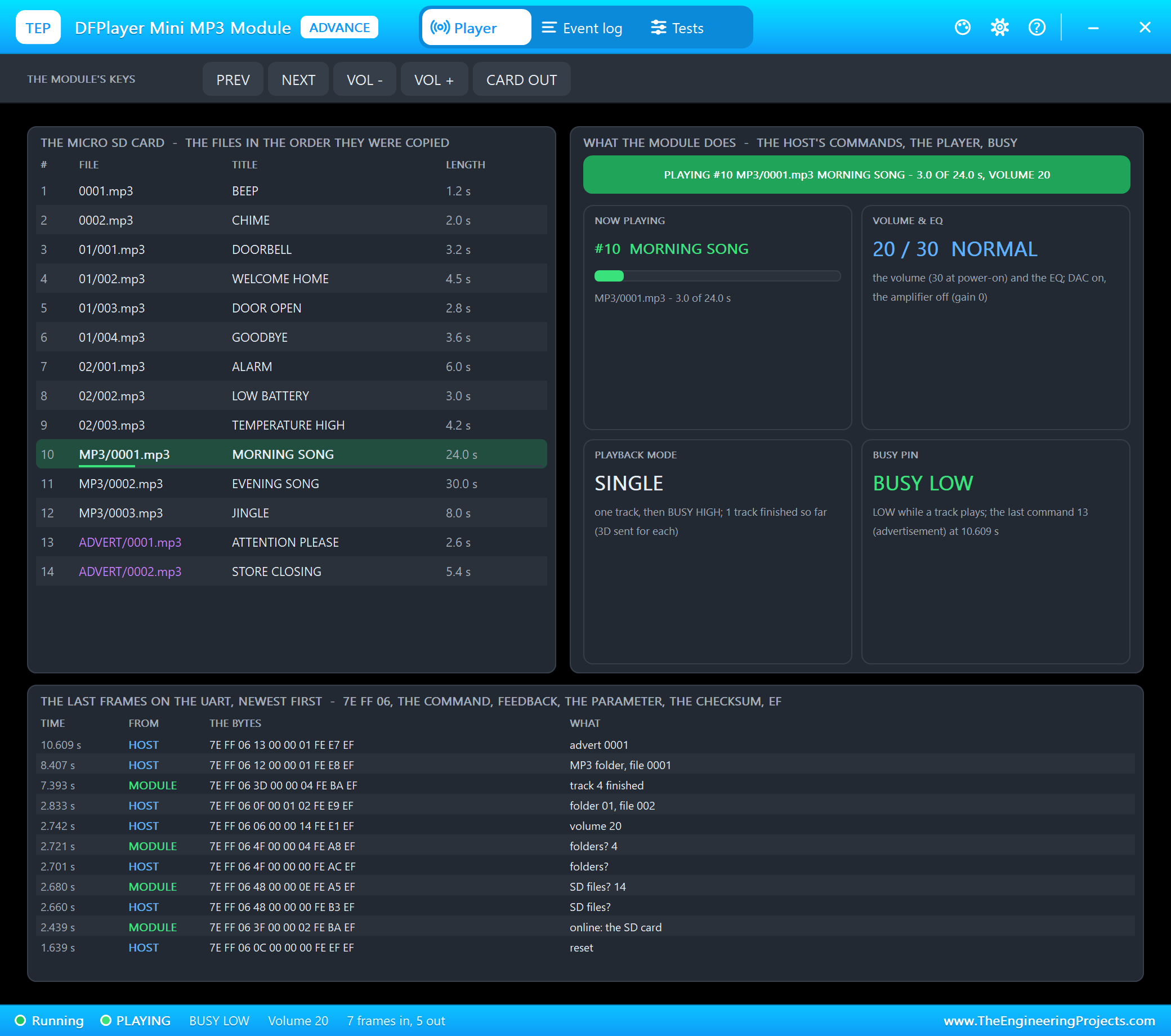
We typed MP3 1 - MORNING SONG, 24 s long, from the MP3 folder - and two seconds later ADVERT 1:
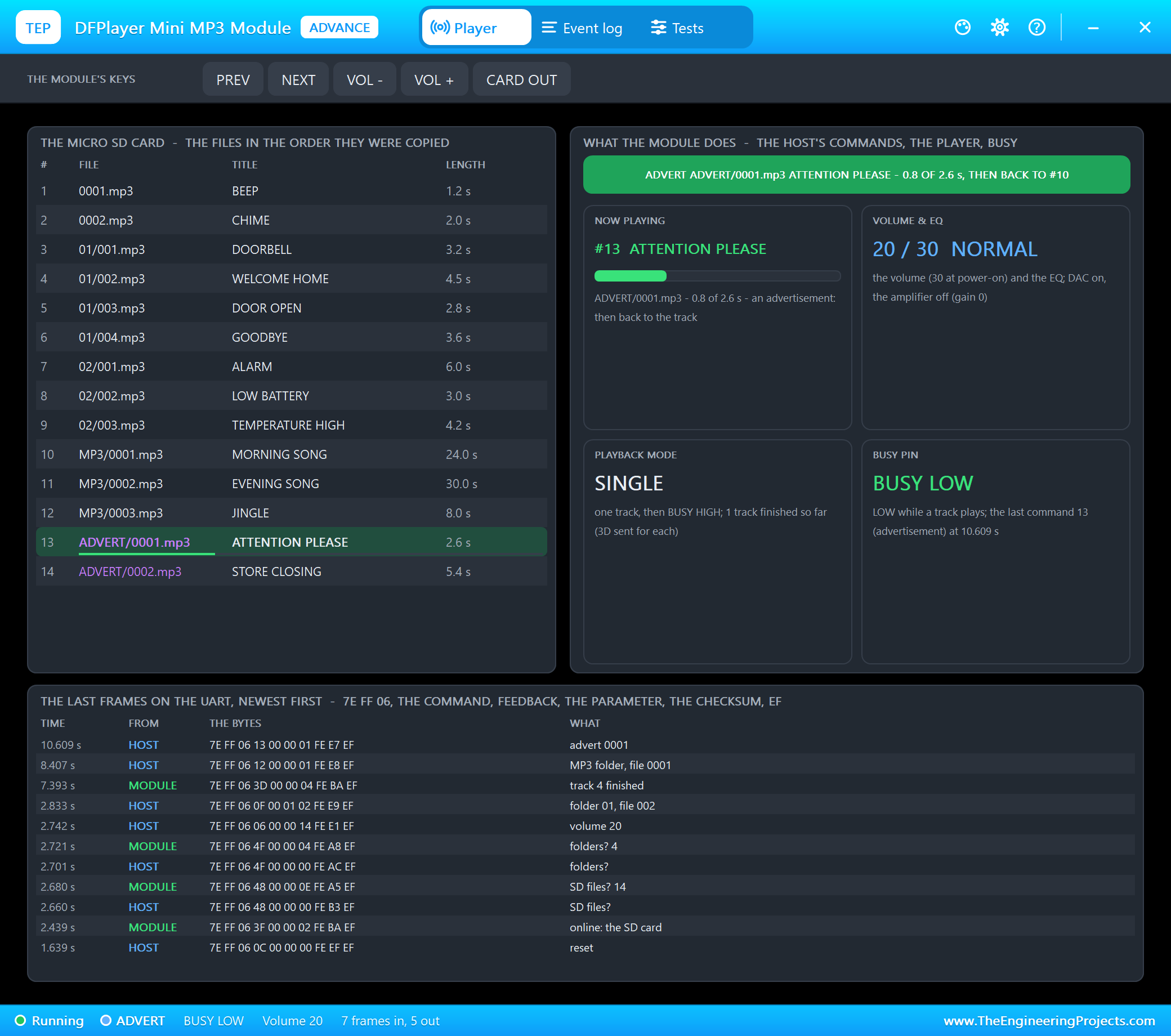
An advertisement pauses the track, plays ADVERT/0001.mp3 and then goes back to the track where it stopped. The datasheet calls it insertion: it only works while a track plays - with nothing playing the module answers 40 07. When ATTENTION PLEASE was over, MORNING SONG went on from 2.1 s:
Volume, EQ, Pause and Status
Then VOL 10, EQ 2 (rock) and PAUSE:
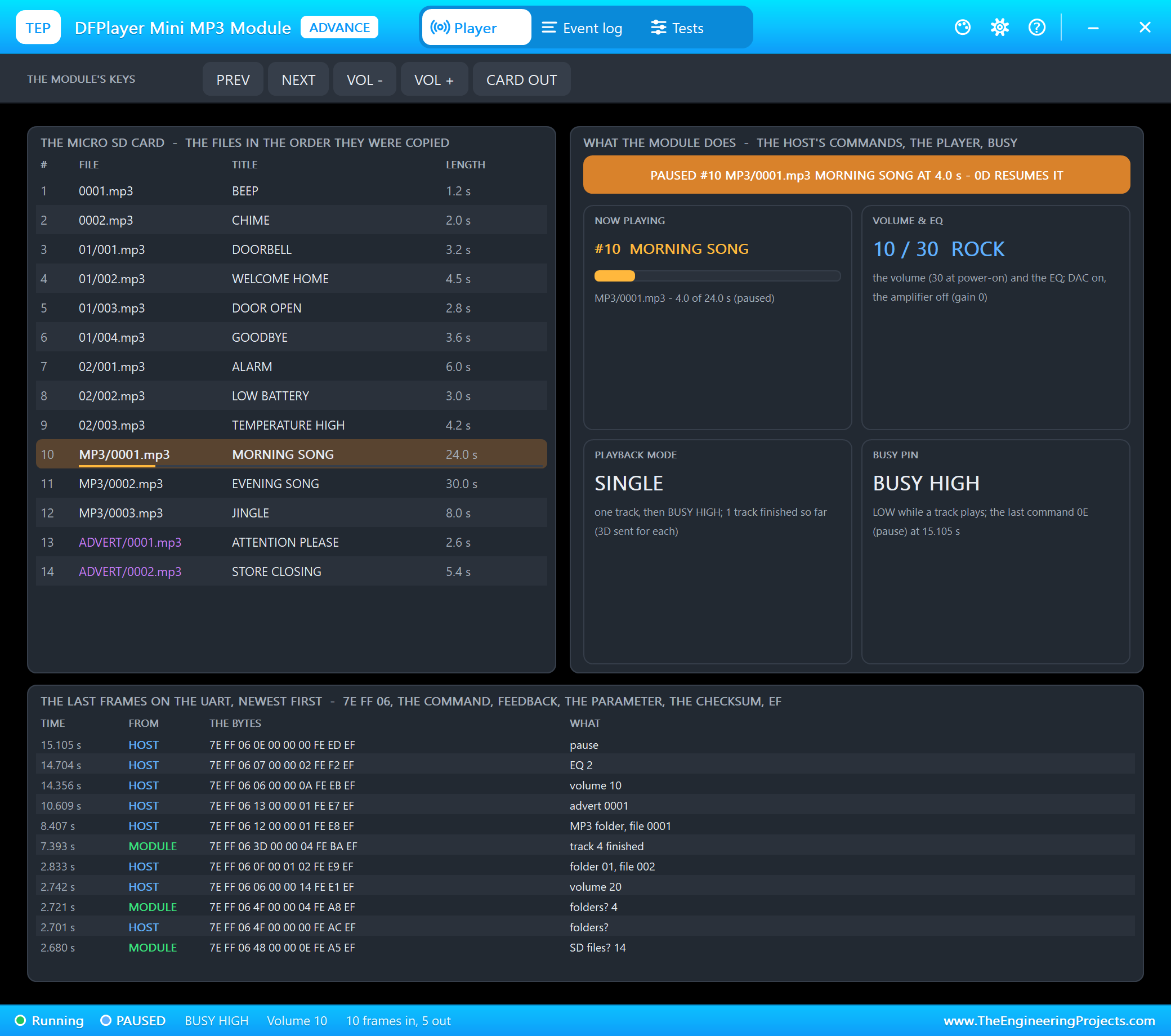
A paused track keeps its place, and BUSY goes HIGH. RESUME sends 0D and the song goes on from 4.0 s. STATUS asks four questions - the state (42), the volume (43), the EQ (44) and the current file (4C) - and prints the answers:
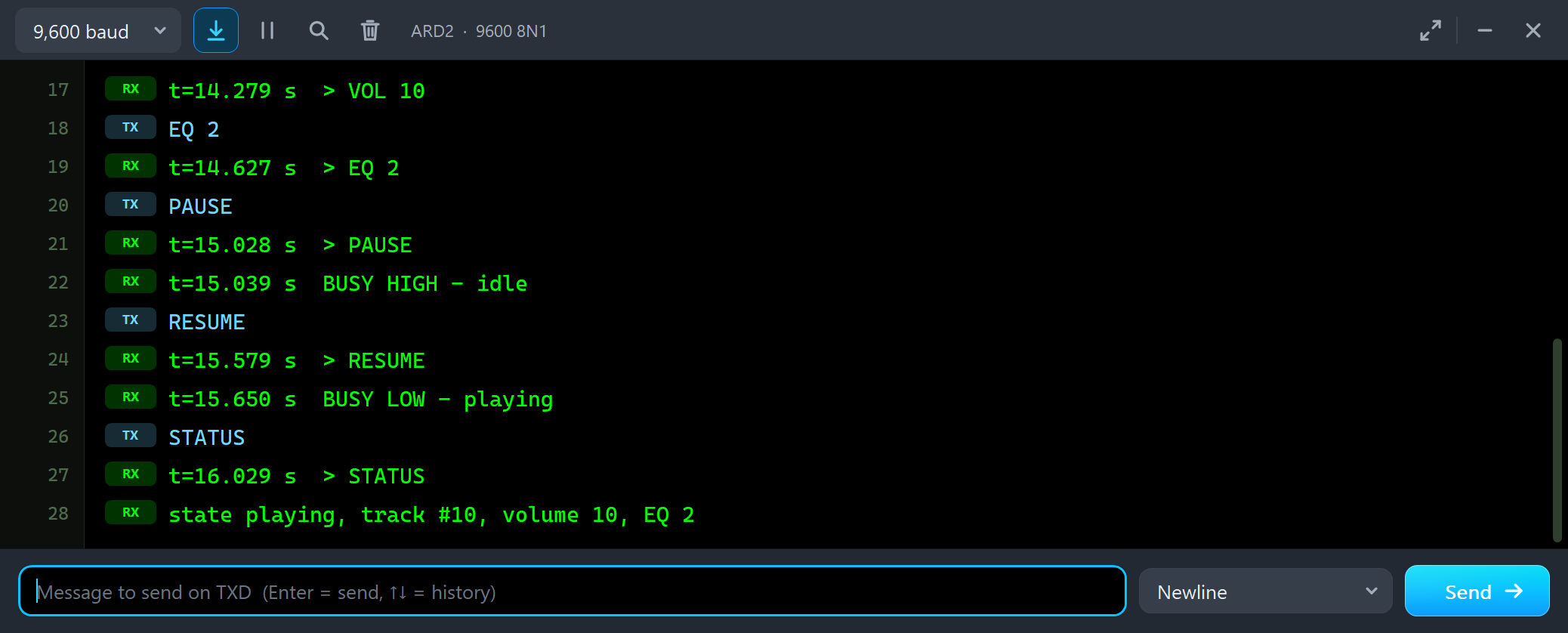
t=14.279 s  > VOL 10
EQ 2
t=14.627 s  > EQ 2
PAUSE
t=15.028 s  > PAUSE
t=15.039 s  BUSY HIGH - idle
RESUME
t=15.579 s  > RESUME
t=15.650 s  BUSY LOW - playing
STATUS
t=16.029 s  > STATUS
state playing, track #10, volume 10, EQ 2
Errors: Out of Range and Not Found
There are 14 files on the card, so we typed PLAY 40:
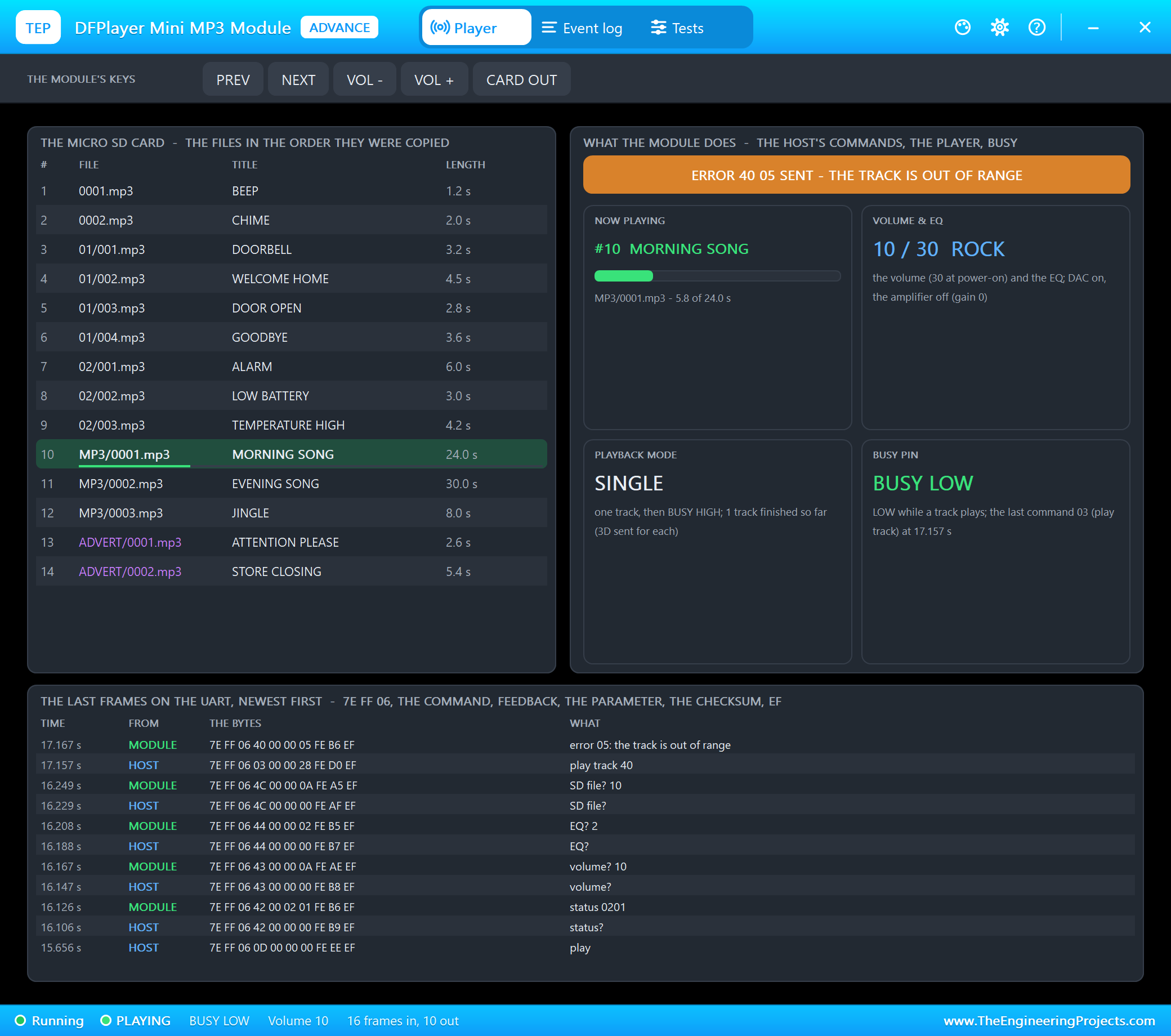
The module answers 7E FF 06 40 00 00 05 FE B6 EF and keeps playing what it played. FOLDER 3 1 asks for a folder that is not on the card: 40 06, the track is not found. FOLDER 2 1 plays ALARM:
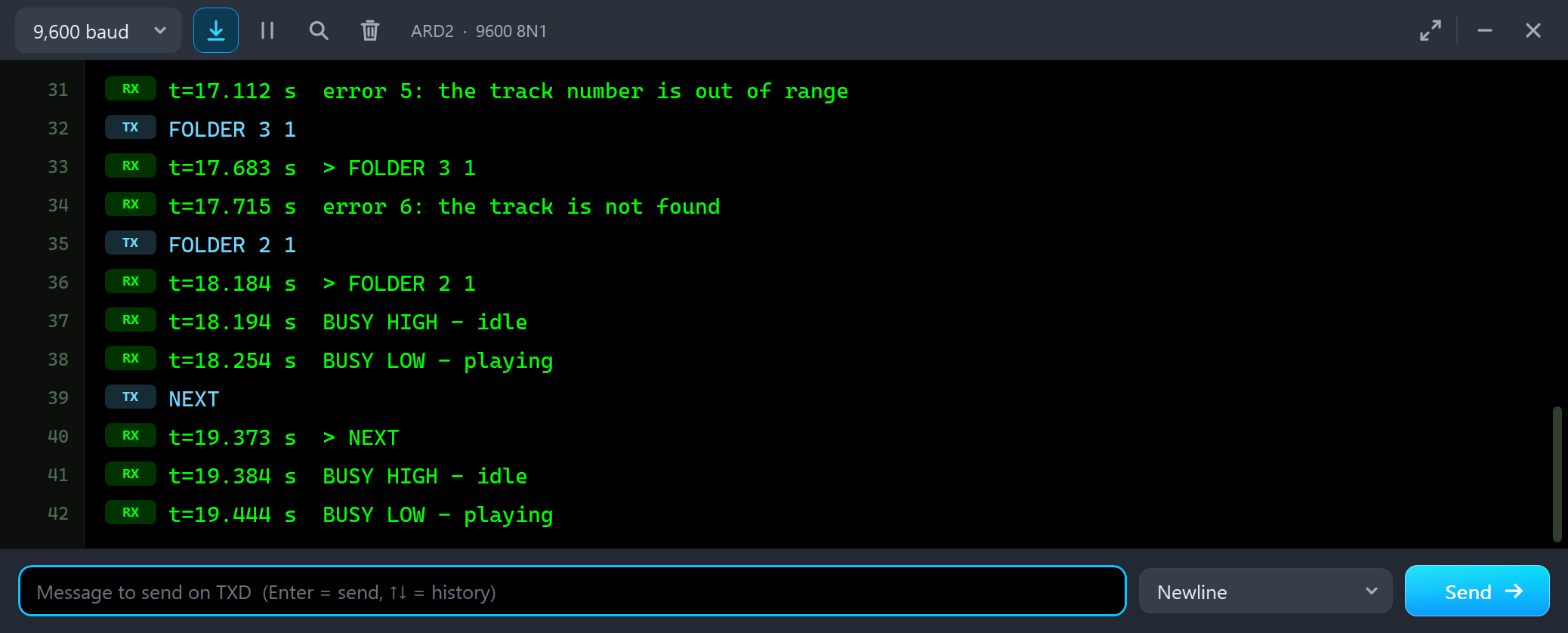
t=17.112 s  error 5: the track number is out of range
FOLDER 3 1
t=17.683 s  > FOLDER 3 1
t=17.715 s  error 6: the track is not found
FOLDER 2 1
t=18.184 s  > FOLDER 2 1
t=18.194 s  BUSY HIGH - idle
t=18.254 s  BUSY LOW - playing
The Card Out, Sleep and Repeat All
We clicked CARD OUT on the pop-up's toolbar while LOW BATTERY played:
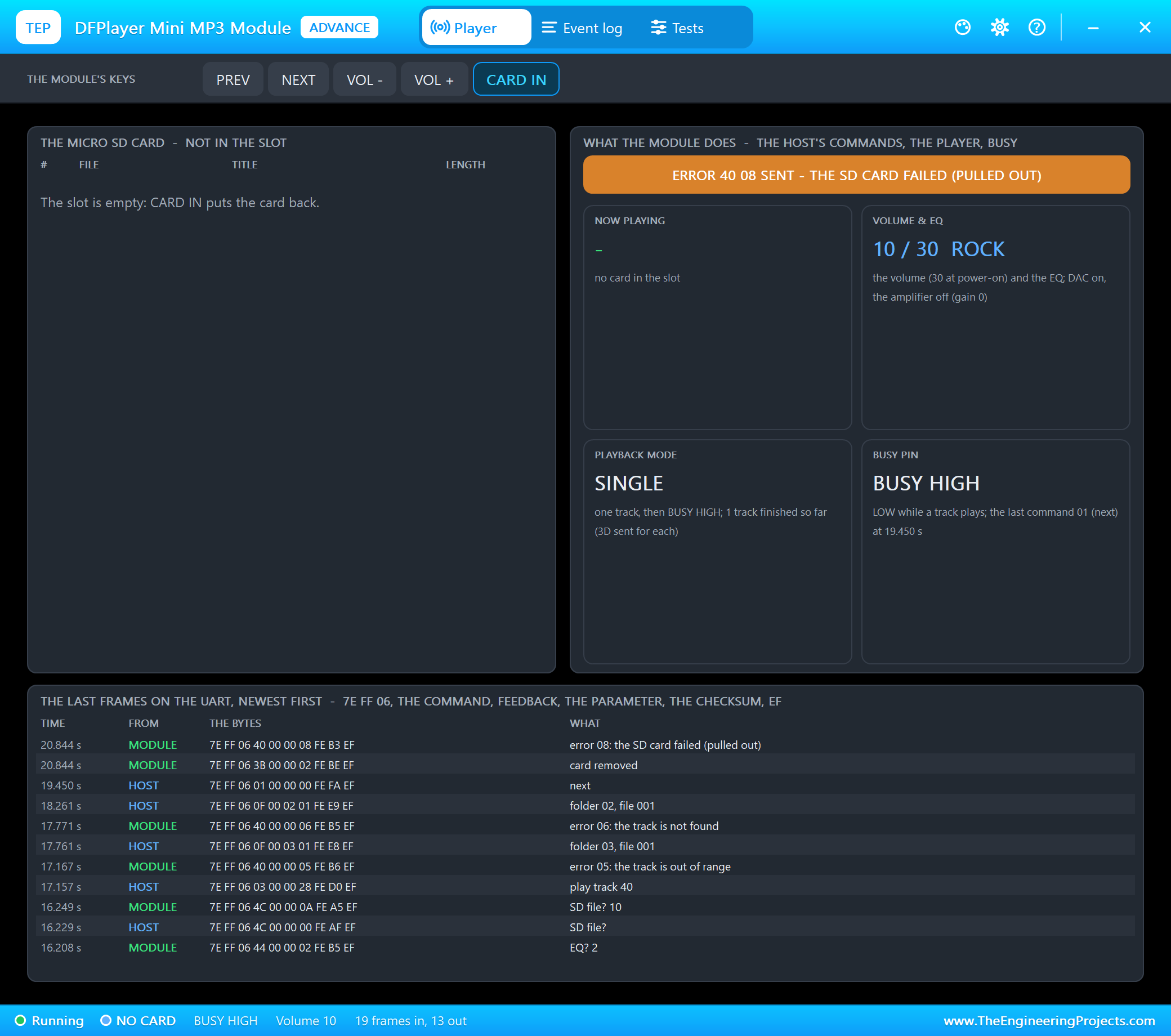
The track stops, BUSY goes HIGH, and the module sends 3B (the card removed) and 40 08. CARD IN puts it back: 3A, the card inserted. Then SLEEP: the module answers nothing until it is woken, and a play command gets 40 02. WAKE sends 09 0002, the SD card as the device, and the module plays again. A click on the module's NEXT key (IO_2) skipped DOORBELL, and ALL turned on repeat all:
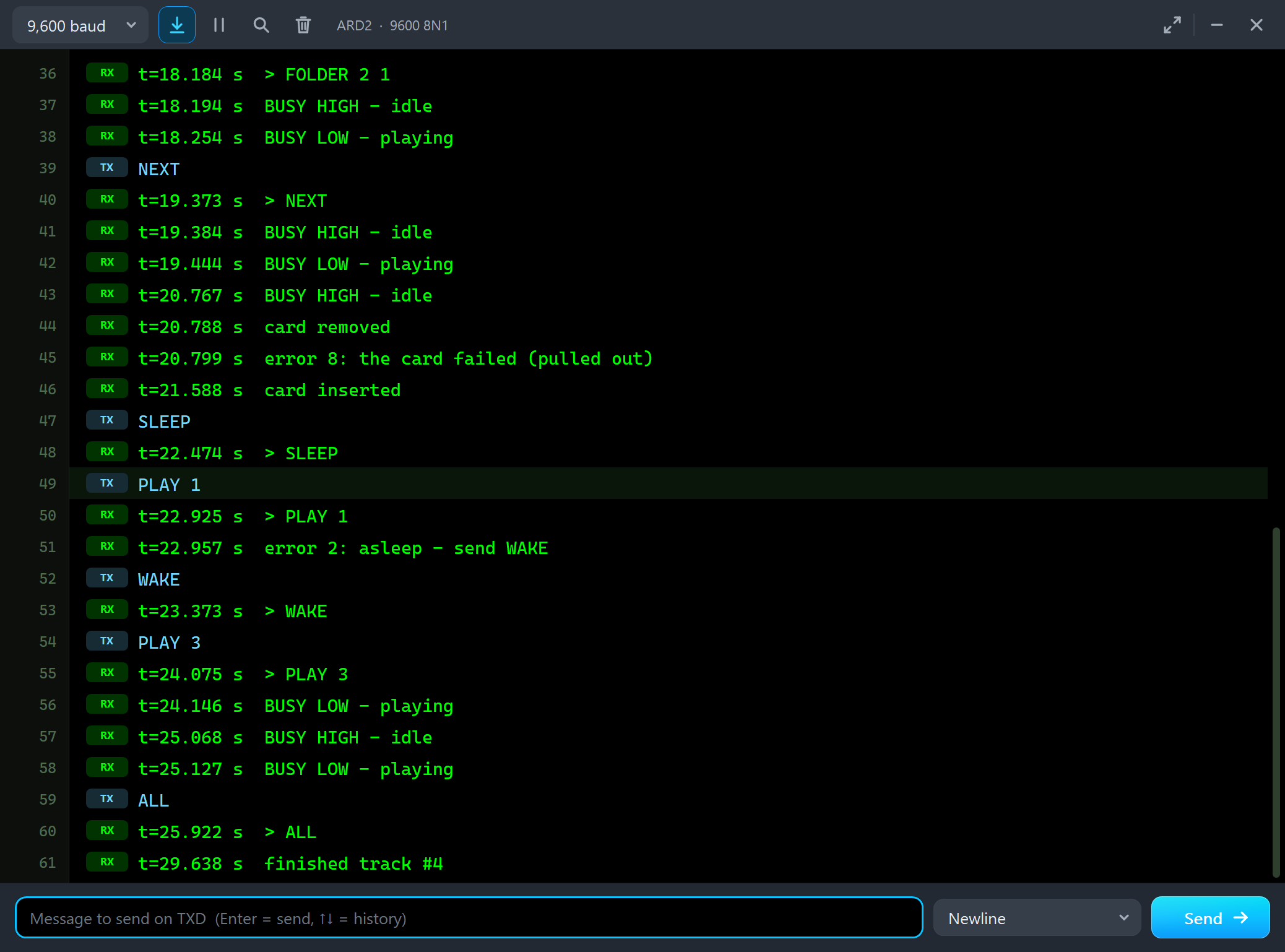
t=20.767 s  BUSY HIGH - idle
t=20.788 s  card removed
t=20.799 s  error 8: the card failed (pulled out)
t=21.588 s  card inserted
SLEEP
t=22.474 s  > SLEEP
PLAY 1
t=22.925 s  > PLAY 1
t=22.957 s  error 2: asleep - send WAKE
WAKE
t=23.373 s  > WAKE
PLAY 3
t=24.075 s  > PLAY 3
t=24.146 s  BUSY LOW - playing
t=25.068 s  BUSY HIGH - idle
t=25.127 s  BUSY LOW - playing
ALL
t=25.922 s  > ALL
t=29.638 s  finished track #4
The NEXT key on the module (or the pop-up's NEXT button) does what the next command does: BUSY goes HIGH for 60 ms and the next file starts. In repeat all the module goes on from file to file and sends 3D after each one - ADVERT is left out.
The Test Tools
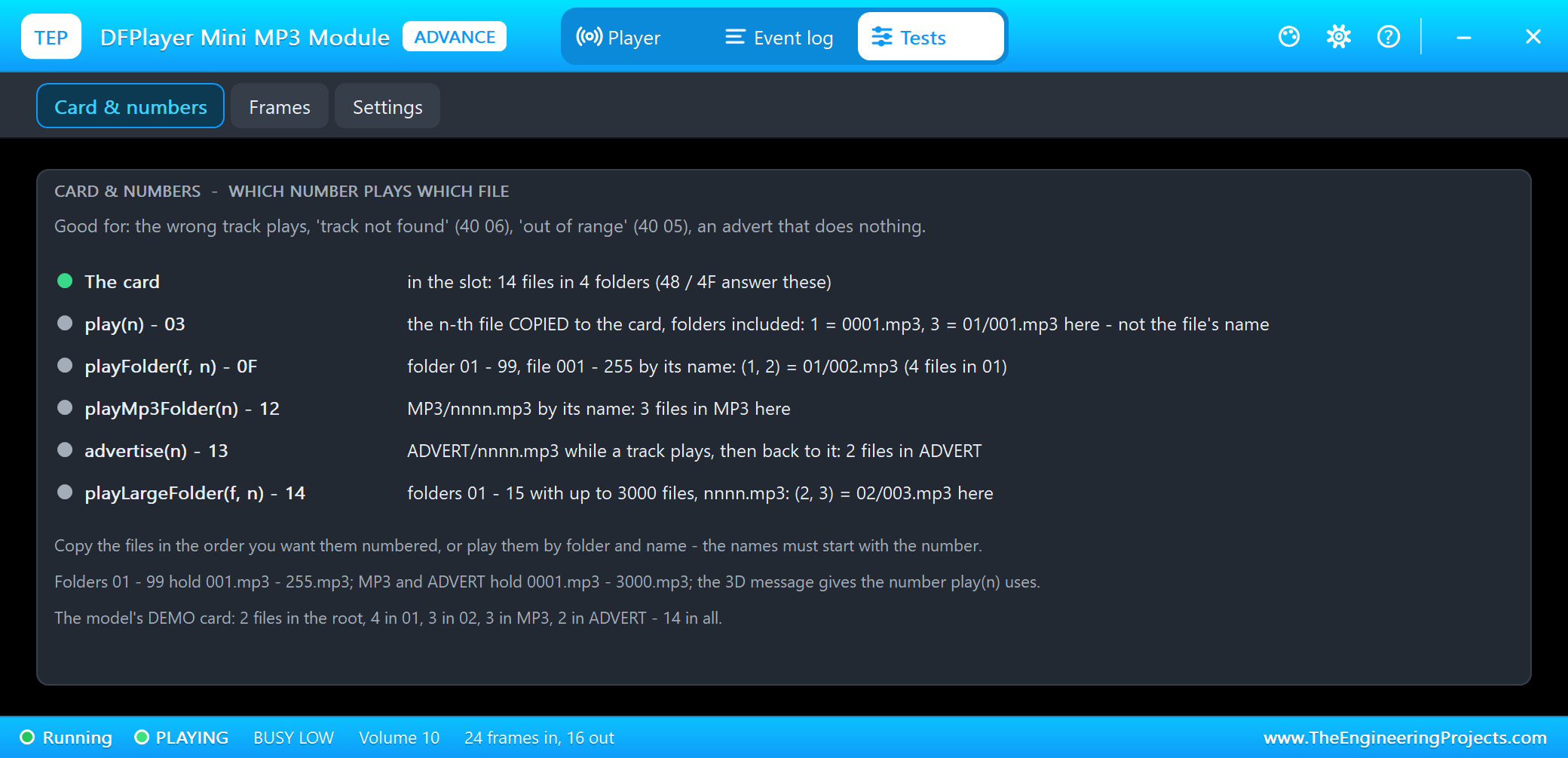
The Card & numbers tool answers the most common DFPlayer question: why does play(3) not play 0003.mp3? Because play(n) counts the files in the order they were copied, folders included - here 3 is 01/001.mp3. playFolder, playMp3Folder and advertise go by the names. The tool shows the card and what each command plays on it.
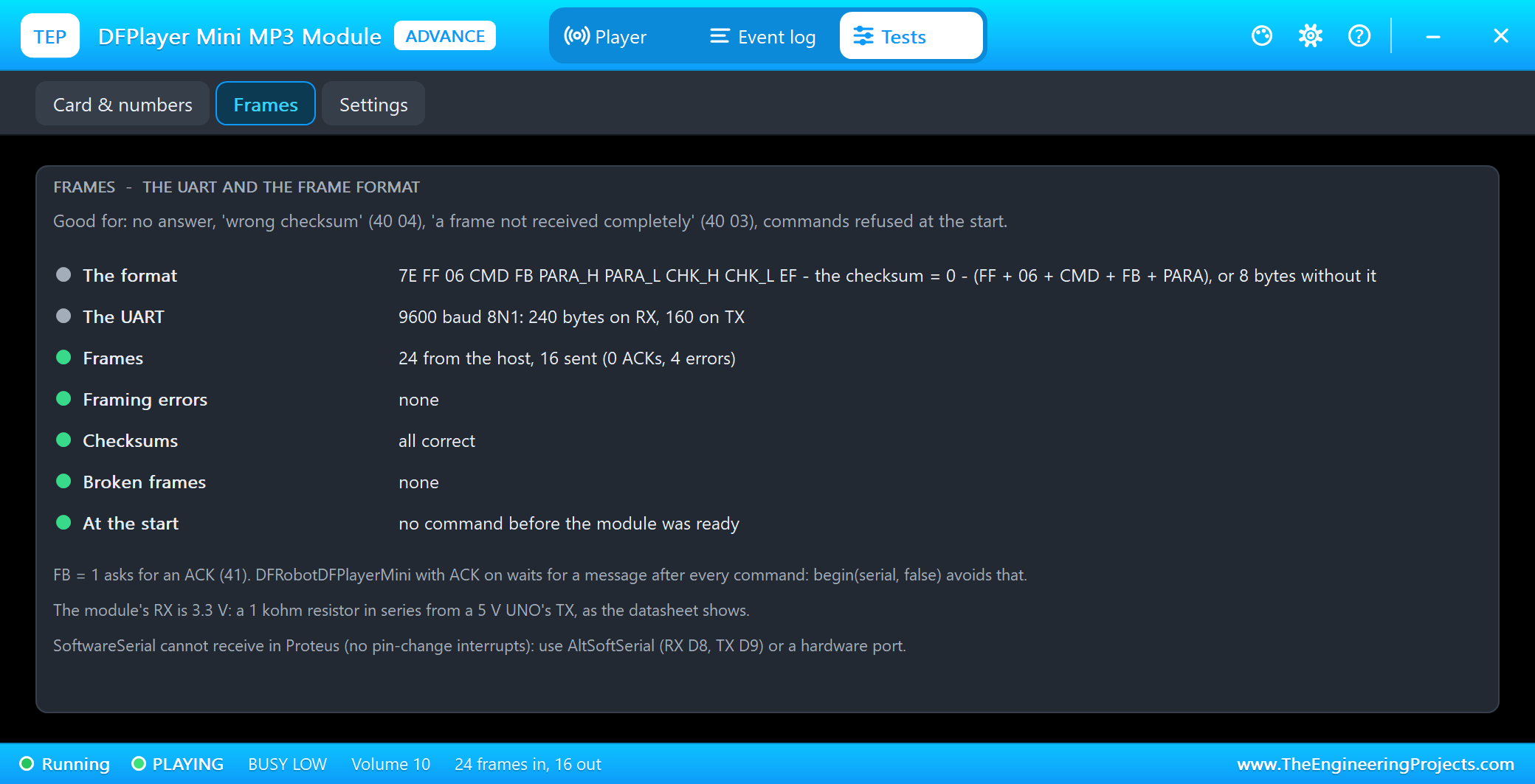
The Frames tool checks the UART: the frame format, the bytes on RX and TX, framing errors (a host at another baud rate), wrong checksums, broken frames and commands sent during the start-up.
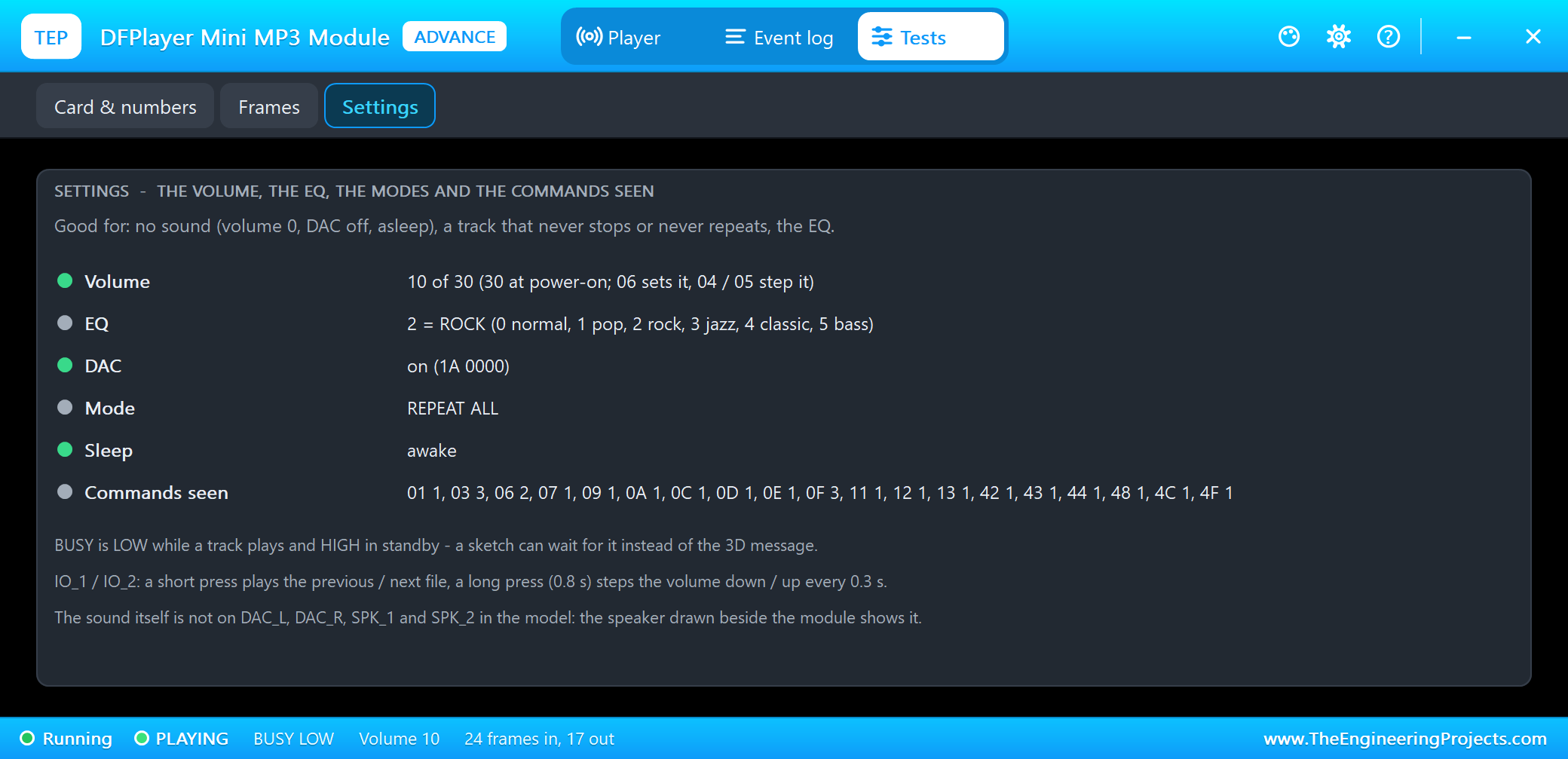
The Settings tool is good for "no sound": a volume of 0, the DAC off or the module asleep. It also shows the playback mode and how many of each command the module has seen.
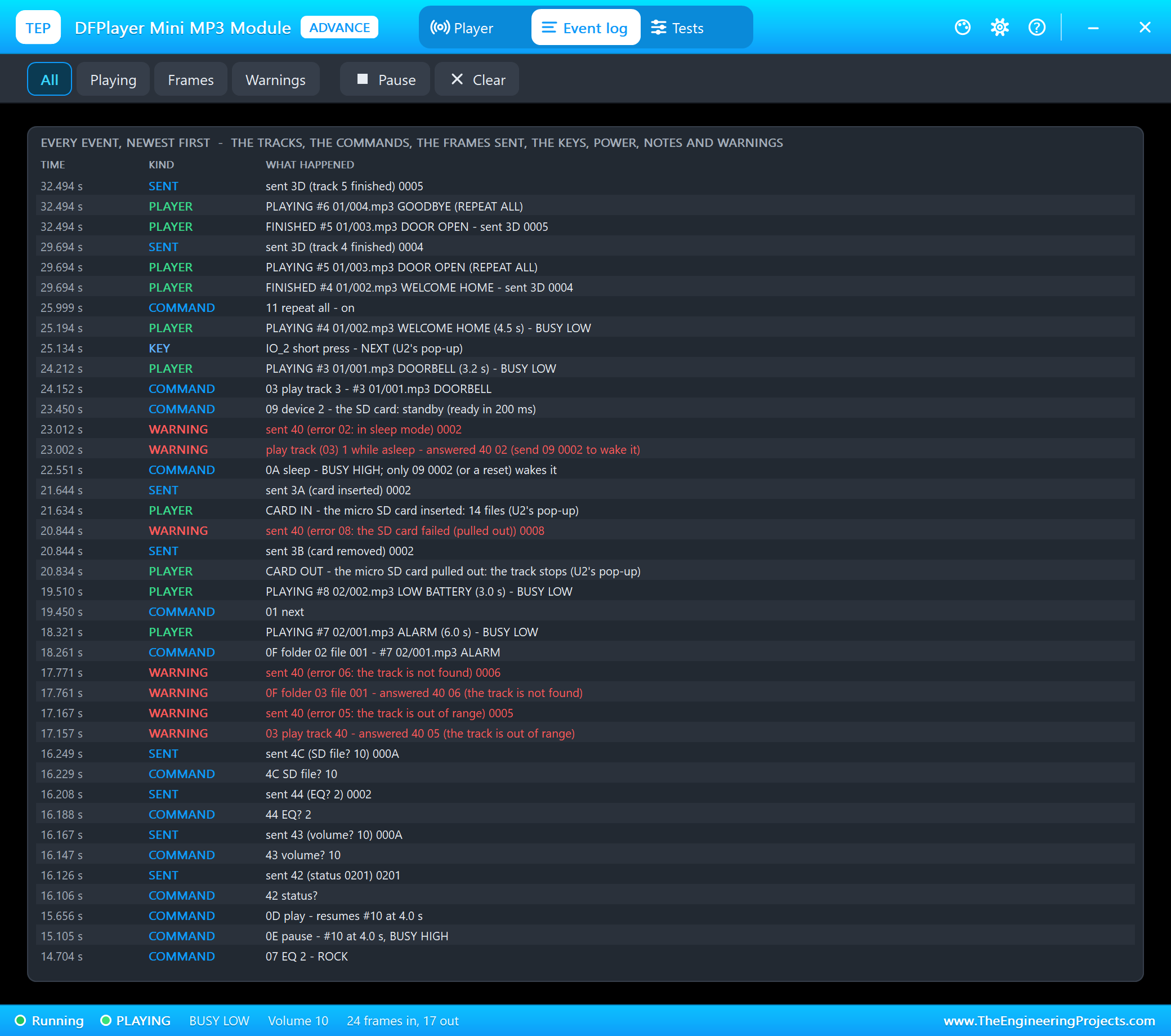
The Event log lists everything that happened, newest first: the tracks, the commands, the frames sent, the keys, power, notes and warnings. Filter it, pause it, or clear it.
The Keys and the Card with the Mouse
Back to node 1, the Simple part. We clicked its panel and its card with the mouse while the simulation ran. WELCOME HOME had ended; a click on NEXT on the panel - the module's IO_2 key - started the next file, 01/003.mp3 DOOR OPEN:
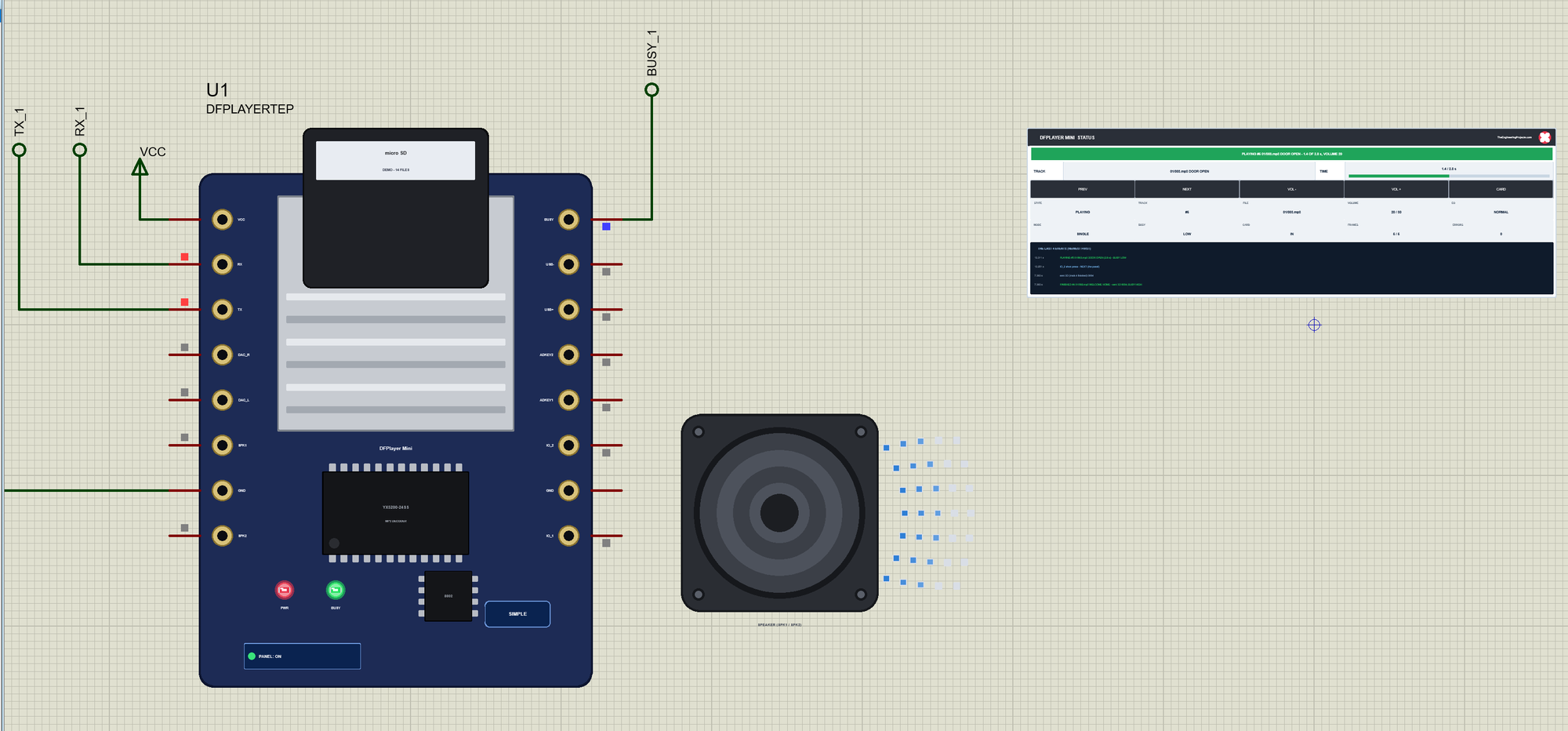
A click on VOL + took the volume to 21. When DOOR OPEN had ended, we clicked the card itself - and it came out of the slot:
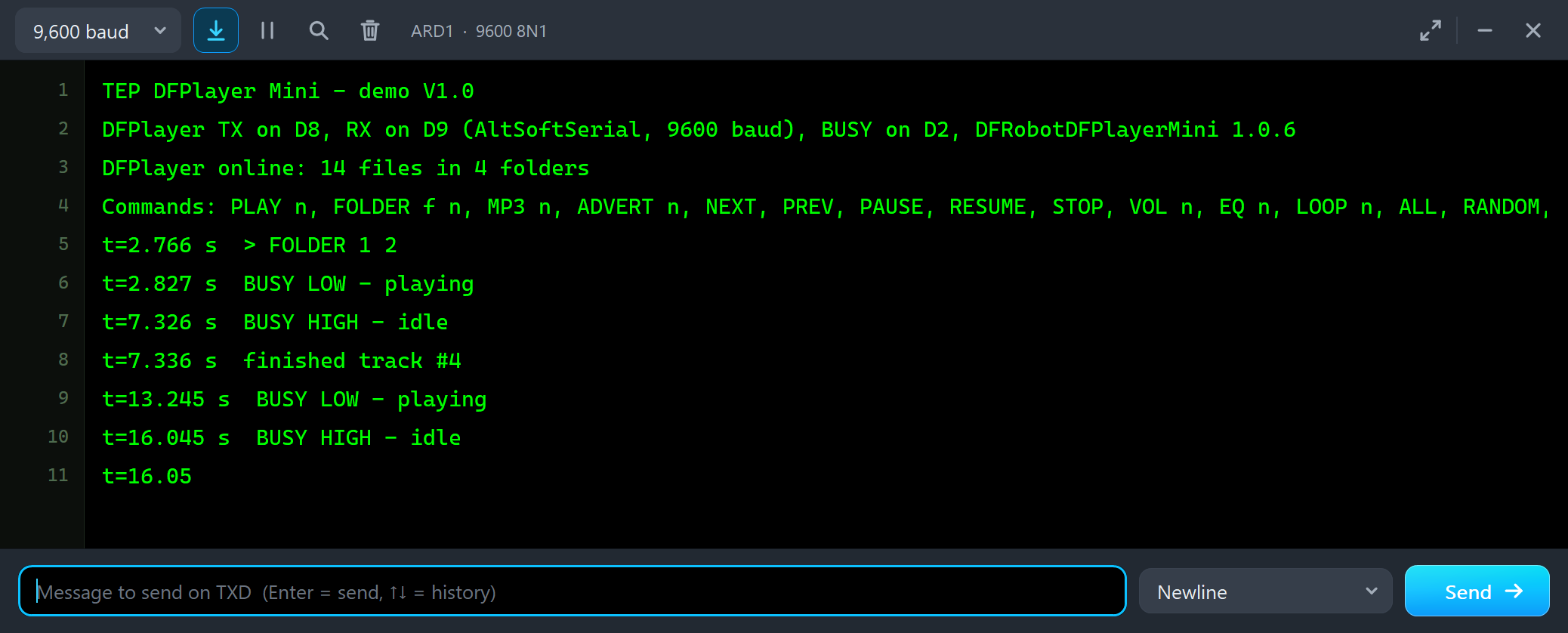
t=2.766 s  > FOLDER 1 2
t=2.827 s  BUSY LOW - playing
t=7.326 s  BUSY HIGH - idle
t=7.336 s  finished track #4
t=13.245 s  BUSY LOW - playing
t=16.045 s  BUSY HIGH - idle
Every click read back from the model on the first try. CARD IN on the panel - or another click on the card - put the card back, and the module sent 3A 0002, as the close-up of the panel shows.
The Simulation Log
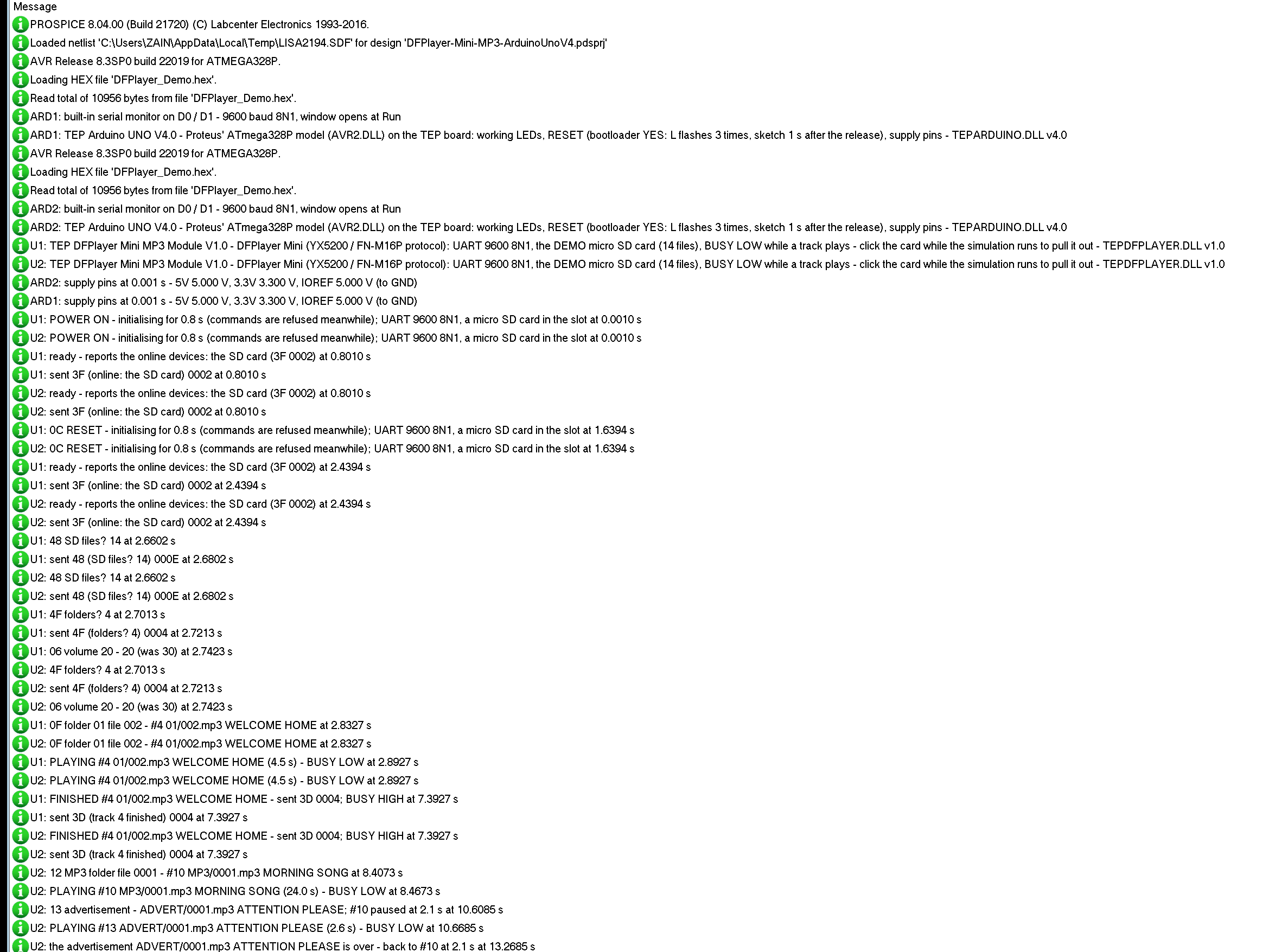
The parts also write to the simulation log of Proteus, with the exact simulation time. These lines of U2 show the start, the first track and the advertisement:
U2: TEP DFPlayer Mini MP3 Module V1.0 - DFPlayer Mini (YX5200 / FN-M16P protocol): UART 9600 8N1, the DEMO micro SD card (14 files), BUSY LOW while a track plays - click the card while the simulation runs to pull it out - TEPDFPLAYER.DLL v1.0
U2: POWER ON - initialising for 0.8 s (commands are refused meanwhile); UART 9600 8N1, a micro SD card in the slot at 0.0010 s
U2: ready - reports the online devices: the SD card (3F 0002) at 0.8010 s
U2: 0C RESET - initialising for 0.8 s (commands are refused meanwhile); UART 9600 8N1, a micro SD card in the slot at 1.6394 s
U2: ready - reports the online devices: the SD card (3F 0002) at 2.4394 s
U2: 48 SD files? 14 at 2.6602 s
U2: sent 48 (SD files? 14) 000E at 2.6802 s
U2: 0F folder 01 file 002 - #4 01/002.mp3 WELCOME HOME at 2.8327 s
U2: PLAYING #4 01/002.mp3 WELCOME HOME (4.5 s) - BUSY LOW at 2.8927 s
U2: FINISHED #4 01/002.mp3 WELCOME HOME - sent 3D 0004; BUSY HIGH at 7.3927 s
U2: 13 advertisement - ADVERT/0001.mp3 ATTENTION PLEASE; #10 paused at 2.1 s at 10.6085 s
U2: the advertisement ADVERT/0001.mp3 ATTENTION PLEASE is over - back to #10 at 2.1 s at 13.2685 s
The module's times are the simulation's; the monitor's t= is the sketch's millis(), a little behind.
How the Model Works
The model samples RX at 9600 baud: every falling edge starts a byte, and the bits are read in the middle of each bit time. The bytes become frames - 7E, FF, 06, the command, the feedback byte, the parameter, the checksum, EF - and a complete frame runs: the ACK 10 ms later if it was asked for, a query's answer after 20 ms, a track 60 ms after its command. A track is a timer as long as the file: BUSY goes LOW at its start and HIGH at its end, and 3D goes out on TX bit by bit, each change as a callback at its exact time. The card is a list of files with their folders, names and lengths, in the order they were copied - play(n) counts in that order, the folder commands go by name. One detail: the module leaves one idle bit between the bytes it sends, because AltSoftSerial in Proteus can lose a byte that follows another without a gap.
Troubleshooting
- "no answer" at the start: TX and RX swapped (the module's TX goes to the UNO's RX pin, D8), or the part has no power (the PWR LED).
- Commands refused (40 01) at the start: they came before the module's 3F - wait for it, as begin() does.
- The wrong track plays: play(n) counts the files in the order they were copied - Card & numbers shows which file each number is; or use playFolder().
- 40 06, the track is not found: the folder or the file does not exist, or the card is out (the CARD readout).
- ADVERT does nothing (40 07): an advertisement only works while a track plays.
- No more answers: the module is asleep - WAKE (09 0002) wakes it.
- "Time Out" messages and slow commands: ACK is on in begin() - turn it off as the demo does.
- No part or no monitor: TEPDFPLAYER.DLL or TEPARDUINO.DLL is missing from MODELS and the project folder; a closed monitor opens again with a click on the UNO's USB port.
Things to Know Before Using a Real DFPlayer Mini
- The levels: RX is a 3.3 V input - put 1 kohm in series from a 5 V UNO's TX, as the datasheet shows; without it many modules hum or do not answer.
- The card: FAT16 or FAT32, names that start with their number (0001.mp3, 01/001.mp3), copied in the order you want them numbered.
- The speaker: under 3 W, 4 or 8 ohm, between SPK_1 and SPK_2 - never from SPK to GND; or an amplifier or earphones on DAC_L / DAC_R.
- The power: the amplifier draws current peaks at high volume - a capacitor of a few hundred uF near VCC and a separate supply for big speakers help.
- The start: give the module its 0.5 - 1.5 s after power-on before the first command.
Limitations of the Simulation
- Not modelled: the sound itself (DAC_L, DAC_R, SPK_1 and SPK_2 carry nothing - the speaker drawn beside the module shows a track playing), the AD keys (ADKEY_1 / ADKEY_2), the USB port and USB drives, the real MP3 decoding and its timing, the current, cards of your own (the DEMO card only).
- The model's own choices: 0.8 s to start (the datasheet: 0.5 - 1.5 s), the ACK 10 ms after a frame, a query's answer 20 ms after it, a track starting 60 ms after its command, a frame with a gap of more than 20 ms incomplete; 48 counts every file and 4F every folder; repeat all and random leave ADVERT out; an IO key held 0.8 s is a long press; one idle bit between the bytes the module sends.
- The badge, the LEDs, the speaker and its waves, the panel button and the panels are TEP additions.
- The model is our own implementation written from the FN-M16P datasheet. This library is not made or endorsed by DFRobot, by the makers of the modules and their chips, by PJRC or by Labcenter.
- Licences: the HEX file contains DFRobotDFPlayerMini 1.0.6 (LGPL licence - its source link is in the README, and with the demo sketch you can rebuild the HEX with your own copy), AltSoftSerial 1.4 (MIT licence - its notice is in the README) and the Arduino AVR core 1.8.6 with LGPL-licensed code - the source link is in the README.
- Tested in Proteus 8.5 in October 2026 (the demo as shipped on two Arduino UNO V4.0 boards with their built-in monitors: WELCOME HOME at the start, MP3 and ADVERT, VOL, EQ, PAUSE, RESUME and STATUS, errors 5 and 6, the card out and in, SLEEP and WAKE, the NEXT key, repeat all and the three tools on the Advance part; the keys and the card with the mouse on the Simple one; 34.2 s of simulation took 123 s for node 2 with the pop-up and both monitors open, about 0.28 x real time, and the node 1 run 30.5 s in 79 s). Proteus 7 is not supported.
So, that was all about the DFPlayer Mini Library for Proteus V1.0. I hope the frames, the numbering of the files and BUSY of the DFPlayer Mini are clear now, and that your MP3 project plays its first sound from the first run. If you use the DFPlayer Mini Library for Proteus in a project, please share it in the comments or in our forum, and if you have any questions, ask in the comments and I will help you out. Till the next tutorial, take care and have fun!
Comments
0