


Gas Sensor Library for Proteus


Hello friends, hope you all are fine and having fun with your lives. Today, I am going to share a new Gas Sensor Library for Proteus. I hope you guys are going to enjoy this one. We are all well aware of Gas Sensors which are used for the detection of different gasses in the atmosphere. These sensors are not available in Proteus so that's why I have designed a library using which now you can use these different gas sensors quite easily in Proteus software. You can interface this Gas Sensor with any Microcontroller i.e. Arduino, PIC Microcontroller or 8051 Microcontroller etc.
Gas Sensor Library for Proteus
Latest version: Gas Sensor Library for Proteus V2.0 (October 2026): an analog MQ-2 model with datasheet curves, heater warm-up, Simple and Advance devices and an Arduino demo
Earlier versions: V1.0 (2016, this tutorial)
Helping Tools
- Serial Monitor Advance: a serial terminal window for the UART of your board
- Serial Monitor Expert: the serial monitor with extra debugging tools
- LCD Library for Proteus V3.0: 16x2, 20x4 and I2C LCDs to show your readings
In this Gas Sensor Library for Proteus, I have added eight different Gas Sensors, which are used for the detection of different gases. As we all know that Proteus is a simulating software so it won't be able to detect the gas in real in Proteus. So, that's why I have placed a Test Pin in each of these sensors so when you make this pin HIGH, then it means the gas is present and if this Test Pin goes LOW then it means there's no gas available and sensors will give LOW output. We will have a look at How to use these sensors below. You should also have a look at the project LPG Gas Leak Detector using Arduino in which I have used this Gas Sensor MQ-2 with Arduino. So, here's the list of all eight gas sensors, I have added to this library:
- MQ-2 Gas Sensor
- MQ-3 Gas Sensor
- MQ-4 Gas Sensor
- MQ-5 Gas Sensor
- MQ-6 Gas Sensor
- MQ-7 Gas Sensor
- MQ-8 Gas Sensor
- MQ-9 Gas Sensor
So, let's start with downloading and installing of Gas Sensor Library for Proteus.
Note:
Other Proteus Libraries are as follows:
- Arduino Library for Proteus.
- Genuino Library for Proteus.
- GPS Library for Proteus.
- GSM Library for Proteus.
- XBee Library for Proteus.
- Ultrasonic Sensor Library for Proteus.
- PIR Library for Proteus.
- Bluetooth Library for Proteus.
- DS1307 Library for Proteus.
Gas Sensor Library for Proteus
- First of all, download the Gas Sensor Library for Proteus by clicking the below button:
- Once you download the file, you will get a rar file so unrar it and you will find three files in it, named as:
- GasSensorTEP.LIB
- GasSensorTEP.IDX
- GasSensorTEP.HEX
- Place all these three files in the Library folder of your Proteus software.
Note:
- If you are having issues with Library installation in Proteus 8 Professional, you should read How to add new Library in Proteus 8.
- Now open your Proteus software or restart it, if it's already open.
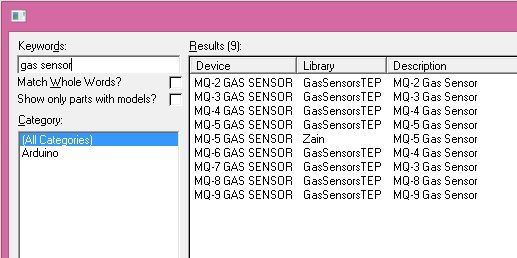
- In the components section, make a search for Gas sensors as shown in below figure:
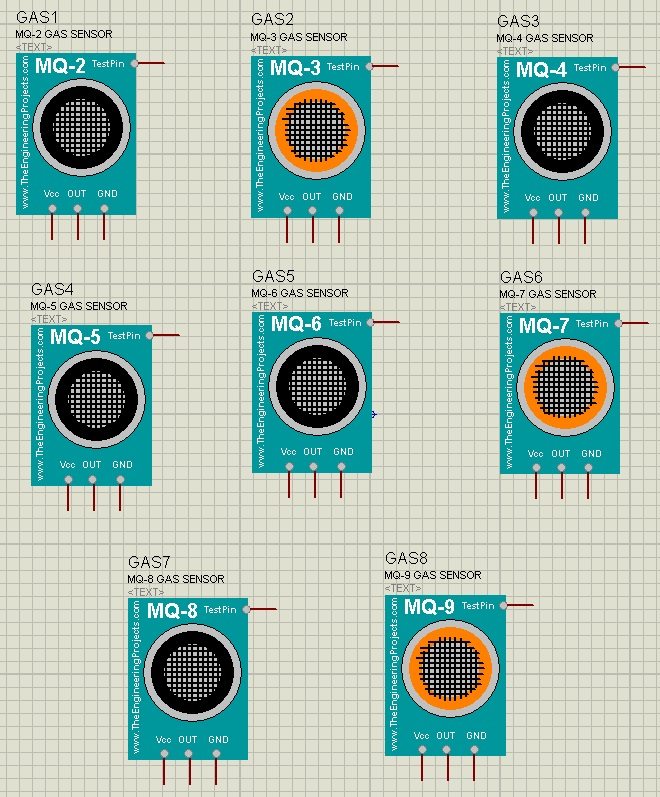
- Now place all of them in your workspace and they will look something as shown in the below figure:
- So, these are all the Gas Sensors available in this Gas Sensor Library for Proteus.
- You can see all of these sensors have four pins on them.
- Two of these pins are Vcc and GND while the third is OUT Pin.
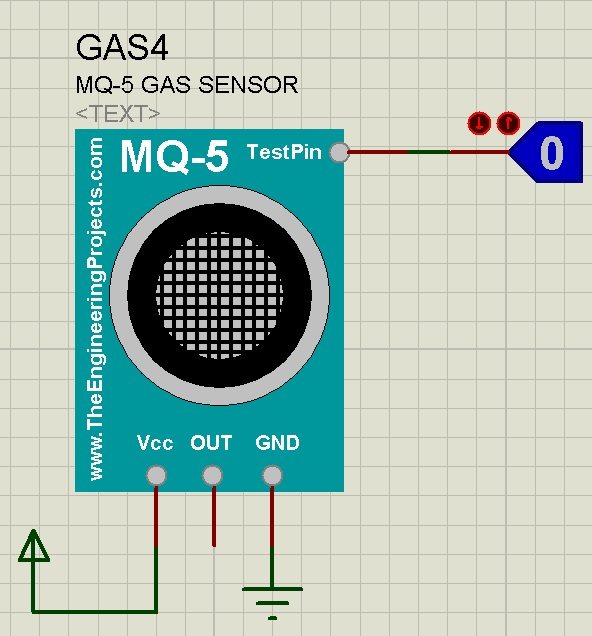
- Test Pin is used for simulation purposes, when you have HIGH on Test Pin then it means that you have Gas in the atmosphere and your sensor will give HIGH as well on the OUT Pin.
- So, let's check out how to use these gas sensors. So, take any of these sensors and design a small circuit as shown in the below figure:
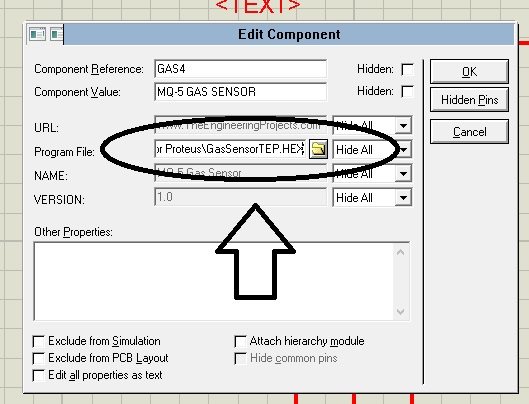
- Now before running your simulation, one thing you need to do is to double click this gas sensor and open the Properties.
- In Properties, you will find a Program file section. In this section browse for the GasSensorTEP.HEX file, which we just downloaded above and placed in the library folder of our Proteus software.
- Now run your simulation, and when you turn the logic state HIGH then you will see the OUT Pin will also go HIGH as shown in the below figure.
- You can plug this OUT Pin of your Gas Sensor in your Microcontroller e.g. Arduino, PIC Microcontroller etc.
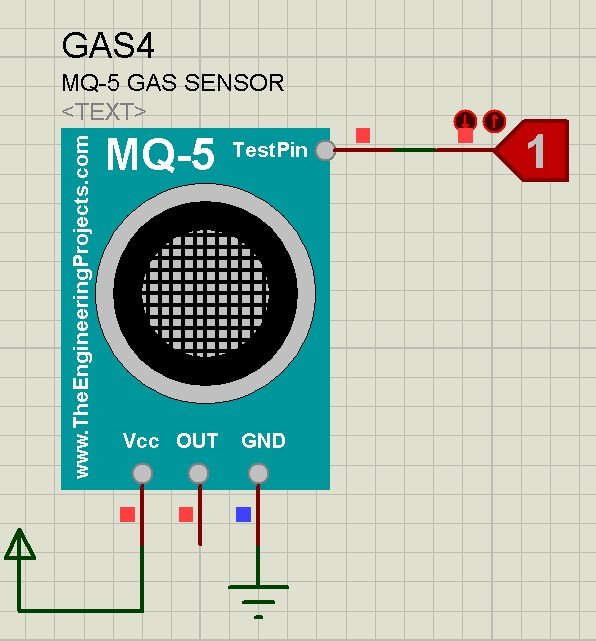
- So, that's how you can quite easily simulate this Gas Sensor in Proteus ISIS.
- Here's the video in which I have demonstrated this library in detail:
So, that's all for today, I hope you guys have enjoyed this Gas Sensor Library for Proteus. You should have a look at LPG Gas Leak Detect using Arduino in which I have designed its Proteus simulation. I will also share its tutorial with PIC Microcontroller soon. I hope you will enjoy it. Thanks.

Tags


nice one
but it dosent give me arange in output depend to the differ of input . it just give high or low . how can get more accurate sensor
1 reply
Hi,
For now, that's our best shot. We are working on analog output and will share it soon. :)
Thanks.
1 reply
the analog output already available?
in copying gassensor.lib there is error coming please help.
1 reply
Please follow instructions carefully given in video.
we need a code for gasdetection using mq-6 gas sensor in python for raspberrypi
1 reply
Hi,
Contact me on Skype and we will discuss it out.
Thanks.
i really liked but in practice it do not work like date but instead he as an analog out put
and by using an ADC we state the amount of gas that we want to test them
1 reply
Hi,
Yeah you are right and I have tried my best to design an analog sensor in Proteus but couldn't, that's why its digital for now. Btw I am still working on design an analog one, so if we got succeeded then it will be here. :)
Thanks.
sir , can you tell me which gas sensor detect co2 ..it's an urgent to know me . i need to use that sensor
1 reply
MG-811 Gas Sensor is used to detect CO2 gas.
The MQ9 sensors only indicate a HIGH or LOW state.
They work on Arduino UNO BUT don't respond on Arduino MEGA
Comments
17