Update: We have created a new version of this library, which you can check here: Arduino Pro Mini Library for Proteus V2.0.
Hello friends, hope you all are fine and having fun with your lives. In today's post, I am gonna share Arduino Pro Mini Library for Proteus. Recently, I have shared Arduino Nano Library for Proteus, and before that I have also posted Arduino UNO Library for Proteus as well as Arduino Mega 2560 Library for Proteus, and now I am gonna share Arduino Pro Mini Library for Proteus. Arduino Pro Mini is another Arduino board which also uses the same Atmega328 Microcontroller and has almost the same number of pins as Arduino UNO and Arduino Nano. Arduino Pro Mini is even more smaller than Arduino Nano board. It doesn't have the programmer on it so if you need to program it you have to use some TTL to Serial converter or you can also use Arduino UNO board in order to burn programming code in it.
So, in today's tutorial, I am gonna share the Arduino Pro Mini Library for Proteus, which is the first library ever made for this board. You won't find the Arduino Pro Mini Library for Proteus anywhere. I am quite proud that our blog is sharing this library for the first time. You can download this library freely from the link below and can now simulate your circuits quite easily. So, now let's get started with this new Arduino Pro Mini Library for Proteus.
I have added all the Arduino boards in a single library. This library contains six Arduino boards which are Arduino UNO, Arduino Mega 2560, Arduino Mega 1280, Arduino Nano, Arduino Mini and Arduino Pro Mini. You can download this complete Arduino Library by checking Arduino Library for Proteus.
Arduino Pro Mini Library for Proteus
First of all, download the Arduino Pro Mini Library for Proteus by clicking the below button.
Now when you click it, you will get a zip file so extract this zip file and you will get two files named as ArduinoProMiniTEP.LIB and ArduinoProMiniTEP.IDX.
So download these two files and place it in the libraries folder of your Proteus software.
Now, after getting the Arduino Pro Mini Library for Proteus files and placing it properly in your Proteus software. Open your Proteus software and make a search for Arduino Pro Mini.
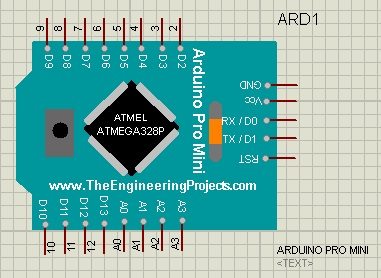
Once you get this board, place it in your Proteus workspace and it will look like something as shown in below figure:
Now next thing you need to do is to read How to get hex Fie from Arduino, so that you can get the hex file, which we are gonna upload in this Arduino Pro Mini board.
So, once you get the link for your hex file, simply double click this board to open its properties.
Now place this hex file in the Program File section of its Properties section as we have seen in Arduino Nano Library for Proteus tutorial.
That's all, now using this Arduino Pro Mini Library for Proteus, you can easily simulate your circuits in Proteus and can test your codes.
Now, let's design a simple blinking example as we have done for previous libraries.
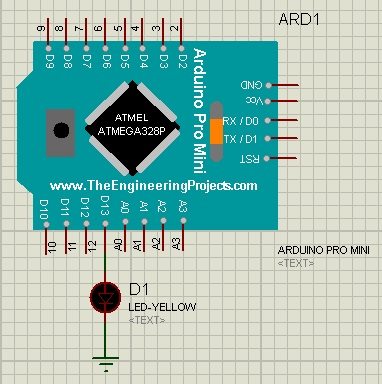
So, in order to dos so, design a simple circuit in Proteus as shown in below figure:
So, now as usual, use the blink example from the Arduino software and get your hex file as described in How to get hex file from Arduino.
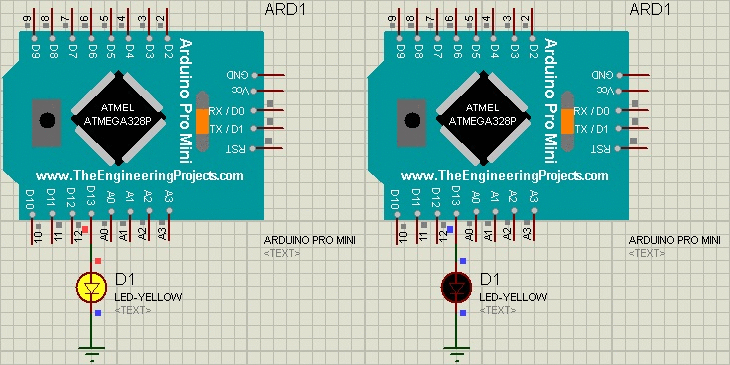
So, after uploading the hex file, run your simulation. If everything goes fine then you will get results as shown in below figure:
So, now that's how you can simulate Arduino Pro Mini in Proteus using Arduino Pro Mini Library for Proteus.
"Is there a difference between the pro minis on the market? I'm looking to purchase one and it seems that there are a lot of 3rd party manufacturers which make them? Are they any different in terms of quality or performance? Here's the one I want to buy: <a>arduino pro mini</a>.
Thanks,
Gary"
A0-A3 Not working in arduino mini and arduino pro mini
Arduino Nano is working but same code try in arduino mini and arduino pro mini
always HIGH in analog read 1023 (For 5V)
Any Option for this error FIX
please replay to my email





Comments
5