


L12 Linear Servo Library for Proteus V1.0 (Linear Actuator, Arduino)


Hello friends, I hope you all are doing great. Today, I am going to share the new L12 Linear Servo Library for Proteus V1.0. A servo motor turns a horn to an angle; a linear servo pushes a rod to a position. The L12-R is the small one people build into robot grippers, camera focus pullers, RC model landing gear, small valves and lab automation: a motor, a gearbox and a lead screw in a body the size of a finger, and a built-in controller that takes the same RC pulses as a hobby servo.
L12 Linear Servo Library for Proteus
Latest version: V1.0 (October 2026, this tutorial)
Helping Tools
- Serial Monitor Advance: a serial terminal window for the UART of your board
- Serial Monitor Expert: the serial monitor with extra debugging tools
- LCD Library for Proteus V3.0: 16x2, 20x4 and I2C LCDs to show your readings
This library brings it into Proteus. The rod moves on your schematic to the real position at the real speed, the controller reads the pulses of the Arduino Servo library, the motor draws its current from your circuit, and the force follows the supply - about 38 N at 5 V and 46 N at 6 V for the 30 mm, 100:1 version we model. Push against it harder and it stalls; push a little less and it crawls and stops just short of the target. The demo runs on our Arduino UNO V4.0 with a potentiometer as the position knob.
NOTICE: a linear actuator is a rotary motor in disguise: the lead screw turns torque into force and turns into millimetres. We modelled the whole chain, so the rod in Proteus is as slow, as strong and as stubborn as the real one. It took our team a lot of hard work. Your feedback is the fuel that keeps us going, so please tell us what you think in the comments below or in the Motor Driver board of our forum. And if our free libraries help you, you can buy us a coffee. So, let's get started with the L12 Linear Servo Library for Proteus V1.0:
What is the L12 Linear Servo?
The L12 is a family of micro linear actuators. Inside its black body a small DC motor drives a spur gearbox, the gearbox turns a lead screw, and a nut on the screw pushes the rod in and out. A rod end with a hole on the tip and a mounting hole at the back let you fit it between two pins like a tiny hydraulic cylinder. The family comes with 10, 30, 50 and 100 mm strokes, three gear ratios and 6 or 12 V motors.
The -R version adds a position controller with an RC servo input. Feed it 1000 us and the rod goes fully in; feed it 2000 us and it goes fully out; anything in between is a position along the stroke. The three wires are the RC standard: black for GND, red for the supply and white for the signal. To an Arduino it is just another servo.
| L12-R linear servo (the model: 30 mm, 100:1, 6 V) | |
|---|---|
| Stroke | 30 mm |
| Signal | 1000 - 2000 us = 0 - 30 mm, about 50 Hz |
| Peak power point | 23 N at 12 mm/s at 6 V |
| Force | about 38 N at 5 V, 46 N at 6 V (stall) |
| Speed | 19 mm/s at 5 V, 23 mm/s at 6 V (no load) |
| Current | about 8 mA at rest, up to 0.38 A stalled at 5 V (0.45 A at 6 V) |
| Wires | black GND, red V+, white SIG |
Force, Speed and the Lead Screw
A lead screw changes the motor's character completely. A rotary servo talks about torque and degrees; the L12 talks about newtons and millimetres per second. The 100:1 gearbox and the screw trade speed for force: the rod moves at 19 mm/s with no load on 5 V, slows down as the load grows, and stops altogether at about 38 N. The data sheet's peak power point - 23 N at 12 mm/s on 6 V - sits exactly halfway down that line, as it does for every DC motor.
The screw has one more property that matters in practice: it does not back-drive. A load cannot push the rod back through the screw, so when the pulses stop the rod simply stays where it is, holding its load without a milliamp. The model does the same, and treats any load as a force against the motion.
What's New in L12 Linear Servo Library for Proteus V1.0
- A rod that moves: the actuator drawn from the side, its rod moving on the schematic over a 0 - 30 mm ruler, with an orange tick at the position the pulses ask for.
- Real timing and force: the controller, the motor, the gearbox and the lead screw - 30 mm in about 1.7 s at 5 V, about 4 mm/s against 30 N.
- Force from the supply: about 38 N at 5 V and 46 N at 6 V.
- Real current: drawn from V+ in your circuit.
- Loads, stalls and droop: a LOAD property in newtons, load buttons from 10 to 40 N and a 60 N brake on the rod; the pop-up tells a stall from a rod held short under a load it can carry.
- No back-driving: with no pulses the rod stays put, even under a load.
- A pop-up window with four pages - Servo, Graphs, Event log and Check - and the actuator drawn live on the Servo page.
- A full release: the zip with the library, our Arduino UNO V4.0 and an A4 demo, tested in Proteus.
The L12 in Proteus
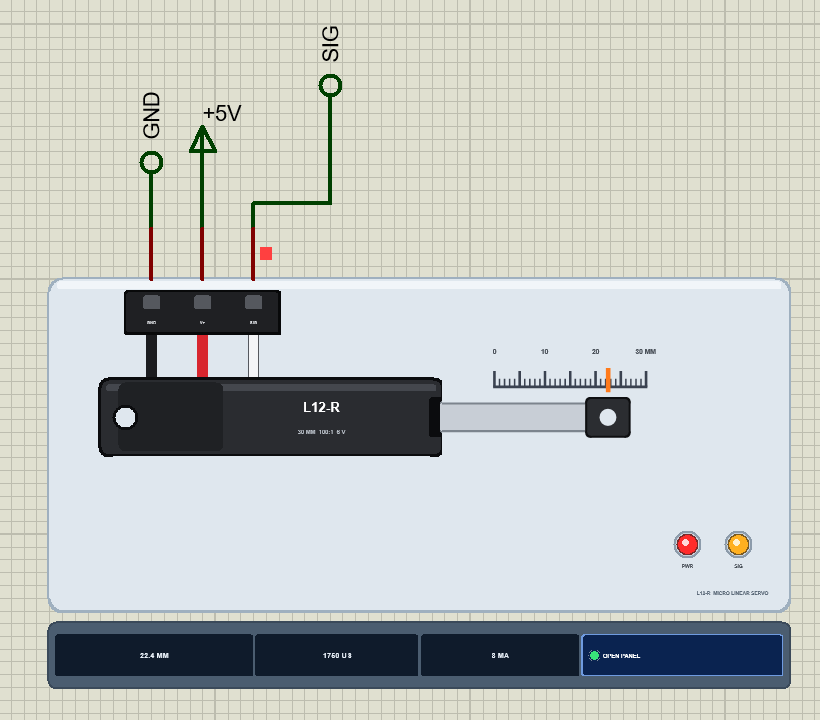
Search L12 or linear in Pick Devices; the device L12SERVOTEP is in TEPL12.LIB (category Electromechanical, Linear Actuators) and its model is TEPL12.DLL. It is drawn from the side at half its real size: the black body with the motor at the back and the rear mounting hole, the steel rod coming out of the front and the black rod end with its hole. The black, red and white cable runs up to the plug, where the pins GND, V+ and SIG come out.
Above the rod is a printed ruler from 0 to 30 mm, read at the hole of the rod end. While the simulation runs the rod moves along it, and an orange tick on the ruler shows the position the pulses ask for - while the rod is on its way you see both. PWR lights when V+ is high enough and SIG while pulses arrive. Under the plate the strip shows the position, the pulse width and the current, with the OPEN PANEL button. The plate, the ruler, the LEDs and the strip are TEP additions; the real actuator has none of them.
The Pins and the Properties
| Pin | Wire | What the model does with it |
|---|---|---|
| GND | black | the return of the motor's current |
| V+ | red | the supply, 5 - 6 V: the current and the force come from it (below 3 V nothing moves) |
| SIG | white | every edge is time-stamped; a 300 - 3000 us HIGH is a servo pulse |
| Property | Default | What it does |
|---|---|---|
| PULSE_MIN | 1000 | the pulse for the rod fully in (0 mm), in us |
| PULSE_MAX | 2000 | the pulse for the rod fully out (30 mm), in us |
| START | 0 | the rod's position when the simulation starts, in mm |
| LOAD | 0 | a constant load on the rod in N (the L12 pushes 38 N at 5 V, 46 N at 6 V) |
Download L12 Linear Servo Library for Proteus
Click the button below to download L12-Linear-Servo-Library-for-Proteus-v1.0.zip (about 1.2 MB, without the source code of the models):
L12 Linear Servo Library for Proteus V1.0- README.txt: installation, the demo, the wiring, the properties, real hardware, troubleshooting and the limits.
- Proteus Library Files:
TEPL12.LIBandArduinoV4TEP.LIBfrom our Arduino Library for Proteus V4.0. - Proteus Model Files:
TEPL12.DLLandTEPARDUINO.DLL. - Proteus Simulation:
L12-Linear-Servo-ArduinoUnoV4.pdsprj,L12_Linear_Servo_Demo.hexand copies of the two DLLs. - Arduino Code:
L12_Linear_Servo_Demo.ino(the Servo library comes with the Arduino IDE).
No Proteus yet? Read How to Download and Install Proteus 7 and 8. New to libraries? Follow How to Install a New Library in Proteus.
How to Install L12 Linear Servo Library for Proteus
- Close Proteus and extract the whole zip file, for example to your Desktop.
- Copy
TEPL12.LIBandArduinoV4TEP.LIBfrom Proteus Library Files into the LIBRARY folder of Proteus (usuallyC:\Program Files (x86)\Labcenter Electronics\Proteus 8 Professional\LIBRARY). - Copy
TEPL12.DLLandTEPARDUINO.DLLfrom Proteus Model Files into the MODELS folder. The two Arduino files are the ones of our Arduino Library V4.0; if you have it, they are the same. - Delete
TEPL12.IDXfrom the LIBRARY folder if it is there. - Start Proteus, press P and search for L12.
Tip: keep the Proteus Simulation folder together, because the project needs its .hex file and the DLLs beside it. The library is tested in Proteus 8.5; Proteus 7 is not supported.
The Demo Circuit
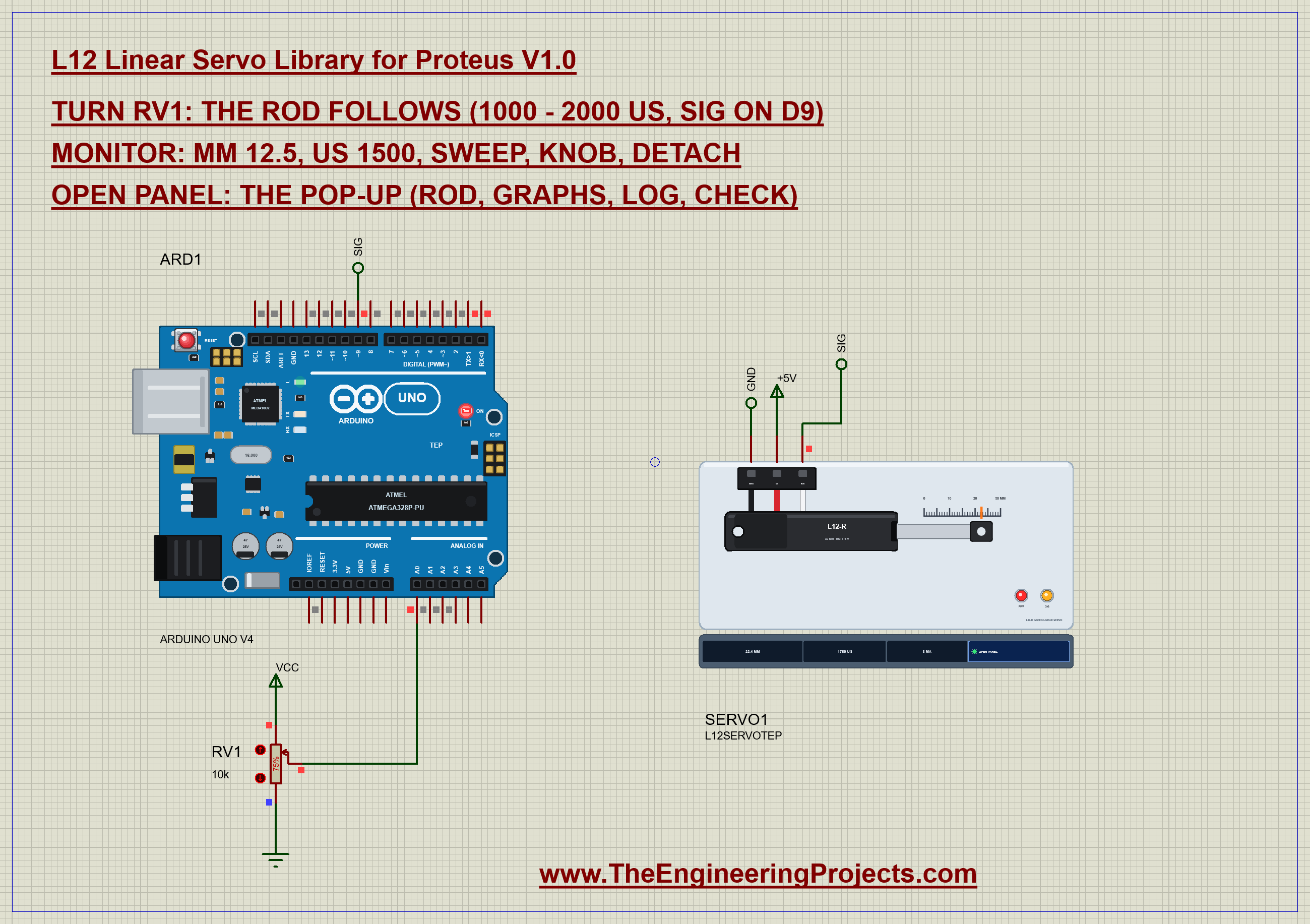
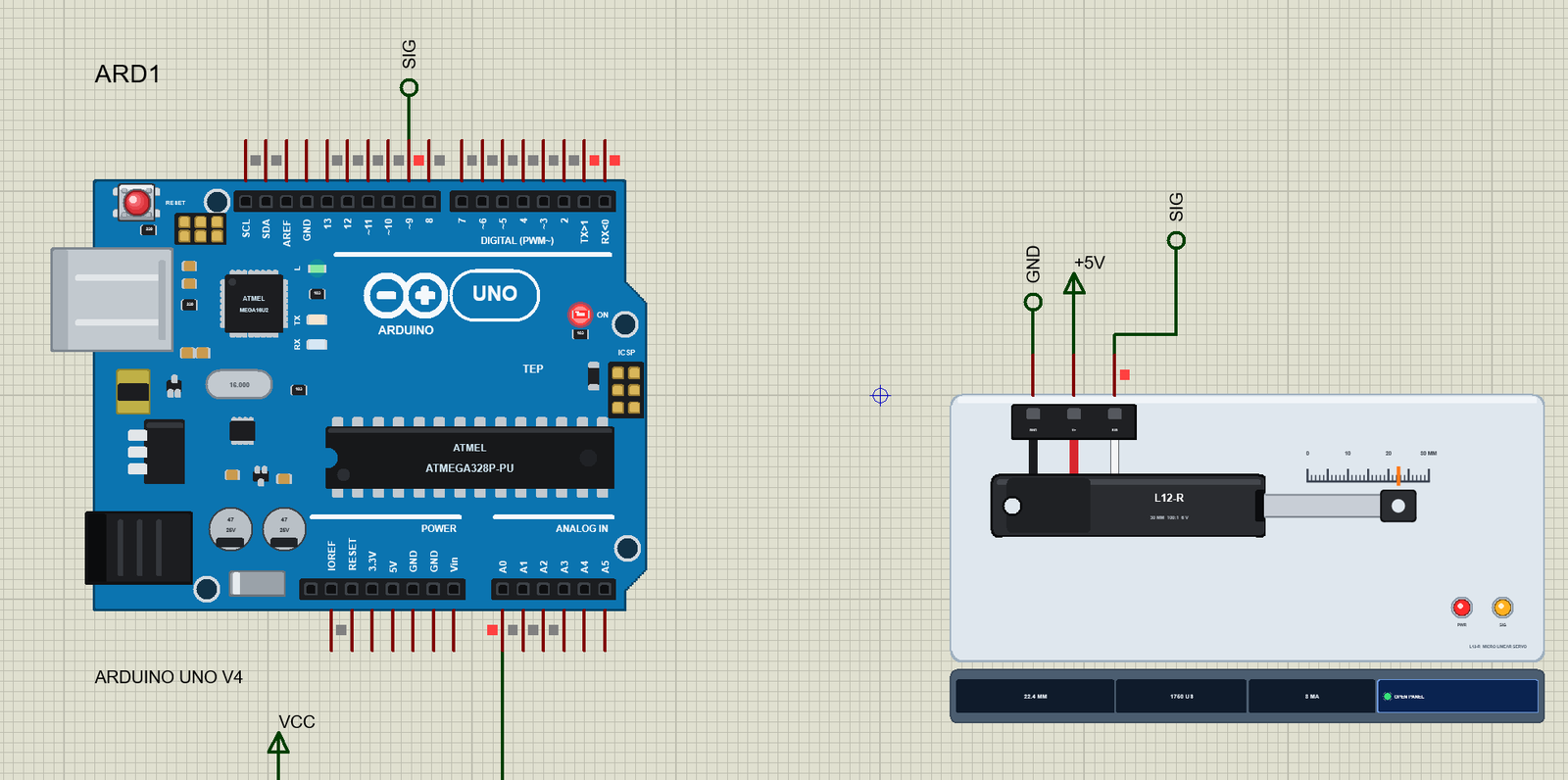
Open L12-Linear-Servo-ArduinoUnoV4.pdsprj. ARD1 is an Arduino UNO V4.0 from our Arduino UNO Library for Proteus V4.0, running L12_Linear_Servo_Demo.hex with its serial monitor built in. SERVO1 is the L12, and RV1, a 10k potentiometer on A0, is the position knob. The signal reaches D9 through a net label called SIG; V+ sits on the +5V terminal and GND on a ground terminal.
| L12-R wire | Arduino UNO | Note |
|---|---|---|
| black (GND) | GND | common with the supply |
| red (V+) | 5V | one L12 is fine on 5 V (0.38 A stall); more of them want their own supply |
| white (SIG) | D9 | any digital pin: the Servo library makes the pulses with Timer1 |
| RV1 wiper | A0 | the ends of the pot on 5V and GND |
The Arduino Code
The demo uses the Servo library that comes with the Arduino IDE. New to Arduino? Start with Arduino Tutorial for Beginners and Introduction to Arduino UNO. The sketch begins with the pins, the actuator's two pulse widths and its stroke:
#include <Servo.h>

const int SERVO_PIN = 9;
const int POT_PIN = A0;
const int US_IN = 1000, US_OUT = 2000;                   // the L12-R: 0 mm and 30 mm
const float STROKE = 30.0;
A linear servo is driven in microseconds, not degrees. One small function turns a position in millimetres into the pulse width for it:
int usFor(float mm) { return US_IN + (int)(mm / STROKE * (US_OUT - US_IN) + 0.5); }The Servo library clamps every pulse to the limits given to attach(), so the sketch attaches with the actuator's own 1000 and 2000 us. For the us command it re-attaches with wider limits, so a pulse beyond the range can be tried:
  if (wideLimits) servo.attach(SERVO_PIN, 800, 2200);
  else servo.attach(SERVO_PIN, US_IN, US_OUT);
Going to a position is then two lines:
void goTo(float mm) {
  ensureAttached();
  servo.writeMicroseconds(usFor(mm));
}
The knob reads the pot, maps it to tenths of a millimetre and moves the rod when the reading has changed by half a millimetre:
    int raw = analogRead(POT_PIN);
    int tenths = map(raw, 0, 1023, 0, 300);                // 0.0 - 30.0 mm
    if (lastTenths < 0 || abs(tenths - lastTenths) >= 5) {
      goTo(tenths / 10.0);
Type mm 12.5 in the monitor and the sketch goes to that position; the pot is ignored until you type knob:
  if (!strncmp(s, "mm", 2)) {
    float mm = atof(s + 2);
    if (mm < 0 || mm > STROKE) { Serial.println(F("Position: 0 - 30 mm")); return; }
And the sweep moves the target half a millimetre every 50 ms - 10 mm/s, slower than the rod can go - from 0 to 30 mm and back:
  } else if (mode == SWEEP && millis() - sweepAt >= 50) {  // 0.5 mm every 50 ms: 10 mm/s
    sweepAt = millis();
    servo.writeMicroseconds(usFor(sweepMm));
The HEX file is in the package. To change the sketch, open it in the Arduino IDE and export the compiled binary, as in How to get the HEX file from Arduino. It needs 9,302 bytes of flash (29 % of the UNO, most of it the floating-point text reading) and 326 bytes of RAM.
Running the Demo
Press Run. The UNO's serial monitor and the actuator's pop-up open over the schematic; move them aside. RV1 starts at 75 %, so the first reading asks for 22.5 mm:
L12 Linear Servo demo - The Engineering Projects
attach(9, 1000, 2000): 0 - 30 mm
Turn the pot on A0, or type mm 15.
Commands: mm 12.5 = position, us 1500 = pulse width, sweep, knob, detach, help
Pot 768 -> 22.5 mm -> pulse 1750 us
The rod drives out: "reached 22.4 mm from 1.5 in 1196 ms (17.5 mm/s)", says the Event log. Then it holds there at 8 mA - the controller at rest - and the strip on the schematic shows 22.4 MM, 1750 US and 8 MA.
The Pop-Up Window
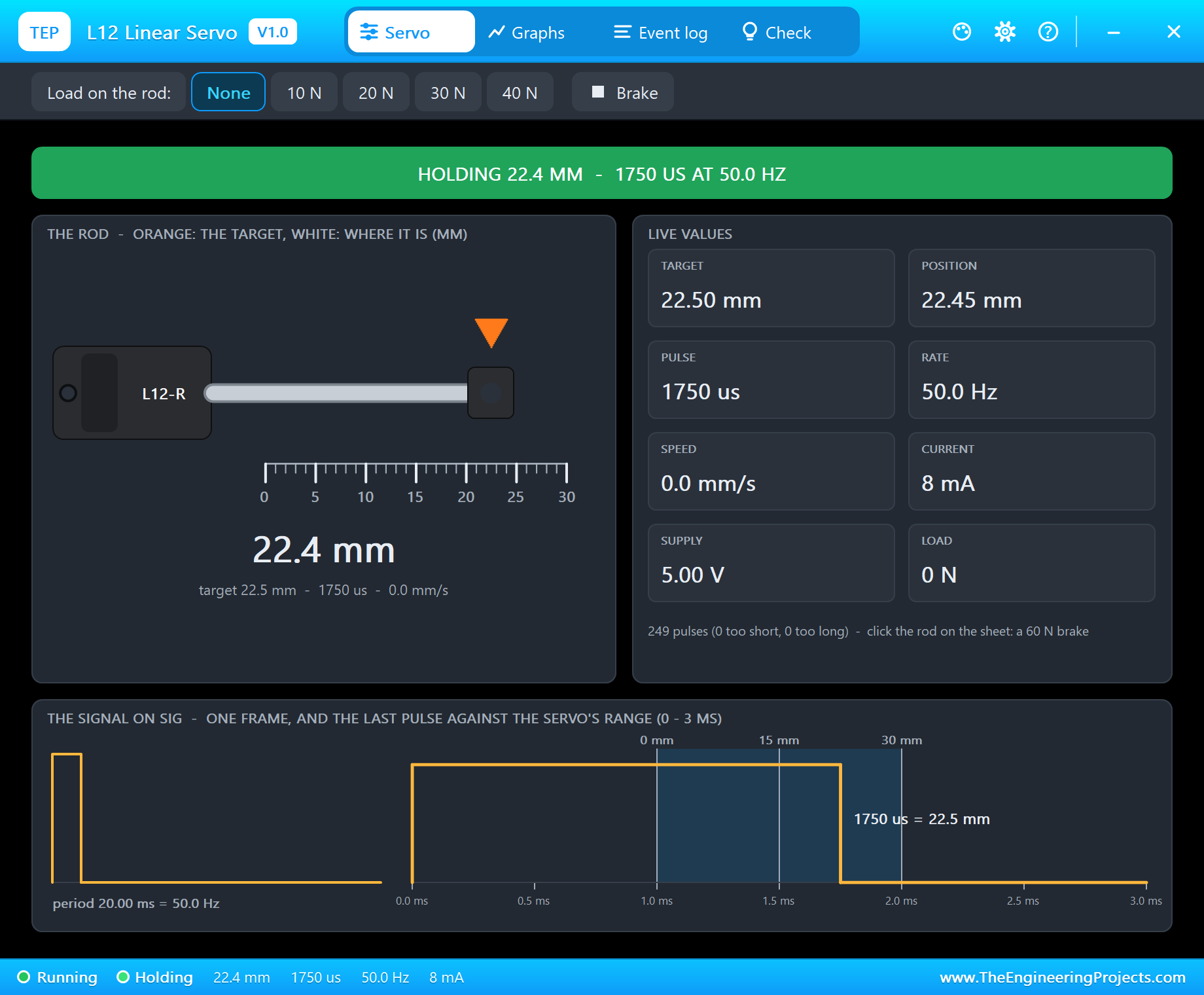
At Run the actuator opens TEP L12 Linear Servo, a window in the look of our TEP Serial Monitor Advance for Proteus. Its Servo page draws the L12 from the side with the rod at its live position over a 0 - 30 mm ruler and an orange triangle at the target. The banner says what the actuator is doing, the live values give the target, the position, the pulse, the rate, the speed, the current, the supply and the load, and the bottom card shows the last pulse against the 0, 15 and 30 mm marks of the 1000 - 2000 us range. The toolbar puts a load on the rod - None, 10, 20, 30 or 40 N - or the 60 N brake.
Moving the Rod
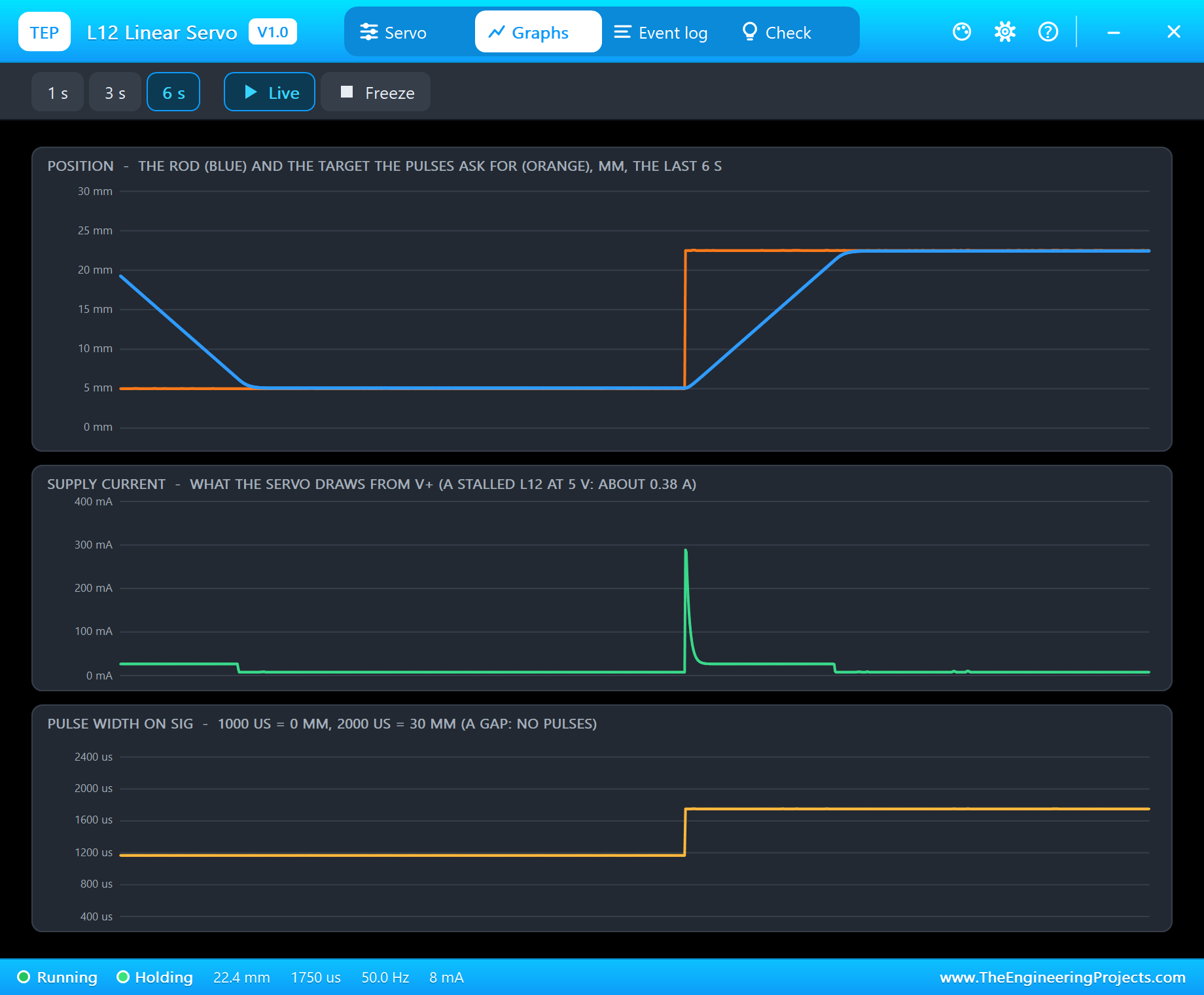
Type mm 5. The sketch sends 1167 us and the rod drives in: "reached 5.1 mm from 22.5 in 1036 ms (16.8 mm/s)". Type knob and it goes back out: "reached 22.4 mm from 5.1 in 1033 ms (16.8 mm/s)". The Graphs page shows why a linear servo feels so different from a hobby servo: the rod does not swing, it travels. Each move is a straight ramp at a constant speed, because the motor runs flat out until the rod is within a millimetre of the target. The current tells the same story: a start peak of about 290 mA while the motor gets going, then only about 25 mA while the rod glides with no load, and 8 mA at rest.
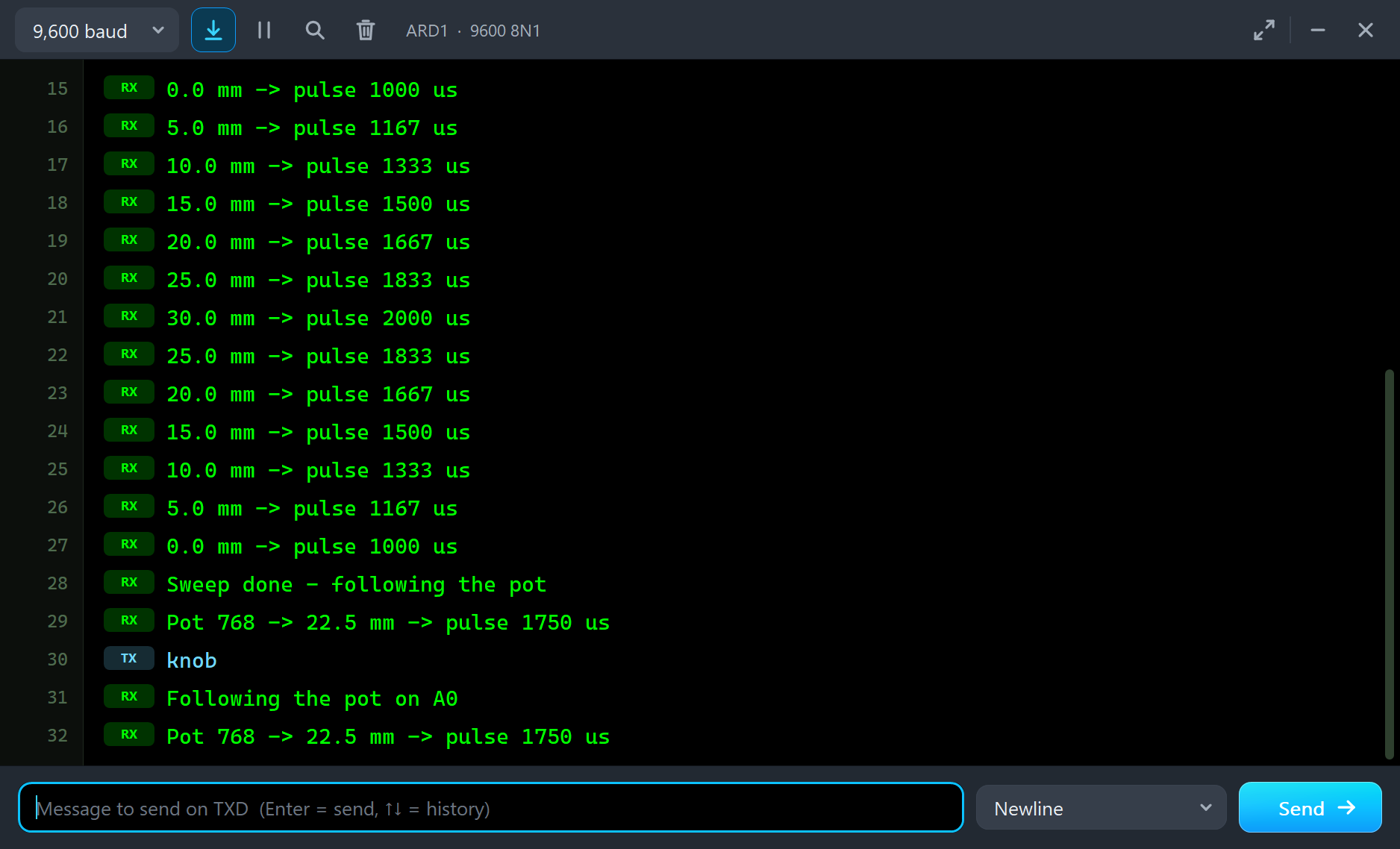
Type sweep and the sketch runs the target from 0 to 30 mm and back at 10 mm/s, printing every 5 mm. The rod keeps up easily - it could go almost twice as fast - and when the sweep is done the sketch returns to the pot by itself:
0.0 mm -> pulse 1000 us
5.0 mm -> pulse 1167 us
10.0 mm -> pulse 1333 us
15.0 mm -> pulse 1500 us
20.0 mm -> pulse 1667 us
25.0 mm -> pulse 1833 us
30.0 mm -> pulse 2000 us
25.0 mm -> pulse 1833 us
20.0 mm -> pulse 1667 us
15.0 mm -> pulse 1500 us
10.0 mm -> pulse 1333 us
5.0 mm -> pulse 1167 us
0.0 mm -> pulse 1000 us
Sweep done - following the pot
Pot 768 -> 22.5 mm -> pulse 1750 us
Force, the Supply and the Load
This is where an actuator earns its place, and where most real designs go wrong. The L12's force grows with its supply - about 38 N at 5 V and 46 N at 6 V for our 100:1 version - and its speed falls as the load grows. The pop-up's load chips let you test both.
40 N: a Stall
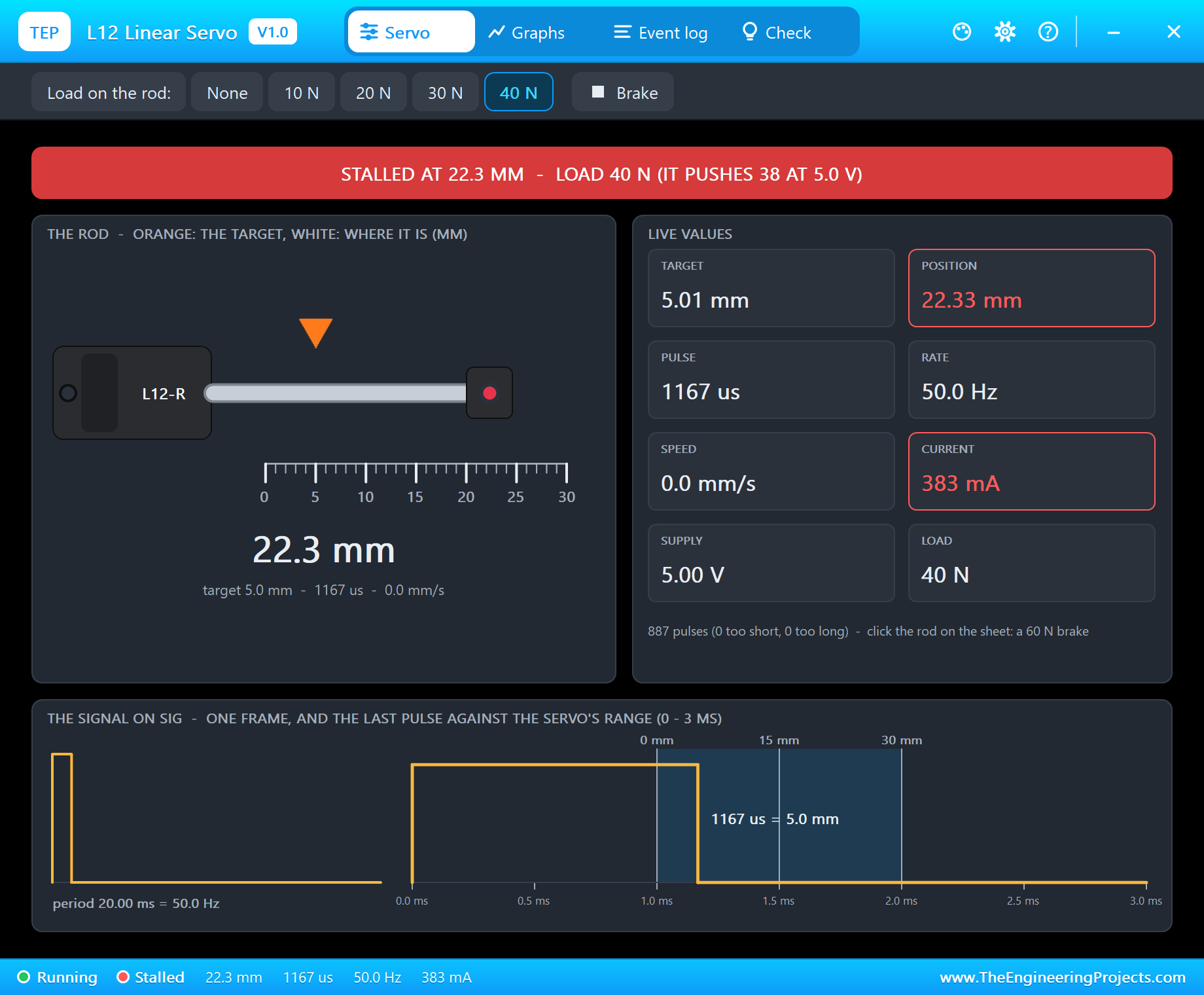
Pick 40 N on the toolbar and type mm 5. At 5 V the L12 pushes 38 N, so the motor pulls its stall current and the rod stays at 22.3 mm. The banner turns red - STALLED AT 22.3 MM - LOAD 40 N (IT PUSHES 38 AT 5.0 V) - and the Event log adds "STALLED at 22.43 mm - the load (40 N) is above its force (38 N at 5.0 V), 382 mA". On 6 V the same 40 N would not stop it: our automatic tests check exactly that.
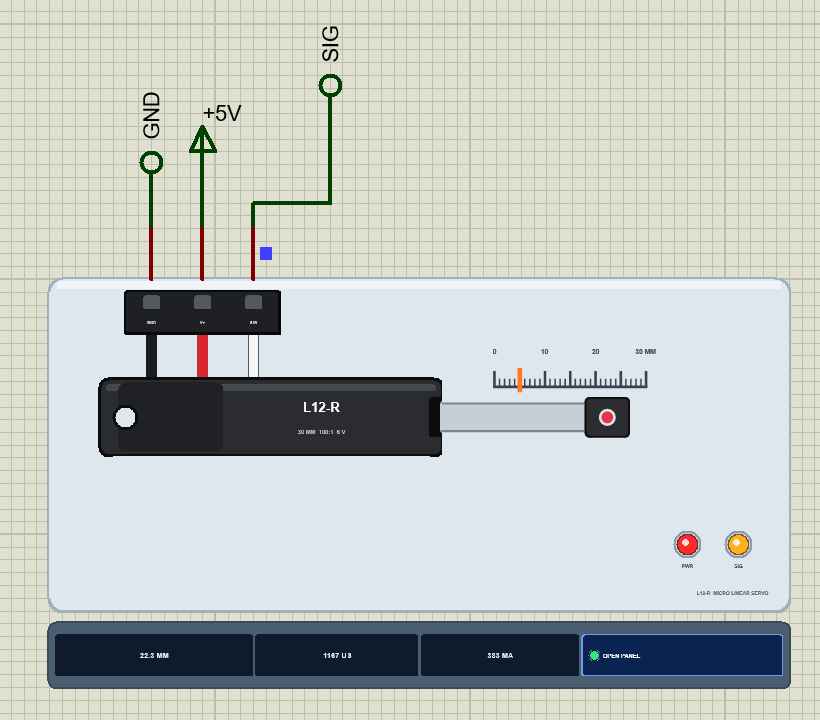
On the schematic the orange tick has jumped to 5 mm while the rod has not moved, and a red dot in the rod end marks the stall. The strip shows the stall current. A real L12 would hum and warm up; the model keeps pushing for as long as the pulses ask.
30 N: It Crawls, Then Droops
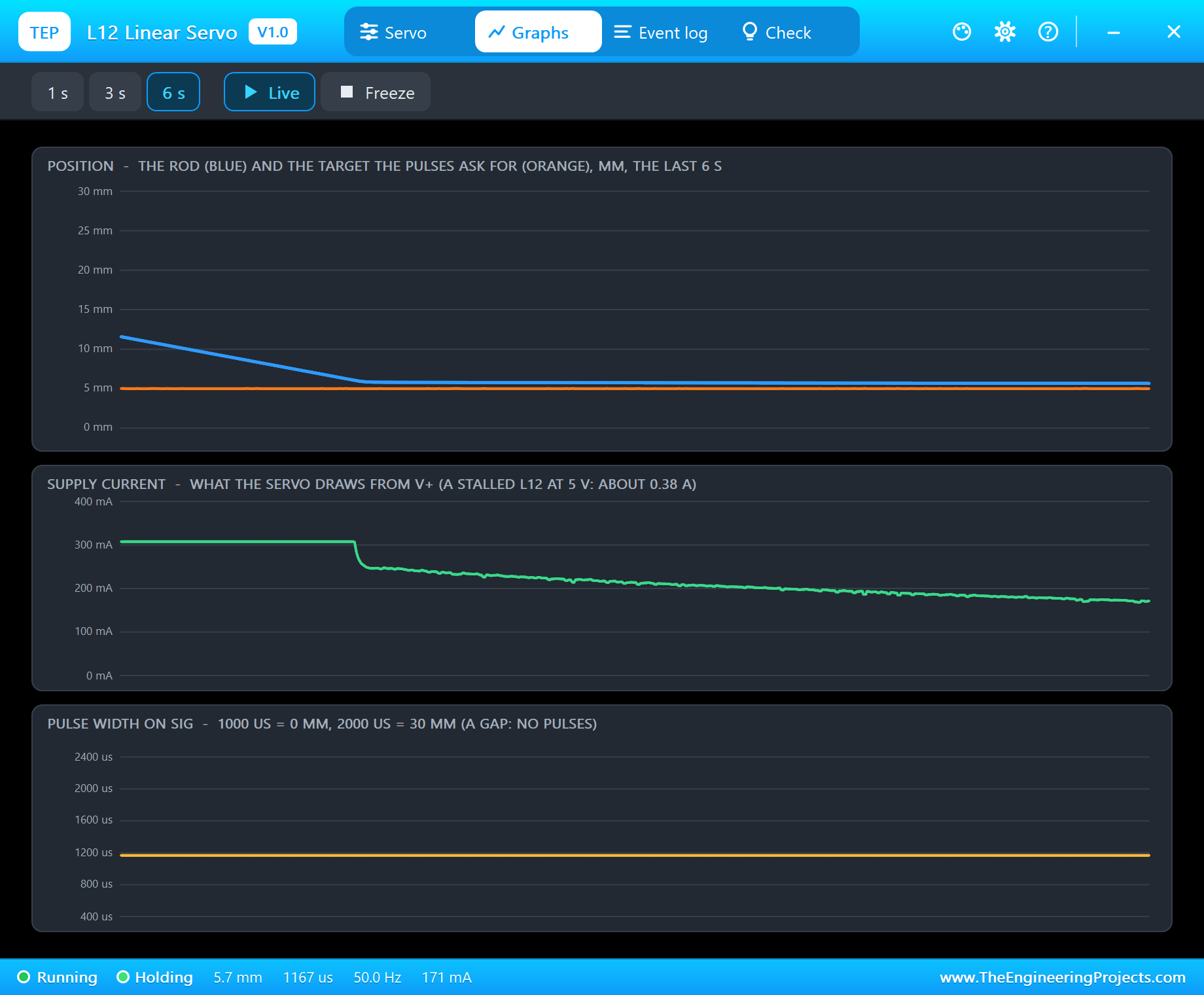
Now pick 30 N. That is less than the L12 can push, so the rod moves - but slowly: about 4 mm/s instead of 17, with about 300 mA. A DC motor trades speed for force along a straight line, and 30 N is most of the way down that line. A design that needs the rod to move quickly under load needs a lower gear ratio or a higher voltage.
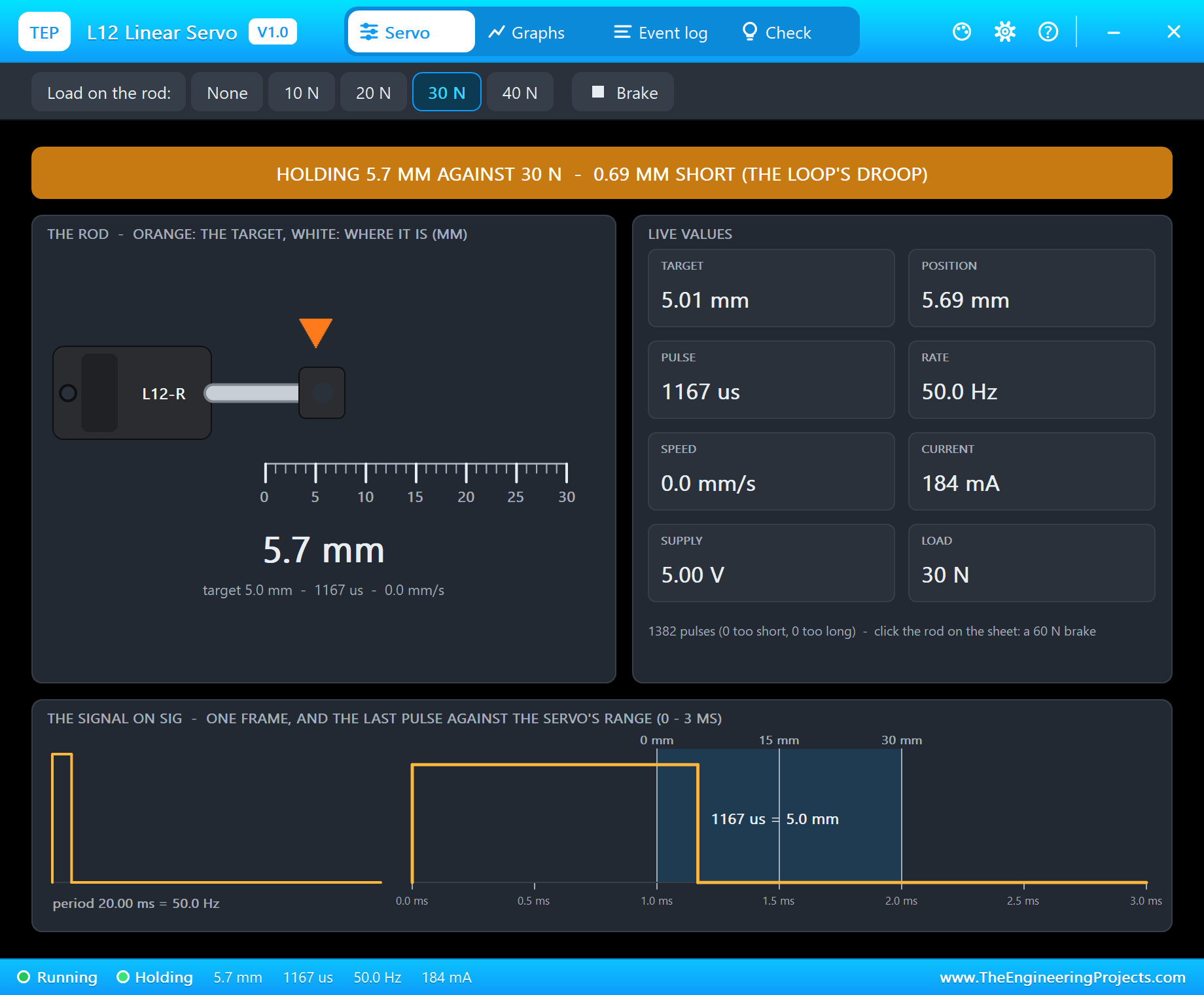
The rod stops at 5.8 mm - "stopped at 5.8 mm, 0.8 mm short of 5.0 (the load)" - and the banner turns amber: HOLDING 5.7 MM AGAINST 30 N - 0.69 MM SHORT (THE LOOP'S DROOP). The controller drives in proportion to the error, and under a load the rod settles where the push just balances the load, a little short. Less than a millimetre over a 30 mm stroke, but on a valve or a gripper it matters - and it costs 184 mA just to stand there.
Event Log
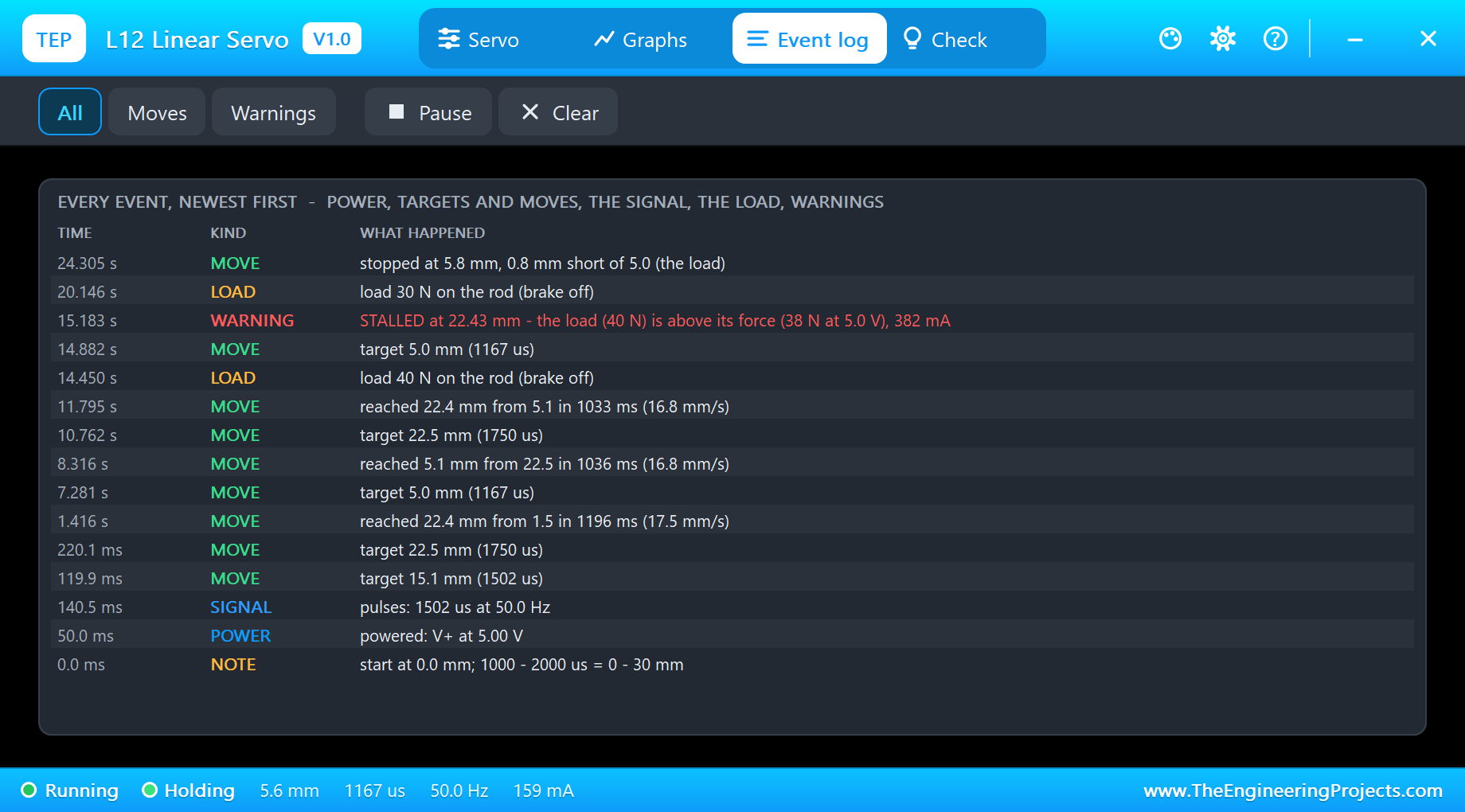
The Event log keeps the whole run, newest first: the power and the first pulses, every target with its pulse width - "target 5.0 mm (1167 us)" -, every finished move with its time and speed, the load changes, the stall warning in red and the move that stopped short. Filter it by moves or warnings, pause it or clear it.
The Check Page
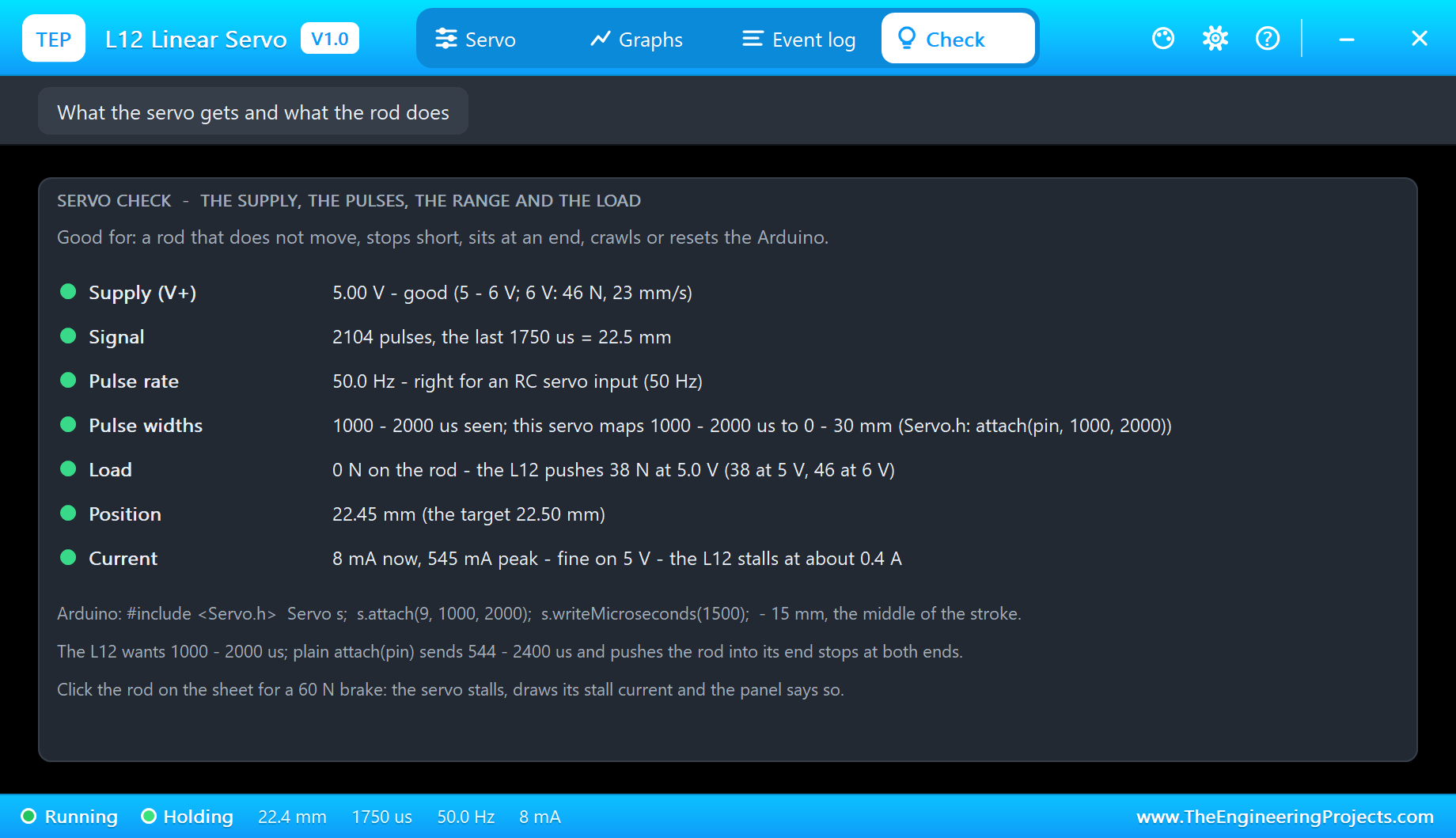
The Check page answers the forum questions in one look, each row with a verdict - green for fine, amber to check, red for wrong: the supply, the signal, the pulse rate ("right for an RC servo input (50 Hz)"), the pulse widths seen against the 1000 - 2000 us range, the load against the force at this supply ("the L12 pushes 38 N at 5.0 V"), the position and the current. Under the rows sit the Arduino code to start from and the warning that matters most: plain attach(pin) sends 544 - 2400 us, and both ends of that range push the rod into its end stops.
How the Model Works
Proteus runs the digital part of a circuit, the Arduino and its pulses, before each analog step. The actuator keeps every edge on SIG with its exact time, so it knows each pulse width to the microsecond. It then integrates its motor and rod over the step in 50 us slices: the pulse sets the target, the controller compares it with the position, the motor fights its back-EMF, the friction and the load, and the gearbox and the lead screw turn all of that into a rod speed in millimetres per second.
The current is part of the circuit, drawn from V+, so an ammeter in series with the red wire reads what the pop-up shows. We checked the model on a PC with 23 automatic tests: the full 30 mm take 1.671 s at 5 V and 1.360 s at 6 V, the top speed is 19.0 mm/s, every 5 mm step lands within 0.1 mm, 30 N still reaches 29.30 mm, 40 N stalls at 5 V and gets through at 6 V, the 60 N brake stalls it at 384 mA, and with no pulses the rod holds even under 20 N. Six more tests render the pop-up pages, and the demo project is read back from disk with 51 checks.
Need a rotary servo instead? Our MG90S Servo Motor Library for Proteus and DS3218 Servo Motor Library for Proteus cover the small and the strong ones. For a linear stage driven by a stepper, start from our NEMA 17 Stepper Motor Library for Proteus.
Troubleshooting
- The rod sits at an end and the current is high: a pulse beyond 1000 - 2000 us - plain
attach(pin)sends 544 - 2400 us. Useattach(pin, 1000, 2000). - The rod never moves and the pop-up says NO POWER: V+ is not connected or below 3 V.
- WAITING FOR PULSES: SIG is on another pin than the one in
attach(), or the sketch never callsattach(). - The rod crawls: a load - under 30 N it moves at about 4 mm/s on 5 V.
- The rod stops a little short: a load it can carry - the droop.
- STALLED: the load is above the force at this supply (38 N at 5 V), or the brake on the rod end.
- No rod, no UNO or no monitor:
TEPL12.DLLorTEPARDUINO.DLLis missing from MODELS and the project folder; a closed monitor opens again with a click on the UNO's USB port.
Things to Know Before Using a Real L12
- Use attach(pin, 1000, 2000): the Servo library's defaults push the rod into its end stops at both ends.
- Pick the gearing for the job: 50:1 is faster and weaker, 210:1 slower and stronger than the 100:1 we model.
- Push along the rod: side loads wear the rod and its bushing - guide the load.
- Power: one 6 V L12 is fine on an Arduino's 5V (0.38 A stalled); several of them, or the 12 V version, want their own supply with a common GND.
- It holds without power: the lead screw does not back-drive, which is handy - and means a jammed rod stays jammed until the motor drives it out.
Limitations of the Simulation
- The model is the 30 mm, 100:1, 6 V L12-R. Other strokes, gearings and the 12 V version are not modelled; the L12-P (potentiometer feedback) and L12-I (limit switches) are other parts.
- A load is taken as a force against the motion; a load that pulls the rod, side loads, wear and heating are not modelled.
- The plate, the ruler, the LEDs, the strip and the brake are TEP additions.
- The model is our own, written from the typical data of the L12-R; this library is not made or endorsed by Actuonix, Arduino or Labcenter.
- Licences: the demo HEX contains the Arduino Servo library 1.2.2 (LGPL 2.1) and the Arduino AVR core 1.8.6 (LGPL); the sketch is included and the README gives the source links. The potentiometer is Proteus's own POT-HG.
- Tested in Proteus 8.5 in October 2026 with the demo as shipped: the knob, mm 5, the 40 and 30 N loads, the sweep and all four pages of the pop-up. Proteus 7 is not supported.
So, that was all about the L12 Linear Servo Library for Proteus V1.0. I hope it helps you find out in Proteus how fast your rod really moves, how much it can push and how far it droops - before the first linear servo goes into your gripper or valve. If you have any questions, ask in the comments and I will help you out. Till the next tutorial, take care and have fun!

Comments
0