


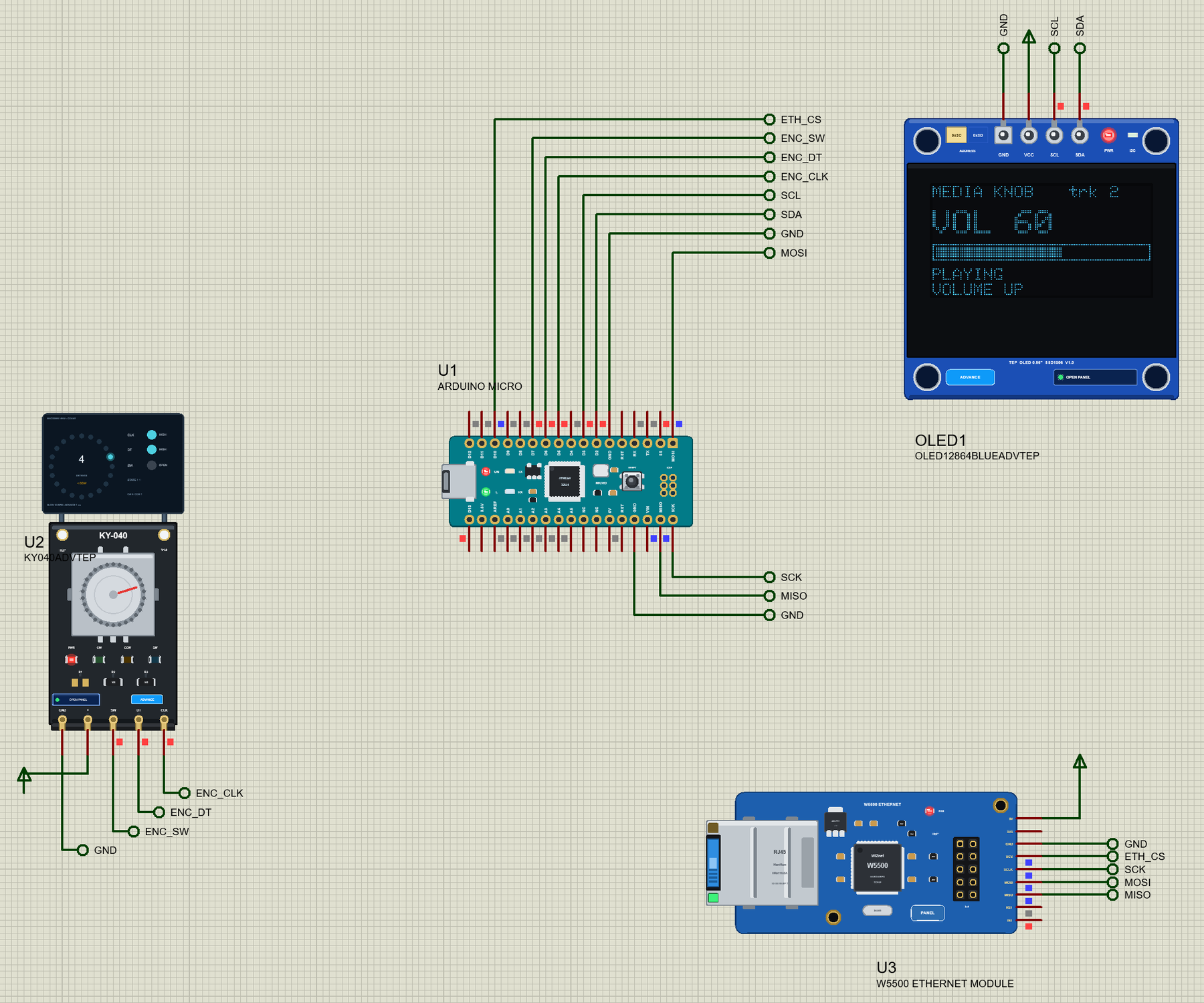
Arduino Micro Library for Proteus: USB Media Keys Volume Knob


Hello friends, I hope you all are doing great. Today, I am going to share the Arduino Micro Library for Proteus. The Micro is the Leonardo made small: the same ATmega32U4 with USB on the chip, on a 48 x 18 mm board that plugs into a breadboard. Its USB can be a keyboard, a mouse and - the subject of this post - a media-key device: the volume, mute and play buttons of a multimedia keyboard. With this library it runs your Micro sketch in Proteus 8.5, and the keys it sends reach a PC that the board model plays for you.
Arduino Micro Library for Proteus
Latest version: V1.0 (October 2026, this tutorial)
Helping Tools
- Laptop WiFi Monitor: a laptop on the Wi-Fi of your design: a browser, a TCP / UDP terminal and ping
- Mobile WiFi Monitor: a smartphone that opens the pages of your board and sends it commands
- Serial Monitor Advance: a serial terminal window for the UART of your board
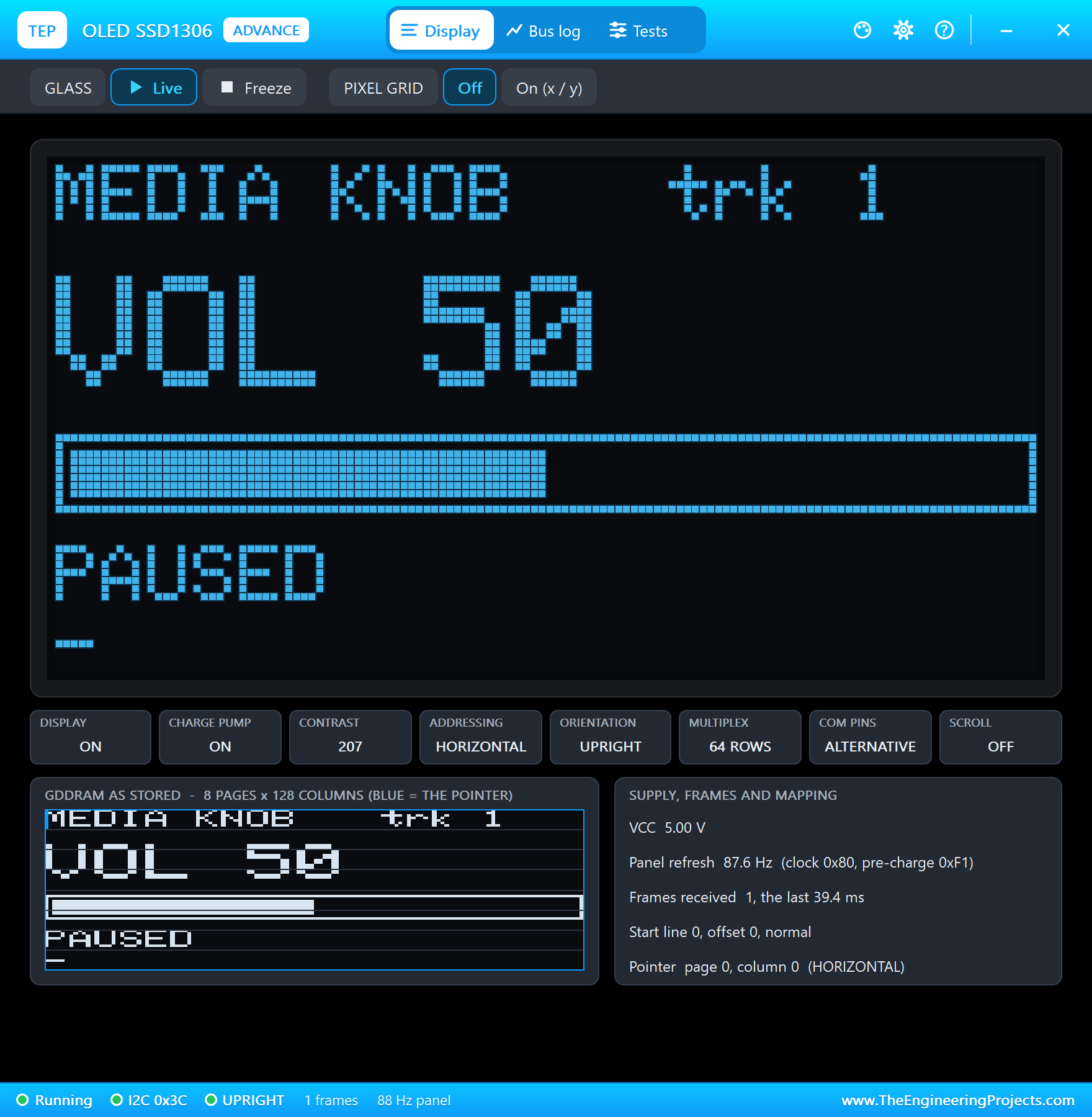
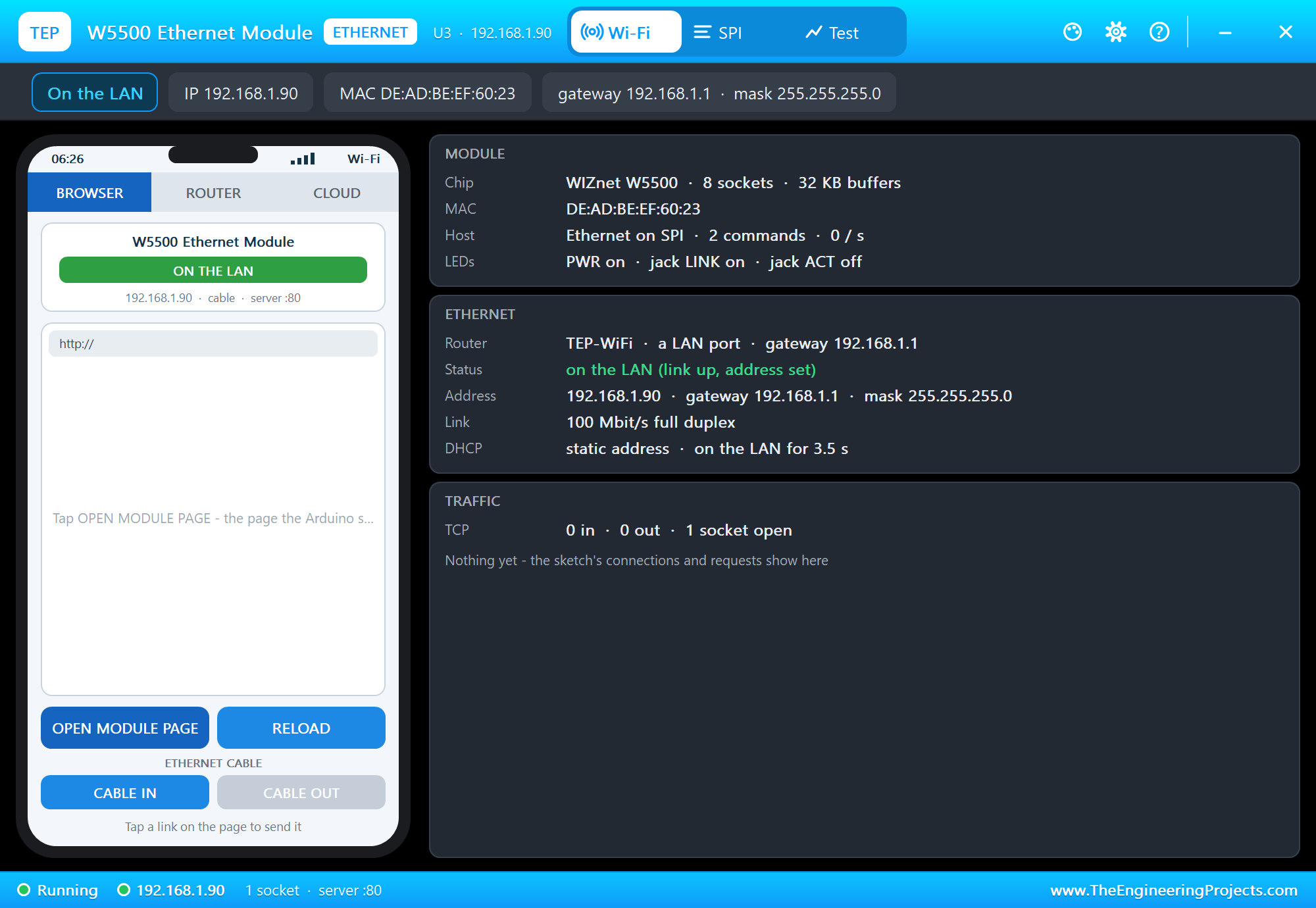
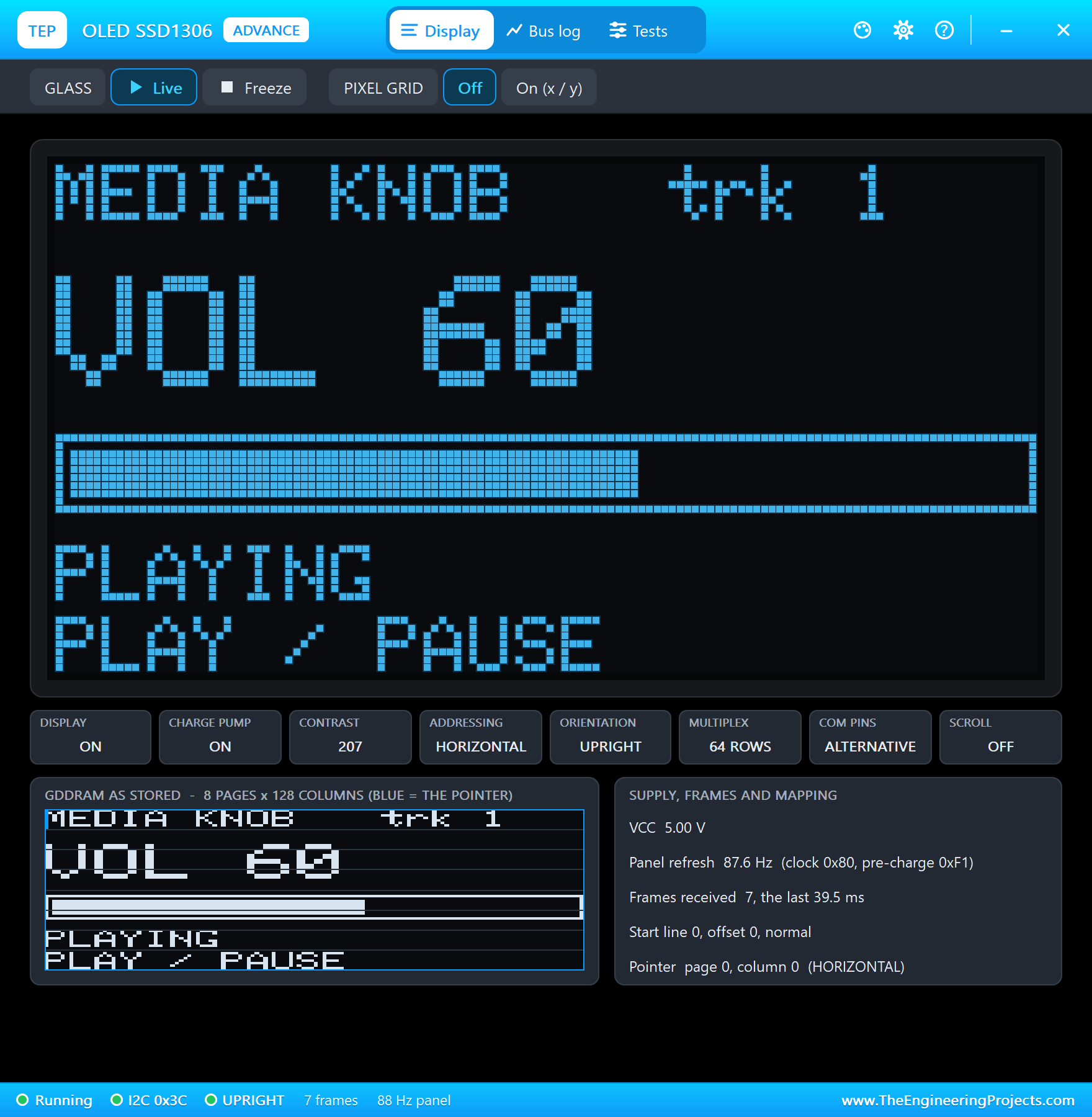
The demo is a USB volume knob, the kind that sits on a desk next to the monitor: a KY-040 rotary encoder turns the volume up and down, a press plays or pauses, a long press mutes, a small OLED shows the level, and a W5500 Ethernet module serves a page that turns the phone into a remote.
NOTICE: Proteus has no ATmega32U4 model with its USB, so our team has put a lot of effort into building this board ourselves: the Micro's pins, LEDs, serial monitor and its USB media keys, keyboard and mouse are all our own model, and your sketch compiles with our free TEP Boards for Proteus add-on. Your feedback is the fuel that keeps us going, so please tell us what you think in the comments below or in the Arduino Micro board of our forum. And if our free libraries help you, you can buy us a coffee. So, let's get started with the Arduino Micro Library for Proteus:
What is the Arduino Micro?
Arduino and Adafruit designed the Micro in 2012 as the smallest board of the Leonardo family. It has the Leonardo's chip, the ATmega32U4 at 16 MHz, and the same idea: the USB is not a separate converter chip but part of the microcontroller, so the sketch decides what the computer sees. Plugged in, a Micro can be a serial port, a keyboard, a mouse, a game controller or a set of media keys - with no driver to install, because every computer already knows those devices.
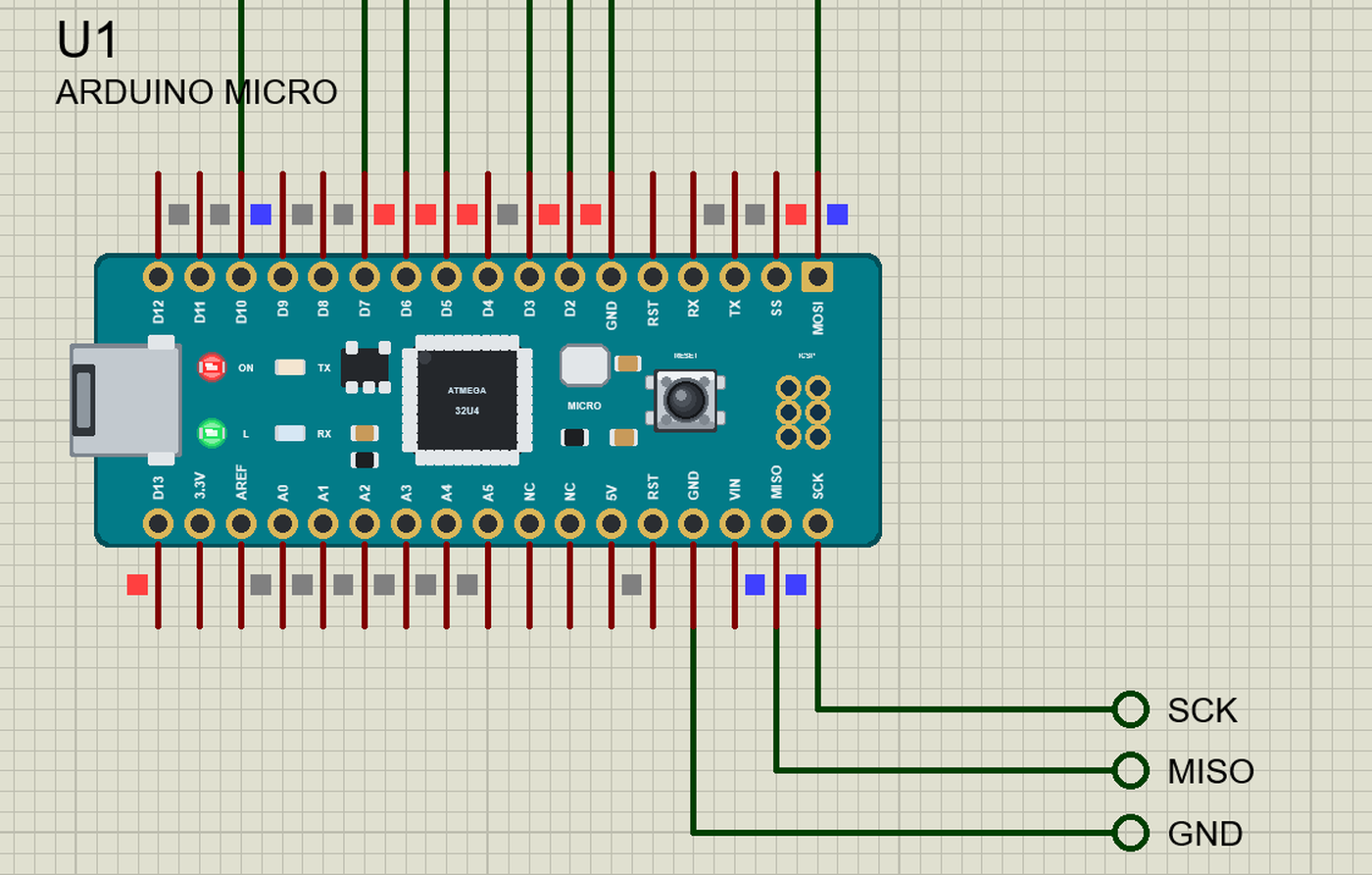
Everything is packed on a 48 x 18 mm board with 2 x 17 pins on the 0.6 inch spacing of a breadboard: a micro-USB socket at one end, the RESET button and six ICSP pads at the other, and four LEDs - L on D13, TX, RX and ON. Unlike the Leonardo, the Micro brings SPI out to its own MISO, SCK, MOSI and SS pins.
| Arduino Micro | |
|---|---|
| Chip | ATmega32U4: 8-bit AVR at 16 MHz with full-speed USB on the chip |
| Memory | 32 KB flash (4 KB used by the bootloader), 2.5 KB SRAM, 1 KB EEPROM |
| Pins | 20 digital I/O: 7 with PWM, 12 analog inputs (A0 - A5 and six on digital pins) |
| USB | micro-USB: a serial port (CDC) and keyboard / mouse / media keys (HID) at once |
| Serial ports | Serial is the USB; Serial1 is a real UART on RX / TX (D0 / D1) |
| I2C / SPI | SDA on D2, SCL on D3; SPI on the MISO, SCK, MOSI and SS pins |
| Size | 48 x 18 mm, 2 x 17 pins on 0.6 inch |
Media Keys - the Consumer Page
A USB keyboard reports letters on the keyboard page of the HID tables. The volume, mute and play keys live on another page, the consumer page: each key is a 16-bit usage - 0xE9 VOLUME UP, 0xEA VOLUME DOWN, 0xE2 MUTE, 0xCD PLAY / PAUSE, 0xB5 NEXT, 0xB6 PREVIOUS. The computer acts on the press: one VOLUME UP is one step of its volume, 2 % on Windows. Arduino's own Keyboard library has no media keys, so the usual choice is NicoHood's HID-Project library and its Consumer object - our add-on includes it with the same names.
Why a Knob Sends Keys, Not a Level
A media key only says "a little louder" or "a little quieter"; it never says "set the volume to 60 %". That is on purpose: the computer may also be changed by its own slider, by another keyboard or by a program, and the knob cannot know about those. So a USB volume knob is relative, like a mouse wheel - each click is one key, and the computer decides how far one key moves the volume. The display on our knob shows what the knob has sent, counted from 50 %, and the PC window does the same; on a real desk the two agree as long as nothing else touches the volume. If you need an absolute value, the trick used by commercial controllers is to send fifty VOLUME DOWN keys first (the computer stops at 0 %) and then count up from there.
Features of the Arduino Micro Library for Proteus
- The board as it looks: Arduino's teal Micro with its 2 x 17 gold pads and their labels, the micro-USB, the ATmega32U4 and its crystal, the regulator, the L, TX, RX and ON LEDs, RESET and the ICSP pads.
- Your sketch: a .hex for "Arduino Micro (TEP Proteus)" with D0 - D17, A0 - A5, LED_BUILTIN, Serial, Serial1, Wire, SPI, EEPROM, analogRead, analogWrite and attachInterrupt.
- Media keys, keyboard and mouse: HID-Project's
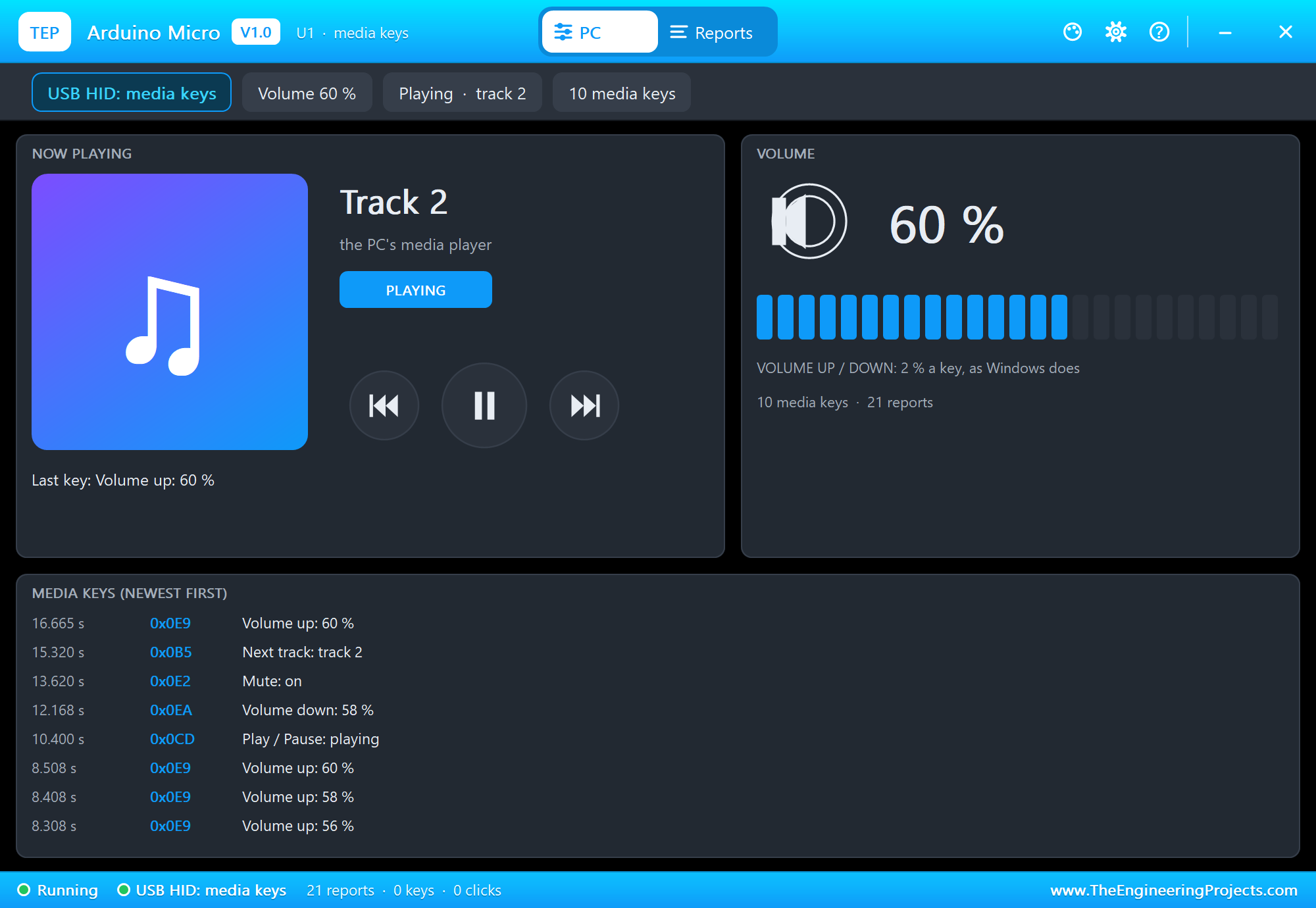
Consumer.write(MEDIA_VOLUME_UP)and the rest, Arduino's Keyboard and Mouse - from the add-on, no extra library. - The PC window: with media keys only, a media player - the track, playing or paused, the PREV, PLAY and NEXT buttons, the volume with 25 segments, mute and every key; with a keyboard or mouse, the notepad and the screen of our Leonardo library; a Reports tab with every report's bytes.
- The serial monitor: the built-in monitor on the USB with Monitor, Plotter and Board tabs - our TEP header, no Windows title bar.
- A complete package: about 3.7 MB with the board, the add-on, the KY-040, OLED and W5500 libraries for the demo, without the source code of the models.
The Arduino Micro in Proteus
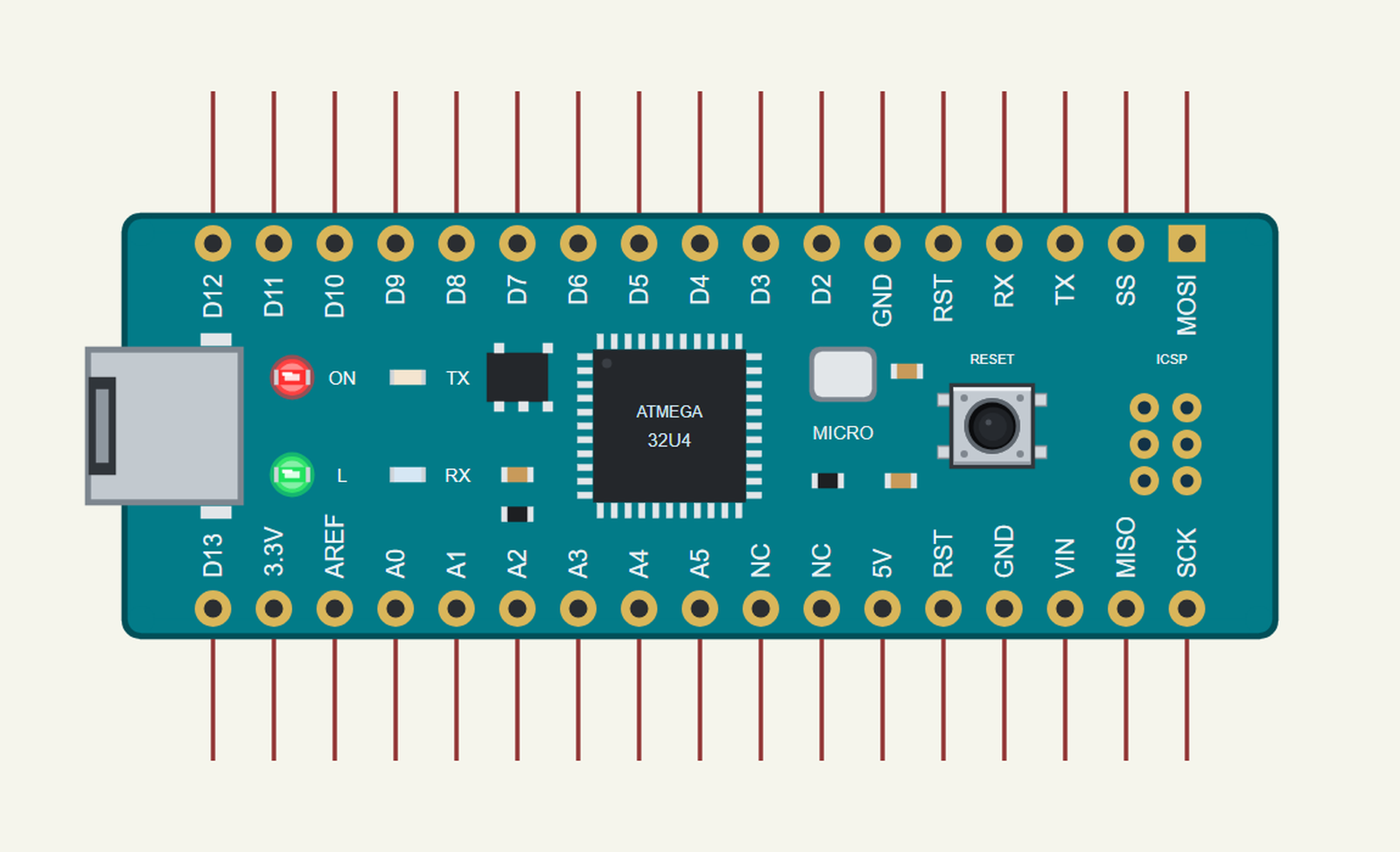
Search MICRO in Pick Devices; the device ARDUINO MICRO is in TEPMICRO.LIB (Microprocessor ICs, Arduino Boards), with the prefix U. The pins are on the usual 0.1 inch grid. Click the micro-USB for the serial monitor and the ATmega32U4 for the PC window.
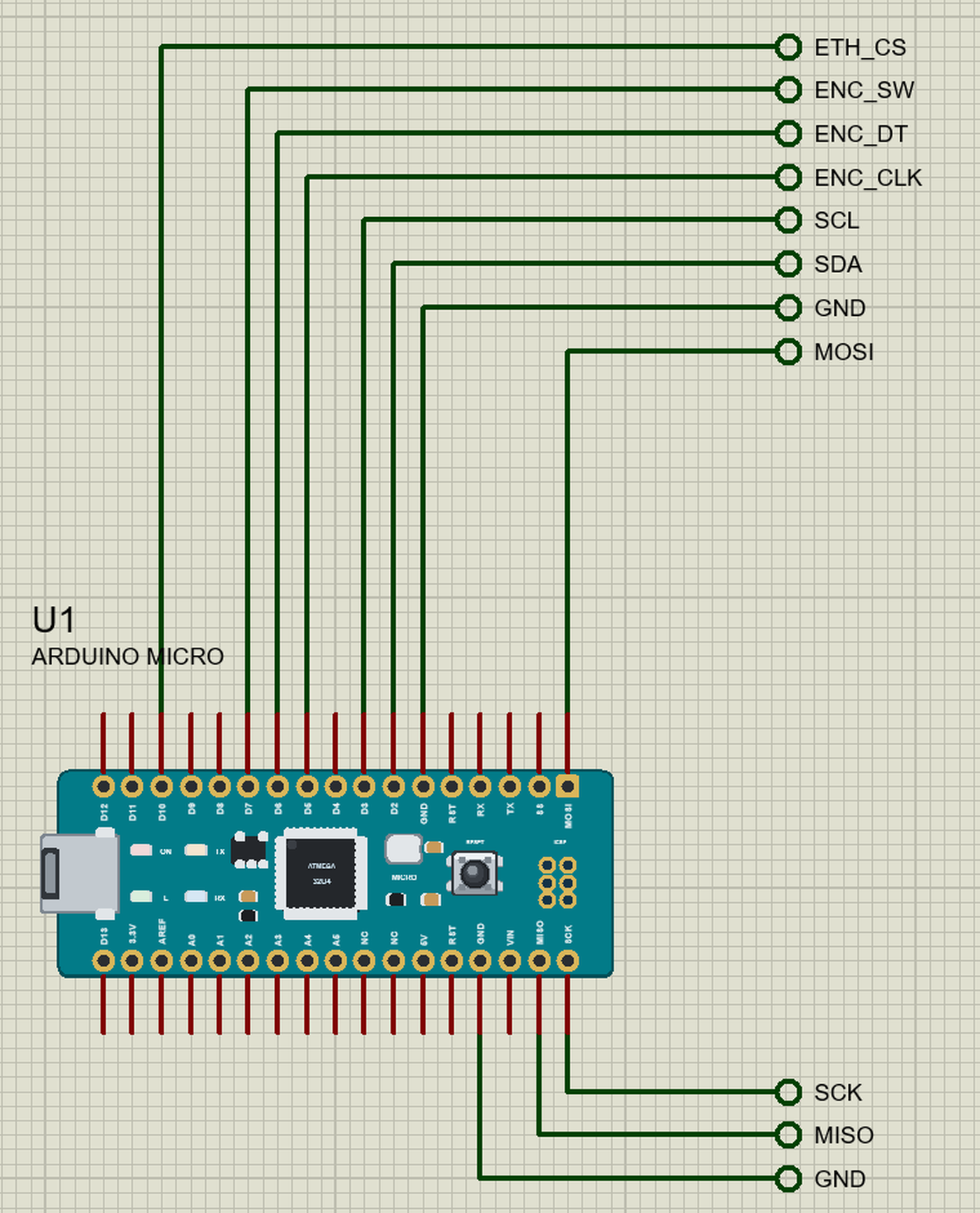
The Pins
| Pins | What the library does with them |
|---|---|
| RX, TX | D0 / D1: Serial1 and GPIO |
| D2, D3 | Wire: SDA on D2, SCL on D3 |
| D4 - D13 | GPIO, PWM and interrupts on any of them; D13 is also the L LED |
| MISO, SCK, MOSI, SS | SPI (D14 - D17) and GPIO |
| A0 - A5 | analogRead 0 - 1023 for 0 - 5 V, also GPIO 18 - 23 |
| 5V, 3.3V, GND, RST | 5 V, 3.3 V, ground, the reset (LOW = reset) |
| AREF, NC, VIN | drawn, not modelled |
Serial is the USB and goes to the board's own monitor, not to RX / TX - as on the real Micro. If you know our Arduino Leonardo Library for Proteus, everything there works here too: the same chip, the same pin numbers, the same Keyboard and Mouse.
Sending a Media Key
One line does it. Consumer.write() sends a report with the key and a report with no key, exactly what a real multimedia keyboard sends for a press and a release:
void media(ConsumerKeycode key, const char *name, const char *from) {
  Consumer.write(key);                                     // press + release: one report with the key, one with none
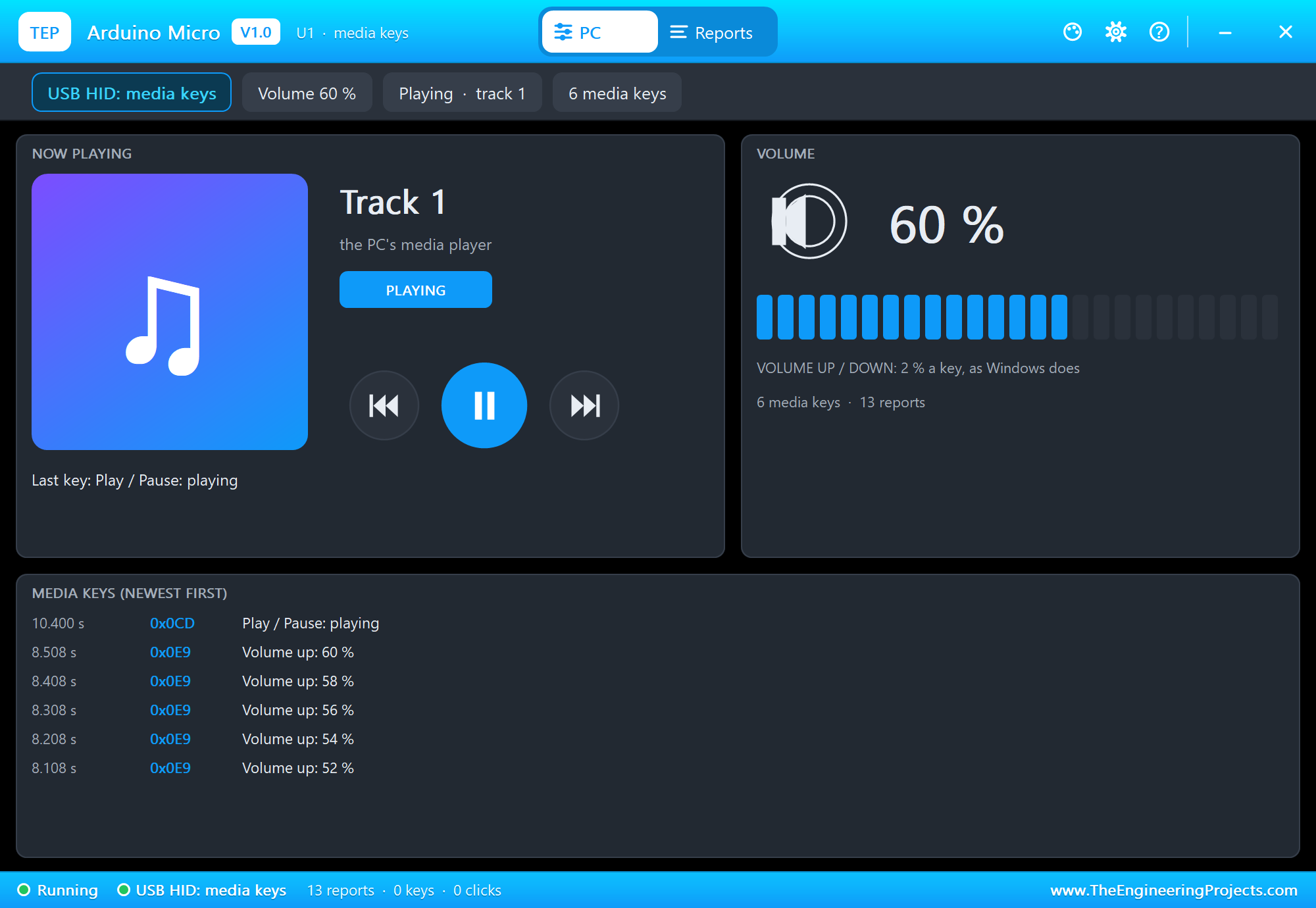
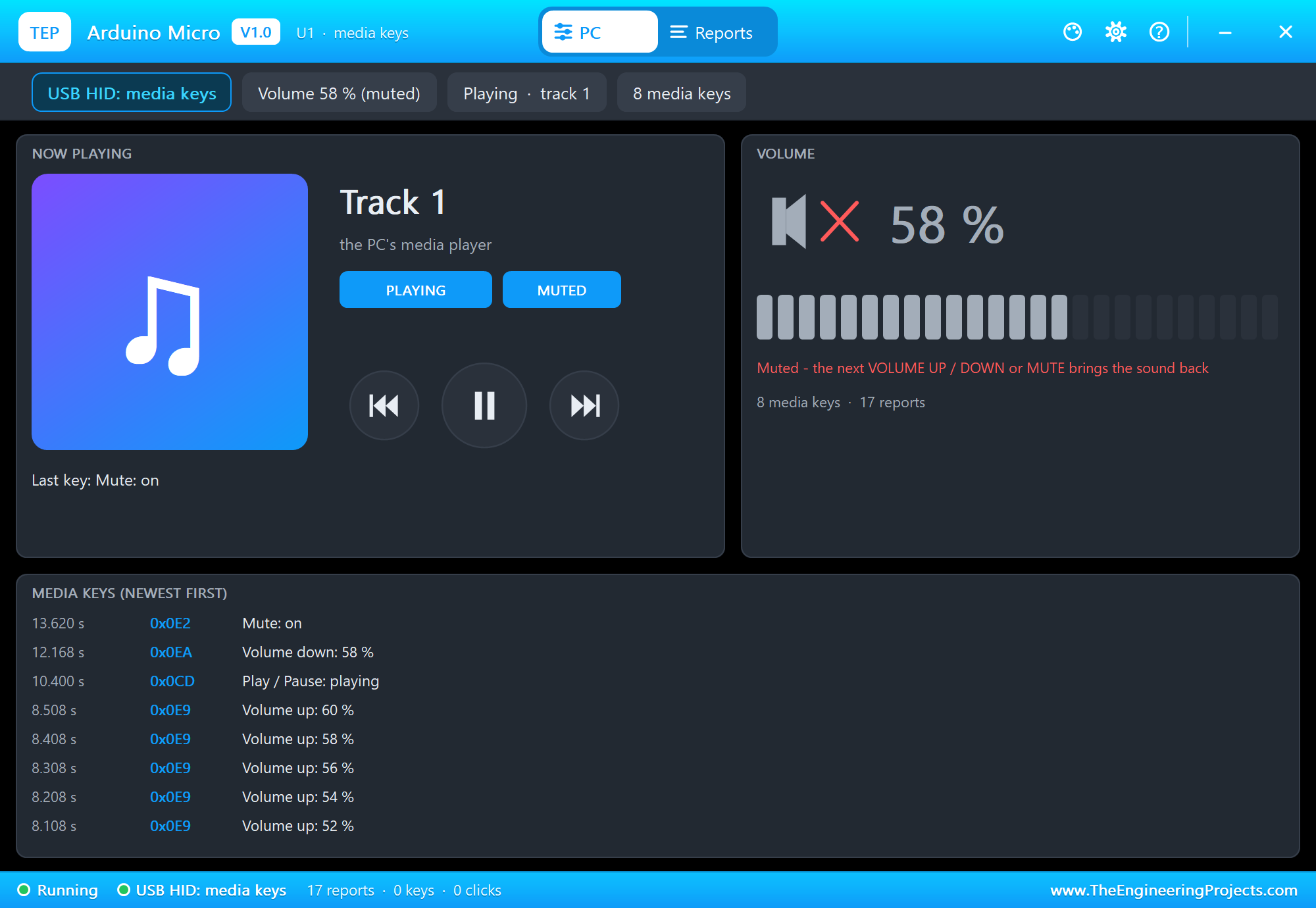
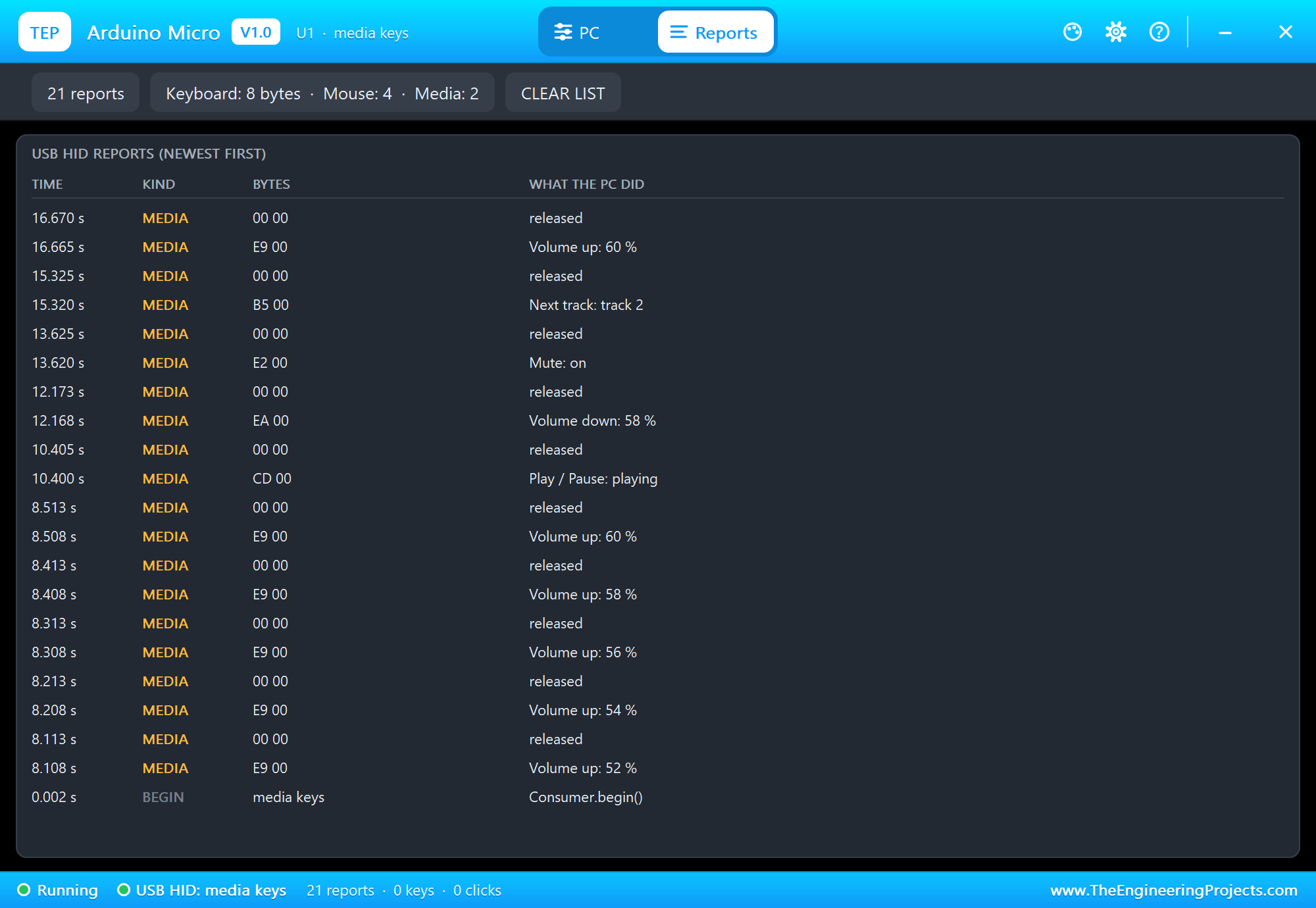
The PC window shows the result: VOLUME UP and DOWN move the level 2 % a key, MUTE toggles the sound, PLAY / PAUSE starts and stops the player, NEXT and PREVIOUS change the track. The Reports tab lists the bytes - E9 00 for VOLUME UP, then 00 00 for the release.
Download Arduino Micro Library for Proteus
Click the button below to download Arduino-Micro-Library-for-Proteus-v1.0.zip (about 3.7 MB, without the source code of the models):
Arduino Micro Library for Proteus V1.0- README.txt: installation, the demo, the pins, the properties, troubleshooting and the limits.
- Proteus Library Files:
TEPMICRO.LIBand the demo's parts:TEPKY040.LIB,TEPOLED12864.LIB,TEPW5500MOD.LIB,TEPLAPTOP.LIBandTEPMOBILE.LIB. - Proteus Model Files:
TEPNET.DLL(the Micro and its PC window, the W5500 module, the laptop, the phone and the network),TEPKY040.DLLandTEPOLED.DLL. - Arduino Code: the demo sketch and the TEP Boards for Proteus add-on 1.35.0 with HID-Project, Keyboard and Mouse.
- Proteus Simulation: the demo project, its HEX file and copies of the DLLs.
No Proteus yet? Read How to Download and Install Proteus 7 and 8. New to libraries? Follow How to Install a New Library in Proteus.
How to Install Arduino Micro Library for Proteus
- Close Proteus and extract the whole zip file, for example to your Desktop.
- Copy the files from Proteus Library Files into the LIBRARY folder of Proteus.
- Copy the DLLs from Proteus Model Files into the MODELS folder, replacing an older TEPNET.DLL.
- Delete
TEPMICRO.IDXfrom the LIBRARY folder if it is there. - For your own sketches, copy Arduino Code\TEP Boards for Proteus\hardware into your Arduino sketchbook (Documents\Arduino) and restart the Arduino IDE; the board is Arduino Micro (TEP Proteus). For the demo install Adafruit SSD1306 (with Adafruit GFX and BusIO) and Ethernet from the Library Manager.
- Start Proteus, press P and search for MICRO.
Demo: a USB Volume Knob
A volume knob is the simplest useful USB gadget: turning a real knob is faster than finding the volume slider, and it works in every program because the computer treats it as part of the keyboard. Ours adds a small screen and a web page, so the same keys can come from the knob, from a phone or from the Serial Monitor.
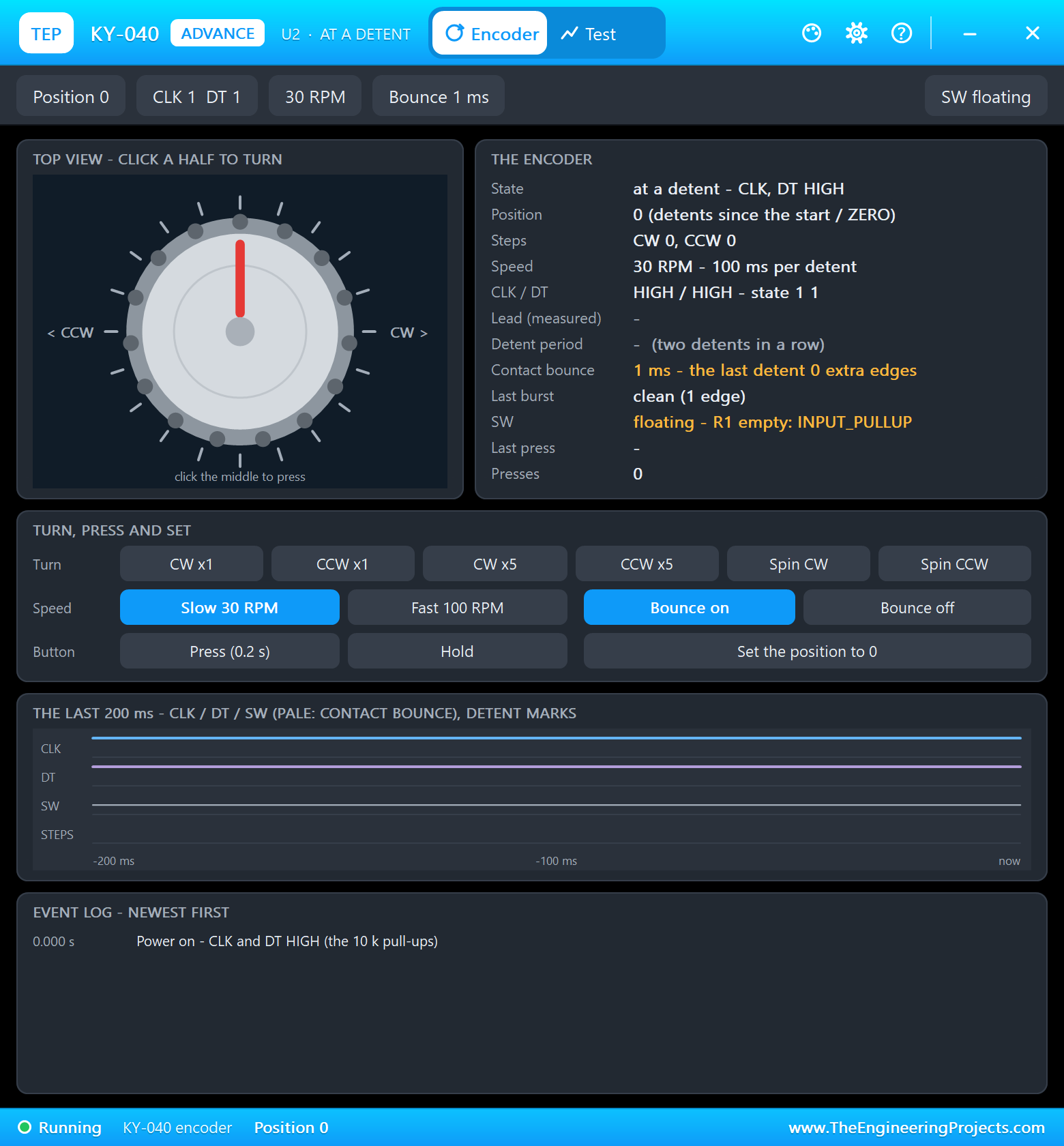
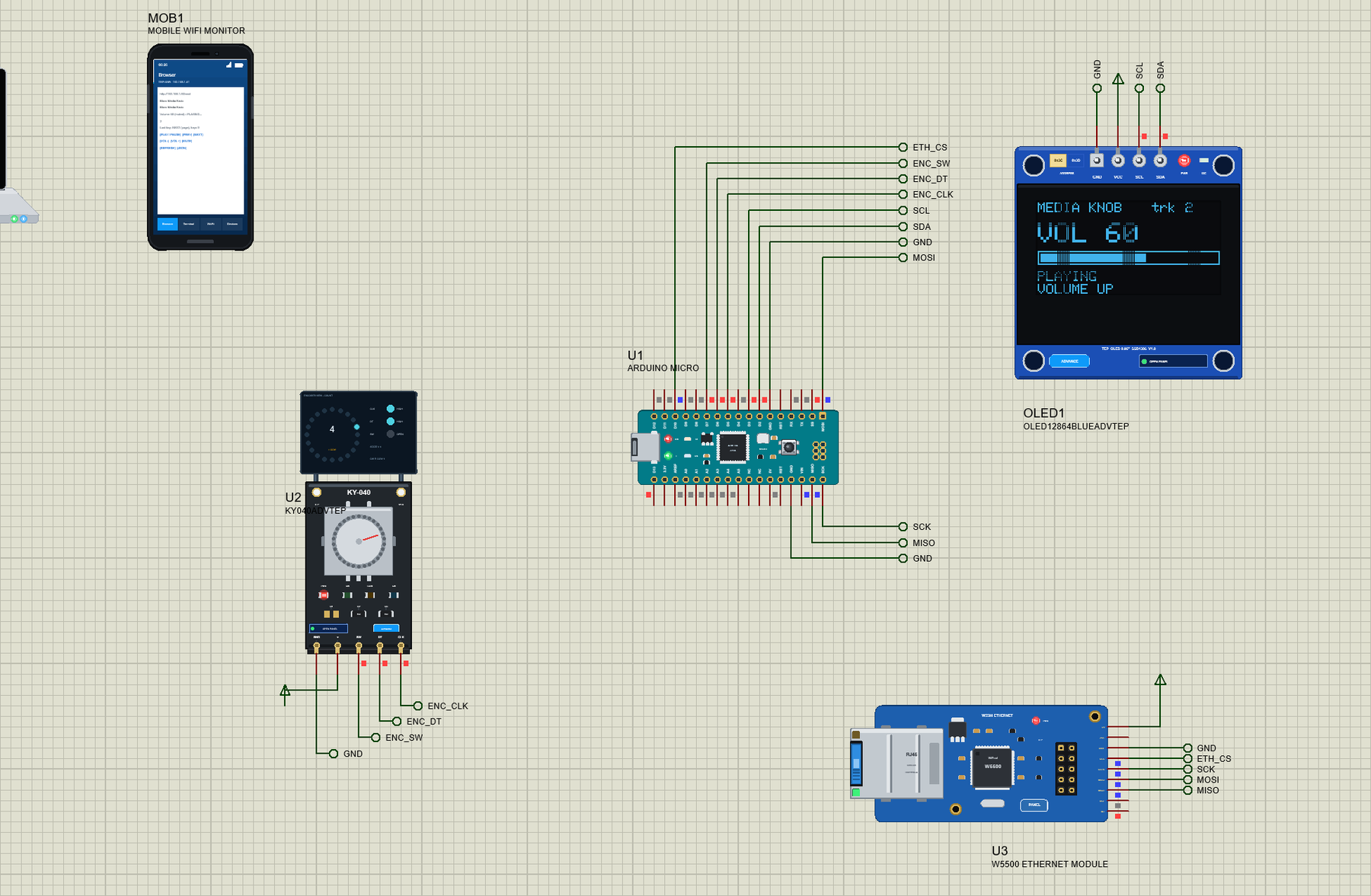
Open Micro-Media-Knob.pdsprj. U1 is the Micro running Micro_Media_Knob.hex. U2 is the KY-040 from our Rotary Encoder Library for Proteus, OLED1 the 0.96" SSD1306 from our OLED SSD1306 Library for Proteus - both the Advance versions - and U3 the W5500 from our W5500 Ethernet Module Library for Proteus at the fixed address 192.168.1.90. PC1 is the Laptop WiFi Monitor and MOB1 the Mobile WiFi Monitor.
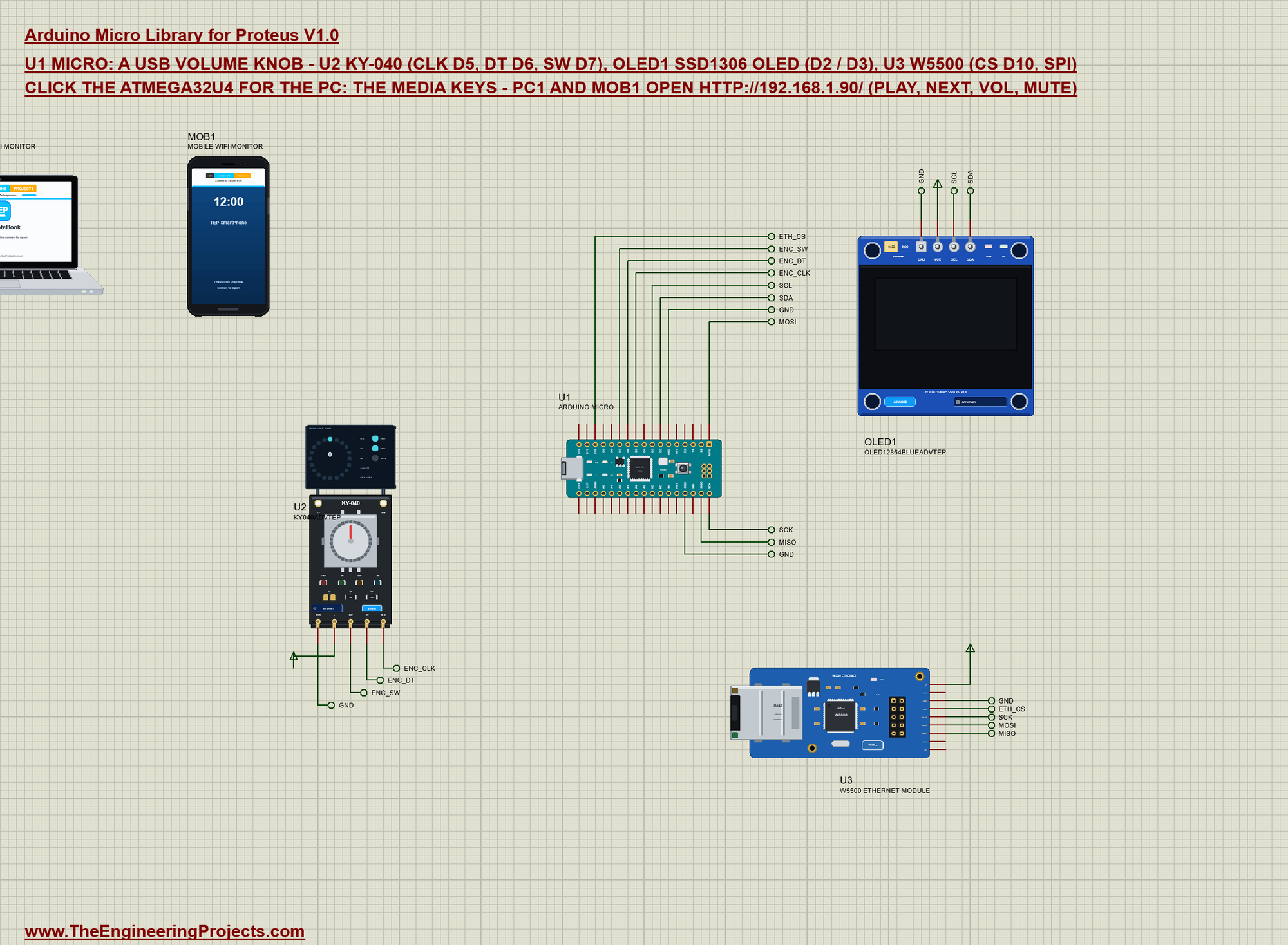
| Part | Pins | Micro pins | Notes |
|---|---|---|---|
| KY-040 (U2) | CLK / DT | D5 / D6 | an interrupt on every edge of both |
| SW | D7 | INPUT_PULLUP: LOW while pressed | |
| SSD1306 OLED (OLED1) | SDA / SCL | D2 / D3 | I2C address 0x3C |
| W5500 (U3) | SCS / SCLK / MOSI / MISO | D10 / SCK / MOSI / MISO | Ethernet.init(10), 192.168.1.90 |
| all three | VCC / GND | power terminal / GND | their models want a digital supply |
The modules get their supply from power terminals: their models read VCC as a digital level, which the board's 5V (an analog source in Proteus) does not give them. On a real board all three sit on the Micro's 5V.
Reading the KY-040
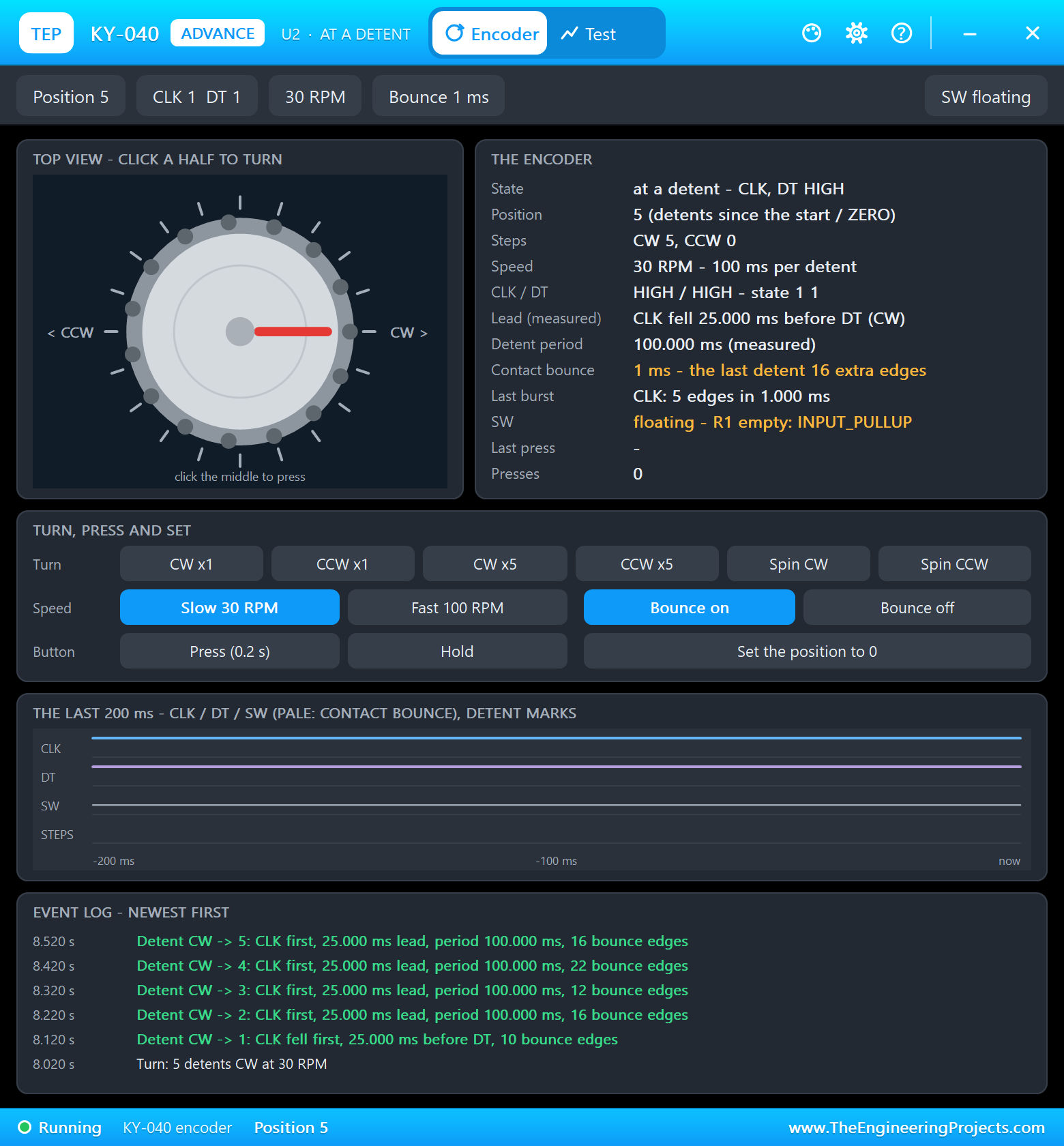
A rotary encoder gives two square waves a quarter-step apart. Their order says the direction, and each click of the knob (a detent) is a full cycle. The contacts bounce, so the sketch follows every edge of CLK and DT through a table of the valid transitions - a bounce steps back and forth and cancels out - and counts a click only when the knob is back at rest:
const int8_t QUAD[16] = {0, -1, 1, 0, 1, 0, 0, -1, -1, 0, 0, 1, 0, 1, -1, 0};
void onEdge() {
  const uint8_t now = (digitalRead(ENC_CLK) << 1) | digitalRead(ENC_DT);
  quarter += QUAD[(ab << 2) | now];
  ab = now;
  if (now == 3) {
    if (quarter >= 2) clicks++; else if (quarter <= -2) clicks--;
    quarter = 0;
  }
}
The knob's button tells a short press from a long one by the time between the press and the release:
  const bool sw = digitalRead(ENC_SW) == LOW;              // the knob's button: short = PLAY / PAUSE, long = MUTE
  if (sw && !swWas) swDown = millis();
  if (!sw && swWas && millis() - swDown > 30) command(millis() - swDown >= LONG_PRESS ? "MUTE" : "PLAY", "knob");
  swWas = sw;
One Name for Every Key
The knob, the page and the Serial Monitor all go through one function, so every way in sends exactly the same key:
bool command(const char *c, const char *from) {            // one name for the knob, the page and the monitor
  if (!strcasecmp_P(c, PSTR("UP"))) media(MEDIA_VOLUME_UP, "VOLUME UP", from);
  else if (!strcasecmp_P(c, PSTR("DOWN"))) media(MEDIA_VOLUME_DOWN, "VOLUME DOWN", from);
  else if (!strcasecmp_P(c, PSTR("PLAY"))) media(MEDIA_PLAY_PAUSE, "PLAY / PAUSE", from);
  else if (!strcasecmp_P(c, PSTR("NEXT"))) media(MEDIA_NEXT, "NEXT", from);
  else if (!strcasecmp_P(c, PSTR("PREV"))) media(MEDIA_PREVIOUS, "PREVIOUS", from);
  else if (!strcasecmp_P(c, PSTR("MUTE"))) media(MEDIA_VOLUME_MUTE, "MUTE", from);
  else return false;
  return true;
}
The Page
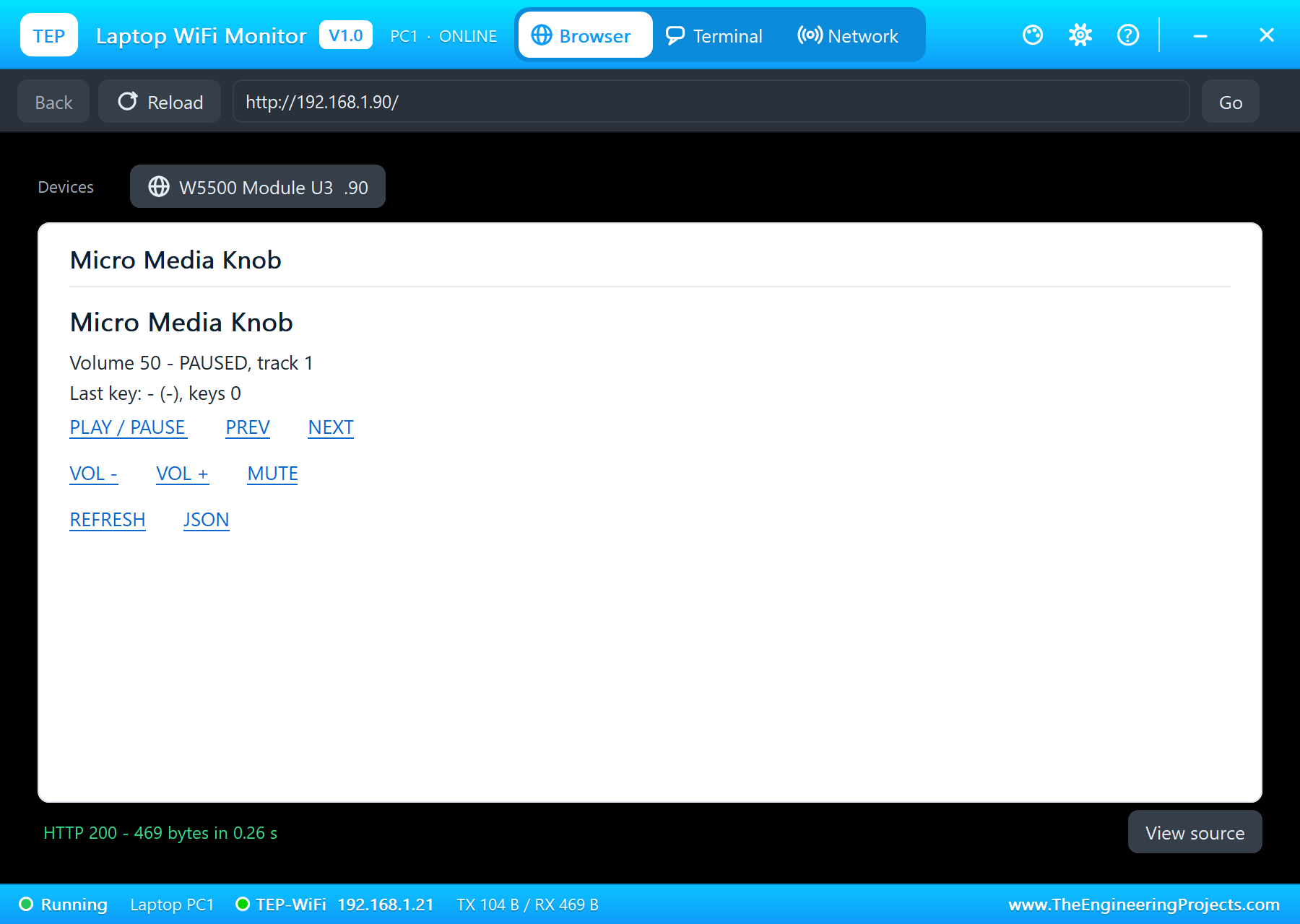
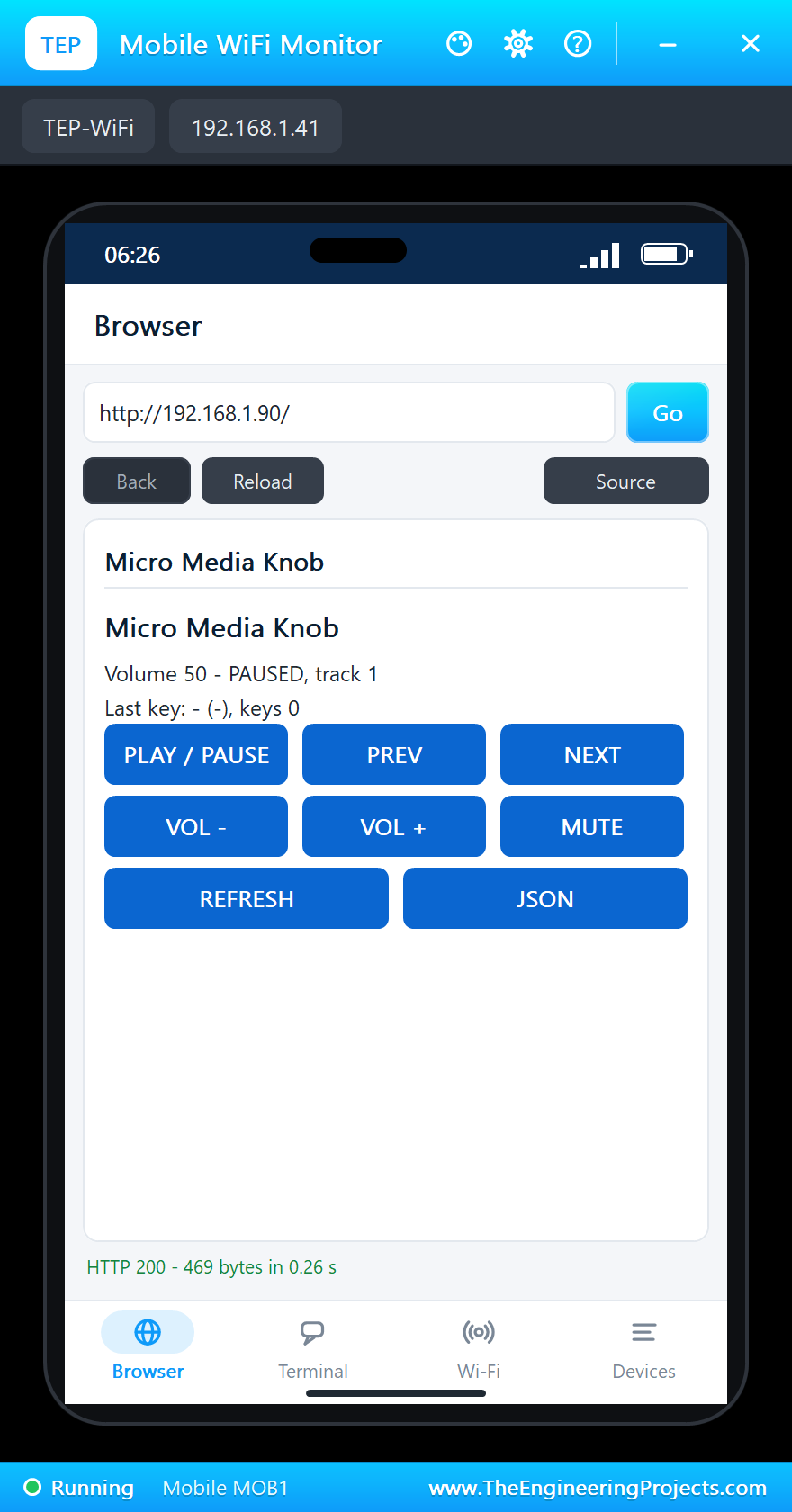
The W5500 module does the network in hardware; the sketch only starts it with a fixed address and answers requests. The page has PLAY / PAUSE, PREV, NEXT, VOL -, VOL + and MUTE, and /json gives the state to a program:
  Ethernet.init(ETH_CS);
  Ethernet.begin(mac, ip, dnsServer, gateway, subnet);
Run the Demo
Press Run. The PC window opens with USB HID: media keys - the sketch has called Consumer.begin() - the W5500's link comes up and the monitor prints the address:
Micro Media Knob - The Engineering Projects
Link: ON
Media knob page: http://192.168.1.90/
Volume 50, paused, track 1, keys 0, page http://192.168.1.90/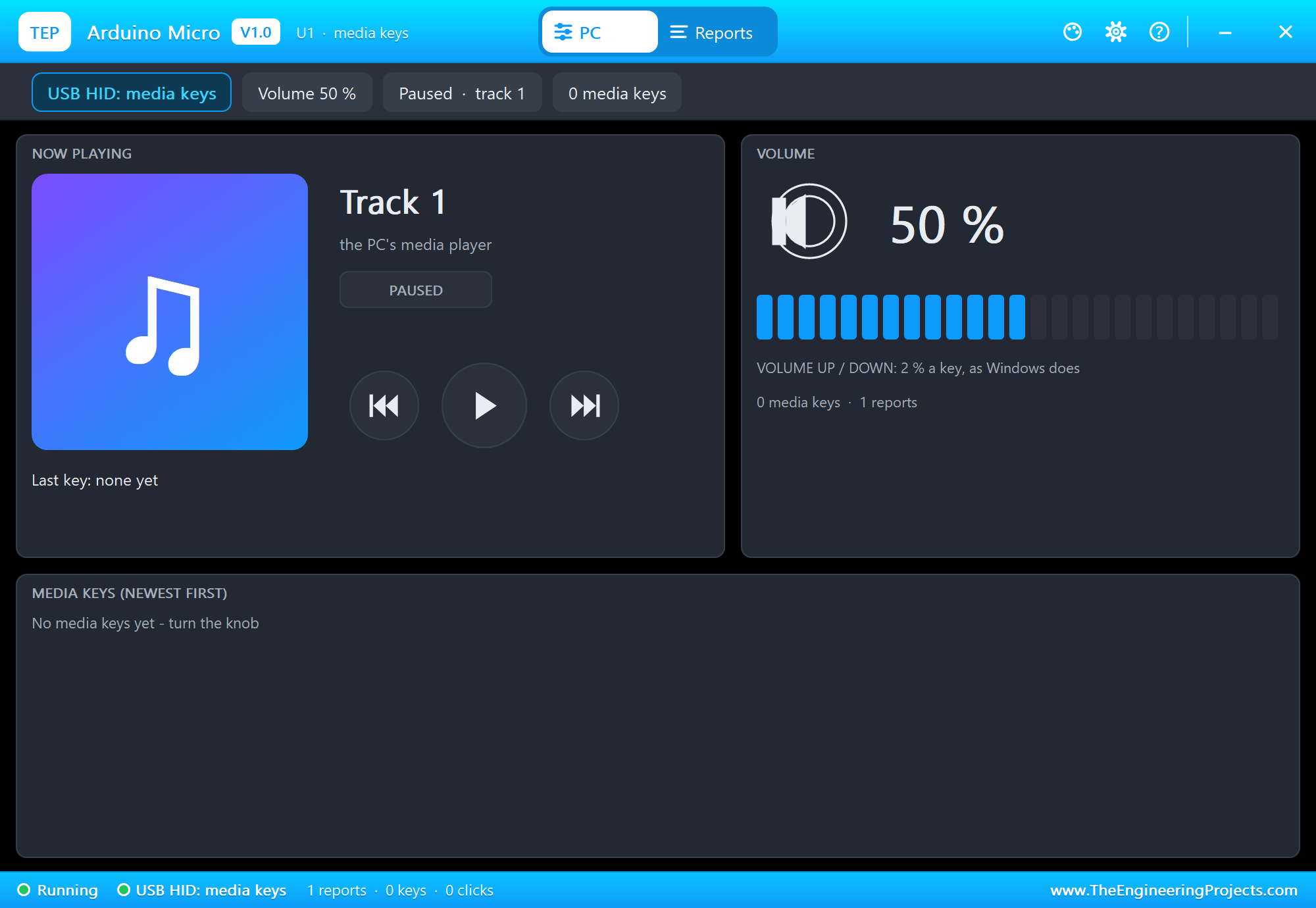
Turn the Knob
Click CW x5 on the KY-040's pop-up: five clicks to the right, five VOLUME UP keys. Then Press (a short press: PLAY / PAUSE), CCW x1 (VOLUME DOWN) and Hold for a second (a long press: MUTE):
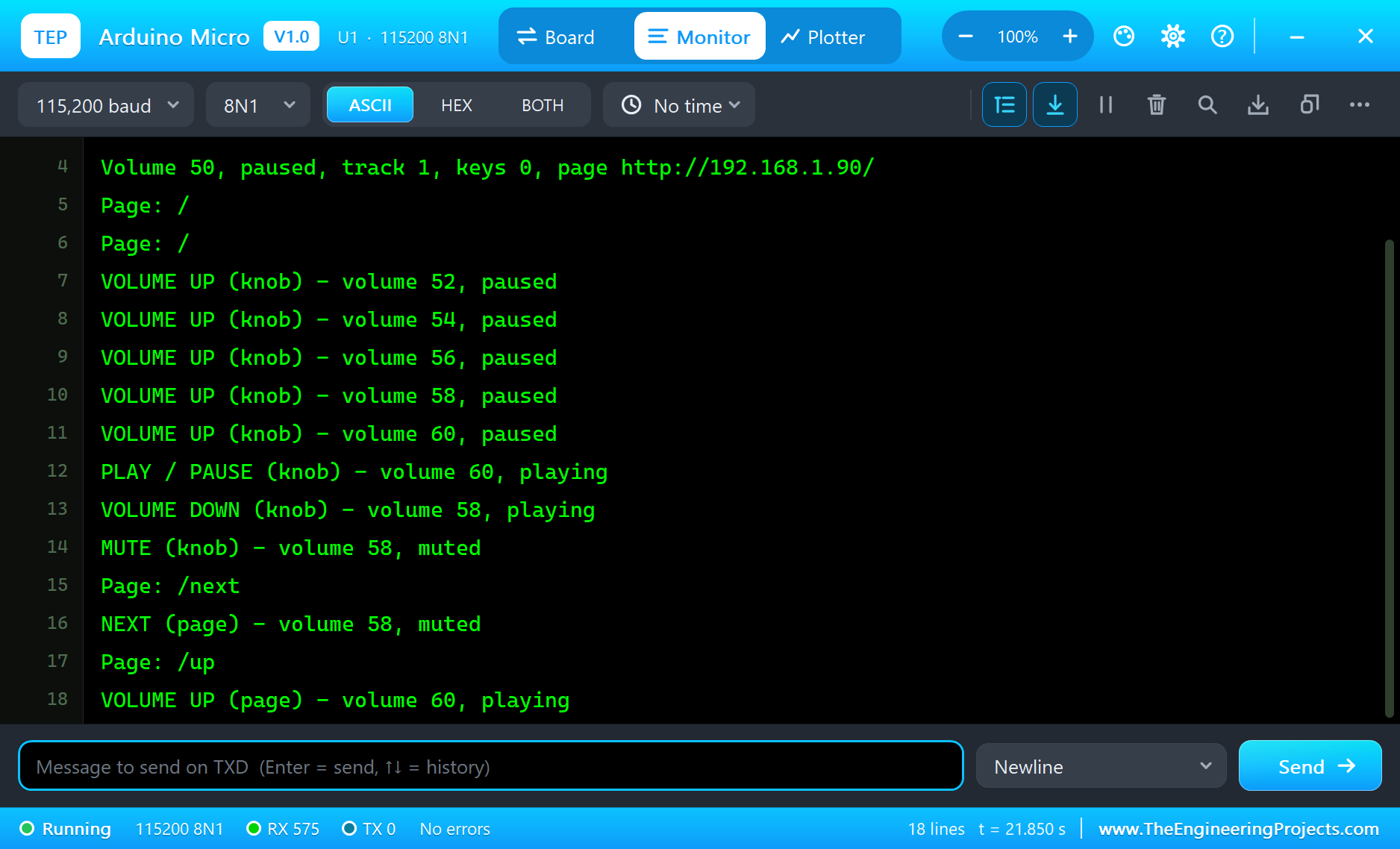
VOLUME UP (knob) - volume 52, paused
VOLUME UP (knob) - volume 54, paused
VOLUME UP (knob) - volume 56, paused
VOLUME UP (knob) - volume 58, paused
VOLUME UP (knob) - volume 60, paused
PLAY / PAUSE (knob) - volume 60, playing
VOLUME DOWN (knob) - volume 58, playing
MUTE (knob) - volume 58, muted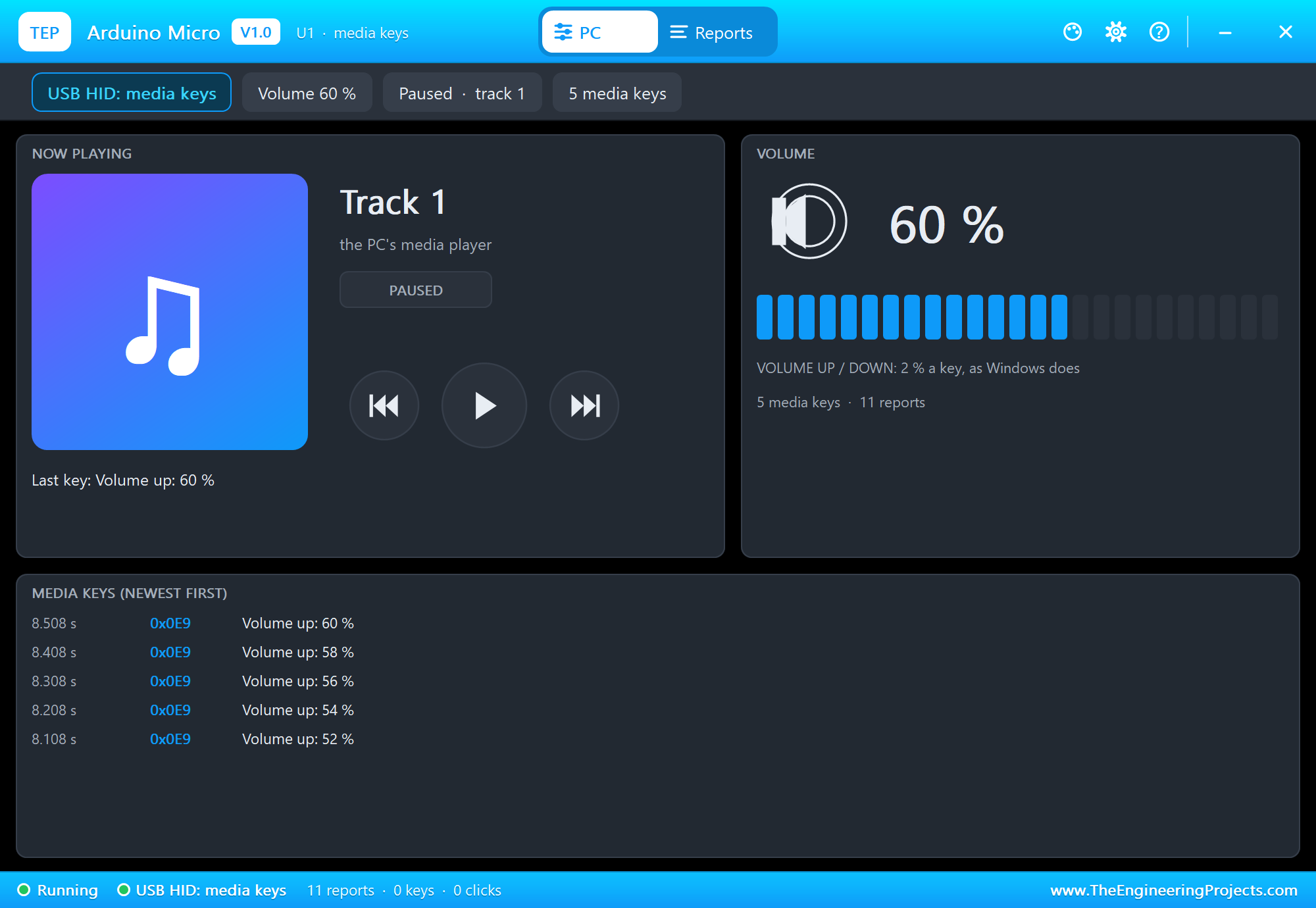
The Phone as a Remote
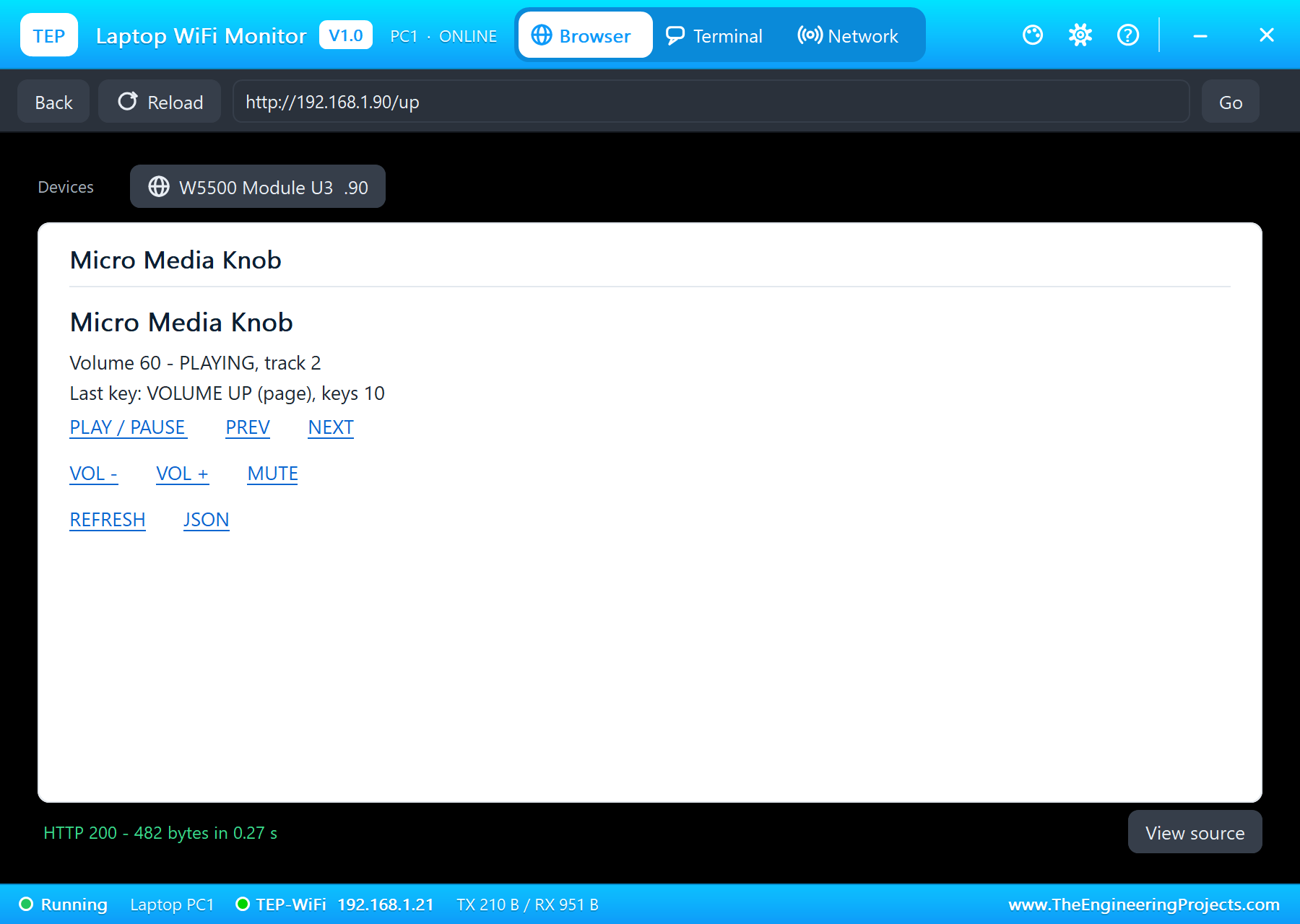
Tap NEXT on the phone and VOL + on the laptop. The W5500 passes each request to the sketch, which sends the same key the knob would:
Page: /next
NEXT (page) - volume 58, muted
Page: /up
VOLUME UP (page) - volume 60, playing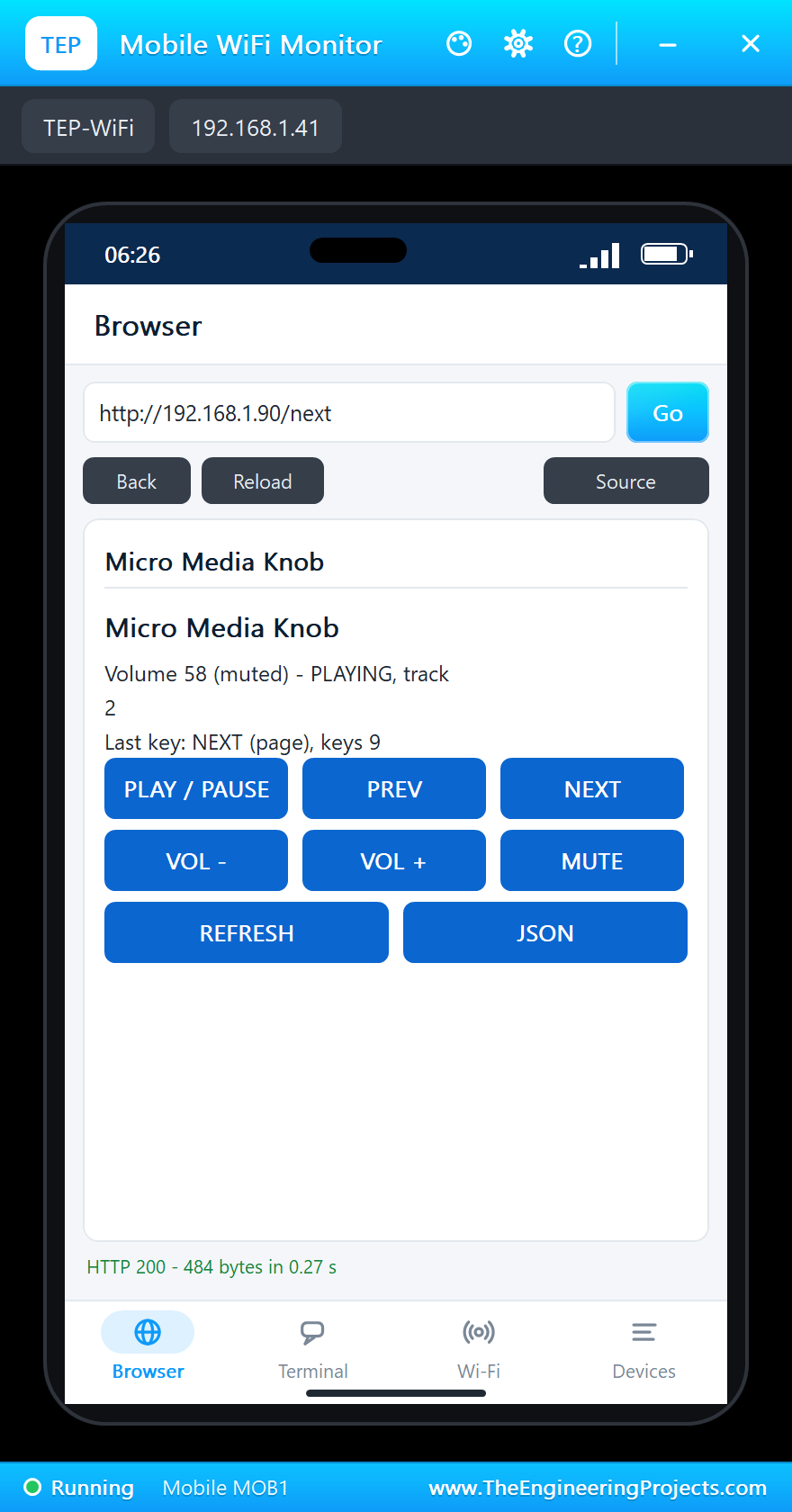
The Reports tab shows the traffic behind it - every key is a report with its usage and a report with none:
The built-in serial monitor, in the look of our TEP Serial Monitor Advance for Proteus, keeps every key:
Try It Yourself
- Type
NEXTorMUTEin the serial monitor: the same keys from the keyboard of your PC. - Click Spin CW on the KY-040's pop-up and watch the volume run to 100 %.
- Turn Bounce off and then on again - the count stays right either way.
- Open
http://192.168.1.90/jsonon the laptop for the state as JSON.
Ideas to Extend the Knob
- A second encoder for the brightness: CONSUMER_BRIGHTNESS_UP and DOWN.
- A button that opens the calculator or the browser's home page (CONSUMER_CALCULATOR, CONSUMER_BROWSER_HOME).
- Hold the knob and turn it to skip tracks instead of changing the volume.
- Show the track time on the OLED and send PLAY at a set hour - an alarm clock that plays music.
Your Own Sketches
Write the sketch in the Arduino IDE with the board Arduino Micro (TEP Proteus), use Sketch > Export Compiled Binary and set the board's PROGRAM property to the .hex. For a real Micro select "Arduino Micro" and install NicoHood's HID-Project from the Library Manager - the same sketch, and the computer's volume follows the knob.
Things to Know Before Using a Real Micro
- The real volume: a PC starts at its own level and the knob only says "up" or "down" - it cannot read the volume back, so a display on the knob shows what the knob has sent, not what the PC is set to.
- Uploading: the USB restarts when the board resets; if an upload cannot find the port, press RESET just as the IDE starts uploading.
- 5 V: the Micro is a 5 V board; a 3.3 V module needs a level shifter on its inputs.
- Breadboards: the 0.6 inch row spacing leaves one free hole on each side - enough for jumper wires.
Properties of the Arduino Micro
| Property | What it does |
|---|---|
| PROGRAM | the sketch: a .hex from TEP Boards for Proteus (board "Arduino Micro") |
| MONITOR, BAUD, AUTOOPEN | the built-in serial monitor: on, its baud rate (115200), open at Run |
The PC window has its own "Open at Run" switch on its Settings tab, with the theme and the text size.
Troubleshooting
- The PC window says "waiting for Keyboard.begin()": the sketch has not called Consumer.begin(), Keyboard.begin() or Mouse.begin().
- The knob counts double or misses clicks: read CLK and DT on every edge and count at the detent, as the demo does.
- No page: the W5500's 5V needs the power terminal; SCS on D10 and Ethernet.init(10).
- Blank OLED: SDA on D2, SCL on D3, address 0x3C, its VCC on the power terminal.
- Closed a window? The micro-USB opens the monitor again, the ATmega32U4 the PC window.
Limitations of the Simulation
- Your sketch gets 8 KB of RAM in the simulation (the real ATmega32U4 has 2.5 KB).
- The USB controller, its descriptors and Timer4 are not modelled: write Arduino code, not registers.
- The PC window counts the media keys from 50 %: a real PC starts at its own volume.
- The TX and RX LEDs are drawn, not driven; the extra analog inputs A6 - A11 are not modelled.
- Arduino and Micro are trademarks of Arduino S.r.l.; this library is not made or endorsed by Arduino, Microchip, NicoHood or Labcenter.
- Tested in Proteus 8.5 in October 2026 (the demo as shipped, about 22 s of simulation in about 3.5 minutes on our PC with the three pop-ups, the PC window, the monitor and both tools open). Proteus 7 is not supported.
So, that was all about the Arduino Micro Library for Proteus. I hope it helps you build and test your own USB knobs, macro pads and controllers before the board goes into a box - and see exactly what each key sends. If you have any questions, ask in the comments and I will help you out. Till the next tutorial, take care and have fun!

Comments
0