


LoRa and RF Libraries for Proteus: Long-Range Wireless Simulation with Arduino


Hello friends, I hope you all are doing great. Today, I am going to share a list of LoRa and RF Libraries for Proteus. LoRa radios can send a small message over several kilometres with very little power, so they are used in smart farms, water tank monitors, weather stations, city sensors and every project where the nodes are far away from each other. Long-range RF modules such as the RFM69HCW and the nRF24L01 PA LNA cover the middle ground, with more speed but less range.
Testing long range on real hardware means carrying one radio away from the other and hoping your code does the right thing when the signal gets weak. Our LoRa libraries bring that test to your desk. Every module has a control panel and eight distance buttons from 10 m to 20 km, and a prediction line tells you whether your settings can cover the selected distance. You can change the spreading factor, the bandwidth and the power and see the effect on the very next packet.
In this list, our three LoRa libraries come first: SX1262, SX1278 (Ra-02) and RFM95W. After them, you will find our long-range RF libraries and a short guide to the LoRa settings that decide the range. If you are new to Proteus libraries, read How to Add New Library in Proteus 8 first. So, let's get started with the LoRa and RF Libraries for Proteus:
LoRa and Long-Range RF Libraries at a Glance
Here is a quick comparison of the long-range radios in this list. The distances are the ranges of the distance buttons in each simulation.
| Library | Type | Band in the example | Distance buttons | Arduino board |
|---|---|---|---|---|
| SX1262 | LoRa | 868 MHz | 10 m to 20 km | Arduino Mega 2560 with RadioLib |
| SX1278 (Ra-02) | LoRa | 433 MHz | 10 m to 20 km | Arduino Uno |
| RFM95W | LoRa | 868 MHz | 10 m to 20 km | Arduino Uno |
| RFM69HCW | FSK | 433 MHz | 10 m to 10 km | Arduino Uno |
| CC1101 | FSK | 433.92 MHz | 10 m to 5 km | Arduino Uno |
| nRF24L01 PA LNA | 2.4 GHz | 2.4 GHz | 1 m to 2 km | Arduino Uno |
| HC-12 V1.1 | 433 MHz serial | 433 MHz | Distance buttons with the predicted level | Arduino UNO |
How LoRa Reaches a Long Range
Before we look at the libraries, let's understand the trick behind LoRa. LoRa stretches every symbol into a long sweep over the whole bandwidth. The receiver adds up the energy of the complete sweep, so it can decode a signal that lies below the noise. The range is paid for with time, because a slow setting keeps the packet on the air for much longer. Three settings control this exchange:
- Spreading factor (SF): each step up doubles the length of a symbol, and the receiver can work with a signal that is about 2.5 dB weaker.
- Bandwidth (BW): the width of the signal. Half the bandwidth means 3 dB less noise, but twice the time.
- Coding rate (CR): the amount of error correction. A rate of 4/5 sends five bits for every four data bits.
You will also see these terms on the control panels and the terminals: RSSI is the strength of the received signal in dBm, SNR is the signal-to-noise ratio (a negative SNR means the signal is weaker than the noise, which LoRa can still decode), and time on air is how long one packet needs for its transmission. Our models calculate the time on air with the formula of the chip manufacturer, so you can see why a long-range setting sends fewer packets.
1. SX1262 LoRa Proteus Library
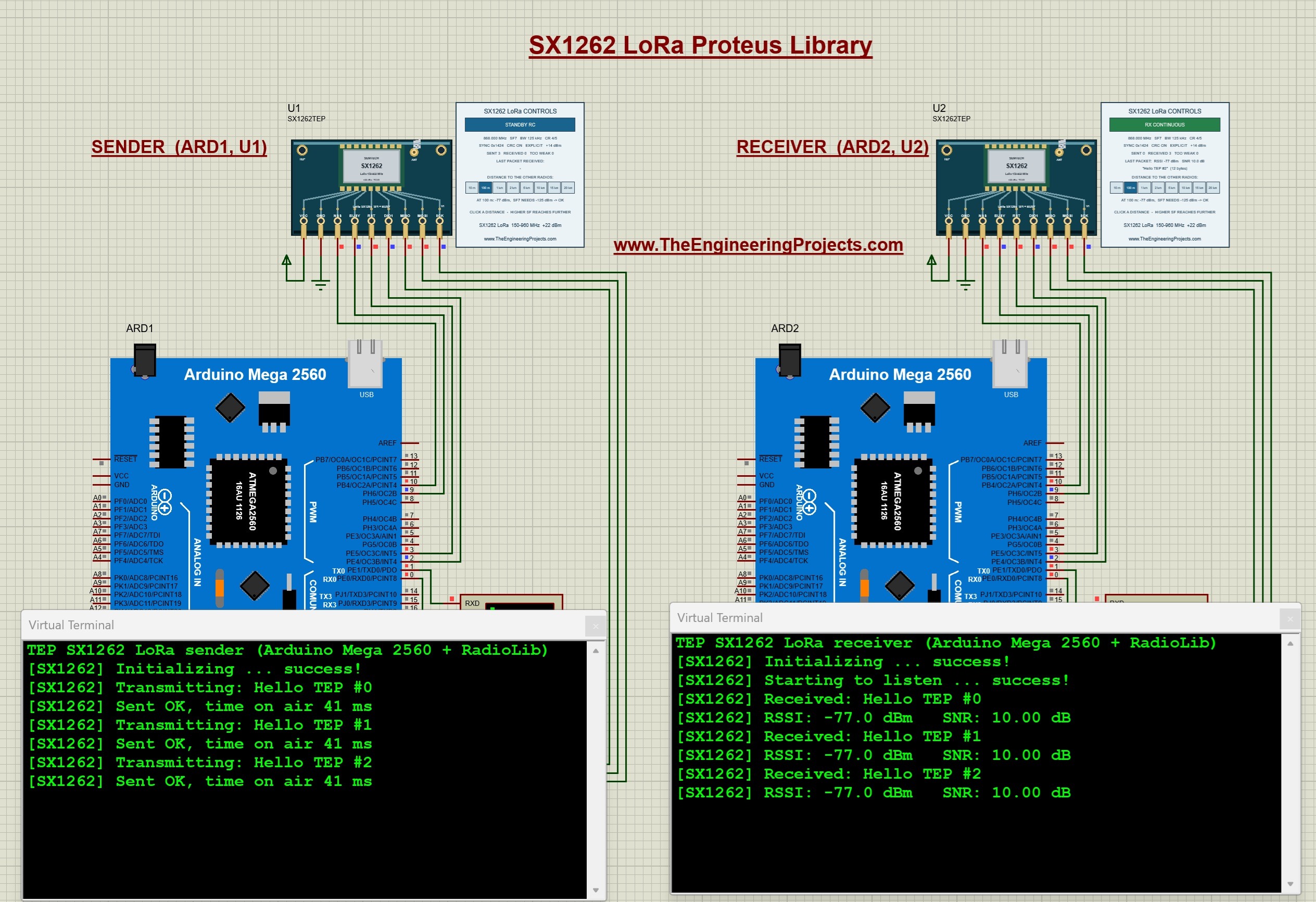
The SX1262 is the newer LoRa chip from Semtech. It covers 150 to 960 MHz without a gap, so one chip serves the 433, 868 and 915 MHz bands, and its output power goes up to +22 dBm. Unlike the older SX1276 and SX1278, it is controlled through commands instead of registers. While it works on a command, its BUSY pin is high and the driver waits, and every sent or received packet is reported on its DIO1 interrupt pin.
Our model behaves the same way, so the unmodified RadioLib driver works with it. The RadioLib SX1262 driver needs about 44 KB of program memory, which doesn't fit into the 32 KB of an Arduino Uno, so our example uses two Arduino Mega 2560 boards sending messages at 868 MHz. The control panel shows the live mode, the settings, the counters and the last packet, and you can test how the distance, the spreading factor, the bandwidth and the output power decide whether a packet arrives.
Read the complete tutorial: SX1262 LoRa Proteus Library
2. SX1278 LoRa (Ra-02) Proteus Library
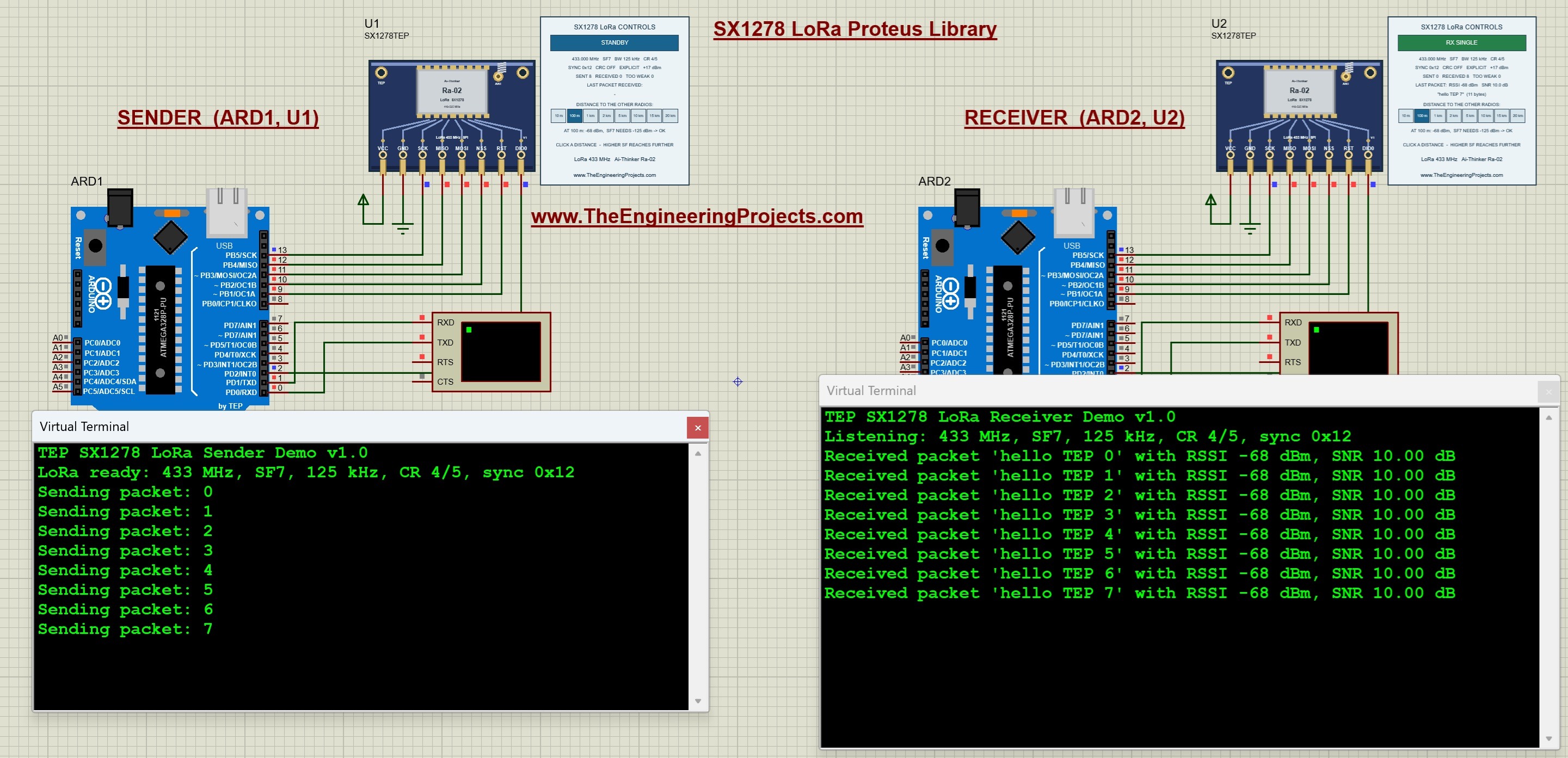
The SX1278 is the LoRa chip of the popular Ai-Thinker Ra-02 module, and our Proteus component shows that module. The chip can be tuned from 137 to 525 MHz, its sensitivity goes down to -148 dBm, and its maximum link budget is 168 dB. The Ra-02 itself is normally used at 433 MHz and transmits up to 18 dBm.
In our simulation, two Arduino Uno boards exchange messages at 433 MHz, and the receiver prints every message with its RSSI and SNR. Version 1.1 made the model more realistic: each chip works only inside its own frequency range (the panel shows OUT OF BAND outside it), and the path loss now depends on the frequency, so a signal at 868 MHz loses 6 dB more than a signal at 433 MHz. The Arduino talks to the model through real SPI commands and registers, so the unmodified Arduino driver works with it.
Read the complete tutorial: SX1278 LoRa Proteus Library
3. RFM95W LoRa Proteus Library
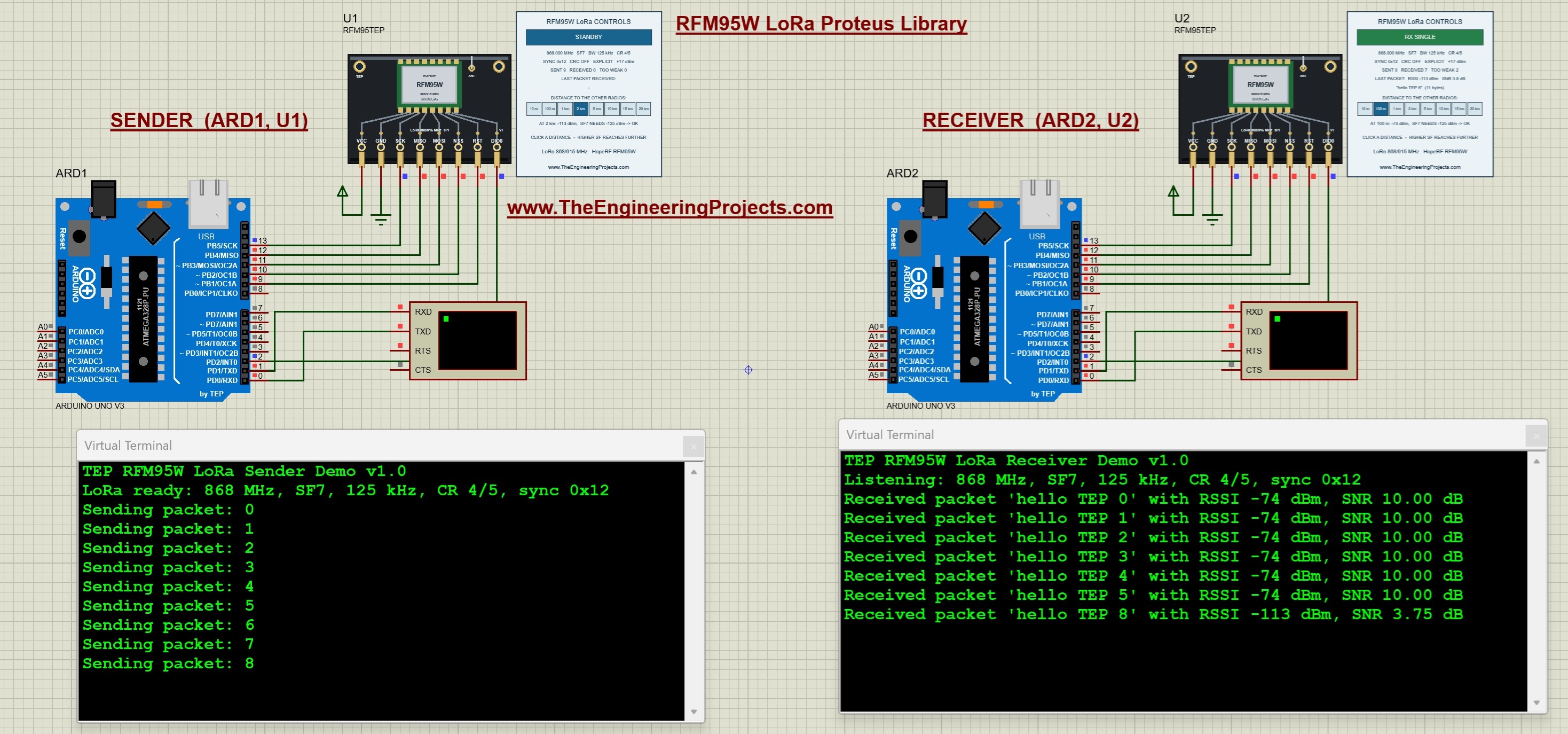
The RFM95W from HopeRF is a LoRa module for the 868 and 915 MHz bands, with an output power of up to +20 dBm (100 mW), a sensitivity down to -148 dBm and spreading factors from 6 to 12. It is the radio of many LoRaWAN nodes and Feather-style boards.
Our library runs an 868 MHz link between two Arduino Uno boards. The receiver prints every message with its RSSI and SNR, and the tutorial shows how the spreading factor, the bandwidth and the output power change the range of the link, with the time on air calculated for each setting.
Read the complete tutorial: RFM95W LoRa Proteus Library
One Model for Our Whole LoRa Family
Here is a detail that many students miss: all three LoRa modules use one model file, TEPSX1278.DLL. It keeps the name of our first LoRa module, and the device name tells the model which chip it has to be. Because they share the file, all LoRa modules in one design share one radio band, so an SX1262, an SX1278 and an RFM95W can exchange packets in the same simulation, as long as their settings match. The SX1262 package carries version 1.2 of the file, the first one that knows the SX1262, and it still runs the SX1278 and the RFM95W. So, if you install several LoRa libraries, keep the newest DLL and don't copy an older one over it.
Other Long-Range RF Libraries for Proteus
If your project needs more data than LoRa can send, these RF libraries give you a shorter range with a higher speed. All of them also have distance buttons in the simulation.
RFM69HCW Proteus Library
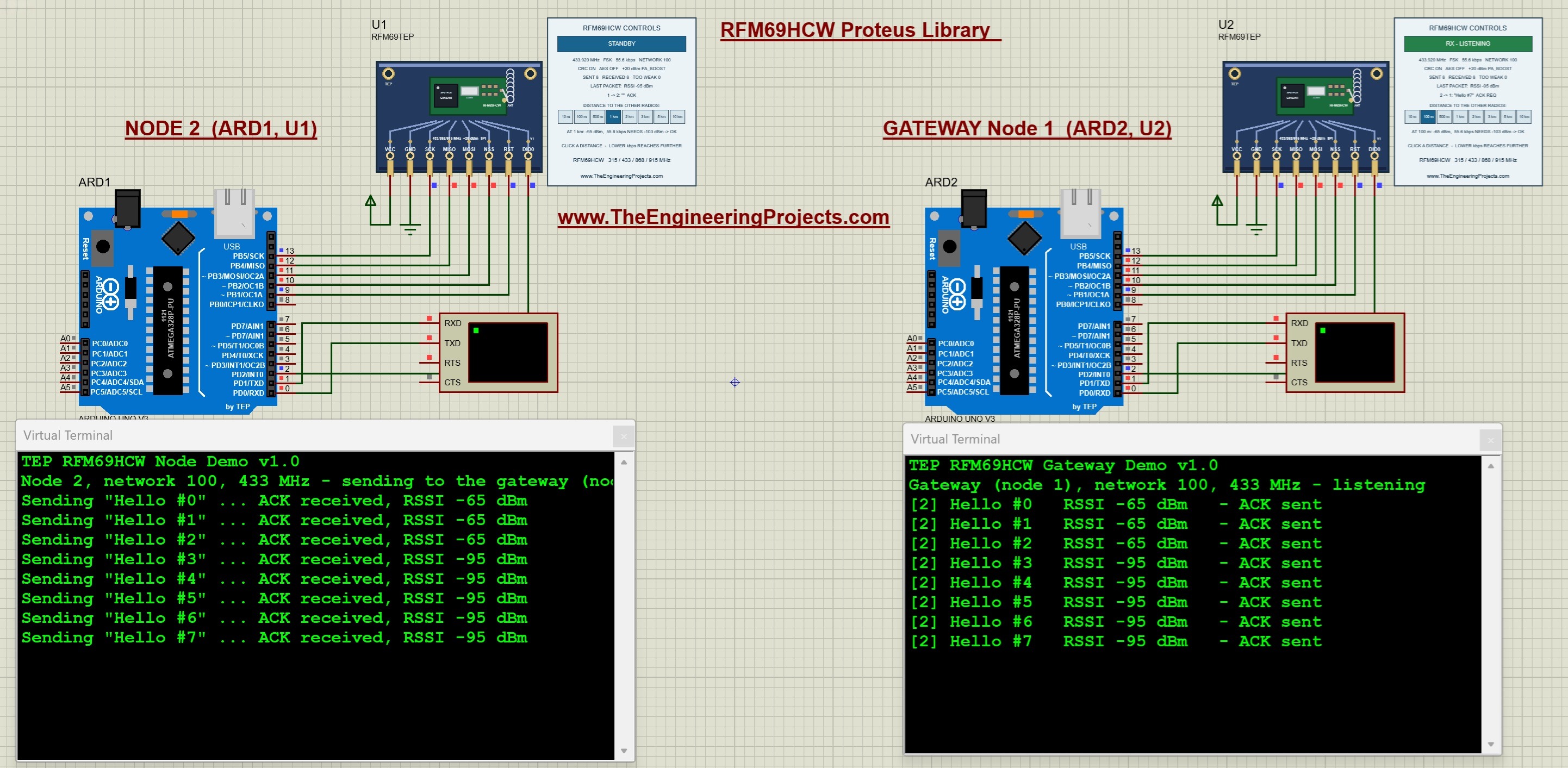
The RFM69HCW is an FSK radio with up to +20 dBm and a sensitivity down to -120 dBm at 1.2 kbps. Our example has a node and a gateway at 433 MHz with acknowledgements and RSSI, and its distance buttons go from 10 m to 10 km. Read the complete tutorial: RFM69HCW Proteus Library
CC1101 Proteus Library
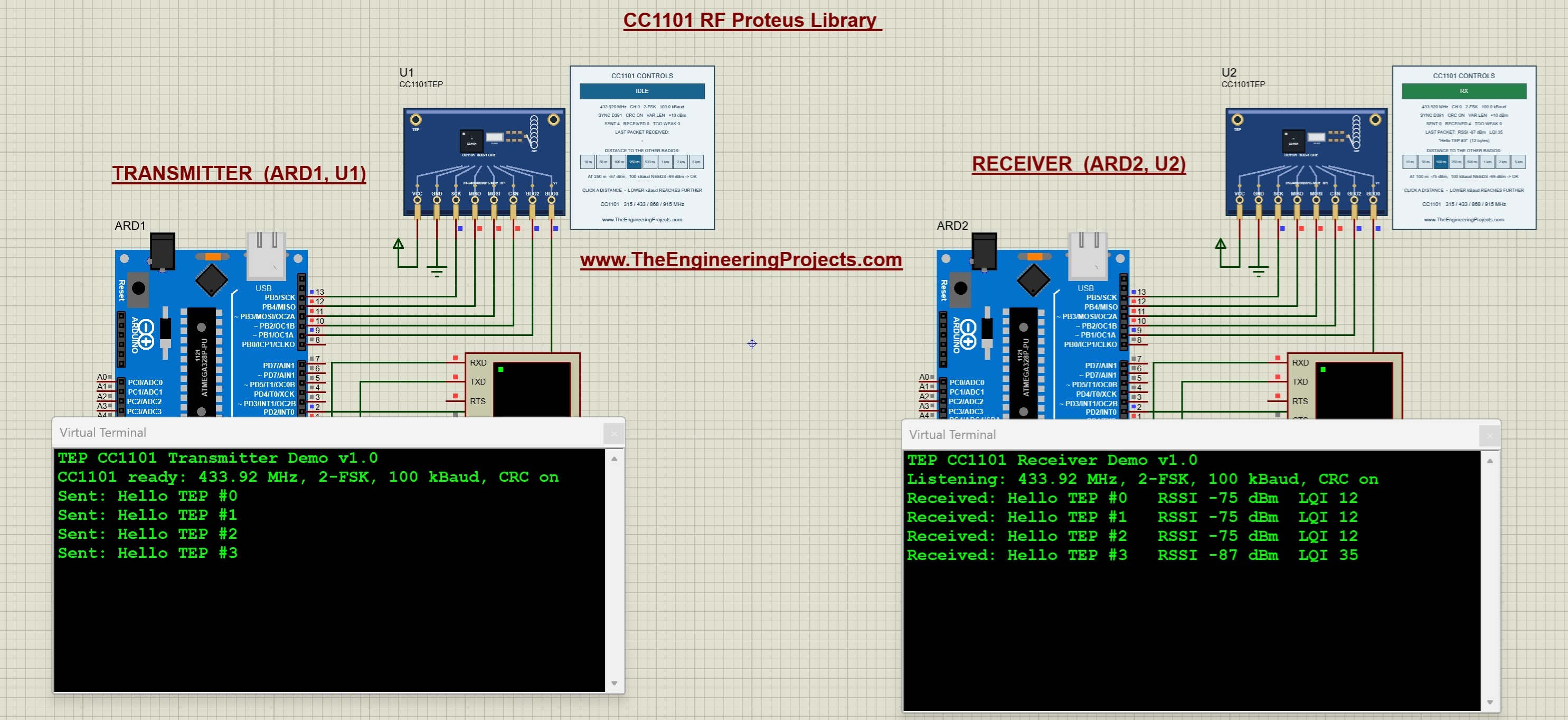
The CC1101 works in the sub-GHz bands with a data rate from 0.6 to 600 kbps. Two Arduino Uno boards send messages at 433.92 MHz, the receiver reports RSSI and LQI, and the distance buttons go from 10 m to 5 km. Read the complete tutorial: CC1101 Proteus Library
nRF24L01 PA LNA Proteus Library
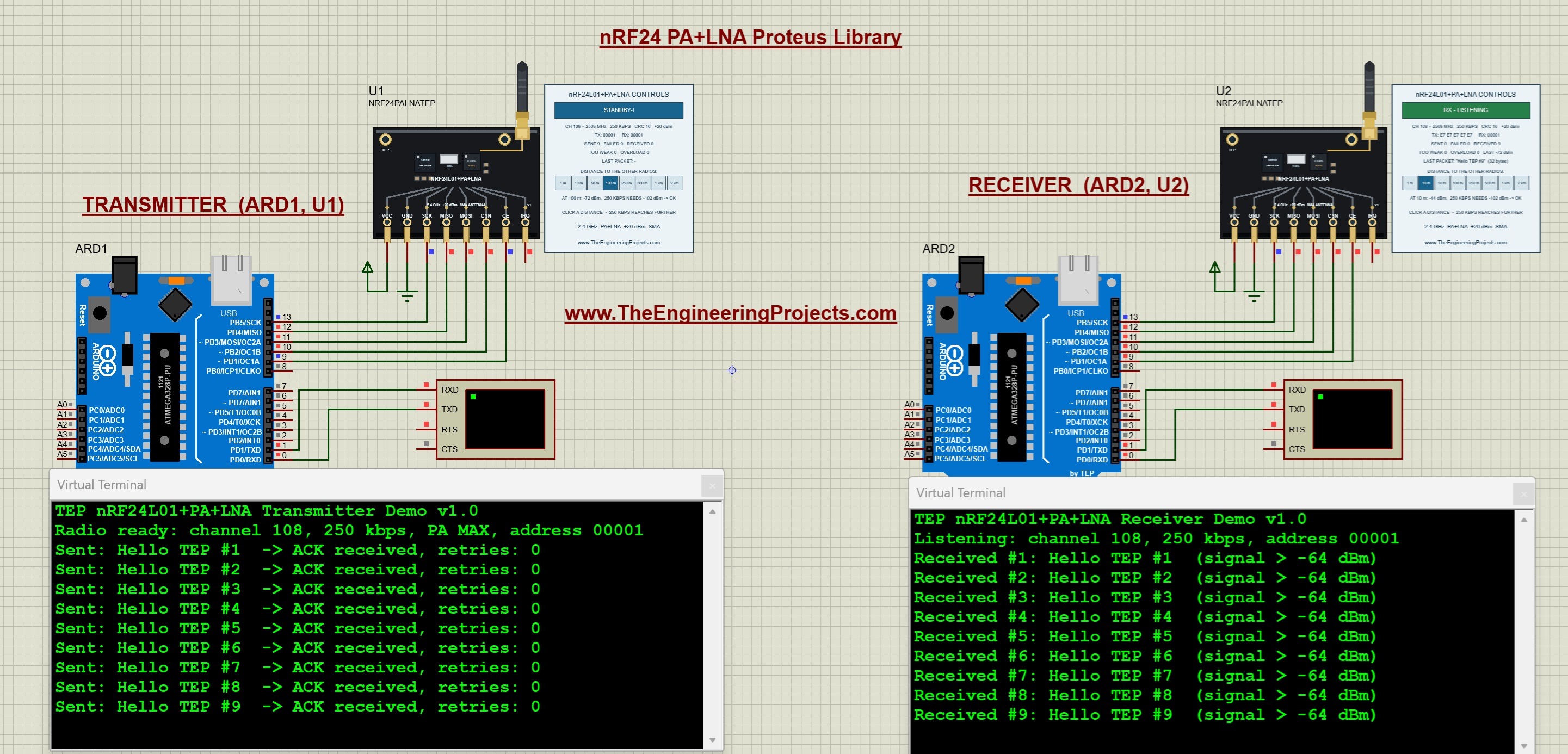
The nRF24L01 PA LNA adds a power amplifier, a low-noise amplifier and an external antenna to the 2.4 GHz nRF24L01. Its distance buttons go from 1 m to 2 km, and the model even shows how two of these modules fail when they are too close to each other. Read the complete tutorial: nRF24L01 PA LNA Proteus Library
HC-12 Library for Proteus V1.1
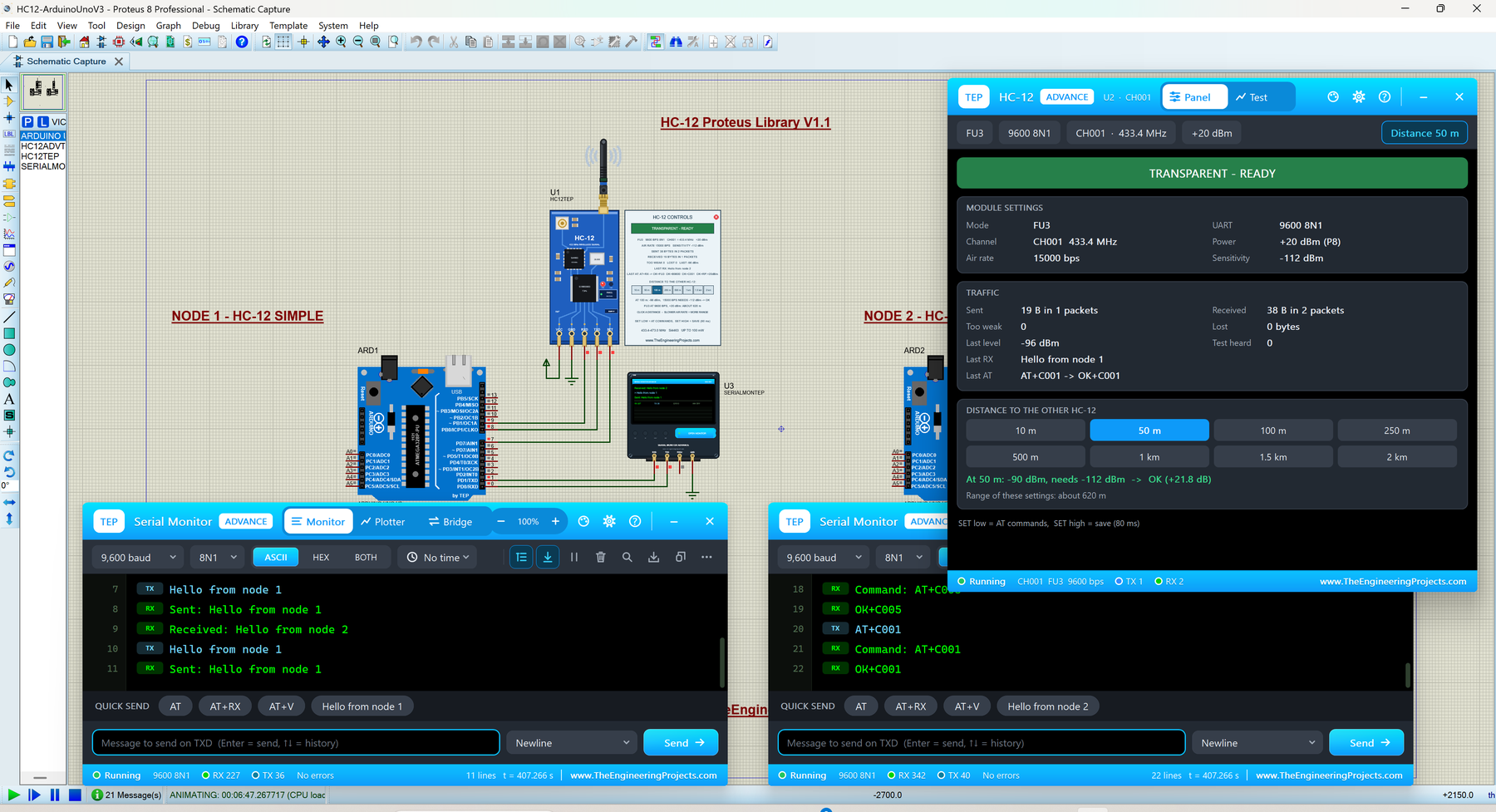
The HC-12 is the easiest long-range radio of all, because it is just a serial port in the air. Its FU4 mode slows the air rate down to 500 bps for the longest range. The Advance device adds a link test, a range sweep and a radio scan. Read the complete tutorial: HC-12 Library for Proteus V1.1
A Word About the Distances
Please keep in mind that these are functional models with a simple range calculation. They don't simulate antennas, buildings, hills, reflections or interference, so the distance buttons can't predict the exact range of your real link. What they show you is how power, data rate, spreading factor and distance are related, and how your code behaves when the signal gets weak or a packet is lost. That is the part that usually goes wrong in a real project.
LoRa or RF: Which One for Your Project?
- A few bytes every minute over kilometres: LoRa. Start with the SX1278 (Ra-02) on an Arduino Uno.
- The newest LoRa chip and RadioLib: the SX1262 on an Arduino Mega 2560.
- 868 / 915 MHz LoRa: the RFM95W.
- A sensor network with a gateway and acknowledgements: the RFM69HCW.
- More data at a shorter range: the nRF24L01 PA LNA or the CC1101.
- The simplest code: the HC-12, which needs no radio library at all.
All of these modules are also listed in the LoRa Modules and RF Modules sections of our Proteus Libraries tutorial series.
More Lists of Proteus Libraries
We have grouped our Proteus libraries into several lists, so you can quickly find the right ones for your project:
- 30 New Proteus Libraries for Engineering Students (2026)
- GSM Libraries for Proteus
- GPS Libraries for Proteus
- RF Module Libraries for Proteus
- Wi-Fi and Bluetooth Libraries for Proteus
- List of Wireless Modules for Proteus
- Top IoT Libraries for Proteus
- RFID and NFC Libraries for Proteus
- List of Embedded Sensors in Proteus
- I2C Sensor Libraries for Proteus
- Environmental Sensor Libraries for Proteus
- Motion and Distance Sensor Libraries for Proteus
- Smart Agriculture Sensor Libraries for Proteus
- Medical Sensor Libraries for Proteus
- Must-Have Proteus Libraries for Arduino Simulation
- Microcontroller Board Libraries for Proteus
Conclusion
So, that was all about the LoRa and RF Libraries for Proteus. I hope this list helps you choose the right long-range radio and test your settings on your PC before you carry a module across the city. If you have any questions or need a new LoRa module, please tell us in the comments or in the Proteus Libraries category of our forum. Till the next tutorial, take care and have fun!
Comments
0