


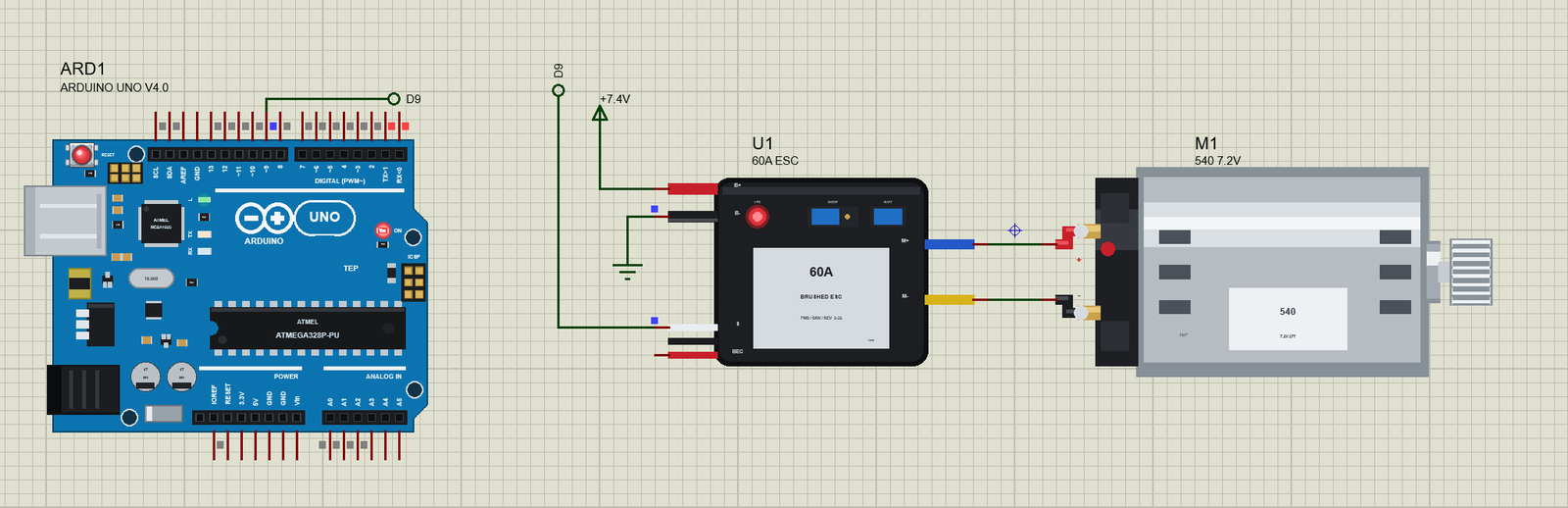
60A Brushed ESC Library for Proteus Simulation


Hello friends, I hope you all are doing great. Today, I am going to share the new 60A Brushed ESC Library for Proteus Simulation, the 35th library of our motor series. If you have searched for a Proteus simulation of an RC car ESC, this is the part that sits between the receiver and the motor in almost every brushed RC car: a small waterproof box that turns the throttle pulse from the radio into forward, brake and reverse for a 540 motor. Students and makers meet it whenever they build an RC car, a robot on a car chassis or an Arduino-driven vehicle, and it behaves in ways that surprise people the first time: it beeps, it waits for the neutral, and it brakes instead of reversing.
60A Brushed ESC Library for Proteus Simulation
Latest version: V1.0 (November 2026, this tutorial)
Helping Tools
- Serial Monitor Advance: a serial terminal window for the UART of your board
- Serial Monitor Expert: the serial monitor with extra debugging tools
- LCD Library for Proteus V3.0: 16x2, 20x4 and I2C LCDs to show your readings
Our library brings this ESC into your Proteus simulation at its true size, 36.5 x 32 mm, with its battery and motor leads, the receiver lead, the two jumpers and the red LED. The simulation model follows the maker's manual of the common 60 A brushed car ESC: the start-up beeps, the 3-second neutral calibration, the three running modes, the double-click reverse, the low-voltage, over-heat and signal-loss protections and the 6 V BEC. The pop-up shows the throttle pulse on its scale, the H-bridge with the switches that are on and the path of the current, and the state machine with the state the ESC is in. In the demo, an Arduino plays the receiver and drives our 540 RC motor in a 1/10 RC car: forward, full speed, brake, reverse, the double-click guard and the failsafe.
NOTICE: Our team has put a lot of effort into these small parts: the bodies, the animation and the pop-ups are all our own design, and you get them free. Your feedback is the fuel that keeps us going, so please tell us what you think in the comments below or in the Motor Driver board of our forum. And if our free libraries help you, you can buy us a coffee. So, let's get started with the 60A Brushed ESC Library for Proteus Simulation:
What is a Brushed ESC?
An ESC (electronic speed controller) is the motor driver of the RC world. A brushed ESC drives a brushed DC motor, like the 540 in most RC cars, from a LiPo or NiMH pack. Inside it is an H-bridge of four power MOSFETs: switching one diagonal pair drives the motor forward, the other pair drives it backwards, and turning on both low-side switches shorts the motor, which brakes it. A small microcontroller reads the throttle signal, switches the bridge with PWM and watches the battery and its own temperature. Most car ESCs also carry a BEC (battery eliminator circuit), a small regulator that powers the receiver and the steering servo from the main pack.
The throttle signal is the same pulse a servo gets: a pulse every 20 ms (50 Hz) whose width carries the command. 1.5 ms is neutral, 2.0 ms is full forward and 1.0 ms is full back. That is why an Arduino can drive an ESC with the standard Servo library: writeMicroseconds(1500) is neutral and writeMicroseconds(2000) is full throttle.
| The 60 A brushed car ESC (maker's manual) | |
|---|---|
| Current | 60 A forward (360 A peak), 30 A reverse (180 A peak) |
| Bridge resistance | 0.001 ohm forward, 0.002 ohm reverse |
| Battery | 2 - 3S LiPo or 5 - 9 cell NiMH |
| BEC | 3 A at 6 V, switch mode |
| Running modes | Fwd / Br / Rev (double-click reverse), Fwd / Br, Fwd / Rev |
| Protections | low voltage, over-heat (100 C), throttle signal loss (0.1 s) |
| Size | 36.5 x 32 x 18 mm, 39 g |
The motor limit in the manual is a 540 or 550 motor of 12 turns or more (or under 30,000 RPM at 7.2 V) on 2S. Our 540 RC motor library fits that limit.
Features of the 60A Brushed ESC Library for Proteus Simulation
- The real ESC at true scale: the black case with its label, the red and black battery leads, the receiver lead, the blue and yellow motor leads, the MODE and BATT jumpers and the red LED, which lights at run time.
- The real start-up: the battery found from its voltage with 1, 2 or 3 short beeps (NiMH, 2S, 3S), the neutral calibrated after 3 s at neutral, one long beep, ready. The beeps play on your PC's speaker.
- The throttle pulse read edge by edge: 1.0 to 2.0 ms around the calibrated neutral, with a 3 % deadband.
- Three running modes: Fwd / Br / Rev with the double-click reverse, Fwd / Br for racing and Fwd / Rev for crawlers.
- An H-bridge with the manual's numbers: 1 mΩ forward and 2 mΩ reverse, the battery current from the duty, the brake through both low sides.
- The protections: low-voltage cut-off (the power halved, then cut), over-heat (a thermal model, the output reduced till cut at 100 °C, back under 80 °C) and the failsafe after 0.1 s without a pulse.
- A pop-up: the pulse on its scale, the bridge with its switches and the current's path, the state machine, eight live values, graphs, an event log and a check page.
- A complete package: about 1.2 MB with the library, our Arduino UNO V4.0 and the demo, without the source code of the model.
The 60A Brushed ESC in Proteus
The device is ESCBRUSHED60TEP in TEPESC60.LIB, under Electromechanical > Motor Drivers, with the prefix U and the mixed model TEPESC60.DLL. Search ESCBRUSHED in Pick Devices. On the left are B+ and B- for the battery, S for the throttle pulse and BEC for the 6 V output. On the right are M+ and M- for the motor, 400 thou apart, the same spacing as the + and - leads of our 540 RC motor. The ESC's black receiver wire is B- inside, so the Arduino's ground and B- must be joined, as they are in the demo.
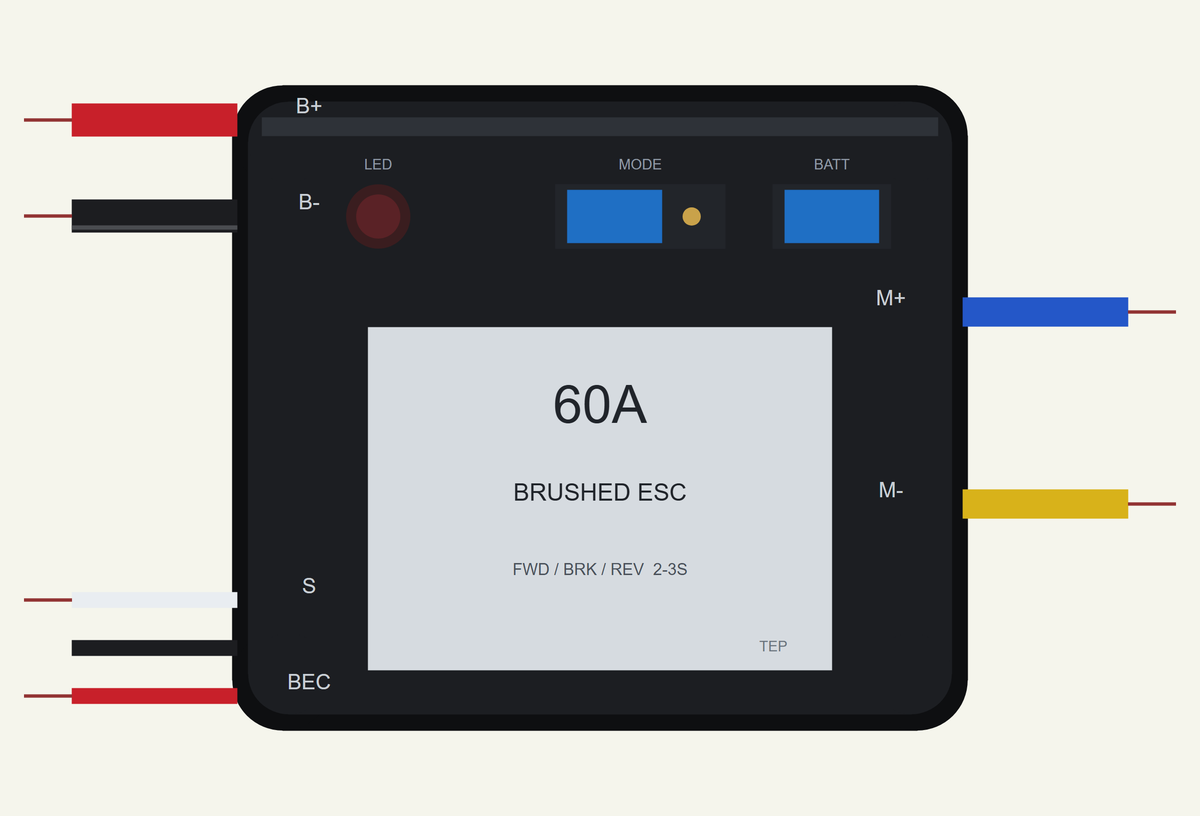
Three properties set it up. MODE is the running-mode jumper: FBR (forward, brake and reverse with the double-click), FB (forward and brake, no reverse) or FR (forward and reverse, single click). BATTERY is the battery-type jumper: LIPO, where the ESC counts the cells from the voltage at power-on, or NIMH. AMBIENT is the air temperature in °C for the thermal model (25). The jumpers on the sheet follow the properties: a cap across the first two MODE pins is FBR, across the last two is FB, and no cap is FR.
Download 60A Brushed ESC Library for Proteus Simulation
Click the button below to download 60A-Brushed-ESC-Library-for-Proteus-v1.0.zip (about 1.2 MB, without the source code of the models):
60A Brushed ESC Library for Proteus V1.0- README.txt: installation, the demo, the wiring, troubleshooting and the limits of the simulation.
- Proteus Library Files:
TEPESC60.LIBandArduinoV4TEP.LIB. - Proteus Model Files:
TEPESC60.DLLandTEPARDUINO.DLL. - Arduino Code: the demo sketch.
- Proteus Simulation: the demo project, its HEX file and copies of the DLLs.
No Proteus yet? Read How to Download and Install Proteus 7 and 8. New to libraries? Follow How to Install a New Library in Proteus.
How to Install 60A Brushed ESC Library for Proteus Simulation
- Close Proteus and extract the whole zip file, for example to your Desktop.
- Copy the files from Proteus Library Files into the LIBRARY folder of Proteus.
- Copy the files from Proteus Model Files into the MODELS folder.
- Delete
TEPESC60.IDXfrom the LIBRARY folder if it is there. - The demo's motor is our separate 540 RC Motor Library for Proteus Simulation: install its LIB and DLL too.
- Start Proteus, press P and search for ESCBRUSHED.
Proteus Simulation of a Brushed ESC with Arduino
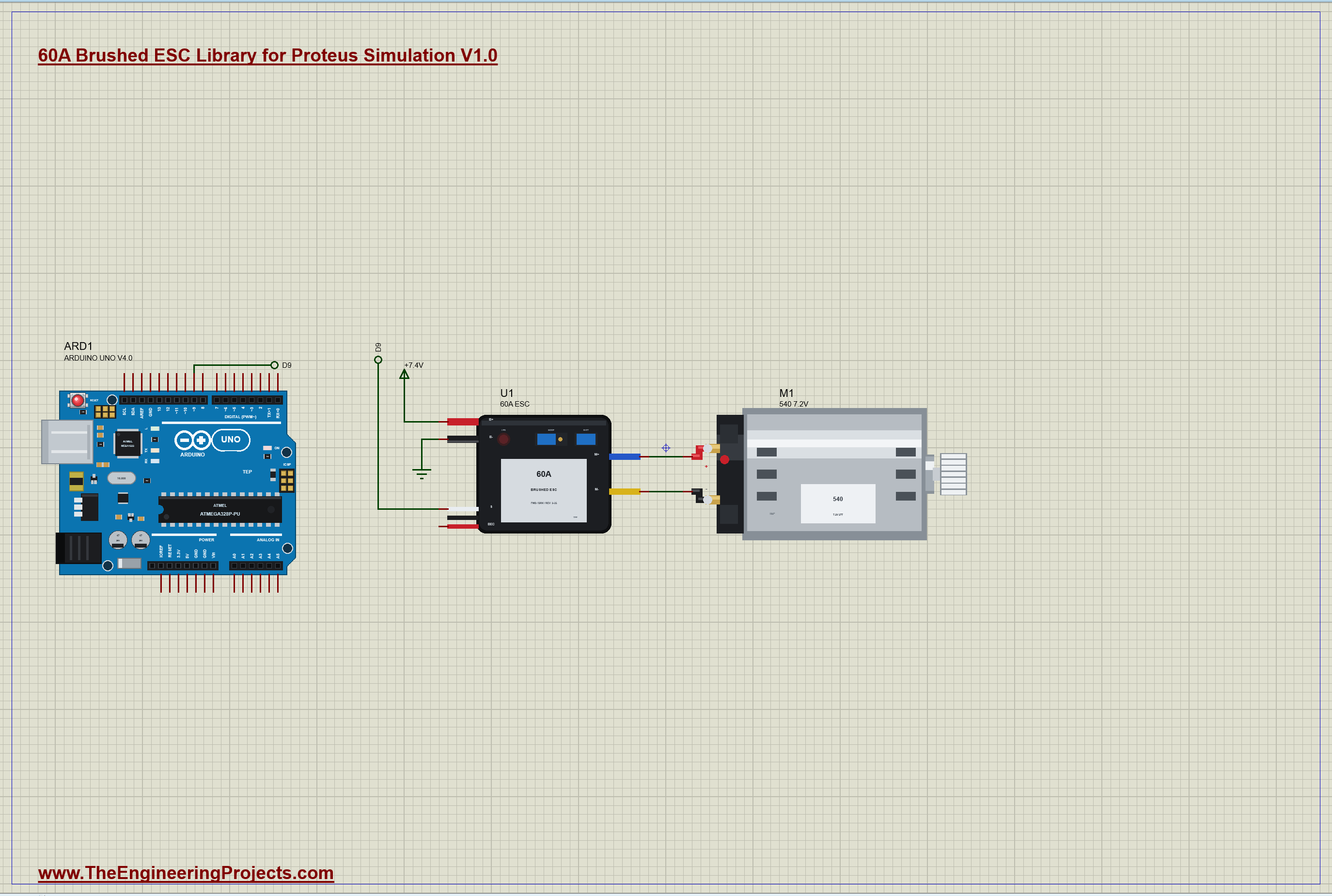
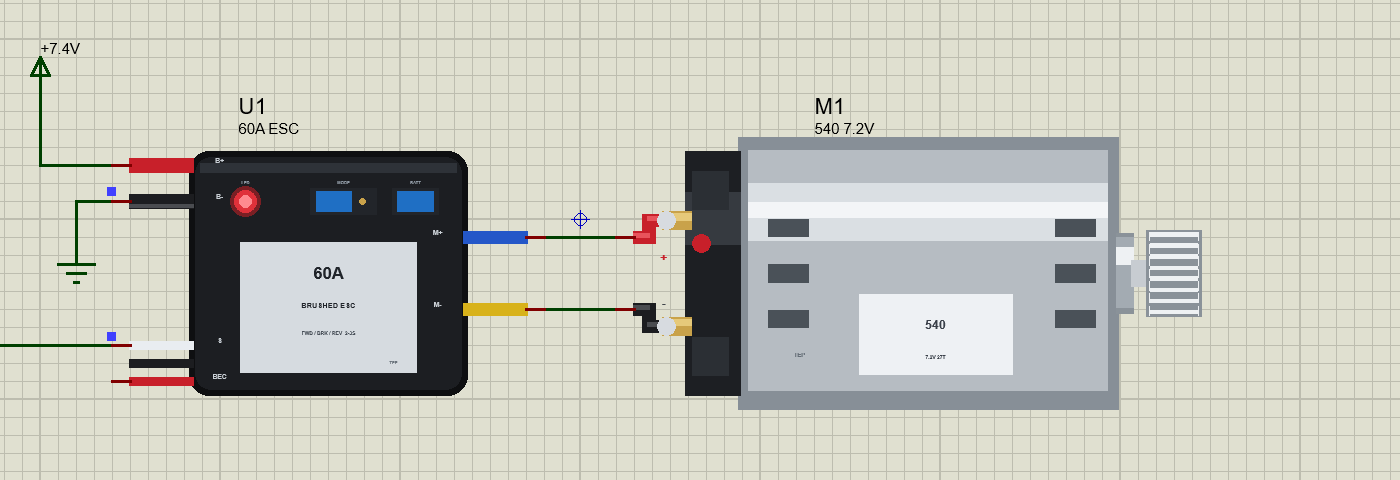
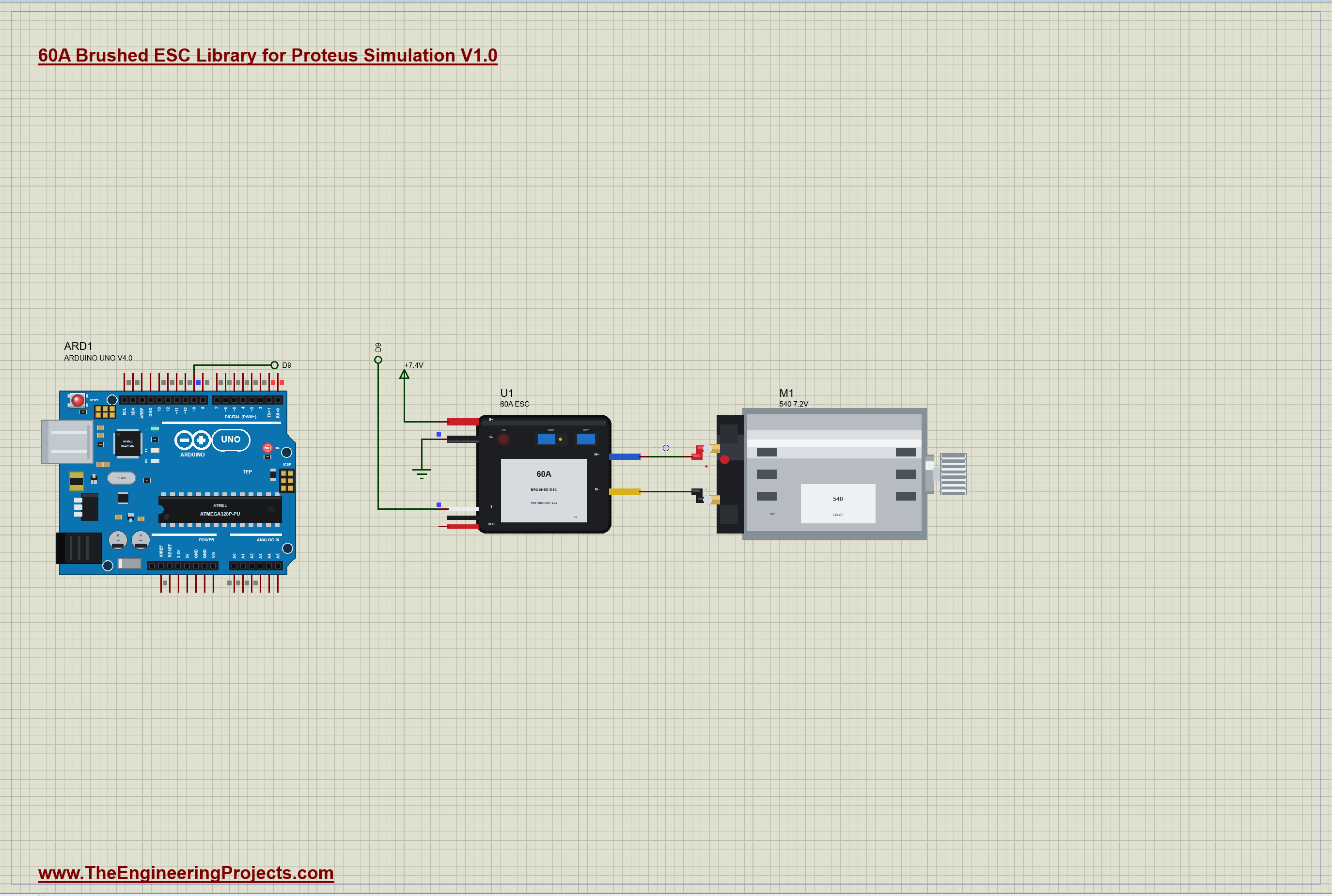
The demo has our Arduino UNO Library for Proteus V4.0 with its built-in monitor, the same window as our TEP Serial Monitor Advance for Proteus. The UNO plays the RC receiver: its D9 sends the throttle pulse to the ESC's S lead through the Servo library. B+ is on a 7.4 V rail, a 2S LiPo, and B- is on the ground. M+ and M- go straight to our 540 RC motor M1, which drives a 1.6 kg 1/10 car on a flat road. The motor comes from our separate 540 RC Motor library (TEPRC540.LIB and TEPRC540.DLL), so install it first. The sheet is A3. Open ESC60-RC540-Car-ArduinoUnoV4.pdsprj.
The Sketch
The sketch attaches the ESC like a servo, with the pulse range of 1000 to 2000 µs, and starts at neutral, because the ESC calibrates on the pulse it sees at power-on:
  esc.attach(ESC_PIN, 1000, 2000);
  esc.writeMicroseconds(1500);                                          // neutral from the start: the ESC calibrates on it
One function sets the throttle. A width of 0 detaches the Servo, so no pulses leave D9 at all, which is how the demo tests the failsafe:
void throttle(uint16_t us) {
  if (us == 0) { esc.detach(); digitalWrite(ESC_PIN, LOW); return; }
  if (!esc.attached()) esc.attach(ESC_PIN, 1000, 2000);
  esc.writeMicroseconds(us);
}
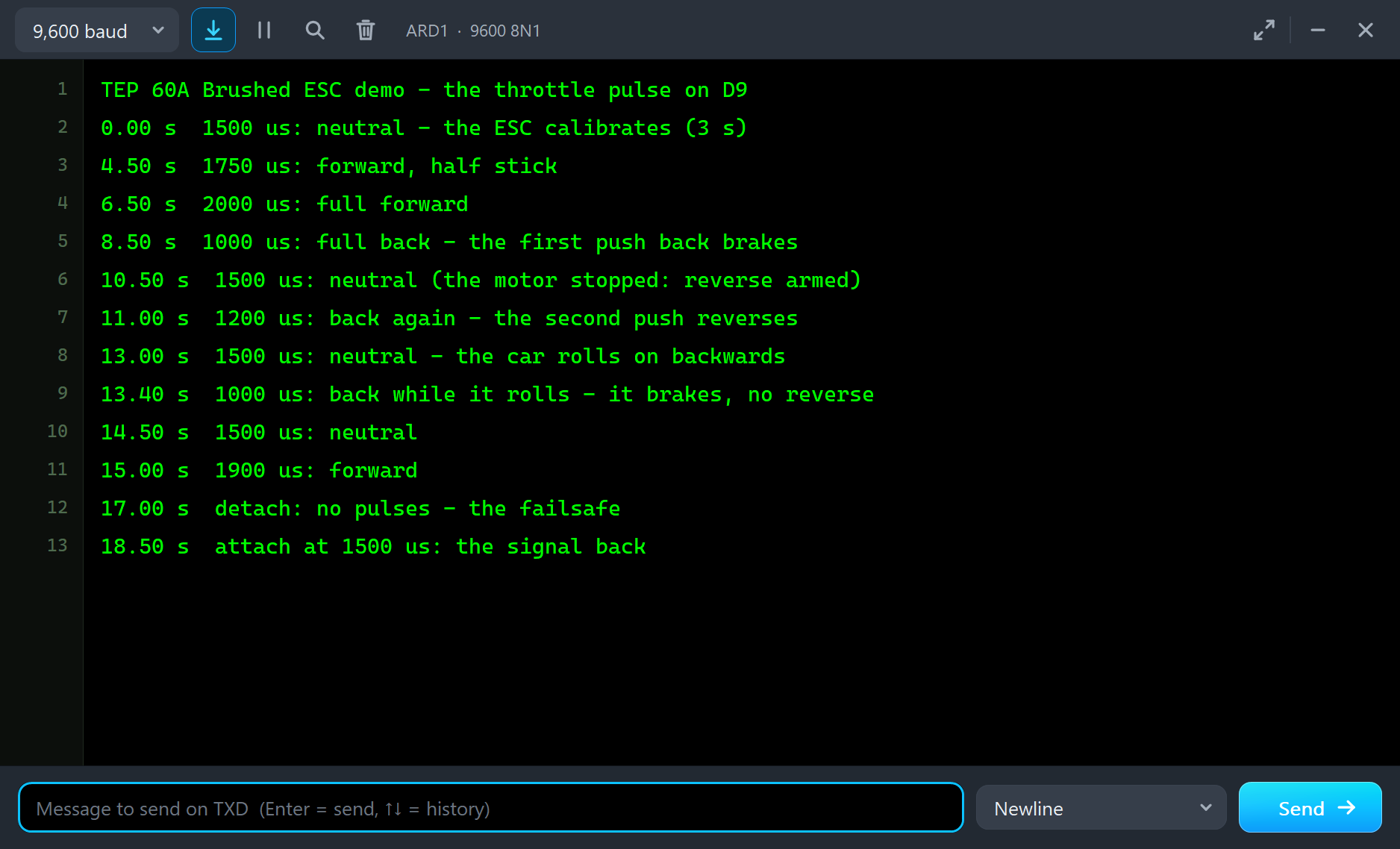
The program is a table of steps, each with its time in tenths of a second and the pulse width in microseconds:
  {85, 1000, "1000 us: full back - the first push back brakes"},
  {105, 1500, "1500 us: neutral (the motor stopped: reverse armed)"},
  {110, 1200, "1200 us: back again - the second push reverses"},
After the program you can drive it yourself from the monitor: type a pulse width such as 1750 for forward, 1500 for neutral or 1000 for full back, or d to detach. A typed command ends the program.
60A Brushed ESC Simulation Results
Open the project and press Run. The program runs about 19 simulated seconds, which Proteus ran in about five minutes on our PC with both pop-ups open and the pictures being taken. Click the ESC to open its pop-up. Every number below comes from one simulation run, the demo exactly as it ships.
The Start: Beeps and Calibration
At power-on the ESC reads 7.40 V on B+ and B-, decides it has a 2S LiPo and gives 2 short beeps: the Event log writes POWER ON: 7.40 V - a 2S LiPo found. Then it waits for the throttle to sit at neutral. The UNO sends 1500 µs from the start, so the banner reads CALIBRATING, and the state machine has CALIBRATE 3 S lit. The bridge is off; nothing reaches the motor yet, whatever the pulse says.
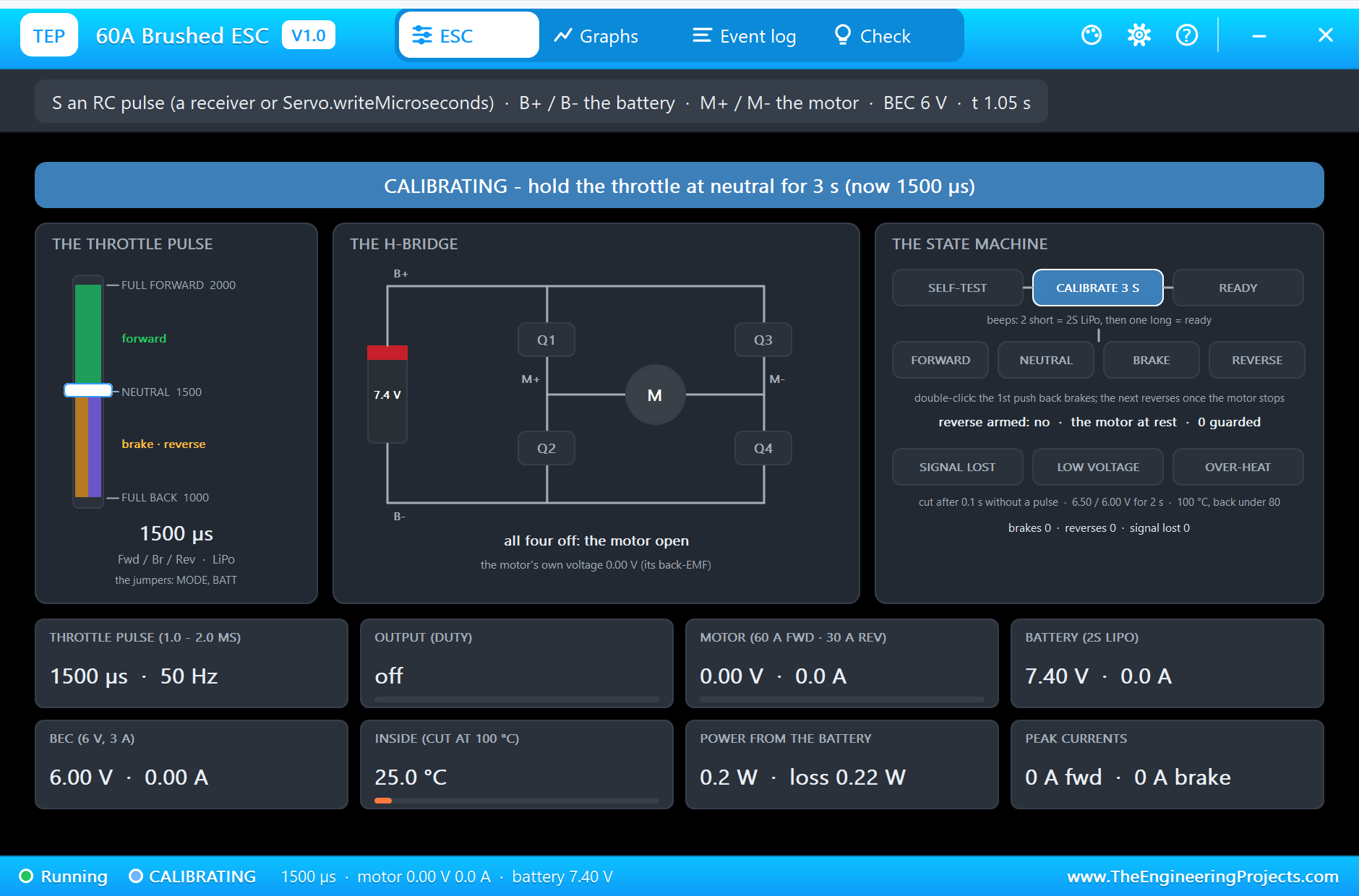
After 3 s of steady neutral the log says CALIBRATED: neutral 1500 us (full forward 2000, full back 1000) - one long beep, and half a second later READY at 3.62 s. If the stick is not at neutral at power-on, the ESC waits and says so, which is a common reason a real ESC "does nothing" on the bench.
Forward: Half and Full Throttle
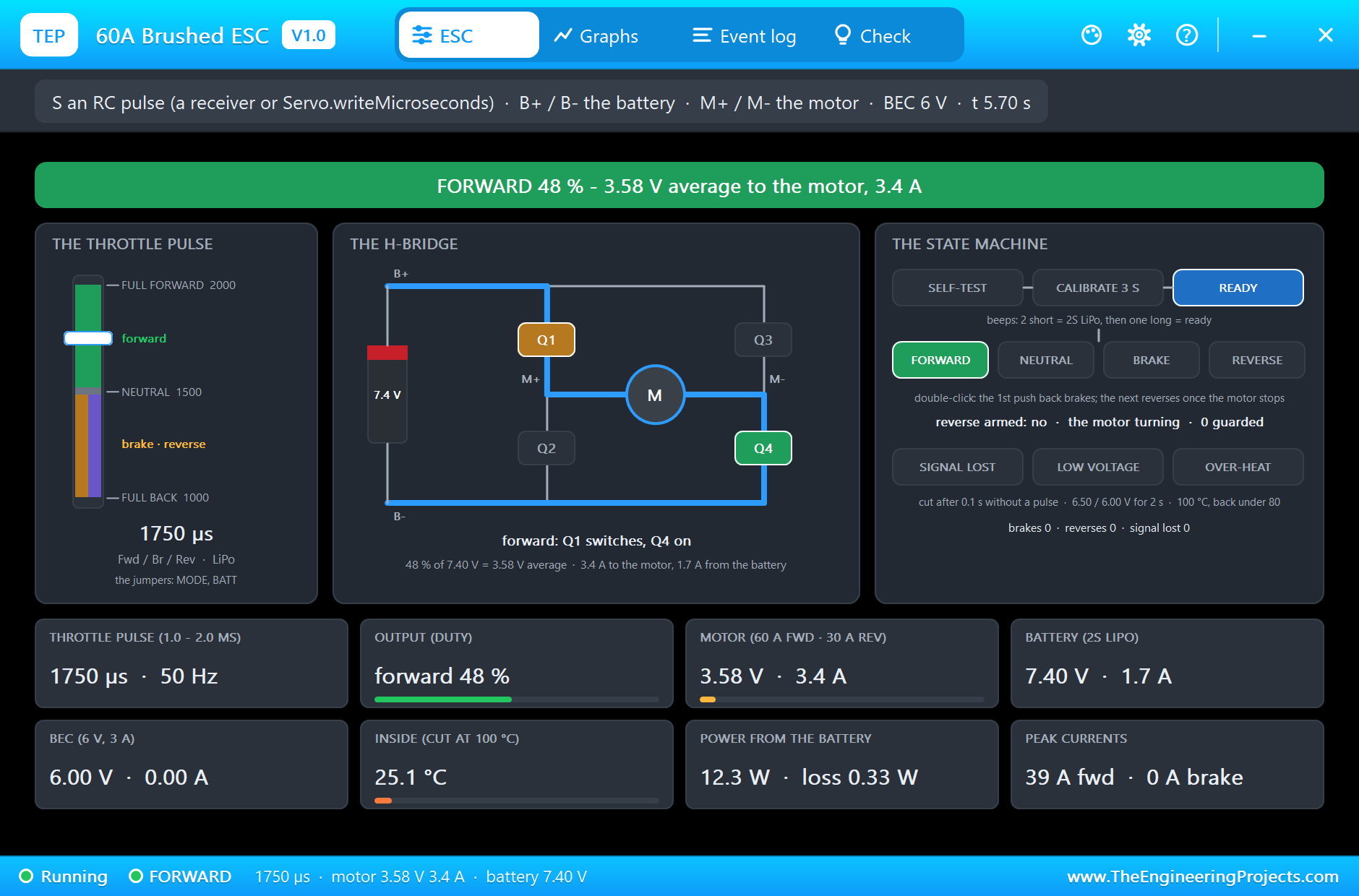
At 4.5 s the sketch sends 1750 µs, half of the stick. After the 3 % deadband that is a 48 % duty, so the motor sees 3.58 V on average from the 7.40 V pack. It draws 3.4 A and the car settles at 13.8 km/h. The bridge drawing shows Q1 switching (amber) and Q4 on (green), with the current's path in blue from B+ through the motor to B-.
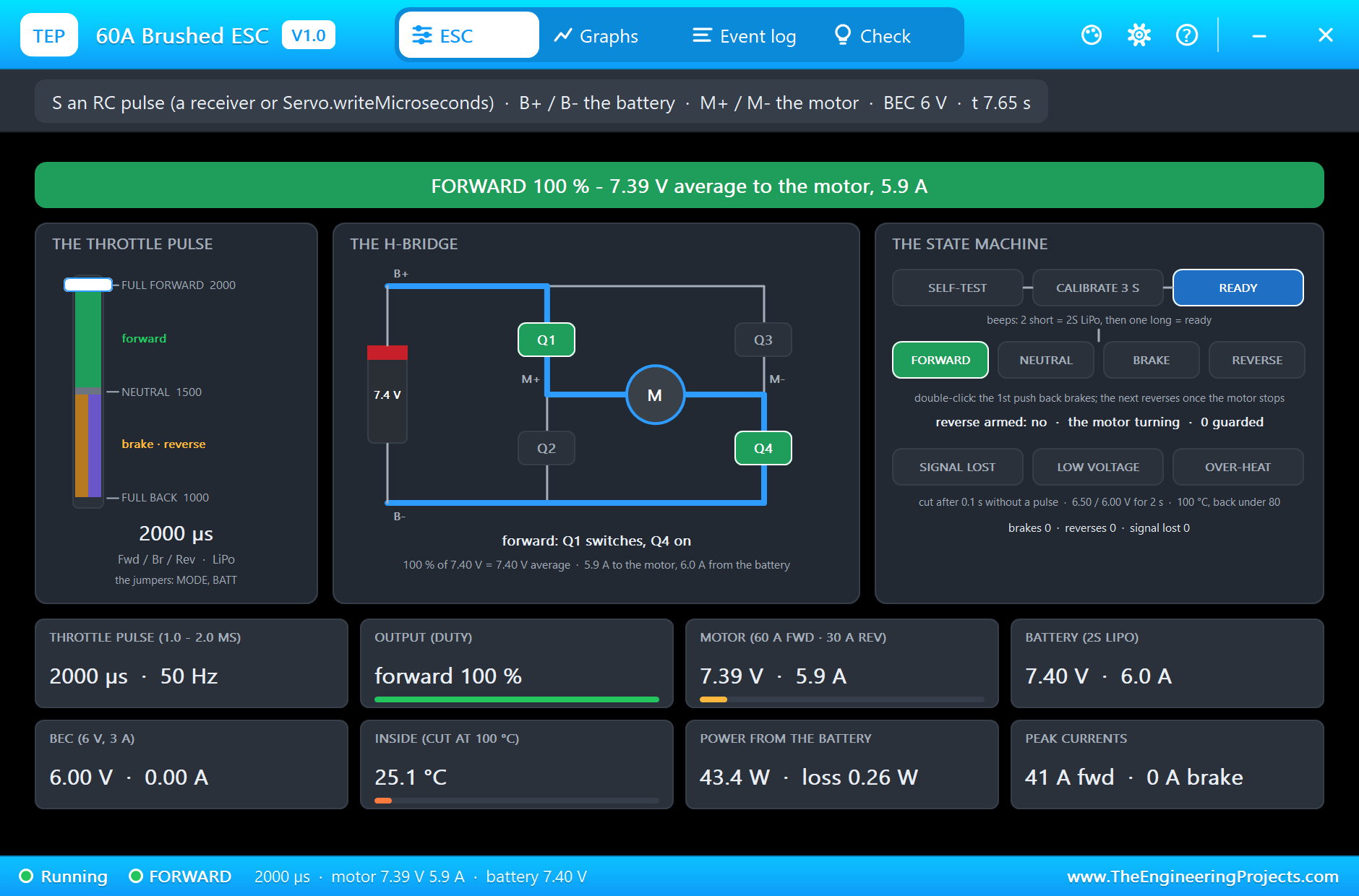
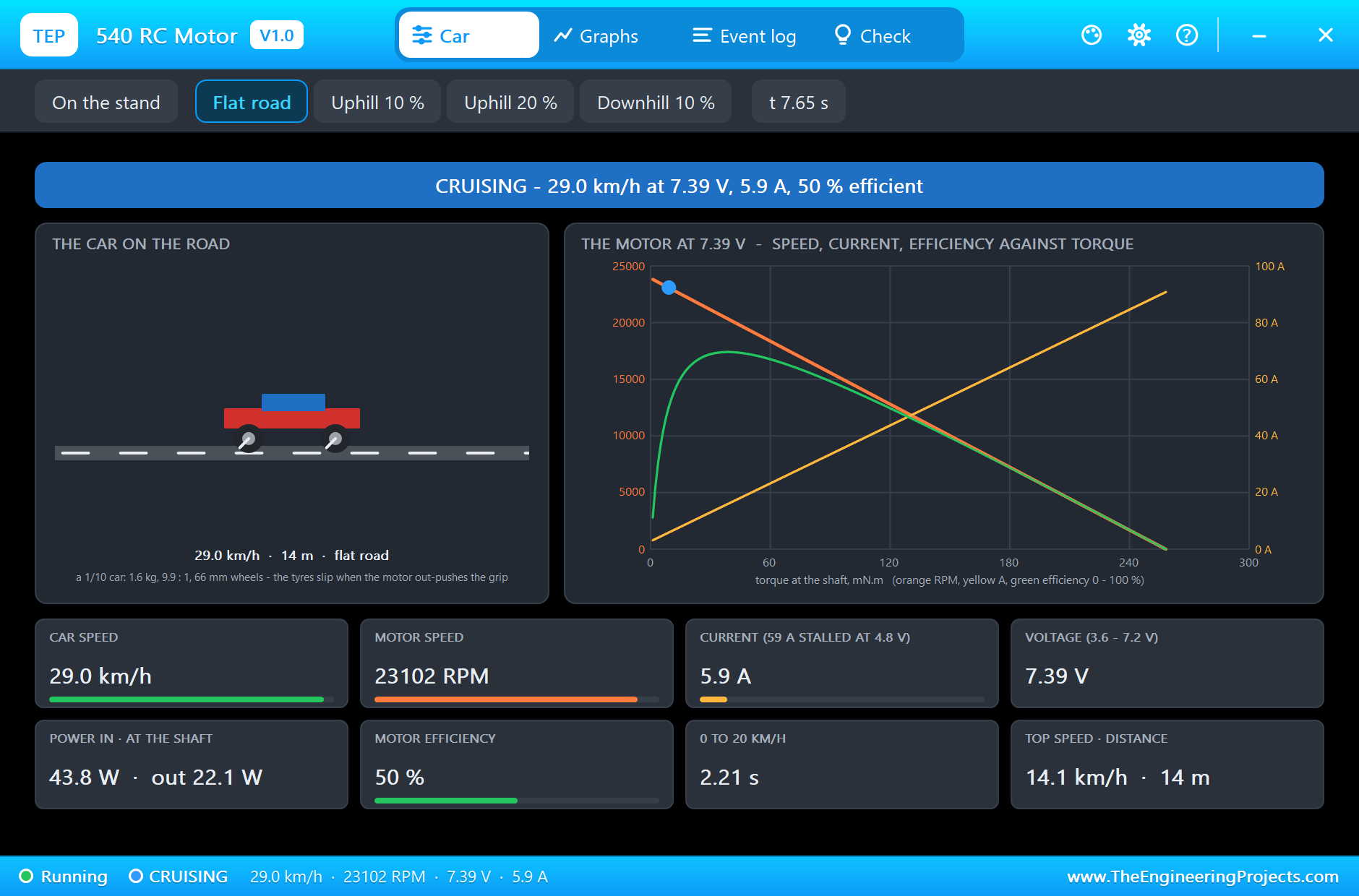
At 6.5 s the pulse goes to 2000 µs, full forward. Q1 now stays on, the motor gets 7.39 V and the car reaches 29.0 km/h with the motor at 23,088 RPM. At top speed the motor draws only 5.9 A, and the battery gives 6.0 A, a little more because the ESC itself and the BEC draw from it too.
On the sheet, the ESC's red LED is solid at full throttle, as the manual describes: off at neutral, blinking at part throttle, solid at full.
The motor's own pop-up shows the same moment from the motor's side: the car on the road and the motor's working point on its curves.
The First Push Back Brakes
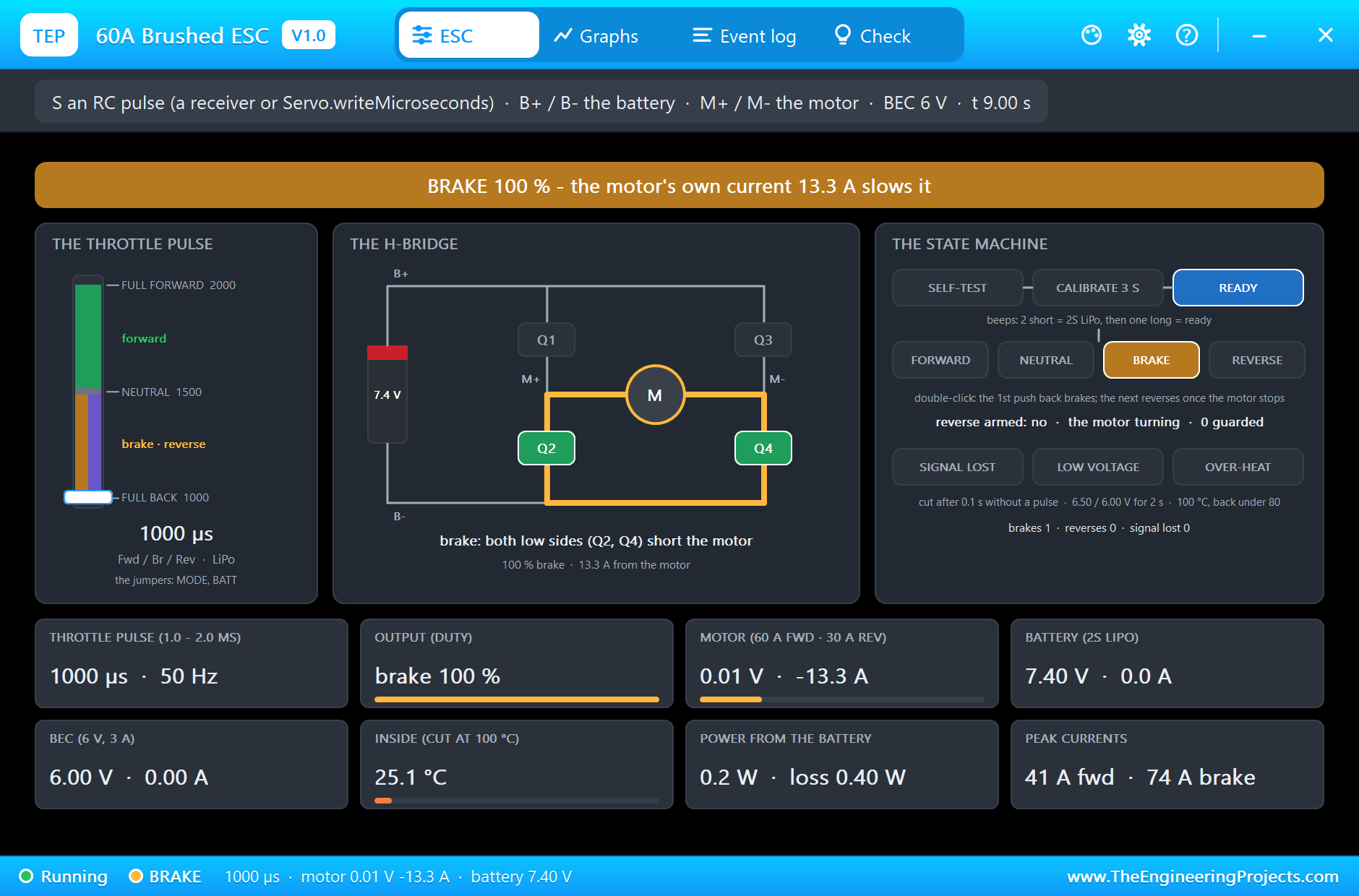
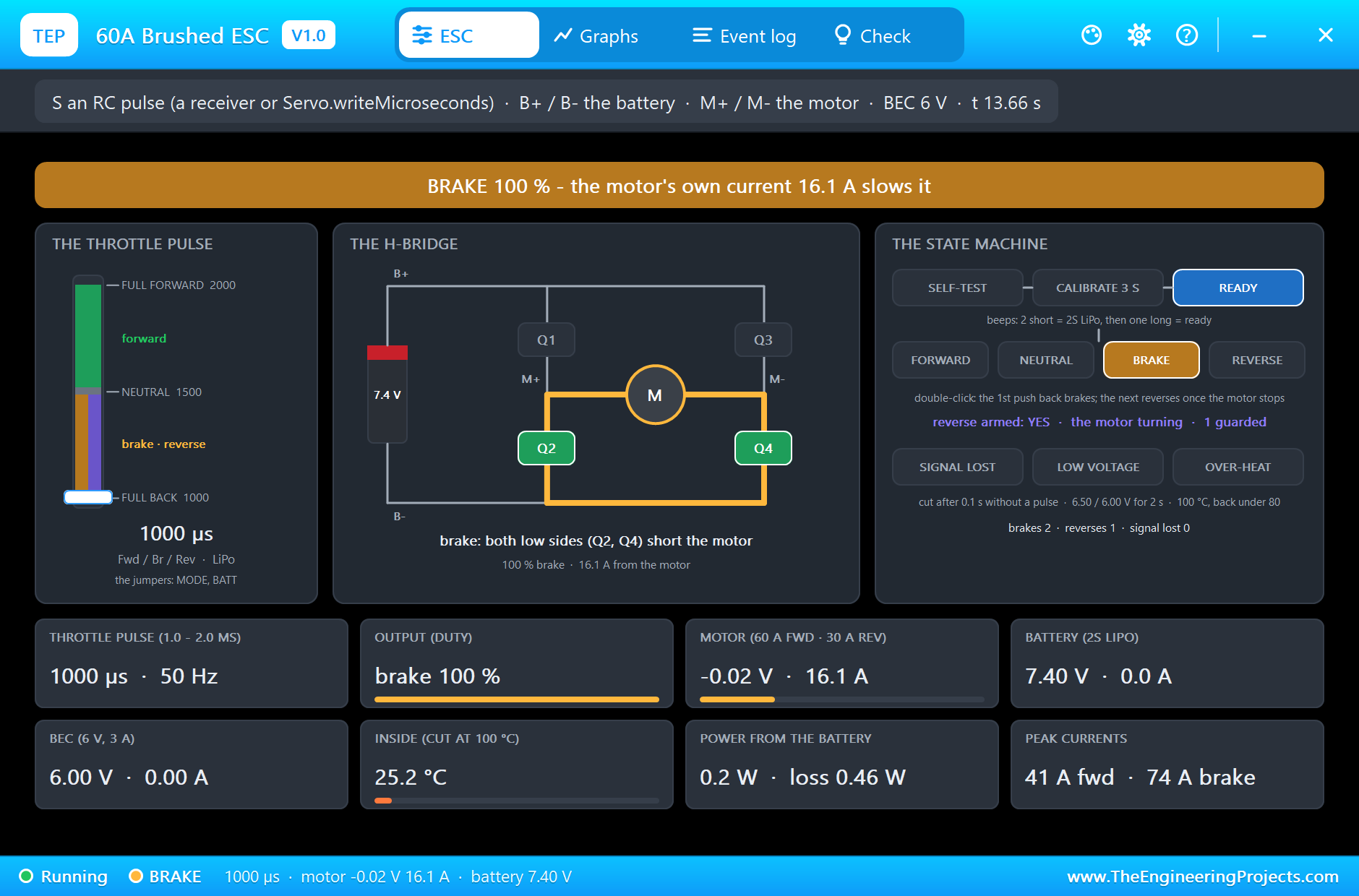
At 8.5 s the sketch sends 1000 µs, full back. A beginner expects reverse; the ESC brakes. This is the double-click method of the Fwd / Br / Rev mode: the first push back only brakes. Both low-side switches, Q2 and Q4, short the motor, and the spinning motor becomes a generator whose own current slows it. The braking current peaks at 74 A, and in the picture the motor gives 13.3 A while the car still runs at 15.6 km/h, its tyres sliding, slower than the road. The log says the motor stopped 1.28 s after the brake began; the car stopped in 3.50 m.
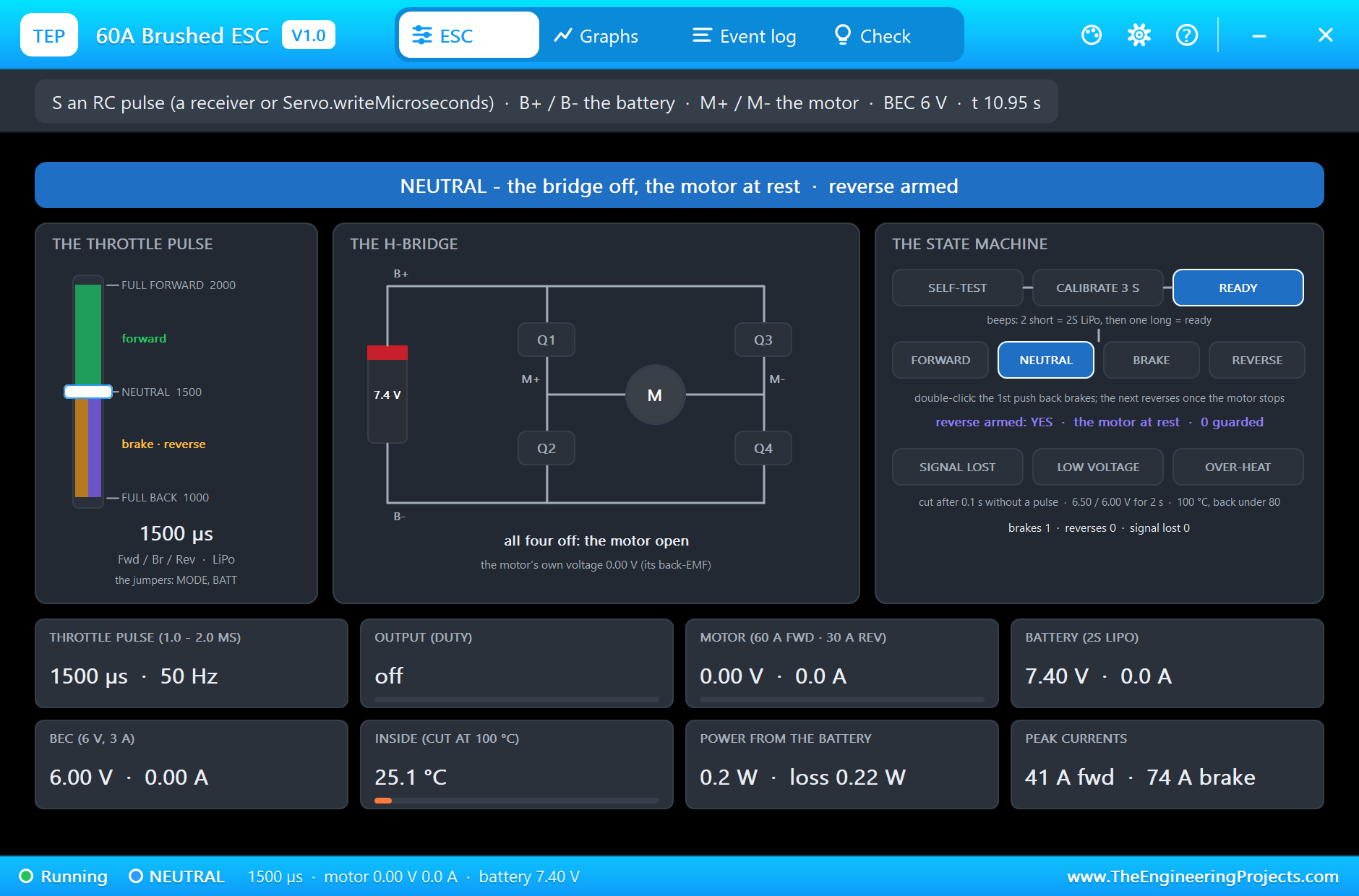
At 10.5 s the stick returns to neutral. The motor has stopped, so the log says neutral: the motor stopped - the next push back reverses, and the state machine shows reverse armed: YES.
The Second Push Reverses
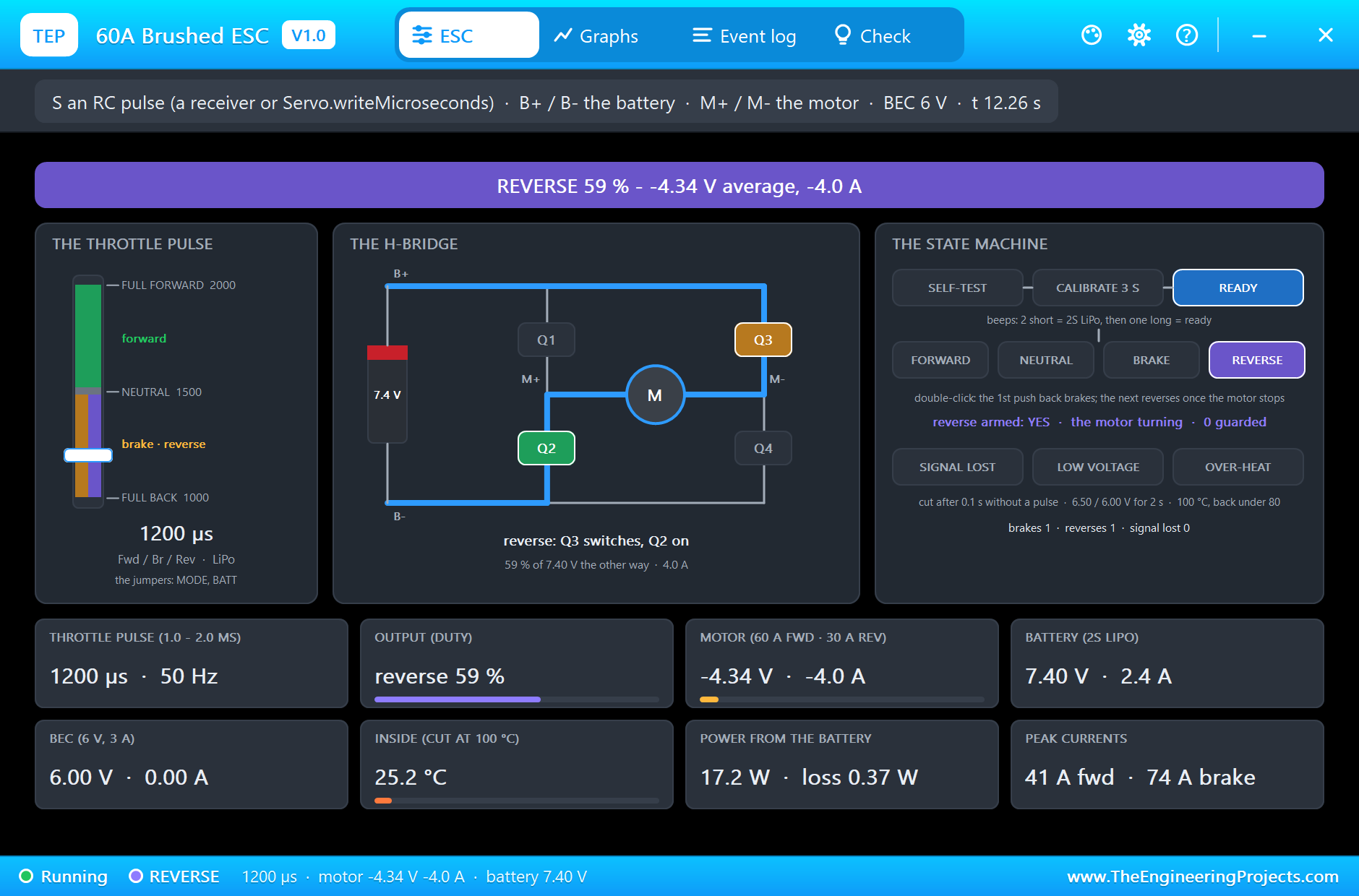
At 11 s the sketch sends 1200 µs, and this time the ESC reverses: REVERSE 59 % (1200 us) - the motor had stopped: the second push back reverses. Q3 switches and Q2 is on, the motor gets -4.34 V and 4.0 A, and the car backs up at 16.8 km/h. The manual rates reverse lower than forward: 30 A against 60 A, through 2 mΩ instead of 1 mΩ.
The Double-Click Guard
At 13 s the stick returns to neutral. The bridge opens and the car rolls on backwards: the motor is now a free generator, and the pop-up reads its back-EMF, 3.88 V, from the open terminals. Reverse is still armed, but the motor is turning.
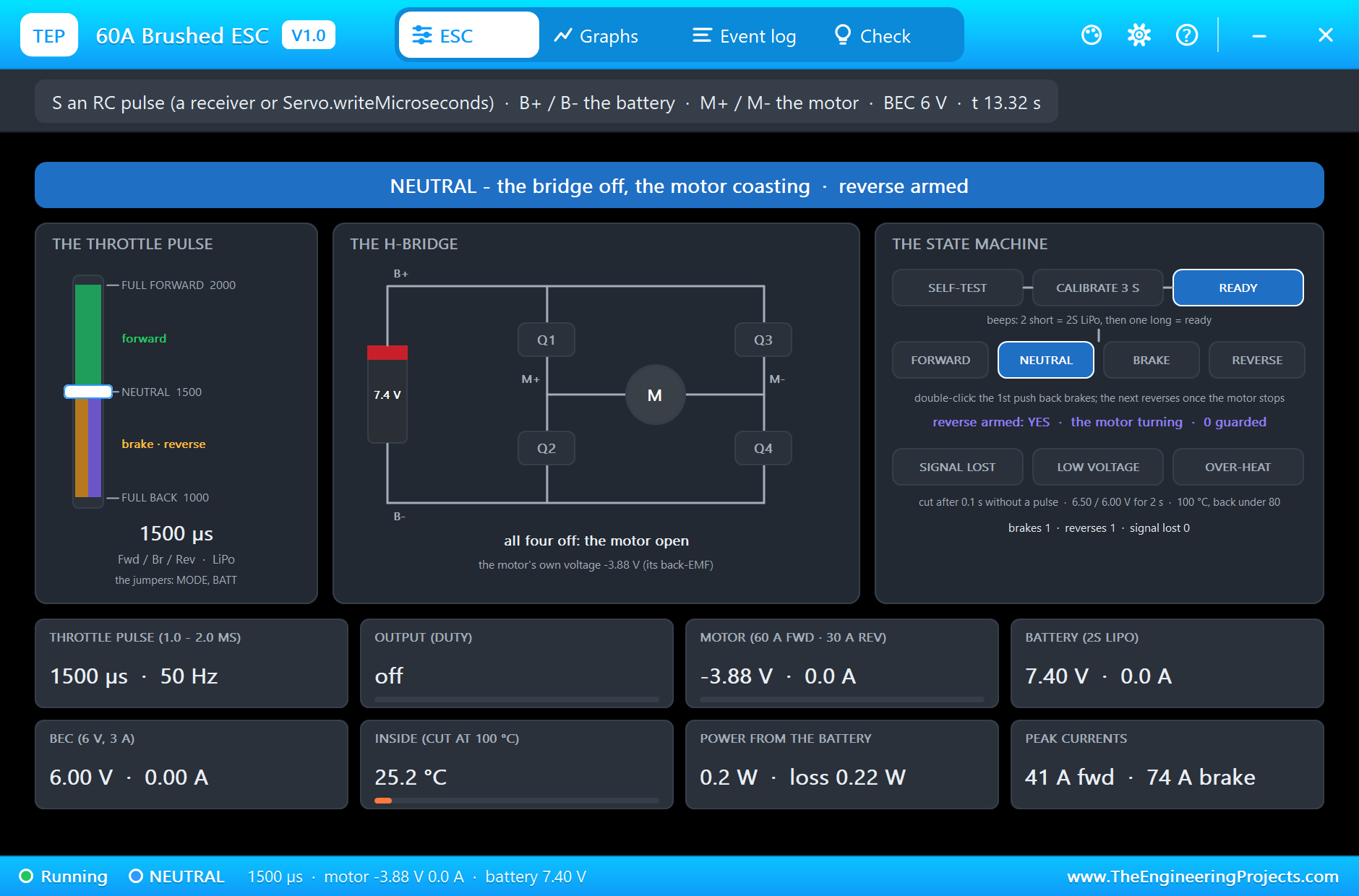
At 13.4 s the sketch pushes back again at once. A careless ESC would slam into reverse against the rolling car; this one checks the motor first. It still turns, so the ESC brakes instead: BRAKE 100 % (1000 us) - the motor still turns (3.71 V): no reverse until it stops. The motor stops 0.88 s later. This is the guard the manual describes, against a mistaken reverse when the brake is used a lot while steering.
Forward Again and the Failsafe
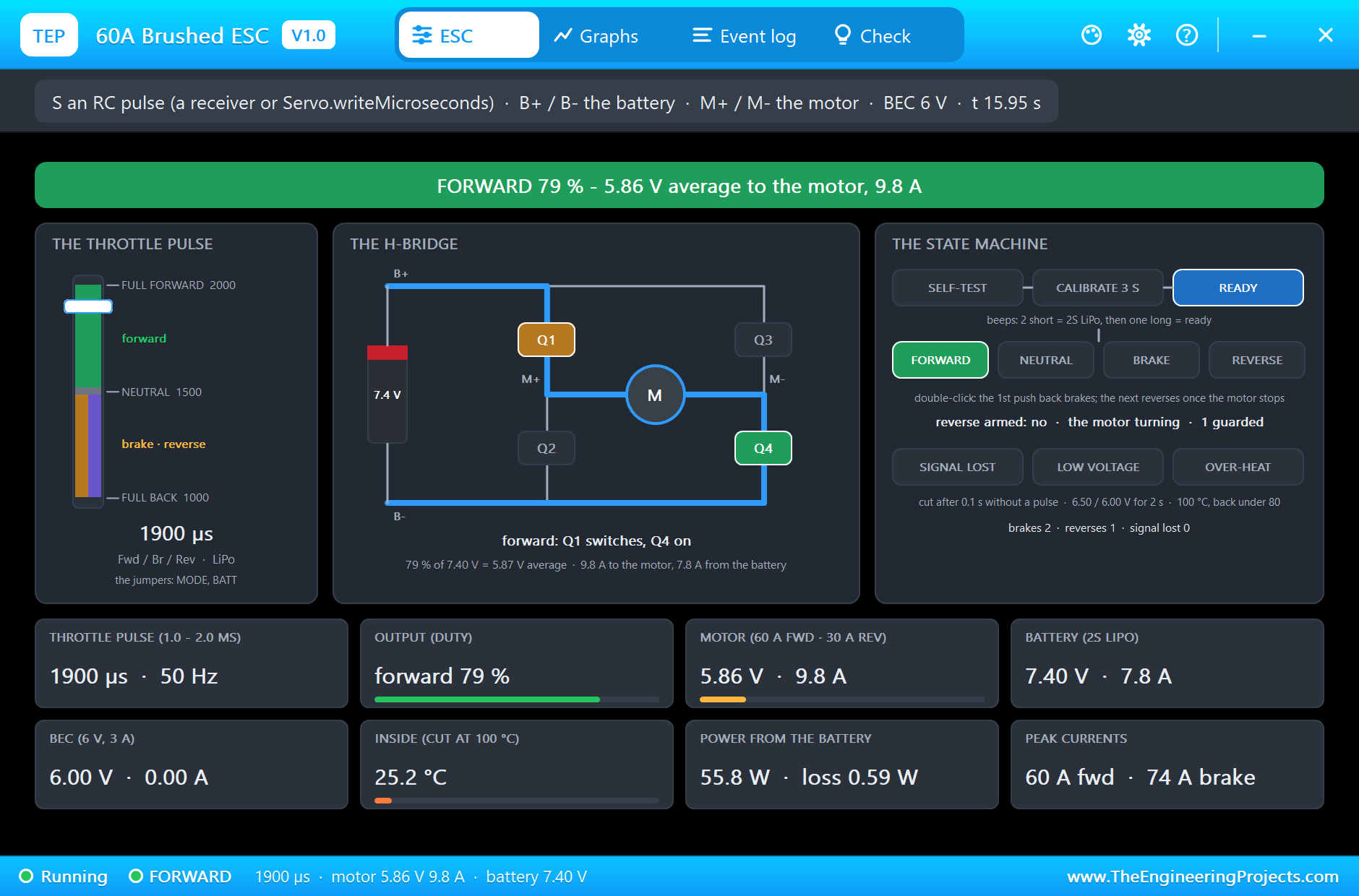
At 15 s the sketch sends 1900 µs: FORWARD 79 % with 5.87 V to the motor. Starting from rest, the motor draws about 60 A for a moment, the ESC's continuous rating, though well below its 360 A peak.
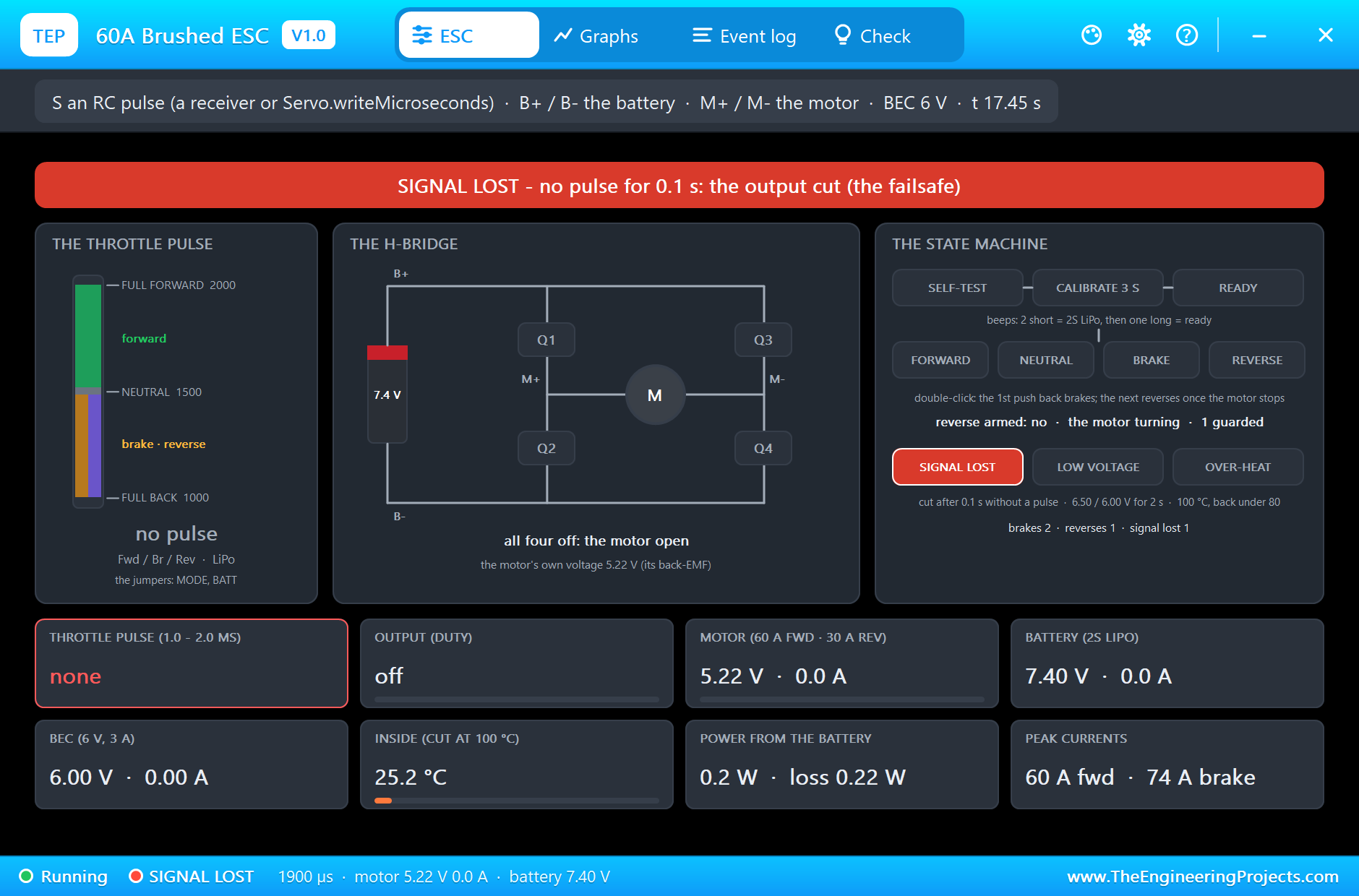
At 17 s the sketch detaches the Servo, so D9 sends no more pulses: a broken wire or a radio out of range. After 0.1 s without a pulse the ESC cuts the output, and the log writes SIGNAL LOST: no pulse on S for 0.1 s - the output cut (the failsafe). The car coasts, and the bridge shows all four switches off. At 18.5 s the sketch attaches again at 1500 µs and the log says signal back.
The Graphs, the Event Log and the Check Page
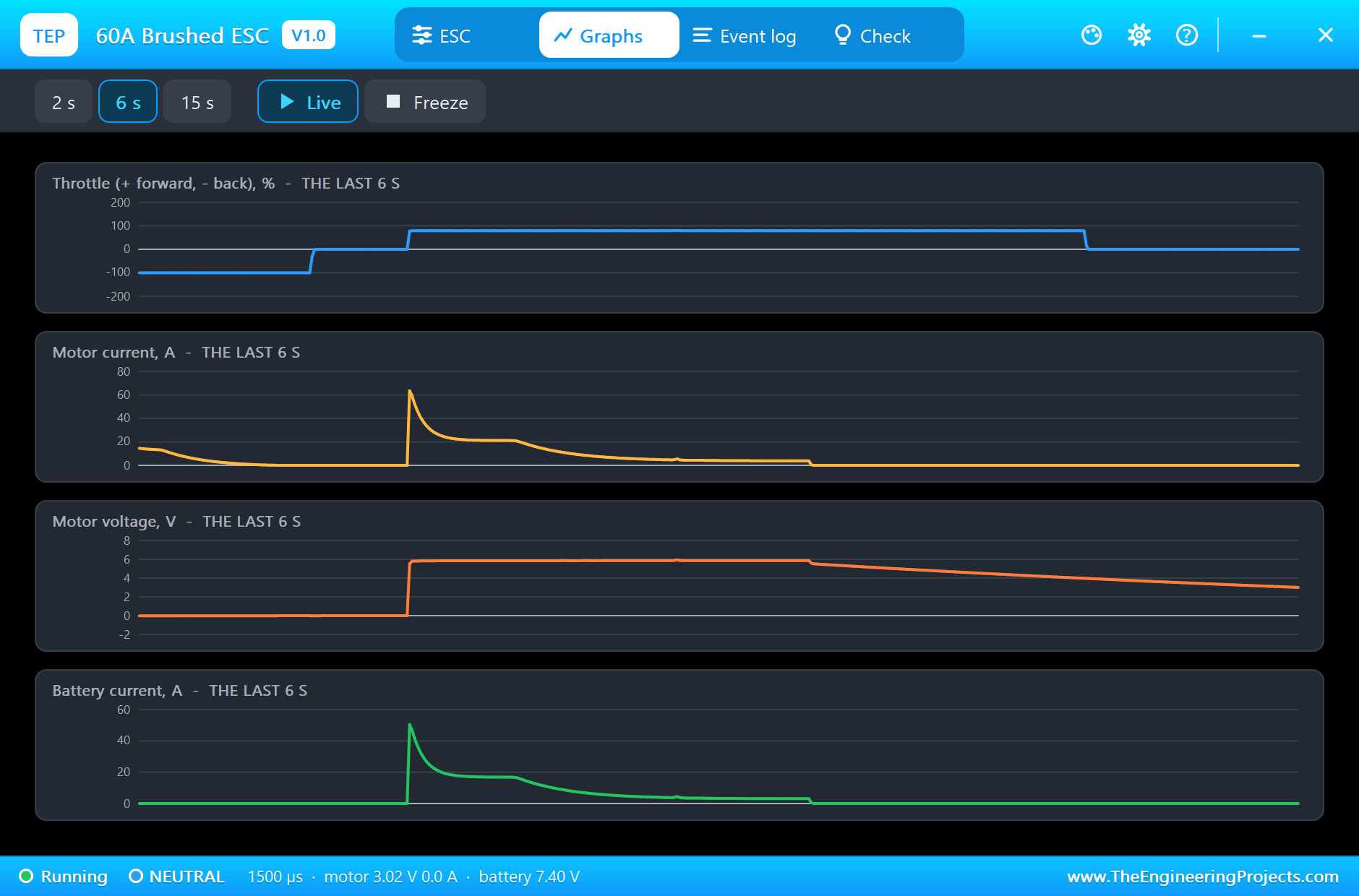
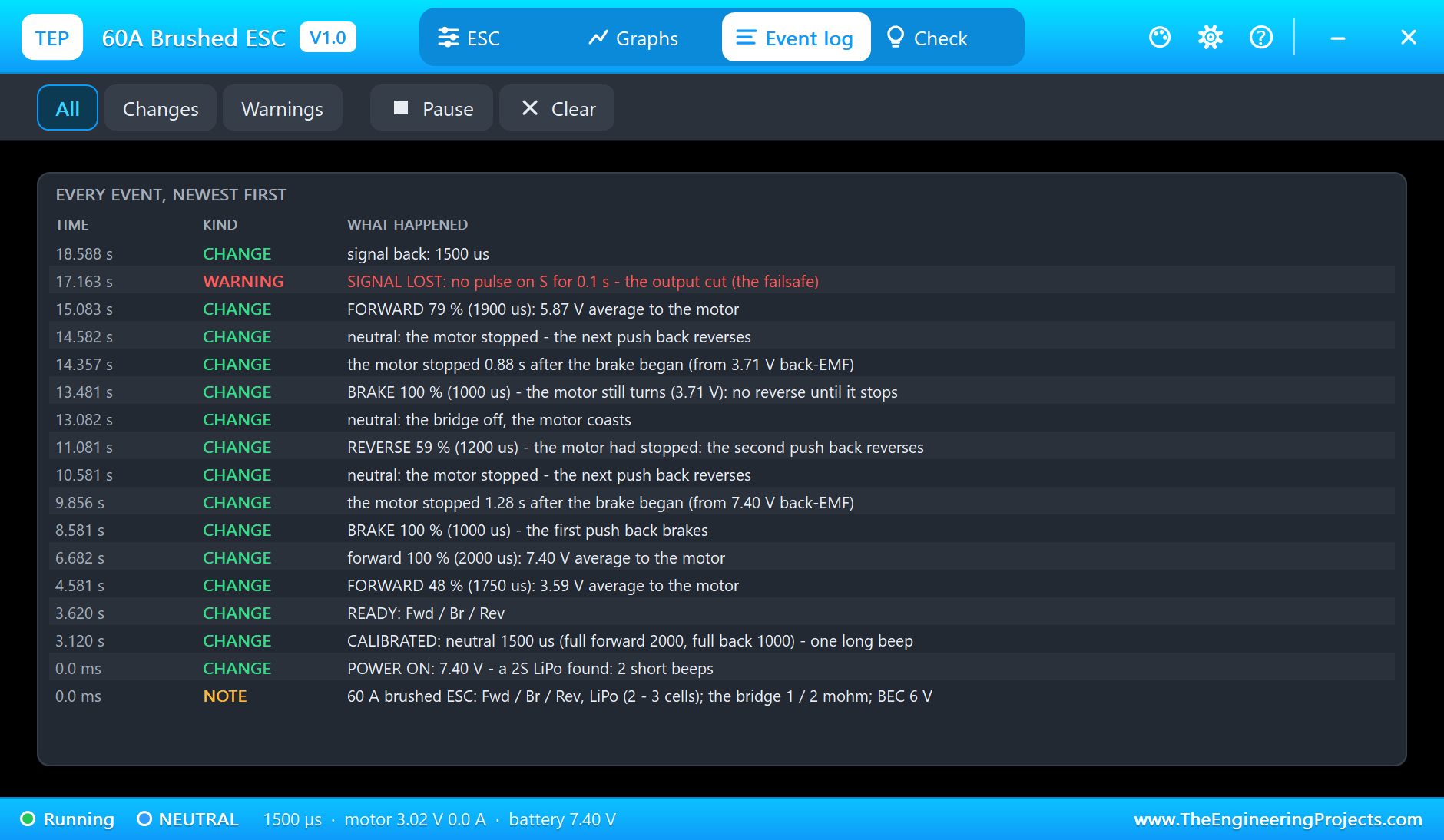
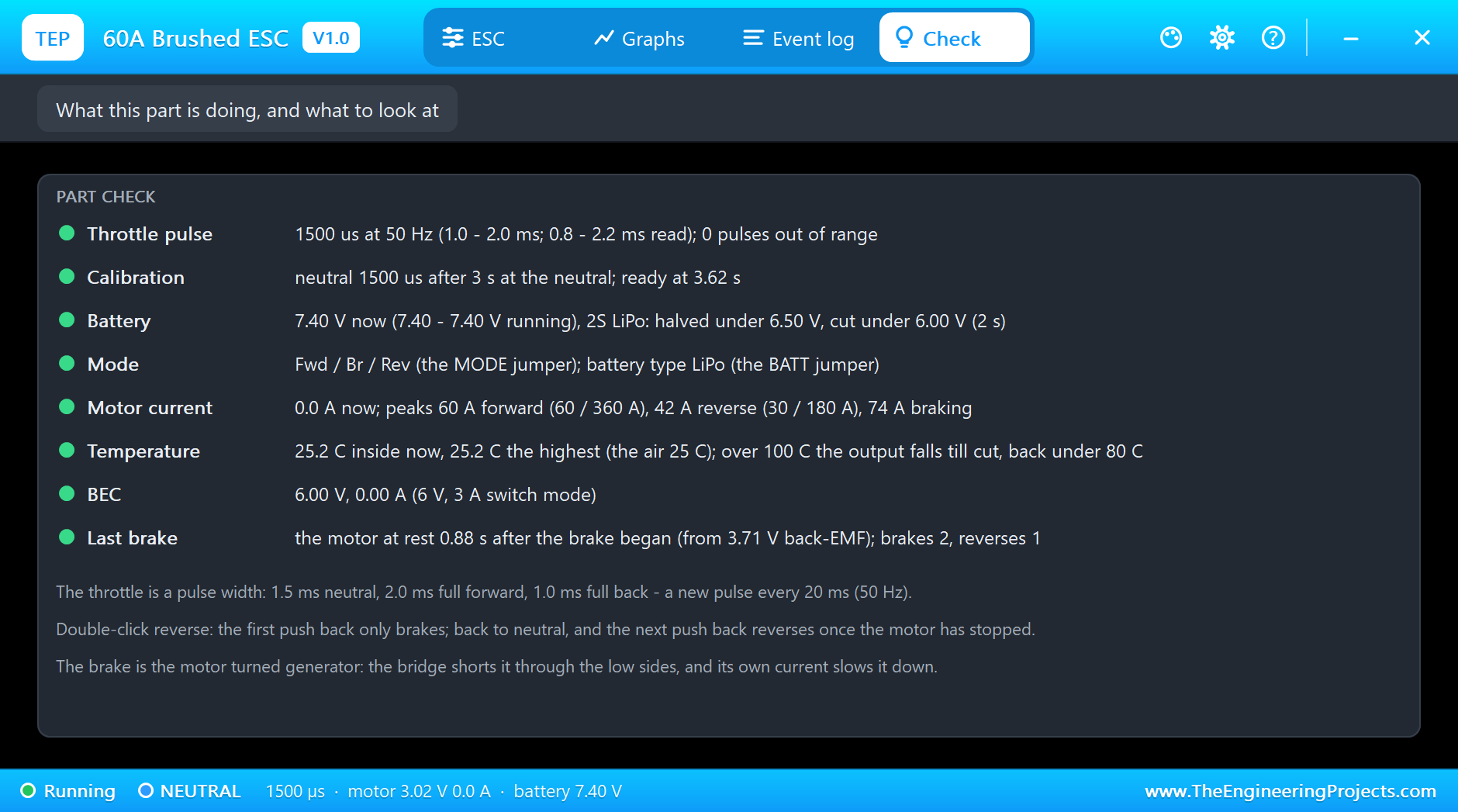
The Graphs page plots the throttle (forward up, back down), the motor current, the motor voltage and the battery current over the last 2, 6 or 15 simulated seconds. The Event log keeps every step of the state machine: the power-on and the beeps, the calibration, every change of direction and throttle, the brakes with the time to stop and the failsafe. The Check page sums it up with a verdict for the pulse, the calibration, the battery, the mode, the currents against the ratings, the temperature and the BEC.
Try It Yourself
- Set MODE to FB and run the demo: the pushes back only brake, and the car never reverses.
- Set MODE to FR: the first push back reverses at once, as on a rock crawler.
- Type
1000while the car runs at full speed, then1500, then1000again before it stops: watch the guard brake. - Start the UNO at 1800 µs instead of 1500 µs: the ESC waits, without the long beep, until the stick returns to neutral.
- Put B+ on a 6.3 V rail: after 2 s under 6.5 V the power is halved and the LOW VOLTAGE box lights.
- Set BATTERY to NIMH: one short beep at power-on, and the low-voltage thresholds become 4.5 and 4.0 V.
Ideas to Extend the Demo
- Read a potentiometer on an analog pin and map it to 1000 - 2000 µs, like a throttle trigger.
- Read a real receiver's channel with
pulseInand pass it on to the ESC through the Arduino, with your own limits. - Add a steering servo on another pin and power it from the ESC's BEC, as in a real car.
- Build a cruise control: read the car speed and adjust the pulse width to hold it.
Your Own Sketches
The demo sketch is in the zip file, and you can change it in the Arduino IDE. New to Arduino? Start with our Arduino Tutorial for Beginners. Export the compiled binary, and set the UNO's PROGRAM property to the new file. Our guide on How to get the HEX file from Arduino shows you where the file ends up.
Things to Know Before Using a Real ESC
- Never reverse the battery: a real ESC is damaged at once if the battery goes in the wrong way round.
- Mind the BEC: its red wire powers the receiver at 6 V. With an Arduino on USB, leave it off the Arduino or use it only for the servos.
- Hold the throttle at neutral at power-on: the ESC calibrates there; a stick off neutral and it waits.
- Use a failsafe: set the radio's failsafe to neutral; the ESC also cuts the output after 0.1 s without pulses.
- Swap the motor wires if the motor turns the wrong way; the ESC's forward is whatever M+ and M- make it.
Troubleshooting
- No long beep, WAITING in the log: the throttle must sit at neutral (1.3 to 1.7 ms) for 3 s after the power comes on.
- It brakes but will not reverse: the double-click; return to neutral, let the motor stop, and push back again, or set MODE to FR.
- SIGNAL LOST: no pulse on S for 0.1 s, from a detached Servo or a loose wire; the output stays cut until pulses return.
- LOW VOLTAGE: the battery under the threshold for 2 s; the power is halved, then cut until the power is cycled.
- The part is not simulated:
TEPESC60.DLLis missing from MODELS and from the project folder.
Limitations of the Simulation
- The bridge is averaged: the PWM ripple itself, the switching frequency and the motor's inductance are not modelled.
- The programmable punch and drag-brake settings of some ESCs are not modelled; the drag brake is 0 %, so the motor coasts at neutral.
- The thermal model is one lumped mass; the cooling fan, the airflow and the reverse-polarity damage are not modelled.
- Arduino is a name of Arduino; this library is not made or endorsed by Arduino, Labcenter or any ESC maker.
- Tested in Proteus 8.5 in November 2026 (the demo as shipped). Proteus 7 is not supported.
So, that was all about the 60A Brushed ESC Library for Proteus Simulation. I hope it helps you understand what an RC car ESC does before you wire a real one: the throttle pulse, the beeps and the neutral calibration, the brake that comes before the reverse, the guard against a mistaken reverse and the failsafe, all in a simulation with a pop-up that shows the switches and the state. If you have any questions, ask in the comments and I will help you out. Till the next tutorial, take care and have fun!

Comments
0