


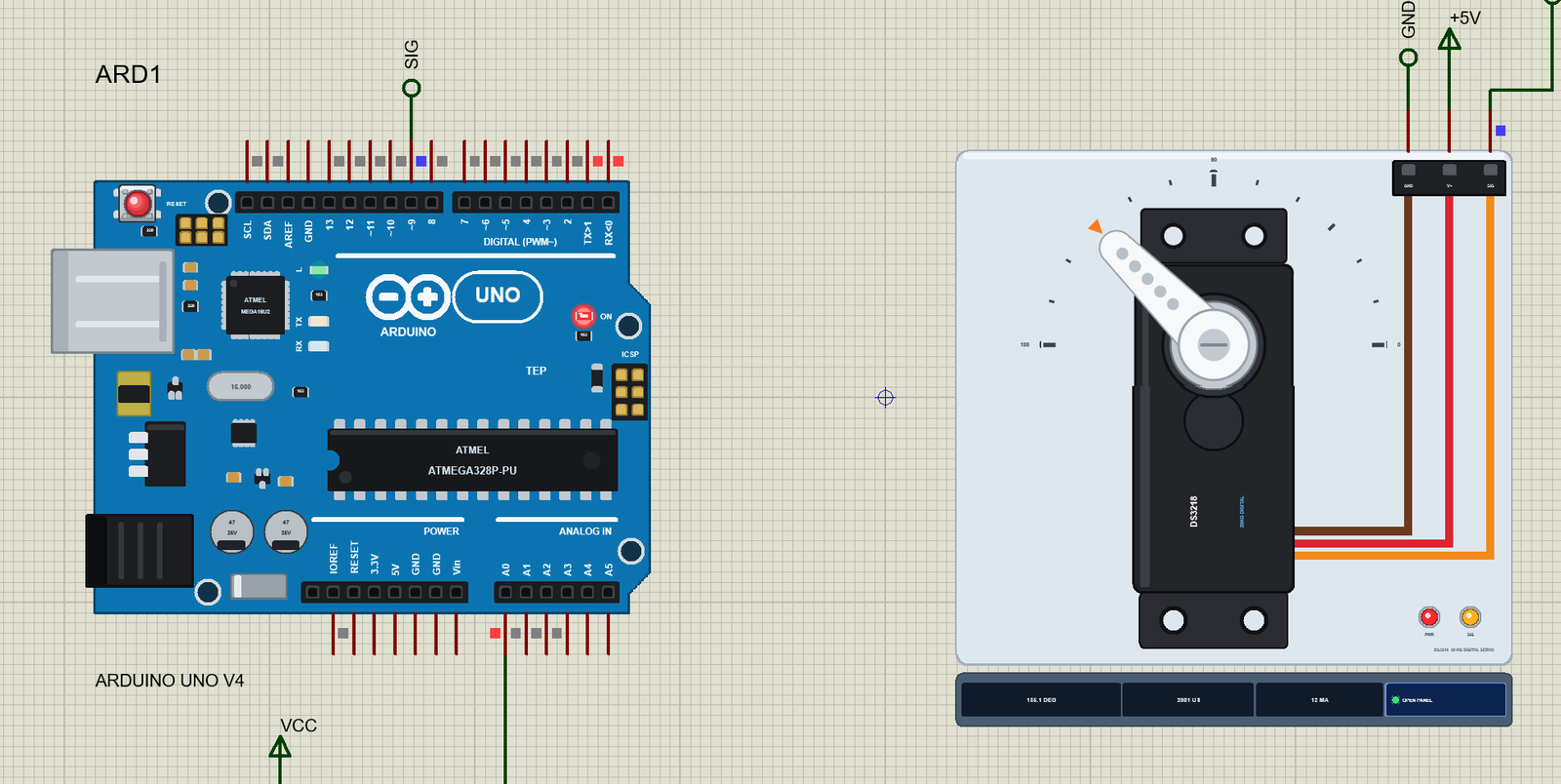
DS3218 Servo Motor Library for Proteus V1.0 (20kg Digital Servo)


Hello friends, I hope you all are doing great. Today, I am going to share the new DS3218 Servo Motor Library for Proteus V1.0. The DS3218 is the servo people reach for when a robot arm has to lift something real: a standard-size 20 kg digital servo with metal gears, used in robot arms, walking robots, camera rigs and large RC models. It is also the servo behind one of the most common questions on our forum: "why does my servo never reach 0 or 180 degrees?"
DS3218 Servo Motor Library for Proteus
Latest version: V1.0 (October 2026, this tutorial)
Helping Tools
- Serial Monitor Advance: a serial terminal window for the UART of your board
- Serial Monitor Expert: the serial monitor with extra debugging tools
- LCD Library for Proteus V3.0: 16x2, 20x4 and I2C LCDs to show your readings
This library brings the DS3218 into Proteus with the answer built in. Its horn turns on your schematic at the real speed, its torque follows the supply - 19 kg.cm at 5 V, 21.5 kg.cm at 6.8 V - and its range is the real one: 500 to 2500 us for 0 to 180 degrees, wider than the Arduino Servo library's default. The demo runs on our Arduino UNO V4.0 with Servo.h and a potentiometer, and one command switches between the library's default and the right range so you can see the difference.
NOTICE: a big servo is not just a small servo with a bigger number on the label. It needs a different pulse range, a different supply and respect for its current - several amps when it starts or stalls. We put all of that into the model. It took our team a lot of hard work. Your feedback is the fuel that keeps us going, so please tell us what you think in the comments below or in the Motor Driver board of our forum. And if our free libraries help you, you can buy us a coffee. So, let's get started with the DS3218 Servo Motor Library for Proteus V1.0:
What is the DS3218 Servo Motor?
A hobby servo is a motor that goes to an angle and stays there. Inside its case are a DC motor, a gear train that slows it down and multiplies its torque, a potentiometer that measures the angle of the output shaft, and a control board that drives the motor until the measured angle matches the requested one. The request arrives on one signal wire as a pulse every 20 ms, and the width of the pulse sets the angle.
The DS3218 is a standard-size servo - about 40 x 20 x 40.5 mm and 60 g - with metal gears and a 25-tooth metal output spline. Its data sheet gives 19 kg.cm and 0.16 s for 60 degrees at 5 V, and 21.5 kg.cm and 0.14 s at 6.8 V. That is about twice the torque of an MG996R in the same body size. Its three wires are brown for GND, red for the supply and orange for the signal.
| DS3218 20 kg digital servo (the model) | |
|---|---|
| Supply | 4.8 - 6.8 V (the red wire), on its own supply |
| Signal | 500 - 2500 us = 0 - 180 degrees, 50 Hz up to 333 Hz |
| Speed | 0.16 s for 60 degrees at 5 V, 0.14 s at 6.8 V (no load) |
| Stall torque | 19 kg.cm at 5 V, 21.5 kg.cm at 6.8 V |
| Current | about 12 mA at rest, up to about 3.7 A when it starts or stalls at 5 V |
| Dead band | 3 us, about 0.27 degrees |
| Gears | metal, 25T output spline |
| Wires | brown GND, red V+, orange SIG |
A Digital Servo
An analog servo, like the SG90, drives its motor in bursts that follow the incoming pulses. A digital servo has a small microcontroller that reads each pulse and then drives the motor with its own fast PWM. The result is a stiffer hold, a smaller dead band - 3 us instead of the 5 to 10 us of cheap analog servos - and a servo that accepts pulses much faster than 50 Hz. The DS3218 takes up to 333 Hz, and the model accepts the same: the Check page calls 50 to 333 Hz right for this servo and only warns above that.
The 500 - 2500 us Range
This is the detail that trips people up. The DS3218 maps 500 us to 0 degrees and 2500 us to 180 degrees. The Arduino Servo library, when you call attach(pin), uses 544 and 2400 us. Feed those to a DS3218 and write(0) gives about 4 degrees while write(180) gives about 171 - a servo that seems to be missing 13 degrees of travel. The fix is one line: attach(pin, 500, 2500). Our model uses the DS3218's numbers by default (the properties PULSE_MIN and PULSE_MAX), so it behaves exactly like the real servo with either call.
What's New in DS3218 Servo Motor Library for Proteus V1.0
- A part of its own: the DS3218 with its black body, its labels and the silver spline round the shaft.
- The real range: 500 - 2500 us for 0 - 180 degrees, and what Servo.h's defaults do to it, shown in the demo.
- A digital servo: 50 to 333 Hz, a 3 us dead band, a stiff position loop.
- Torque from the supply: 19 kg.cm at 5 V and 21.5 kg.cm at 6.8 V, with the driver's current limit that holds the torque at the higher voltages.
- Real current: drawn from V+ in your circuit - several amps at the start of a move or in a stall.
- Loads, stalls and droop: a LOAD property, load buttons from 5 to 20 kg.cm, a 25 kg.cm brake on the horn, and a pop-up that tells a stall from a horn held short under a load it can carry.
- A pop-up window with four pages - Servo, Graphs, Event log and Check.
- A full release: the zip with the library, our Arduino UNO V4.0 and an A4 demo, tested in Proteus.
The DS3218 in Proteus
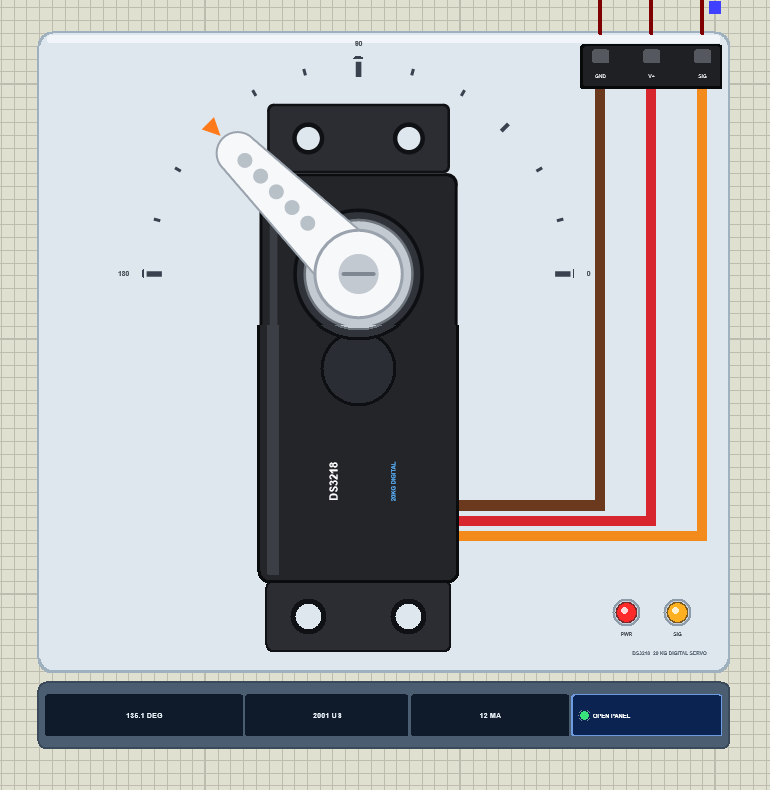
Search DS3218 in Pick Devices; the device DS3218SERVOTEP is in TEPDS3218.LIB (category Electromechanical, Servo Motors) and its model is TEPDS3218.DLL. It is drawn as the real servo seen from the top: the black body with its two mounting ears and their screw holes, the labels DS3218 and 20KG DIGITAL, the round boss with the silver 25-tooth spline and the white single-arm horn on it. The brown, red and orange cable runs to the plug at the top right.
Around the servo is a light TEP plate with a 0 - 180 degree scale. The horn points at the angle the model computes and the small orange triangle at the angle the pulses ask for. PWR lights when V+ is high enough and SIG while pulses arrive. Under the plate the strip shows the angle, the pulse width and the current, with the OPEN PANEL button. The plate, the scale, the LEDs and the strip are TEP additions; a real servo has none of them.
The Pins and the Properties
| Pin | Wire | What the model does with it |
|---|---|---|
| GND | brown | the return of the servo's current |
| V+ | red | the supply, 4.8 - 6.8 V: the current and the torque come from it (below 3 V nothing moves) |
| SIG | orange | every edge is time-stamped; a 300 - 3000 us HIGH is a servo pulse |
| Property | Default | What it does |
|---|---|---|
| PULSE_MIN | 500 | the pulse for 0 degrees, in us (the DS3218's) |
| PULSE_MAX | 2500 | the pulse for 180 degrees, in us |
| START | 90 | the horn's angle when the simulation starts |
| LOAD | 0 | a constant load on the horn in kg.cm (the DS3218 gives 19 kg.cm at 5 V, 21.5 kg.cm at 6.8 V) |
Download DS3218 Servo Motor Library for Proteus
Click the button below to download DS3218-Servo-Motor-Library-for-Proteus-v1.0.zip (about 1.2 MB, without the source code of the models):
DS3218 Servo Motor Library for Proteus V1.0- README.txt: installation, the demo, the wiring, the properties, real hardware, troubleshooting and the limits.
- Proteus Library Files:
TEPDS3218.LIBandArduinoV4TEP.LIBfrom our Arduino Library for Proteus V4.0. - Proteus Model Files:
TEPDS3218.DLLandTEPARDUINO.DLL. - Proteus Simulation:
DS3218-Servo-Motor-ArduinoUnoV4.pdsprj,DS3218_Servo_Demo.hexand copies of the two DLLs. - Arduino Code:
DS3218_Servo_Demo.ino(the Servo library comes with the Arduino IDE).
No Proteus yet? Read How to Download and Install Proteus 7 and 8. New to libraries? Follow How to Install a New Library in Proteus.
How to Install DS3218 Servo Motor Library for Proteus
- Close Proteus and extract the whole zip file, for example to your Desktop.
- Copy
TEPDS3218.LIBandArduinoV4TEP.LIBfrom Proteus Library Files into the LIBRARY folder of Proteus (usuallyC:\Program Files (x86)\Labcenter Electronics\Proteus 8 Professional\LIBRARY). - Copy
TEPDS3218.DLLandTEPARDUINO.DLLfrom Proteus Model Files into the MODELS folder. The two Arduino files are the ones of our Arduino Library V4.0; if you have it, they are the same. - Delete
TEPDS3218.IDXfrom the LIBRARY folder if it is there. - Start Proteus, press P and search for DS3218.
Tip: keep the Proteus Simulation folder together, because the project needs its .hex file and the DLLs beside it. The library is tested in Proteus 8.5; Proteus 7 is not supported.
The Demo Circuit
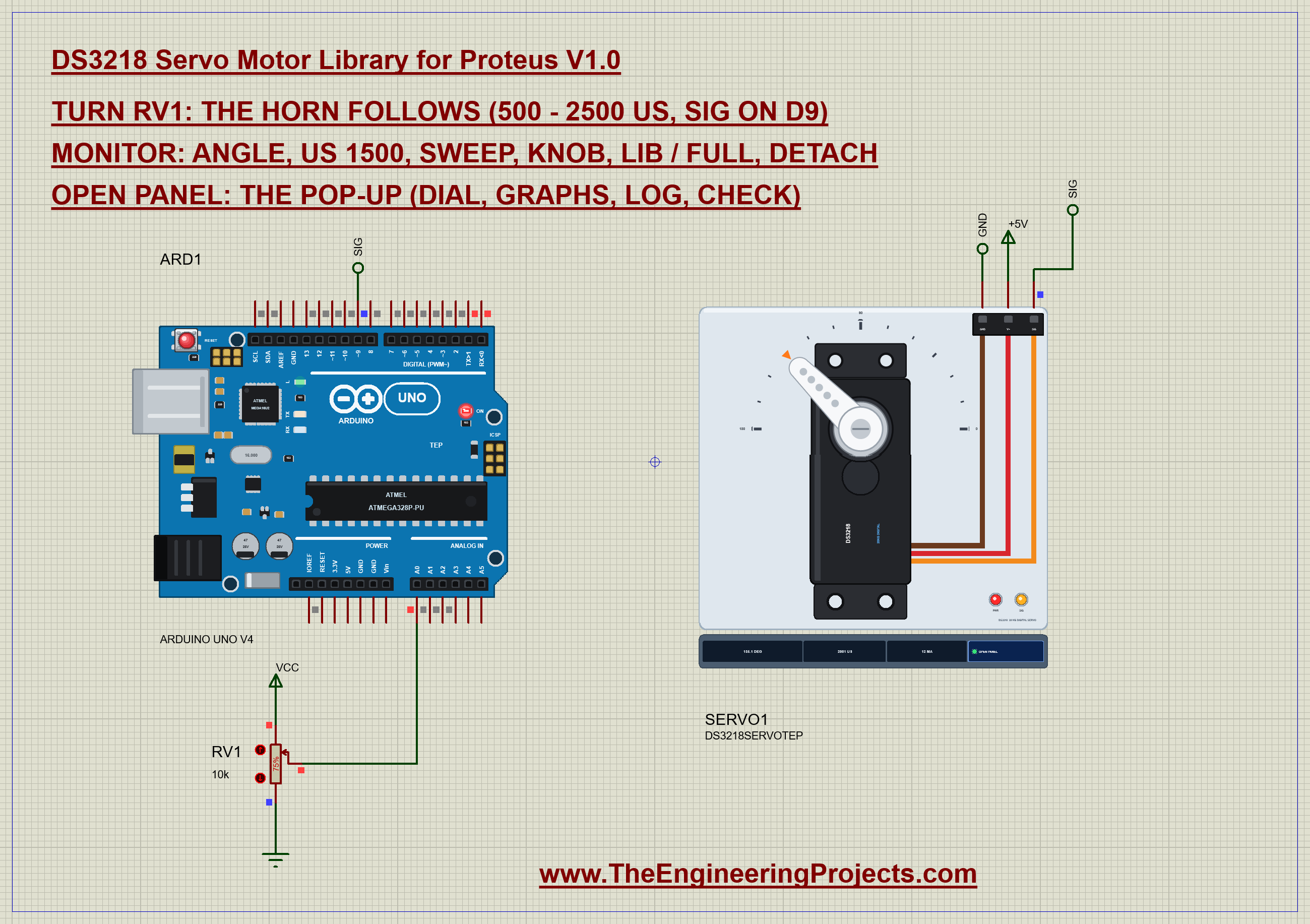
Open DS3218-Servo-Motor-ArduinoUnoV4.pdsprj. ARD1 is an Arduino UNO V4.0 from our Arduino UNO Library for Proteus V4.0, running DS3218_Servo_Demo.hex with its serial monitor built in. SERVO1 is the DS3218, and RV1, a 10k potentiometer on A0, is the knob. In Proteus the servo's V+ sits on the ideal +5V rail; on the bench it must not.
| DS3218 wire | Arduino UNO | Note |
|---|---|---|
| brown (GND) | GND | and the minus of the servo supply |
| red (V+) | its own 5 - 6.8 V supply | 4 A or more - never the Arduino's 5V pin |
| orange (SIG) | D9 | any digital pin: the Servo library makes the pulses with Timer1 |
| RV1 wiper | A0 | the ends of the pot on 5V and GND |
The Arduino Code
The demo uses the Servo library that comes with the Arduino IDE. New to Arduino? Start with Arduino Tutorial for Beginners and Introduction to Arduino UNO. The sketch begins with the library, the two pins and one Servo object:
#include <Servo.h>

const int SERVO_PIN = 9;
const int POT_PIN = A0;

Servo servo;
Two variables hold the attach limits - the pulse widths that write(0) and write(180) become. They start at the DS3218's numbers:
int usMin = 500, usMax = 2500; // the attach() limits: write(0 - 180) = usMin - usMaxAttaching is the important part. With the DS3218's limits the sketch calls attach(9, 500, 2500); with the library's numbers it calls the plain attach(9), exactly as most tutorials do. A third branch allows wide limits for the us command:
  if (wideLimits) servo.attach(SERVO_PIN, 400, 2900);
  else if (usMin == 544) servo.attach(SERVO_PIN);        // the library's defaults: 544 - 2400 us
  else servo.attach(SERVO_PIN, usMin, usMax);
Two commands switch between them. lib gives the library's defaults, full the DS3218's range; both re-attach and let the knob write its angle again:
void setLimits(int lo, int hi) {
  usMin = lo; usMax = hi; attachedLimits = false;
  ensureAttached();
  lastAngle = -1;                                          // the knob writes again with the new limits
}
if (!strcmp(s, "lib")) { setLimits(544, 2400); return; }
if (!strcmp(s, "full")) { setLimits(500, 2500); return; }For every angle the sketch prints the pulse width the library sends, with the same sum write() uses:
void report(int angle) {
  Serial.print(F("Angle "));
  Serial.print(angle);
  Serial.print(F(" deg -> pulse "));
  Serial.print(map(angle, 0, 180, usMin, usMax));
  Serial.println(F(" us"));
}
The knob is the Arduino's Knob example: read the pot, map it to 0 - 180 degrees and write the angle when it has changed by two degrees:
  if (mode == KNOB) {
    int raw = analogRead(POT_PIN);
    int angle = map(raw, 0, 1023, 0, 180);
    if (lastAngle < 0 || abs(angle - lastAngle) >= 2) {
      servo.write(angle);
      lastAngle = angle;
The HEX file is in the package. To change the sketch, open it in the Arduino IDE and export the compiled binary, as in How to get the HEX file from Arduino. It needs 6,938 bytes of flash (21 % of the UNO) and 319 bytes of RAM.
Running the Demo
Press Run. The UNO's serial monitor and the servo's pop-up open over the schematic; move them aside. RV1 starts at 75 %, so the first reading asks for 135 degrees - 2000 us with the DS3218's range:
DS3218 Servo Motor demo - The Engineering Projects
attach(9, 500, 2500): the DS3218's 0 - 180 deg
Turn the pot on A0, or type an angle.
Commands: 0-180 = angle, us 1500 = pulse width, sweep, knob, lib, full, detach, help
Pot 768 -> Angle 135 deg -> pulse 2000 us
The horn swings from 90 degrees: "reached 134.9 deg from 90.0 in 149 ms (301 deg/s)", says the Event log. Then it holds at 135 degrees and the strip shows 12 mA - a digital servo's controller at rest.
Servo.h's Range Against the DS3218's
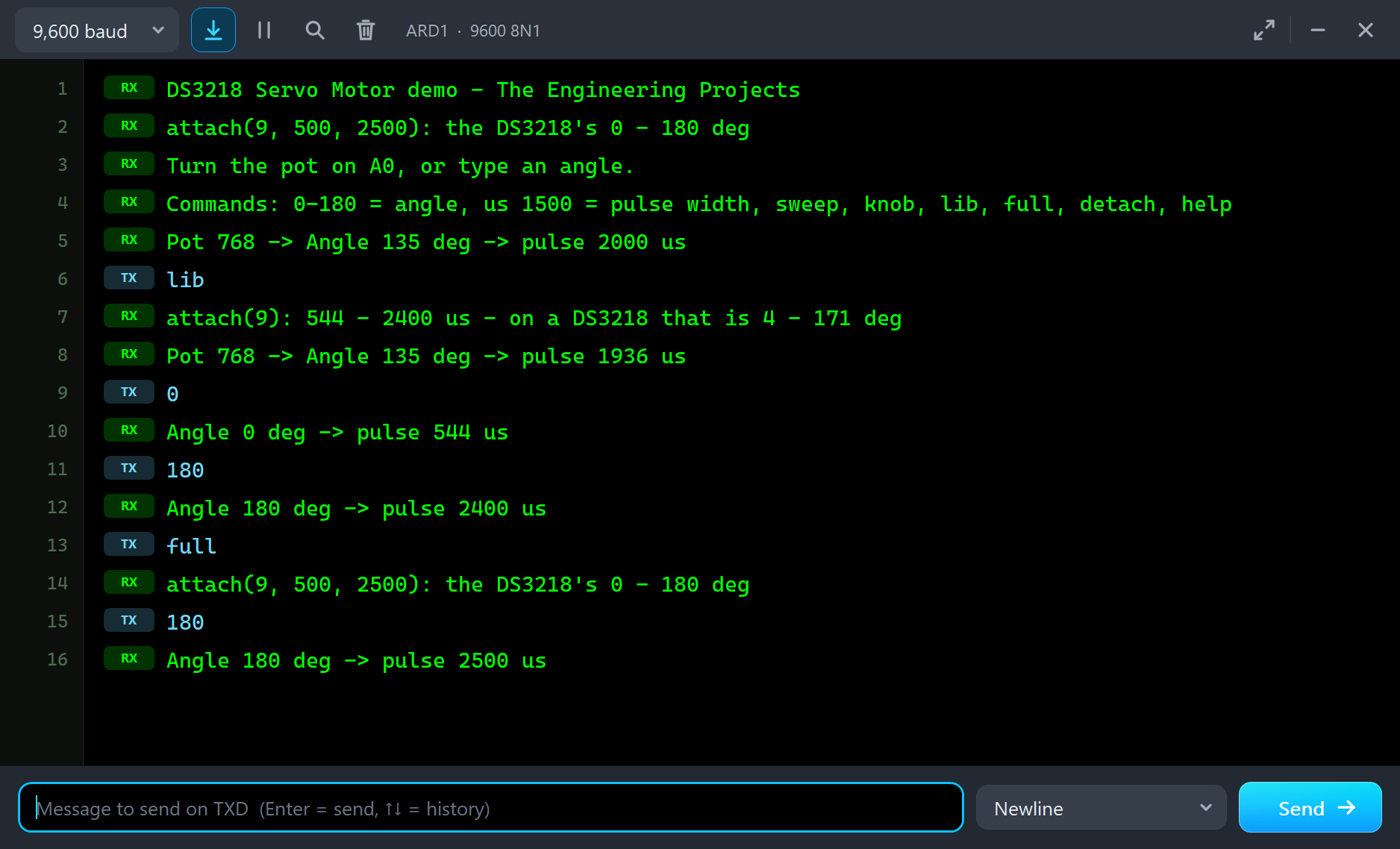
Now type lib in the monitor and press Enter or Send, then 0, then 180. Then full and 180 again. The monitor keeps the story:
lib
attach(9): 544 - 2400 us - on a DS3218 that is 4 - 171 deg
Pot 768 -> Angle 135 deg -> pulse 1936 us
0
Angle 0 deg -> pulse 544 us
180
Angle 180 deg -> pulse 2400 us
full
attach(9, 500, 2500): the DS3218's 0 - 180 deg
180
Angle 180 deg -> pulse 2500 us
After lib the same pot position asks for 1936 us, and the horn moves to 129.2 degrees: the angle on the monitor and the angle of the horn no longer agree. It gets worse at the ends.
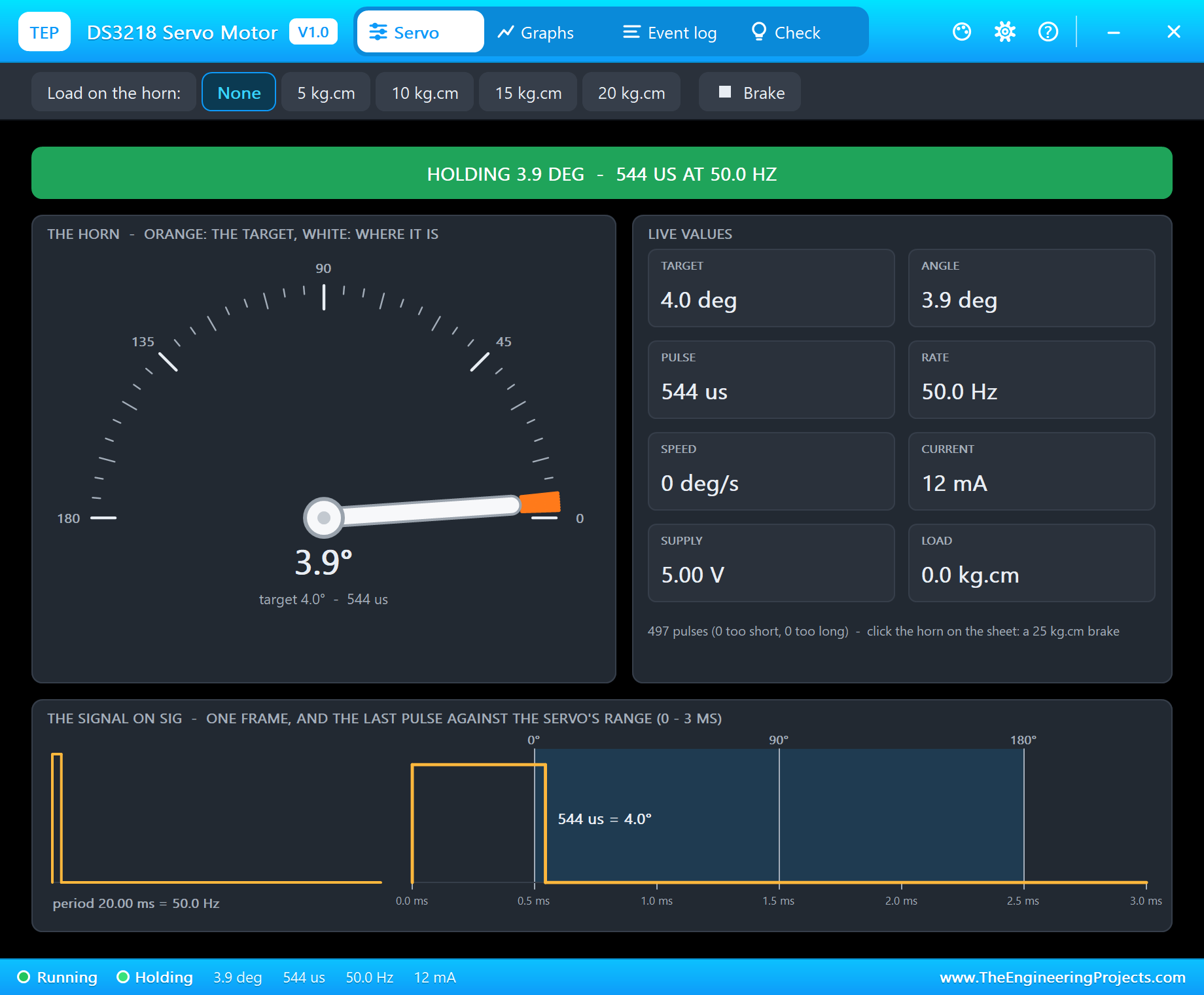
write(0) sends 544 us. The DS3218 reads that as 4.0 degrees and the horn stops at 3.9 - "reached 4.1 deg from 129.2 in 360 ms". The signal view at the bottom of the pop-up shows why: the servo's 0 degree mark is at 500 us, and the pulse ends just after it. write(180) is the same story at the other end: 2400 us, and the horn stops at 171 degrees. Thirteen degrees of the servo's travel are simply never asked for.
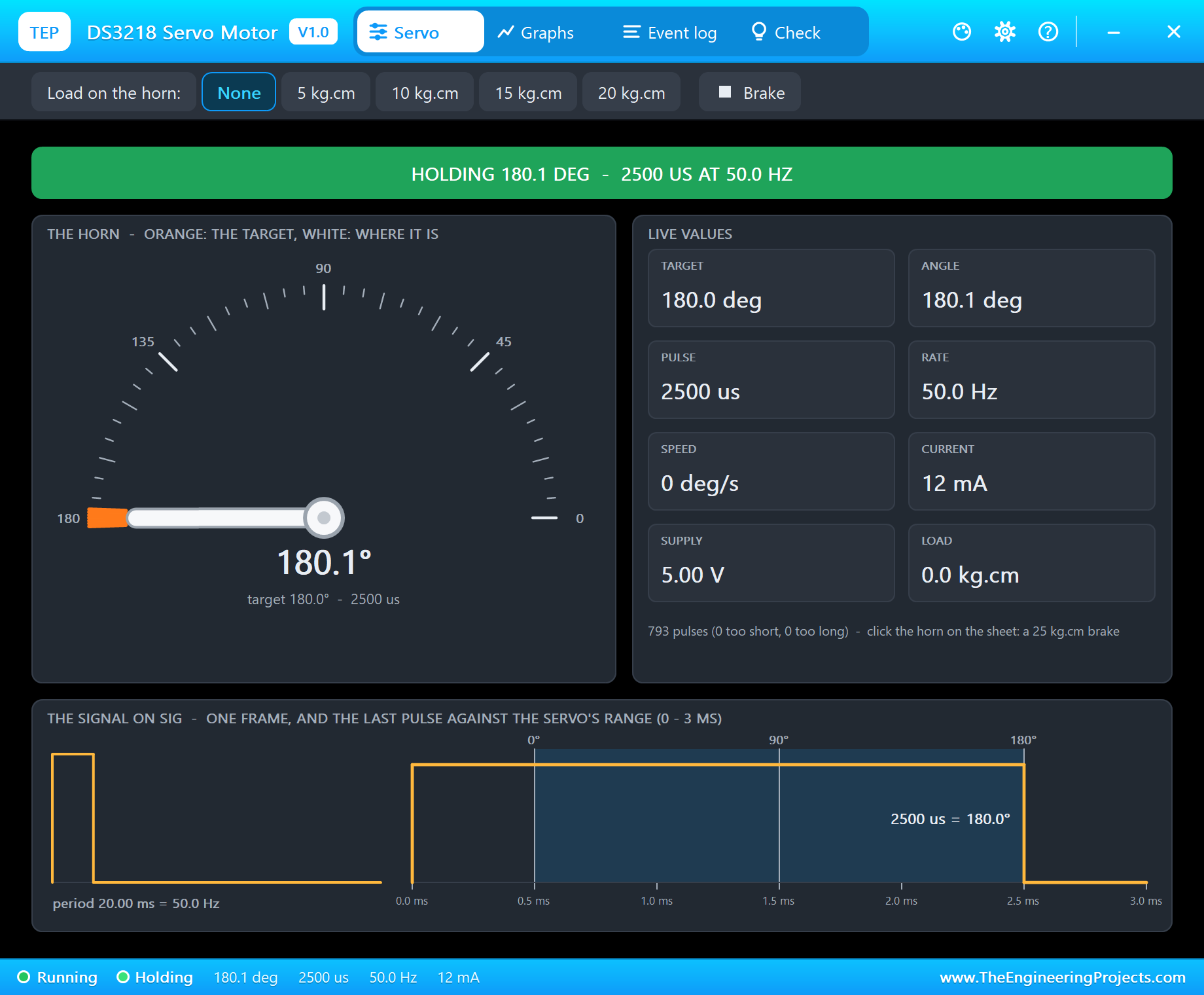
Type full and 180 and the sketch sends 2500 us: "reached 179.9 deg from 171.1 in 55 ms". The whole range is back.
The window in these pictures is the servo's pop-up, TEP DS3218 Servo Motor, which opens at Run in the look of our TEP Serial Monitor Advance for Proteus. It has four tabs - Servo, Graphs, Event log and Check - plus Settings and Help; OPEN PANEL on the strip brings it back if you close it. The Servo page shows everything at once: the banner, the dial with the horn and the orange target, the live values from the target to the load, and the pulse against the servo's 0, 90 and 180 degree marks.
| Call | write(0) | write(180) | On a DS3218 |
|---|---|---|---|
| attach(9) | 544 us | 2400 us | 4 - 171 degrees |
| attach(9, 500, 2500) | 500 us | 2500 us | 0 - 180 degrees |
Graphs
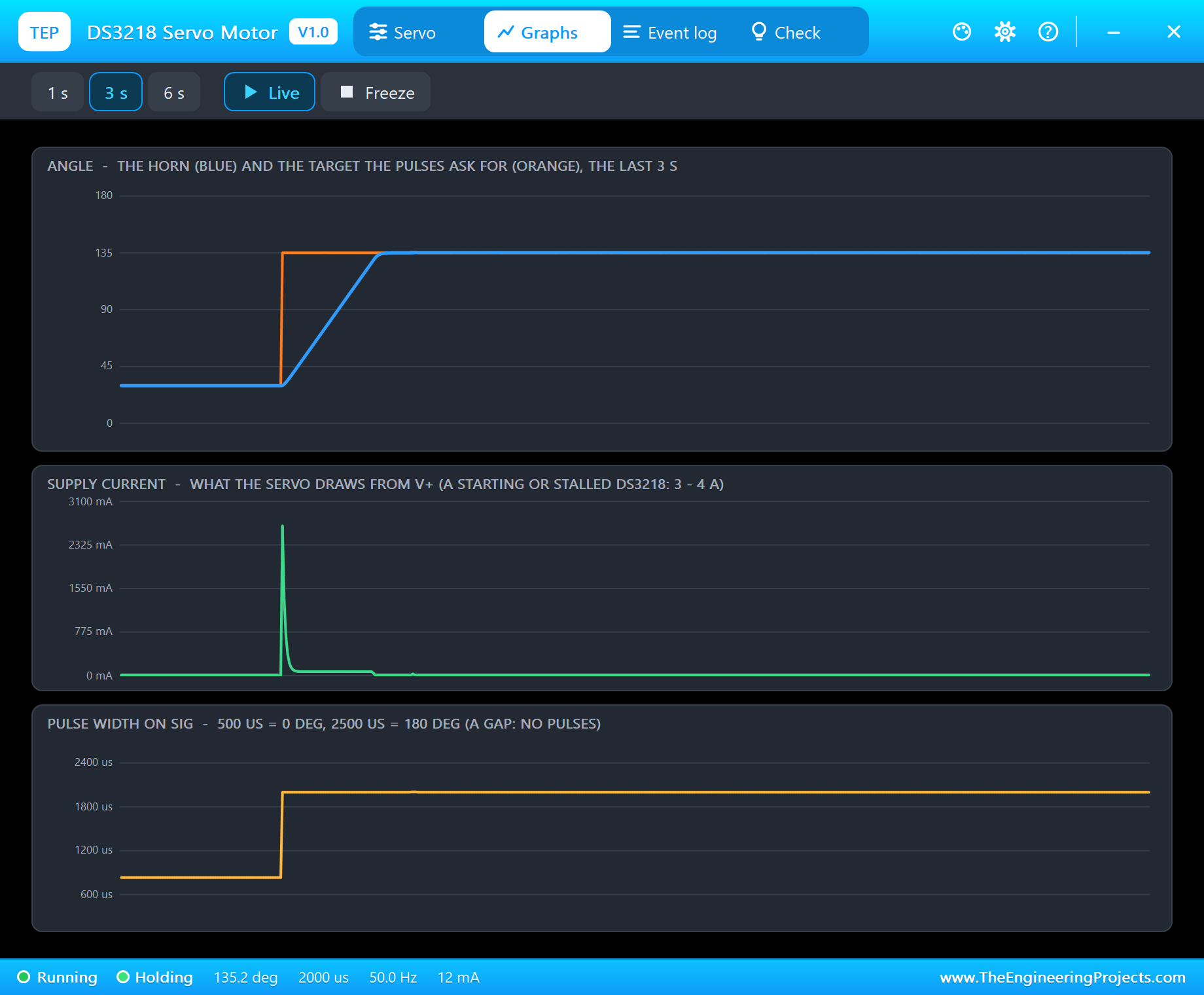
Typed 30, the horn goes down in 425 ms - "reached 30.1 deg from 180.1" - and after knob it climbs back from 29.9 to 134.9 degrees in 307 ms. Graphs shows that second move: the orange target jumps, the blue horn follows on a straight ramp at about 340 degrees per second. The current graph is the warning: the start of the move pulls about 2.9 A in the graph's 5 ms samples, because a standing motor has no back-EMF to limit its current. Once the horn is moving the current falls to about 0.1 A, and at rest it is 12 mA again.
Torque, the Supply and the Current Limit
A servo's torque grows with its supply, but the DS3218's data sheet shows it growing more slowly than the voltage: 19 kg.cm at 5 V, only 21.5 kg.cm at 6.8 V. Its driver limits the motor current. The model does the same: below about 5.7 V the torque follows the voltage, above it the driver's 4.13 A limit holds it at 21.5 kg.cm, while the speed keeps rising with the voltage.
20 kg.cm: a Stall
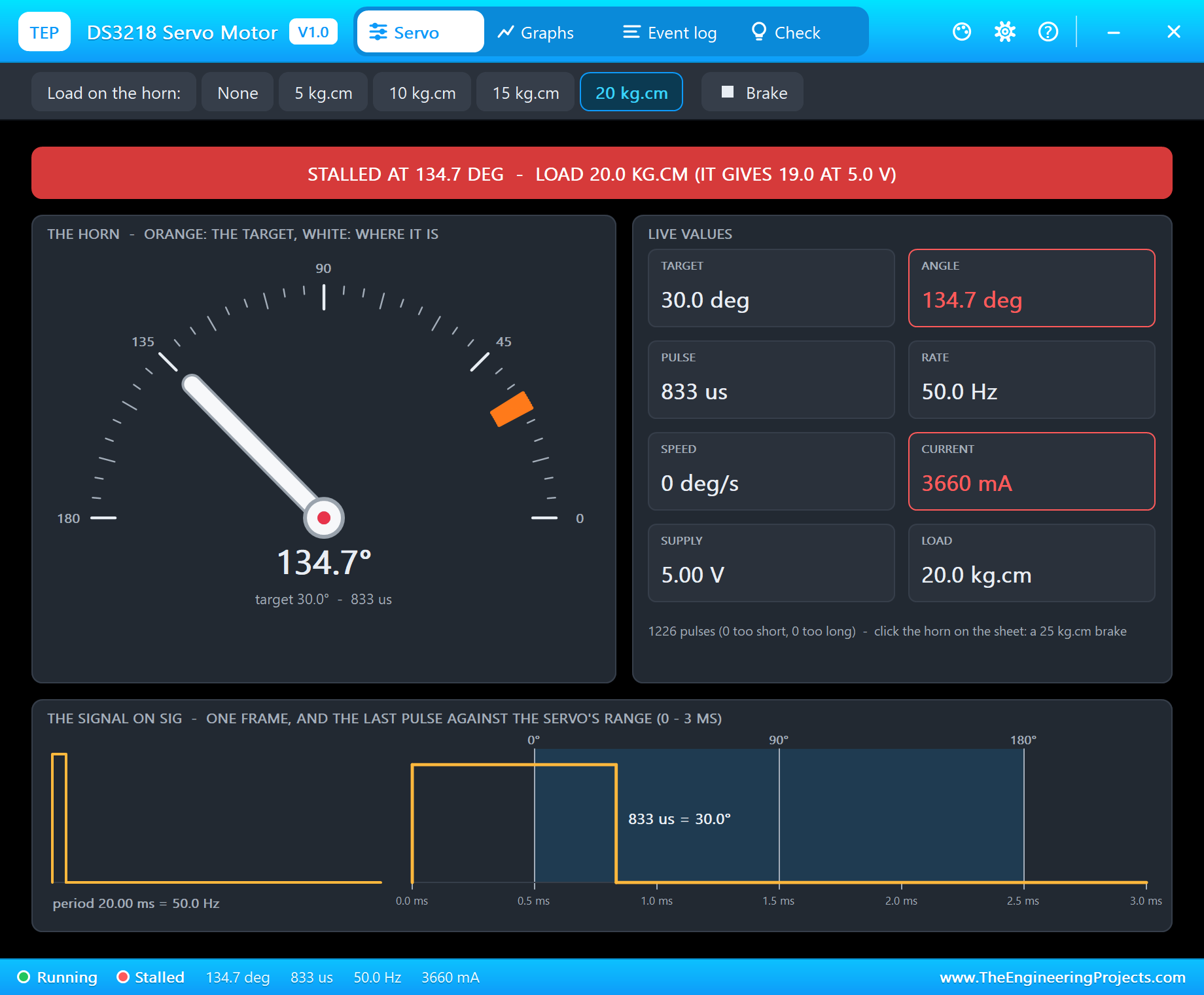
Pick 20 kg.cm on the toolbar and type 30. At 5 V the DS3218 gives 19 kg.cm, so the motor pushes with everything it has and the horn stays at 135 degrees. The banner turns red - STALLED AT 134.7 DEG - LOAD 20.0 KG.CM (IT GIVES 19.0 AT 5.0 V) - and the current reads 3660 mA. The Event log adds "STALLED at 135.2 deg - the load (20.0 kg.cm) is above its torque (19.0 kg.cm at 5.0 V), 3651 mA". Run the same servo from 6.8 V and the same load would not stop it; our automatic tests check exactly that.
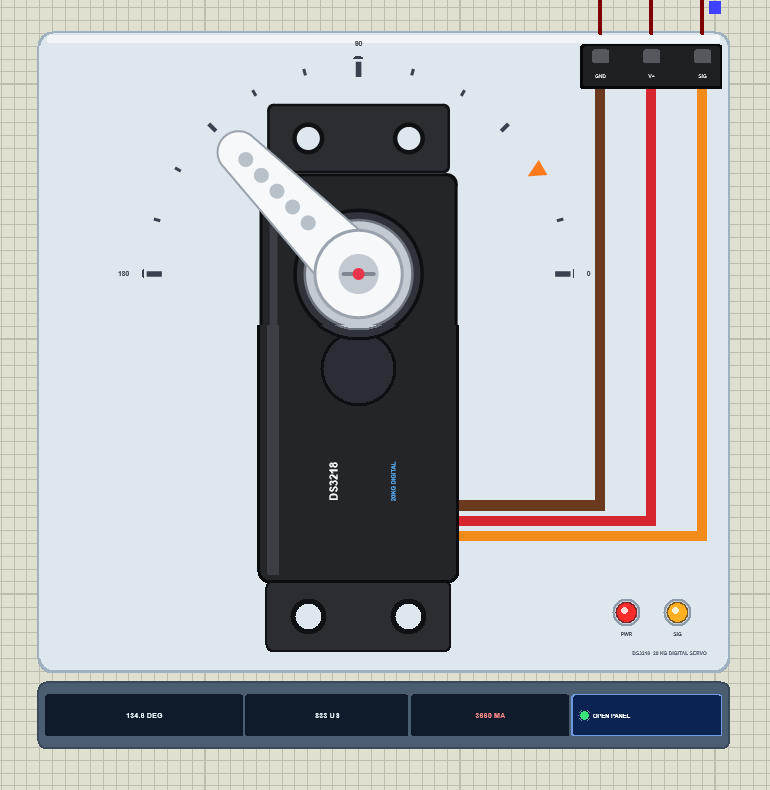
On the schematic the orange target marker sits at 30 degrees while the horn has not moved, and a red dot on the hub marks the stall. 3.7 A is why a DS3218 must never hang on the Arduino's 5V pin: the regulator and the USB port behind it are made for a few hundred milliamps, and the board resets the moment the servo pushes.
15 kg.cm: the Droop
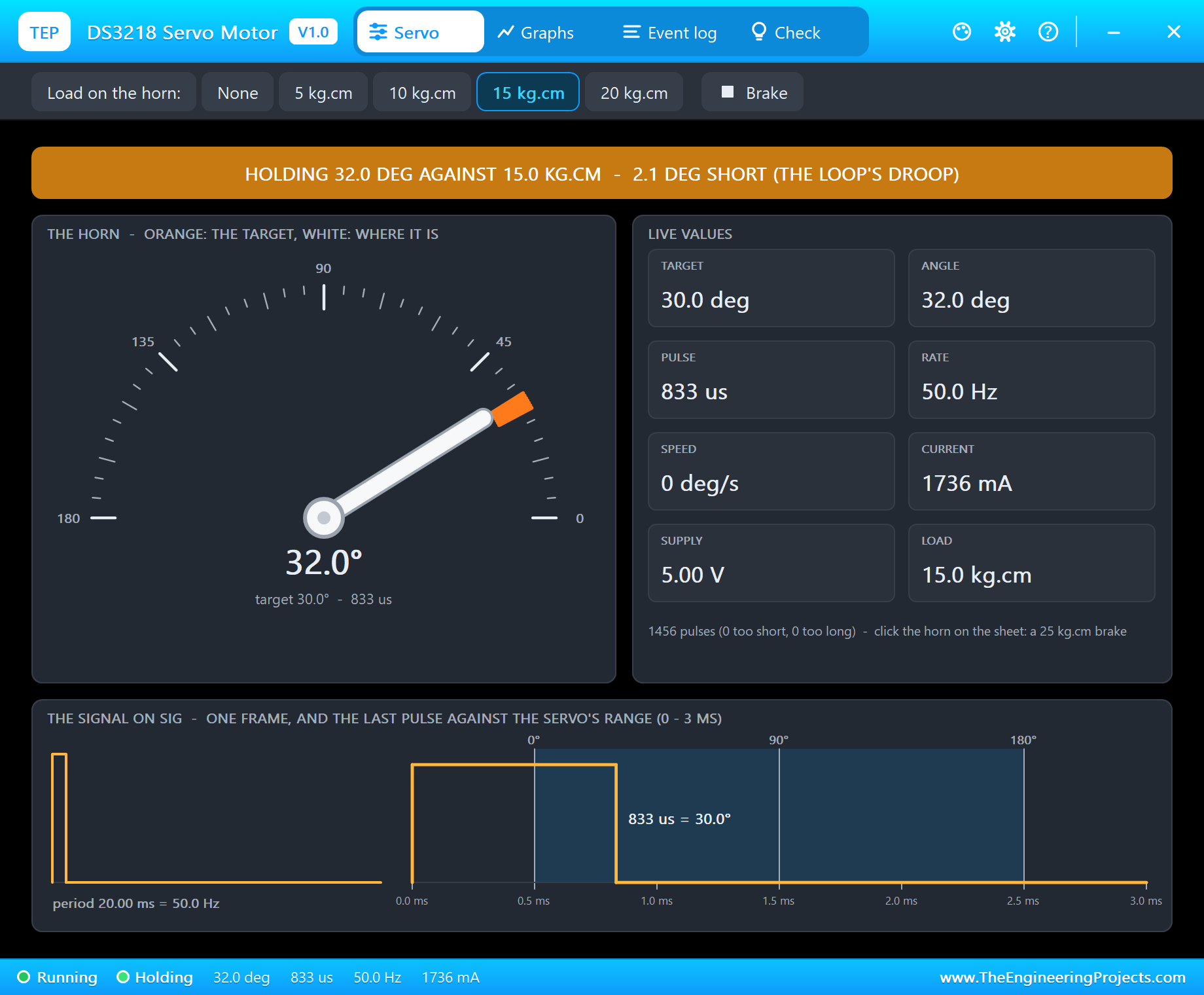
Now pick 15 kg.cm. That is less than the servo can give, so the horn moves and stops at 32.4 degrees, a little short of 30: "stopped at 32.4 deg, 2.4 deg short of 30.0 (the load)". The banner turns amber: HOLDING 32.0 DEG AGAINST 15.0 KG.CM - 2.1 DEG SHORT (THE LOOP'S DROOP), and the servo draws 1736 mA to hold it there.
Every position loop that drives in proportion to the error behaves like this: under a load the horn settles where the push just balances the load, a little short of the target. The DS3218's stiff digital loop keeps that droop small - about two degrees under 15 kg.cm, where a softer analog servo would sag much more - but it is never zero. And it costs current: almost 2 A just to stand still, which turns into heat in the motor.
Event Log
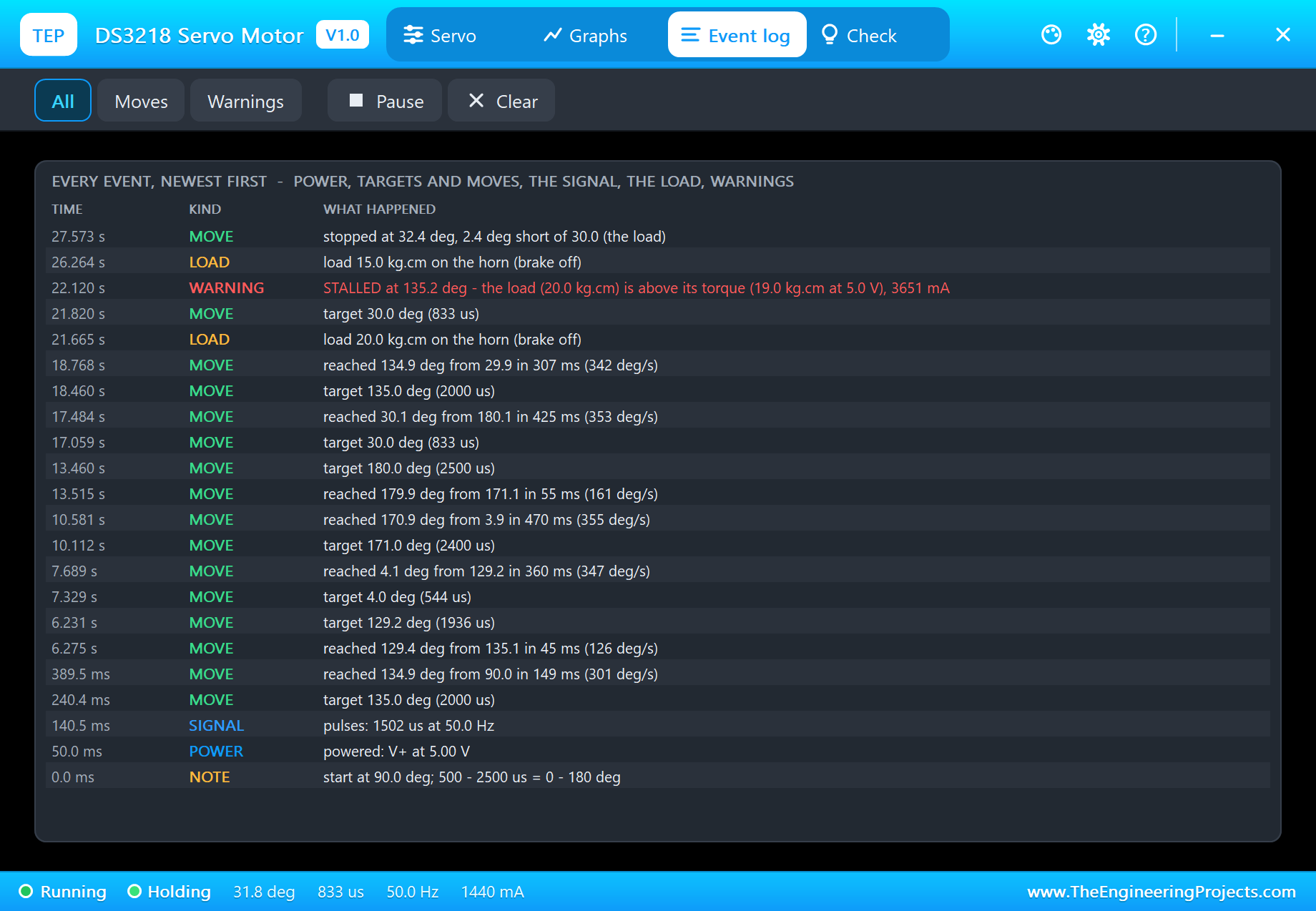
The Event log keeps the whole run, newest first: the power and the first pulses, every target with its pulse width - "target 4.0 deg (544 us)", "target 171.0 deg (2400 us)", "target 180.0 deg (2500 us)" - every finished move with its time and speed, the load changes, the stall warning in red and the move that stopped short. Filter it by moves or warnings, pause it or clear it.
The Check Page
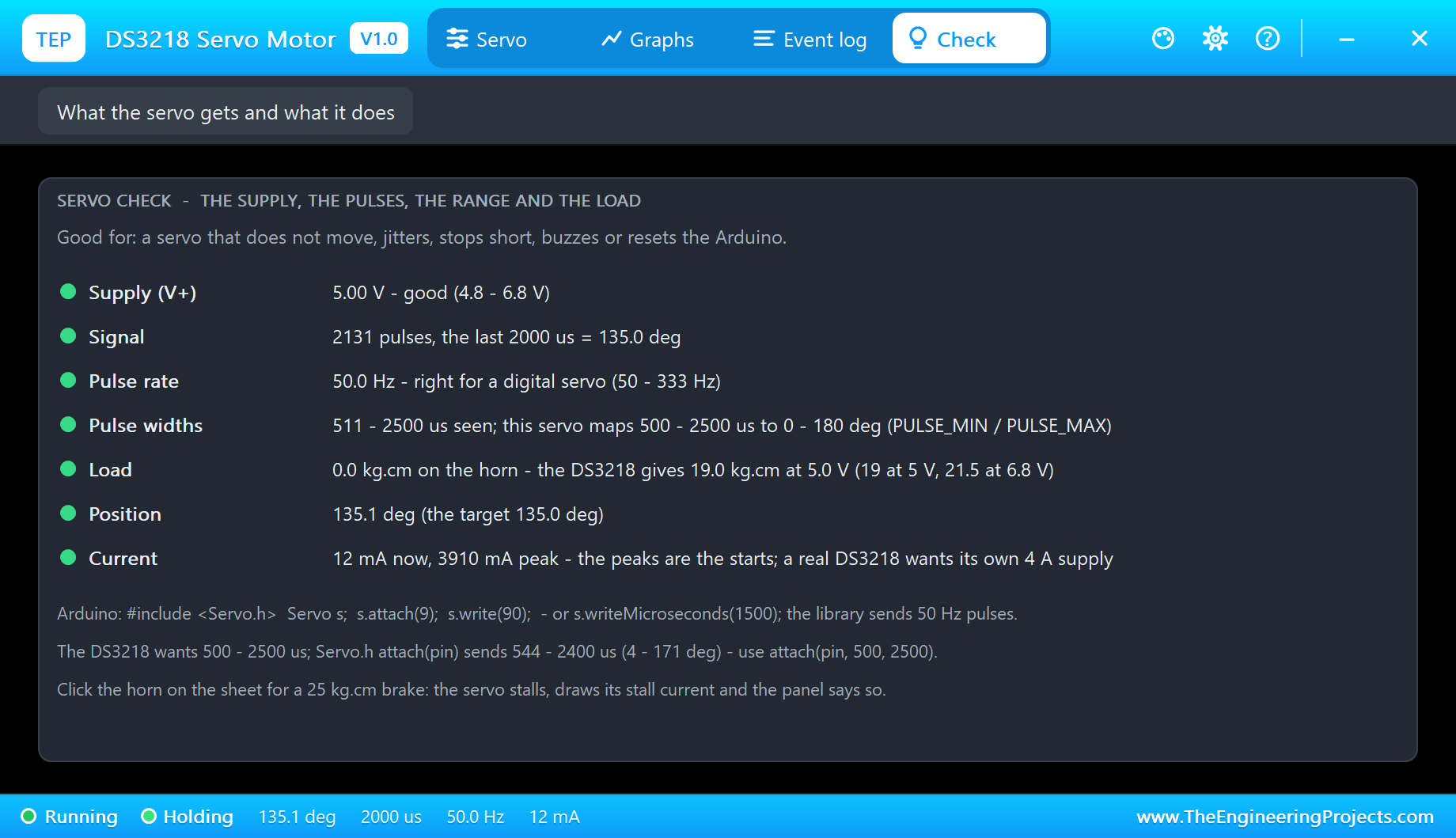
The Check page answers the forum questions in one look, each row with a verdict - green for fine, amber to check, red for wrong. At the end of our run all seven are green: the supply, the signal, "50.0 Hz - right for a digital servo (50 - 333 Hz)", the pulse widths seen against the servo's 500 - 2500 us, the load against the torque at this supply ("the DS3218 gives 19.0 kg.cm at 5.0 V"), the position and the current, "12 mA now, 3910 mA peak". Under the rows sits the reminder that started this article: the DS3218 wants 500 - 2500 us, so use attach(pin, 500, 2500).
How the Model Works
Proteus runs the digital part of a circuit, the Arduino and its pulses, before each analog step. The servo keeps every edge on SIG with its exact time, so it knows each pulse width to the microsecond. It then integrates its motor and horn over the step in 50 us slices: the pulse sets the target, the stiff digital loop compares it with the angle, the driver applies the voltage up to its current limit, the motor fights its back-EMF, the friction of the metal gears and the load, and the gearbox turns the horn.
The current is part of the circuit, drawn from V+, so an ammeter in series with the red wire reads what the pop-up shows. We checked the model on a PC with 30 automatic tests: 60 degrees take 0.172 s at 5 V with the settling and 0.130 s at 6.8 V, the top speed is 381 degrees per second, Servo.h's 544 and 2400 us land at 3.9 and 171.1 degrees, 20 kg.cm stalls the servo at 5 V and gets through at 6.8 V, the 25 kg.cm brake draws 3661 mA, and 333 Hz pulses work. Six more tests render the pop-up pages, and the demo project is read back from disk with 51 checks.
Building a robot arm with several of them? Our PCA9685 Servo Driver Library for Proteus drives sixteen servos over I2C - and for the smaller joints there are our MG996R Servo Motor Library for Proteus, MG90S Servo Motor Library for Proteus and SG90 Servo Motor Library for Proteus.
Troubleshooting
- The horn never reaches 0 or 180 degrees: the sketch uses
attach(pin)- useattach(pin, 500, 2500). - The horn never moves and the pop-up says NO POWER: V+ is not connected or below 3 V; a DS3218 wants 4.8 - 6.8 V.
- WAITING FOR PULSES: SIG is on another pin than the one in
attach(), or the sketch never callsattach(). - "SIG stays HIGH" or "pulses under 300 us":
digitalWrite()oranalogWrite()on the SIG pin - use the Servo library. - The horn stops a degree or two short: a load it can carry - the droop.
- STALLED: the load is above the torque at this supply (19 kg.cm at 5 V), or the brake on the hub.
- No horn, no UNO or no monitor:
TEPDS3218.DLLorTEPARDUINO.DLLis missing from MODELS and the project folder; a closed monitor opens again with a click on the UNO's USB port.
Things to Know Before Using a Real DS3218
- Power: a DS3218 draws 3 - 4 A when it starts or stalls. Give it its own 5 - 6.8 V supply of 4 A or more, with GND common to the Arduino.
- Use attach(pin, 500, 2500): with
attach(pin)the horn never reaches 0 or 180 degrees. - There is a 270 degree DS3218: the same 500 - 2500 us then cover 270 degrees; set PULSE_MIN and PULSE_MAX to match your servo, the model is the 180 degree one.
- Do not hold a heavy load forever: the droop costs amps, and amps make heat.
- The Servo library uses Timer1: on an UNO,
analogWrite()on D9 and D10 stops working while a servo is attached.
Limitations of the Simulation
- The model is the 180 degree DS3218; the 270 degree version and continuous rotation servos are other parts.
- Not modelled: the digital servo's programmable options (its own range, speed and fail-safe), the variations from one servo to the next, gear play, heating, and damage from a wrong supply (the model only warns).
- The plate, the scale, the LEDs, the strip and the brake are TEP additions.
- The model is our own, written from the typical data of the DS3218; this library is not made or endorsed by DSSERVO, Arduino or Labcenter.
- Licences: the demo HEX contains the Arduino Servo library 1.2.2 (LGPL 2.1) and the Arduino AVR core 1.8.6 (LGPL); the sketch is included and the README gives the source links. The potentiometer is Proteus's own POT-HG.
- Tested in Proteus 8.5 in October 2026 with the demo as shipped: the knob, lib and full, 0, 180 and 30, the 20 and 15 kg.cm loads, the sweep and all four pages of the pop-up. Proteus 7 is not supported.
So, that was all about the DS3218 Servo Motor Library for Proteus V1.0. I hope it saves you the classic surprise of a big servo that never reaches its ends, and shows you how much torque and current your design really asks for - before a 20 kg servo meets your bench supply. If you have any questions, ask in the comments and I will help you out. Till the next tutorial, take care and have fun!

Comments
0