


W5500 Ethernet Module Library for Proteus: Arduino Cloud Logger


Hello friends, I hope you all are doing great. Today, I am going to share the W5500 Ethernet Module Library for Proteus. The W5500 module is the small blue board that puts almost any microcontroller on a wired network: a WIZnet W5500 chip does the whole TCP / IP work in hardware, an RJ45 jack with its LINK and ACT LEDs takes the cable from your router, and a 2x5 header brings out SPI, reset, interrupt and power. It is the cheapest way to give an Arduino a cable connection, and the Ethernet library of the Arduino IDE drives it. With this library you can wire the module to your UNO in Proteus and run those sketches as they are - fixed addresses or DHCP, DNS, clients, servers, UDP and the link status.
W5500 Ethernet Module Library for Proteus
Latest version: V1.0 (October 2026, this tutorial)
Helping Tools
- Laptop WiFi Monitor: a laptop on the Wi-Fi of your design: a browser, a TCP / UDP terminal and ping
- Mobile WiFi Monitor: a smartphone that opens the pages of your board and sends it commands
- Serial Monitor Advance: a serial terminal window for the UART of your board
This is the thirtieth library of our Wi-Fi / Ethernet series and the third of its Ethernet group. Its demo is a cloud logger on a fixed IP address: the UNO resets the module through its RST pin, sends the pot on A0 to a ThingSpeak-style cloud every 20 seconds, and serves its status to our Mobile WiFi Monitor and JSON to our Laptop WiFi Monitor, which also pings it.
NOTICE: the PANEL pad, the panel, the virtual router and the virtual internet host are TEP additions - api.thingspeak.com is answered by our internet host, nothing leaves your PC; the W5500's interrupts and the PHY's mode settings are not simulated (see the limits at the end). The module works with the Arduino Ethernet library. Your feedback is the fuel that keeps us going, so please tell us what you think in the comments below or in the W5500 Ethernet Module board of our forum. And if our free libraries help you, you can buy us a coffee. So, let's get started with the W5500 Ethernet Module Library for Proteus:
What is the W5500 Ethernet Module?
The W5500 Ethernet module is a breakout of the WIZnet W5500: the same chip as on the Arduino Ethernet Shield 2, on a board about 5 x 3 cm with an RJ45 MagJack (the transformer and the LEDs inside the socket), a 25 MHz crystal and an AMS1117 3.3 V regulator. The W5500 keeps eight sockets at a time, with 16 KB of send and 16 KB of receive buffer shared between them, and talks to the microcontroller over SPI. Its I/O pins take 5 V signals, so it wires straight to an UNO; power it from 5 V and the regulator makes the 3.3 V the chip needs.
| Real W5500 module | This library in Proteus | |
|---|---|---|
| Chip | WIZnet W5500, 10/100 Mbit, 8 sockets | our model of the W5500, register by register |
| Link | SPI: SCLK, MOSI, MISO, SCS | the same pins, named beside their ends |
| Other pins | RST, INT, 5V, 3V3, GND | the same; RST resets the chip, INT stays HIGH |
| Arduino library | Ethernet (built into the IDE) | the same library, unchanged (2.0.2 in the demo) |
| Network | an RJ45 cable to your router | a virtual cable to our router, shared with our Wi-Fi parts |
| Link status | the PHY reports it (linkStatus) | the same: LinkON with the cable in, LinkOFF with it out |
| LEDs | PWR on the board, LINK and ACT on the jack | the same three |
The Pins of the Module
The module's header carries ten pins; makers order them differently, so wire by the names printed beside them. SCLK, MOSI and MISO go to the SPI pins (D13, D11 and D12 on an UNO). SCS is the chip select: the Ethernet library uses D10 unless the sketch names another pin with Ethernet.init(). RST resets the W5500 while it is LOW; the module pulls it up, so it may stay free, but a sketch that drives it can restart the chip at any time. INT is the W5500's interrupt output - the Ethernet library polls the chip instead, so it stays HIGH. 5V or 3V3 powers the module, and GND closes the circuit.
One Chip, Three Boards
The W5500 on this module is the chip of our Arduino Ethernet Shield 2 Library for Proteus; the older W5100 is on the shield of our Arduino Ethernet Shield Library for Proteus. The Ethernet library tests which chip answers and uses the same functions for all of them, so a sketch moves from the shield to the module by changing the wiring, not the code. The module is the one to choose when the shield's size or its fixed pins get in the way: it needs only six wires and fits any board with SPI.
Features of the W5500 Ethernet Module Library for Proteus
- The module as it looks: the blue board with the RJ45 jack and its LINK / ACT LEDs, the W5500 and its crystal, the AMS1117 regulator, the red PWR LED and the 2x5 header; every pin named beside its end.
- The real Ethernet library: our W5500 answers the library exactly as the chip does - we ran the Ethernet library 2.0.2 and the demo sketch unchanged against the model on the PC (13 checks) and in Proteus.
- A fixed address or DHCP:
Ethernet.begin(mac, ip, dns, gateway, subnet)takes its address at once;Ethernet.begin(mac)asks the router. - The RST and INT pins: a LOW on RST restarts the W5500, as on the real module; INT stays HIGH.
- DNS and a ThingSpeak-style cloud: names are looked up by DNS, and our internet host stores updates and refuses one that comes less than 15 s after the last.
- Eight sockets with EthernetServer, EthernetClient and EthernetUDP (an UNO uses four of them).
- The link:
Ethernet.linkStatus()follows the cable; pull it with a click on the jack, the CABLE property or the panel. - One network for every part: the cable goes to the same virtual router as our Wi-Fi boards and Ethernet shields; the laptop can ping the module.
- Our Laptop and Mobile WiFi Monitors: a laptop and a phone on the same network, with a browser, TCP and UDP terminals and ping - included in the package.
- Our pop-up panel: the phone with its CLOUD tab, the module card, an ETHERNET card, an SPI page with every socket command, DNS answer and the RST / INT pins, a Test page, Settings and Help - with our TEP header, not a Windows title bar.
- A compact package: about 2.91 MB, without the C++ source code of the models.
The W5500 Ethernet Module in Proteus
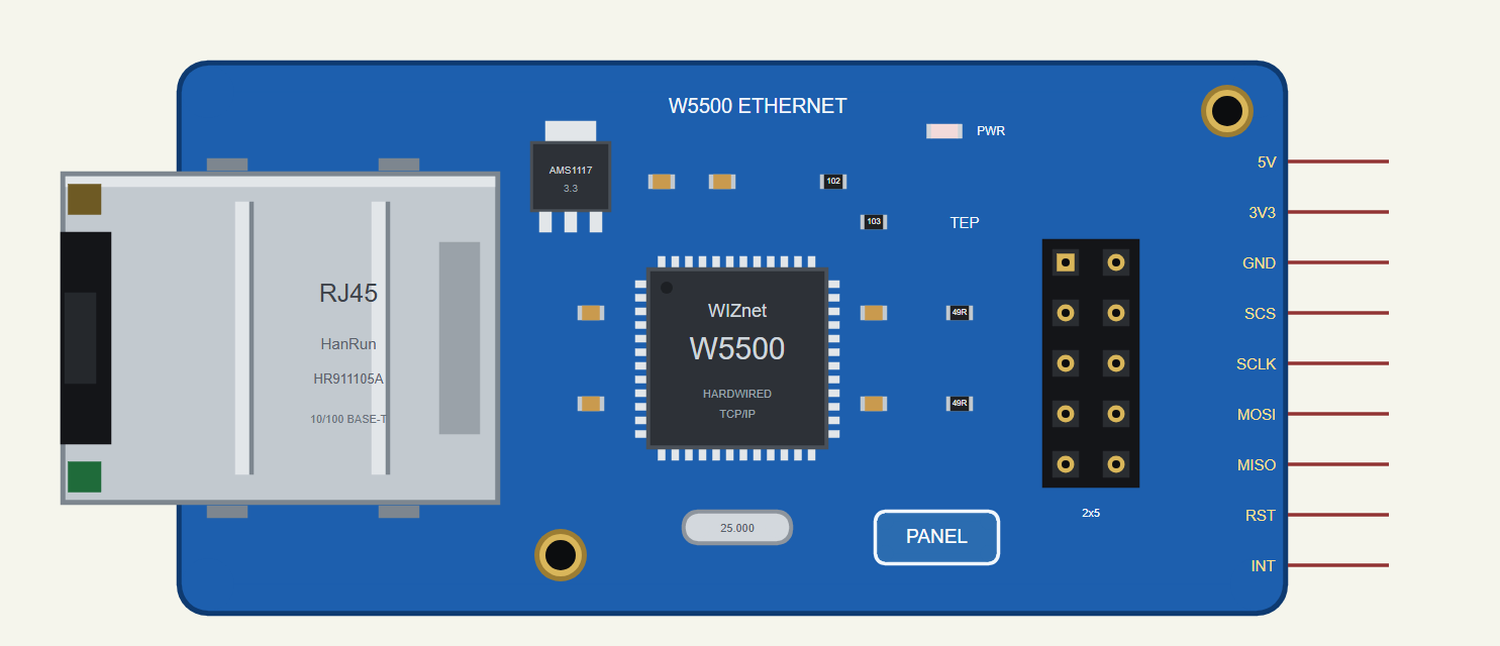
Search W5500 in Pick Devices; the device W5500 ETHERNET MODULE is in TEPW5500MOD.LIB. Click the PANEL pad or the W5500 to open the panel, and the RJ45 jack to pull or plug the cable.
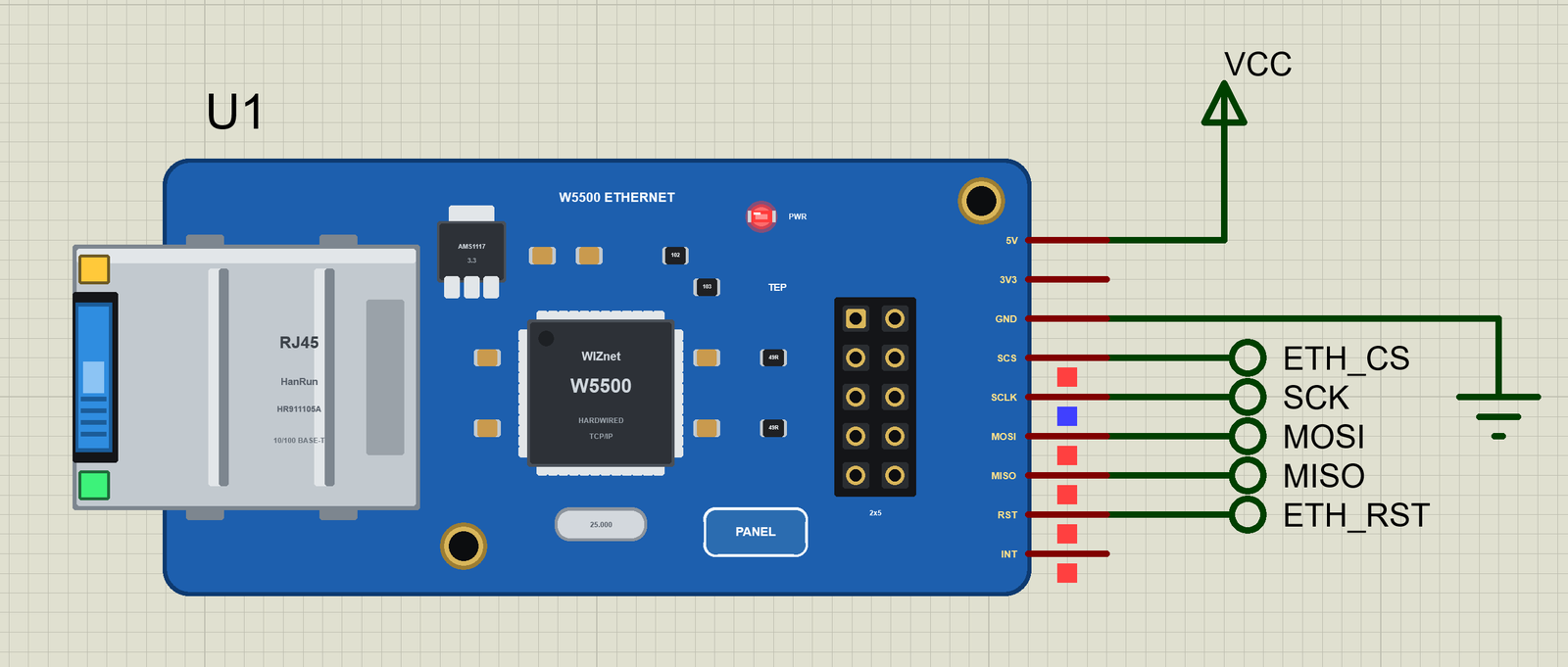
Every State of the W5500 Module
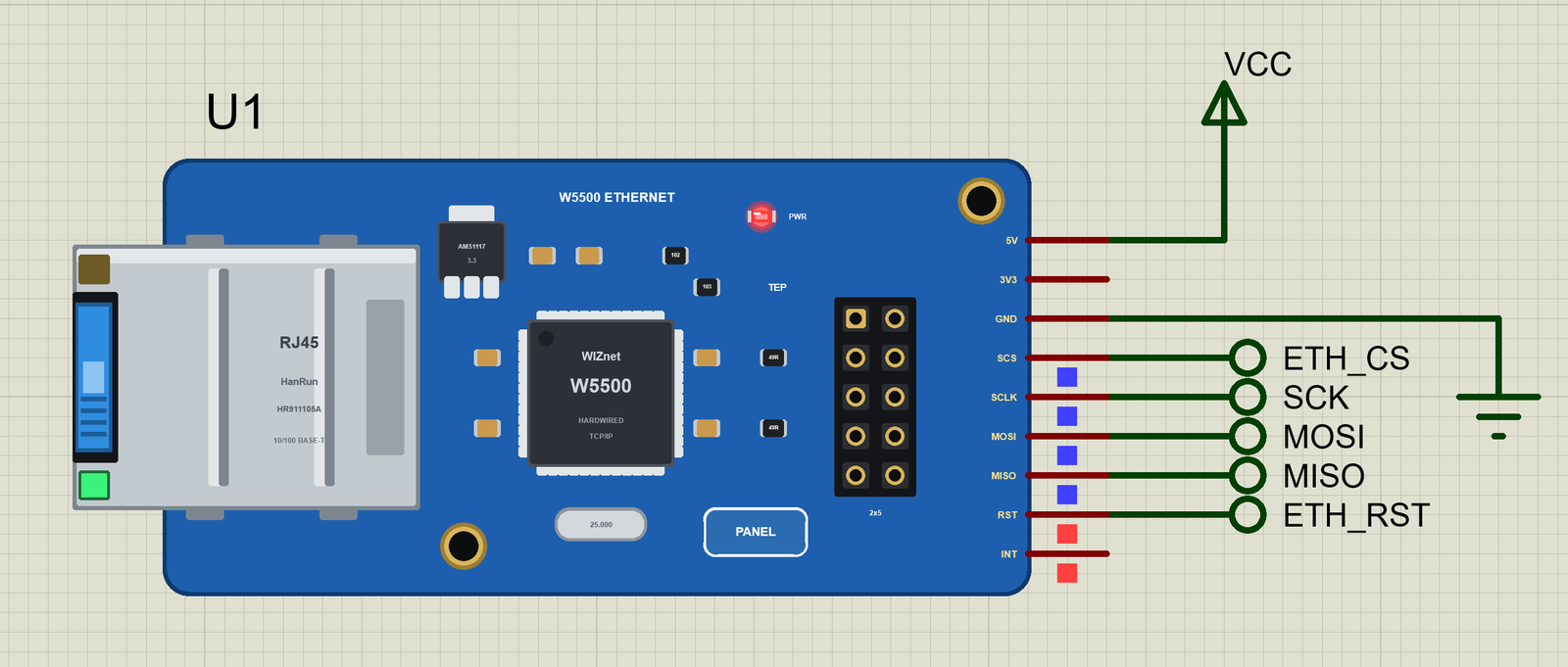
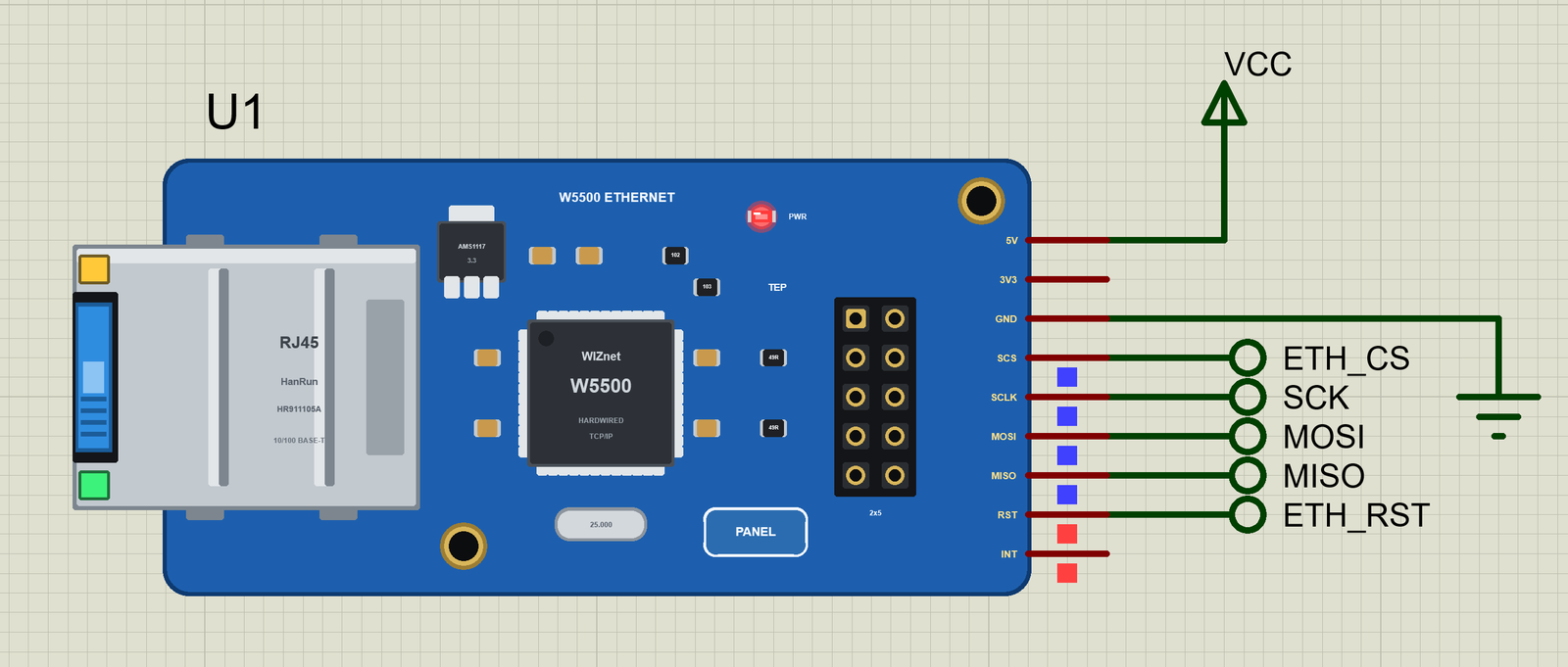
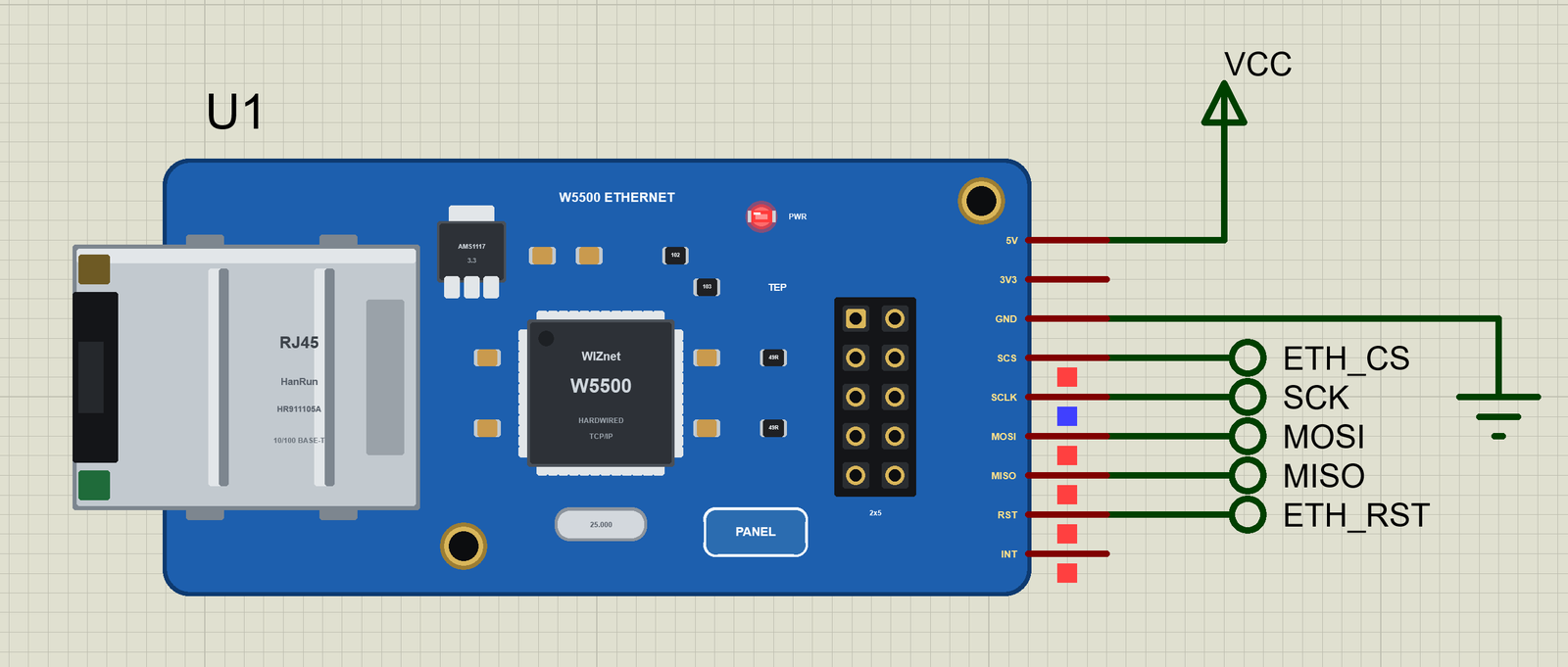
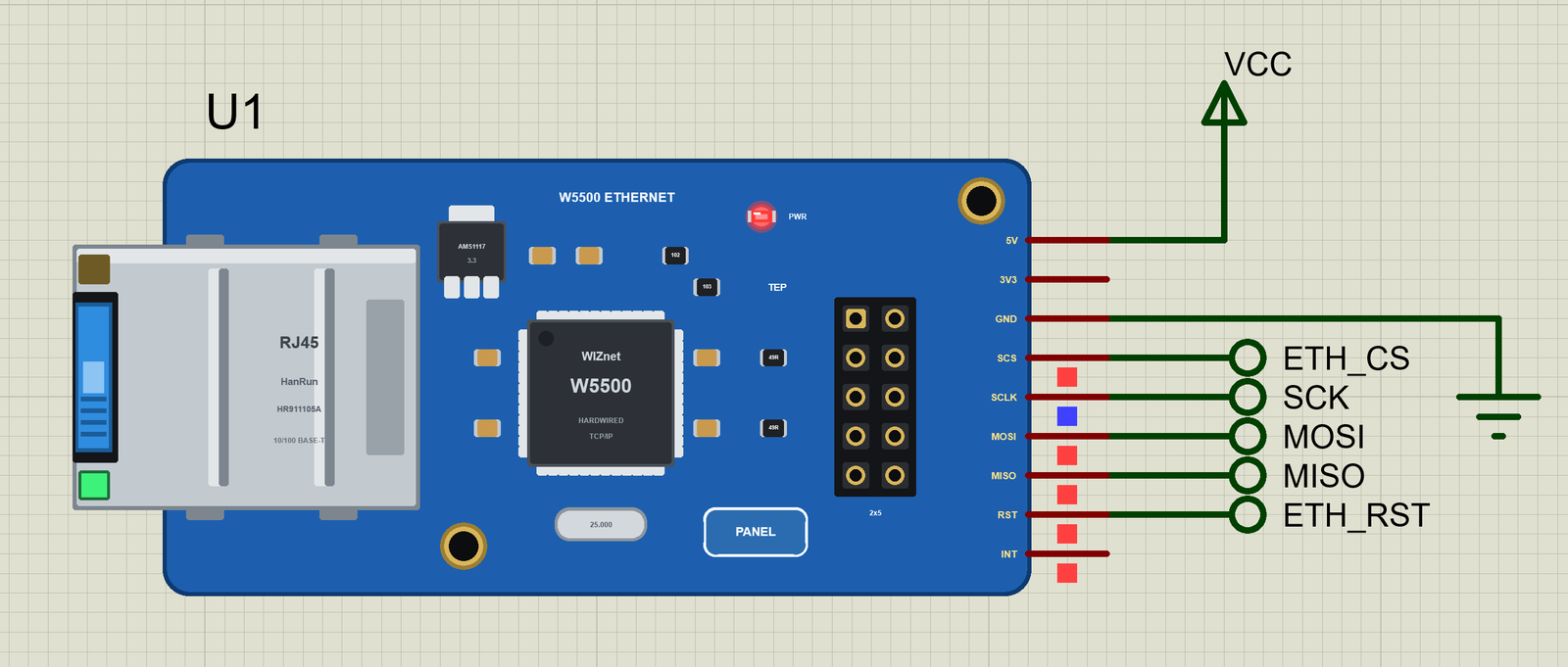
We ran the demo and paused the simulation for each picture. The sketch first resets the module through RST, then the Ethernet library tests the chip and sets the fixed address:
Download W5500 Ethernet Module Library for Proteus
Click the button below to download W5500-Ethernet-Module-Library-for-Proteus-v1.0.zip (about 2.91 MB, without the C++ source code of the models):
W5500 Ethernet Module Library for Proteus V1.0- README.txt: the device, installation, the demo, the pins, the properties, troubleshooting and the limits.
- Proteus Library Files:
TEPW5500MOD.LIB(the module),ArduinoV4TEP.LIB(our Arduino boards V4.0 - the UNO of the demo),TEPLAPTOP.LIBandTEPMOBILE.LIB(our Laptop and Mobile WiFi Monitors). - Proteus Model Files:
TEPNET.DLL(the module, the two monitors and the network) andTEPARDUINO.DLL(the Arduino boards). - Proteus Simulation: the demo project, its HEX file and copies of the DLLs.
- Arduino Code: the demo sketch. The Ethernet library is not included - it comes with the Arduino IDE.
No Proteus yet? Read How to Download and Install Proteus 7 and 8. New to libraries? Follow How to Install a New Library in Proteus.
How to Install W5500 Ethernet Module Library for Proteus
- Close Proteus and extract the whole zip file, for example to your Desktop.
- Copy the four files from Proteus Library Files into the LIBRARY folder of Proteus (usually
C:\Program Files (x86)\Labcenter Electronics\Proteus 8 Professional\LIBRARY). - Copy
TEPNET.DLLandTEPARDUINO.DLLfrom Proteus Model Files into the MODELS folder - replace older copies (this TEPNET.DLL is the first one that knows the W5500 module, and it still runs our Ethernet shields, every Wi-Fi part of the series and the two monitors). - Delete
TEPW5500MOD.IDX,ArduinoV4TEP.IDX,TEPLAPTOP.IDXandTEPMOBILE.IDXfrom the LIBRARY folder if they are there. - Start Proteus, press P and search for W5500.
The sketch is a normal UNO sketch: the Ethernet library is built into the Arduino IDE, so write your sketch and use Sketch > Export Compiled Binary; then double-click the UNO in Proteus and set its Program File to the HEX (see How to get the HEX file from Arduino).
Demo: A Cloud Logger on a Fixed IP Address
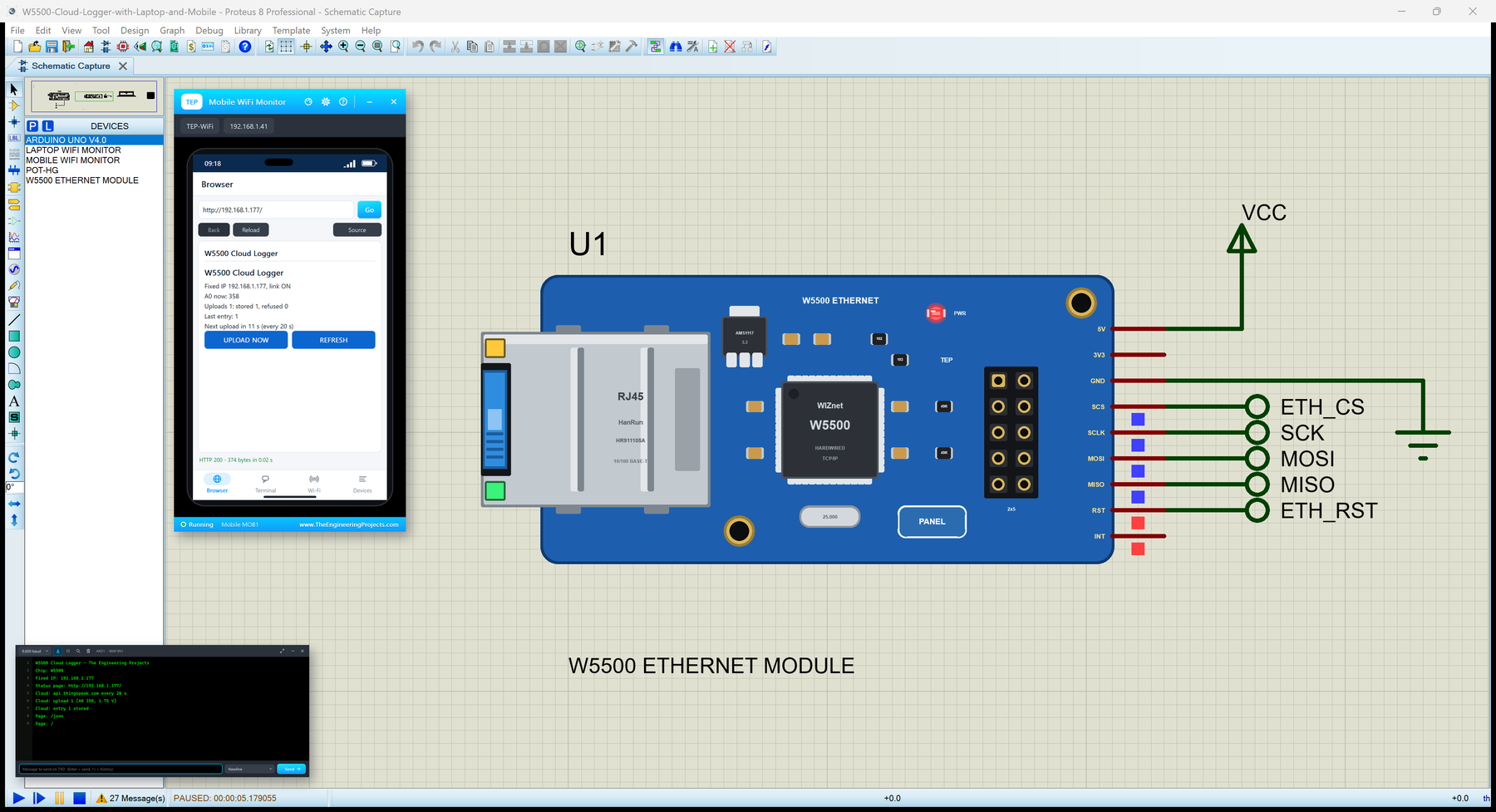
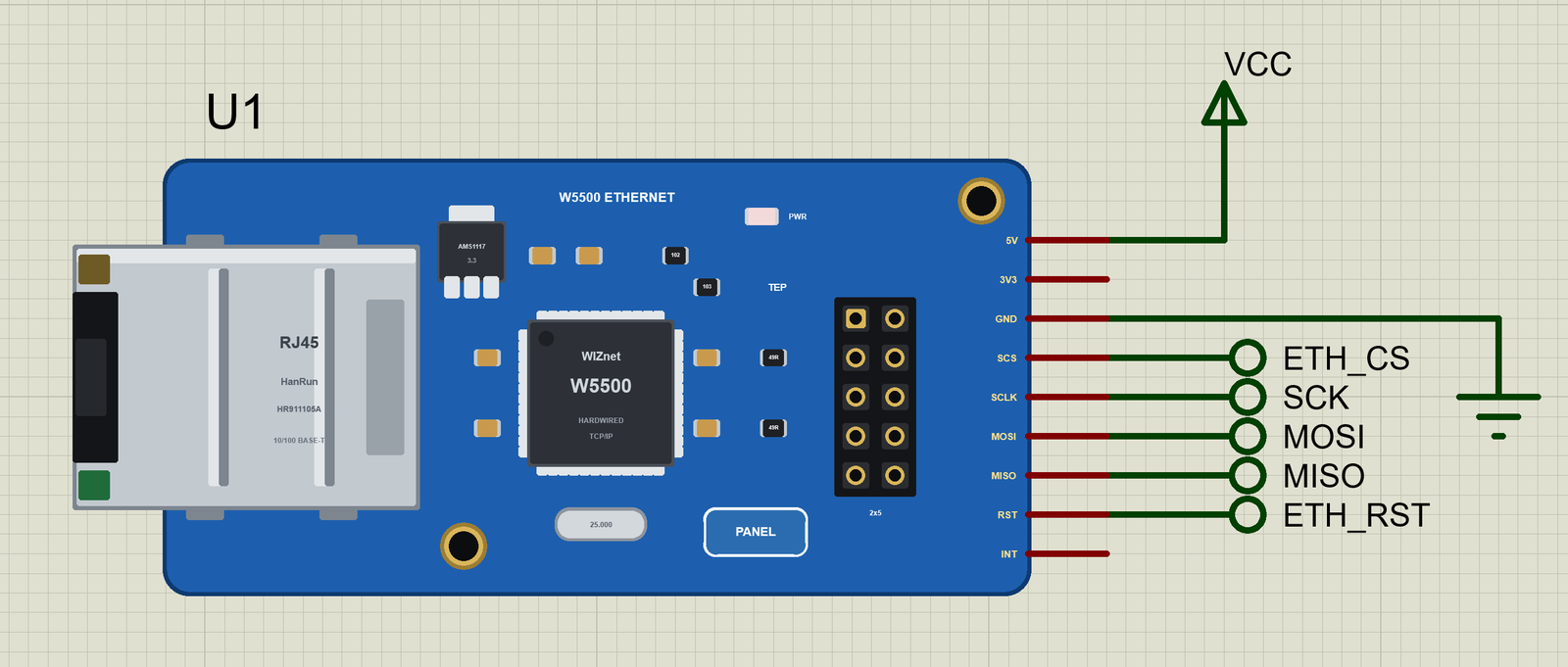
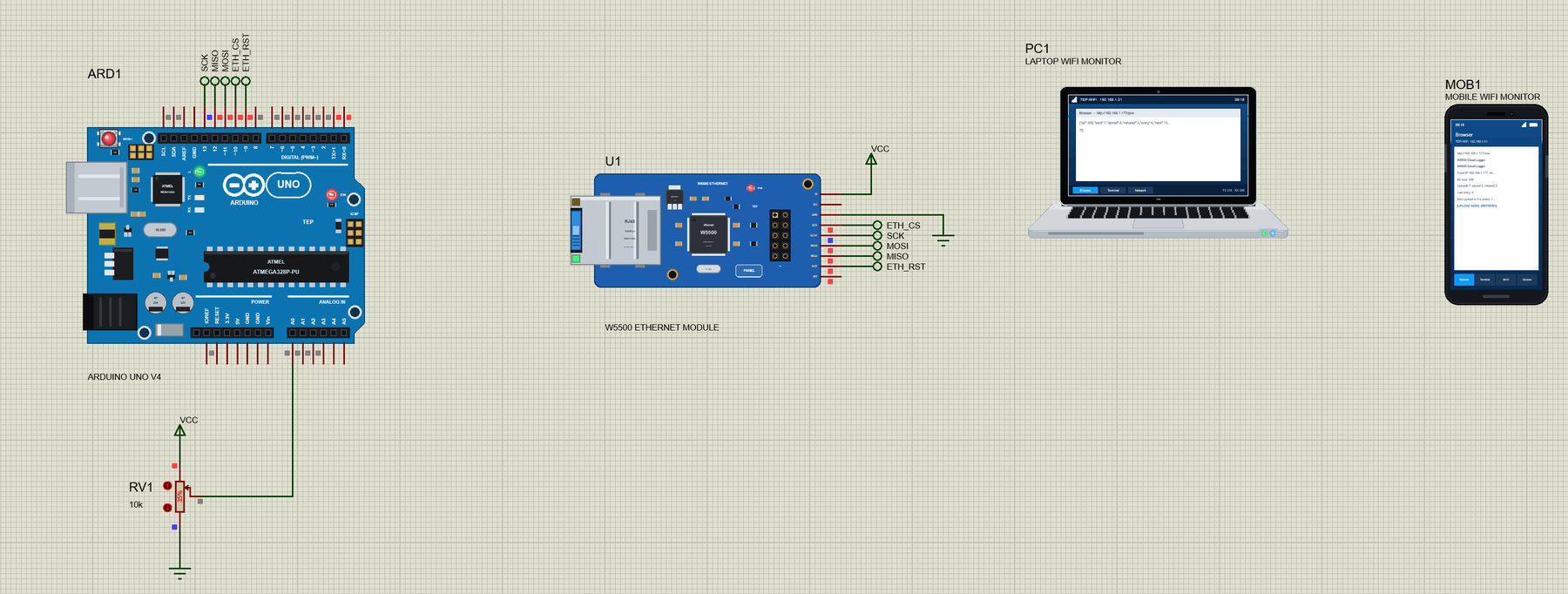
Open W5500-Cloud-Logger-with-Laptop-and-Mobile.pdsprj. On the left is our UNO V4.0 (ARD1, from our Arduino UNO Library for Proteus V4.0) with its built-in serial monitor and a pot on A0, in the middle the W5500 module (U1), and on the right the laptop (PC1) and the phone (MOB1) - no wires to them, they are on the router's network like the real ones.
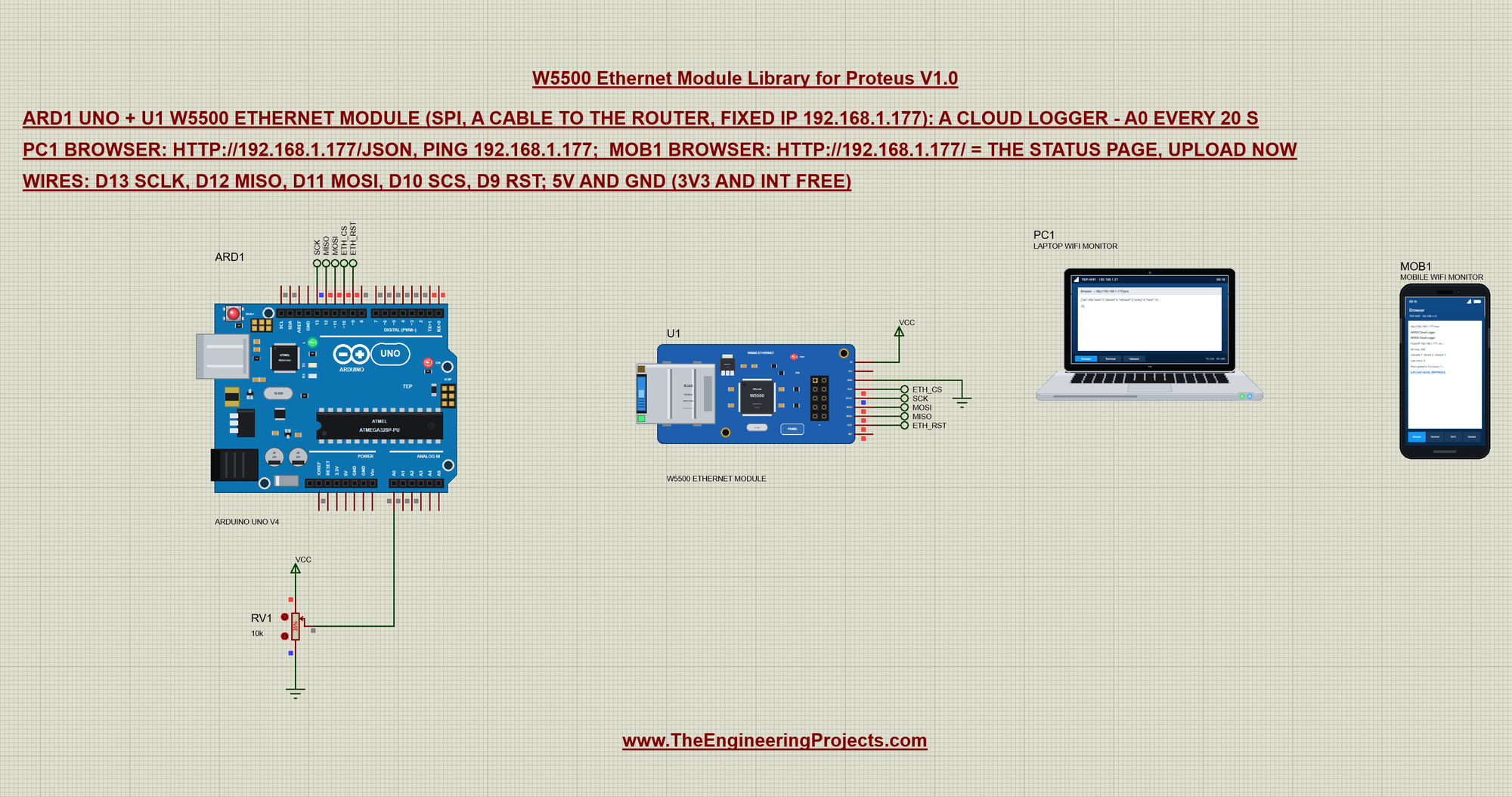
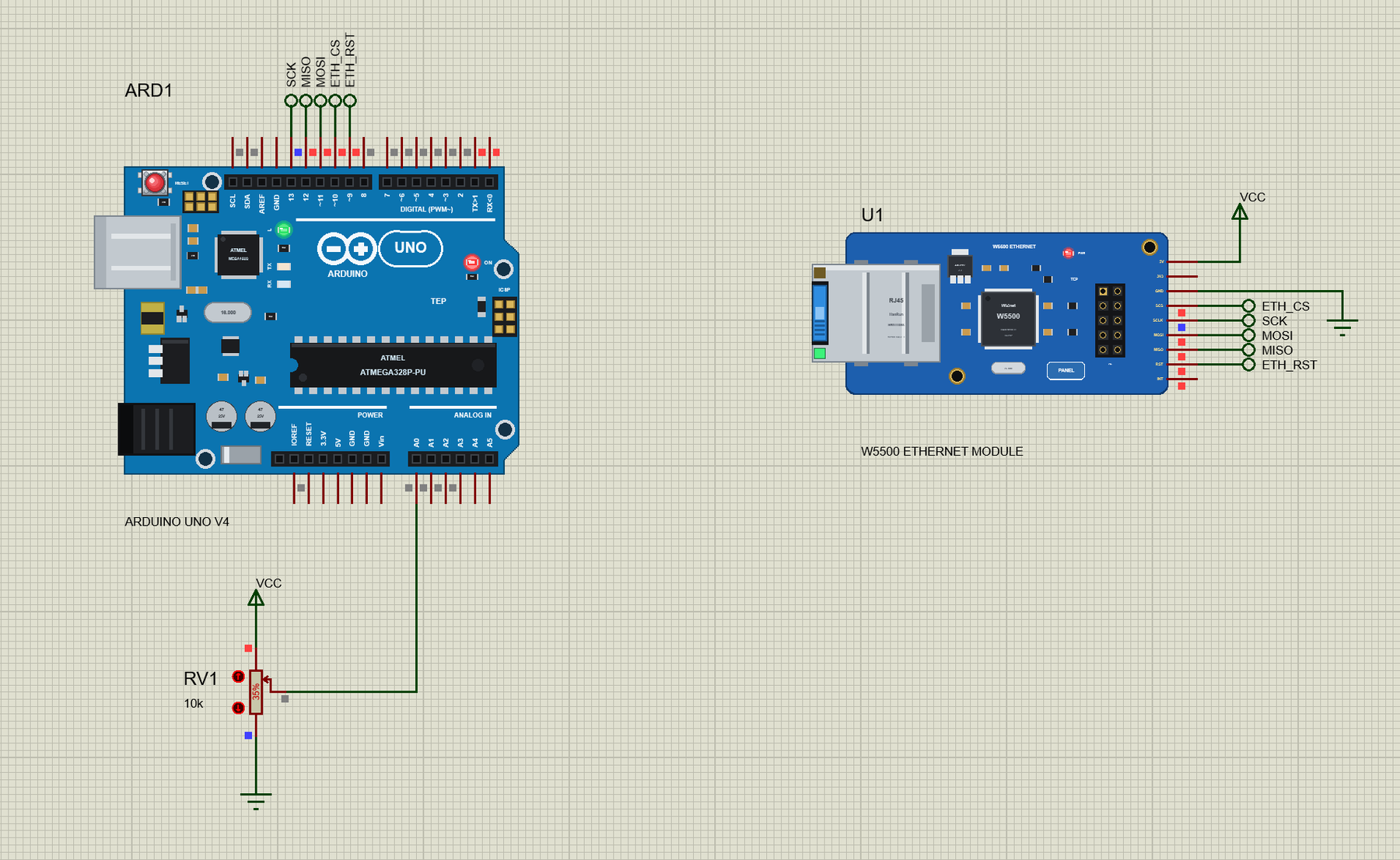
Net labels make the six connections: SCK, MISO and MOSI from D13, D12 and D11, ETH_CS from D10 to SCS and ETH_RST from D9 to RST. The module's 5V goes to VCC and its GND to ground; 3V3 and INT stay free. RV1 (10k, at 35 %) on A0 gives the value the logger uploads:
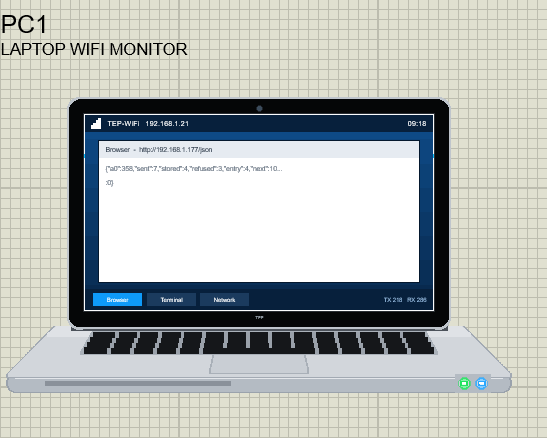
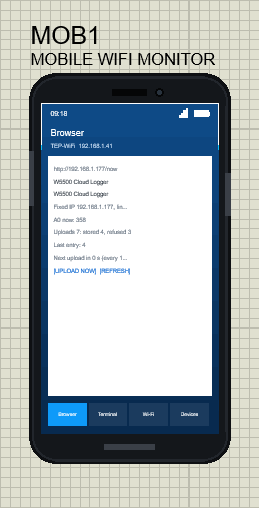
The two tools come from our Laptop WiFi Monitor Library for Proteus and Mobile WiFi Monitor Library for Proteus. In this project the laptop's browser opens http://192.168.1.177/json and its ping box holds 192.168.1.177; the phone's browser opens http://192.168.1.177/. The laptop is 192.168.1.21 and the phone 192.168.1.41:
The Sketch: a Fixed Address
The sketch needs only the SPI and Ethernet libraries. Instead of asking the router for an address, it gives the module a fixed one - with the DNS server, the gateway and the subnet mask of the network:
#include <SPI.h>
#include <Ethernet.h>
byte mac[] = {0xDE, 0xAD, 0xBE, 0xEF, 0x55, 0x00};
IPAddress ip(192, 168, 1, 177);
IPAddress dnsServer(192, 168, 1, 1);
IPAddress gateway(192, 168, 1, 1);
IPAddress subnet(255, 255, 255, 0);The chip select, the reset pin and the cloud's name and key:
const byte CS_PIN = 10, RST_PIN = 9;
const char HOST[] = "api.thingspeak.com";
const char API_KEY[] = "TEPW5500DEMO01";
A real module starts best after a clean reset, so the sketch pulls RST LOW for a moment before it talks to the chip. Then Ethernet.init() names the chip select pin and Ethernet.begin() with five arguments sets the address without DHCP:
  pinMode(RST_PIN, OUTPUT);                // a hardware reset of the module through its RST pin
  digitalWrite(RST_PIN, LOW);
  delay(1);
  digitalWrite(RST_PIN, HIGH);
  delay(50);
Ethernet.init(CS_PIN);
Ethernet.begin(mac, ip, dnsServer, gateway, subnet);The library's chip test runs inside begin(); Ethernet.hardwareStatus() tells the sketch whether a chip answered at all, and Ethernet.linkStatus() whether the cable is in:
  if (Ethernet.hardwareStatus() == EthernetNoHardware) {
    Serial.println(F("No W5500 found - check the wiring"));
    while (true) {}
  }
while (Ethernet.linkStatus() == LinkOFF) {
Serial.println(F("Link: OFF - is the cable in?"));
delay(1000);
}Press Run and watch the UNO's monitor: the chip, the fixed address, the status page and the first upload:
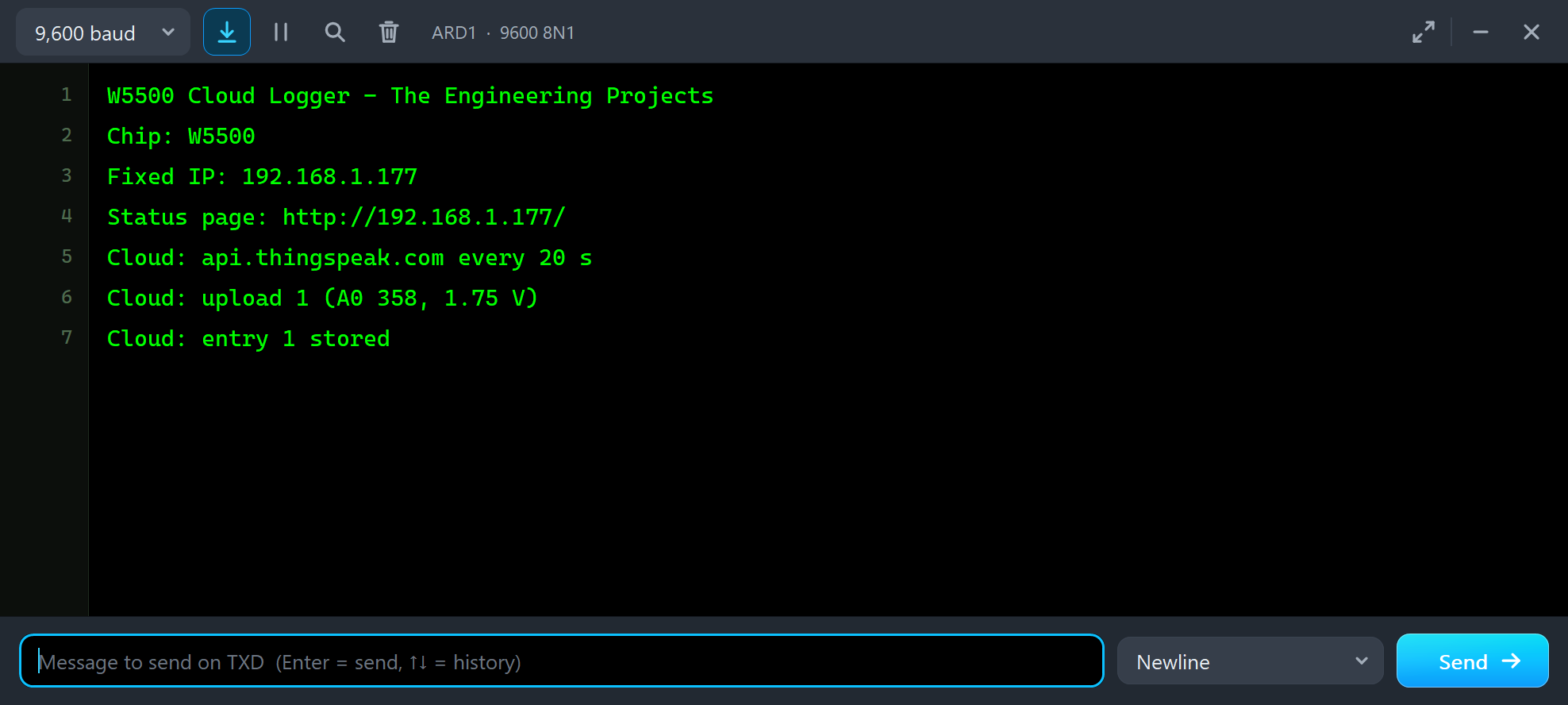
W5500 Cloud Logger - The Engineering Projects
Chip: W5500
Fixed IP: 192.168.1.177
Status page: http://192.168.1.177/
Cloud: api.thingspeak.com every 20 s
Cloud: upload 1 (A0 358, 1.75 V)
Cloud: entry 1 stored
Uploading to the Cloud
Every 20 seconds loop() calls upload(). It reads A0 and opens a TCP connection to the cloud by its name: connect() first asks the DNS server for api.thingspeak.com (our router answers with the internet host, 203.0.113.10), then connects to port 80:
if (uploadNow || millis() - lastUpload >= every) upload(); if (!cloud.connect(HOST, 80)) { // DNS first, then TCP to port 80
failed++;
Serial.println(F("Cloud: no connection"));
return;
}The request is built in one buffer and written in one piece - a ThingSpeak-style update with the API key and two fields:
  snprintf_P(req, sizeof req, PSTR("GET /update?api_key=%s&field1=%d&field2=%s HTTP/1.1\r\nHost: %s\r\nConnection: close\r\n\r\n"),
             API_KEY, lastA0, volts, HOST);
  cloud.write((const uint8_t *)req, strlen(req));
GET /update?api_key=TEPW5500DEMO01&field1=358&field2=1.75 HTTP/1.1
Host: api.thingspeak.com
Connection: closeThe cloud answers with the number of the stored entry, or 0 when the same key sent an update less than 15 seconds before. The sketch skips the HTTP headers - they end with an empty line - and reads the number from the body:
    if (!body) {
      if (c == '\n') { if (++newlines == 2) body = true; }
      else if (c != '\r') newlines = 0;
      continue;
    }
    if (c >= '0' && c <= '9') { entry = entry * 10 + (c - '0'); digits = true; }
if (entry > 0) {
stored++; lastEntry = entry;
Serial.print(F("Cloud: entry ")); Serial.print(entry); Serial.println(F(" stored"));
} else {
refused++;
Serial.println(F("Cloud: refused (0) - one update per 15 s"));
}The JSON and the Ping from the Laptop
A web server on port 80 answers the laptop and the phone. /json gives the counts in a form a program can read; in the laptop, open the Browser and press Go:
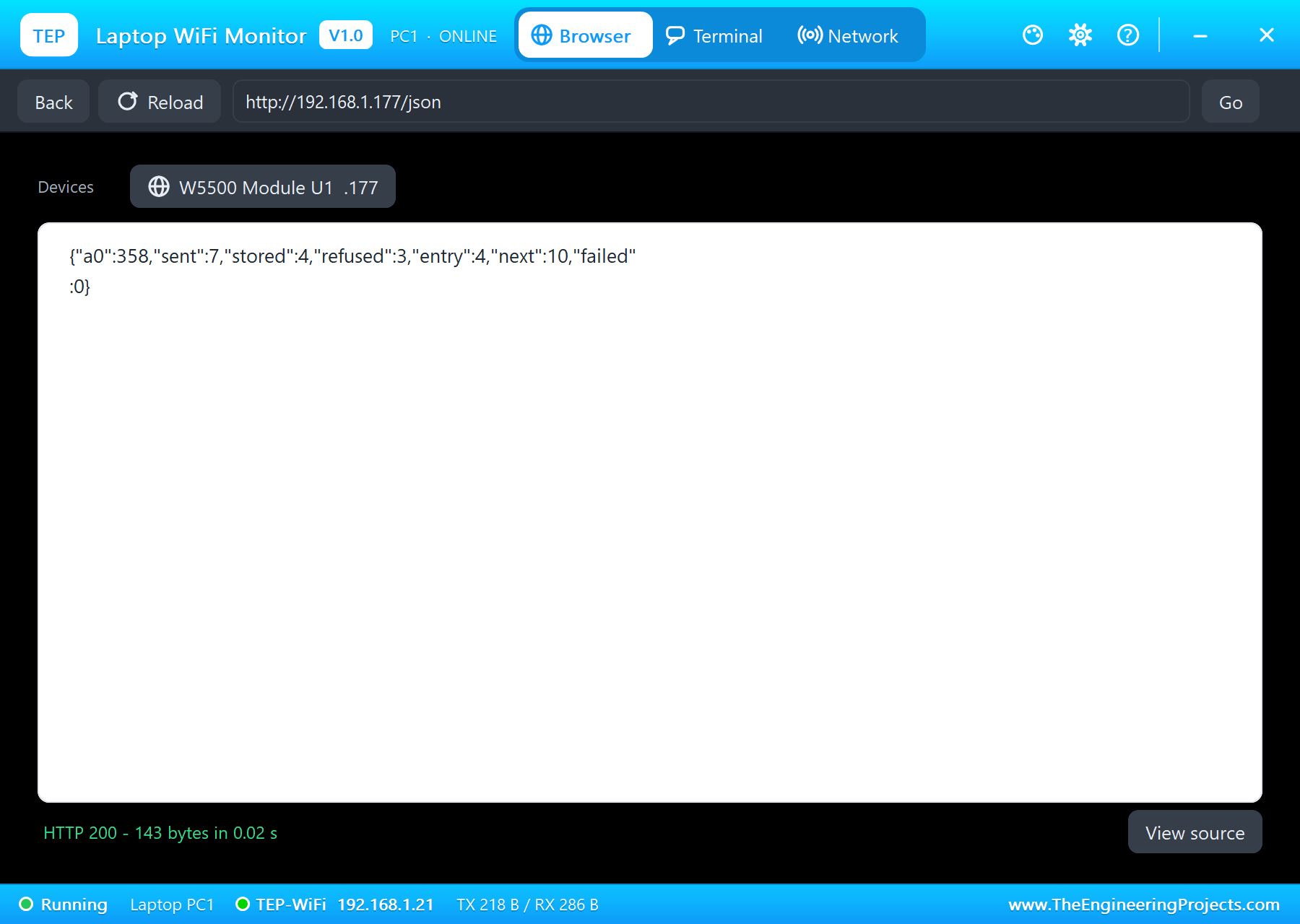
{"a0":358,"sent":7,"stored":4,"refused":3,"entry":4,"next":10,"failed":0}Every answer is collected in a 64-byte buffer and only a full buffer goes to the W5500 - an Ethernet client's print(F("...")) would send each character as its own packet:
void flushOut() {
  if (outLen) { outClient->write((const uint8_t *)out, outLen); outLen = 0; }
}
Then open the laptop's Network tab and press Ping: the module answers, as a real W5500 does:
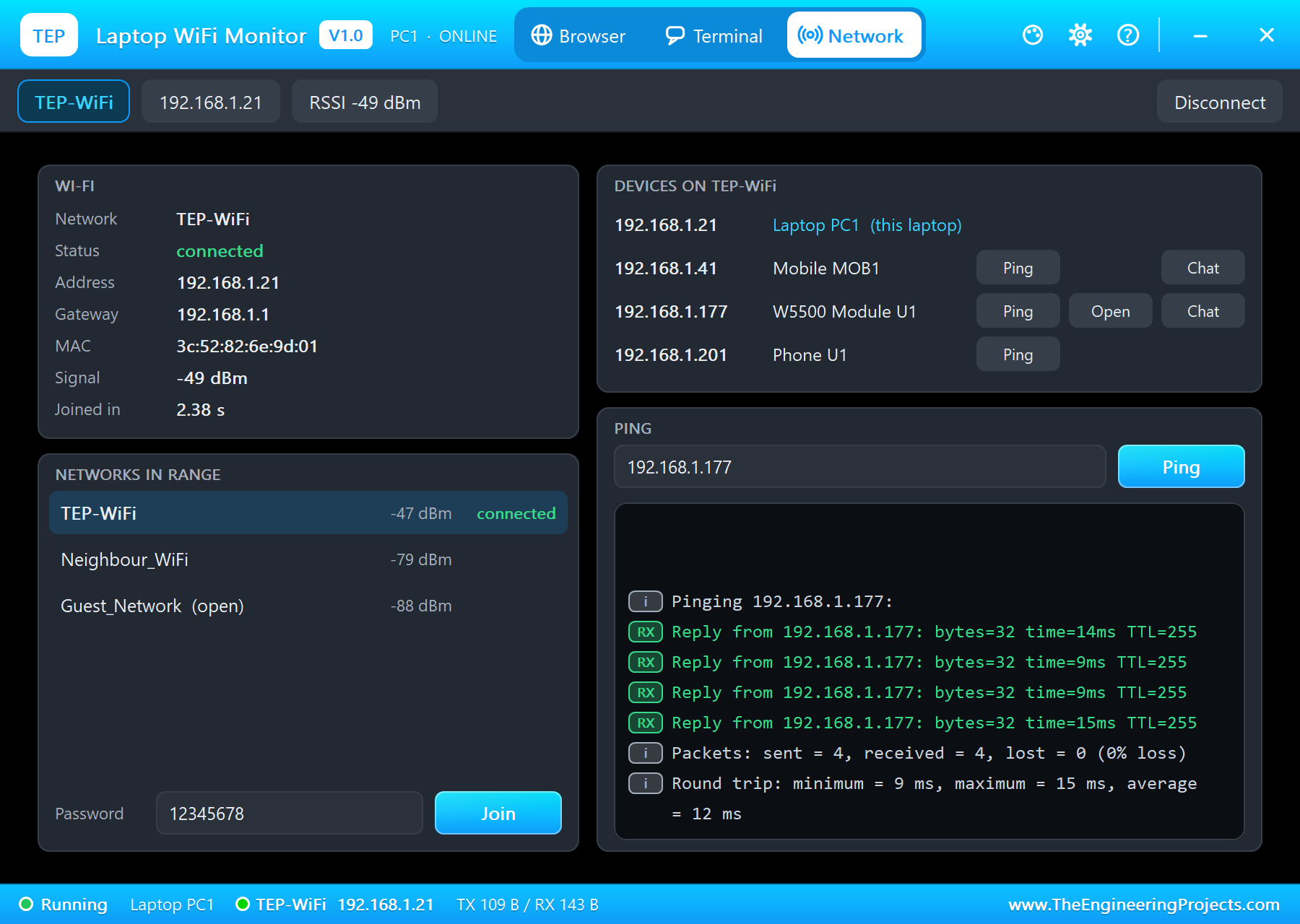
Pinging 192.168.1.177:
Reply from 192.168.1.177: bytes=32 time=14ms TTL=255
Reply from 192.168.1.177: bytes=32 time=9ms TTL=255
Reply from 192.168.1.177: bytes=32 time=9ms TTL=255
Reply from 192.168.1.177: bytes=32 time=15ms TTL=255
Packets: sent = 4, received = 4, lost = 0 (0% loss)
The Status Page and UPLOAD NOW on the Phone
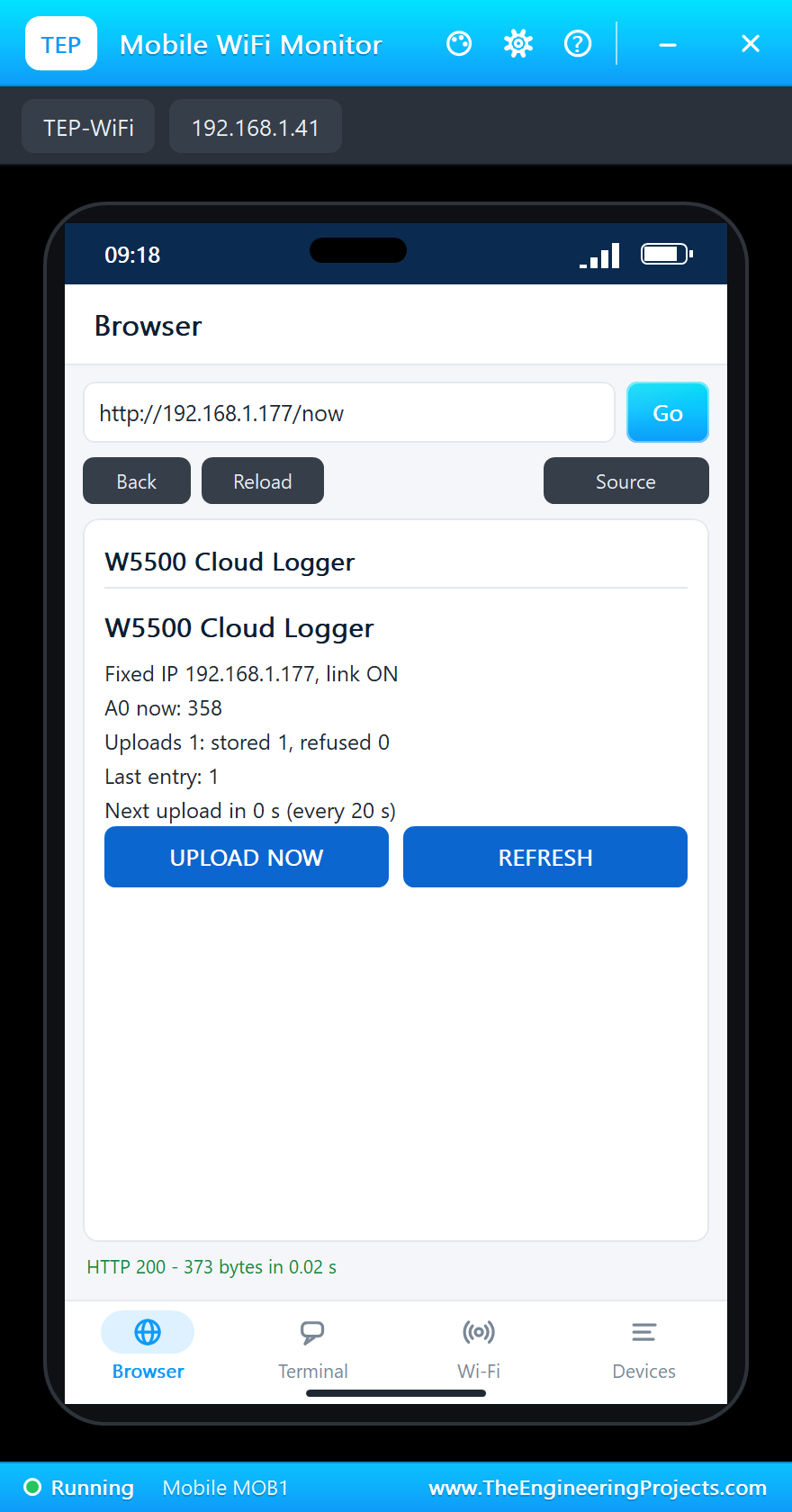
The phone's browser shows the status page: the address and the link, the pot, the uploads, the last entry and the countdown to the next upload, with two links:
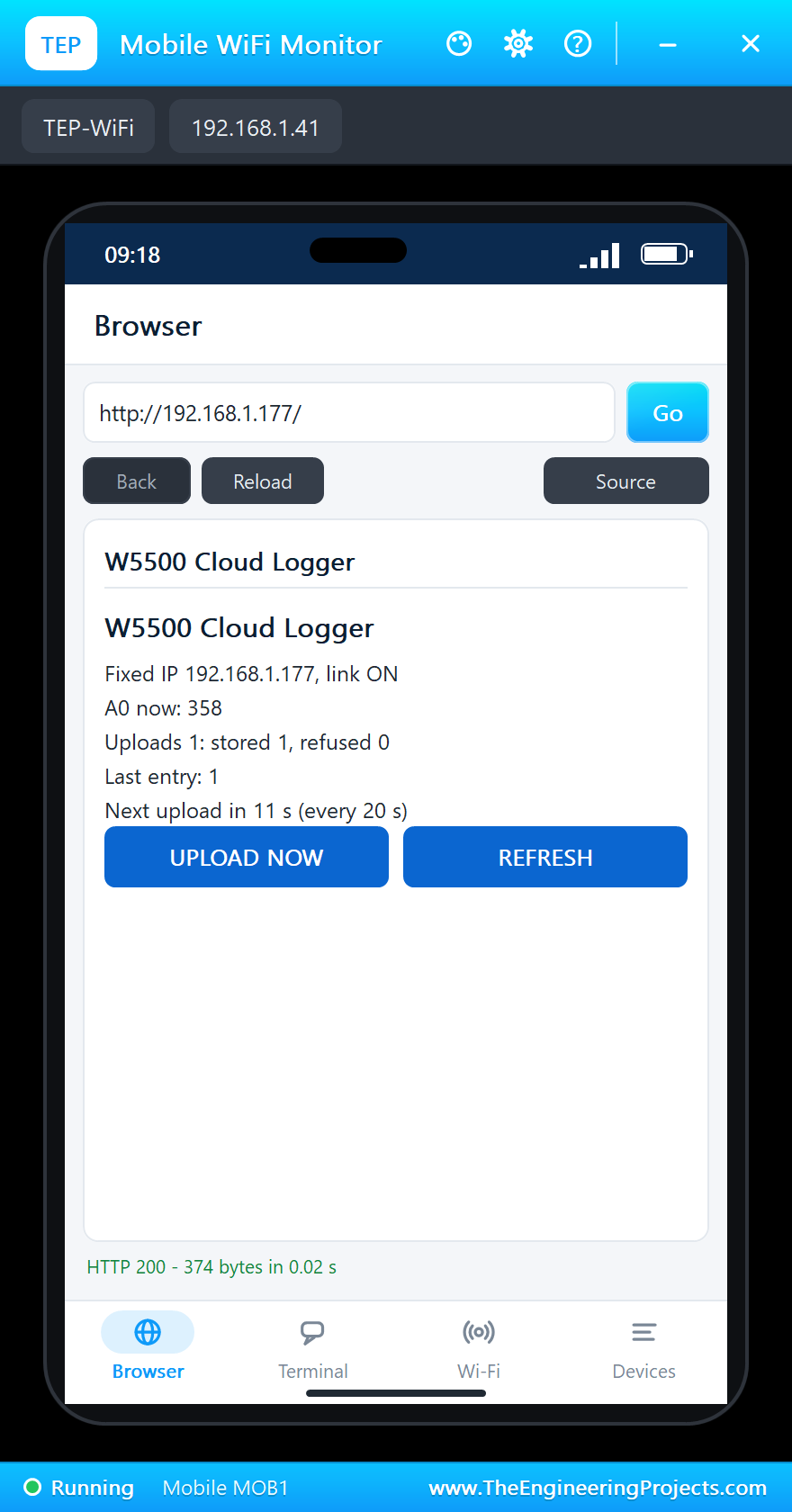
The server reads the first line of each request and picks the answer by its path; /now asks for an upload at once:
  if (!strcmp(path, "/json")) sendJson();
  else {
    if (!strcmp(path, "/now")) uploadNow = true;
    sendPage();
  }
Tap UPLOAD NOW about ten seconds after the first upload, and the cloud refuses it - it takes one update per key every 15 seconds:
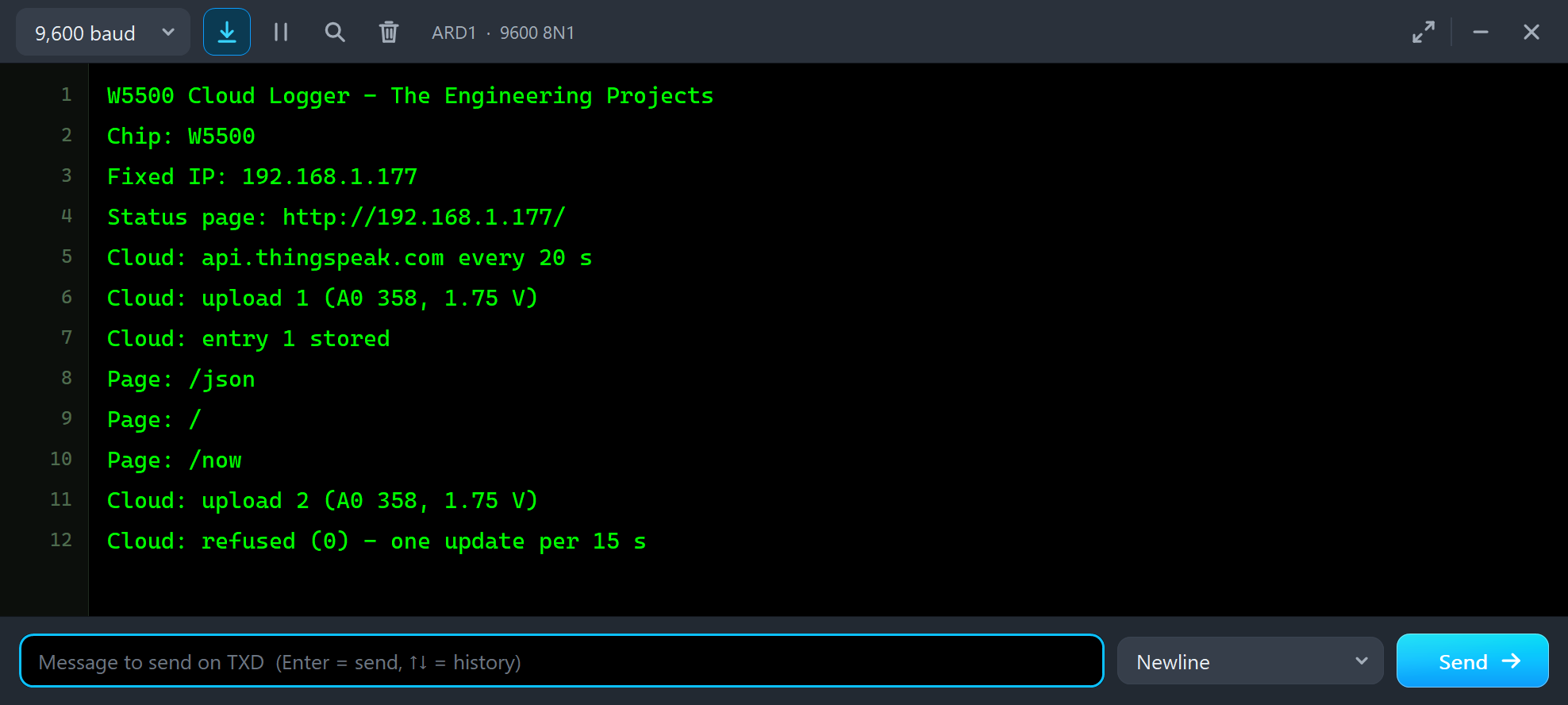
Page: /now
Cloud: upload 2 (A0 358, 1.75 V)
Cloud: refused (0) - one update per 15 s
The Serial Monitor Commands
The monitor takes NOW, EVERY <seconds>, STATUS and HELP. EVERY 10 sends an update every ten seconds - faster than the cloud allows, so every other one comes back refused:
    } else if (!strncmp(line, "EVERY ", 6)) {
      int s = atoi(line + 6);
      if (s >= 5 && s <= 3600) {
        every = s * 1000UL;
        Serial.print(F("Uploads every ")); Serial.print(s); Serial.println(F(" s"));
      } else Serial.println(F("EVERY takes 5 to 3600 (seconds)"));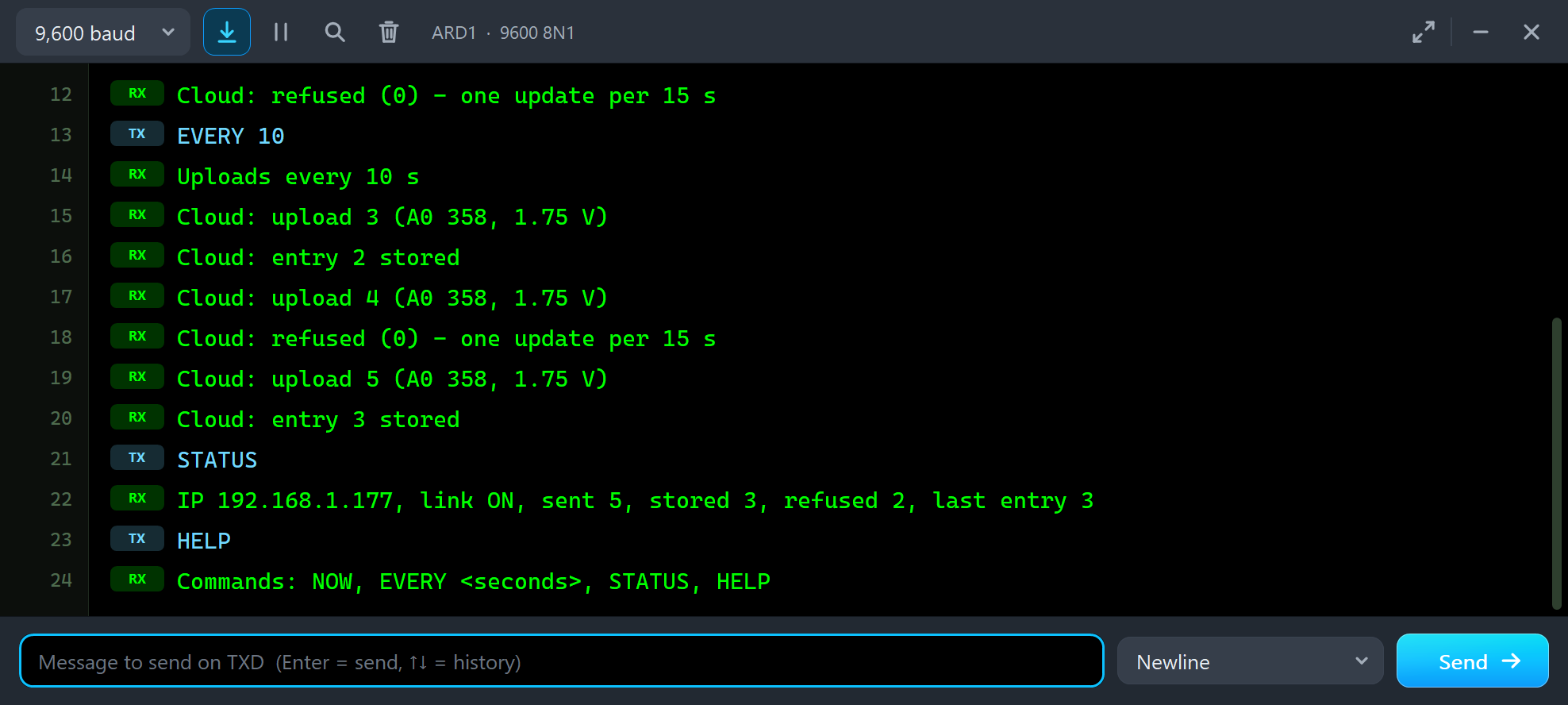
EVERY 10
Uploads every 10 s
Cloud: upload 3 (A0 358, 1.75 V)
Cloud: entry 2 stored
Cloud: upload 4 (A0 358, 1.75 V)
Cloud: refused (0) - one update per 15 s
Cloud: upload 5 (A0 358, 1.75 V)
Cloud: entry 3 stored
STATUS
IP 192.168.1.177, link ON, sent 5, stored 3, refused 2, last entry 3
HELP
Commands: NOW, EVERY <seconds>, STATUS, HELP
The page later in the run shows the same story:
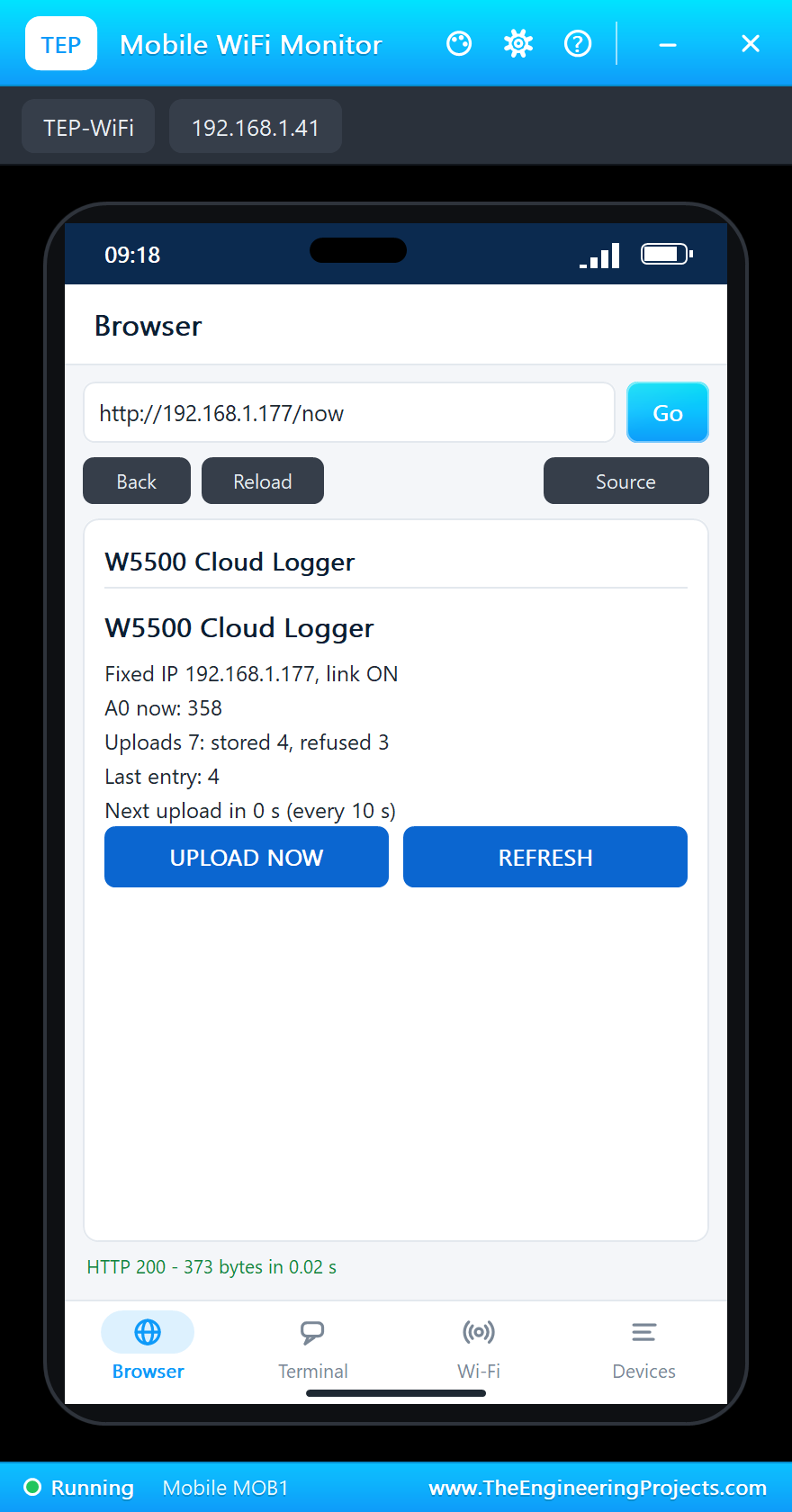
The countdown on the page and in the JSON comes from nextIn():
long nextIn() {                            // seconds to the next upload
  if (uploadNow) return 0;
  long left = (long)every - (long)(millis() - lastUpload);
  return left > 0 ? (left + 999) / 1000 : 0;
}
And the whole demo running:
The W5500 Ethernet Module Panel
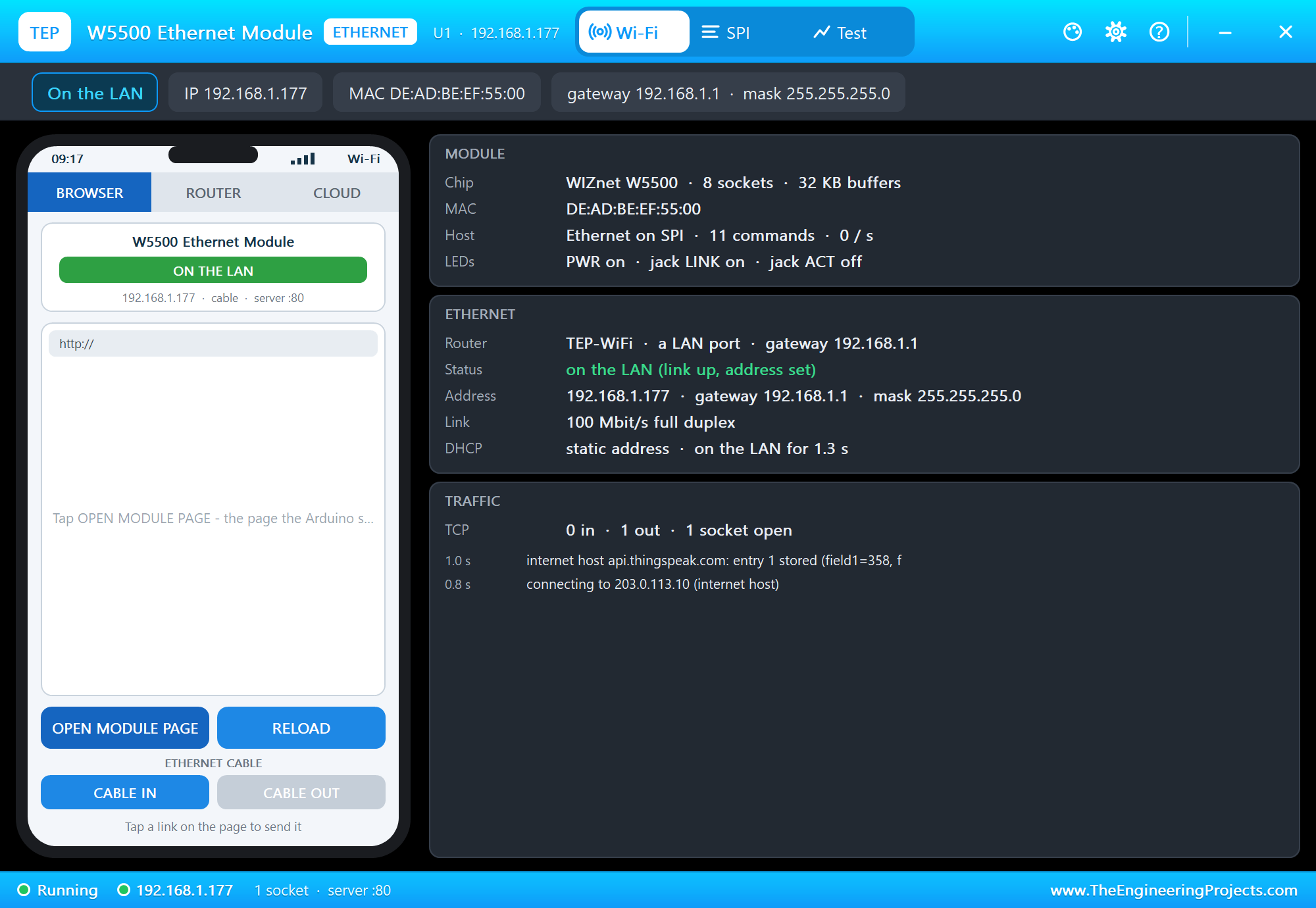
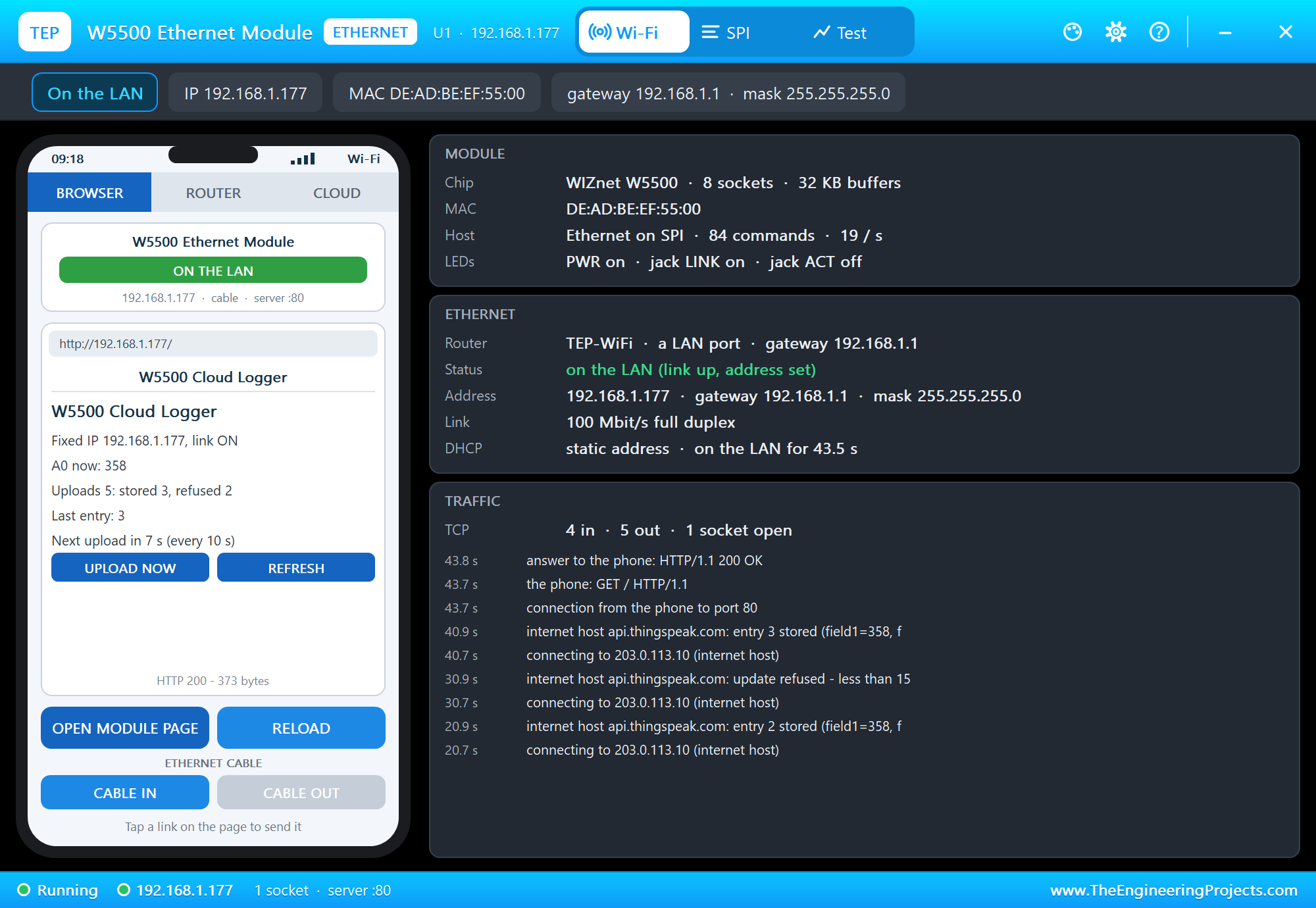
The panel opens at Run, in the look of our TEP Serial Monitor Advance for Proteus - our own TEP header, no Windows title bar. Its first page has a small phone of its own with the CABLE IN and CABLE OUT buttons, and three cards: MODULE with the chip, the MAC address, the host link and the LEDs, ETHERNET with the router, the status, the address with its gateway and mask, the link and "static address" for a fixed IP, and TRAFFIC:
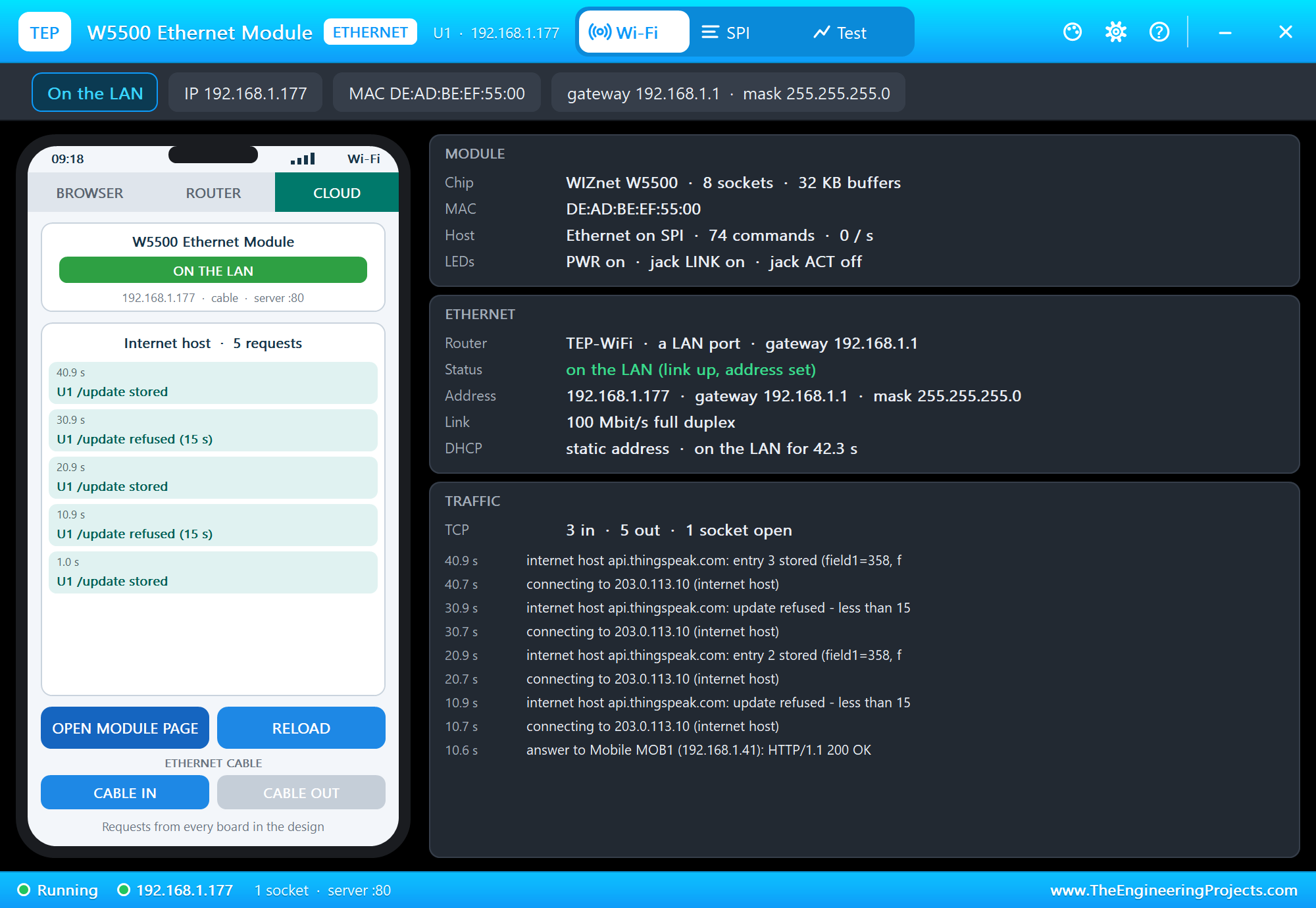
The phone's CLOUD tab lists what the internet host received - here the uploads stored and refused while EVERY 10 was on:
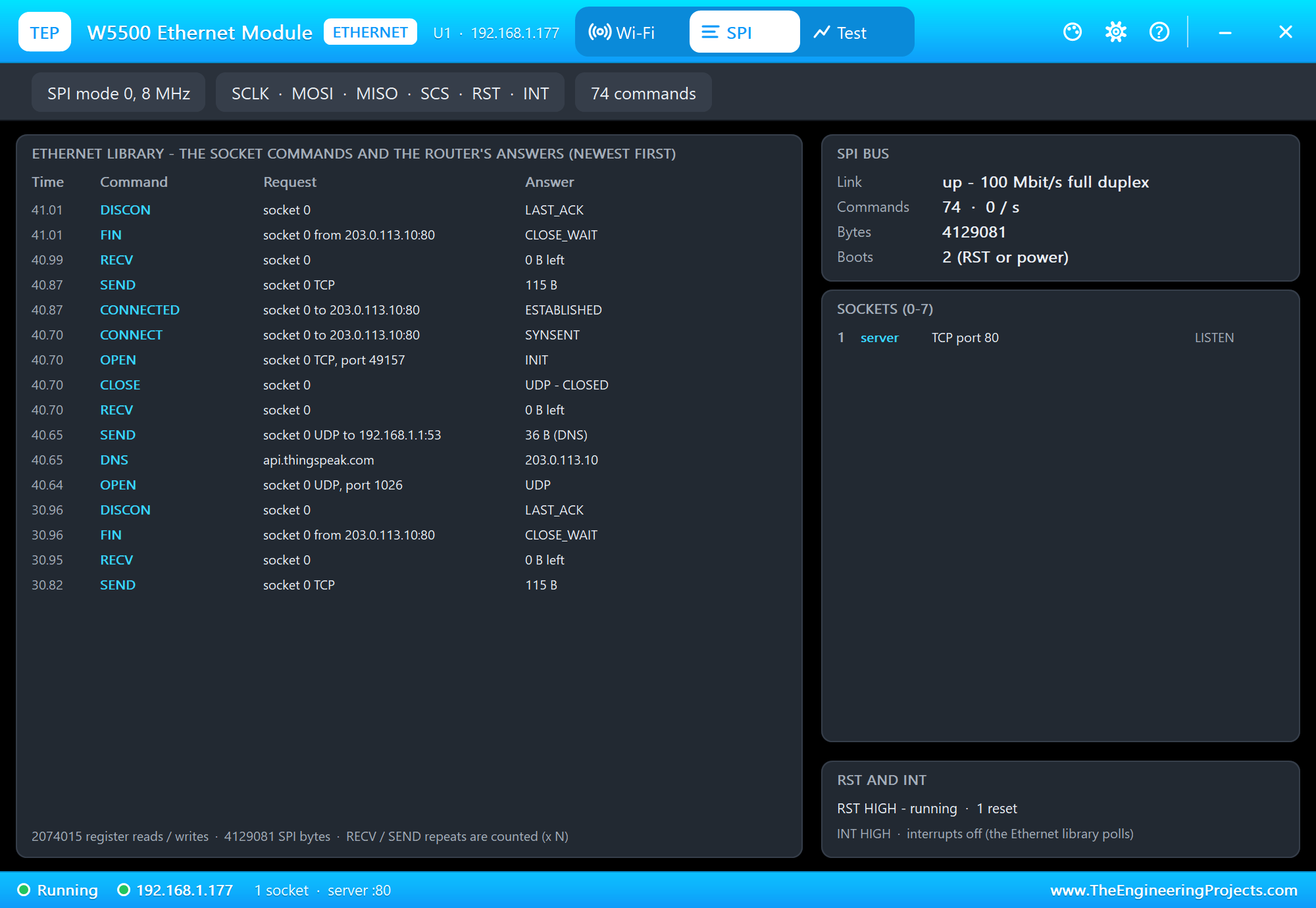
The SPI page lists what the Ethernet library asks the W5500 and what the router answers, newest first. One upload is a whole story: a UDP socket for the DNS question, the answer 203.0.113.10, a TCP socket that connects to port 80, SEND with the 115-byte request, RECV with the answer, the host's FIN and DISCON. The card at the bottom shows the RST and INT pins:
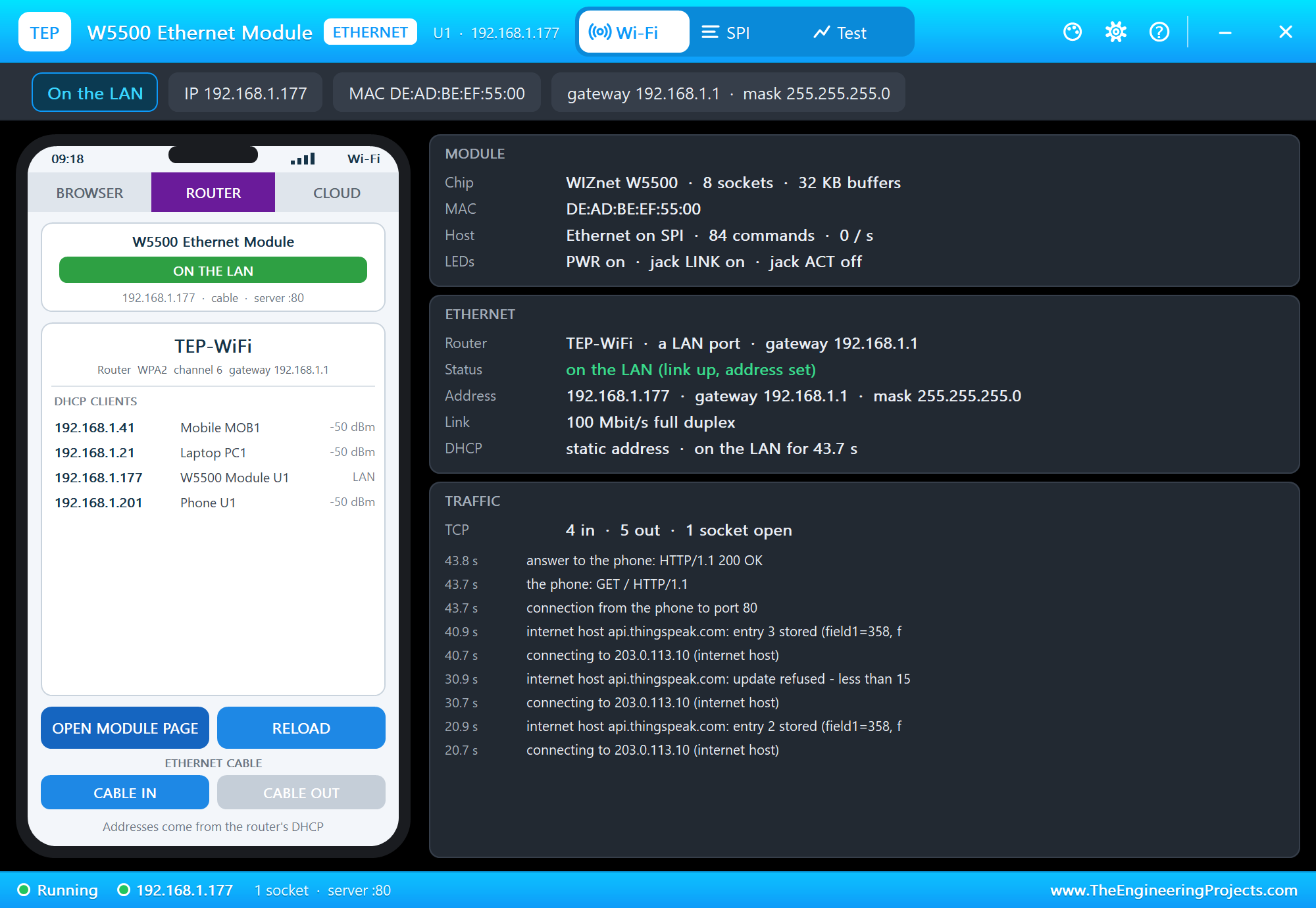
OPEN MODULE PAGE opens the page the UNO serves; the ROUTER tab lists the router's clients, the module among them as a LAN client:
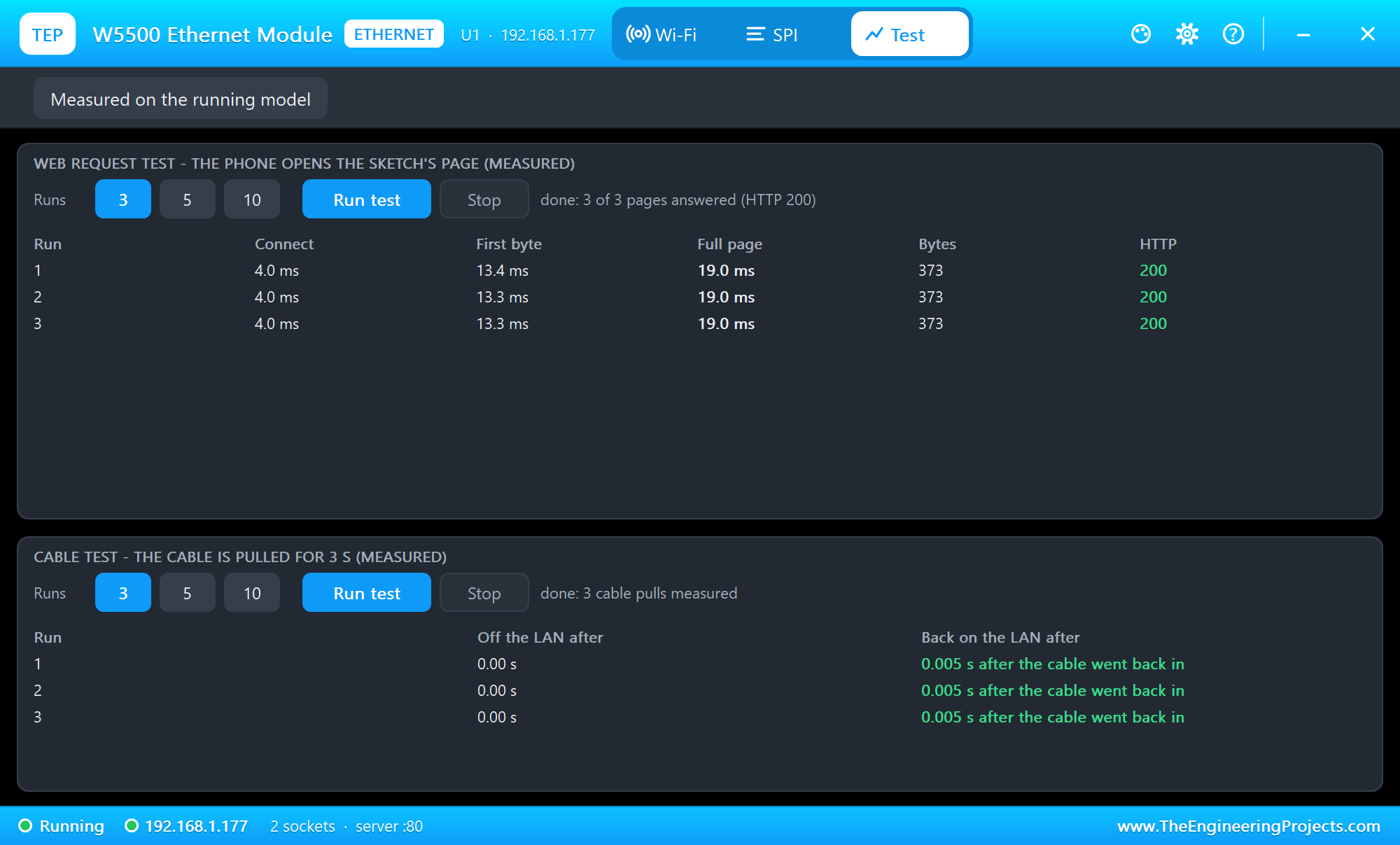
The Test page measures the running model: the phone opens the page three times, and the cable is pulled for 3 seconds three times:
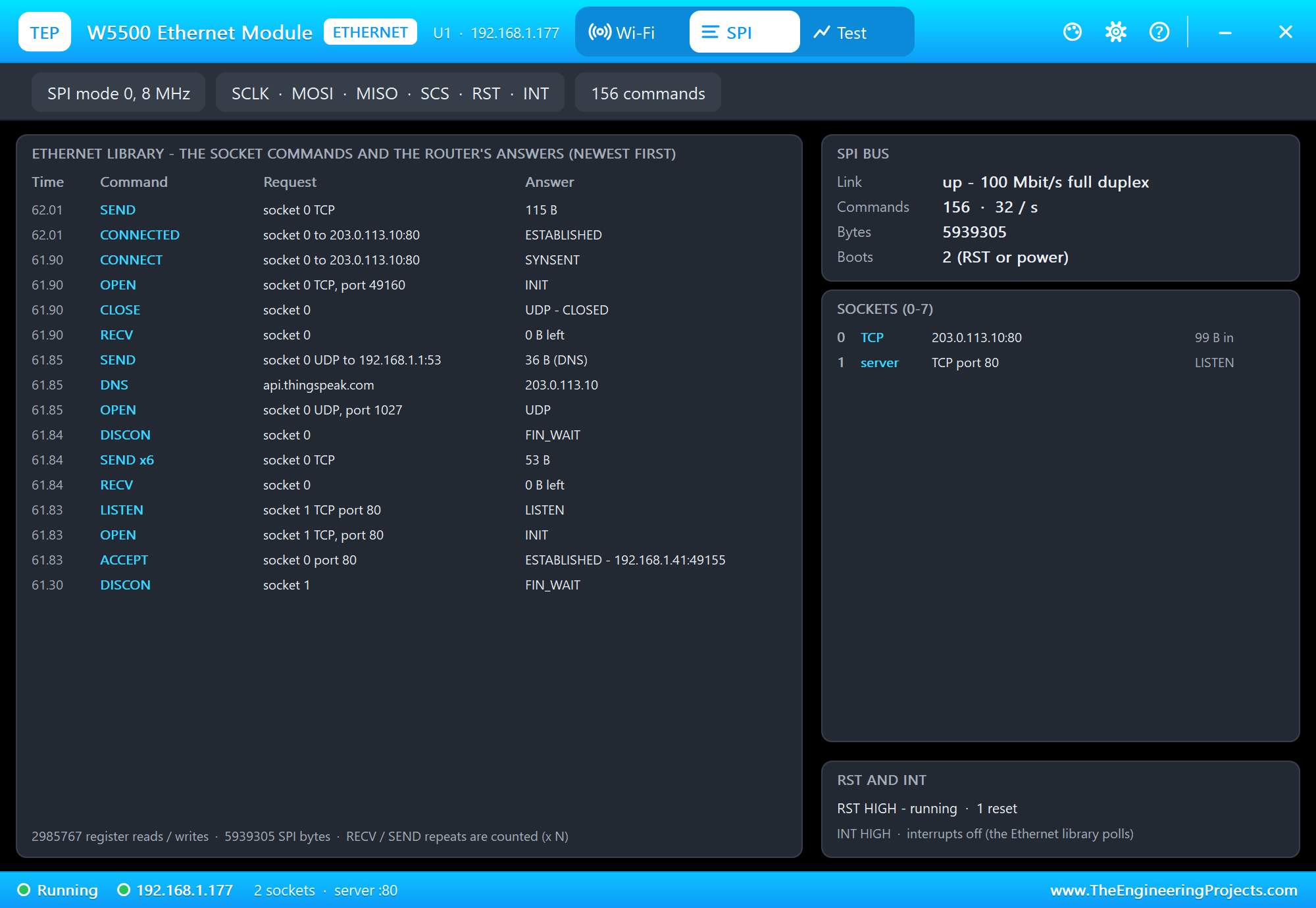
The footer counts the register accesses - the library reads the socket status all the time, about 48,000 register reads a second while it waits.
Pins of the W5500 Ethernet Module
| Pin | Demo wiring | What it does |
|---|---|---|
| 5V, 3V3 | 5V to VCC | power: either one (the AMS1117 makes 3.3 V from 5 V) |
| GND | ground | ground |
| SCS | D10 | the W5500's chip select (LOW = selected) |
| SCLK, MOSI, MISO | D13, D11, D12 | SPI; MISO is the W5500's while SCS is LOW |
| RST | D9 | LOW holds the W5500 in reset; free or HIGH = running |
| INT | free | the W5500's interrupt output, HIGH |
Properties of the W5500 Ethernet Module
| Property | What it does |
|---|---|
| ROUTER | the router the cable goes to - the network name of the Wi-Fi parts (TEP-WiFi) |
| CABLE | the Ethernet cable at Run: IN or OUT |
| PANEL | the phone's tab at start (BROWSER, ROUTER, CLOUD) |
| PAGEPORT | the port OPEN MODULE PAGE opens (80) |
| CLOCK | the clock of NTP and the panel: PC (UTC) or a start time |
With DHCP the address follows the part's number: U1 gets 192.168.1.101, U2 .102 and so on. With a fixed address, pick one that no other part uses. The laptop is always 192.168.1.21 and the phone 192.168.1.41.
Troubleshooting
- The hardware status is EthernetNoHardware: check SCLK, MISO, MOSI, SCS (and
Ethernet.init()when it is not D10), the power and GND, and that RST is not held LOW. - No answer from the cloud: the cable is out (linkStatus() is LinkOFF), or the DNS address given to
Ethernet.begin()is not the router (192.168.1.1). - "Cloud: refused (0)": the cloud takes one update per key every 15 seconds - send less often.
- Two parts on one address: give the module a fixed address no other part uses.
- A page is slow or arrives in tiny pieces: write whole buffers with
client.write(buf, n), not one character at a time. - No panel: click the PANEL pad or the W5500, or turn "Open the panel at Run" back on in Settings.
Things to Know Before Using a Real W5500 Module
- Power: the W5500 needs well over 100 mA with the link up. Feed the module's 5V pin (its AMS1117 makes the 3.3 V) rather than a weak 3.3 V pin.
- The header: makers order the 2x5 pins differently - always wire by the names printed on your board.
- The MAC address: the module has none of its own; give each module on the network a different one in the sketch.
- The sockets: the W5500 has eight, but on an UNO the library uses four; on a Mega it uses all eight.
- The cloud: a real ThingSpeak channel needs your own write key and, on a free account, about 15 seconds between updates - the same rule our virtual cloud uses.
- The size of the sketch: the demo takes 20,554 of the UNO's 32,256 bytes of flash - there is room for your own sensors.
Limitations of the Simulation
- The W5500 is our model of the chip as the Ethernet library (2.0) uses it - the registers, the sockets and the buffers - not a packet-level simulation of Ethernet.
- Not modelled: MACRAW traffic (the mode opens but carries nothing), PPPoE, the socket interrupts (INT stays HIGH), the PHY's mode settings and auto-negotiation (it is always 100 Mbit/s full duplex), the ping-block and wake-on-LAN bits (a ping is always answered), the supply's voltage and current.
- With the cable out the TCP connections are kept for 20 s - our choice, close to what a real network does for a short pull.
- The internet host is a stand-in for the internet: every internet name is 203.0.113.10; it answers HTTP, the time and ThingSpeak-style updates.
- The PANEL pad, the panel, its phone, the router, the internet host and the two monitors are TEP additions.
- W5500 is a name of WIZnet and ThingSpeak of The MathWorks; this library is not made or endorsed by WIZnet, The MathWorks or Labcenter.
- Tested in Proteus 8.5 in October 2026 (the demo as shipped, the UNO, the module, the laptop and the phone together at about 0.15 to 0.2 x real time on our PC). Proteus 7 is not supported.
So, that was all about the W5500 Ethernet Module Library for Proteus. I hope it helps you put your Arduino projects on a wired network in Proteus - a fixed address or DHCP, DNS, web pages, uploads to the cloud and the link status - and watch every socket command on the panel while you do. The cable goes to the same router as our Wi-Fi boards, so a wired UNO and a Wi-Fi ESP32 can share one design. If you use the W5500 Ethernet Module Library for Proteus in a project, please share it in the comments or in our forum, and if you have any questions, ask in the comments and I will help you out. Till the next tutorial, take care and have fun!

Comments
0