


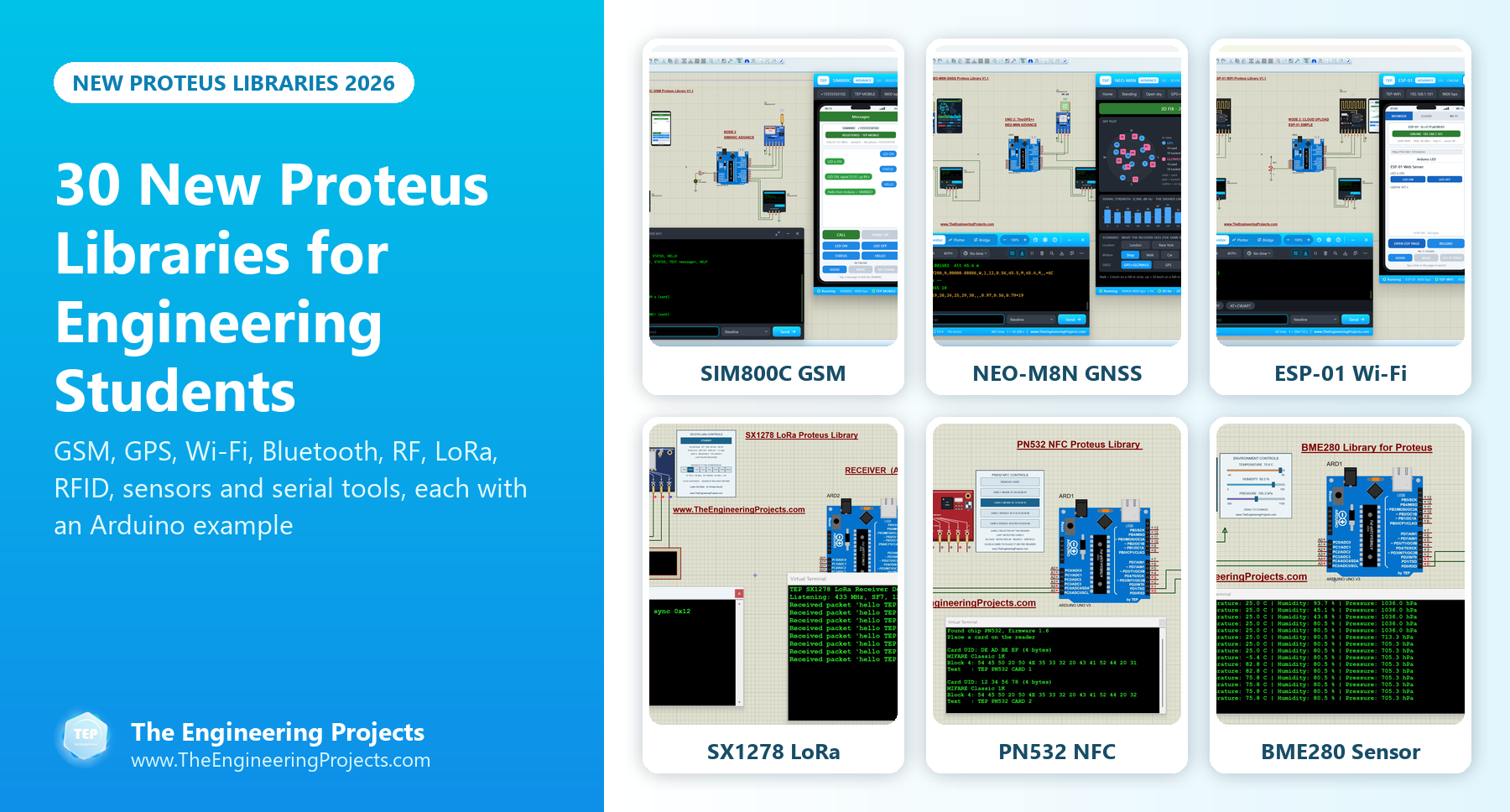
30 New Proteus Libraries for Engineering Students (2026)


Hello friends, I hope you all are doing great. Today, I am going to share a list of 30 New Proteus Libraries for Engineering Students. Our team designed all of these libraries in September and October 2026, and they cover GSM and GPS modules, Wi-Fi and Bluetooth modules, RF and LoRa radios, RFID and NFC readers, I2C sensors and two serial monitor tools. I have already shared them one by one in separate tutorials, so today I have collected all of them in a single post, so you can find the right one for your project quickly.
These are not the simple symbols of our older libraries. Each new library is a working simulation model: the GSM and Wi-Fi modules answer real AT commands, the radios measure their signal strength over a distance that you choose, the sensors have sliders for their inputs, and many devices open a control panel or a virtual smartphone while the simulation is running. Every library also comes with a complete Arduino example, so you can run a working circuit first and then change it for your own project.
I have placed the newest libraries at the top of each category. Under each library, you will find a short introduction and a link to its complete tutorial, which explains the module, the installation, the wiring and the Arduino code in detail. If you have never added a third-party library to Proteus before, read How to Add New Library in Proteus 8 first. So, let's get started with the New Proteus Libraries:
New Proteus Libraries at a Glance
Here is the complete list of the 30 new libraries. Click the name of a library to open its tutorial, or scroll down for a short introduction to each one.
| # | Library | Category | What you can simulate |
|---|---|---|---|
| 1 | SIM800C GSM Library V1.1 | GSM | SMS, calls, the PWX power key and four GSM test tools |
| 2 | SIM900A GSM Library V1.1 | GSM | SMS, calls, the region lock and four GSM test tools |
| 3 | NEO-7M GPS Library V1.1 | GPS | GPS or GLONASS position and five GNSS test tools |
| 4 | NEO-M8N GNSS Library V1.1 | GPS | GPS and GLONASS together and a Constellations test |
| 5 | SIM800L GSM Library V1.1 | GSM | SMS remote control, calls and AT commands |
| 6 | NEO-6M GPS Library V1.1 | GPS | NMEA sentences, position, speed and time |
| 7 | SIM808 GSM + GPS Library V1.1 | GSM + GPS | An SMS GPS tracker and five GSM + GPS test tools |
| 8 | ESP-01 Wi-Fi Library V1.1 | Wi-Fi | A web server and cloud uploads over AT commands |
| 9 | HC-05 & HC-06 Library V1.1 | Bluetooth | Phone control and a master-slave chat |
| 10 | HC-12 Library V1.1 | RF 433 MHz | A wireless serial link with a link test and a range sweep |
| 11 | nRF24L01 PA LNA Library | RF 2.4 GHz | A long-range link from 1 m to 2 km |
| 12 | RFM69HCW Library | RF 433 MHz | A node and a gateway with ACKs and RSSI |
| 13 | CC1101 Library | RF 433 MHz | An RF link with RSSI and LQI |
| 14 | nRF24L01 Library | RF 2.4 GHz | Auto-ACK, retries and a broken link |
| 15 | SX1262 LoRa Library | LoRa 868 MHz | A RadioLib link with RSSI, SNR and range |
| 16 | SX1278 LoRa Library | LoRa 433 MHz | An Ra-02 link with RSSI, SNR and range |
| 17 | RFM95W LoRa Library | LoRa 868 MHz | Spreading factor, bandwidth and range |
| 18 | PN532 NFC Library | NFC | MIFARE Classic and NTAG213 cards over I2C or SPI |
| 19 | EM-18 RFID Library | RFID 125 kHz | Tag IDs, checksums and access control |
| 20 | MFRC522 RFID Library | RFID 13.56 MHz | Card UIDs, MIFARE blocks and access control |
| 21 | BME280 Sensor Library | Sensor | Temperature, humidity and pressure |
| 22 | BH1750 Light Sensor Library | Sensor | Light level in lux |
| 23 | TCS34725 Library | Sensor | Red, green, blue and clear light |
| 24 | SHT31 Library | Sensor | Temperature and humidity with CRC checks |
| 25 | VL53L0X Library | Sensor | Time-of-flight distance |
| 26 | BMP280 Library | Sensor | Temperature, pressure and altitude |
| 27 | MAX30102 Library | Sensor | Pulse and SpO2 estimates |
| 28 | MPU6050 Library | Sensor | Acceleration, rotation and temperature |
| 29 | Serial Monitor Advance | Tool | A serial monitor, a plotter and a COM port bridge |
| 30 | Serial Monitor Expert | Tool | An auto-responder, a network bridge and decoders |
GSM and GPS Libraries for Proteus
Let's start with the newest group. These modules give your Arduino its own phone number or its position on the map, so they are used in trackers, alarms, home automation and remote-control projects.
1. SIM800C GSM Library for Proteus V1.1
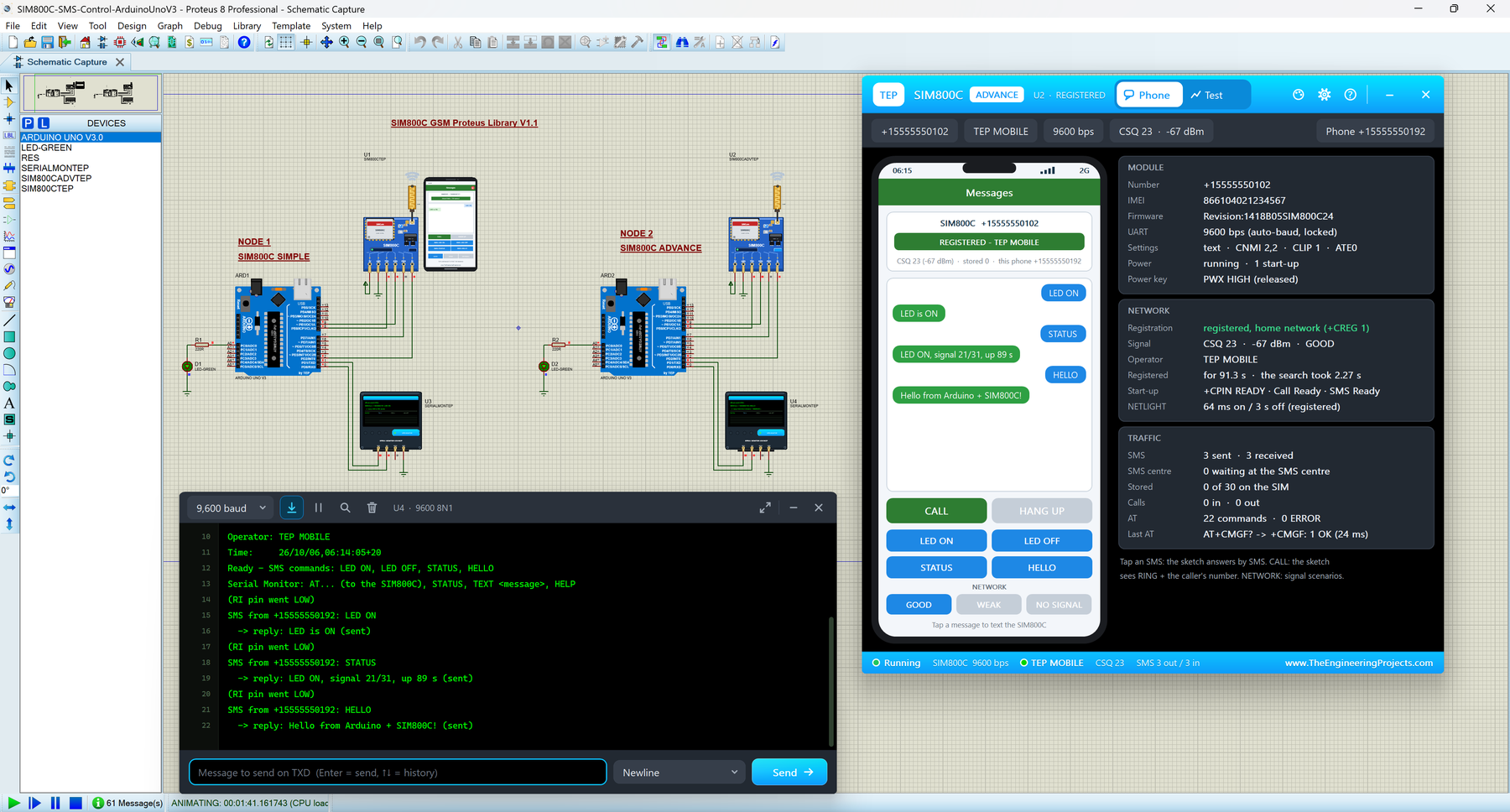
The SIM800C is SIMCom's quad-band GSM module, and most makers buy it on the small blue HW-537 board. This board stays switched off until its PWX power key is held LOW for more than a second, and our model copies that behaviour, so you learn the start-up sequence before you touch a real board. After start-up, it reports +CPIN: READY, Call Ready and SMS Ready, and then sends SMS and handles calls over a simulated network.
You get two devices: SIM800C Simple, with a virtual smartphone beside the module, and SIM800C Advance, with a pop-up window that holds the phone and four GSM test tools. In the demo, two Arduino UNOs switch an LED by SMS and reject incoming calls.
Read the complete tutorial: SIM800C Library for Proteus V1.1
2. SIM900A GSM Library for Proteus V1.1
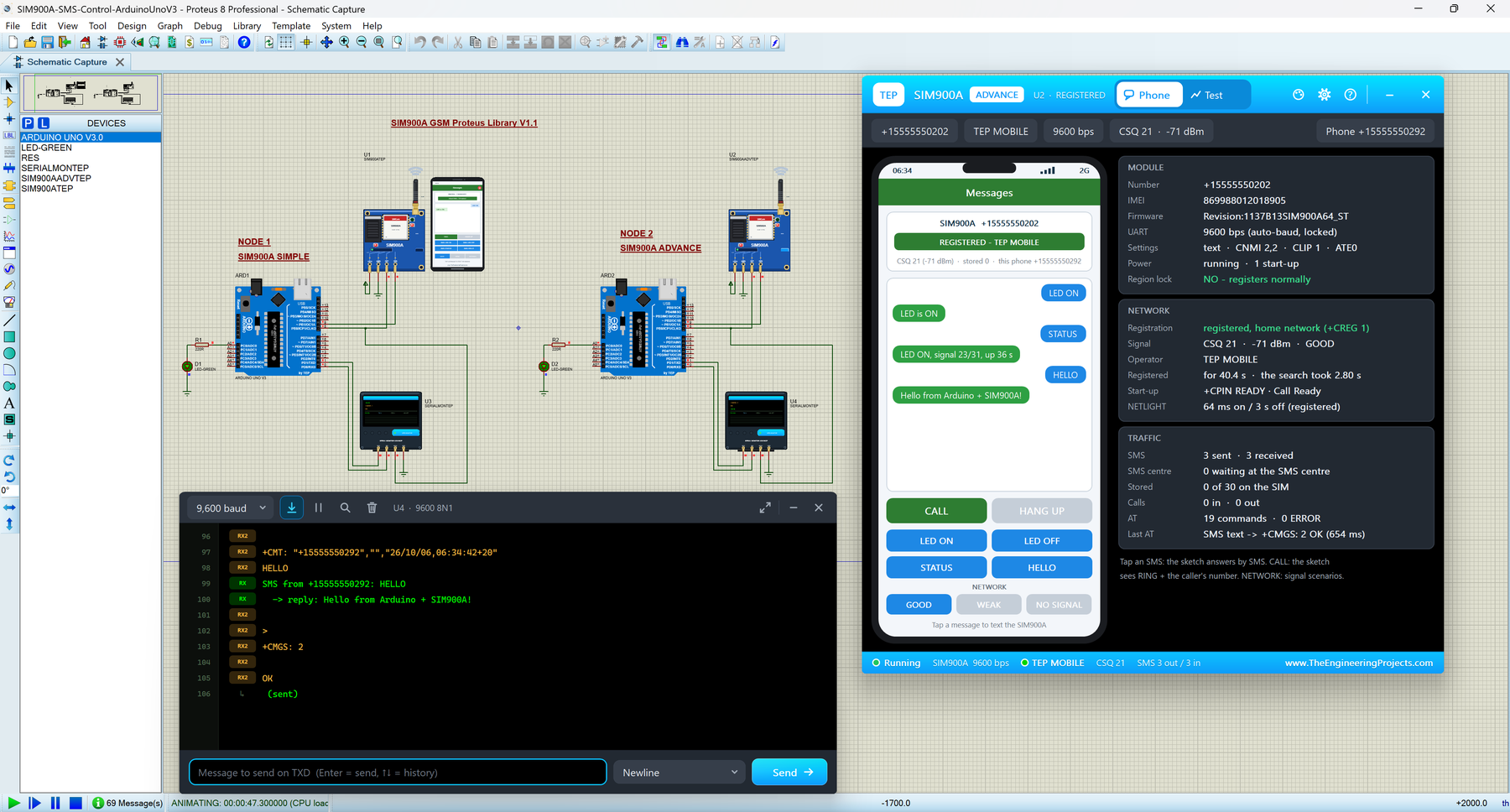
The SIM900A on its blue SIM900A MINI board is one of the cheapest ways to give an Arduino a phone number. It is also famous for its region lock: in many countries, a brand-new SIM900A never registers on the network. Our model can simulate that lock as well, so you can see exactly what your sketch receives from a locked module and learn how to recognise the problem.
Like the SIM800C, it comes as SIM900A Simple and SIM900A Advance, with a virtual phone and four GSM test tools. Both libraries share one model file, so a SIM900A and a SIM800C in the same design can even text and call each other.
Read the complete tutorial: SIM900A Library for Proteus V1.1
3. NEO-7M GPS Library for Proteus V1.1
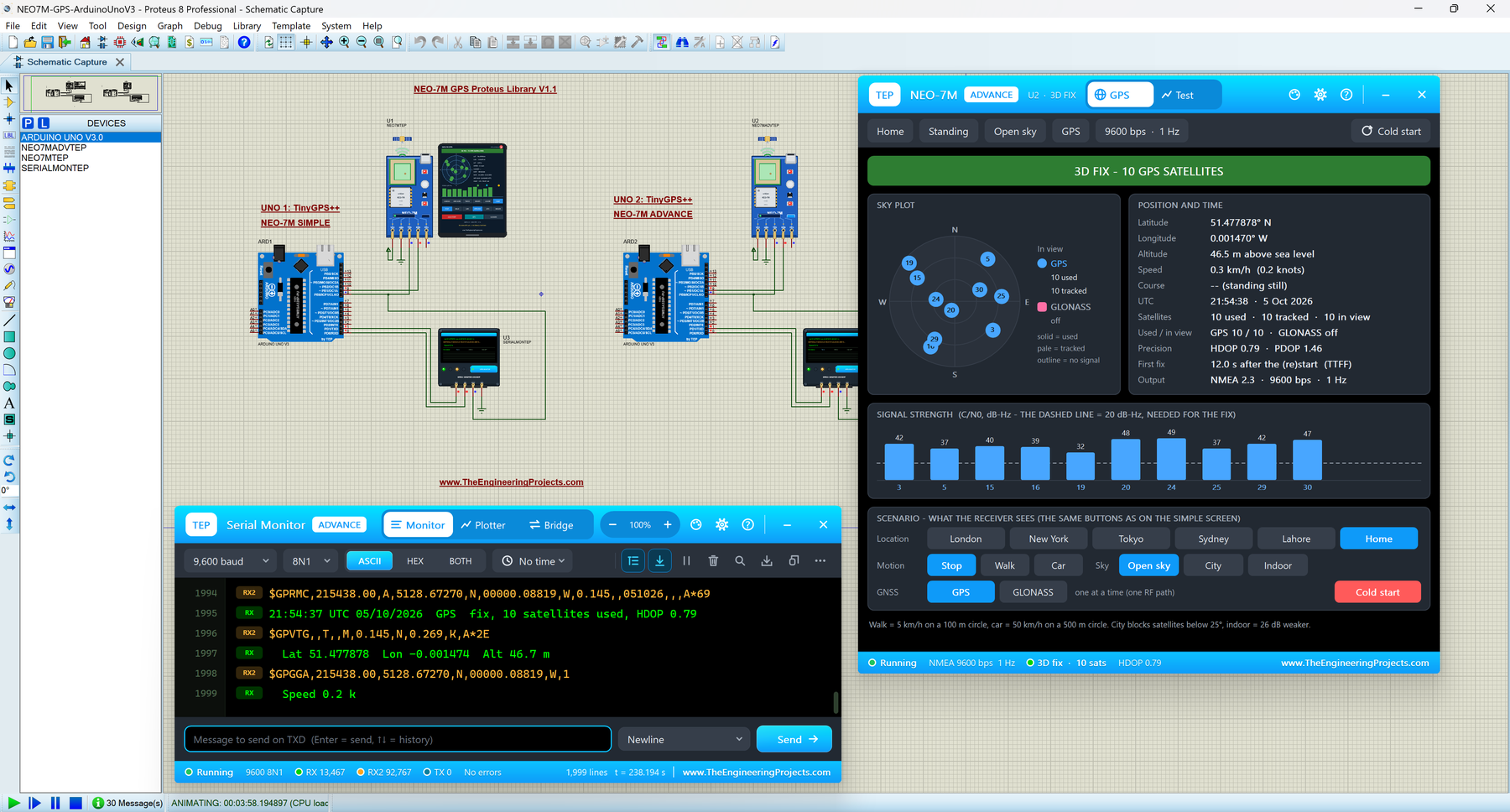
The u-blox NEO-7M is the next step after the famous NEO-6M. It has the same size and talks to the Arduino in the same way, but it can also use the Russian GLONASS satellites instead of GPS. In our library, you switch between GPS and GLONASS with one click and compare the two systems yourself.
NEO-7M Simple draws a GPS screen on the schematic, while NEO-7M Advance opens a pop-up with five GNSS test tools: time to first fix, accuracy, NMEA check, route and a Constellations test. The demo reads the position with the TinyGPS++ library.
Read the complete tutorial: NEO-7M Library for Proteus V1.1
4. NEO-M8N GNSS Library for Proteus V1.1
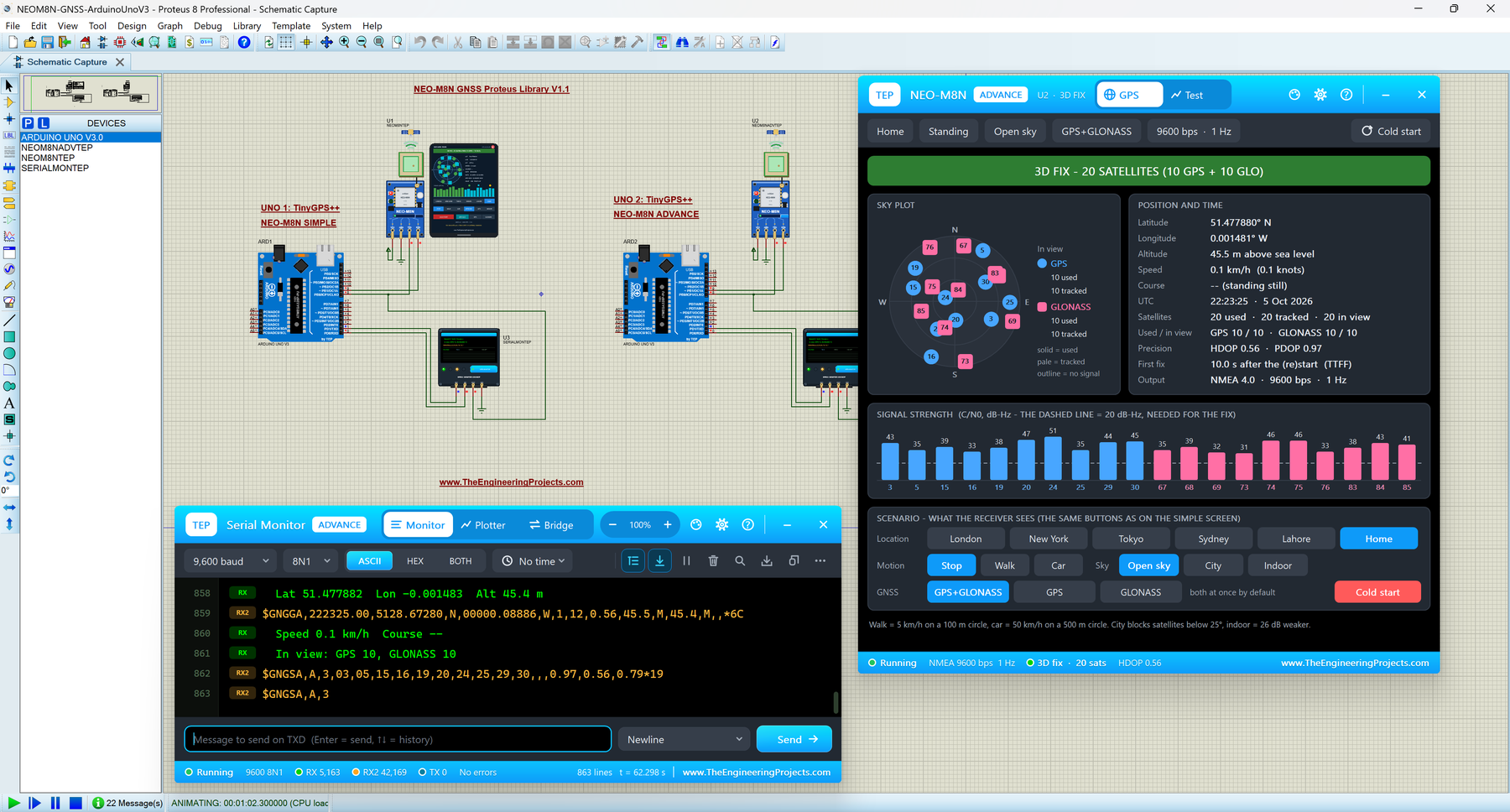
The NEO-M8N is the GPS module of choice for drones, robots and trackers, because it listens to GPS and GLONASS at the same time. More satellites mean a faster and steadier position, especially between tall buildings.
Its star feature in Proteus is the Constellations test, which runs GPS only, GLONASS only and GPS + GLONASS one after the other and compares them side by side. Like the NEO-7M, it comes in Simple and Advance versions with five GNSS test tools and a TinyGPS++ demo.
Read the complete tutorial: NEO-M8N Library for Proteus V1.1
5. SIM800L GSM Library for Proteus V1.1
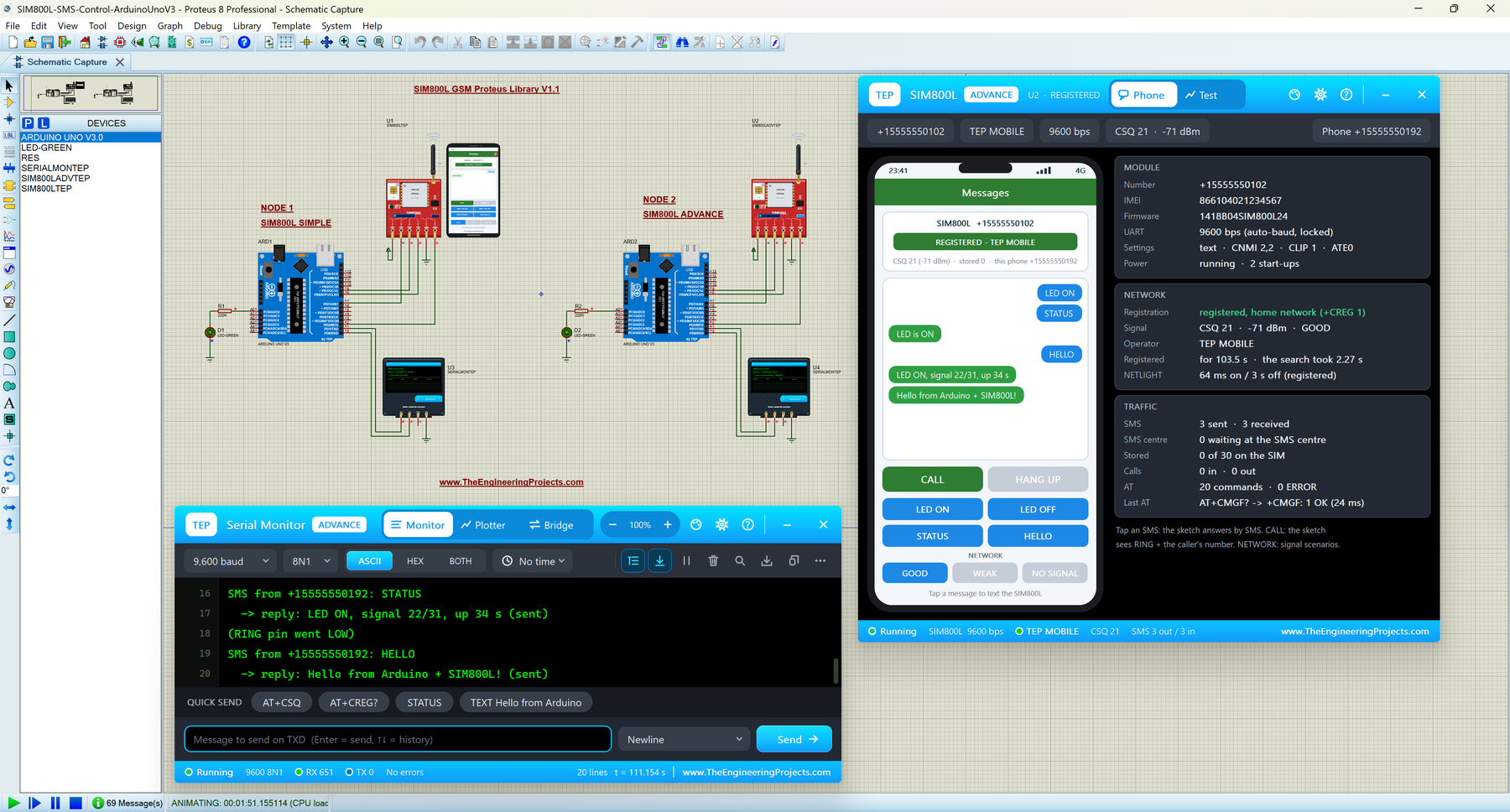
The SIM800L is the small GSM module behind almost every "control it from my phone" project: home automation, alarms, trackers and remote switches. With this library, you can build those projects on your PC, without a SIM card, a 2 A power supply or a 2G network.
SIM800L Simple shows a virtual smartphone on the schematic, and SIM800L Advance adds four GSM test tools: network registration, SMS round trip, call test and AT check. In the demo, two Arduino UNOs switch an LED by SMS, reject calls and take AT commands from our TEP Serial Monitor.
Read the complete tutorial: SIM800L Library for Proteus V1.1
6. NEO-6M GPS Library for Proteus V1.1
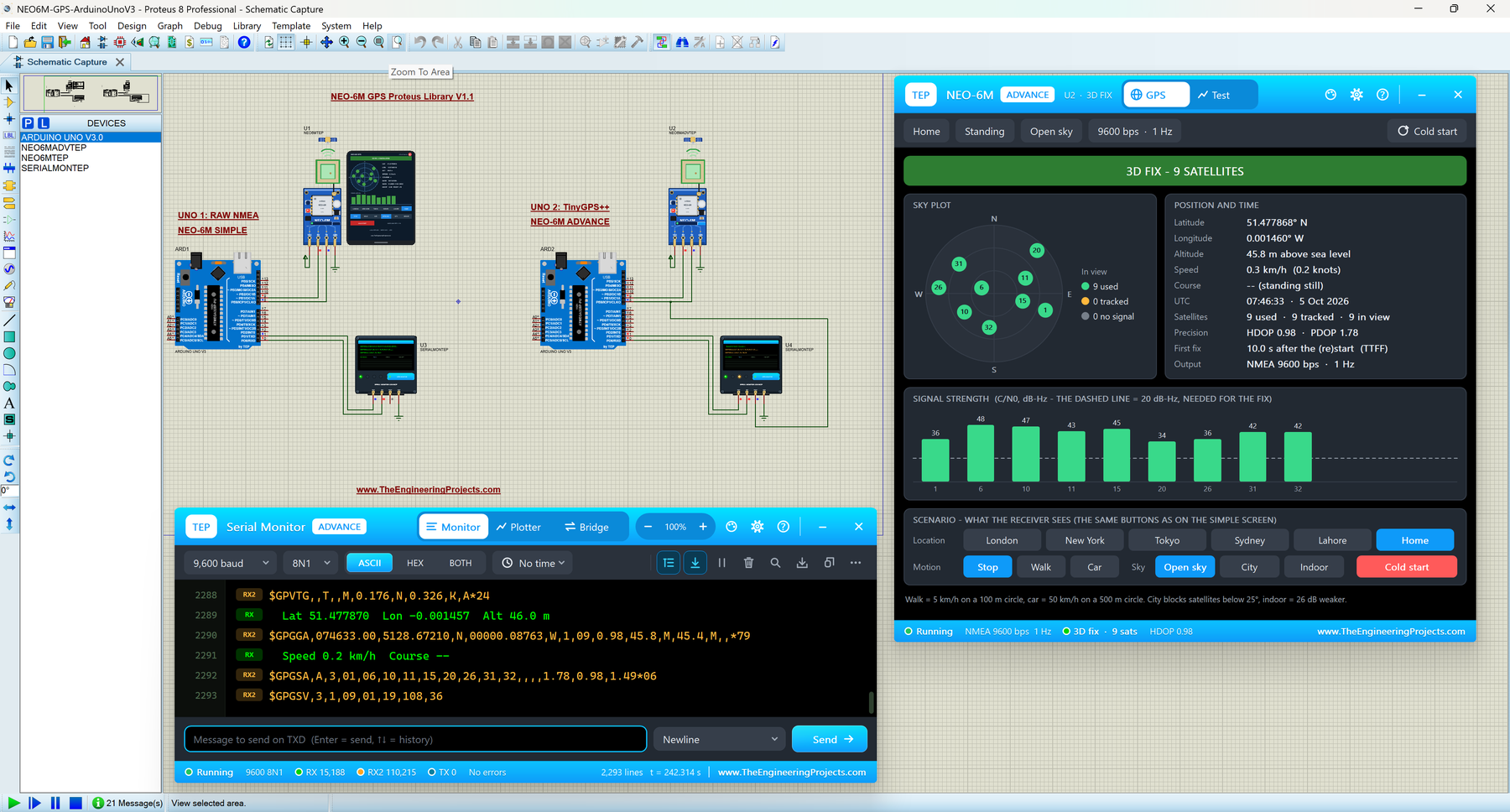
The u-blox NEO-6M is the GPS module most students start with. It tells your Arduino where it is, how fast it moves and the exact time, over just two wires. With this library, you can test your GPS project on your PC instead of waiting next to a window for a satellite fix.
NEO-6M Simple draws a GPS screen on the schematic, and NEO-6M Advance adds four GPS test tools: time to first fix, accuracy, NMEA check and route. One Arduino UNO of the demo prints the raw NMEA sentences, and the other one reads the position with TinyGPS++.
Read the complete tutorial: NEO-6M Library for Proteus V1.1
7. SIM808 GSM + GPS Library for Proteus V1.1
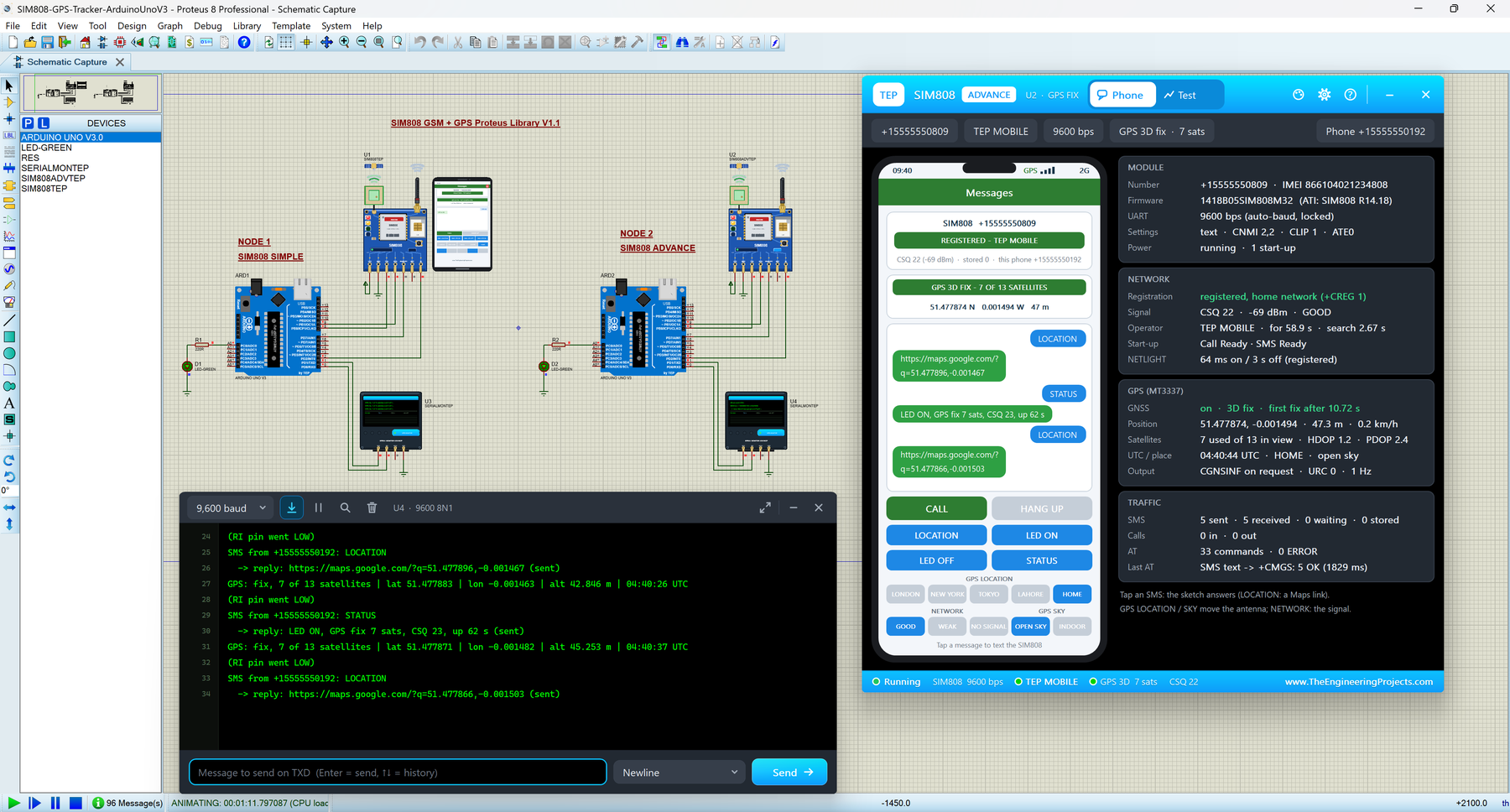
The SIM808 puts a GSM/GPRS modem and a GPS receiver on one board, so a single Arduino serial port gives you SMS, calls and your position. That makes it the favourite of vehicle trackers and anti-theft projects. Our model waits for its power key, texts and calls over a simulated network and, at the same time, tracks a simulated GPS sky and gets its first fix like a real receiver.
Version 1.1 gives you SIM808 Simple, with a virtual phone and its GPS strip beside the module, and SIM808 Advance, with a pop-up window and five GSM + GPS test tools, including a GPS fix test with cold, warm and hot starts. In the demo, two Arduino UNOs switch their SIM808 on with PWRKEY and answer a LOCATION SMS with a Google Maps link.
Read the complete tutorial: SIM808 Library for Proteus V1.1
Wi-Fi and Bluetooth Libraries for Proteus
Next are two modules that connect your Arduino to a smartphone, a router or the cloud. Both of them come with a virtual phone, so you can test the phone side of your project inside Proteus too.
8. ESP-01 Wi-Fi Library for Proteus V1.1
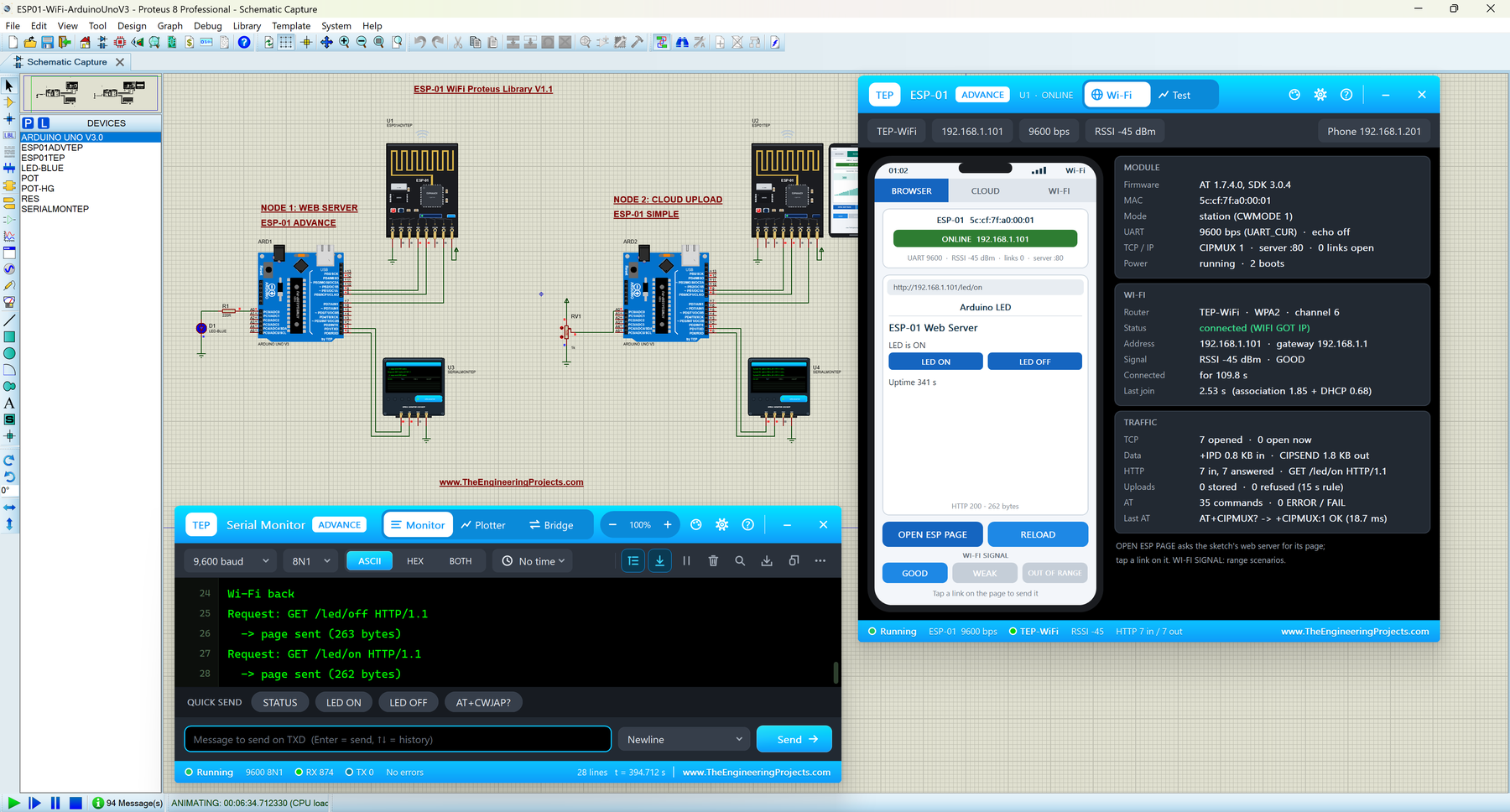
The ESP-01 is the tiny ESP8266 board that gives an Arduino Wi-Fi through a handful of AT commands. With this library, your sketch can join a router, serve a web page to a phone or upload readings to the cloud, all on your PC, without a 3.3 V supply, a router or an internet account.
ESP-01 Simple draws a virtual smartphone, and ESP-01 Advance opens a pop-up with four Wi-Fi test tools: Wi-Fi join, web request, cloud upload and AT check. In the demo, one UNO runs a web server that switches an LED from the phone's browser, and the other one uploads a potentiometer reading every 20 seconds.
Read the complete tutorial: ESP-01 Library for Proteus V1.1
9. HC-05 & HC-06 Bluetooth Library for Proteus V1.1
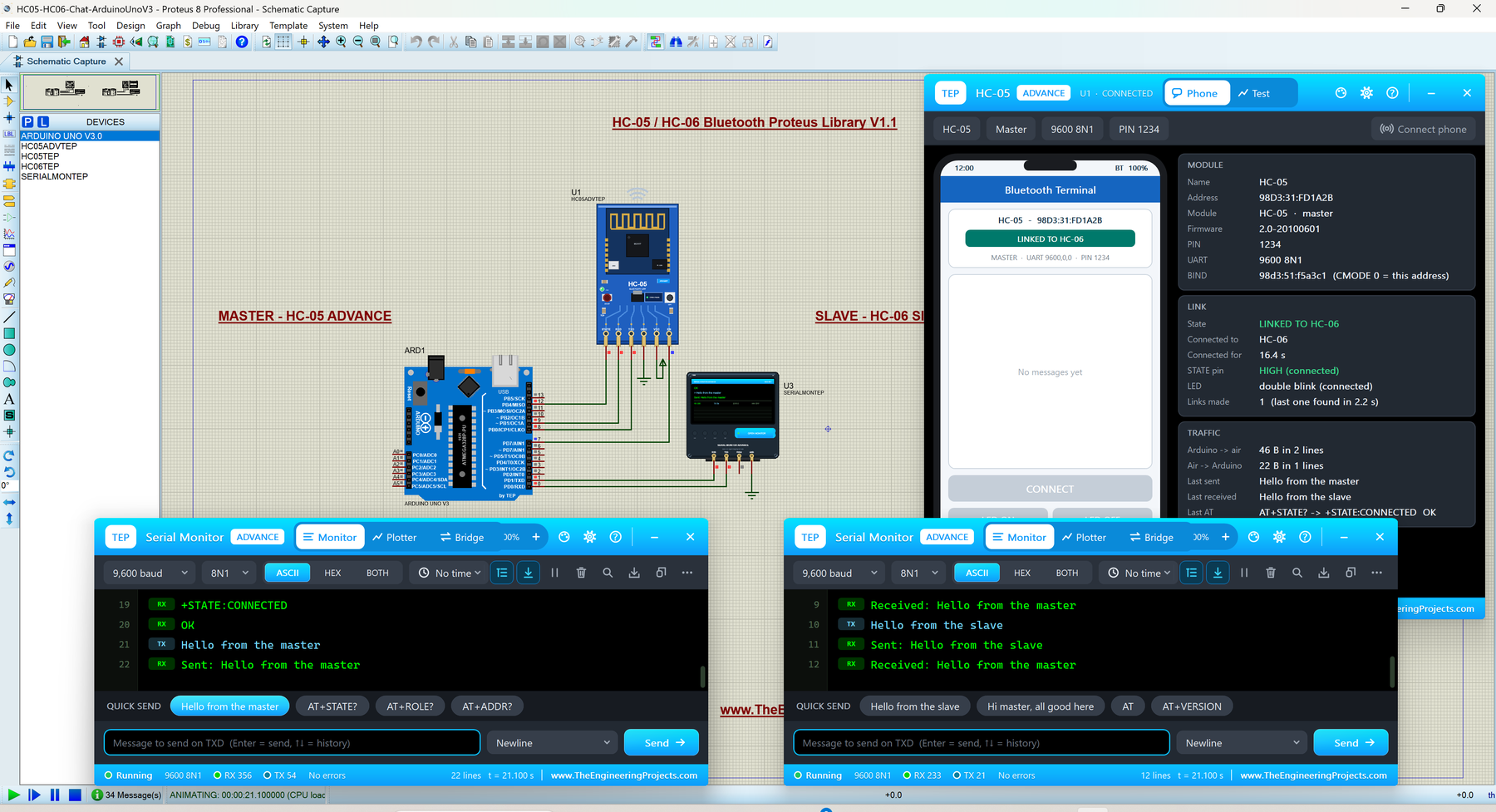
The HC-05 and HC-06 are the most popular Bluetooth modules among Arduino users. They work like a wireless serial cable between your Arduino and a smartphone, so students use them for phone-controlled LEDs, robots and home automation.
This library gives you four devices: HC-05 Simple, HC-05 Advance, HC-06 Simple and HC-06 Advance. The Simple devices draw a virtual smartphone, and the Advance devices add Bluetooth test tools in a pop-up window. You also get two demos: an LED switched from the phone, and an HC-05 master chatting with an HC-06 slave.
Read the complete tutorial: HC-05 Library for Proteus V1.1
RF Module Libraries for Proteus
These radios send data between two Arduino boards without any network at all. In each library, you place two modules in one design, and in most of them you can change the distance between the radios while the simulation is running, which is something you can't easily do on your desk.
10. HC-12 Library for Proteus V1.1 (433 MHz)
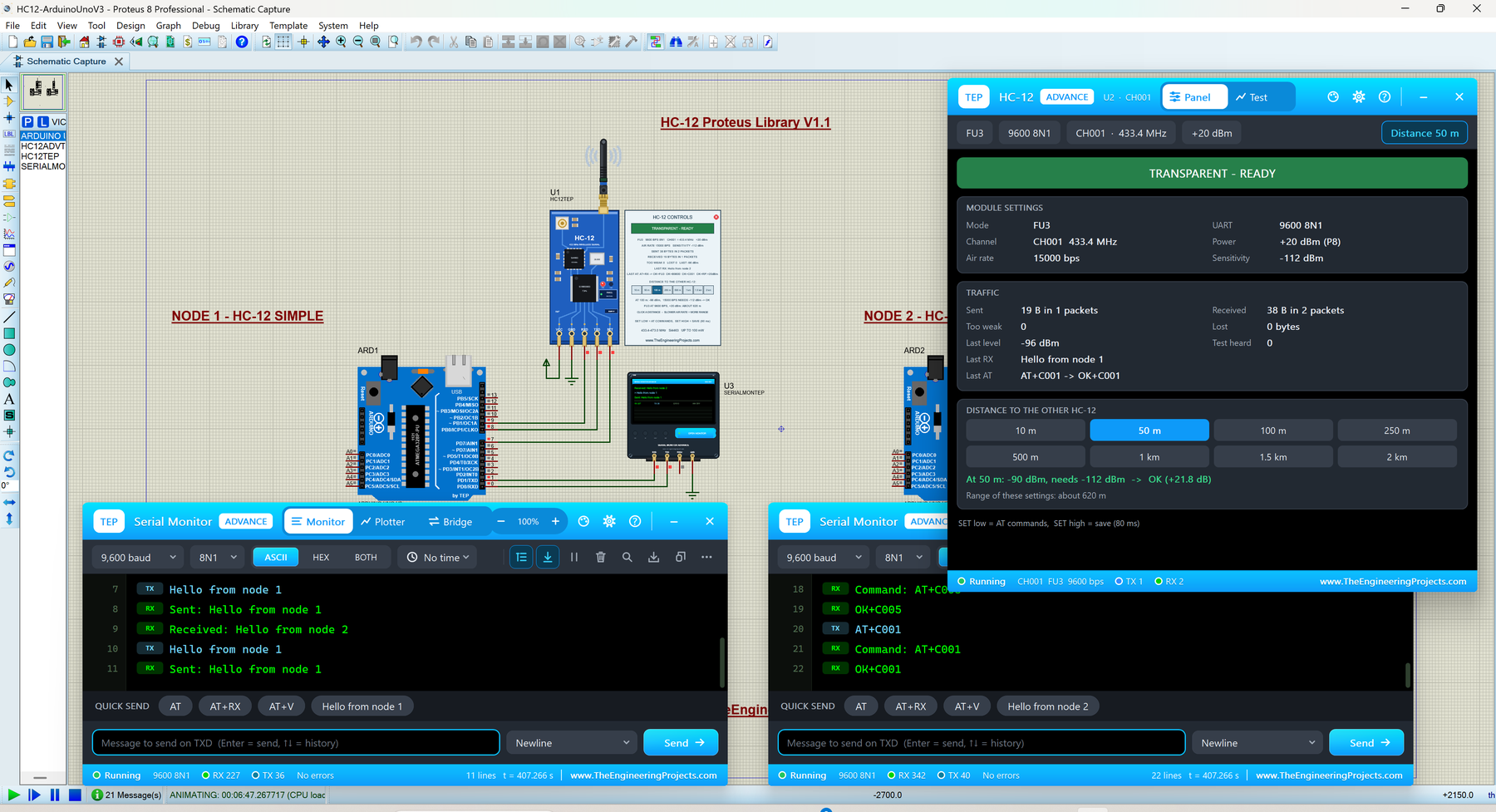
The HC-12 is a 433 MHz radio module that works like a wireless serial cable: whatever your Arduino prints into one HC-12 comes out of another HC-12, hundreds of metres away. It is cheap and simple, so students love it for remote controls, weather stations and wireless sensor projects.
HC-12 Simple has its control panel drawn right on the schematic, and HC-12 Advance opens a pop-up panel with test tools such as a link test and a range sweep. The demo shows two Arduino UNOs chatting over the air, each with our TEP Serial Monitor.
Read the complete tutorial: HC-12 Library for Proteus V1.1
11. nRF24L01 PA LNA Proteus Library
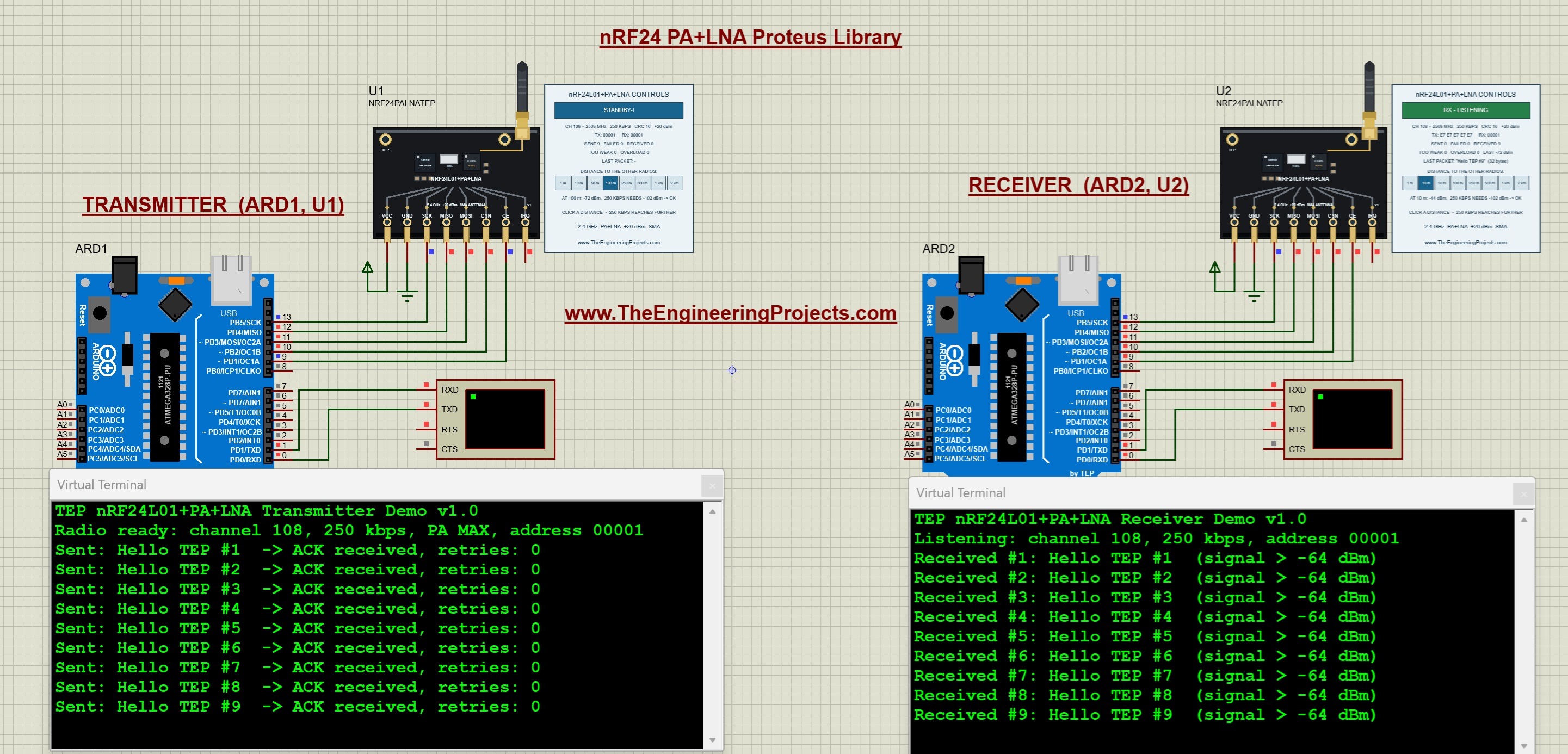
This is the long-range version of the nRF24L01, with a power amplifier, a low-noise amplifier and an external antenna. A row of distance buttons moves the two radios from 1 m to 2 km apart, so you can test how the distance, the data rate and the power level decide whether a message is acknowledged.
The tutorial also shows a surprise of the real PA LNA modules: two of them can fail when they are placed too close to each other.
Read the complete tutorial: nRF24L01 PA LNA Proteus Library
12. RFM69HCW Proteus Library
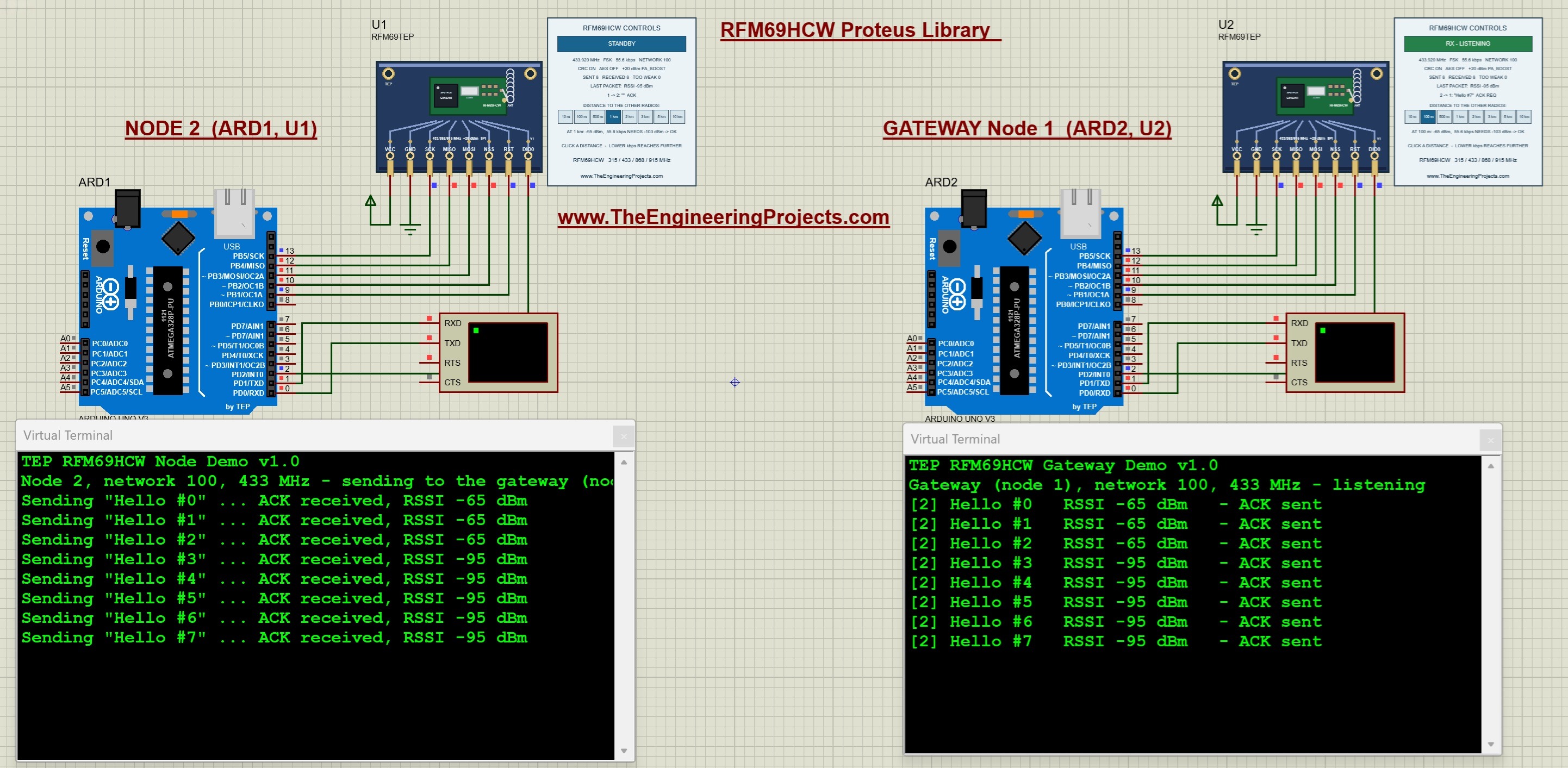
With the RFM69HCW library, one Arduino Uno works as a node and the other as a gateway at 433 MHz. The gateway answers every message with an acknowledgement, and both boards print the signal strength (RSSI). The distance buttons let you test a link of up to 10 km.
Read the complete tutorial: RFM69HCW Proteus Library
13. CC1101 Proteus Library
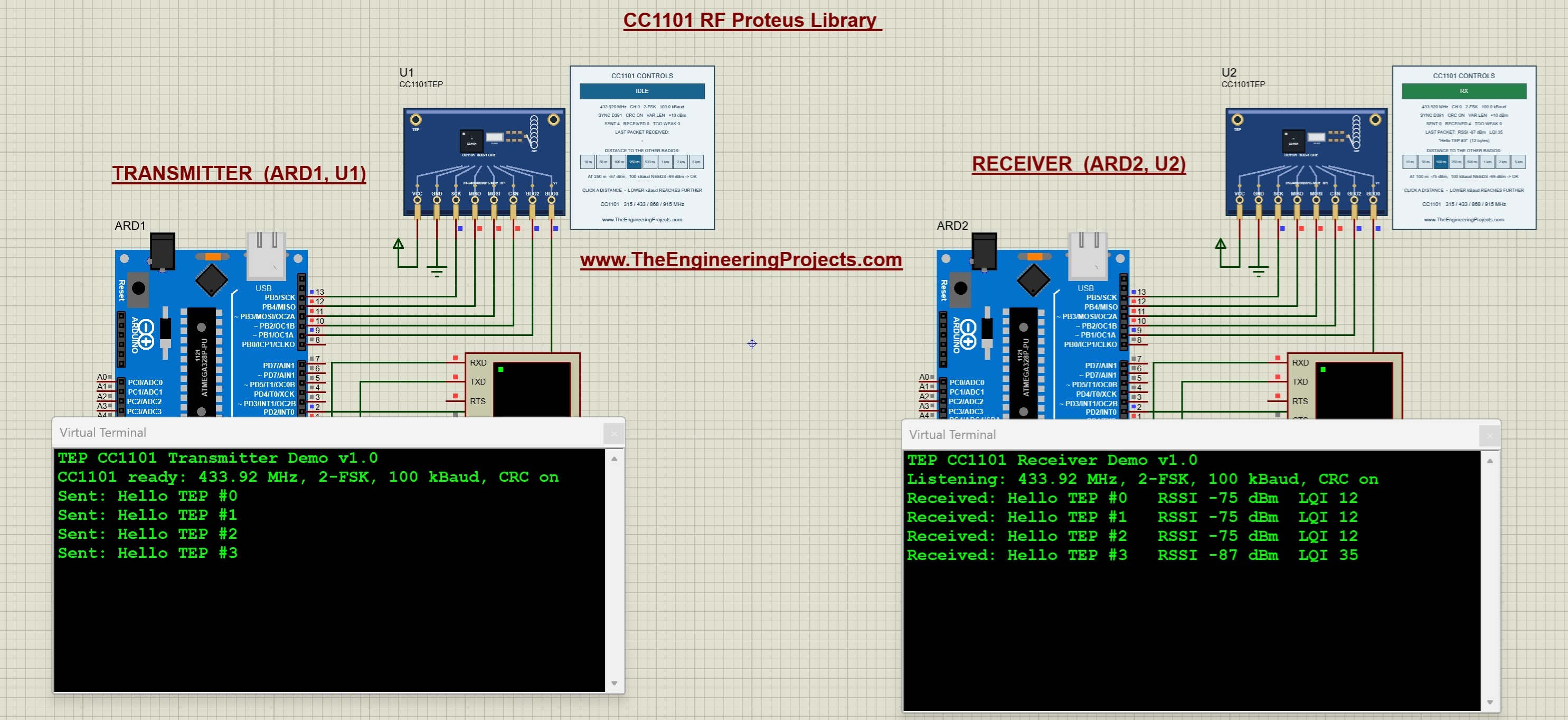
The CC1101 is a popular sub-GHz transceiver. In this library, two CC1101 modules send messages between two Arduino Uno boards at 433.92 MHz. The receiver prints each message with its signal strength (RSSI) and link quality (LQI), and the distance buttons show you how far the link can reach.
Read the complete tutorial: CC1101 Proteus Library
14. nRF24L01 Proteus Library
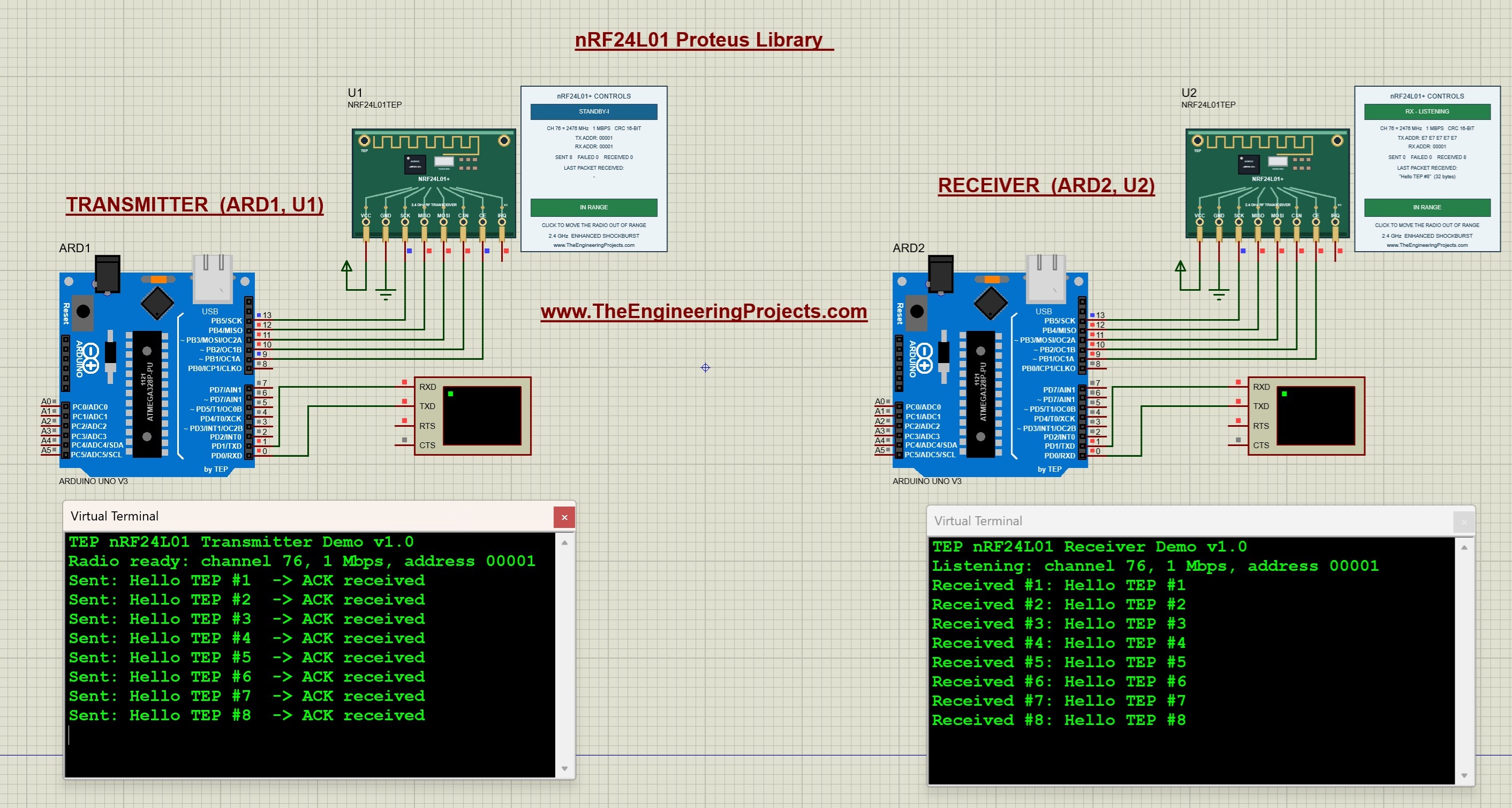
The plain nRF24L01 is the 2.4 GHz radio of countless Arduino projects. The transmitter in our simulation reports whether every message was acknowledged, the receiver prints each message on its own Virtual Terminal, and a range switch lets you break the link to see what your code does when the acknowledgement never comes.
Read the complete tutorial: nRF24L01 Proteus Library
LoRa Libraries for Proteus
LoRa trades speed for range: a slow LoRa link can cover several kilometres. Our three LoRa libraries let you test that range with distance buttons of up to 20 km, and their control panels show you why a packet arrives or gets lost.
15. SX1262 LoRa Proteus Library
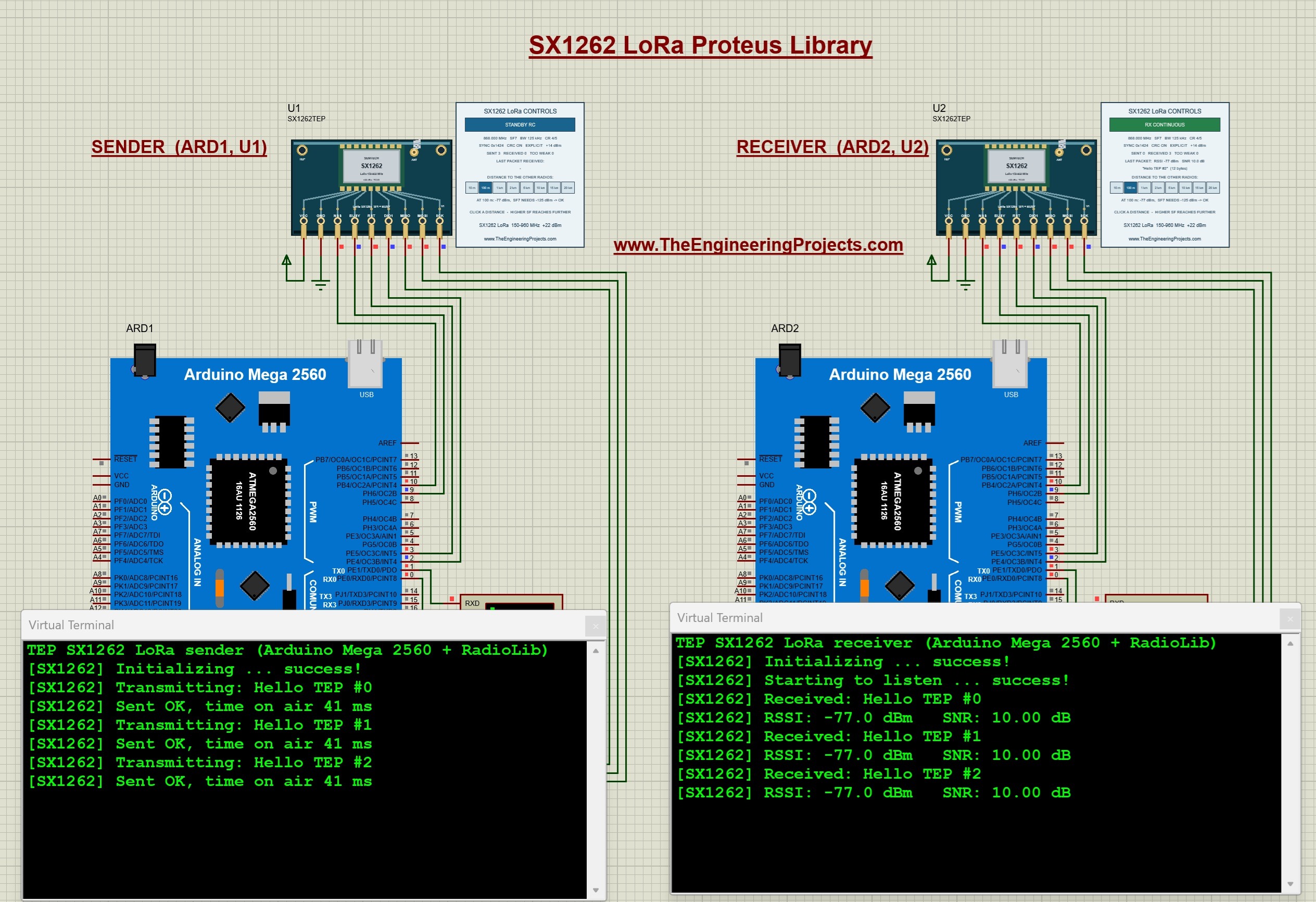
The SX1262 is the newer LoRa chip from Semtech, with an output power of up to +22 dBm. Our example uses two Arduino Mega 2560 boards and the popular RadioLib library at 868 MHz. Its control panel shows how the distance, the spreading factor, the bandwidth and the output power decide whether a packet arrives.
Read the complete tutorial: SX1262 LoRa Proteus Library
16. SX1278 LoRa (Ra-02) Proteus Library
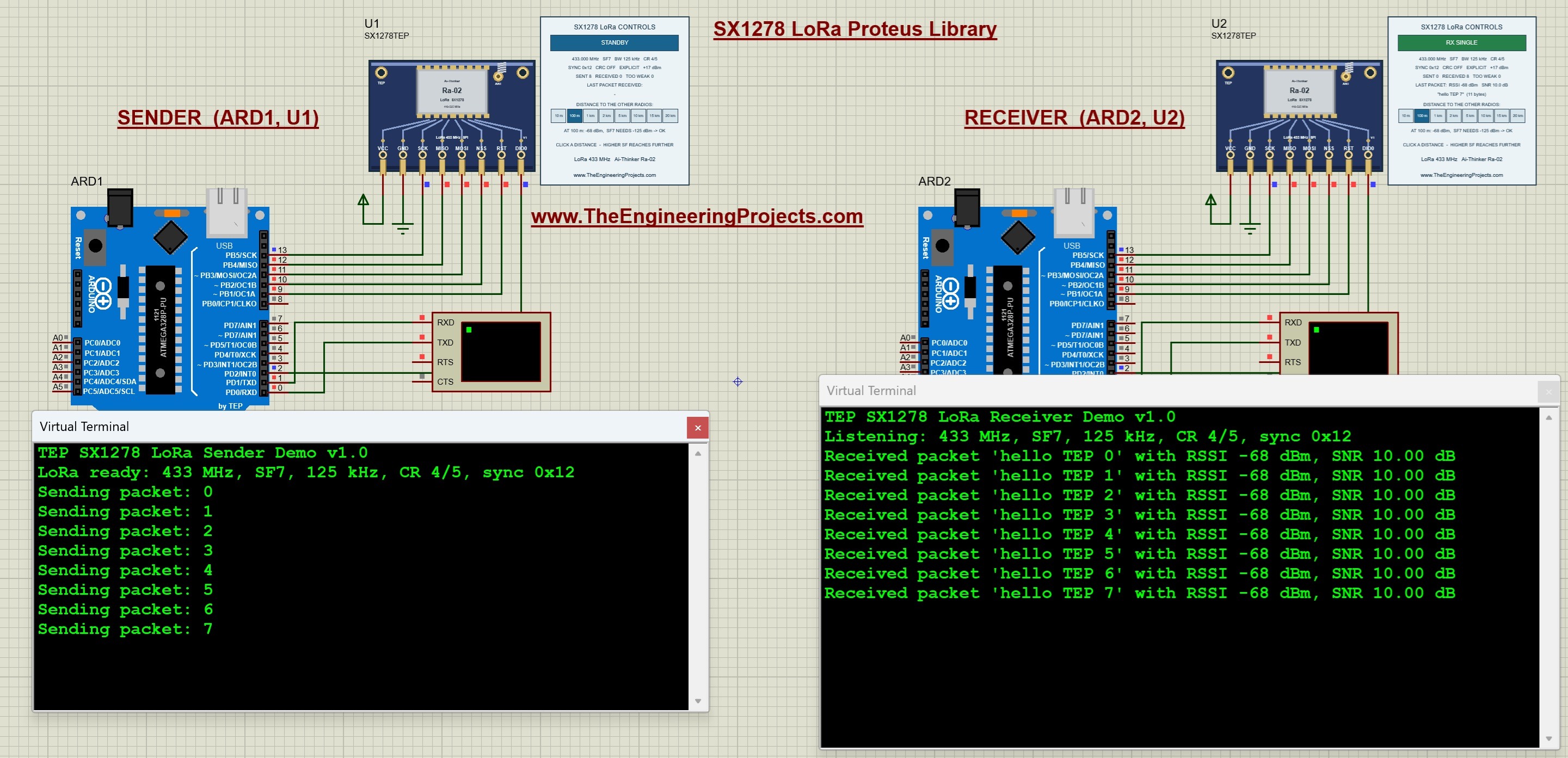
The SX1278 library adds the popular Ai-Thinker Ra-02 module to Proteus. Two Arduino Uno boards exchange messages at 433 MHz, and the receiver prints every message with its signal strength and its signal-to-noise ratio (SNR).
Read the complete tutorial: SX1278 LoRa Proteus Library
17. RFM95W LoRa Proteus Library
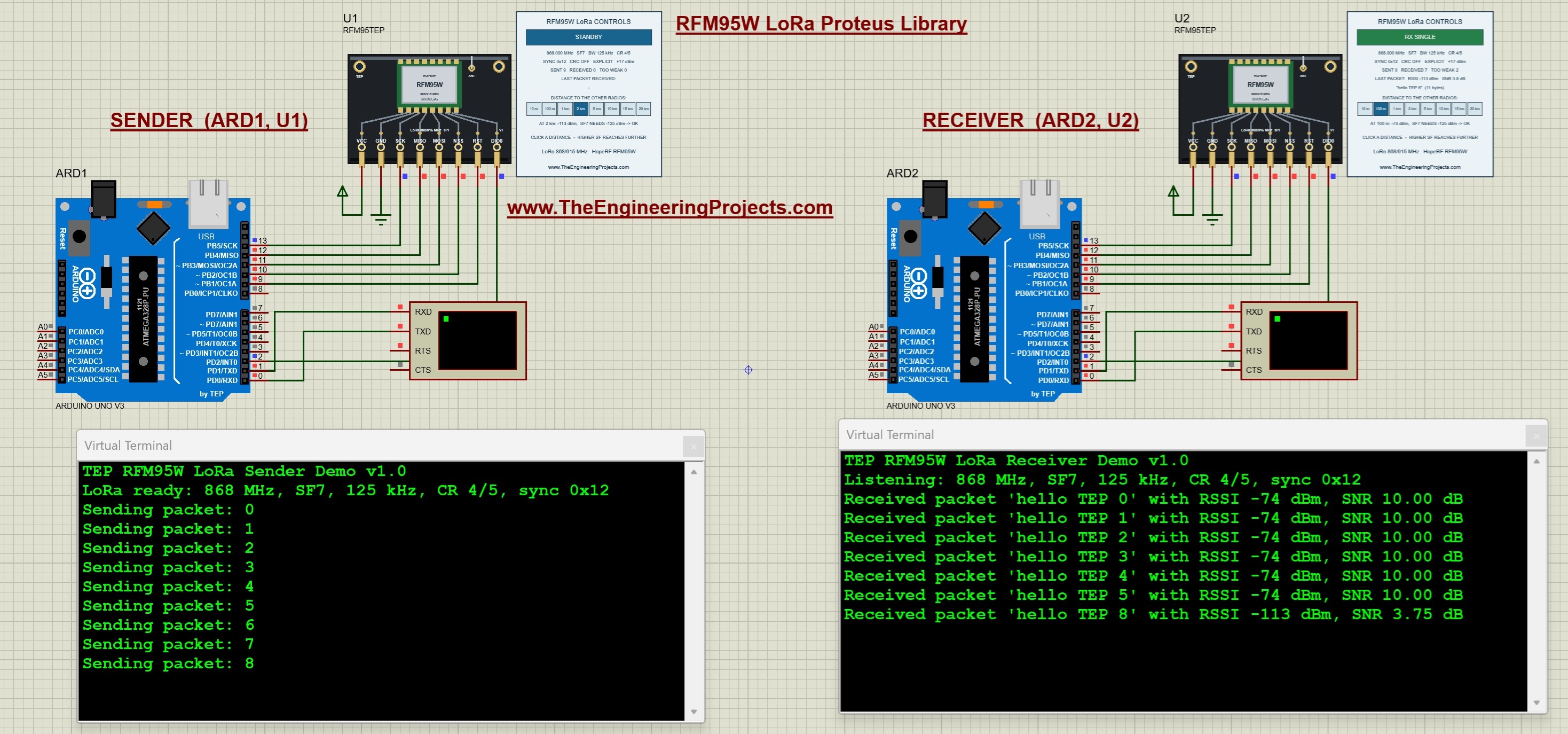
The RFM95W is a compact LoRa module from HopeRF. Our library runs an 868 MHz link between two Arduino Uno boards and shows how the spreading factor, the bandwidth and the output power change the range of the link.
Read the complete tutorial: RFM95W LoRa Proteus Library
RFID and NFC Libraries for Proteus
These readers are the heart of attendance systems and door locks. In each library, you place a virtual card on the reader with a single click, and the Arduino reads it.
18. PN532 NFC Proteus Library
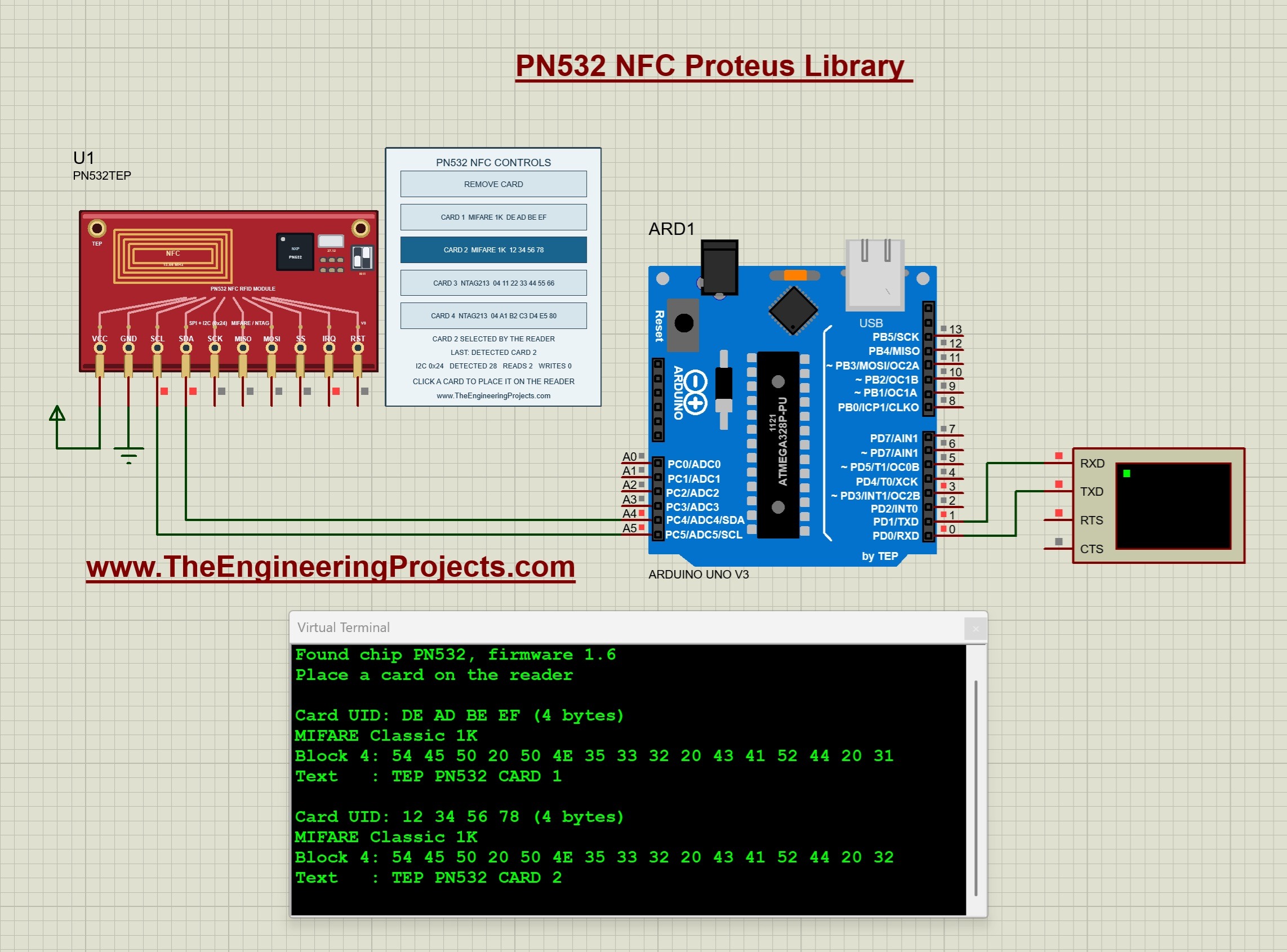
The PN532 connects to an Arduino Uno through I2C or SPI, and the tutorial includes a project for each. A control panel beside the module holds four cards of two types, MIFARE Classic 1K and NTAG213, and the Arduino prints the UID and the stored data of the card you place on the reader.
Read the complete tutorial: PN532 NFC Proteus Library
19. EM-18 RFID Proteus Library
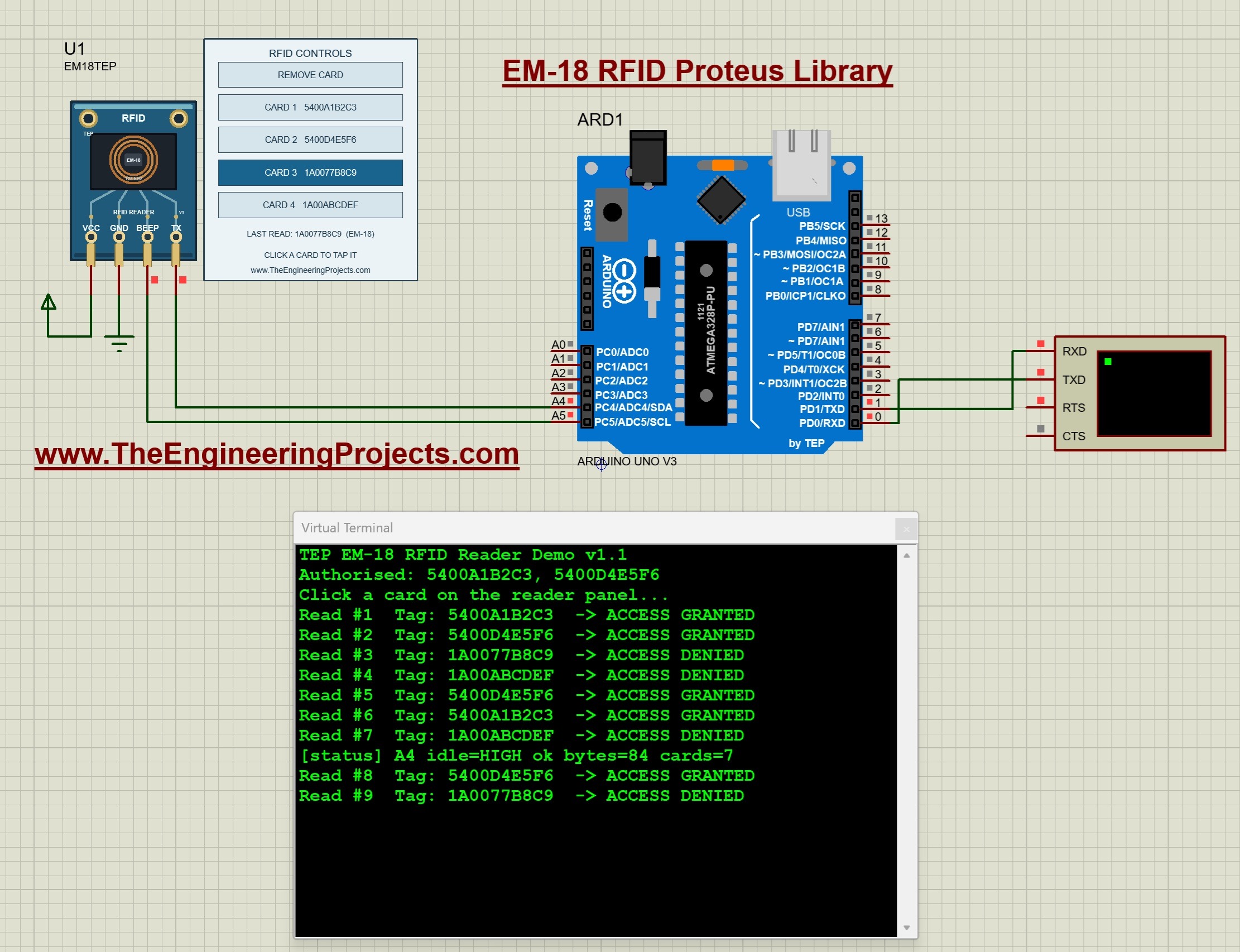
The EM-18 is a 125 kHz RFID reader that sends the tag number over a serial line. In our simulation, the Arduino checks the tag's checksum and prints whether access is granted or denied, which is the starting point of most RFID door-lock projects.
Read the complete tutorial: EM-18 RFID Proteus Library
20. MFRC522 RFID Proteus Library
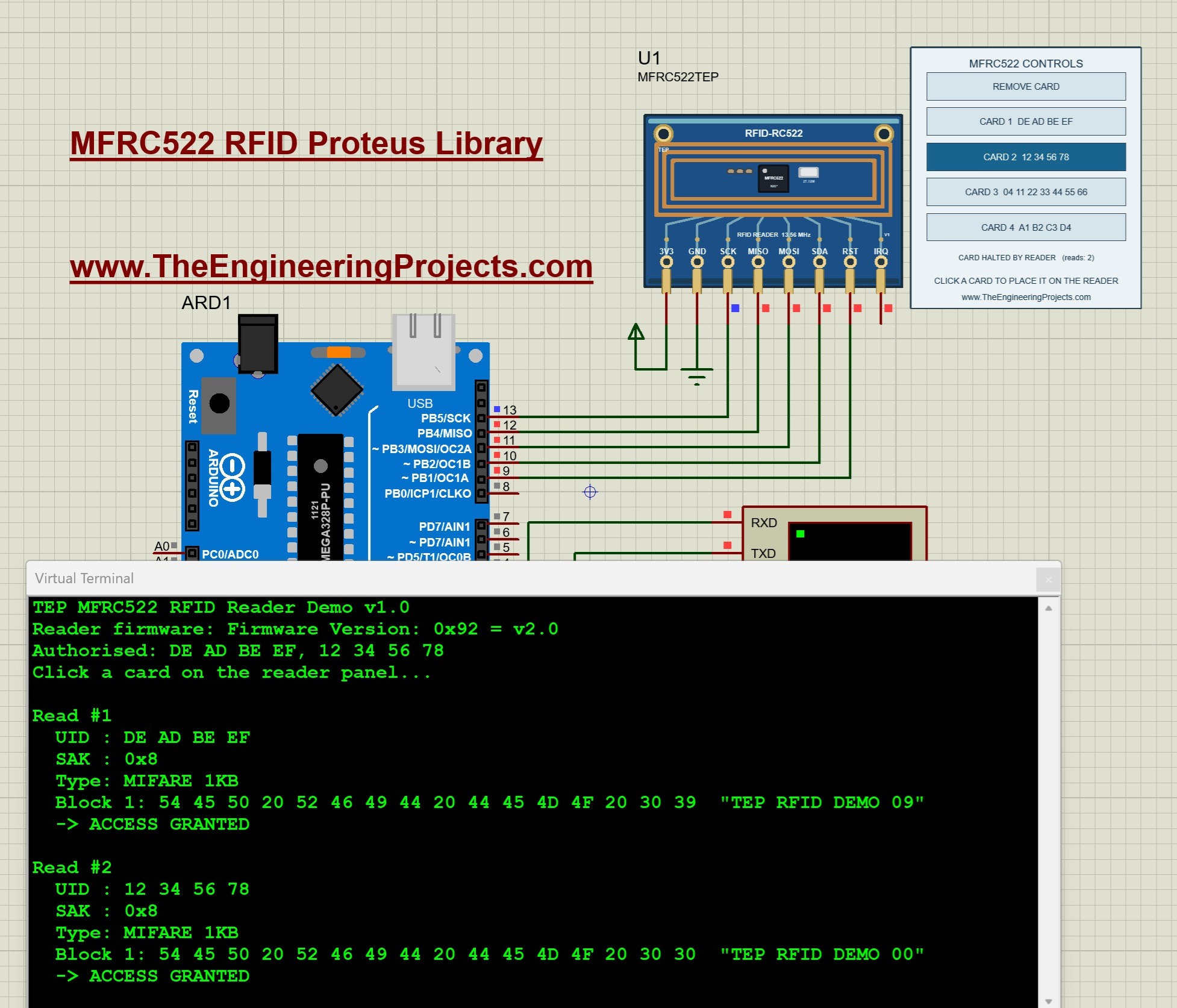
The RC522 (MFRC522) is the RFID reader that comes with most Arduino starter kits. Our library connects it to an Arduino Uno over SPI, reads the card's UID and its stored MIFARE blocks, and prints whether access is granted or denied.
Read the complete tutorial: MFRC522 RFID Proteus Library
Sensor Libraries for Proteus
All eight new sensors talk to the Arduino over I2C, and each one has interactive controls, so you can change its inputs while the Arduino program is running and watch the readings follow.
21. BME280 Sensor Library for Proteus
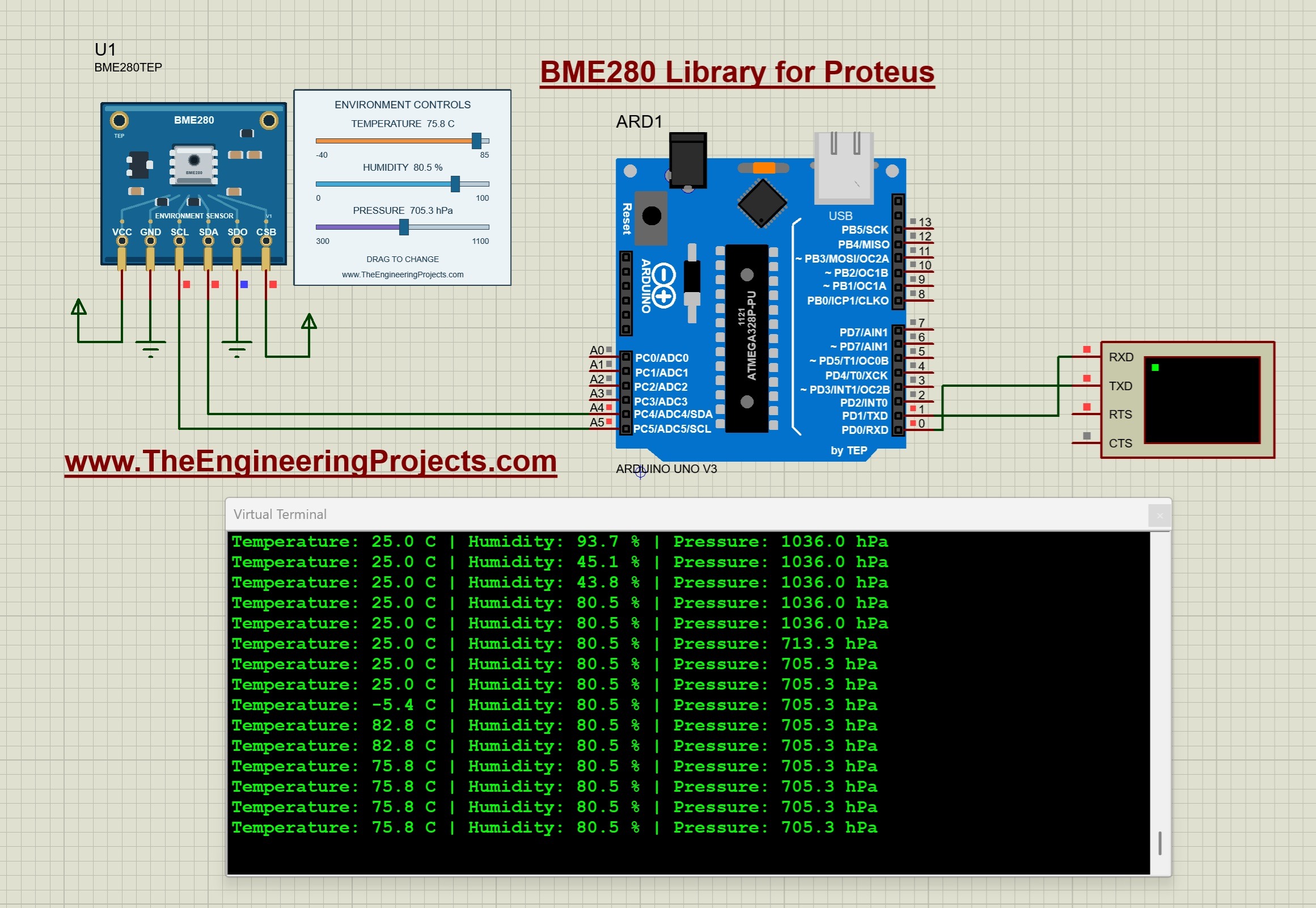
The BME280 measures temperature, relative humidity and atmospheric pressure in one small package. Its sliders change all three values during the simulation, and the Arduino Uno prints the readings on a Virtual Terminal. The tutorial also covers unit conversions and the timing of the measurements.
Read the complete tutorial: BME280 Sensor Library for Proteus
22. BH1750 Light Sensor Library for Proteus
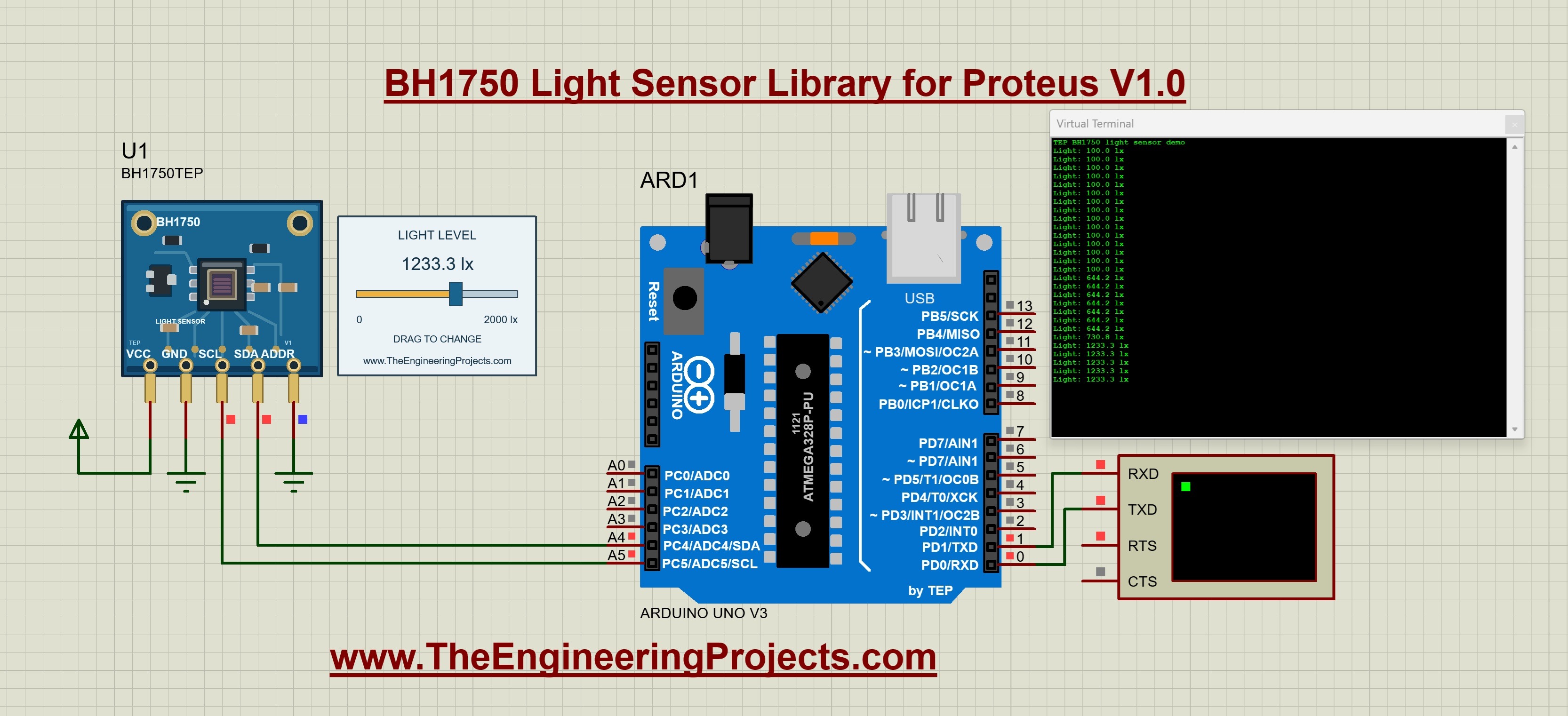
The BH1750 measures light in lux. An interactive slider sets the light level, so you can test bright and dark conditions while your sketch runs, and the tutorial ends with an automatic-lighting exercise.
Read the complete tutorial: BH1750 Light Sensor Library for Proteus
23. TCS34725 Color Sensor Proteus Library

The TCS34725 color sensor reads red, green, blue and clear light. In Proteus, you pick an input color from a palette, adjust its brightness and watch the raw RGBC readings, including what happens in darkness and at saturation.
Read the complete tutorial: TCS34725 Proteus Library
24. SHT31 Temperature and Humidity Proteus Library

The SHT31 is a precise temperature and humidity sensor. Our model lets you change both inputs during the simulation, and the tutorial explains the CRC check that tells a valid measurement from a failed reading.
Read the complete tutorial: SHT31 Proteus Library
25. VL53L0X Distance Sensor Proteus Library
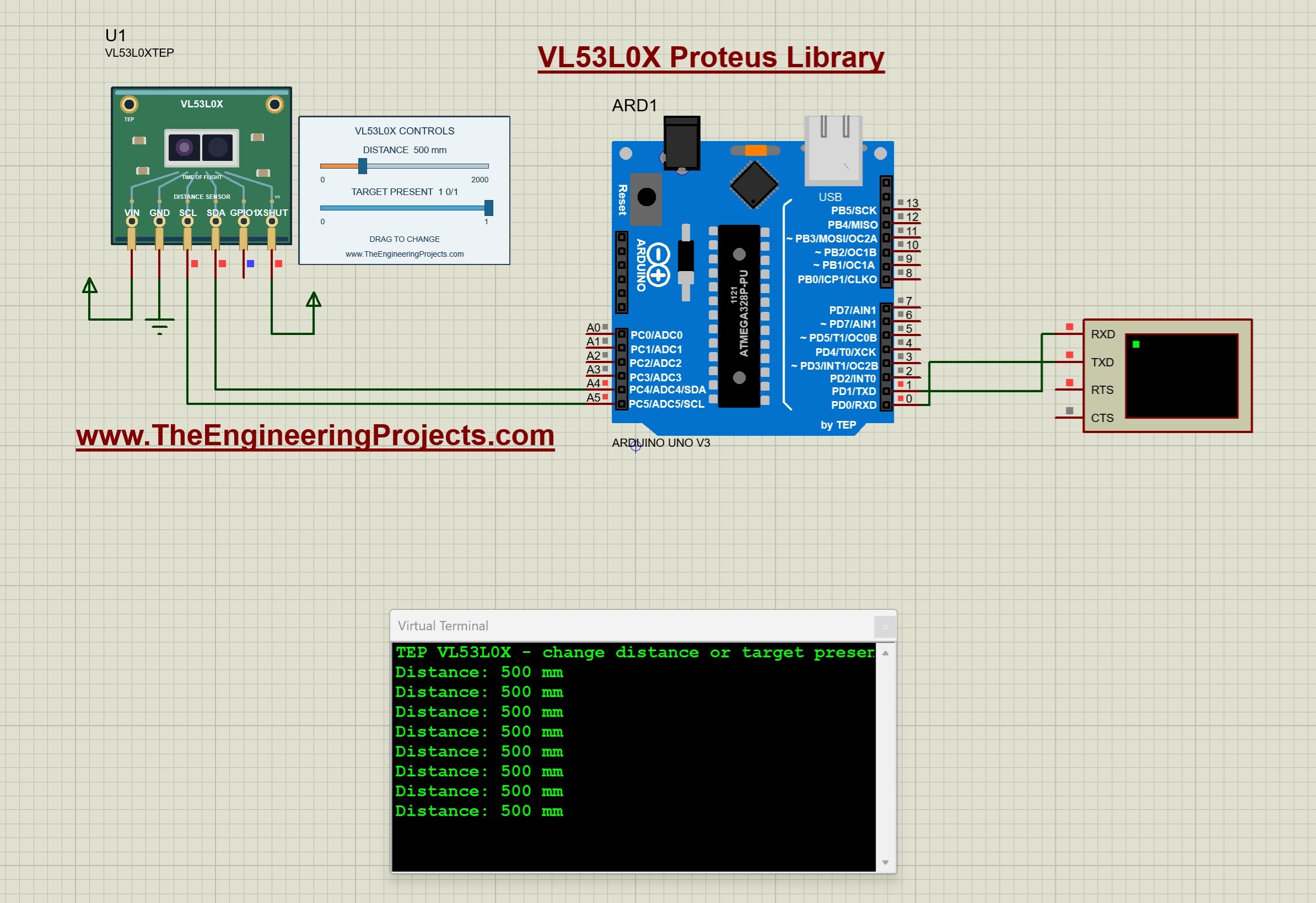
The VL53L0X is a time-of-flight distance sensor: it measures how long light takes to bounce back from a target. You set the target distance with a control, and a second control removes the target, so you can test how your program handles a missing measurement.
Read the complete tutorial: VL53L0X Proteus Library
26. BMP280 Pressure Sensor Proteus Library
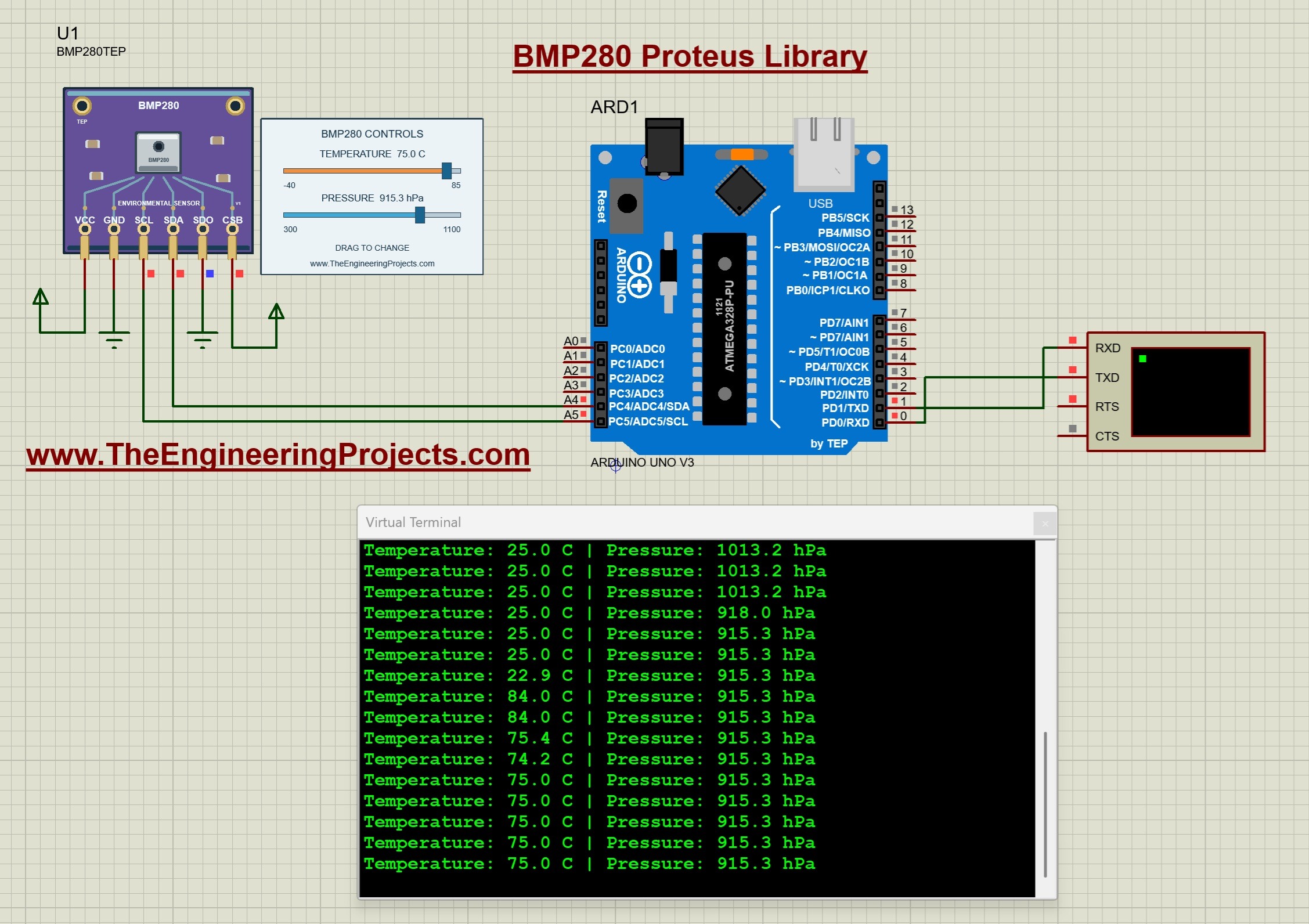
The BMP280 measures temperature and pressure, but not humidity, which is the main difference from the BME280. Two sliders change its inputs, and the tutorial shows how pressure compensation works and how to estimate the altitude from the pressure.
Read the complete tutorial: BMP280 Proteus Library
27. MAX30102 Pulse Oximeter Proteus Library
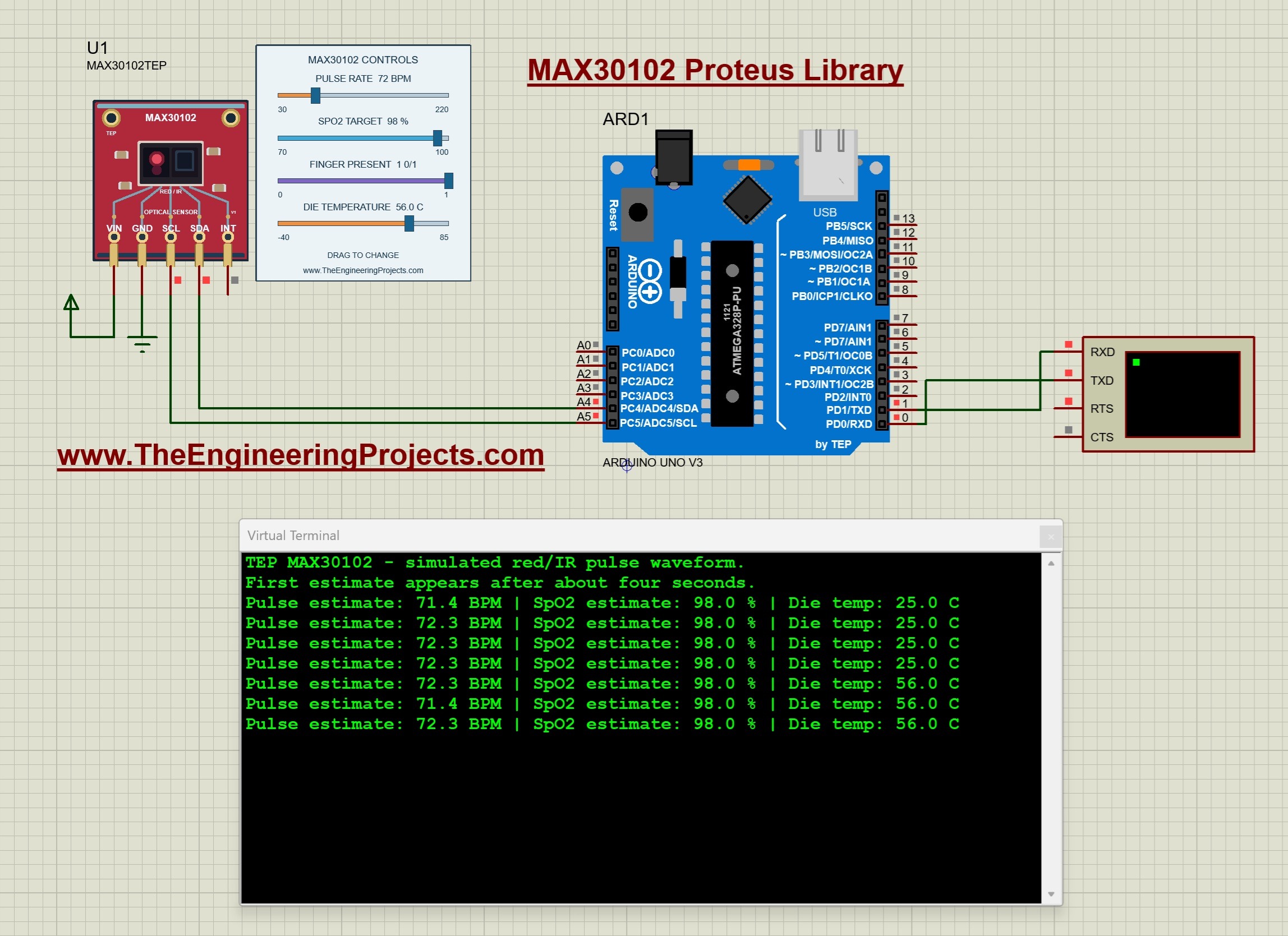
The MAX30102 is the optical sensor of pulse oximeters and fitness bands. Our model has controls for the pulse rate, an SpO2 waveform target, finger presence and die temperature, and the Arduino estimates the pulse and SpO2 from the samples. It is made for learning the sensor and its code, not for medical use.
Read the complete tutorial: MAX30102 Proteus Library
28. MPU6050 Accelerometer and Gyroscope Proteus Library
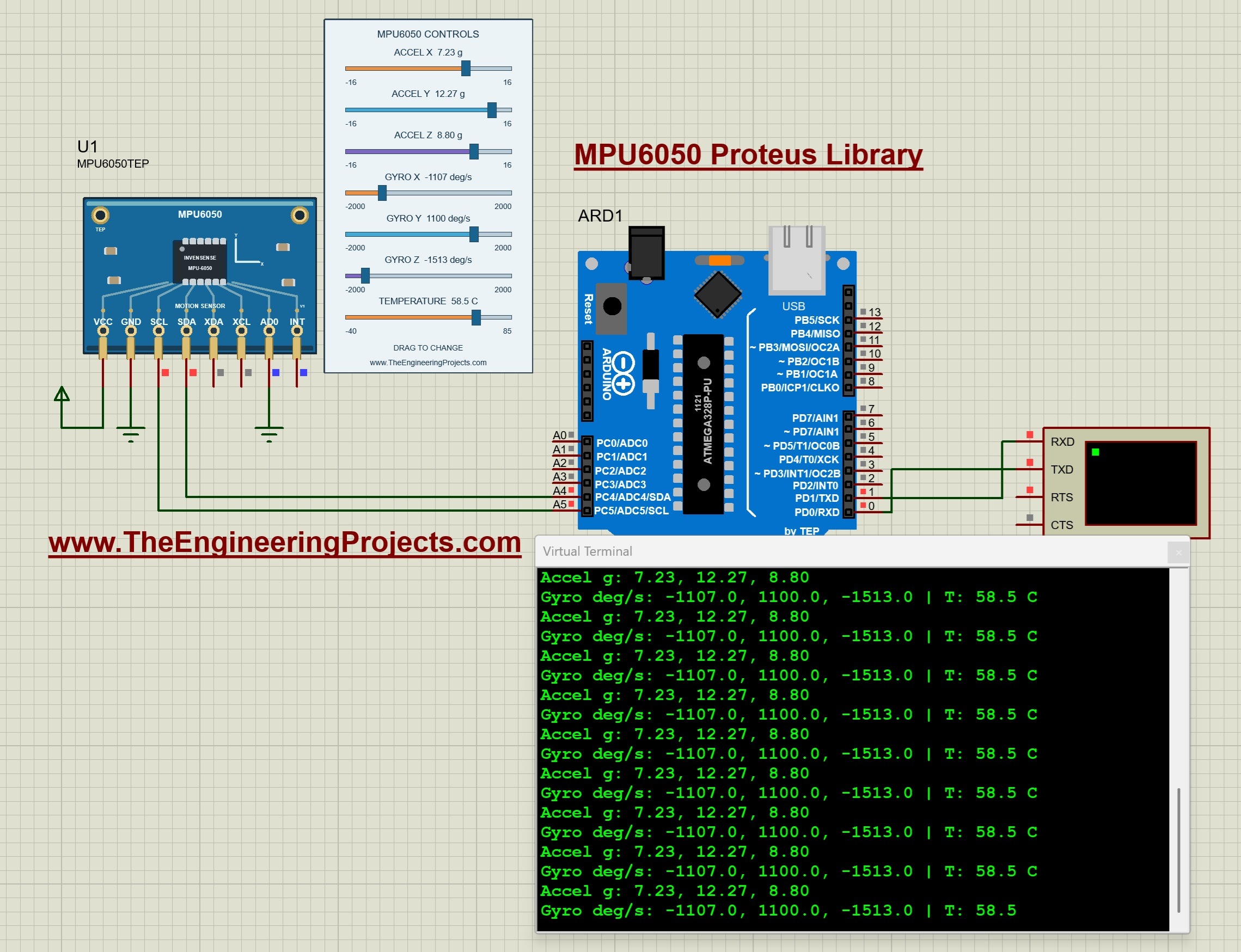
The MPU6050 combines a 3-axis accelerometer and a 3-axis gyroscope. Seven interactive controls set the acceleration, the angular velocity and the temperature, so you can test tilt and motion code without moving anything.
Read the complete tutorial: MPU6050 Proteus Library
Proteus Tools: Serial Monitor Libraries
The last two libraries are not modules, they are tools. You can use them with every library on this list, and they make debugging a serial project in Proteus much easier.
29. Serial Monitor Proteus Library (Advance)
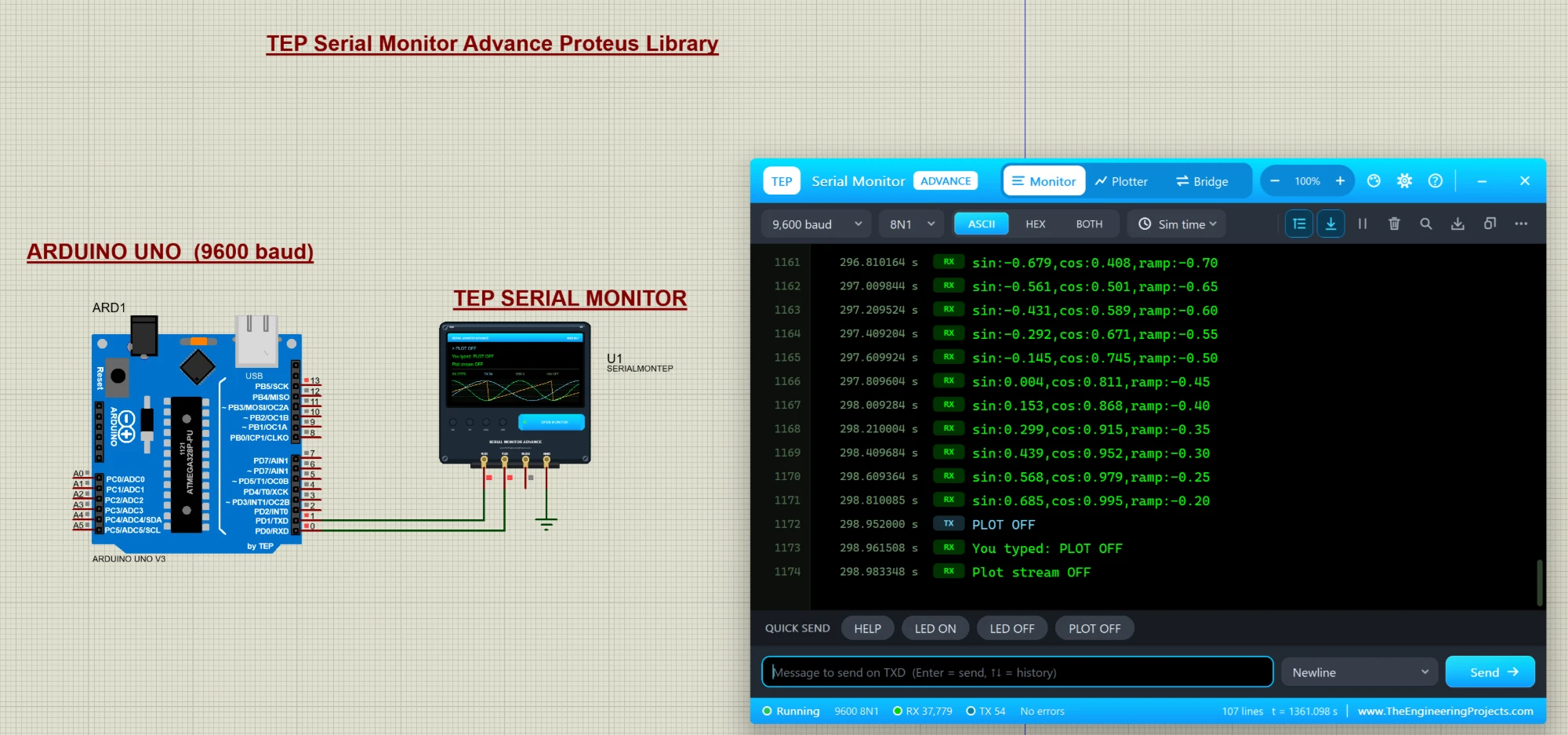
The TEP Serial Monitor replaces the Proteus Virtual Terminal with a modern window that works like the Serial Monitor of the Arduino IDE. You get line numbers, timestamps, a HEX view, a Serial Plotter for live graphs and a bridge to a real COM port of your PC.
Read the complete tutorial: Serial Monitor Proteus Library
30. Serial Monitor Expert Proteus Library
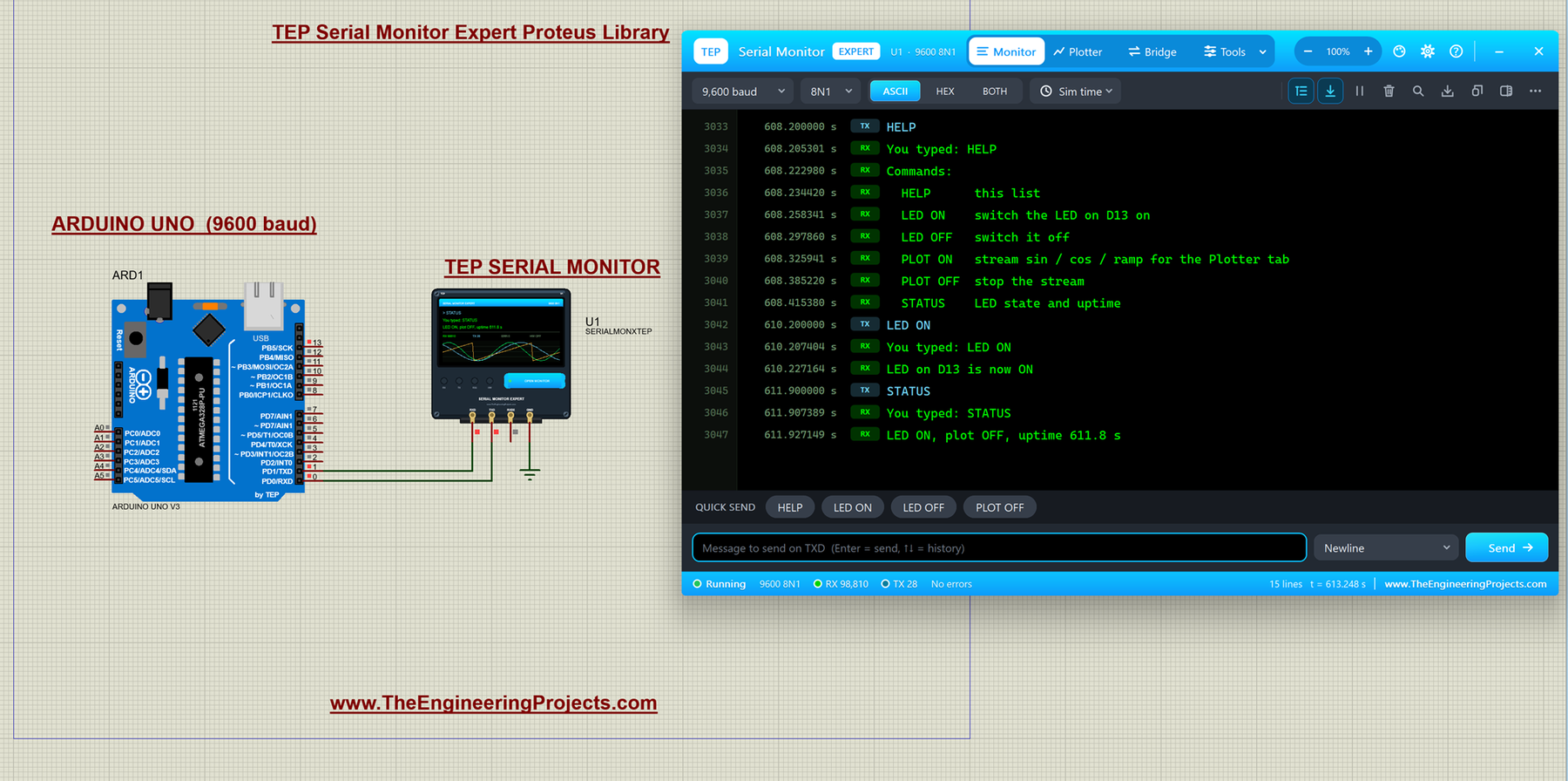
The Expert edition adds six professional tools: an auto-responder that plays a missing module, a network bridge to Python or a web page, triggers and alarms, record and replay, smart decoders for NMEA, AT, HEX and JSON data, and data export to CSV.
Read the complete tutorial: Serial Monitor Expert Proteus Library
How to Install These Proteus Libraries
All of these libraries are installed in the same way. Each package has a library file, which holds the symbol of the module, and a model file (DLL), which holds its behaviour during the simulation. Here are the general steps:
- Extract the zip file of the library on your PC.
- Copy the
.LIBfile (and the.IDXfile, if there is one) into the LIBRARY folder of your Proteus installation. - Copy the
.DLLfile into the MODELS folder of Proteus. - Restart Proteus, open the Pick Devices window and search for the name of the module.
- Open the example project of the library, or place the module in your own design and connect it to your Arduino.
Each tutorial lists the exact files of its library, so check it before you copy anything. If this is your first library, read How to Add New Library in Proteus 8, and if you still need Proteus itself, follow this Proteus installation guide. To place Arduino boards in your designs, use our Arduino Library for Proteus V3.0; several of the new packages already include its Arduino UNO.
Which New Library Should You Try First?
If you are not sure where to start, pick the library that matches your project:
- SMS and phone control: start with the SIM800L, then try the SIM800C and SIM900A.
- Location and tracking: start with the NEO-6M, then the NEO-M8N, or the SIM808 for a complete SMS tracker.
- IoT and the cloud: the ESP-01 with its web server and cloud upload demo.
- Phone apps over Bluetooth: the HC-05 and HC-06.
- Wireless links between two Arduino boards: the HC-12 for the easiest start, the nRF24L01 for 2.4 GHz, and a LoRa module for long range.
- Access control: the MFRC522 or the EM-18.
- Weather stations: the BME280, BMP280, SHT31 and BH1750.
- Robots and motion: the MPU6050 and the VL53L0X.
- Any serial project: the TEP Serial Monitor, which makes every one of these libraries easier to debug.
Our Older Proteus Libraries
Our team has been designing Proteus libraries for many years, including Arduino boards, Raspberry Pi boards and dozens of sensors. You can find them in our earlier lists: New Proteus Libraries for Engineering Students, Latest Proteus Libraries for Engineering Students V2.0 and Top Embedded Proteus Libraries V2.0 for Engineering Students. All of our libraries, old and new, are also collected section by section in our Proteus Libraries tutorial series.
More Lists of Proteus Libraries
We have grouped our Proteus libraries into several lists, so you can quickly find the right ones for your project:
- GSM Libraries for Proteus
- GPS Libraries for Proteus
- RF Module Libraries for Proteus
- LoRa and RF Libraries for Proteus
- Wi-Fi and Bluetooth Libraries for Proteus
- List of Wireless Modules for Proteus
- Top IoT Libraries for Proteus
- RFID and NFC Libraries for Proteus
- List of Embedded Sensors in Proteus
- I2C Sensor Libraries for Proteus
- Environmental Sensor Libraries for Proteus
- Motion and Distance Sensor Libraries for Proteus
- Smart Agriculture Sensor Libraries for Proteus
- Medical Sensor Libraries for Proteus
- Must-Have Proteus Libraries for Arduino Simulation
- Microcontroller Board Libraries for Proteus
Conclusion
So, that was all about the 30 New Proteus Libraries for Engineering Students. I hope you will enjoy them and use them in your semester and final year projects. Our team is still designing new libraries, and I will keep adding them to this list. If you find a bug or have an idea for a new library, please tell us in the comments or in the Proteus Libraries category of our forum. And if our free libraries help you in your studies, you can support our work. Till the next tutorial, take care and have fun!
Comments
0