


nRF52833 DK Library for Proteus: nRF52833 Bluetooth LE Simulation


Hello friends, I hope you all are doing great. Today, I am going to share the nRF52833 DK Library for Proteus, so you can run a Bluetooth LE simulation of Nordic Semiconductor's nRF52833 development kit. The nRF52833 is an Arm Cortex-M4F with 512 KB of flash, 128 KB of RAM, Bluetooth LE, 802.15.4 for Thread, NFC and USB - a chip built for products that must work for years, such as industrial sensors and smart home devices. With this library the DK runs your Arduino sketch in Proteus 8.5, reads sensors on its Arduino header and talks to a phone over Bluetooth LE.
nRF52833 DK Library for Proteus
Latest version: V1.0 (November 2026, this tutorial)
Helping Tools
- Laptop WiFi Monitor: a laptop on the Wi-Fi of your design: a browser, a TCP / UDP terminal and ping
- Mobile WiFi Monitor: a smartphone that opens the pages of your board and sends it commands
- Serial Monitor Advance: a serial terminal window for the UART of your board
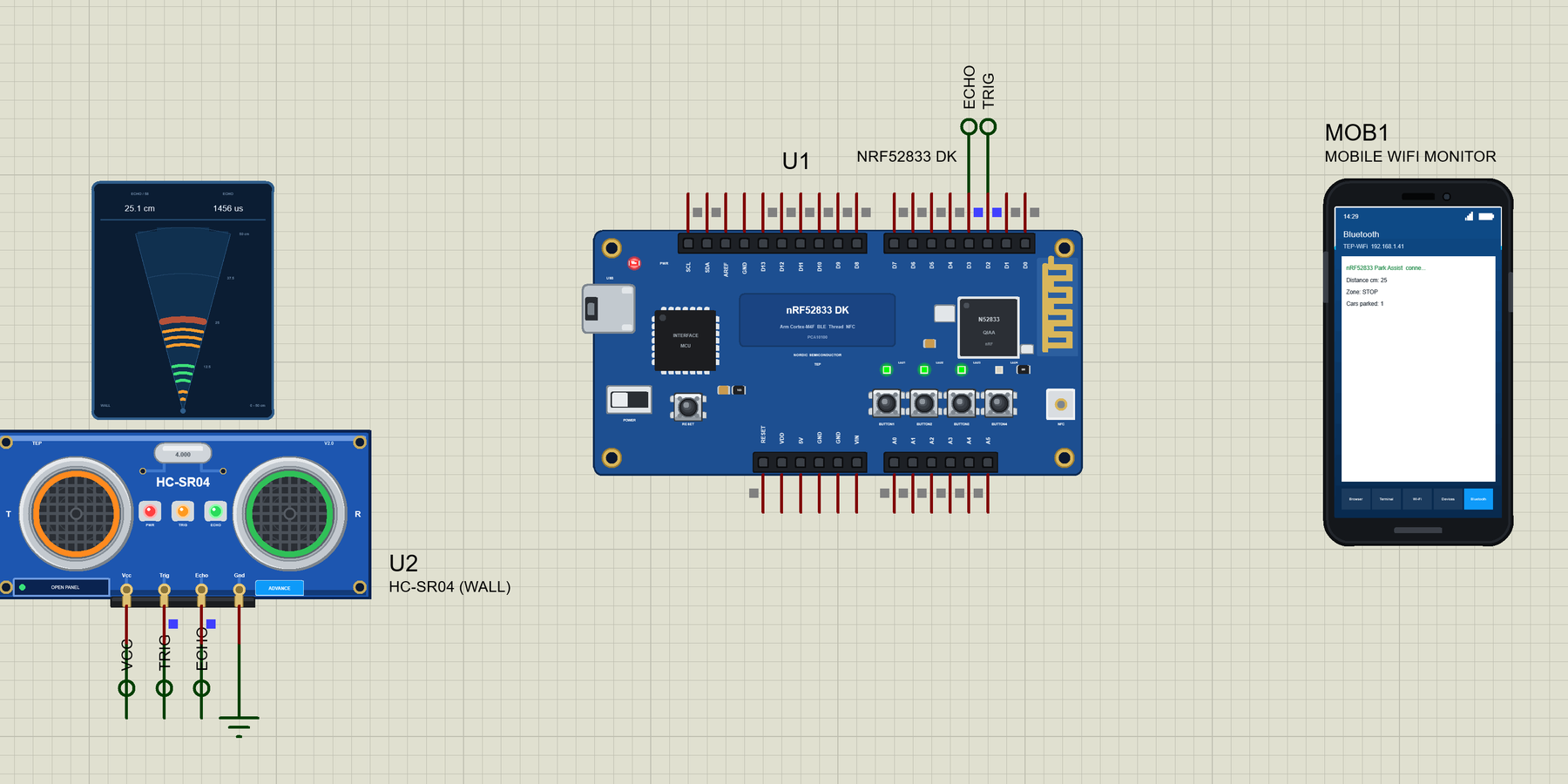
For the demo we built a Bluetooth parking assistant. An HC-SR04 ultrasonic sensor on the garage wall measures the distance to the car, the four LEDs of the DK show how close it is, and a phone shows the distance, the zone and the cars parked.
NOTICE: Proteus has no nRF52833 model, so our team has put a lot of effort into building this board ourselves: the pins, the LEDs, the buttons and Bluetooth LE are all our own model, and your sketch compiles with our free TEP Boards for Proteus add-on. Your feedback is the fuel that keeps us going, so please tell us what you think in the comments below. And if our free libraries help you, you can buy us a coffee. So, let's get started with the nRF52833 DK Library for Proteus:
What is the nRF52833 DK?
The nRF52833 DK (PCA10100) is Nordic Semiconductor's development kit for the nRF52833. The chip sits between the popular nRF52832 and the bigger nRF52840: it keeps the Cortex-M4F with its floating-point unit, adds a USB device port and an 802.15.4 radio for Thread, and is rated for the extended industrial temperature range. The kit carries the chip with its PCB antenna, an interface MCU that programs and debugs it over one USB cable, four buttons, four green LEDs, an NFC antenna connector and Arduino Uno compatible headers.
| Part | The real nRF52833 DK | In the library |
|---|---|---|
| SoC | nRF52833: Cortex-M4F, 512 KB flash, 128 KB RAM | your Arduino sketch |
| Radio | Bluetooth LE, 802.15.4 (Thread), NFC | ArduinoBLE |
| LEDs | LED1 to LED4 on P0.13 to P0.16, active LOW | LED1 to LED4 |
| Buttons | BUTTON1 to BUTTON4 on P0.11, P0.12, P0.24, P0.25 | BUTTON1 to BUTTON4 |
| Headers | Arduino Uno layout | D0 to D13, A0 to A5, SDA, SCL |
| USB | interface MCU, virtual COM port; USB device on the chip | the serial monitor |
Between the nRF52832 and the nRF52840
Nordic's nRF52 family covers a wide range: the nRF52832 is the compact Bluetooth workhorse, the nRF52840 the big one with 1 MB of flash and every radio feature. The nRF52833 is in the middle: twice the RAM of the nRF52832, USB and Thread like the nRF52840, at a lower cost. Our library has all three kits; for the nRF52832 version, with its buttons and LEDs on the header pins, see our nRF52 DK Library for Proteus.
LEDs and Buttons Off the Header
Unlike the nRF52 DK, the nRF52833 DK keeps its buttons and LEDs away from the Arduino header: the LEDs are P0.13 to P0.16 and the buttons P0.11, P0.12, P0.24 and P0.25, none of which is a D pin (Zephyr's board files for the kit list the full map). So D0 to D13 are all free for shields and sensors, like the HC-SR04 of our demo on D2 and D3.
Bluetooth LE in a Few Words
The DK is a Bluetooth LE peripheral: it advertises its name, a phone - the central - connects, and the DK offers its data as characteristics grouped in services. Our parking service has three: the distance, the zone and the number of cars. With notifications the phone sees every change at once, without asking again and again.
Where Is It Used?
The nRF52833 appears in industrial sensors, asset tags, smart lighting, Bluetooth direction-finding products and Thread devices for the smart home. The DK is the reference platform for all of them and a good teaching board, because its free header pins make it easy to add sensors.
A simulation lets you build the logic before the kit is on the desk: the sensor timing, the zones, the LEDs and the phone. When the sketch works in the Proteus simulation, the real board only has to confirm it.
Features of the nRF52833 DK Library for Proteus
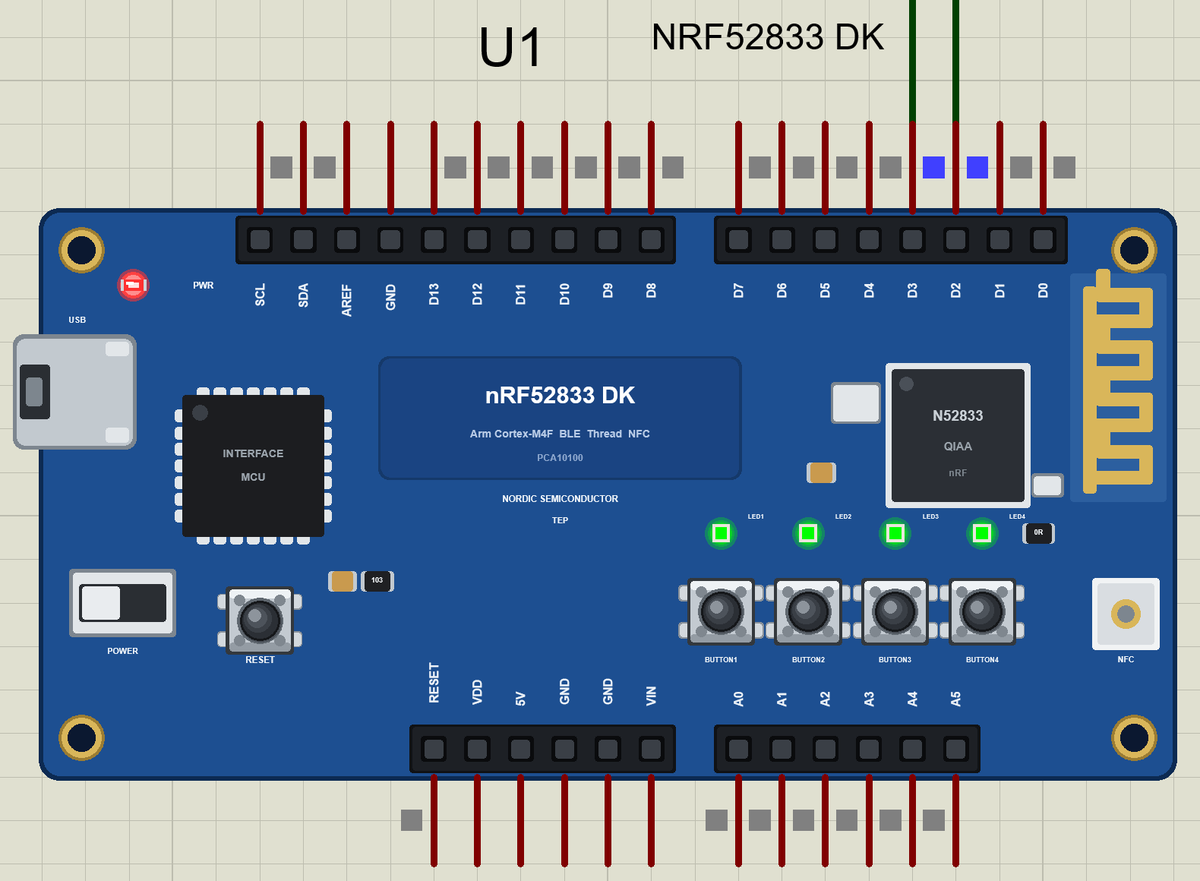
- The board as it looks: the blue DK with the interface MCU and its USB port, the nRF52833, the PCB antenna, the power switch, RESET, the four buttons, the four green LEDs, the NFC pad and the Arduino headers, drawn compact, with our small TEP signature.
- Your sketch: a .hex for "Nordic nRF52833 DK (TEP Proteus)" with D0 to D13, A0 to A5, LED1 to LED4 and BUTTON1 to BUTTON4.
- Sensors on the header: digital I/O, analogRead, PWM, interrupts and pulse timing for parts like the HC-SR04.
- Bluetooth LE: ArduinoBLE, with our phone as the central.
- A complete package: about 3.8 MB with the part, the add-on, the HC-SR04, the phone and the demo, without the source code of the models.
The nRF52833 DK in Proteus Simulation
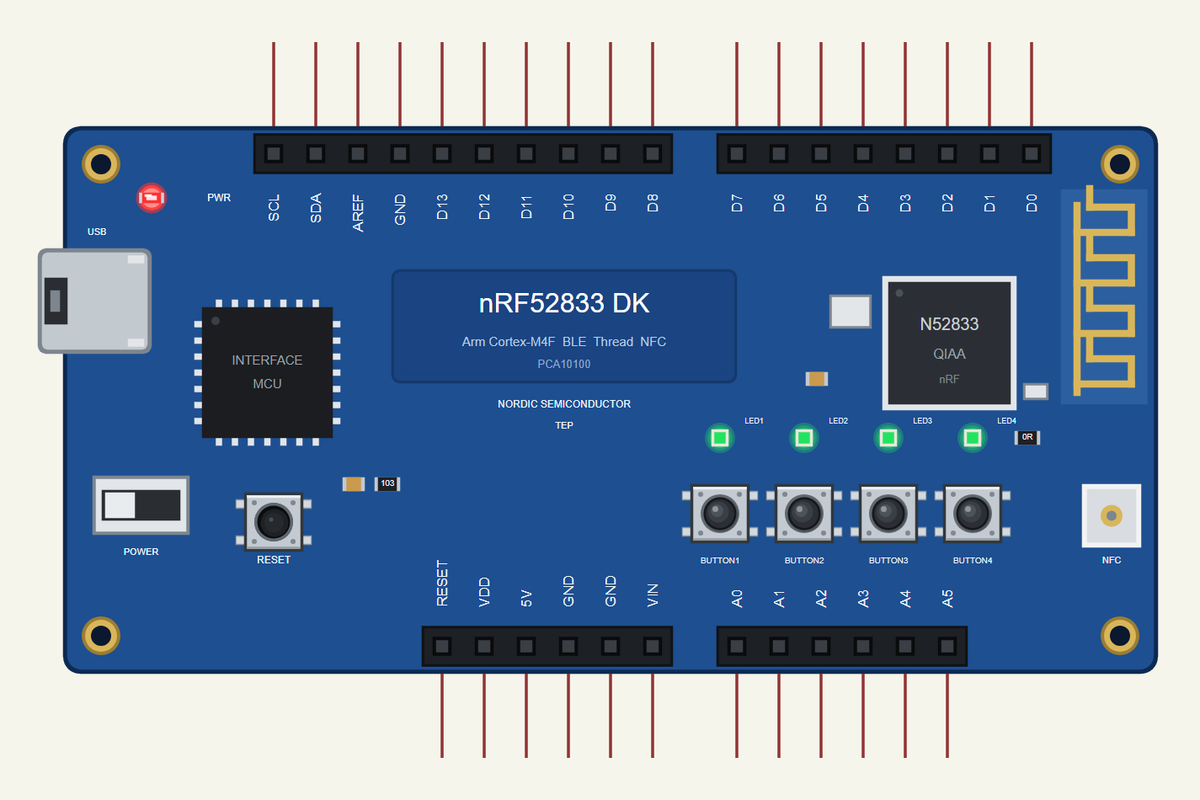
Search NRF52833 in Pick Devices; the device NRF52833 DK is in TEPNRF52833DK.LIB (Microprocessor ICs, Bluetooth Boards), with the prefix U. The USB port opens the serial monitor.
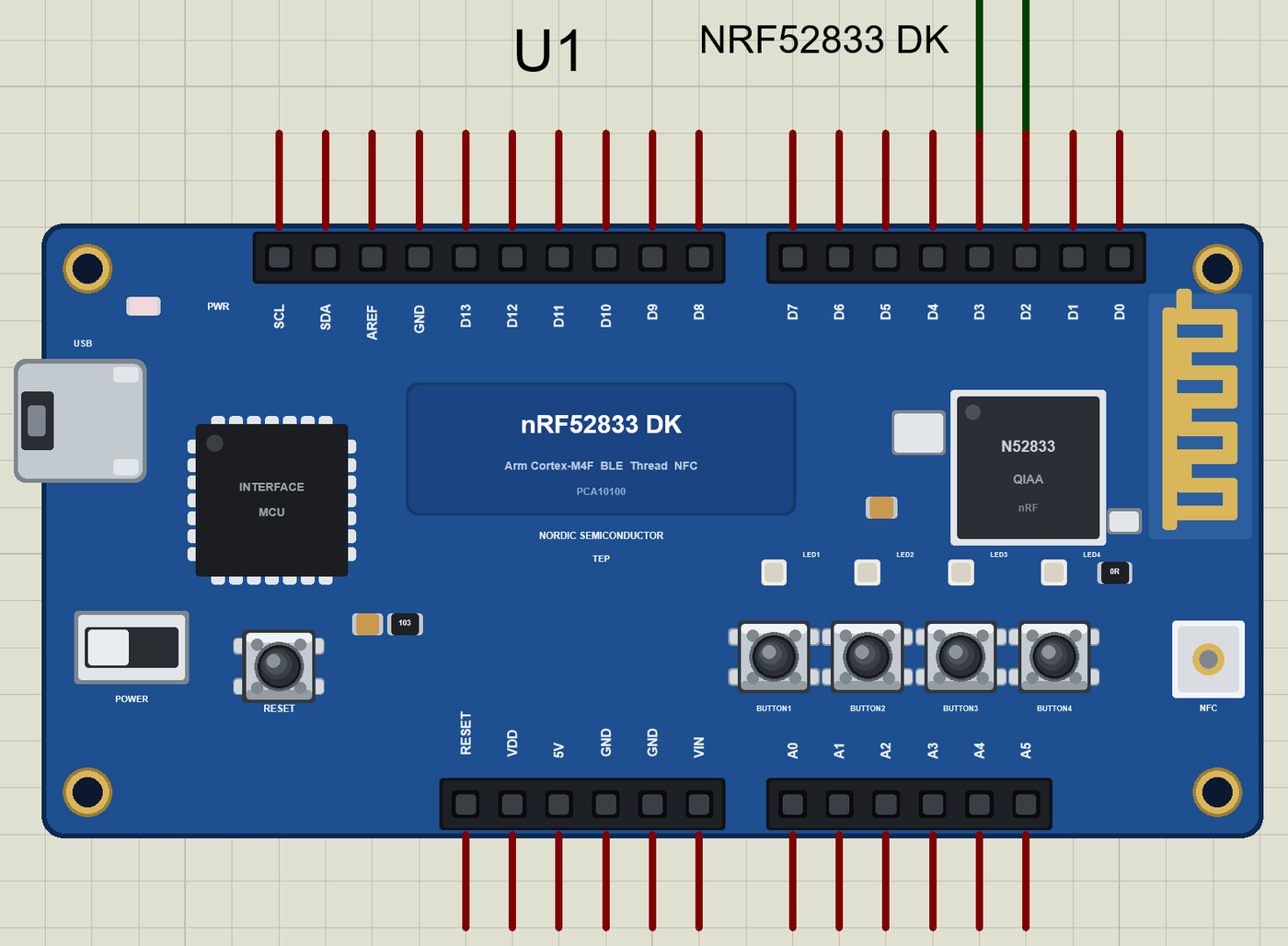
The Pins
| Pins | The real DK | What the library does with them |
|---|---|---|
| D0, D1 | P1.01, P1.02 | Serial1 RX and TX, or GPIO |
| D2 to D9 | P1.03 to P1.08, P0.17, P0.19 | GPIO, PWM, interrupt, pulse timing |
| D10 to D13 | P0.20 to P0.23 | GPIO, PWM; SPI SS, MOSI, MISO, SCK |
| A0 to A5 | P0.03, P0.04, P0.28 to P0.31 | analogRead 0 to 1023 for 0 to 3.3 V, or GPIO |
| SDA, SCL | P0.26, P0.27 | Wire |
| LED1 to LED4, BUTTON1 to BUTTON4 | P0.13 to P0.16; P0.11, P0.12, P0.24, P0.25 | on the board, active LOW |
Download nRF52833 DK Library for Proteus
Click the button below to download nRF52833-DK-Library-for-Proteus-v1.0.zip (about 3.8 MB, without the source code of the models):
nRF52833 DK Library for Proteus V1.0- README.txt: installation, the demo, the pins, the properties, troubleshooting and the limits.
- Proteus Library Files:
TEPNRF52833DK.LIB, the HC-SR04 (TEPHCSR04.LIB) and the phone and laptop (TEPMOBILE.LIB,TEPLAPTOP.LIB). - Proteus Model Files:
TEPNET.DLLandTEPHCSR04.DLL. - Arduino Code: the demo sketch and the TEP Boards for Proteus add-on 1.82.0, with ArduinoBLE.
- Proteus Simulation: the demo project, its HEX file and copies of the DLLs.
No Proteus yet? Read How to Download and Install Proteus 7 and 8. New to libraries? Follow How to Install a New Library in Proteus.
How to Install nRF52833 DK Library for Proteus
- Close Proteus and extract the whole zip file, for example to your Desktop.
- Copy the files from Proteus Library Files into the LIBRARY folder of Proteus.
- Copy the DLLs from Proteus Model Files into the MODELS folder, replacing an older
TEPNET.DLL. - Delete
TEPNRF52833DK.IDXfrom the LIBRARY folder if it is there. - For your own sketches, copy Arduino Code\TEP Boards for Proteus\hardware into your Arduino sketchbook (Documents\Arduino) and restart the Arduino IDE; the board is Nordic nRF52833 DK (TEP Proteus).
- Start Proteus, press P and search for NRF52833.
Demo: a Bluetooth Parking Assistant in Simulation
Parking in a tight garage is a classic job for an ultrasonic sensor: it sees the car's bumper coming closer and a light tells the driver when to stop. Ours adds Bluetooth LE, so a phone shows the distance and counts how often the space is used.
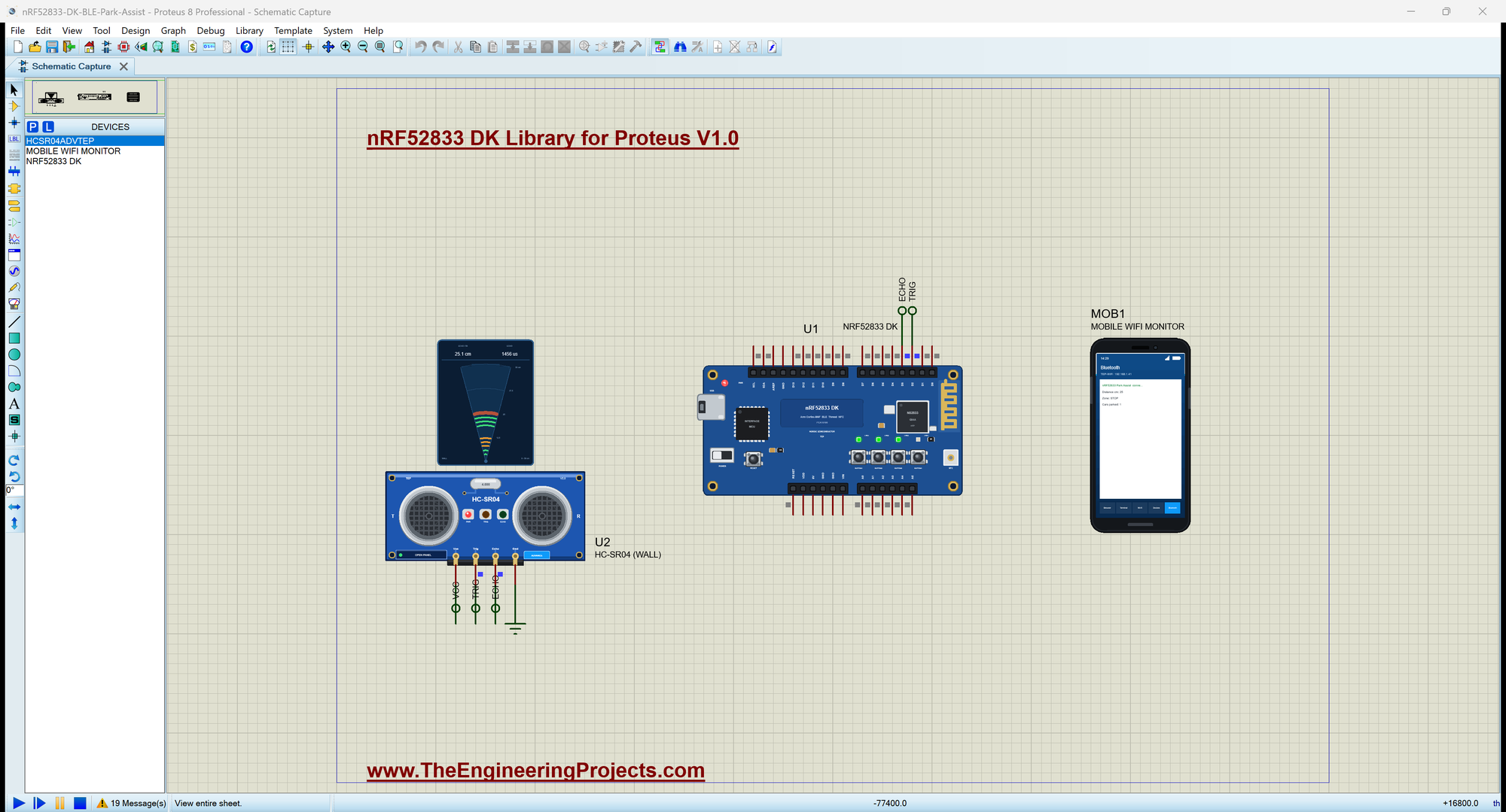
Open nRF52833-DK-BLE-Park-Assist.pdsprj. U1 runs DK33_Park_Assist.hex; U2 is our HC-SR04 Ultrasonic Sensor Library for Proteus (Advance) on the wall, with TRIG on D2 and ECHO on D3; MOB1 is our Mobile WiFi Monitor, the phone.
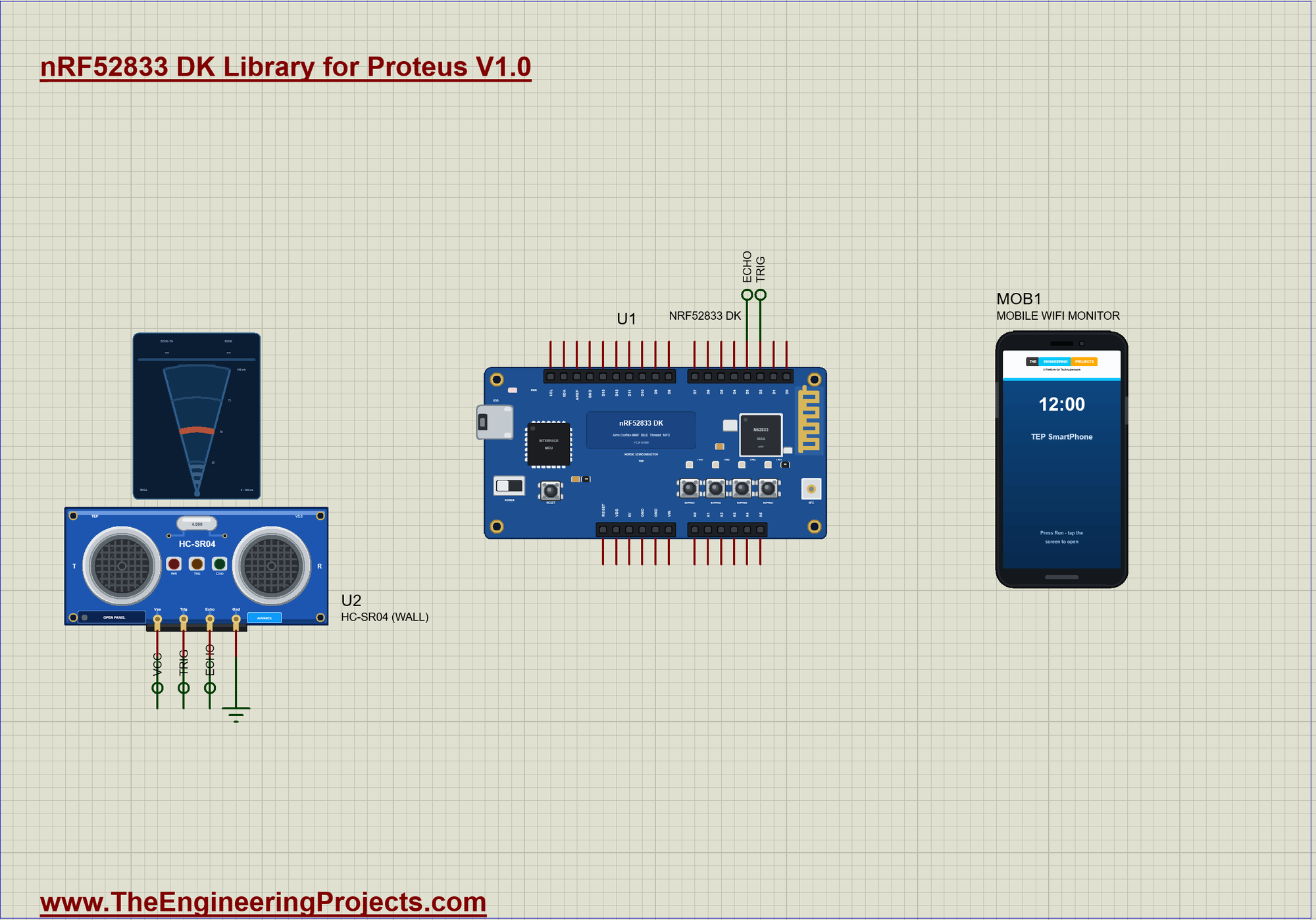
| Zone | Distance | LEDs |
|---|---|---|
| FREE | 120 cm or more (or nothing) | none |
| APPROACH | 70 to 119 cm | LED1 |
| SLOW | 35 to 69 cm | LED1, LED2 |
| STOP | 15 to 34 cm | LED1 to LED3 |
| TOO CLOSE | under 15 cm | all four |
Measuring the Distance
readCm() sends the HC-SR04 a 10 microsecond pulse on TRIG and times the HIGH pulse it answers on ECHO. Sound travels there and back, so 58 microseconds make one centimetre:
long readCm() {                                             // one HC-SR04 measurement: a 10 us TRIG pulse, then the ECHO time
  digitalWrite(TRIG, LOW);
  delayMicroseconds(2);
  digitalWrite(TRIG, HIGH);
  delayMicroseconds(10);
  digitalWrite(TRIG, LOW);
  const unsigned long us = pulseInLong(ECHO, HIGH, 30000UL); // timed with micros(): no echo within 30 ms = nothing in range
  return us ? (long)(us / 58) : -1;                          // 58 us per cm (there and back)
}
From Distance to LEDs
barFor() turns the distance into the number of LEDs, a simple bar that fills up as the car comes closer:
byte barFor(long d) {                                       // how many LEDs light
  if (d < 0 || d >= 120) return 0;
  if (d >= 70) return 1;
  if (d >= 35) return 2;
  if (d >= 15) return 3;
  return 4;
}
Zones and Parked Cars
update() writes the LEDs and the phone's distance on every measurement, but prints and notifies the zone only when it changes. A car that reaches STOP counts as parked; when the space is FREE again it is ready for the next one:
void update(long d) {
  cm = d;
  const byte bar = barFor(d);
  for (byte k = 0; k < 4; k++) digitalWrite(LEDS[k], k < bar ? LOW : HIGH);   // LOW = on
  distChar.writeValue((int)d);
  const String now = zoneFor(d);
  if (now == zone) return;
  zone = now;
  zoneChar.writeValue(zone);
  Serial.print(F(">> ")); Serial.print(zone); Serial.print(F(": ")); Serial.print(d); Serial.println(F(" cm"));
  if (!parked && bar >= 3) { parked = true; cars++; carsChar.writeValue(cars); Serial.print(F("   car parked (")); Serial.print(cars); Serial.println(F(" today)")); }
  if (parked && bar == 0) { parked = false; Serial.println(F("   the space is free")); }
}
The Bluetooth Service
Three characteristics carry the distance, the zone and the cars, each with a readable 0x2901 name for the phone:
BLEService parkService("19B10080-E8F2-537E-4F6C-D104768A1214");
BLEIntCharacteristic distChar("19B10081-E8F2-537E-4F6C-D104768A1214", BLERead | BLENotify);
BLEStringCharacteristic zoneChar("19B10082-E8F2-537E-4F6C-D104768A1214", BLERead | BLENotify, 12);
BLEIntCharacteristic carsChar("19B10083-E8F2-537E-4F6C-D104768A1214", BLERead | BLENotify);
Run the Simulation
Press Run. The serial monitor - the same window as our TEP Serial Monitor Advance for Proteus - shows the name the DK advertises and the first distance; the HC-SR04's wall starts at 50 cm:
nRF52833 DK Bluetooth Parking Assistant - The Engineering Projects
Advertising as "nRF52833 Park Assist"   BUTTON1 = report
>> SLOW: 50 cm
Phone connected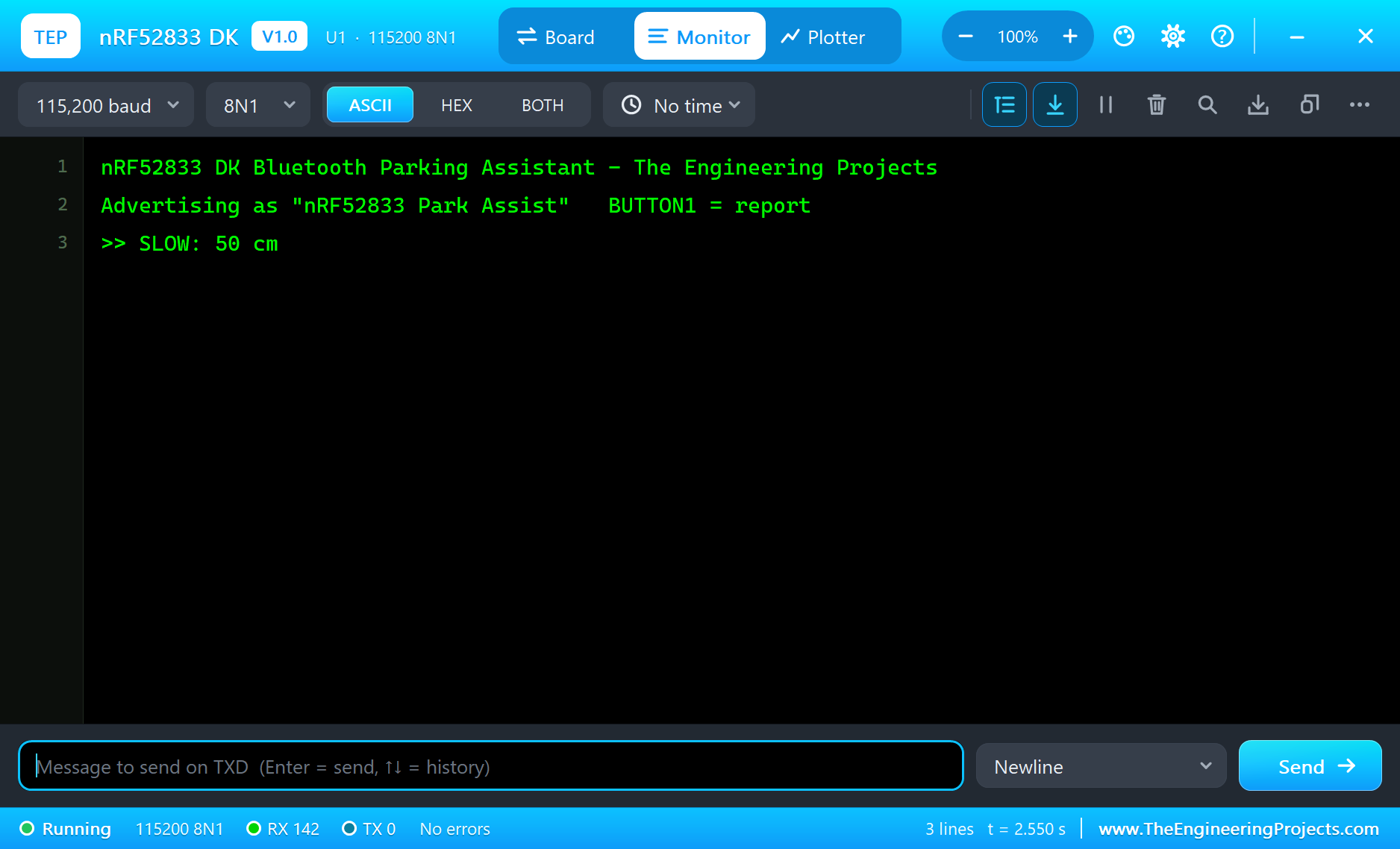
Connect the Phone and Clear the Garage
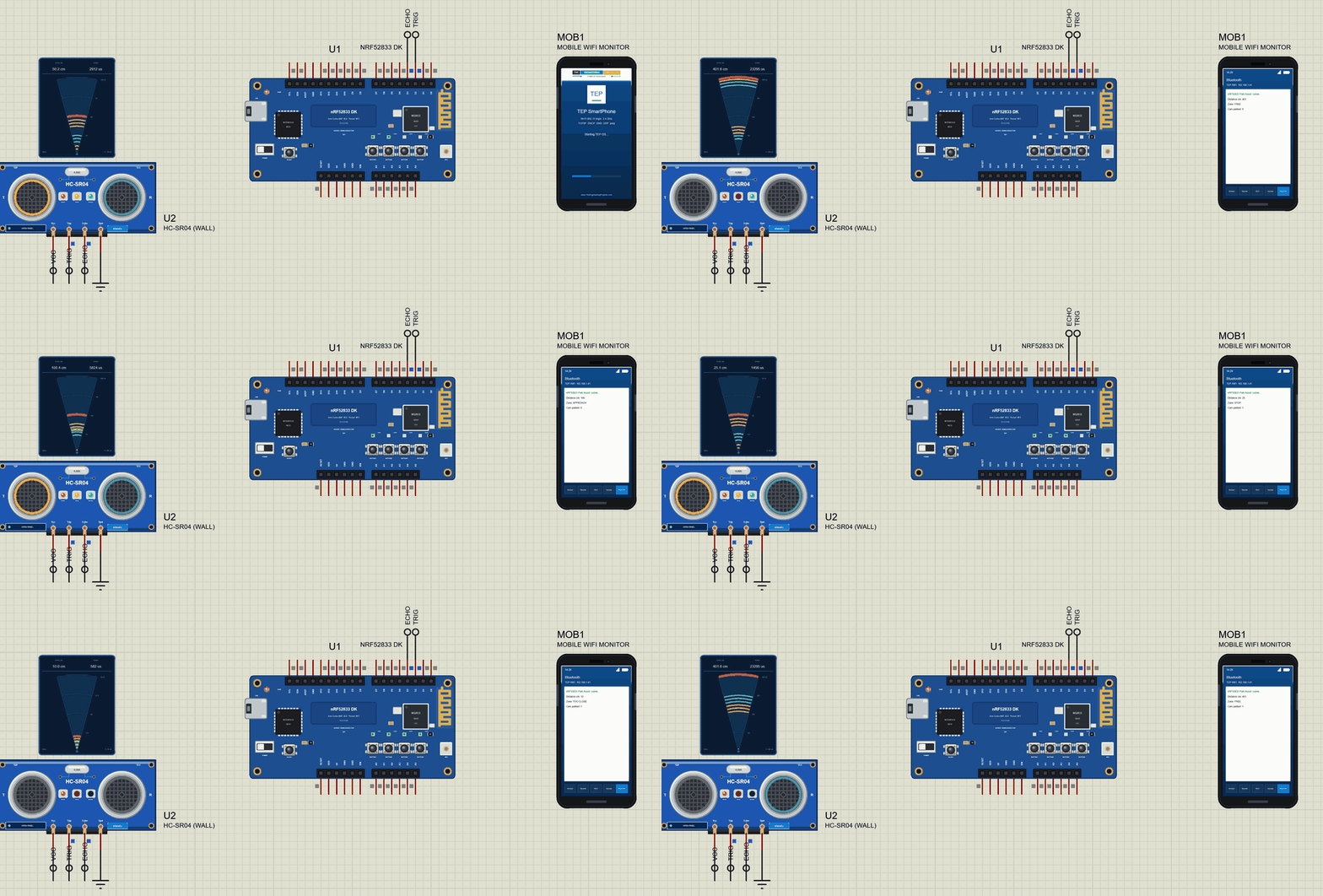
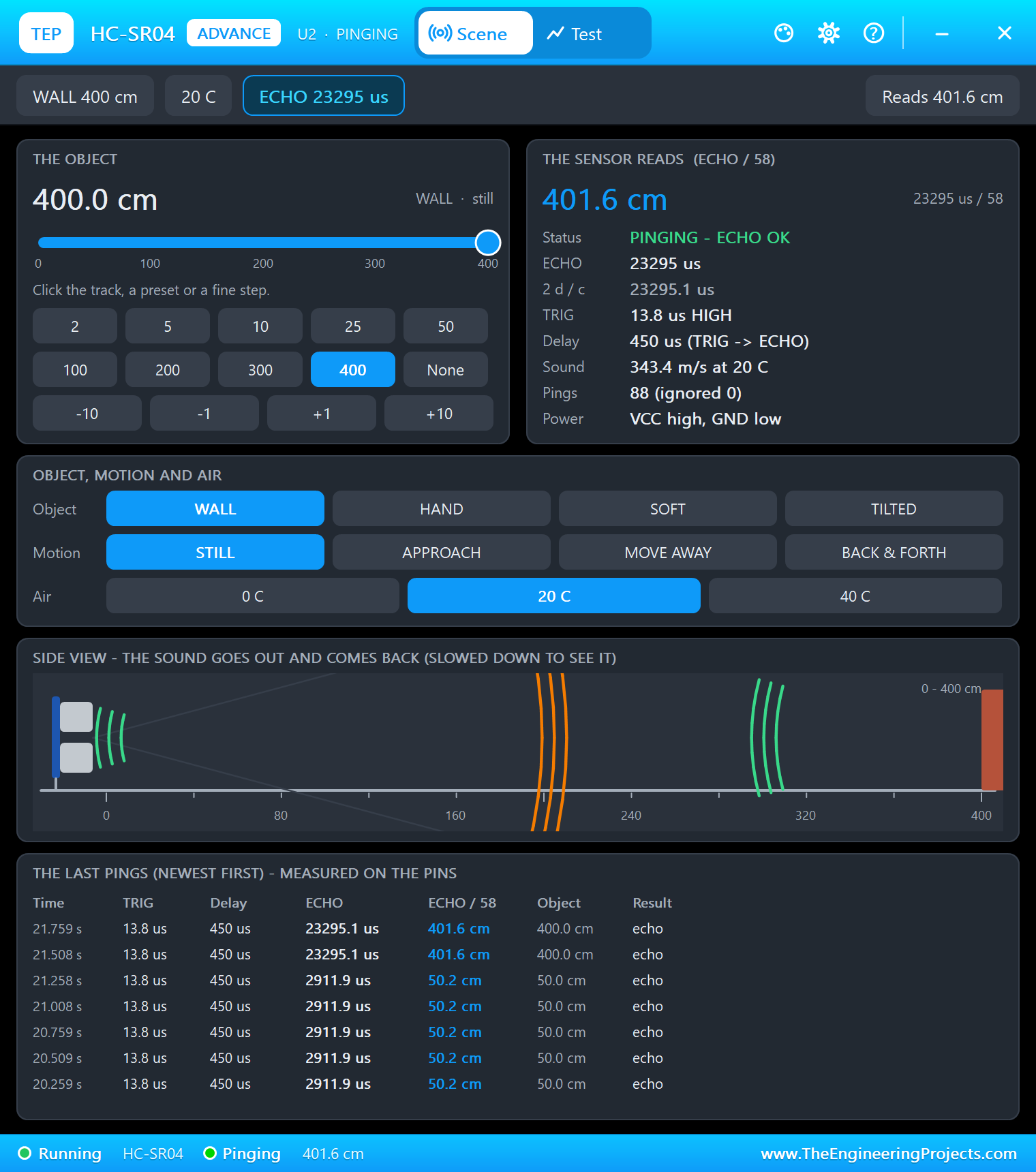
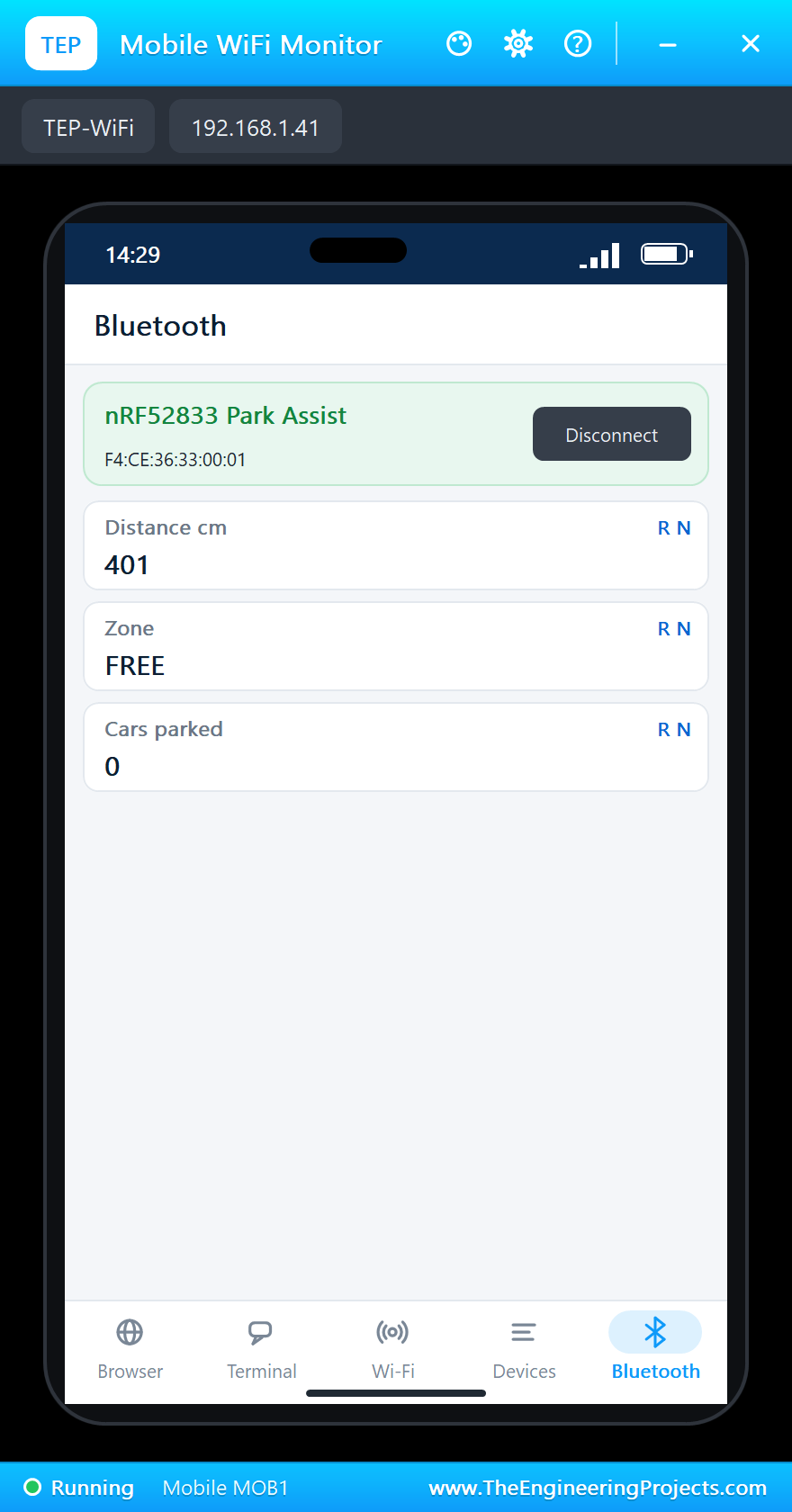
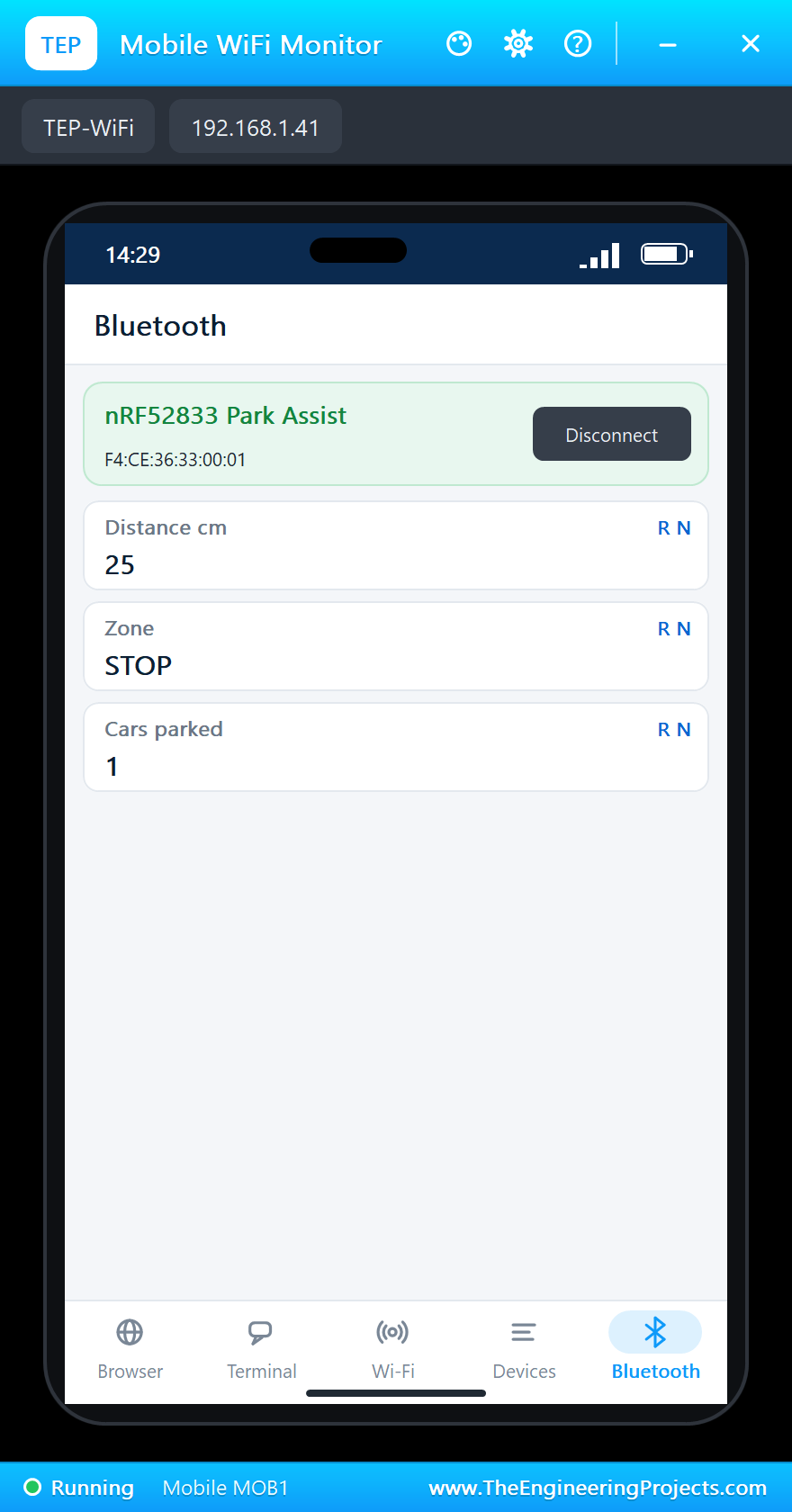
On the phone open the Bluetooth app, press SCAN and connect to "nRF52833 Park Assist". In the HC-SR04's window click the 400 preset: nothing nearby, the zone is FREE and no LED is on:
The Car Comes In
Click 100: APPROACH, LED1 lights. Click 50: SLOW, LED2 joins it:
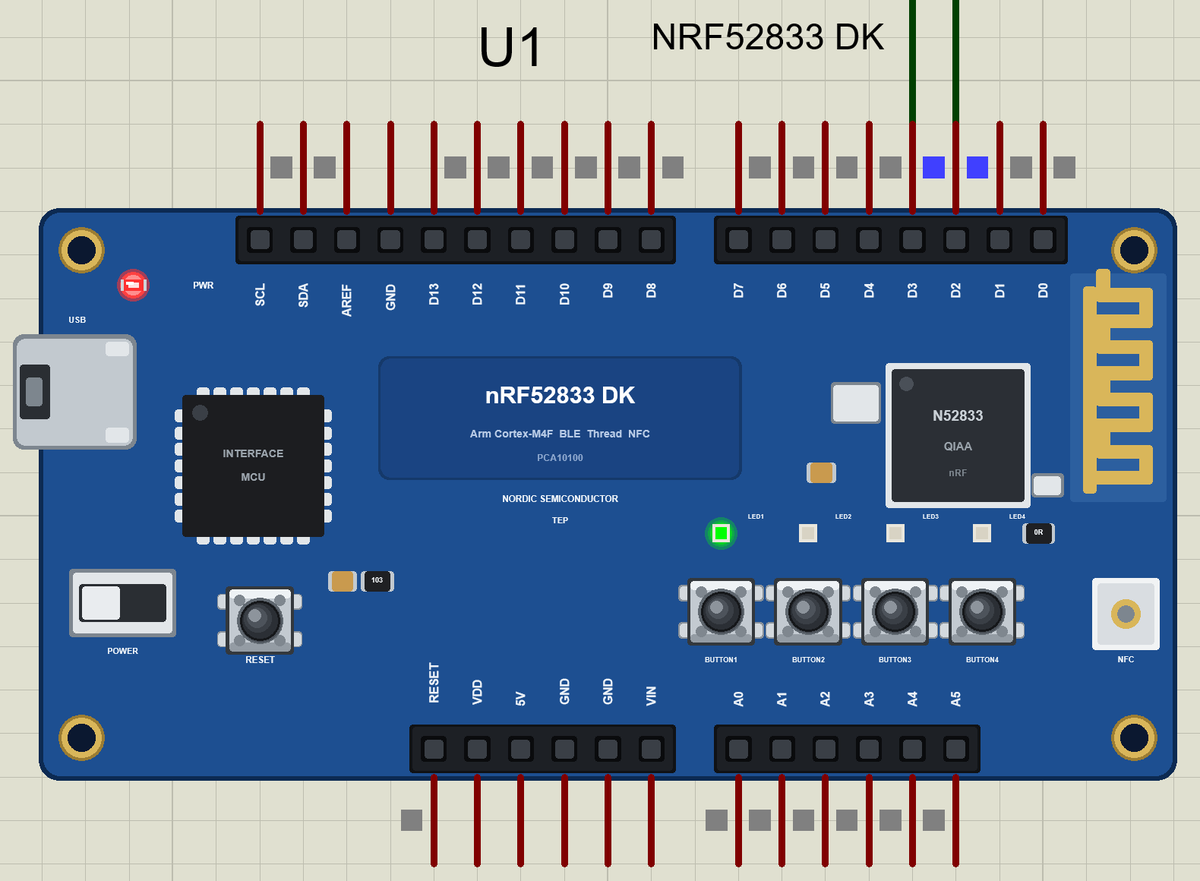
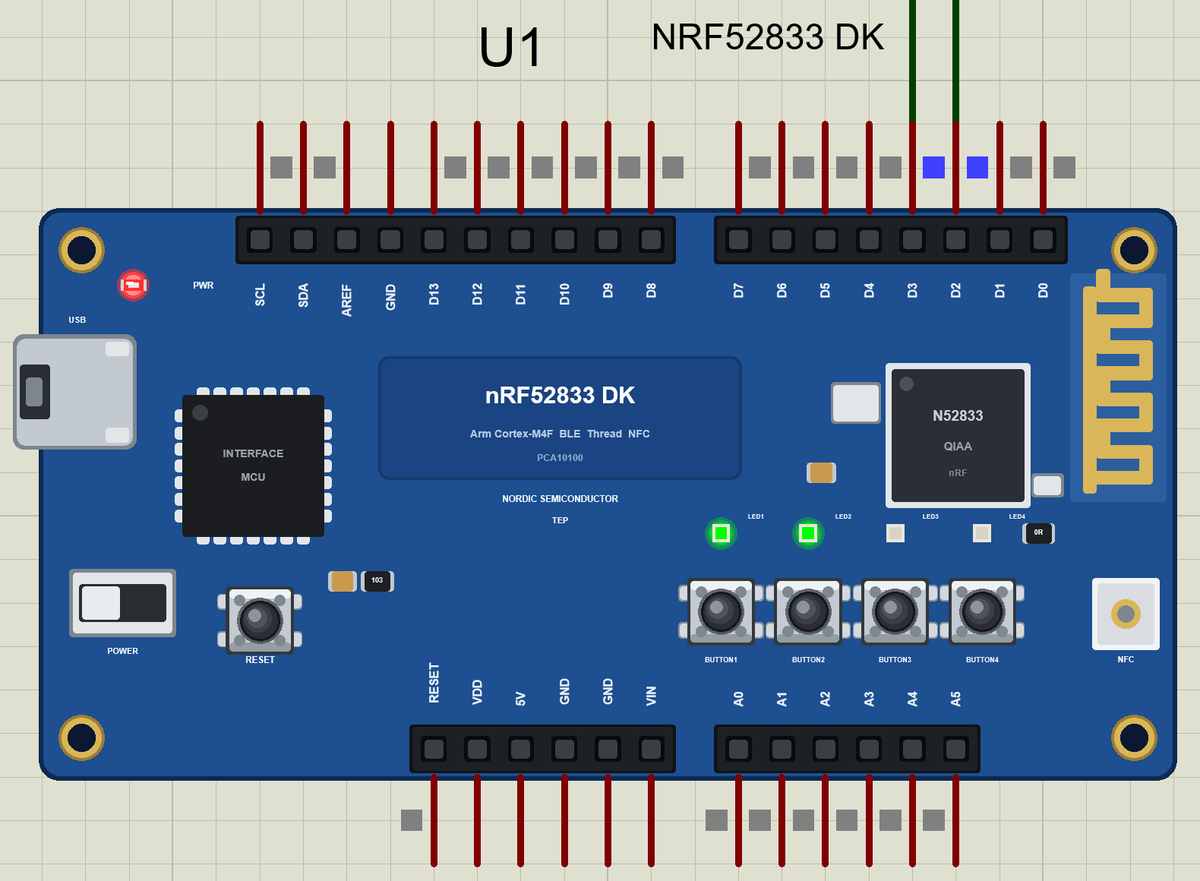
Stop
Click 25: STOP, three LEDs, and the car counts as parked. Here is the complete circuit while the simulation runs:
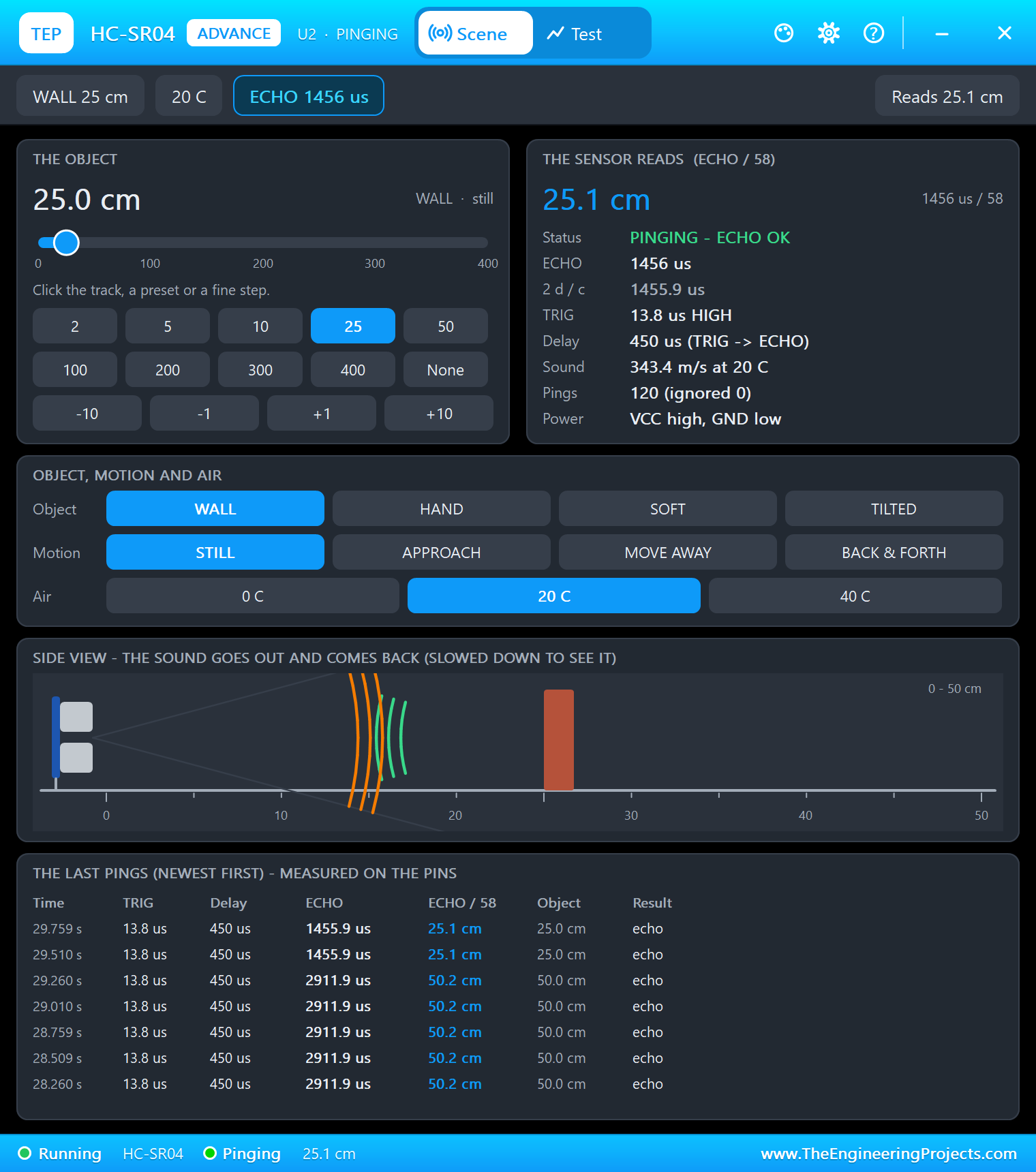
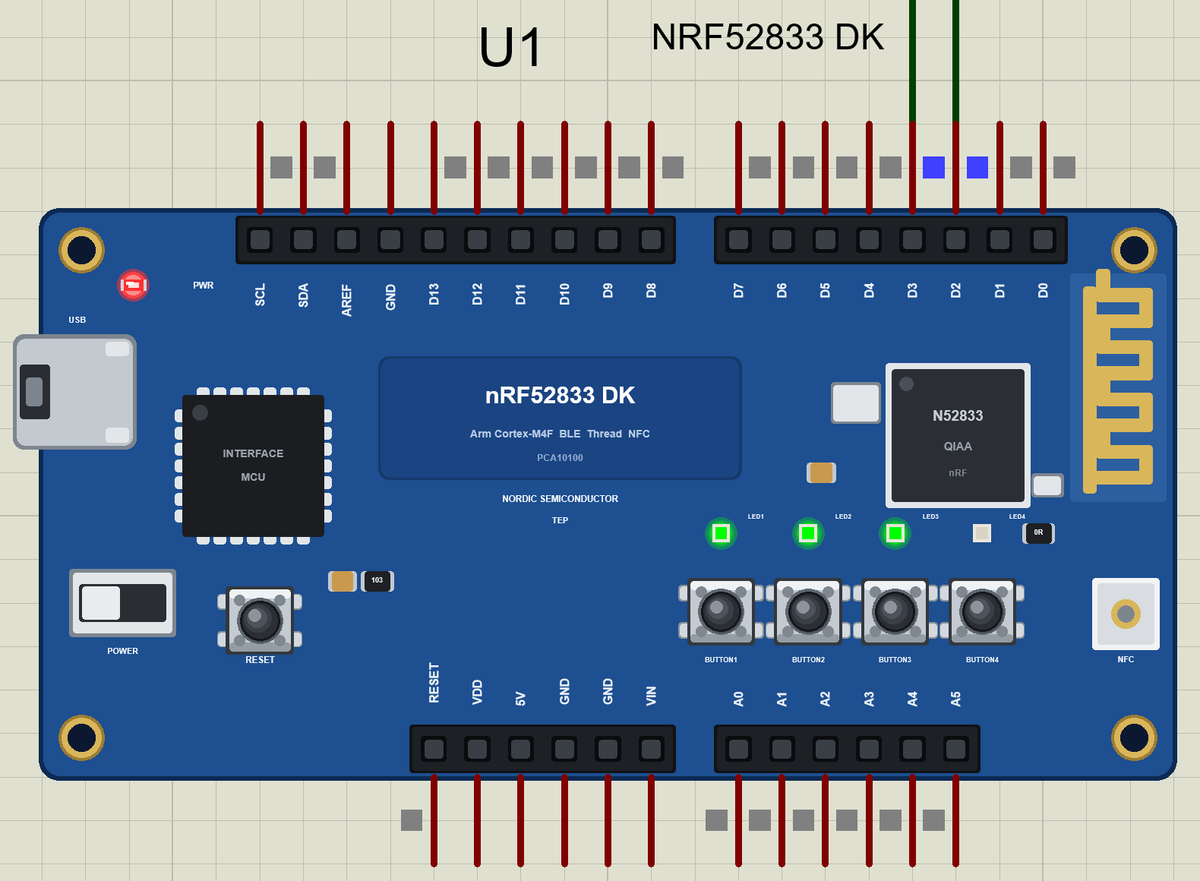
Too Close, Then Away
Click 10: TOO CLOSE, all four LEDs. Finally 400 again: the car has left and the space is free. BUTTON1 prints a report:
>> FREE: 401 cm
>> APPROACH: 100 cm
>> SLOW: 50 cm
>> STOP: 25 cm
   car parked (1 today)
>> TOO CLOSE: 10 cm
>> FREE: 401 cm
   the space is free
>> BUTTON1: 401 cm, FREE, cars parked 1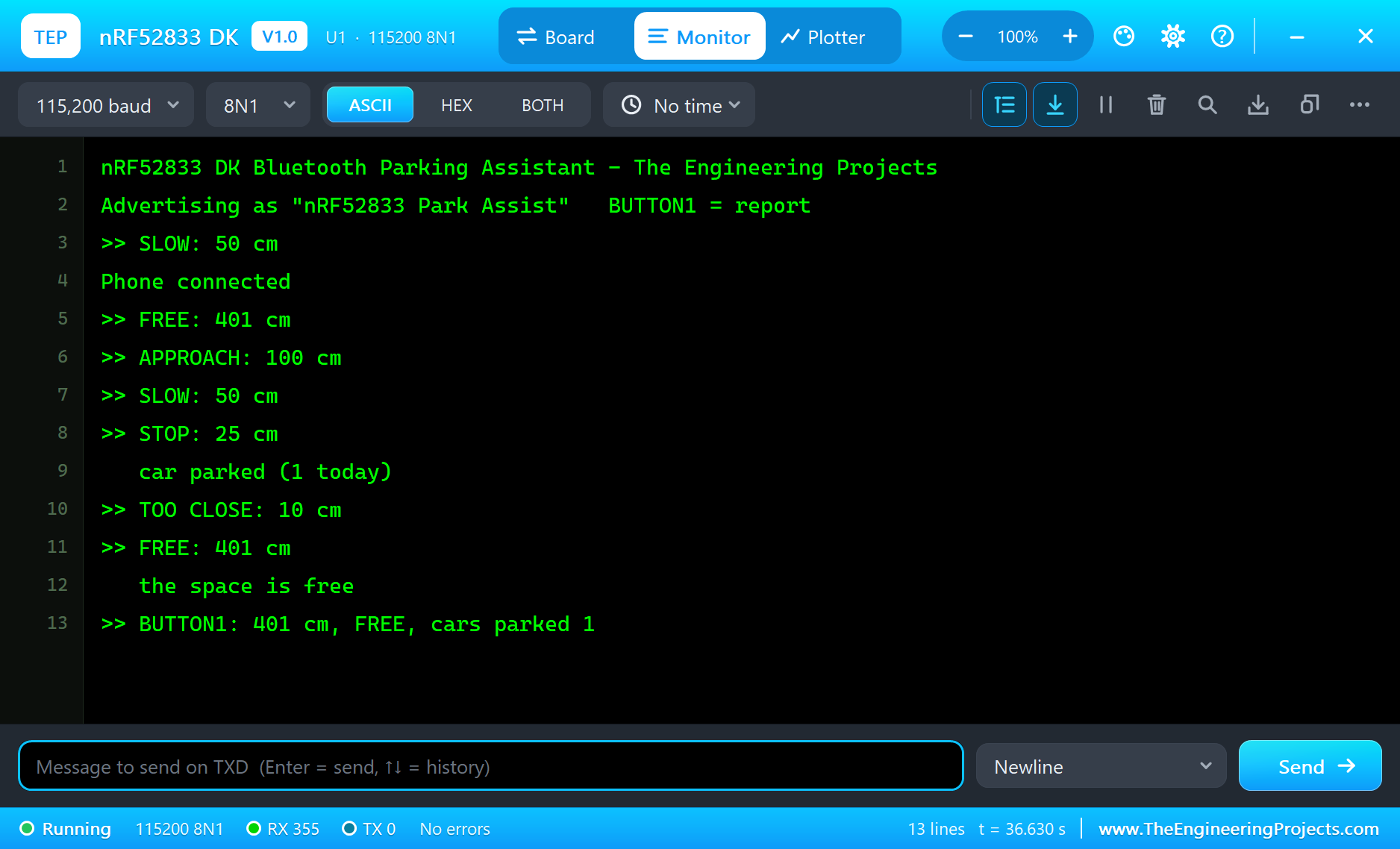
How the HC-SR04 Works
The HC-SR04 has two transducers: one sends a burst of eight 40 kHz clicks, the other listens for the echo. After a short TRIG pulse the module sends the burst, raises ECHO and lowers it when the echo returns. The length of the ECHO pulse is the time the sound needed to reach the object and come back. At about 343 m/s that is 58 microseconds per centimetre of distance.
Why Ultrasound for Parking?
Ultrasonic sensors are cheap, work in the dark, do not care about the colour of the car and measure from a few centimetres to a few metres - exactly the range of a garage. That is why most cars carry ultrasonic parking sensors in their bumpers. Infrared and laser sensors are faster or more precise, but they struggle with dark or shiny surfaces, and a car offers plenty of both.
Temperature and the Speed of Sound
Sound travels faster in warm air: about 331 m/s at 0 C and about 343 m/s at 20 C. The sketch's 58 microseconds per centimetre assumes room temperature, so in a cold garage the readings come out a few percent too long. The HC-SR04's window in our simulation has an air temperature setting (0, 20 and 40 C), so you can see the effect. A real product can correct it with a temperature sensor, for example the nRF52833's own internal one.
Counting Cars
The parked counter uses a small state: a car is parked when the distance reaches the STOP zone, and the space is free again only when the distance goes back to FREE. In between, moving a little back and forth does not count twice. The same pattern - arm, count, re-arm - is used for counting people at a door, bottles on a belt or laps on a track.
The Interface MCU
The square chip next to the USB port is the DK's interface MCU. It programs and debugs the nRF52833 and turns the chip's UART into a virtual serial port on the PC, so one cable does everything. In our simulation the USB port opens the serial monitor, where the parking assistant prints each zone and the report.
Why pulseInLong?
The classic pulseIn() counts processor cycles in a tight loop, and anything that interrupts the loop - a timer, the radio - makes the pulse look shorter. pulseInLong() uses micros() instead, so interrupts do not change the result. On a Bluetooth board, where the radio needs attention all the time, that is the safer choice, in the simulation as on the real chip.
Zones Away From the Edges
A distance right on a boundary - say exactly 25 cm when STOP starts at 25 - flickers between two zones as the reading moves by a millimetre. The demo puts its limits at 120, 70, 35 and 15 cm, so typical distances fall clearly inside a zone. Real parking aids often add hysteresis as well: the zone changes only when the distance has moved a few centimetres past the limit.
5 V Sensors on a 3.3 V Board
The HC-SR04 runs from 5 V and its ECHO output is 5 V. The nRF52833's pins are 3.3 V, so on the real kit put a voltage divider on ECHO - for example 1 k and 2 k resistors - or use a 3.3 V version of the sensor. TRIG is fine: the module accepts 3.3 V as HIGH.
Try It Yourself
- Blink all four LEDs at TOO CLOSE so the driver cannot miss it.
- Add hysteresis: change the zone only 3 cm past each limit.
- Use BUTTON2 to store the current distance as the perfect parking spot.
- Average three readings to smooth out a moving car.
Ideas to Extend the Assistant
- Add a buzzer that beeps faster as the car comes closer.
- Send the time each car arrived and left to the phone.
- Add a second HC-SR04 for the side of the car.
- Switch the garage light on with a relay when a car arrives.
Your Own Sketches
Write the sketch in the Arduino IDE with the board Nordic nRF52833 DK (TEP Proteus), use Sketch > Export Compiled Binary and set the part's PROGRAM property to the .hex.
Moving to a Real nRF52833 DK
- Install Nordic's nRF Connect SDK, or Zephyr with the board nrf52833dk/nrf52833.
- Wire the HC-SR04: VCC to 5 V, GND, TRIG to D2, ECHO through a divider to D3.
- Start from Nordic's Bluetooth peripheral samples and time ECHO with a timer or GPIO interrupts.
- Move the logic of the demo across: the zones, the LEDs, the parked counter and the service.
- Program the DK through the interface MCU's USB and test with a phone app.
The pins, the zones and the Bluetooth service stay the same; on the real kit Nordic's SDK takes the place of the Arduino calls.
Things to Know Before Using a Real nRF52833 DK
- 3.3 V logic: the header is 3.3 V; 5 V signals need a divider or a level shifter.
- The HC-SR04's range: 2 to 400 cm in theory; soft or angled surfaces reflect less.
- Power: the DK runs from USB, an external supply or a coin cell; the HC-SR04 needs the 5 V of USB.
- Thread: the chip's 802.15.4 radio can join a Thread network with Nordic's SDK.
Properties of the nRF52833 DK
| Property | What it does |
|---|---|
| PROGRAM | the sketch: a .hex from TEP Boards for Proteus (board "Nordic nRF52833 DK") |
| MONITOR, BAUD, AUTOOPEN | the built-in serial monitor: on, its baud rate (115200), open at Run |
Troubleshooting
- The phone finds nothing: call
BLE.begin(), set a local name andBLE.advertise(); callBLE.poll()in loop(). - The distance stays -1: the HC-SR04 needs 5 V on VCC (the VCC rail) and a 10 microsecond TRIG pulse.
- The distance jumps around: time ECHO with
pulseInLong(), notpulseIn(). - The LEDs look inverted: they light when the pin is LOW, as on the real DK.
- A number goes wrong above 32767: int is 16 bits in the simulation - use long.
Limitations of the Simulation
- Bluetooth LE: the DK is a peripheral only, with one phone as the central.
- 802.15.4 / Thread, NFC, USB device classes and the current measurement header are drawn, not modelled.
- Your sketch gets 8 KB of RAM in the simulation, and int is 16 bits there.
- nRF52833 and Nordic Semiconductor are names of Nordic Semiconductor ASA and Arduino of Arduino, and the Bluetooth word mark belongs to Bluetooth SIG; this library is not made or endorsed by them or by Labcenter.
- Tested in Proteus 8.5 in November 2026 (the demo as shipped, about 35 s of simulation). Proteus 7 is not supported.
So, that was all about the nRF52833 DK Library for Proteus. I hope it helps you try your Bluetooth sensor ideas in a simulation before you buy the kit - the ultrasonic sensor, the LEDs and the phone, all on one sheet. If you have any questions, ask in the comments and I will help you out. Till the next tutorial, take care and have fun!

Comments
0