


ESP32-C6 DevKitC-1 Library for Proteus: JSN-SR04T, BTS7960 Pump


Hello friends, I hope you all are doing great. Today, I am going to share the ESP32-C6 DevKitC-1 Library for Proteus. The ESP32-C6 is Espressif's newest everyday chip: a RISC-V processor with Wi-Fi 6, Bluetooth LE and an 802.15.4 radio for Thread and Zigbee, all in one. The DevKitC-1 is Espressif's own board for it. With this library it runs your ESP32-C6 Arduino sketch in Proteus 8.5 and joins our virtual Wi-Fi network, with its RGB LED, its buttons and a serial monitor.
ESP32-C6 DevKitC-1 Library for Proteus
Latest version: V1.0 (October 2026, this tutorial)
Helping Tools
- Laptop WiFi Monitor: a laptop on the Wi-Fi of your design: a browser, a TCP / UDP terminal and ping
- Mobile WiFi Monitor: a smartphone that opens the pages of your board and sends it commands
- Serial Monitor Advance: a serial terminal window for the UART of your board
For the demo we put it on a roof: a water tank pump controller. A JSN-SR04T waterproof ultrasonic sensor on the tank's lid measures how far down the water is, a BTS7960 motor driver runs the pump with a soft start, the board's RGB LED shows the level in colour, and a phone and a laptop read the tank and switch the pump between AUTO, ON and OFF on the board's web page.
NOTICE: Proteus has no ESP32-C6 model, so our team has put a lot of effort into building this board ourselves: the DevKitC-1's pins, Wi-Fi and LEDs are all our own model, and your sketch compiles with our free TEP Boards for Proteus add-on. Your feedback is the fuel that keeps us going, so please tell us what you think in the comments below or in the ESP32-C6 DevKitC-1 board of our forum. And if our free libraries help you, you can buy us a coffee. So, let's get started with the ESP32-C6 DevKitC-1 Library for Proteus:
What is the ESP32-C6 DevKitC-1?
The ESP32-C6 came out in 2023 as Espressif's first chip with Wi-Fi 6 (802.11ax) on 2.4 GHz. It has a 160 MHz RISC-V core for your program and a second, 20 MHz low-power RISC-V core that can watch sensors while the main core sleeps, 512 KB of RAM, Bluetooth 5 LE and an IEEE 802.15.4 radio - the radio of Thread, Zigbee and Matter smart-home devices. The ESP32-C6-DevKitC-1 puts the ESP32-C6-WROOM-1 module (8 MB of flash, a PCB antenna) on a small board with two USB-C ports - one through a USB-to-UART bridge, one straight to the chip - the BOOT and RESET buttons, an addressable RGB LED on GPIO8 and two 16-pin headers.
| ESP32-C6 DevKitC-1 | ESP32-S3 DevKitC-1 | ESP32-C3 SuperMini | |
|---|---|---|---|
| Processor | RISC-V, 160 MHz (+ a low-power core) | two Xtensa LX7, 240 MHz | RISC-V, 160 MHz |
| Wi-Fi | Wi-Fi 6 (802.11ax), 2.4 GHz | Wi-Fi 4 (802.11n) | Wi-Fi 4 (802.11n) |
| Other radios | Bluetooth 5 LE, Thread / Zigbee | Bluetooth 5 LE | Bluetooth 5 LE |
| RAM | 512 KB | 512 KB (+ PSRAM) | 400 KB |
| Header pins | 2 x 16 (23 GPIOs) | 2 x 22 (36 GPIOs) | 2 x 8 (13 GPIOs) |
| On-board LED | RGB on GPIO8 | RGB on GPIO48 | blue on GPIO8 |
Our ESP32-S3 DevKitC-1 Library for Proteus is the same Espressif board design with the dual-core S3; the ESP32-C3 SuperMini Library for Proteus is the tiny RISC-V board. Sketches move between them with only pin changes - the Arduino-ESP32 API is the same.
Why the ESP32-C6?
Pick the C6 for smart-home and battery projects: Wi-Fi 6's target wake time lets a sensor sleep between scheduled check-ins, the low-power core can poll a sensor without waking the main one, and the 802.15.4 radio makes the board a Thread or Zigbee device next to its Wi-Fi. For a simple Wi-Fi sketch it behaves like any ESP32: WiFi.begin, WebServer, HTTPClient and the same pin functions.
Features of the ESP32-C6 DevKitC-1 Library for Proteus
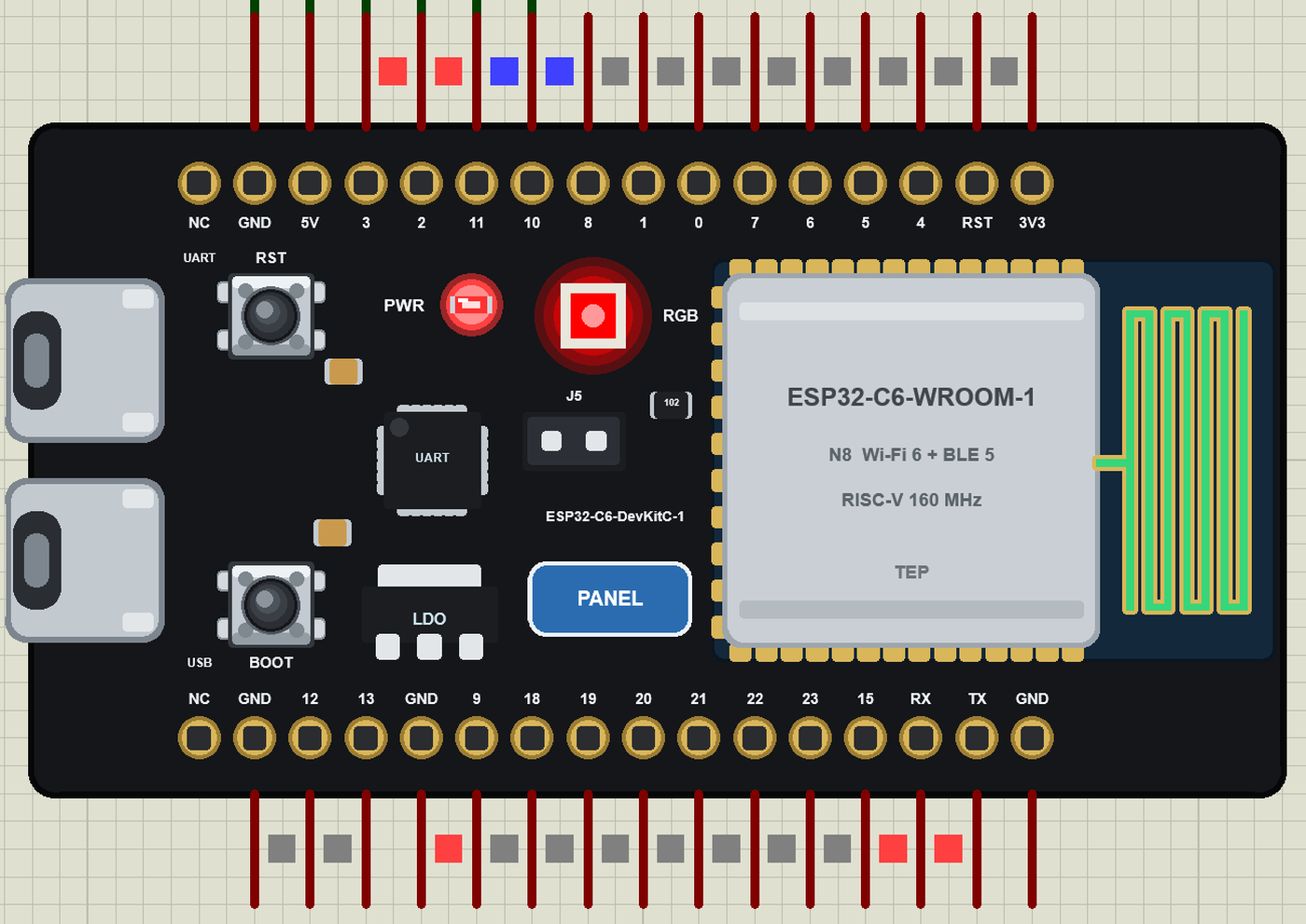
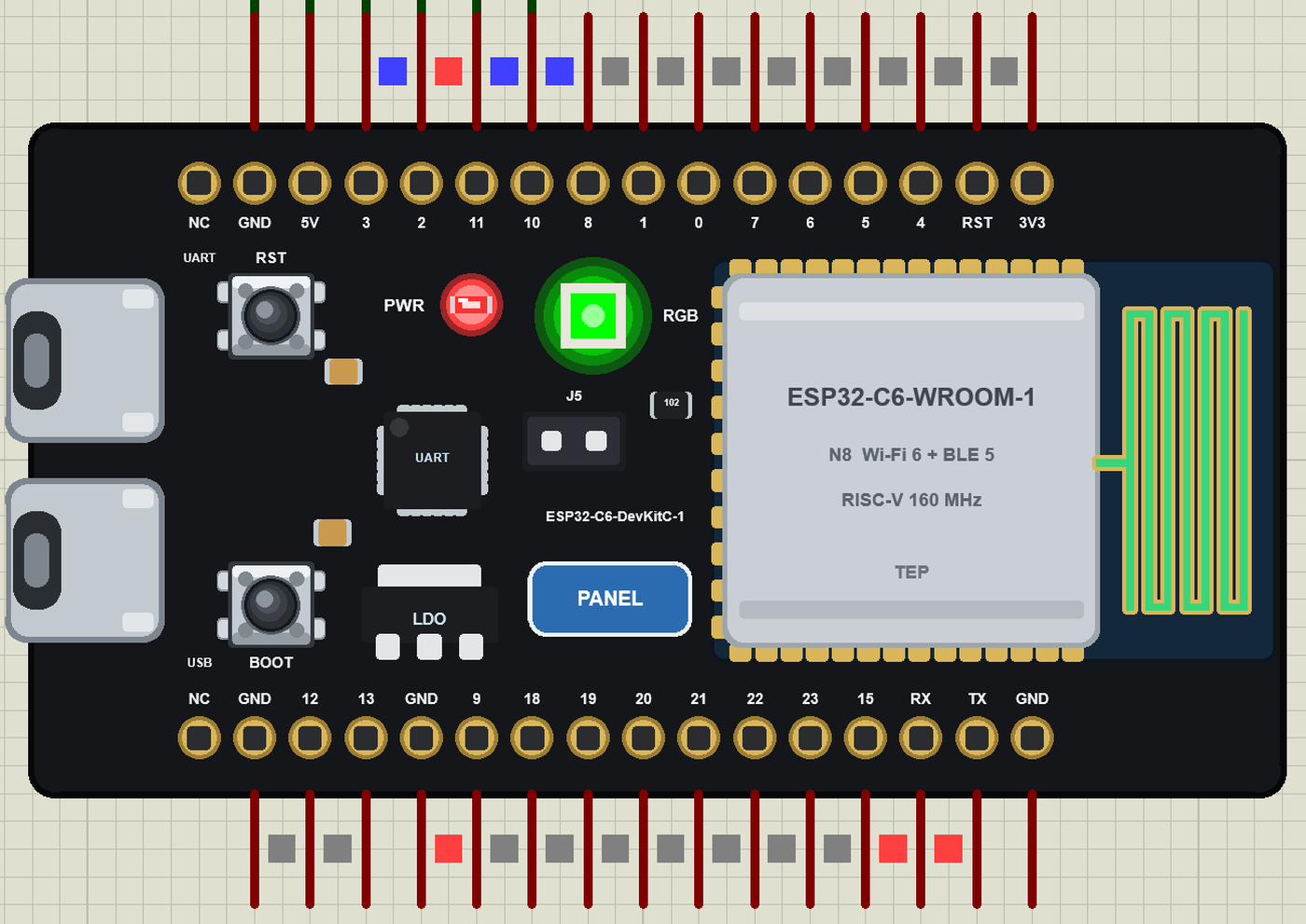
- The board as it looks: the black DevKitC-1 with its two USB-C ports, RST and BOOT, the LDO, the USB-to-UART bridge, the PWR LED, the RGB LED, the J5 jumper, the ESP32-C6-WROOM-1 module with its antenna and the 16 + 16 pins.
- Your sketch: a .hex for "ESP32-C6 DevKitC-1 (TEP Proteus)" with the C6's GPIO numbers - GPIO 0 to 13 and 15 to 23, analogRead 0 to 4095 on GPIO0 to 6, analogWrite and ledc PWM, attachInterrupt, pulseIn, Serial, Wire, SPI.
- The RGB LED: rgbLedWrite(RGB_BUILTIN, r, g, b) and neopixelWrite - the board shows the colour.
- Wi-Fi: WiFi.begin, WebServer, HTTPClient, mDNS and NTP on our virtual router TEP-WiFi; the board is 192.168.1.101 in the demo.
- The panel and the serial monitor: the board's panel (Wi-Fi, Pins, Test) and the built-in serial monitor with Monitor, Plotter and Board tabs - our TEP header, no Windows title bar.
- A complete package: about 3.5 MB with the board, the add-on, the JSN-SR04T, BTS7960, motor and monitor libraries and the demo, without the source code of the models.
The ESP32-C6 DevKitC-1 in Proteus
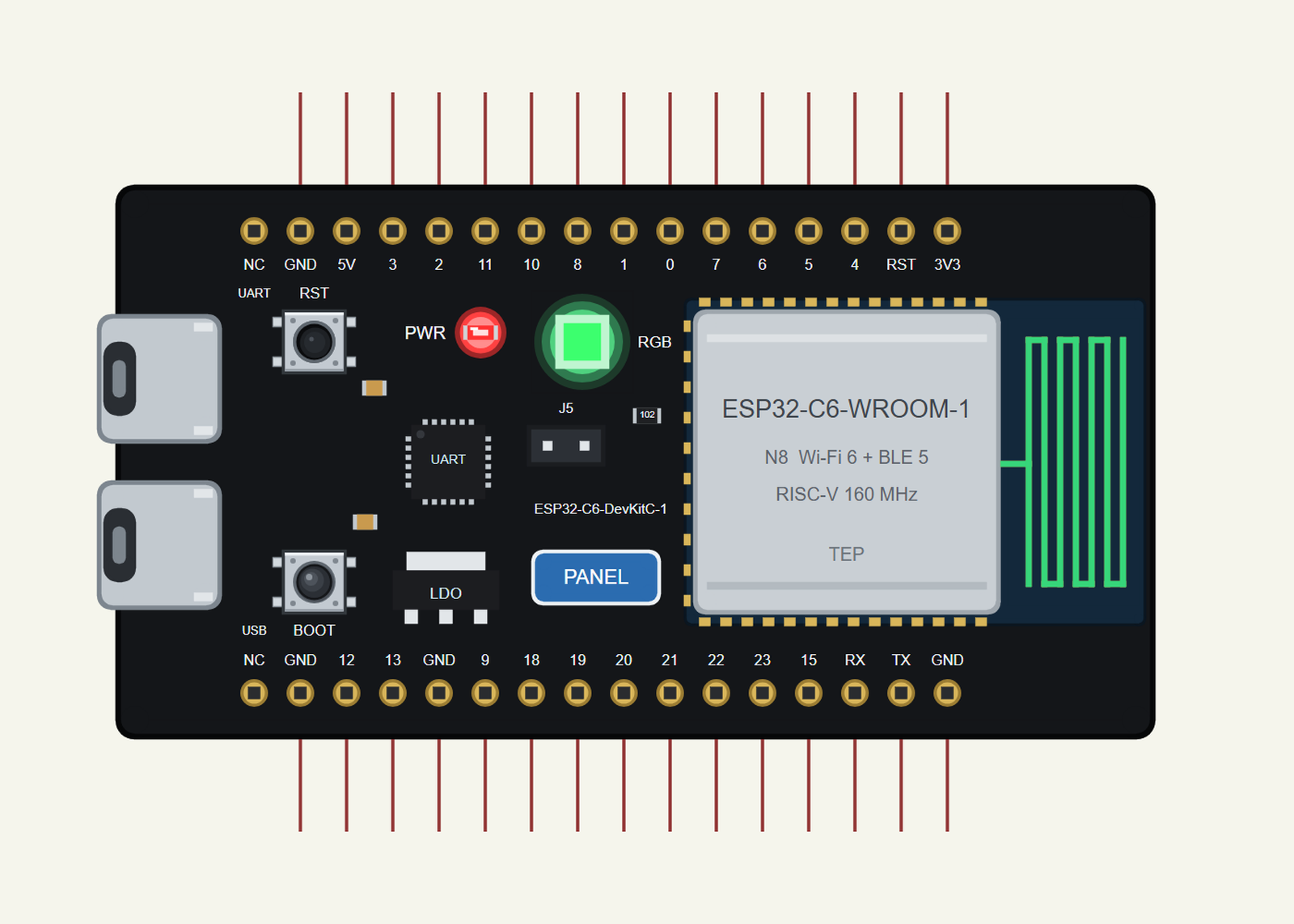
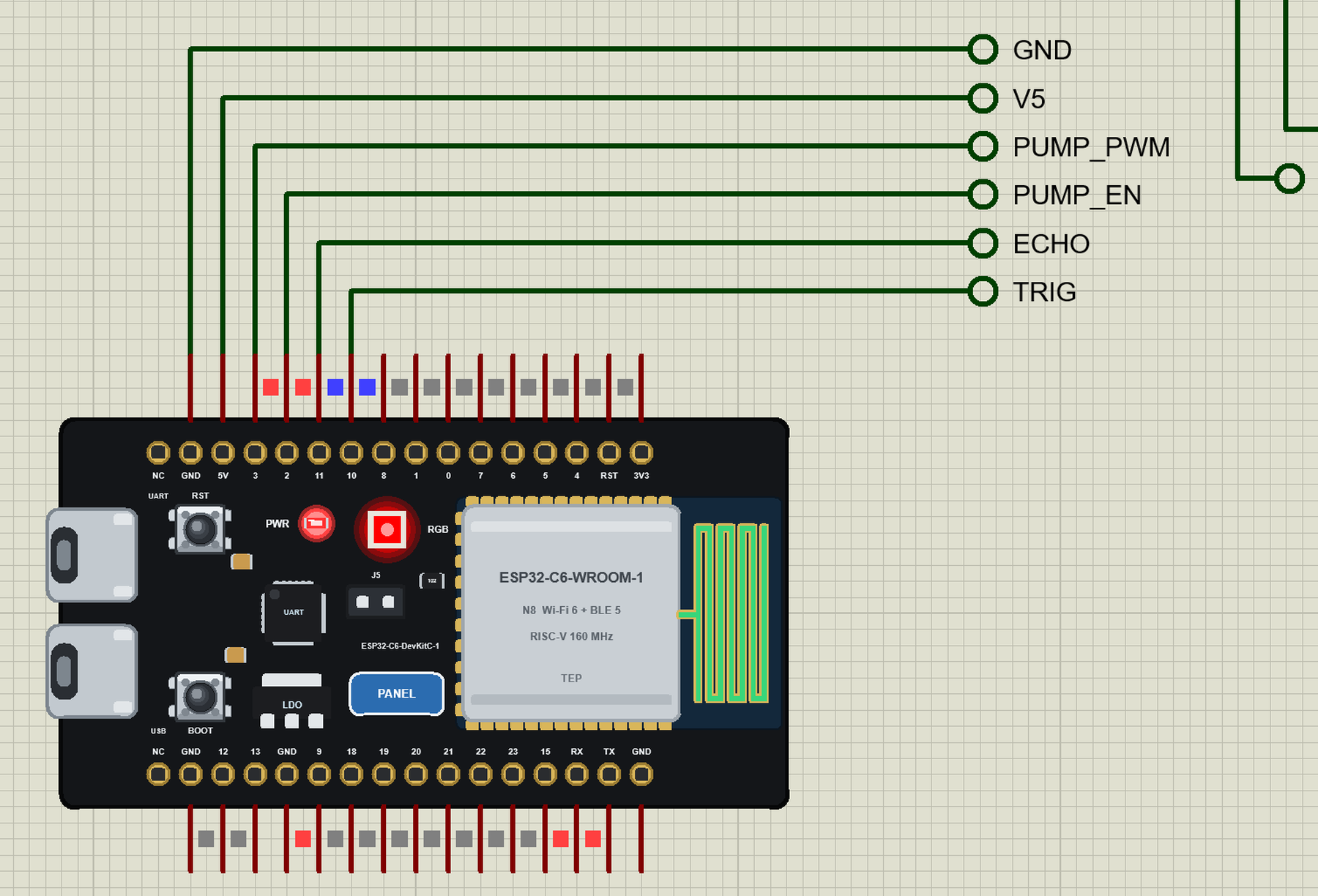
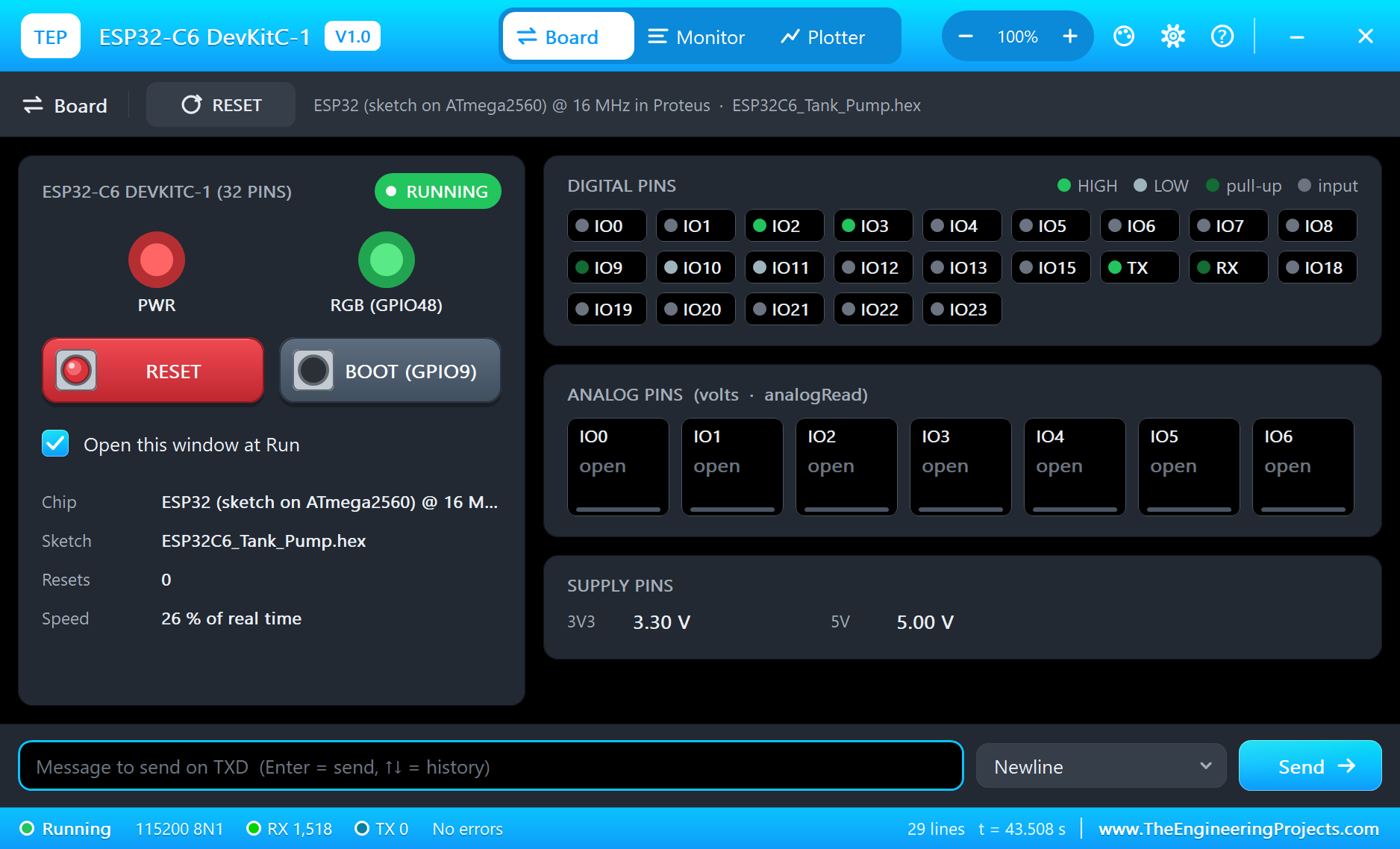
Search ESP32-C6 in Pick Devices; the device ESP32-C6 DEVKITC-1 is in TEPESP32C6.LIB (Microprocessor ICs, ESP32 Boards), with the prefix U. The board lies with the USB-C ports on the left and the module on the right. Click a USB-C port to open the serial monitor and the PANEL pad (or the module) to open the board's panel.
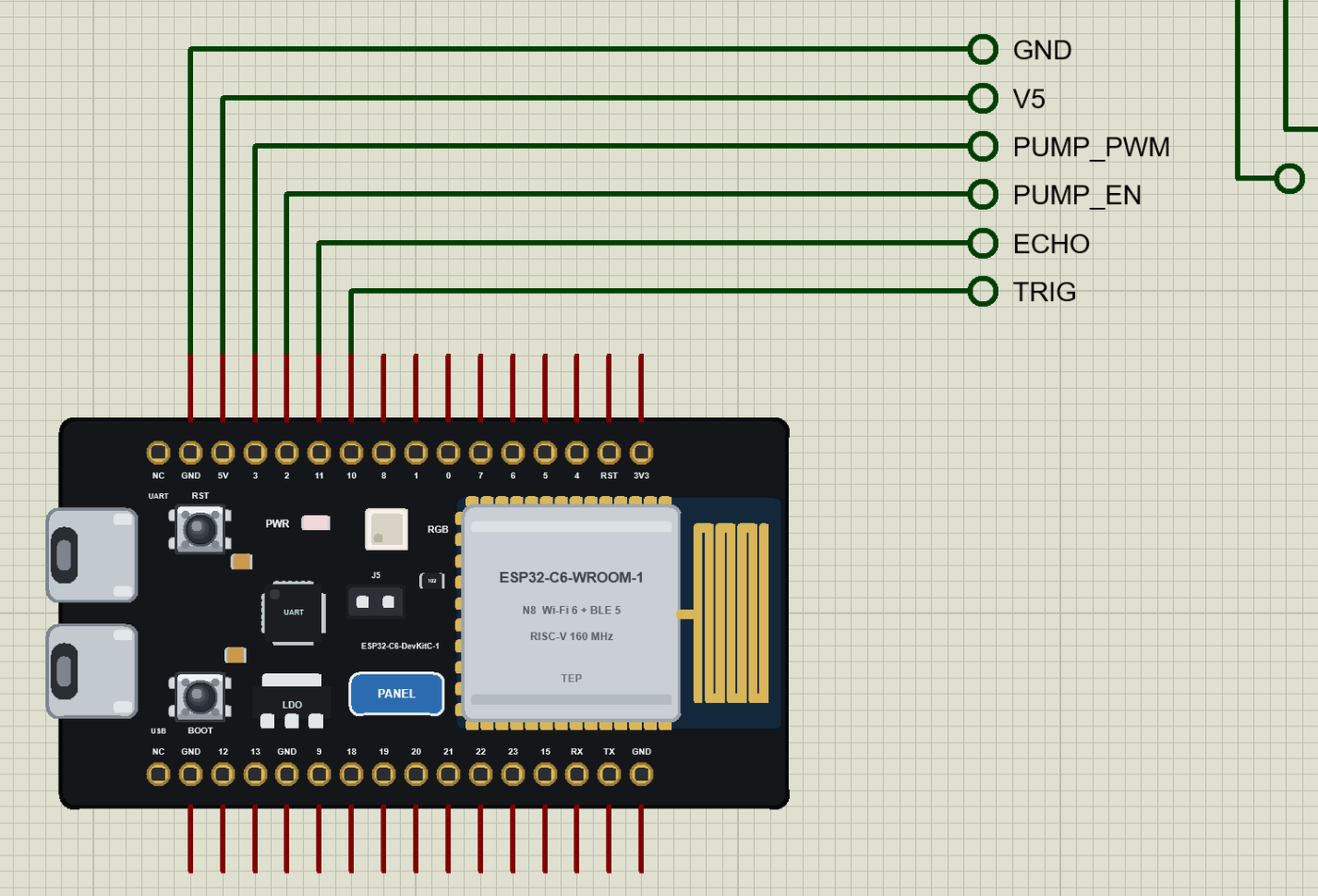
The Pins
| Pins | What the library does with them |
|---|---|
| 0 to 6 | GPIO, analogRead 0 to 4095 for 0 to 3.3 V, PWM, interrupt |
| 7, 10, 11, 15 | GPIO, PWM, interrupt |
| 8 | GPIO and the RGB LED (RGB_BUILTIN) |
| 9 | GPIO and the BOOT button (LOW when pressed) |
| 16 / 17 (TX / RX) | Serial: the board's monitor |
| 18 to 21 | SPI SS / MOSI / MISO / SCK |
| 22 / 23 | Wire SCL / SDA |
| 12, 13 | GPIO (the C6's USB on the real board) |
| 3V3, 5V, G, RST | 3.3 V, 5 V, ground, reset |
| NC | not connected |
Download ESP32-C6 DevKitC-1 Library for Proteus
Click the button below to download ESP32-C6-DevKitC-1-Library-for-Proteus-v1.0.zip (about 3.5 MB, without the source code of the models):
ESP32-C6 DevKitC-1 Library for Proteus V1.0- README.txt: installation, the demo, the pins, the properties, troubleshooting and the limits.
- Proteus Library Files:
TEPESP32C6.LIBand the demo's parts:TEPJSNSR04T.LIB,TEPBTS7960.LIB,TEPMOTOR775.LIB,TEPLAPTOP.LIBandTEPMOBILE.LIB. - Proteus Model Files:
TEPNET.DLL(the board, the laptop, the phone and the network) and the DLLs of the sensor, the driver and the motor. - Arduino Code: the demo sketch and the TEP Boards for Proteus add-on 1.22.0.
- Proteus Simulation: the demo project, its HEX file and copies of the DLLs.
No Proteus yet? Read How to Download and Install Proteus 7 and 8. New to libraries? Follow How to Install a New Library in Proteus.
How to Install ESP32-C6 DevKitC-1 Library for Proteus
- Close Proteus and extract the whole zip file, for example to your Desktop.
- Copy the files from Proteus Library Files into the LIBRARY folder of Proteus.
- Copy the DLLs from Proteus Model Files into the MODELS folder, replacing an older TEPNET.DLL.
- Delete
TEPESP32C6.IDXfrom the LIBRARY folder if it is there. - For your own sketches, copy Arduino Code\TEP Boards for Proteus\hardware into your Arduino sketchbook (Documents\Arduino) and restart the Arduino IDE; the board is ESP32-C6 DevKitC-1 (TEP Proteus).
- Start Proteus, press P and search for ESP32-C6.
Demo: a Water Tank Pump Controller
Many homes keep a water tank on the roof, filled by a pump from a well or the street supply. Run the pump too long and the tank overflows; forget it and the taps run dry. A controller watches the level and does the job by itself. Ours uses a JSN-SR04T - the waterproof cousin of the HC-SR04, with its sealed probe on a cable, made for exactly this kind of wet, closed space - and a BTS7960, a 43 A H-bridge that easily drives a 12 V pump motor.
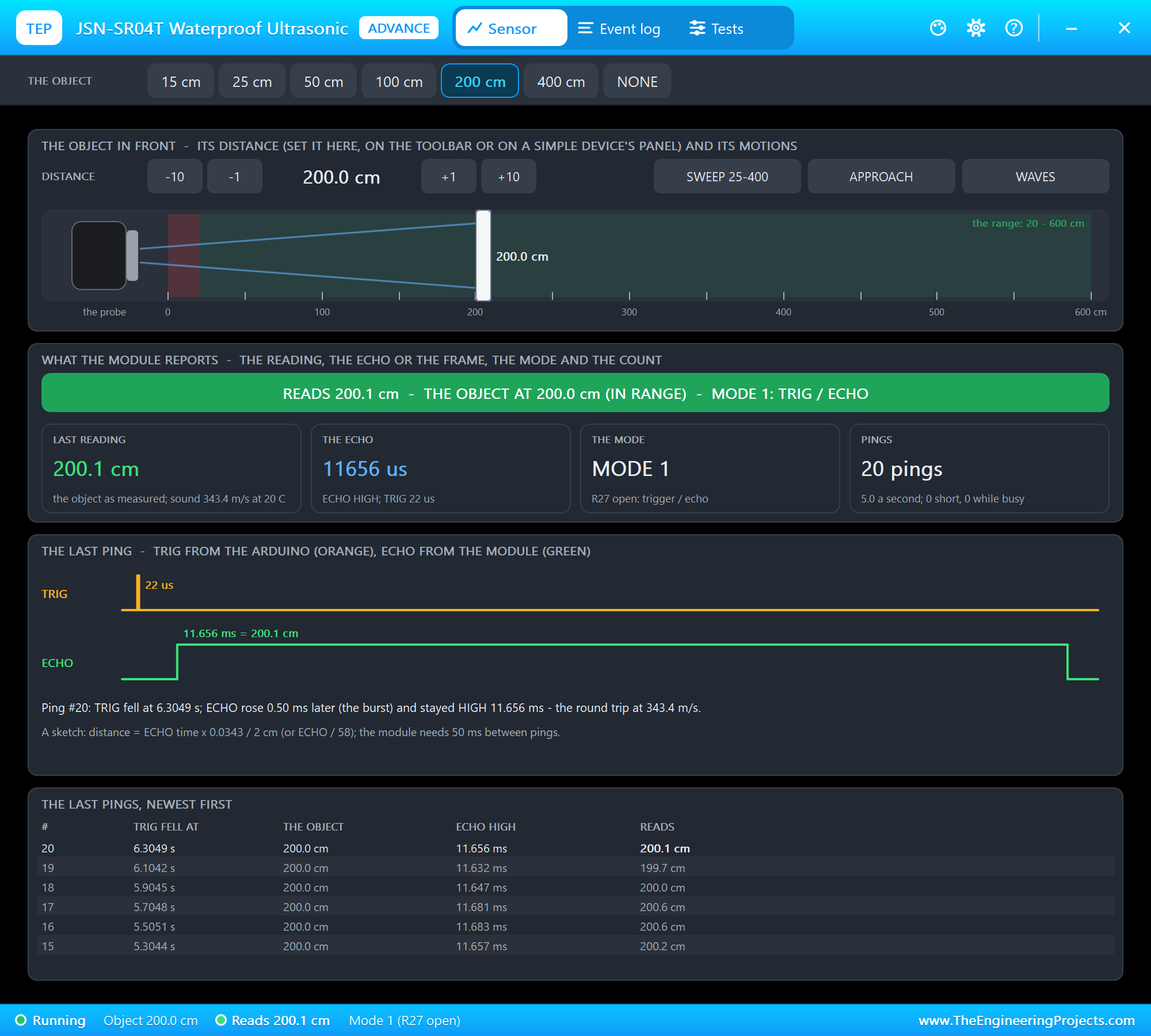
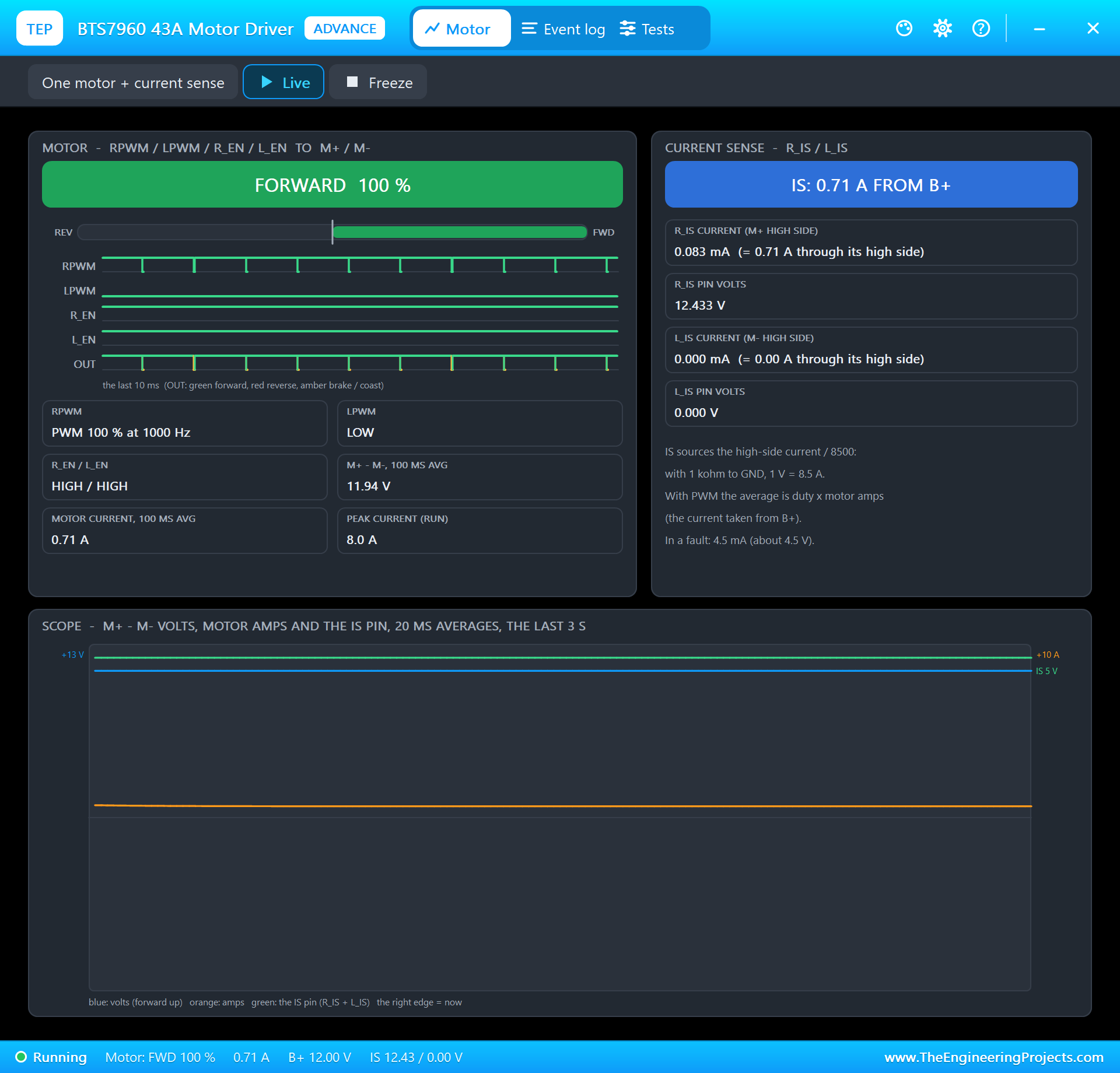
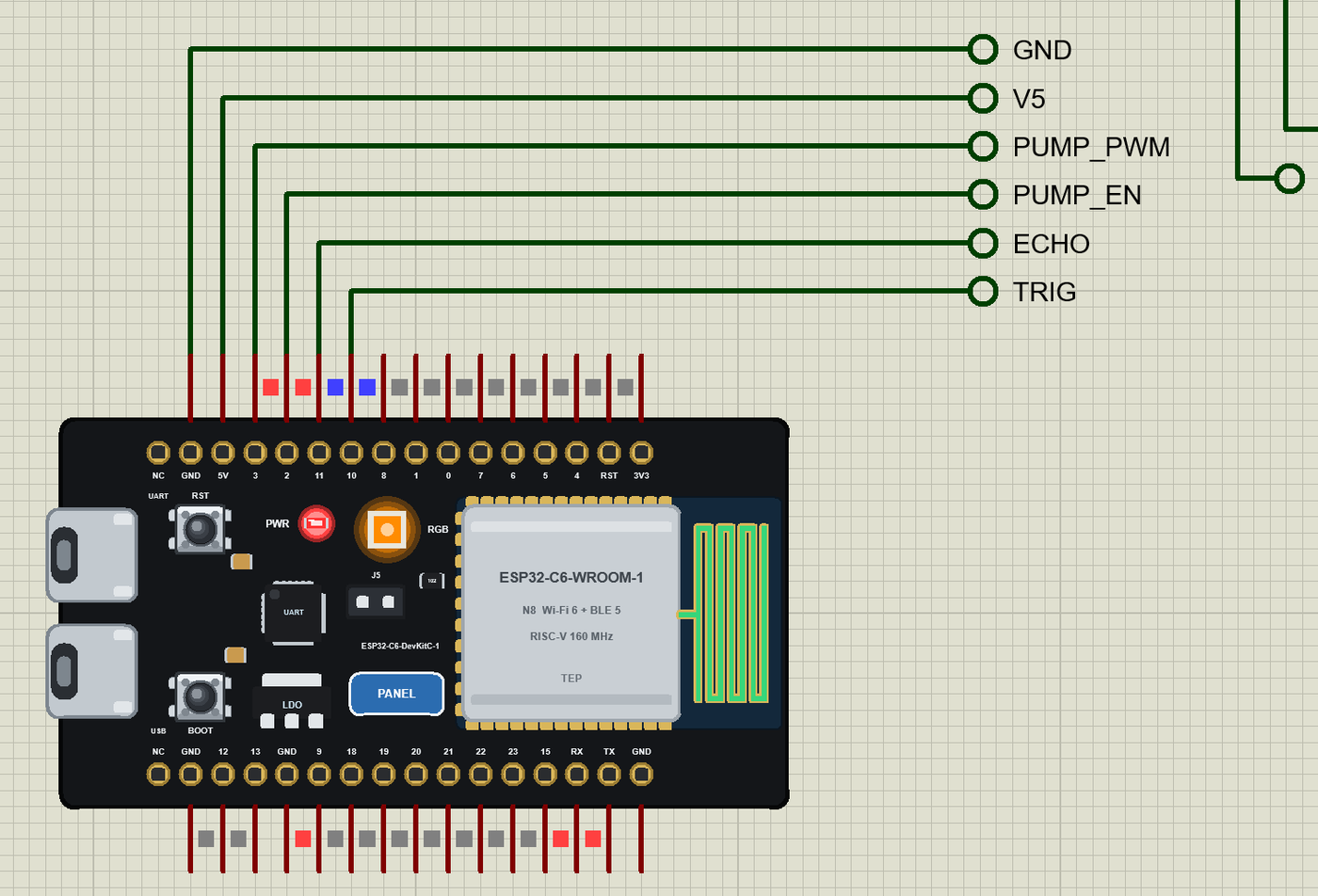
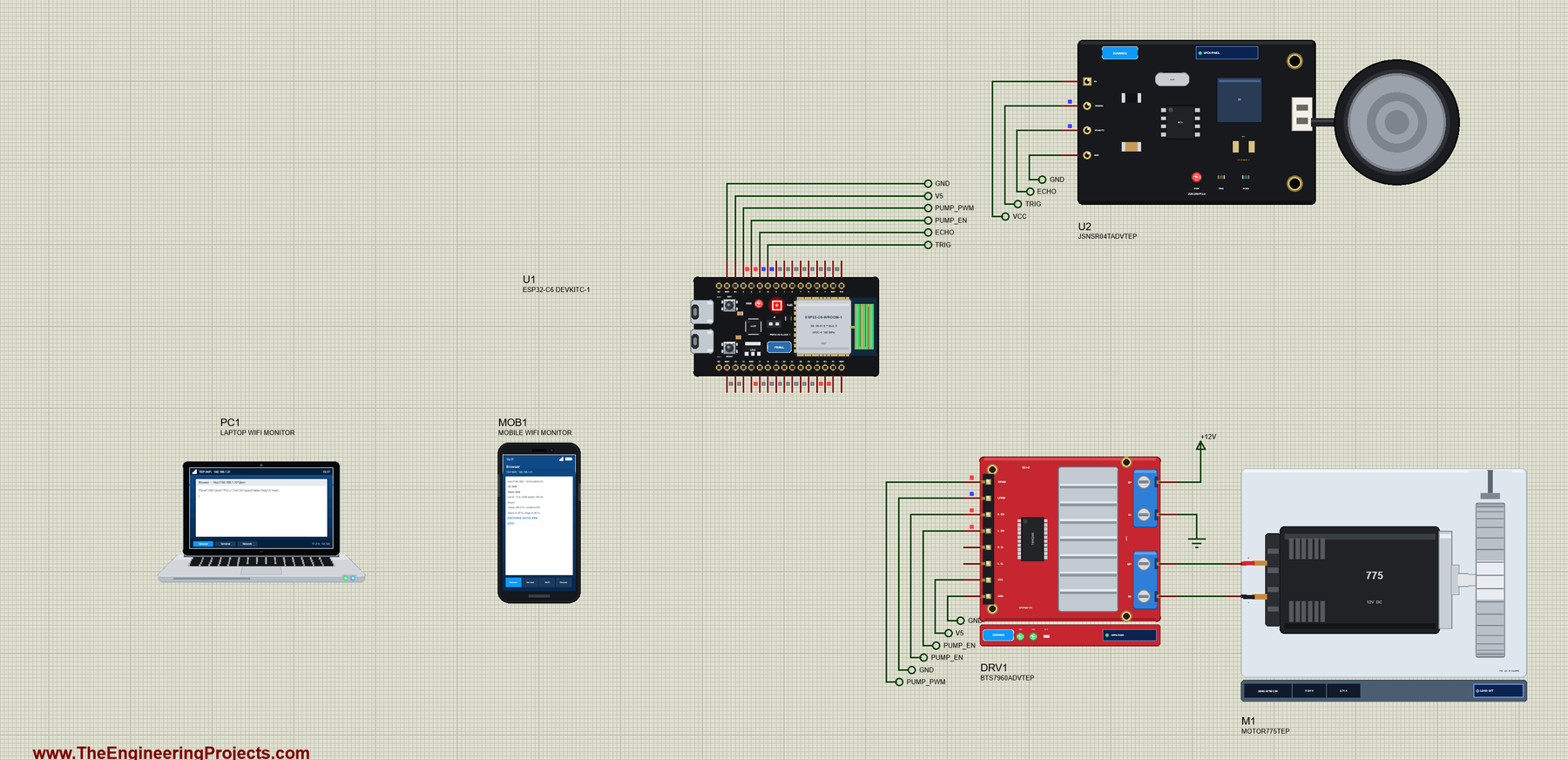
Open ESP32-C6-DevKitC-1-Tank-Pump.pdsprj. U1 runs ESP32C6_Tank_Pump.hex. The parts come from our own libraries, each with its article: U2 from the JSN-SR04T Waterproof Ultrasonic Sensor Library for Proteus and DRV1 with the 775 motor M1 (our pump) from the BTS7960 Motor Driver Library for Proteus. Both are the Advance versions: each opens a pop-up window at Run. PC1 is the Laptop WiFi Monitor and MOB1 the Mobile WiFi Monitor.
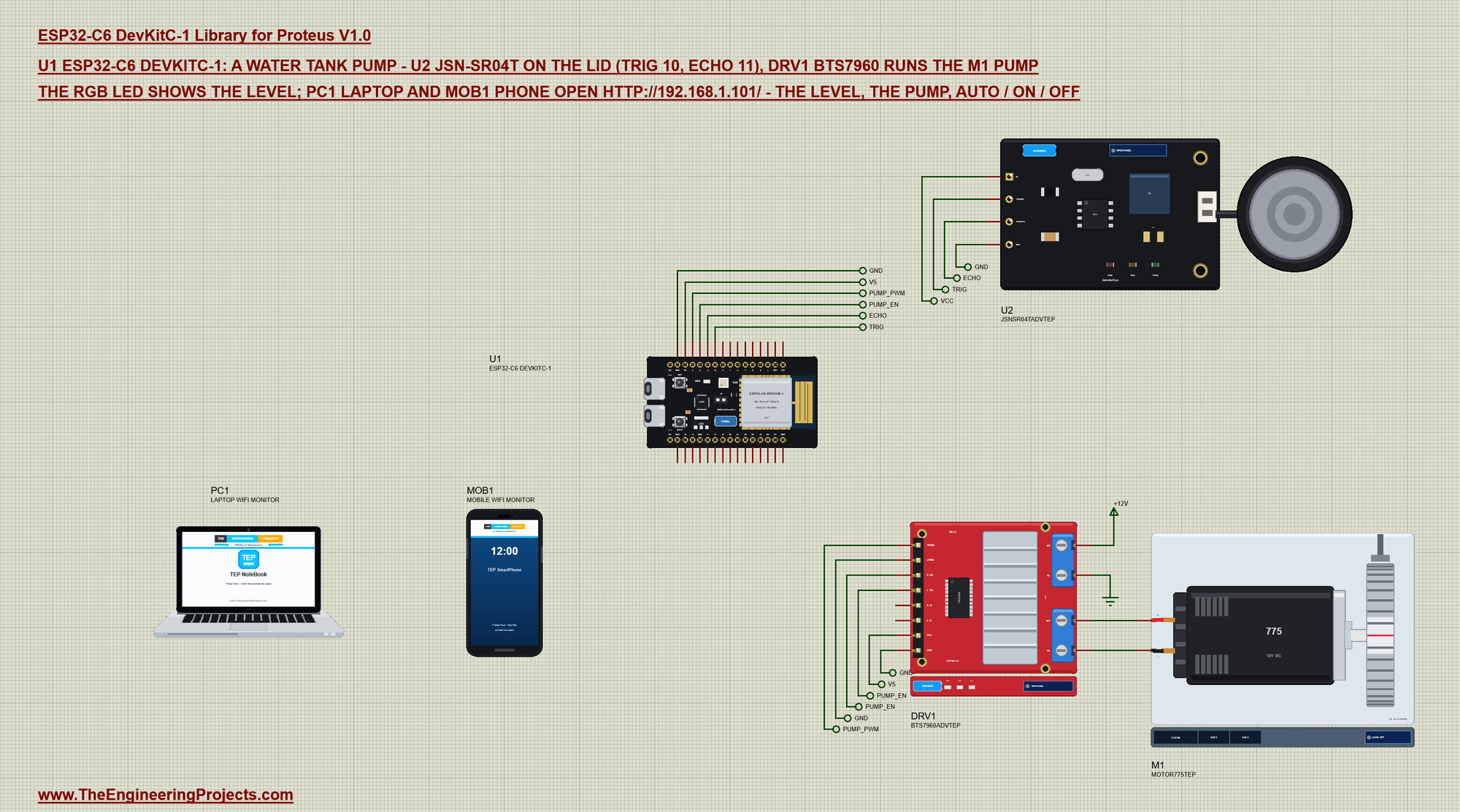
| Part pin | Net label | ESP32-C6 DevKitC-1 pin | What it does |
|---|---|---|---|
| JSN-SR04T TRIG | TRIG | GPIO10 | a 20 us pulse starts a ping |
| JSN-SR04T ECHO | ECHO | GPIO11 | HIGH for the round trip of the sound |
| BTS7960 RPWM | PUMP_PWM | GPIO3 | the pump's speed (PWM) |
| BTS7960 R_EN, L_EN | PUMP_EN | GPIO2 | both half-bridges on |
| BTS7960 LPWM | GND | G | one direction only |
| BTS7960 VCC, B+ | V5, +12V | 5V, a 12 V supply | the logic and the motor supply |
| BTS7960 M+, M- | - | - | the pump motor |
In the demo the JSN-SR04T's 5V is on a label named VCC - Proteus' power rail - and the BTS7960's VCC on the board's 5V. On a real board the JSN-SR04T also runs on 5 V, so its ECHO pin needs a divider (for example 1k and 2k) down to the C6's 3.3 V.
How the JSN-SR04T Measures the Water
The sensor sends a short burst of 40 kHz sound when TRIG gets a pulse, then holds ECHO HIGH until the echo comes back. Sound travels about 343 m/s, so each centimetre of distance adds about 58 microseconds to the round trip: the distance in centimetres is the ECHO time divided by 58. When nothing answers, the JSN-SR04T holds ECHO HIGH for about 36 ms - the sketch reads that as "no echo" and stops the pump, because it can no longer see the water. The sensor has a blind zone of about 20 cm, so it sits a little above the highest water level.
void measure() {
  digitalWrite(TRIG_PIN, HIGH);
  delayMicroseconds(20);
  digitalWrite(TRIG_PIN, LOW);
  unsigned long us = pulseIn(ECHO_PIN, HIGH, 40000UL);
  echoOk = us > 0 && us < 35000UL;                          // no echo: the JSN-SR04T holds ECHO HIGH about 36 ms
  if (!echoOk) return;
  distanceCm = us / 58;
  level = constrain((long)(EMPTY_CM - distanceCm) * 100 / (EMPTY_CM - FULL_CM), 0, 100);
}
From Distance to a Level
The tank is 2 m deep and the sensor is 25 cm above the full mark: 225 cm down means empty and 25 cm down means full. The sketch turns the distance into a percentage with a straight line between those two points:
const int EMPTY_CM = 225, FULL_CM = 25;                     // the sensor to the water: an empty / a full tank
const int START_PCT = 25, STOP_PCT = 90;                    // AUTO: the pump starts at 25 % and stops at 90 %
A Band, Not a Point
If the pump started below 50 % and stopped above 50 %, it would switch on and off every few seconds around that point - hard on the motor and the relay. So AUTO uses a band (hysteresis): the pump starts at 25 % and runs until 90 %. Between those two levels it keeps doing whatever it was doing. ON runs the pump until the tank is full, then returns to AUTO; OFF keeps it off whatever the level:
void control() {
  if (!echoOk) setPump(false, "no echo");
  else if (mode == 2) setPump(false, "mode OFF");
  else if (level >= STOP_PCT) { setPump(false, "tank full"); if (mode == 1) mode = 0; }
  else if (mode == 1) setPump(true, "mode ON");
  else if (level <= START_PCT) setPump(true, "tank low");
}
A Soft Start with the BTS7960
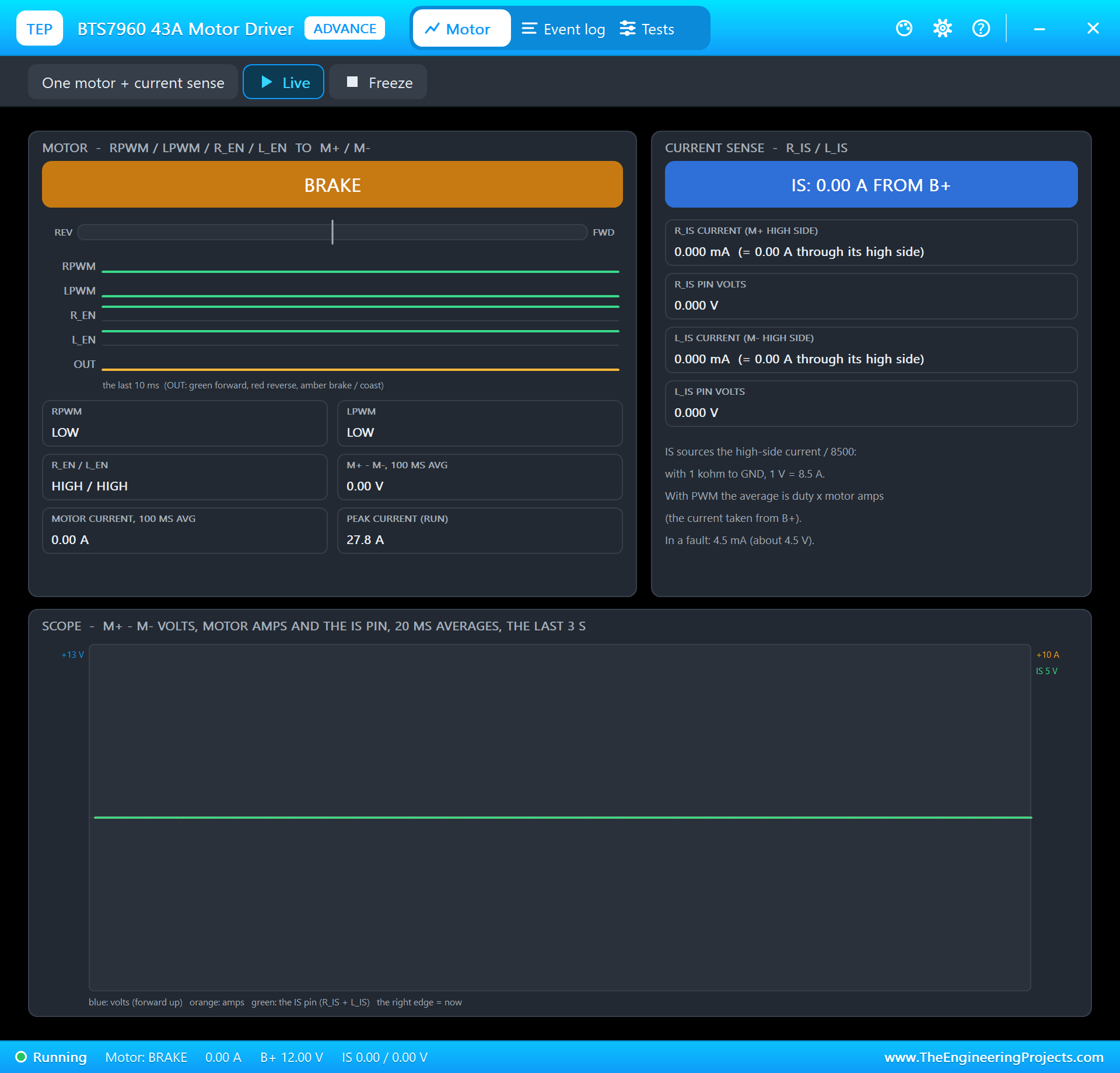
A pump that starts at full power with a long pipe behind it makes a bang - water hammer. The sketch ramps the PWM from 0 to full speed in about a second, ten steps of 10 %. The BTS7960 takes the PWM on RPWM and switches the 12 V supply to the motor; R_EN and L_EN stay HIGH and LPWM stays LOW, so the motor only turns one way:
void softStart() {                                          // 0 to full speed in about a second: no water hammer
  if (!pumpOn || duty >= 255 || millis() < nextRamp) return;
  nextRamp = millis() + 100;
  duty = min(255, duty + 25);
  analogWrite(PUMP_PWM, duty);
}
The RGB LED
The DevKitC-1's RGB LED is an addressable WS2812-type LED on GPIO8. In the Arduino-ESP32 core rgbLedWrite() sets its colour; the sketch uses it as a tank gauge you can read across the roof:
void showLevel() {                                          // the RGB LED: red LOW, amber, green above 60 %, purple no echo
  int c = !echoOk ? 3 : level <= START_PCT ? 0 : level < 60 ? 1 : 2;
  if (c == shown) return;
  shown = c;
  if (c == 0) rgbLedWrite(RGB_BUILTIN, 255, 0, 0);
  else if (c == 1) rgbLedWrite(RGB_BUILTIN, 255, 140, 0);
  else if (c == 2) rgbLedWrite(RGB_BUILTIN, 0, 255, 0);
  else rgbLedWrite(RGB_BUILTIN, 160, 0, 255);
}
Wi-Fi and the Page
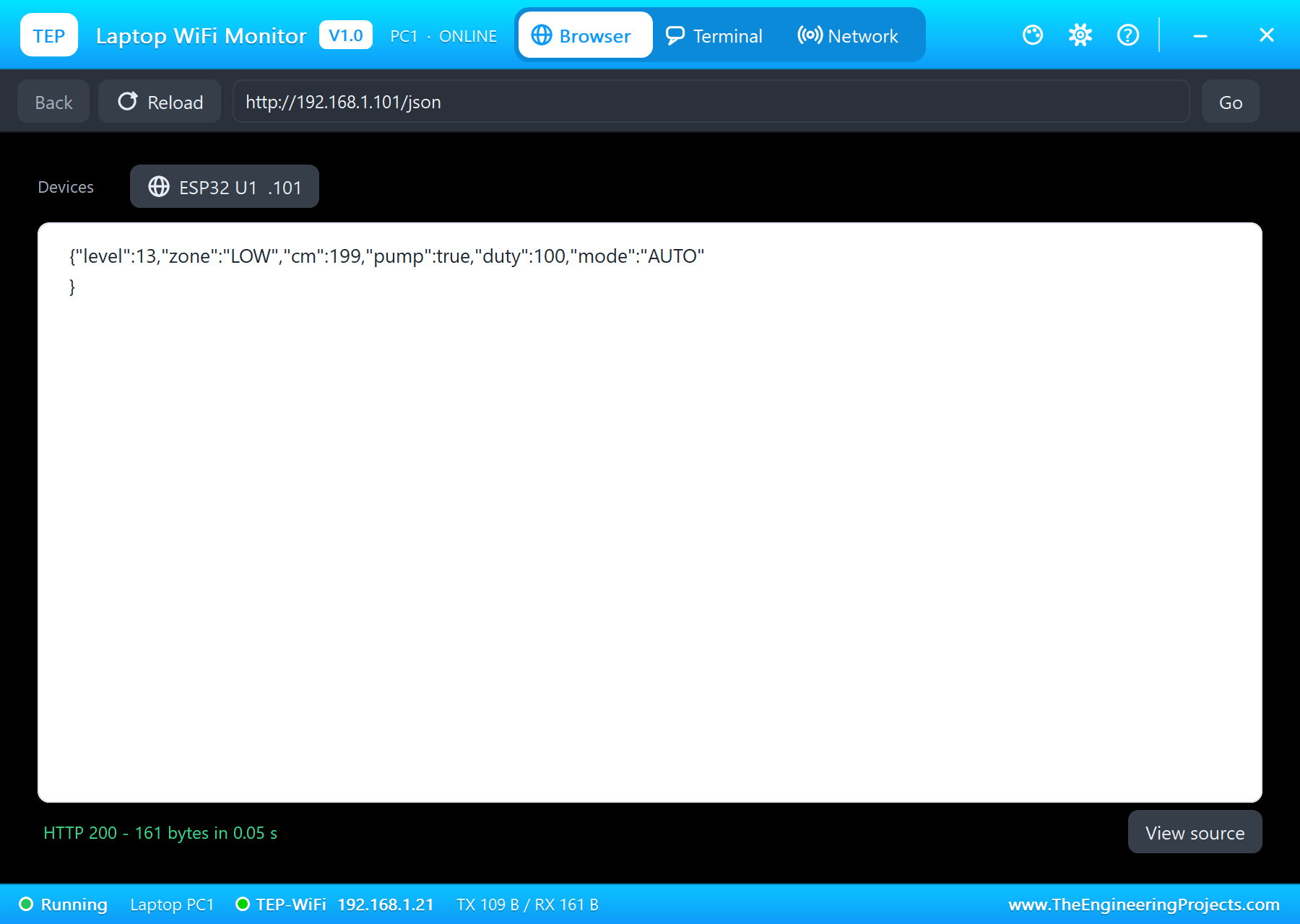
The sketch joins the network and starts the ESP32 core's WebServer with three pages: / for the phone, /json for a program and /mode?m= for the AUTO, ON and OFF links:
  server.on("/", handleRoot);
  server.on("/json", handleJson);
  server.on("/mode", handleMode);
The loop pings the tank five times a second, then ramps the pump, logs, reads the BOOT button, serves the page and reads the monitor:
void loop() {
  if (millis() >= nextPing) {                               // a ping every 200 ms (the module needs 50 ms between pings)
    nextPing = millis() + 200;
    measure();
    control();
    showLevel();
  }
  softStart();
  logStatus();
  readButtons();
  server.handleClient();
  readMonitor();
}
Run the Demo
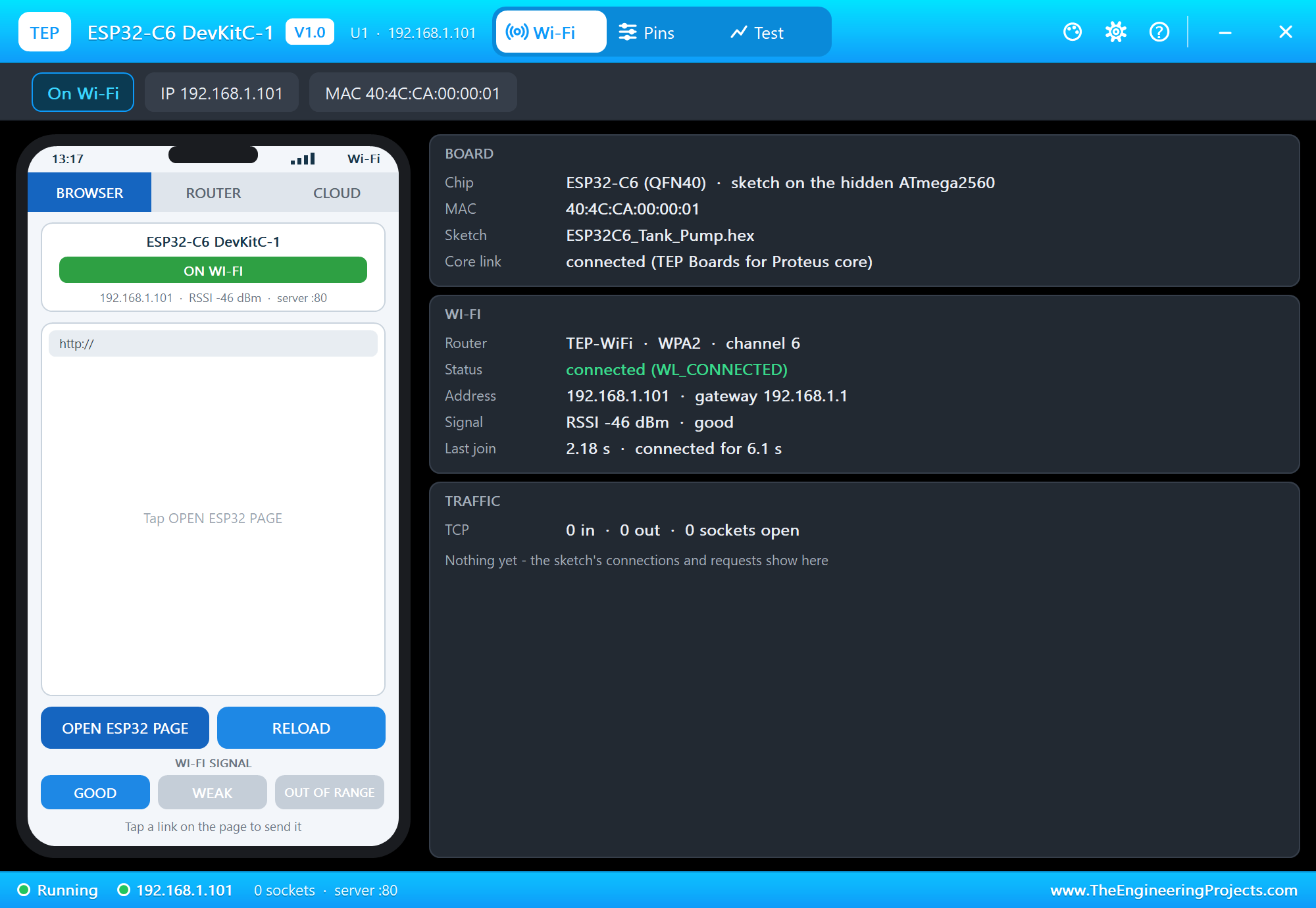
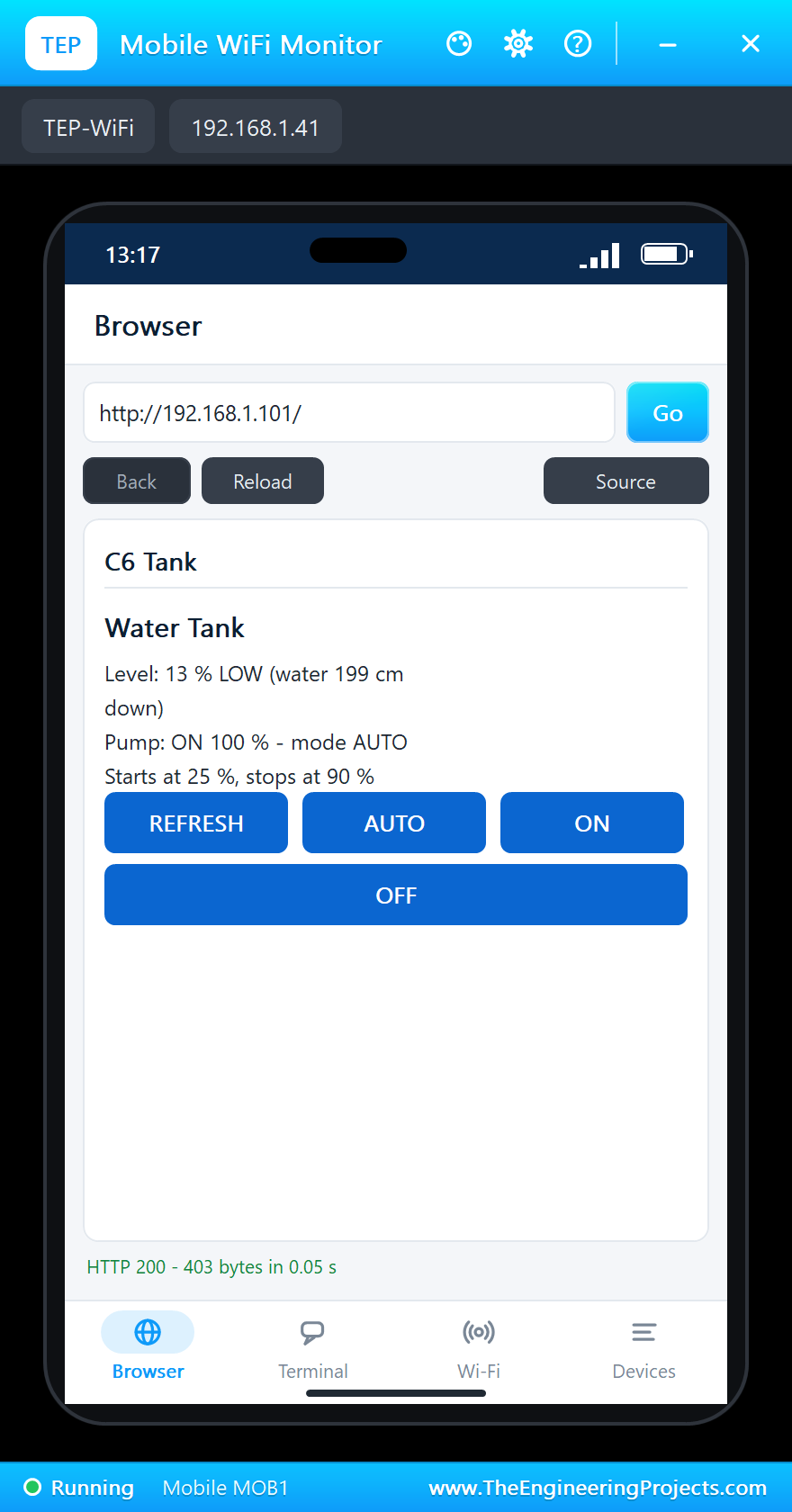
Press Run. The serial monitor opens; the board joins TEP-WiFi and the first ping finds the water 200 cm down - about 12 %, LOW. The pump starts:
ESP32-C6 Tank Pump - The Engineering Projects
Connecting to TEP-WiFi
Tank page: http://192.168.1.101/
Pump START (tank low) - tank at 14 %
Tank 14 % LOW (water 197 cm down)  pump ON 9 %  mode AUTO
Tank 13 % LOW (water 199 cm down)  pump ON 100 %  mode AUTO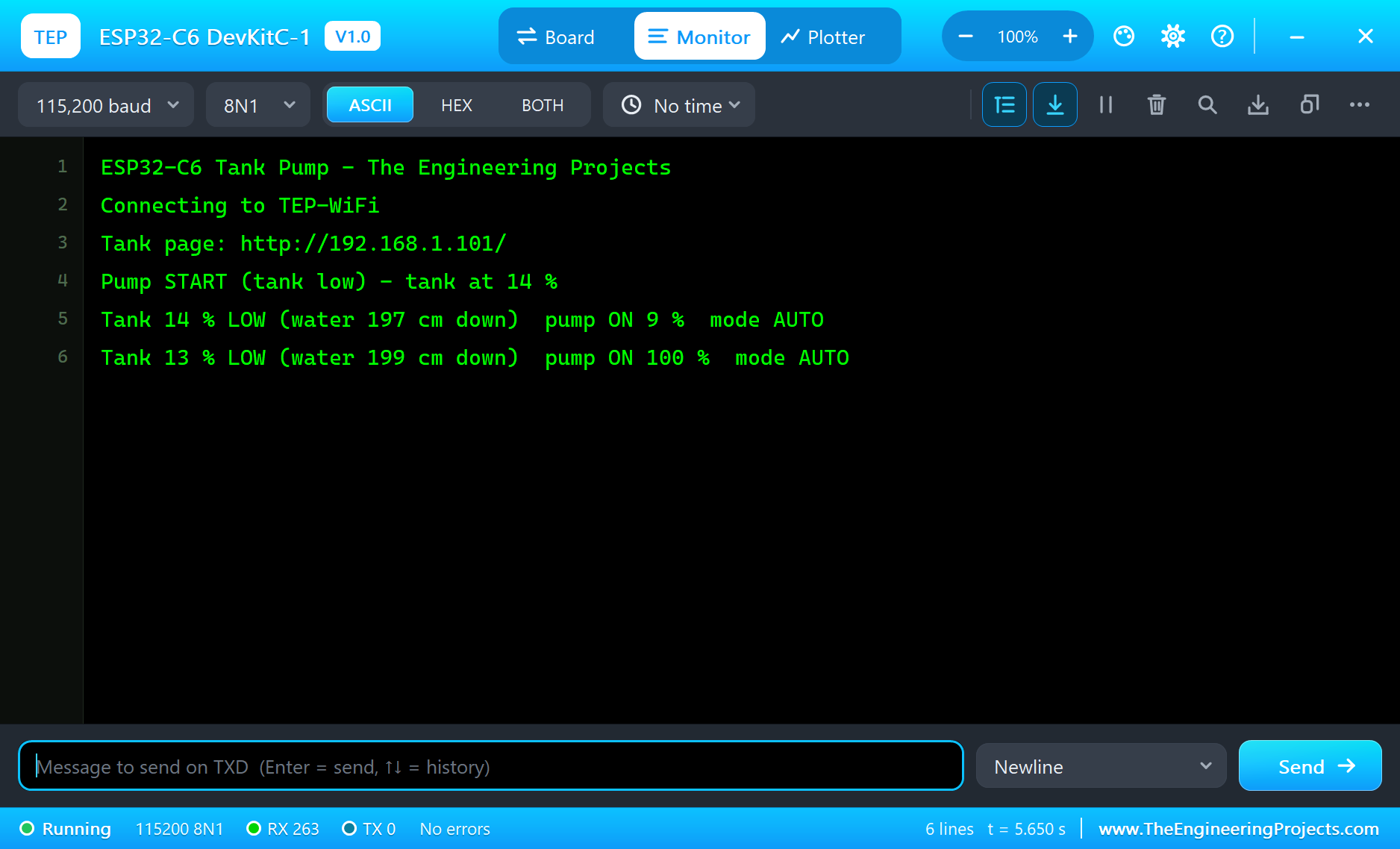
Open the Page
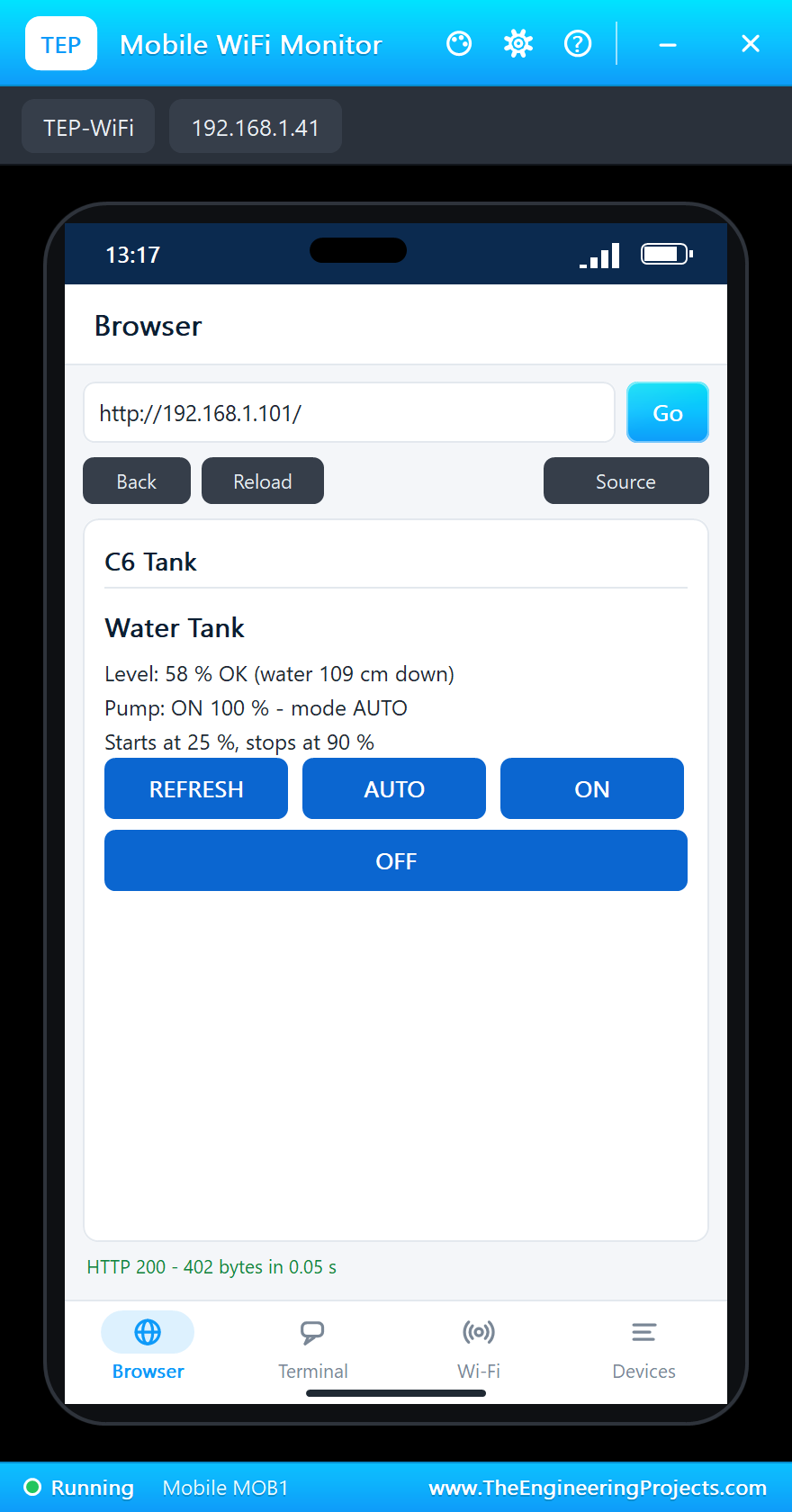
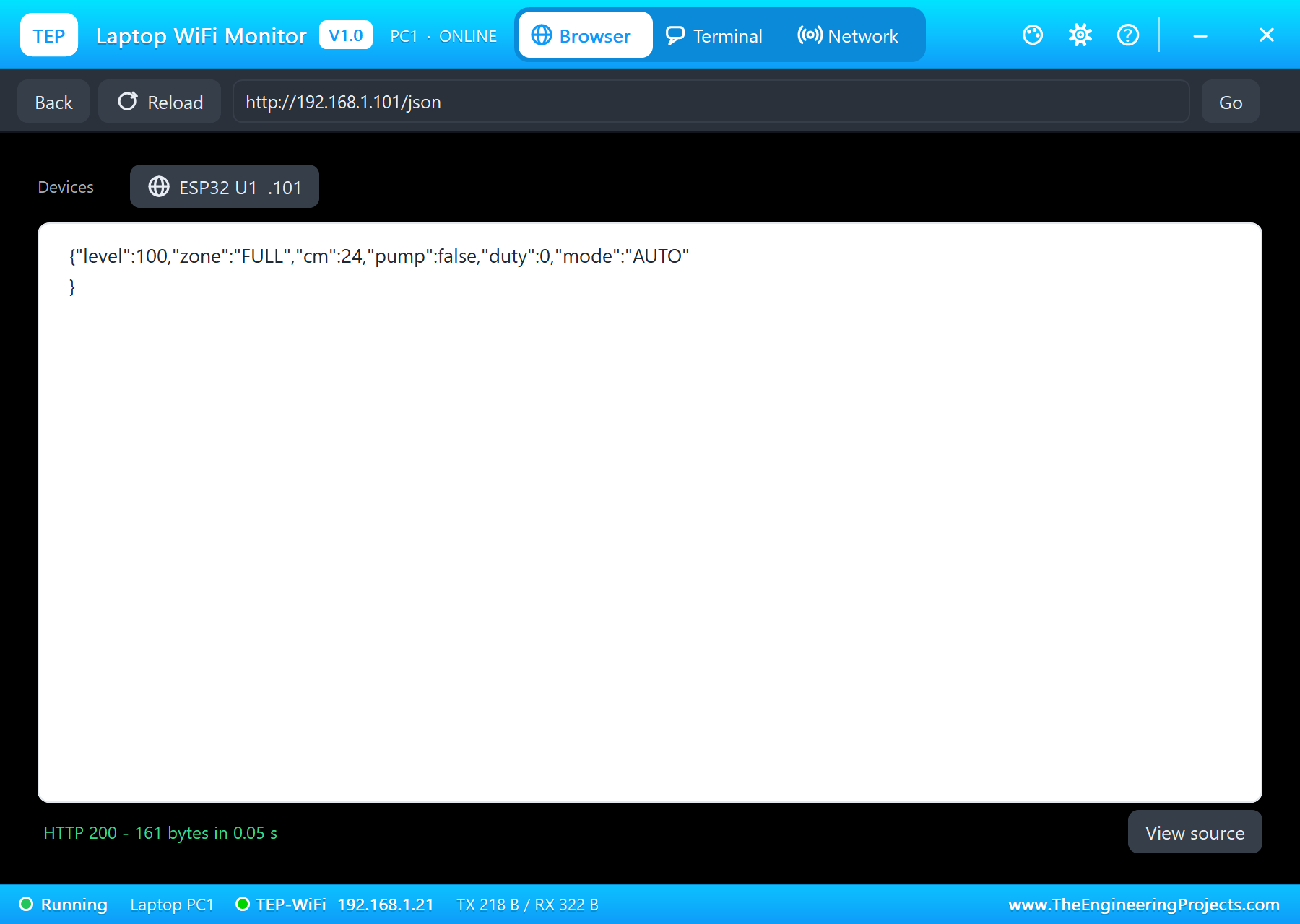
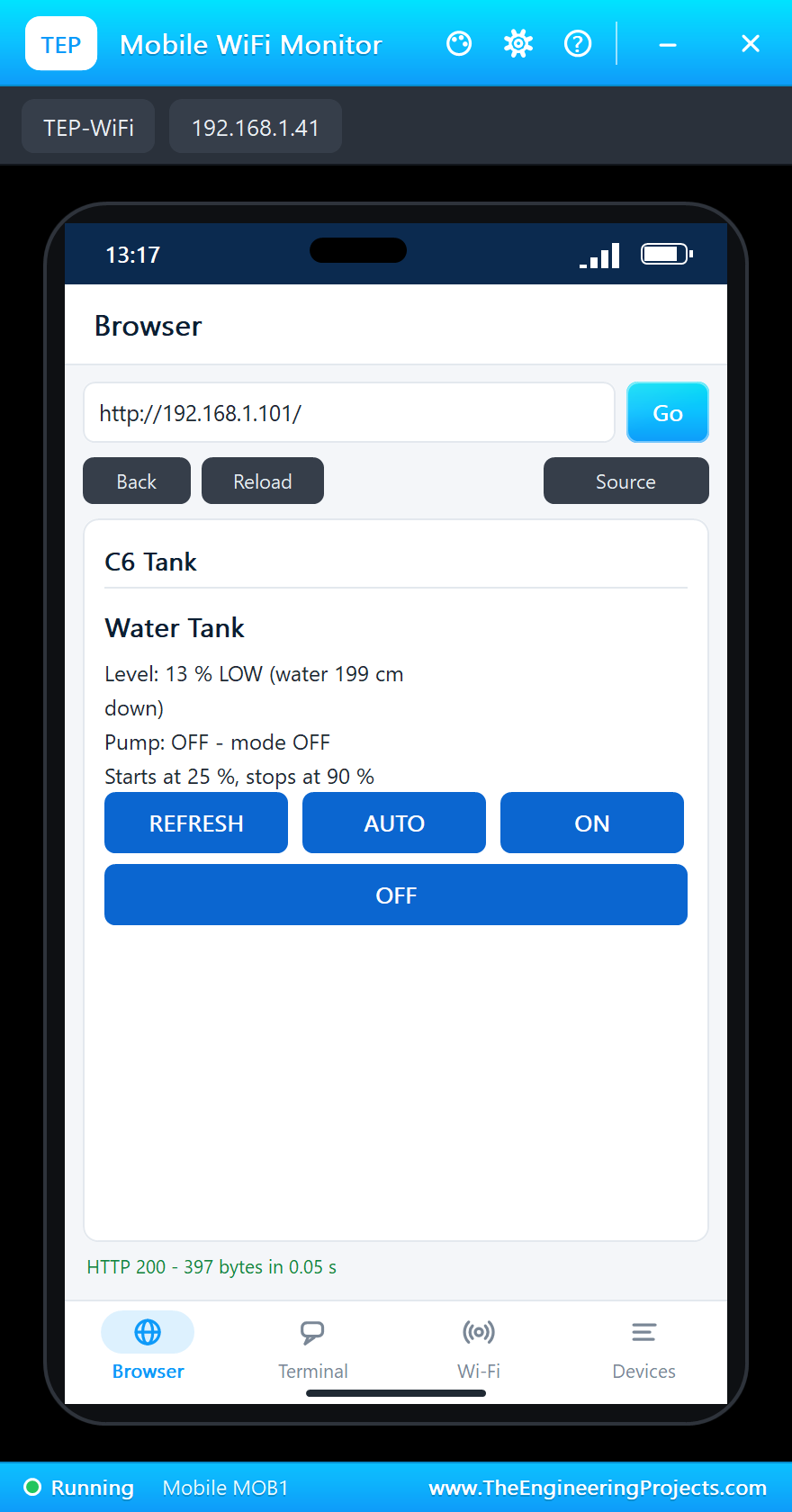
On the laptop click Browser and Go (the home page is http://192.168.1.101/json, the values for a program); on the phone the same with http://192.168.1.101/, the page with its links:
The Tank Fills
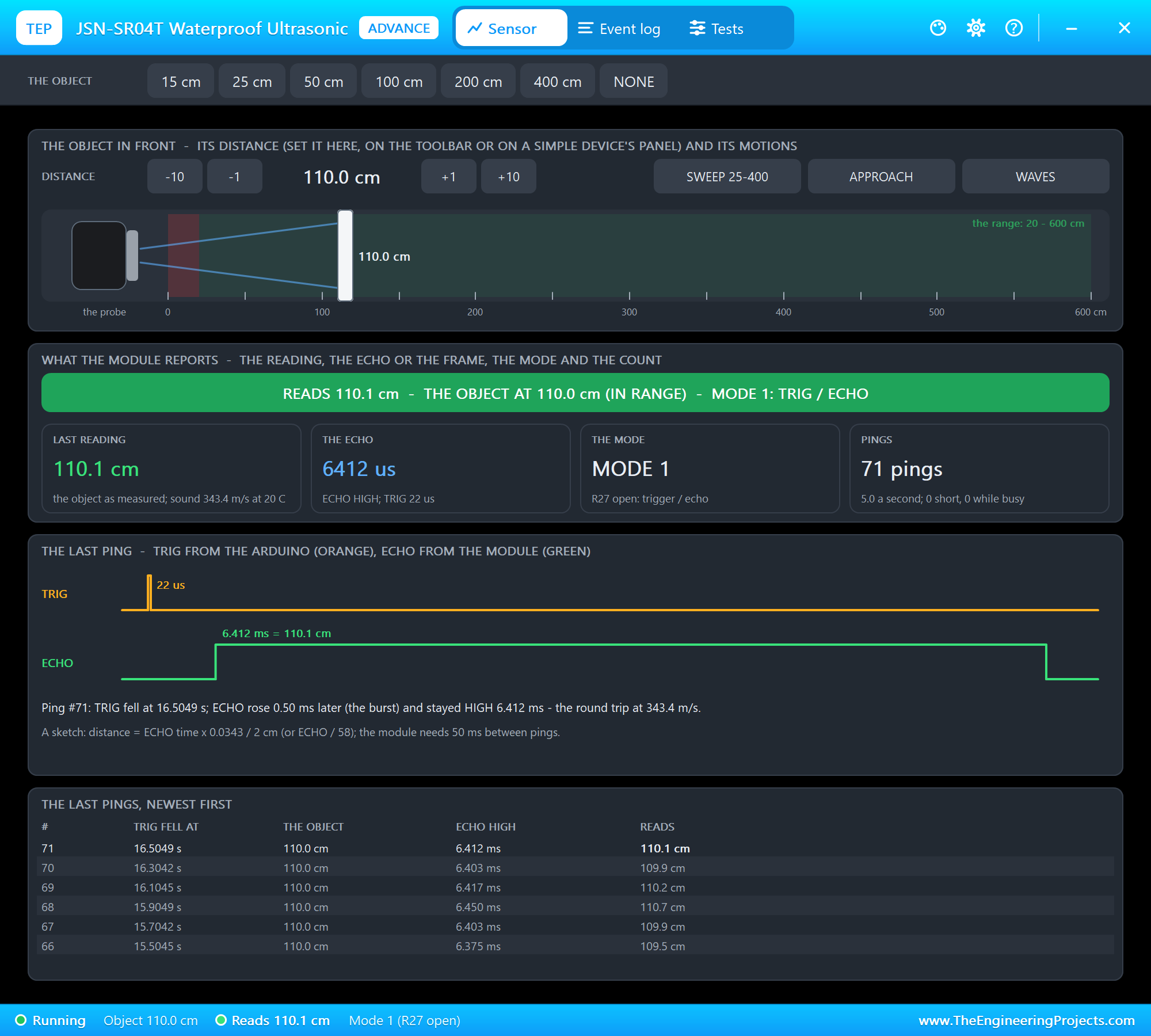
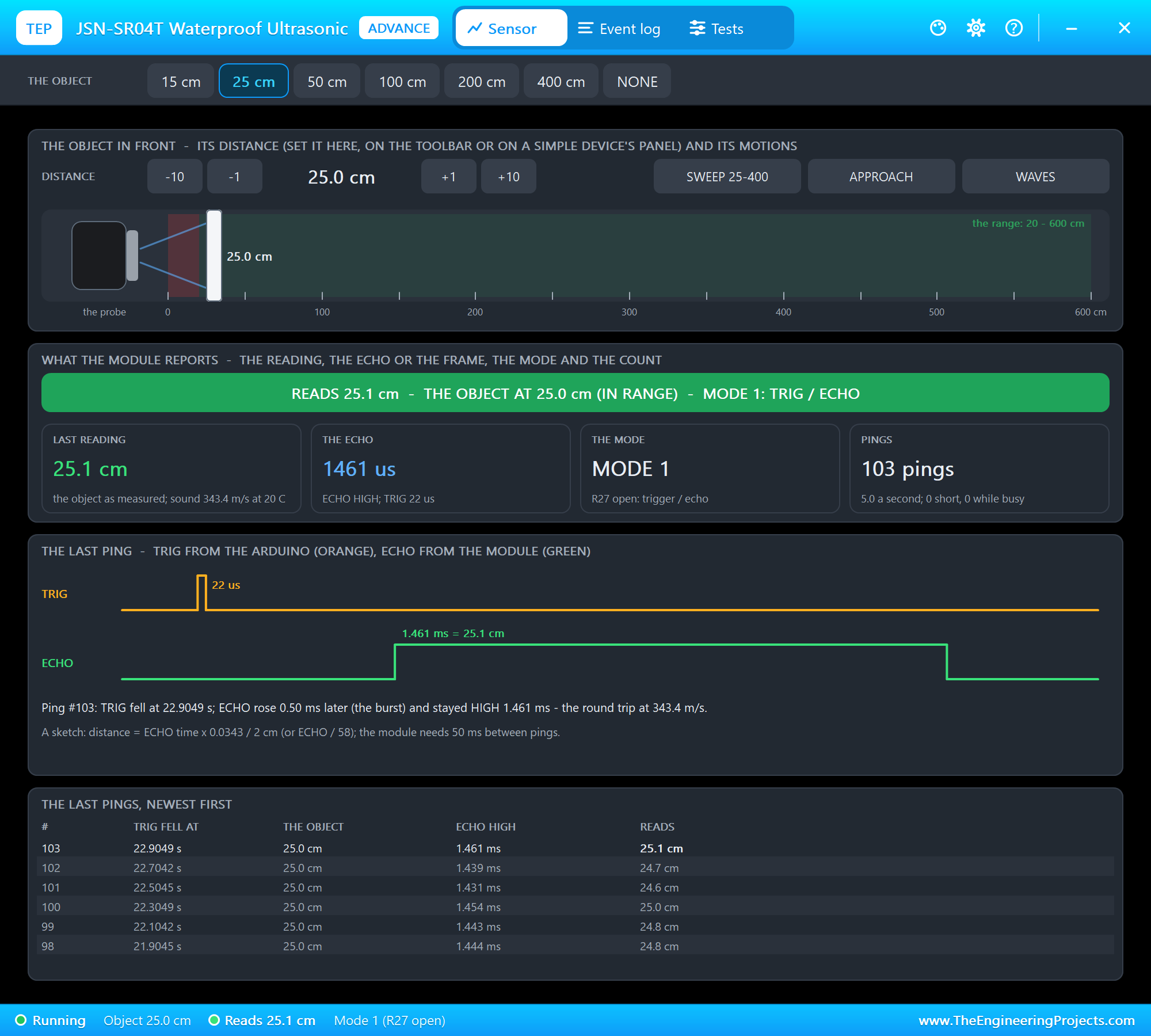
On the JSN-SR04T's pop-up click 100 cm and then +10: the water is 110 cm down, about 57 %. The level has left the LOW zone, but the pump keeps running - it stops only at 90 %. The RGB LED turns amber:
Full: the Pump Stops
Click 25 cm: 100 %, FULL. The sketch stops the pump, the RGB LED turns green and the BTS7960 lets the motor coast:
OFF and AUTO from the Phone
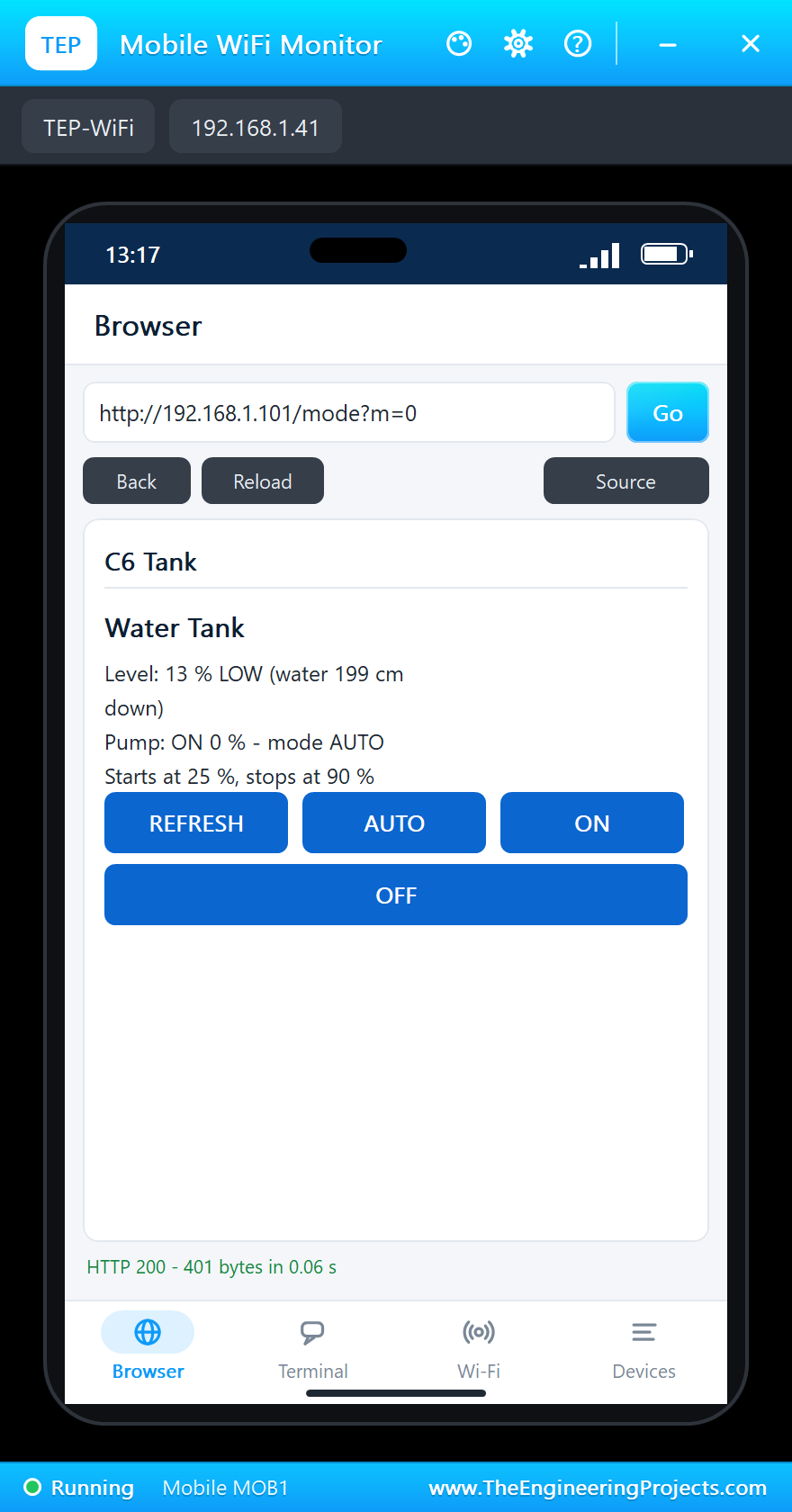
Tap OFF on the phone - say, to clean the tank. Then click 200 cm on the pop-up: the tank is LOW again, the RGB LED red, but the pump stays off. Tap AUTO and the pump starts at once:
| Step | Water down | Level | Mode | The pump | RGB LED |
|---|---|---|---|---|---|
| Run | 200 cm | about 12 %, LOW | AUTO | starts | red |
| 100 cm and +10 on the pop-up | 110 cm | about 57 % | AUTO | keeps running | amber |
| 25 cm on the pop-up | 25 cm | 100 %, FULL | AUTO | stops | green |
| OFF from the phone, 200 cm | 200 cm | about 12 %, LOW | OFF | stays off | red |
| AUTO from the phone | 200 cm | about 12 %, LOW | AUTO | starts | red |
The built-in serial monitor, in the look of our TEP Serial Monitor Advance for Proteus, logs every change and a status line every 2 s:
Tank 58 % OK (water 109 cm down)  pump ON 100 %  mode AUTO
Tank 57 % OK (water 110 cm down)  pump ON 100 %  mode AUTO
Pump STOP (tank full) - tank at 100 %
Tank 100 % FULL (water 24 cm down)  pump OFF  mode AUTO
Mode OFF (from the web page)
Tank 100 % FULL (water 24 cm down)  pump OFF  mode OFF
Tank 13 % LOW (water 199 cm down)  pump OFF  mode OFF
Mode AUTO (from the web page)
Pump START (tank low) - tank at 13 %
Tank 13 % LOW (water 199 cm down)  pump ON 100 %  mode AUTO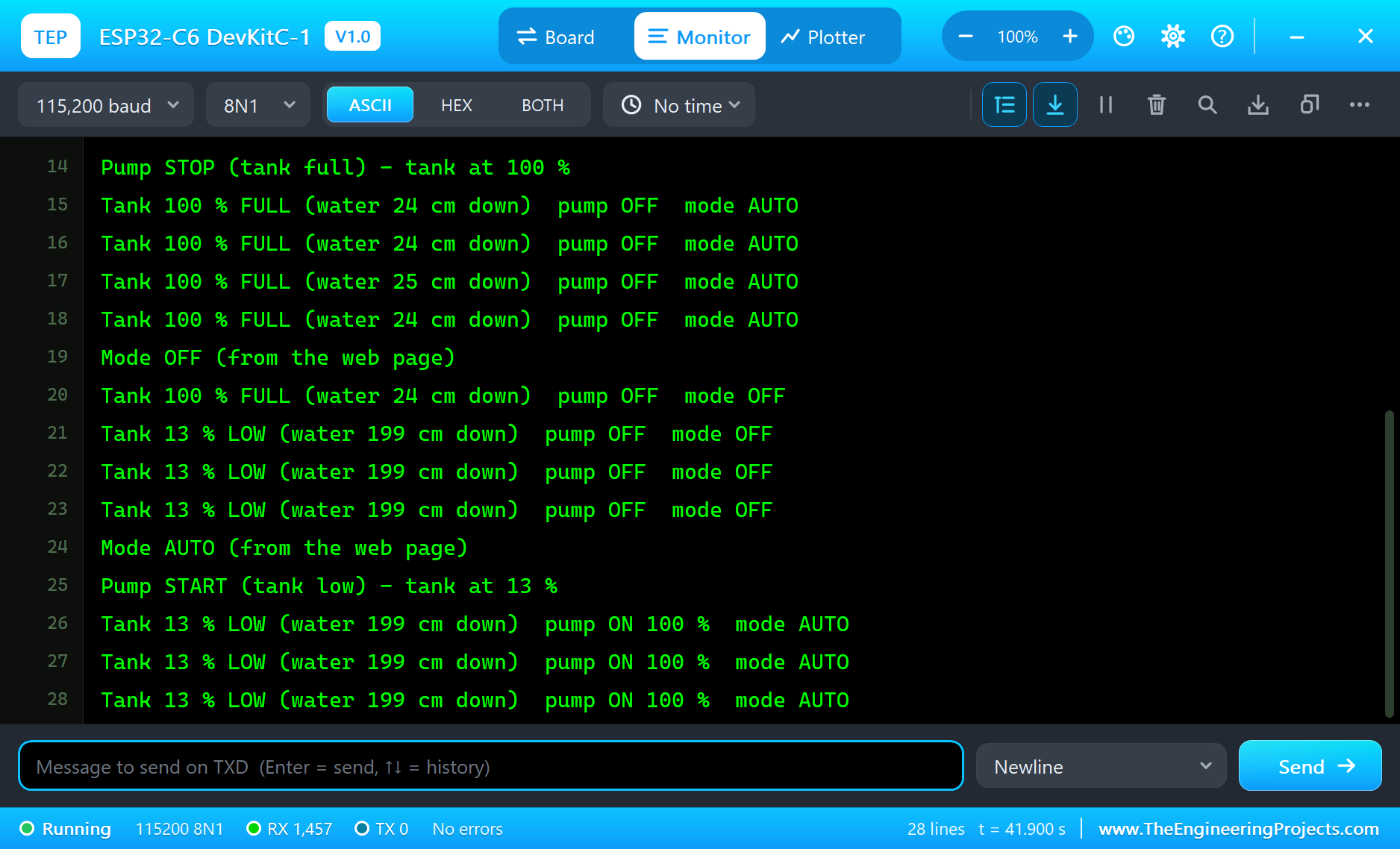
Try It Yourself
- Click NONE on the JSN-SR04T's pop-up: no echo - the pump stops and the RGB LED turns purple.
- Press the board's BOOT button: the mode switches between AUTO and OFF.
- Tap ON with the tank half full: the pump runs until FULL, then the mode returns to AUTO.
- Type
STATUS,AUTO,ONorOFFin the monitor.
Ideas to Extend the Tank Controller
- Add a dry-run guard: if the level does not rise within a minute of starting, stop the pump and raise an alarm.
- Log the level every hour with NTP time and draw the day's water use on the page.
- Use the pump's current from the BTS7960's R_IS pin to spot a blocked or dry pump.
- Send the level to a home server with HTTPClient, or (on a real C6) as a Thread or Zigbee sensor.
Your Own Sketches
Write the sketch in the Arduino IDE with the board ESP32-C6 DevKitC-1 (TEP Proteus), use Sketch > Export Compiled Binary and set the board's PROGRAM property to the .hex. The same sketch compiles for a real ESP32-C6-DevKitC-1 with Espressif's "esp32" package 3.x - select "ESP32C6 Dev Module" there and upload.
Things to Know Before Using a Real ESP32-C6 DevKitC-1
- 3.3 V logic: the C6's pins are not 5 V tolerant - divide the JSN-SR04T's ECHO down to 3.3 V.
- Two USB-C ports: the UART port goes through the bridge; the USB port is the C6's own USB (GPIO12 / 13). With the USB port, enable "USB CDC On Boot" in the IDE to see Serial there.
- The pump's supply: give the BTS7960 its own 12 V supply and join the grounds; never feed the motor from the board.
- The JSN-SR04T in the tank: keep the probe clear of the inlet pipe and the walls - the sound cone is wide - and above the overflow level.
- The J5 jumper: leave it on; it is there to measure the module's current.
Properties of the ESP32-C6 DevKitC-1
| Property | What it does |
|---|---|
| PROGRAM | the sketch: a .hex from TEP Boards for Proteus (board "ESP32-C6 DevKitC-1") |
| WIFISSID, WIFIPASS | the router in range (TEP-WiFi, 12345678) |
| MONITOR, BAUD, AUTOOPEN | the built-in serial monitor: on, its baud rate (115200), open at Run |
| TIME | the clock for NTP: PC or a fixed UTC time |
Troubleshooting
- The tank shows NO ECHO: TRIG on GPIO10, ECHO on GPIO11; the sensor's 5V on the power rail.
- The pump does not turn: RPWM on GPIO3, R_EN and L_EN on GPIO2, LPWM on GND, B+ on +12V.
- The board stays off the network: the sketch's SSID and password must match WIFISSID and WIFIPASS.
- A number goes wrong above 32767: int is 16 bits in the simulation - use long.
- The page shows old values: use REFRESH; the monitors do not reload by themselves.
Limitations of the Simulation
- Your sketch gets 8 KB of RAM in the simulation and runs slower than on the C6's 160 MHz RISC-V core with 512 KB.
- Wi-Fi 6 features, Bluetooth LE, Thread / Zigbee, the low-power core, the native USB and Serial1 are not modelled.
- The router, the addresses and the windows are TEP additions.
- ESP32-C6 and ESP32-C6-DevKitC-1 are names of Espressif Systems; this library is not made or endorsed by Espressif or by Labcenter.
- Tested in Proteus 8.5 in October 2026 (the demo as shipped, about 44 s of simulation). Proteus 7 is not supported.
So, that was all about the ESP32-C6 DevKitC-1 Library for Proteus. I hope it helps you build and test your ESP32-C6 projects before you touch the hardware - the sensor, the motor driver, the RGB LED and the web page in one simulation. If you have any questions, ask in the comments and I will help you out. Till the next tutorial, take care and have fun!

Comments
0