


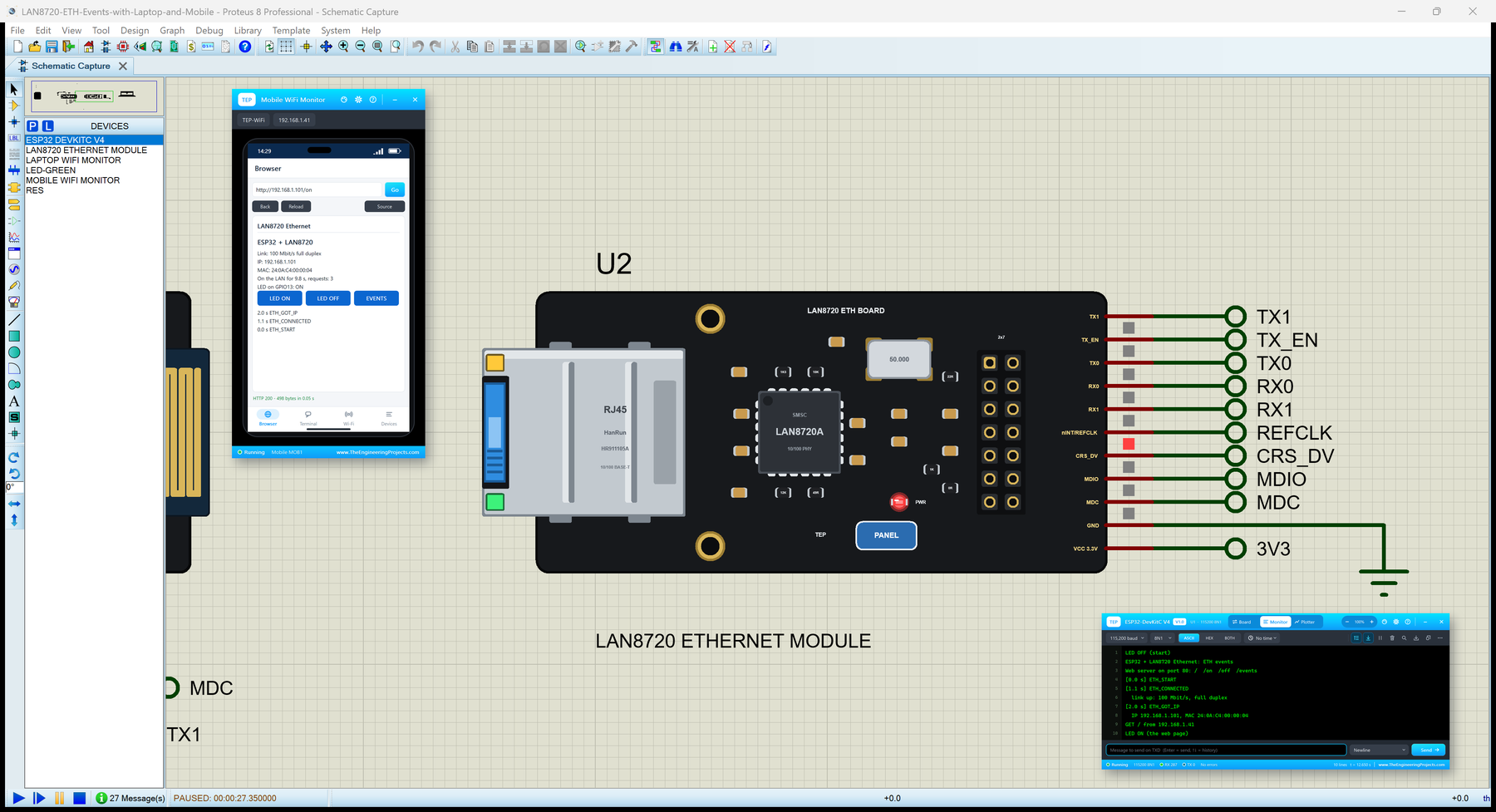
LAN8720 Ethernet Module Library for Proteus: ESP32 Wired Ethernet


Hello friends, I hope you all are doing great. Today, I am going to share the LAN8720 Ethernet Module Library for Proteus. The LAN8720 module is the cheapest way to give an ESP32 a wired network: a small board with a Microchip LAN8720A Ethernet PHY, a 50 MHz oscillator and an RJ45 jack. The ESP32 already has an Ethernet controller inside, so the module only connects that controller to the cable, and your sketch uses the ETH library instead of WiFi.
LAN8720 Ethernet Module Library for Proteus
Latest version: V1.0 (October 2026, this tutorial)
Helping Tools
- Laptop WiFi Monitor: a laptop on the Wi-Fi of your design: a browser, a TCP / UDP terminal and ping
- Mobile WiFi Monitor: a smartphone that opens the pages of your ESP32 and sends it commands
- Serial Monitor Advance: a serial terminal window for the UART of your board
This is the thirty-fifth library of our Wi-Fi / Ethernet series and the eighth of its Ethernet group, and the first one for the ESP32 boards. In Proteus it works with our ESP32 boards: ETH.begin() finds the module by its wiring, the ETH events arrive as on a real ESP32, and the demo shows them on a web page for our Laptop WiFi Monitor and Mobile WiFi Monitor - with the cable pulled out and plugged back in.
NOTICE: the PANEL pad, the panel and the virtual router are TEP additions. The ESP32 board in Proteus runs your sketch on a hidden ATmega2560 (Proteus has no ESP32 model), so the sketch is compiled with our free TEP Boards for Proteus add-on (included). Your feedback is the fuel that keeps us going, so please tell us what you think in the comments below or in the LAN8720 Ethernet Module board of our forum. And if our free libraries help you, you can buy us a coffee. So, let's get started with the LAN8720 Ethernet Module Library for Proteus:
What is the LAN8720 Ethernet Module?
An Ethernet port needs two parts: a MAC, which builds and checks the frames, and a PHY, which turns them into signals on the cable. Chips like the W5500 or the ENC28J60 have both and talk to a microcontroller over SPI. The ESP32 is different: its Ethernet MAC is built in, and it only needs a PHY. The LAN8720A from Microchip is that PHY - a 10/100 Mbit/s transceiver that talks to the ESP32 over RMII (the Reduced Media Independent Interface).
The LAN8720 module puts the chip on a small board with everything it needs: the 50 MHz oscillator that clocks the RMII, an RJ45 MagJack with its transformer and two LEDs, a few resistors and capacitors, and a 2x7 header. It is about 56 x 27 mm - roughly the size of an ESP32-DevKitC - and runs from 3.3 V. Many makers sell it, often as a "LAN8720 ETH Board".
| Real LAN8720 module | This library in Proteus | |
|---|---|---|
| Chip | Microchip LAN8720A, 10/100 PHY | the module as one part, with the LAN8720A as the ETH driver sees it |
| Interface | RMII to the ESP32's MAC, MDC / MDIO | the same pins, checked by ETH.begin() |
| Clock | 50 MHz oscillator to the ESP32's GPIO0 | nINT/REFCLK must be wired to GPIO0 |
| ESP32 library | ETH (Arduino-ESP32 core) | ETH in our TEP Boards for Proteus add-on 1.14.0 |
| Network | an RJ45 cable to your router | a virtual cable to our router, shared with our Wi-Fi parts |
| LEDs | link / activity, speed | LINK / ACT, 100M and a PWR LED, all working |
RMII: Seven Wires and a Clock
RMII moves the frames two bits at a time. The ESP32 sends on TX_EN, TX0 and TX1 (GPIO21, GPIO19 and GPIO22) and receives on RX0, RX1 and CRS_DV (GPIO25, GPIO26 and GPIO27). These pins are fixed inside the ESP32 - you cannot move them. The 50 MHz reference clock times them all; on this module it comes from the module's own oscillator, out of the nINT/REFCLK pin and into the ESP32's GPIO0. In the ETH library that is ETH_CLOCK_GPIO0_IN.
Two more wires form the management bus: MDC (the clock) and MDIO (the data). Through them the driver reads the PHY's registers - its identity, the link, the speed. They can go to any free GPIO; the usual choice is GPIO23 and GPIO18, the defaults of the ETH library.
Why GPIO0 Matters
GPIO0 is the clock input, so the ESP32 board must have GPIO0 on its header. Our ESP32-DevKitC V4 Library for Proteus has it, so the demo uses that board; the 30-pin ESP32 DevKit V1 does not bring GPIO0 out. On a real board, GPIO0 is also a boot pin: a clock already running when the ESP32 starts can keep it in its download mode. That is why many designs switch the oscillator on only after the boot, with a GPIO given to the library as ETH_PHY_POWER.
The PHY Address
Several PHYs can share one MDC / MDIO bus, so each has an address. The LAN8720A takes 0 or 1 from a pin at power-up (PHYAD0). The sketch must use the same address with ETH_PHY_ADDR, or -1 to let the driver look for it. Our module answers at 1; the PHYADDR property changes it.
Features of the LAN8720 Ethernet Module Library for Proteus
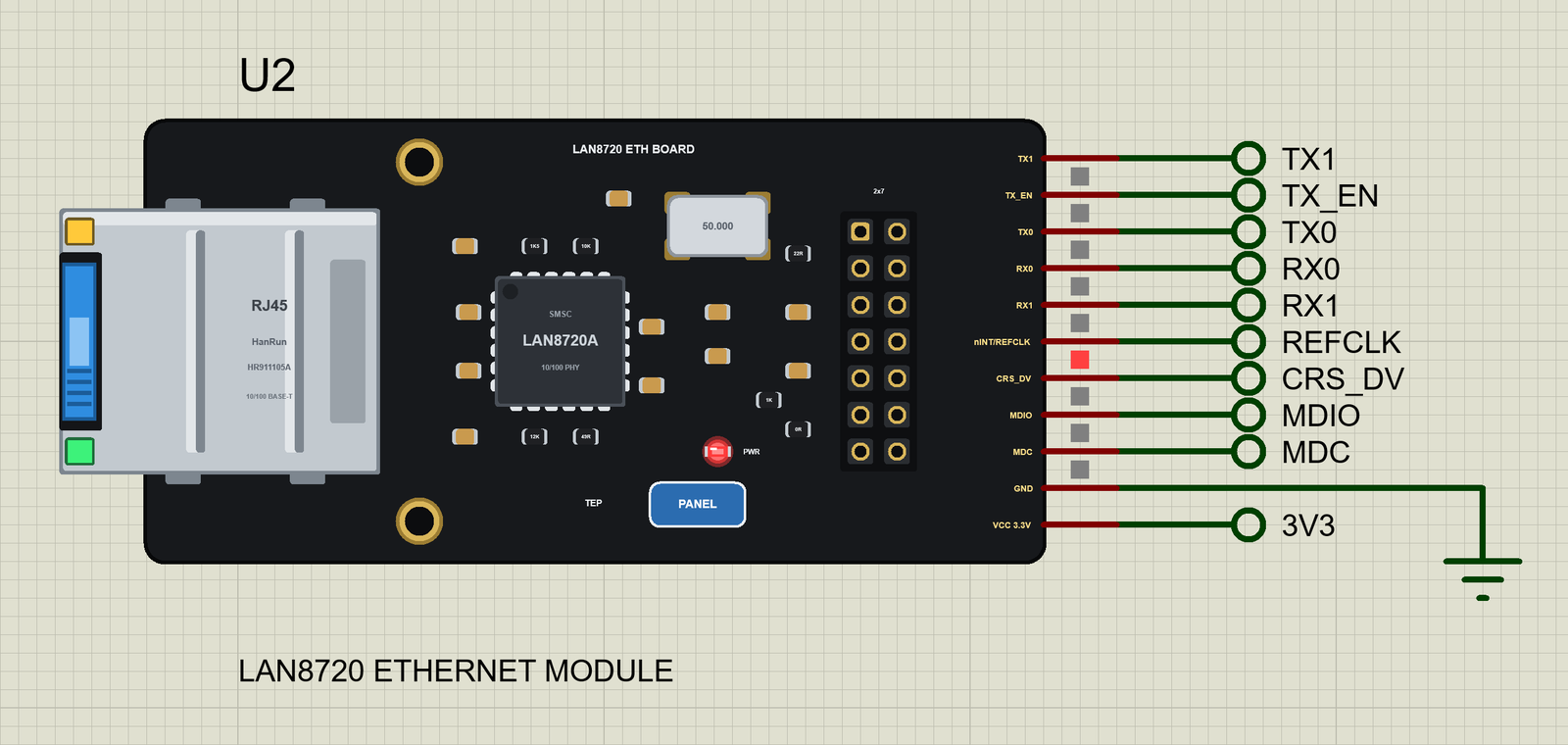
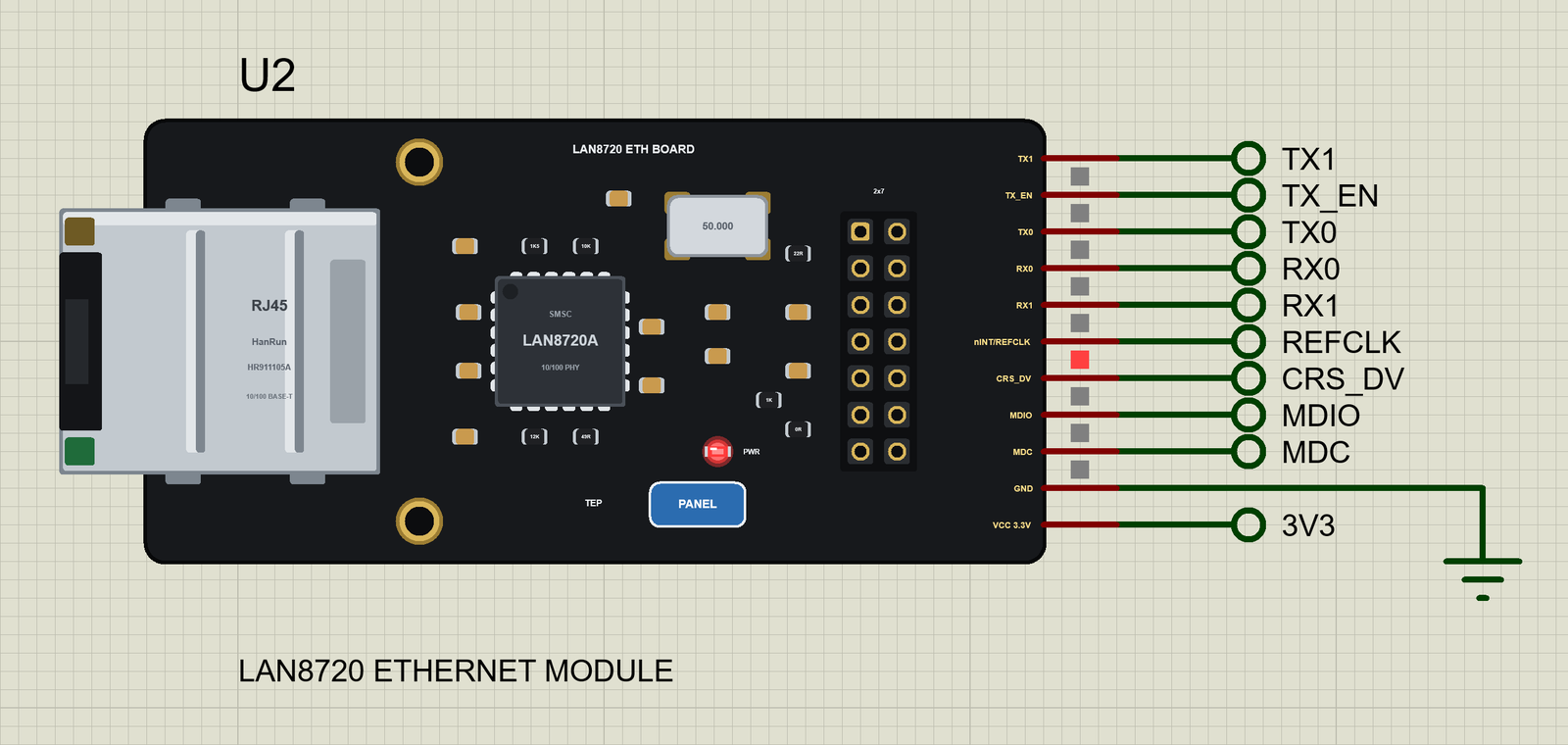
- The module as it looks: the black board, the silver RJ45 jack with its green and yellow LEDs at the left end, two mounting holes, the LAN8720A with its 50 MHz oscillator, the 2x7 header at the right end, a red PWR LED and our PANEL pad.
- ETH.begin() checks the wiring: it finds the module only when MDC and MDIO go to the sketch's pins, the module has power, the PHY address matches and the clock mode is ETH_CLOCK_GPIO0_IN - and Proteus's simulation log says what is wrong.
- The ETH events: ETH_START, ETH_CONNECTED, ETH_GOT_IP, ETH_DISCONNECTED, ETH_LOST_IP and ETH_STOP reach
WiFi.onEvent()orNetwork.onEvent()handlers, as on a real ESP32. - The ETH library: both the core 2.x and 3.x forms of
ETH.begin(),ETH.config(),localIP(),macAddress(),linkUp(),linkSpeed(),fullDuplex()andsetHostname(); WiFiClient, WiFiServer, WiFiUDP and WebServer run over the cable. - Working LEDs: LINK / ACT (it blinks with the traffic), the 100 Mbit/s LED and PWR.
- The cable: pull it with a click on the jack, the CABLE property or the panel; the connections wait 20 s for it.
- Our Laptop and Mobile WiFi Monitors: a laptop and a phone with browsers on the same network - included in the package.
- Our pop-up panel: the phone, the MODULE and ETHERNET cards, an RMII page with what the ETH driver read over MDIO, a Test page, Settings and Help - with our TEP header, not a Windows title bar.
- A complete package: about 2.49 MB with the ESP32-DevKitC V4 part and the add-on, without the C++ source code of the models.
The LAN8720 Module in Proteus
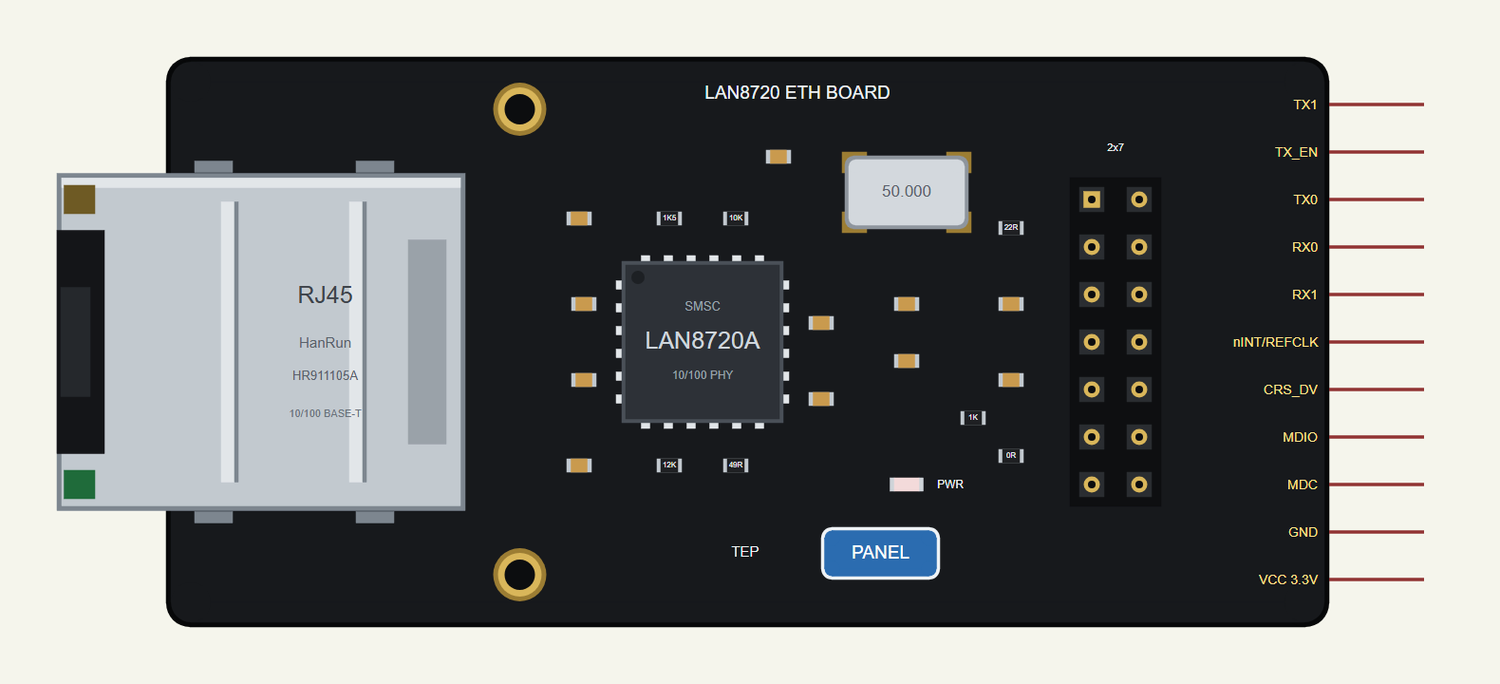
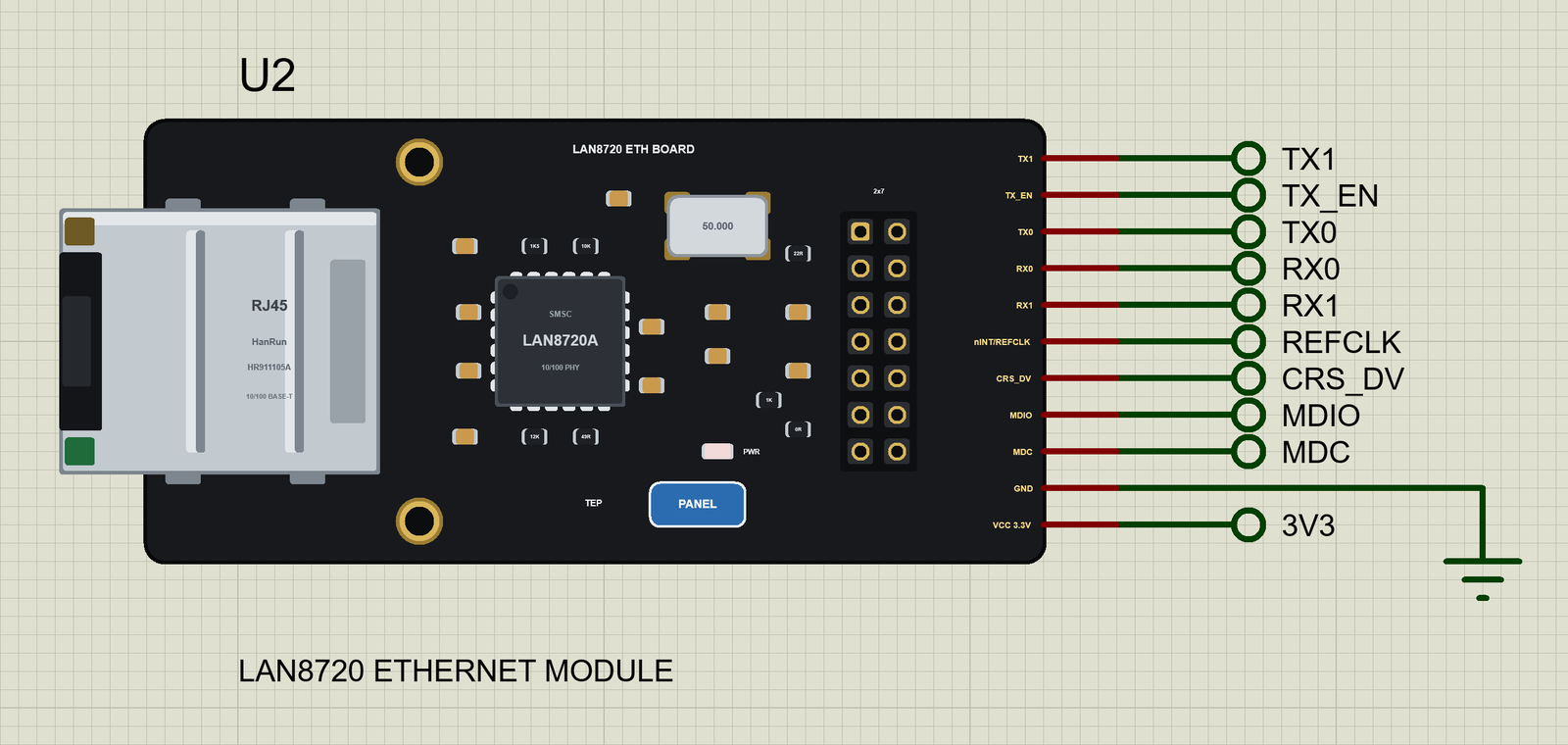
Search LAN8720 in Pick Devices; the device LAN8720 ETHERNET MODULE is in TEPLAN8720.LIB. Its pins leave the right edge in the header's order: TX1, TX_EN, TX0, RX0, RX1, nINT/REFCLK, CRS_DV, MDIO, MDC, GND and VCC 3.3V. Click the PANEL pad or the LAN8720A to open the panel and the RJ45 jack to pull or plug the cable.
Every State of the Module
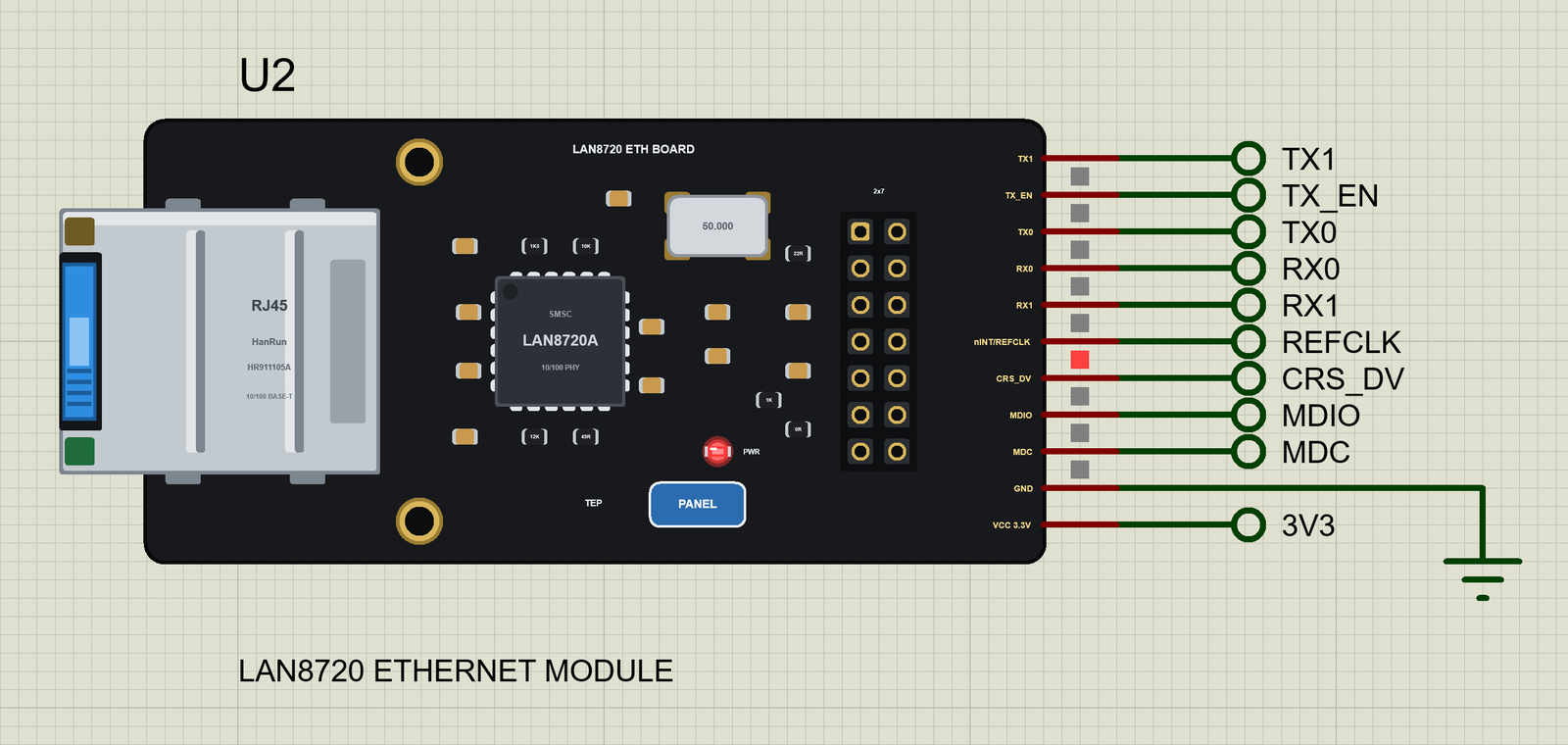
We ran the demo and paused the simulation for each picture. As soon as the sketch calls ETH.begin(), the module is found, the cable's plug appears and the PWR LED is on; the PHY then negotiates the link:
Download LAN8720 Ethernet Module Library for Proteus
Click the button below to download LAN8720-Ethernet-Module-Library-for-Proteus-v1.0.zip (about 2.49 MB, without the C++ source code of the models):
LAN8720 Ethernet Module Library for Proteus V1.0- README.txt: the device, installation, the demo, the pins, the properties, troubleshooting and the limits.
- Proteus Library Files:
TEPLAN8720.LIB(the module),TEPESP32DEVKITC.LIB(our ESP32-DevKitC V4),TEPLAPTOP.LIBandTEPMOBILE.LIB(our Laptop and Mobile WiFi Monitors). - Proteus Model Files:
TEPNET.DLL(the module, the ESP32 boards, the two monitors and the network). - Proteus Simulation: the demo project, its HEX file and a copy of the DLL.
- Arduino Code: the demo sketch and the TEP Boards for Proteus add-on 1.14.0 for the Arduino IDE, with the ETH library.
No Proteus yet? Read How to Download and Install Proteus 7 and 8. New to libraries? Follow How to Install a New Library in Proteus.
How to Install LAN8720 Ethernet Module Library for Proteus
- Close Proteus and extract the whole zip file, for example to your Desktop.
- Copy the four files from Proteus Library Files into the LIBRARY folder of Proteus (usually
C:\Program Files (x86)\Labcenter Electronics\Proteus 8 Professional\LIBRARY). - Copy
TEPNET.DLLfrom Proteus Model Files into the MODELS folder - replace older copies (this TEPNET.DLL is the first one with the LAN8720 and Ethernet for the ESP32 boards, and it still runs every part of the series). - Delete
TEPLAN8720.IDX,TEPESP32DEVKITC.IDX,TEPLAPTOP.IDXandTEPMOBILE.IDXfrom the LIBRARY folder if they are there. - Start Proteus, press P and search for LAN8720.
For your own sketches, copy the hardware folder from Arduino Code\TEP Boards for Proteus into your sketchbook folder (Documents\Arduino\hardware\tep\avr\boards.txt is the result) and replace any older copy - version 1.14.0 is the first one with the ETH library and the events. Restart the IDE, choose Tools > Board > TEP Boards for Proteus > ESP32-DevKitC V4 (TEP Proteus) and use Sketch > Export Compiled Binary. Double-click the board in Proteus and set its Program File to the HEX (see How to get the HEX file from Arduino).
Demo: ETH Events and a Web Page over the Cable
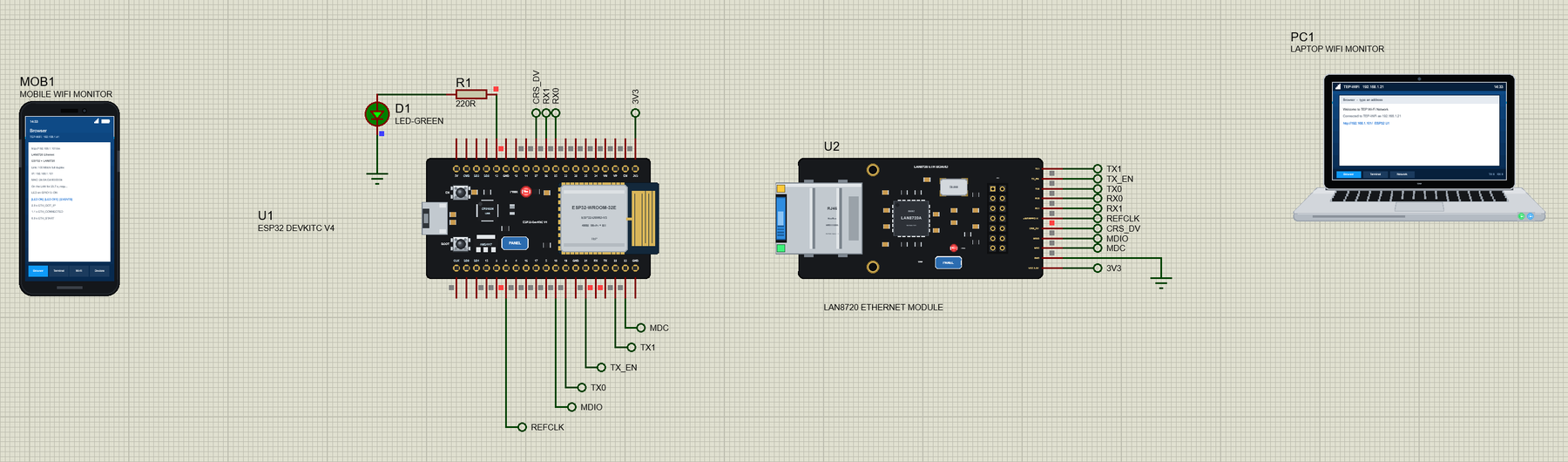
Open LAN8720-ETH-Events-with-Laptop-and-Mobile.pdsprj. The ESP32-DevKitC V4 (U1) is on the left, the LAN8720 module (U2) in the middle, the phone (MOB1) and the laptop (PC1) at the sides - they are on the router's network, like the real ones, so they have no wires.
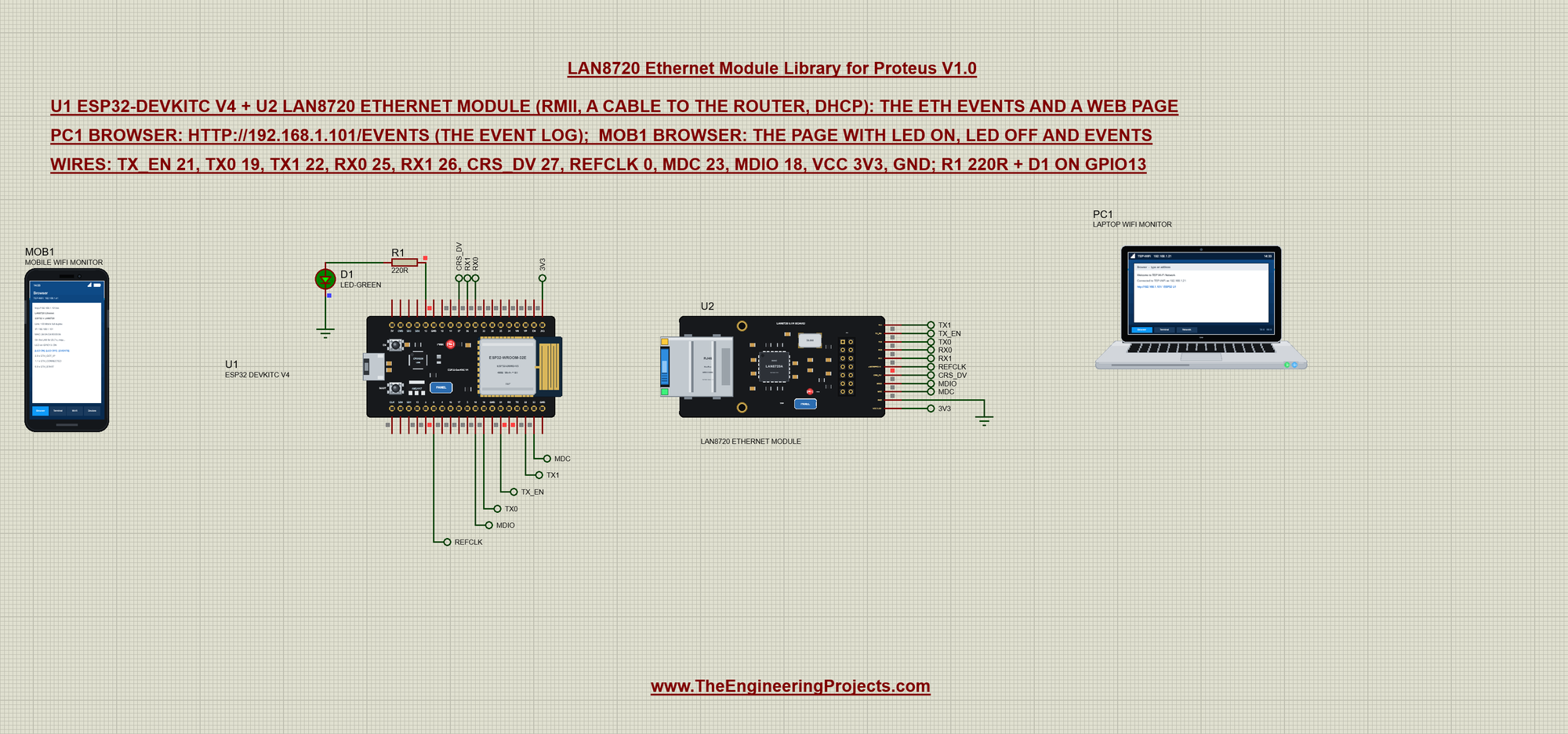
The module is wired to the board with net labels - a label on the board's pin and the same label on the module's pin are one wire. An LED with a 220R resistor sits on GPIO13:
| ESP32-DevKitC V4 | LAN8720 module | Net label |
|---|---|---|
| GPIO21 | TX_EN | TX_EN |
| GPIO19 | TX0 | TX0 |
| GPIO22 | TX1 | TX1 |
| GPIO25 | RX0 | RX0 |
| GPIO26 | RX1 | RX1 |
| GPIO27 | CRS_DV | CRS_DV |
| GPIO0 | nINT/REFCLK | REFCLK |
| GPIO23 | MDC | MDC |
| GPIO18 | MDIO | MDIO |
| 3V3 | VCC 3.3V | 3V3 |
| - | GND | ground |
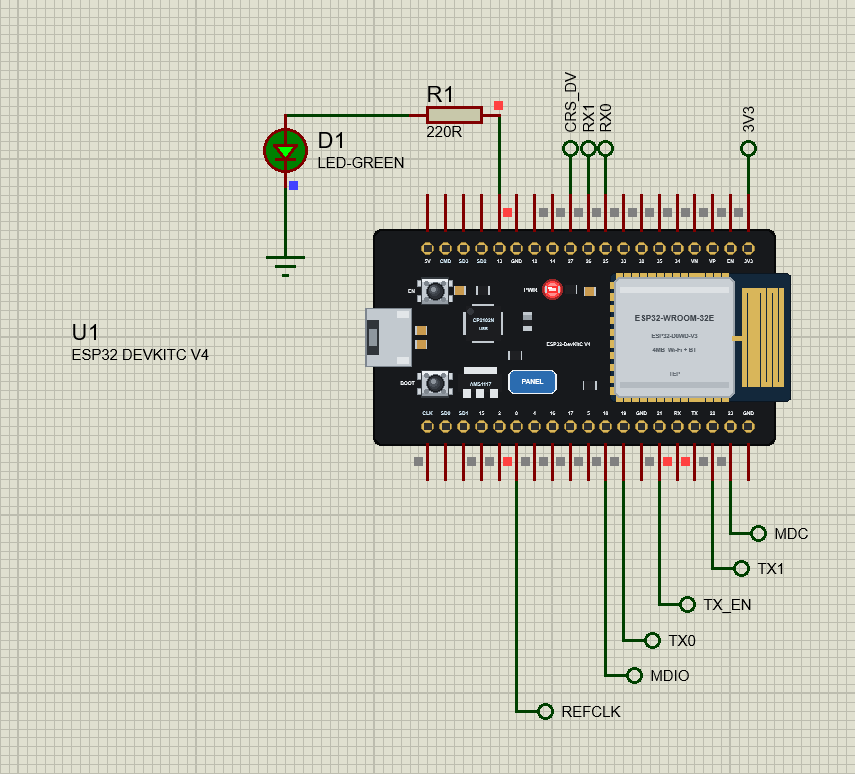
The laptop and the phone come from our Laptop WiFi Monitor Library for Proteus and Mobile WiFi Monitor Library for Proteus. In this project the laptop's home page is http://192.168.1.101/events and the phone's http://192.168.1.101/ - the address the router gives U1. The laptop is 192.168.1.21 and the phone 192.168.1.41.
The Sketch: Six Lines before ETH.h
The ETH library reads its settings from defines placed before the include - the PHY type, its address, the MDC / MDIO pins, the power pin (none here) and the clock mode:
#define ETH_PHY_TYPE  ETH_PHY_LAN8720
#define ETH_PHY_ADDR  1                  // the module's PHY address (its PHYAD0 strap)
#define ETH_PHY_MDC   23
#define ETH_PHY_MDIO  18
#define ETH_PHY_POWER -1                 // no power / oscillator enable pin
#define ETH_CLK_MODE  ETH_CLOCK_GPIO0_IN // the module's 50 MHz clock into GPIO0

#include <ETH.h>
#include <WebServer.h>
Every event is kept in a small log with its time, so the page and the monitor can show it:
struct LogLine {
  unsigned long ms;
  arduino_event_id_t id;
};
String seconds(unsigned long ms) {
return String(ms / 1000) + "." + String((ms / 100) % 10) + " s";
}The heart of the sketch is the event handler. It stores and prints each event, then does what the event asks: the host name at ETH_START (before DHCP asks for an address), the link at ETH_CONNECTED, the address and the MAC at ETH_GOT_IP:
void onEvent(arduino_event_id_t event) {
  eventLog[eventCount % LOG_SIZE] = {millis(), event};
  eventCount++;
  Serial.print("[");
  Serial.print(seconds(millis()));
  Serial.print("] ");
  Serial.println(eventName(event));
  switch (event) {
    case ARDUINO_EVENT_ETH_START:
      ETH.setHostname("esp32-lan8720");  // before DHCP asks for an address
      break;
    case ARDUINO_EVENT_ETH_CONNECTED:
      Serial.printf("  link up: %u Mbit/s, %s duplex\n", (unsigned)ETH.linkSpeed(), ETH.fullDuplex() ? "full" : "half");
      break;
    case ARDUINO_EVENT_ETH_GOT_IP:
      Serial.print("  IP ");
      Serial.print(ETH.localIP());
      Serial.print(", MAC ");
      Serial.println(ETH.macAddress());
      ethReady = true;
      readySince = millis();
      break;
    case ARDUINO_EVENT_ETH_DISCONNECTED:
      Serial.println("  no link - the cable is out");
      ethReady = false;
      break;
    case ARDUINO_EVENT_ETH_STOP:
      ethReady = false;
      break;
    default:
      break;
  }
}
setup() adds the handler first, then starts Ethernet. If the module is missing, unpowered or wired wrong, ETH.begin() returns false:
  WiFi.onEvent(onEvent);                 // (Arduino-ESP32 3.x: Network.onEvent(onEvent) does the same)
  if (!ETH.begin()) {                    // the PHY, MDC / MDIO and the clock mode of the #defines above
    Serial.println("ETH.begin() failed - check the LAN8720's wiring, its 3.3 V and ETH_PHY_ADDR");
    while (true) delay(1000);
  }
Press Run and open the board's serial monitor (click its USB socket). The events arrive one by one - the link after the PHY's auto-negotiation, the address after DHCP:
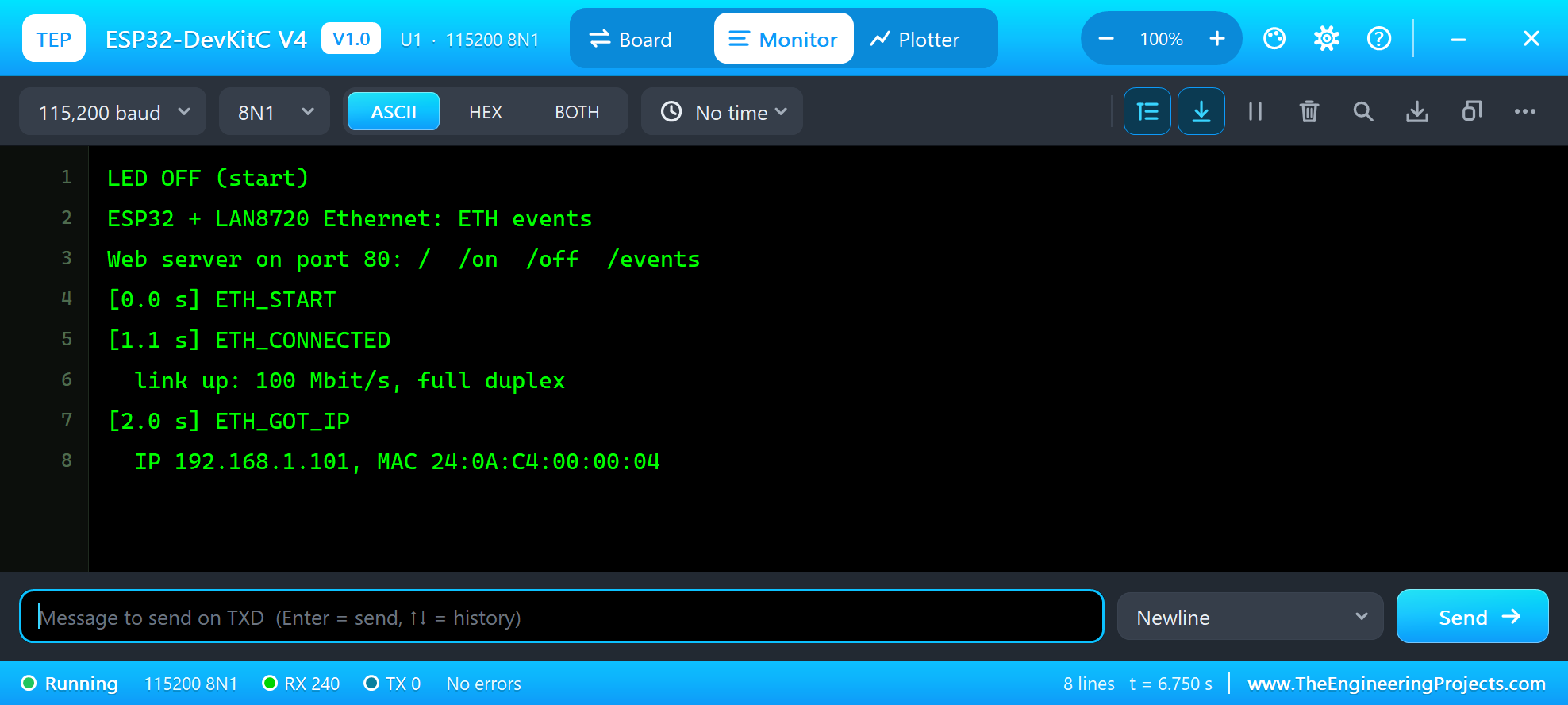
ESP32 + LAN8720 Ethernet: ETH events
Web server on port 80: /  /on  /off  /events
[0.0 s] ETH_START
[1.1 s] ETH_CONNECTED
  link up: 100 Mbit/s, full duplex
[2.0 s] ETH_GOT_IP
  IP 192.168.1.101, MAC 24:0A:C4:00:00:04
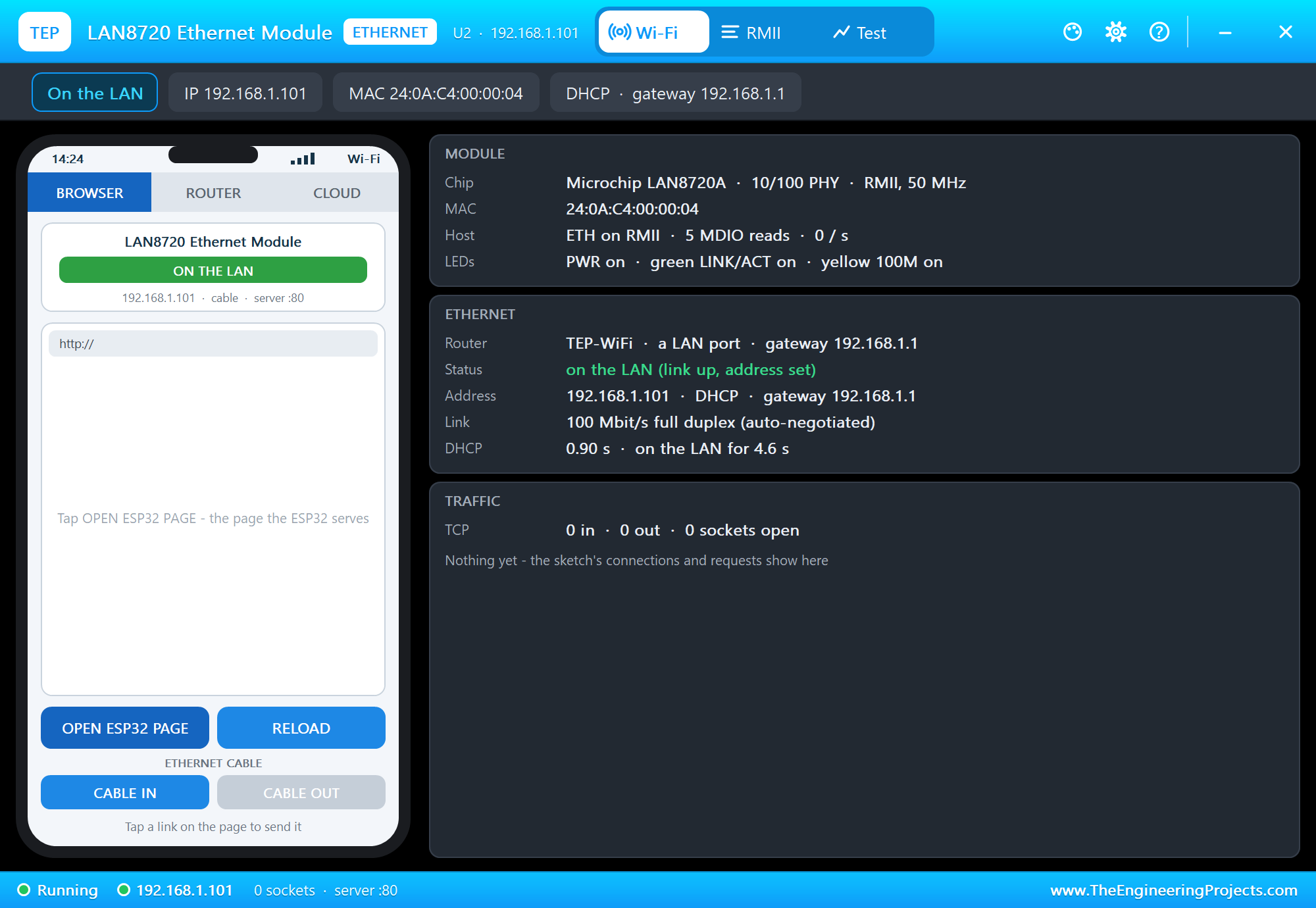
The MAC address of the Ethernet port is the ESP32's base MAC plus 3, as on a real chip. The panel opens at Run and shows the module on the LAN:
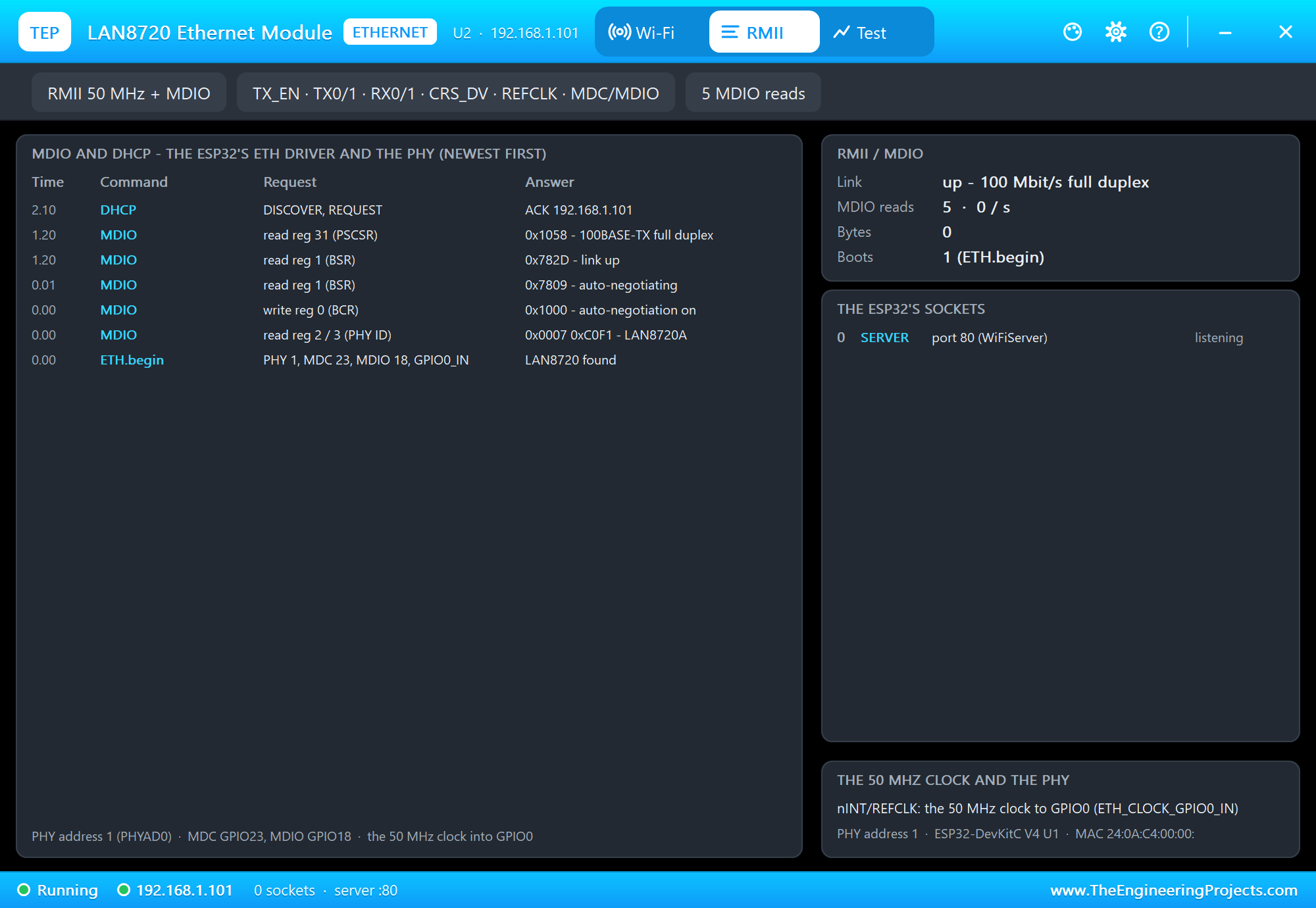
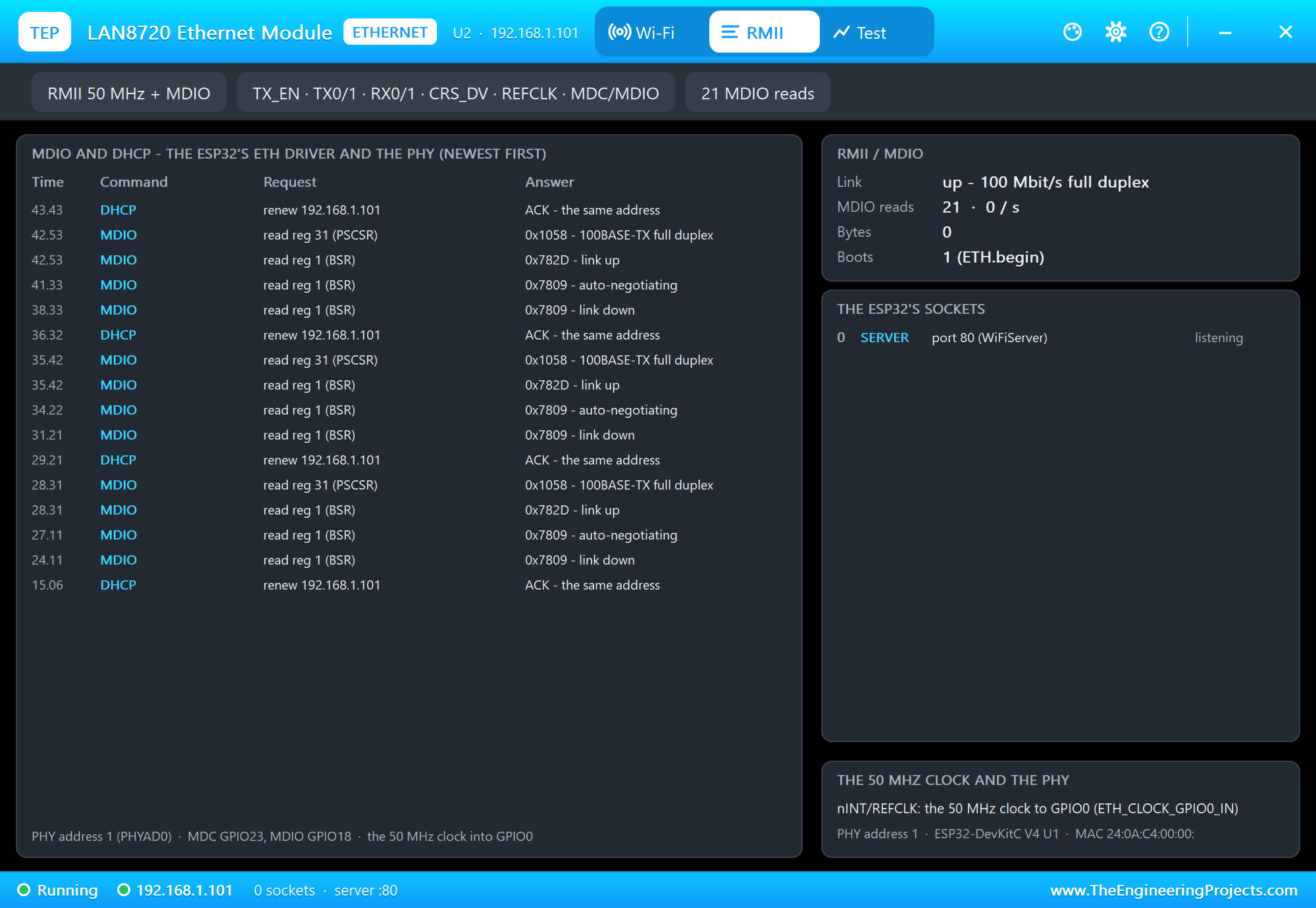
Its RMII page shows what the ESP32's ETH driver did, newest first. Read it from the bottom: ETH.begin found the LAN8720 at PHY address 1, the driver read its ID over MDIO, switched auto-negotiation on, read the link and the speed, and DHCP gave the address. The server on port 80 is listening:
The Web Page
The sketch uses the same WebServer class as on Wi-Fi - the network underneath does not matter to it:
  server.on("/", handleRoot);
  server.on("/on", handleOn);
  server.on("/off", handleOff);
  server.on("/events", handleEvents);
  server.begin();
sendPage() builds the page from the ETH library's own answers - the link, the speed, the address, the MAC:
void sendPage() {
  String h = F("<html><head><title>LAN8720 Ethernet</title></head><body><h1>ESP32 + LAN8720</h1><p>Link: ");
  if (ETH.linkUp()) {
    h += ETH.linkSpeed();
    h += ETH.fullDuplex() ? F(" Mbit/s full duplex") : F(" Mbit/s half duplex");
  } else {
    h += F("down");
  }
and adds the last three events, newest first:
  const int first = eventCount > 3 ? eventCount - 3 : 0;   // the last three events, newest first
  for (int i = eventCount - 1; i >= first; i--) {
    h += F("<p>");
    h += seconds(eventLog[i % LOG_SIZE].ms);
    h += F("  ");
    h += eventName(eventLog[i % LOG_SIZE].id);
    h += F("</p>");
  }
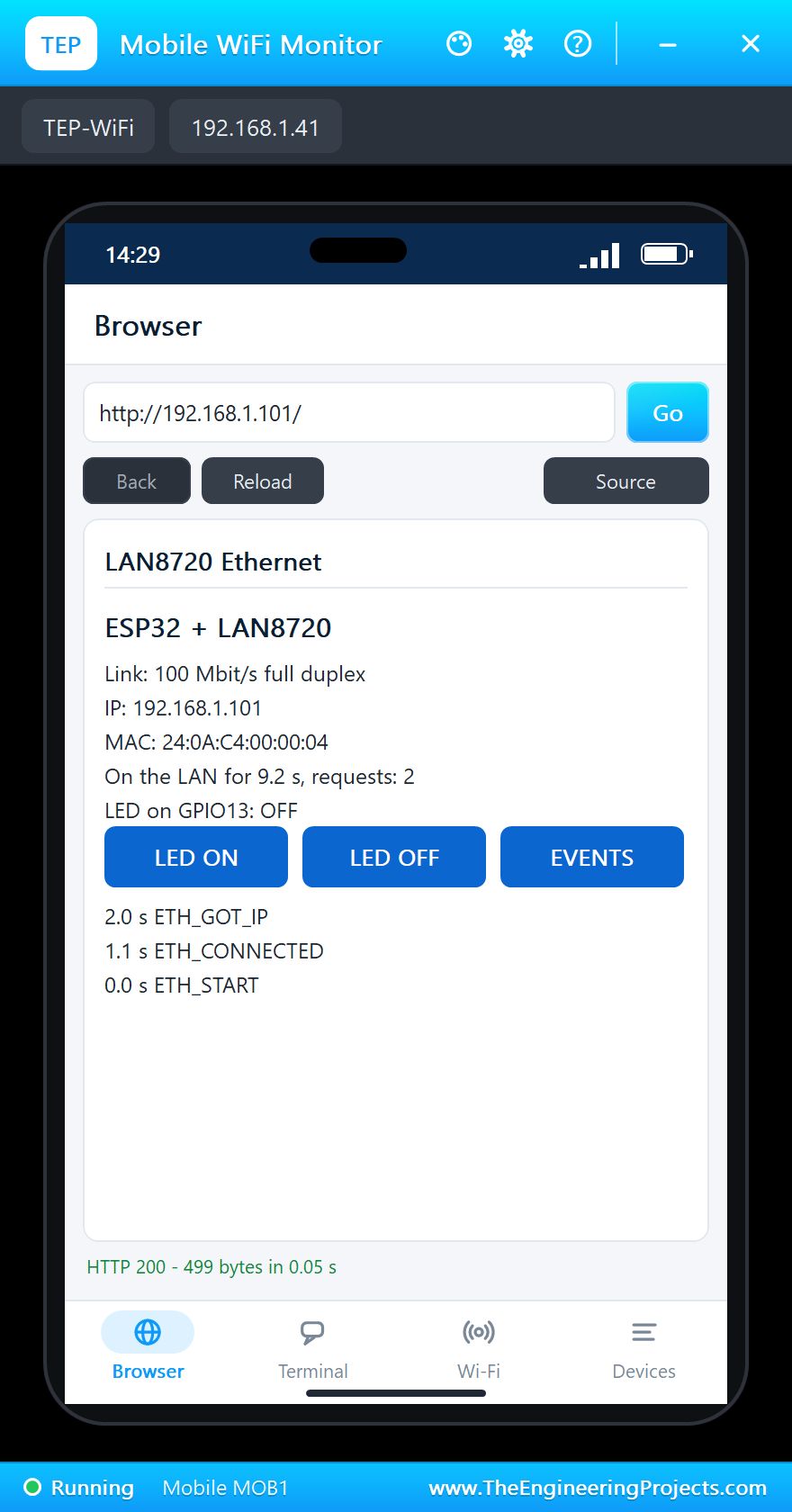
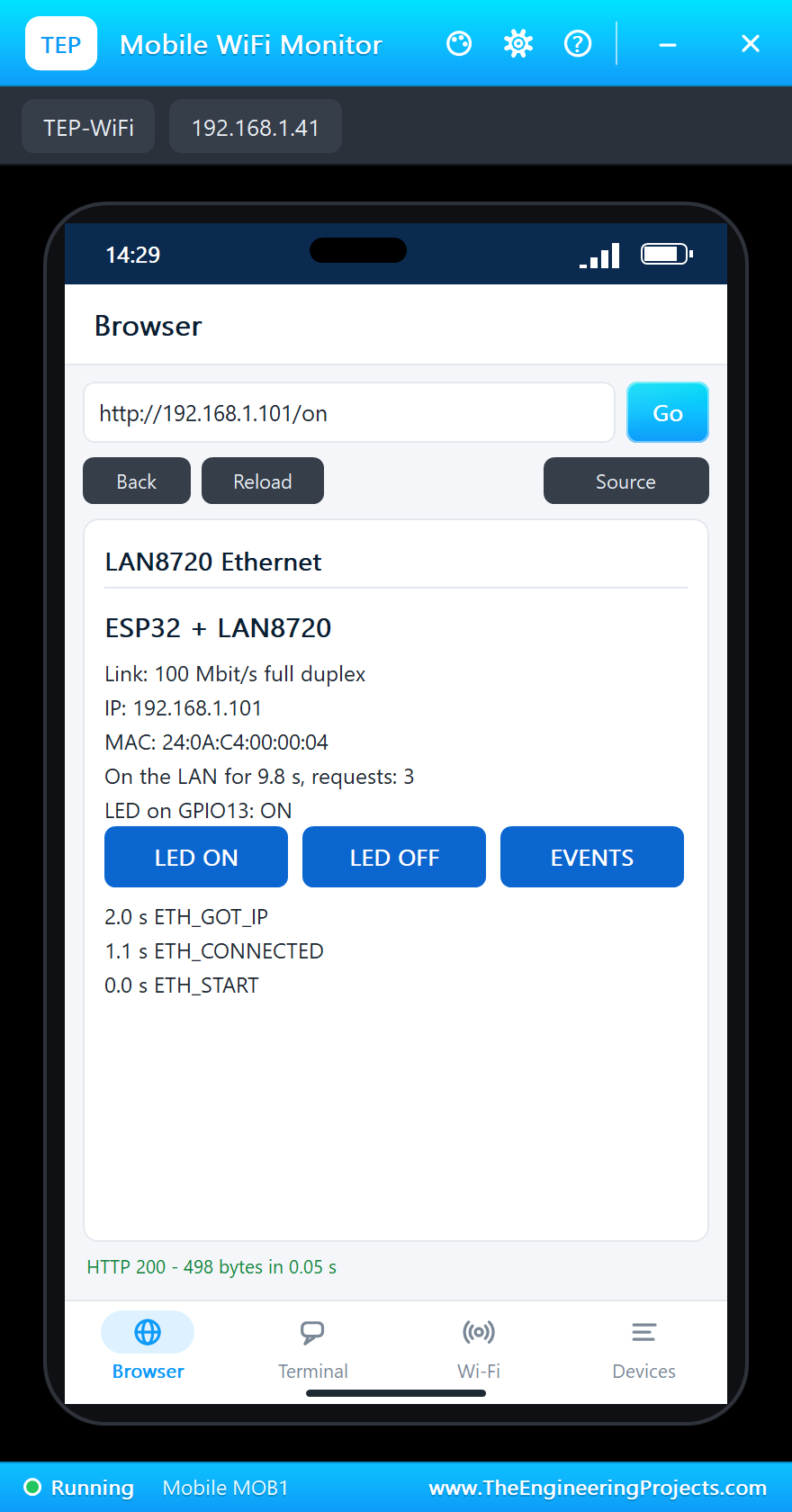
Press Go in the phone's Browser:
The LED from the Phone
/on and /off switch the LED and send the page again:
void handleOn() { requests++; setLed(true, "the web page"); sendPage(); }
void handleOff() { requests++; setLed(false, "the web page"); sendPage(); }
Tap LED ON. The page answers "LED on GPIO13: ON" and D1 lights up on the sheet:
The monitor logs the request and the LED:
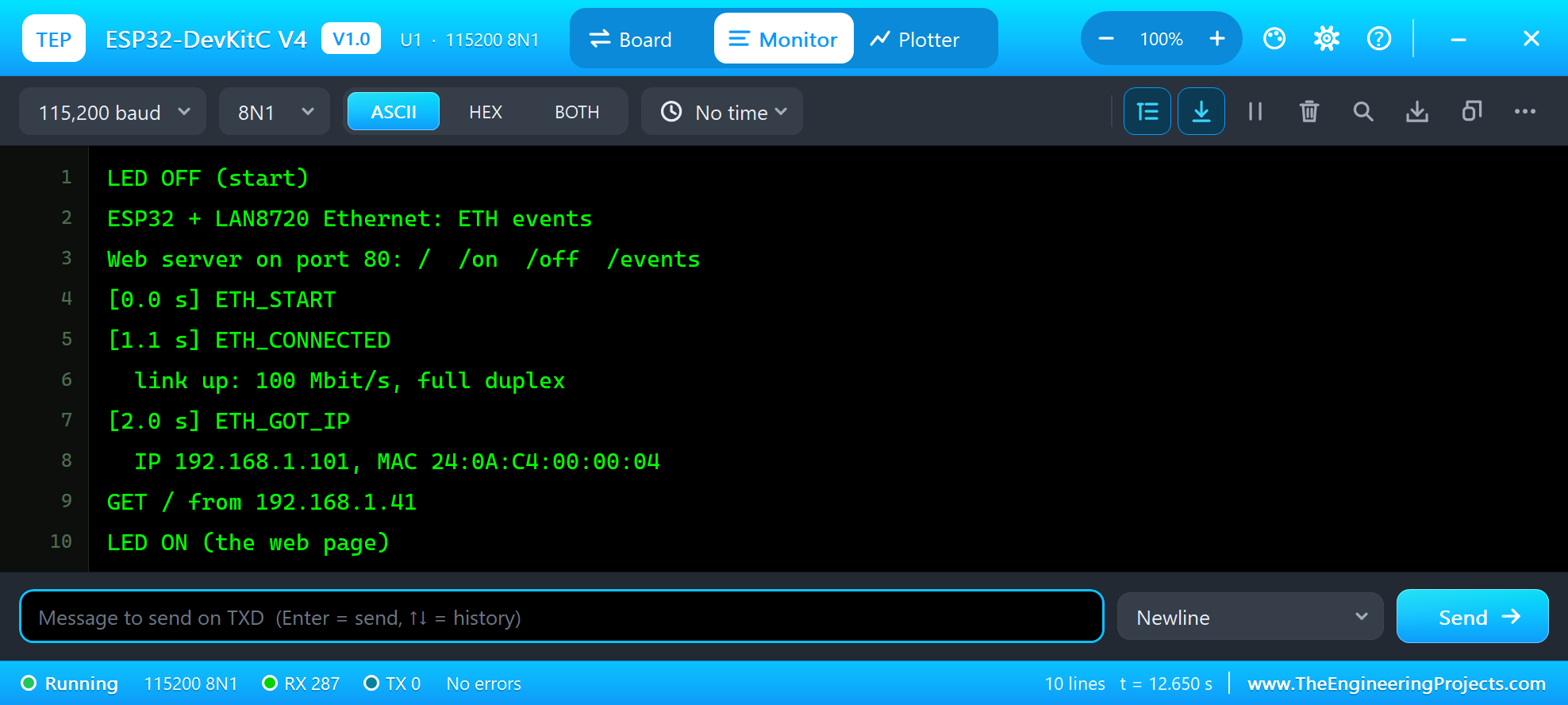
GET / from 192.168.1.41
LED ON (the web page)
The Event Log as Text
/events sends the whole log as text/plain - easy to read for a program, or for a person:
void handleEvents() {
  requests++;
  String t = F("LAN8720 ETH events (oldest first)\n");
  const int first = eventCount > LOG_SIZE ? eventCount - LOG_SIZE : 0;
  for (int i = first; i < eventCount; i++) {
    t += seconds(eventLog[i % LOG_SIZE].ms);
    t += "  ";
    t += eventName(eventLog[i % LOG_SIZE].id);
    t += "\n";
  }
  t += String(eventCount) + " events, " + (ethReady ? "on the LAN as " + ETH.localIP().toString() : String("not on the LAN")) + "\n";
  server.send(200, "text/plain", t);
}
The laptop's home page is /events, so its Go button shows the log:
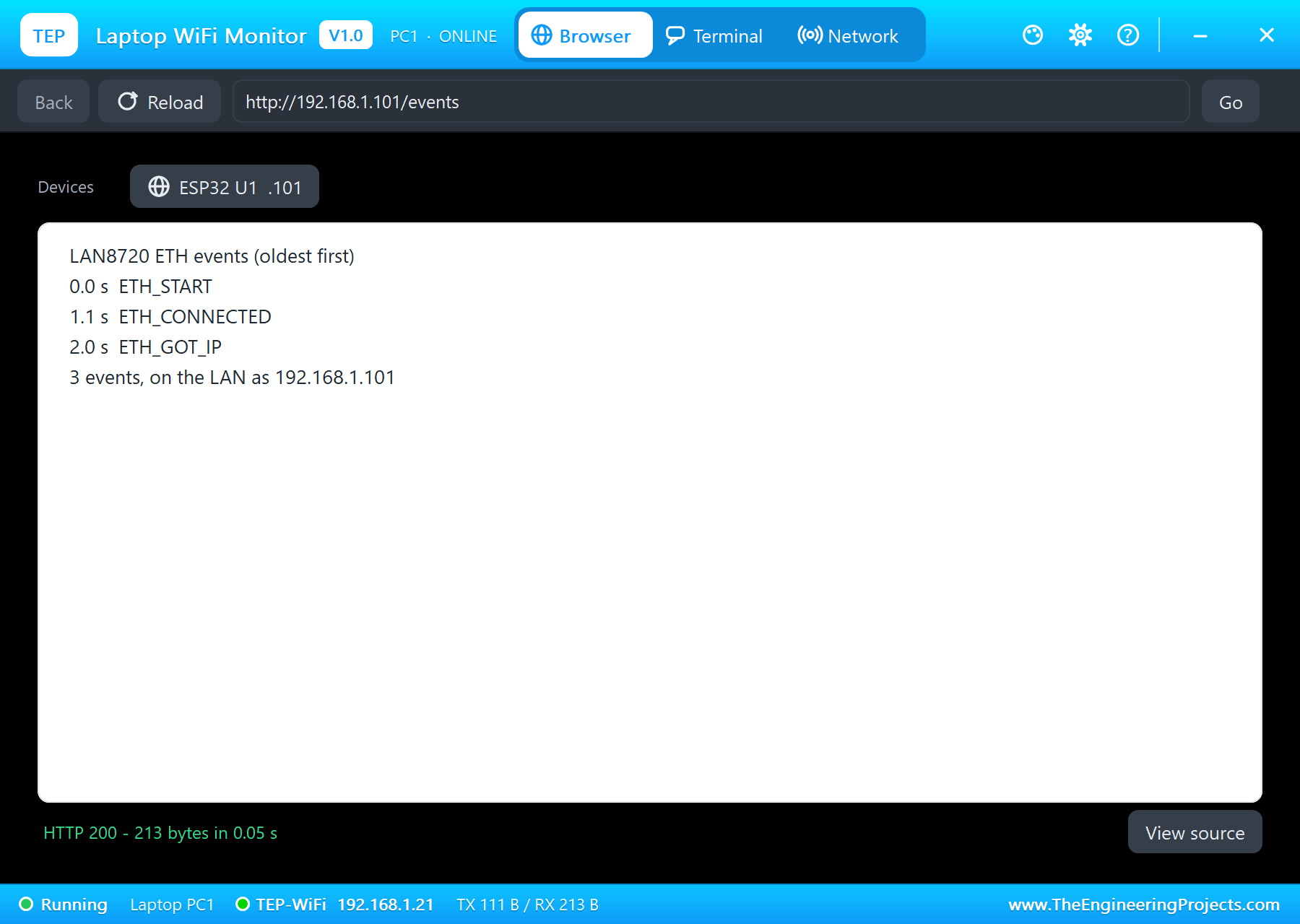
LAN8720 ETH events (oldest first)
0.0 s  ETH_START
1.1 s  ETH_CONNECTED
2.0 s  ETH_GOT_IP
3 events, on the LAN as 192.168.1.101
Pull the Cable
Now the part Wi-Fi demos cannot show. Click CABLE OUT in the panel (or the RJ45 jack). The PHY loses the link at once, both jack LEDs go dark and the sketch gets ETH_DISCONNECTED:
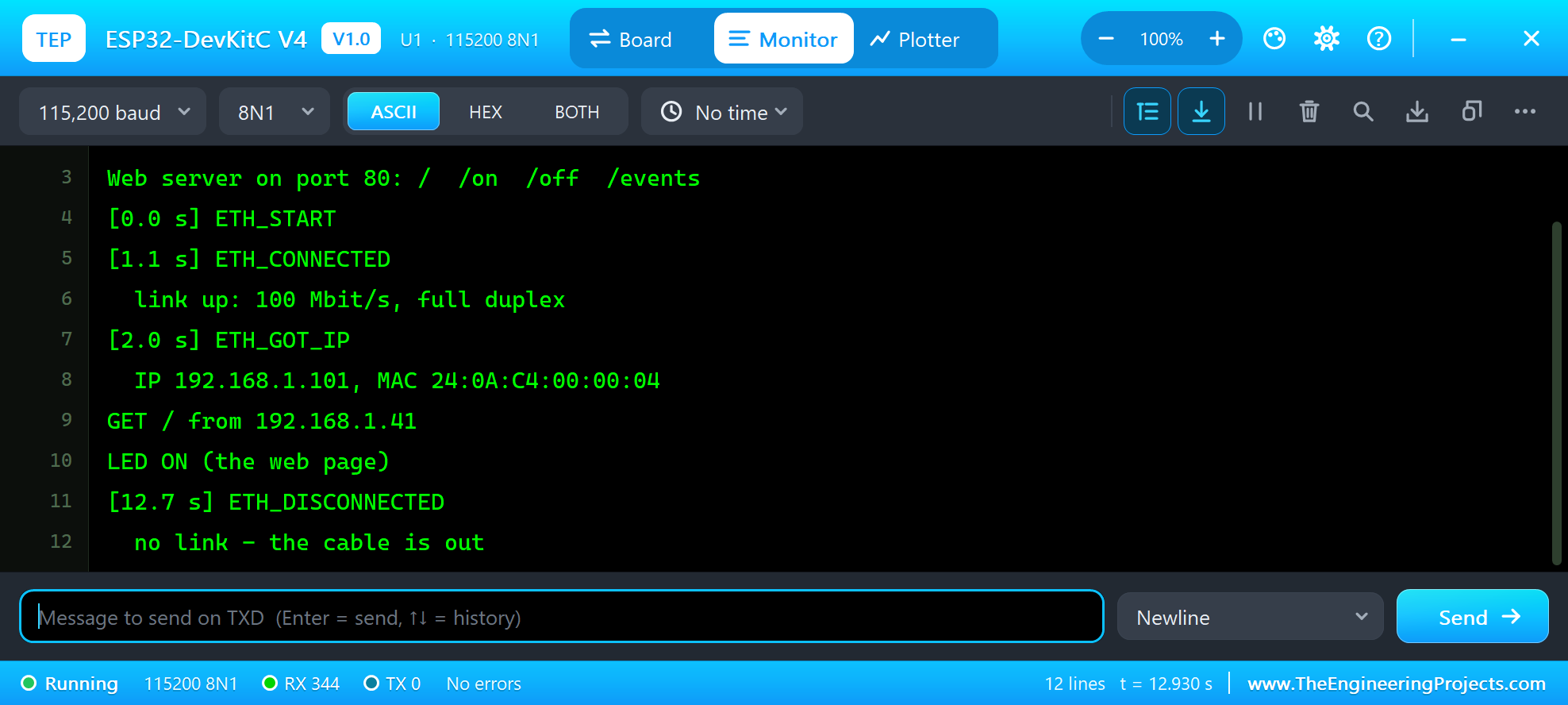
[12.7 s] ETH_DISCONNECTED
  no link - the cable is out
The address stays and the open connections wait. Put the cable back with CABLE IN: after the 1.2 s auto-negotiation comes ETH_CONNECTED, and 0.9 s later ETH_GOT_IP with the same address. If the cable stays out for more than 20 s, the connections are dropped and ETH_LOST_IP arrives. The laptop's /events now tells the whole story:
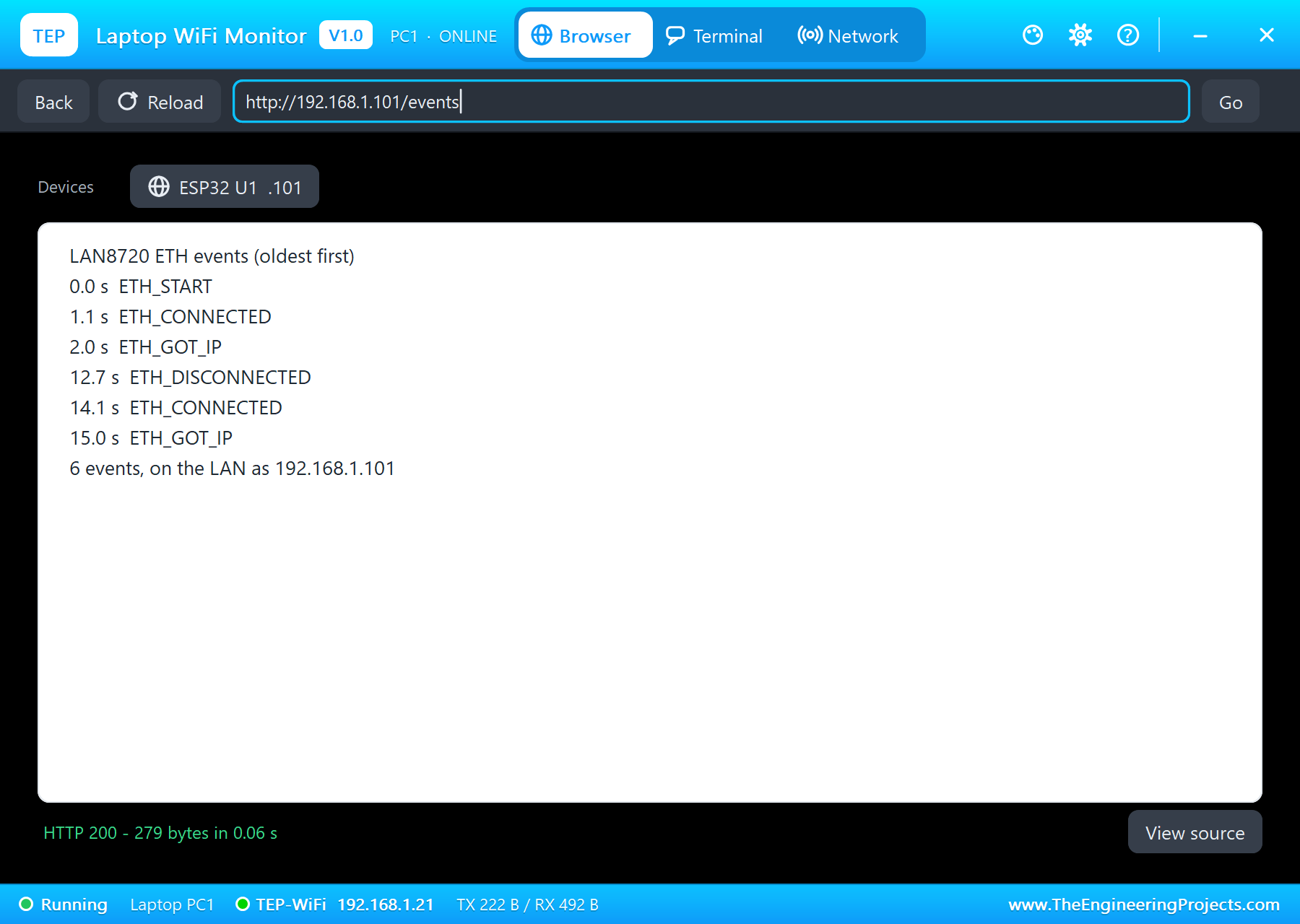
LAN8720 ETH events (oldest first)
0.0 s  ETH_START
1.1 s  ETH_CONNECTED
2.0 s  ETH_GOT_IP
12.7 s  ETH_DISCONNECTED
14.1 s  ETH_CONNECTED
15.0 s  ETH_GOT_IP
6 events, on the LAN as 192.168.1.101
The Monitor's Commands
The monitor takes STATUS (the link, the address, the gateway, the MAC, the LED and the counts), EVENTS (the log), ON, OFF and HELP. The loop only serves the web clients and the monitor; the events come by themselves:
void loop() {
  server.handleClient();
  monitor();
}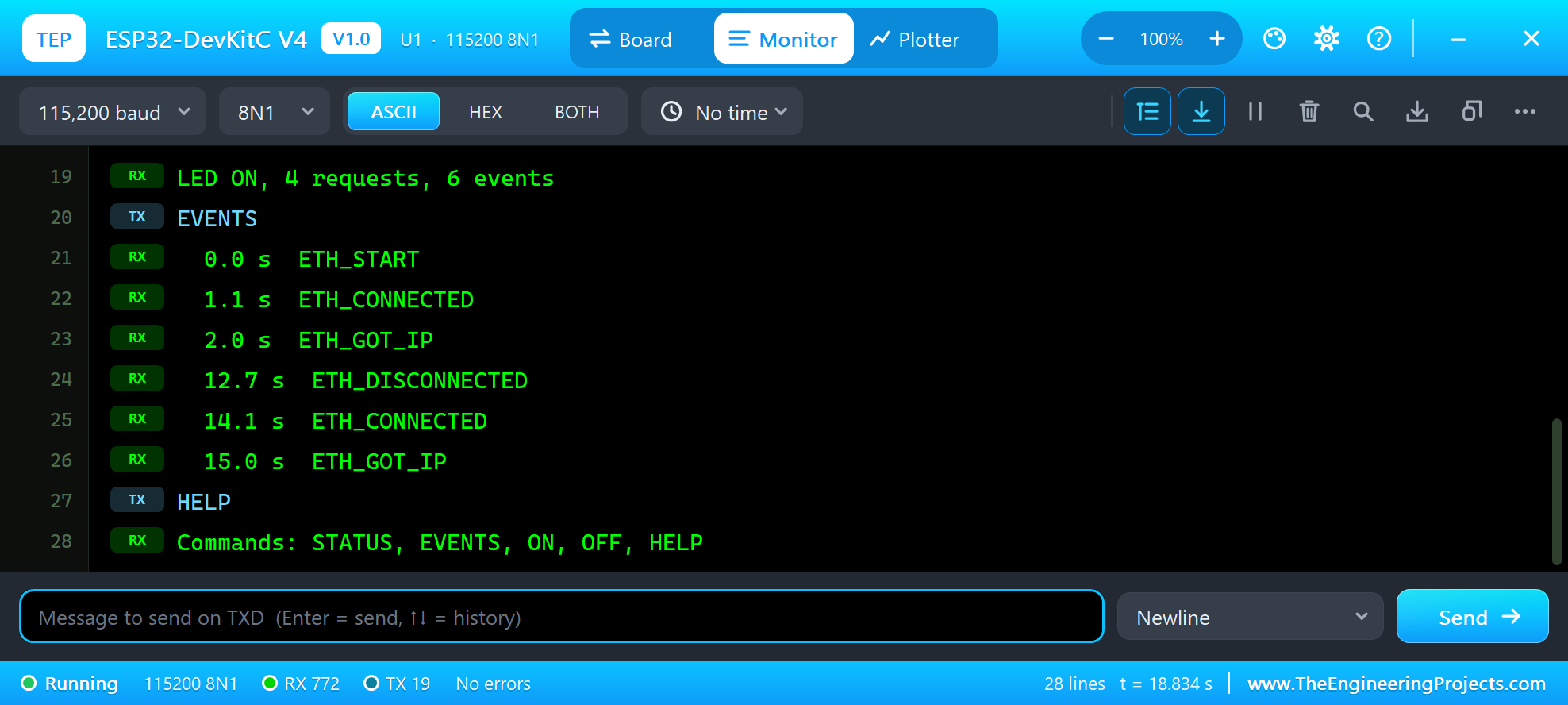
LED ON, 4 requests, 6 events
EVENTS
  0.0 s  ETH_START
  1.1 s  ETH_CONNECTED
  2.0 s  ETH_GOT_IP
  12.7 s  ETH_DISCONNECTED
  14.1 s  ETH_CONNECTED
  15.0 s  ETH_GOT_IP
HELP
Commands: STATUS, EVENTS, ON, OFF, HELP
Event names come from one small function - the same names the ESP32 core uses:
const char *eventName(arduino_event_id_t id) {
  switch (id) {
    case ARDUINO_EVENT_ETH_START: return "ETH_START";
    case ARDUINO_EVENT_ETH_STOP: return "ETH_STOP";
    case ARDUINO_EVENT_ETH_CONNECTED: return "ETH_CONNECTED";
    case ARDUINO_EVENT_ETH_DISCONNECTED: return "ETH_DISCONNECTED";
    case ARDUINO_EVENT_ETH_GOT_IP: return "ETH_GOT_IP";
    default: return "OTHER";
  }
}
The LAN8720 Panel
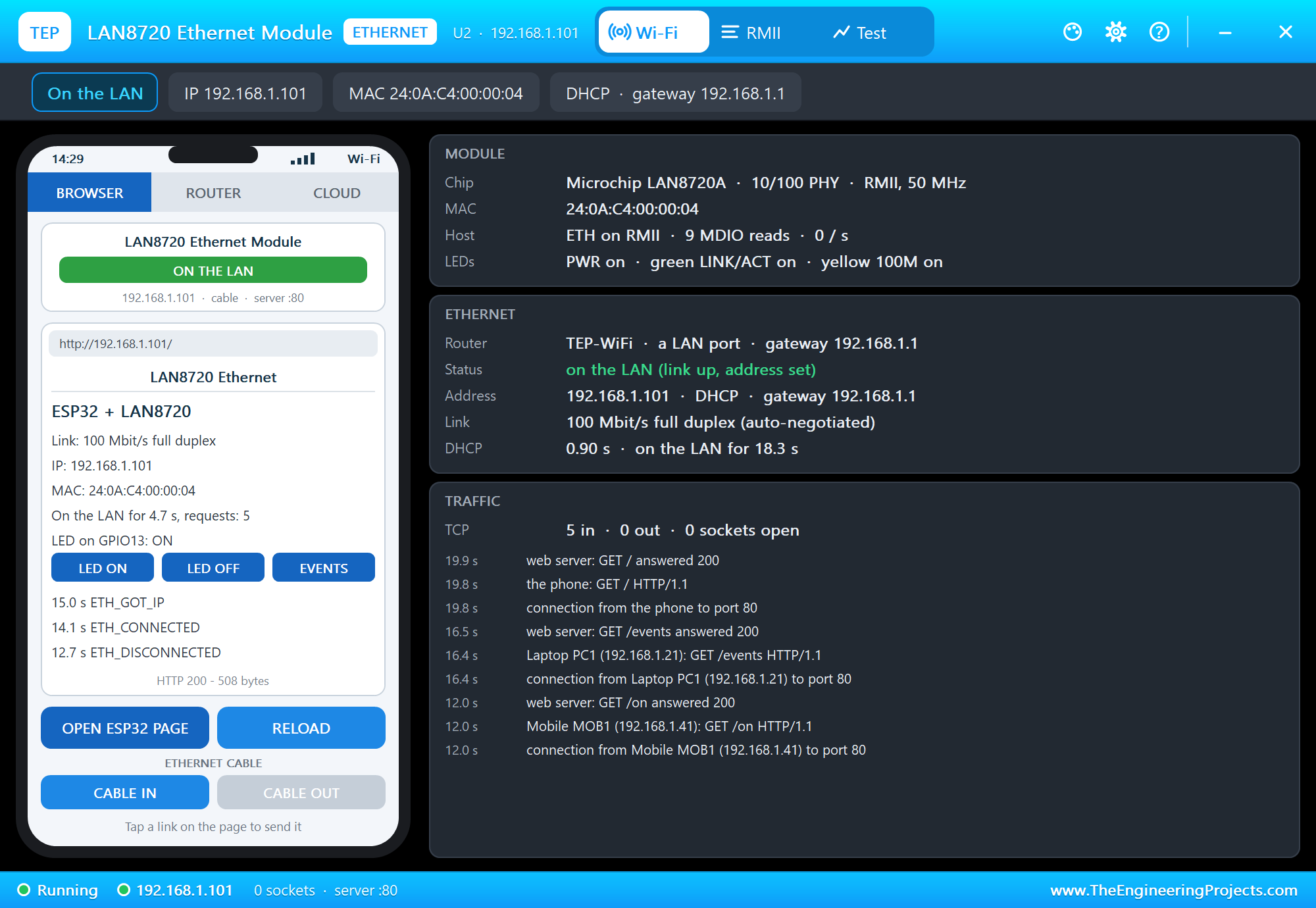
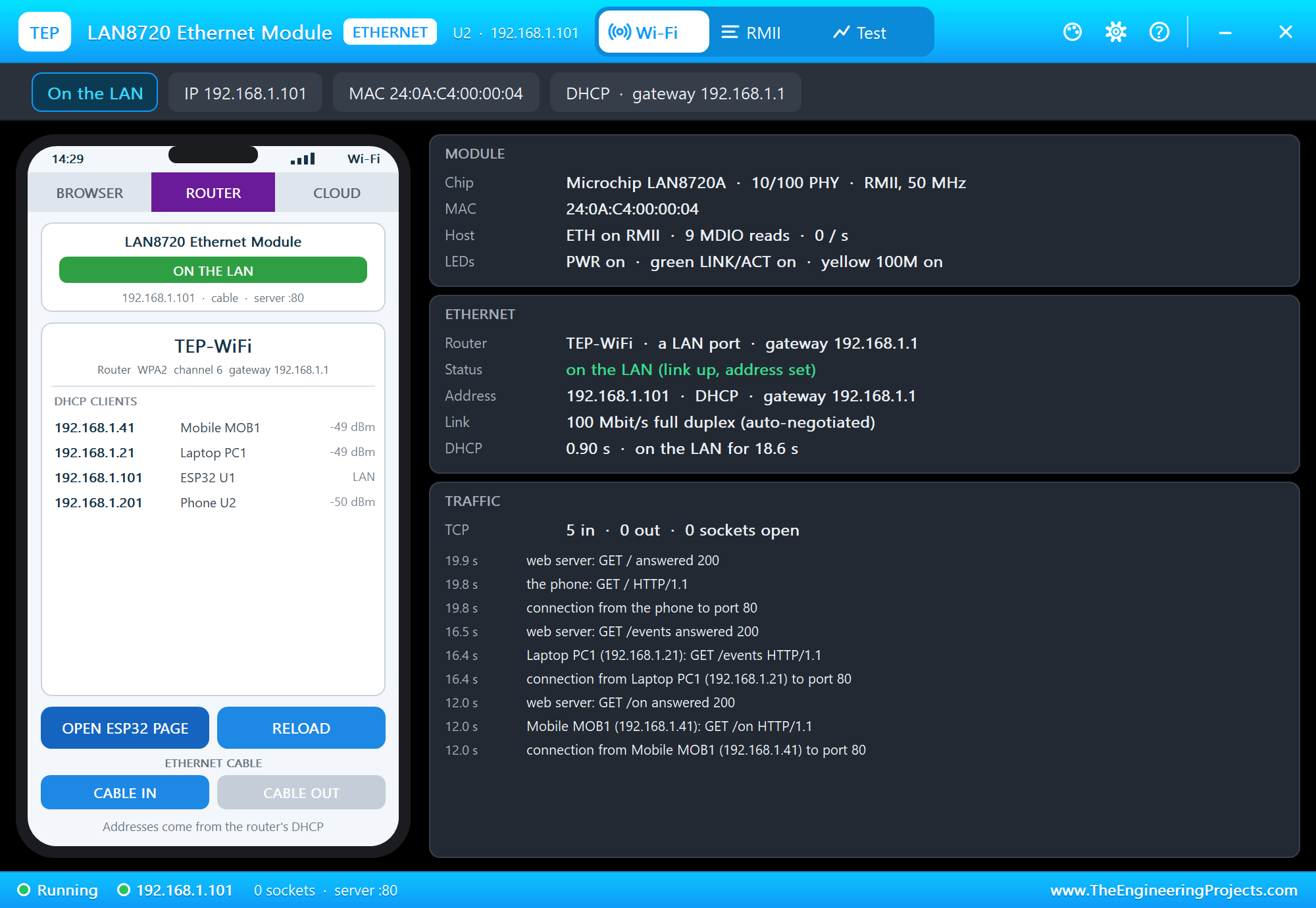
The panel opens at Run, in the look of our TEP Serial Monitor Advance for Proteus - our own TEP header, no Windows title bar. Its first page has a small phone of its own with the CABLE IN and CABLE OUT buttons, and three cards: MODULE with the chip, the ESP32's Ethernet MAC, the MDIO reads and the LEDs, ETHERNET with the router, the status, the address, the link and how long DHCP took, and TRAFFIC. OPEN ESP32 PAGE lets the panel's phone open the page the ESP32 serves:
The ROUTER tab lists the router's clients - the ESP32 among them as a LAN client:
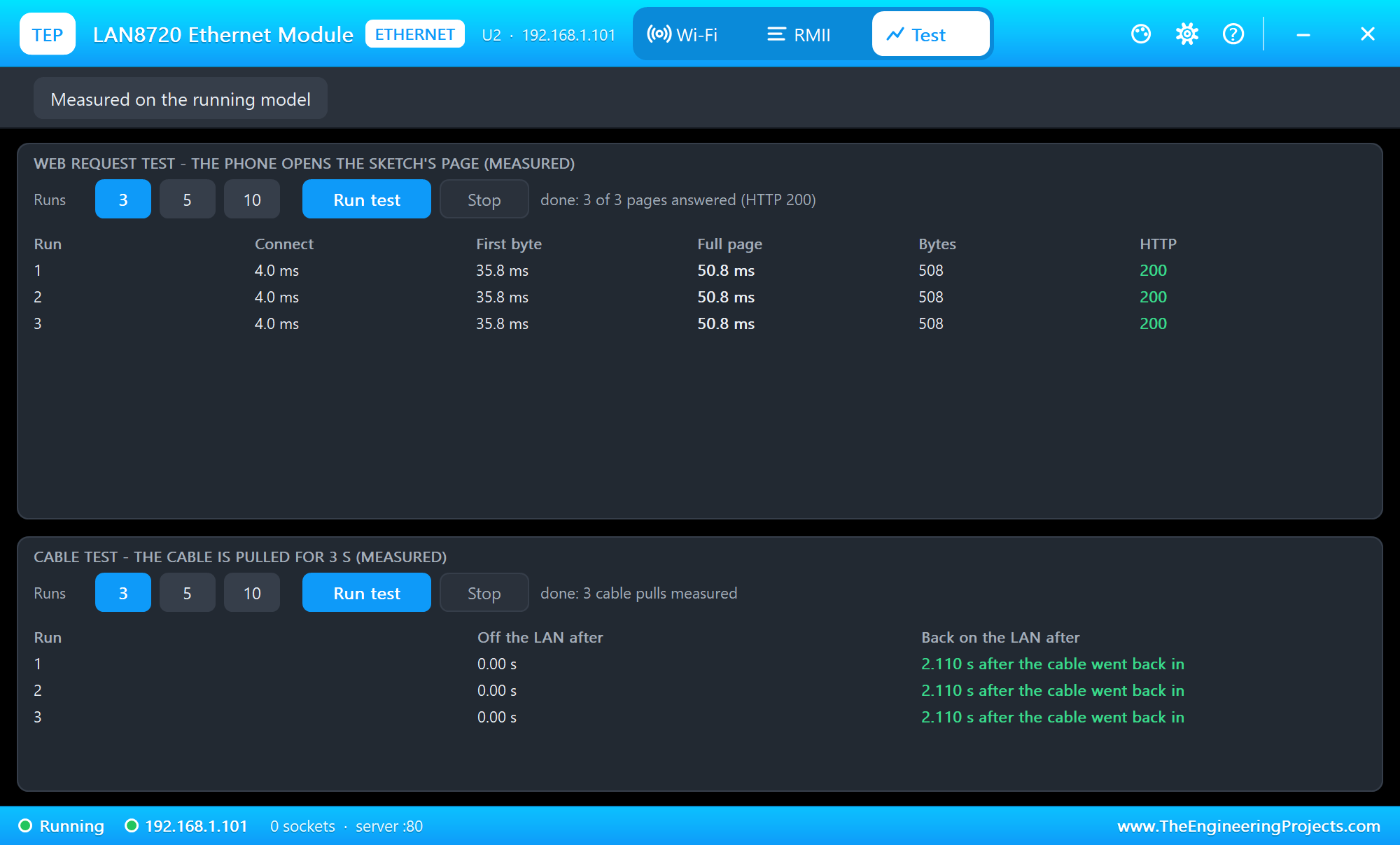
The Test page measures the running model: the web request test lets the panel's phone open the page three times, and the cable test pulls the cable for 3 seconds, three times:
After the tests the RMII page shows each cable pull: the link down in reg 1, auto-negotiation, the link and the speed again, and the DHCP renewal with the same address:
Pins of the LAN8720 Module
| Pin | ESP32 pin | What it does |
|---|---|---|
| TX_EN, TX0, TX1 | GPIO21, GPIO19, GPIO22 (fixed) | the ESP32 sends |
| RX0, RX1, CRS_DV | GPIO25, GPIO26, GPIO27 (fixed) | the ESP32 receives; CRS_DV = carrier sense / data valid |
| nINT/REFCLK | GPIO0 | the 50 MHz reference clock into the ESP32 (ETH_CLOCK_GPIO0_IN) |
| MDC, MDIO | GPIO23, GPIO18 (the defaults) | the management bus: the driver reads the PHY's registers |
| VCC 3.3V, GND | 3V3, GND | power - the module has no regulator |
Properties of the LAN8720 Module
| Property | What it does |
|---|---|
| ROUTER | the router the cable goes to - the network name of the Wi-Fi parts (TEP-WiFi) |
| CABLE | the Ethernet cable at Run: IN or OUT |
| PHYADDR | the PHY address the module answers at: 1 (its PHYAD0 strap) or 0 |
| PANEL, PAGEPORT | the phone's tab at start; the port OPEN ESP32 PAGE opens (80) |
With DHCP the address follows the board's number: U1 gets 192.168.1.101, U2 .102 and so on. In this model a board uses one network at a time - the cable (ETH) or Wi-Fi.
Troubleshooting
- ETH.begin() returns false: read Proteus's simulation log - it names the reason: MDC / MDIO not on the sketch's pins, no power on VCC, ETH_PHY_ADDR not the module's address (use the PHYADDR value or -1), or a clock mode other than ETH_CLOCK_GPIO0_IN.
- ETH_CONNECTED comes but ETH_GOT_IP never: an RMII pin or REFCLK is not wired - the log lists the missing ones.
- No events at all: add the handler with
WiFi.onEvent()beforeETH.begin(), and letloop()return or calldelay()now and then - the events are delivered there. - The page never opens: the cable is out (the panel shows CABLE OUT) or the board is not on the LAN yet.
- ETH.h not found: the TEP Boards for Proteus add-on is older than 1.14.0 - replace it with the one in the zip.
- No panel: click the PANEL pad or the LAN8720A, or turn "Open the panel at Run" back on in Settings.
Things to Know Before Using a Real LAN8720 Module
- The clock and GPIO0: the module's oscillator runs as soon as it has power, and GPIO0 decides the ESP32's boot mode. If your ESP32 starts in its download mode, switch the oscillator's enable with a GPIO and give that pin to
ETH_PHY_POWER, or let the ESP32 make the clock on GPIO17 (ETH_CLOCK_GPIO17_OUT) on a board wired for it. - The PHY address: boards differ - 0 or 1. If
ETH.begin()fails, try the other one, or -1. - Short wires: RMII runs at 50 MHz. Keep the wires between the module and the ESP32 short, ideally a few centimetres, with a solid ground.
- Power: 3.3 V only, and enough current for the PHY and the jack's LEDs.
- The header: pin orders differ between makers - wire by the names printed on your board.
- A real sketch: the demo compiles for a real ESP32 with Espressif's core ("ESP32 Dev Module") - set
ETH_PHY_ADDRto your module's address.
Limitations of the Simulation
- The ESP32 board in Proteus is NOT a real ESP32 chip: your sketch runs on a hidden ATmega2560 at 16 MHz with 8 KB of RAM, int is 16 bits, and there are no FreeRTOS tasks.
- The module is the ESP32's link to the LAN, not a bit-by-bit RMII model: the 50 MHz clock and the MDIO waveform are not on the pins, the link is always 100 Mbit/s full duplex, and other PHYs or SPI Ethernet chips on ETH are not modelled.
- The router, the phone, the internet host, the PANEL pad, the panel and the two monitors are TEP additions.
- LAN8720 and Microchip are names of Microchip Technology, ESP32 of Espressif Systems; this library is not made or endorsed by Microchip, Espressif or Labcenter.
- Tested in Proteus 8.5 in October 2026 (the demo as shipped, the board, the module, the laptop and the phone together at about 0.3 x real time on our PC). Proteus 7 is not supported.
So, that was all about the LAN8720 Ethernet Module Library for Proteus. I hope it helps you try wired Ethernet on the ESP32 before you touch the hardware - the RMII wiring, the 50 MHz clock on GPIO0, the PHY address and every ETH event, with the cable pulled and plugged back in. If your project uses an Arduino instead, our W5500 Ethernet Module Library for Proteus and ENC28J60 Ethernet Module Library for Proteus bring Ethernet over SPI. If you use the LAN8720 Ethernet Module Library for Proteus in a project, please share it in the comments or in our forum, and if you have any questions, ask in the comments and I will help you out. Till the next tutorial, take care and have fun!

Comments
0