


ENC28J60 Nano Ethernet Shield Library for Proteus: Arduino TCP Client


Hello friends, I hope you all are doing great. Today, I am going to share the ENC28J60 Nano Ethernet Shield Library for Proteus. The ENC28J60 Nano shield is the smallest way to put an Arduino Nano on a wired network: a long, narrow red board with a Microchip ENC28J60 Ethernet controller, a HanRun RJ45 jack across one end and two header rows the Nano plugs into. Like the ENC28J60 module, the chip only moves Ethernet frames - the TCP/IP stack runs on the Arduino, inside the EthernetENC library. With this library you can wire the shield to your Arduino in Proteus, run EthernetENC sketches unchanged and watch every frame go by.
ENC28J60 Nano Ethernet Shield Library for Proteus
Latest version: V1.0 (October 2026, this tutorial)
Helping Tools
- Laptop WiFi Monitor: a laptop on the Wi-Fi of your design: a browser, a TCP / UDP terminal and ping
- Mobile WiFi Monitor: a smartphone that opens the pages of your board and sends it commands
- Serial Monitor Advance: a serial terminal window for the UART of your board
This is the thirty-third library of our Wi-Fi / Ethernet series and the sixth of its Ethernet group. The last post showed the ENC28J60 as a web server waiting for visitors; this one turns it around. The demo is a reporter: the Arduino gets its address from the router, the time from the internet, connects to a TCP server on our Laptop WiFi Monitor and sends it a reading every few seconds - and takes commands back on the same connection. Our Mobile WiFi Monitor opens a status page, and in the end we pull the cable to see the sketch connect again.
NOTICE: the PANEL pad, the panel and the virtual router are TEP additions; the regulator's voltage and wake-on-LAN are not simulated (see the limits at the end). The shield works with the EthernetENC library. Your feedback is the fuel that keeps us going, so please tell us what you think in the comments below or in the ENC28J60 Nano Ethernet Shield board of our forum. And if our free libraries help you, you can buy us a coffee. So, let's get started with the ENC28J60 Nano Ethernet Shield Library for Proteus:
What is the ENC28J60 Nano Ethernet Shield?
The ENC28J60 is a stand-alone Ethernet controller from Microchip: a 10 Mbit/s MAC and PHY with an 8 KB packet buffer, driven over SPI. The Nano shield puts it on a red board about the length of a Nano, with a 25 MHz crystal, an AMS1117 regulator that makes the chip's 3.3 V from the Nano's 5 V, a HanRun RJ45 MagJack (the transformer and two LEDs inside the socket) and two 15-pin header rows. The Nano plugs in on top, and the shield takes only the pins it needs: 5V, GND and the SPI pins D10 to D13.
| Real ENC28J60 Nano shield | This library in Proteus | |
|---|---|---|
| Chip | Microchip ENC28J60, 10 Mbit/s, 8 KB buffer | our model of the ENC28J60, register by register |
| Power | 5V from the Nano, AMS1117 to 3.3 V | the 5V and GND pins |
| Link | SPI on the Nano's D13, D11, D12 and D10 | the same four pins, named beside their ends |
| TCP/IP | on the Arduino (uIP in EthernetENC) | the same - the library's own stack, unchanged |
| Arduino library | EthernetENC (Library Manager) | the same library, unchanged (2.0.5 in the demo) |
| Network | an RJ45 cable to your router | a virtual cable to our router, shared with our Wi-Fi parts |
| LEDs | two on the jack | the same two, plus a PWR LED |
The Pins of the Shield
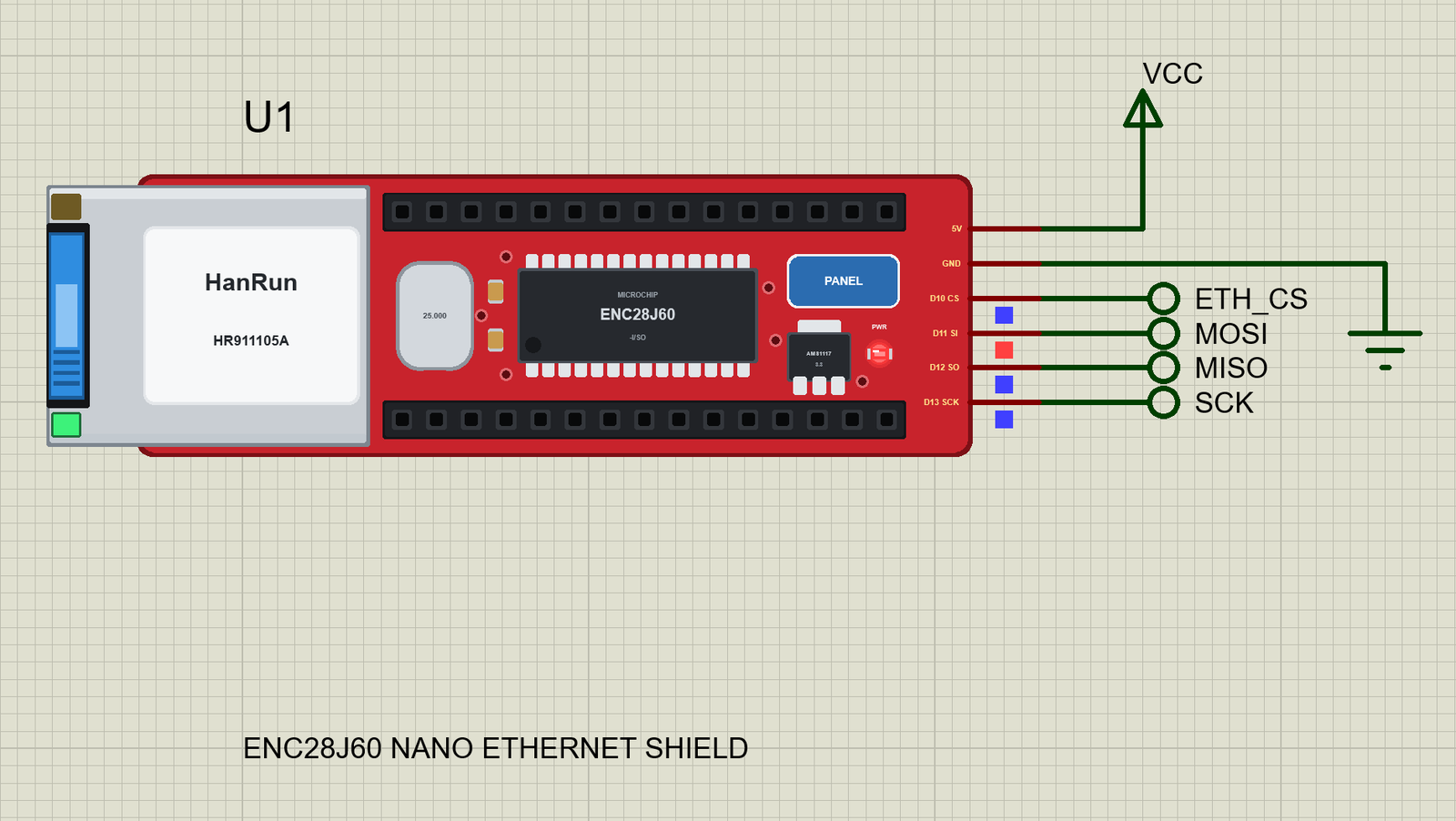
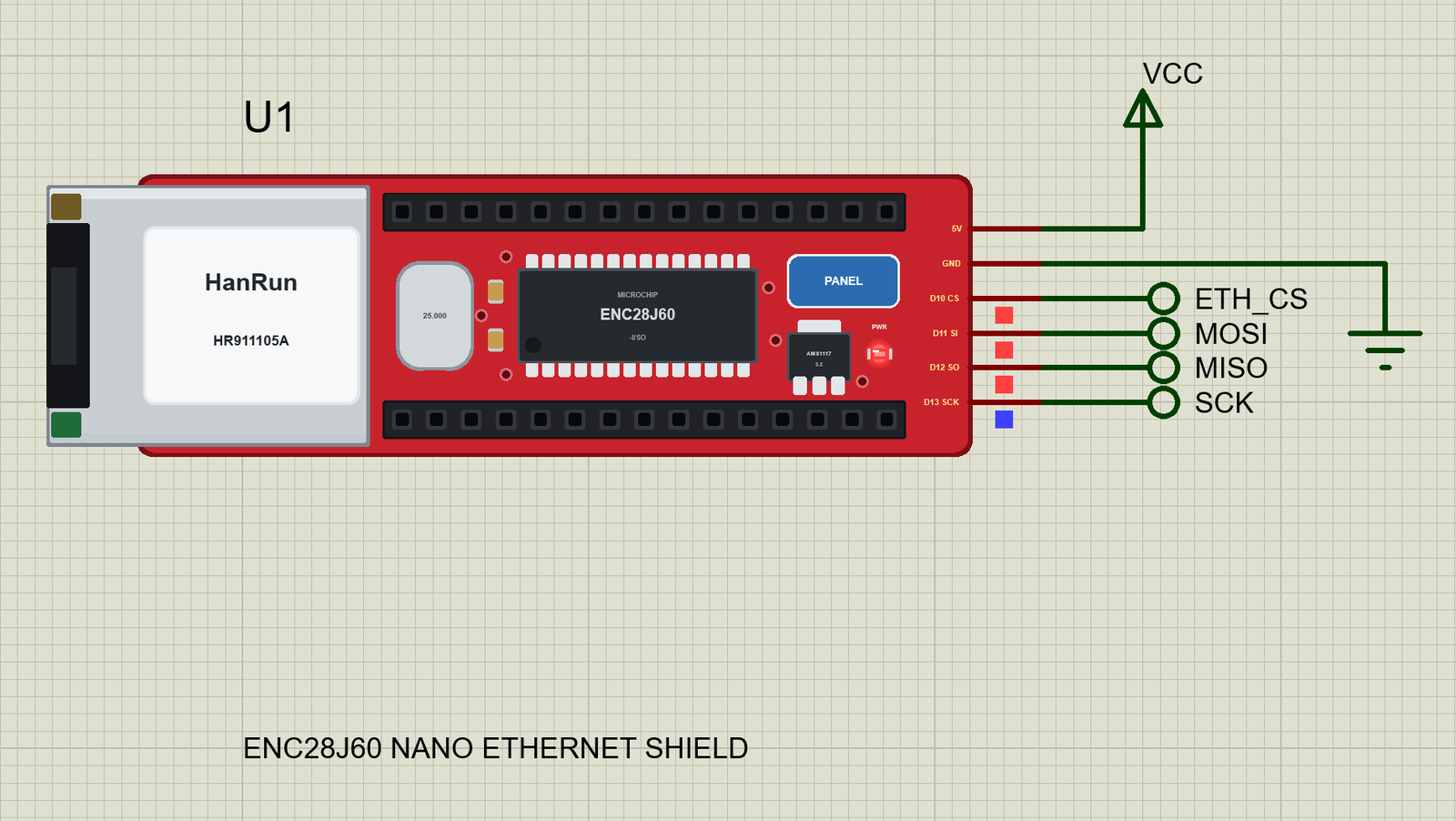
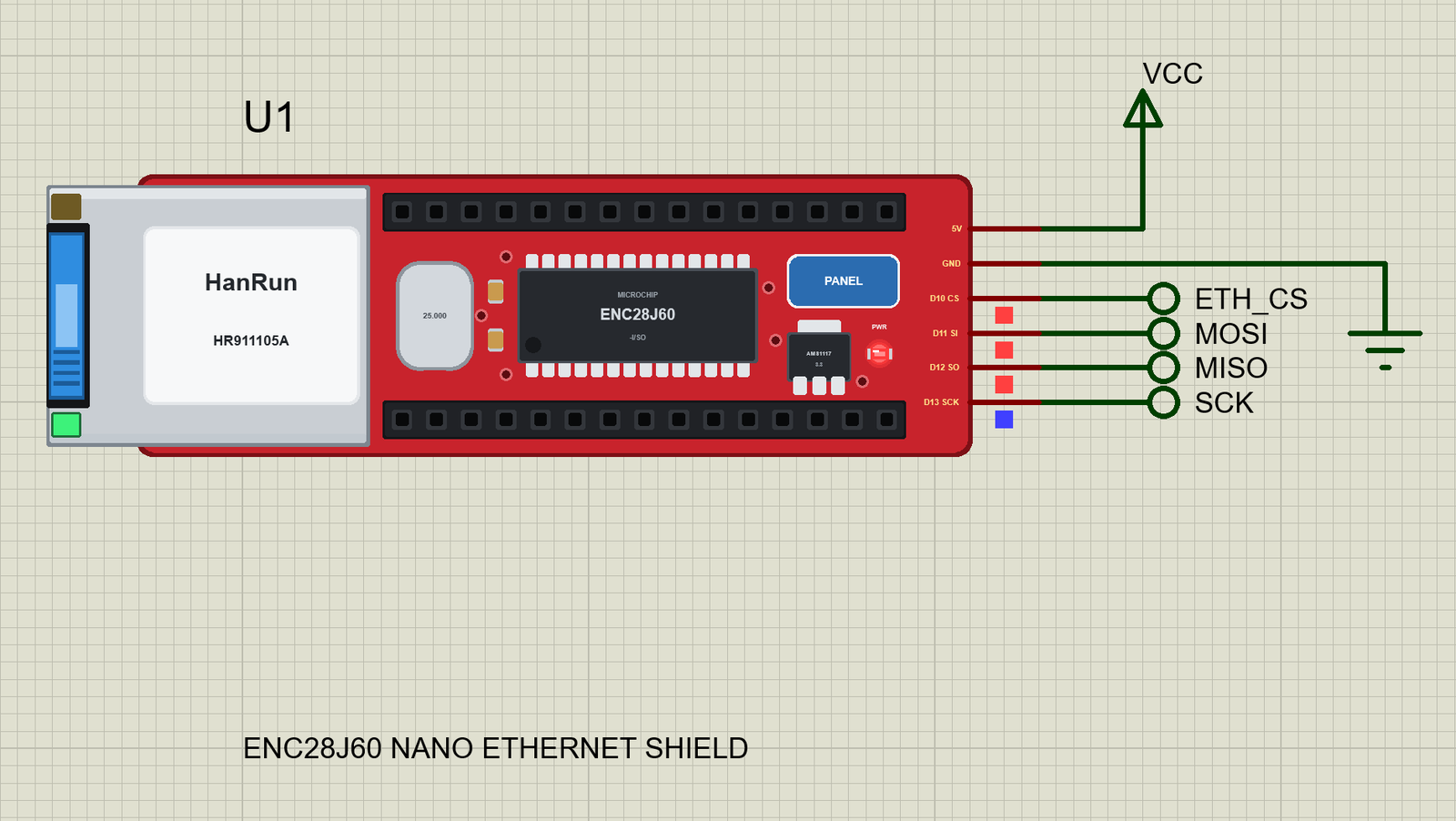
On the real shield there is nothing to wire: the Nano sits in the socket and its pins meet the shield's tracks. In Proteus the Nano is not on top of the shield, so the part brings those six pins out on its right end, each named with its job. D13 SCK is the SPI clock, D11 SI the chip's data in (MOSI), D12 SO its data out (MISO) and D10 CS the chip select. 5V and GND power the shield. Wire them to the same pins of your Arduino. The Nano and the UNO have the same ATmega328P and the same D10 to D13, so the sketch and its HEX file are the same on both - we use our UNO V4.0 in every demo. The chip's RESET, INT, WOL and CLKOUT pins are not brought out: EthernetENC resets the ENC28J60 over SPI and polls it.
The Same Chip as the ENC28J60 Module
Inside, this is the same ENC28J60 as in our ENC28J60 Ethernet Module Library for Proteus - the same model in the DLL, tested with the same EthernetENC. The difference is the board around it: the module is a small blue board with a 2x5 header and needs 3.3 V, the shield is made for the Nano and has its own regulator. Unlike the WIZnet chips of our W5500 Ethernet Module Library for Proteus, the ENC28J60 has no TCP/IP stack inside. EthernetENC carries uIP and runs it on the Arduino: every ARP answer, every DHCP request and every TCP acknowledgement is built by the sketch's processor and written into the chip's buffer over SPI. That costs memory - the demo takes 27,940 bytes of flash and 1,190 bytes of RAM - and it means the sketch must call the library often. In return, the panel can show you every frame.
Features of the ENC28J60 Nano Ethernet Shield Library for Proteus
- The shield as it looks: the long, narrow red board, the silver HanRun jack across its left end with its two LEDs, the Nano's socket rows along its length with the ENC28J60, its crystal and the AMS1117 between them, a red PWR LED.
- Only the pins the shield uses: 5V, GND, D10, D11, D12 and D13 - named as the Nano's pins, so the wiring is obvious.
- The real EthernetENC library: our ENC28J60 answers the library exactly as the chip does. We ran EthernetENC 2.0.5 with the demo sketch (10 checks) on the PC, plus the 26 checks of the ENC28J60 module, and in Proteus.
- A real frame-level network: ARP, DHCP, DNS, NTP, ping, UDP and TCP travel as Ethernet frames between the Arduino's stack and the rest of the network.
- DHCP and NTP: the router gives the shield its address, gateway and DNS server; pool.ntp.org answers with the time through our internet host.
- TCP client and server at once: the demo keeps a connection to the laptop open and serves a page to the phone.
- The link:
Ethernet.linkStatus()reads the PHY - LinkON with the cable in, LinkOFF with it out. - The jack's LEDs as the sketch sets them: EthernetENC writes PHLCON so the green LED shows the link and the yellow one the traffic.
- The cable: pull it with a click on the jack, the CABLE property or the panel - and watch the sketch connect again.
- Our Laptop and Mobile WiFi Monitors: a laptop with a TCP server and a phone with a browser on the same network - included in the package.
- Our pop-up panel: the phone, the SHIELD card, an ETHERNET card, an SPI page with every frame explained, a Test page, Settings and Help - with our TEP header, not a Windows title bar.
- A compact package: about 3.04 MB, without the C++ source code of the models.
The ENC28J60 Nano Ethernet Shield in Proteus
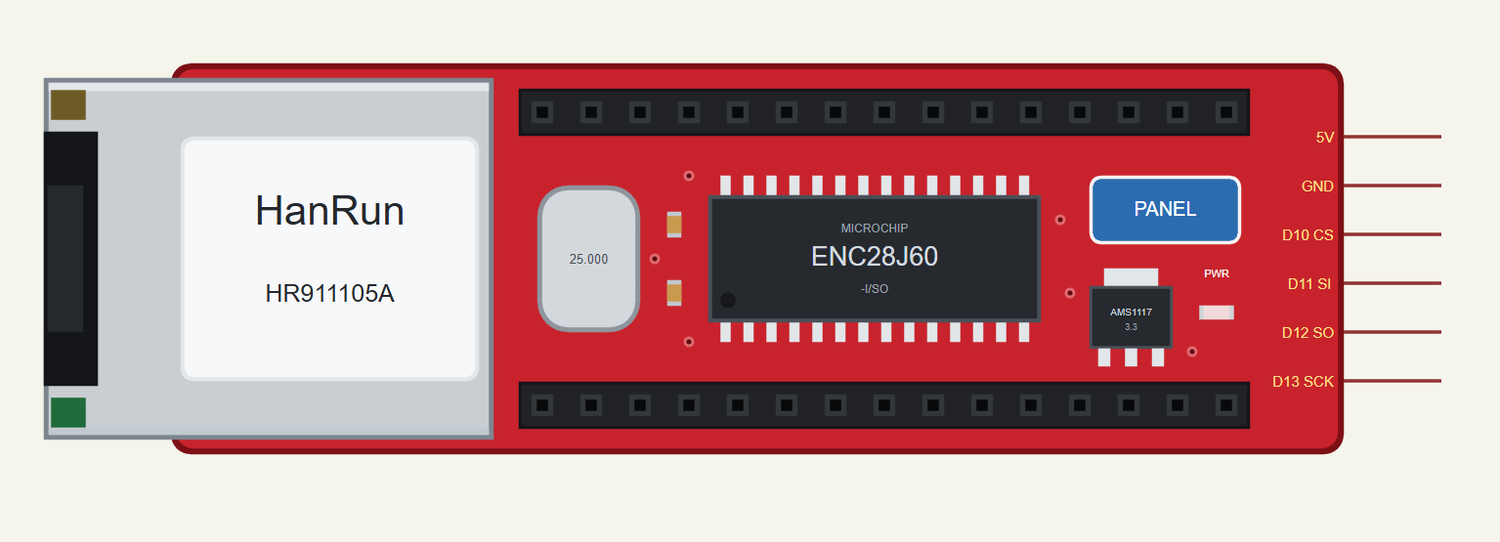
Search ENC28J60 in Pick Devices; the device ENC28J60 NANO ETHERNET SHIELD is in TEPENC28J60NANO.LIB. Click the PANEL pad or the ENC28J60 to open the panel, and the RJ45 jack to pull or plug the cable.
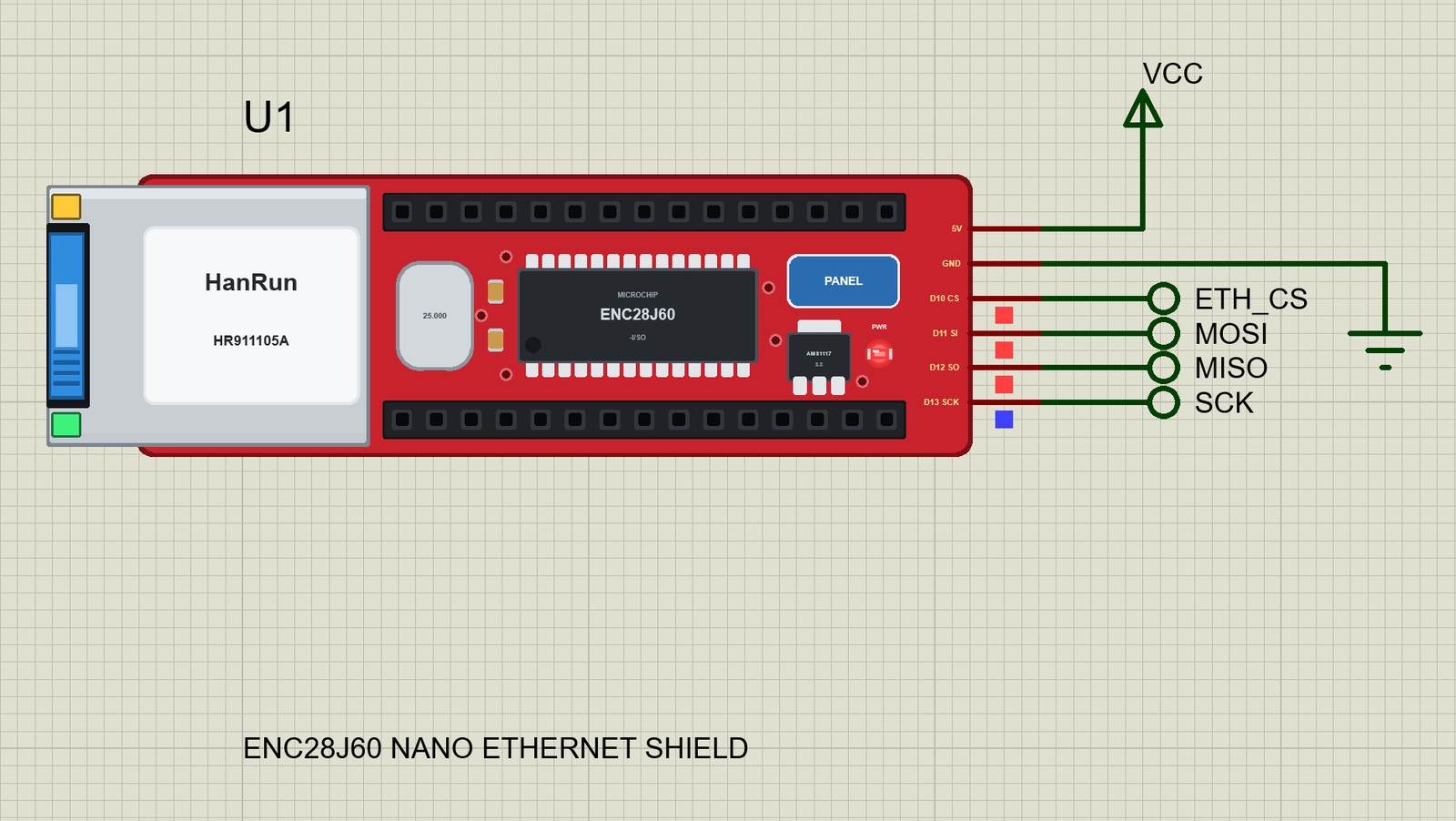
Every State of the ENC28J60 Nano Shield
We ran the demo and paused the simulation for each picture. EthernetENC resets the chip, sets its filters, the MAC and the LEDs and reads its revision 0.12 s after Run; the router's DHCP answer follows a moment later:
Download ENC28J60 Nano Ethernet Shield Library for Proteus
Click the button below to download ENC28J60-Nano-Ethernet-Shield-Library-for-Proteus-v1.0.zip (about 3.04 MB, without the C++ source code of the models):
ENC28J60 Nano Ethernet Shield Library for Proteus V1.0- README.txt: the device, installation, the demo, the pins, the properties, troubleshooting and the limits.
- Proteus Library Files:
TEPENC28J60NANO.LIB(the shield),ArduinoV4TEP.LIB(our Arduino boards V4.0 - the UNO of the demo),TEPLAPTOP.LIBandTEPMOBILE.LIB(our Laptop and Mobile WiFi Monitors). - Proteus Model Files:
TEPNET.DLL(the shield, the two monitors and the network) andTEPARDUINO.DLL(the Arduino boards). - Proteus Simulation: the demo project, its HEX file and copies of the DLLs.
- Arduino Code: the demo sketch. The EthernetENC library is not included - install it with the Library Manager.
No Proteus yet? Read How to Download and Install Proteus 7 and 8. New to libraries? Follow How to Install a New Library in Proteus.
How to Install ENC28J60 Nano Ethernet Shield Library for Proteus
- Close Proteus and extract the whole zip file, for example to your Desktop.
- Copy the four files from Proteus Library Files into the LIBRARY folder of Proteus (usually
C:\Program Files (x86)\Labcenter Electronics\Proteus 8 Professional\LIBRARY). - Copy
TEPNET.DLLandTEPARDUINO.DLLfrom Proteus Model Files into the MODELS folder - replace older copies (this TEPNET.DLL is the first one that knows the Nano shield, and it still runs our ENC28J60, W5100 and W5500 modules, our Ethernet shields, every Wi-Fi part of the series and the two monitors). - Delete
TEPENC28J60NANO.IDX,ArduinoV4TEP.IDX,TEPLAPTOP.IDXandTEPMOBILE.IDXfrom the LIBRARY folder if they are there. - Start Proteus, press P and search for ENC28J60.
For your own sketches, install EthernetENC in the Arduino IDE (Sketch > Include Library > Manage Libraries, search "EthernetENC") and include EthernetENC.h instead of Ethernet.h - the functions are the same. Then use Sketch > Export Compiled Binary, double-click the UNO in Proteus and set its Program File to the HEX (see How to get the HEX file from Arduino).
Demo: A Reporter for the Laptop
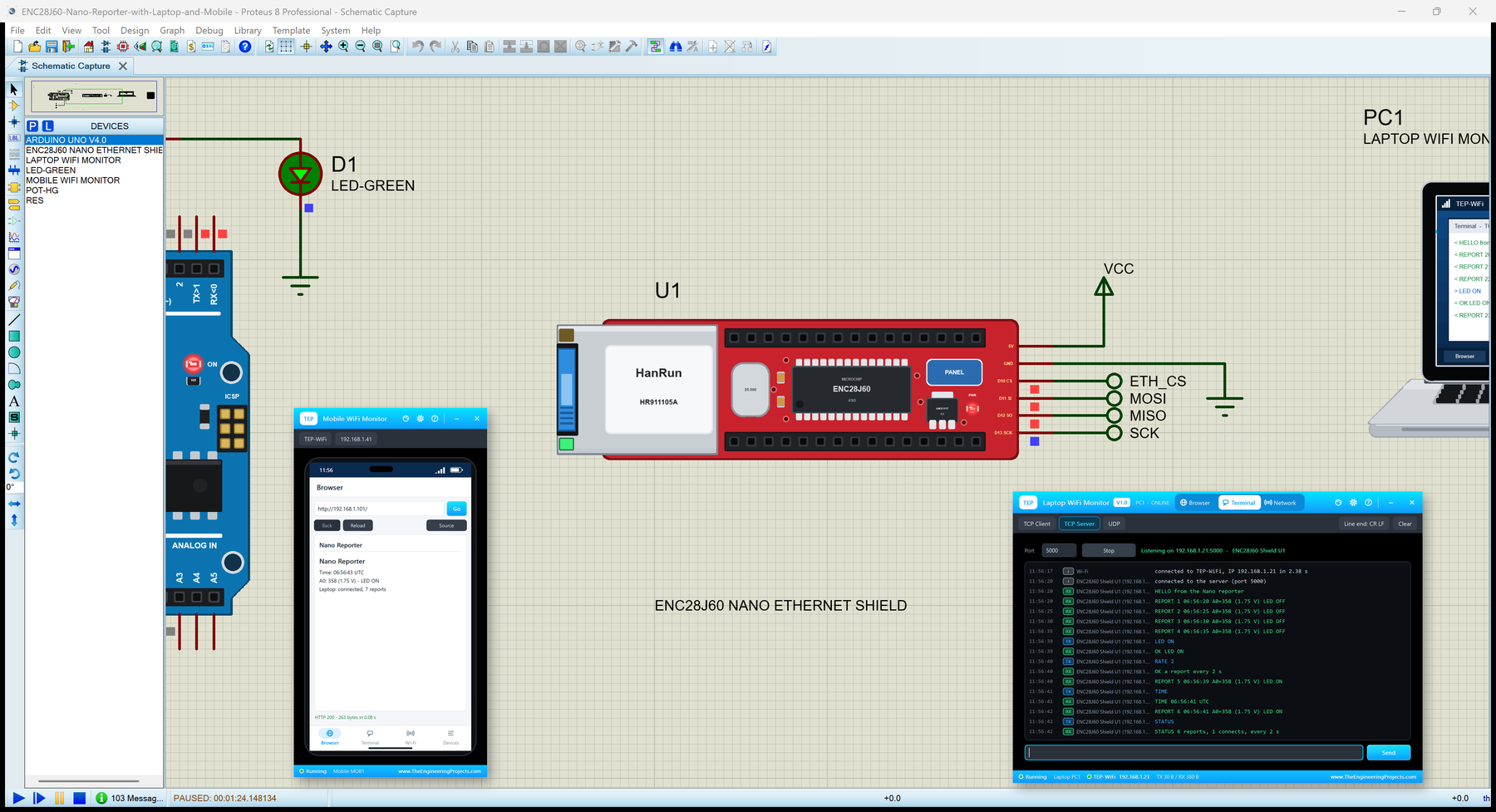
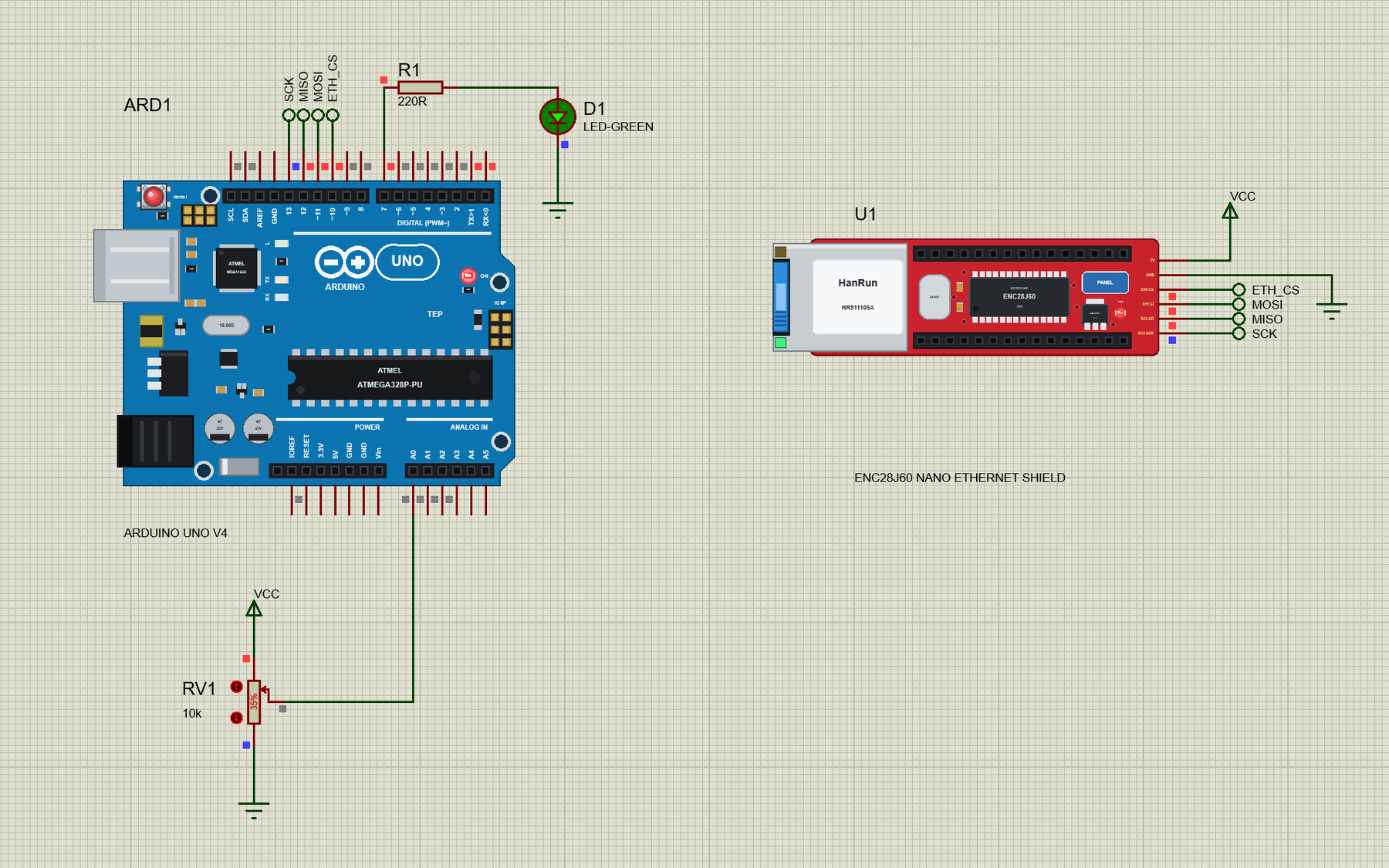
Open ENC28J60-Nano-Reporter-with-Laptop-and-Mobile.pdsprj. On the left is our UNO V4.0 (ARD1, from our Arduino UNO Library for Proteus V4.0) with its built-in serial monitor, a pot on A0 and an LED on D7, in the middle the ENC28J60 Nano shield (U1), and on the right the laptop (PC1) and the phone (MOB1) - no wires to them, they are on the router's network like the real ones.
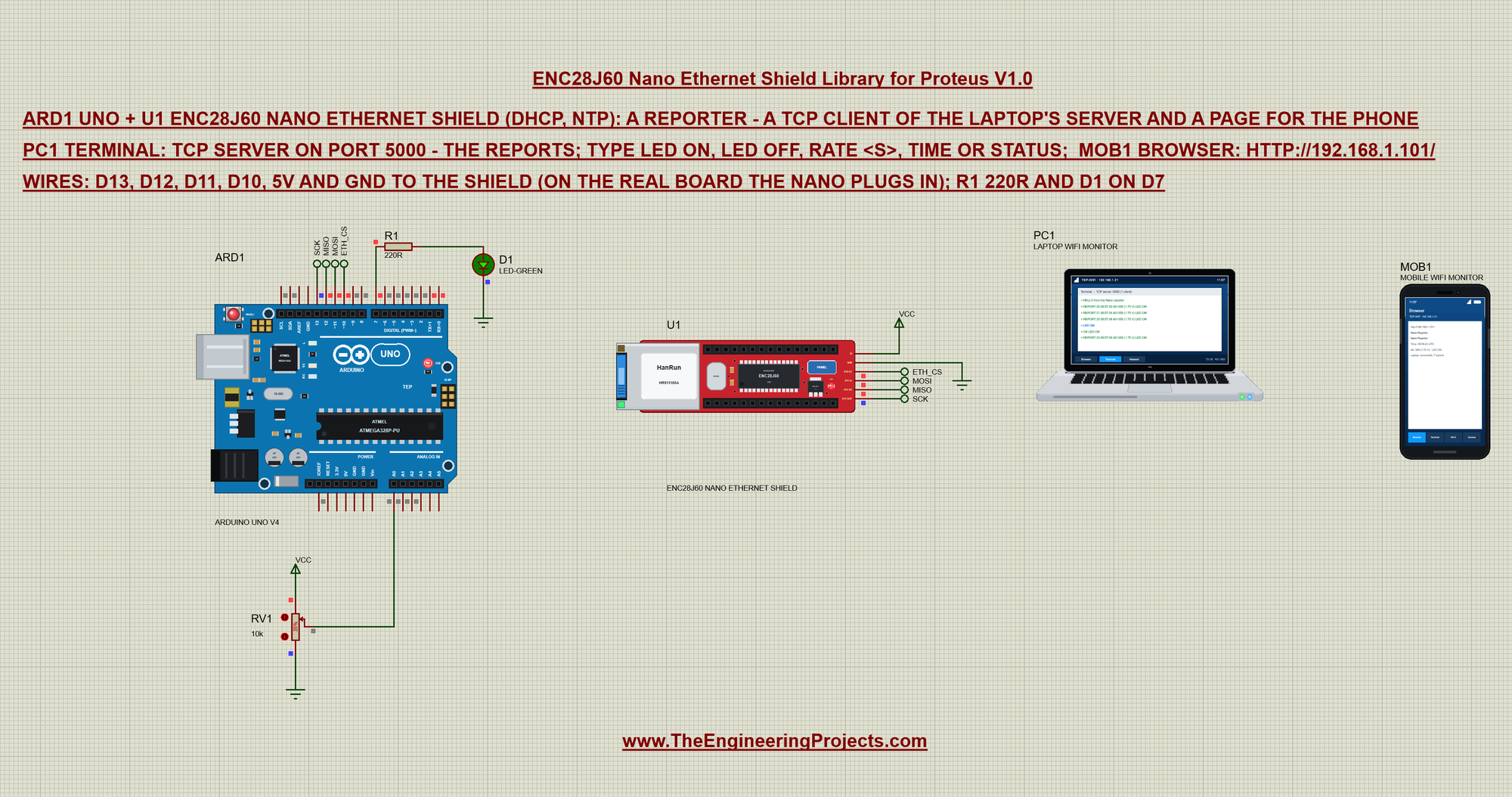
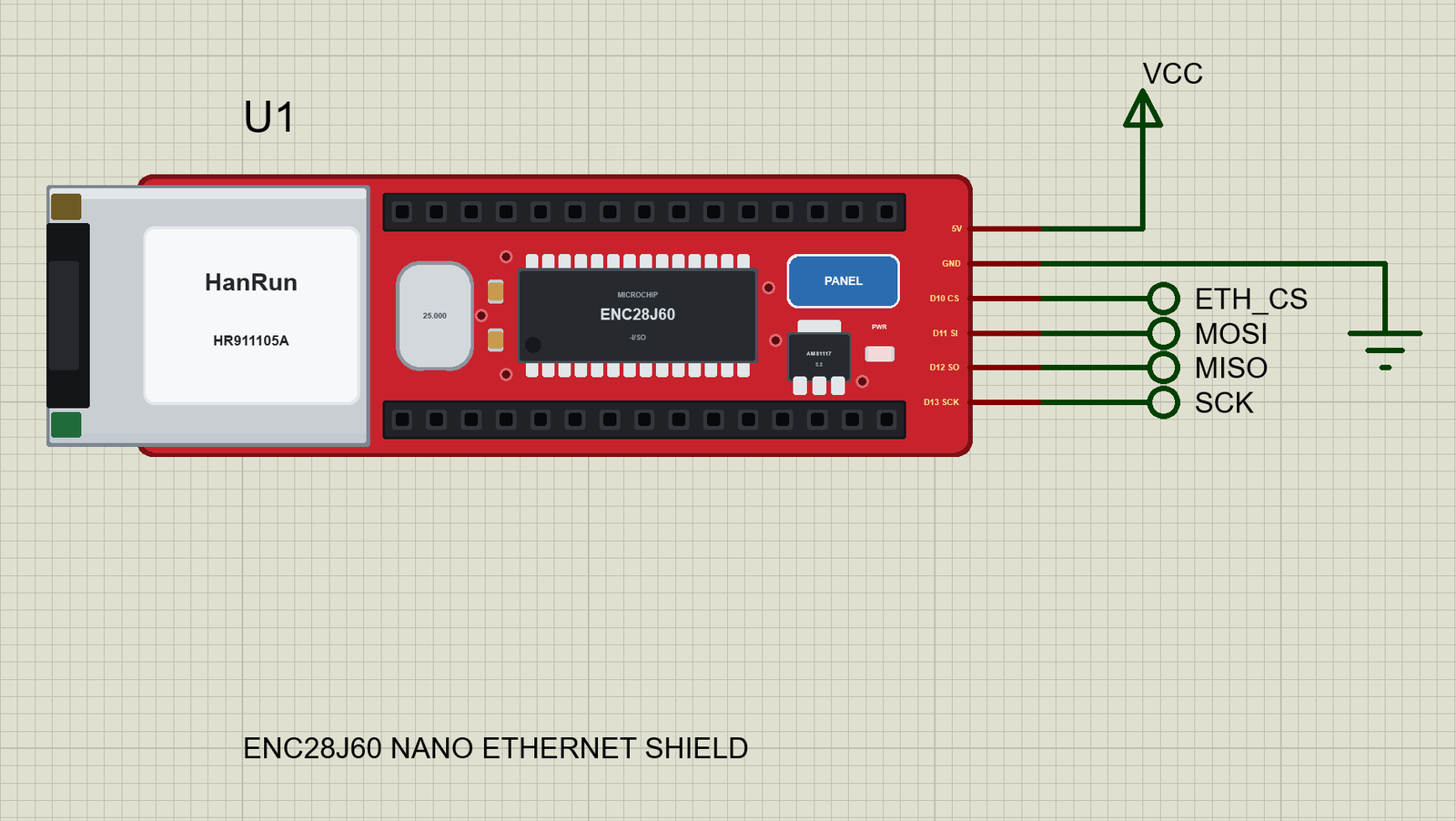
Four net labels make the SPI connections: SCK, MISO and MOSI from D13, D12 and D11 to the shield's D13, D12 and D11, and ETH_CS from D10 to D10. The shield's 5V goes to a VCC terminal and its GND to ground. R1 (220R) and the LED D1 hang on D7, and RV1 (10k) on A0 gives the reading in the reports:
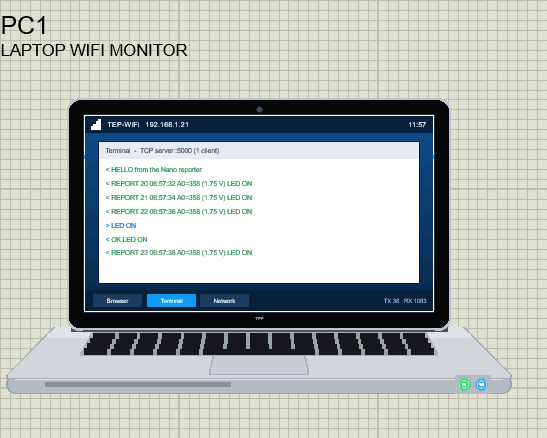
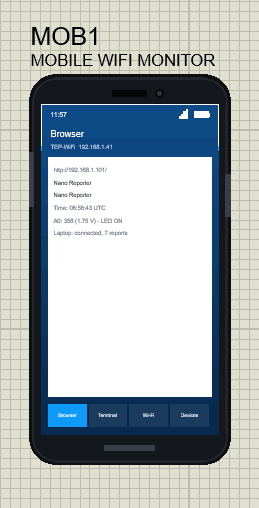
The two tools come from our Laptop WiFi Monitor Library for Proteus and Mobile WiFi Monitor Library for Proteus. In this project the laptop's TCP server listens on port 5000 from the start, and both tools have http://192.168.1.101/ as their home page - the address the router gives U1. The laptop is 192.168.1.21 and the phone 192.168.1.41:
The Sketch: EthernetENC and DHCP
The sketch includes EthernetENC instead of the Arduino Ethernet library - that is the only change an Ethernet sketch needs. A MAC address, the laptop's address and port and the LED pin follow, then the three network objects: a client for the laptop, a server for the phone and a UDP socket for the time:
#include <SPI.h>
#include <EthernetENC.h>
const byte mac[] = {0xDE, 0xAD, 0xBE, 0xEF, 0x28, 0x33};
const IPAddress laptop(192, 168, 1, 21);
const unsigned int LAPTOP_PORT = 5000;
const byte LED_PIN = 7;EthernetClient link;
EthernetServer server(80);
EthernetUDP udp;Ethernet.init() names the chip select pin. Ethernet.begin(mac) with only the MAC address means DHCP: EthernetENC sends DISCOVER and REQUEST frames and waits for the router's OFFER and ACK. It returns 0 when nothing answers - then Ethernet.hardwareStatus() tells a missing chip from a missing cable:
  Ethernet.init(10);
  Serial.print(F("DHCP... "));
  if (Ethernet.begin(mac) == 0) {
    Serial.println(Ethernet.hardwareStatus() == EthernetNoHardware ? F("no ENC28J60 found - check the wiring") : F("no answer - is the cable in?"));
    while (true) {}
  }
On success the sketch prints the address, the gateway and the DNS server the router gave it, asks for the time, starts the page server and prints where everything is. Press Run and watch the UNO's monitor:
  askTime();
  server.begin();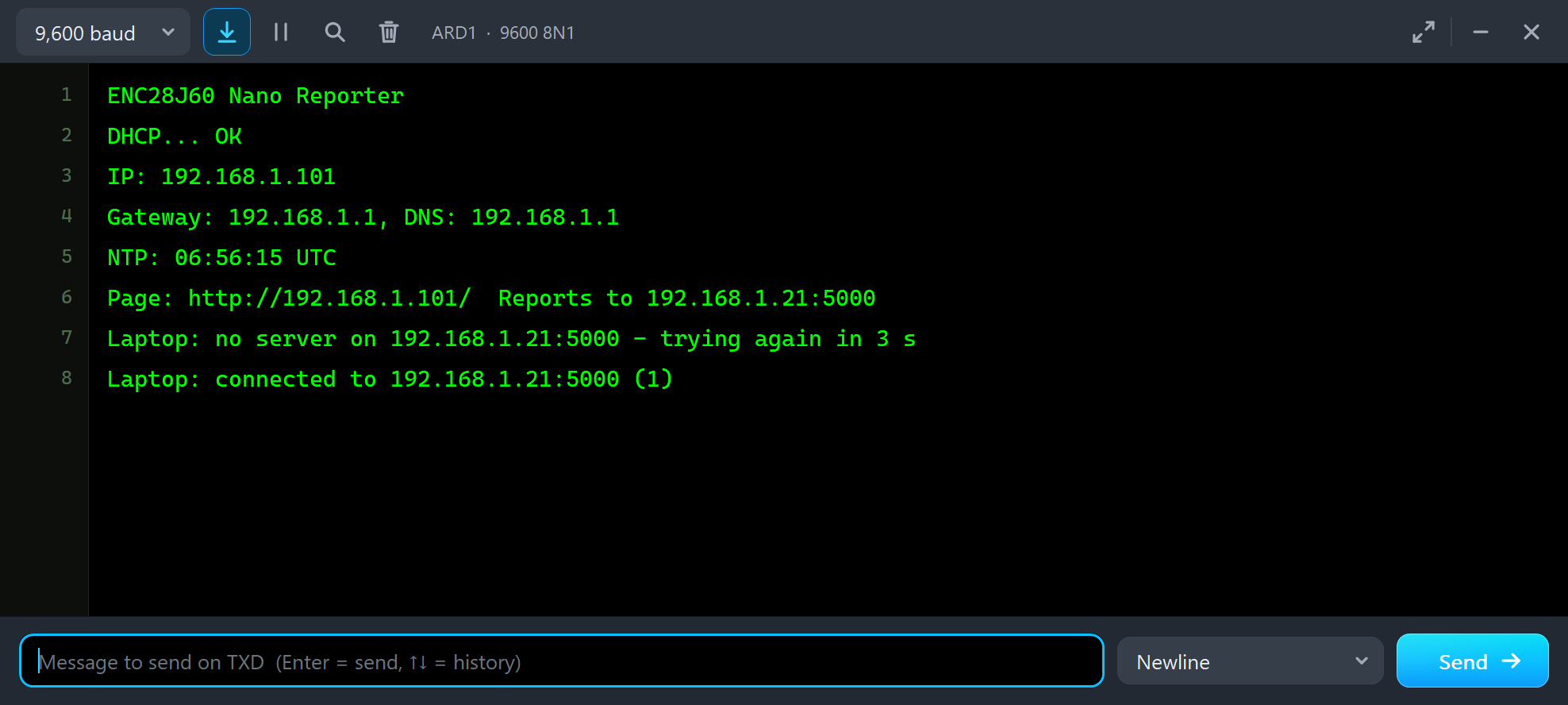
ENC28J60 Nano Reporter
DHCP... OK
IP: 192.168.1.101
Gateway: 192.168.1.1, DNS: 192.168.1.1
NTP: 06:56:15 UTC
Page: http://192.168.1.101/  Reports to 192.168.1.21:5000
Laptop: no server on 192.168.1.21:5000 - trying again in 3 s
Laptop: connected to 192.168.1.21:5000 (1)
The Time from pool.ntp.org
NTP is a small UDP exchange: the sketch sends a 48-byte request to port 123 of a time server and reads a 48-byte answer. beginPacket() takes the name pool.ntp.org - EthernetENC asks the DNS server for its address first. In the model our internet host answers both, at the documentation address 203.0.113.10:
void askTime() {
  byte packet[48] = {0xE3, 0, 6, 0xEC};                   // NTP version 4, client
  udp.begin(8888);
  if (!udp.beginPacket("pool.ntp.org", 123)) { Serial.println(F("NTP: no DNS answer")); return; }
  udp.write(packet, sizeof(packet));
  udp.endPacket();
The time sits in bytes 40 to 43 of the answer: seconds since 1900. The sketch keeps that number and the moment it arrived, and works out the time of day from millis() afterwards - no second request needed:
ntpSeconds = (unsigned long)packet[40] << 24 | (unsigned long)packet[41] << 16 | (unsigned long)packet[42] << 8 | packet[43]; const unsigned long now = ntpSeconds + (millis() - ntpAt) / 1000;NTP gives UTC, so the reports carry UTC times; the laptop shows its own local clock beside them.
The TCP Link to the Laptop
The heart of the demo is laptopLink(). When the connection is down it tries link.connect() to 192.168.1.21, port 5000, at most every 3 seconds; when it connects it says hello and sends the first report at once:
void laptopLink() {
  if (!link.connected()) {
    if (lastTry && millis() - lastTry < 3000) return;
    if (connects) { link.stop(); Serial.println(F("Laptop: the link is down - connecting again")); }
    lastTry = millis();
    if (link.connect(laptop, LAPTOP_PORT)) {
      ++connects;
      Serial.print(F("Laptop: connected to 192.168.1.21:5000 ("));
      Serial.print(connects);
      Serial.println(F(")"));
      link.println(F("HELLO from the Nano reporter"));
      report();
    } else Serial.println(F("Laptop: no server on 192.168.1.21:5000 - trying again in 3 s"));
    return;
  }
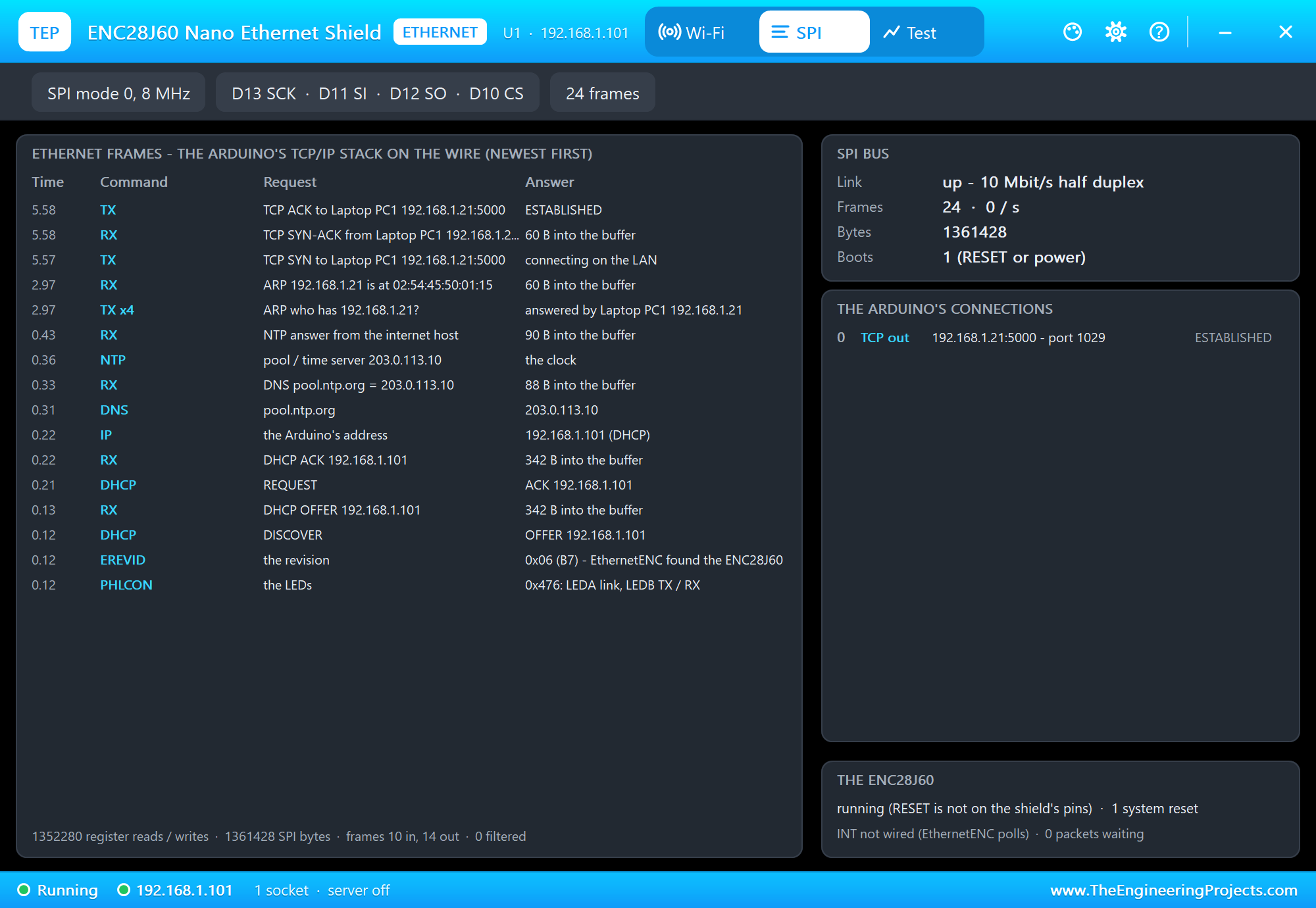
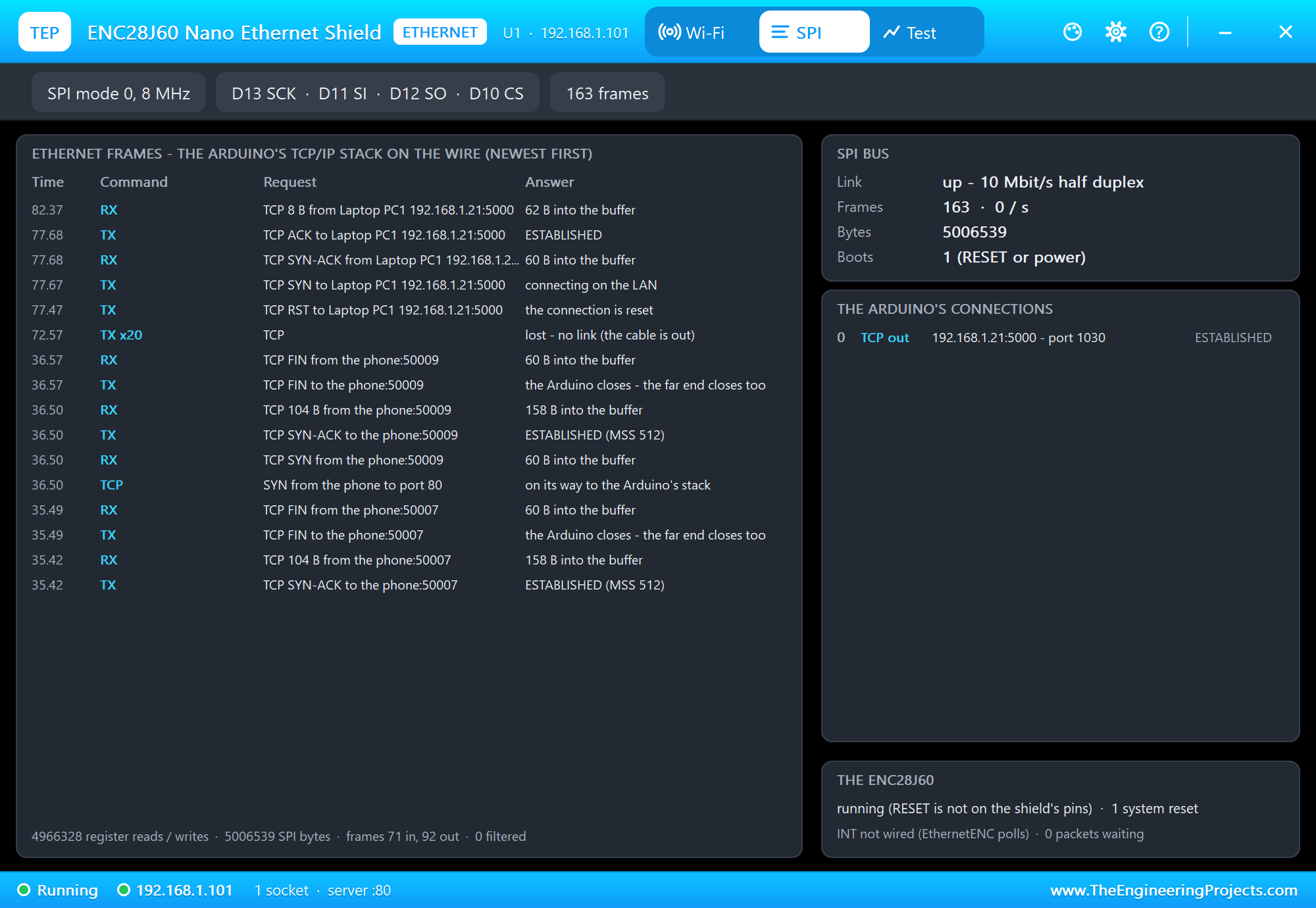
Look at the monitor above: the first try failed. That is a real situation, not a bug - the laptop joins the Wi-Fi 2.38 s after Run, and the UNO was faster. The sketch printed "trying again in 3 s", and the next try connected. The panel's SPI page shows it frame by frame, newest first. Read it from the bottom: the chip's revision and LED setup, the DHCP exchange, the DNS question and the NTP answer, then the ARP question "who has 192.168.1.21?" answered once the laptop was on, and the TCP handshake - SYN, SYN-ACK, ACK:
On the laptop, the Terminal tab is in TCP Server mode, listening on 5000. It shows the connection, the hello and a report every 5 seconds:
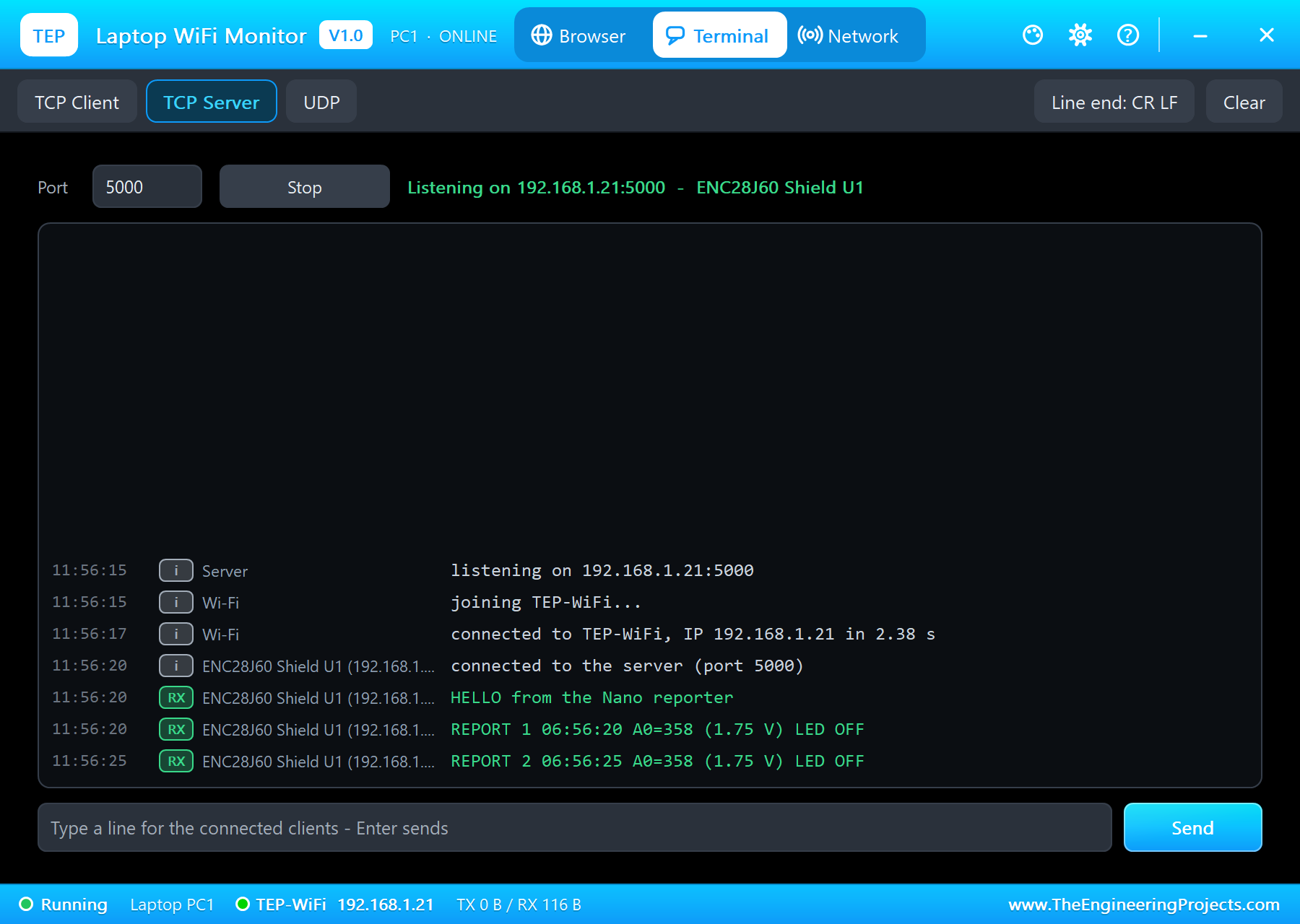
Each report is one line: a counter, the NTP time, the raw A0 reading, the same in volts and the LED state. The voltage is worked out in whole millivolts, rounded:
  sprintf_P(text, PSTR("REPORT %u %s A0=%d (%s V) LED %s"), reports, t, a0, v, ledOn ? "ON" : "OFF");
  link.println(text);
const long mv = ((long)a0 * 5000L + 511L) / 1023L; // (rounded to the millivolt)Commands from the Laptop
A TCP connection goes both ways. While it is up, laptopLink() collects whatever the laptop sends into a line, in capitals, and hands each complete line to command():
  while (link.available()) {
    const char c = link.read();
    if (c == '\n') { cmd[cmdLen] = 0; if (cmdLen) command(cmd); cmdLen = 0; }
    else if (c != '\r' && cmdLen < sizeof(cmd) - 1) cmd[cmdLen++] = toupper(c);
  }
There are five commands. LED ON and LED OFF switch D1, RATE with a number changes the report interval (1 to 60 seconds), TIME answers with the NTP time and STATUS with the counters. Each one is answered on the same connection:
if (!strcmp(c, "LED ON")) { setLed(true); link.println(F("OK LED ON")); } else if (!strncmp(c, "RATE ", 5)) {
const int s = atoi(c + 5);
if (s >= 1 && s <= 60) { every = s * 1000UL; sprintf_P(text, PSTR("OK a report every %d s"), s); link.println(text); }
else link.println(F("RATE takes 1 to 60 seconds"));
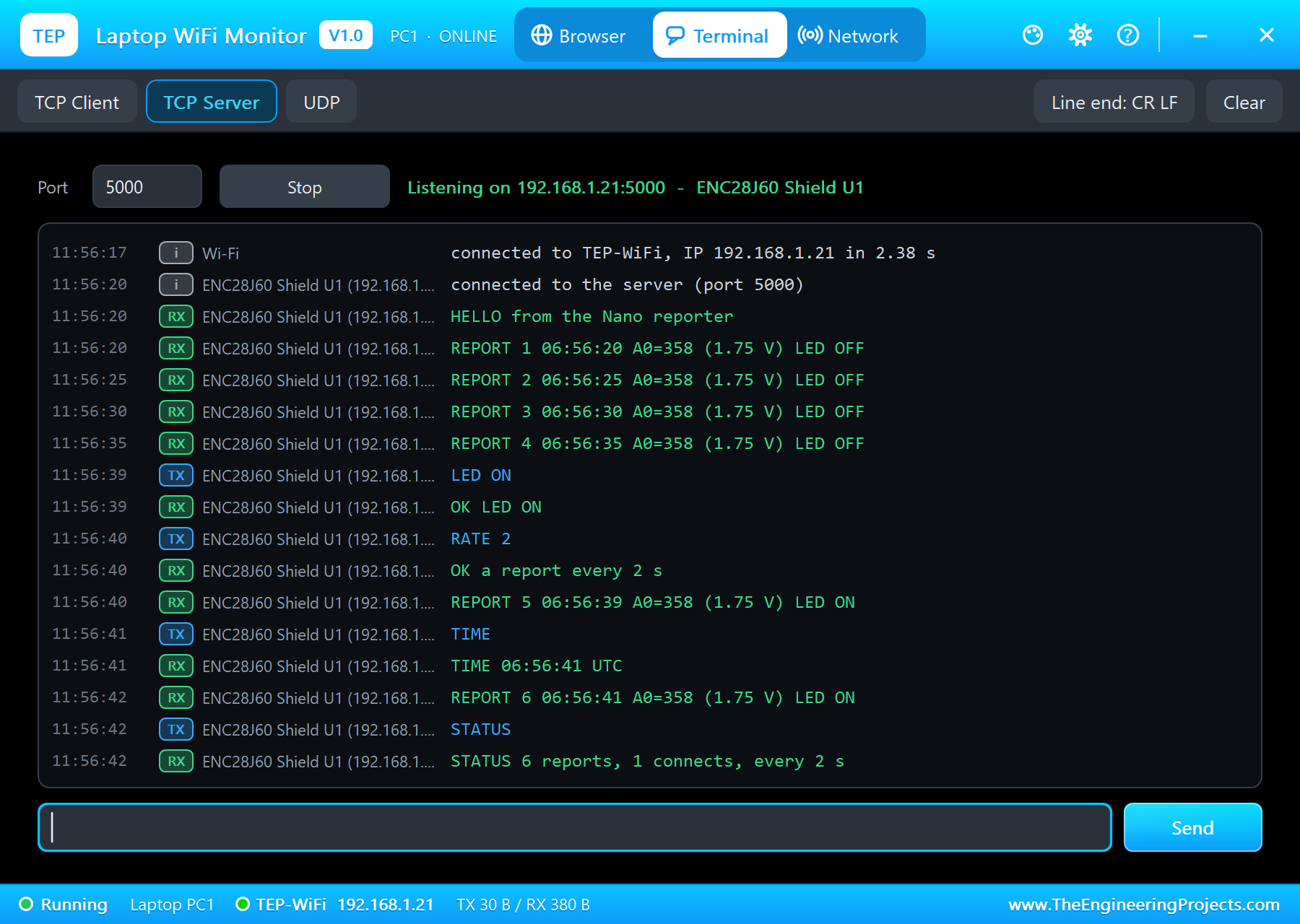
}Type the commands in the laptop's input line and press Enter. The answers come back at once, the reports keep coming in between - every 2 seconds after RATE 2 - and D1 lights up on the sheet after LED ON:
HELLO from the Nano reporter
REPORT 1 06:56:20 A0=358 (1.75 V) LED OFF
REPORT 2 06:56:25 A0=358 (1.75 V) LED OFF
REPORT 3 06:56:30 A0=358 (1.75 V) LED OFF
REPORT 4 06:56:35 A0=358 (1.75 V) LED OFF
LED ON
OK LED ON
RATE 2
OK a report every 2 s
REPORT 5 06:56:39 A0=358 (1.75 V) LED ON
TIME
TIME 06:56:41 UTC
REPORT 6 06:56:41 A0=358 (1.75 V) LED ON
STATUS
STATUS 6 reports, 1 connects, every 2 s
The lines LED ON, RATE 2, TIME and STATUS came from the laptop; everything else came from the UNO. The sketch also prints each command it receives on the serial monitor, and the monitor has three commands of its own - STATUS, TIME and HELP. STATUS reads the link from the PHY with Ethernet.linkStatus():
Serial.print(Ethernet.linkStatus() == LinkON ? F("ON") : F("OFF"));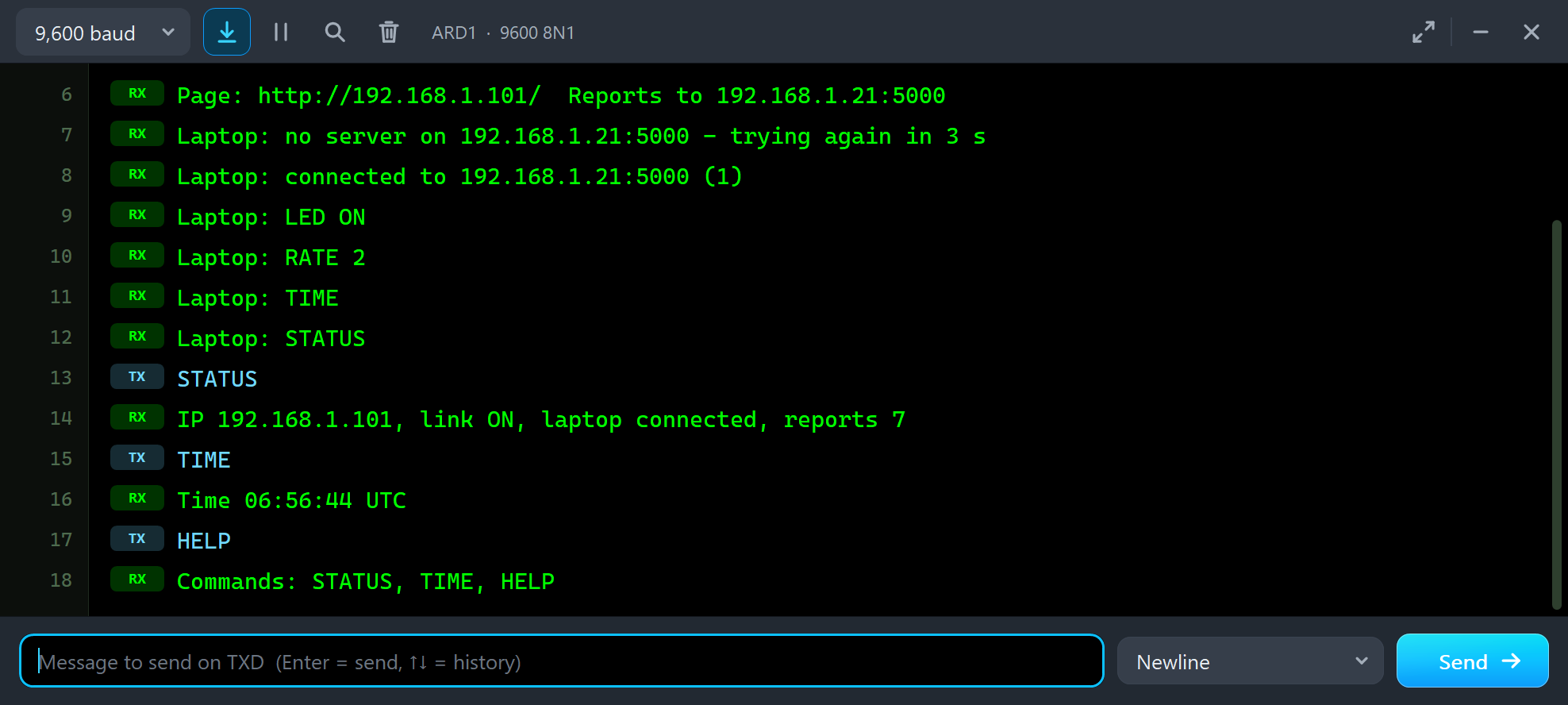
Laptop: LED ON
Laptop: RATE 2
Laptop: TIME
Laptop: STATUS
STATUS
IP 192.168.1.101, link ON, laptop connected, reports 7
TIME
Time 06:56:44 UTC
HELP
Commands: STATUS, TIME, HELP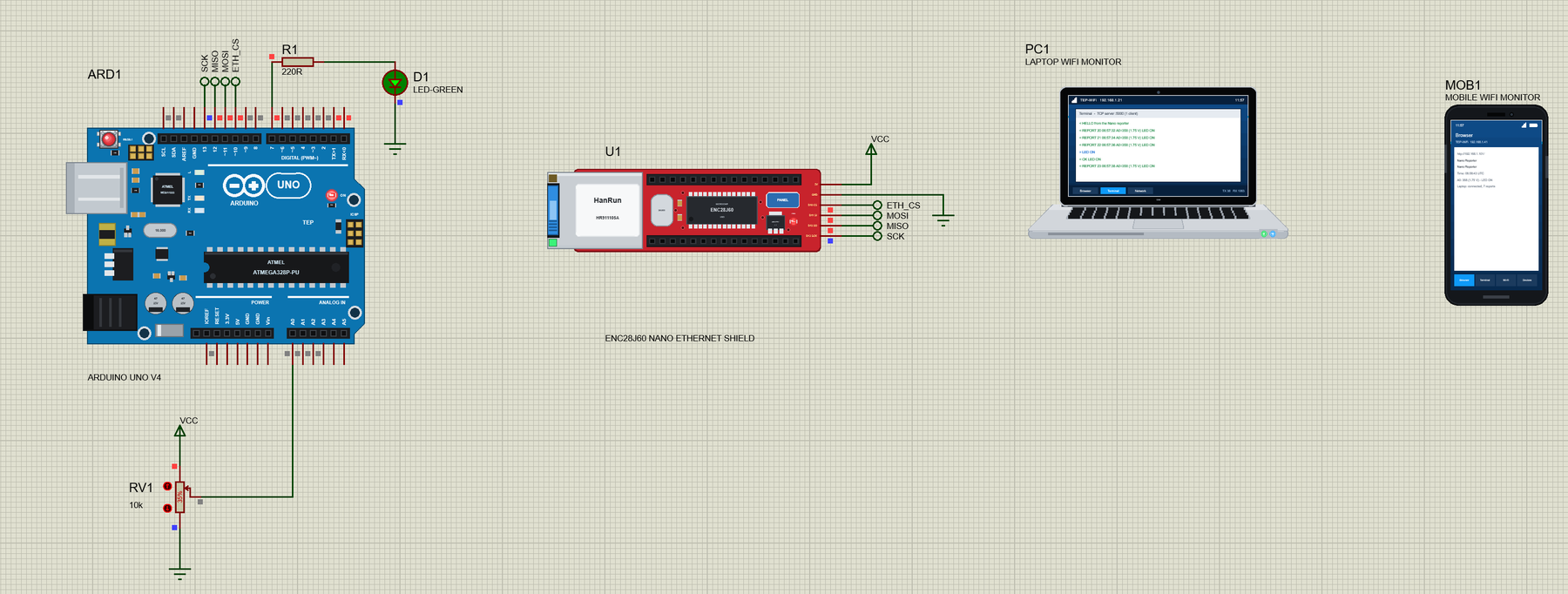
Keep the Loop Moving
loop() calls four short functions and never waits for long. Ethernet.maintain() renews the DHCP lease when it is due; the other three run the laptop link, the page and the monitor:
void loop() {
  Ethernet.maintain();
  laptopLink();
  page();
  monitor();
}
This matters more on an ENC28J60 than on a WIZnet board. Each time the sketch calls EthernetENC, the library reads the chip's packet counter and lets uIP answer whatever arrived - ARP, the laptop's acknowledgements, the phone's connection. A long delay() in the loop would freeze all of it.
A Page for the Phone
The same sketch is also a server. page() takes a client from server.available(), reads the request up to the blank line that ends the headers and answers with a small page - the time, A0, the LED and whether the laptop is connected:
client.print(link.connected() ? F("connected") : F("not connected"));Open the phone's Browser and press Go - the home page is http://192.168.1.101/:
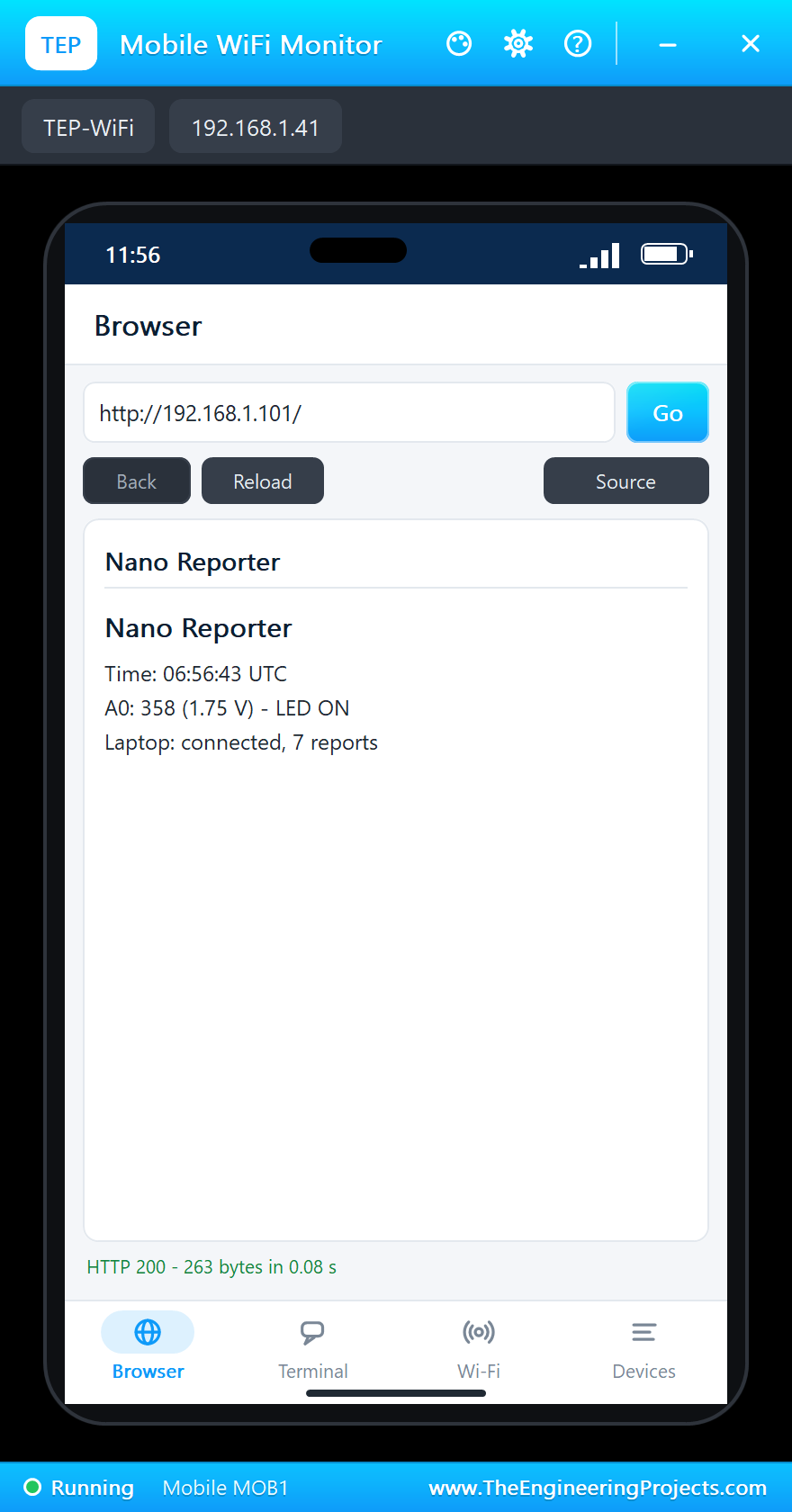
Both connections live side by side in uIP: the long one to the laptop and the short one from the phone, which the sketch closes after each page.
Pulling the Cable
A reporter must survive a bad network. We pulled the cable with the panel's CABLE OUT button and left it out for 22 seconds of simulation - longer than the 20 s our network keeps a quiet TCP connection. The green LED went dark and the panel turned orange:
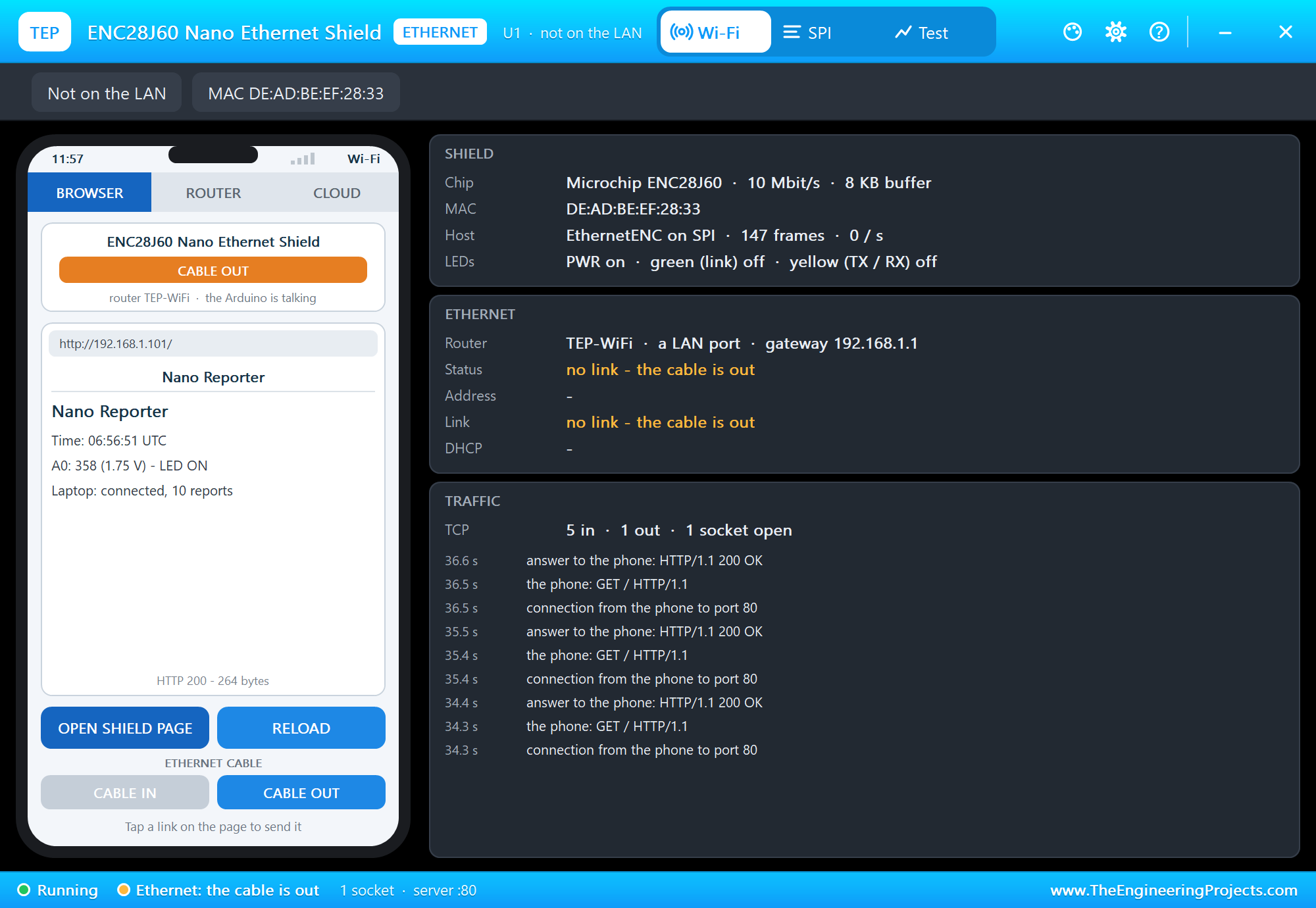
The sketch did not know at once - for uIP a quiet cable looks like a slow network, and the reports written meanwhile waited for an answer that never came. When the connection was dropped, link.connected() turned false, and with the cable back in the next try connected again:
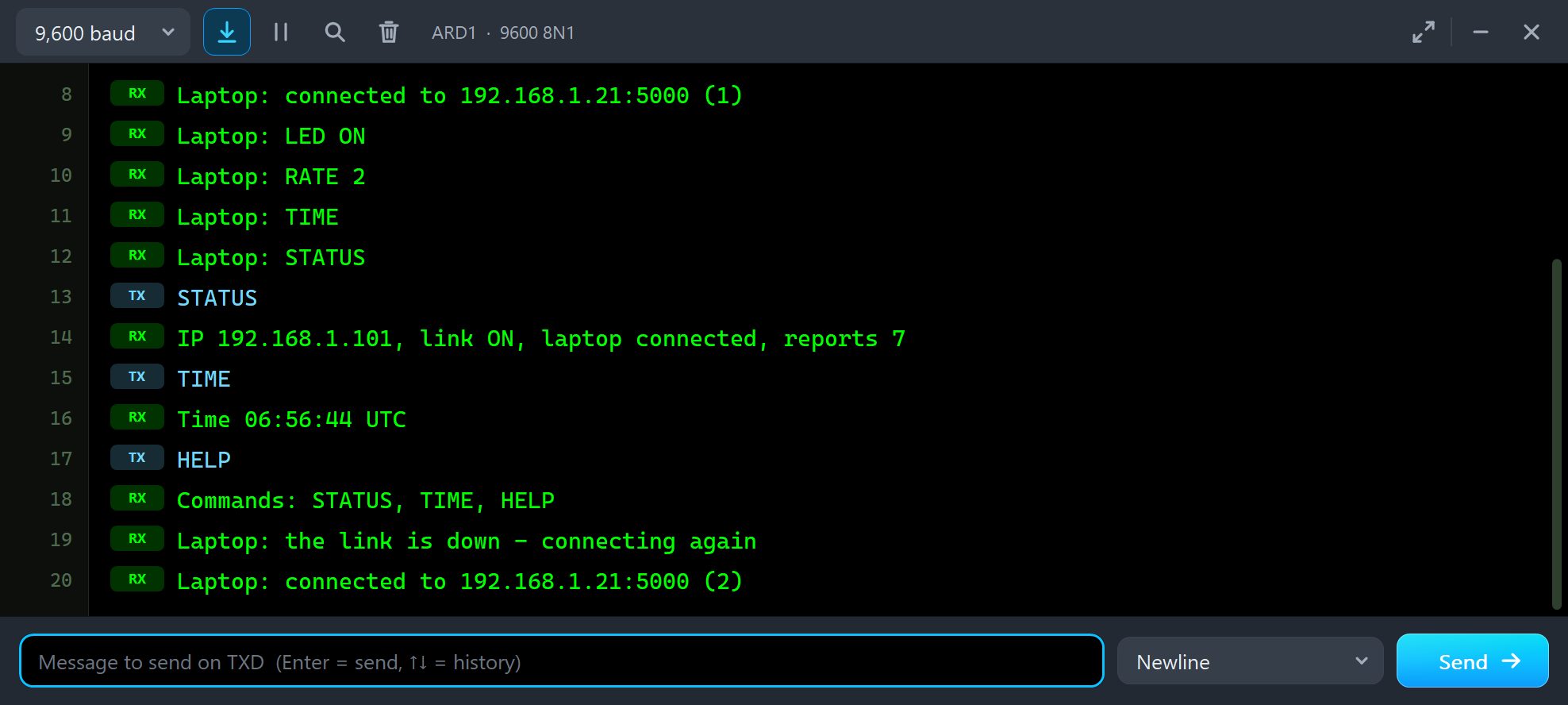
Laptop: the link is down - connecting again
Laptop: connected to 192.168.1.21:5000 (2)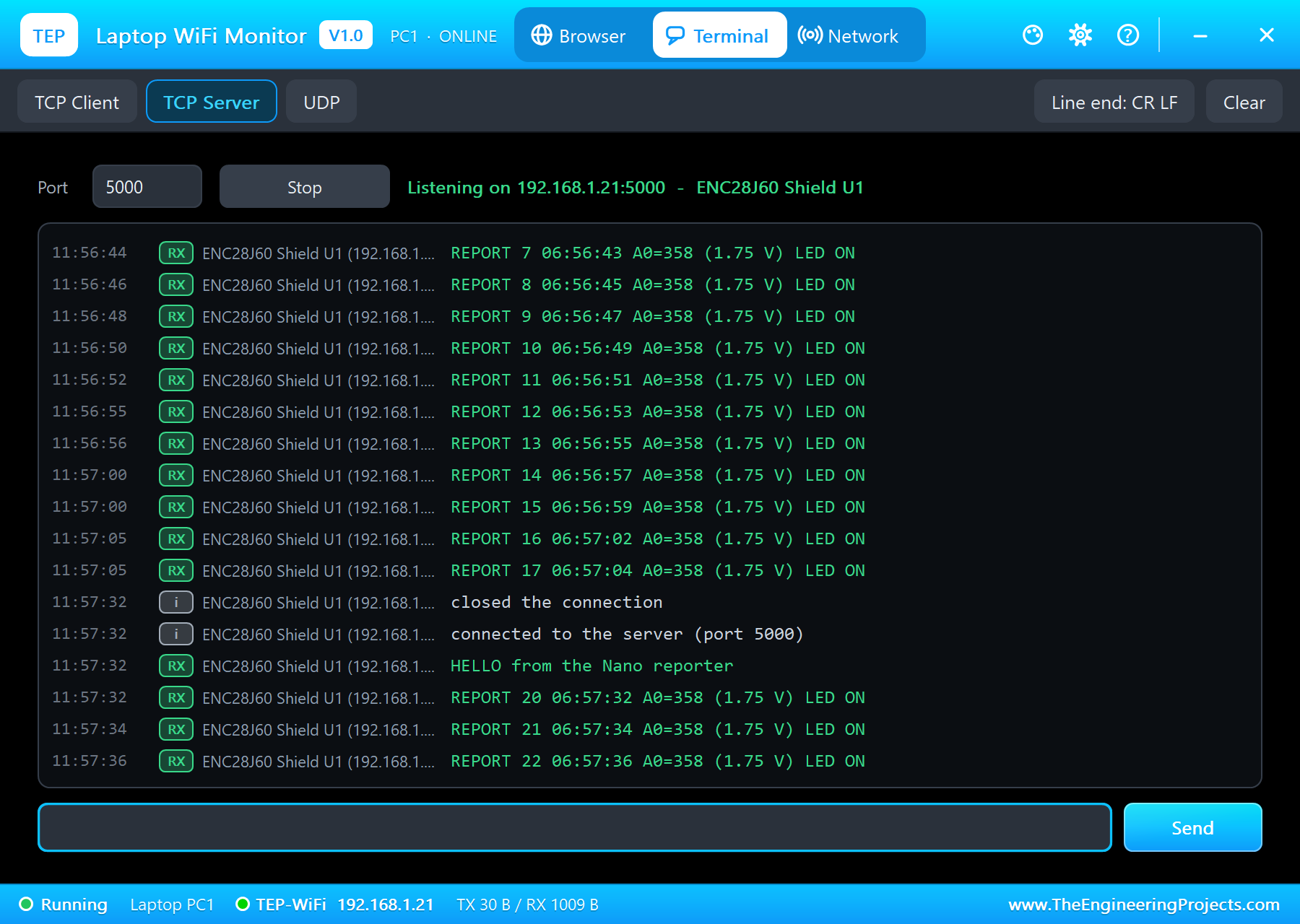
The report numbers jump from 17 to 20: the two reports written while the cable was out were lost with the old connection. A real logger would keep them and send them again - an easy change once you see it happen. The SPI page shows the end of the story: the frames lost while there was no link, a reset for the old connection, and a fresh handshake:
The ENC28J60 Nano Ethernet Shield Panel
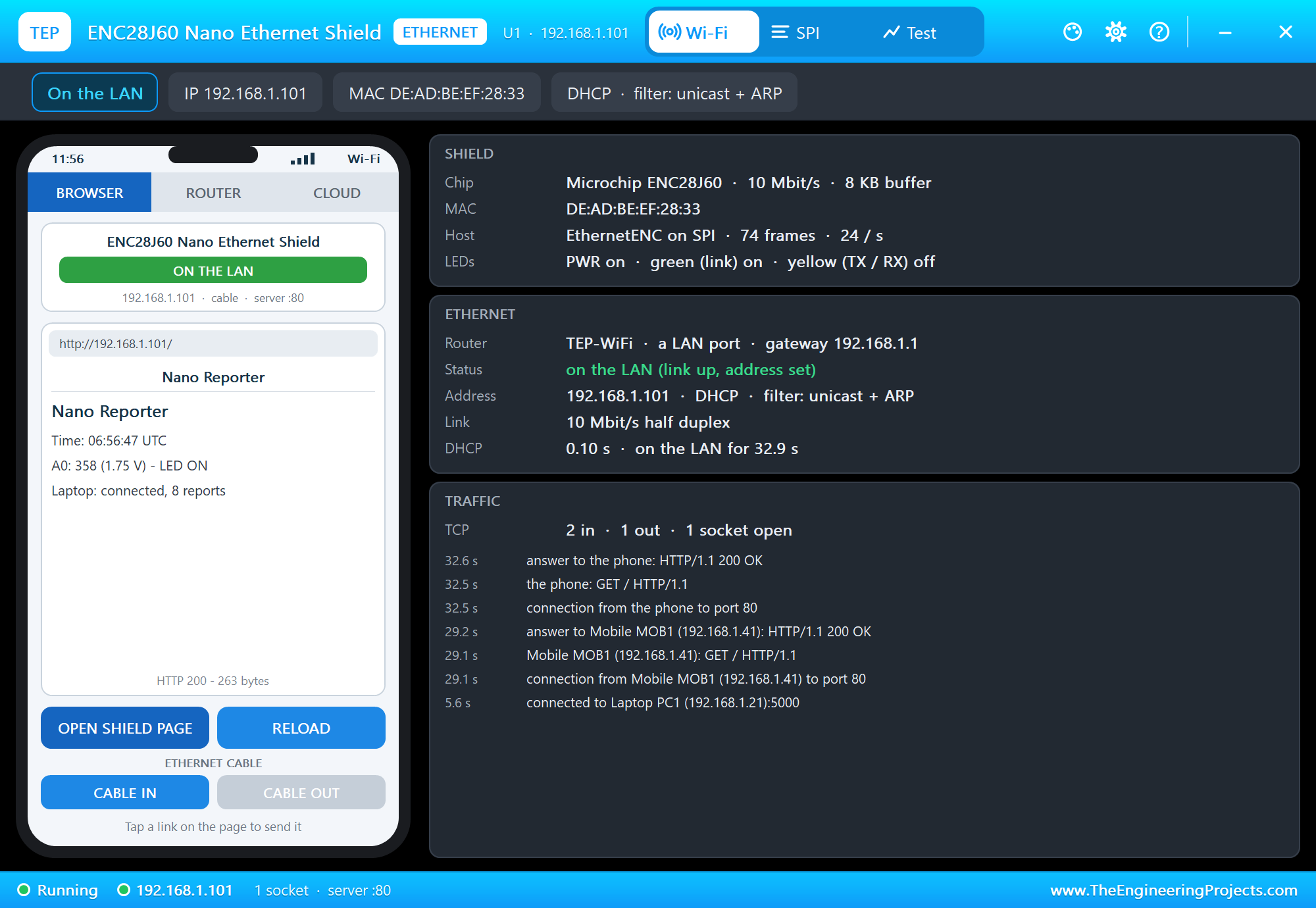
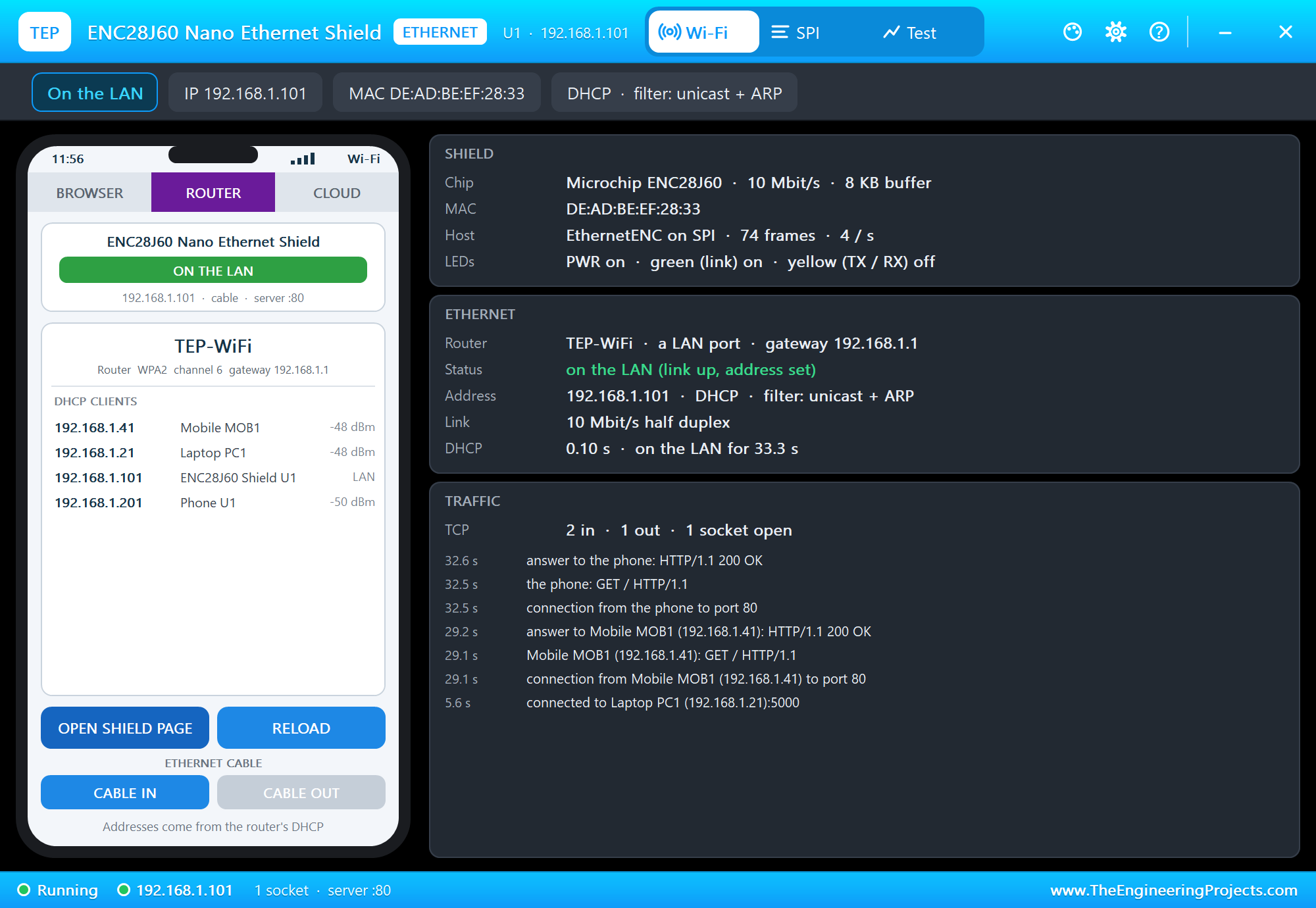
The panel opens at Run, in the look of our TEP Serial Monitor Advance for Proteus - our own TEP header, no Windows title bar. Its first page has a small phone of its own with the CABLE IN and CABLE OUT buttons, and three cards: SHIELD with the chip, the MAC address, the frame count and the LEDs, ETHERNET with the router, the status, the address and how long DHCP took, and TRAFFIC:
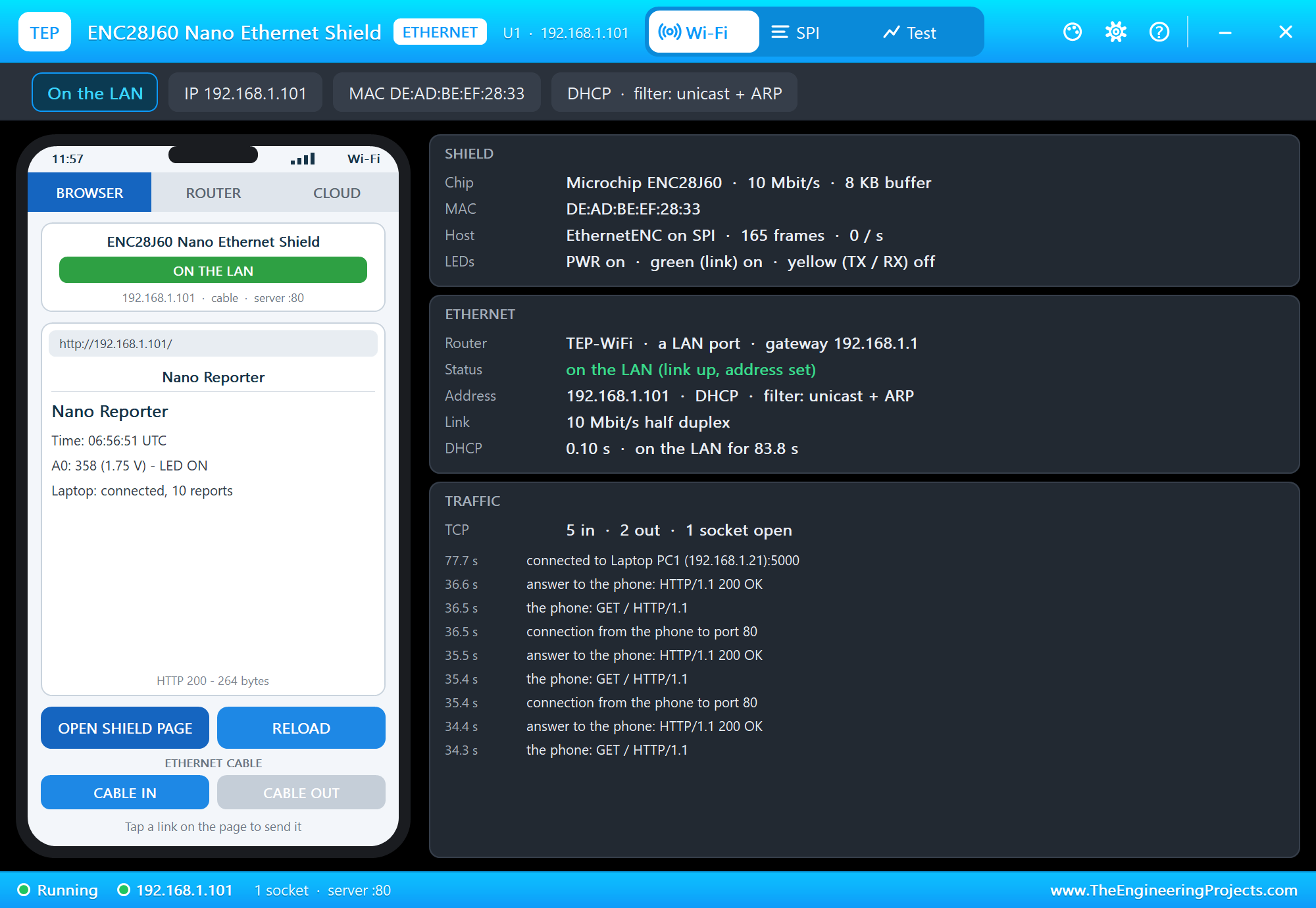
OPEN SHIELD PAGE lets the panel's own phone open the page the Arduino serves:
The ROUTER tab lists the router's clients with the addresses its DHCP gave out - the shield among them as a LAN client:
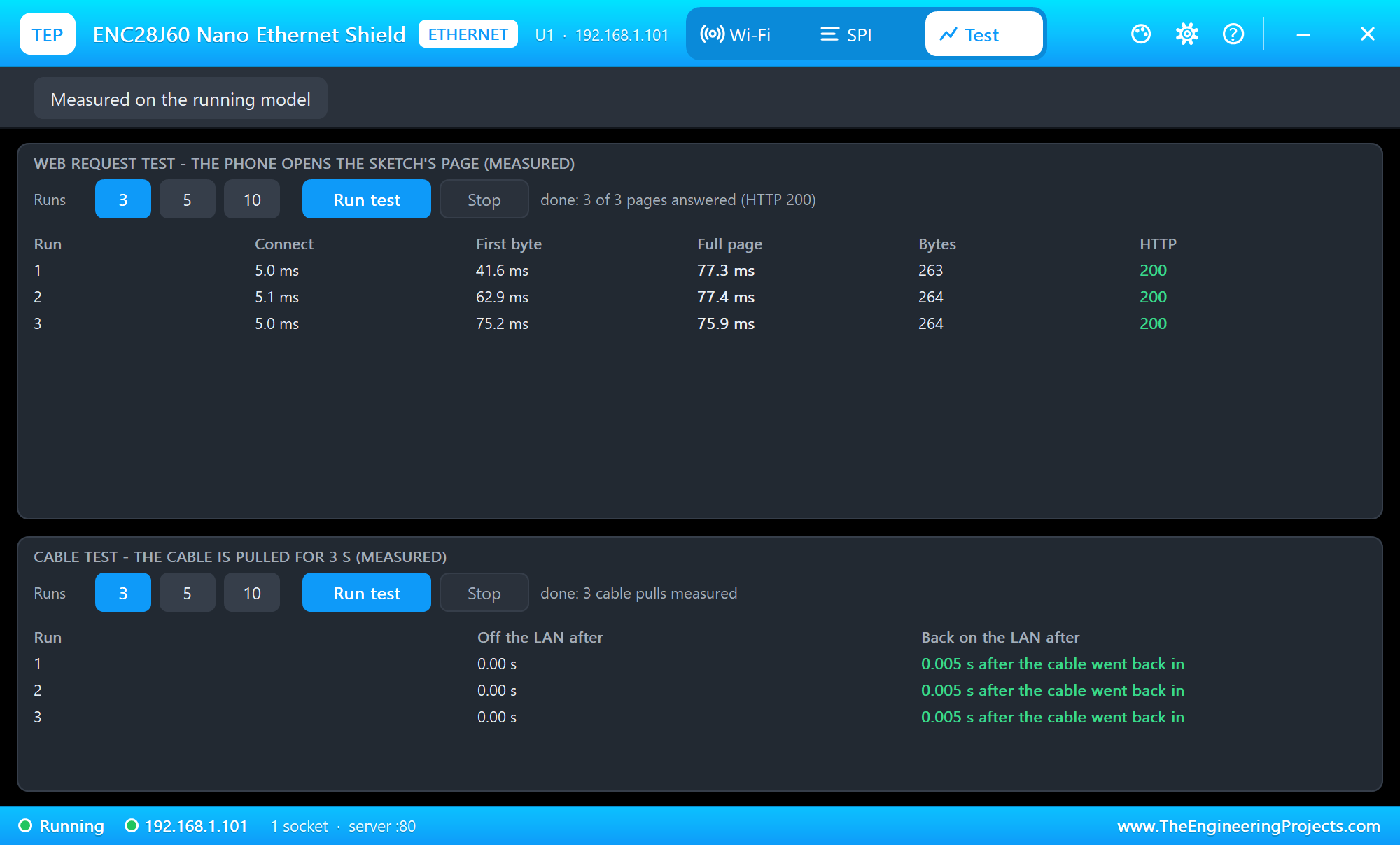
The Test page measures the running model: the web request test lets the panel's phone open the page three times, and the cable test pulls the cable for 3 seconds, three times - short pulls the TCP connection to the laptop rides out:
The SPI page's footer counts the register accesses - EthernetENC reads the chip about 60,000 times a second of simulation while it waits for packets. That is the price of a stack on the Arduino, and the reason the simulation runs below real time.
Pins of the ENC28J60 Nano Ethernet Shield
| Pin | Demo wiring | What it does |
|---|---|---|
| 5V | VCC | power: 5 V (the AMS1117 makes 3.3 V for the ENC28J60) |
| GND | ground | ground |
| D10 CS | D10 (ETH_CS) | chip select (LOW = selected) |
| D11 SI | D11 (MOSI) | SPI data to the chip |
| D12 SO | D12 (MISO) | SPI data from the chip; floats while D10 is HIGH |
| D13 SCK | D13 (SCK) | SPI clock |
Properties of the ENC28J60 Nano Ethernet Shield
| Property | What it does |
|---|---|
| ROUTER | the router the cable goes to - the network name of the Wi-Fi parts (TEP-WiFi) |
| CABLE | the Ethernet cable at Run: IN or OUT |
| PANEL | the phone's tab at start (BROWSER, ROUTER, CLOUD) |
| PAGEPORT | the port OPEN SHIELD PAGE opens (80) |
| CLOCK | the clock of NTP and the panel: PC (UTC) or a start time |
With DHCP the address follows the part's number: U1 gets 192.168.1.101, U2 .102 and so on - give every network part its own number. The laptop is always 192.168.1.21 and the phone 192.168.1.41. Set CLOCK to a fixed start time when you want the same times in every run.
Troubleshooting
- "no ENC28J60 found":
Ethernet.hardwareStatus()is EthernetNoHardware - check D13, D12, D11, D10 (andEthernet.init()when CS is not D10), 5V and GND. - "DHCP... no answer": the cable is out - the panel shows CABLE OUT and
Ethernet.linkStatus()is LinkOFF. Put it in with the panel, or click the RJ45 jack. - "Laptop: no server on 192.168.1.21:5000": the laptop's TCP server is not listening on 5000 (Terminal, TCP Server, Start), or the laptop is still joining the Wi-Fi - the sketch tries again every 3 seconds.
- The page never opens: the sketch must call the library often. With a long
delay()in the loop nothing answers, not even ARP or a ping. - A UDP broadcast never arrives: EthernetENC's filter lets only ARP broadcasts in - send to the shield's address.
- No panel: click the PANEL pad or the ENC28J60, or turn "Open the panel at Run" back on in Settings.
Things to Know Before Using a Real ENC28J60 Nano Shield
- Power: the shield takes 5V from the Nano and its AMS1117 makes 3.3 V. The ENC28J60 draws well over 100 mA while it sends and runs warm - normal for this chip. A Nano on USB powers it; a weak supply resets it in the middle of a transfer.
- The pins: the shield uses D10 to D13 for SPI. Your own parts can use the other pins, and other SPI parts can share D11 to D13 with their own chip select.
- The MAC address: the shield has none of its own; give each board on the network a different one in the sketch.
- 10 Mbit/s: the ENC28J60 is a 10BASE-T part. Any modern switch or router port talks to it - plenty for reports, a page or a command.
- Flash and RAM: the stack lives in the sketch. The demo takes 27,940 of the 32,256 bytes of flash and 1,190 of the 2,048 bytes of RAM of a Nano or an UNO - keep your own code lean, or choose a WIZnet board for a big project.
- Real networks: your router may give a different address than our 192.168.1.101, and your PC's firewall must let the TCP server on port 5000 in.
Limitations of the Simulation
- The ENC28J60 is our model of the chip as EthernetENC (2.0) uses it: the SPI instructions, the register banks, the buffer, the receive filters and the PHY registers that matter for the link and the LEDs.
- Not modelled: the regulator's voltage, the CLKOUT clock, wake-on-LAN, collisions and flow control frames, power-save timing, the supply's current.
- The far end of each TCP connection is ours: it sends one segment at a time; with the cable out the connections are kept for 20 s - our choice, close to what a real network does for a short pull.
- The PANEL pad, the panel, its phone, the router, the internet host and the two monitors are TEP additions.
- ENC28J60 is a name of Microchip, Nano of Arduino; this library is not made or endorsed by Microchip, Arduino or Labcenter.
- Tested in Proteus 8.5 in October 2026 (the demo as shipped, the UNO, the shield, the laptop and the phone together at about 0.25 to 0.35 x real time on our PC). Proteus 7 is not supported.
So, that was all about the ENC28J60 Nano Ethernet Shield Library for Proteus. I hope it helps you build and test Nano Ethernet projects in Proteus before you solder anything - a reporter that finds its own address, keeps a connection to a server, takes commands and survives a pulled cable. The cable goes to the same router as our Wi-Fi boards and our other Ethernet modules, so they can all share one design. If you use the ENC28J60 Nano Ethernet Shield Library for Proteus in a project, please share it in the comments or in our forum, and if you have any questions, ask in the comments and I will help you out. Till the next tutorial, take care and have fun!

Comments
0