VL53L0X Sensor Library for Proteus V1.1: two Arduino UNOs with purple GY-VL53L0XV2 boards, the VL53L0X Advance pop-up Sensor page with a white target at 860 mm and the TEP Serial Monitor in its Simple interface

VL53L0X Sensor Library for Proteus V1.1 (GY-530 + Arduino)

2.5K Views
40
700
60
25
60
PCBWay

Hello friends, I hope you all are doing great. Today, I am going to share the new VL53L0X Sensor Library for Proteus V1.1. The VL53L0X from ST is a tiny laser time-of-flight distance sensor, best known on the purple GY-530 / GY-VL53L0XV2 board. With this VL53L0X Sensor Library for Proteus, you set the distance and the kind of target with presets, a slider or a click on the distance scale, and your Arduino reads it over I2C with the same Pololu VL53L0X library you use on real hardware.

Version 1.1 replaces the first version of this post. You now get two devices: VL53L0X Simple, with a control panel on the schematic, and VL53L0X Advance, with a pop-up window and four measured sensor test tools. The model takes the real ranging time from ST's formula, and white, grey and black targets each have their own range. The new VL53L0X Arduino Proteus demo runs on two Arduino UNOs with a proximity alarm LED, shown in the compact Simple interface of our TEP Serial Monitor. Have you read version 1.0? Then jump to "What's New" below.

NOTICE: This library is very special to our team. Our VL53L0X model runs the whole ST start-up sequence with the SPAD and reference calibrations, takes its ranging time from ST's timing-budget formula, knows how far a white, grey or black target can be seen, and speaks I2C to the unmodified Pololu library. It took our team a lot of hard work, many test runs and many design changes. Your feedback is the fuel that keeps us going, so please tell us what you think in the comments below or in the VL53L0X Library board of our forum. And if our free libraries help you, you can buy us a coffee. So, let's get started with the VL53L0X Sensor Library for Proteus:

VL53L0X Sensor Library for Proteus V1.1: two Arduino UNOs with purple GY-VL53L0XV2 boards, the VL53L0X Advance pop-up Sensor page with a white target at 860 mm and the TEP Serial Monitor in its Simple interface
Figure: The VL53L0X demo in Proteus 8.5: NODE 1 (Simple) and NODE 2 (Advance), U2's Sensor page with a WHITE 88 % target at 860 mm (max 1.20 m), and U4 printing "Distance: 860 mm".

What is the VL53L0X Sensor?

The VL53L0X, made by STMicroelectronics (ST), is a laser distance sensor in one small package. A tiny laser, the VCSEL (vertical-cavity surface-emitting laser), sends out light pulses; an array of SPADs (single-photon avalanche diodes) catches the light that comes back from the target, and the chip measures the time in between. That is the time of flight. Your Arduino does not time anything itself: it reads the finished distance in millimetres over I2C, the 2-wire bus with a clock line (SCL) and a data line (SDA). For the chip's own documents, see ST's VL53L0X page.

So it does not work like an ultrasonic sensor: there is no trigger pin and no echo pulse to time.

The VL53L0X at a Glance

VL53L0X in numbers
FeatureValue
MeasuresThe distance to a target in millimetres (our slider: 0 to 2000 mm)
InterfaceI2C, standard and fast mode, at 0x29 after every power-up; the sketch can move it to another address
Chip IDMODEL_ID (register 0xC0) = 0xEE
RangingSingle shot, back-to-back, or timed continuous (one ranging every inter-measurement period)
Ranging timeThe timing budget: 33.8 ms after the Pololu init, 20 ms "high speed", 200 ms "high accuracy"
RangeUp to 2 m in the data sheet, with the long-range set-up, a white target and little ambient light; in our model a white target is seen to 1.2 m by default
No targetThe result 8190, with range status 4
PinsVIN, GND, SCL, SDA, GPIO1 (interrupt output) and XSHUT (shutdown, low = off)
SupplyThe GY-VL53L0XV2 has a 2.8 V regulator and level shifters, so it takes 3.3 V or 5 V on VIN

VL53L0X Terms You Will See in This Article

VL53L0X terms
TermMeaning
Time of flight (ToF)The time the light takes to the target and back
Timing budgetHow long one ranging takes, computed with ST's formula from the registers
MCPSMega counts per second: the rate of returned light, the "signal"
Signal rate limitThe smallest return signal the chip accepts as a valid result (0.25 MCPS by default)
VCSEL periodThe laser pulse period in PCLKs, one for the pre-range and one for the final range (14 / 10 by default)
ReflectanceHow much light the target sends back: white 88 %, grey 17 %, black 5 % in our model
8190, range status 4No usable signal: what the sketch reads when there is no target
Inter-measurement periodThe time between two timed rangings (50 ms in the demo)
GPIO1The interrupt output: with the Pololu set-up, active low while a new result waits
XSHUTThe shutdown input: high = on, low = off (the sensor forgets its settings and address)

How the VL53L0X Measures: Time of Flight, Timing Budget and Signal

Time of Flight

The rule is distance = speed of light x travel time / 2, divided by two because the light goes to the target and back. For a target at 0.5 m, the round trip takes about 3.34 nanoseconds, and the chip measures it itself. So the 50 in the demo's startContinuous(50) is a schedule (one ranging every 50 ms), not the travel time of the light.

The Timing Budget: ST's Formula

One ranging is a sequence of steps that collects light for a set time. ST gives a formula for the total, the measurement timing budget, from the registers your sketch set:

budget = 1.91 ms (start) + 0.96 ms (end) + TCC + DSS / MSRC + pre-range + final range

TCC (target centre check), DSS (dynamic SPAD selection) and MSRC (minimum signal rate check) are optional steps; the pre-range and final-range times depend on their VCSEL periods. After the Pololu init(), the sum is 33.82 ms, exactly what getMeasurementTimingBudget() reports. Version 1.0 only approximated the ranging time; in v1.1, setMeasurementTimingBudget(20000) really gives 20 ms rangings. The chip ranges once on request (single shot), back-to-back, or once every inter-measurement period (timed continuous, as in the demo).

Return Signal, Target Colour and Range

How far the sensor sees depends on how much light comes back. A white wall sends back much more than a black jacket, and the light falls with the square of the distance. Below the signal rate limit (0.25 MCPS by default), the chip does not trust the result and reports 8190 with range status 4: no target. Version 1.0 only had a target that was there or not; v1.1 models four target types:

Target types in our model (the reflectance and signal values are model values)
Target (TARGET)ReflectanceRange, default set-upRange, long-range set-up
IDEAL (1)The v1.0 targetEvery distance (signal 1.00 MCPS)Every distance
WHITE (2)88 %1.2 mAbout 2.3 m
GREY (3)17 %0.7 mAbout 1.35 m
BLACK (4)5 %0.38 mAbout 0.73 m
NO TARGET (0)-Never seen (8190)Never seen (8190)

In the model, the return signal is reflectance x VCSEL period / distance². A white target returns 144 MCPS at 50 mm and 1.44 MCPS at 500 mm; at 1.2 m it falls to the 0.25 MCPS limit, and that is its range.

The Long-Range Set-Up

The demo's MODE LONG uses Pololu's long-range set-up: the signal limit goes down to 0.1 MCPS, and the VCSEL periods go up from 14 / 10 to 18 / 14 PCLKs. A longer period returns more signal, and a lower limit accepts less, so every target is seen almost twice as far.

Why does STATUS then say 0.09 MCPS? The chip holds the limit in "9.7 fixed point" (the I2C check's words), in steps of 1/128 MCPS. The Pololu library turns 0.1 x 128 = 12.8 into 12, and 12 / 128 = 0.094 prints as 0.09.

8190, Timeouts and 65535

8190 means the chip finished a ranging without a usable signal: no target. A timeout means it did not finish within setTimeout(500), and the Pololu library sets timeoutOccurred(). If the chip does not answer at all (XSHUT low), the library reads 65535; the demo prints "No target detected." for anything from 8190 up, so that is no target, not 65.5 m.

GPIO1, XSHUT and the I2C Address

The Pololu init() sets GPIO1 to "new sample ready, active low", and the library clears the interrupt after each read. Our model drives the pin and the amber GPIO1 LED from it. A new result comes every 50 ms, but the demo clears it only about every 250 ms, so the LED is lit most of the time.

Every VL53L0X starts at 0x29, and there is no address pin: setAddress() moves the chip until the next power-up or XSHUT low. That is how several sensors share one bus: hold all XSHUT pins low, then release one at a time and give each a new address. XSHUT low switches our model off ("I2C OFF" on the board), and it forgets its settings and address.

What's New in VL53L0X Sensor Library for Proteus V1.1

If you used version 1.0, here is what has changed:

  • Two devices in TEPVL53L0X.LIB: VL53L0X Simple (VL53L0XTEP, the v1.0 device) and VL53L0X Advance (VL53L0XADVTEP) with a pop-up window.
  • A redrawn, live board: the purple GY-VL53L0XV2 with an animated time-of-flight view, PWR / I2C / GPIO1 LEDs (a TEP addition) and the live I2C address.
  • Six presets and a distance scale you click; the Simple panel closes with a red X.
  • The real ranging time from ST's timing-budget formula (v1.0: approximate).
  • Target types: white, grey and black, each with its own range (v1.0: present or absent); TARGET 0 and 1 behave as in v1.0.
  • The long-range set-up, and 8190 = no target with range status 4.
  • GPIO1, XSHUT and the address, now visible: the GPIO1 LED, "I2C OFF" while XSHUT is low, and the new address after ADDR.
  • An I2C log: every read and write decoded, and the SCL clock measured on the pin.
  • Four measured test tools on the Advance.
  • A two-UNO demo with the TEP Serial Monitor instead of the Virtual Terminal: a proximity alarm LED and five commands; every v1.0 output line is kept.
  • Lighter package: about 1.59 MB, without the C++ source code and the AVR core archive.

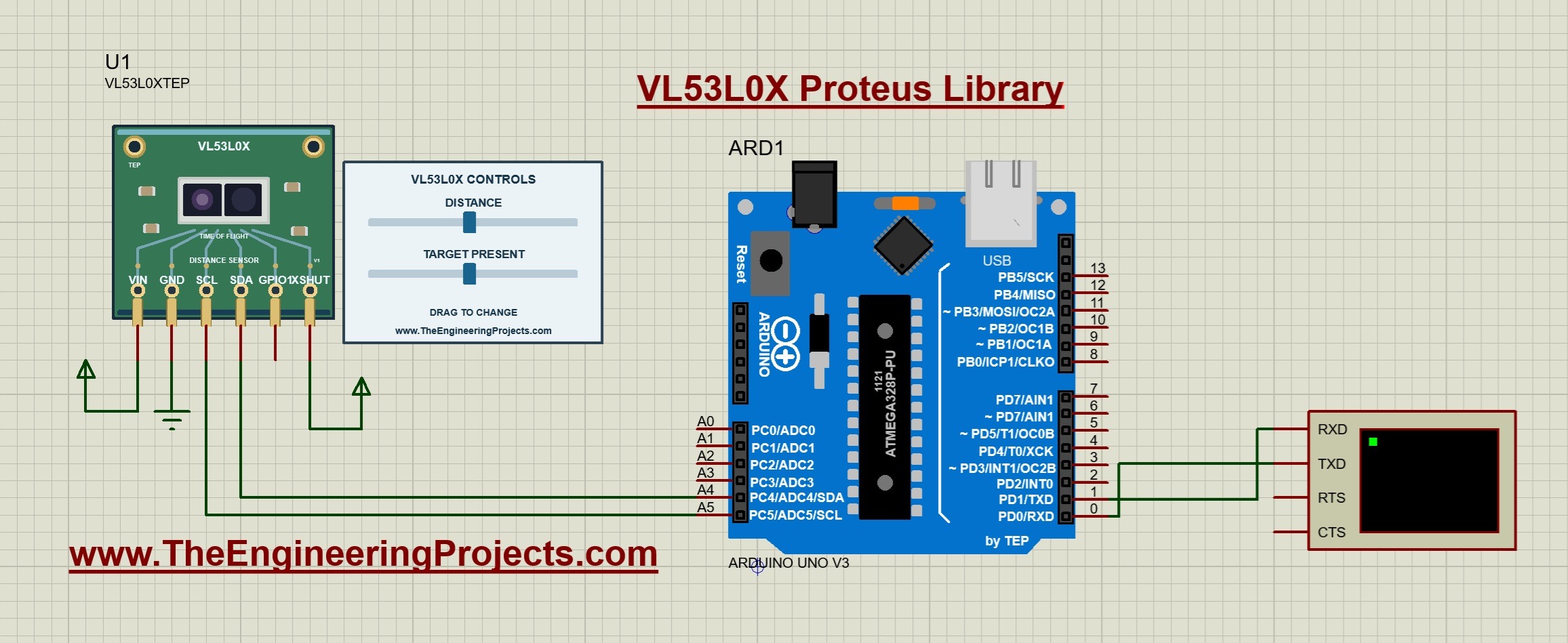
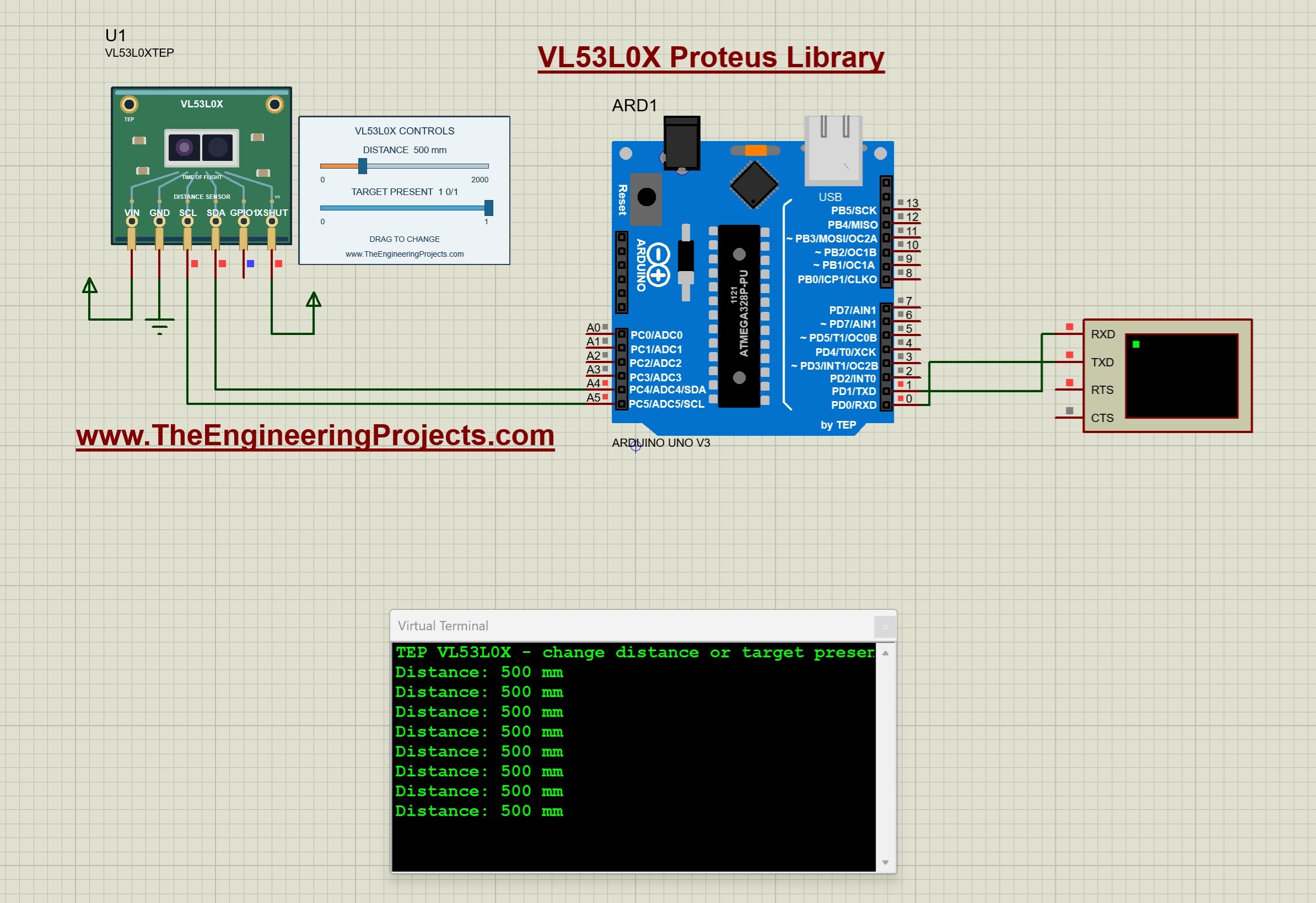
And your old designs keep working. A design with the v1.0 symbol runs with the new model and shows the old VL53L0X CONTROLS panel; here, the v1.0 demo with the v1.1 DLL:

A v1.0 VL53L0X design running on the v1.1 DLL in Proteus: the green v1.0 board, the VL53L0X CONTROLS panel at DISTANCE 500 mm with TARGET PRESENT 1 and DRAG TO CHANGE, and the Virtual Terminal printing Distance: 500 mm
Figure: A v1.0 design after the update: the v1.0 panel at 500 mm, and the v1.0 sketch prints "Distance: 500 mm".

Re-pick the part from the library to get the v1.1 board and the red X.

VL53L0X Sensor Library for Proteus: Simple vs Advance

Both devices run the same model with the same properties; only the panel differs:

VL53L0X Simple vs Advance
FeatureSimpleAdvance
Full VL53L0X model (0x29 and new addresses, timing budget, target types, long range, GPIO1, XSHUT)✔✔
Purple GY-VL53L0XV2 board: live time-of-flight view, PWR / I2C / GPIO1 LEDs✔✔
Control panel on the schematic (six presets, the DISTANCE slider, what the sketch read)✔✘
Pop-up window you can move, resize and minimise✘✔
Sensor page: a large live view, presets, click-sliders with - / + for both inputs✘✔
I2C check, Timing, Step response and Range test✘✔
TEP Dark / Light theme, text size, Help page with Copy diagnostics✘✔
Same device name as v1.0 (old designs keep working)✔✘

Choose Simple to keep the controls beside your circuit, and Advance when your sheet is full or you want hard numbers about your sketch. The demo has one of each.

Download VL53L0X Sensor Library for Proteus

Click the button below to download VL53L0X-Sensor-Library-for-Proteus-v1.1.zip (about 1.59 MB, without the C++ source code):

VL53L0X Sensor Library for Proteus V1.1
  • README.txt: a detailed guide to the files, the wiring, the model, the test tools and real hardware.
  • Proteus Library Files: TEPVL53L0X.LIB (both devices), TEPSERIALMON.LIB and our Arduino UNO library ArduinoV3TEP.LIB / ArduinoV3TEP.IDX.
  • Proteus Model Files: TEPVL53L0X.DLL and TEPSERIALMON.DLL.
  • Proteus Simulation: VL53L0X-ArduinoUnoV3.pdsprj, VL53L0X_Demo.hex (both UNOs run it) and copies of both DLLs.
  • Arduino Code: VL53L0X_Demo.ino and the unmodified Pololu VL53L0X library 1.3.1 with its two examples (Continuous and Single); its LICENSE.txt holds Pololu's MIT-style licence and ST's BSD notice.

No Proteus yet? Read How to Download and Install Proteus 7 and 8. New to libraries? Follow How to Install a New Library in Proteus.

How to Install VL53L0X Sensor Library for Proteus

  1. Close Proteus and extract the whole zip file.
  2. Copy the four files from Proteus Library Files into the LIBRARY folder, usually C:\Program Files (x86)\Labcenter Electronics\Proteus 8 Professional\LIBRARY (on some PCs C:\ProgramData\Labcenter Electronics\Proteus 8 Professional\LIBRARY).
  3. Copy TEPVL53L0X.DLL and TEPSERIALMON.DLL into the MODELS folder.
  4. Start Proteus, press P and search for VL53L0X. You get the Simple and the Advance device (category Sensors > Distance, as in v1.0).

Updating from v1.0? Replace TEPVL53L0X.LIB and TEPVL53L0X.DLL, and delete TEPVL53L0X.IDX if there is one in LIBRARY. The DLL keeps its v1.0 name, so a v1.0 design keeps its v1.0 symbol and runs with the new model, with the v1.0 panel (no new board, no red X); re-pick the part to get the v1.1 board. Tested in Proteus 8.5; Proteus 7 is not supported.

The GY-VL53L0XV2 Board in Proteus

We drew the sensor as a clean TEP board in the purple of the real module: a round ear with a gold mounting hole on each side, the VL53L0X with its emitter and receiver windows, the two 7002 level-shifter transistors, the 2V8 regulator and the GY-VL53L0XV2 board print. Here is U1, the Simple device, at the start distance of 500 mm:

VL53L0X Simple board in Proteus at 500 mm: the purple GY-VL53L0XV2 with its two ears, the time-of-flight view with an ideal target at 500 mm on a 2 m scale, I2C 0x29, and the VL53L0X CONTROLS panel with SKETCH READ 500 MM
Figure: U1 (Simple) at 500 mm with the IDEAL target: SKETCH READ: 500 MM, signal 1.00 MCPS, budget 33.8 ms.

GY-530 or GY-VL53L0XV2?

VL53L0X is ST's chip, the black part with the two windows. GY-VL53L0XV2 is the purple breakout board that carries it, so our board print reads GY-VL53L0XV2, and GY-530 is the other name of this board. In Proteus, you search for "VL53L0X".

The Time-of-Flight View

Above the board, the sensor, seen from the side, sends laser pulses to the target, and they come back on a second line. The target stands on a 0 to 2 m scale in the colour of its type (cyan for IDEAL, white for WHITE). For a white, grey or black target, a dashed amber line marks how far it can be seen. The bottom line reads "IDEAL - SIGNAL 1.00 MCPS (LIMIT 0.25) - 33.8 MS".

Pinout

The six pins keep the v1.0 names, order and places. The real GY-VL53L0XV2 header has the same order and calls the first pin VCC:

GY-VL53L0XV2 pins in Proteus (VIN GND SCL SDA GPIO1 XSHUT)
PinWhat it doesDemo connection
VINPower (VCC on the real board)Supply terminal
GNDGroundGND
SCLI2C clockArduino A5
SDAI2C dataArduino A4
GPIO1Interrupt output (it also drives the GPIO1 LED)Not connected
XSHUTShutdown: high = on, low = off and resetSupply terminal (always on)

LEDs and Indicators

Board animations (the same on both devices)
IndicatorWhat it shows
Time-of-flight viewThe distance, the laser pulses, the target and its range line
PWR LED (red)Lit while VIN and GND are connected
I2C LED (blue)Flashes with every I2C transaction to this sensor
GPIO1 LED (amber)Lit while the GPIO1 interrupt is active
I2C 0x29The live address; "I2C OFF" while XSHUT is low
PANEL / OPEN PANEL, SIMPLE / ADVANCEThe panel button and the device badge

The three LEDs are a TEP addition: the real GY-VL53L0XV2 has no LED.

Component Properties

VL53L0X properties (double-click the sensor > Edit Properties; the v1.0 properties, the same on both devices)
PropertyMeaningDefault
DISTANCEThe distance to the target in mm, 0 to 2000500
TARGET0 = no target, 1 = ideal (seen at every distance, v1.0), 2 = white, 3 = grey, 4 = black1 (ideal)

Every Run starts again from these properties. The panel style comes from the device (Simple or Advance), not from a property.

VL53L0X Simple: The Control Panel on the Sheet

Beside the Simple board sits the VL53L0X CONTROLS panel (on the right of the image above):

The VL53L0X Simple control panel
PartWhat it does
Header, red XVL53L0X CONTROLS; the X closes the panel
Six presetsNO TARGET, IDEAL, WHITE, GREY, BLACK and 100 mm; the active ones turn dark blue
DISTANCE sliderThe v1.0 slider, 0 to 2000 mm; the target type comes from the presets
SKETCH READWhat your sketch really read over I2C, decoded by the model: "500 MM" or "8190 = NO TARGET"
SET lineThe distance and the target you set, and the return signal in MCPS
BUDGET lineThe timing budget, the signal limit and the VCSEL periods your sketch chose

SKETCH READ is the line to watch: it is not what the slider says, but what your Arduino got from the chip.

100 mm and the Proximity Alarm

The 100 mm preset moves the target to 100 mm and keeps its type. That is closer than the demo's alarm distance of 200 mm:

VL53L0X Simple board in Proteus at 100 mm: the ideal target close to the sensor, the amber GPIO1 LED lit, and the panel with IDEAL and 100 mm selected and SKETCH READ 100 MM
Figure: The 100 mm preset: SKETCH READ: 100 MM, and on the UNO the proximity LED D1 lights.

The demo prints "Proximity: closer than the alarm distance (LED on)" once and lights LED D1 on A0 (see the full circuit below). The amber GPIO1 LED was lit at 500 mm too: it shows the "new result" interrupt, not the distance.

NO TARGET: 8190

VL53L0X Simple board in Proteus with NO TARGET: the laser pulses go out and nothing comes back, NO TARGET in amber, SIGNAL 0.00 MCPS, and the panel with SKETCH READ 8190 = NO TARGET
Figure: NO TARGET: the pulses go out, nothing comes back, and the sketch reads 8190.

The pulses run across the whole scale and none come back. The signal is 0.00 MCPS, below the 0.25 limit, so the chip reports 8190: SKETCH READ: 8190 = NO TARGET. The slider keeps its 100 mm for the next target.

MODE LONG: a White Target at 1487 mm

Now click WHITE and drag the slider to about 1.5 m. U3 prints "No target detected.", because the white target's range is 1.2 m. Type MODE LONG on U3 (or click its quick button), and the target is back:

VL53L0X Simple board in Proteus with a white target at 1487 mm after MODE LONG: SIGNAL 0.23 MCPS against a LIMIT of 0.09, VCSEL 18 / 14, and SKETCH READ 1487 MM
Figure: After MODE LONG: the white target at 1487 mm returns 0.23 MCPS, above the 0.09 limit, and the sketch reads 1487 mm.

The BUDGET line shows what MODE LONG changed: LIMIT 0.09 MCPS and VCSEL 18 / 14. The final-range period of 14 instead of 10 PCLKs returns 1.4 times the signal: 0.23 MCPS, still below the old 0.25 limit, but well above the new 0.09. The budget stays 33.8 ms, because the demo sets it back after changing the periods.

Closing the Panel

Click the red X: the board button says PANEL: CLOSED, and the sensor keeps running. PANEL brings the panel back. Here, U1 is still in the long-range mode, at 100 mm:

VL53L0X Simple board in Proteus with the control panel closed: PANEL: CLOSED, the white target at 100 mm with SIGNAL 50.40 MCPS (LIMIT 0.09), I2C 0x29 and the SIMPLE badge
Figure: The panel closed: PANEL: CLOSED; the view still shows 100 mm, WHITE and 50.40 MCPS.

VL53L0X Advance: The Pop-Up Sensor Window

The Advance device keeps only the board on the schematic. Here is U2, at the start distance:

VL53L0X Advance board in Proteus: the purple GY-VL53L0XV2 with the ideal target at 500 mm, IDEAL - SIGNAL 1.00 MCPS (LIMIT 0.25) - 33.8 MS, I2C 0x29, the OPEN PANEL button and the ADVANCE badge
Figure: U2 (Advance) with OPEN PANEL and the ADVANCE badge; VIN and XSHUT go to the supply.

At Run, the "TEP VL53L0X Advance" pop-up opens with the look of our TEP Serial Monitor and no Windows title bar: move it by its header, resize or minimise it, and reopen it with OPEN PANEL. The header shows the state (here U2 · 34 ms, the timing budget, rounded), the Sensor and Test tabs and the palette (theme), gear (Settings) and ? (Help) icons.

The Sensor Page

VL53L0X Advance Sensor page in Proteus: chips I2C 0x29, 4 readings / s, GPIO1 ACTIVE and 34 ms, the live view at 500 mm with an ideal target, the presets, two click-sliders and what the Arduino read over I2C
Figure: The Sensor page at the start: CONTINUOUS · 33.8 MS BUDGET, and SKETCH READ: 500 MM.
  • Toolbar chips: I2C 0x29, 4 readings / s, GPIO1 ACTIVE (a result waits) and the budget, 34 ms.
  • Green bar: CONTINUOUS · 33.8 MS BUDGET, the ranging mode and the budget your sketch set.
  • LIVE VIEW: the large time-of-flight view; click the scale to move the target.
  • CONTROLS: the six presets and click-sliders with - / + for DISTANCE and TARGET (which shows its name, such as WHITE 88 %).
  • YOUR SKETCH READ: tiles for the distance read, the target, the signal (1.00 MCPS) and the ranging time (33.8 ms).
  • WHAT THE ARDUINO READ OVER I2C: SKETCH READ, 541 rangings (0 without a target), 752 transactions and an SCL clock of 86 kHz.

In the featured image, I clicked WHITE and moved the target to 860 mm. The view says "target: white 88 %" and draws the dashed amber line at max 1.20 m. The signal is 0.49 MCPS, about twice the 0.25 limit, so U4 prints "Distance: 860 mm". Past the amber line, the reading becomes "No target detected.".

The Test Page: Four Measured Sensor Test Tools

The four tools on the Test tab only change the sensor's inputs (and restore them) and watch the I2C reads your Arduino really makes; they never talk to your Arduino. So every number is what the chip and your sketch really did, timed with the simulation clock. Each tool ends with a bold "Good for:" line. All results below come from U2 with the demo sketch.

1. I2C Check: What Did Your Sketch Write Into the Chip?

VL53L0X I2C check in Proteus: MODEL_ID EE, I2C_ADDRESS 29, SYSRANGE_START 04 continuous timed, SEQUENCE_CONFIG E8, MIN_COUNT_RATE 0020 = 0.250 MCPS, VCSEL 14 and 10 PCLKs, FINAL_TIMEOUT 0290 = 33.82 ms, 772 transactions, 0 NACKs, SCL 86 kHz and the decoded transactions
Figure: I2C check: MODEL_ID EE, FINAL_TIMEOUT 0290 = 33.82 ms, 0 NACKs and an SCL clock of 86 kHz.

Good for: "checking that the VL53L0X answers and what your sketch really wrote into it." It works live, without a Run button. Read the register table like a checklist:

  • MODEL_ID EE and I2C_ADDRESS 29: a VL53L0X answers at its reset address.
  • SYSRANGE_START 04 and SYSTEM_INTERMEAS 50: continuous, timed, 50 ms apart.
  • SEQUENCE_CONFIG E8: the steps DSS, pre-range and final range.
  • MIN_COUNT_RATE 0020: the signal limit, 0.250 MCPS in 9.7 fixed point.
  • PRE_VCSEL 06 and FINAL_VCSEL 04: 14 and 10 PCLKs.
  • FINAL_TIMEOUT 0290: the timing budget, 33.82 ms in all.
  • INT_CONFIG_GPIO 04 and INT_STATUS 04: new sample ready, GPIO1 active low; a result waits.
  • RANGE_STATUS 58 and RESULT_RANGE 500: range valid, 500 mm.

Below the table: 772 transactions, 1928 bytes with 0 NACKs, and the SCL clock, measured on the pin: 86 kHz. The last transactions show one demo reading: the library reads RESULT_INTERRUPT_STATUS (04, a result waits) in 215 us, reads RESULT_RANGE (01 F4, that is 500) in 310 us and writes SYSTEM_INTERRUPT_CLEAR = 01 in 309 us.

2. Timing: How Often Is There New Data?

VL53L0X timing test in Proteus over 3 s: 60 conversions every 50.00 ms, conversion time 33.82 ms, the sketch read 12 times every 251.7 ms, data age 27.5 / 36.6 ms, ST's timing budget formula and every read listed
Figure: Timing, 3 s: a 33.82 ms ranging every 50.00 ms, 12 reads every 251.7 ms, every one new data.

Good for: "seeing how often new data exists and whether your sketch reads it in time." Choose a 1, 3 or 10 s window and click Run test. In 3 s, the sensor made 60 conversions of 33.82 ms, one every 50.00 ms, exactly as the registers expect. The sketch read 12 times, every 251.7 ms (its delay(250) plus the rest of the loop), never the same result twice, with no busy NACKs. The middle box writes ST's formula with your registers.

The list at the bottom shows the data age climbing: 28.3, 29.9, 31.6, 33.3, 34.9 and 36.6 ms. Five rangings take 250 ms, but the sketch waits 251.7 ms, so every read comes about 1.7 ms later in the 50 ms cycle (27.5 ms on average). The demo sees one ranging in five.

3. Step Response: How Quickly Does a Change Reach Your Sketch?

VL53L0X step response test in Proteus: the distance stepped 200 to 800, 800 to 200 and 200 to 800 mm, the set value dashed and the sketch's readings as dots, each step seen after 136.2, 146.2 and 156.1 ms
Figure: Step response, distance x 3: every step showed in full in the first reading after it.

Good for: "seeing how quickly a change reaches your sketch - conversion, filter and read period together." Choose Distance (200 to 800 mm), Far (500 to 1500 mm) or Close up (30 to 150 mm), and 1, 3 or 5 steps of 1.5 s. The tool steps the distance, restores it afterwards, and plots the set value (dashed) and every reading (dots).

Step response, distance, 3 steps (U2, the demo's reads every 251.7 ms)
StepChangeFirst reading (10 %)90 % reachedSettled (2 %)Readings
1200 to 800 mm136.2 ms136.2 ms136.2 ms6
2800 to 200 mm146.2 ms146.2 ms146.2 ms6
3200 to 800 mm156.1 ms156.1 ms156.1 ms6

The first reading after each step already had the whole change, so the time is mostly the wait for the sketch's next read. It grows by about 10 ms per step, because six reads take 6 x 251.7 = 1510.2 ms, 10 ms more than a step.

4. Range Test: How Far Does Your Sensor See?

VL53L0X range test in Proteus with a white 88 % target: 50 to 1100 mm read exactly, 1400, 1700 and 2000 mm read as 8190 (no target), and the return signal against the distance on a log scale with the 0.25 MCPS limit dashed
Figure: Range test, White 88 %: seen up to 1100 mm, lost at 1400 mm (0.18 MCPS, 8190); the model's range is 1.20 m.

Good for: "finding how far your sensor sees a white, grey or black target - and what the long-range set-up adds." Choose White 88 %, Grey 17 %, Black 5 % or Ideal (v1.0) and click Run test. The tool holds the target at nine distances for 1.6 s each:

Range test, White 88 %, default set-up (U2, the demo sketch; 3 or 4 reads per point)
DistanceSignal (model)Your sketch readVerdict
50 mm144.00 MCPS50 mmOK
150 mm16.00 MCPS150 mmOK
300 mm4.00 MCPS300 mmOK
500 mm1.44 MCPS500 mmOK
800 mm0.56 MCPS800 mmOK
1100 mm0.30 MCPS1100 mmOK
1400 mm0.18 MCPS8190 (no target)OUT OF RANGE (8190)
1700 mm0.12 MCPS8190 (no target)OUT OF RANGE (8190)
2000 mm0.09 MCPS8190 (no target)OUT OF RANGE (8190)

Three times the distance (50 to 150 mm) gives one ninth of the signal (144 to 16 MCPS): the square law. Up to 1100 mm, the sketch read every distance exactly; at 1400 mm the signal is 0.18 MCPS, below the limit, and it read 8190. The summary: "the model's range is 1.20 m" and "Your sketch saw the target up to 1100 mm and lost it at 1400 mm." 9 of 9 set points OK means the sketch read what the model expects everywhere, 8190 included.

The chart shows the signal on a log scale against the dashed 0.25 limit. Type MODE LONG on U4 and run it again: the white target is then seen to 2000 mm.

Settings and Help

The gear opens Settings: theme (TEP Dark or Light), text size, open the panel at Run, and the window size, saved for your Windows user.

Settings page of the VL53L0X Advance pop-up: theme TEP Dark or Light, text size Small, Normal or Large, open the panel at Run on or off, and reset the window size
Figure: Settings, saved under HKCU\Software\TheEngineeringProjects\TEP VL53L0X Advance.

The ? icon opens Help & Support: eight cards with their links (the VL53L0X forum board for bugs and ideas, this article, updates, donate, website, forum), Check for updates, and Copy diagnostics for a bug report: the inputs, what was read, the registers, the last transactions and the test results. A links.ini next to the DLL can change the links.

Help and Support page of the VL53L0X Advance: eight cards with their links to the VL53L0X forum board, this article, the donate page, the website and the forum, and the Copy diagnostics button
Figure: Help & Support: every card shows its link; TEP VL53L0X Advance v1.1, build 2026-10-08, TEPVL53L0X.DLL.

VL53L0X Proximity Alarm with Arduino in Proteus

Open VL53L0X-ArduinoUnoV3.pdsprj from the Proteus Simulation folder, with VL53L0X_Demo.hex and both DLLs beside it. Its two Arduino UNOs from our Arduino Library for Proteus V3.0 run the same HEX file:

  • NODE 1 - SIMPLE: UNO 1 (ARD1) with the VL53L0X Simple (U1), the proximity LED D1 on A0 and Serial Monitor U3.
  • NODE 2 - ADVANCE: UNO 2 (ARD2) with the VL53L0X Advance (U2), the proximity LED D2 on A0 and Serial Monitor U4.

Both sensors sit at 0x29; each UNO has its own I2C bus, so that is no conflict.

VL53L0X Arduino Proteus circuit running: two Arduino UNOs, the VL53L0X Simple at 100 mm with its panel and the green proximity LED D1 lit, the VL53L0X Advance at 500 mm with D2 off, and two TEP Serial Monitors
Figure: The whole circuit running, without the pop-up windows: U1 at 100 mm (proximity LED D1 on), U2 at 500 mm (D2 off).

Wiring

Demo wiring (the same on both UNOs, as in the v1.0 demo)
FromToWhy
VL53L0X VIN / GNDSupply / groundPower (the PWR LED lights)
VL53L0X SCL / SDAArduino A5 / A4I2C clock and data
VL53L0X XSHUTSupplyHigh = on; low = off, and the sensor forgets its settings and address
VL53L0X GPIO1Not connectedOptional: it drives the GPIO1 LED and can go to D2 for attachInterrupt
LED + 220 ΩA0 to GNDThe proximity alarm LED
Serial Monitor RXD / TXD / GNDArduino D1 / D0 / groundShows what the Arduino prints, sends what you type
Serial Monitor RXD2Not connectedI2C has no serial line to watch

A4 and A5 are the UNO's I2C pins (see our Introduction to Arduino UNO). The Wire library turns on the UNO's internal pull-ups, so the simulation needs no external pull-up resistors; a real GY-VL53L0XV2 has its own on board.

The Arduino Code

The sketch uses the unmodified Pololu VL53L0X library 1.3.1, like v1.0:

#include <Wire.h>
#include <VL53L0X.h>
VL53L0X sensor;
bool ready=false;

The new v1.1 variables: the LED pin, the start budget, the mode and the proximity alarm:

const uint8_t LED_PIN=A0;
uint32_t defaultBudget=33000;
uint8_t mode=0;                    // 0 DEFAULT, 1 LONG, 2 FAST, 3 ACCURATE
uint16_t nearMm=200;
bool nearOn=false;

In setup(), init() runs ST's start-up sequence; the sketch stores the budget and starts ranging every 50 ms, as in v1.0:

  sensor.setTimeout(500); ready=sensor.init();
  if(!ready) { Serial.println(F("VL53L0X not found. Check power, SDA, SCL and XSHUT/VCC.")); return; }
  defaultBudget=sensor.getMeasurementTimingBudget();
  sensor.startContinuous(50);

The loop keeps the three cases apart (the v1.0 lines): a timeout, no target and a distance:

    uint16_t mm=sensor.readRangeContinuousMillimeters();
    if(sensor.timeoutOccurred()) Serial.println(F("Ranging timeout."));
    else if(mm>=8190) Serial.println(F("No target detected."));
    else { Serial.print(F("Distance: ")); Serial.print(mm); Serial.println(F(" mm")); }

Then the new proximity alarm. Its message comes only when it changes, and the LED follows it:

    const bool closeBy=!sensor.timeoutOccurred() && mm<nearMm;
    if(closeBy!=nearOn) { nearOn=closeBy; Serial.println(nearOn ? F("Proximity: closer than the alarm distance (LED on)") : F("Proximity: off")); }
    digitalWrite(LED_PIN,nearOn ? HIGH : LOW);

Then the loop waits, so it prints about four lines a second:

  delay(250);

MODE switches between Pololu's example set-ups: applyMode() sets the limit, the VCSEL periods and the budget, and starts again:

void applyMode(uint8_t m) {        // Pololu's examples: long range = 0.1 MCPS + VCSEL 18 / 14; high speed 20 ms; high accuracy 200 ms
  sensor.stopContinuous();
  sensor.setSignalRateLimit(m==1 ? 0.1 : 0.25);
  sensor.setVcselPulsePeriod(VL53L0X::VcselPeriodPreRange, m==1 ? 18 : 14);
  sensor.setVcselPulsePeriod(VL53L0X::VcselPeriodFinalRange, m==1 ? 14 : 10);
  sensor.setMeasurementTimingBudget(m==2 ? 20000 : m==3 ? 200000 : defaultBudget);
  sensor.startContinuous(50);
  mode=m;
}

STATUS asks the library for the real values, so it shows 0.09 MCPS in the long-range mode, and 199.9 ms in the ACCURATE mode (the library computes the budget back from the registers):

  Serial.print(F(", timing budget ")); Serial.print(sensor.getMeasurementTimingBudget()/1000.0,1);
  Serial.print(F(" ms, signal limit ")); Serial.print(sensor.getSignalRateLimit(),2);

ADDR moves the sensor to a new I2C address:

    sensor.setAddress(a); Serial.print(F("I2C address: 0x")); Serial.println(sensor.getAddress(),HEX);

HELP prints one line, short enough for the Serial Monitor's Simple interface:

void help() {
  Serial.println(F("Commands: HELP, STATUS, MODE DEFAULT|LONG|FAST|ACCURATE, NEAR mm, ADDR hex"));
}

The settings live in the chip and in RAM, so a new Run brings back the start values. To change the sketch, export a new HEX file and load it into both UNOs; see How to get the HEX file from Arduino. New to Arduino? Start with our Arduino Tutorial for Beginners.

Serial Monitor Commands

Commands of the demo sketch, upper or lower case (monitor quick buttons: STATUS, MODE LONG, MODE FAST, HELP)
CommandWhat it does
HELPThe command list (one line)
STATUSTwo lines: the mode, the timing budget and the signal limit; the VCSEL periods, the alarm distance and the I2C address
MODE DEFAULTThe start set-up: 0.25 MCPS, VCSEL 14 / 10 and the start budget (33.8 ms)
MODE LONGLong range: 0.1 MCPS (it reads back as 0.09) and VCSEL 18 / 14
MODE FASTHigh speed: a 20 ms timing budget
MODE ACCURATEHigh accuracy: a 200 ms timing budget
NEAR mmThe proximity alarm distance, 20 to 2000 mm (default 200)
ADDR hexMoves the sensor to another I2C address, 08 to 77 hex (for example ADDR 30)

How to Run the Demo

  1. Press Run. Both Serial Monitors (9600 baud) and U2's pop-up open; the laser pulses run, and the I2C LEDs flash with every read.
  2. On U1's panel, drag DISTANCE, click 100 mm (D1 lights) and NO TARGET; then click WHITE and drag past 1.2 m.
  3. Click STATUS and MODE LONG on U3; then type MODE ACCURATE, MODE DEFAULT, NEAR 600 and ADDR 30.
  4. On U2, try the Sensor page, then the four tools on the Test tab.
  5. Close U2's window and open it again with OPEN PANEL; close U1's panel with its red X and open it with PANEL.

VL53L0X Proteus Simulation Results

The Serial Monitor in Its Simple Interface

Both monitors in this demo run in the Simple interface of our TEP Serial Monitor, as in every monitor screenshot here. Only the log, the send box and one slim toolbar row stay visible (baud rate, follow, pause, search and clear), so the window stays small.

  • Switch to it: right-click the log and choose Simple interface, or press Ctrl+Shift+U.
  • Back to the full view: click the corner button (the expand arrows at the top right), press Esc or Ctrl+Shift+U, or right-click and choose Full interface.
  • Your choice is remembered.

Type commands such as STATUS or MODE LONG in the send box and press Enter; the quick buttons (STATUS, MODE LONG, MODE FAST, HELP) come back with the full view. Every line of the v1.1 sketch is 80 characters or less, so it fits this small window. Read all about the monitor in TEP Serial Monitor Advance for Proteus.

Start-Up

After Run, U3 prints the v1.0 line, the new v1.1 line and then a distance about four times a second:

VL53L0X Arduino Proteus start-up in the TEP Serial Monitor Simple interface: TEP VL53L0X - change distance or target presence., TEP VL53L0X Demo v1.1 - type HELP in the Serial Monitor, and Distance: 500 mm
Figure: U3 in the Simple interface: the two start lines, then "Distance: 500 mm" about four times a second.
TEP VL53L0X - change distance or target presence.
TEP VL53L0X Demo v1.1 - type HELP in the Serial Monitor
Distance: 500 mm
Distance: 500 mm
Distance: 500 mm
Distance: 500 mm

500 mm is the DISTANCE property, with the IDEAL target of v1.0.

100 mm, Then NO TARGET

TEP Serial Monitor Simple interface in Proteus: Distance: 100 mm, then No target detected., Proximity: off and more No target detected. lines
Figure: U3 after 100 mm and NO TARGET: "No target detected." and, once, "Proximity: off".
Distance: 100 mm
Distance: 100 mm
Distance: 100 mm
No target detected.
Proximity: off
No target detected.
No target detected.

The 100 mm click had printed "Proximity: closer than the alarm distance (LED on)" once, above this part of the log. After NO TARGET, the sketch prints "No target detected.", and because 8190 is not closer than 200 mm, "Proximity: off" once; D1 goes dark. The alarm line comes only when the alarm changes, so it does not fill the log.

MODE LONG and STATUS

TEP Serial Monitor Simple interface in Proteus: Mode: LONG (timing budget 33.8 ms), Distance: 1487 mm, then STATUS answered with Status: mode LONG, timing budget 33.8 ms, signal limit 0.09 MCPS and VCSEL 18/14, alarm below 200 mm, address 0x29
Figure: U3: MODE LONG, the white target at 1487 mm, and the two-line STATUS.
Mode: LONG (timing budget 33.8 ms)
Distance: 1487 mm
Distance: 1487 mm
Distance: 1487 mm
STATUS
Status: mode LONG, timing budget 33.8 ms, signal limit 0.09 MCPS
  VCSEL 18/14, alarm below 200 mm, address 0x29
Distance: 1487 mm

This is the white target at 1487 mm from the board picture above: MODE LONG answers with its budget, still 33.8 ms, and the target reads 1487 mm. STATUS gives the mode, the budget and the limit (0.09 MCPS), then the VCSEL periods, the alarm distance and the address. In the default mode, it says 0.25 MCPS and VCSEL 14/10.

Troubleshooting

  • "VL53L0X not found. Check power, SDA, SCL and XSHUT/VCC.": check VIN / GND (the PWR LED must be lit and the board must show I2C 0x29), XSHUT high, SDA on A4 and SCL on A5; then restart the simulation.
  • "No target detected.": TARGET is 0, or the target is beyond its range (white 1.2 m, grey 0.7 m, black 0.38 m by default); try MODE LONG, or click IDEAL.
  • "Ranging timeout.": the sensor answers but never finishes a ranging, for example after XSHUT went low and high again while running. Reset the Arduino.
  • The readings lag: the demo reads about four times a second; the sensor ranges every 50 ms.
  • After ADDR, the sensor is lost: XSHUT or the power cycled, and the address went back to 0x29.
  • The GPIO1 LED is lit nearly all the time: correct; the demo reads only one ranging in five.
  • The part is not simulated, no panel or no monitor window: TEPVL53L0X.DLL or TEPSERIALMON.DLL is missing from MODELS and the project folder; click OPEN MONITOR on a closed monitor.
  • The Advance pop-up does not appear: click OPEN PANEL on the board, or turn "Open the panel at Run" back on in Settings.
  • No red X, or the board looks like v1.0: the design still holds the v1.0 symbol; replace TEPVL53L0X.LIB, delete TEPVL53L0X.IDX and re-pick the part.
  • Your own sketch uses SoftwareSerial to receive: Proteus 8.5 cannot receive with SoftwareSerial; use the hardware Serial, as the demo does, or AltSoftSerial.

Things to Know Before Using a Real GY-VL53L0XV2

The demo sketch uses only Wire and the Pololu library, so it runs on a real UNO and GY-VL53L0XV2, too. Keep in mind:

  • Supply: the board has a 2.8 V regulator and MOSFET level shifters, so feed VIN (VCC on the board) with 3.3 V or 5 V; SDA, SCL and XSHUT work with a 5 V UNO.
  • Pull-ups: the board has its own I2C pull-ups (to its 2.8 V side and through the level shifters to VIN), so A4 / A5 need nothing else.
  • Several sensors: all start at 0x29; use the XSHUT trick from above.
  • Range: the data sheet's 2 m needs the long-range set-up, a white target and little ambient (sun) light; grey and black objects are seen much less far, as in the model.
  • Noise and offset: a real sensor has a few % noise and an offset; the model gives exact values.
  • Protective film: the real sensor has a film over its windows; remove it.
  • GPIO1 is optional; wire it to D2 if your sketch uses attachInterrupt.

Limitations of the Simulation

  • Not modelled: noise, offset and crosstalk, ambient light, the SPAD and VCSEL physics (the return signal is a model formula), the histogram and sigma checks, targets nearer than the minimum distance, and real materials beyond the four target types.
  • The model is our own implementation, written from the VL53L0X data sheet and ST's published timing-budget formula; it contains no ST code.
  • Licences: the Pololu VL53L0X library 1.3.1 has an MIT-style licence; most of it is derived from ST's VL53L0X API, whose BSD notice applies to the HEX file too, and both texts are in its LICENSE.txt. The HEX file also contains the Arduino AVR core 1.8.6, which includes LGPL-licensed code; its source code is on GitHub.
  • Tested in Proteus 8.5 on 8 Oct 2026 (the demo, both panels, the four tools, a v1.0 design and every screenshot here) and with 1,770 automatic PC checks, all passed, 27 of them with the real demo sketch and the unmodified Pololu library on two UNOs; the unchanged v1.0 test passed too. Proteus 7 is not supported.

Want to measure motion next to the distance? See our MPU6050 Sensor Library for Proteus. Measuring light? Try our BH1750 Light Sensor Library for Proteus, or our BME280 Sensor Library for Proteus for temperature, humidity and pressure. To send your readings to another Arduino by radio, add our HC-12 Library for Proteus.

So, that was all about the VL53L0X Sensor Library for Proteus V1.1. I hope the live time-of-flight view, the target types, the long-range mode and the four test tools make the VL53L0X much easier to understand, so your distance or proximity project works the first time you wire a real GY-VL53L0XV2. If you use the VL53L0X Sensor Library for Proteus in a project, please share your feedback in the comments or in our forum, and if you have any questions, ask in the comments and I will help you out. Till the next tutorial, take care and have fun!


Comments

0

Join the conversation