


RS-775 DC Motor Library for Proteus V1.0 (12V, 775 Motor, BTS7960)


Hello friends, I hope you all are doing great. Today, I am going to share the new RS-775 DC Motor Library for Proteus V1.0. When a project needs real power - a mini drill, a bench grinder, a small table saw, a water pump, a blower or the drive of a heavy robot - makers reach for the RS-775: a 42 mm brushed DC motor that spins at about 10,000 RPM on 12 V and pulls around 30 A when it starts or stalls. That current is the whole story of this motor, and it is exactly what a simulation should show you before you burn a driver on the bench.
RS-775 DC Motor Library for Proteus
Latest version: V1.0 (October 2026, this tutorial)
Helping Tools
- Serial Monitor Advance: a serial terminal window for the UART of your board
- Serial Monitor Expert: the serial monitor with extra debugging tools
- LCD Library for Proteus V3.0: 16x2, 20x4 and I2C LCDs to show your readings
This library gives you the motor as one part. It is analog, so it takes its real current from whatever drives it, and its front face turns on the schematic: the white blades of its cooling fan move behind the vent slots and blur into a grey haze at full speed. The demo runs on our Arduino UNO V4.0 and drives the motor from 12 V through our separate BTS7960 library, with a potentiometer for the speed and the direction and a soft start that you can switch off to see what a hard start does.
NOTICE: a high-current motor in a simulator is only useful if it pulls the current a real one pulls - at the start, under load and at a stall. Our team put a lot of effort into building this motor, its numbers and a front face that turns with the simulation. Your feedback is the fuel that keeps us going, so please tell us what you think in the comments below or in the Motor Driver board of our forum. And if our free libraries help you, you can buy us a coffee. So, let's get started with the RS-775 DC Motor Library for Proteus V1.0:
What is the RS-775 DC Motor?
The name is a size code. Brushed can motors are sold in families named by their frame - the 130 of toys, the 380, the 540 and 550 of RC cars - and the 775 is the big one: a steel can 42 mm across and 66.7 mm long, a 5 mm D-shaft on ball bearings, two M4 holes 28.8 mm apart on the front face and a cooling fan inside that pulls air through the vents. Compared with the little motor of our 130 DC Motor Library for Proteus, it is twice as wide, many times heavier and draws about forty times the stall current.
775 motors come in many windings, from slow 12 V versions at about 3,000 RPM to fast 24 V ones. The one in this library is the common 12 V, 10,000 RPM type with no gearbox - the motor you find in DIY drills and grinders, and behind the gearboxes of many big gear motors.
| RS-775 12 V (the model) | |
|---|---|
| Body | 42 mm steel can, 66.7 mm long, cooling fan inside, ball bearings |
| Shaft and mounting | 5 mm D-shaft; two M4 holes 28.8 mm apart on the front face |
| No load | about 10,000 RPM and 0.71 A at 12 V, about 4,900 RPM at 6 V |
| Stall | about 30 A and 3.4 kg.cm at 12 V |
| Start | about 30 A for a moment at a full 12 V start |
| Winding | 0.40 ohm, back-EMF 11.2 mV per rad/s |
| Wires | + red, - black (two terminals at the back) |
Why the Current Is the Whole Story
At a standstill a DC motor has no back-EMF, so the only thing that limits its current is the resistance of its winding. For the RS-775 that is 0.40 ohm, and 12 V divided by 0.40 ohm is 30 A. That is the current at every hard start and at every stall. As the motor speeds up, its back-EMF rises towards the supply and the current falls, until at 10,000 RPM it needs only 0.71 A to cover its friction and the air its fan moves. So the same motor is a 0.7 A load and a 30 A load, depending on what it is doing at that moment - and a reversal at full speed is worse than a start, because the back-EMF then adds to the supply.
This is why a 775 needs a driver like the BTS7960, why a soft start makes sense, and why a stalled 775 is a fire risk: 30 A at 12 V is about 350 W of heat in a motor with nothing turning. The simulation shows all of it with numbers.
What's New in RS-775 DC Motor Library for Proteus V1.0
- A 12 V motor with real current: the winding, the back-EMF, the brushes' and bearings' friction, the fan's air, the inertia and the load, from any driver, PWM or DC, either way.
- The real starting current: about 30 A for a moment at a 12 V start, and the same at a stall.
- A face that turns: the white fan blades move behind the four vent slots and the D-shaft's flat turns; at speed they blur as the eye sees them. The CW and CCW LEDs show the direction.
- Loads and stalls: a LOAD property, load buttons of 0.5, 1, 2 and 3 kg.cm on the pop-up and a 1 kg.cm brake pad when you click the motor's face.
- A pop-up window with four pages - Motor, Graphs, Event log and Check.
- It names the problems: a stall, an over-voltage above 15 V and a reversal at speed.
- A demo with a soft start on our Arduino UNO V4.0 and our BTS7960 driver, with commands to turn the soft start off and on and compare the two starts on the Graphs page.
The RS-775 in Proteus
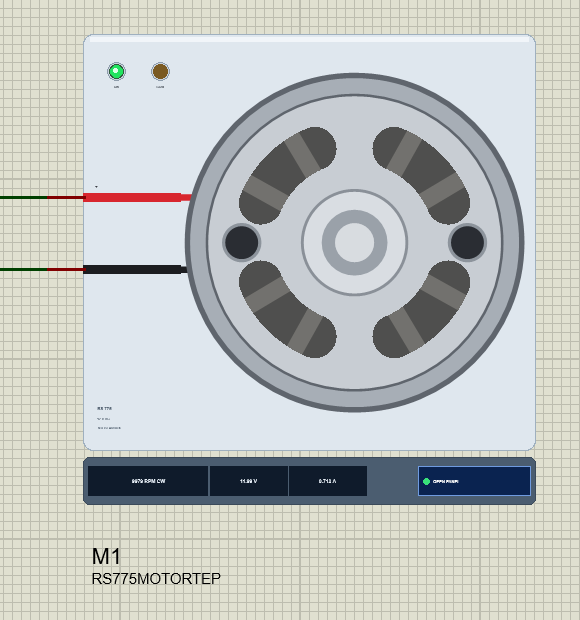
Search RS775 in Pick Devices; the device RS775MOTORTEP is in TEPRS775.LIB (category Electromechanical, DC Motors) and its model is TEPRS775.DLL. It shows the motor from its shaft end at 1.1 times its real size: the silver front face with the crimped edge of the can, the two M4 holes, four kidney-shaped vent slots with the white fan blades behind them, the bearing boss and the 5 mm D-shaft. While the simulation runs, the fan and the shaft's flat turn at the simulated speed, and the strip under the plate gives the speed with its direction, the volts and the amps, next to the OPEN PANEL button.
The red and black wires come from the + and - pins on the left and go behind the can, as on a real motor whose two terminals sit at the back. The plate, the LEDs and the strip are TEP additions; the real motor has none of them.
| Pin | Wire | What the model does with it |
|---|---|---|
| + | red | the motor, analog: positive on + turns the shaft clockwise (seen from the shaft end) |
| - | black | the motor's other terminal |
The only property is LOAD, a constant load on the shaft in kg.cm for the whole run. The motor stalls at about 3.4 kg.cm on a stiff 12 V supply, and at about 3.2 kg.cm through a BTS7960, which loses a little voltage at 30 A. Click the motor's face while the simulation runs to press a brake pad on the shaft: 1 kg.cm more.
Download RS-775 DC Motor Library for Proteus
Click the button below to download RS-775-DC-Motor-Library-for-Proteus-v1.0.zip (about 1.2 MB, without the source code of the models):
RS-775 DC Motor Library for Proteus V1.0- README.txt: installation, the demo, the wiring, real hardware, troubleshooting and the limits.
- Proteus Library Files:
TEPRS775.LIBandArduinoV4TEP.LIBfrom our Arduino Library for Proteus V4.0. - Proteus Model Files:
TEPRS775.DLLandTEPARDUINO.DLL. - Proteus Simulation:
RS-775-DC-Motor-BTS7960-ArduinoUnoV4.pdsprj,RS775_Demo.hexand copies of the two DLLs. - Arduino Code:
RS775_Demo.ino(no library needed).
The driver is a separate library: this package holds only the motor and the UNO. The demo drives the motor through our BTS7960 (IBT-2) motor driver, which has its own download - get it from our BTS7960 Motor Driver Library for Proteus and install it first, or the demo opens without its driver.
No Proteus yet? Read How to Download and Install Proteus 7 and 8. New to libraries? Follow How to Install a New Library in Proteus.
How to Install RS-775 DC Motor Library for Proteus
- Close Proteus and extract the whole zip file, for example to your Desktop.
- Copy
TEPRS775.LIBandArduinoV4TEP.LIBfrom Proteus Library Files into the LIBRARY folder of Proteus (usuallyC:\Program Files (x86)\Labcenter Electronics\Proteus 8 Professional\LIBRARY). - Copy
TEPRS775.DLLandTEPARDUINO.DLLfrom Proteus Model Files into the MODELS folder. The two Arduino files are the ones of our Arduino Library V4.0; if you have it, they are the same. - Install our BTS7960 Motor Driver library the same way from its own zip:
TEPBTS7960.LIBinto LIBRARY andTEPBTS7960.DLLinto MODELS. - Delete
TEPRS775.IDXfrom the LIBRARY folder if it is there. - Start Proteus, press P and search for RS775.
Tip: keep the Proteus Simulation folder together, because the project needs its .hex file and the DLLs beside it. The library is tested in Proteus 8.5; Proteus 7 is not supported.
The Demo Circuit
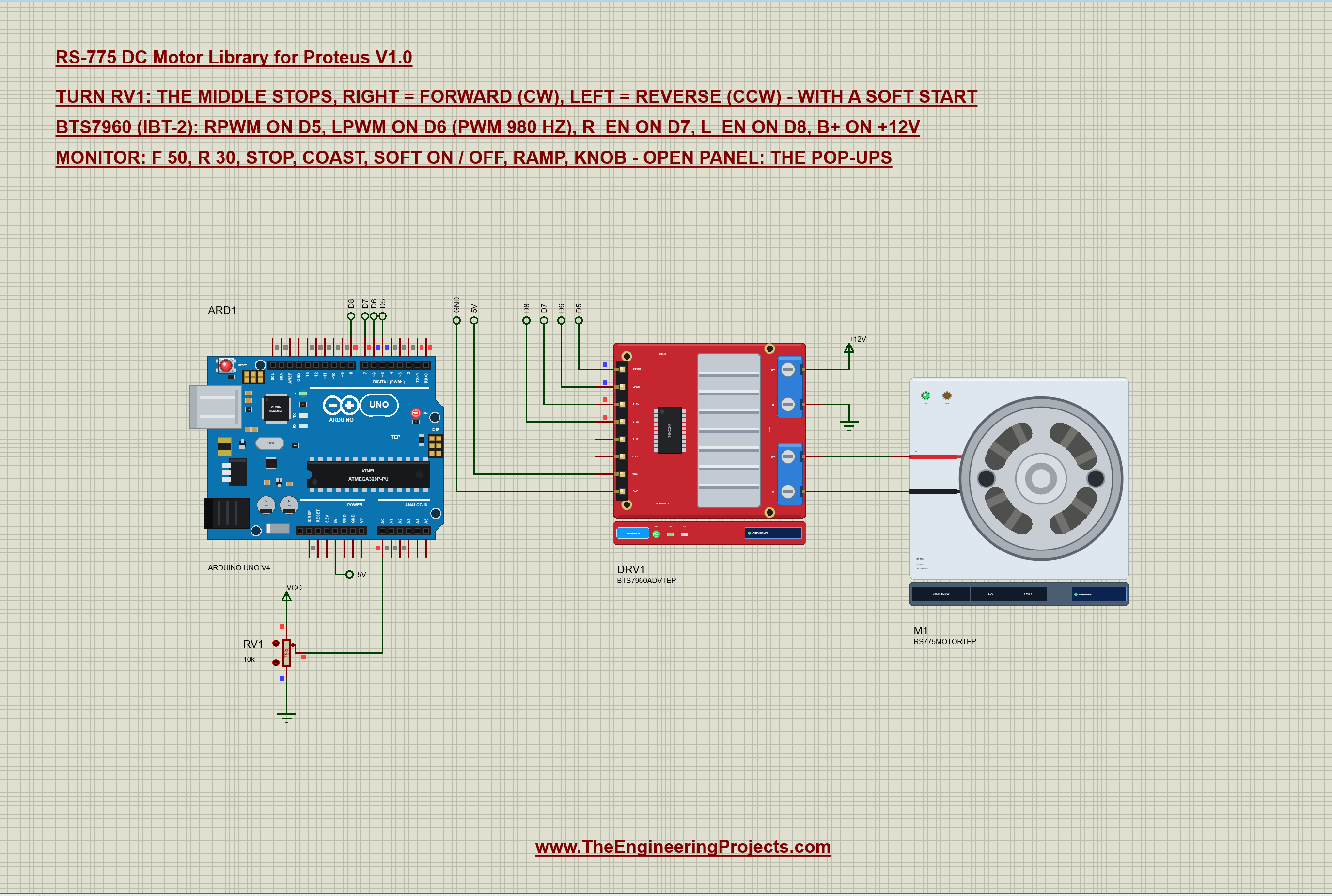
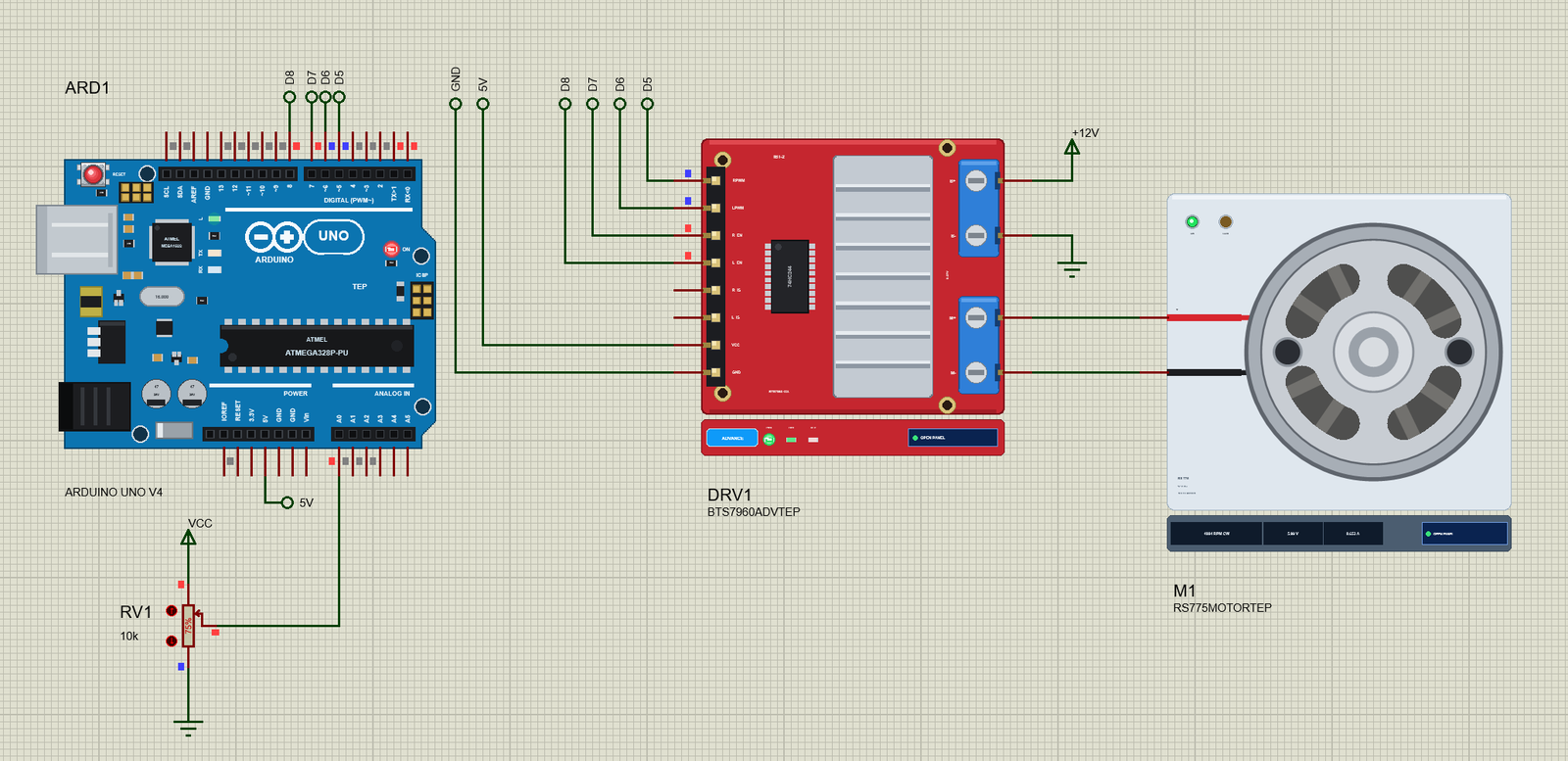
Open RS-775-DC-Motor-BTS7960-ArduinoUnoV4.pdsprj. ARD1 is an Arduino UNO V4.0 from our Arduino UNO Library for Proteus V4.0, running RS775_Demo.hex with its serial monitor built in. DRV1 is the BTS7960 (IBT-2) driver in its pop-up version. M1 is the RS-775 on the driver's M+ and M-. RV1 is a 10k potentiometer on A0: the middle stops the motor, right is forward and left is reverse. The sheet is A3, because the UNO, the big IBT-2 board and the motor do not fit an A4 sheet legibly.
The driver's logic side runs on the UNO's 5V, and its power side, B+ and B-, on a +12V power terminal and ground. The two current-sense pins, R_IS and L_IS, are left open in this demo; the BTS7960 library shows how to read them.
| From | To | Note |
|---|---|---|
| BTS7960 RPWM | D5 | PWM 980 Hz: forward |
| BTS7960 LPWM | D6 | PWM 980 Hz: reverse |
| BTS7960 R_EN / L_EN | D7 / D8 | HIGH = on; both LOW = coast |
| BTS7960 VCC / GND | 5V / GND | the logic supply |
| BTS7960 B+ / B- | +12V / GND | the motor supply |
| BTS7960 M+ / M- | RS-775 + / - | the motor |
| RV1 wiper | A0 | the speed and the direction |
The Arduino Code
The demo needs no library. New to Arduino? Start with Arduino Tutorial for Beginners and Introduction to Arduino UNO. The pins come first:
const int RPWM = 5, LPWM = 6, R_EN = 7, L_EN = 8, POT = A0;In setup() all four are outputs, and the motor starts braked, with both PWM pins LOW:
  pinMode(RPWM, OUTPUT); pinMode(LPWM, OUTPUT); pinMode(R_EN, OUTPUT); pinMode(L_EN, OUTPUT);
  output(0);
One function drives the BTS7960. A positive number puts PWM on RPWM with LPWM LOW (forward), a negative one the other way round, and zero puts both LOW, which turns both low-side switches on and brakes the motor. The pin that must be LOW is always written first, so the two halves of the bridge never push against each other:
void output(int s) {                  // the driver: the pin that must be LOW first
  digitalWrite(R_EN, HIGH); digitalWrite(L_EN, HIGH);
  if (s > 0) { analogWrite(LPWM, 0); analogWrite(RPWM, s); }
  else if (s < 0) { analogWrite(RPWM, 0); analogWrite(LPWM, -s); }
  else { analogWrite(RPWM, 0); analogWrite(LPWM, 0); }         // both LOW: brake
  speedNow = s;
}
Braking is not the only way to stop. With both enables LOW the two half-bridges go to sleep, the outputs open and the motor rolls out on its own - that is the coast command:
mode = COAST; target = 0; output(0); digitalWrite(R_EN, LOW); digitalWrite(L_EN, LOW);The Soft Start
Every command and every turn of the pot only sets a target. A few lines at the end of the loop walk the real PWM towards it, at most 5 steps every 10 ms, so 0 to 255 takes about half a second:
  if (mode != COAST && millis() - slewAt >= 10) {   // the soft start: at most 5 PWM steps every 10 ms
    slewAt = millis();
    if (speedNow != target) output(speedNow + constrain(target - speedNow, -5, 5));
Half a second sounds short, but it changes everything for the RS-775. Its mechanical time constant is about 0.1 s, so a ramp five times slower lets the back-EMF grow with the voltage, and the current never comes near the 30 A of a hard start. The ramp also takes the motor through zero gently when you change direction, so a reversal never slams the full supply against the back-EMF. Two commands switch it:
  if (!strcmp(s, "soft on")) { soft = true; Serial.println(F("Soft start ON: 0 to full in about 0.5 s")); return; }
  if (!strcmp(s, "soft off")) { soft = false; Serial.println(F("Soft start OFF: every change at once")); return; }
With the soft start off, a new target goes to the driver at once:
  target = constrain(s, -255, 255);
  if (!soft) output(target);
The pot is read in the loop. Its 0 - 1023 becomes -255 to 255, with a small dead zone round the middle so the motor really stops there:
      int s = map(raw, 0, 1023, -255, 255);
      if (abs(s) < 20) s = 0;                       // a dead zone round the middle
The open-loop basics of motor speed control are in our older DC Motor Speed Control using Arduino tutorial. The HEX file is in the package; to change the sketch, open it in the Arduino IDE and export the compiled binary, as in How to get the HEX file from Arduino. It needs 6,078 bytes of flash (18 % of the UNO) and 288 bytes of RAM.
Running the Demo
Press Run. The UNO's serial monitor and the pop-ups of the motor and the BTS7960 open over the schematic; move them aside. RV1 starts at 75 %, so the motor ramps up to about half speed forward:
RS-775 DC Motor demo - The Engineering Projects
BTS7960: RPWM D5, LPWM D6, R_EN D7, L_EN D8. Turn the pot on A0: the middle stops, right = forward, left = reverse.
Commands: f 50 | r 30 | stop | coast | soft on | soft off | ramp | knob | help
Pot 768 -> forward 49 % (PWM 127/255) (soft ramp)
  reached forward 49 % (PWM 127/255)
It settles at 4,884 RPM with 5.99 V and 0.65 A. Click RV1's arrows to change the speed or go into reverse. Type a command in the monitor and press Enter:
| Type | What it does | What the run showed |
|---|---|---|
| f 50 / r 30 | forward at 50 % / reverse at 30 % | r 60: 5,919 RPM CCW at -7.21 V, 0.67 A |
| f 100 | full speed forward | 9,979 RPM at 11.99 V, 0.71 A |
| stop | both PWM LOW: the motor brakes | ramped down and braked |
| coast | R_EN = L_EN = LOW: the outputs open | the motor rolls out |
| soft off / soft on | every change at once / the soft start | about 16 A / about 6 A at a start |
| ramp | 0 to 100 % and back, forward then reverse | 2 s each way |
| knob | follow the pot again | back to 4,885 RPM |
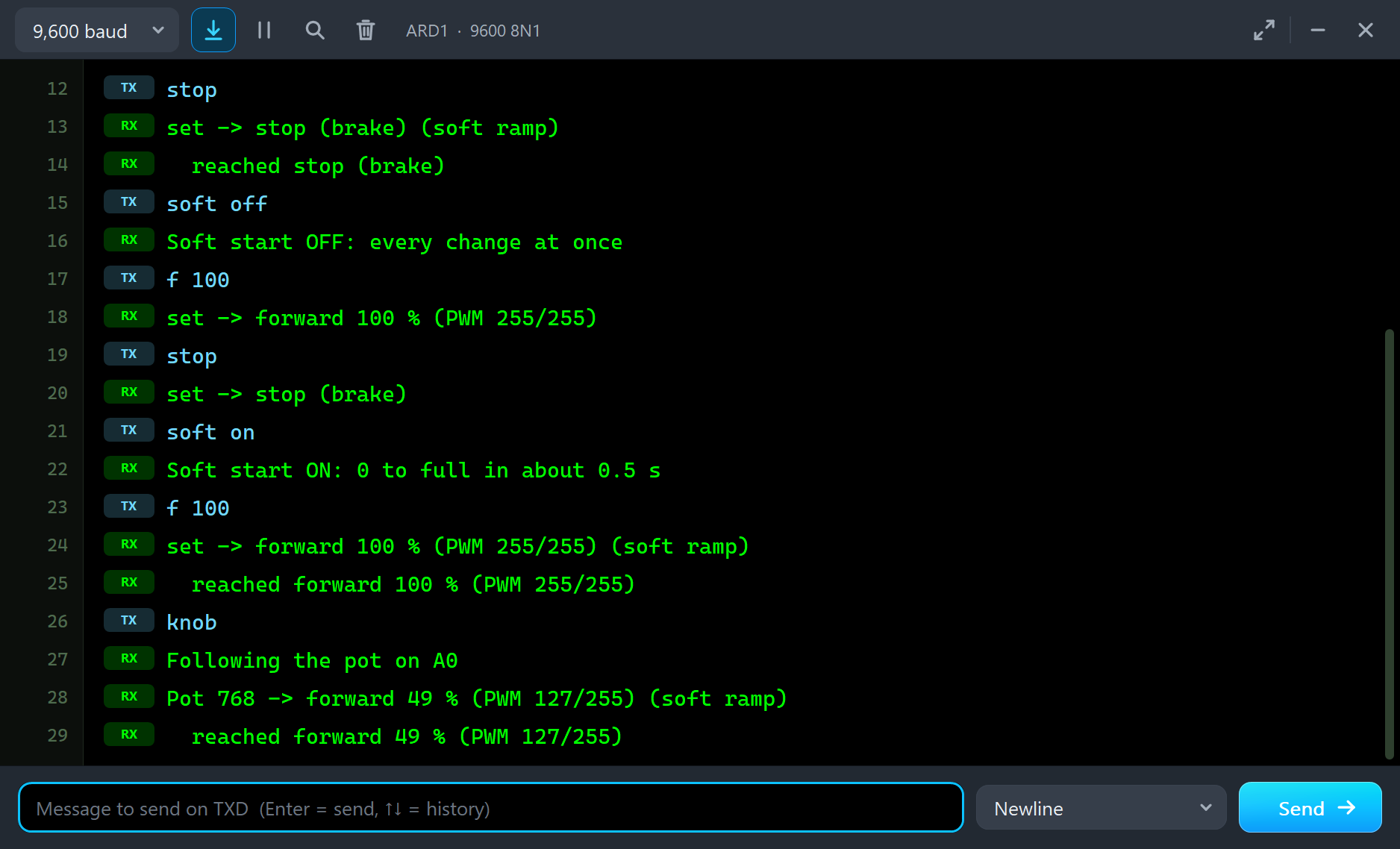
The end of the run, as the monitor printed it - the typed commands and the sketch's answers:
stop
set -> stop (brake) (soft ramp)
  reached stop (brake)
soft off
Soft start OFF: every change at once
f 100
set -> forward 100 % (PWM 255/255)
stop
set -> stop (brake)
soft on
Soft start ON: 0 to full in about 0.5 s
f 100
set -> forward 100 % (PWM 255/255) (soft ramp)
  reached forward 100 % (PWM 255/255)
knob
Following the pot on A0
Pot 768 -> forward 49 % (PWM 127/255) (soft ramp)
  reached forward 49 % (PWM 127/255)
With the soft start on, every line that sets a new target says "soft ramp", and a second line follows when the PWM has reached it. With the soft start off, the PWM jumps at once and there is nothing to wait for. Both starts end at full speed; the difference is in the current, and the pop-up's Graphs page shows it below.
The Pop-Up Window
At Run the motor opens TEP RS-775 DC Motor, a window in the look of our TEP Serial Monitor Advance for Proteus. Its four tabs are Motor, Graphs, Event log and Check, with Settings and Help behind the gear and question mark icons. If you close it, OPEN PANEL on the strip brings it back.
The Motor Page
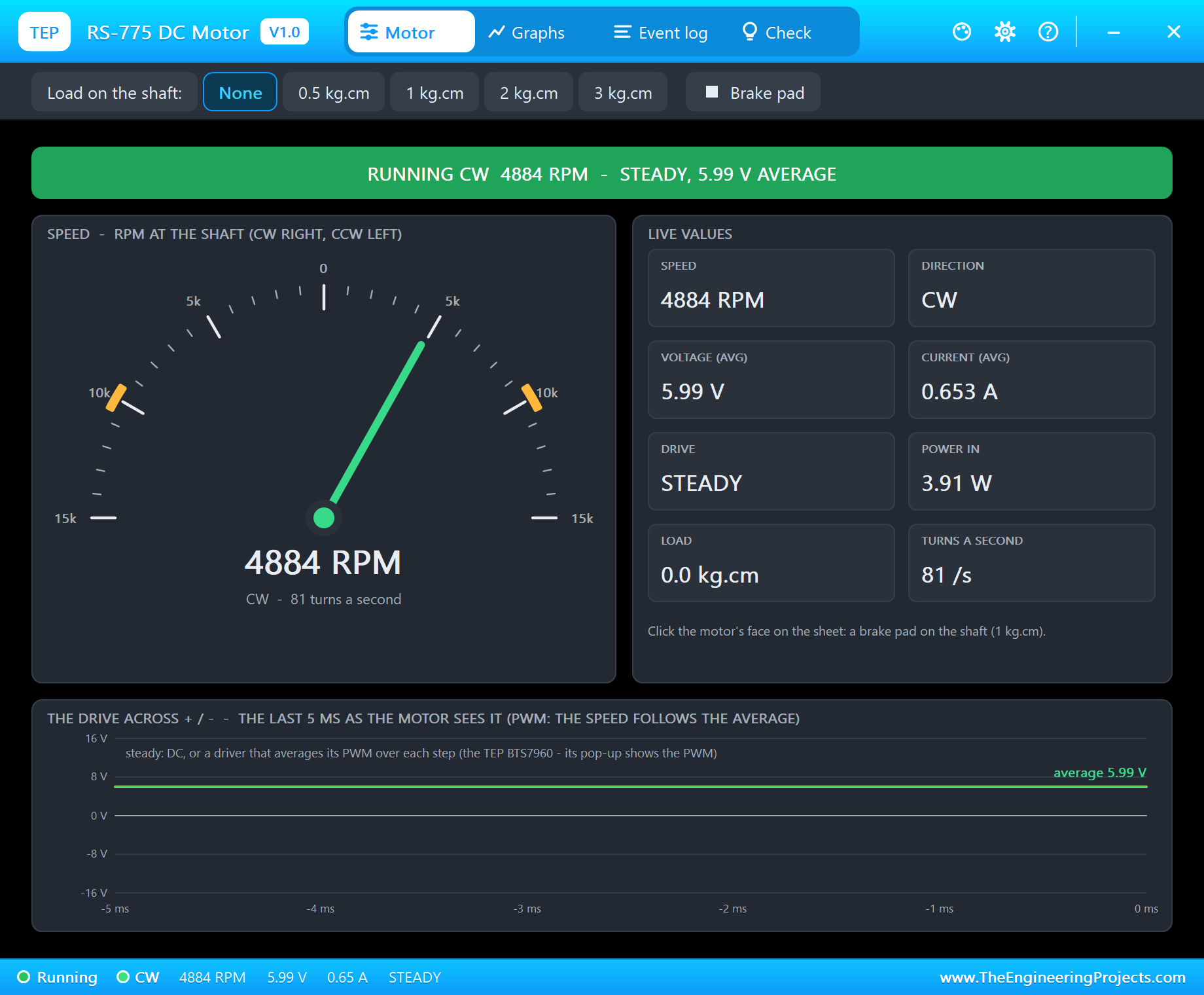
The banner gives the state, the speed and the drive in one line. The gauge runs from 15,000 RPM counterclockwise to 15,000 RPM clockwise, with the no-load speed at 12 V, about 10,000 RPM, marked in orange on both sides. The live values are the speed, the direction, the average voltage, the current, the drive, the power, the load and the turns a second. The toolbar puts 0.5, 1, 2 or 3 kg.cm on the shaft, or the brake pad. Under them, the drive across + and - over the last 5 ms shows what the motor really gets from its driver.
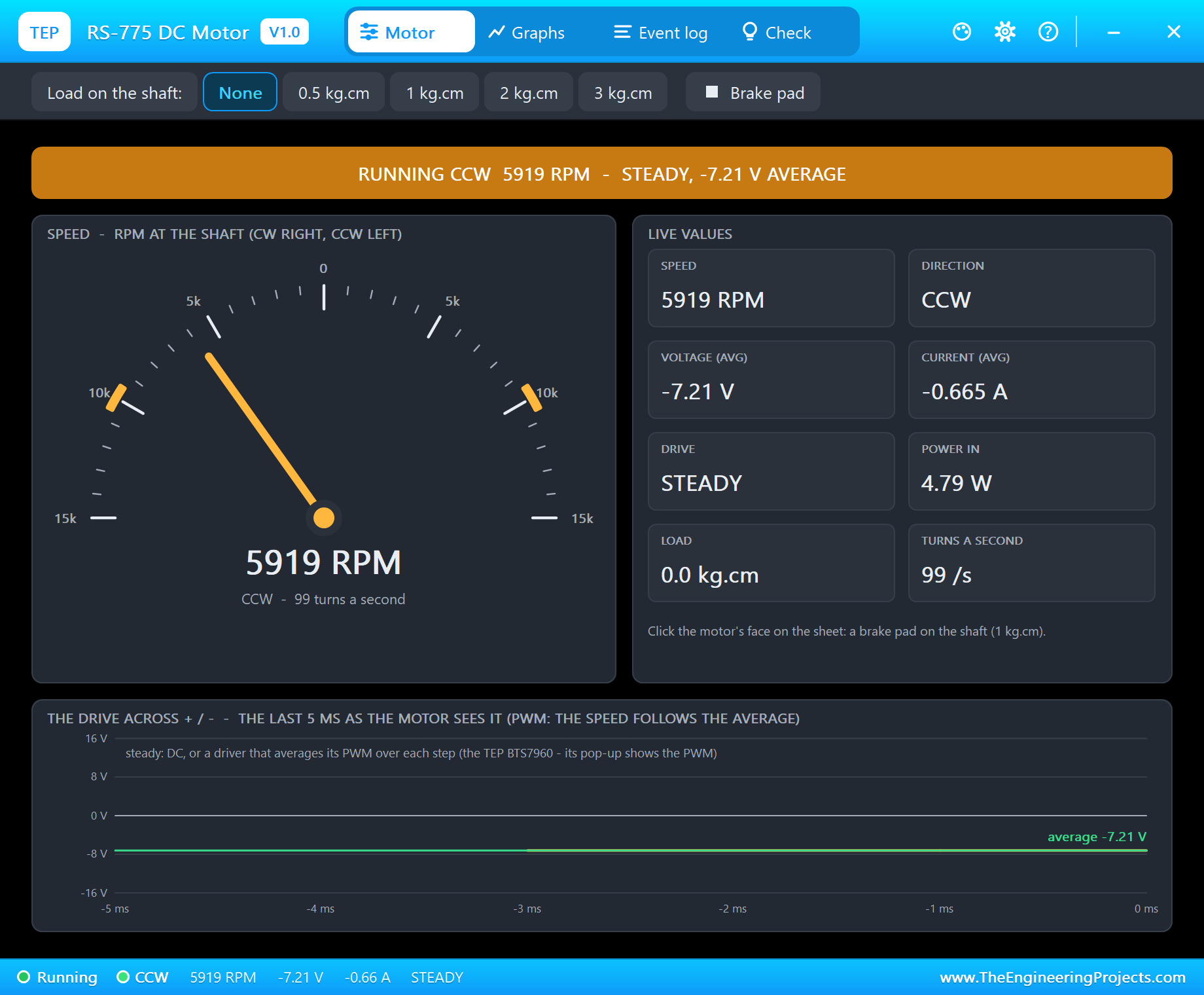
Type r 60 while it runs forward and the soft ramp takes it down through zero and up the other way: 5,919 RPM counterclockwise with -7.21 V across it. Notice what is missing from the Event log for this change: the reversal warning. The ramp never pushed the full supply against a spinning motor.
Loads and the Stall
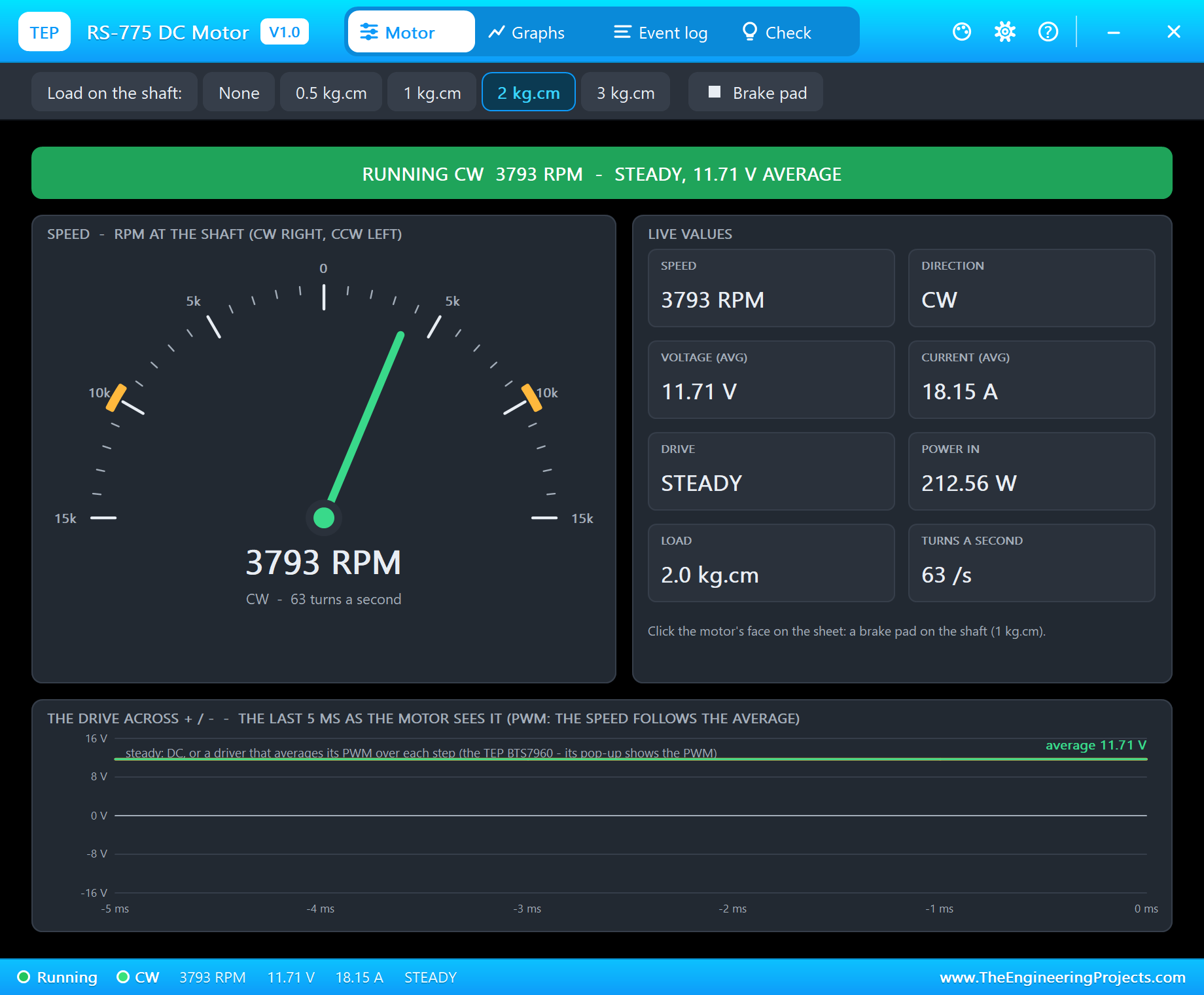
With f 100 and 2 kg.cm on the shaft - about what a drill bit in hard wood asks for - the speed drops from 9,979 to 3,793 RPM and the current climbs from 0.71 to 18.15 A. With 3 kg.cm the motor still turns, at 702 RPM, but it draws 26.86 A. This is a high-torque motor only at a high current: the torque comes from the amps, so a 775 under load needs a driver and a supply that can give them.
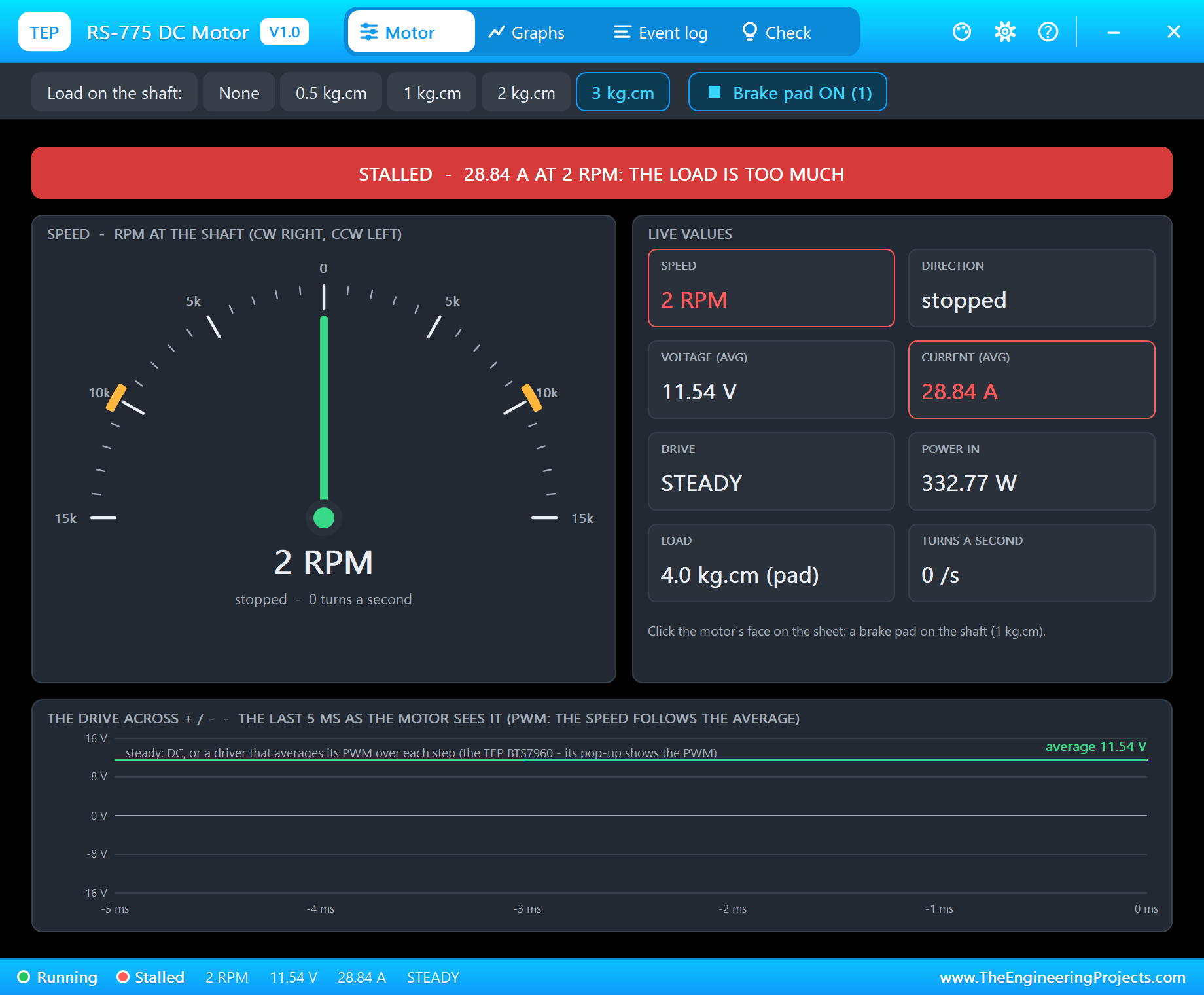
Add the brake pad to the 3 kg.cm and the 4 kg.cm on the shaft is more than the motor gives: "STALLED - 28.84 A at 2.2 RPM". The voltage across the motor is 11.54 V, because the BTS7960 drops 0.46 V in its switches at 28.8 A. On a real bench this is the moment to cut the power: the motor turns about 330 W into heat and nothing into work.
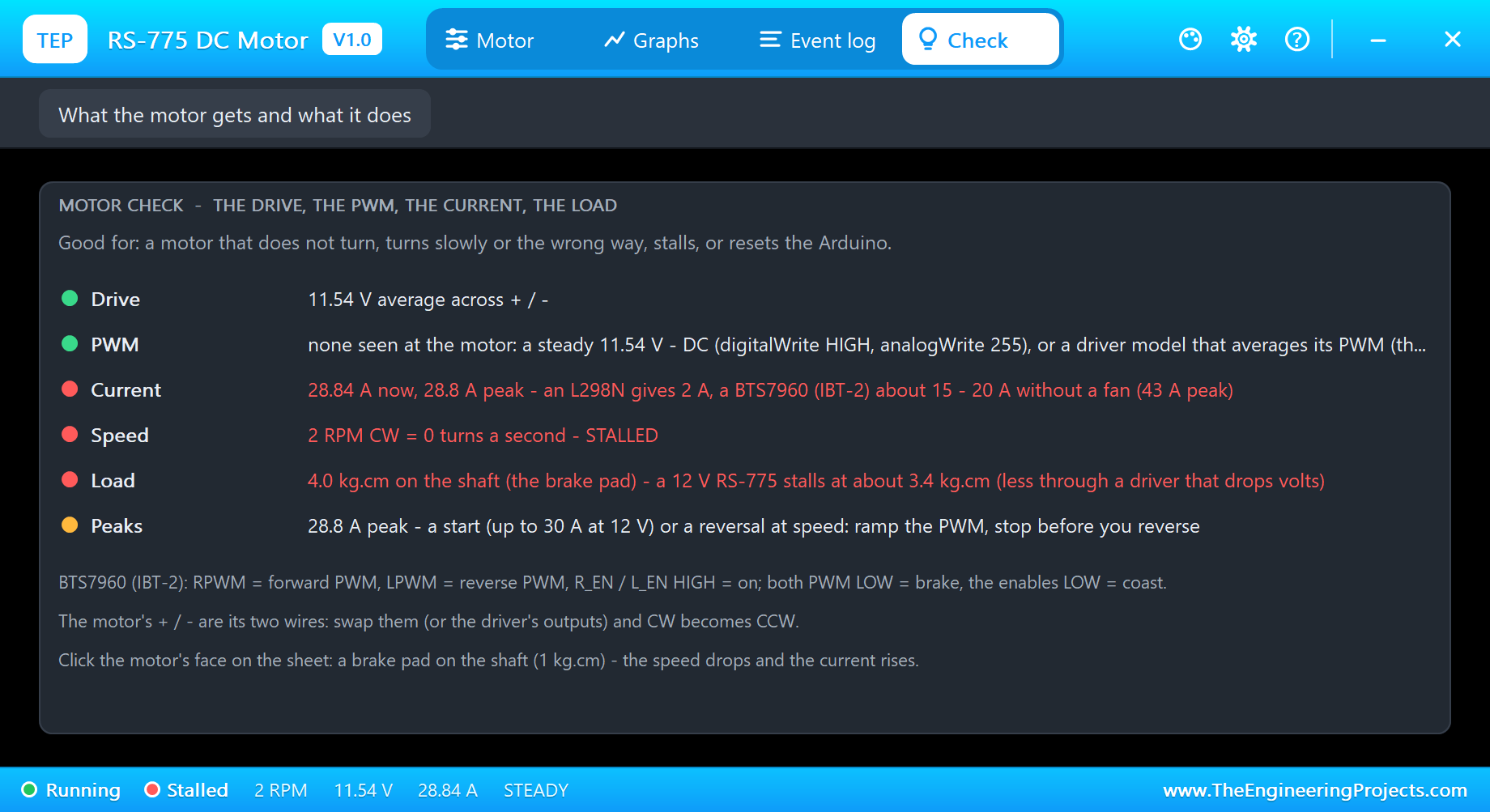
The Check page puts it in rows with a verdict each. The current row compares the motor's current with what the common drivers give: an L298N 2 A, a BTS7960 about 15 - 20 A without extra cooling and 43 A as a peak. The speed row says STALLED. The load row says a 12 V RS-775 stalls at about 3.4 kg.cm, less through a driver that drops volts. The peaks row remembers the highest current of the run and reminds you that a start or a reversal is where they come from.
A Hard Start and a Soft Start
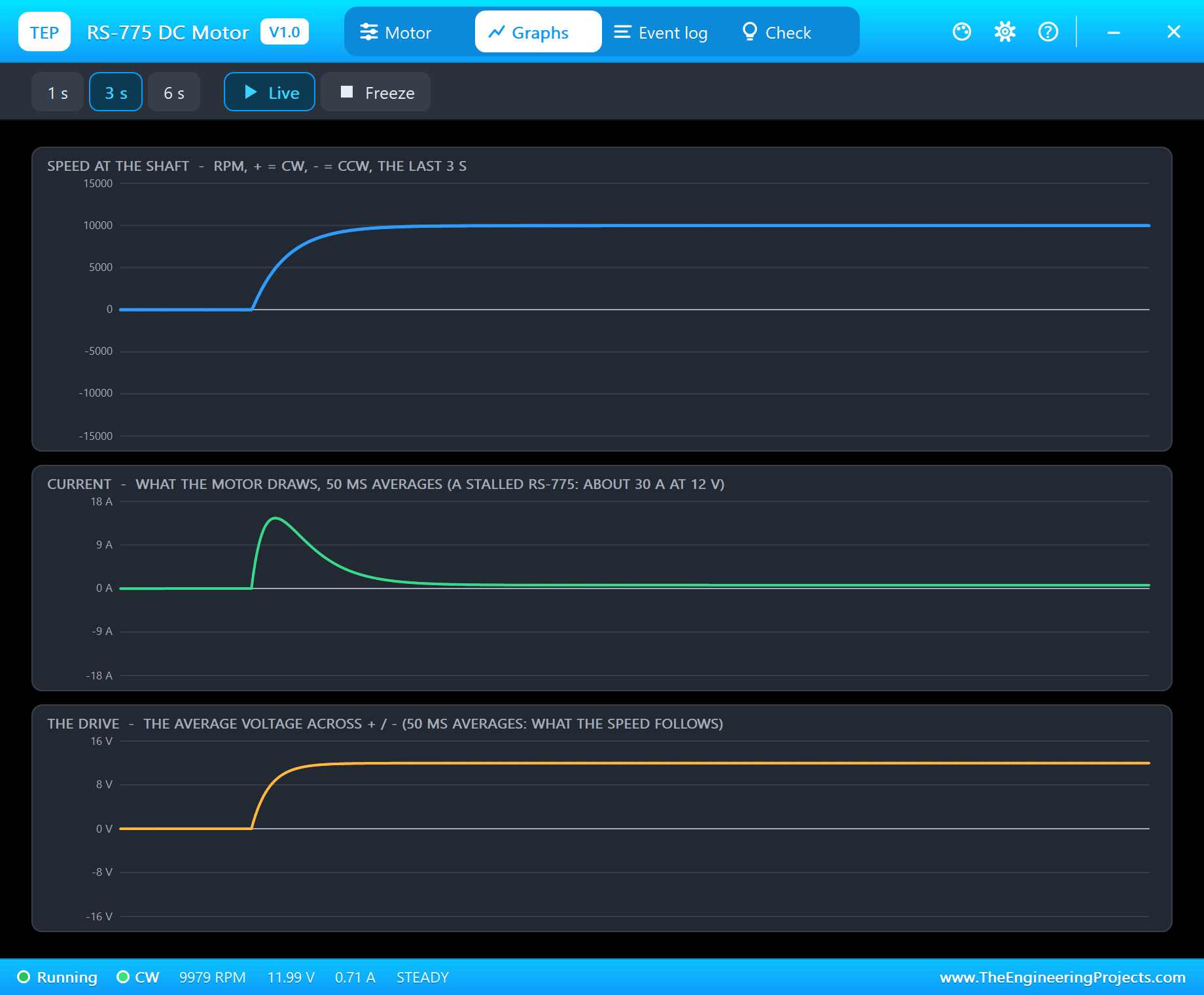
The Graphs page draws the speed, the current and the average voltage over the last 1, 3 or 6 seconds. Here is a hard start: soft off, then f 100 from a standstill. The speed reaches 10,000 RPM in about 0.4 s and the current, averaged over 50 ms, peaks at about 16 A. The real first instant is worse - close to 30 A - but it lasts only a few milliseconds, which the 50 ms averages smooth out.
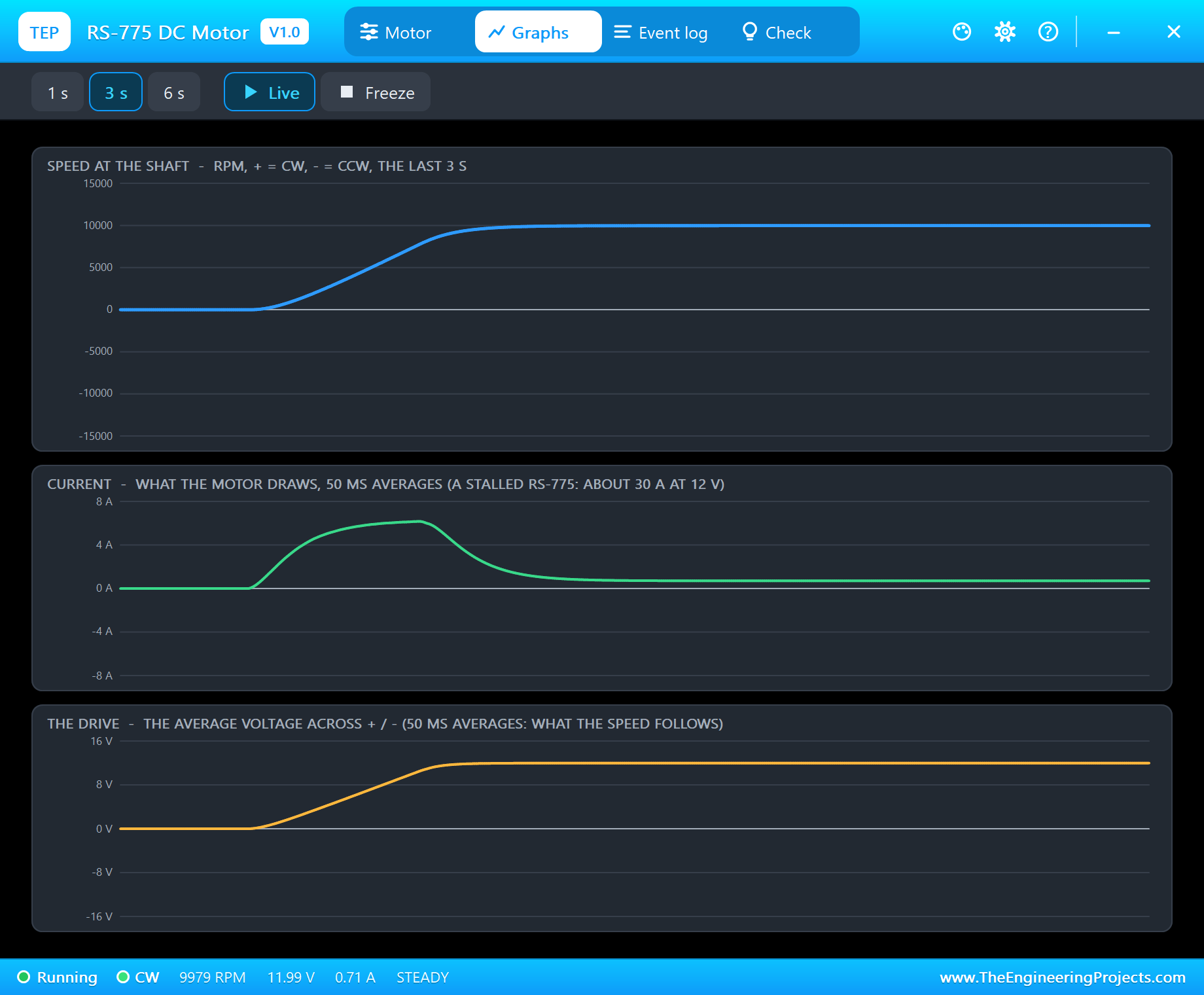
Now the same with soft on. The voltage climbs in a straight ramp, the speed follows it, and the current stays near 6 A the whole way - the current that accelerates the rotor, not the current of a winding with no back-EMF. Full speed comes about 0.2 s later than with the hard start. For a drill or a pump nobody notices those 0.2 s; the supply, the driver and the Arduino's reset line notice the 30 A very much.
Event Log
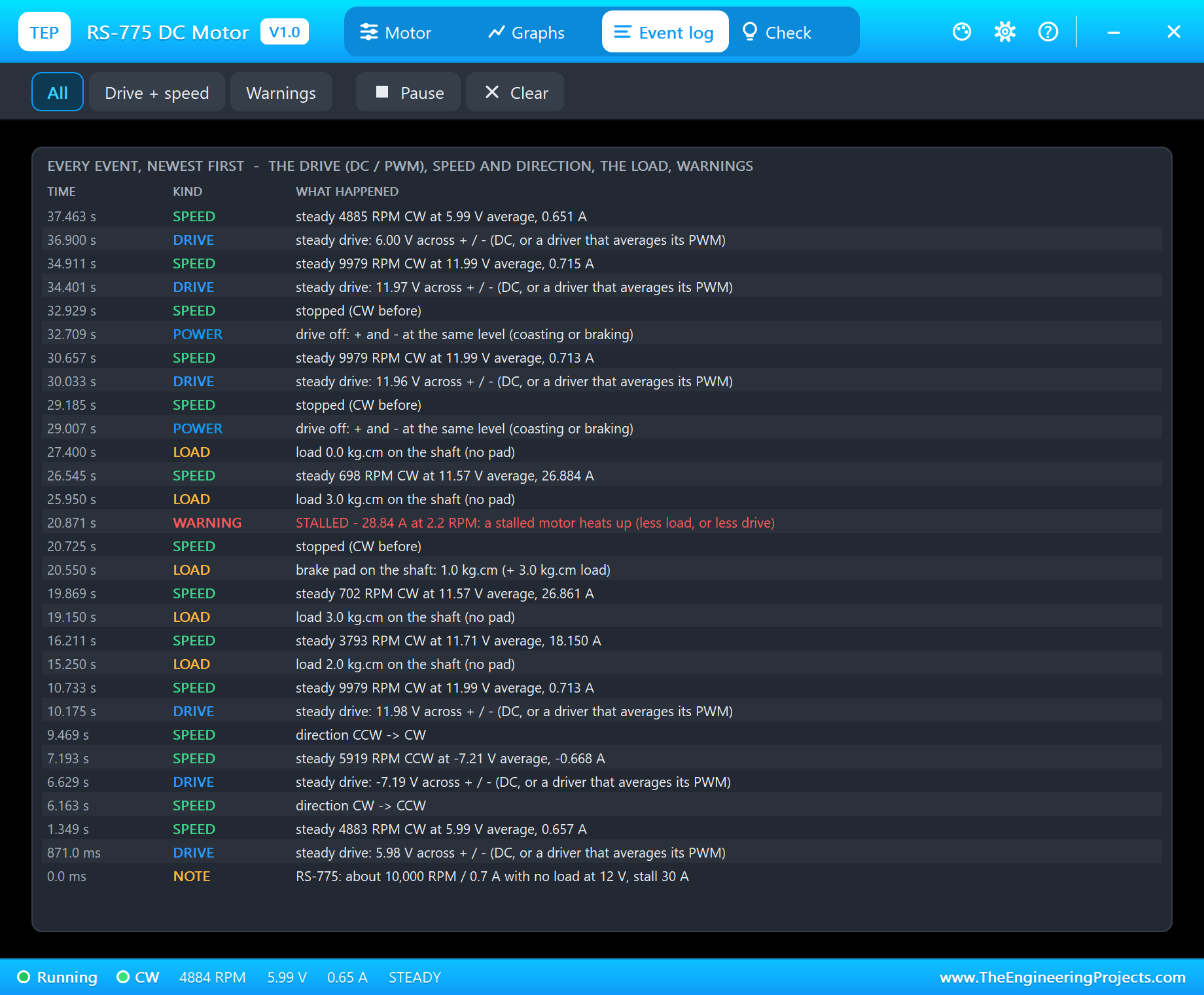
The Event log is the motor's diary: "steady 3793 RPM CW at 11.71 V average, 18.150 A", every direction change, every stop, "brake pad on the shaft: 1.0 kg.cm (+ 3.0 kg.cm load)" and the warnings. Filters show only the drive and speed or only the warnings, and Pause and Clear do what they say.
The Driver's View
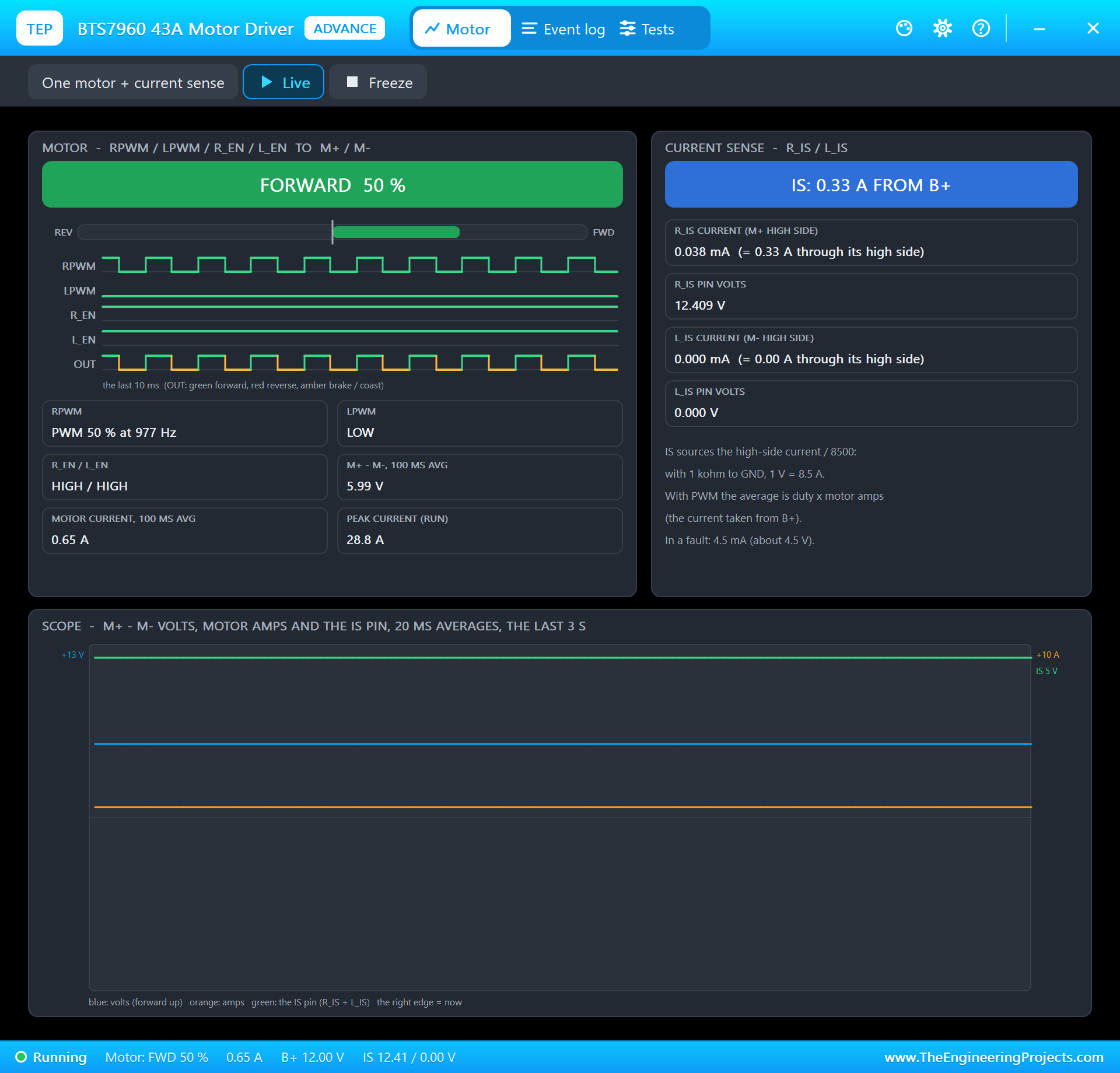
The driver sees the same run from its side. Its pop-up shows forward at 50 %, the UNO's PWM at 977 Hz on RPWM, both enables HIGH, about 6 V across M+ and M- and the peak current of the run: 28.8 A, the stall. That is within the BTS7960's 43 A rating as a peak, but a real IBT-2 board held at that current for long needs serious cooling.
How the Model Works
The motor is solved by Proteus's analog engine: its speed is an internal node computed together with the driver from the winding resistance, the back-EMF, the friction of the brushes and bearings, the air of the cooling fan, the inertia of the rotor and the load, in analog steps of 2 ms or less. Because the motor and the driver are one set of equations, the BTS7960's switches and the motor share the voltage and the current exactly, which is how the 0.46 V drop at 28.8 A appears without anyone programming it.
The demo runs at about 0.27 x real time on a desktop PC: 38 seconds of simulation took under 3 minutes. We checked the model on a PC with 22 automatic tests: 9,989 RPM and 0.71 A at 12 V, a 29.7 A start peak, 90 % of the speed in 0.22 s, 4,893 RPM at 6 V, the speed following 25, 50 and 75 % PWM at 2,335, 4,879 and 7,431 RPM, a reversal at 12 V peaking at 58.7 A, 4 kg.cm stalling at 30.0 A, and 2 kg.cm still turning at 4,039 RPM and 18.2 A.
Why the Motor Says STEADY
Our BTS7960 model does not switch the motor on and off a thousand times a second; in each analog step it hands the motor the average of its PWM over whole PWM periods. With a 0.4 ohm motor this keeps the current smooth from step to step, and the simulation runs much faster. So the motor's Drive tile reads STEADY - "DC, or a driver that averages its PWM" - while the 977 Hz PWM is on the BTS7960's own pop-up. With a driver that really switches, the motor's pop-up shows the PWM frequency and duty.
Troubleshooting
- The shaft never turns and the pop-up says NO DRIVE: R_EN / L_EN LOW (coast), the driver's B+ supply, or the motor wires on the wrong outputs.
- No driver in the project: install our BTS7960 library (
TEPBTS7960.LIB/TEPBTS7960.DLL) - it is not in this package. - Slow, about half speed: the driver's B+ is on 5 V or 6 V, not 12 V.
- It turns the wrong way: swap the motor's wires, or RPWM and LPWM.
- STALLED: less load, or more drive.
- On a real board the Arduino resets when the motor starts: the start current pulls the supply down - keep the soft start, use a stronger supply and put capacitors across the motor.
- No moving face, no UNO or no monitor:
TEPRS775.DLLorTEPARDUINO.DLLis missing from MODELS and the project folder; a closed monitor opens again with a click on the UNO's USB port.
Things to Know Before Using a Real RS-775
- The driver: about 30 A at every hard start and stall, near 60 A for a reversal at full speed. Use a BTS7960 / IBT-2 or a MOSFET stage, ramp the PWM and never reverse at full speed. An L298N (2 A) or an L9110S (0.8 A) is far too small.
- The supply: 12 V from a supply or a 3S pack that can give the start current, thick wires (14 - 16 AWG), a fuse and GND common with the Arduino.
- Brush noise: a 100 nF capacitor across the motor's terminals, and from each terminal to the can, keeps the noise out of the Arduino.
- Heat: a stalled RS-775 turns about 350 W into heat and burns in seconds.
- Know your motor: 775 motors come with windings from about 3,000 to 12,000 RPM at 12 V, and in 18 V and 24 V versions. This one is the 12 V 10,000 RPM type; another winding has other numbers.
Limitations of the Simulation
- Not modelled: the winding inductance (a real 775's current ripples under PWM), the brushes' sparks and noise, heating, magnetic saturation at very high current, and the differences between real motors.
- The motor is the 12 V 10,000 RPM RS-775; other windings are not selectable.
- The plate, the LEDs, the strip and the brake pad are TEP additions.
- The model is our own, written from the typical data of the 12 V RS-775 DC motor; this library is not made or endorsed by Arduino or Labcenter.
- Licences: the demo needs no Arduino library; the HEX file contains the Arduino AVR core 1.8.6 with LGPL-licensed code, and the sketch is included. The potentiometer is Proteus's own POT-HG. The BTS7960 driver is our separate library.
- Tested in Proteus 8.5 in October 2026 with the demo as shipped: the knob, both directions, full speed, the loads, the stall, the hard and the soft start and the pop-ups. Proteus 7 is not supported.
So, that was all about the RS-775 DC Motor Library for Proteus V1.0. I hope it helps you size the driver, the supply and the wires before your drill, grinder or rover takes its first 30 A on the bench. If you have any questions, ask in the comments and I will help you out. Till the next tutorial, take care and have fun!

Comments
0