


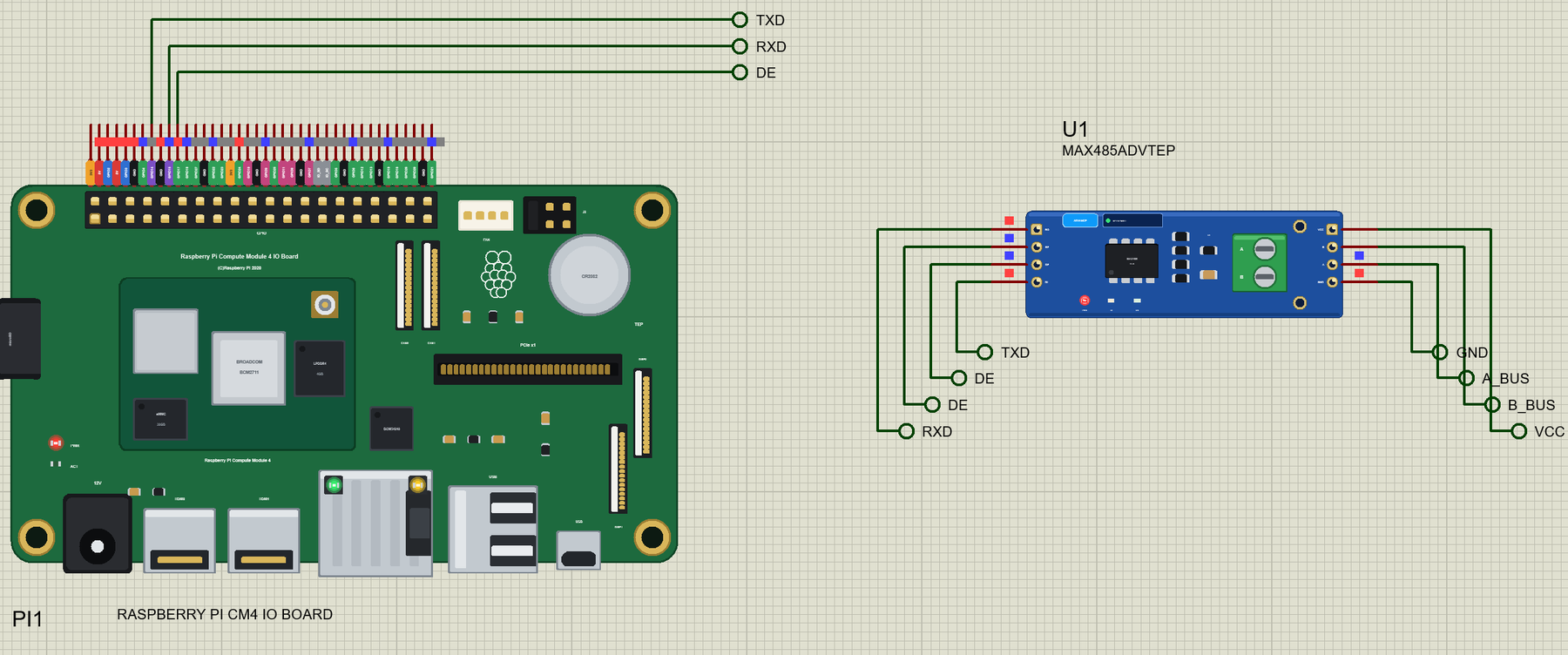
Raspberry Pi CM4 IO Board Library for Proteus: MAX485 Modbus HMI


Hello friends, I hope you all are doing great. Today, I am going to share the Raspberry Pi CM4 IO Board Library for Proteus. The Raspberry Pi Compute Module 4 is the Pi 4 made for products: the same BCM2711 with four Cortex-A72 cores at 1.5 GHz, 4 GB of RAM and 32 GB of eMMC flash on a module the size of a matchbox, plugged into its official IO Board with the 40-pin GPIO header, a PCIe slot, Gigabit Ethernet and two HDMI sockets. With this library the CM4 runs your Python program against the circuit in Proteus 8.5, on our virtual network.
Raspberry Pi CM4 IO Board Library for Proteus
Latest version: V1.0 (October 2026, this tutorial)
Helping Tools
- Laptop WiFi Monitor: a laptop on the Wi-Fi of your design: a browser, a TCP / UDP terminal and ping
- Mobile WiFi Monitor: a smartphone that opens the pages of your board and sends it commands
- LCD Library for Proteus V3.0: 16x2, 20x4 and I2C LCDs to show your readings
Every library of our board series connects the board to a different module and serves a web page. A Compute Module usually lives inside a machine or a control cabinet, so this time it does what such boards do there: it is the Modbus RTU master of an RS-485 bus. A MAX485 module on its UART talks to a field node - an Arduino UNO with its own MAX485, a BMP280 sensor and a relay for a fan. The CM4 reads the node's registers, switches the fan by the temperature, and shows it all on an HMI page on a laptop and a phone.
NOTICE: this library does not run Raspberry Pi OS. It runs your Python program, with the same Python libraries a Pi uses for its pins, its buses and its network, in step with the simulation. Your feedback is the fuel that keeps us going, so please tell us what you think in the comments below or in the Raspberry Pi CM4 IO Board section of our forum. And if our free libraries help you, you can buy us a coffee. So, let's get started with the Raspberry Pi CM4 IO Board Library for Proteus:
What is the Raspberry Pi Compute Module 4?
Raspberry Pi has made Compute Modules since 2014 for companies that build the Pi into their own products. The Compute Module 4 (October 2020) carries the heart of a Pi 4 on a 55 x 40 mm board: the BCM2711, the RAM, the eMMC flash that replaces the microSD card, the power supplies, and on most versions the dual-band Wi-Fi and Bluetooth 5.0 with a small antenna and a U.FL socket for an external one. It has no connectors of its own except two high-density connectors underneath; everything else - the sockets, the header, the power input - is on the carrier board the product designer makes.
The Compute Module 4 IO Board is Raspberry Pi's own carrier board, for development and for small series. It brings out the standard 40-pin HAT header, so every HAT and every circuit made for a Pi 4 fits, and adds what a Pi 4 lacks: a PCIe Gen 2 x1 slot for an NVMe adapter or a network card, a battery-backed real-time clock, a fan connector, two camera and two display connectors, and a 12 V barrel jack instead of the USB-C socket.
| Raspberry Pi 4 Model B | Compute Module 4 + IO Board | |
|---|---|---|
| Processor | BCM2711, four Cortex-A72 cores | the same BCM2711 |
| RAM | 1, 2, 4 or 8 GB | 1, 2, 4 or 8 GB (our part: 4 GB) |
| Storage | a microSD card | eMMC on the module (8 to 32 GB); a microSD slot for the Lite version |
| Wireless | dual-band Wi-Fi, Bluetooth 5.0 | the same, optional, with a U.FL socket for an external antenna |
| PCIe | used inside by the USB 3.0 chip | a PCIe Gen 2 x1 slot on the IO Board |
| Video | two micro-HDMI | two full-size HDMI |
| USB | two USB 3.0, two USB 2.0 | two USB 2.0 and a micro-USB port for flashing the eMMC |
| Ethernet | Gigabit | Gigabit, with PoE on the IO Board |
| Power | 5 V on USB-C | 12 V on a barrel jack |
| Real-time clock | - | yes, with a CR2032 battery |
| GPIO header | 40 pins | the same 40 pins |
In Proteus, our Raspberry Pi Model B Library for Proteus covers how a board runs a Python program: the program and Proteus work in lockstep, every sleep, pin wait and bus transfer moves the simulation clock, and the Python libraries for the pins answer as on a Pi. The CM4 is the closest relative of the Raspberry Pi 4 Model B Library for Proteus and the Raspberry Pi 400 Library for Proteus: the same chip, the same runtime, a different body.
Features of the Raspberry Pi CM4 IO Board Library for Proteus
- The IO Board as it looks: the Compute Module 4 on its carrier with the BCM2711, the RAM, the eMMC and the Wi-Fi can, the 40-pin header, the PCIe slot, the camera and display connectors, the CR2032 holder, the fan connector, the 12 V jack, the two HDMI sockets, the RJ45 and the USB sockets.
- A real CM4 inside: /proc/cpuinfo says Revision c03140, the device tree "Raspberry Pi Compute Module 4 Rev 1.0", gpiozero names the board CM4, and /proc/meminfo shows 4 GB.
- RPi.GPIO and gpiozero: the Pi 4 way to drive the pins, with the timing of a 1.5 GHz Cortex-A72 - about 1.5 us a GPIO call.
- pyserial on /dev/serial0: GPIO14 and GPIO15 at any baud rate, with timeouts and a flush() that returns when the last stop bit is out - exactly what an RS-485 driver needs.
- Ethernet and Wi-Fi: eth0 with the cable in (the default), wlan0 on our router TEP-WiFi with the cable out - 192.168.1.51 either way; sockets and http.server work on both.
- Live LEDs: PWR and ACT on the board, LNK and 100 on the Ethernet jack.
- The Pi Terminal: the output, the errors, a line for input(), and a Board tab with the GPIOs, the LEDs and the supply pins - with our TEP header, no Windows title bar.
- A complete package: about 15.1 MB with the board, Python, the runtime, the MAX485, BMP280, relay and Arduino UNO libraries, the monitors and the demo, without the source code of the models.
The Raspberry Pi CM4 IO Board in Proteus
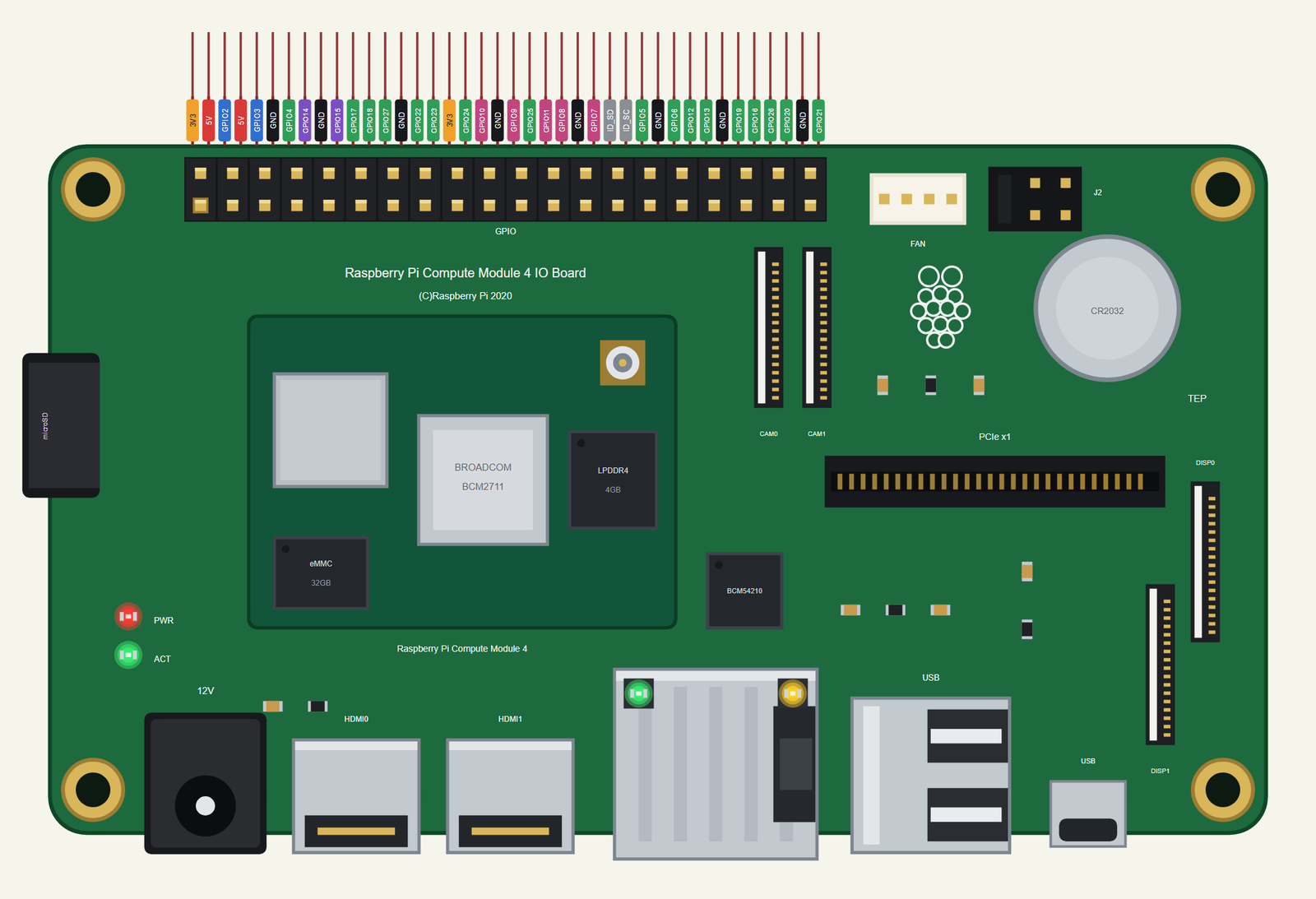
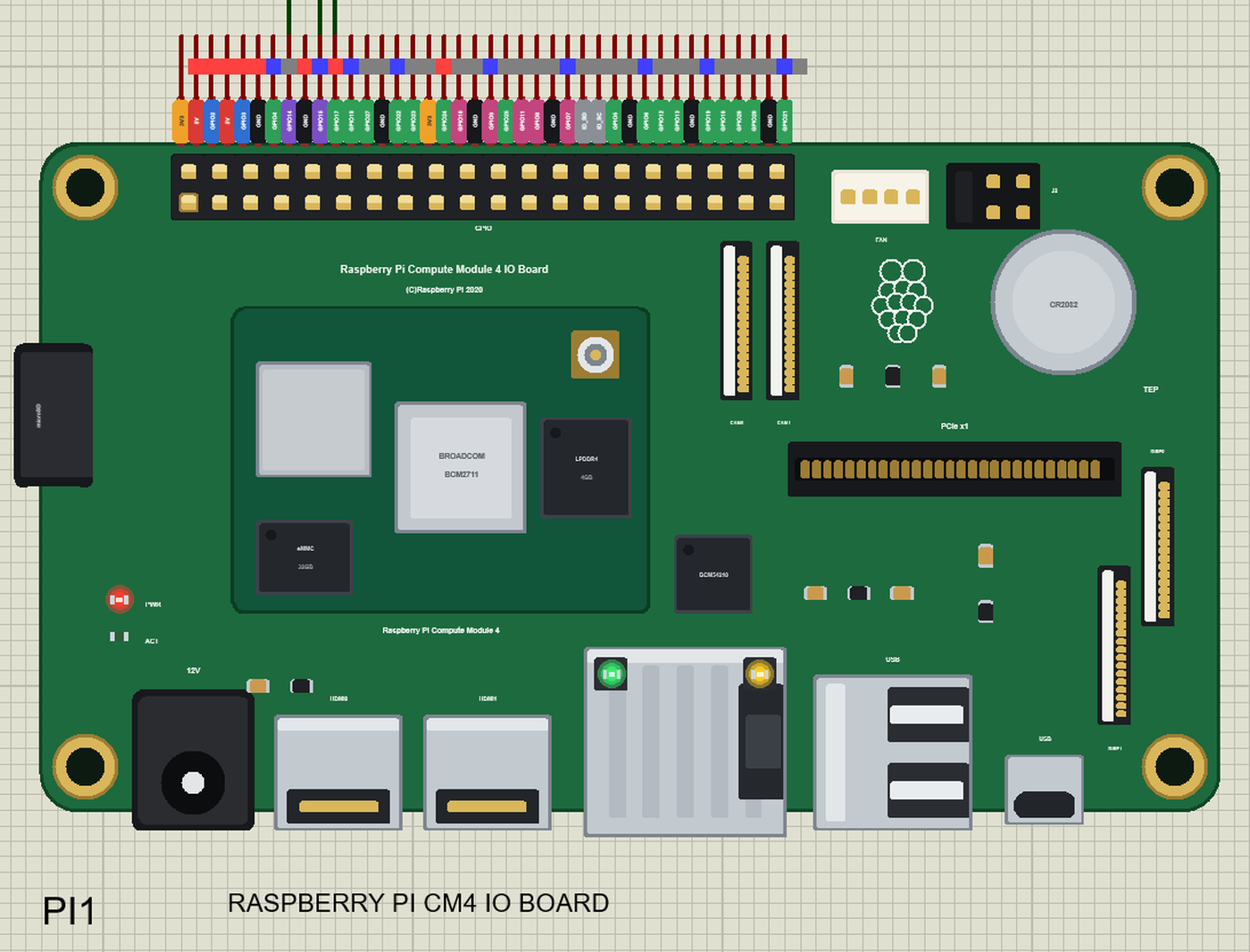
Search RASPBERRY in Pick Devices; the device RASPBERRY PI CM4 IO BOARD is in TEPRPICM4.LIB (Microprocessor ICs, Raspberry Pi), with the prefix PI. The IO Board measures 160 x 90 mm, so it is drawn at about 0.6 of its size to stay a handy part on the sheet - but the header keeps the real 0.1 in pitch, so its 40 pins leave the top edge as one comb, as on every Pi of the series, each with a tag in the colour of its kind: 5V red, 3V3 orange, GND black, GPIO green, I2C blue, SPI pink, UART purple and the ID pins grey. Click the HDMI0 socket or the processor to open the Pi Terminal, and the RJ45 to plug or unplug the Ethernet cable.
The 40-Pin Header
| Pins | Name | Pins | Name |
|---|---|---|---|
| 1 | 3V3 | 2 | 5V |
| 3 | GPIO2 (SDA) | 4 | 5V |
| 5 | GPIO3 (SCL) | 6 | GND |
| 7 | GPIO4 | 8 | GPIO14 (TXD) |
| 9 | GND | 10 | GPIO15 (RXD) |
| 11 | GPIO17 | 12 | GPIO18 |
| 13 | GPIO27 | 14 | GND |
| 15 | GPIO22 | 16 | GPIO23 |
| 17 | 3V3 | 18 | GPIO24 |
| 19 | GPIO10 (MOSI) | 20 | GND |
| 21 | GPIO9 (MISO) | 22 | GPIO25 |
| 23 | GPIO11 (SCLK) | 24 | GPIO8 (CE0) |
| 25 | GND | 26 | GPIO7 (CE1) |
| 27 | ID_SD | 28 | ID_SC |
| 29 | GPIO5 | 30 | GND |
| 31 | GPIO6 | 32 | GPIO12 |
| 33 | GPIO13 | 34 | GND |
| 35 | GPIO19 | 36 | GPIO16 |
| 37 | GPIO26 | 38 | GPIO20 |
| 39 | GND | 40 | GPIO21 |
The GPIOs work at 3.3 V; GPIO2 and GPIO3 have the Pi's 1.8 k pull-ups. The 5V and 3V3 pins power the modules wired to them. ID_SD and ID_SC are kept for a HAT's ID EEPROM, so leave them free, as on a real Pi.
Download Raspberry Pi CM4 IO Board Library for Proteus
Click the button below to download Raspberry-Pi-CM4-IO-Board-Library-for-Proteus-v1.0.zip (about 15.1 MB with Python included, without the source code of the models):
Raspberry Pi CM4 IO Board Library for Proteus V1.0- README.txt: the device, the network, installation, the demo, the header, the properties, troubleshooting and the limits.
- Proteus Library Files:
TEPRPICM4.LIB(the CM4 IO Board) and the demo's parts:TEPMAX485.LIB,TEPBMP280.LIB,TEPRELAY.LIB,ArduinoV4TEP.LIB(the slave node's Arduino UNO V4.0),TEPLAPTOP.LIBandTEPMOBILE.LIB. - Proteus Model Files:
TEPNET.DLL(the board, the laptop, the phone and the network),TEPMAX485.DLL,TEPBMP280.DLL,TEPRELAY.DLL,TEPARDUINO.DLLand the TEPPi folder - Python 3.11 and the TEP Pi runtime. - Python Code:
blink.pyandmodbus_hmi.py. - Arduino Code:
Modbus_Slave_Node.ino, the slave node. - Proteus Simulation: the demo project, its program, the slave's HEX file and copies of the DLLs.
No Proteus yet? Read How to Download and Install Proteus 7 and 8. New to libraries? Follow How to Install a New Library in Proteus.
How to Install Raspberry Pi CM4 IO Board Library for Proteus
- Close Proteus and extract the whole zip file, for example to your Desktop.
- Copy the files from Proteus Library Files into the LIBRARY folder of Proteus (usually
C:\Program Files (x86)\Labcenter Electronics\Proteus 8 Professional\LIBRARY). - Copy everything from Proteus Model Files - the DLLs and the TEPPi folder - into the MODELS folder, replacing an older TEPNET.DLL and TEPPi folder (these are the newest; they also run every earlier Pi of the series).
- Delete
TEPRPICM4.IDXfrom the LIBRARY folder if it is there. - Start Proteus, press P and search for RASPBERRY.
There is nothing else to install: Python comes in the TEPPi folder, so you need no Python on your PC.
Demo: a Modbus RTU Master and HMI
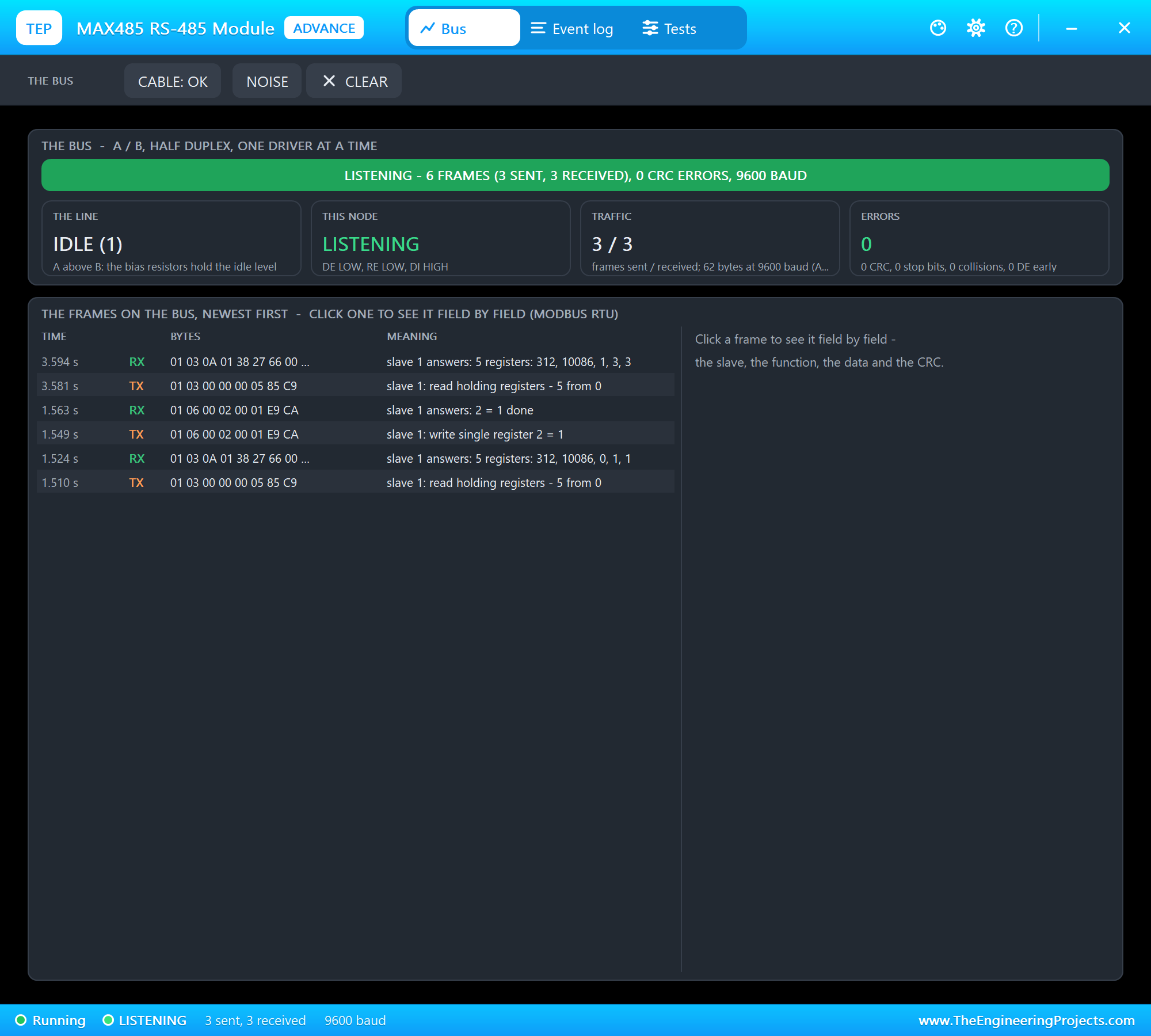
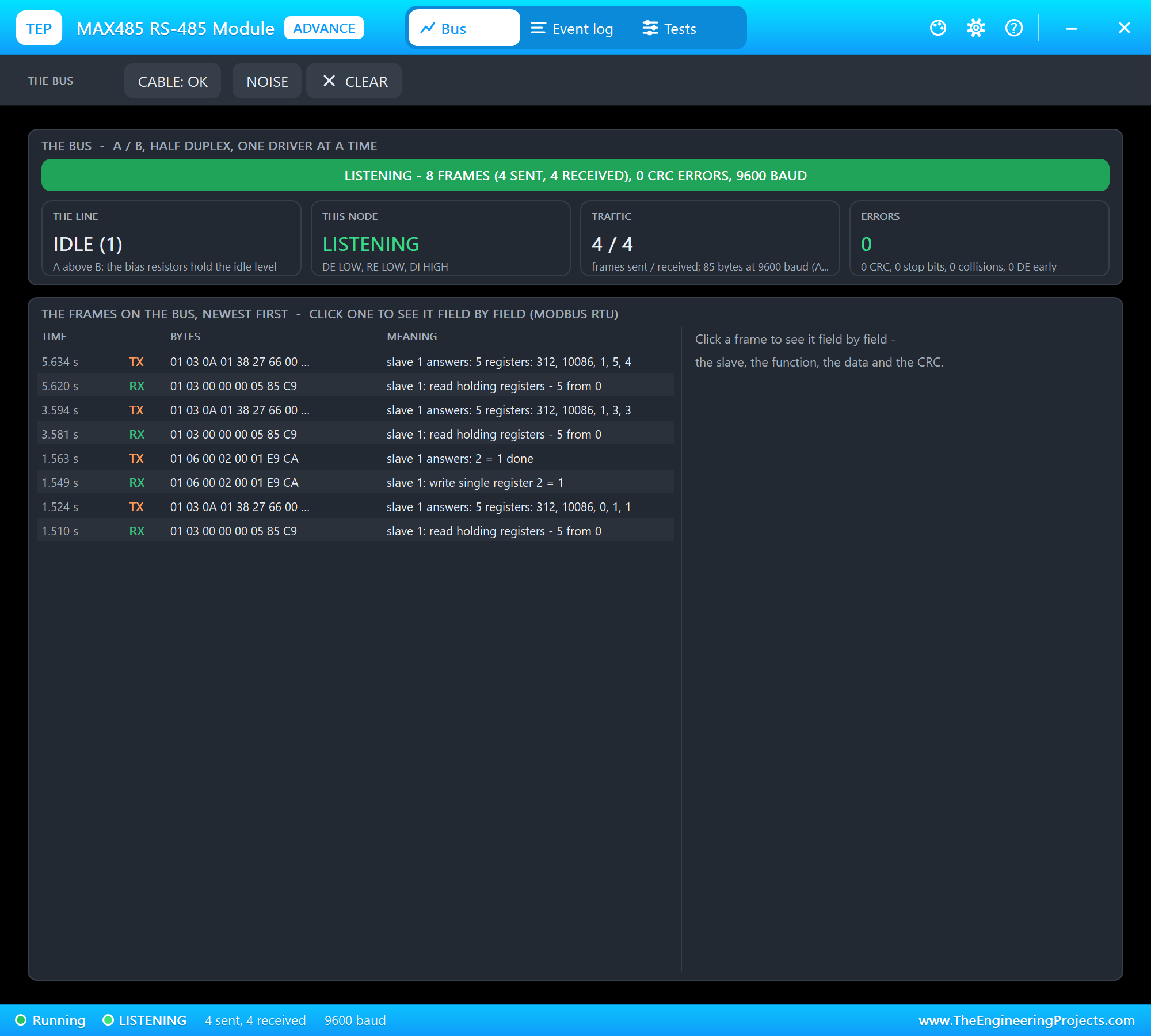
RS-485 is the wiring of factories: one twisted pair, A and B, carries a difference of voltage rather than a level, so it shrugs off noise and runs over a kilometre. It is half duplex - one transmitter at a time - so every transceiver has a driver-enable pin. Modbus RTU is the language most machines speak on it: one master asks, the slaves answer. Each slave keeps numbered 16-bit holding registers; the master reads them with function 03 and writes one with function 06, and every frame ends with a CRC.
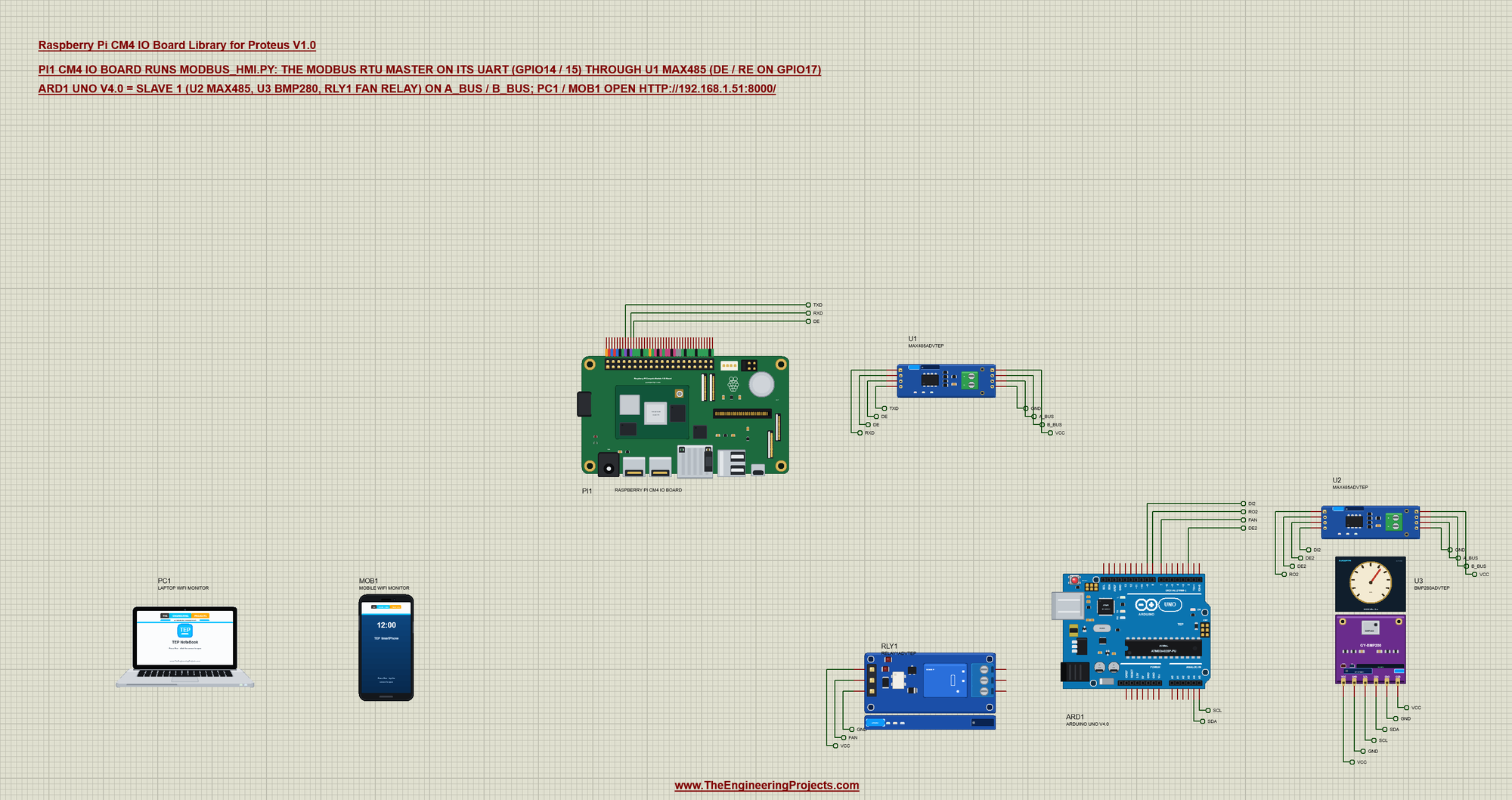
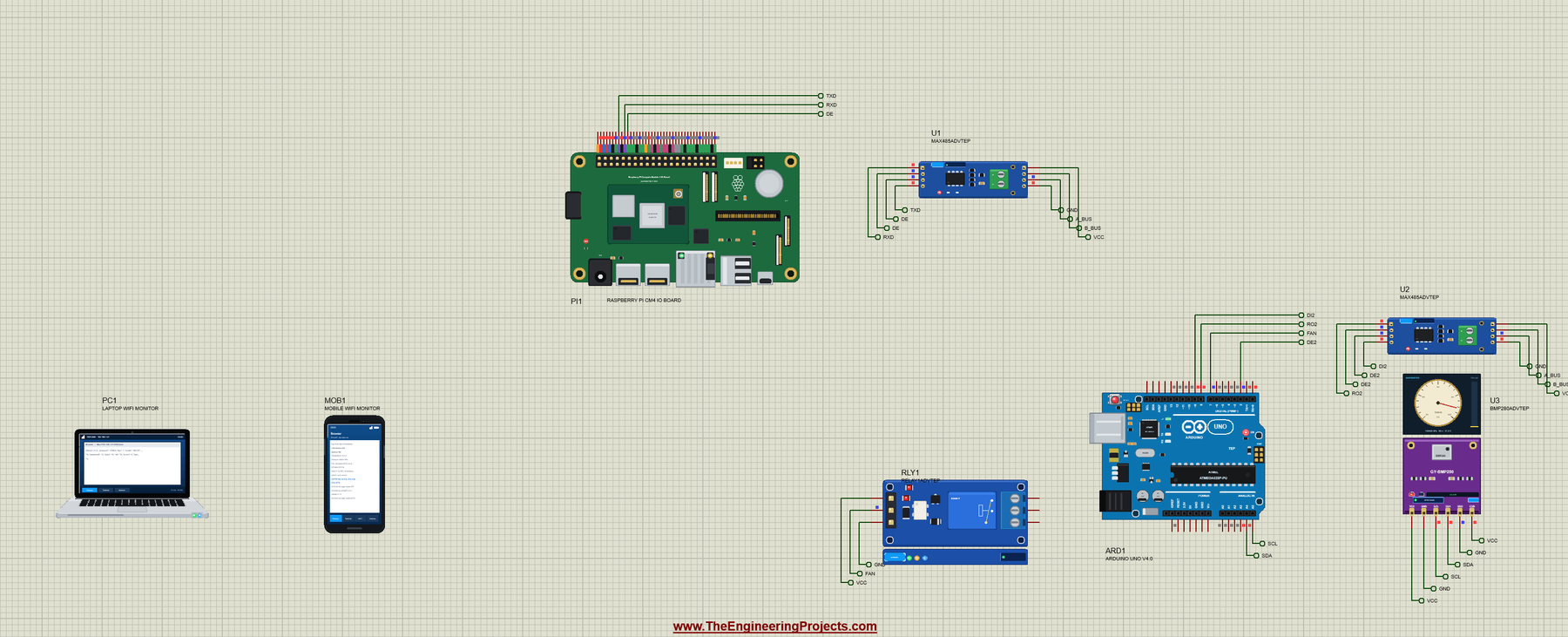
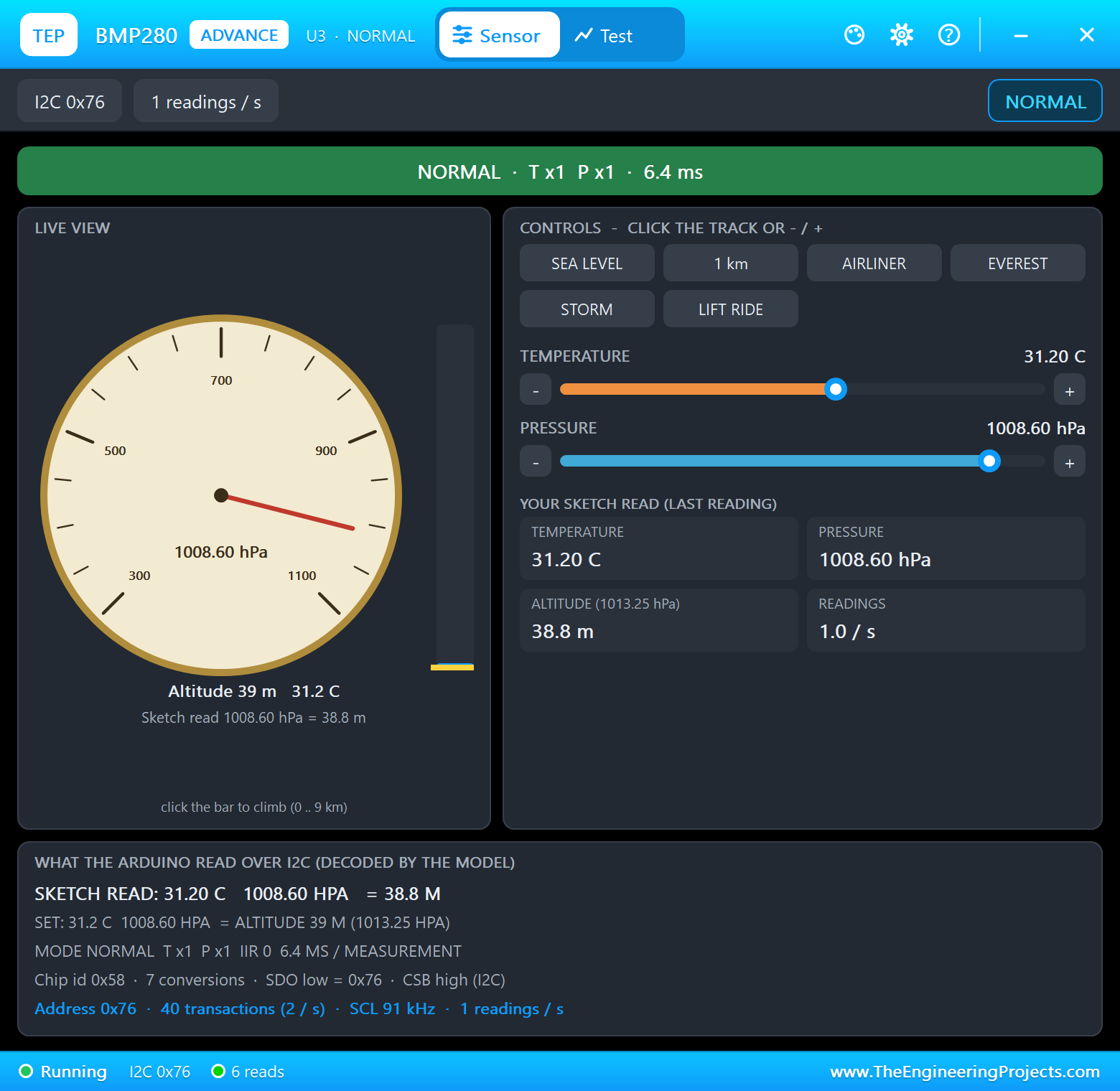
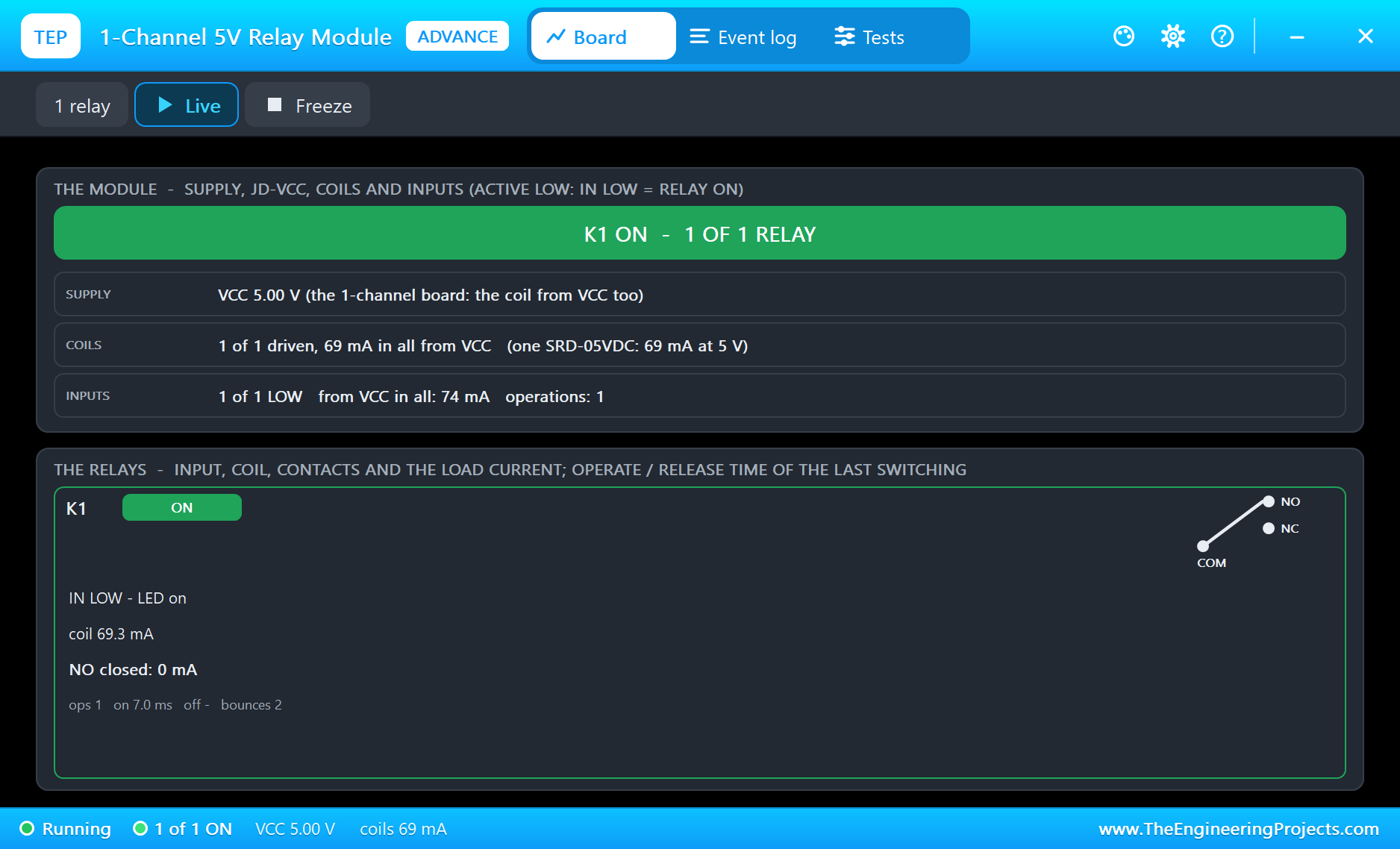
Open CM4-Modbus-HMI.pdsprj. PI1 runs modbus_hmi.py on Ethernet, with U1, a MAX485 module from our MAX485 RS485 Module Library for Proteus, on its UART. ARD1 is an Arduino UNO V4.0 from our Arduino UNO Library for Proteus V4.0 running Modbus_Slave_Node.hex: it is slave 1, with its own MAX485 (U2), a BMP280 (U3) from our BMP280 Sensor Library for Proteus and a relay module (RLY1) from our Relay Module Library for Proteus as the fan. The A and B pins of the two MAX485s are joined by the A_BUS and B_BUS labels. All the modules are the Advance versions: each opens a pop-up window at Run. PC1 is the Laptop WiFi Monitor and MOB1 the Mobile WiFi Monitor.
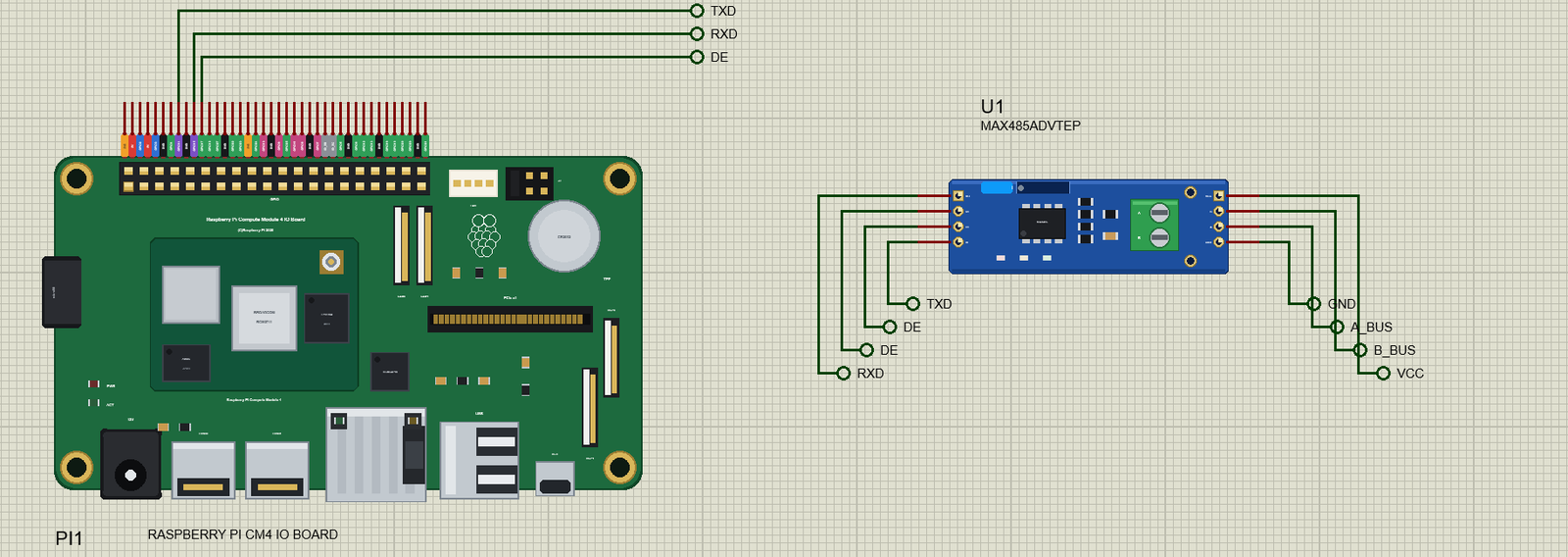
| MAX485 pin | Net label | CM4 header pin | What it does |
|---|---|---|---|
| DI | TXD | 8 (GPIO14) | the bytes the CM4 sends |
| RO | RXD | 10 (GPIO15) | the bytes it receives |
| DE, RE | DE | 11 (GPIO17) | HIGH: drive the bus; LOW: listen |
| A, B | A_BUS, B_BUS | - | the bus to the slave's MAX485 |
| VCC, GND | VCC, GND | - | the module's 5 V supply |
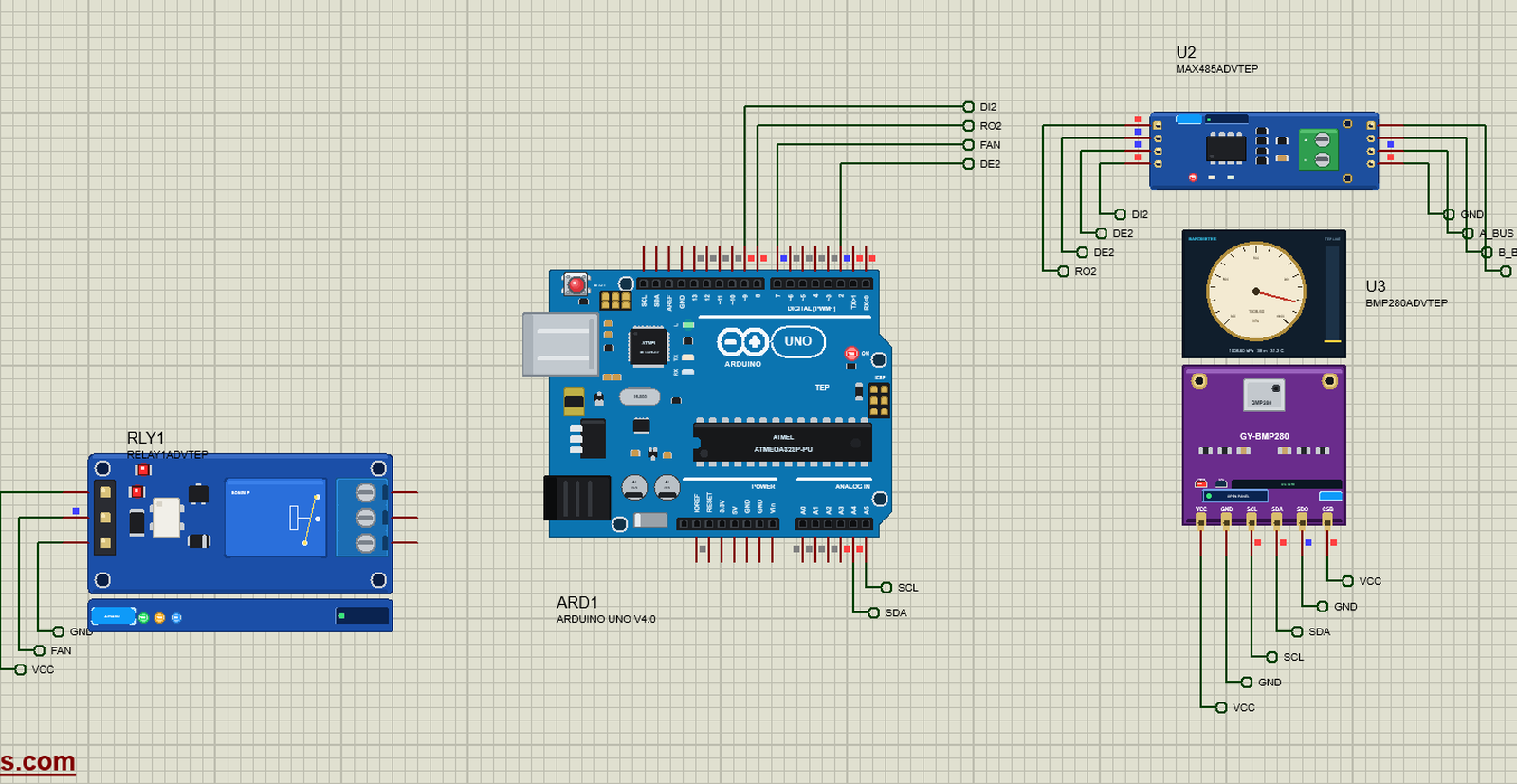
| Part | Pins | UNO pins |
|---|---|---|
| U2 MAX485 | RO, DI, DE + RE | D8, D9 (AltSoftSerial), D2 |
| U3 BMP280 | SDA, SCL, SDO | A4, A5, SDO to GND (address 0x76) |
| RLY1 relay | IN | D7 (LOW = the fan on) |
The Modbus Frame
A Modbus RTU frame is the slave's address, the function code, the data, and a 16-bit CRC sent low byte first. The CRC is the same on every Modbus device in the world: start at 0xFFFF and run every byte through the reflected polynomial 0xA001. A receiver that computes another value simply drops the frame:
def crc16(frame):
    """Modbus RTU CRC-16: start at 0xFFFF, polynomial 0xA001 (reflected 0x8005), sent low byte first."""
    crc = 0xFFFF
    for b in frame:
        crc ^= b
        for _ in range(8):
            crc = (crc >> 1) ^ 0xA001 if crc & 1 else crc >> 1
    return crc
So reading five registers from address 0 of slave 1 is the eight bytes 01 03 00 00 00 05 85 C9: slave 1, function 03, start 0, count 5, and the CRC 0xC985 as 85 C9. The answer starts with 01 03 0A - slave 1, function 03, ten bytes of data - then the five registers, then its own CRC.
Talking on a Half-Duplex Bus
The program drives the bus itself, with pyserial and RPi.GPIO. Before a request it waits 10 ms: Modbus RTU has no start or end character - a frame ends when the line has been silent for 3.5 characters, about 4 ms at 9600 baud. Without that gap two frames run together and every receiver sees one long frame with a wrong CRC. Then it raises GPIO17, so the MAX485 drives the bus, writes the frame, and drops GPIO17 again as soon as flush() says the last stop bit has left - in time to hear the answer:
    def transact(self, pdu, answer_len):
        """Send slave + pdu + CRC with the driver on, then read the answer (answer_len bytes with the CRC). Returns the answer's data
        or raises IOError with the reason (no answer, a bad CRC, an exception code)."""
        frame = bytes([SLAVE]) + pdu
        crc = crc16(frame)
        frame += bytes([crc & 0xFF, crc >> 8])
        time.sleep(0.01)                                            # Modbus RTU: at least 3.5 characters of silence between frames
        self.ser.reset_input_buffer()
        GPIO.output(DE_RE, GPIO.HIGH)
        self.ser.write(frame)
        self.ser.flush()                                            # the last stop bit is out
        GPIO.output(DE_RE, GPIO.LOW)
        ans = self.ser.read(answer_len)
        if len(ans) >= 5 and ans[1] & 0x80:
            raise IOError('exception %d' % ans[2])
        if len(ans) < answer_len:
            raise IOError('no answer' if not ans else 'short answer (%d bytes)' % len(ans))
        if crc16(ans[:-2]) != ans[-2] | ans[-1] << 8:
            raise IOError('bad CRC')
        return ans
The two Modbus functions are then one line each. Function 03 returns the registers, function 06 writes one register, and the slave answers a write with the same eight bytes as the request:
    def read_registers(self, start, count):                       # function 03
        ans = self.transact(bytes([3, start >> 8, start & 0xFF, 0, count]), 5 + 2 * count)
        return [ans[3 + 2 * i] << 8 | ans[4 + 2 * i] for i in range(count)]

    def write_register(self, reg, value):                         # function 06: the answer echoes the request
        self.transact(bytes([6, reg >> 8, reg & 0xFF, value >> 8, value & 0xFF]), 8)
The Slave Node
The Arduino keeps five registers: 0 the temperature in tenths of a degree, 1 the pressure in tenths of a hPa, 2 the fan, 3 its uptime and 4 the requests it has answered. It reads the BMP280 once a second with Wire and Bosch's compensation formulas, and collects the bytes from the bus with AltSoftSerial - in Proteus the UNO's SoftwareSerial cannot receive. The end of a frame is the same 3.5-character silence:
void loop() {
  while (rs485.available()) {
    uint8_t b = rs485.read();
    if (n < sizeof buf) buf[n++] = b;
    lastByte = micros();
  }
  if (n && micros() - lastByte > SILENCE_US) {   // 3.5 characters of silence: the frame is complete
    handle();
    n = 0;
  }
  if (!n && millis() - lastRead >= 1000) { lastRead = millis(); bmpMeasure(); }
  regs[3] = millis() / 1000;
}
A complete frame is checked: a bad CRC is ignored, a frame for another address too. Function 03 copies the registers into the answer, function 06 may only write register 2 - the relay - and anything else gets a Modbus exception:
void handle() {
  if (n < 4) return;
  uint16_t crc = crc16(buf, n - 2);
  if ((crc & 0xFF) != buf[n - 2] || (crc >> 8) != buf[n - 1]) { Serial.println(F("a frame with a bad CRC - ignored")); return; }
  if (buf[0] != ADDRESS) return;                 // (a frame for another slave)
  uint8_t fn = buf[1];
  uint16_t a = buf[2] << 8 | buf[3], v = buf[4] << 8 | buf[5];
  Serial.print(F("request "));
  if (fn < 16) Serial.print('0');
  Serial.print(fn, HEX);
  if (fn == 3 && n == 8) {                       // read holding registers: start a, count v
    Serial.print(F(": read ")); Serial.print(v); Serial.print(F(" from ")); Serial.print(a);
    if (v == 0 || a + v > NREGS) { exception(fn, 2); return; }
    regs[4]++;
    uint8_t f[5 + 2 * NREGS] = {ADDRESS, 3, uint8_t(v * 2)};
    for (byte i = 0; i < v; i++) { f[3 + 2 * i] = regs[a + i] >> 8; f[4 + 2 * i] = regs[a + i] & 0xFF; }
    send(f, 3 + 2 * v);
    Serial.println(F(" - answered"));
  } else if (fn == 6 && n == 8) {                // write single register a = v
    Serial.print(F(": write ")); Serial.print(a); Serial.print(F(" = ")); Serial.print(v);
    if (a != 2) { exception(fn, 2); return; }    // only the relay can be written
    setRelay(v != 0);
    regs[4]++;
    uint8_t f[8] = {ADDRESS, 6, buf[2], buf[3], buf[4], buf[5]};
    send(f, 6);                                  // the answer is the request again
    Serial.println(regs[2] ? F(" - FAN ON") : F(" - FAN OFF"));
  } else exception(fn, 1);
}
The Control Loop
A thread on the CM4 polls the slave every 2 s. It reads all five registers in one request, then decides the fan: FAN ON and FAN OFF from the page win; in AUTO the fan goes on at 30.0 C and off below 29.0 C - the gap stops it chattering around one value. Only a change is written to register 2:
def modbus_loop():
    """Every 2 s: read registers 0 - 4; decide the fan (the page's mode, or AUTO by the temperature); write register 2 when it changes."""
    first = True
    while True:
        with lock:
            state['polls'] += 1
            mode = state['mode']
        try:
            t10, p10, fan, uptime, answered = bus.read_registers(0, 5)
            t10 = signed(t10)
            with lock:
                state.update(temp=t10 / 10.0, pressure=p10 / 10.0, fan=fan, uptime=uptime, answered=answered)
                state['ok'] += 1
            if first:
                note('slave 1 answers: %.1f C, %.1f hPa, fan %s' % (t10 / 10.0, p10 / 10.0, 'ON' if fan else 'off'))
                first = False
            want = fan
            if mode == 'ON': want = 1
            elif mode == 'OFF': want = 0
            elif t10 >= FAN_ON_AT: want = 1
            elif t10 < FAN_OFF_AT: want = 0
            if want != fan:
                bus.write_register(2, want)
                with lock:
                    state['fan'] = want
                note('fan %s (%s, %.1f C) - register 2 = %d' % ('ON' if want else 'off', mode, t10 / 10.0, want))
            print('%s  %.1f C  %.1f hPa  fan %s  mode %s  polls %d ok %d errors %d' % (time.strftime('%H:%M:%S'), t10 / 10.0,
                  p10 / 10.0, 'ON' if want else 'off', mode, state['polls'], state['ok'], state['errors']))
        except IOError as e:
            with lock:
                state['errors'] += 1
                state['last_error'] = str(e)
            note('slave 1: %s' % e)
        time.sleep(2)
The Web Page
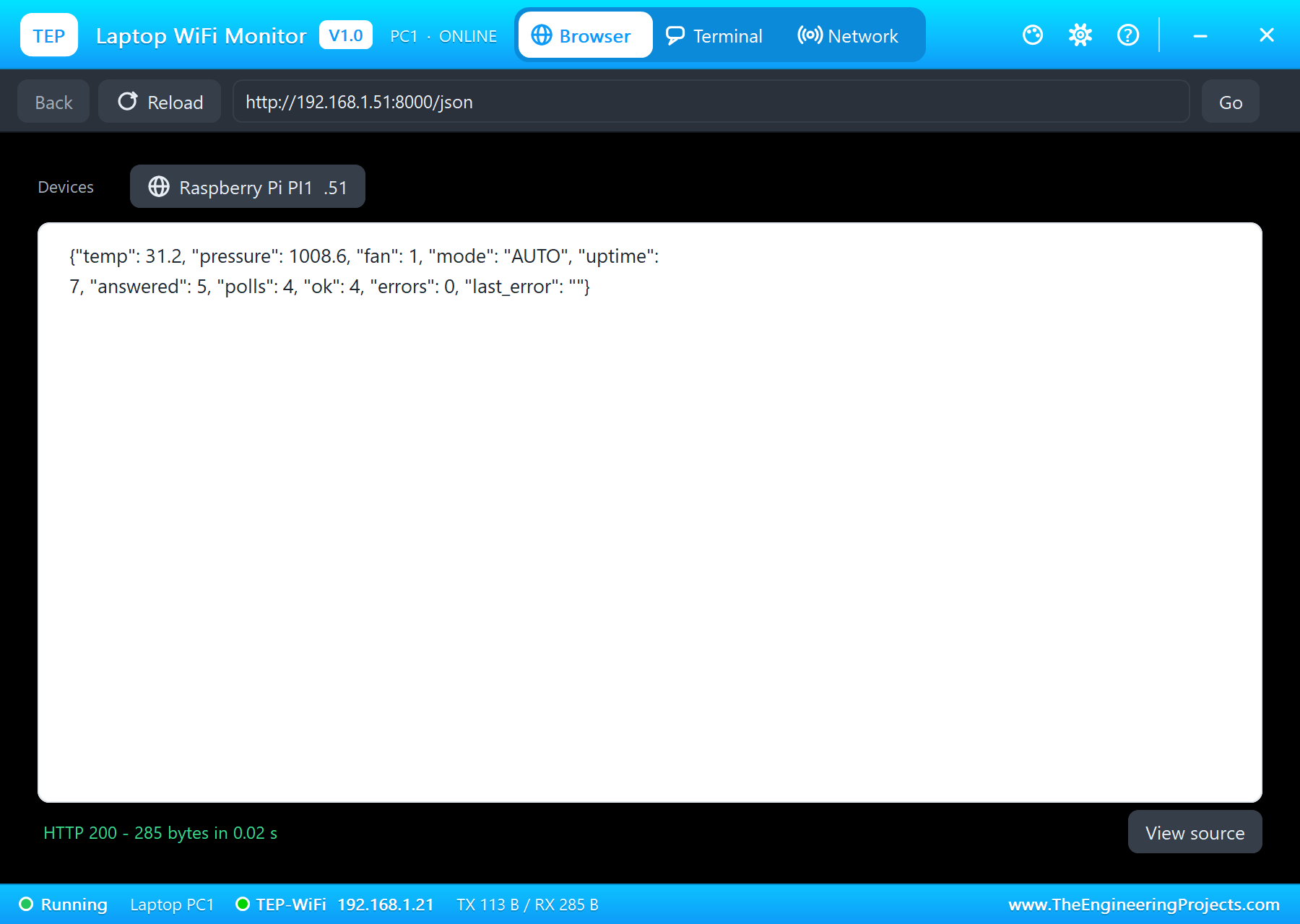
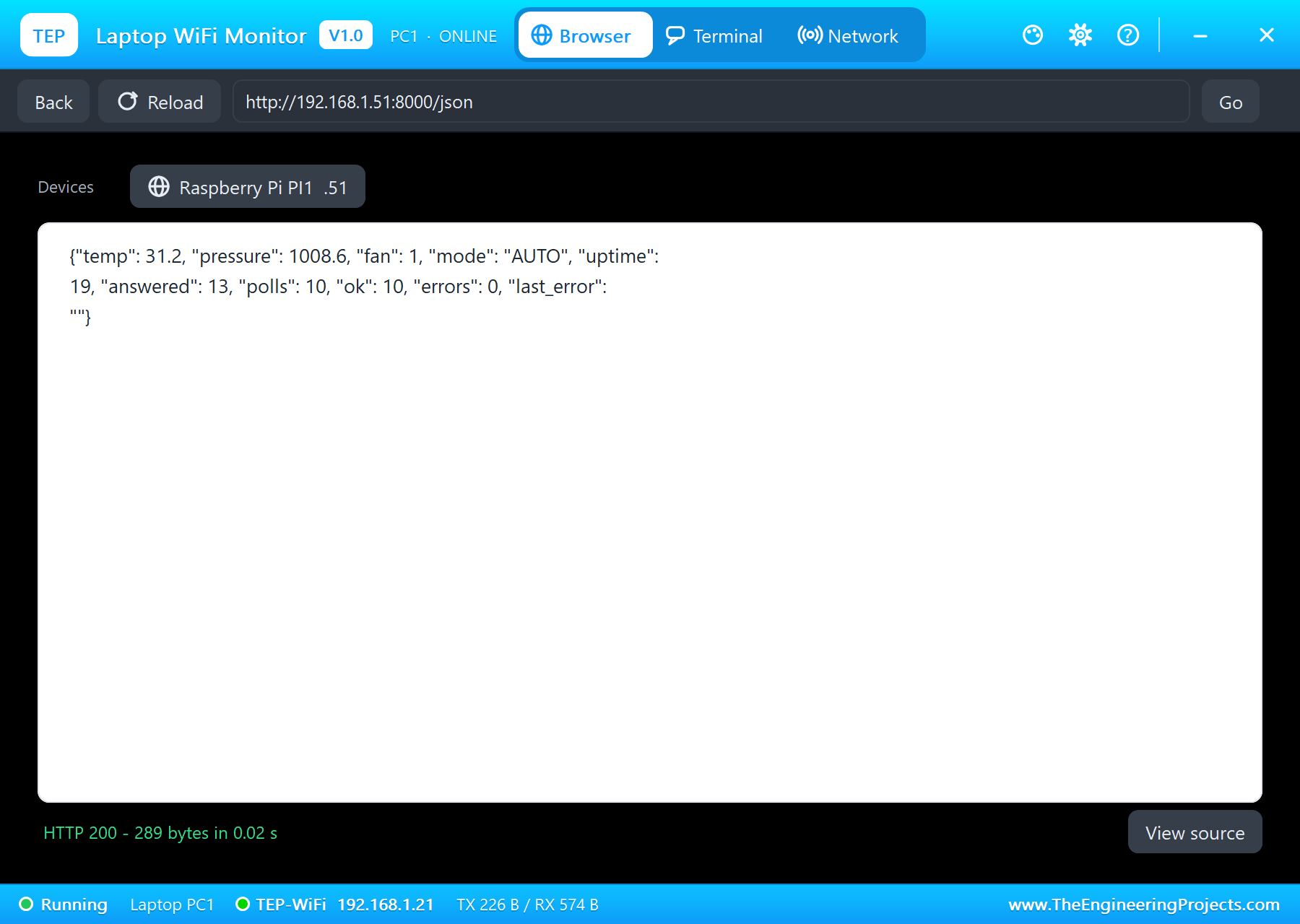
The HMI page shows the temperature, the pressure, the fan and the slave's counters, with REFRESH, AUTO, FAN ON and FAN OFF; /json gives the same values for another program:
PAGE = """<html><head><title>CM4 Modbus HMI</title></head><body>
<h1>Modbus HMI</h1>
<p>Temperature: <b>{temp}</b></p>
<p>Pressure: <b>{pressure}</b></p>
<p>Fan: <b>{fan}</b> (mode {mode}: on at 30.0 C, off below 29.0 C)</p>
<p>Slave 1: up {uptime} s, {answered} answers; polls {polls}, ok {ok}, errors {errors}</p>
<p><a href="/">REFRESH</a> <a href="/mode?m=AUTO">AUTO</a> <a href="/mode?m=ON">FAN ON</a> <a href="/mode?m=OFF">FAN OFF</a></p>
<p>{log}</p>
</body></html>"""
At the start the program opens the bus, waits for the network, starts the Modbus thread and serves on port 8000:
print('modbus_hmi.py - Modbus RTU master and web HMI on the Raspberry Pi CM4 IO Board')
bus = ModbusMaster()
print('RS-485 on /dev/serial0 (GPIO14 / 15) at 9600 baud 8N1, DE / RE on GPIO%d; slave %d' % (DE_RE, SLAVE))
print('waiting for the network ...')
while my_ip() == '0.0.0.0':
    time.sleep(0.5)
threading.Thread(target=modbus_loop, daemon=True).start()
print('HMI on http://%s:%d/' % (my_ip(), PORT))
HTTPServer(('', PORT), Handler).serve_forever()
Run the Demo
Press Run. eth0 comes up, the first poll is answered at once - and as the BMP280 reads 31.2 C, AUTO switches the fan on in the same second:
pi@raspberrypi:~ $ python3 modbus_hmi.py
modbus_hmi.py - Modbus RTU master and web HMI on the Raspberry Pi CM4 IO Board
RS-485 on /dev/serial0 (GPIO14 / 15) at 9600 baud 8N1, DE / RE on GPIO17; slave 1
waiting for the network ...
HMI on http://192.168.1.51:8000/
03:00:28  slave 1 answers: 31.2 C, 1008.6 hPa, fan off
03:00:28  fan ON (AUTO, 31.2 C) - register 2 = 1
03:00:28  31.2 C  1008.6 hPa  fan ON  mode AUTO  polls 1 ok 1 errors 0
03:00:30  31.2 C  1008.6 hPa  fan ON  mode AUTO  polls 2 ok 2 errors 0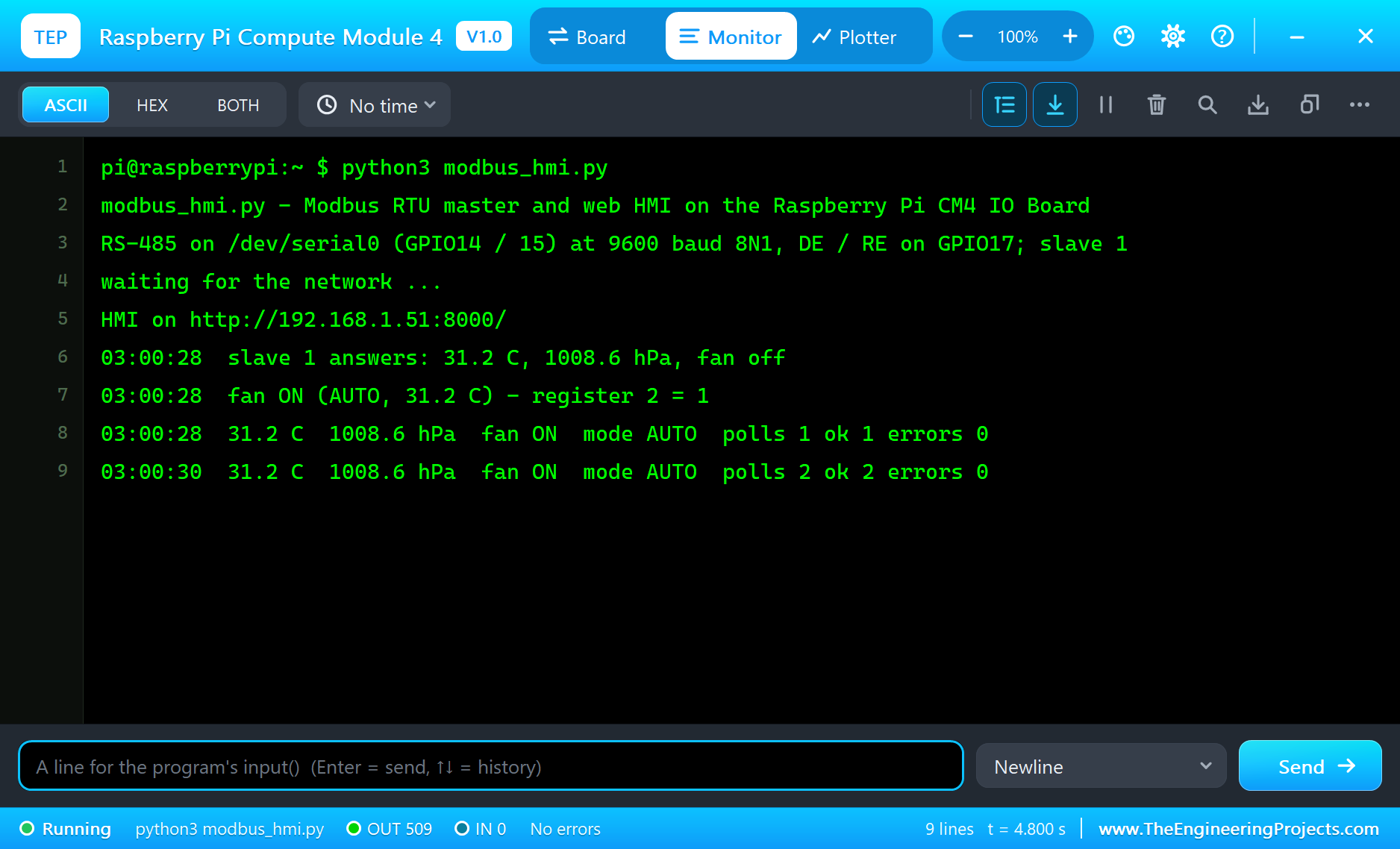
The slave's serial monitor shows what arrives - the reads and the first write:
TEP Modbus RTU slave node V1.0 - slave 1, 9600 baud
BMP280 found at 0x76
registers: 0 temperature x10, 1 pressure x10, 2 fan relay, 3 uptime, 4 answered
request 03: read 5 from 0 - answered
request 06: write 2 = 1 - FAN ON
request 03: read 5 from 0 - answered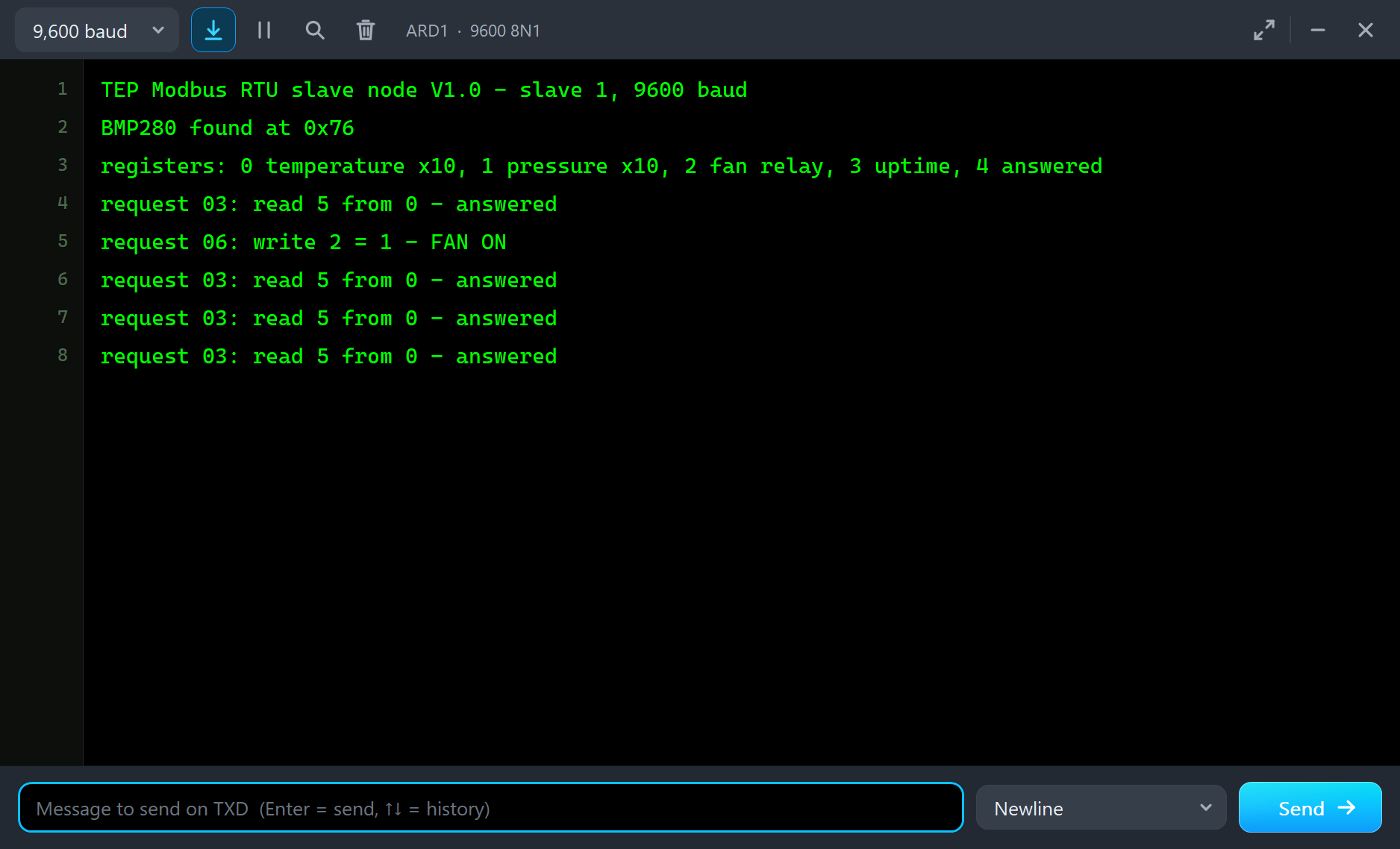
Open the HMI
On the laptop click Browser and Go (its home page is http://192.168.1.51:8000/json); on the phone the same with http://192.168.1.51:8000/:
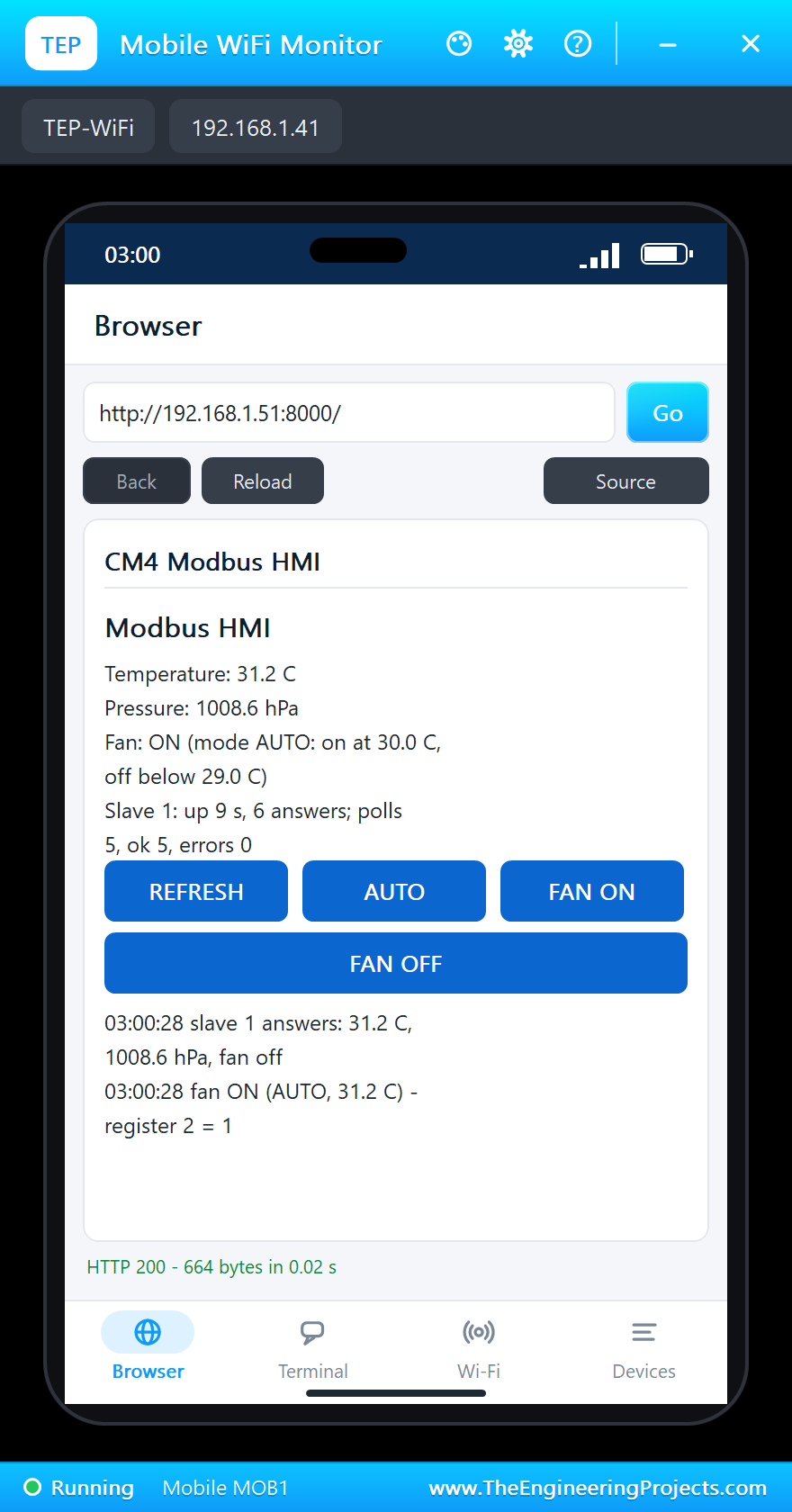
Switch the Fan from the Phone
Tap FAN OFF. The mode changes at once; at the next poll the CM4 sees that the fan should be off and writes 0 to register 2. The slave answers, its D7 goes HIGH and the relay drops - a command crossing from a web page, through the CM4 and the RS-485 bus, to another microcontroller:
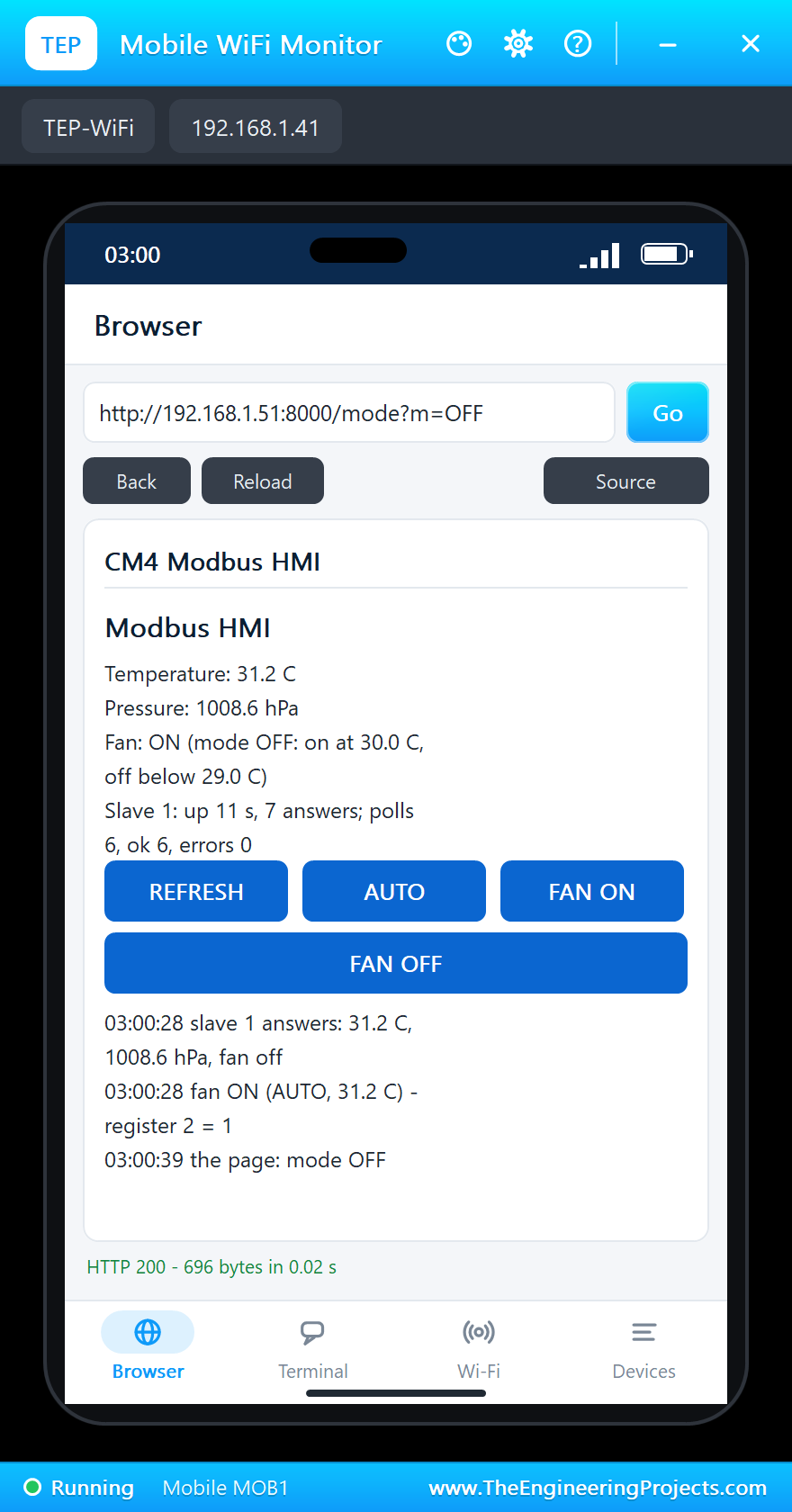
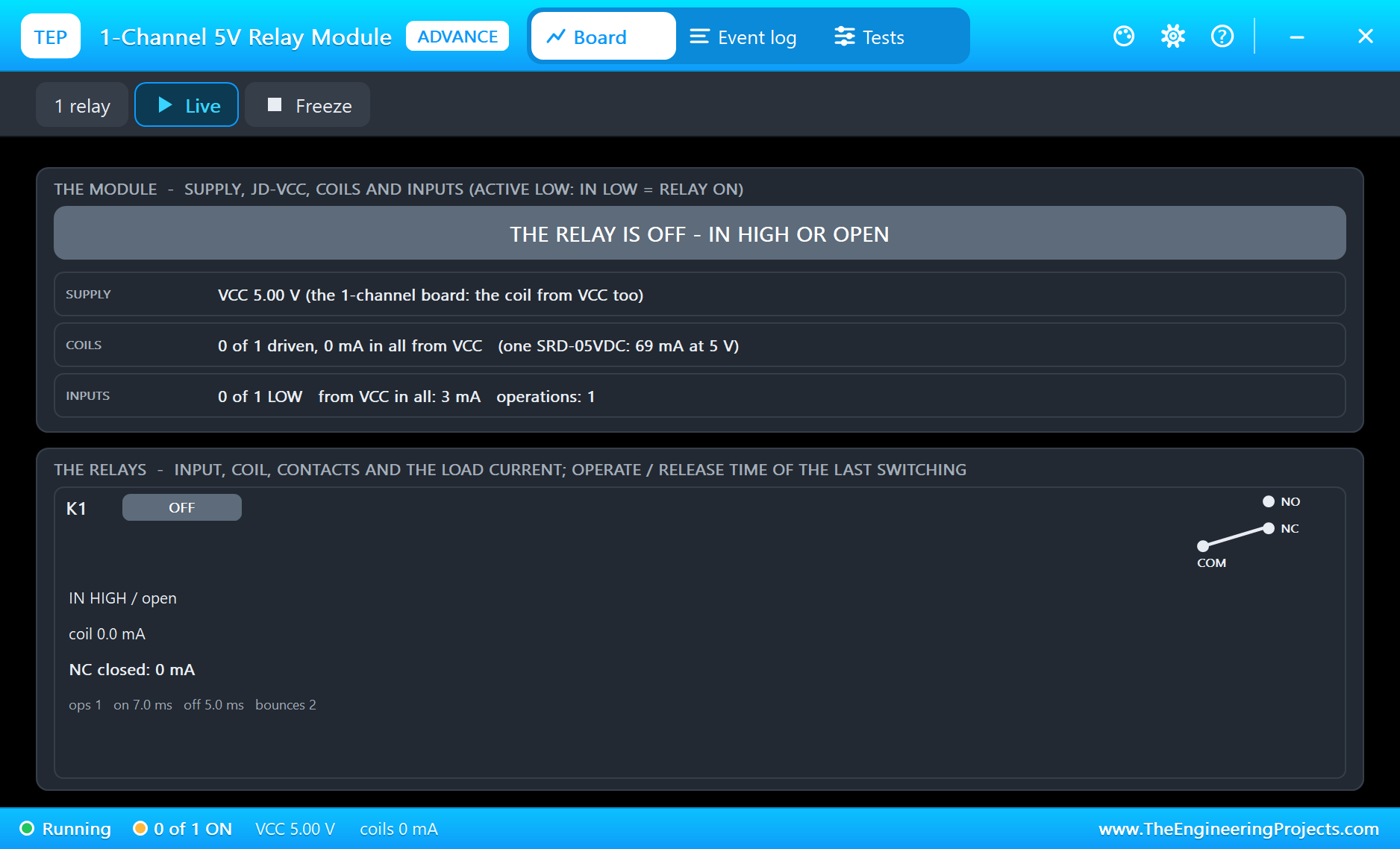
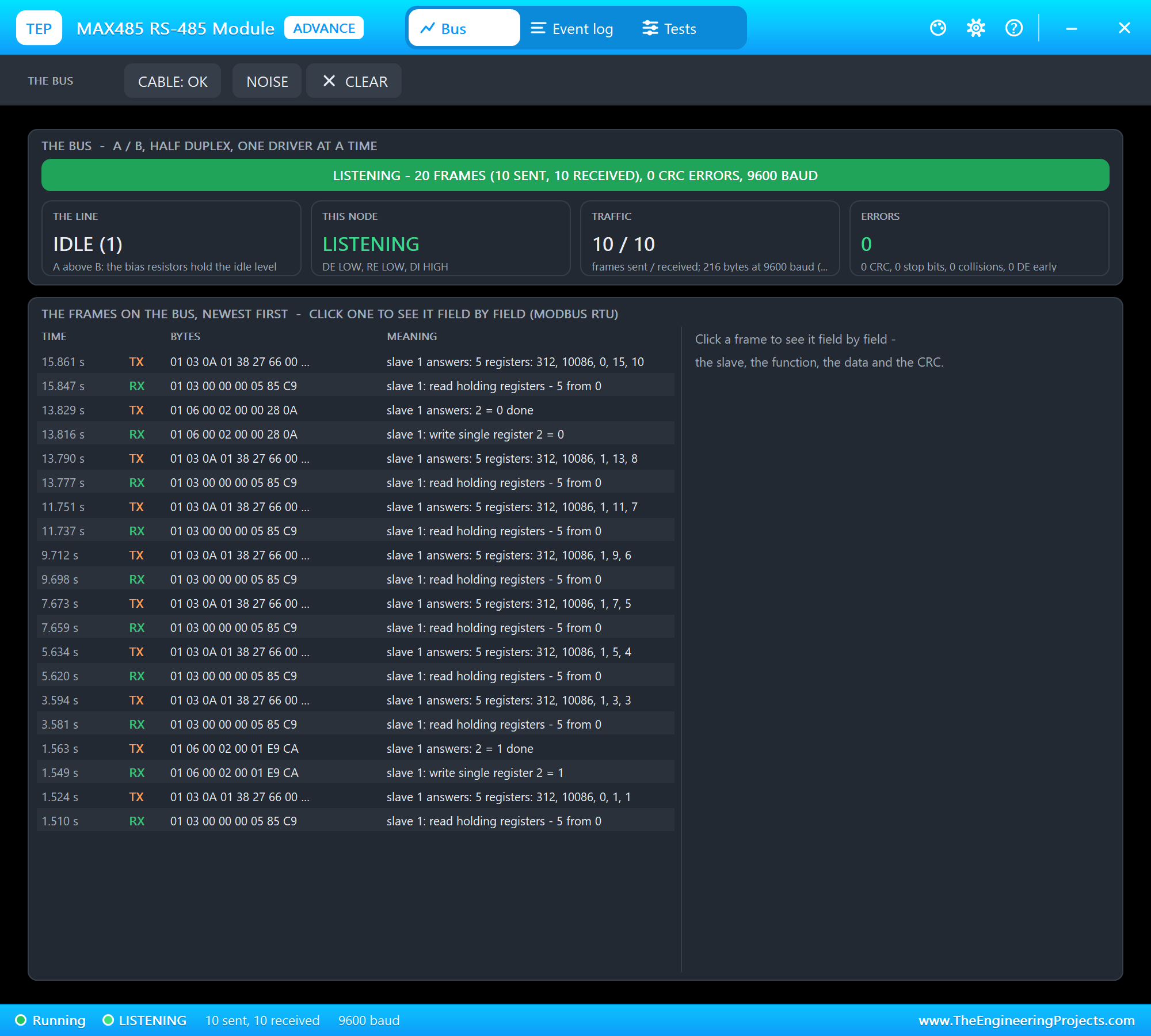
Now tap AUTO: the temperature is still 31.2 C, so the next poll switches the fan on again. To see AUTO switch it off, drag TEMPERATURE in U3's pop-up below 29.0 C.
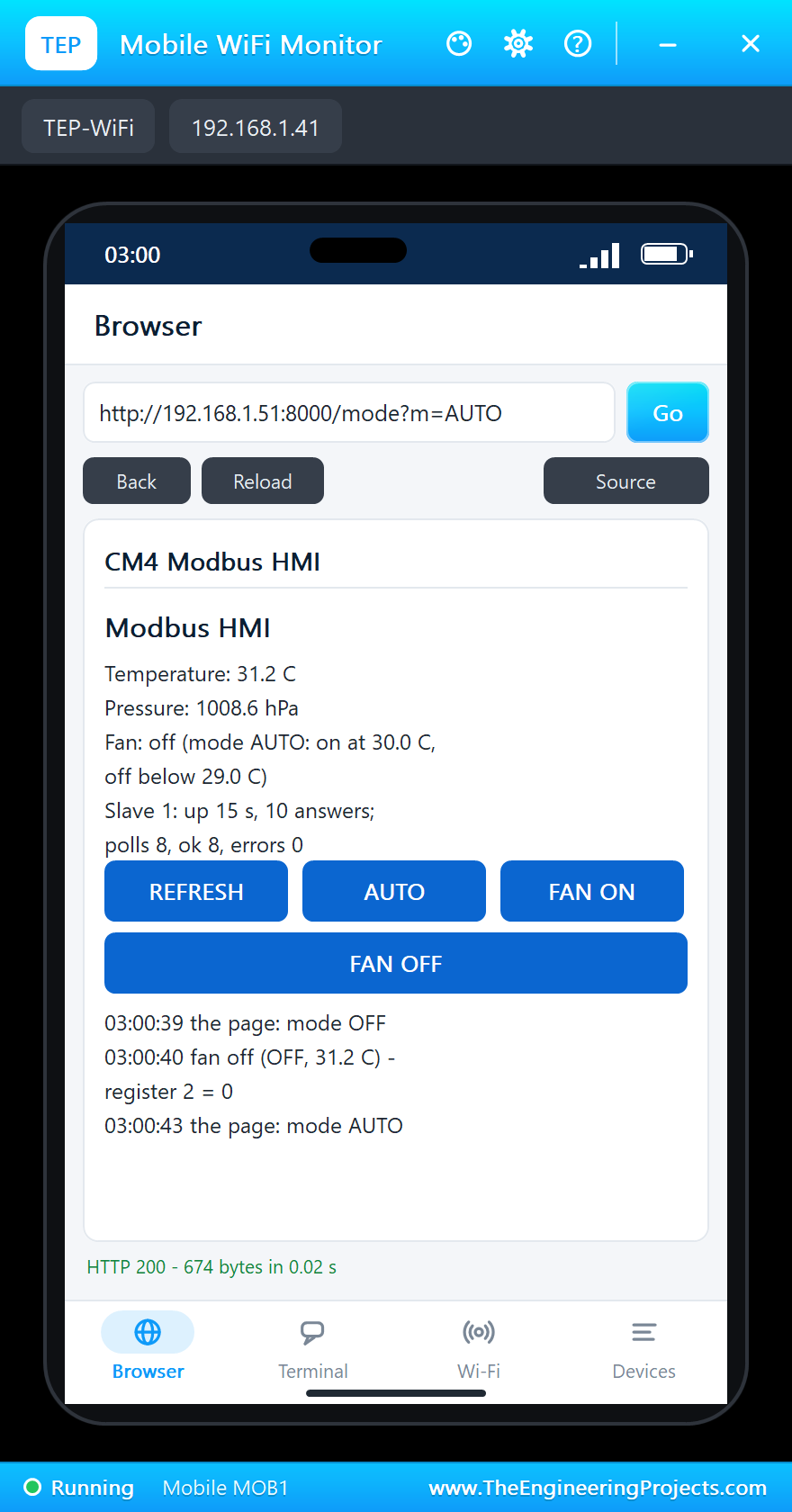
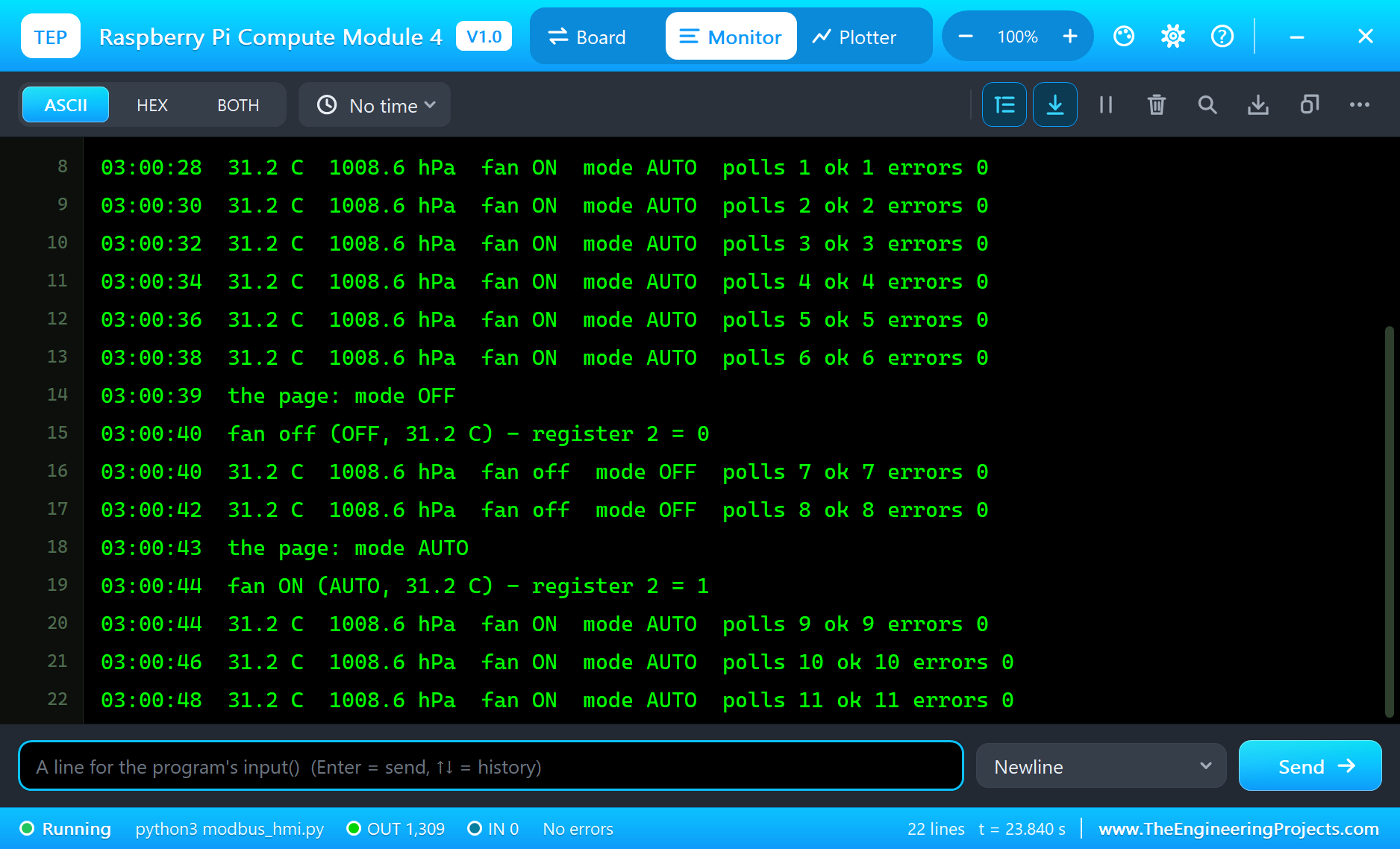
The Pi Terminal logs every event:
03:00:38  31.2 C  1008.6 hPa  fan ON  mode AUTO  polls 6 ok 6 errors 0
03:00:39  the page: mode OFF
03:00:40  fan off (OFF, 31.2 C) - register 2 = 0
03:00:40  31.2 C  1008.6 hPa  fan off  mode OFF  polls 7 ok 7 errors 0
03:00:42  31.2 C  1008.6 hPa  fan off  mode OFF  polls 8 ok 8 errors 0
03:00:43  the page: mode AUTO
03:00:44  fan ON (AUTO, 31.2 C) - register 2 = 1
03:00:44  31.2 C  1008.6 hPa  fan ON  mode AUTO  polls 9 ok 9 errors 0
03:00:46  31.2 C  1008.6 hPa  fan ON  mode AUTO  polls 10 ok 10 errors 0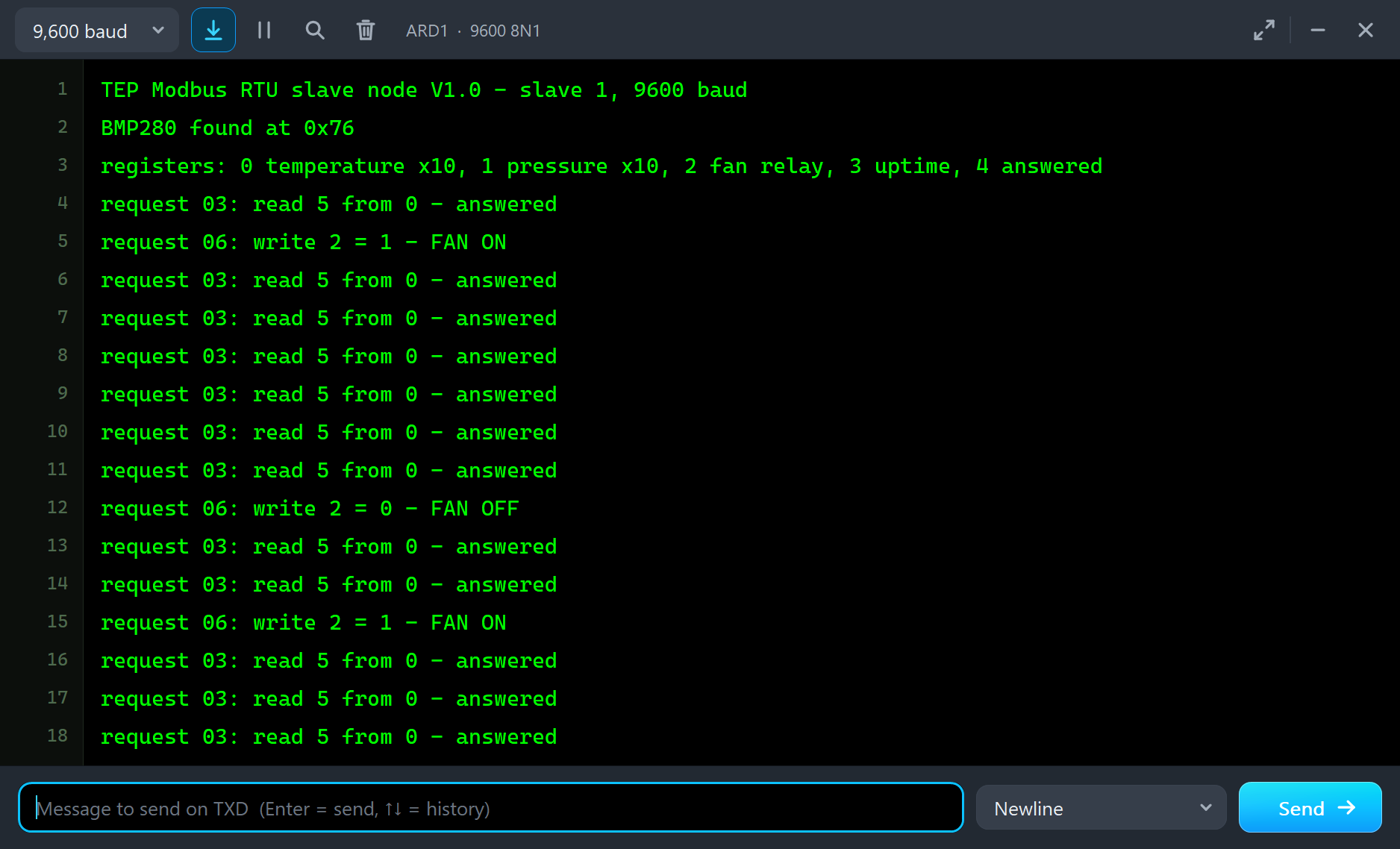
The Pi Terminal
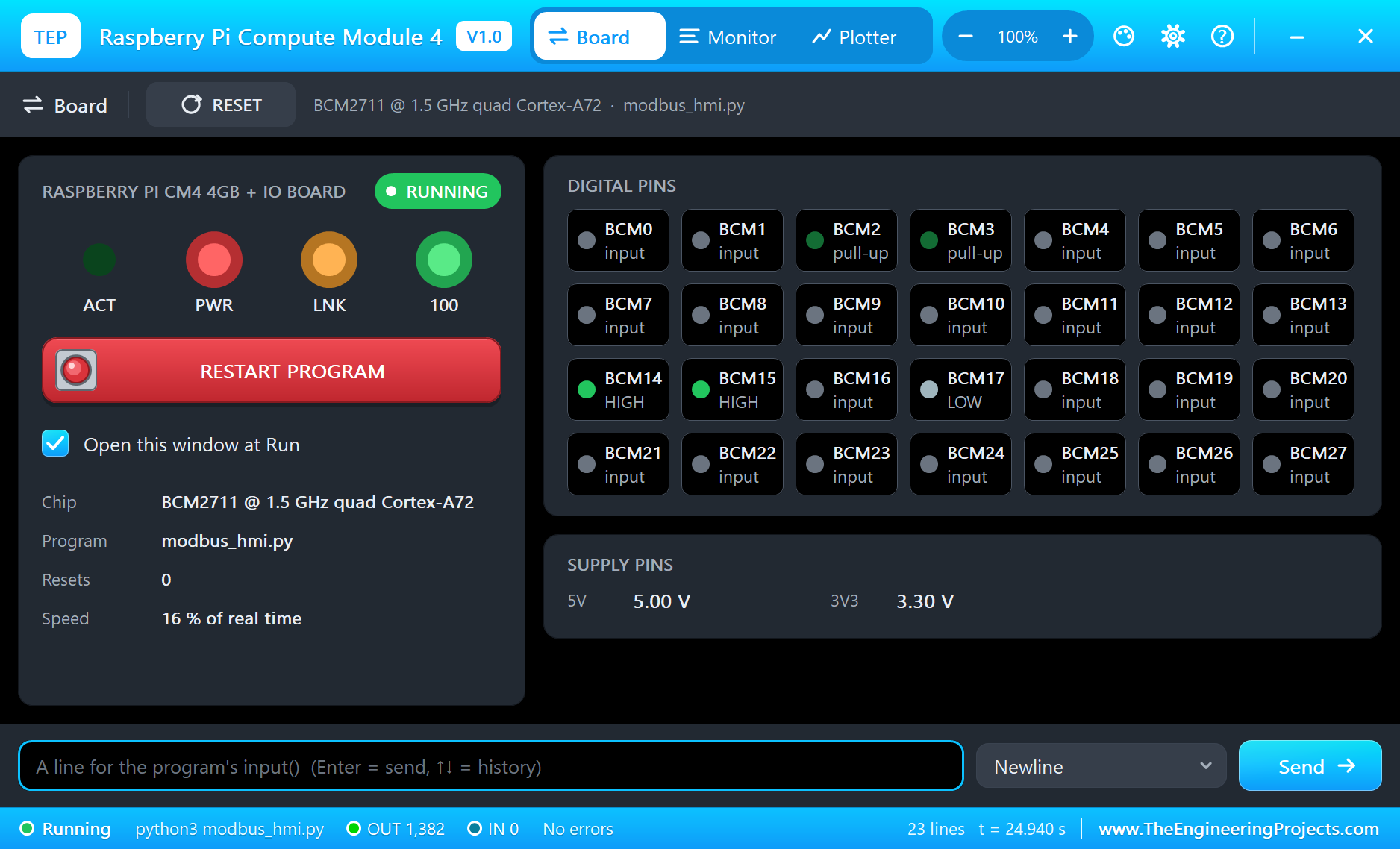
The Pi Terminal opens at Run, in the look of our TEP Serial Monitor Advance for Proteus - our own TEP header, no Windows title bar. Its Monitor tab shows the program's output (OUT), errors (ERR) and the lines you type for input() (IN). The Board tab shows the board live - GPIO14 and GPIO15 idle HIGH, GPIO17 LOW between the frames - the four LEDs and the supply pins, and RESTART PROGRAM starts the program again:
Properties of the Raspberry Pi CM4 IO Board
| Property | What it does |
|---|---|
| PROGRAM | the Python program (default blink.py; a name next to the project or a full path) |
| AUTOOPEN | the Pi Terminal at Run: YES (default) or NO |
| ETHERNET | the cable at Run: IN (default, eth0) or OUT (the network on wlan0) |
| WIFISSID, WIFIPASS | the network wlan0 joins and its password (default TEP-WiFi, 12345678) |
| PYTHON, RUNTIME | a python.exe and a runtime folder of your own (empty: the TEPPi folder) |
Your own programs go next to your project; set PROGRAM to the file's name. The default blink.py blinks an LED on GPIO17 with gpiozero:
from time import sleep
from gpiozero import LED

led = LED(17)
while True:
    led.on()
    print('LED on')
    sleep(0.5)
    led.off()
    print('LED off')
    sleep(0.5)
Troubleshooting
- "slave 1: no answer": DI on GPIO14, RO on GPIO15, DE and RE on GPIO17; A to A and B to B; the slave's HEX file next to the project; 9600 baud at both ends. The MAX485 pop-ups show who drives the bus.
- "slave 1: bad CRC" or frames glued together: two frames with no silence between them - wait at least 3.5 characters before each request, as modbus_hmi.py does.
- The fan does not follow the page: the mode changes at once, the relay at the next poll, within 2 s; use REFRESH.
- The page does not open: the address is http://192.168.1.51:8000/ and the program must have printed "HMI on". A monitor sometimes needs Go a second time.
- The TEPPi folder was not found: copy it from Proteus Model Files into MODELS, or next to your project.
Things to Know Before Using a Real CM4 IO Board
- Flashing the eMMC: a CM4 with eMMC has no card to write. Fit the jumper on the nRPIBOOT pins of J2, connect the IO Board's micro-USB port to a PC and run rpiboot: the eMMC then shows up as a USB drive for Raspberry Pi Imager. Remove the jumper to boot from it. A CM4 Lite boots from the IO Board's microSD slot instead.
- The UART: enable it with enable_uart=1 in config.txt and switch off the serial console in raspi-config, or the kernel prints its boot messages onto your RS-485 bus.
- 3.3 V levels: a MAX485 module on 5 V drives its RO pin to 5 V, too much for GPIO15. Use a 3.3 V transceiver such as a MAX3485 module, or a divider on RO.
- Termination: an RS-485 bus wants 120 ohm across A and B at its two ends only; many MAX485 modules already carry one, so remove it from the modules in the middle of a long bus.
- The antenna: the CM4 has its own antenna and a U.FL socket for an external one; config.txt chooses (dtparam=ant2 for the external antenna) - useful when the board sits in a metal cabinet.
- Power: the IO Board takes 12 V on its barrel jack and makes the 5 V and 3.3 V for the module and the HAT header itself.
Limitations of the Simulation
- The board does not run Raspberry Pi OS: there is no desktop, no shell commands, no kernel drivers and no apt. It runs one Python program; its threads take turns, so the four cores are not modelled.
- The PCIe slot, the HDMI outputs, USB, the cameras and displays, the eMMC's files, flashing over micro-USB, the real-time clock and the fan connector are drawn or named but not simulated.
- Bluetooth, the 5 GHz band, the Gigabit speed, PoE and Wi-Fi scanning are not modelled; the network is the same TEP network.
- The extra UARTs, I2C and SPI buses of the BCM2711 are not modelled: the header's standard pins are.
- The 5V and 3V3 pins are logic levels: a module that reads its own supply sees 5 V on either.
- C programs and Python packages with C code do not run. Pure Python code takes no simulation time; only the pin, bus, sleep and network calls move the clock.
- The board is drawn at about 0.6 of its size. The router, the board's address, the boot time and the Pi Terminal are TEP additions.
- Raspberry Pi is a trademark of Raspberry Pi Ltd; this library is not made or endorsed by Raspberry Pi Ltd or Labcenter.
- Tested in Proteus 8.5 in October 2026 (the demo as shipped, about 26 s of simulation in 214 s on our PC with the four pop-ups, the monitors and the Pi Terminal open). Proteus 7 is not supported.
So, that was all about the Raspberry Pi CM4 IO Board Library for Proteus. I hope it helps you try the Compute Module with real modules before you touch the hardware - Modbus RTU frames built and checked by hand, a half-duplex RS-485 bus driven with one GPIO, a field node with a sensor and a relay, and an HMI on a laptop or a phone. The next boards of our series bring other modules and more web pages. If you use the library in a project, please share it in the comments or in our forum, and if you have any questions, ask in the comments and I will help you out. Till the next tutorial, take care and have fun!

Comments
0