


Jetson Nano Library for Proteus: TF-Luna LiDAR, PCA9685 Servo


Hello friends, I hope you all are doing great. Today, I am going to share the Jetson Nano Library for Proteus. The NVIDIA Jetson Nano Developer Kit is a small computer made for AI at the edge: a Tegra X1 with four Cortex-A57 cores at 1.43 GHz, a 128-core GPU, 4 GB of RAM, Gigabit Ethernet and a 40-pin header in the Raspberry Pi layout. With this library the Jetson Nano runs your Python program against the circuit in Proteus 8.5, on our virtual network.
Jetson Nano Library for Proteus
Latest version: V1.0 (October 2026, this tutorial)
Helping Tools
- Laptop WiFi Monitor: a laptop on the Wi-Fi of your design: a browser, a TCP / UDP terminal and ping
- Mobile WiFi Monitor: a smartphone that opens the pages of your board and sends it commands
- LCD Library for Proteus V3.0: 16x2, 20x4 and I2C LCDs to show your readings
It is the twelfth board of our series of single-board computers, after eleven Raspberry Pi boards, and like every library of the series it connects the board to different modules and serves a web page. This time the Jetson Nano is a LiDAR barrier gate: a TF-Luna LiDAR on the UART measures how far the next car is, a PCA9685 servo driver on I2C swings an SG90 servo as the barrier, and a page on a laptop and a phone shows the distance, counts the cars, holds the gate open or locks it, and sets the distance that opens it.
NOTICE: this library does not run Ubuntu, CUDA or any AI model. It runs your Python program, with the same Python libraries a Jetson uses for its pins, its buses and its network, in step with the simulation. Your feedback is the fuel that keeps us going, so please tell us what you think in the comments below or in the Jetson Nano board of our forum. And if our free libraries help you, you can buy us a coffee. So, let's get started with the Jetson Nano Library for Proteus:
What is the Jetson Nano?
NVIDIA presented the Jetson Nano Developer Kit in March 2019 for 99 dollars, to bring its embedded AI boards to students and makers. The computer itself is the Jetson Nano module, a 70 x 45 mm card with a 260-pin edge that plugs into an SO-DIMM socket like laptop memory: the Tegra X1 with its four CPU cores and a 128-core Maxwell GPU, and 4 GB of LPDDR4. A big black heatsink covers it. The carrier board under it brings out the sockets: four USB 3.0, Gigabit Ethernet, HDMI and DisplayPort, a camera connector, an M.2 slot for a Wi-Fi card, and power from a micro-USB or a 5 V barrel jack.
For electronics the important part is the 40-pin expansion header J41. NVIDIA gave it the layout of the Raspberry Pi's header - the same supply pins, I2C on pins 3 and 5, the UART on 8 and 10, SPI on 19 to 26 - and a Python library, Jetson.GPIO, with the API of RPi.GPIO. So many Pi modules and much Pi code move to the Jetson with small changes. The board runs Ubuntu with NVIDIA's JetPack, and its GPU runs CUDA for camera and AI work.
| Raspberry Pi 4 Model B (2019) | Jetson Nano Developer Kit (2019) | |
|---|---|---|
| Processor | BCM2711, four Cortex-A72 cores at 1.5 GHz | Tegra X1, four Cortex-A57 cores at 1.43 GHz |
| GPU | VideoCore VI | 128-core Maxwell, with CUDA |
| RAM | 1, 2, 4 or 8 GB | 4 GB |
| Network | Gigabit Ethernet, Wi-Fi, Bluetooth | Gigabit Ethernet; Wi-Fi with an M.2 card |
| USB | two USB 3.0, two USB 2.0 | four USB 3.0, one micro-USB |
| Video | two micro-HDMI | HDMI and DisplayPort |
| GPIO | 40-pin header, RPi.GPIO | 40-pin header J41 in the same layout, Jetson.GPIO |
| Size | 85 x 56 mm | 100 x 80 mm carrier board, module and heatsink on top |
In Proteus, our Raspberry Pi Model B Library for Proteus covers how a board runs a Python program: the program and Proteus work in lockstep, every sleep, pin wait and bus transfer moves the simulation clock, and the Python libraries for the pins answer as on the real board. Then came the Raspberry Pi 1 Model B+, the Pi 2 Model B, the Pi 3 Model B, the Pi 3 Model B+, the Pi 3 Model A+, the Raspberry Pi 4 Model B Library for Proteus, the Pi 5, the Zero W, the Zero 2 W and the Raspberry Pi 400, each with its own modules. The Jetson Nano is the first board of the series from another maker: its pin names, its Python library and its serial port differ, and this library follows them.
Features of the Jetson Nano Library for Proteus
- The developer kit as it looks: the heatsink over the module, the SO-DIMM connector, the four blue USB 3.0 sockets, the Ethernet jack, the HDMI and DisplayPort stack, the micro-USB, the barrel jack, the headers J15, J38, J40, J44 and J48, the camera connector J13 and the power LED - at the real size of 100 x 80 mm.
- Ethernet: eth0 with the cable in, 192.168.1.51, the name jetson-nano.local; sockets and http.server work on it. Like the real kit, the board has no Wi-Fi of its own.
- Your Python program: any .py file in the PROGRAM property; Python 3.11 and its standard library are included.
- Jetson.GPIO as on a Jetson: BOARD or BCM numbers, the I2C and UART pins refused as GPIO channels, pull_up_down ignored with NVIDIA's warning, PWM on pins 32 and 33 only, edges with callbacks, about 1.8 us a GPIO call; "import RPi.GPIO" gives Jetson.GPIO too.
- The buses: pyserial on /dev/ttyTHS1 (pins 8 and 10), smbus2 on I2C bus 1 (pins 3 and 5) and spidev on SPI1.
- Threads: a web server and a sensor loop run side by side, every wait in simulation time.
- The terminal: the prompt jetson@jetson-nano:~$, the output, the errors, a line for input(), and a Board tab with the GPIOs, the LED and the supply pins - with our TEP header, no Windows title bar.
- A complete package: about 13.5 MB with the board, Python, the runtime, the TF-Luna, PCA9685 and monitor libraries and the demo, without the source code of the models.
The Jetson Nano in Proteus
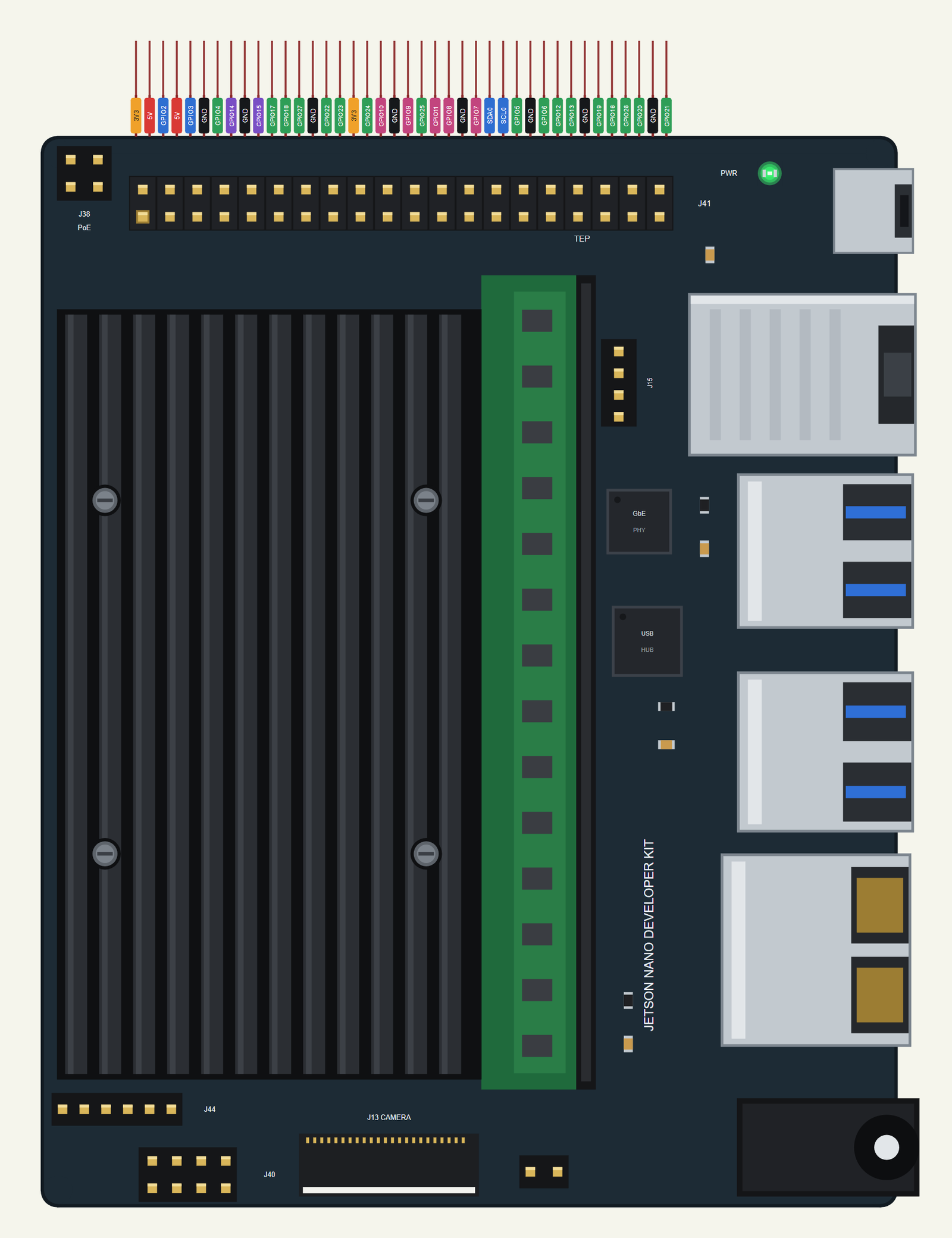
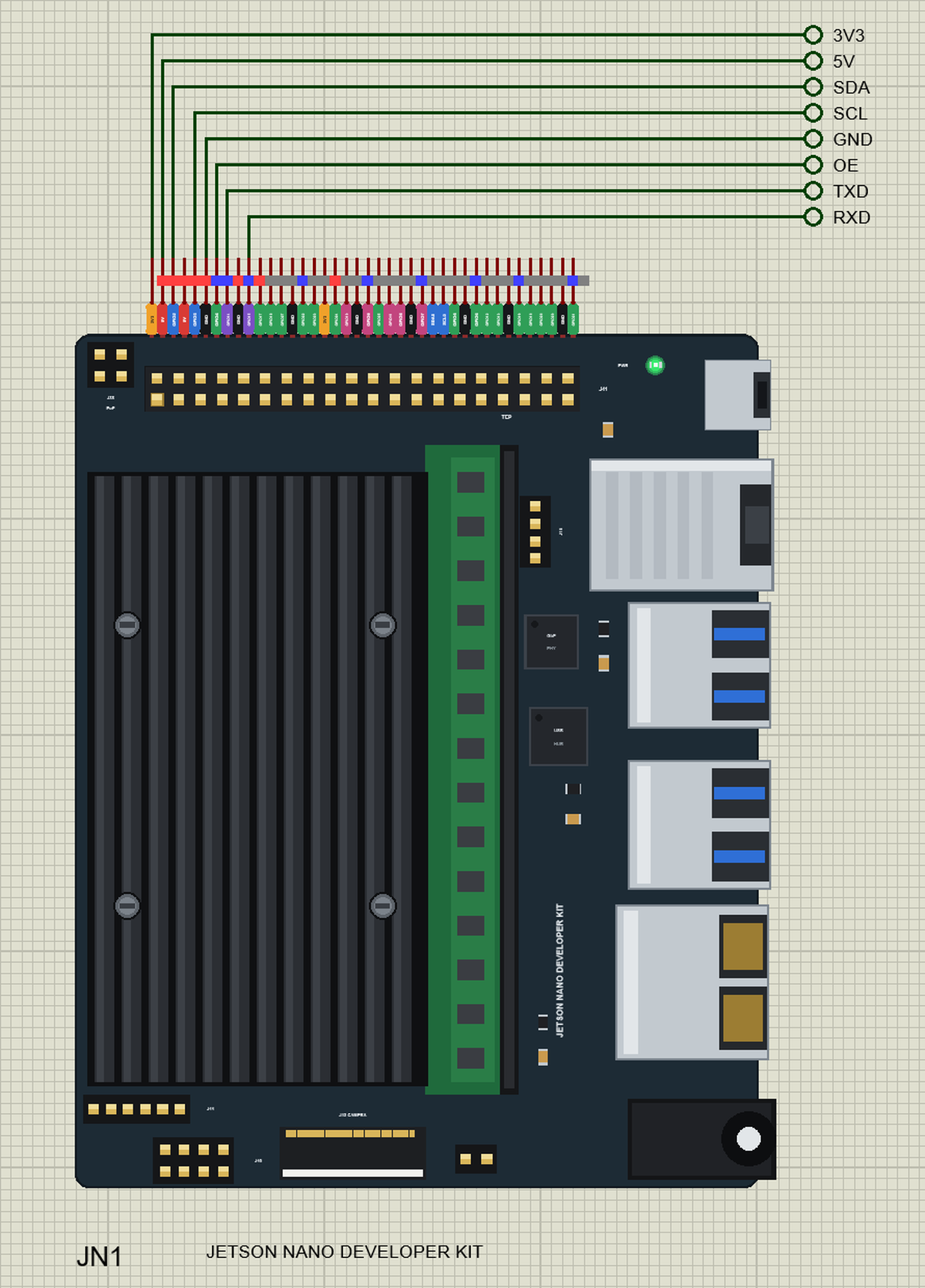
Search JETSON in Pick Devices; the device JETSON NANO DEVELOPER KIT is in TEPJNANO.LIB (Microprocessor ICs, NVIDIA Jetson), with the prefix JN. The board is drawn at its real size, 100 x 80 mm, but turned a quarter turn to the left: on the real board J41 runs along the right edge; here it runs along the top, so its 40 pins leave the board as one comb, as on every board of our series, each with a tag in the colour of its kind - 5V red, 3V3 orange, GND black, GPIO green, I2C blue, SPI pink and UART purple. We drew the first carrier board, the A02 of 2019, with its one camera connector; the B01 of 2020 has two. Click the DisplayPort and HDMI stack or the heatsink to open the terminal, and the Ethernet jack to plug or unplug the cable.
Ethernet
The ETHERNET property says whether the cable is in at Run: IN (the default) brings up eth0, OUT leaves the board without a network. The Jetson is 192.168.1.51, named jetson-nano.local, on our router TEP-WiFi - the router of our Wi-Fi parts and of the Laptop WiFi Monitor and the Mobile WiFi Monitor, so the wired Jetson and the Wi-Fi monitors meet on it. The developer kit has no Wi-Fi of its own; a real one takes an M.2 card or a USB adapter, which the library does not model. A click on the jack while the simulation runs pulls the cable or plugs it back.
The 40-Pin Header J41
| Pins | Name | Pins | Name |
|---|---|---|---|
| 1 | 3V3 | 2 | 5V |
| 3 | I2C1 SDA (BCM 2) | 4 | 5V |
| 5 | I2C1 SCL (BCM 3) | 6 | GND |
| 7 | GPIO (BCM 4) | 8 | UART TXD |
| 9 | GND | 10 | UART RXD |
| 11 | GPIO (BCM 17) | 12 | GPIO (BCM 18) |
| 13 | GPIO (BCM 27) | 14 | GND |
| 15 | GPIO (BCM 22) | 16 | GPIO (BCM 23) |
| 17 | 3V3 | 18 | GPIO (BCM 24) |
| 19 | SPI MOSI (BCM 10) | 20 | GND |
| 21 | SPI MISO (BCM 9) | 22 | GPIO (BCM 25) |
| 23 | SPI SCK (BCM 11) | 24 | SPI CS0 (BCM 8) |
| 25 | GND | 26 | SPI CS1 (BCM 7) |
| 27 | I2C0 SDA | 28 | I2C0 SCL |
| 29 | GPIO (BCM 5) | 30 | GND |
| 31 | GPIO (BCM 6) | 32 | PWM (BCM 12) |
| 33 | PWM (BCM 13) | 34 | GND |
| 35 | GPIO (BCM 19) | 36 | GPIO (BCM 16) |
| 37 | GPIO (BCM 26) | 38 | GPIO (BCM 20) |
| 39 | GND | 40 | GPIO (BCM 21) |
The pins work at 3.3 V. Jetson.GPIO calls them by their BOARD numbers - the Jetson way - or by the BCM numbers of the same pins on a Pi. Pins 3 and 5 are I2C bus 1, 27 and 28 I2C bus 0, and 8 and 10 the UART /dev/ttyTHS1: Jetson.GPIO refuses them as GPIO channels, as on a real Jetson. Only pins 32 and 33 make PWM. The 5V and 3V3 pins power the modules wired to them.
Download Jetson Nano Library for Proteus
Click the button below to download Jetson-Nano-Library-for-Proteus-v1.0.zip (about 13.5 MB with Python included, without the source code of the models):
Jetson Nano Library for Proteus V1.0- README.txt: the device, the network, installation, the demo, the header, the properties, troubleshooting and the limits.
- Proteus Library Files:
TEPJNANO.LIB(the Jetson Nano) and the demo's parts:TEPTFLUNA.LIB(the LiDAR),TEPPCA9685.LIB(the servo driver and the SG90),TEPLAPTOP.LIBandTEPMOBILE.LIB. - Proteus Model Files:
TEPNET.DLL(the Jetson, the laptop, the phone and the network), the parts'TEPTFLUNA.DLLandTEPPCA9685.DLL, and the TEPPi folder - Python 3.11 and the TEP runtime with Jetson.GPIO. - Python Code:
blink.pyandbarrier_gate.py. - Proteus Simulation: the demo project, its program and copies of the DLLs.
No Proteus yet? Read How to Download and Install Proteus 7 and 8. New to libraries? Follow How to Install a New Library in Proteus.
How to Install Jetson Nano Library for Proteus
- Close Proteus and extract the whole zip file, for example to your Desktop.
- Copy the files from Proteus Library Files into the LIBRARY folder of Proteus (usually
C:\Program Files (x86)\Labcenter Electronics\Proteus 8 Professional\LIBRARY). - Copy everything from Proteus Model Files - the DLLs and the TEPPi folder - into the MODELS folder, replacing an older TEPNET.DLL and TEPPi folder (these are the newest; they also run our eleven Raspberry Pi boards, from the Model B to the Pi 400).
- Delete
TEPJNANO.IDXfrom the LIBRARY folder if it is there. - Start Proteus, press P and search for JETSON.
There is nothing else to install: Python comes in the TEPPi folder, so you need no Python on your PC.
Demo: a LiDAR Barrier Gate
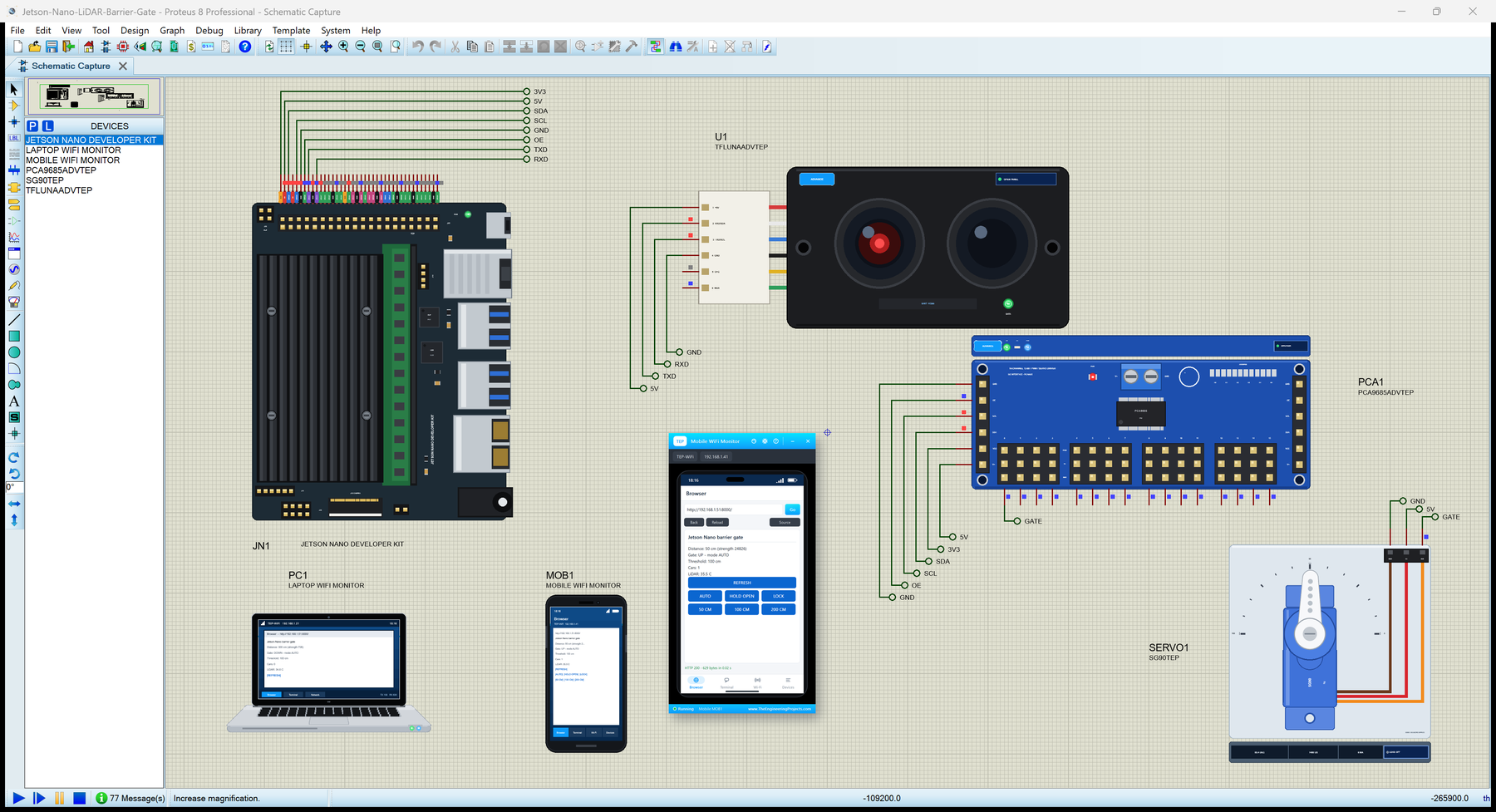
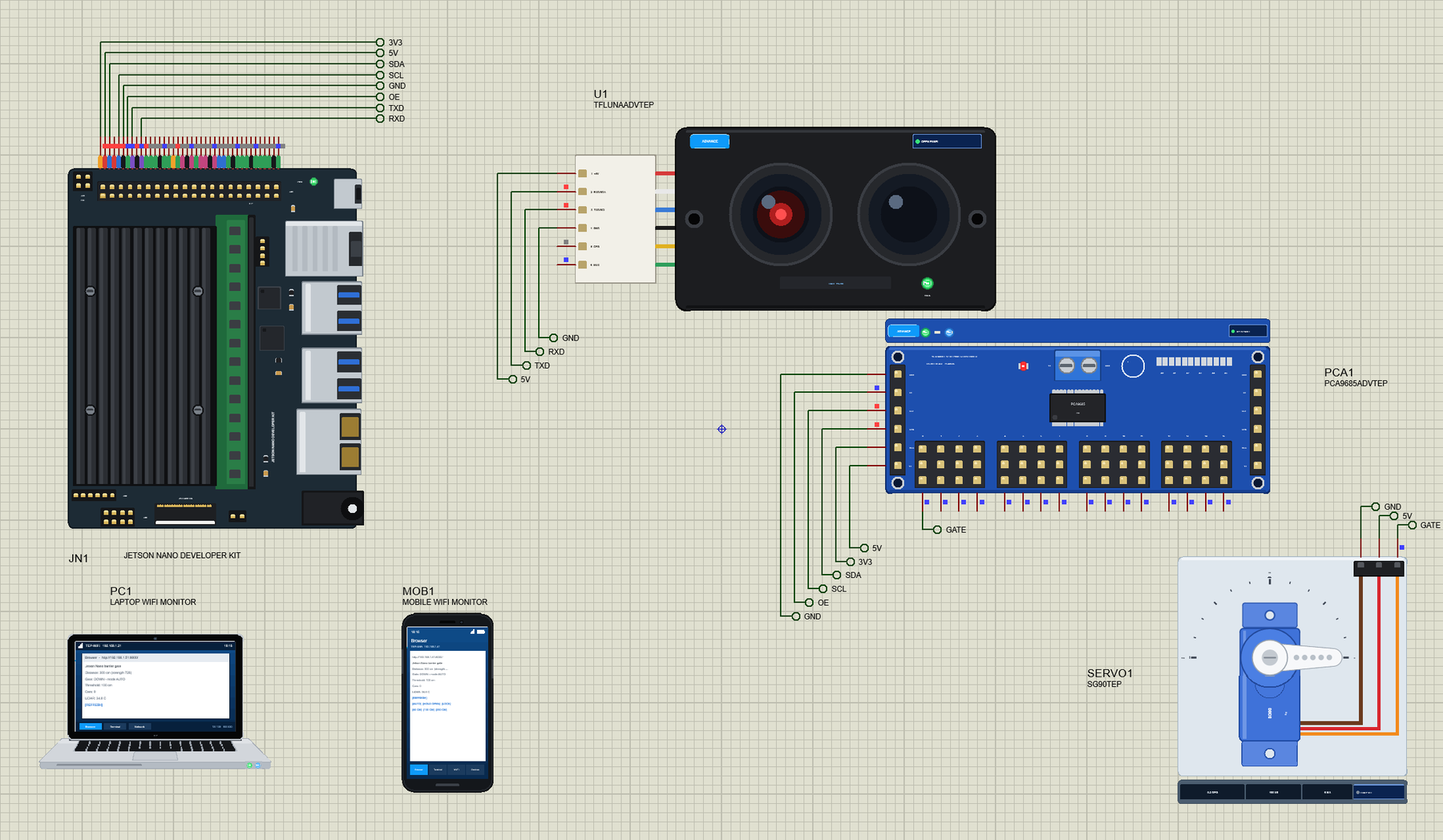
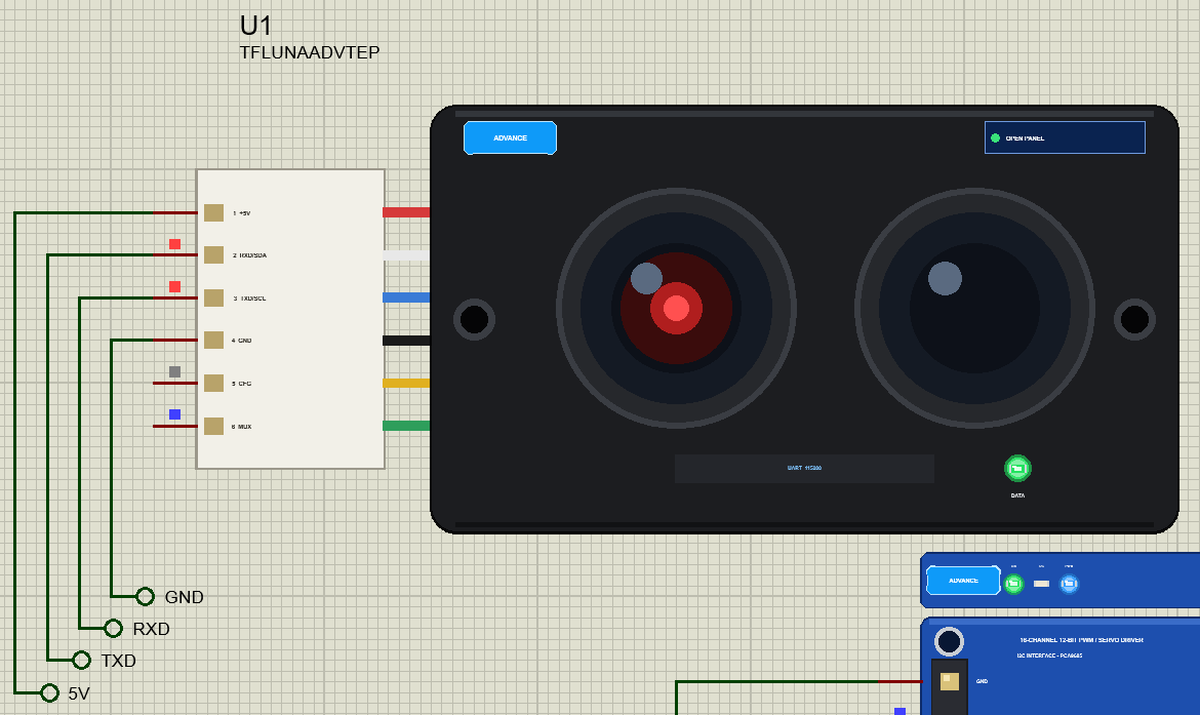
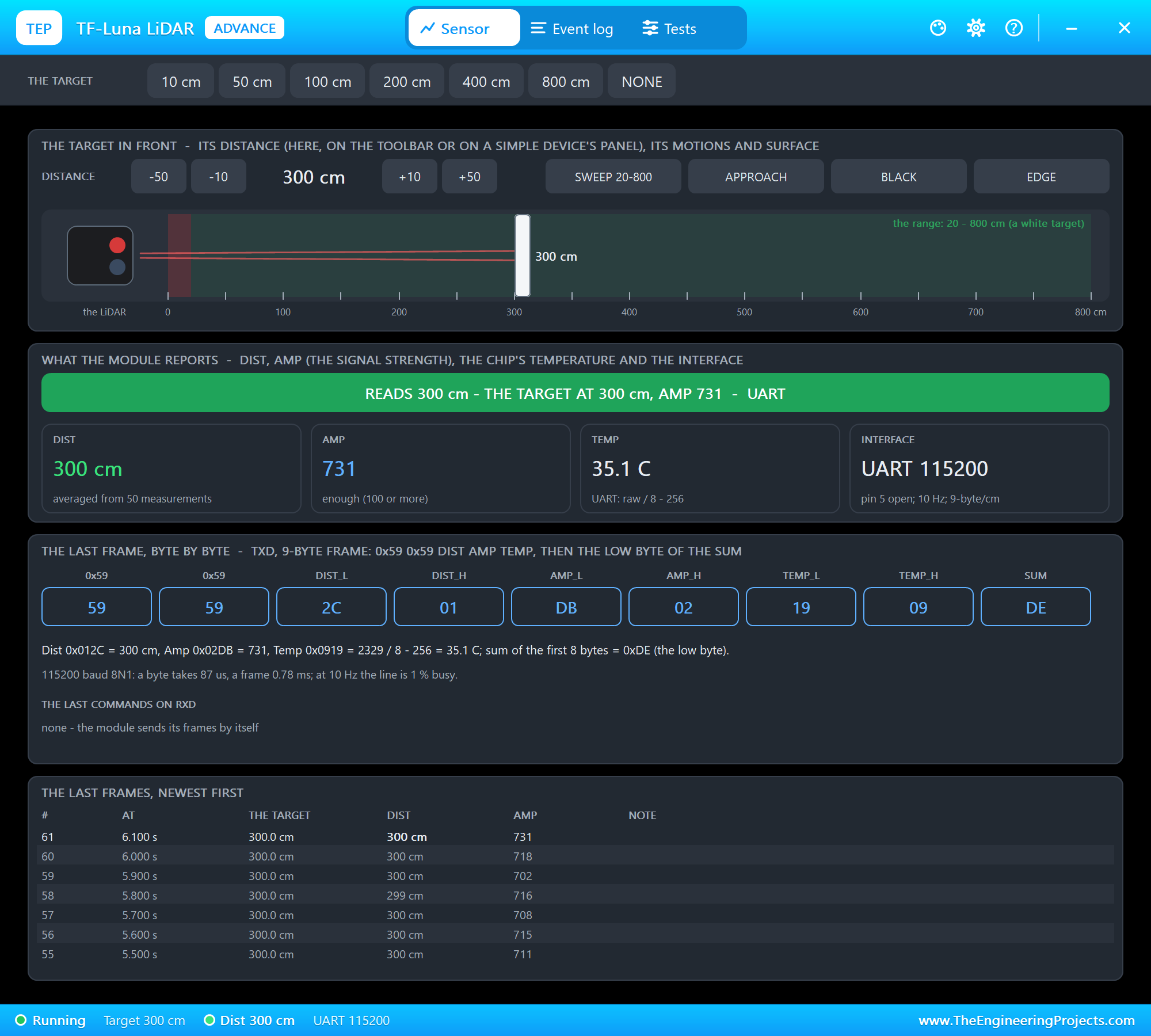
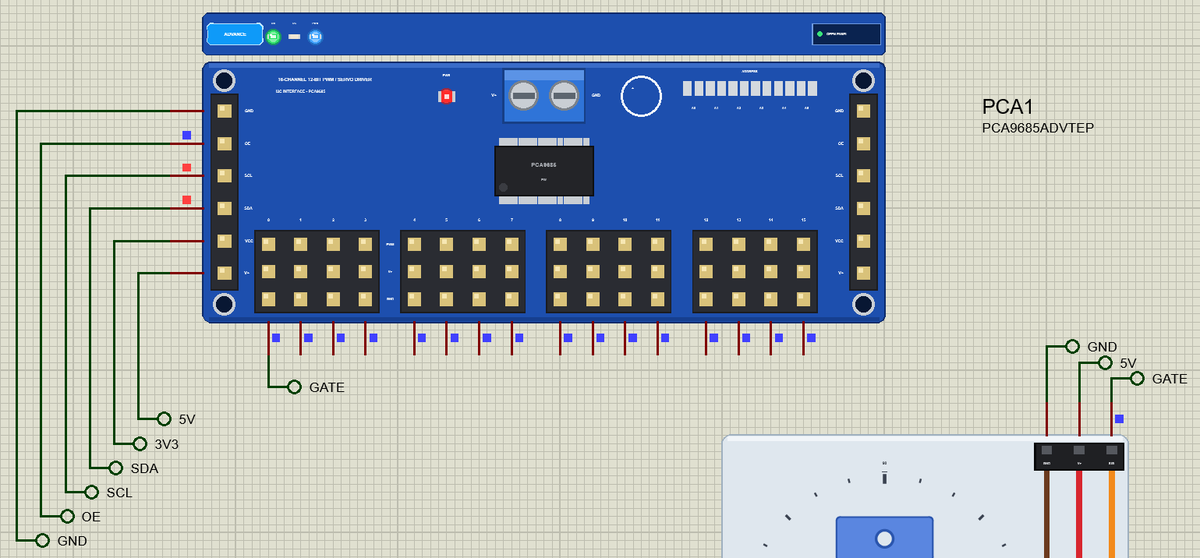
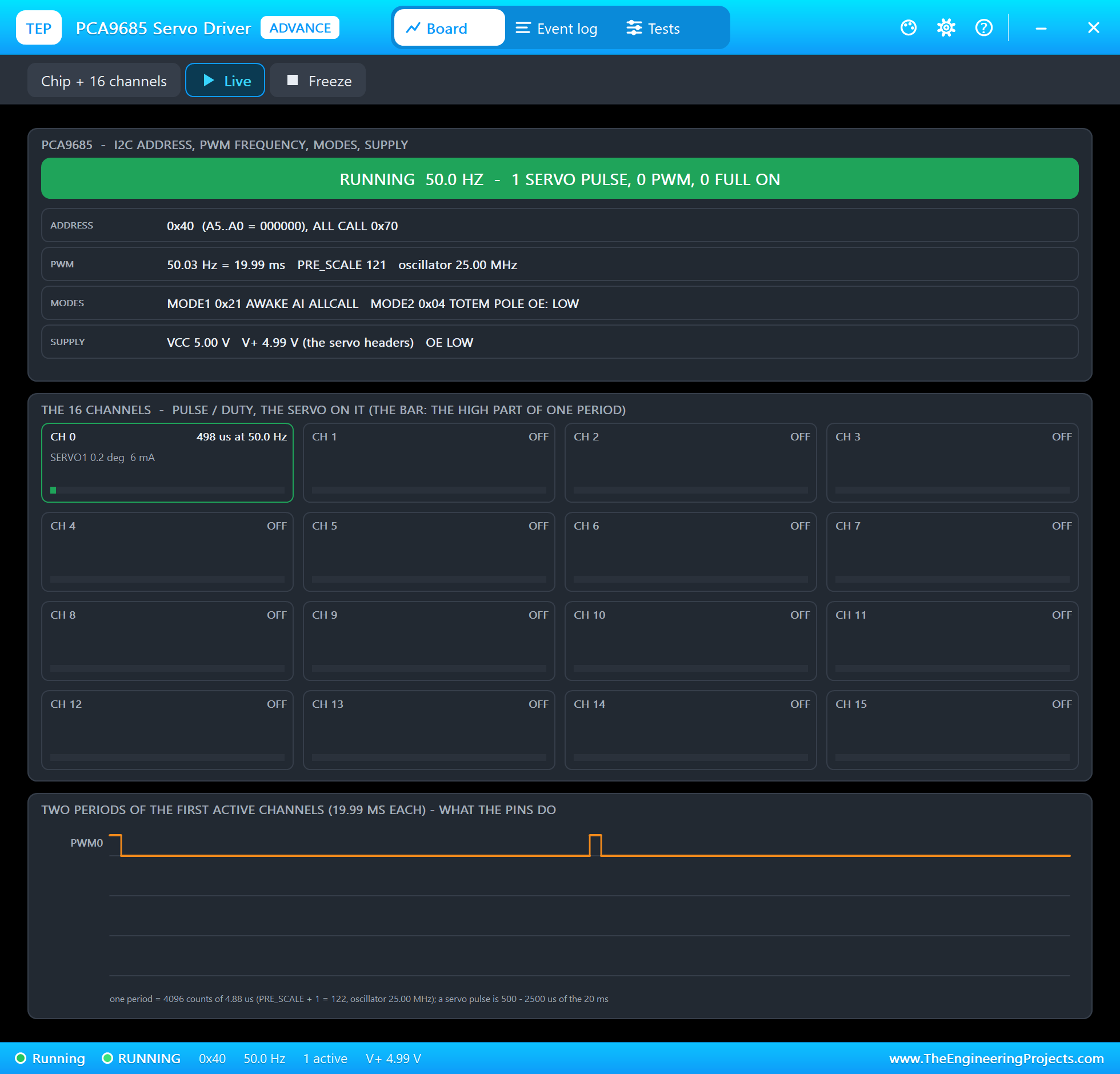
Open Jetson-Nano-LiDAR-Barrier-Gate.pdsprj. JN1 runs barrier_gate.py on Ethernet. The parts come from our own libraries, each with its article: the LiDAR U1 from the TF-Luna LiDAR Sensor Library for Proteus, the servo driver PCA1 and the servo SERVO1 from the PCA9685 Servo Driver Library for Proteus. U1 and PCA1 are the Advance versions: each opens a pop-up window at Run that shows what the Jetson does with it. PC1 is the Laptop WiFi Monitor and MOB1 the Mobile WiFi Monitor, both on the router the Jetson's cable goes to.
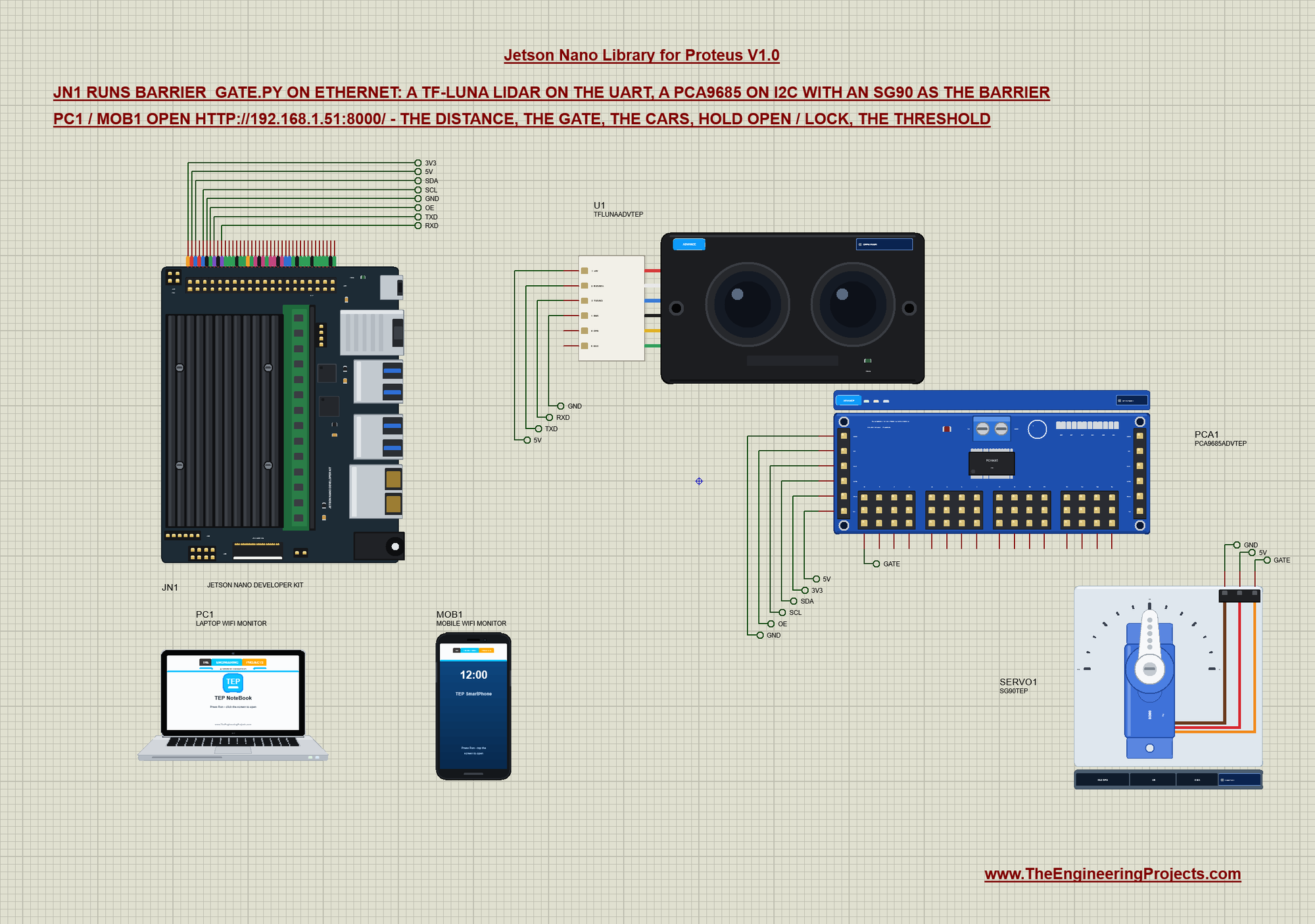
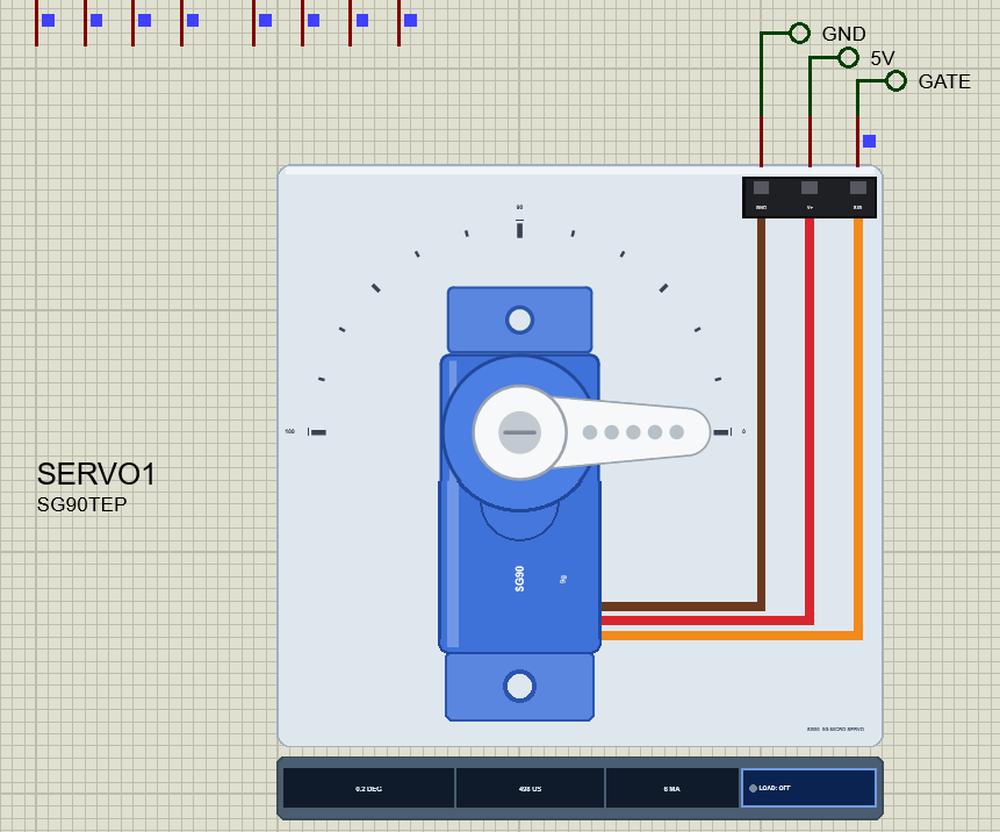
The TF-Luna is a small time-of-flight LiDAR from Benewake: it sends pulses of infrared light and measures how long they take to come back, from 0.2 to 8 m. In UART mode it sends a 9-byte frame for every measurement by itself, at 115200 baud - no command needed. The PCA9685 is a 16-channel, 12-bit PWM chip on I2C at address 0x40: once it is set up, it makes each servo's pulse on its own, so the program only writes a new position. The SG90 is the barrier: 0 degrees is down, 90 degrees up. Net labels connect everything:
| Part pin | Net label | Jetson pin | What it does |
|---|---|---|---|
| TF-Luna VCC, GND | 5V, GND | 2, 6 | the LiDAR's supply |
| TF-Luna TXD | RXD | 10 | the frames into the Jetson's UART |
| TF-Luna RXD | TXD | 8 | commands from the Jetson (the demo sends none) |
| TF-Luna CFG | open | - | open at power-on: UART mode (to GND: I2C mode) |
| PCA9685 VCC, GND | 3V3, GND | 1, 6 | the chip's supply and its I2C level |
| PCA9685 SDA, SCL | SDA, SCL | 3, 5 | I2C bus 1 |
| PCA9685 OE | OE | 7 | LOW: the outputs on |
| PCA9685 V+ | 5V | 2 | the supply of the servo headers |
| PCA9685 PWM0, SG90 signal | GATE | - | the barrier's pulse; the SG90's V+ on 5V |
The TF-Luna Frames on the UART
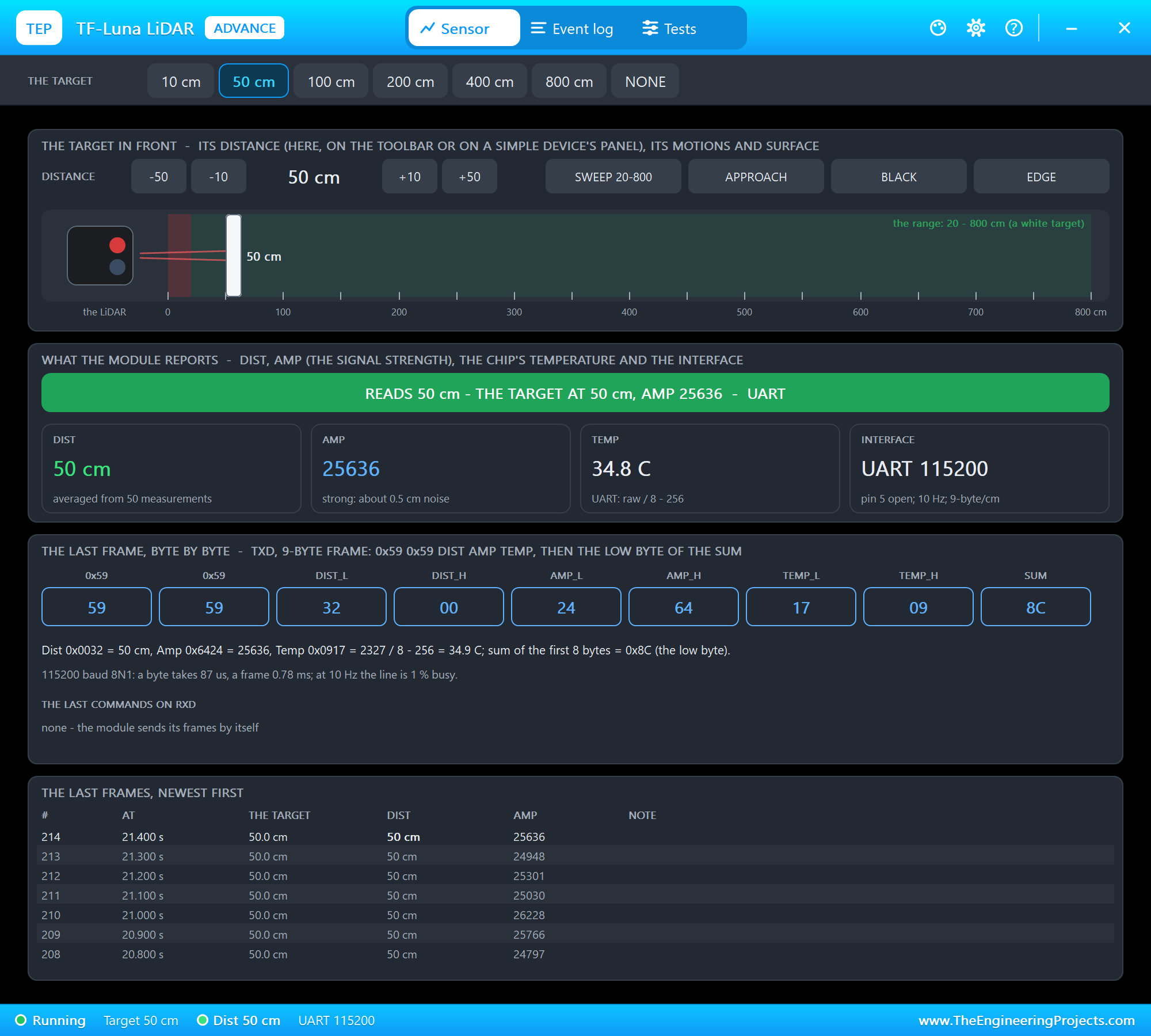
Every frame starts with 59 59, then the distance in cm, the signal strength and the chip's temperature, each low byte first, and ends with a checksum - the low byte of the sum of the first eight bytes. The program waits for two 59s in a row, reads the seven bytes after them and skips a frame whose checksum does not match:
    def frame(self):
        """(cm, strength, degrees C), or None when no whole frame came."""
        while True:
            if self.uart.read(1) != b'\x59':
                continue
            if self.uart.read(1) != b'\x59':
                continue
            rest = self.uart.read(7)
            if len(rest) != 7:
                return None
            f = b'\x59\x59' + rest
            if sum(f[:8]) & 0xFF != f[8]:
                continue
            return f[2] | f[3] << 8, f[4] | f[5] << 8, (f[6] | f[7] << 8) / 8 - 256
The temperature comes in eighths of a degree with an offset: raw / 8 - 256. The strength says how much light came back; below 100 the distance is not reliable.
The PCA9685 on I2C
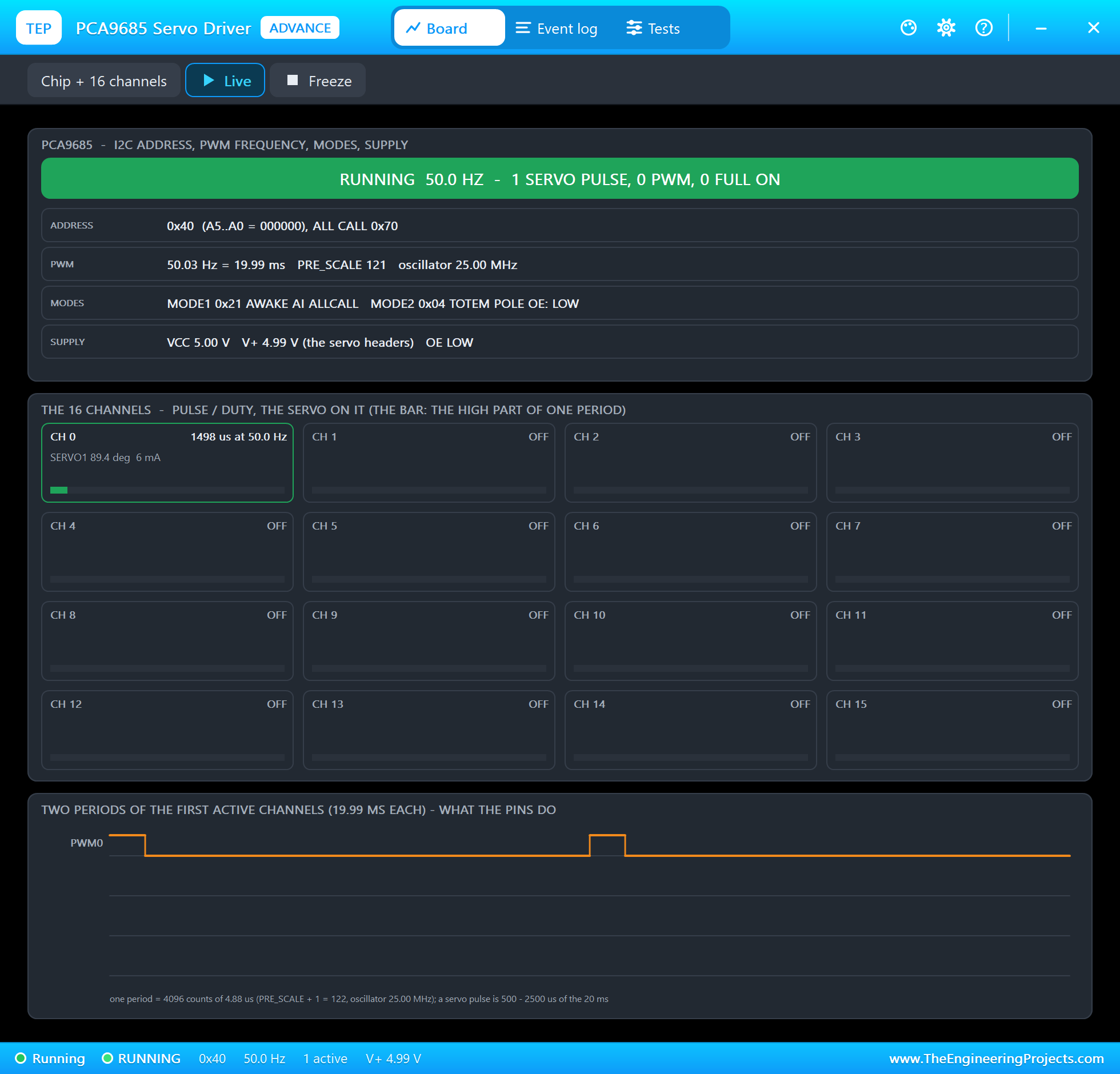
The PCA9685 counts its 25 MHz oscillator, and the PRE_SCALE register divides it so that 4096 counts make one period. For 50 Hz that is 25,000,000 / (4096 x 50) = 122 after rounding, minus 1: 121. PRE_SCALE can only be written while the chip sleeps, so the program sets the SLEEP bit, writes 121, wakes the chip with auto-increment, waits for the oscillator and sets RESTART:
    def __init__(self, address=0x40):
        self.bus = SMBus(1)
        self.address = address
        self.bus.write_byte_data(address, self.MODE1, 0x11)    # sleep (the prescale is written while the oscillator is off)
        self.bus.write_byte_data(address, self.PRESCALE, round(25000000 / (4096 * 50)) - 1)
        self.bus.write_byte_data(address, self.MODE1, 0x21)    # wake, register auto-increment
        time.sleep(0.005)
        self.bus.write_byte_data(address, self.MODE1, 0xA1)    # restart the channels
Each channel has four registers from 0x06 on: when its output goes HIGH and when it goes LOW, in counts of the 4096. A servo wants a pulse every 20 ms, 500 us long at 0 degrees and 2500 us at 180 degrees, so the angle becomes an OFF count, written in one block:
    def angle(self, channel, degrees):
        off = round((500 + degrees / 180 * 2000) * 4096 / 20000)
        self.bus.write_i2c_block_data(self.address, self.LED0 + 4 * channel, [0, 0, off & 0xFF, off >> 8])
OE is the chip's output enable, active LOW: Jetson.GPIO pulls pin 7 LOW, in BOARD numbering, before the driver starts.
The Gate
A thread reads every frame and decides. In AUTO a car that stays closer than the threshold for 0.3 s lifts the barrier and is counted; the barrier comes down when the lane has been clear for 3 s. OPEN holds it up, LOCKED holds it down:
            near = 0 < cm < state['threshold']
            if state['mode'] == 'OPEN':
                move('UP')
            elif state['mode'] == 'LOCKED':
                move('DOWN')
            elif near:
                clear_since = None
                near_since = near_since or now
                if state['gate'] == 'DOWN' and now - near_since >= 0.3:
                    state['cars'] += 1
                    move('UP')
            else:
                near_since = None
                clear_since = clear_since or now
                if state['gate'] == 'UP' and now - clear_since >= 3:
                    move('DOWN')
move() turns the servo only when the gate changes, and logs it:
def move(gate):
    """The barrier up or down (call with the lock held)."""
    if state['gate'] != gate:
        driver.angle(0, UP if gate == 'UP' else DOWN)
        state['gate'] = gate
        print('%s  the gate goes %s (%d cm, %s)' % (time.strftime('%H:%M:%S'), gate.lower(), state['cm'], state['mode']))
The Web Page
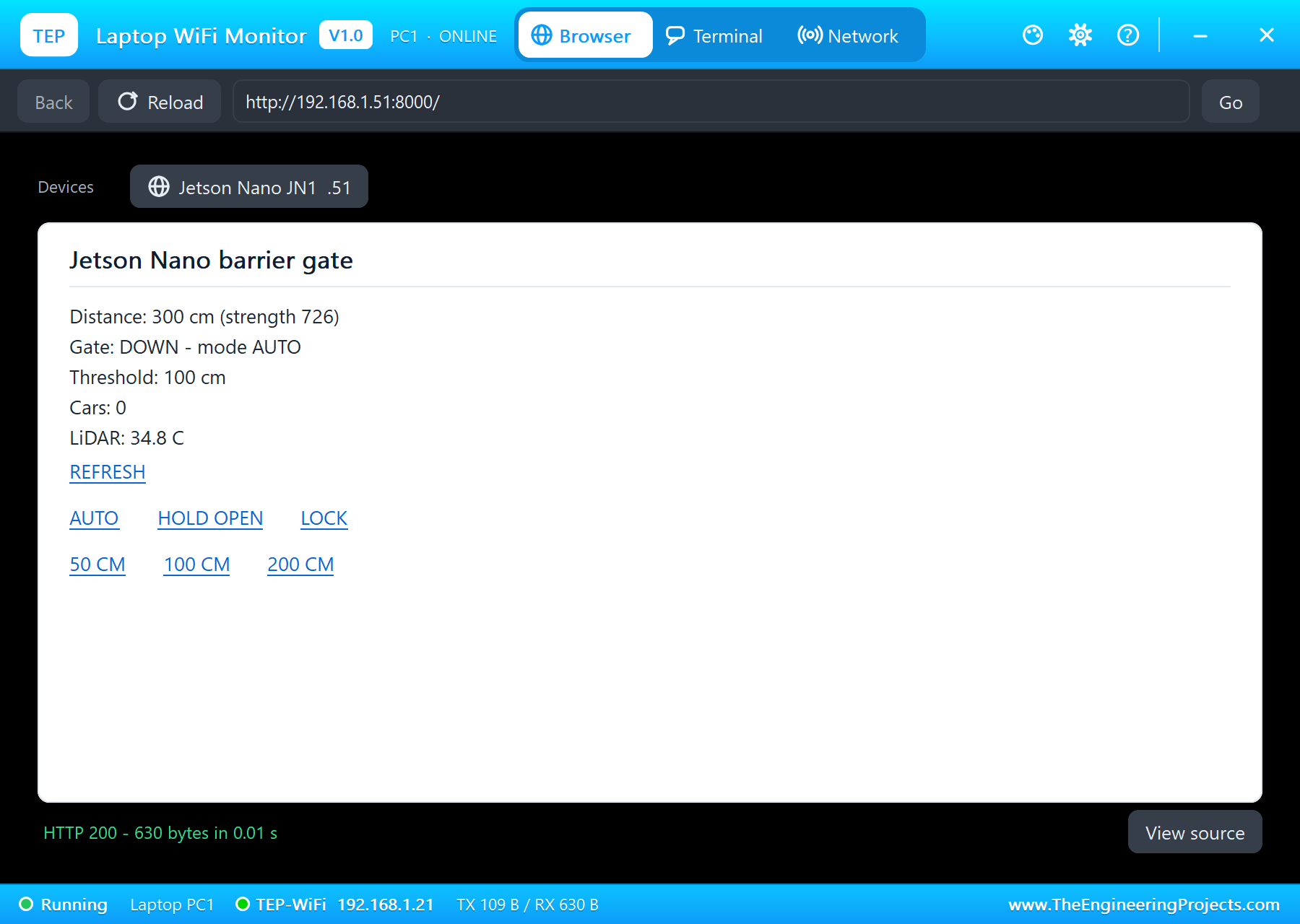
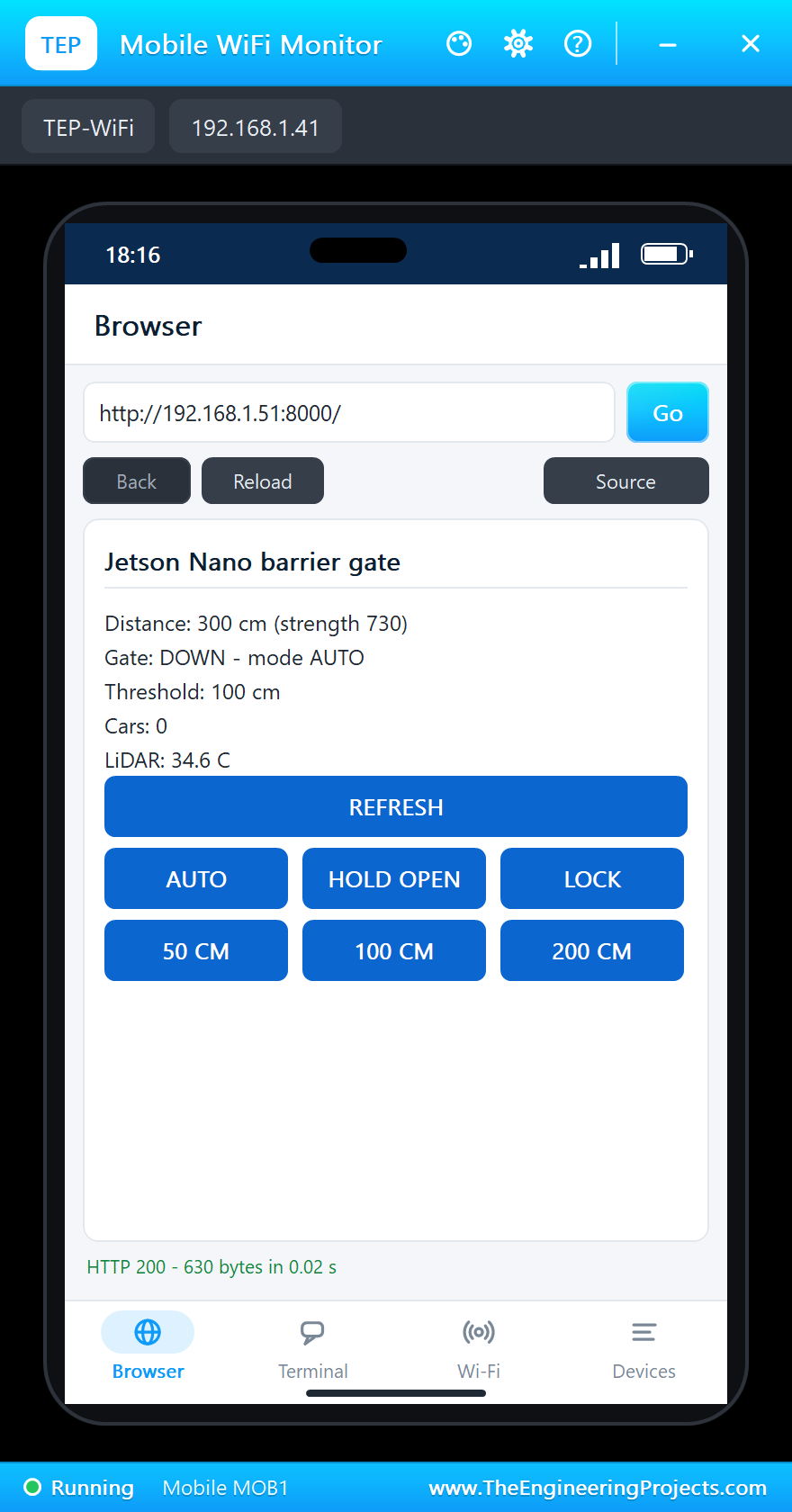
The page shows the distance with the strength, the gate and the mode, the threshold, the cars and the LiDAR's temperature, with REFRESH and two rows of three links:
PAGE = """<html><head><title>Jetson Nano barrier gate</title></head><body>
<p>Distance: <b>{cm} cm</b> (strength {strength})</p>
<p>Gate: <b>{gate}</b> - mode {mode}</p>
<p>Threshold: {threshold} cm</p>
<p>Cars: {cars}</p>
<p>LiDAR: {temp:.1f} C</p>
<p><a href="/">REFRESH</a></p>
<p><a href="/mode?set=AUTO">AUTO</a> <a href="/mode?set=OPEN">HOLD OPEN</a> <a href="/mode?set=LOCKED">LOCK</a></p>
<p><a href="/threshold?cm=50">50 CM</a> <a href="/threshold?cm=100">100 CM</a> <a href="/threshold?cm=200">200 CM</a></p>
</body></html>"""
/mode sets AUTO, OPEN or LOCKED and /threshold the distance that opens the gate; every request answers with the page:
    def do_GET(self):
        url = urlparse(self.path)
        q = parse_qs(url.query)
        with lock:
            if url.path == '/mode' and q.get('set', [''])[0] in ('AUTO', 'OPEN', 'LOCKED'):
                state['mode'] = q['set'][0]
            elif url.path == '/threshold' and q.get('cm', [''])[0].isdigit():
                state['threshold'] = int(q['cm'][0])
            s = dict(state)
        body = PAGE.format(**s).encode()
At the start the program sets OE LOW, sets up the driver with the barrier down, opens the UART, waits for the network, starts the thread and serves on port 8000:
GPIO.setmode(GPIO.BOARD)
GPIO.setup(OE_PIN, GPIO.OUT, initial=GPIO.LOW)                  # the PCA9685's outputs on
driver = PCA9685()
driver.angle(0, DOWN)
lidar = TFLuna()
print('barrier_gate.py - LiDAR barrier gate on the Jetson Nano')
print('TF-Luna on /dev/ttyTHS1 (115200 baud); PCA9685 at 0x40 on I2C bus 1, the servo on PWM0, OE on pin 7')
print('waiting for the network ...')
while my_ip() == '0.0.0.0':
    time.sleep(0.5)
threading.Thread(target=watch, daemon=True).start()
print('serving on http://%s:%d/' % (my_ip(), PORT))
HTTPServer(('', PORT), Handler).serve_forever()
Run the Demo
Press Run. eth0 is up and the page is served 1.5 s after Run. The LiDAR's target starts at 300 cm - an empty lane - and the barrier is down: the PCA9685 sends 498 us on channel 0, and the SG90 stands at 0 degrees:
jetson@jetson-nano:~$ python3 barrier_gate.py
barrier_gate.py - LiDAR barrier gate on the Jetson Nano
TF-Luna on /dev/ttyTHS1 (115200 baud); PCA9685 at 0x40 on I2C bus 1, the servo on PWM0, OE on pin 7
waiting for the network ...
serving on http://192.168.1.51:8000/
18:15:48  301 cm  strength 716  34.8 C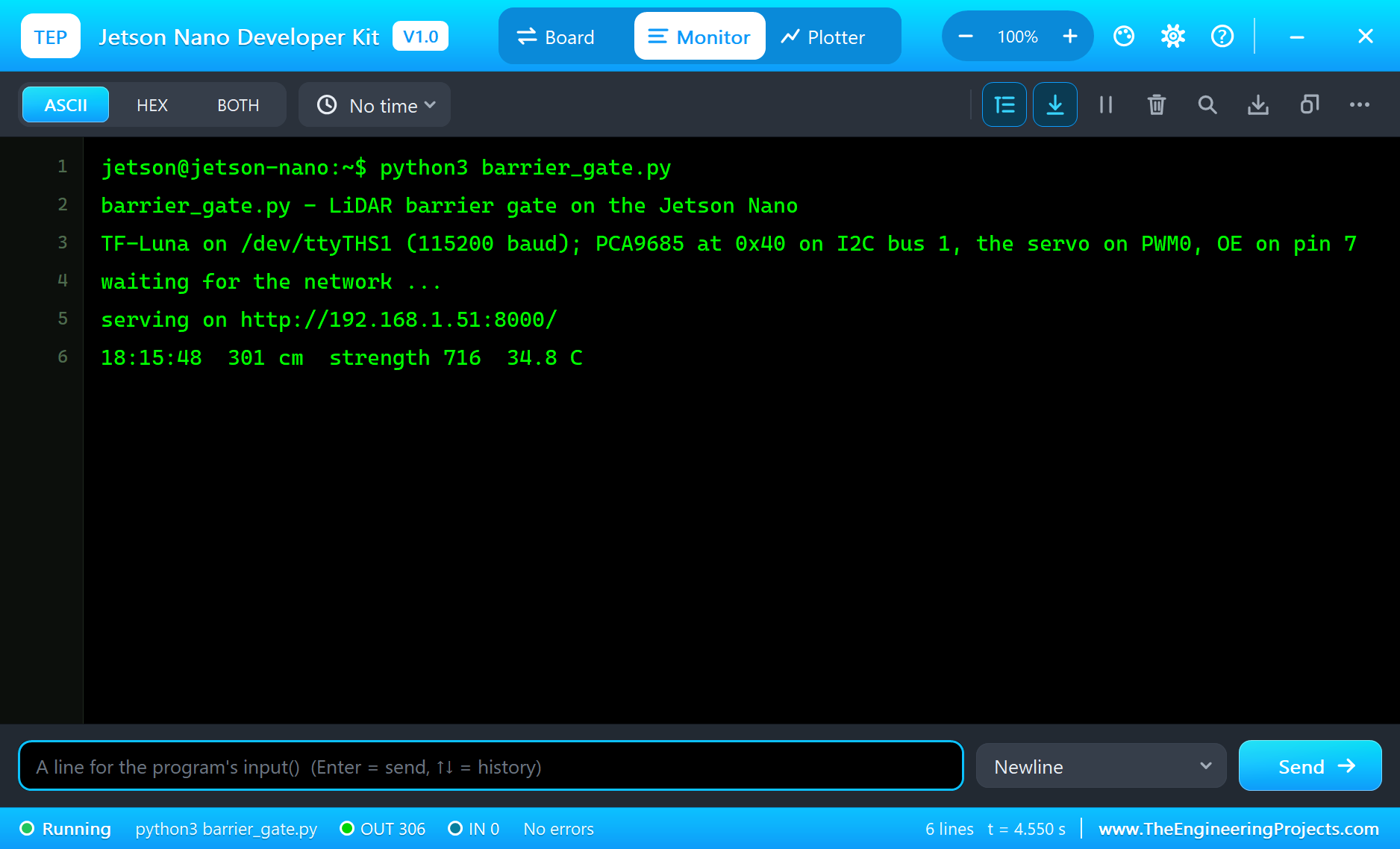
Open the Page
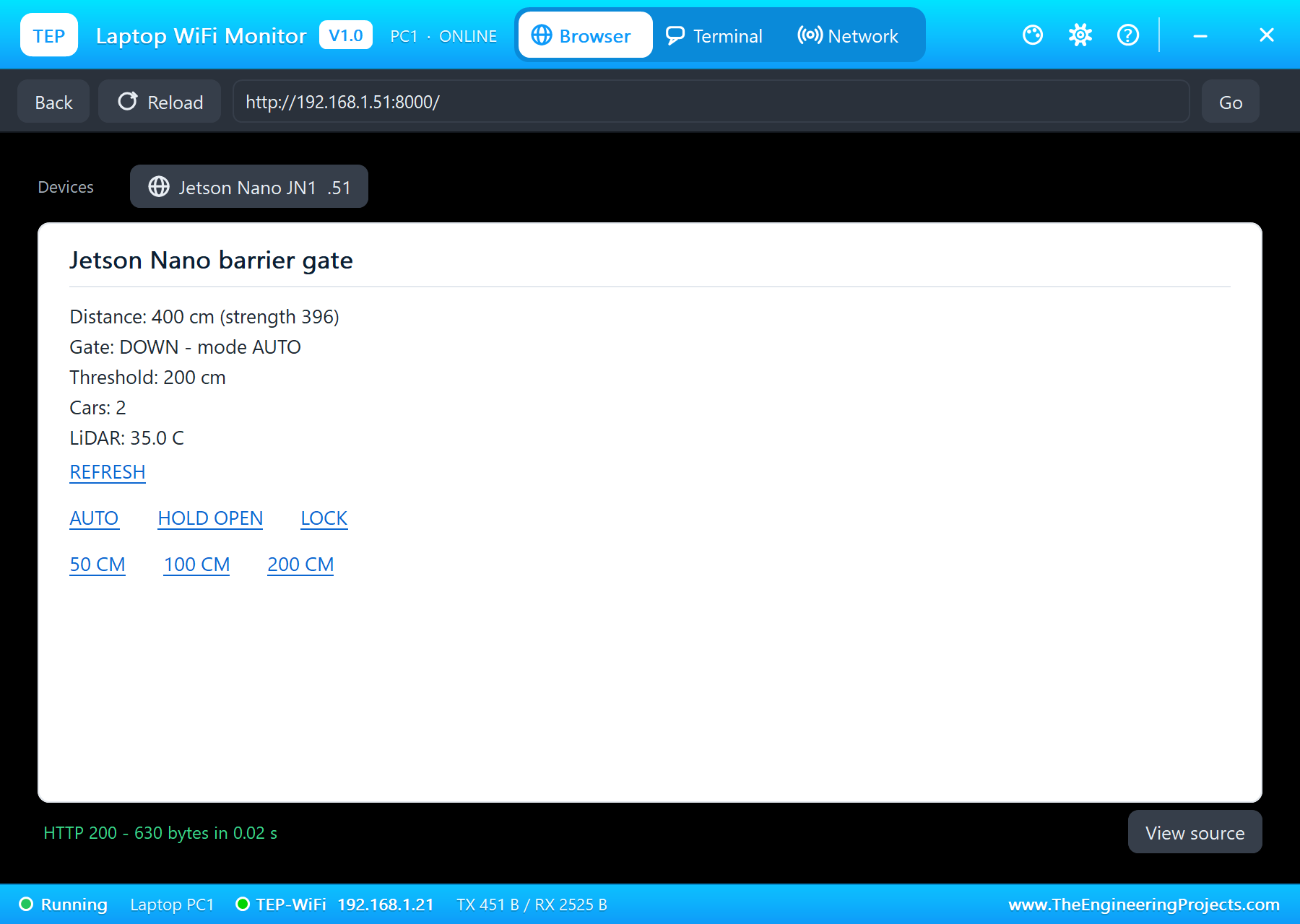
On the laptop click Browser, check the address http://192.168.1.51:8000/ and click Go; on the phone the same. The laptop shows the links as text, the phone as buttons:
A Car Arrives
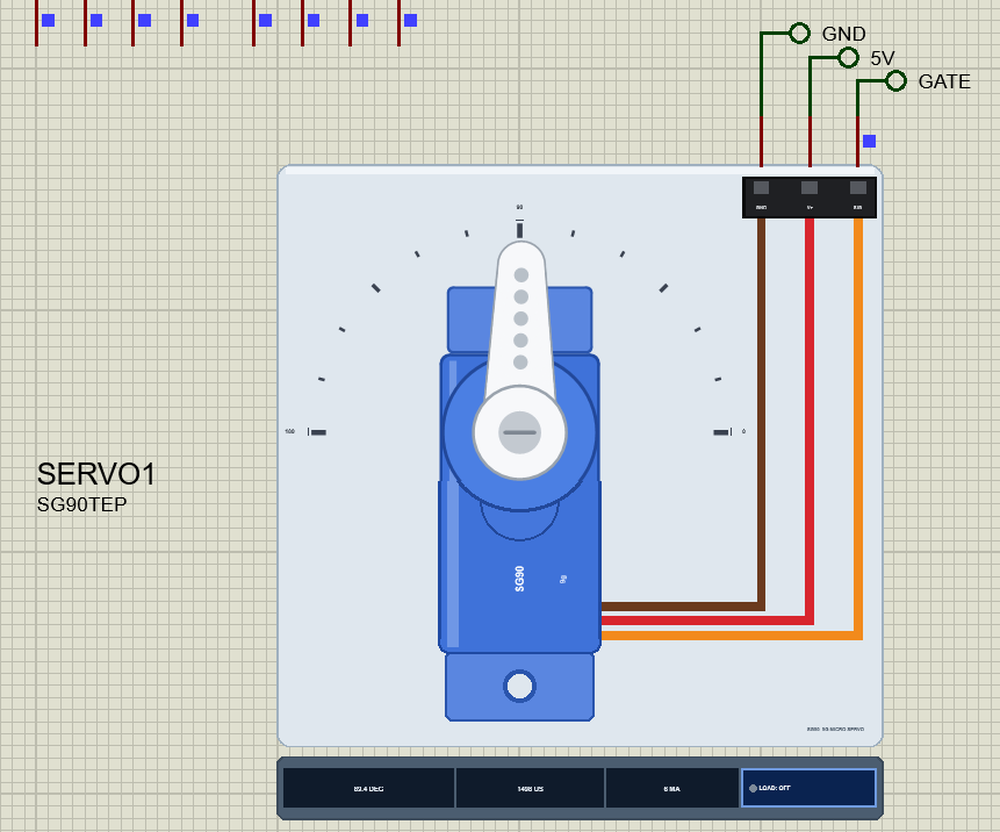
In the LiDAR's pop-up click the 50 cm preset - a car in front of the barrier. The next frames read 50 cm with a much stronger signal, and 0.3 s later the barrier goes up: channel 0 now sends 1498 us, and the SG90 turns to 90 degrees:
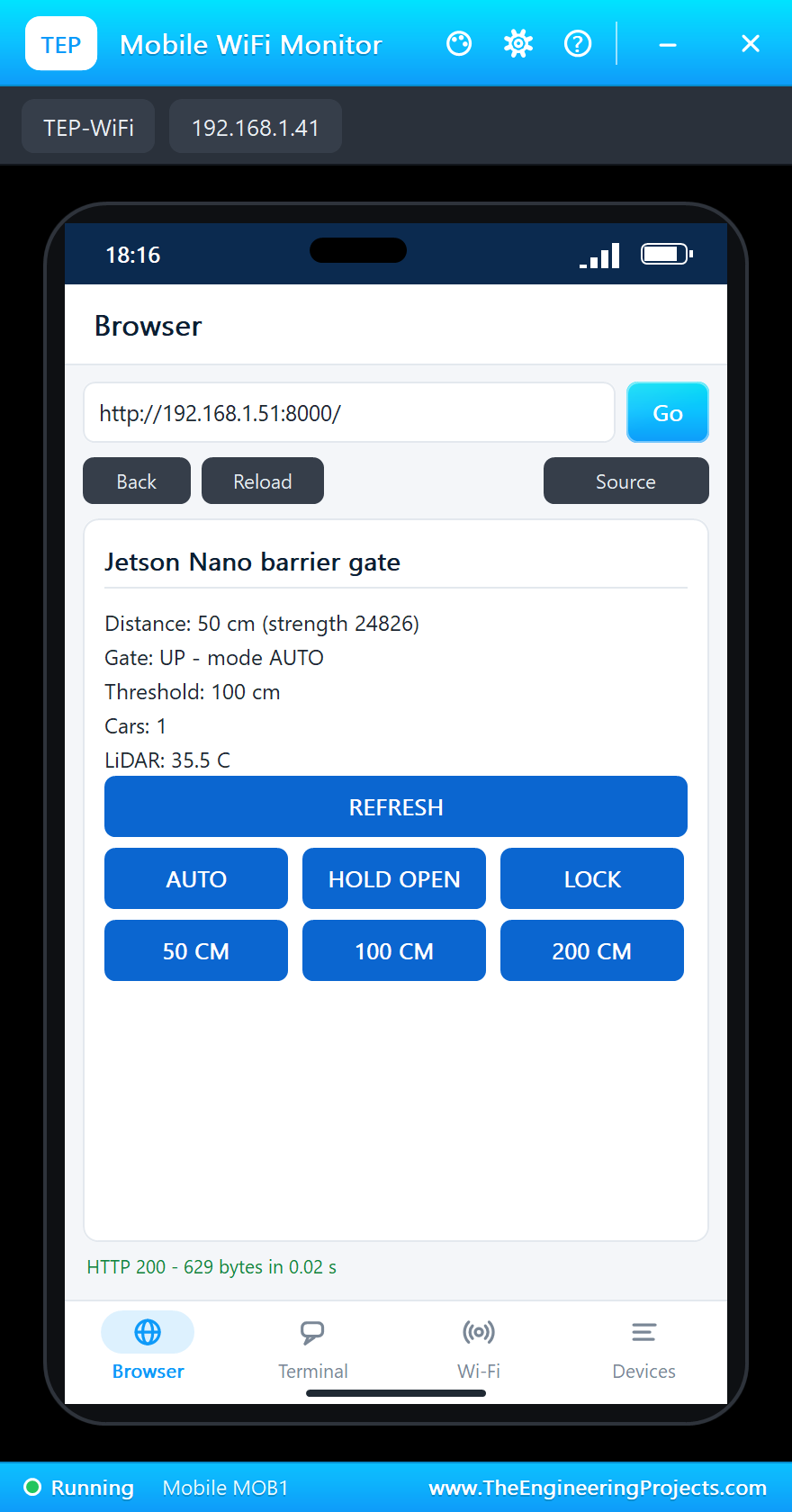
Now click 400 cm - the car has driven through. 3 s later the barrier comes down.
Lock, Auto and the Threshold
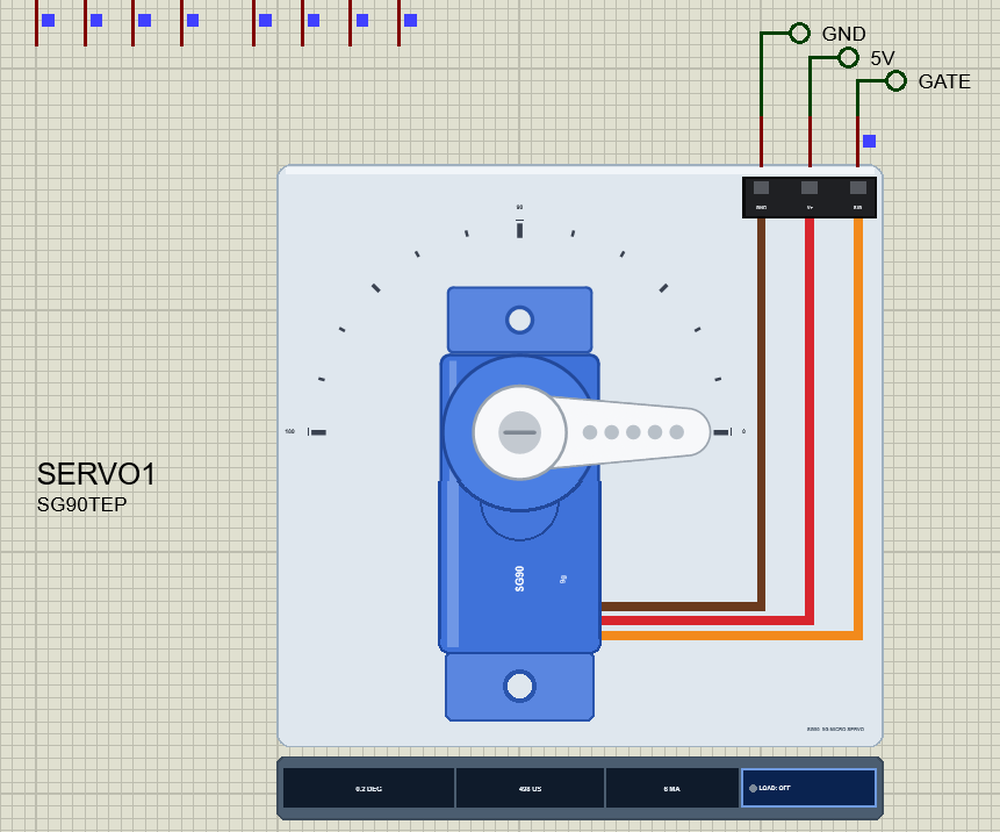
Click LOCK on the laptop, then the 50 cm preset again: a car waits, but the barrier stays down, and REFRESH shows the mode LOCKED:
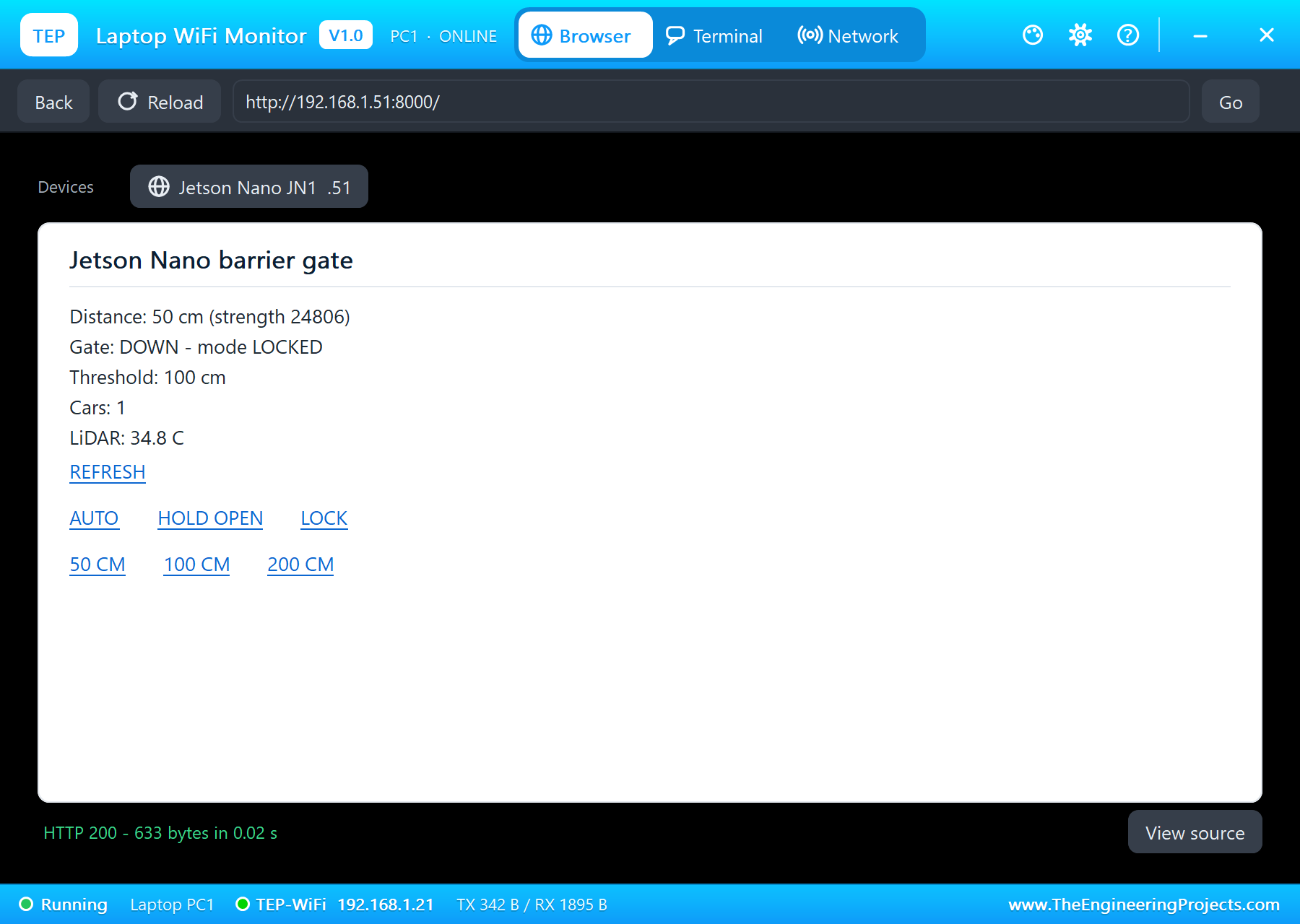
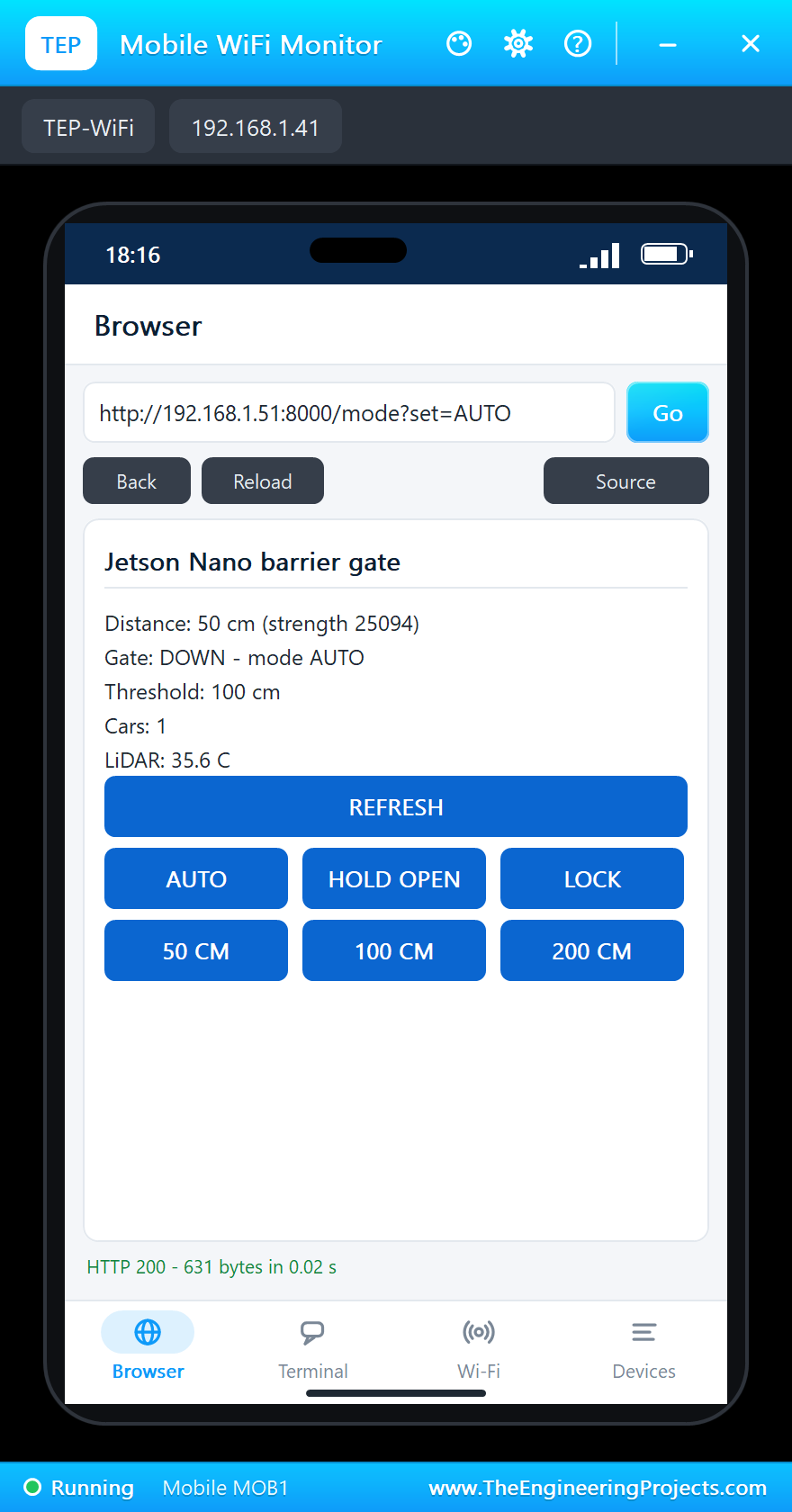
Tap AUTO on the phone. The page answers at once, with the gate still down, and 0.3 s later the barrier goes up for the waiting car. Then tap the 200 cm button: from now on a car opens the gate from 2 m away:
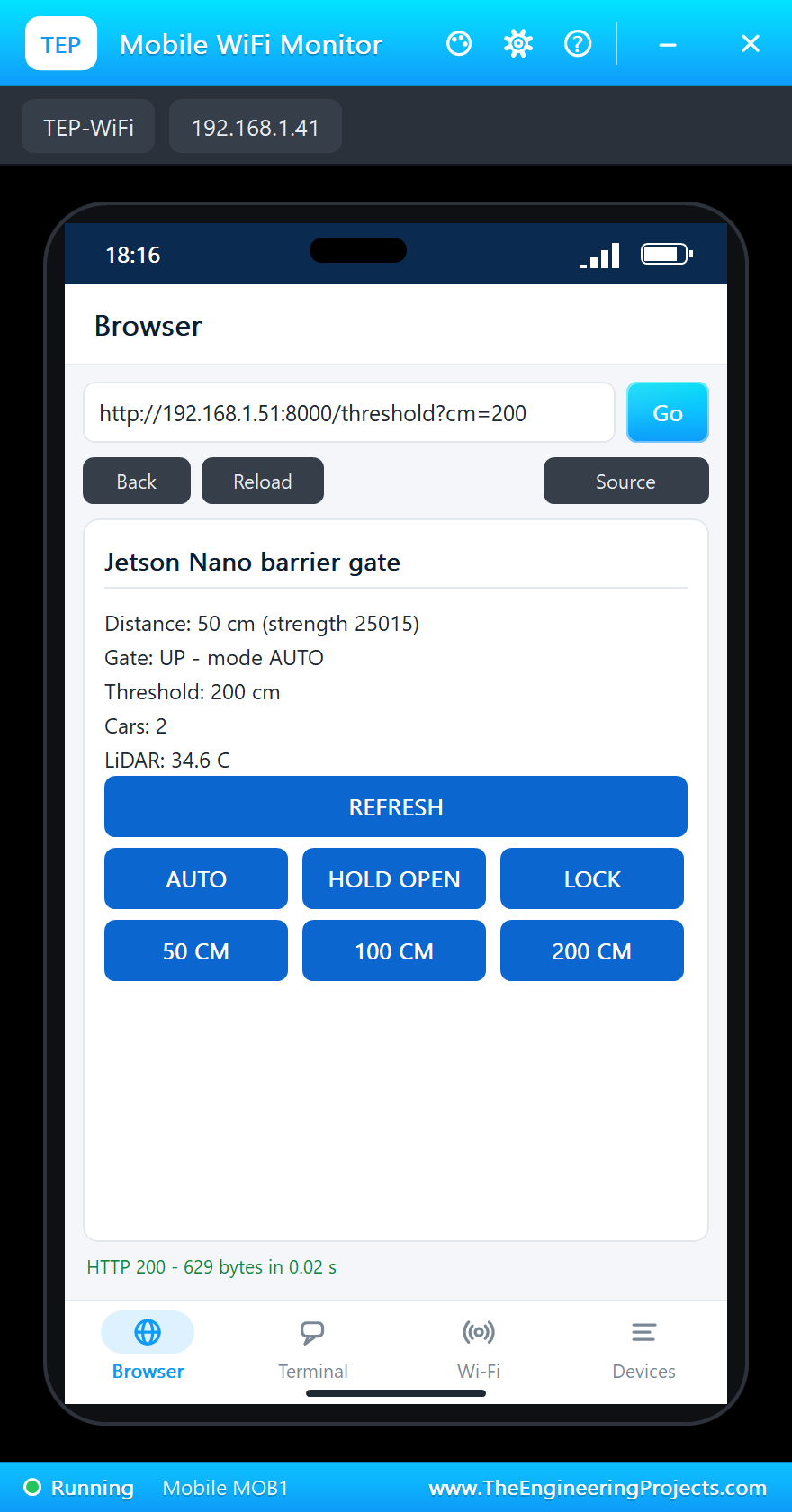
Click 400 cm once more: beyond 200 cm the lane is clear, and 3 s later the barrier is down:
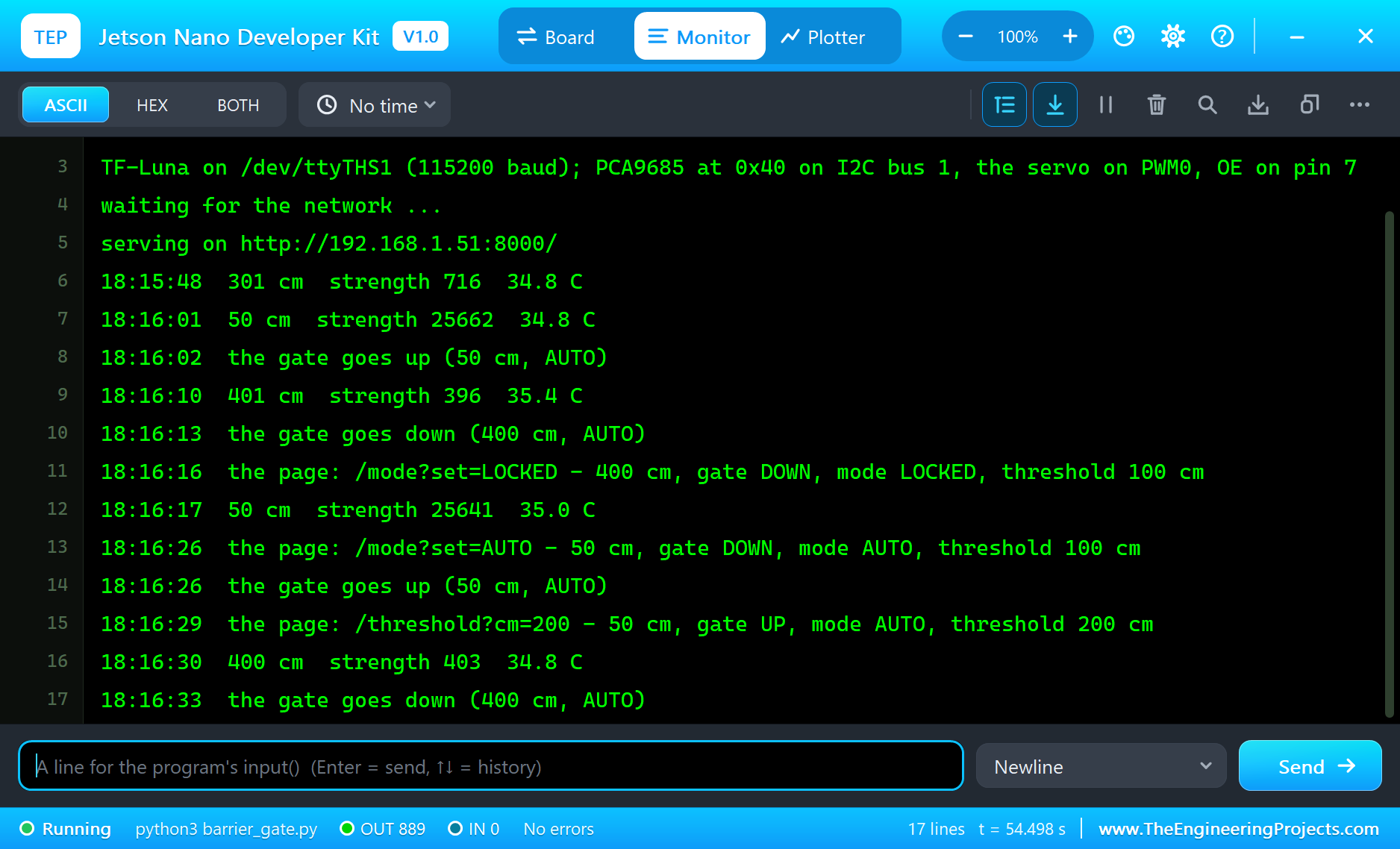
The terminal logs every change of 10 cm or more, every move of the barrier and every click on the page:
18:16:01  50 cm  strength 25662  34.8 C
18:16:02  the gate goes up (50 cm, AUTO)
18:16:10  401 cm  strength 396  35.4 C
18:16:13  the gate goes down (400 cm, AUTO)
18:16:16  the page: /mode?set=LOCKED - 400 cm, gate DOWN, mode LOCKED, threshold 100 cm
18:16:17  50 cm  strength 25641  35.0 C
18:16:26  the page: /mode?set=AUTO - 50 cm, gate DOWN, mode AUTO, threshold 100 cm
18:16:26  the gate goes up (50 cm, AUTO)
18:16:29  the page: /threshold?cm=200 - 50 cm, gate UP, mode AUTO, threshold 200 cm
18:16:30  400 cm  strength 403  34.8 C
18:16:33  the gate goes down (400 cm, AUTO)
The Terminal
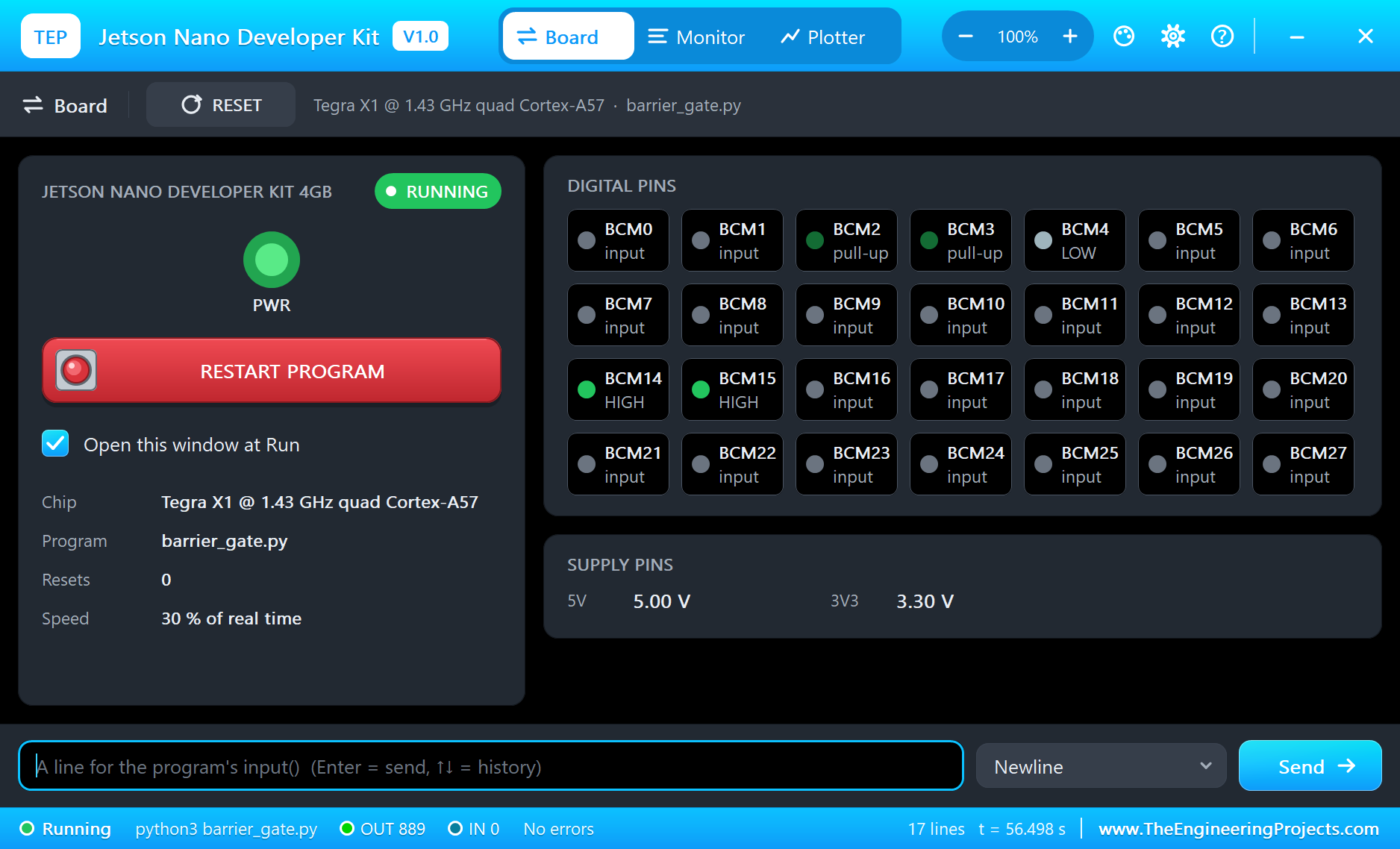
The terminal opens at Run, in the look of our TEP Serial Monitor Advance for Proteus - our own TEP header, no Windows title bar. Its Monitor tab shows the program's output (OUT), errors (ERR) and the lines you type for input() (IN). The Board tab shows the board live - BCM 2 and 3 with their pull-ups, BCM 4 (pin 7, OE) LOW, BCM 14 and 15 (the UART) HIGH between bytes - the power LED and the supply pins, and RESTART PROGRAM starts the program again:
Properties of the Jetson Nano
| Property | What it does |
|---|---|
| PROGRAM | the Python program (default blink.py; a name next to the project or a full path) |
| AUTOOPEN | the terminal at Run: YES (default) or NO |
| ETHERNET | the cable at Run: IN (default, eth0) or OUT (no network) |
| PYTHON, RUNTIME | a python.exe and a runtime folder of your own (empty: the TEPPi folder) |
Your own programs go next to your project; set PROGRAM to the file's name. The default blink.py blinks an LED on pin 12, in BOARD numbering:
import time
import Jetson.GPIO as GPIO

LED_PIN = 12
GPIO.setmode(GPIO.BOARD)
GPIO.setup(LED_PIN, GPIO.OUT, initial=GPIO.LOW)
try:
    while True:
        GPIO.output(LED_PIN, GPIO.HIGH)
        print('LED on')
        time.sleep(0.5)
        GPIO.output(LED_PIN, GPIO.LOW)
        print('LED off')
        time.sleep(0.5)
finally:
    GPIO.cleanup()
Troubleshooting
- ValueError: Channel 3 is invalid: pins 3, 5, 8, 10, 27 and 28 belong to I2C and the UART on a Jetson - use another pin for GPIO.
- ValueError: Channel 12 is not a PWM: only pins 32 and 33 make PWM on a Jetson Nano.
- A button never changes: Jetson.GPIO ignores pull_up_down - wire a 10 kohm pull-up to 3V3 yourself.
- No TF-Luna frames: CFG must be open at power-on (UART mode), 115200 baud on /dev/ttyTHS1, the sensor's TXD to the Jetson's RXD on pin 10.
- The servo does not move: OE LOW on pin 7, PRE_SCALE written while the chip sleeps, the chip woken again, V+ on 5V.
- The page does not open: the address is http://192.168.1.51:8000/ and the program must have printed "serving on". A monitor sometimes needs Go a second time. Use the page's REFRESH link - the monitors' Reload repeats the last link.
- The TEPPi folder was not found: copy it from Proteus Model Files into MODELS, or next to your project.
Things to Know Before Using a Real Jetson Nano
- The software: JetPack 4.6.x is the last release line for the Nano - Ubuntu 18.04 with Python 3.6. The demo program uses nothing newer; install smbus2 and pyserial with pip.
- The rights: Jetson.GPIO comes with JetPack; NVIDIA's instructions add your user to the gpio group, and the UART and the I2C bus want the dialout and i2c groups.
- The pinmux: on a real Nano pins 32 and 33 make PWM and pins 19 to 26 SPI only after the pinmux is set with jetson-io; here they are ready at Run.
- The power: the micro-USB gives the board 2 A at most; with modules on the header use a 5 V 4 A supply on the barrel jack and the J48 jumper. Feed real servos from their own 5 V supply on V+, with the grounds joined.
- The TF-Luna: it needs 5 V, but its UART works at 3.3 V, so it suits the Jetson's pins directly. A real one sends 100 frames a second; the demo sets 10.
Limitations of the Simulation
- The board does not run Ubuntu or L4T: there is no desktop, no shell commands and no apt. It runs one Python program; its threads take turns, so the four cores are not modelled.
- The GPU, CUDA, TensorRT and the cameras are not modelled - no AI inference; the program is plain Python.
- I2C bus 0 on pins 27 and 28, the M.2 slot and Wi-Fi, the HDMI and DisplayPort outputs, USB, the microSD card's files, the fan header, PoE and the button and serial headers are drawn but not simulated.
- The 5V and 3V3 pins are logic levels: a module that reads its own supply sees 5 V on either - so the PCA9685's pop-up shows VCC 5.00 V although it is wired to 3V3.
- C programs and Python packages with C code do not run. Pure Python code takes no simulation time; only the pin, bus, sleep and network calls move the clock.
- The router, the board's address, the boot time and the terminal are TEP additions.
- NVIDIA and Jetson are trademarks of NVIDIA Corporation; this library is not made or endorsed by NVIDIA, Benewake or Labcenter.
- Tested in Proteus 8.5 in October 2026 (the demo as shipped, about 30 % of real time on our PC with the two pop-ups, the two monitors and the terminal open). Proteus 7 is not supported.
So, that was all about the Jetson Nano Library for Proteus. I hope it helps you try NVIDIA's board with real modules before you touch the hardware - a TF-Luna read frame by frame over the UART, a PCA9685 set up over I2C to hold a servo, and a web page that counts the cars, locks the gate and sets its distance from a laptop or a phone. If you use the library in a project, please share it in the comments or in our forum, and if you have any questions, ask in the comments and I will help you out. Till the next tutorial, take care and have fun!

Comments
0