


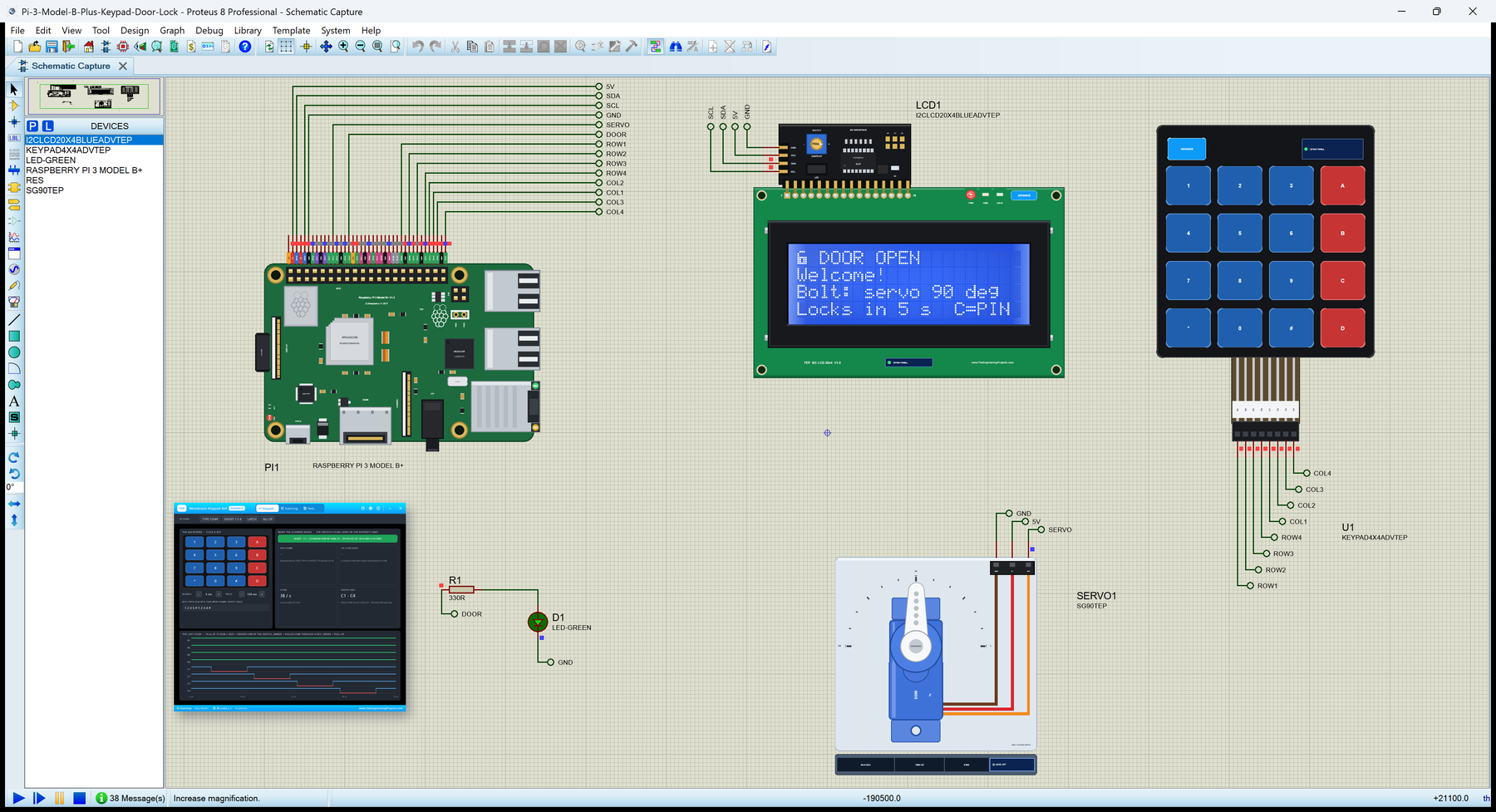
Raspberry Pi 3 Model B+ Library for Proteus: Keypad, I2C LCD, Servo


Hello friends, I hope you all are doing great. Today, I am going to share the Raspberry Pi 3 Model B+ Library for Proteus. The Raspberry Pi 3 Model B+ was the last and fastest board of the Pi 3 family: a BCM2837B0 at 1.4 GHz under a metal heat spreader, dual-band Wi-Fi, Gigabit Ethernet over USB 2.0 and a header for Power over Ethernet. With this library the board runs your Python program against the circuit in Proteus 8.5.
Raspberry Pi 3 Model B+ Library for Proteus
Latest version: V1.0 (October 2026, this tutorial)
Helping Tools
- Laptop WiFi Monitor: a laptop on the Wi-Fi of your design: a browser, a TCP / UDP terminal and ping
- Mobile WiFi Monitor: a smartphone that opens the pages of your board and sends it commands
- LCD Library for Proteus V3.0: 16x2, 20x4 and I2C LCDs to show your readings
This is the fifth library of our Raspberry Pi series, and every library of the series connects the Pi to a different module. This time the Pi guards a door: a 4x4 membrane keypad on eight GPIOs takes the PIN, a 20x4 LCD with an I2C backpack shows what is going on, and an SG90 servo moves the bolt - all driven by one Python program with RPi.GPIO, smbus2 and gpiozero, without any keypad or LCD library.
NOTICE: this library does not run Raspberry Pi OS. It runs your Python program, with the same Python libraries a Pi uses for its pins, its buses and its network, in step with the simulation. Your feedback is the fuel that keeps us going, so please tell us what you think in the comments below or in the Raspberry Pi 3 Model B+ board of our forum. And if our free libraries help you, you can buy us a coffee. So, let's get started with the Raspberry Pi 3 Model B+ Library for Proteus:
What is the Raspberry Pi 3 Model B+?
The Raspberry Pi 3 Model B+ came out in March 2018 at the same 35 dollars as the Pi 3 Model B, in the same 85 x 56 mm shape with the same 40-pin header, four USB ports, HDMI, the CSI camera and DSI display connectors and the 4-pole A/V jack. Under the familiar outline, almost every chip changed. The processor became the BCM2837B0: the same four 64-bit Cortex-A53 cores, now at 1.4 GHz, with a silver heat spreader on top that lets it run fast for longer before it gets hot.
The radio moved into a metal shield can with the raspberry pressed into its lid: a Cypress CYW43455 with dual-band 802.11ac Wi-Fi (2.4 and 5 GHz) and Bluetooth 4.2. The USB hub and the network chip became the Microchip LAN7515, which brings Gigabit Ethernet - limited to about 300 Mbit/s, because it still talks to the processor over USB 2.0. A new 4-pin PoE header beside the top-right mounting hole takes power from the network cable through a PoE HAT, and a MaxLinear MxL7704 power chip feeds the board.
| Raspberry Pi 3 Model B (2016) | Raspberry Pi 3 Model B+ (2018) | |
|---|---|---|
| Processor | BCM2837, four Cortex-A53 cores at 1.2 GHz | BCM2837B0, four Cortex-A53 cores at 1.4 GHz, heat spreader |
| RAM | 1 GB | the same |
| Wi-Fi and Bluetooth | 802.11n (2.4 GHz), Bluetooth 4.1, chip antenna | 802.11ac (2.4 and 5 GHz), Bluetooth 4.2, shielded module |
| Ethernet | 10/100 (SMSC LAN9514) | Gigabit over USB 2.0 (Microchip LAN7515) |
| Power over Ethernet | no | a 4-pin header for the PoE HAT |
| GPIO header, USB | 40 pins, 4 USB | the same |
In Proteus, our Raspberry Pi Model B Library for Proteus covers how the board runs a Python program: the program and Proteus work in lockstep, every sleep, pin wait and bus transfer moves the simulation clock, and the Python libraries for the pins answer as on a Pi. Our Raspberry Pi 1 Model B+ Library for Proteus added the 40-pin header and a touch TFT, the Raspberry Pi 2 Model B Library for Proteus four I2C parts and an OLED, the Raspberry Pi 3 Model B Library for Proteus Wi-Fi and a web page. The B+ brings its faster cores - a GPIO call costs about 2.6 us of simulation time - and a keypad, an LCD and a servo.
Features of the Raspberry Pi 3 Model B+ Library for Proteus
- The board as it looks: the green Pi 3 B+ at its real size with the 40-pin header, the Wi-Fi module's shield can, the silver BCM2837B0, the PoE header with the PEN and RUN pads, the LAN7515, the MXL7704 power chip, PWR and ACT at the left edge, the USB pairs and the RJ45 with its own LEDs, HDMI, the camera and display connectors, the A/V jack and the microSD card.
- Your Python program: any .py file in the PROGRAM property; Python 3.11 and its standard library are included.
- RPi.GPIO and gpiozero: outputs, inputs, pull-ups and pull-downs, one pin or a list of pins at once, edges with callbacks, software PWM, and gpiozero's LED, Button, AngularServo and the rest.
- I2C with smbus2: bus 1 on GPIO2 and GPIO3 at 100 kHz; one i2c_msg write of any length is one I2C transaction - a whole LCD line in one go.
- SPI, the UART, 1-Wire and the DHT sensors: spidev, pyserial and the kernel's files, as on the earlier boards.
- The network: eth0 with the cable in (the default on this board), wlan0 on our virtual Wi-Fi with it out; sockets and http.server work on both.
- The Pi Terminal: the output, the errors, a line for input(), and a Board tab with the GPIOs, the LEDs and the supply pins - with our TEP header, no Windows title bar.
- A complete package: about 13.9 MB with the board, Python, the runtime, the keypad, LCD and servo libraries and the demo, without the source code of the models.
The Raspberry Pi 3 Model B+ in Proteus
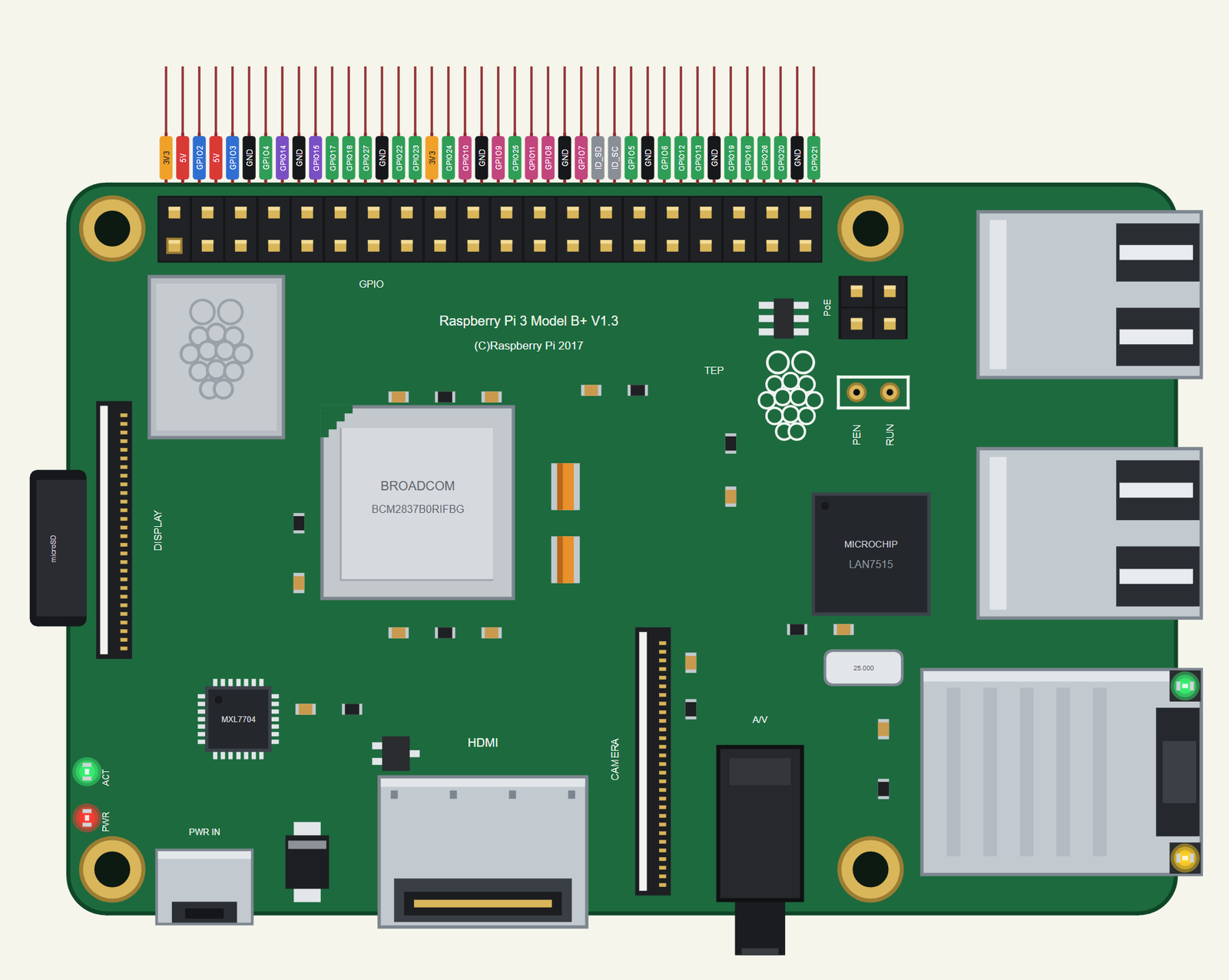
Search RASPBERRY in Pick Devices; the device RASPBERRY PI 3 MODEL B+ is in TEPRPI3BP.LIB (Microprocessor ICs, Raspberry Pi), with the prefix PI. The 40 pins leave the top edge as one comb, each pin above its column of the header, with a tag in the colour of its kind: 5V red, 3V3 orange, GND black, GPIO green, I2C blue, SPI pink, UART purple and the ID pins grey. The PoE header and the PEN and RUN pads are drawn as on the real board, but they are not pins of the part. Click the HDMI socket or the processor to open the Pi Terminal, and the RJ45 to plug or unplug the network cable.
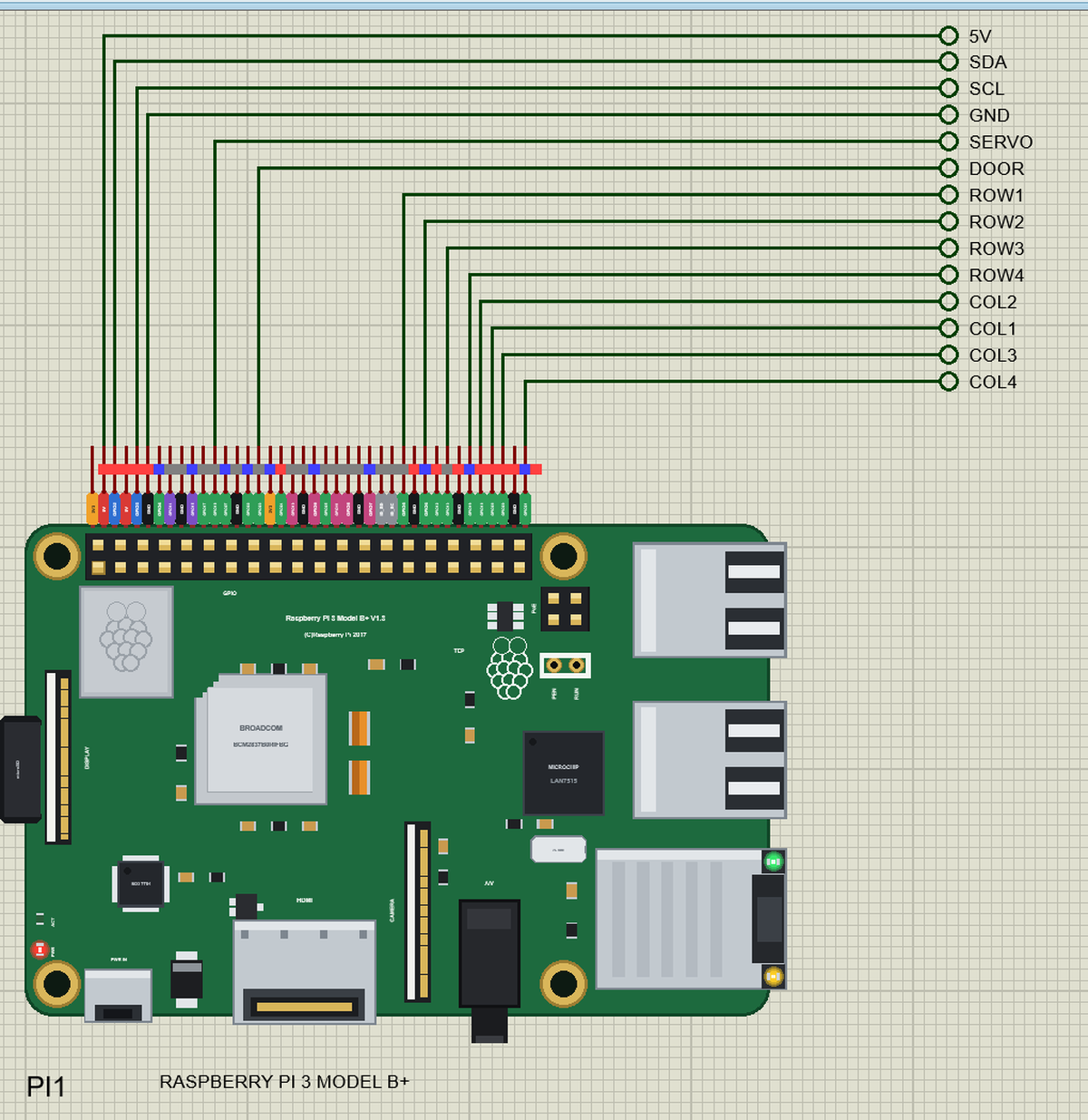
The 40-Pin Header
| Pins | Name | Pins | Name |
|---|---|---|---|
| 1 | 3V3 | 2 | 5V |
| 3 | GPIO2 (SDA) | 4 | 5V |
| 5 | GPIO3 (SCL) | 6 | GND |
| 7 | GPIO4 | 8 | GPIO14 (TXD) |
| 9 | GND | 10 | GPIO15 (RXD) |
| 11 | GPIO17 | 12 | GPIO18 |
| 13 | GPIO27 | 14 | GND |
| 15 | GPIO22 | 16 | GPIO23 |
| 17 | 3V3 | 18 | GPIO24 |
| 19 | GPIO10 (MOSI) | 20 | GND |
| 21 | GPIO9 (MISO) | 22 | GPIO25 |
| 23 | GPIO11 (SCLK) | 24 | GPIO8 (CE0) |
| 25 | GND | 26 | GPIO7 (CE1) |
| 27 | ID_SD | 28 | ID_SC |
| 29 | GPIO5 | 30 | GND |
| 31 | GPIO6 | 32 | GPIO12 |
| 33 | GPIO13 | 34 | GND |
| 35 | GPIO19 | 36 | GPIO16 |
| 37 | GPIO26 | 38 | GPIO20 |
| 39 | GND | 40 | GPIO21 |
The GPIOs work at 3.3 V; GPIO2 and GPIO3 have the Pi's 1.8 k pull-ups. The 5V and 3V3 pins power the modules wired to them. ID_SD and ID_SC are kept for a HAT's ID EEPROM, so leave them free, as on a real Pi.
Ethernet and Wi-Fi
With the cable in at Run - ETHERNET IN, the default on this board - the Pi is on eth0 and the jack's LNK and 100 LEDs light. Take the cable out (ETHERNET OUT, or a click on the RJ45) and wlan0 joins the network in the WIFISSID and WIFIPASS properties, our router TEP-WiFi by default, 2.3 to 3.5 s after Run. Either way the Pi is 192.168.1.51; the board keeps one network interface at a time. The door lock does not use the network, but the board is ready for it.
Download Raspberry Pi 3 Model B+ Library for Proteus
Click the button below to download Raspberry-Pi-3-Model-B-Plus-Library-for-Proteus-v1.0.zip (about 13.9 MB with Python included, without the source code of the models):
Raspberry Pi 3 Model B+ Library for Proteus V1.0- README.txt: the device, installation, the demo, the header, the properties, troubleshooting and the limits.
- Proteus Library Files:
TEPRPI3BP.LIB(the Raspberry Pi 3 Model B+) and the demo's parts:TEPKEYPAD.LIB,TEPI2CLCD20X4.LIBandTEPPCA9685.LIB(with the SG90). - Proteus Model Files:
TEPNET.DLL(the Pi and the network), the parts'TEPKEYPAD.DLL,TEPLCD.DLLandTEPPCA9685.DLL, and the TEPPi folder - Python 3.11 and the TEP Pi runtime. - Python Code:
blink.pyanddoor_lock.py. - Proteus Simulation: the demo project, its program and copies of the DLLs.
No Proteus yet? Read How to Download and Install Proteus 7 and 8. New to libraries? Follow How to Install a New Library in Proteus.
How to Install Raspberry Pi 3 Model B+ Library for Proteus
- Close Proteus and extract the whole zip file, for example to your Desktop.
- Copy the files from Proteus Library Files into the LIBRARY folder of Proteus (usually
C:\Program Files (x86)\Labcenter Electronics\Proteus 8 Professional\LIBRARY). - Copy everything from Proteus Model Files - the DLLs and the TEPPi folder - into the MODELS folder, replacing an older TEPNET.DLL and TEPPi folder (these are the newest; they also run our Model B, Model B+, Pi 2 and Pi 3).
TEPLCD.DLLis the newest build of our LCD model, the one from our LCD Keypad Shield Library for Proteus: it runs every TEP LCD. - Delete
TEPRPI3BP.IDXfrom the LIBRARY folder if it is there. - Start Proteus, press P and search for RASPBERRY.
There is nothing else to install: Python comes in the TEPPi folder, so you need no Python on your PC.
Demo: a Keypad Door Lock
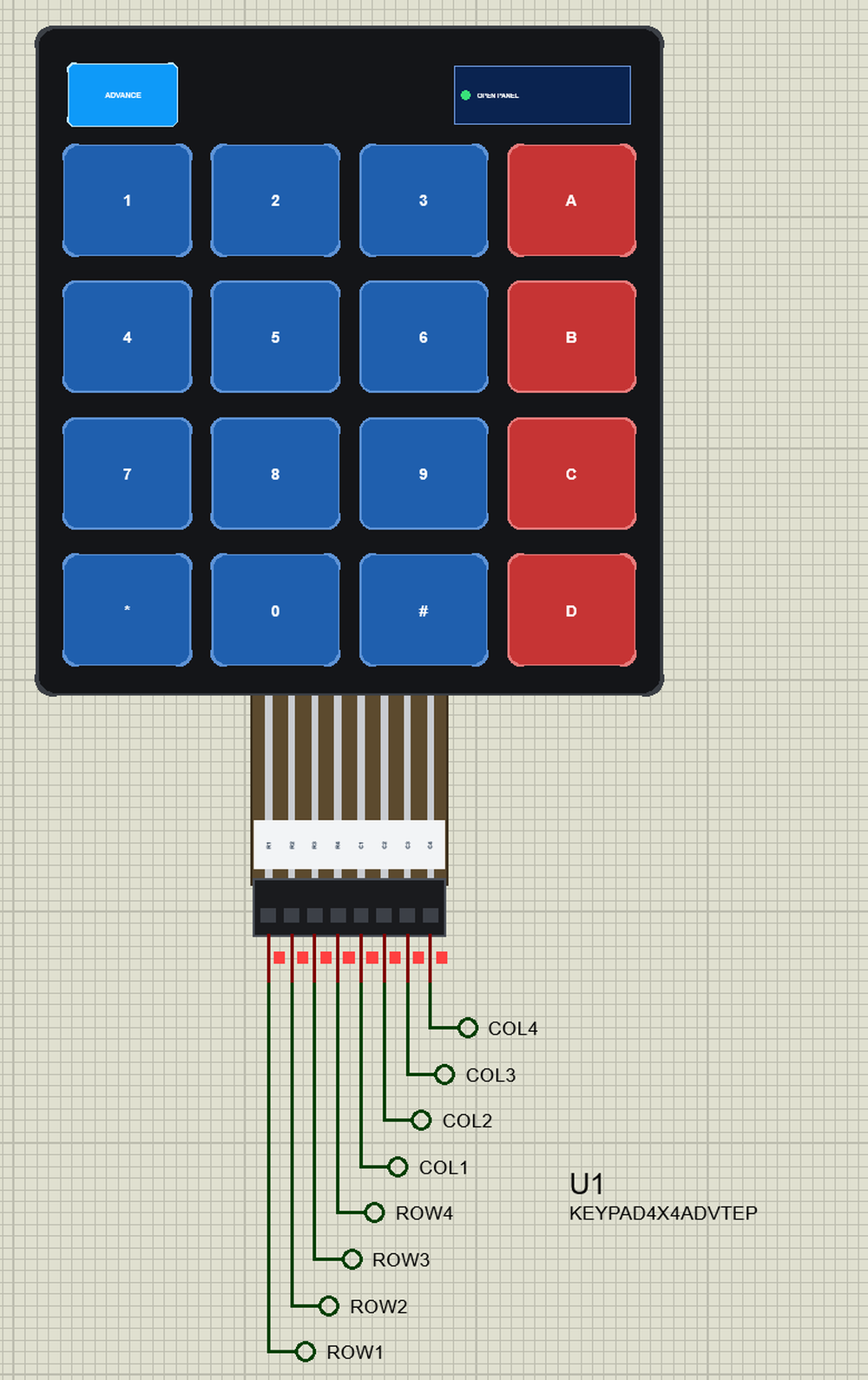
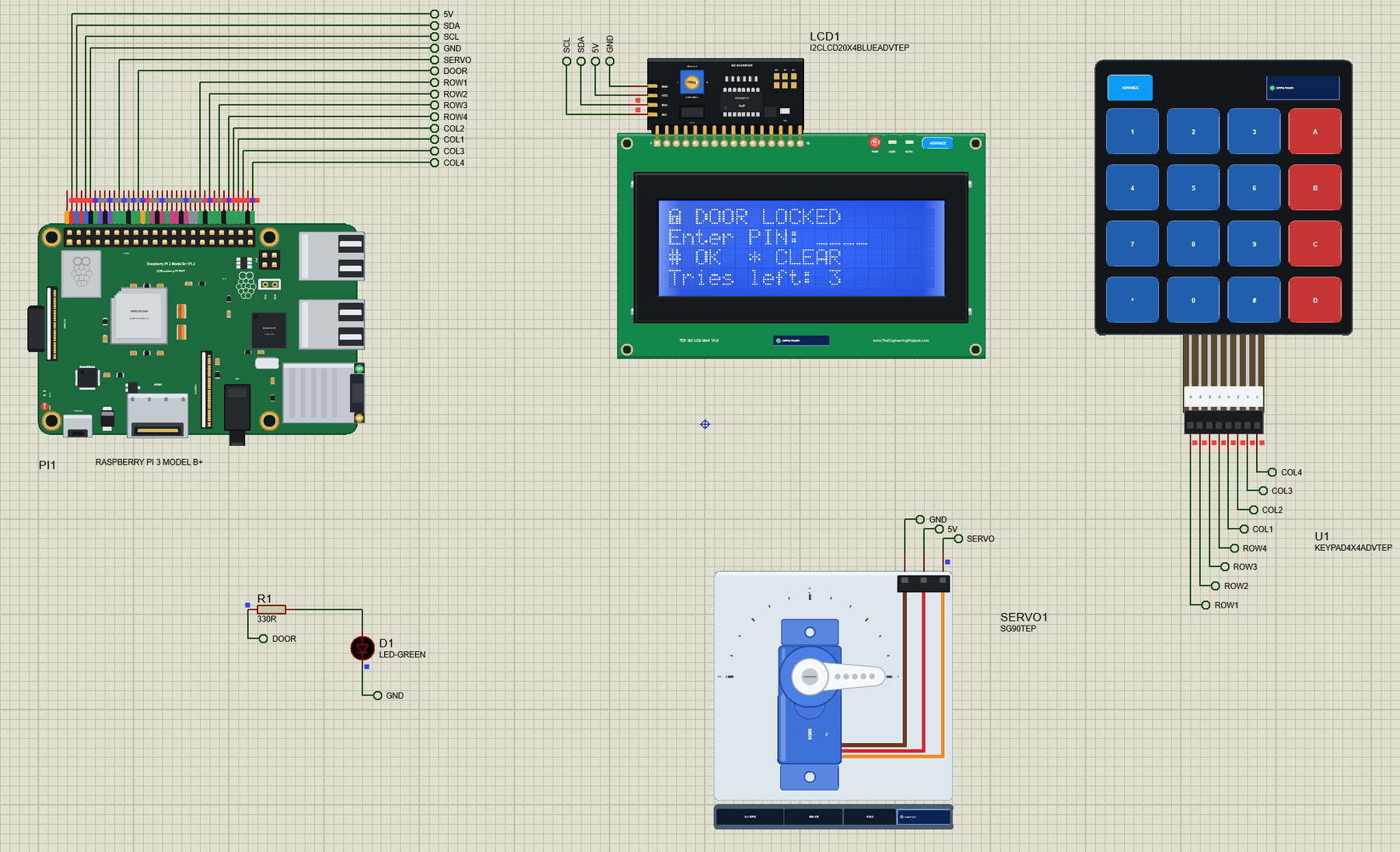
Open Pi-3-Model-B-Plus-Keypad-Door-Lock.pdsprj. PI1 runs door_lock.py. The parts come from our own libraries, each with its article: U1 from the Membrane Keypad Library for Proteus, LCD1 from the I2C LCD 20x4 Library for Proteus and SERVO1 from the PCA9685 Servo Driver and SG90 Servo Motor Library for Proteus. The keypad and the LCD are the Advance versions: each opens a pop-up window at Run - the keypad's shows how the program scans it, the LCD's shows the screen, the controller's settings and the bytes on the bus.
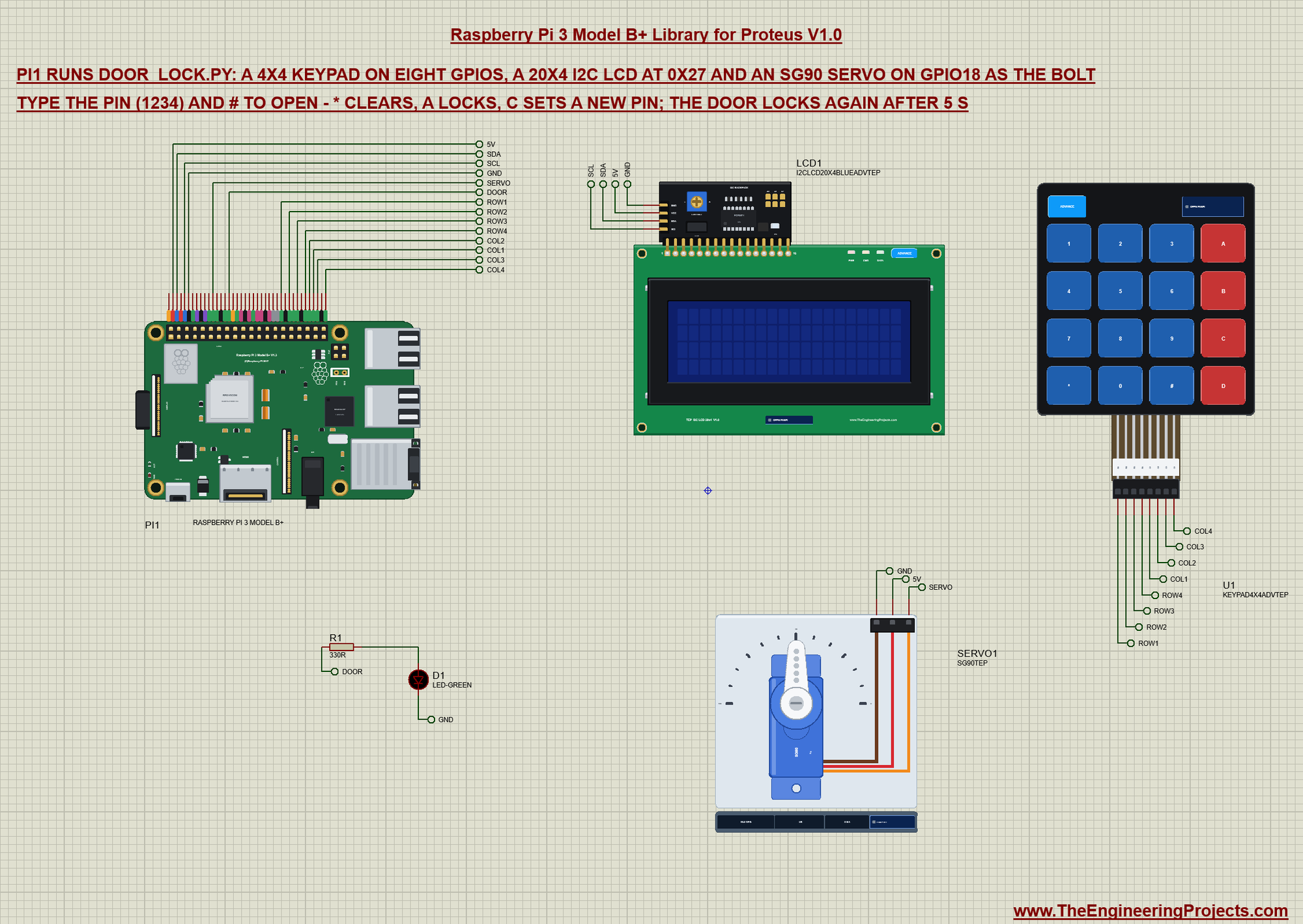
Net labels connect everything. The keypad has no power pin at all - it is only a grid of switches; the LCD's backpack and the servo take 5 V from the Pi's header:
| Part pin | Net label | Pi pin | What it does |
|---|---|---|---|
| Keypad R1, R2, R3, R4 | ROW1 to ROW4 | 29, 31, 33, 35 (GPIO5, 6, 13, 19) | the rows, read with the Pi's pull-ups |
| Keypad C1, C2, C3, C4 | COL1 to COL4 | 37, 36, 38, 40 (GPIO26, 16, 20, 21) | the columns, driven LOW one at a time |
| LCD GND, VCC | GND, 5V | 6, 2 | the LCD and its backlight |
| LCD SDA, SCL | SDA, SCL | 3, 5 (GPIO2, GPIO3) | I2C: the PCF8574 backpack at 0x27 |
| SG90 GND, V+ | GND, 5V | 6, 2 | the servo's motor |
| SG90 SIG | SERVO | 12 (GPIO18) | a pulse every 20 ms: 0.5 ms = 0 deg, 2.5 ms = 180 deg |
| R1 330R and D1 | DOOR | 16 (GPIO23) | the door LED: lit while the door is open |
Scanning the Keypad
A membrane keypad is sixteen switches in a grid: each key joins one row line to one column line, and nothing else. The program names the pins and the keys, and keeps the PIN and the times:
ROWS = [5, 6, 13, 19]                       # R1 - R4: inputs with the Pi's pull-ups
COLS = [26, 16, 20, 21]                     # C1 - C4: outputs, HIGH, LOW one at a time while scanning
KEYS = ['123A', '456B', '789C', '*0#D']
LCD_ADDR = 0x27
OPEN_TIME = 5                               # seconds the door stays open
LOCKOUT = 30                                # seconds the keypad stays locked after three wrong PINs
pin_code = '1234'
The rows are inputs with the Pi's pull-ups, so they read HIGH while no key is down. The columns are outputs, all HIGH. A scan pulls one column LOW at a time and reads the four rows: a row that reads LOW has its key down in that column. Then the column goes HIGH again and the next one follows:
    for c, col in enumerate(COLS):
        GPIO.output(col, GPIO.LOW)
        for r, row in enumerate(ROWS):
            if not GPIO.input(row):
                key = KEYS[r][c]
        GPIO.output(col, GPIO.HIGH)
GPIO.setup(ROWS, GPIO.IN, pull_up_down=GPIO.PUD_UP)
GPIO.setup(COLS, GPIO.OUT, initial=GPIO.HIGH)A key counts once it is released, so holding a key down types it only once, and the contact's bounce never shows - the scans come about every 30 ms, much slower than the 3 ms the contact bounces:
def get_key():
    """A key once it is released, or None."""
    key = scan()
    if key is None:
        return None
    while scan() is not None:
        time.sleep(0.02)
    return key
The LCD over I2C
The 20x4 LCD has an HD44780 controller, and its I2C backpack is a PCF8574 port expander at 0x27: each byte written to it sets eight wires - RS on P0, E on P2, the backlight on P3 and the four data lines D4 to D7 on P4 to P7. So the LCD runs in 4-bit mode, and every byte for it goes as two halves, each latched by a pulse on E:
    def _nibbles(self, value, rs):
        out = []
        for n in (value & 0xF0, (value << 4) & 0xF0):
            out += [n | self.BL | self.EN | rs, n | self.BL | rs]
        return out
The controller starts with the reset by instruction from its datasheet - 0x30 three times, then 0x20 for 4-bit mode - followed by the usual settings. Two custom characters go into its CGRAM: a closed and an open padlock:
        for n in (0x30, 0x30, 0x30, 0x20):          # reset by instruction, then 4-bit mode
            self._send([n | self.BL | self.EN, n | self.BL])
            time.sleep(0.005)
self.glyph(0, [0x0E, 0x11, 0x11, 0x1F, 0x1B, 0x1B, 0x1F, 0x00]) # closed padlock
self.glyph(1, [0x0E, 0x10, 0x10, 0x1F, 0x1B, 0x1B, 0x1F, 0x00]) # open padlockA line of the display is one command for the cursor, then its 20 characters as one smbus2 i2c_msg write - 80 bytes in a single I2C transaction, about 7 ms at 100 kHz. The program sends only the lines that changed:
    def line(self, row, text):
        self.command(0x80 | self.ROW[row])
        self._send(sum((self._nibbles(ord(ch), self.RS) for ch in text.ljust(20)[:20]), []))
def _send(self, data):
self.bus.i2c_rdwr(i2c_msg.write(self.addr, data))The Servo as the Bolt
An SG90 turns its horn to the angle set by the width of a pulse that comes every 20 ms: 0.5 ms for 0 deg, 2.5 ms for 180 deg. gpiozero's AngularServo makes those pulses with the board's software PWM on GPIO18; the door LED is a gpiozero LED:
servo = AngularServo(18, initial_angle=0, min_angle=0, max_angle=180, min_pulse_width=0.5 / 1000, max_pulse_width=2.5 / 1000)
door_led = LED(23)
Opening and locking the door are two small functions: the servo's angle, the LED, the state and the time it locks again:
def unlock():
    global state, until
    servo.angle = 90
    door_led.on()
    state, until = 'open', time.monotonic() + OPEN_TIME
    log('PIN ok - door open (servo 90 deg)')
def lock(reason):
global state, tries
servo.angle = 0
door_led.off()
state, tries = 'locked', 3
log('door locked (servo 0 deg) - ' + reason)The Main Loop
The loop locks the door when its time is up, scans for a key and handles it: digits go into the PIN typed so far, # checks it, * clears it, A locks the open door at once and C starts a new PIN. A wrong PIN costs a try; after three, the keypad is locked for 30 s. The check for # looks like this:
        elif key == '#' and state == 'locked':
            if typed == pin_code:
                typed = ''
                unlock()
            else:
                tries -= 1
                log('PIN %s: wrong - %d tries left' % (typed or '(empty)', tries))
                typed = ''
                if tries == 0:
                    state, until = 'lockout', time.monotonic() + LOCKOUT
                    log('three wrong PINs - keypad locked for %d s' % LOCKOUT)
                else:
                    message('Wrong PIN!', 'Tries left: %d' % tries)
The screen is rebuilt from the state on every pass - only the lines that changed are sent - so the countdown on an open door runs by itself. A short message such as "Wrong PIN!" stays for 2 s while the keypad is still scanned.
Run the Demo
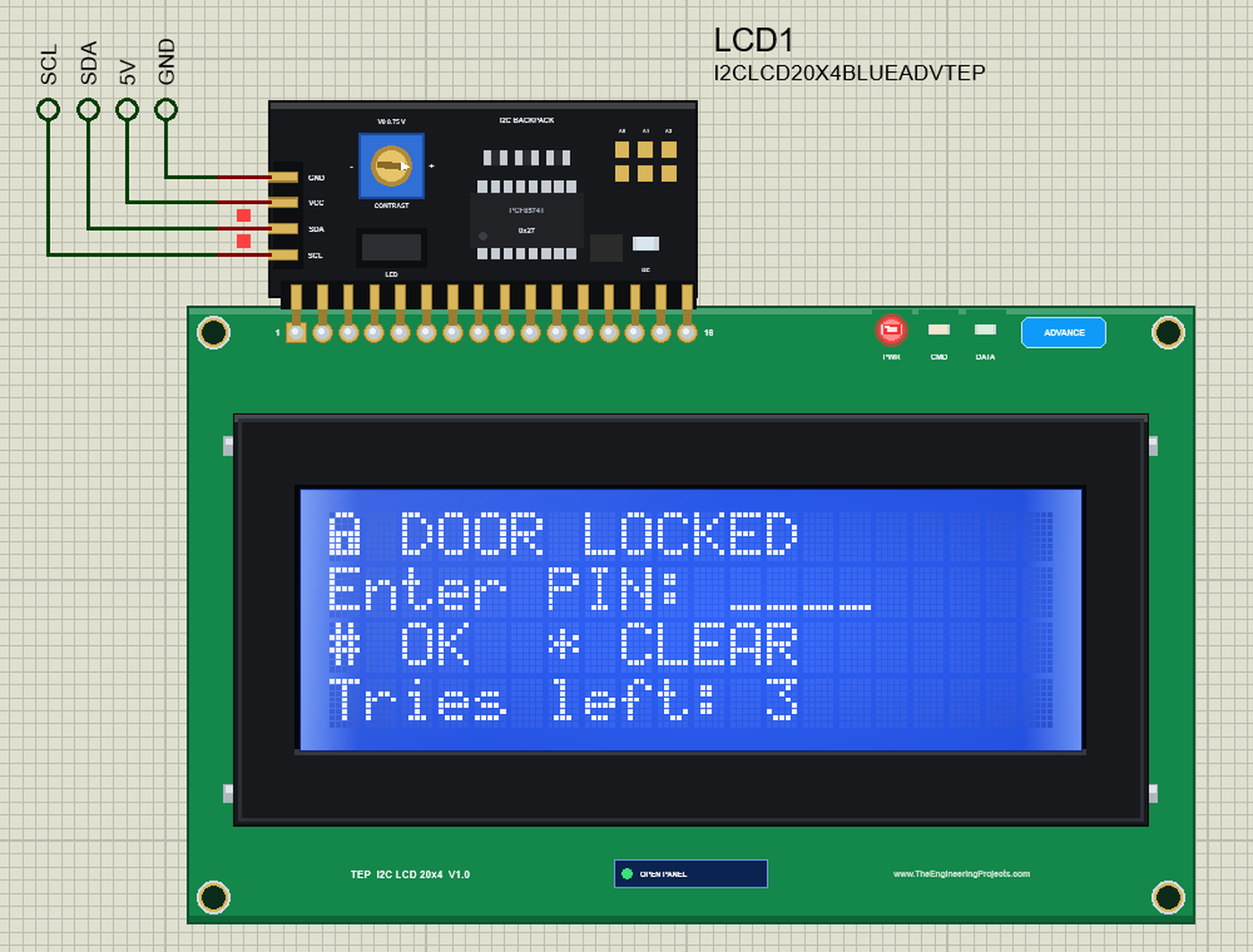
Press Run. The board boots for half a second, the program sets up the pins, the LCD and the servo, and the lock is ready:
pi@raspberrypi:~ $ python3 door_lock.py
door_lock.py - keypad door lock on the Raspberry Pi 3 Model B+
keypad R1-R4 GPIO5 6 13 19, C1-C4 GPIO26 16 20 21; LCD 0x27; servo GPIO18; LED GPIO23
[   0.1 s] ready - PIN and # to open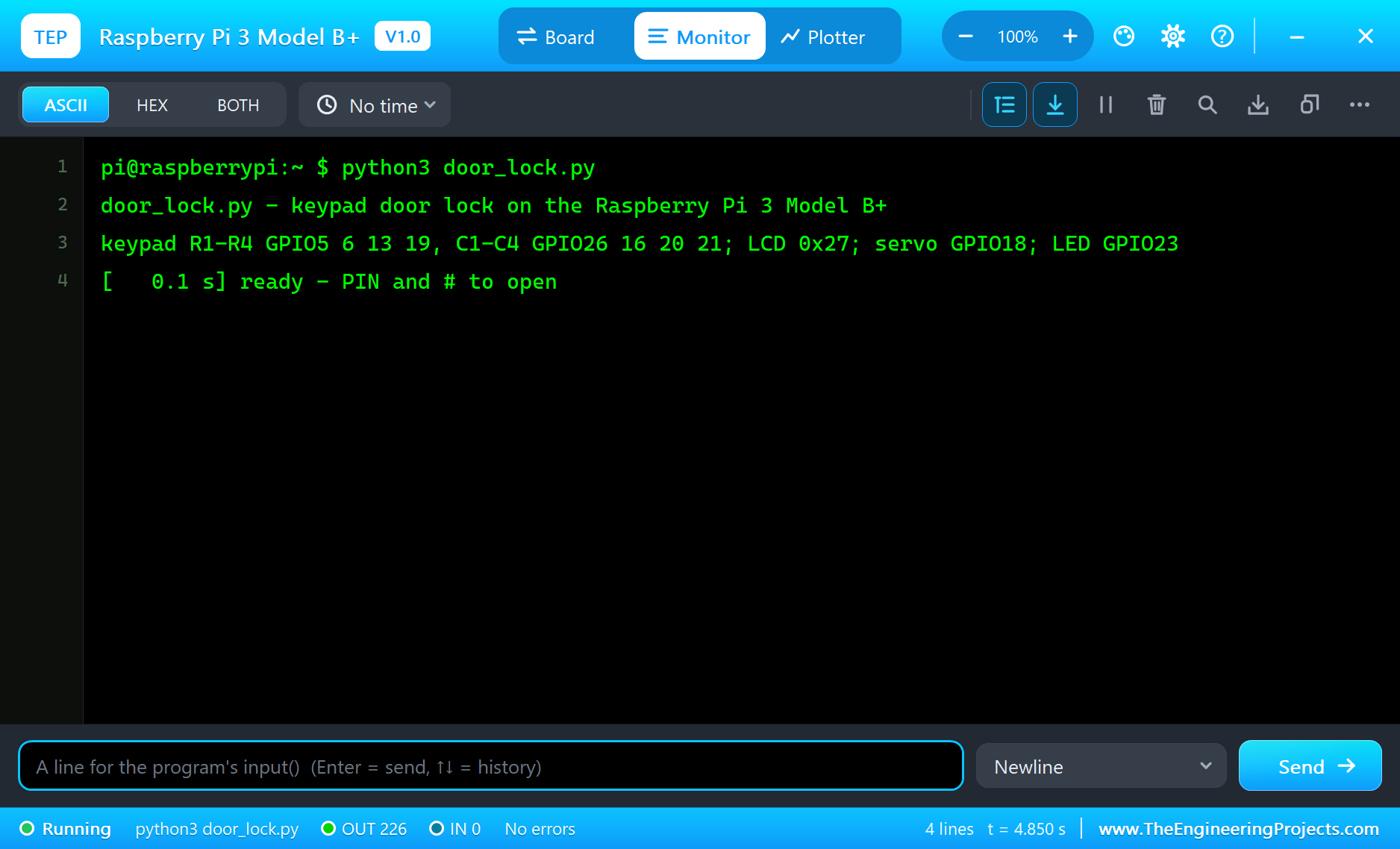
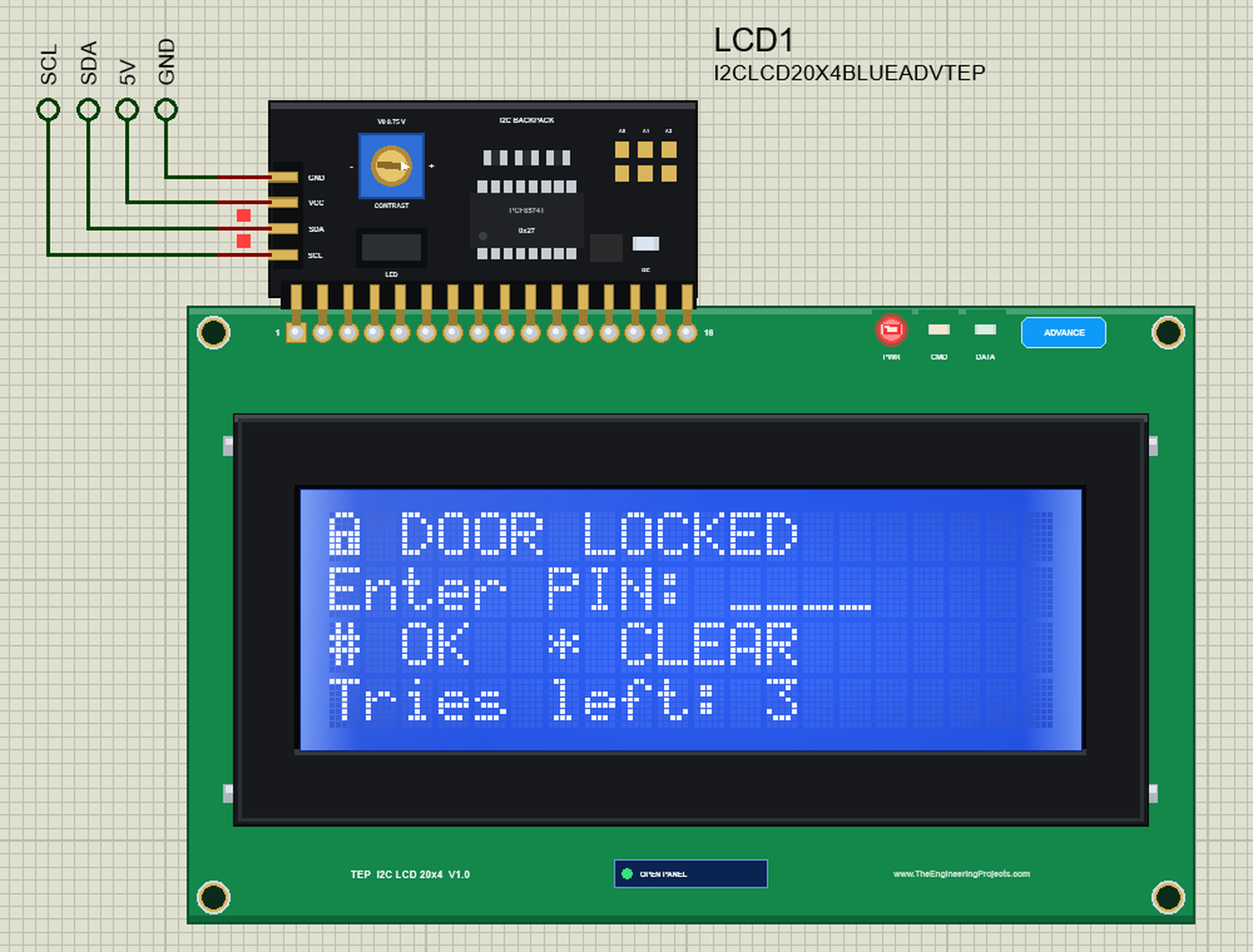
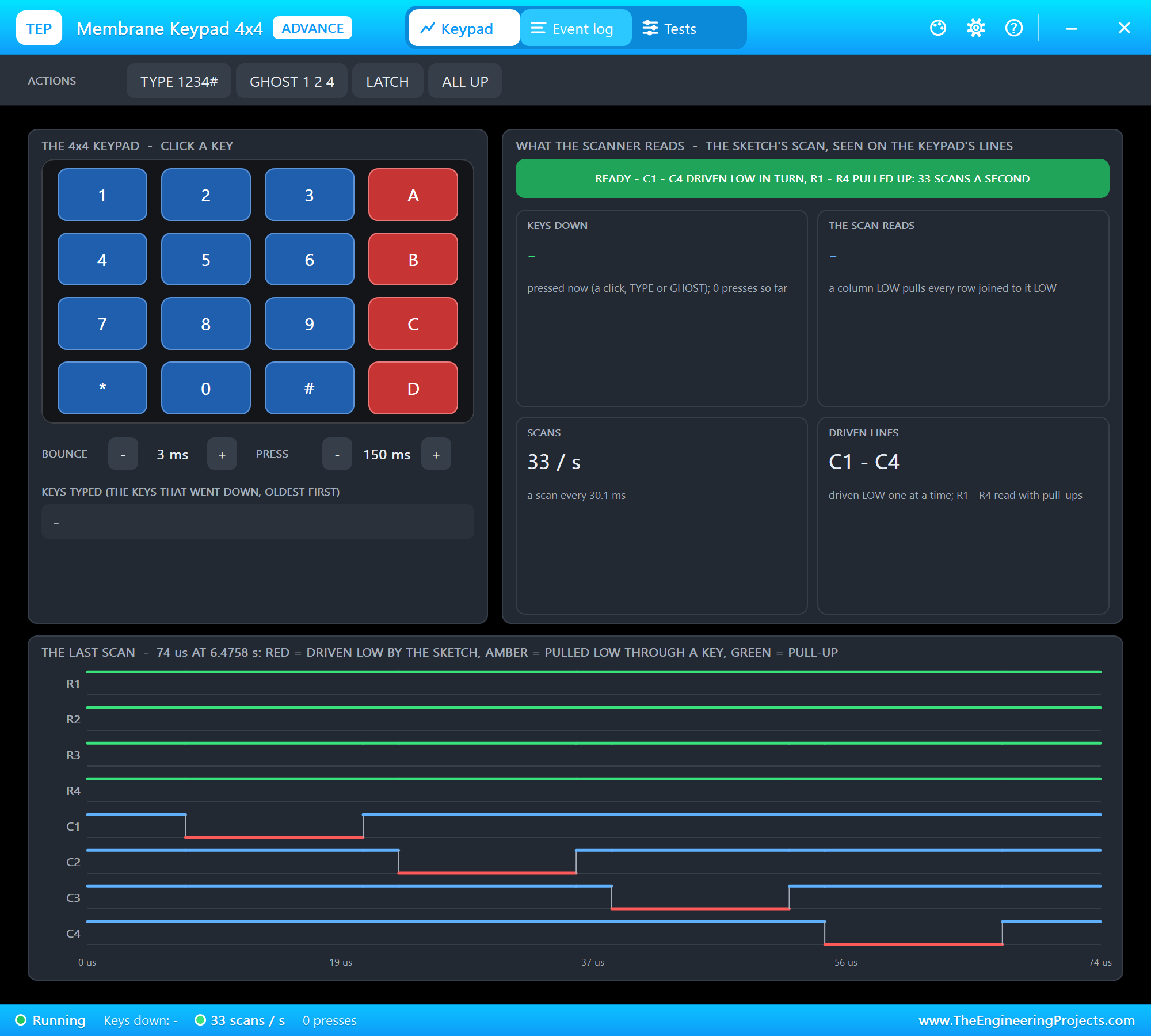
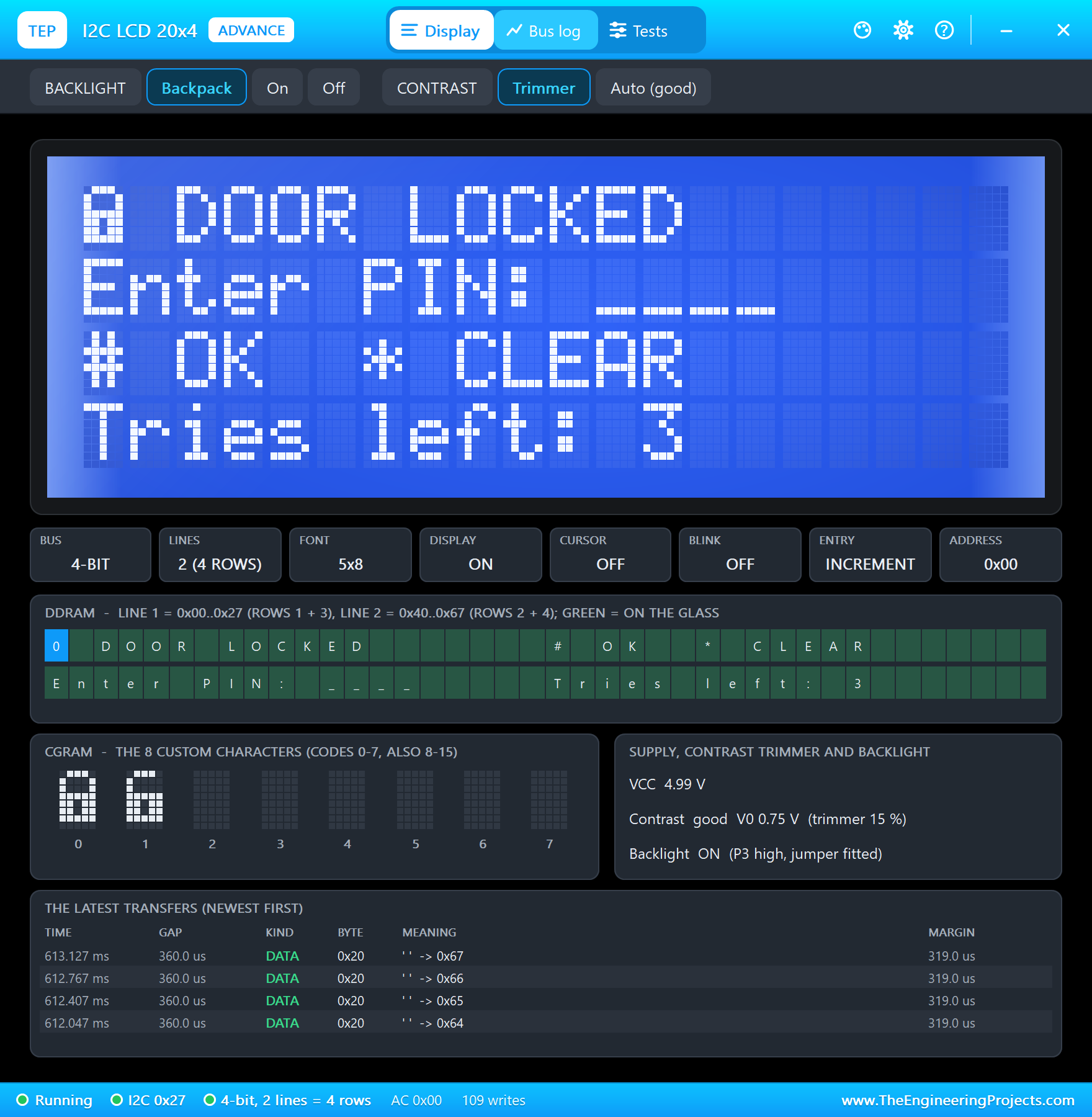
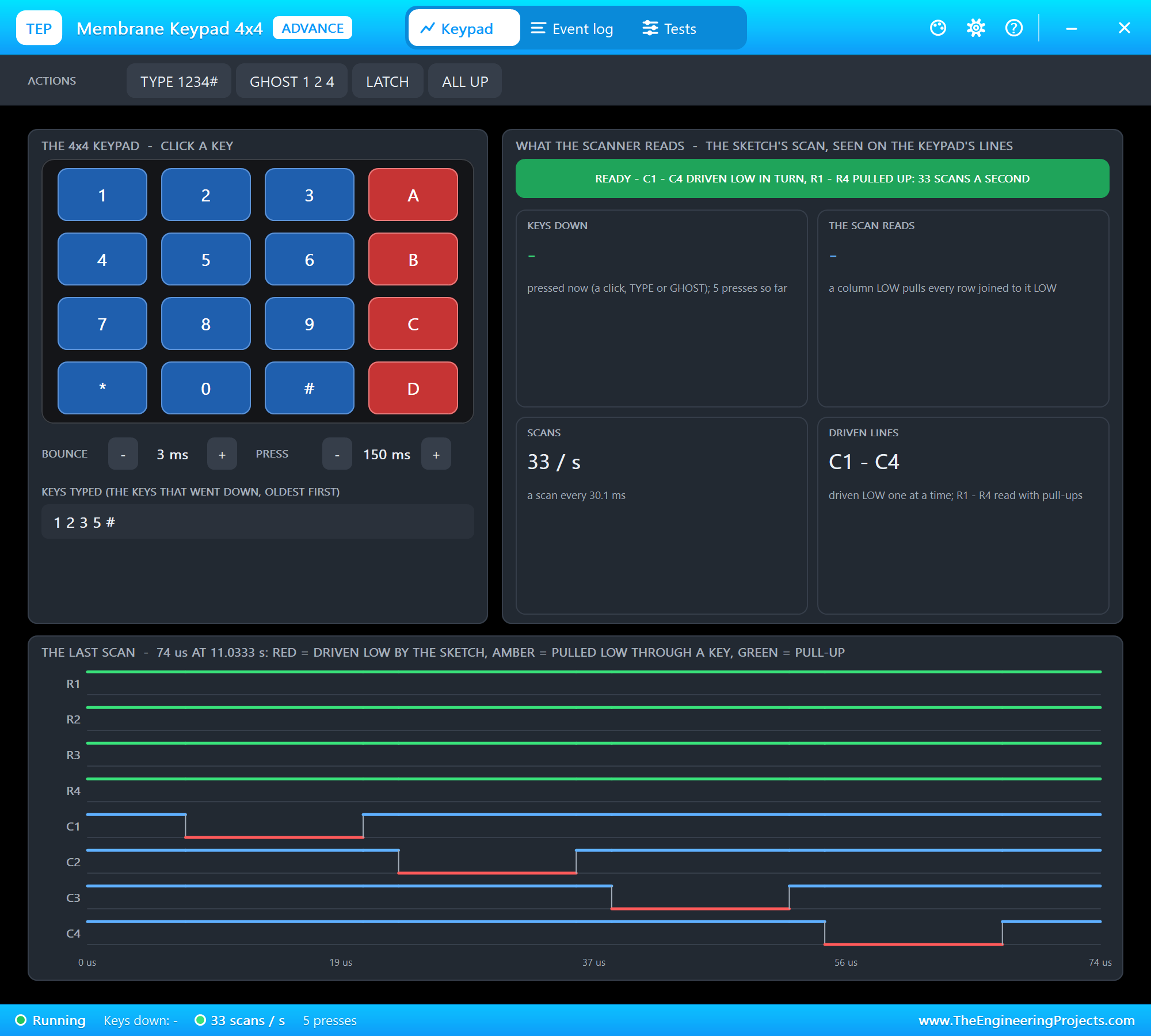
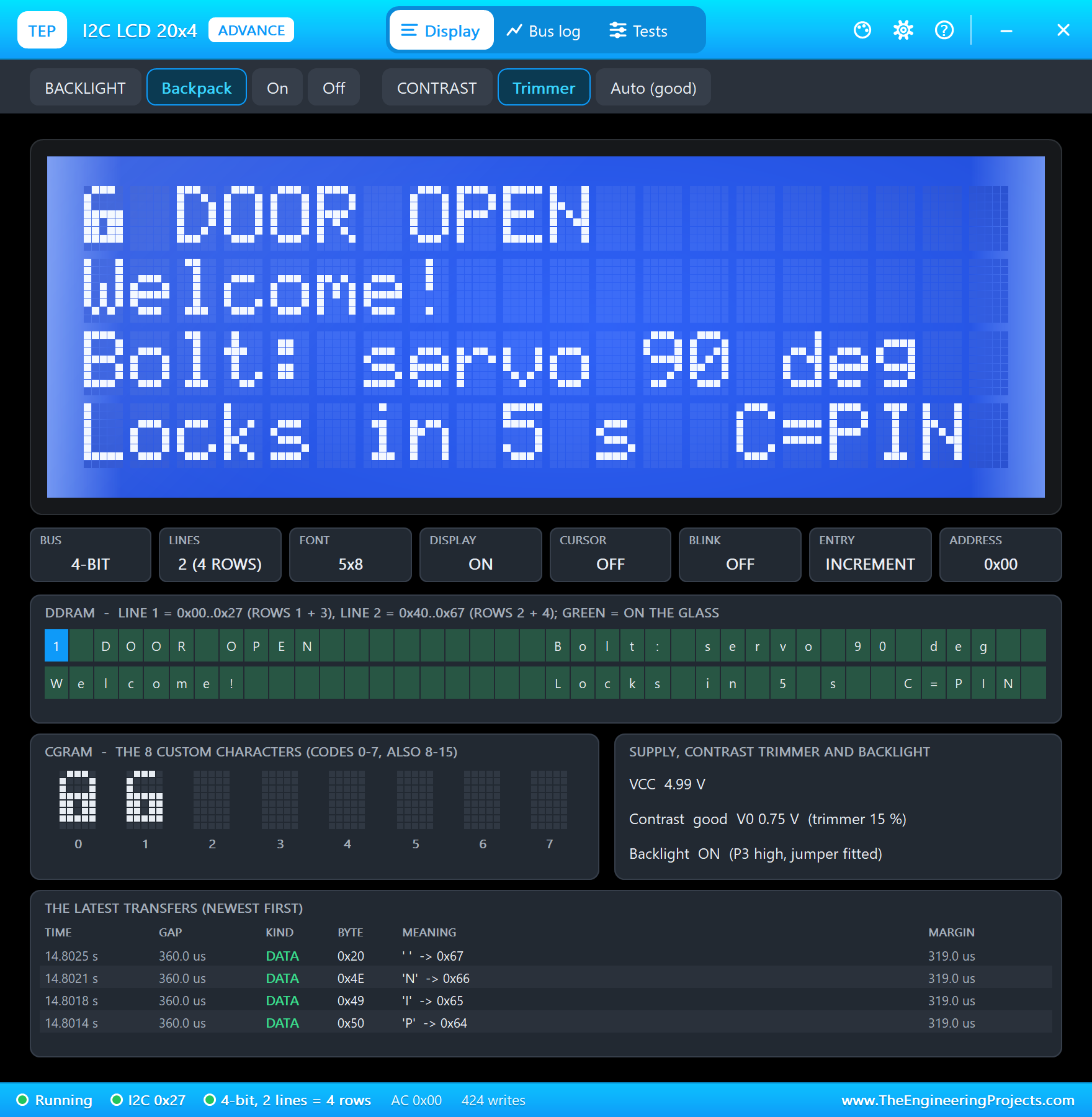
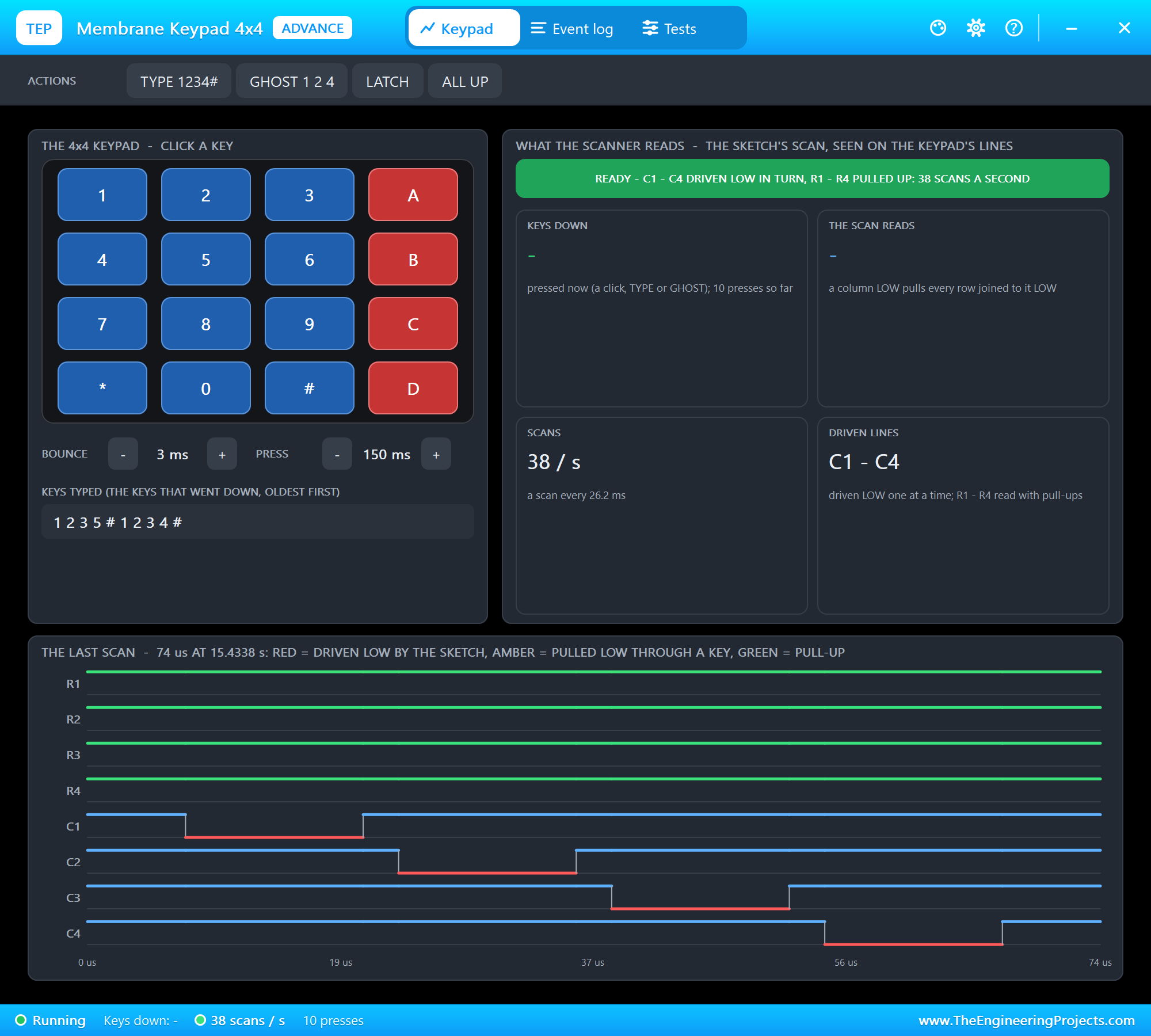
The keypad's pop-up confirms the scan before you press anything: the four columns driven LOW in turn, the rows pulled up, about 33 scans a second; THE LAST SCAN draws the four columns going LOW one after the other. The LCD's pop-up shows the screen at full size, the controller in 4-bit mode with 2 lines (the 20x4's four rows), the two padlocks in CGRAM and the backpack's supply and contrast:
A Wrong PIN
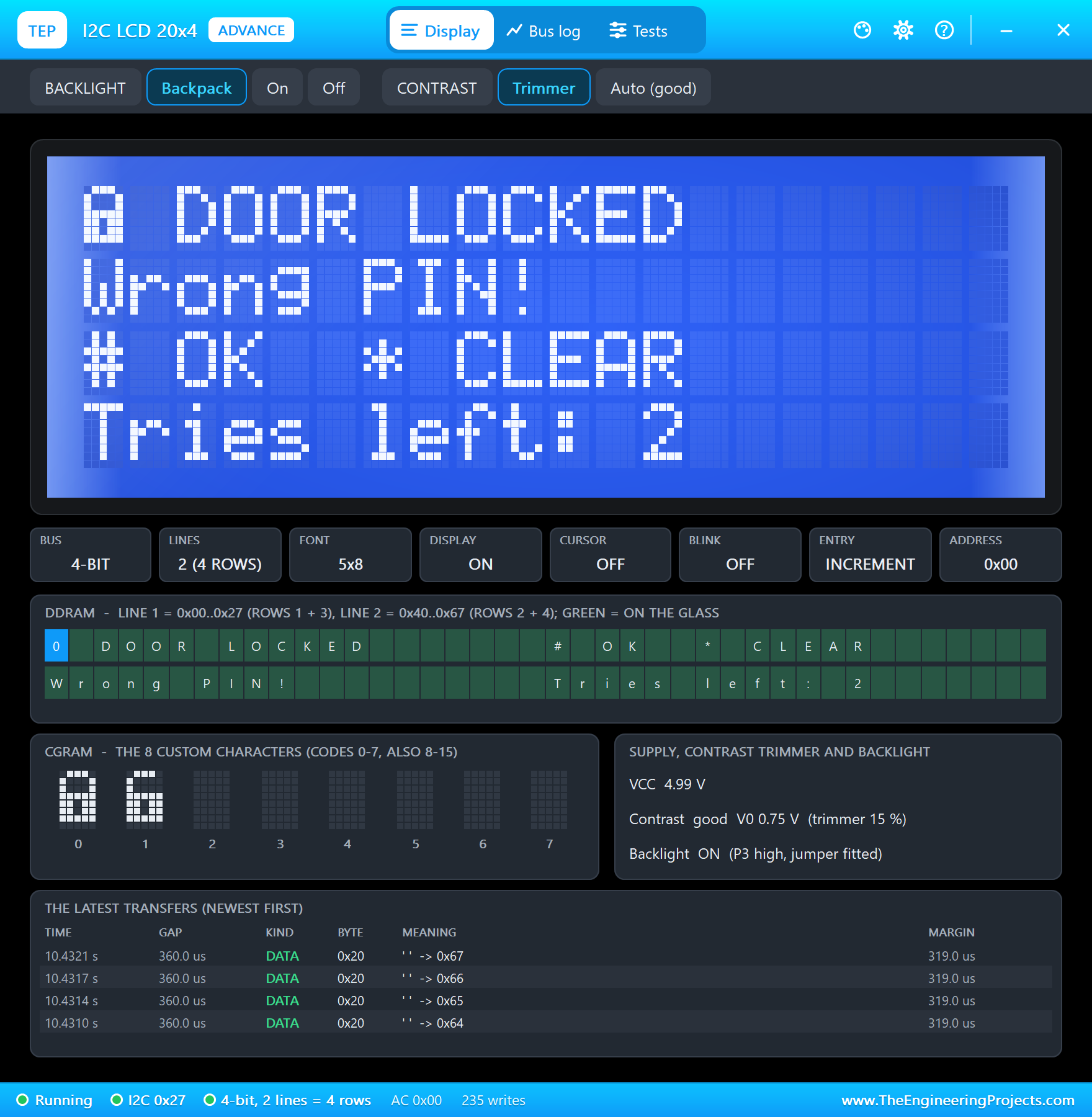
Click keys on the keypad - on the sheet or in its pop-up. Type 1 2 3 5 and #: the program logs every key and refuses the PIN. The LCD says so for 2 s and counts the tries:
[   8.0 s] key 1
[   8.5 s] key 2
[   9.0 s] key 3
[   9.4 s] key 5
[   9.9 s] key #
[   9.9 s] PIN 1235: wrong - 2 tries left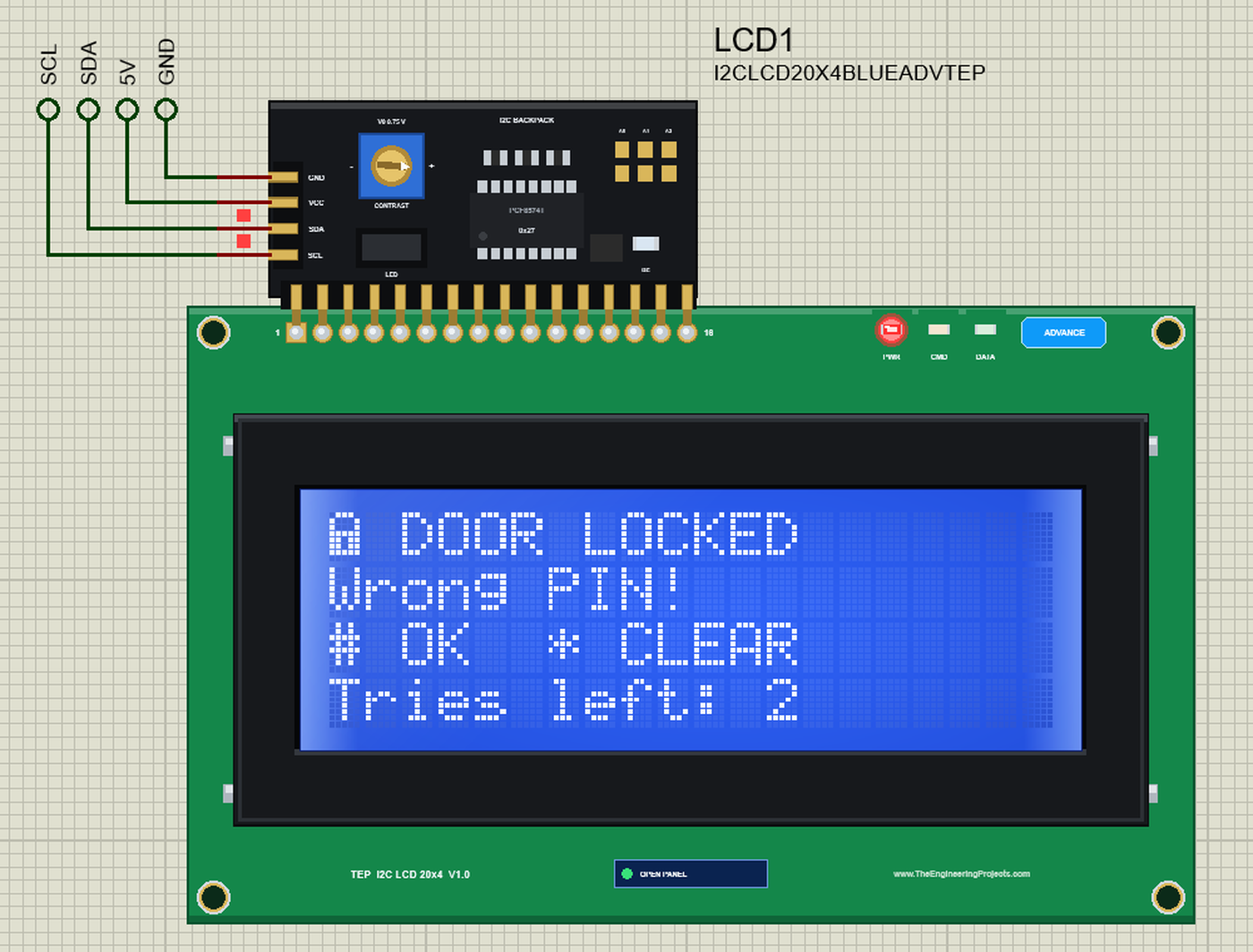
The Right PIN Opens the Door
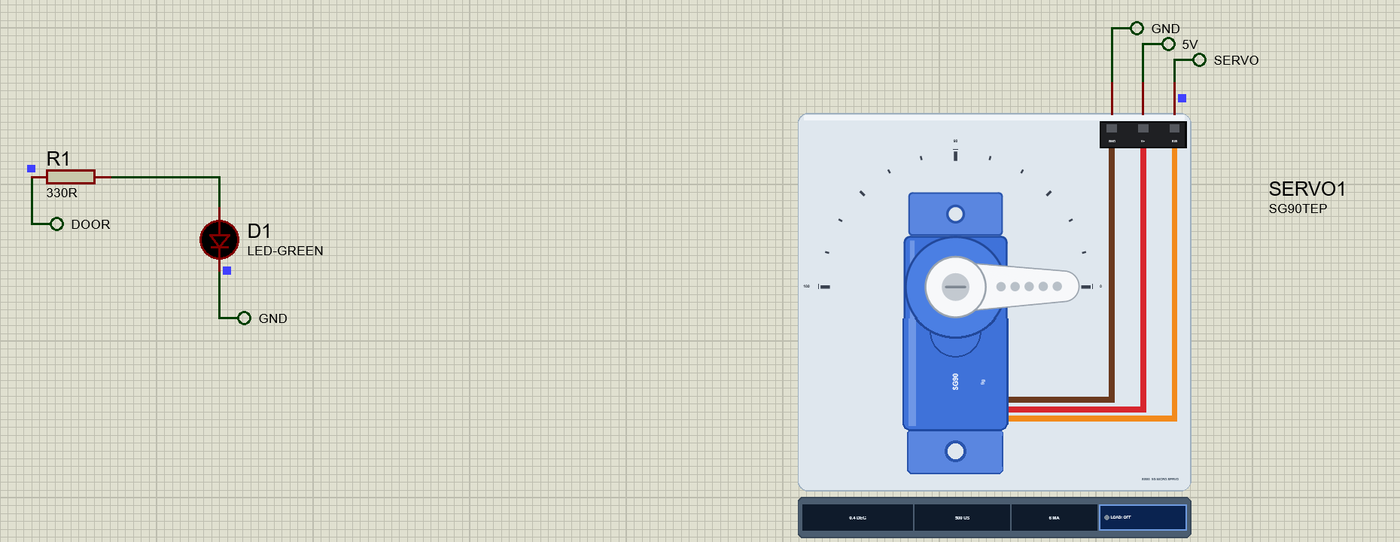
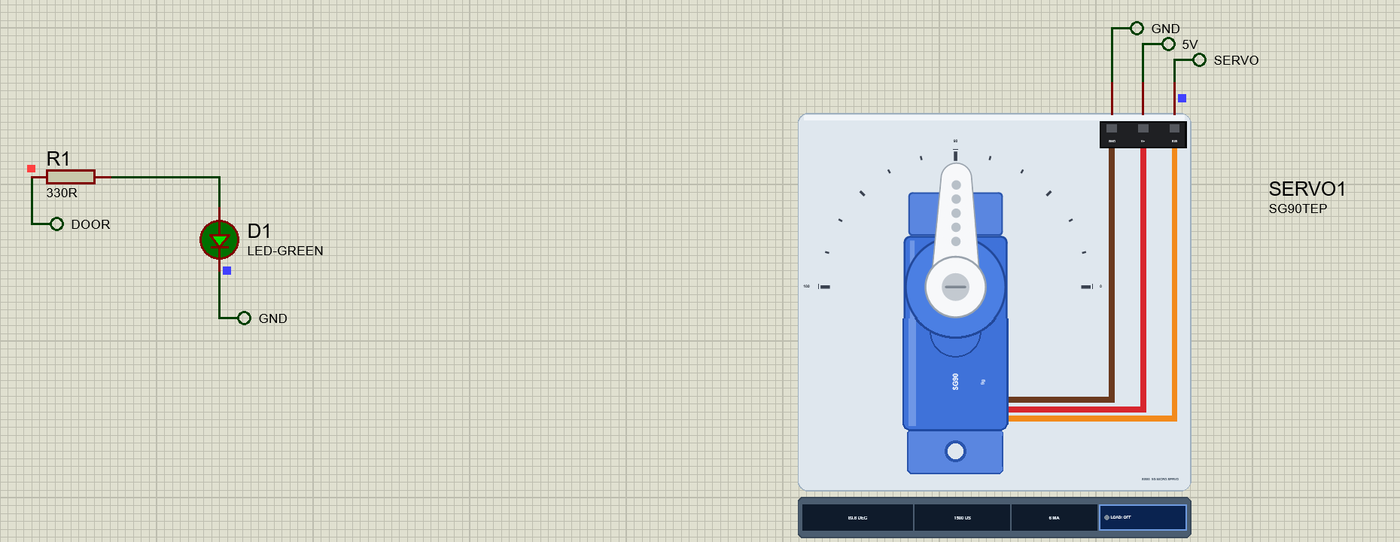
Now press TYPE 1234# in the keypad's pop-up - it presses the five keys for you, each for 150 ms. The PIN is right: the servo turns the bolt to 90 deg, D1 lights and the LCD shows the open padlock with a countdown:
[  13.1 s] key 1
[  13.4 s] key 2
[  13.7 s] key 3
[  14.0 s] key 4
[  14.3 s] key #
[  14.3 s] PIN ok - door open (servo 90 deg)
A New PIN
While the door is open, press C, type four digits and #: the program keeps them as the new PIN. A locks the door at once, and the new PIN opens it again; 5 s later it locks by itself:
[  15.3 s] key C
[  15.7 s] key 2
[  16.2 s] key 5
[  16.6 s] key 8
[  17.1 s] key 0
[  17.6 s] key #
[  17.6 s] new PIN saved
[  18.5 s] key A
[  18.5 s] door locked (servo 0 deg) - A pressed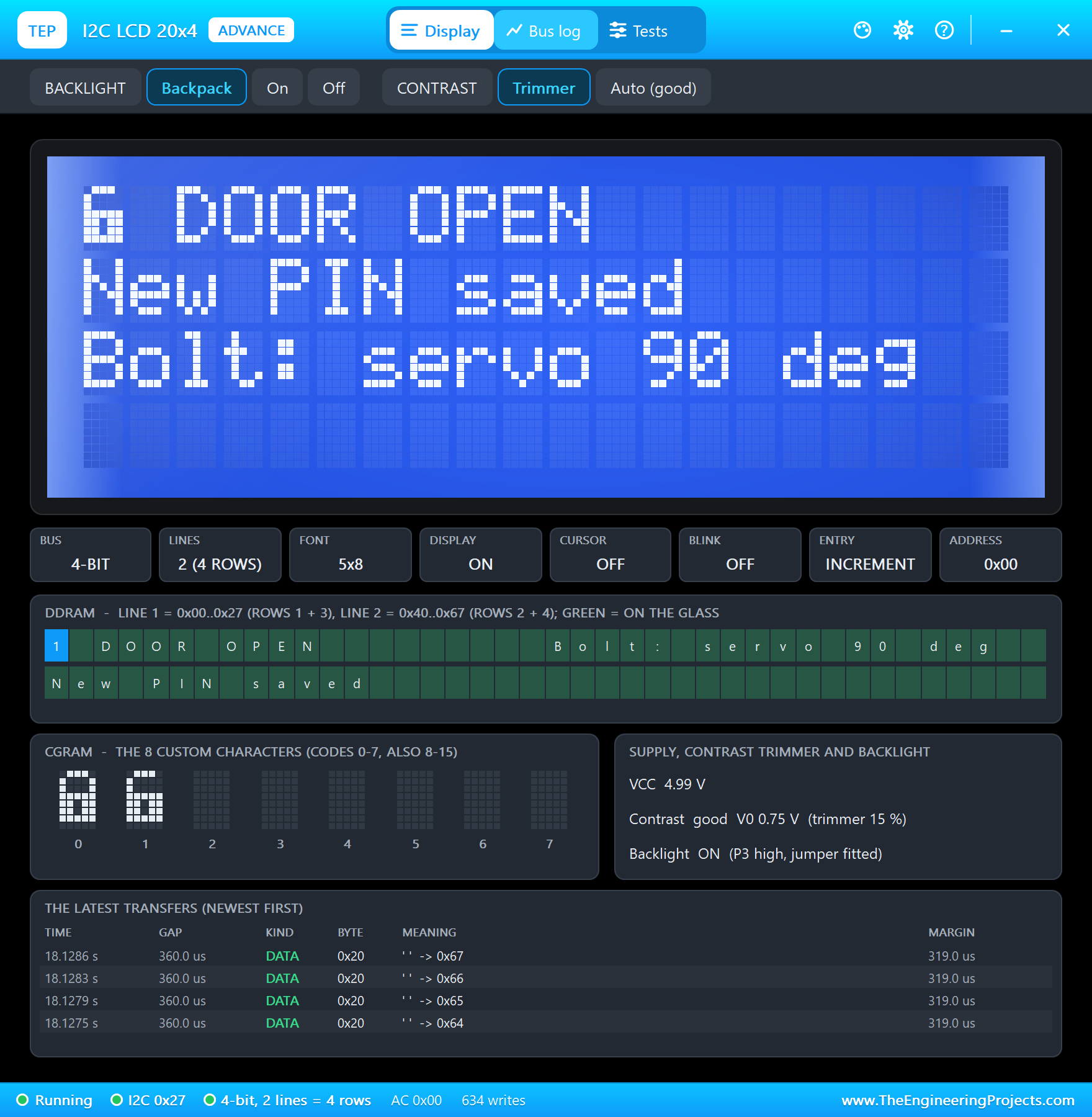
[  21.4 s] key #
[  21.4 s] PIN ok - door open (servo 90 deg)
[  26.4 s] door locked (servo 0 deg) - after 5 s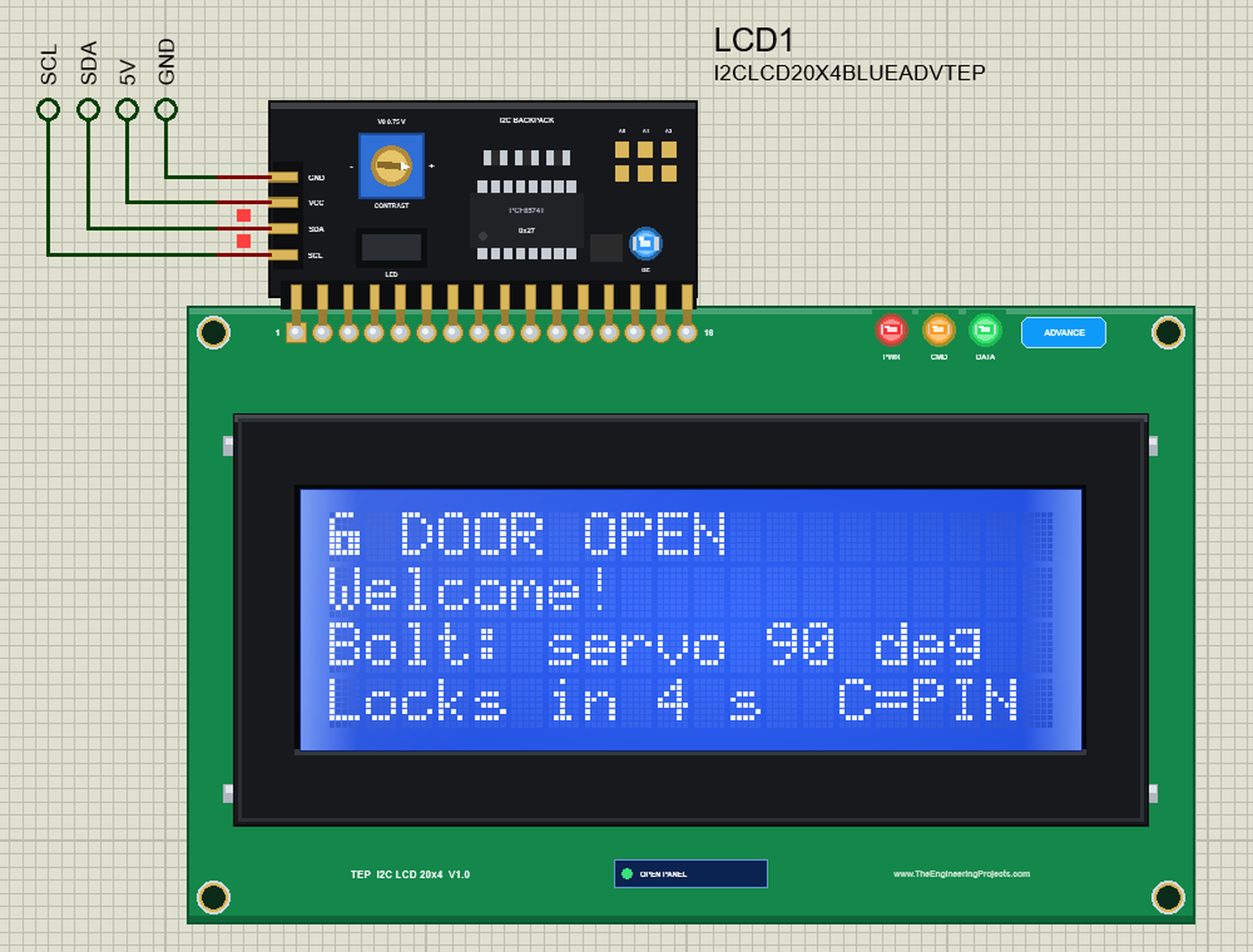
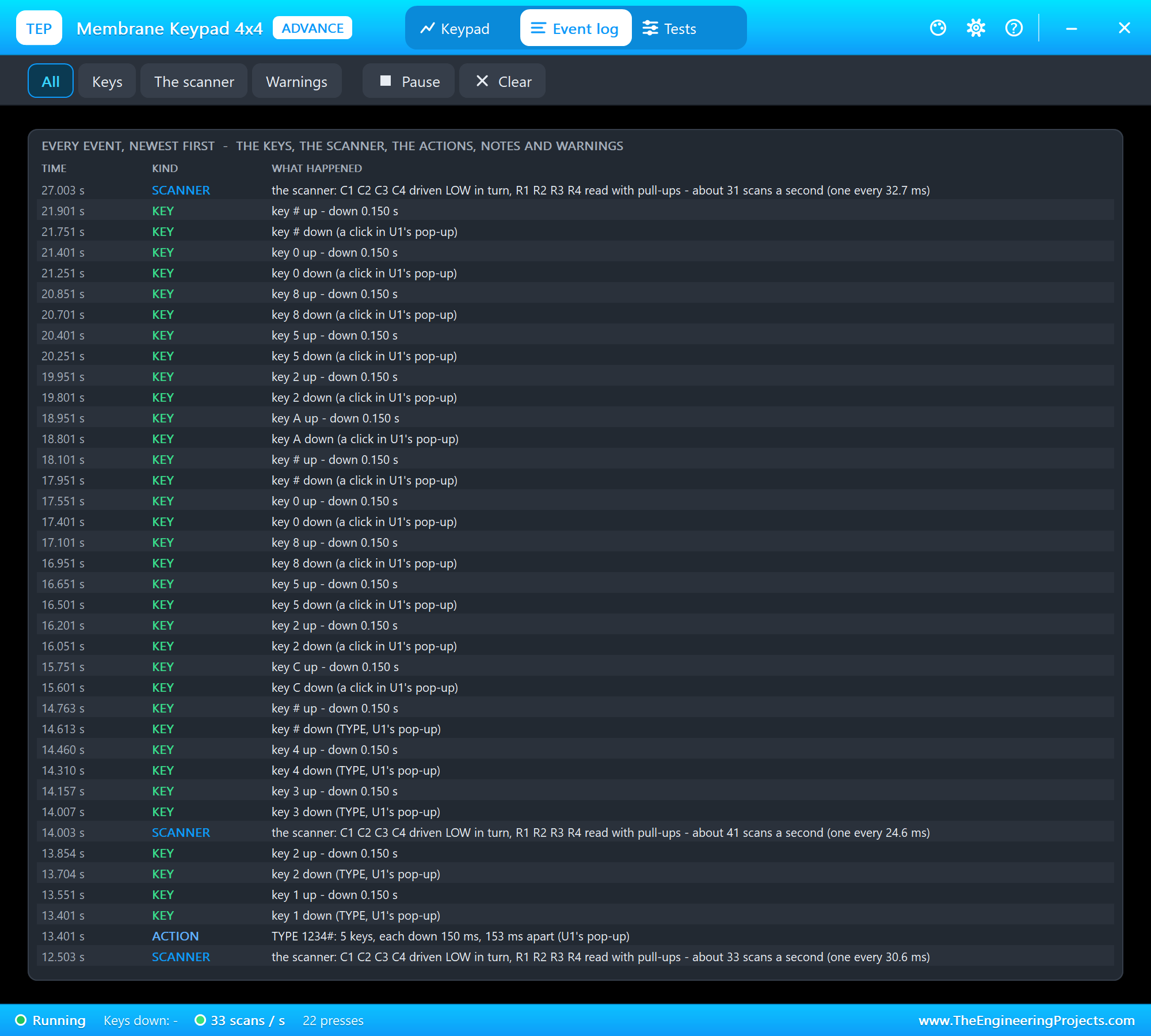
The keypad's Event log has the whole story from the keypad's side: each key down and up with its time, whether a click or TYPE pressed it, and the scanner's rate every few seconds - and no warning, so no press was lost:
The Pi Terminal
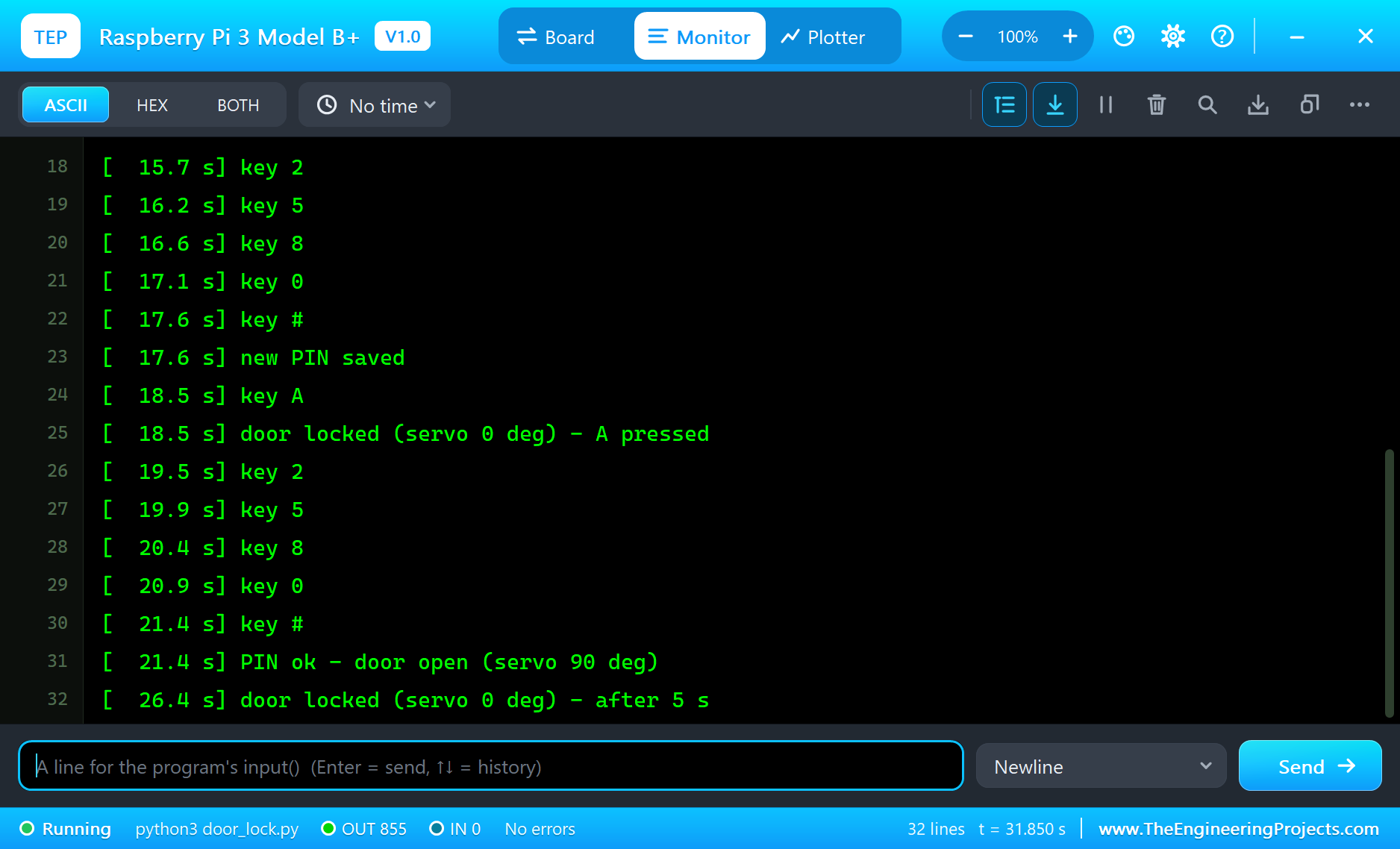
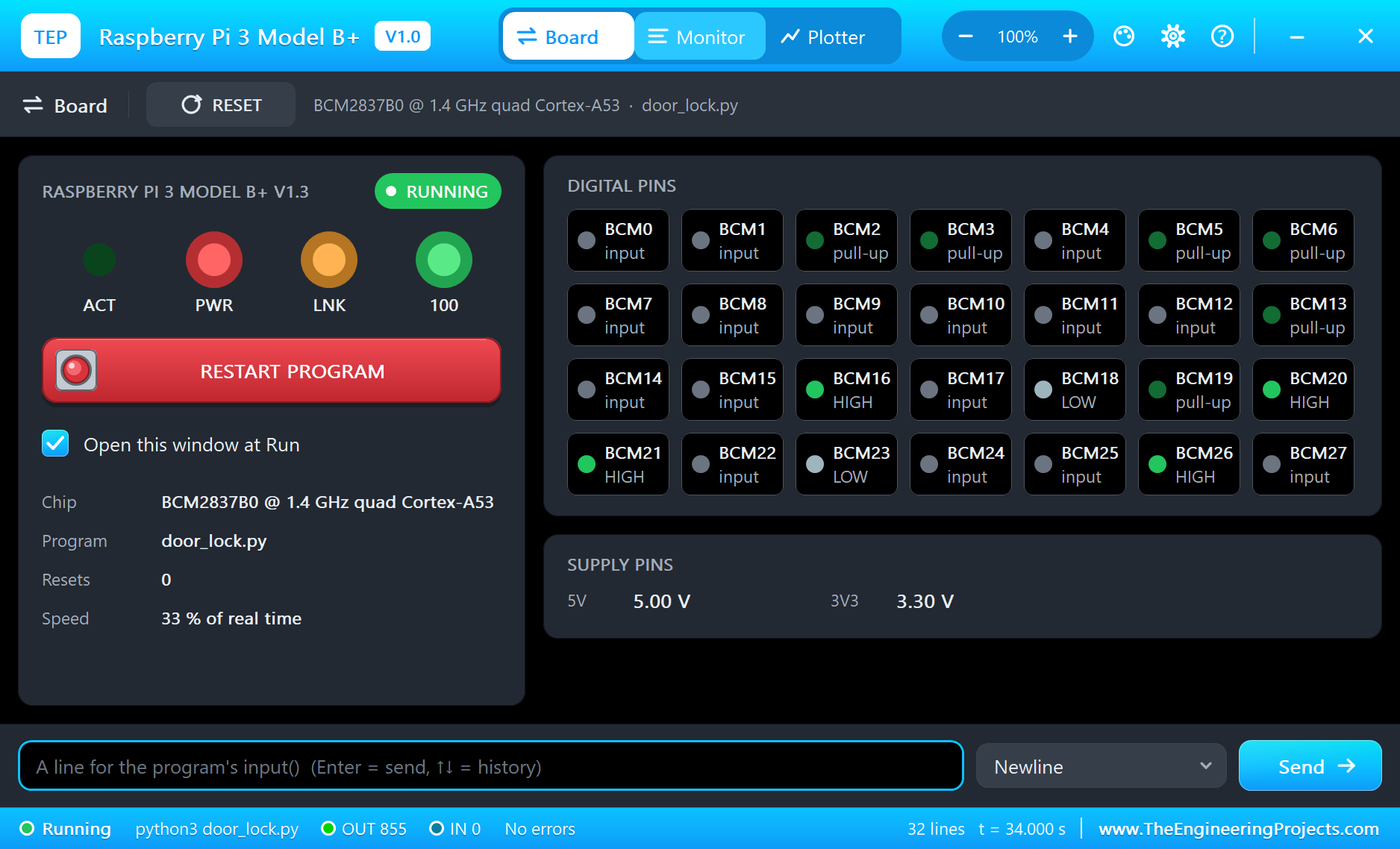
The Pi Terminal opens at Run, in the look of our TEP Serial Monitor Advance for Proteus - our own TEP header, no Windows title bar. Its Monitor tab shows the program's output (OUT), errors (ERR) and the lines you type for input() (IN). The Board tab shows the board live - the rows pulled up, the columns HIGH between scans, GPIO18 for the servo, GPIO23 for D1 - the LEDs and the supply pins, and RESTART PROGRAM starts the program again:
Properties of the Raspberry Pi 3 Model B+
| Property | What it does |
|---|---|
| PROGRAM | the Python program (default blink.py; a name next to the project or a full path) |
| AUTOOPEN | the Pi Terminal at Run: YES (default) or NO |
| ETHERNET | the cable at Run: IN (default: eth0) or OUT (the network on wlan0) |
| WIFISSID, WIFIPASS | the network wlan0 joins and its password (default TEP-WiFi, 12345678) |
| PYTHON, RUNTIME | a python.exe and a runtime folder of your own (empty: the TEPPi folder) |
Your own programs go next to your project; set PROGRAM to the file's name. The default blink.py blinks an LED on GPIO17:
from time import sleep
from gpiozero import LED

led = LED(17)
while True:
    led.on()
    print('LED on')
    sleep(0.5)
    led.off()
    print('LED off')
    sleep(0.5)
Troubleshooting
- No key reaches the program: the keypad's pop-up tells why - NO SCAN when no column is driven LOW in turn (check the column pins), a row "not pulled up" when the rows were set up without PUD_UP. Keep scanning while the program waits: a long time.sleep() between scans loses short presses.
- The LCD stays blank or shows blocks: the backpack answers at 0x27 (its ADDRESS property), VCC needs 5V, and the program must send the 4-bit start before its first command.
- OSError: [Errno 121] Remote I/O error: no part answers at that address - check the LCD's VCC, GND, SDA and SCL.
- The servo does not move: SIG goes to GPIO18 and V+ to 5V; AngularServo needs min_pulse_width 0.5 ms and max_pulse_width 2.5 ms for the SG90's range.
- The TEPPi folder was not found: copy it from Proteus Model Files into MODELS, or next to your project.
Things to Know Before Using a Real Raspberry Pi
- The keypad: wire it straight to the GPIOs - it is only switches, and the Pi's pull-ups do the rest. Leave the idle columns HIGH or make them inputs, never drive two columns against each other.
- The I2C backpack: most backpacks have pull-ups to their own VCC, so at 5 V they pull SDA and SCL to 5 V - more than the Pi's 3.3 V pins should see. Remove those pull-ups or use a level shifter; turn on I2C with
sudo raspi-configand check the address withi2cdetect -y 1(0x27 or 0x3F). - The servo: give it its own 5 V supply with the grounds joined - a servo starting up can pull the Pi's 5 V down. Software PWM jitters on a busy Pi; gpiozero's pigpio pin factory makes steadier pulses.
- A real lock: keep the PIN in a file instead of the program, and never let a servo be the only thing between a door and the street.
Limitations of the Simulation
- The board does not run Raspberry Pi OS: there is no desktop, no shell commands and no apt. It runs one Python program; its threads take turns, so the four cores are not modelled.
- Bluetooth, the 5 GHz band, the Gigabit speed and PoE are not modelled, and the board uses one network interface at a time - eth0 with the cable in, or wlan0.
- HDMI, the A/V jack, the camera and display connectors, USB, the microSD card's files and a HAT's ID EEPROM are drawn but not simulated; GPIO18 makes software PWM, not hardware PWM.
- C programs and Python packages with C code do not run. Pure Python code takes no simulation time; only the pin, bus, sleep and network calls move the clock.
- The router, the board's address, the boot time and the Pi Terminal are TEP additions.
- Raspberry Pi is a trademark of Raspberry Pi Ltd; this library is not made or endorsed by Raspberry Pi Ltd or Labcenter.
- Tested in Proteus 8.5 in October 2026 (the demo as shipped, about 33 % of real time on our PC with the two pop-ups and the Pi Terminal open). Proteus 7 is not supported.
So, that was all about the Raspberry Pi 3 Model B+ Library for Proteus. I hope it helps you try a keypad project on the Pi before you touch the hardware - a matrix scanned with RPi.GPIO, an LCD driven byte by byte over I2C and a servo moved by gpiozero. The next boards of our Raspberry Pi series bring other modules, and a web page served by the Pi. If you use the library in a project, please share it in the comments or in our forum, and if you have any questions, ask in the comments and I will help you out. Till the next tutorial, take care and have fun!

Comments
0