


Raspberry Pi 3 Model A+ Library for Proteus: WiFi Web Page, MAX7219


Hello friends, I hope you all are doing great. Today, I am going to share the Raspberry Pi 3 Model A+ Library for Proteus. The Raspberry Pi 3 Model A+ is the small brother of the Pi 3 Model B+: the same BCM2837B0 at 1.4 GHz and the same dual-band Wi-Fi on a square board with one USB port and no Ethernet. With this library the board runs your Python program against the circuit in Proteus 8.5, on our virtual Wi-Fi.
Raspberry Pi 3 Model A+ Library for Proteus
Latest version: V1.0 (October 2026, this tutorial)
Helping Tools
- Laptop WiFi Monitor: a laptop on the Wi-Fi of your design: a browser, a TCP / UDP terminal and ping
- Mobile WiFi Monitor: a smartphone that opens the pages of your board and sends it commands
- LCD Library for Proteus V3.0: 16x2, 20x4 and I2C LCDs to show your readings
This is the sixth library of our Raspberry Pi series, and every library of the series connects the Pi to a different module. This time the Pi also serves a web page: a 4-in-1 MAX7219 LED matrix on SPI shows a message, a 28BYJ-48 stepper on a ULN2003 board turns a small turntable, and a laptop and a phone on the same Wi-Fi set both from the page - which also shows what the board is doing.
NOTICE: this library does not run Raspberry Pi OS. It runs your Python program, with the same Python libraries a Pi uses for its pins, its buses and its network, in step with the simulation. Your feedback is the fuel that keeps us going, so please tell us what you think in the comments below or in the Raspberry Pi 3 Model A+ board of our forum. And if our free libraries help you, you can buy us a coffee. So, let's get started with the Raspberry Pi 3 Model A+ Library for Proteus:
What is the Raspberry Pi 3 Model A+?
The Raspberry Pi 3 Model A+ came out in November 2018 at 25 dollars. It has the shape of the Pi 1 Model A+ - 65 x 56 mm, the four mounting holes of the B+ boards, so the same cases and HATs fit - with the brains of the Pi 3 Model B+: the BCM2837B0, four 64-bit Cortex-A53 cores at 1.4 GHz under a metal heat spreader, and the shielded Wi-Fi / Bluetooth module with 802.11ac on 2.4 and 5 GHz and Bluetooth 4.2.
To keep it small and cheap the A+ drops what a B+ board carries on its right edge: there is one USB-A port and no Ethernet, so the network is Wi-Fi only, and it has 512 MB of RAM. The full 40-pin header, HDMI, the CSI camera and DSI display connectors, the 4-pole A/V jack and the microSD slot stay. It is a favourite for projects that live inside a box - a sign, a robot, a sensor node - and talk to the world over Wi-Fi.
| Raspberry Pi 3 Model B+ (2018) | Raspberry Pi 3 Model A+ (2018) | |
|---|---|---|
| Processor | BCM2837B0, four Cortex-A53 cores at 1.4 GHz | the same |
| RAM | 1 GB | 512 MB |
| Wi-Fi and Bluetooth | 802.11ac (2.4 and 5 GHz), Bluetooth 4.2 | the same |
| Ethernet | Gigabit over USB 2.0, PoE header | none |
| USB | 4 x USB 2.0 | 1 x USB 2.0 |
| Board | 85 x 56 mm | 65 x 56 mm, the same mounting holes |
| Price at launch | 35 dollars | 25 dollars |
In Proteus, our Raspberry Pi Model B Library for Proteus covers how the board runs a Python program: the program and Proteus work in lockstep, every sleep, pin wait and bus transfer moves the simulation clock, and the Python libraries for the pins answer as on a Pi. Our Raspberry Pi 1 Model B+ Library for Proteus added the 40-pin header and a touch TFT, the Raspberry Pi 2 Model B Library for Proteus four I2C parts and an OLED, the Raspberry Pi 3 Model B Library for Proteus Wi-Fi and a web page, and the Raspberry Pi 3 Model B+ Library for Proteus a keypad, an I2C LCD and a servo. The A+ is on Wi-Fi only and brings SPI and a stepper.
Features of the Raspberry Pi 3 Model A+ Library for Proteus
- The board as it looks: the square A+ at its real size with the 40-pin header, the Wi-Fi module's shield can, the silver BCM2837B0, the single USB-A on the right edge, the MXL7704 power chip, PWR and ACT at the left edge, HDMI, the camera and display connectors, the A/V jack and the microSD card.
- Wi-Fi only: wlan0 joins the network in the WIFISSID and WIFIPASS properties - our router TEP-WiFi by default - and gets 192.168.1.51; sockets and http.server work on it.
- Your Python program: any .py file in the PROGRAM property; Python 3.11 and its standard library are included.
- SPI with spidev: SPI0 on GPIO10, GPIO11 and GPIO9 with CE0 and CE1, modes 0 to 3, up to 8 MHz.
- RPi.GPIO and gpiozero: outputs, inputs, pull-ups and pull-downs, one pin or a list of pins, edges with callbacks, software PWM, and gpiozero's devices, CPUTemperature among them.
- I2C, the UART, 1-Wire and the DHT sensors: smbus2, pyserial and the kernel's files, as on the earlier boards.
- Threads: a web server, a display loop and a motor loop run side by side, every wait in simulation time.
- The Pi Terminal: the output, the errors, a line for input(), and a Board tab with the GPIOs, the LEDs and the supply pins - with our TEP header, no Windows title bar.
- A complete package: about 13.4 MB with the board, Python, the runtime, the matrix, stepper and monitor libraries and the demo, without the source code of the models.
The Raspberry Pi 3 Model A+ in Proteus
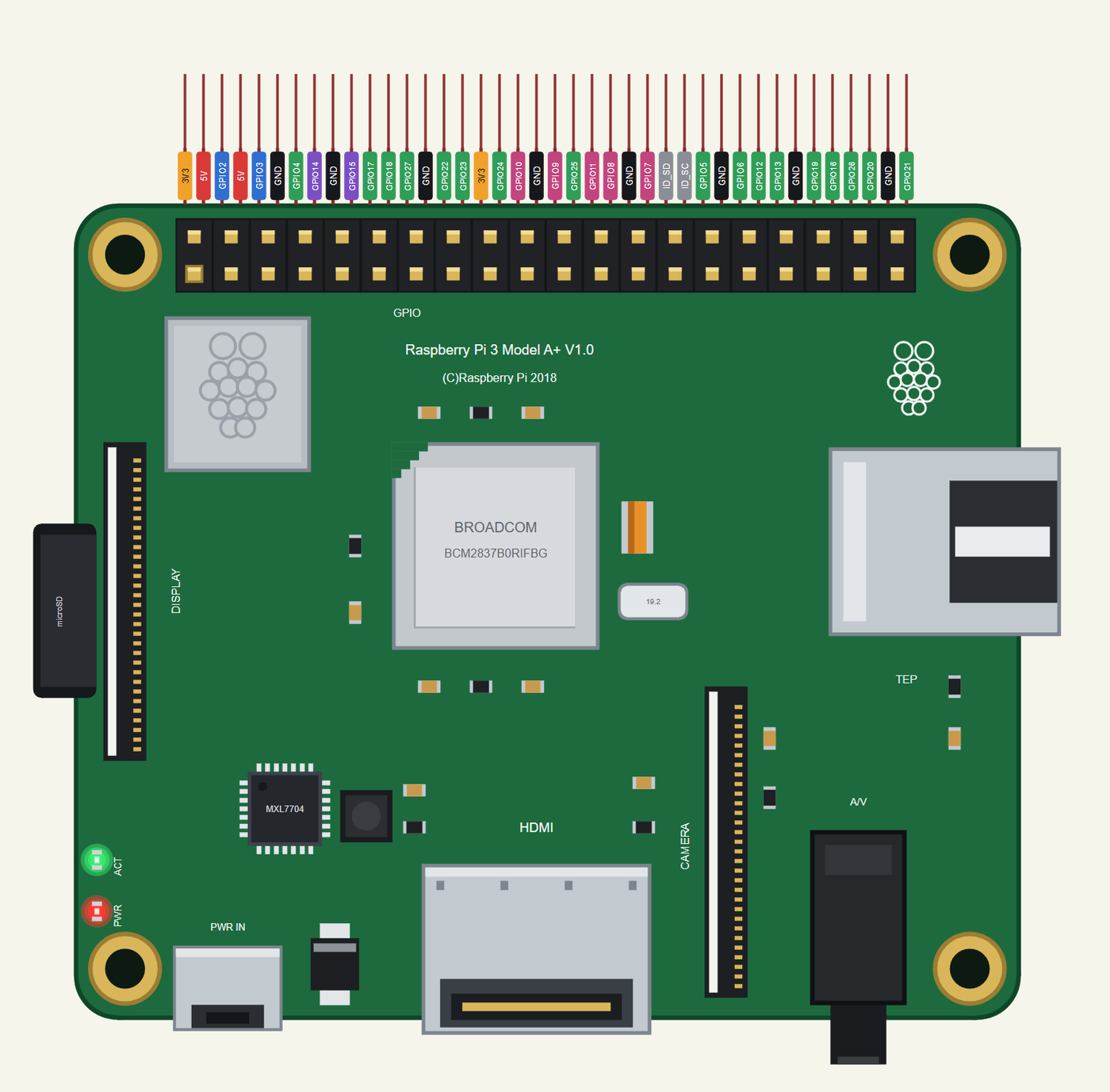
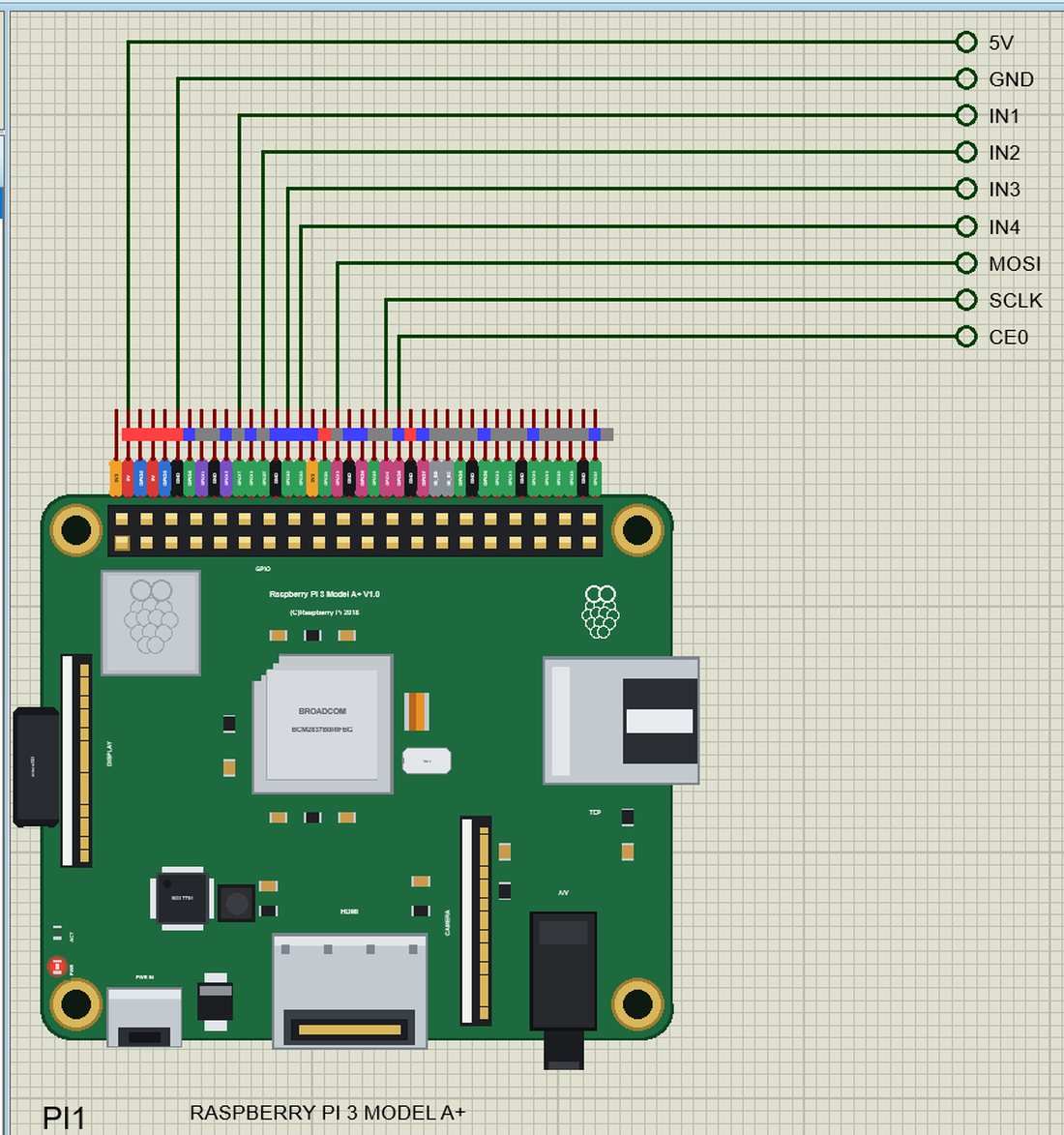
Search RASPBERRY in Pick Devices; the device RASPBERRY PI 3 MODEL A+ is in TEPRPI3AP.LIB (Microprocessor ICs, Raspberry Pi), with the prefix PI. The 40 pins leave the top edge as one comb, each pin above its column of the header, with a tag in the colour of its kind: 5V red, 3V3 orange, GND black, GPIO green, I2C blue, SPI pink, UART purple and the ID pins grey. Click the HDMI socket or the processor to open the Pi Terminal. There is no RJ45 and no ETHERNET property: the A+ is on Wi-Fi from the start.
Wi-Fi
At Run the board boots for half a second and wlan0 joins the network named in its WIFISSID property with the password in WIFIPASS - by default our router TEP-WiFi with 12345678, the network of our ESP32 boards, our other Wi-Fi parts and of the Laptop WiFi Monitor and the Mobile WiFi Monitor. 2.3 to 3.5 s after Run the Pi has 192.168.1.51 and the name raspberrypi.local. A wrong name or password shows up in the simulation log, and the program simply waits.
The 40-Pin Header
| Pins | Name | Pins | Name |
|---|---|---|---|
| 1 | 3V3 | 2 | 5V |
| 3 | GPIO2 (SDA) | 4 | 5V |
| 5 | GPIO3 (SCL) | 6 | GND |
| 7 | GPIO4 | 8 | GPIO14 (TXD) |
| 9 | GND | 10 | GPIO15 (RXD) |
| 11 | GPIO17 | 12 | GPIO18 |
| 13 | GPIO27 | 14 | GND |
| 15 | GPIO22 | 16 | GPIO23 |
| 17 | 3V3 | 18 | GPIO24 |
| 19 | GPIO10 (MOSI) | 20 | GND |
| 21 | GPIO9 (MISO) | 22 | GPIO25 |
| 23 | GPIO11 (SCLK) | 24 | GPIO8 (CE0) |
| 25 | GND | 26 | GPIO7 (CE1) |
| 27 | ID_SD | 28 | ID_SC |
| 29 | GPIO5 | 30 | GND |
| 31 | GPIO6 | 32 | GPIO12 |
| 33 | GPIO13 | 34 | GND |
| 35 | GPIO19 | 36 | GPIO16 |
| 37 | GPIO26 | 38 | GPIO20 |
| 39 | GND | 40 | GPIO21 |
The GPIOs work at 3.3 V; GPIO2 and GPIO3 have the Pi's 1.8 k pull-ups. The 5V and 3V3 pins power the modules wired to them. ID_SD and ID_SC are kept for a HAT's ID EEPROM, so leave them free, as on a real Pi.
Download Raspberry Pi 3 Model A+ Library for Proteus
Click the button below to download Raspberry-Pi-3-Model-A-Plus-Library-for-Proteus-v1.0.zip (about 13.4 MB with Python included, without the source code of the models):
Raspberry Pi 3 Model A+ Library for Proteus V1.0- README.txt: the device, Wi-Fi, installation, the demo, the header, the properties, troubleshooting and the limits.
- Proteus Library Files:
TEPRPI3AP.LIB(the Raspberry Pi 3 Model A+) and the demo's parts:TEPMAX7219.LIB,TEPULN2003.LIB(the driver and the motor),TEPLAPTOP.LIBandTEPMOBILE.LIB. - Proteus Model Files:
TEPNET.DLL(the Pi, the laptop, the phone and the network), the parts'TEPMAX7219.DLLandTEPULN2003.DLL, and the TEPPi folder - Python 3.11 and the TEP Pi runtime. - Python Code:
blink.pyandmessage_board.py. - Proteus Simulation: the demo project, its program and copies of the DLLs.
No Proteus yet? Read How to Download and Install Proteus 7 and 8. New to libraries? Follow How to Install a New Library in Proteus.
How to Install Raspberry Pi 3 Model A+ Library for Proteus
- Close Proteus and extract the whole zip file, for example to your Desktop.
- Copy the files from Proteus Library Files into the LIBRARY folder of Proteus (usually
C:\Program Files (x86)\Labcenter Electronics\Proteus 8 Professional\LIBRARY). - Copy everything from Proteus Model Files - the DLLs and the TEPPi folder - into the MODELS folder, replacing an older TEPNET.DLL and TEPPi folder (these are the newest; they also run our Model B, Model B+, Pi 2, Pi 3 and Pi 3 B+).
- Delete
TEPRPI3AP.IDXfrom the LIBRARY folder if it is there. - Start Proteus, press P and search for RASPBERRY.
There is nothing else to install: Python comes in the TEPPi folder, so you need no Python on your PC.
Demo: a Wi-Fi Message Board and Turntable
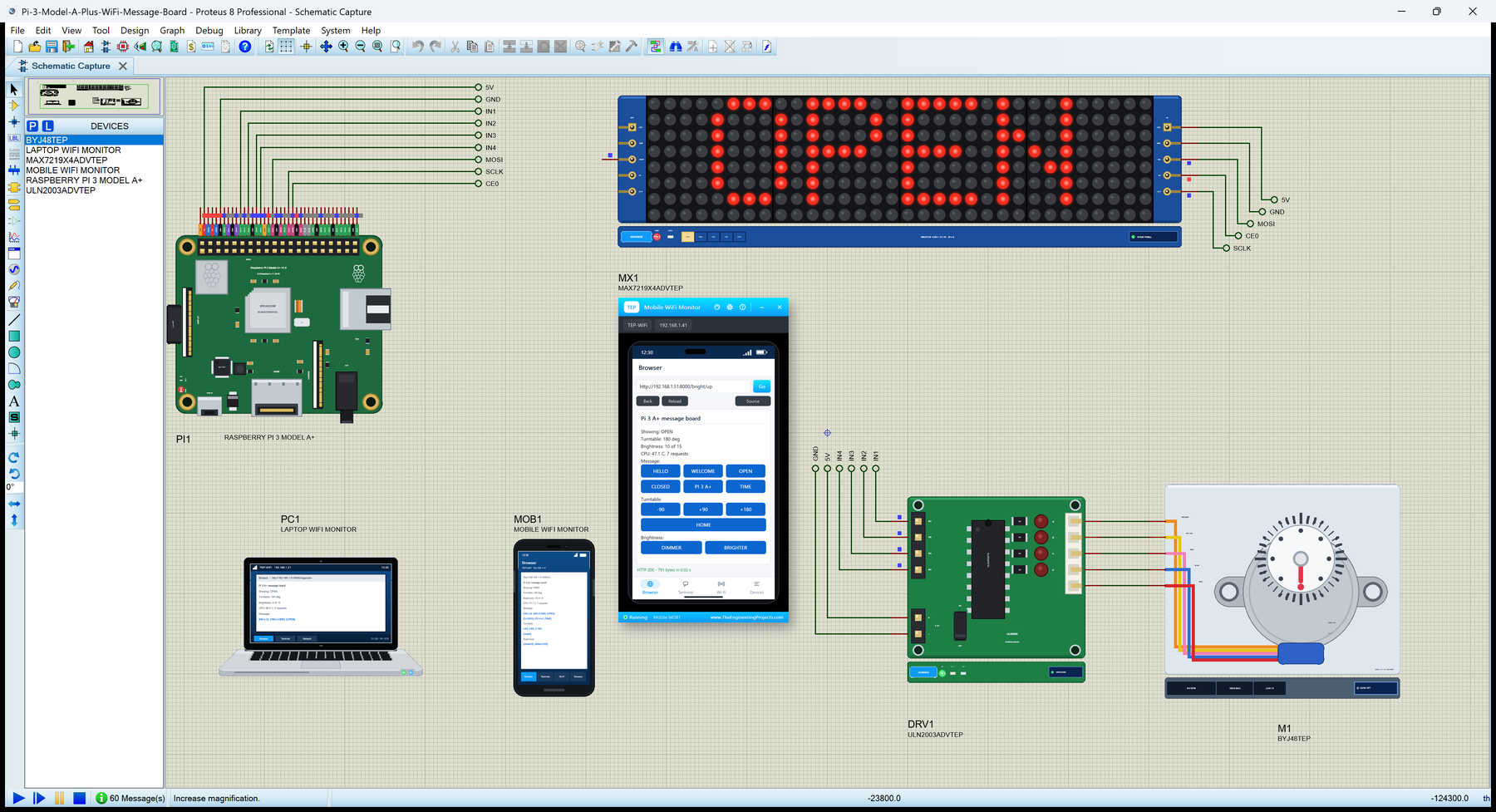
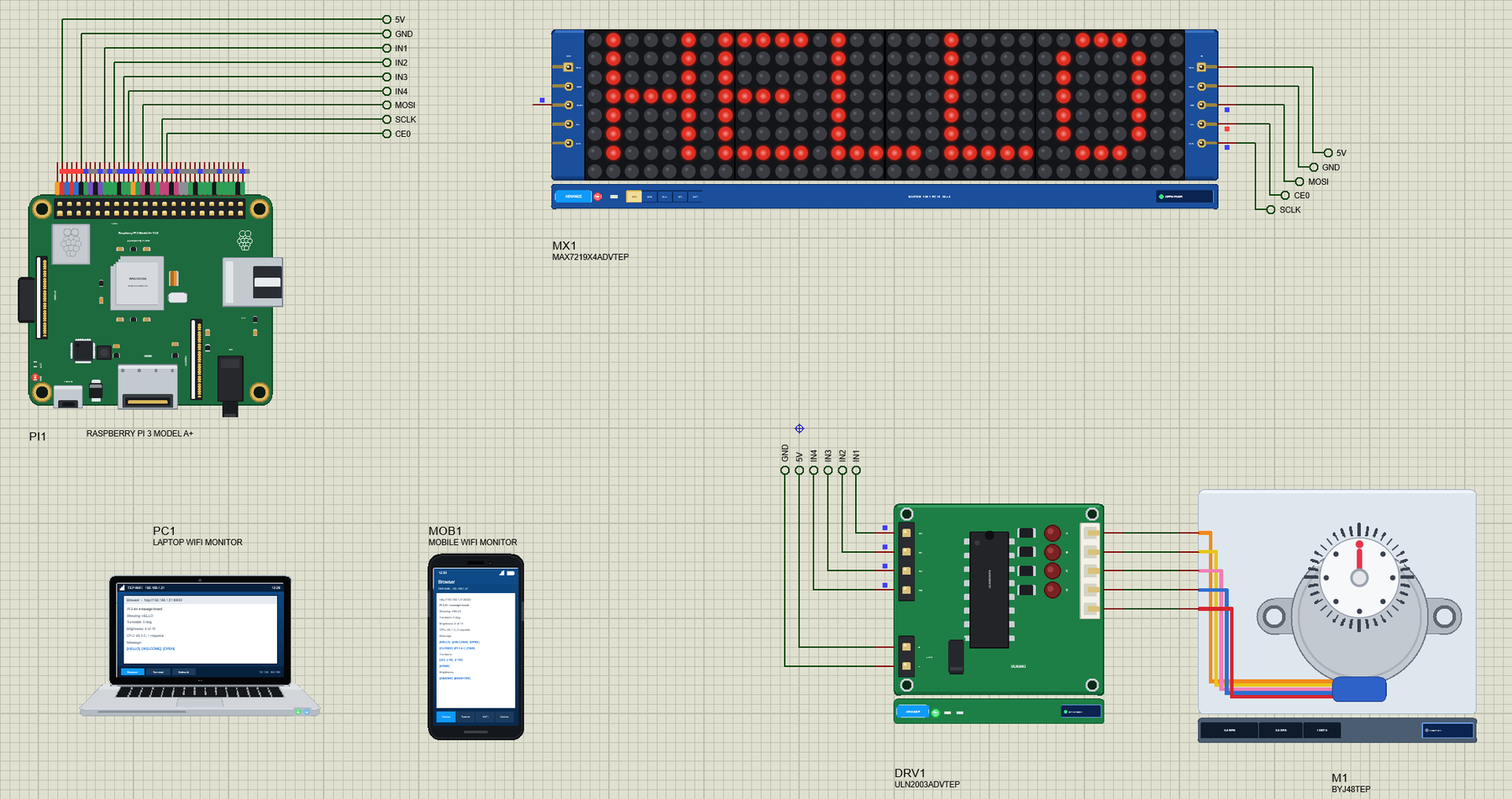
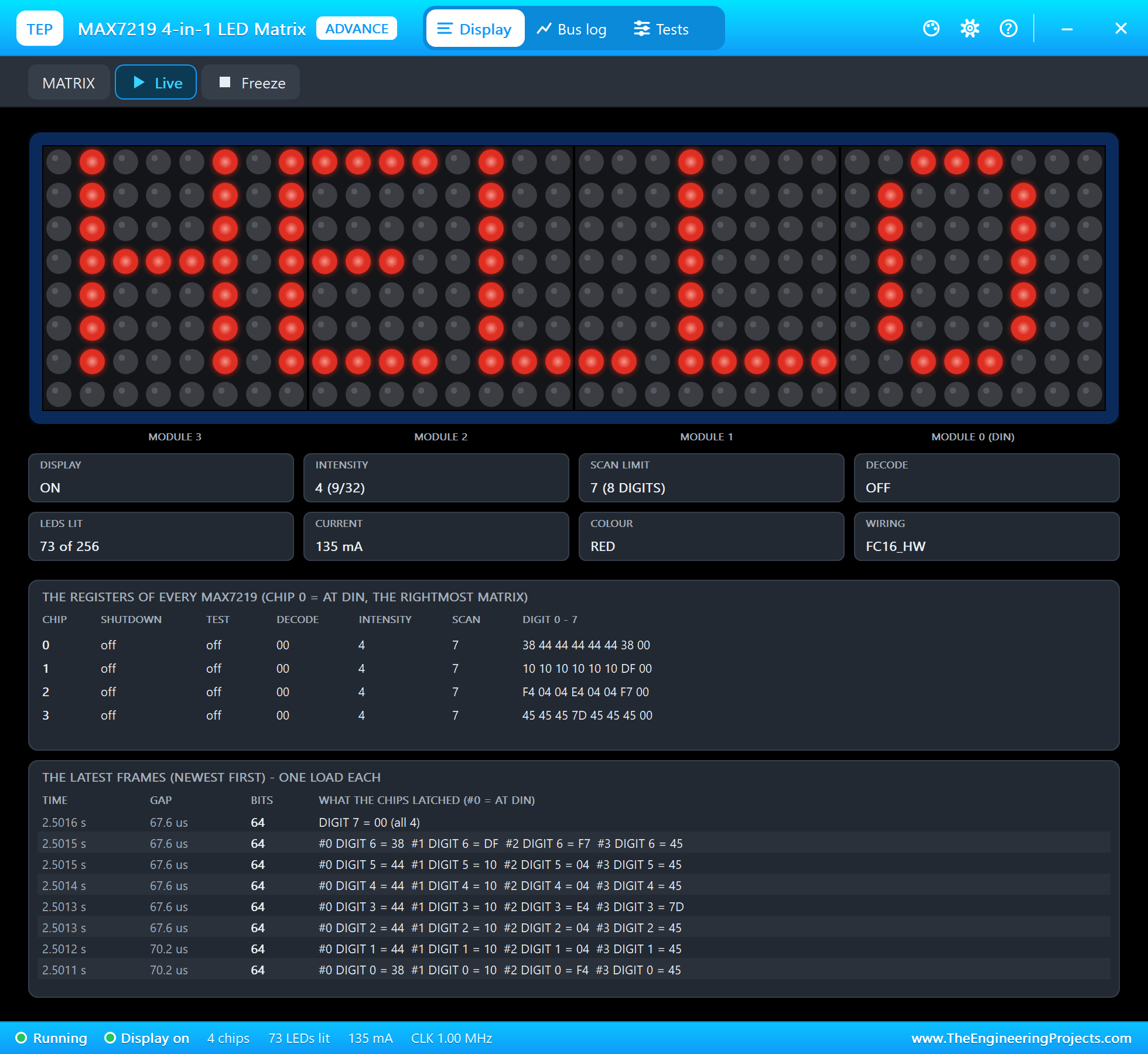
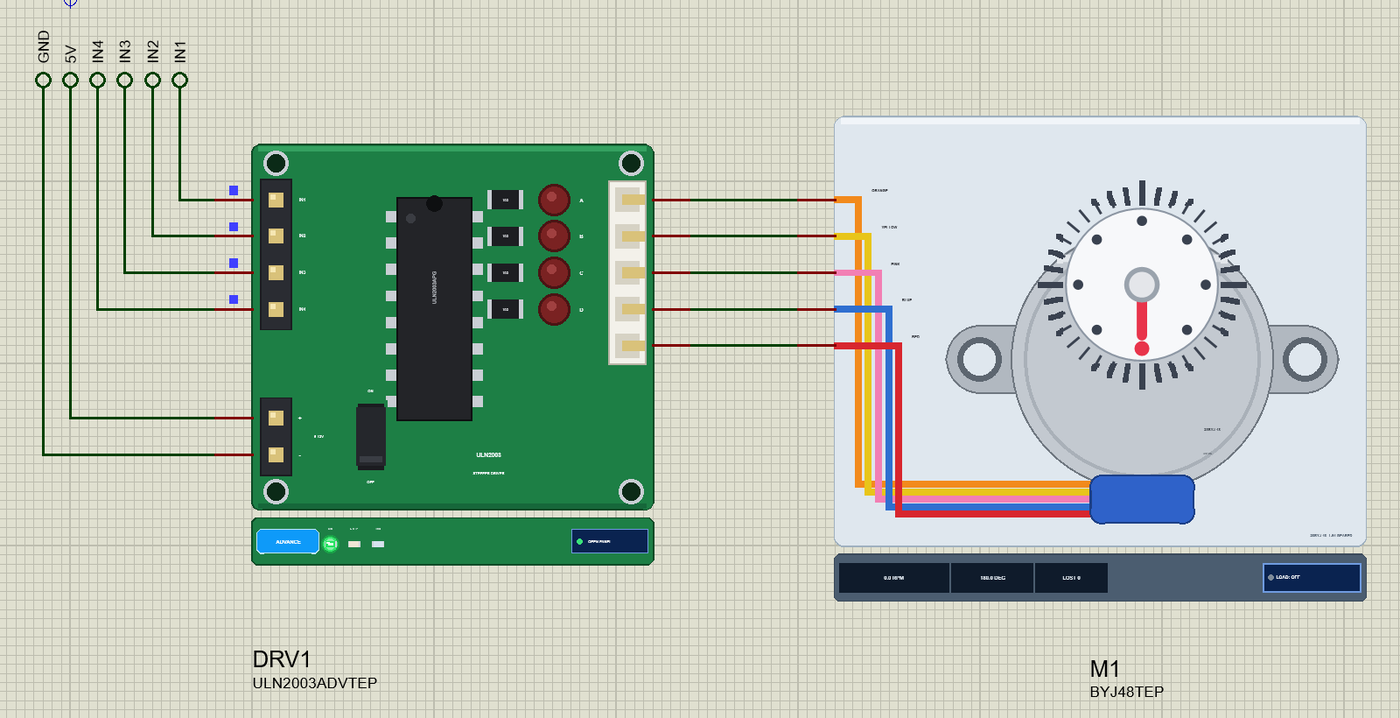
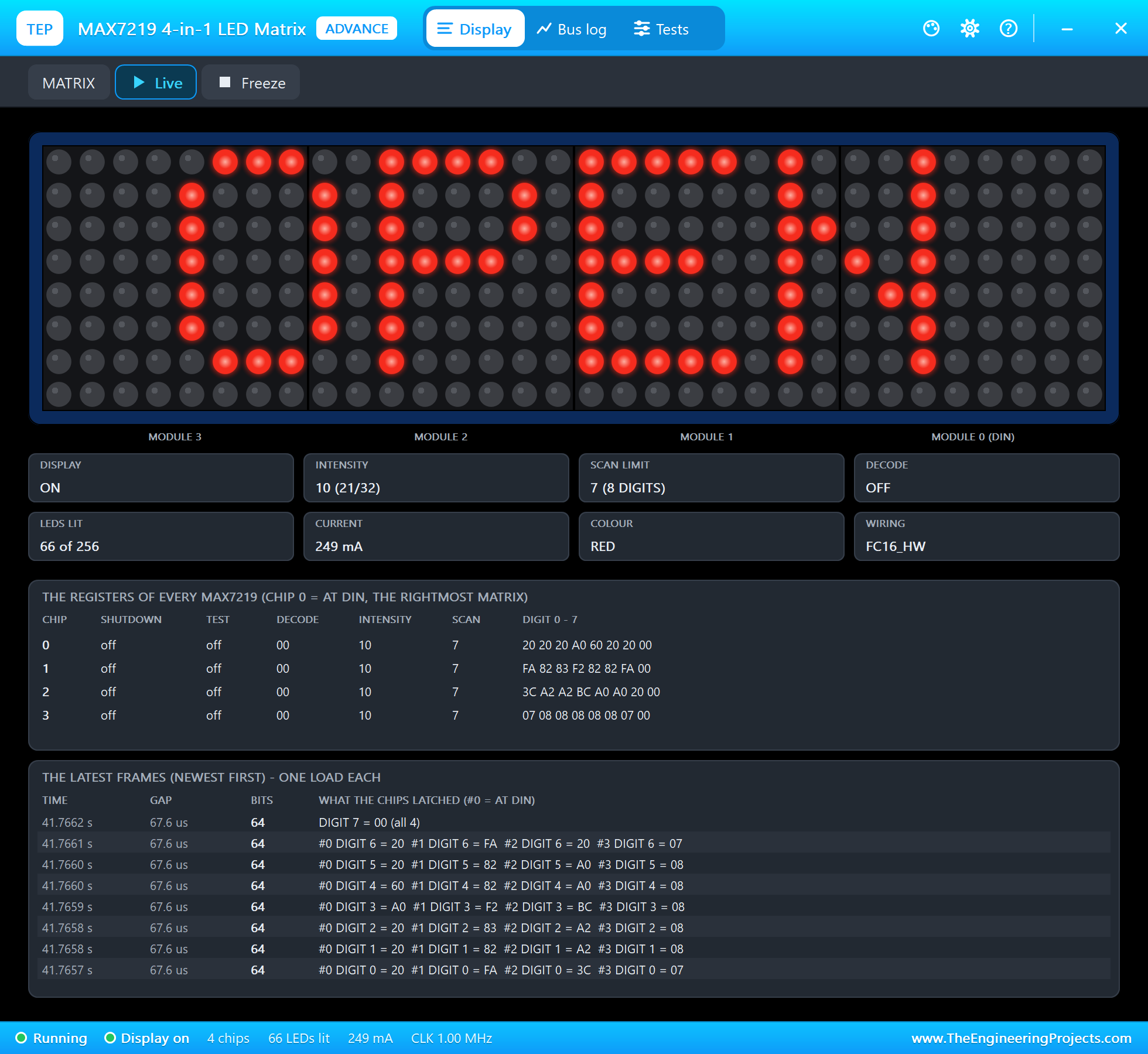
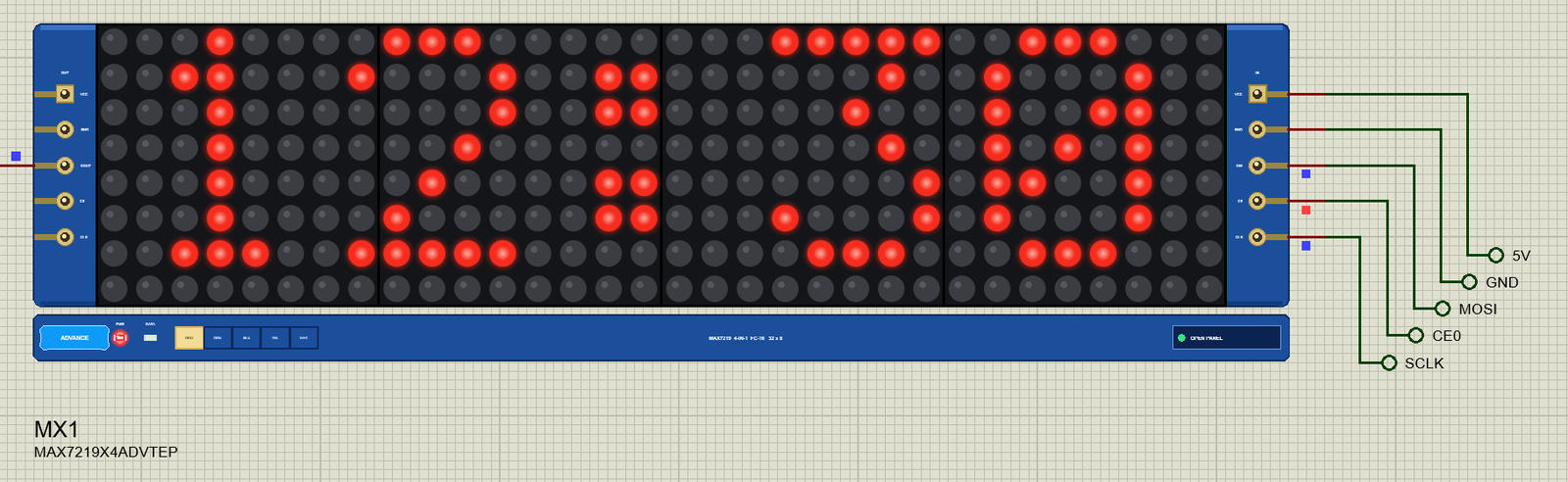
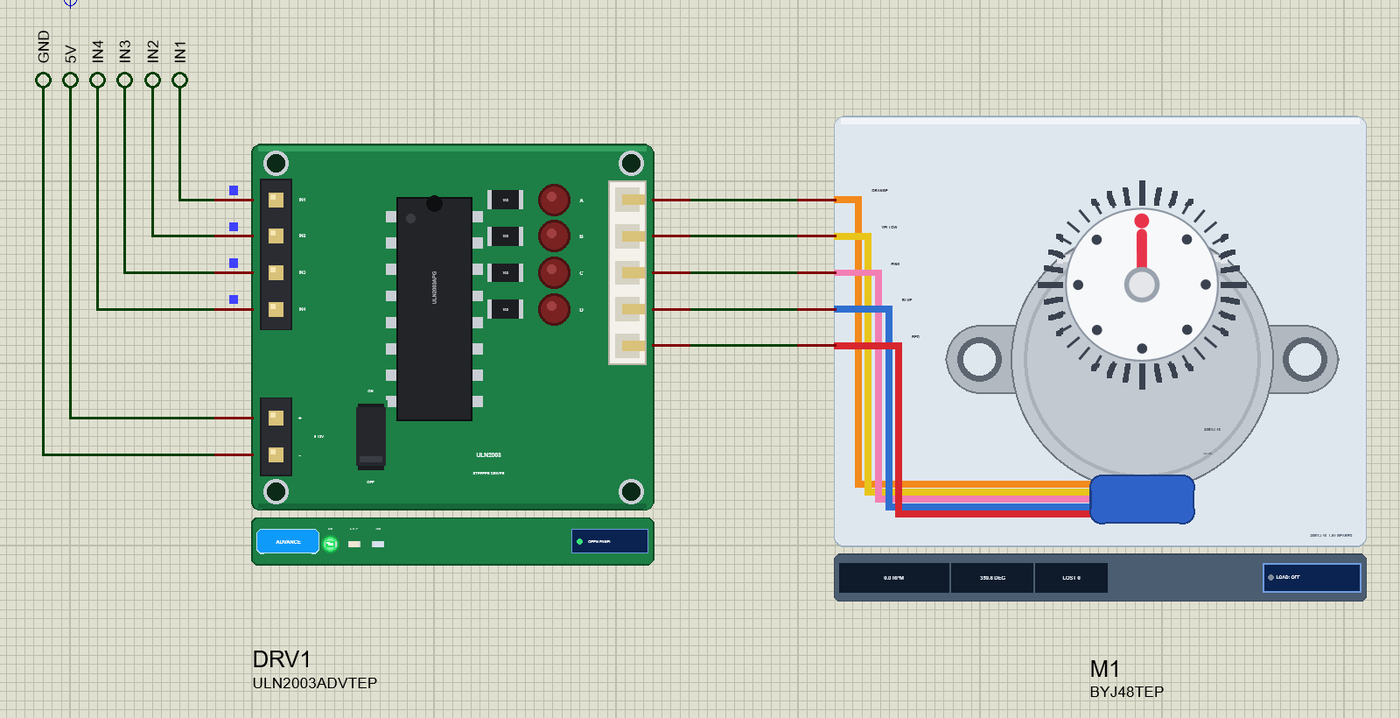
Open Pi-3-Model-A-Plus-WiFi-Message-Board.pdsprj. PI1 runs message_board.py on Wi-Fi. The parts come from our own libraries, each with its article: MX1 from the MAX7219 LED Matrix Library for Proteus, DRV1 and M1 from the 28BYJ-48 Stepper Motor and ULN2003 Library for Proteus. The matrix and the driver are the Advance versions: each opens a pop-up window at Run that shows what the Pi sends it. PC1 is the Laptop WiFi Monitor and MOB1 the Mobile WiFi Monitor, both on the same Wi-Fi network as the Pi.
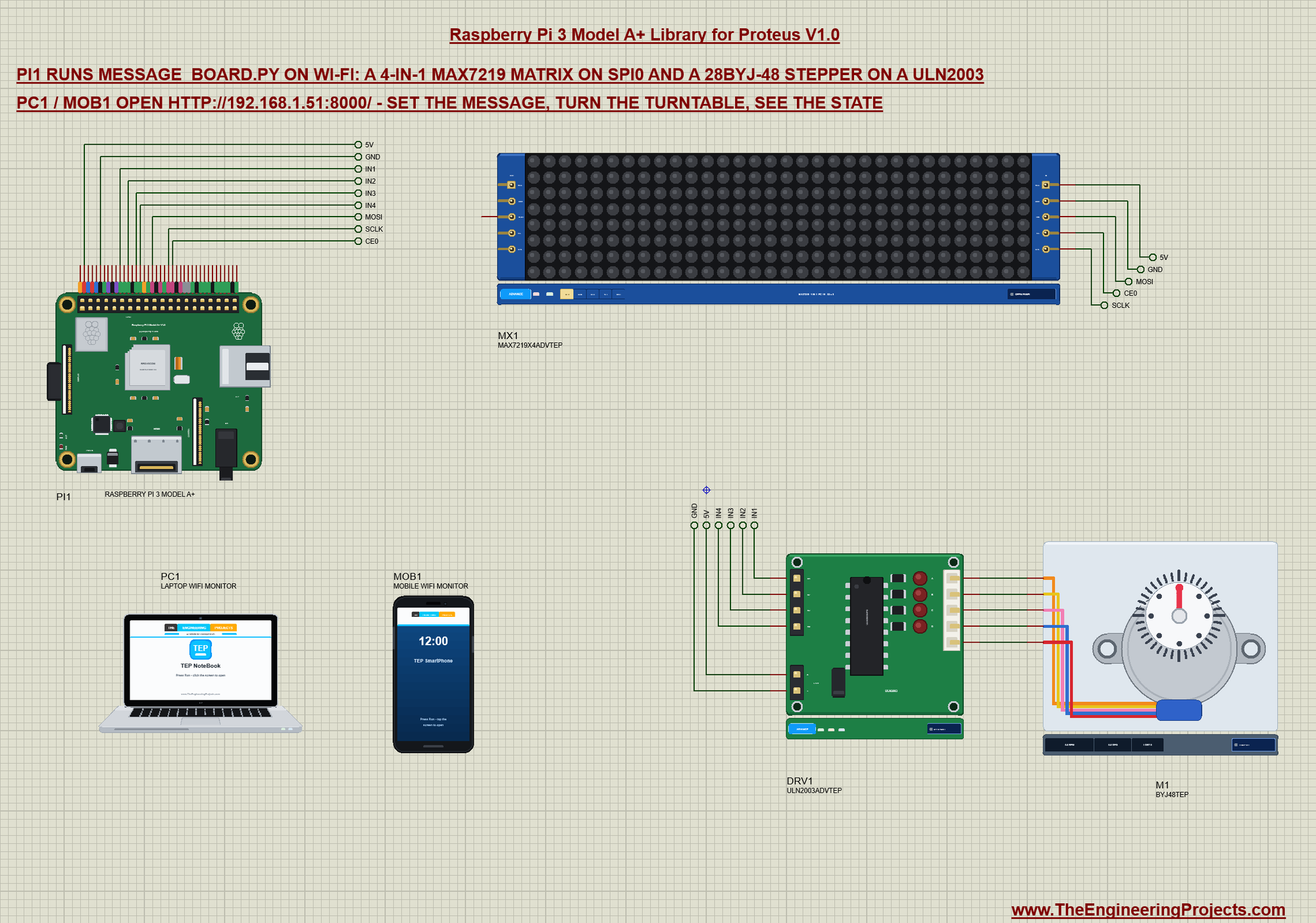
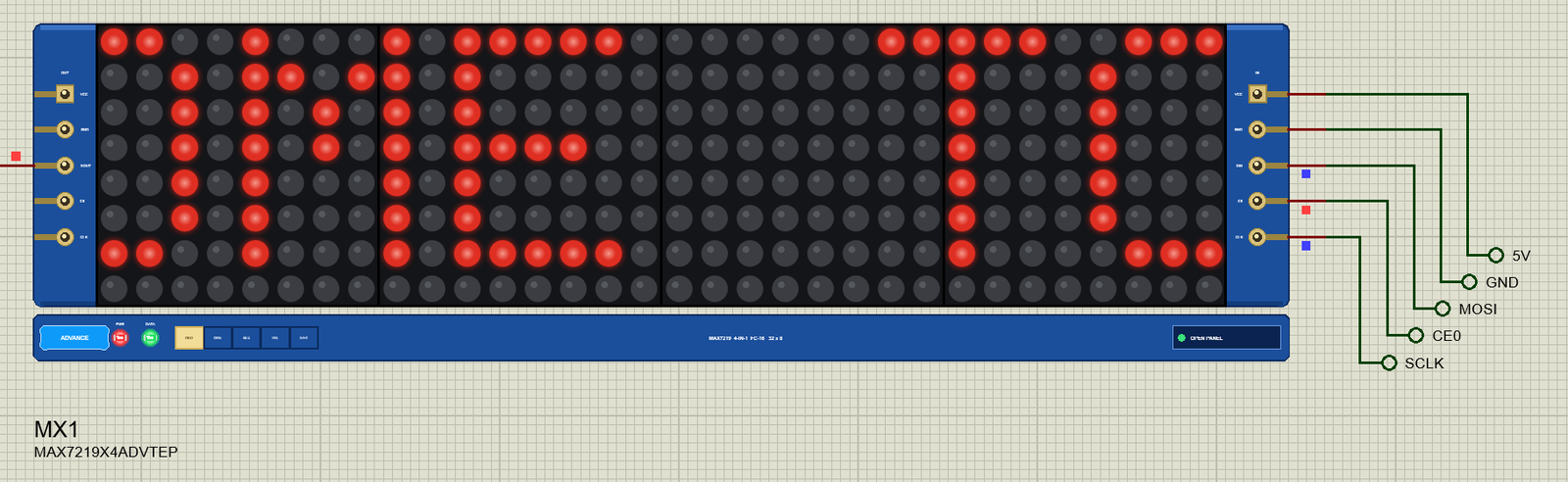
The MAX7219 drives an 8 x 8 LED matrix by itself - the Pi only sends it register writes over SPI - and four of them in a chain make the 32 x 8 "FC-16" module. The ULN2003 board has four Darlington drivers that sink the current of the stepper's four half-coils; the 28BYJ-48 is the small geared 5 V stepper that comes with it. Net labels connect everything:
| Part pin | Net label | Pi pin | What it does |
|---|---|---|---|
| MAX7219 VCC, GND | 5V, GND | 2, 6 | the four chips and their LEDs |
| MAX7219 DIN | MOSI | 19 (GPIO10) | the data, MSB first |
| MAX7219 CLK | SCLK | 23 (GPIO11) | the SPI clock, 1 MHz |
| MAX7219 CS | CE0 | 24 (GPIO8) | a rising edge latches every chip's 16 bits |
| ULN2003 IN1 - IN4 | IN1 - IN4 | 11, 13, 15, 16 (GPIO17, 27, 22, 23) | HIGH = that half-coil on |
| ULN2003 +, - | 5V, GND | 2, 6 | the motor's supply |
| ULN2003 A - D, COM | wires | - | the motor's orange, yellow, pink and blue wires and the red common |
The MAX7219 Matrix on SPI
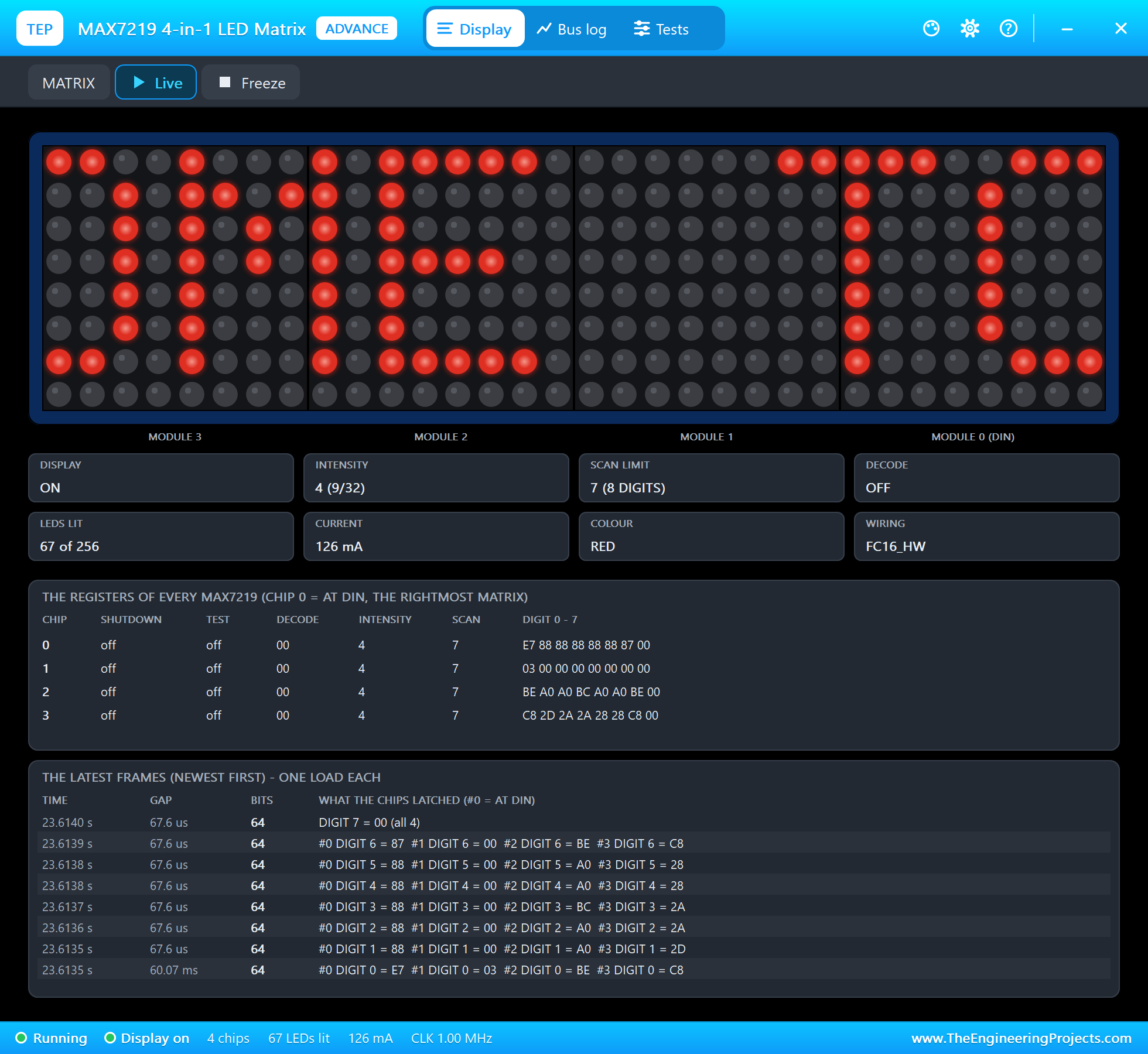
spidev opens SPI0 with CE0, sets 1 MHz and mode 0, and wakes the four chips: display test off, out of shutdown, all 8 rows scanned, no 7-segment decoding and a low intensity. A register write is two bytes, and four of them in one transfer reach the four chips:
        self.spi = spidev.SpiDev()
        self.spi.open(0, 0)                                     # SPI0, CE0
        self.spi.max_speed_hz = 1000000
        self.spi.mode = 0
        for reg, val in ((0x0F, 0), (0x0C, 1), (0x0B, 7), (0x09, 0), (0x0A, 4)):   # test off, on, 8 rows, no decode, intensity 4
            self.all(reg, val)
On an FC-16 module, the digit registers 1 to 8 are the rows from the top and bit 7 of a row is the module's leftmost column. The first 16 bits of a frame end up in the chip furthest from DIN - the leftmost module - so a row is sent left to right:
    def show(self, columns):
        """columns: 8 * n bytes, left to right, bit 0 = the top row."""
        for row in range(8):
            data = []
            for m in range(self.n):
                b = 0
                for c in range(8):
                    if columns[m * 8 + c] >> row & 1:
                        b |= 0x80 >> c
                data += [row + 1, b]
            self.spi.xfer2(data)
The text becomes columns with a small 5 x 7 font - five columns a character and one blank one between characters:
def columns_of(text):
    out = []
    for ch in text.upper():
        out += list(FONT.get(ch, FONT[' '])) + [0]
    return out
Up to five characters fit on the 32 columns and stand in the middle; a longer text scrolls from right to left, a column every 60 ms. The display loop runs in its own thread:
        if len(cols) > 32:
            frame = ([0] * 32 + cols + [0] * 32)[offset:offset + 32]
            matrix.show(frame)
            offset = (offset + 1) % (len(cols) + 32)
            time.sleep(0.06)
The Stepper
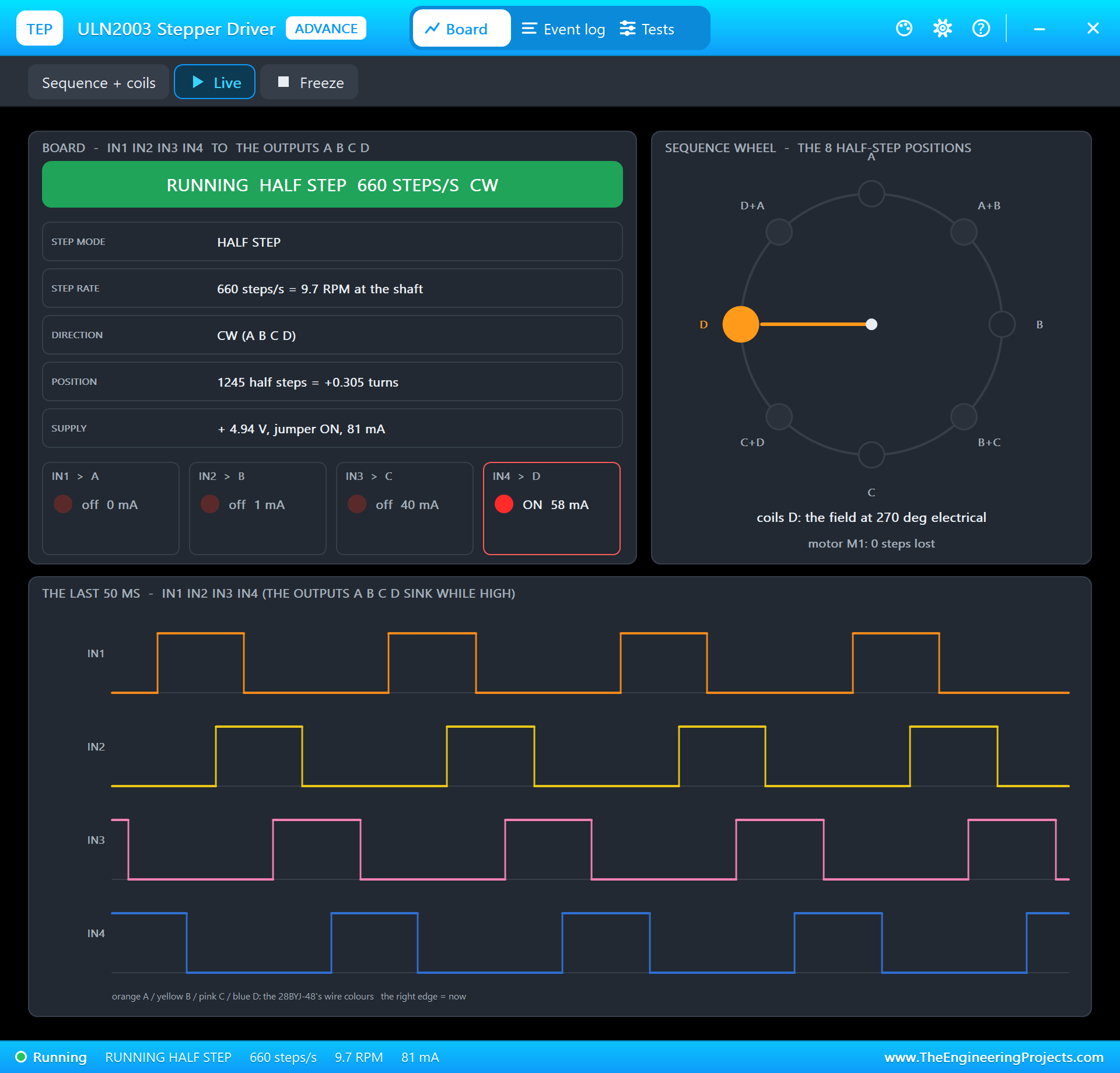
The 28BYJ-48 turns in half steps: the four coils switch in a sequence of eight states, one coil, then two, then the next one. Its gearbox is not exactly 64:1 - one turn of the output shaft takes 4075.77 half steps - and the program counts in half steps. A half step every 1.5 ms is about 10 RPM; for the first and the last 50 steps the program waits up to 4 ms, so the rotor keeps up and no step is lost:
COILS = [17, 27, 22, 23]                    # ULN2003 IN1 - IN4
HALF_STEPS = [(1, 0, 0, 0), (1, 1, 0, 0), (0, 1, 0, 0), (0, 1, 1, 0), (0, 0, 1, 0), (0, 0, 1, 1), (0, 0, 0, 1), (1, 0, 0, 1)]
STEPS_PER_TURN = 4075.77                    # half steps at the output shaft: 64 a rotor turn x the 63.684:1 gearbox
STEP_TIME = 0.0015                          # s a half step at full speed (about 10 RPM)
RAMP = 50                                   # half steps to speed up from 4 ms and to slow down again (no lost steps)
MESSAGES = {'hello': 'HELLO', 'welcome': 'WELCOME TO TEP', 'open': 'OPEN', 'closed': 'CLOSED', 'pi': 'RASPBERRY PI 3 A+'}
PORT = 8000
phase = (phase + (1 if delta > 0 else -1)) % 8
GPIO.output(COILS, HALF_STEPS[phase])
with lock:
state['pos'] += 1 if delta > 0 else -1
run += 1
edge = min(run, abs(delta)) # steps from the start or to the end, whichever is nearer
time.sleep(STEP_TIME + 0.0025 * max(0, RAMP - edge) / RAMP)The Web Page
The page shows the state - the message, the turntable's angle, the brightness, the CPU temperature from gpiozero's CPUTemperature and the number of requests - and has a line of links for each control:
PAGE = """<html><head><title>Pi 3 A+ message board</title>
<meta http-equiv="refresh" content="5; url=/"></head><body>
<p>Showing: <b>{text}</b></p>
<p>Turntable: {angle} deg{moving}</p>
<p>Brightness: {bright} of 15</p>
<p>CPU: {cpu:.1f} C, {requests} requests</p>
<p>Message: <a href="/msg/hello">HELLO</a> <a href="/msg/welcome">WELCOME</a> <a href="/msg/open">OPEN</a> <a href="/msg/closed">CLOSED</a> <a href="/msg/pi">PI 3 A+</a> <a href="/msg/time">TIME</a></p>
<p>Turntable: <a href="/turn/-90">-90</a> <a href="/turn/90">+90</a> <a href="/turn/180">+180</a> <a href="/home">HOME</a></p>
<p>Brightness: <a href="/bright/down">DIMMER</a> <a href="/bright/up">BRIGHTER</a></p>
</body></html>"""
Python's http.server calls do_GET for every request. The path says what to do: /msg/ picks a message (TIME puts the Pi's clock on the matrix), /turn/ adds an angle to the turntable's target, /home brings it back to 0, /bright/ changes the intensity. A lock keeps the three threads from reading the state while it changes:
            if path.startswith('/msg/'):
                key = path[5:]
                state['text'] = time.strftime('%H:%M') if key == 'time' else MESSAGES.get(key, state['text'])
            elif path.startswith('/turn/'):
                try:
                    state['target'] += round(int(path[6:]) * STEPS_PER_TURN / 360)
                except ValueError:
                    pass
            elif path == '/home':
                state['target'] = 0
            elif path == '/bright/up':
                state['bright'] = min(15, state['bright'] + 3)
            elif path == '/bright/down':
                state['bright'] = max(0, state['bright'] - 3)
At the start the matrix shows WI-FI while wlan0 joins the network; once the Pi has an address, the display and motor threads start and the server runs on port 8000 (a program without root rights cannot use port 80 on a Pi):
print('waiting for Wi-Fi ...')
while my_ip() == '0.0.0.0':
    time.sleep(0.5)
ip = my_ip()
threading.Thread(target=display, daemon=True).start()
threading.Thread(target=turntable, daemon=True).start()
print('serving on http://%s:%d/' % (ip, PORT))
HTTPServer(('', PORT), Handler).serve_forever()
Run the Demo
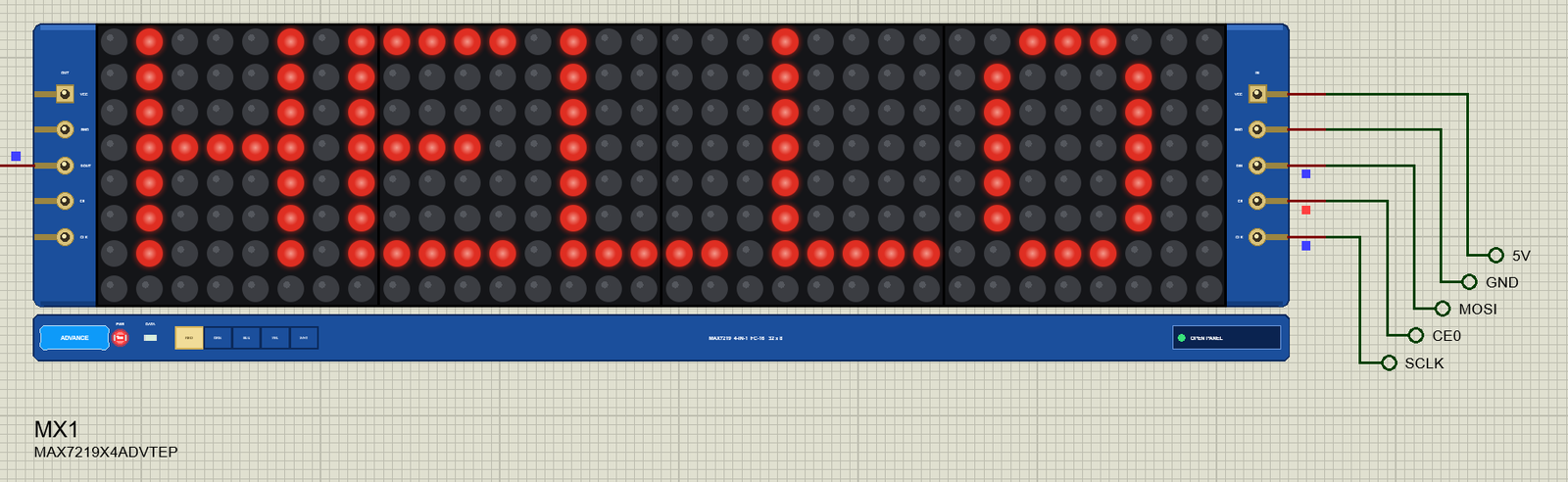
Press Run. The board boots, wlan0 joins TEP-WiFi, and 2.5 s after Run the program serves its page at 192.168.1.51 and the matrix says HELLO:
pi@raspberrypi:~ $ python3 message_board.py
message_board.py - Wi-Fi message board and turntable on the Raspberry Pi 3 Model A+
MAX7219 x4 on SPI0 (CE0); ULN2003 IN1-IN4 on GPIO17 27 22 23
waiting for Wi-Fi ...
serving on http://192.168.1.51:8000/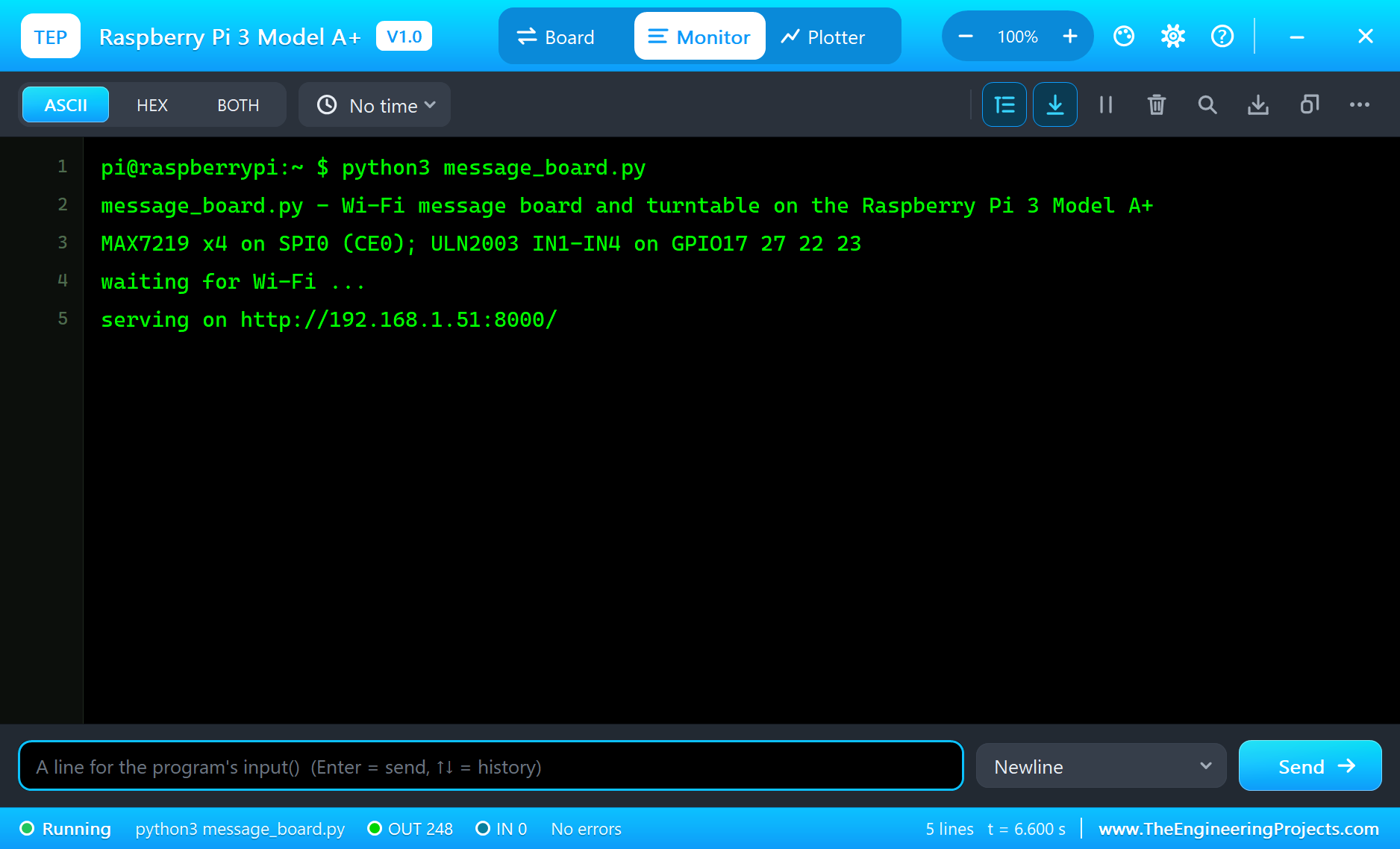
Open the Page
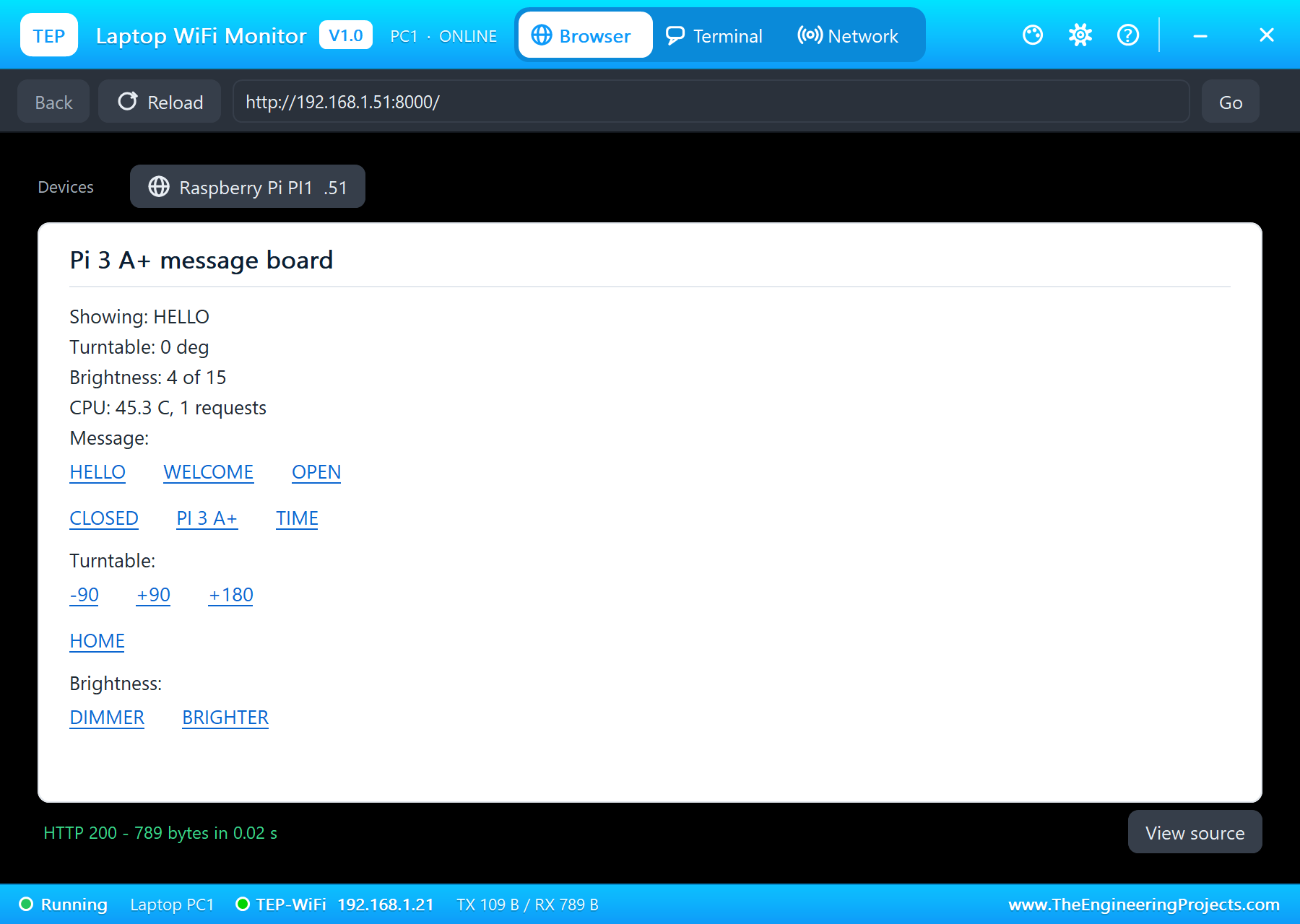
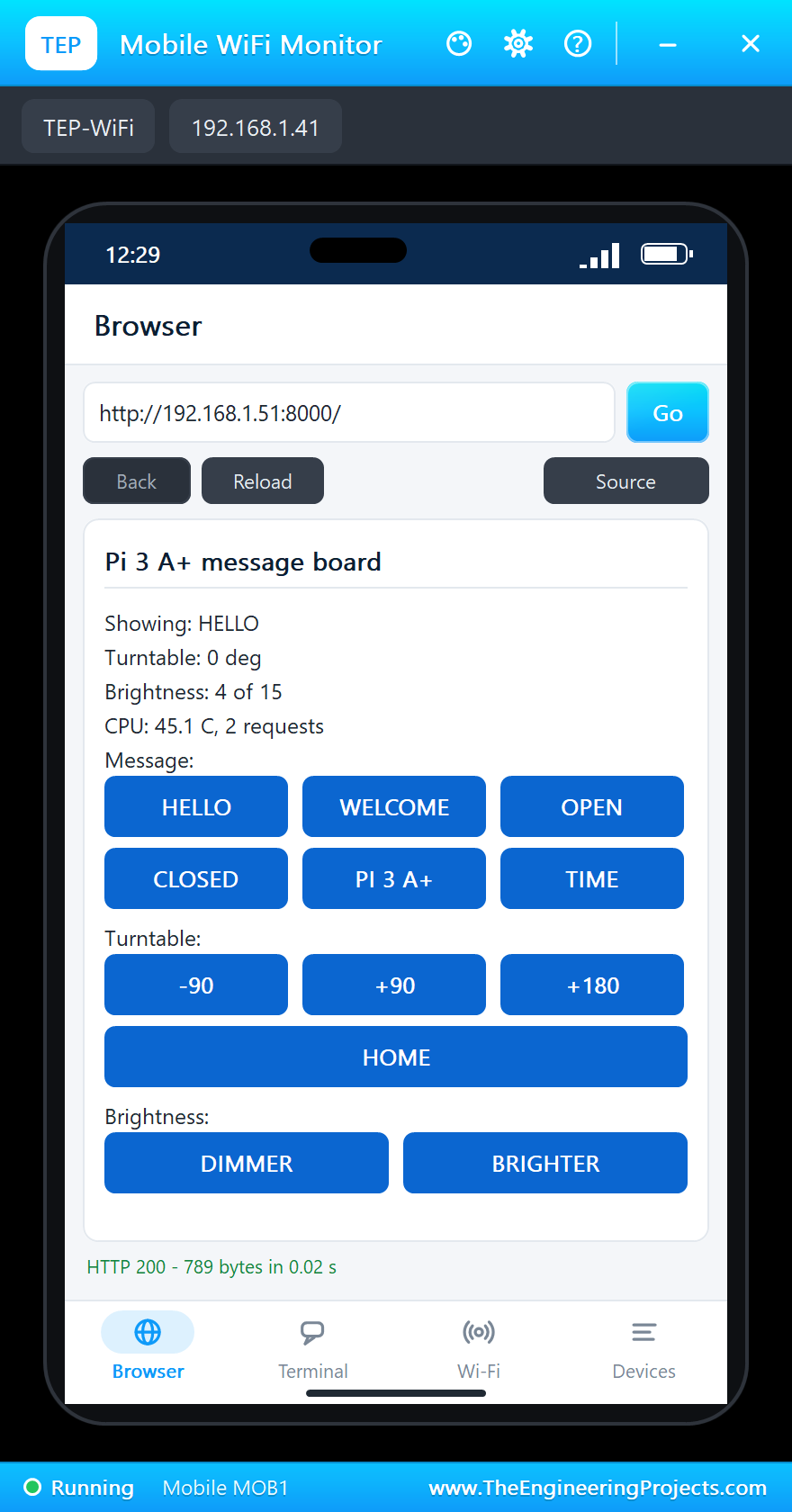
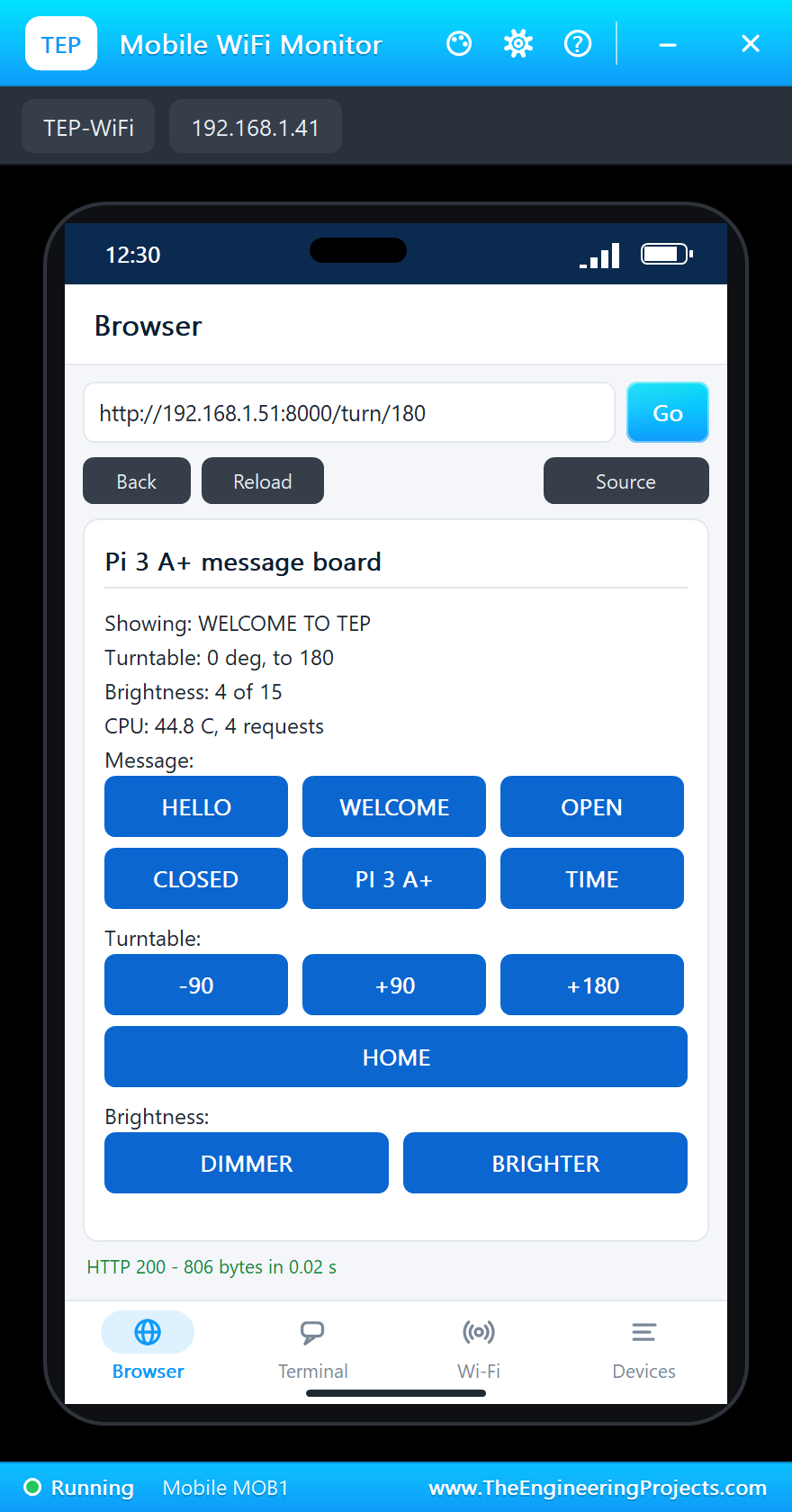
On the laptop click Browser, check the address http://192.168.1.51:8000/ and click Go; on the phone the same. The laptop shows the links as text, the phone turns them into a grid of buttons:
A Long Message Scrolls
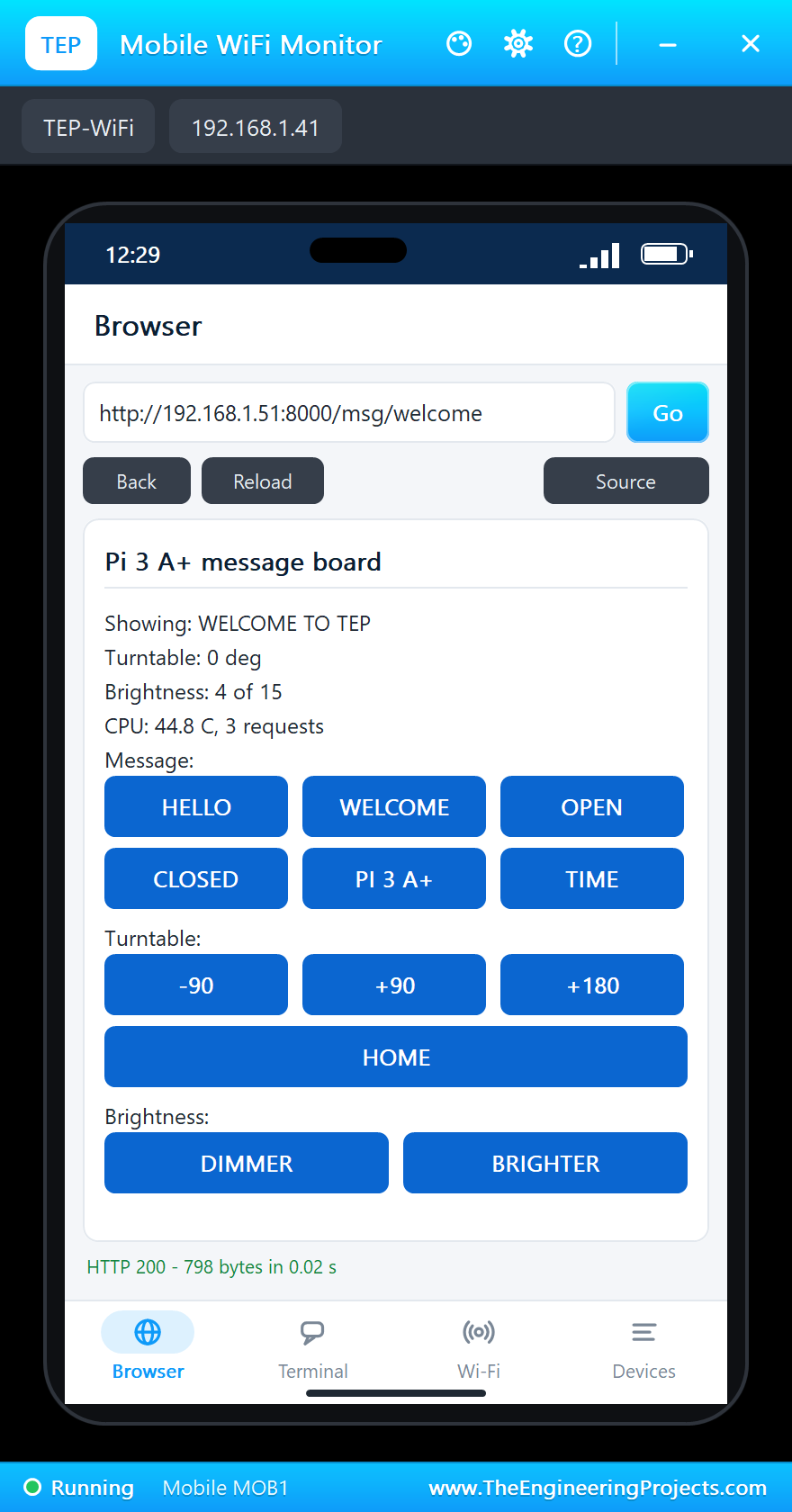
Tap WELCOME on the phone. The request changes the message, and the page that comes back already shows it; on the matrix, WELCOME TO TEP is too long for 32 columns, so it scrolls:
Turn the Turntable
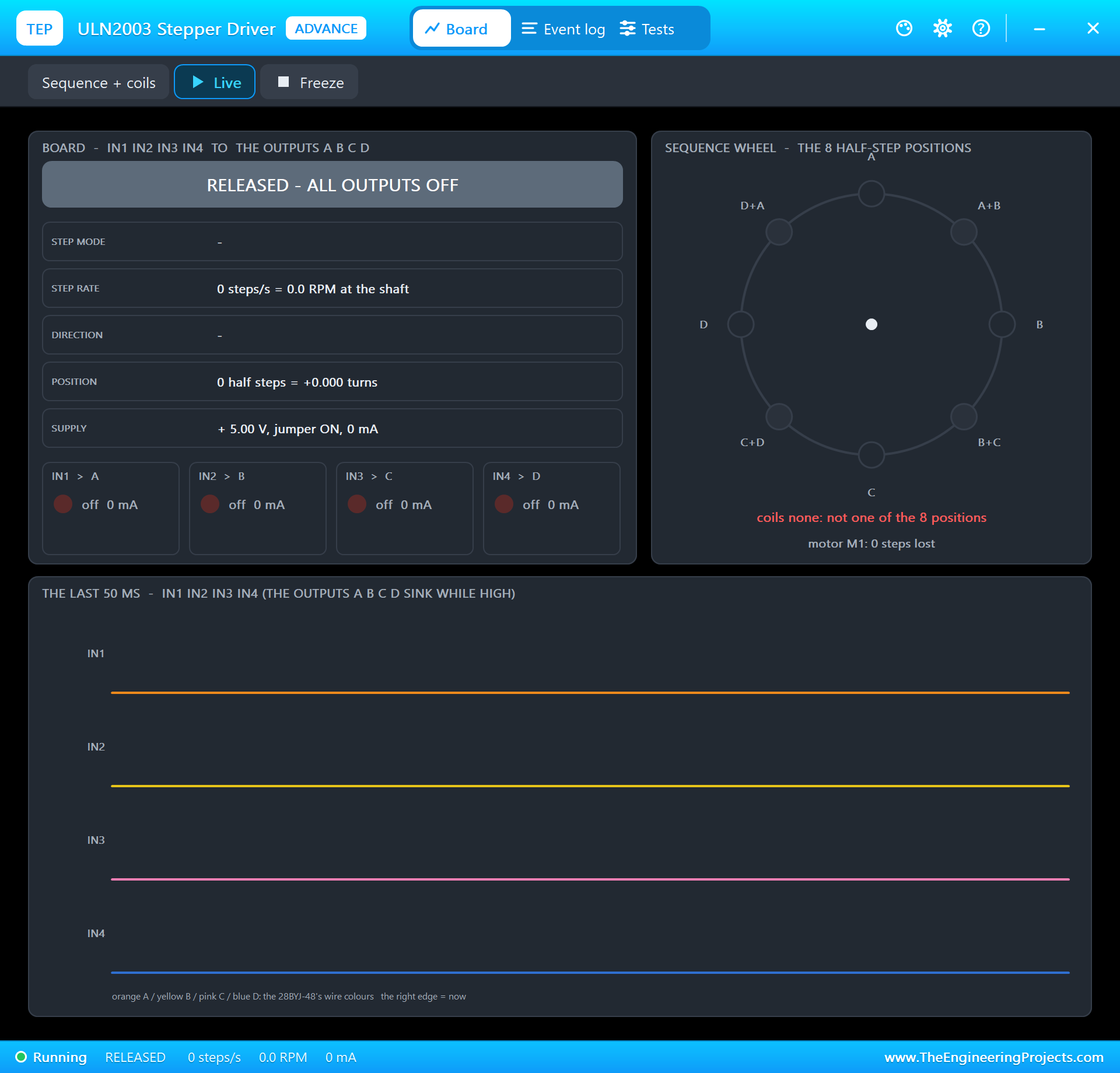
Tap +180. The page answers at once - the turntable is at 0 deg, on its way to 180 - and the motor thread starts stepping. The driver's pop-up shows the half-step sequence on IN1 to IN4: 660 steps a second, 9.7 RPM at the shaft:
Control from the Laptop Too
Both monitors talk to the same server. Click OPEN on the laptop's page, then tap BRIGHTER twice on the phone - the intensity goes from 4 to 10 of 15:
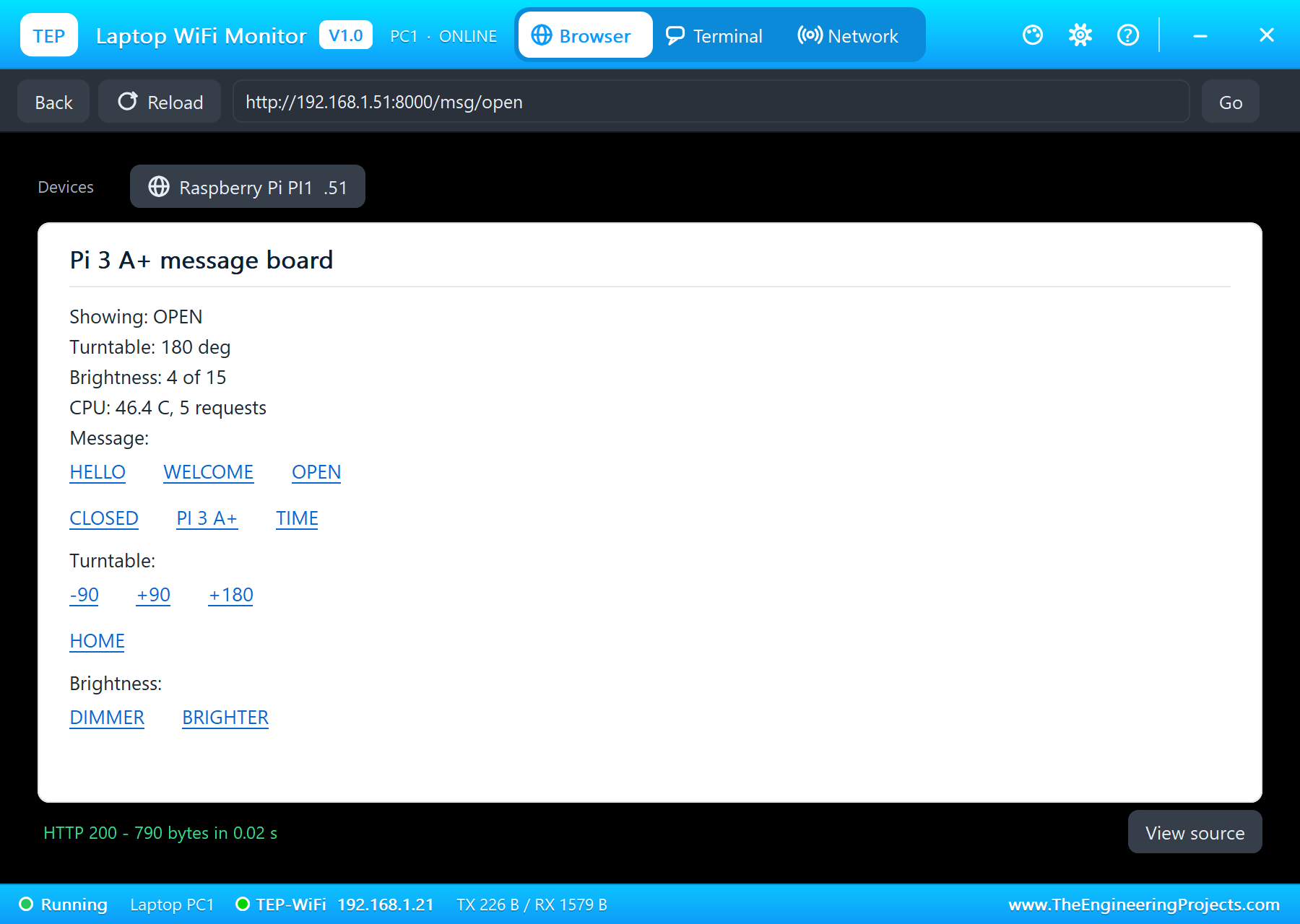
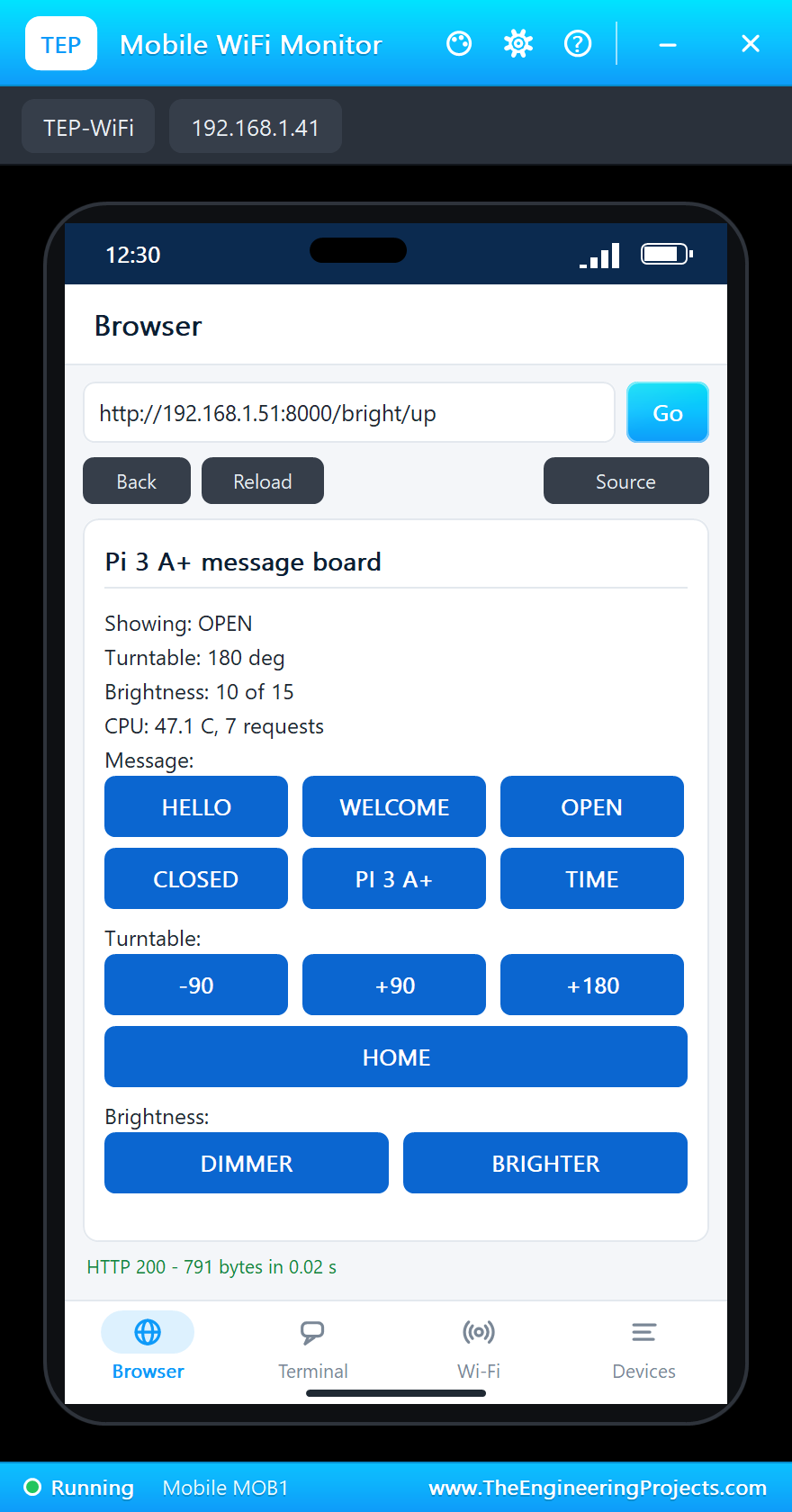
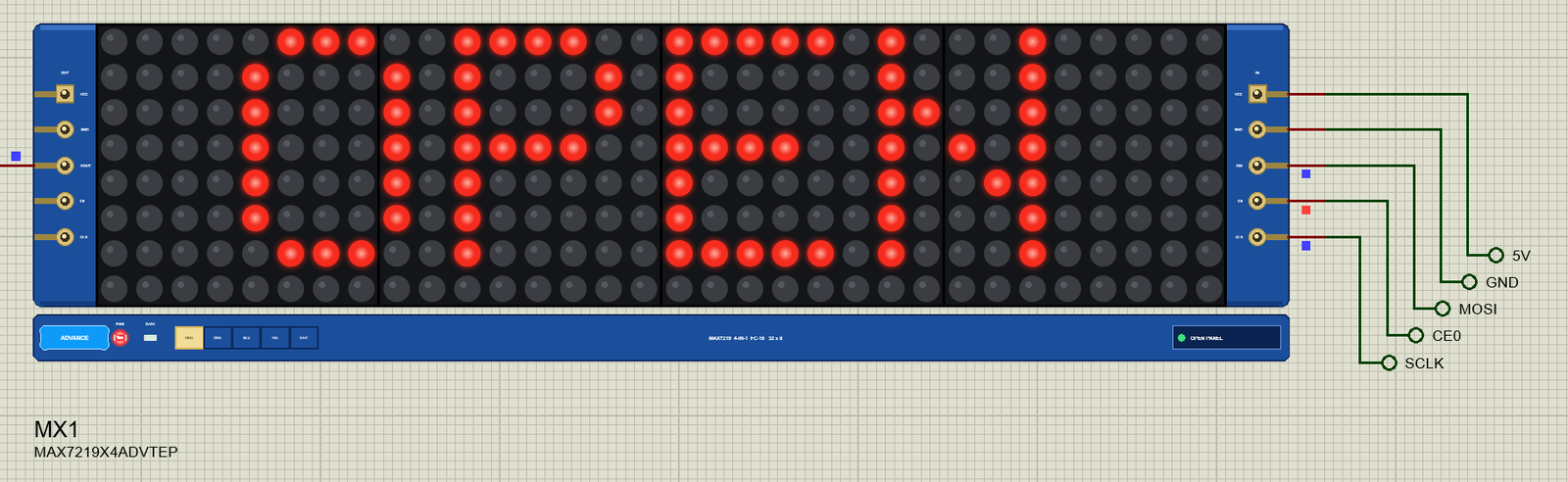
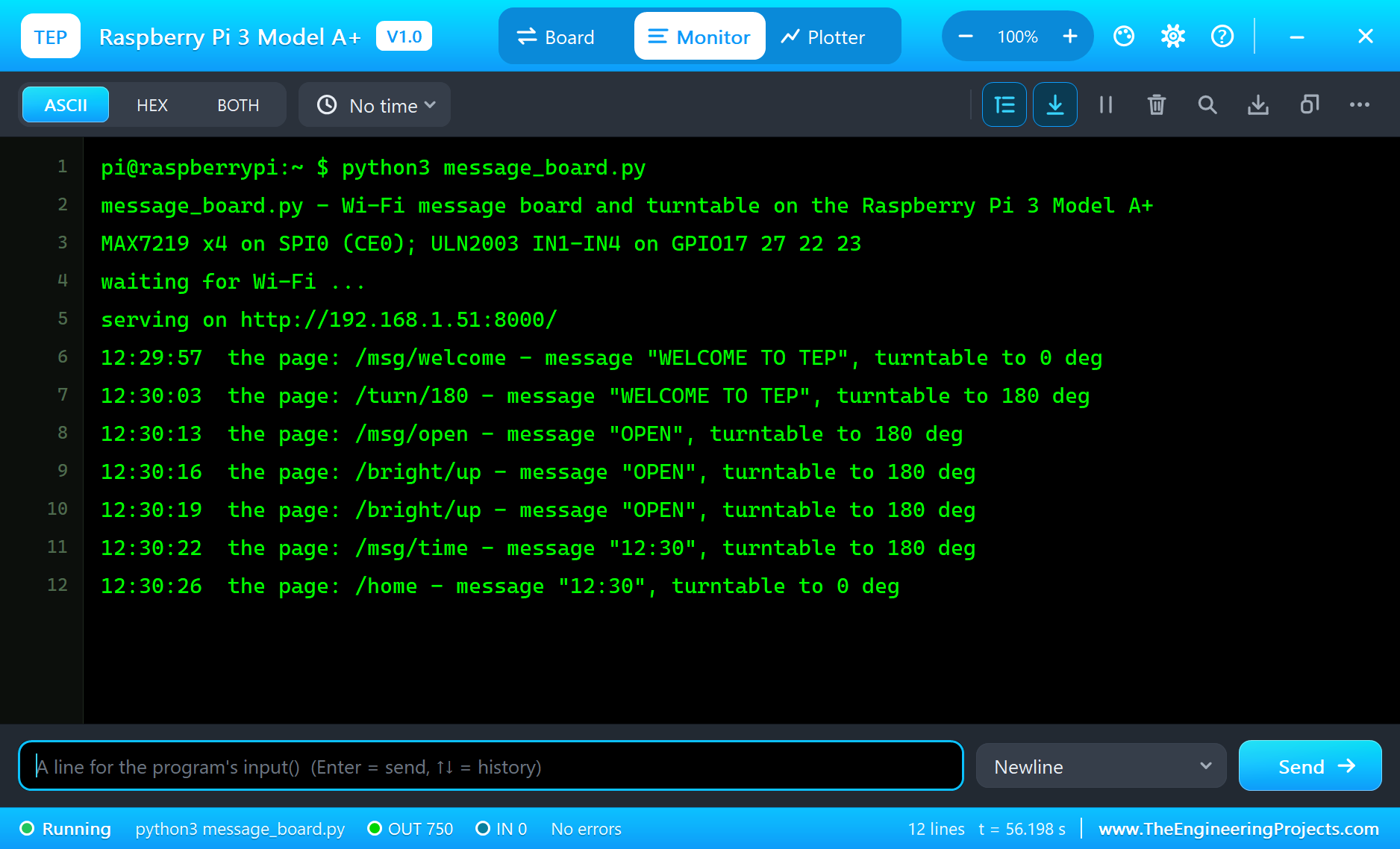
TIME puts the Pi's clock on the matrix, and HOME turns the turntable back to 0 deg, counter-clockwise this time. The Pi Terminal logs every request with the state it left behind:
12:29:57  the page: /msg/welcome - message "WELCOME TO TEP", turntable to 0 deg
12:30:03  the page: /turn/180 - message "WELCOME TO TEP", turntable to 180 deg
12:30:13  the page: /msg/open - message "OPEN", turntable to 180 deg
12:30:16  the page: /bright/up - message "OPEN", turntable to 180 deg
12:30:19  the page: /bright/up - message "OPEN", turntable to 180 deg
12:30:22  the page: /msg/time - message "12:30", turntable to 180 deg
12:30:26  the page: /home - message "12:30", turntable to 0 deg
The Pi Terminal
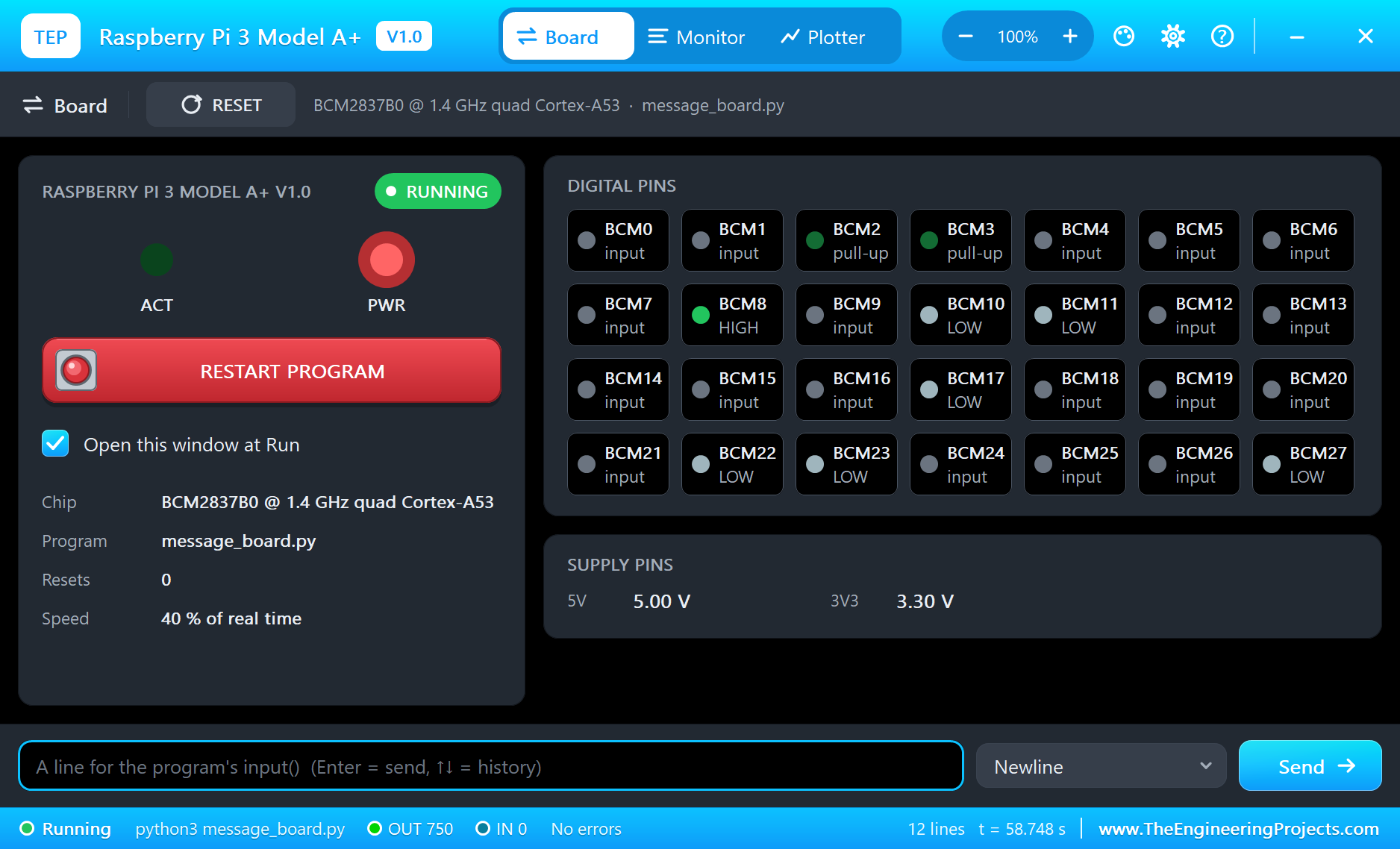
The Pi Terminal opens at Run, in the look of our TEP Serial Monitor Advance for Proteus - our own TEP header, no Windows title bar. Its Monitor tab shows the program's output (OUT), errors (ERR) and the lines you type for input() (IN). The Board tab shows the board live - CE0 HIGH between frames, the SPI lines and the coil pins LOW at rest - the LEDs and the supply pins, and RESTART PROGRAM starts the program again:
Properties of the Raspberry Pi 3 Model A+
| Property | What it does |
|---|---|
| PROGRAM | the Python program (default blink.py; a name next to the project or a full path) |
| AUTOOPEN | the Pi Terminal at Run: YES (default) or NO |
| WIFISSID, WIFIPASS | the network wlan0 joins and its password (default TEP-WiFi, 12345678) |
| PYTHON, RUNTIME | a python.exe and a runtime folder of your own (empty: the TEPPi folder) |
Your own programs go next to your project; set PROGRAM to the file's name. The default blink.py blinks an LED on GPIO17:
from time import sleep
from gpiozero import LED

led = LED(17)
while True:
    led.on()
    print('LED on')
    sleep(0.5)
    led.off()
    print('LED off')
    sleep(0.5)
Troubleshooting
- The program waits for Wi-Fi forever: check WIFISSID and WIFIPASS - the simulation log says "not found" or "wrong password".
- The page does not open: the address is http://192.168.1.51:8000/ - the port the program serves - and the program must have printed "serving on". A monitor sometimes needs Go a second time.
- The text is mirrored or the modules are swapped: on an FC-16 module the rows are the digit registers 1 to 8, bit 7 is a module's leftmost column, and the first 16 bits of a frame reach the leftmost module.
- The stepper hums or loses steps: the driver's pop-up counts lost steps - step more slowly, ramp up and down, and keep the half-step order.
- The TEPPi folder was not found: copy it from Proteus Model Files into MODELS, or next to your project.
Things to Know Before Using a Real Raspberry Pi
- SPI: turn it on with
sudo raspi-config(Interface Options); then /dev/spidev0.0 appears and spidev opens it as here. - The MAX7219 at 5 V: its inputs want about 3.5 V for a HIGH at 5 V, so the Pi's 3.3 V works on most modules but not on every one - a 74HCT125 buffer makes it certain. Four modules at full brightness draw more than the Pi's 5V pin likes; power them from the supply.
- The stepper: power the ULN2003 board and the motor from the 5 V supply, not from a GPIO; the IN pins take the Pi's 3.3 V. Python's timing on a busy Pi jitters, so keep the steps slow or use a library with a C core for smooth motion.
- The web page: on a real Pi the same program works as it is; Flask is a common choice for bigger pages.
Limitations of the Simulation
- The board does not run Raspberry Pi OS: there is no desktop, no shell commands and no apt. It runs one Python program; its threads take turns, so the four cores are not modelled.
- Bluetooth and the 5 GHz band are not modelled; the network is the same TEP network.
- HDMI, the A/V jack, the camera and display connectors, USB, the microSD card's files and a HAT's ID EEPROM are drawn but not simulated; GPIO18 makes software PWM, not hardware PWM.
- C programs and Python packages with C code do not run. Pure Python code takes no simulation time; only the pin, bus, sleep and network calls move the clock.
- The router, the board's address, the boot time and the Pi Terminal are TEP additions.
- Raspberry Pi is a trademark of Raspberry Pi Ltd; this library is not made or endorsed by Raspberry Pi Ltd or Labcenter.
- Tested in Proteus 8.5 in October 2026 (the demo as shipped, about 33 to 40 % of real time on our PC with the two pop-ups, the two monitors and the Pi Terminal open). Proteus 7 is not supported.
So, that was all about the Raspberry Pi 3 Model A+ Library for Proteus. I hope it helps you try a Wi-Fi project on the Pi before you touch the hardware - an SPI display, a stepper and a web page that a laptop and a phone use to control them and to see what they do. The next boards of our Raspberry Pi series bring other modules and more web pages. If you use the library in a project, please share it in the comments or in our forum, and if you have any questions, ask in the comments and I will help you out. Till the next tutorial, take care and have fun!

Comments
0