


Arduino Nano Every Library for Proteus: RCWL-0516, DFPlayer, ESP-01S


Hello friends, I hope you all are doing great. Today, I am going to share the Arduino Nano Every Library for Proteus. The Nano Every is the classic Arduino Nano made new: the same 45 x 18 mm board and the same pins, with a Microchip ATmega4809 at 20 MHz, 48 KB of flash and three times the Nano's RAM - and still 5 V, so all your 5 V modules keep working. With this library the Nano Every runs your Arduino sketch in Proteus 8.5.
Arduino Nano Every Library for Proteus
Latest version: V1.0 (October 2026, this tutorial)
Helping Tools
- Laptop WiFi Monitor: a laptop on the Wi-Fi of your design: a browser, a TCP / UDP terminal and ping
- Mobile WiFi Monitor: a smartphone that opens the pages of your board and sends it commands
- Serial Monitor Advance: a serial terminal window for the UART of your board
The Nano Every has no radio, so in our demo it gets Wi-Fi the classic way: an ESP-01S on its hardware serial port. Around it we built a radar doorbell: an RCWL-0516 microwave radar sees a visitor through the door, a DFPlayer Mini plays the chime from its micro SD card, the board's L LED shows that someone is there, and a laptop and a phone open the doorbell's web page to change the sound or ring it.
NOTICE: Proteus has no ATmega4809 model, so our team has put a lot of effort into building this board ourselves: the Nano Every's pins, LEDs and serial monitor are all our own model, and your sketch compiles with our free TEP Boards for Proteus add-on. Your feedback is the fuel that keeps us going, so please tell us what you think in the comments below or in the Arduino Nano Every board of our forum. And if our free libraries help you, you can buy us a coffee. So, let's get started with the Arduino Nano Every Library for Proteus:
What is the Arduino Nano Every?
Arduino released the Nano Every in 2019 as the low-cost successor of the Nano. It keeps the Nano's footprint and its 2 x 15 pins in the same order, so it drops into the same breadboards and projects, but replaces the ATmega328P with the newer ATmega4809 of Microchip's megaAVR 0-series. The pins are castellated - half-holes on the edge - so the board can also be soldered flat onto a PCB as a module. A small SAMD11 next to the USB connector is the USB-to-serial bridge.
| Arduino Nano | Arduino Nano Every | Arduino Nano 33 IoT | |
|---|---|---|---|
| Microcontroller | ATmega328P, 16 MHz | ATmega4809, 20 MHz | SAMD21 (Cortex-M0+), 48 MHz |
| Flash, RAM, EEPROM | 32 KB, 2 KB, 1 KB | 48 KB, 6 KB, 256 bytes | 256 KB, 32 KB, none |
| Logic, input voltage | 5 V, 7 - 12 V | 5 V, 7 - 21 V | 3.3 V, 5 - 21 V |
| USB | mini-USB | micro-USB | micro-USB |
| Radio | - | - | Wi-Fi and Bluetooth (NINA-W102) |
Our Arduino Nano Library for Proteus V4.0 covers the classic Nano, and our Arduino Nano 33 IoT Library for Proteus the Nano with Wi-Fi; the Nano Every sits between them: the classic Nano's 5 V world with more memory and speed.
Why the Nano Every?
Most Nano projects run out of RAM before they run out of pins: a display buffer, a web page in memory or a long text eats the old Nano's 2 KB quickly. The Nano Every has 6 KB, 48 KB of flash and a faster clock, keeps the 5 V logic that relays, sensors and the DFPlayer like, and costs less than the original Nano. Its ATmega4809 also has four hardware serial ports inside; the board brings one of them to D0 and D1 as Serial1, separate from the USB's Serial - perfect for a Wi-Fi module, as in our demo.
Features of the Arduino Nano Every Library for Proteus
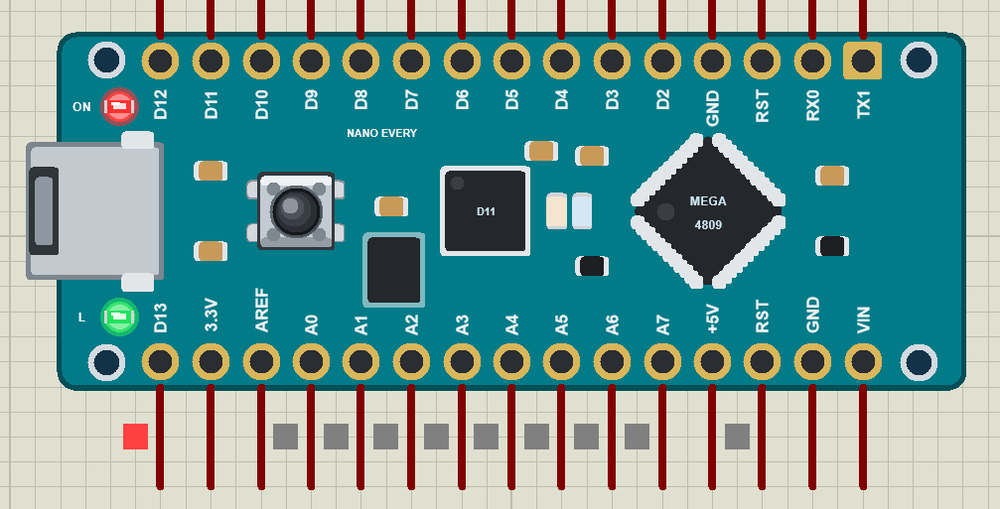
- The board as it looks: the teal Nano Every with its castellated pads and labels, micro-USB, the ATmega4809 turned 45 degrees, the SAMD11, the buck converter, RESET and the L and ON LEDs.
- Your sketch: a .hex for "Arduino Nano Every (TEP Proteus)" with the Nano Every's names - D0 to D13, A0 to A7, LED_BUILTIN, Serial, Serial1, Wire on A4 / A5, SPI on D10 to D13, EEPROM, analogRead, analogWrite and attachInterrupt.
- Wi-Fi with an ESP-01S: on Serial1 with AT commands, on our virtual router TEP-WiFi with the laptop and the phone.
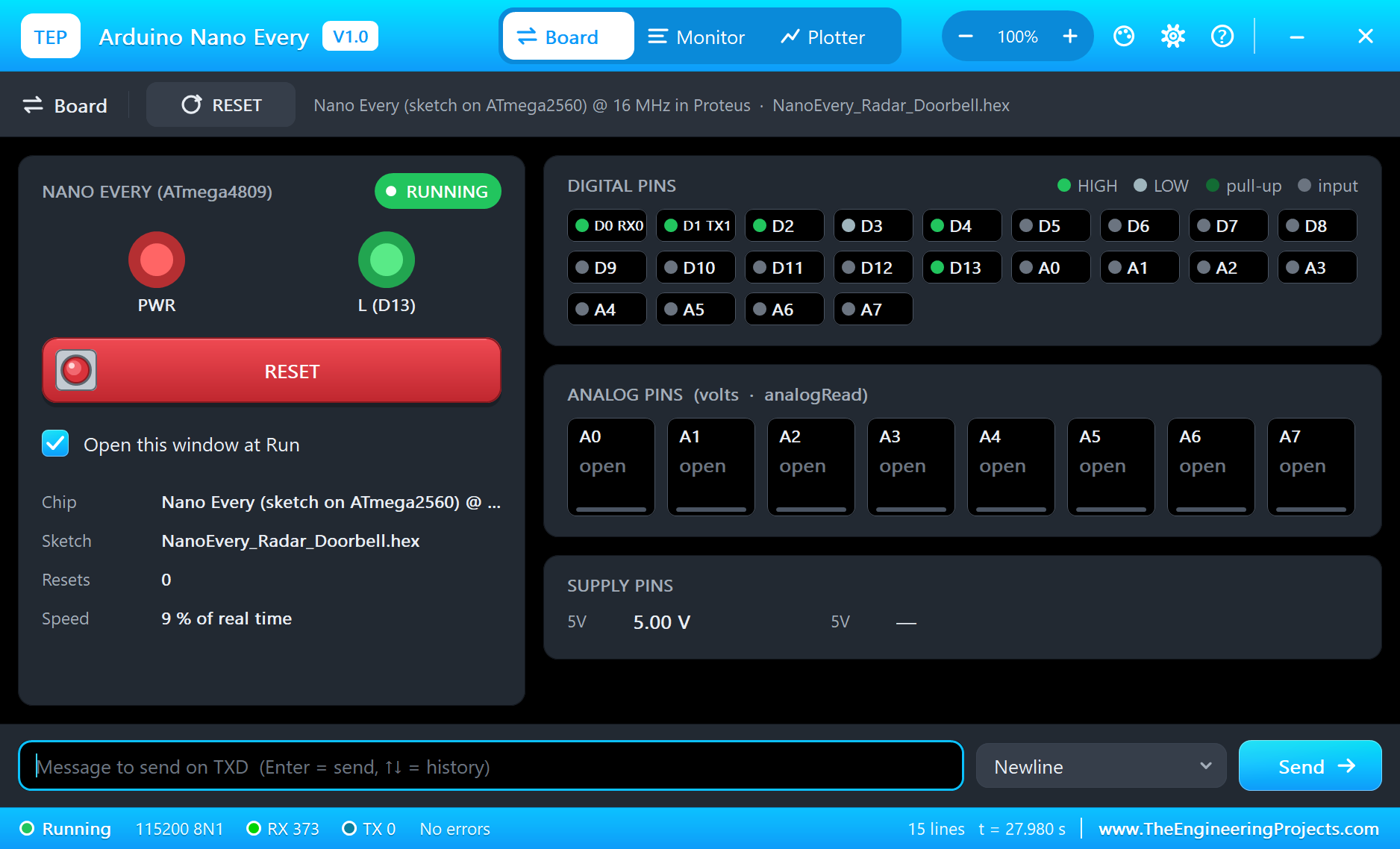
- The serial monitor: built in, on the USB, with Monitor, Plotter and Board tabs - our TEP header, no Windows title bar.
- A complete package: about 3.4 MB with the board, the add-on, the RCWL-0516, DFPlayer, ESP-01S and monitor libraries and the demo, without the source code of the models.
The Arduino Nano Every in Proteus
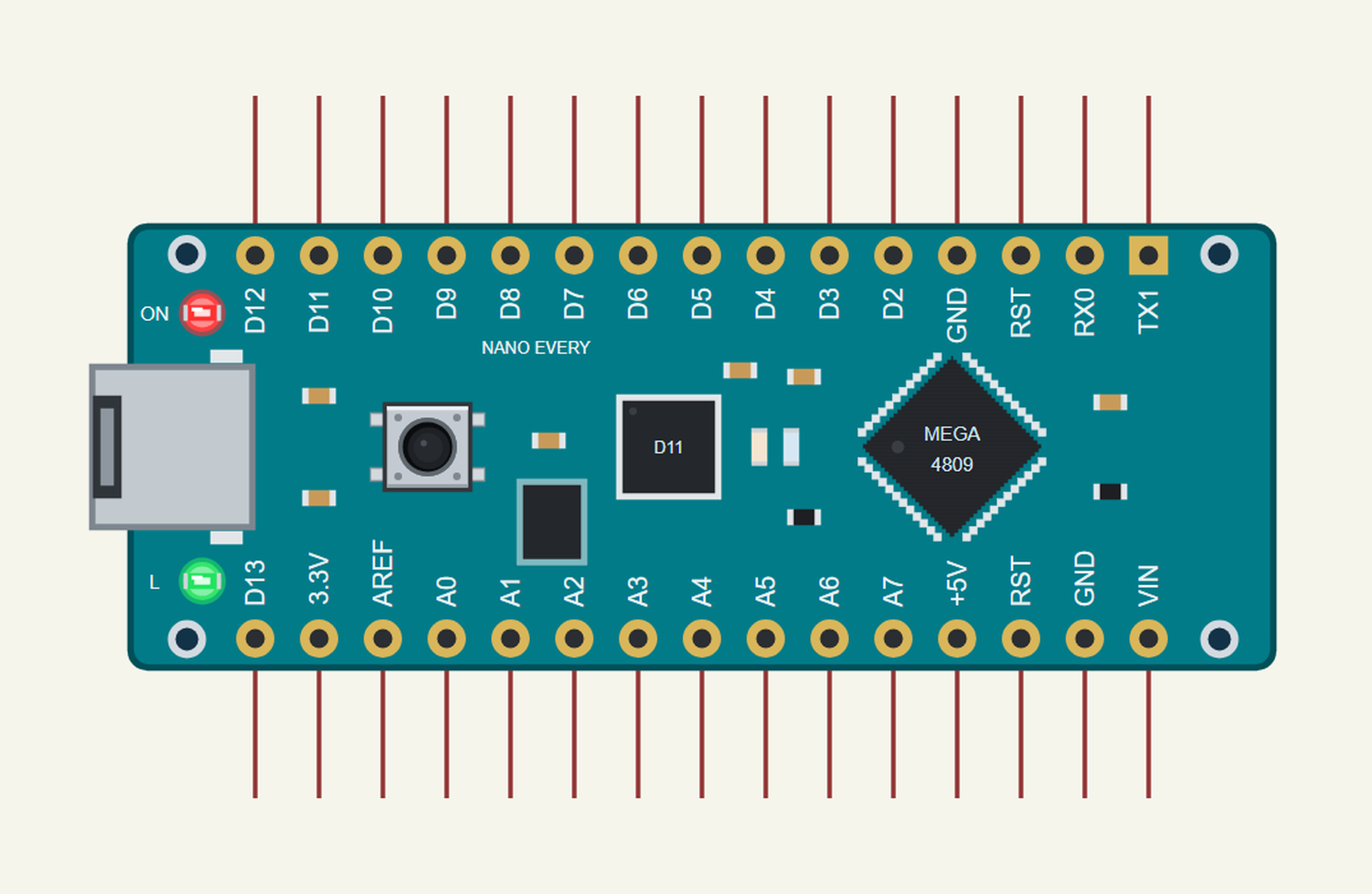
Search NANO EVERY in Pick Devices; the device ARDUINO NANO EVERY is in TEPNANOEVERY.LIB (Microprocessor ICs, Arduino Boards), with the prefix U. The board lies with micro-USB on the left and the pin labels printed inside the rows. Click the micro-USB to open the serial monitor.
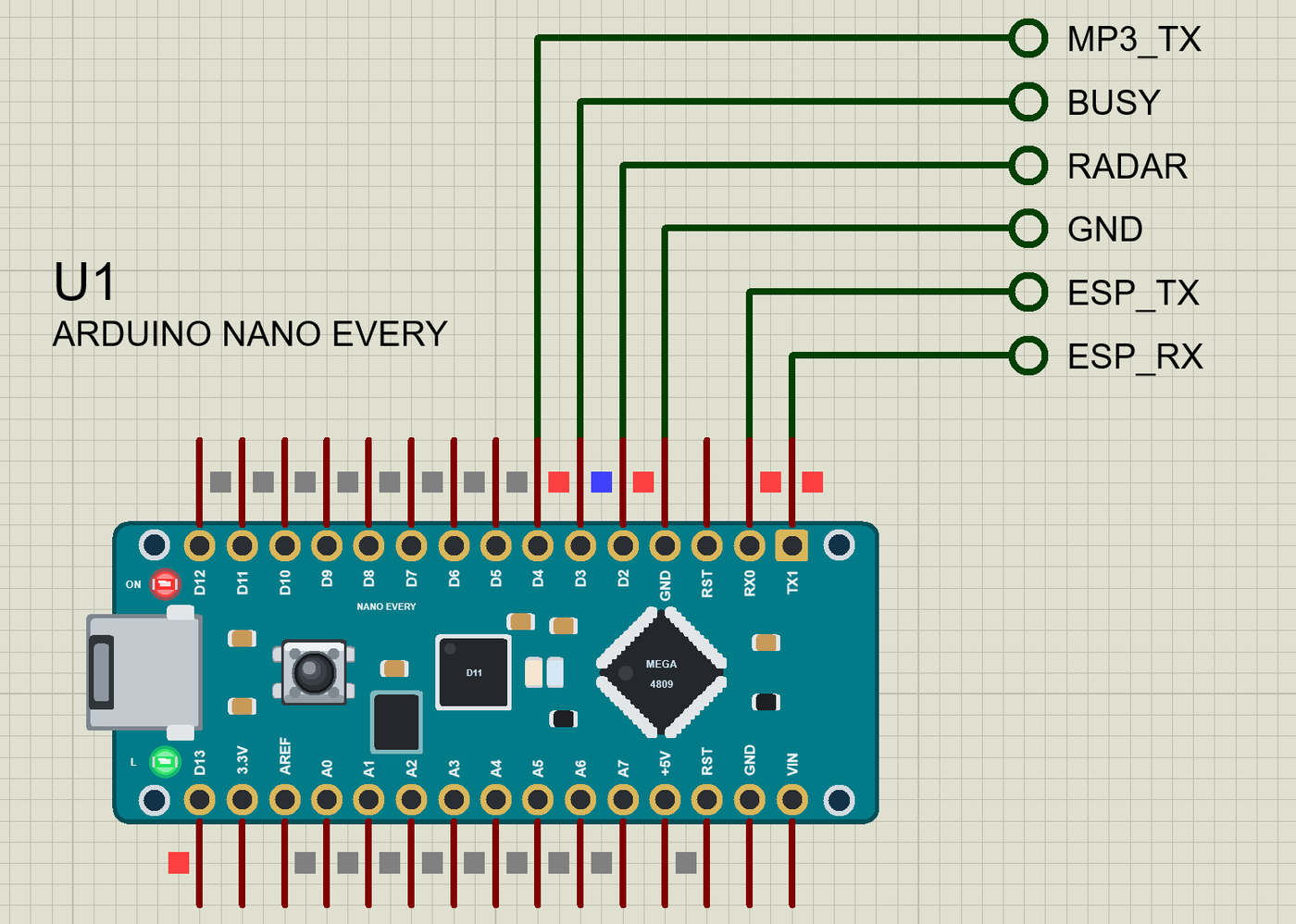
The Pins
| Pins | What the library does with them |
|---|---|
| RX0, TX1 (D0, D1) | Serial1 (not the USB), GPIO |
| D2 to D13 | GPIO, interrupt, PWM (D3, D5, D6, D9, D10 on the real board) |
| D10 to D13 | SPI SS / MOSI / MISO / SCK; D13 is also the L LED |
| A0 to A7 | analogRead 0 to 1023 for 0 to 5 V |
| A4, A5 | Wire SDA / SCL (I2C) |
| +5V, 3.3V, GND, RST | 5 V, a 3.3 V output, ground, reset |
| AREF, VIN | drawn, not modelled |
Download Arduino Nano Every Library for Proteus
Click the button below to download Arduino-Nano-Every-Library-for-Proteus-v1.0.zip (about 3.4 MB, without the source code of the models):
Arduino Nano Every Library for Proteus V1.0- README.txt: installation, the demo, the pins, the properties, troubleshooting and the limits.
- Proteus Library Files:
TEPNANOEVERY.LIBand the demo's parts:TEPRCWL0516.LIB,TEPDFPLAYER.LIB,TEPESP01S.LIB,TEPLAPTOP.LIBandTEPMOBILE.LIB. - Proteus Model Files:
TEPNET.DLL(the board, the ESP-01S, the laptop, the phone and the network) and the parts' DLLs. - Arduino Code: the demo sketch and the TEP Boards for Proteus add-on 1.19.0.
- Proteus Simulation: the demo project, its HEX file and copies of the DLLs.
No Proteus yet? Read How to Download and Install Proteus 7 and 8. New to libraries? Follow How to Install a New Library in Proteus.
How to Install Arduino Nano Every Library for Proteus
- Close Proteus and extract the whole zip file, for example to your Desktop.
- Copy the files from Proteus Library Files into the LIBRARY folder of Proteus.
- Copy the DLLs from Proteus Model Files into the MODELS folder, replacing an older TEPNET.DLL.
- Delete
TEPNANOEVERY.IDXfrom the LIBRARY folder if it is there. - For your own sketches, copy Arduino Code\TEP Boards for Proteus\hardware into your Arduino sketchbook (Documents\Arduino) and restart the Arduino IDE; the board is Arduino Nano Every (TEP Proteus).
- Start Proteus, press P and search for NANO EVERY.
Demo: a Radar Doorbell
A doorbell that rings itself sounds like magic, but it is just a motion sensor and a speaker. The trick is the sensor: the RCWL-0516 is not a PIR but a small microwave Doppler radar. It sends 3.2 GHz around it and hears the echo change when something moves - through a wooden door or a plastic box, up to about 7 m away. Mount it behind the door and it sees the visitor before they reach the bell.
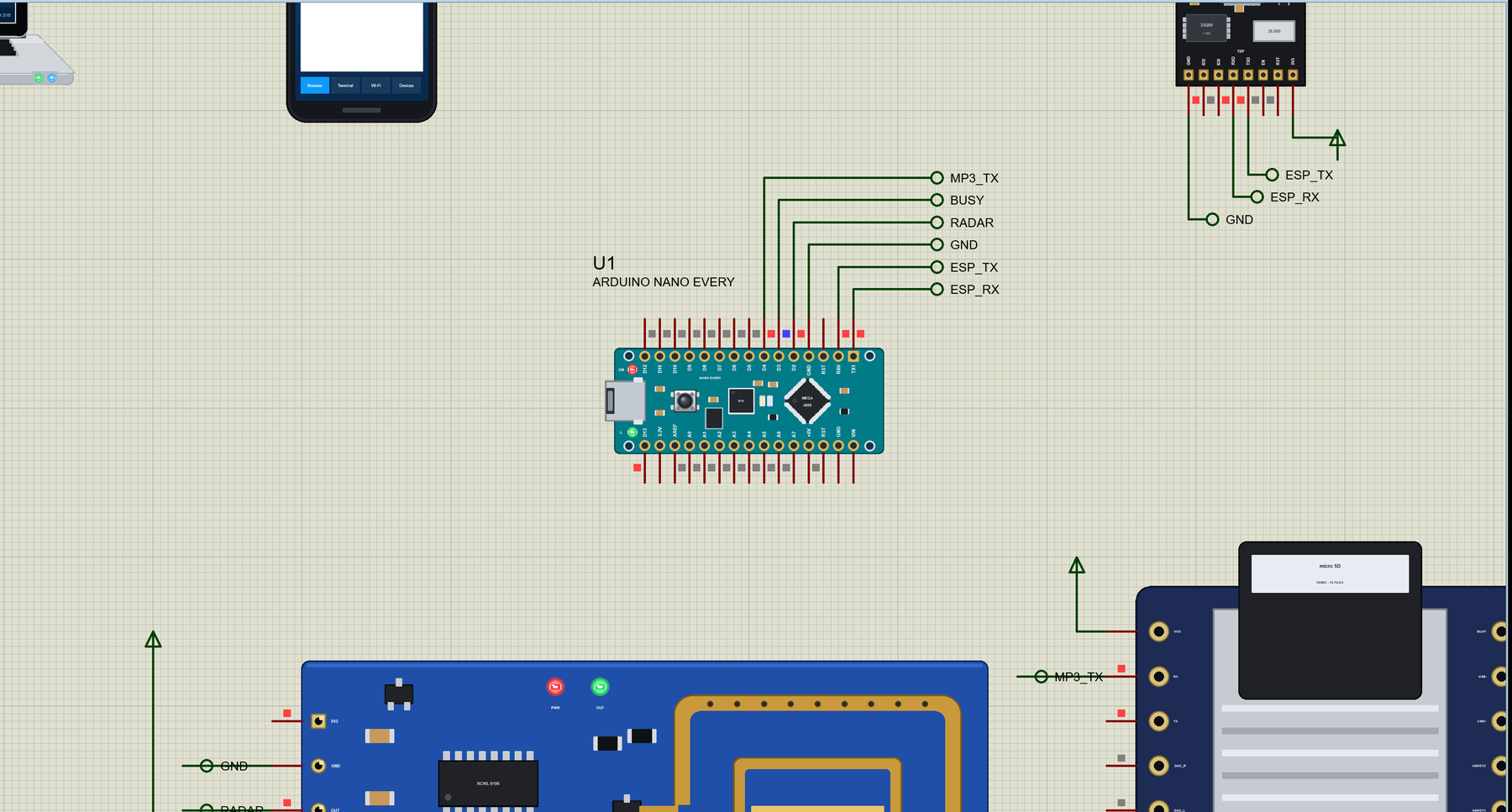
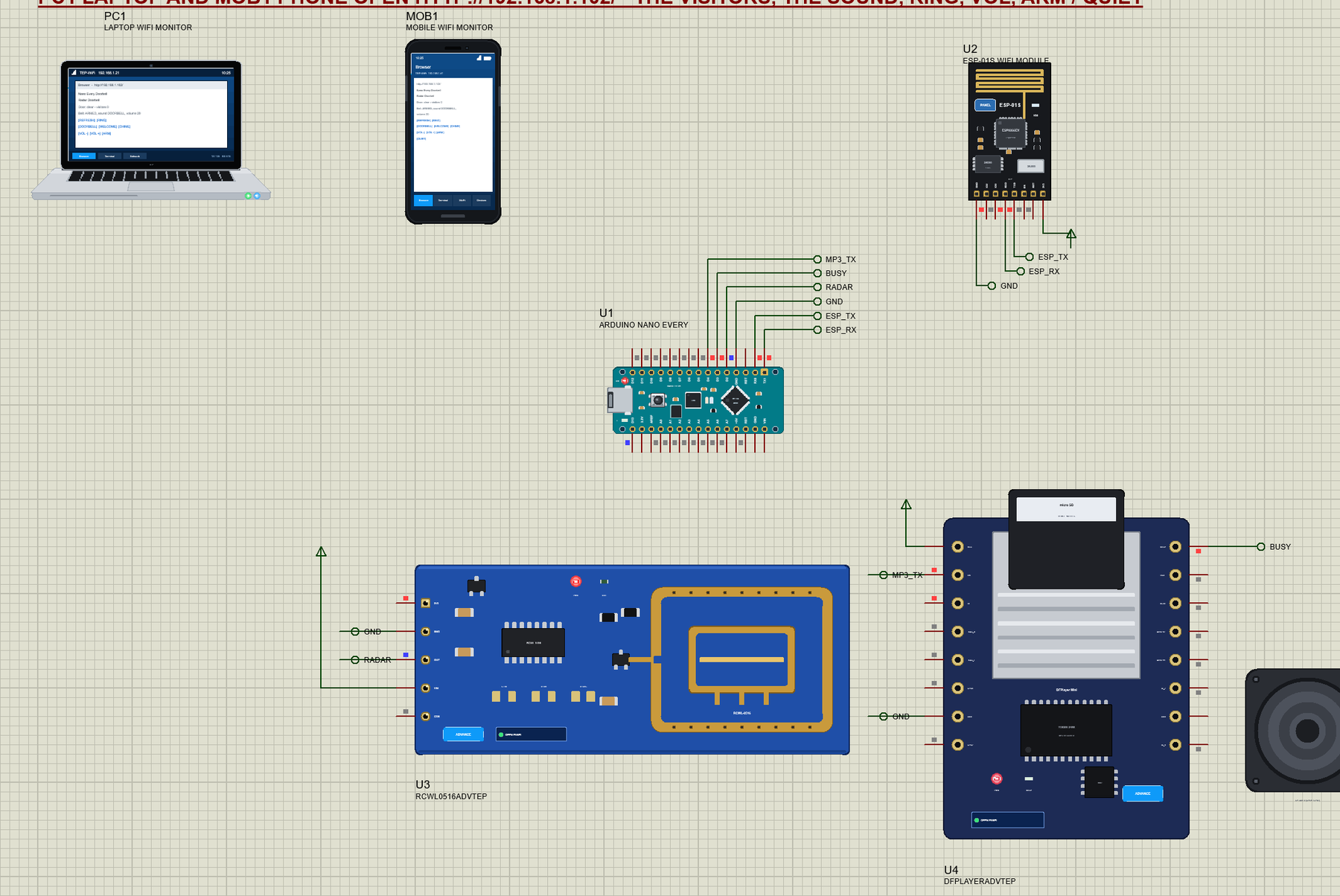
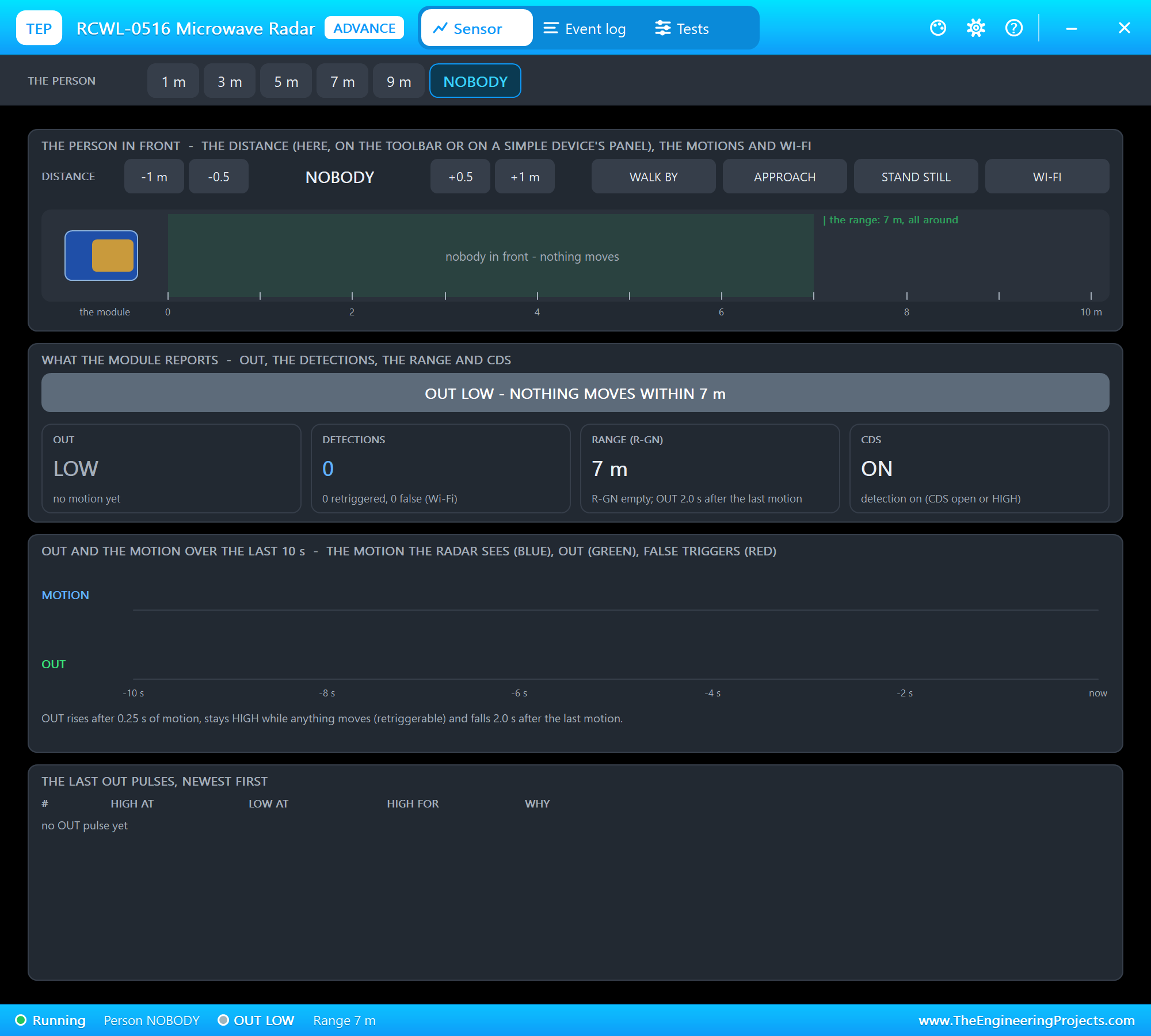
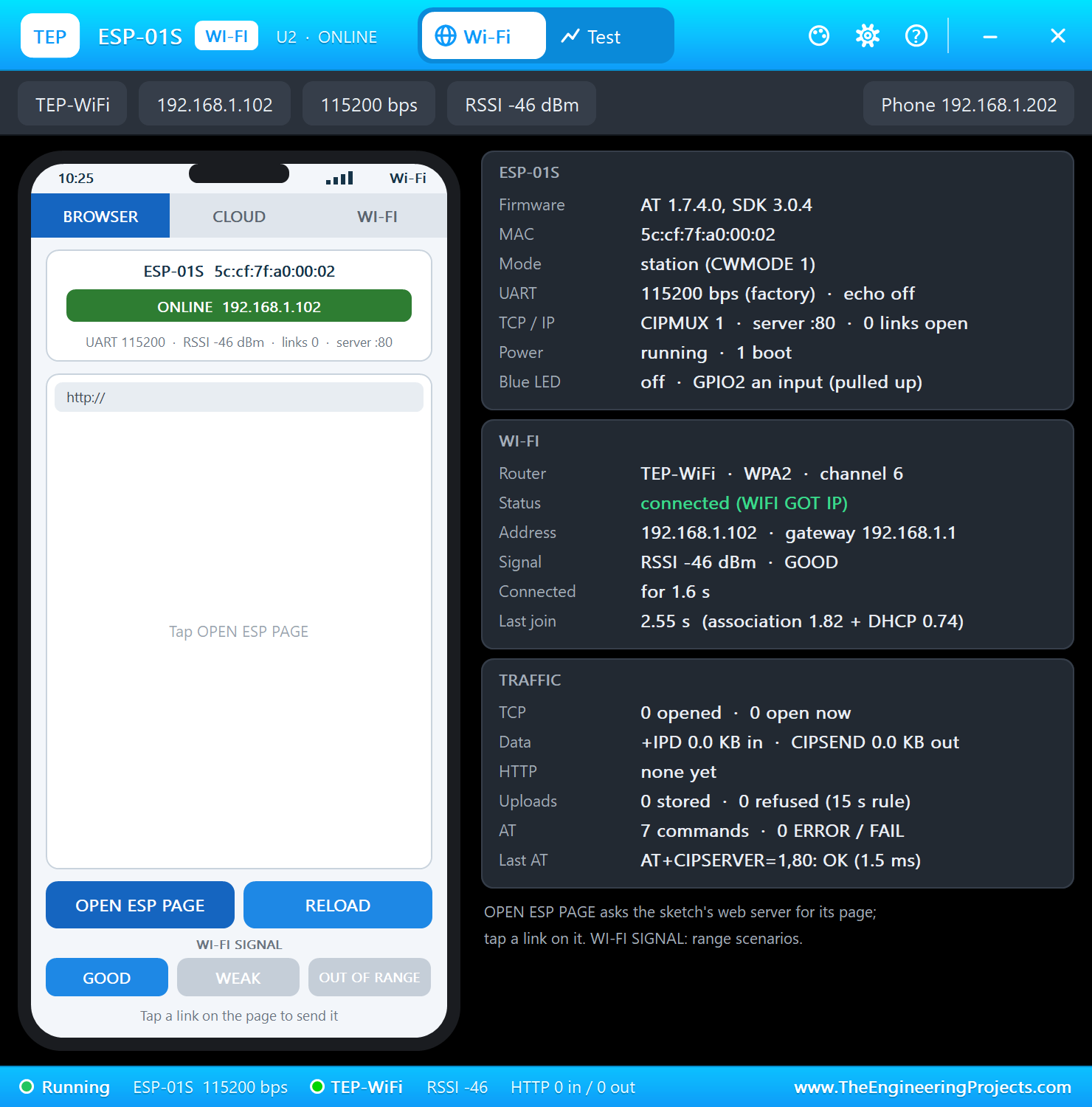
Open Nano-Every-Radar-Doorbell.pdsprj. U1 runs NanoEvery_Radar_Doorbell.hex. The parts come from our own libraries, each with its article: U3 from the RCWL-0516 Microwave Radar Sensor Library for Proteus, U4 from the DFPlayer Mini Library for Proteus and U2 from the ESP-01S Library for Proteus. The radar and the DFPlayer are the Advance versions: each opens a pop-up window at Run, as the ESP-01S does. PC1 is the Laptop WiFi Monitor and MOB1 the Mobile WiFi Monitor.
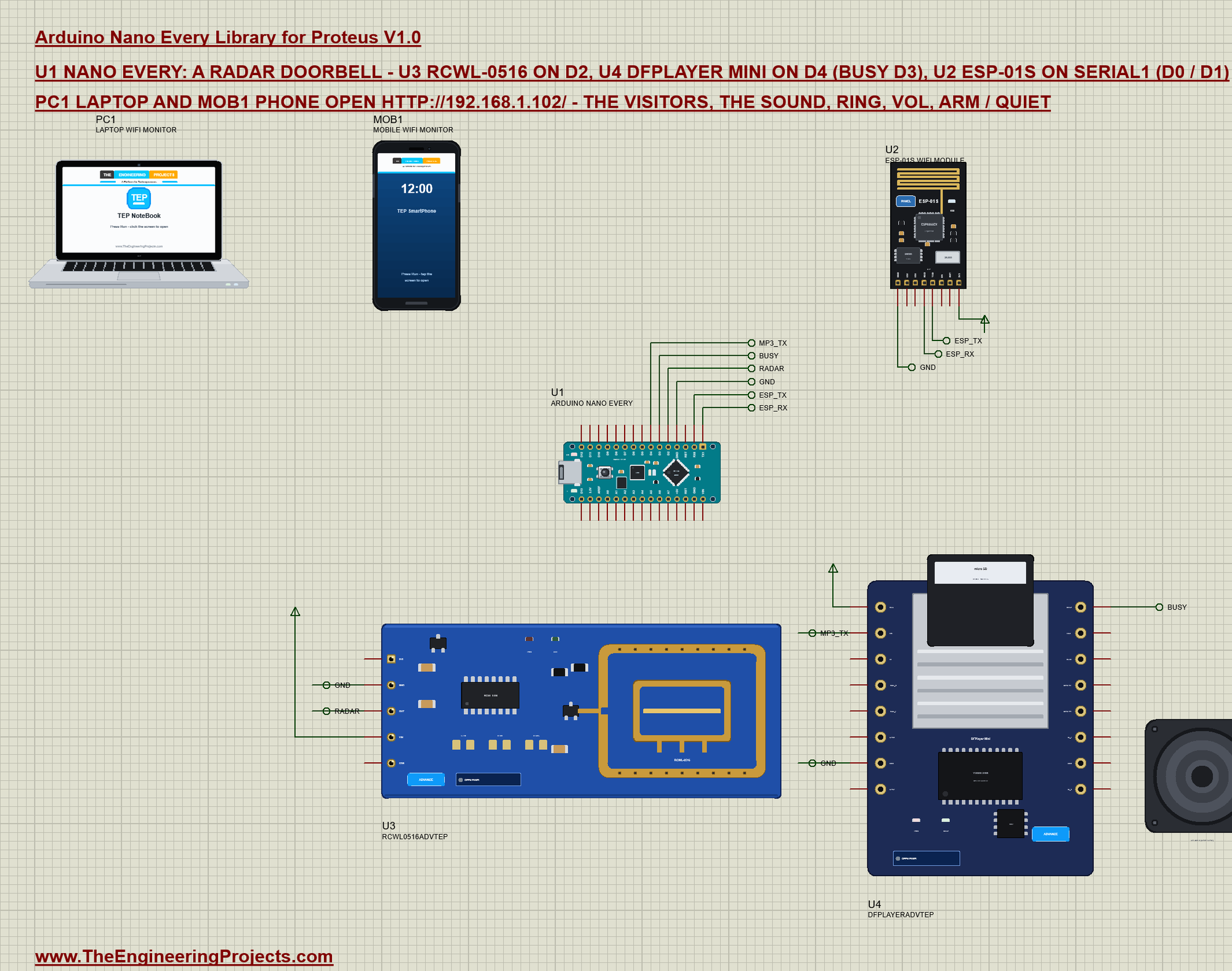
| Part pin | Net label | Nano Every pin | What it does |
|---|---|---|---|
| RCWL-0516 OUT | RADAR | D2 | HIGH while something moves (and 2 s after) |
| DFPlayer RX | MP3_TX | D4 | the commands, 9600 baud |
| DFPlayer BUSY | BUSY | D3 | LOW while a track plays |
| ESP-01S TXD | ESP_TX | RX0 (D0) | the module's answers into Serial1 |
| ESP-01S RXD | ESP_RX | TX1 (D1) | the AT commands from Serial1 |
| GND of all | GND | GND | ground |
The modules take their supply from power terminals in the demo: their models read the supply as a digital level, and the board's 5V and 3.3V are analog sources in Proteus. On a real board the ESP-01S needs its own 3.3 V regulator, the DFPlayer and the radar sit on the Nano Every's 5V pin.
How the Microwave Radar Sees
A PIR sensor waits for the heat of a body to cross its zones; the RCWL-0516 works like a police speed gun instead. Its small oscillator sends a microwave signal, and the echo from anything that moves comes back at a slightly different frequency - the Doppler shift. The chip on the module (an RCWL-9196) mixes the two signals, filters the difference and switches OUT HIGH for about 2 s each time it finds one. That is why it sees through wood, glass and plastic, why it does not care about temperature, and also why a person standing still in front of it is invisible: no movement, no shift.
For a doorbell this is exactly right. The visitor is seen while walking up to the door, the bell rings once, and when they stand and wait the sensor goes quiet - no second chime. Our sketch counts a new visitor only when OUT goes from LOW to HIGH, so a person who keeps moving in front of the door is still one visitor.
The Sketch: Watching the Door
The loop looks at the radar's OUT pin all the time. When it goes HIGH a visitor is there: the L LED lights, the counter goes up, and the bell rings unless it is set to QUIET. When OUT goes LOW again the door is clear:
void watchDoor() {
  const bool now = digitalRead(RADAR) == HIGH;
  if (now == motion) return;
  motion = now;
  digitalWrite(LED, motion);
  if (motion) {
    ++visitors; lastVisit = millis();
    Serial.print(F("Visitor #")); Serial.print(visitors); Serial.print(F(" at ")); Serial.print(millis() / 1000.0, 1);
    Serial.println(armed ? F(" s") : F(" s (quiet: no bell)"));
    if (armed) ring();
  } else Serial.println(F("Door clear"));
}
The DFPlayer on One Pin
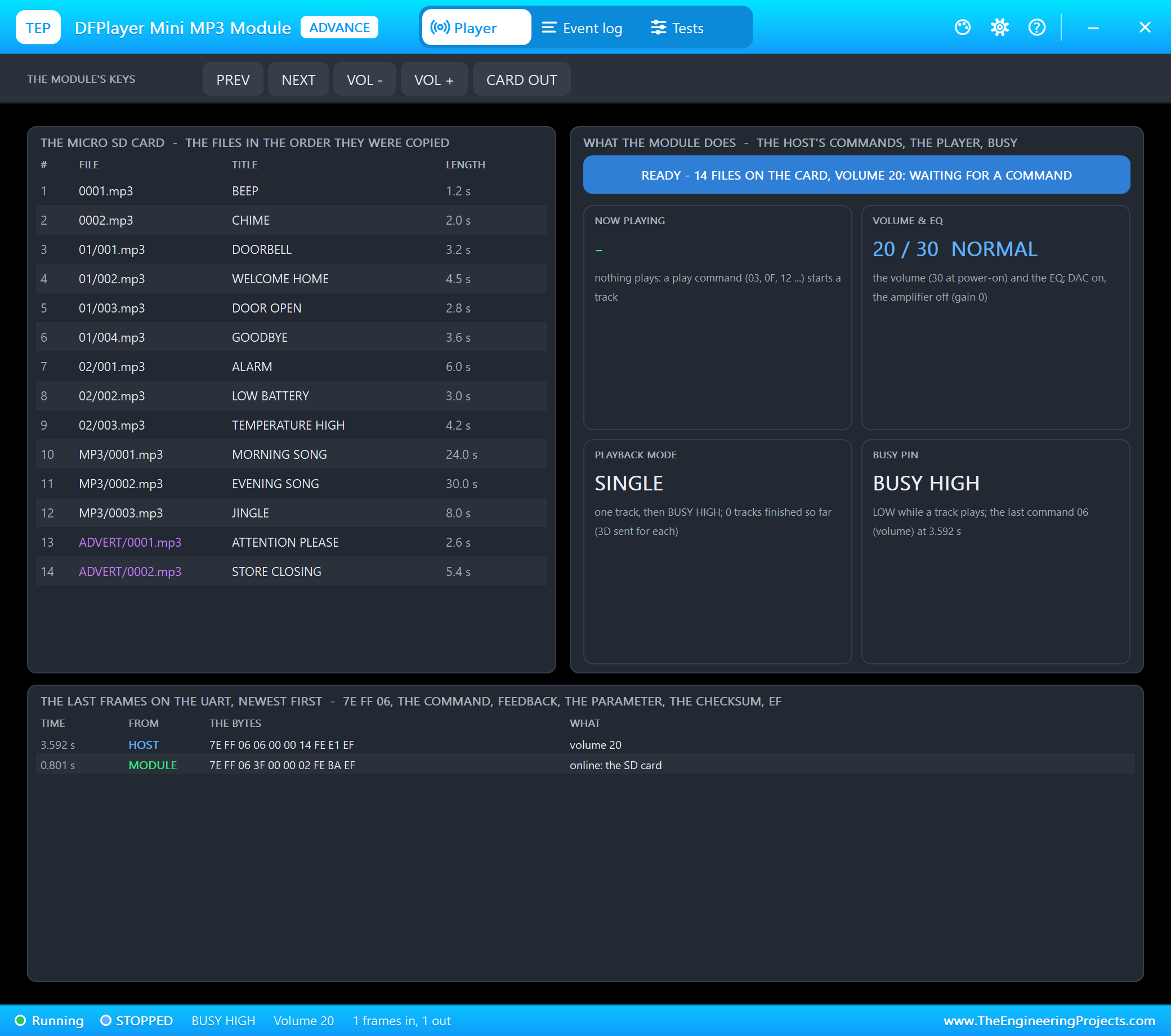
The DFPlayer Mini understands frames of 10 bytes at 9600 baud: a start byte 7E, the version FF, the length 06, the command, a feedback flag, two parameter bytes, a two-byte checksum and the end byte EF. Our doorbell never needs an answer, so the sketch sends the frames itself on D4 - start bit, eight data bits and stop bit, 104 microseconds each:
void mp3Byte(uint8_t b) {                                  // start bit, 8 data bits (LSB first), stop bit: 104 us each
  noInterrupts();
  *mp3Port &= ~mp3Mask; delayMicroseconds(104);
  for (byte i = 0; i < 8; i++) {
    if (b & 1) *mp3Port |= mp3Mask; else *mp3Port &= ~mp3Mask;
    b >>= 1; delayMicroseconds(104);
  }
  *mp3Port |= mp3Mask; delayMicroseconds(104);
  interrupts();
}
void mp3(uint8_t cmd, uint16_t arg) { // 7E FF 06 cmd 00 hi lo checksum(2) EF
uint16_t sum = -(0xFF + 0x06 + cmd + (arg >> 8) + (arg & 0xFF));
const uint8_t frame[10] = {0x7E, 0xFF, 0x06, cmd, 0x00, (uint8_t)(arg >> 8), (uint8_t)arg, (uint8_t)(sum >> 8), (uint8_t)sum, 0xEF};
for (byte i = 0; i < 10; i++) mp3Byte(frame[i]);
delay(30);
}Command 0F plays a file from a folder (01/001.mp3 DOORBELL, 01/002.mp3 WELCOME HOME), command 03 the n-th file copied to the card (the second one is 0002.mp3 CHIME), command 06 sets the volume (0 to 30):
void ring() {
  if (sound == 2) mp3(0x03, 2);                            // the 2nd file on the card: 0002.mp3 CHIME
  else mp3(0x0F, 0x0100 | (sound + 1));                    // folder 01: 001.mp3 DOORBELL, 002.mp3 WELCOME HOME
  Serial.print(F("Ding-dong: ")); Serial.println(SOUNDS[sound]);
}
Wi-Fi with the ESP-01S
The ESP-01S comes with Espressif's AT firmware: it takes text commands on its serial port at 115200 baud. The Nano Every's Serial1 on D0 and D1 is a real hardware port, so it keeps up with that speed while Serial stays free for the USB monitor. The setup joins the router, asks for the address and starts a server on port 80:
  char join[64];
  snprintf_P(join, sizeof join, PSTR("AT+CWJAP=\"%s\",\"%s\""), WIFI_SSID, WIFI_PASS);
  Serial.println(command(join, 20000) ? F("connected") : F("FAILED"));
command("AT+CIPMUX=1"); // several connections - needed for the server
command("AT+CIPSERVER=1,80");Every request arrives as +IPD,link,length:GET /path. The sketch takes the path, acts on it and sends the page back on the same link with AT+CIPSEND, then closes it:
void route(const char *path) {
  if (!strcmp_P(path, PSTR("/ring"))) ring();
  else if (!strcmp_P(path, PSTR("/doorbell"))) sound = 0;
  else if (!strcmp_P(path, PSTR("/welcome"))) sound = 1;
  else if (!strcmp_P(path, PSTR("/chime"))) sound = 2;
  else if (!strcmp_P(path, PSTR("/vol-"))) setVolume(volume - 5);
  else if (!strcmp_P(path, PSTR("/vol+"))) setVolume(volume + 5);
  else if (!strcmp_P(path, PSTR("/arm"))) armed = true;
  else if (!strcmp_P(path, PSTR("/quiet"))) armed = false;
}
Serial1.print(F("AT+CIPSEND=")); Serial1.print(link); Serial1.print(','); Serial1.print(strlen(page)); Serial1.print(F("\r\n"));
bool sent = waitFor(">", 2000);
if (sent) { Serial1.print(page); sent = waitFor("SEND OK", 5000); }
Serial1.print(F("AT+CIPCLOSE=")); Serial1.print(link); Serial1.print(F("\r\n"));
waitFor("OK", 2000);
if (sent) ++served;Run the Demo
Press Run. The serial monitor opens; the ESP-01S joins TEP-WiFi, the sketch prints the page's address, sets the volume and waits for a visitor:
Nano Every Radar Doorbell - The Engineering Projects
Joining TEP-WiFi... connected
Doorbell page: http://192.168.1.102/
Volume 20
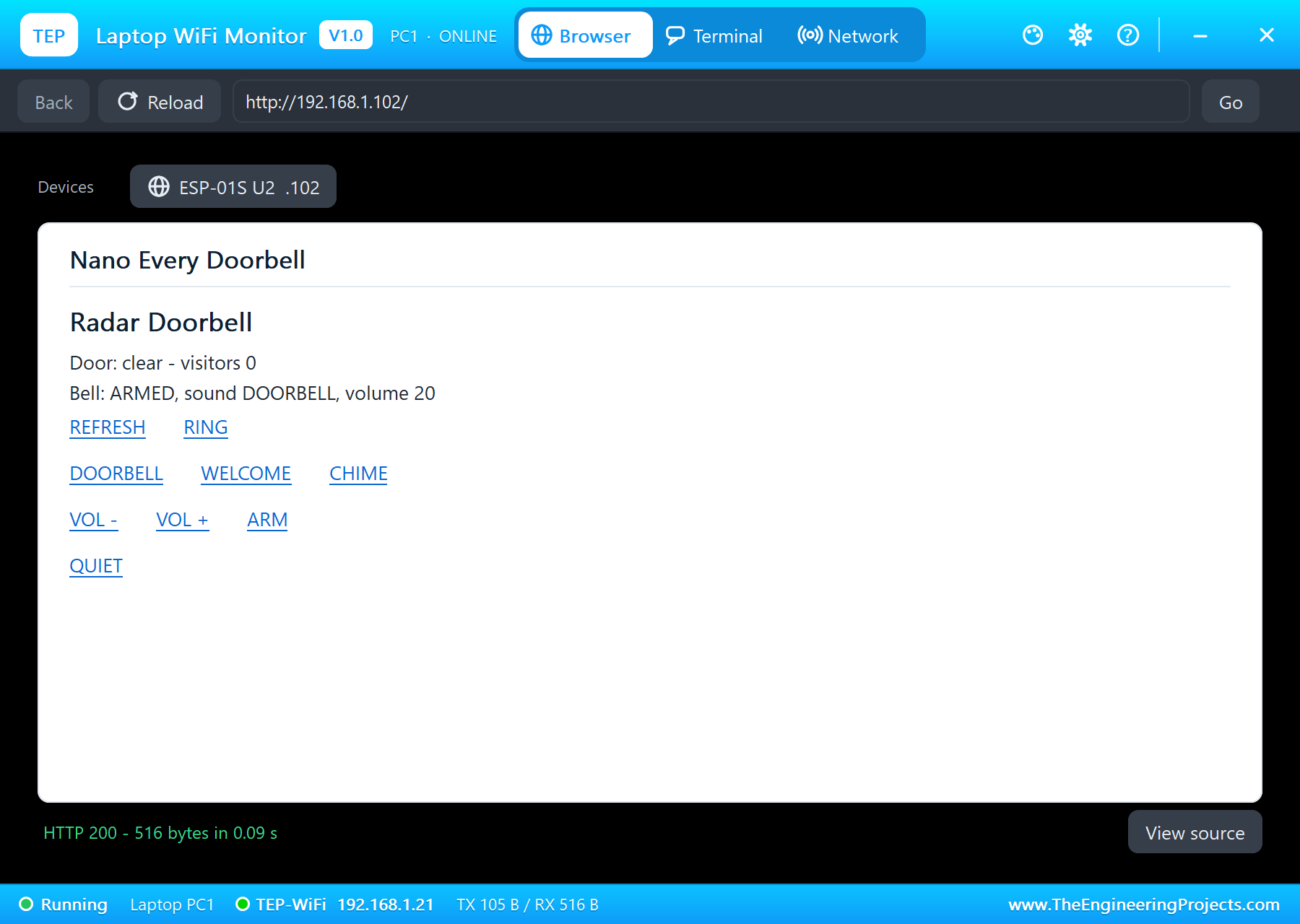
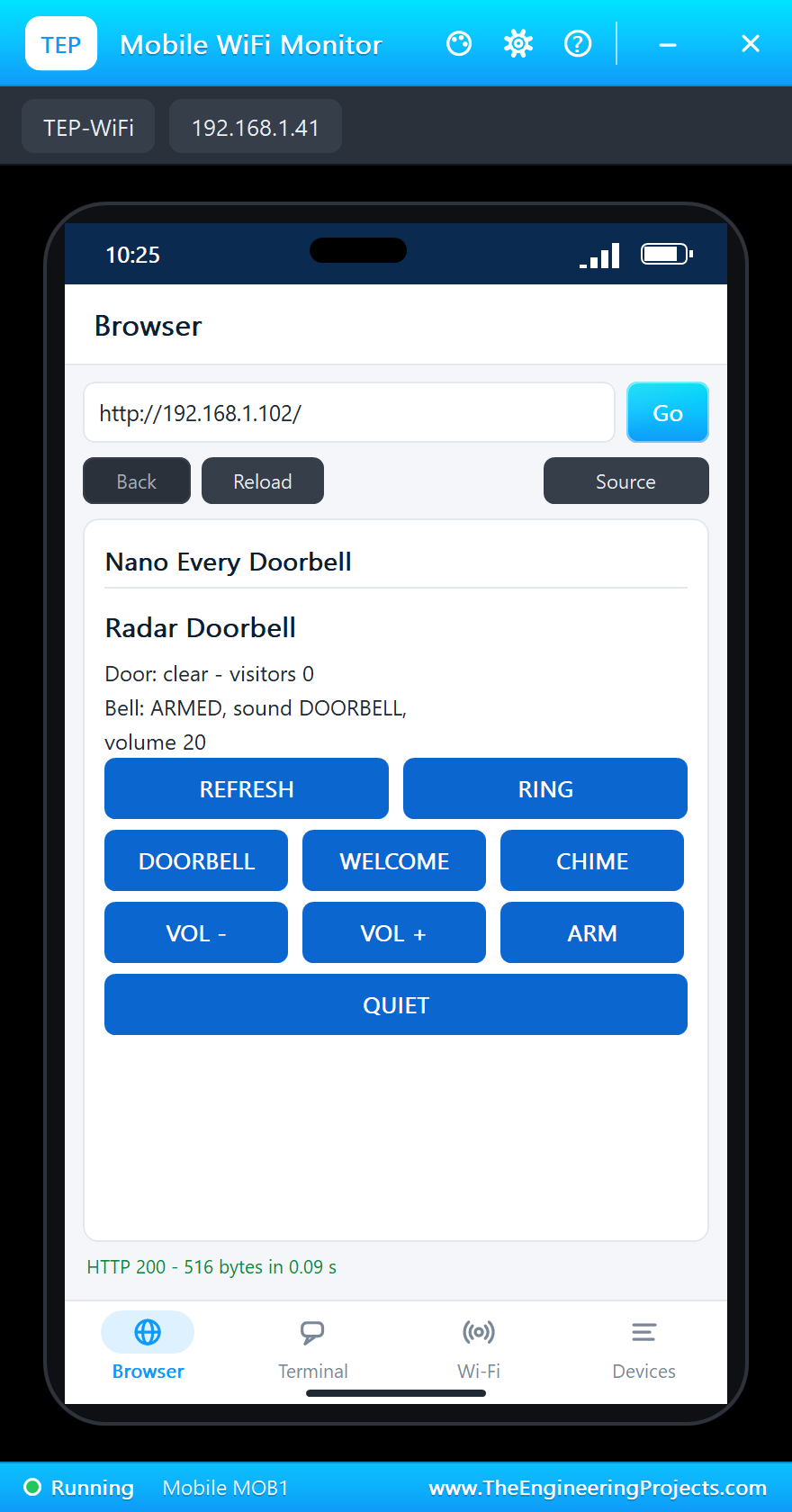
Door clear, visitors 0, bell ARMED, sound DOORBELL, volume 20, IP 192.168.1.102, pages 0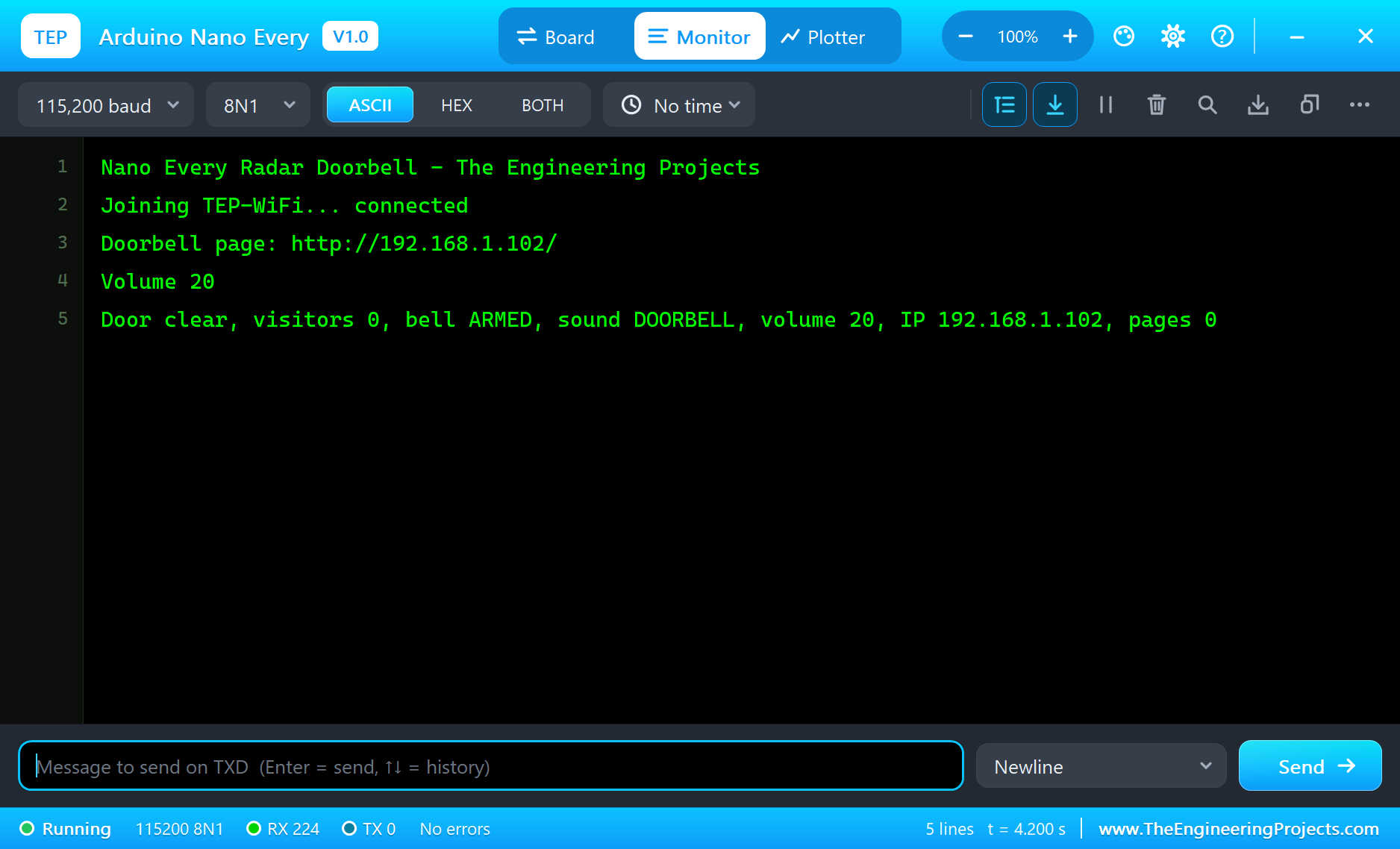
Open the Page
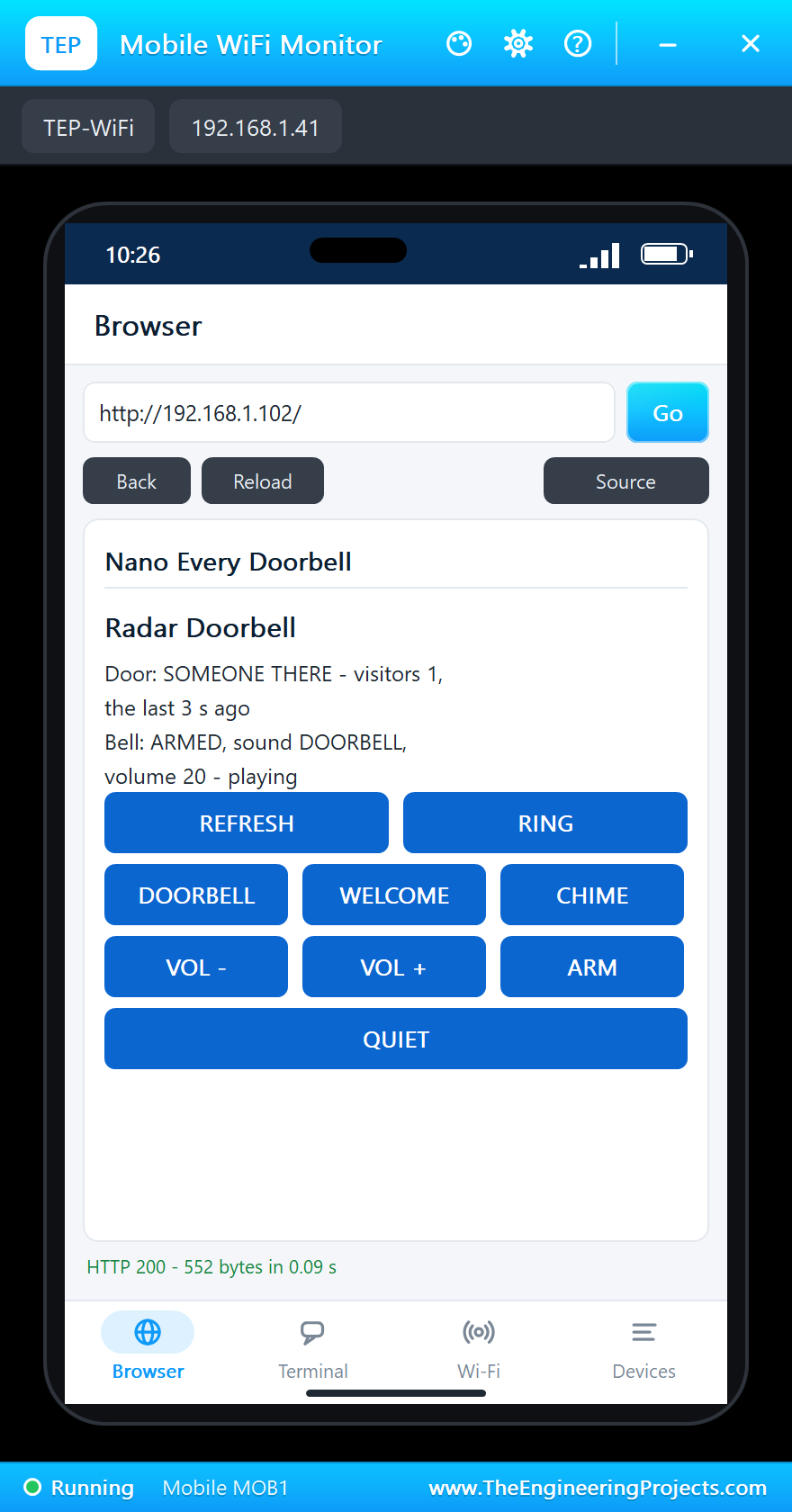
On the laptop click Browser and Go, on the phone the same - the home page of both is http://192.168.1.102/, the ESP-01S's address:
A Visitor: the L LED On
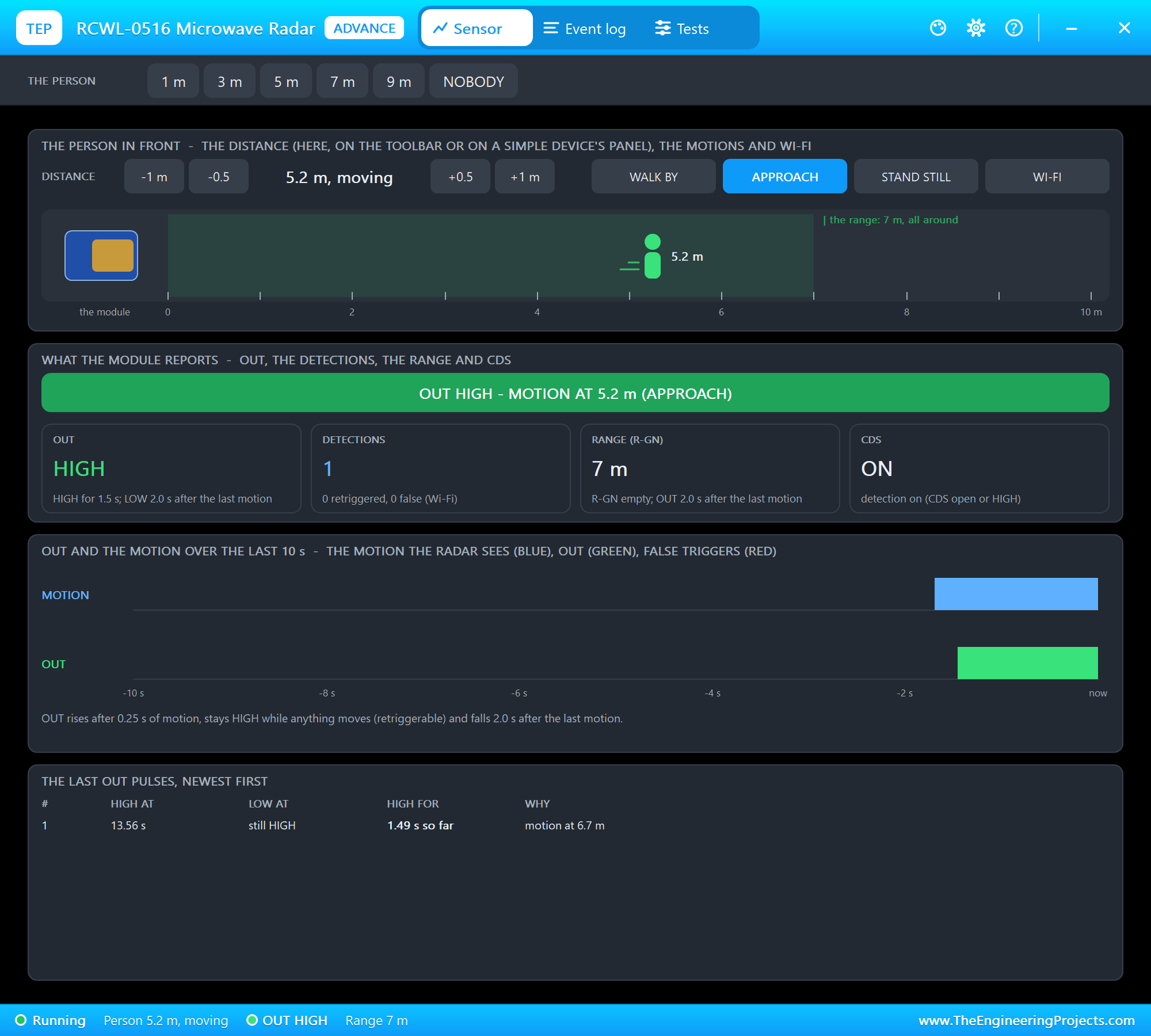
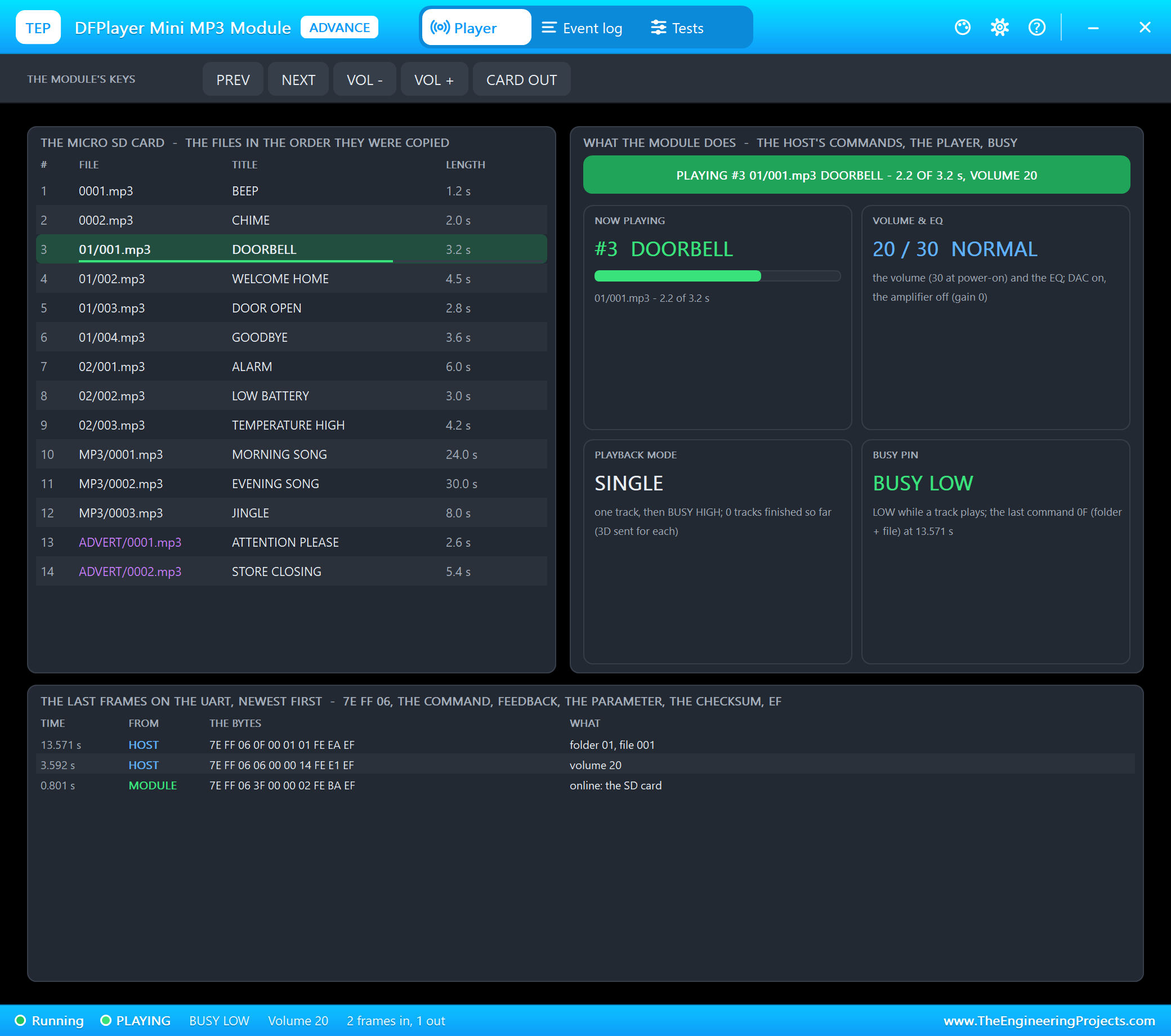
On the radar's pop-up click APPROACH: a person walks from 10 m up to the door. As soon as the radar sees them, OUT goes HIGH - visitor #1, the DFPlayer plays DOORBELL and the Nano Every's L LED lights next to the ON LED:
A Warmer Welcome
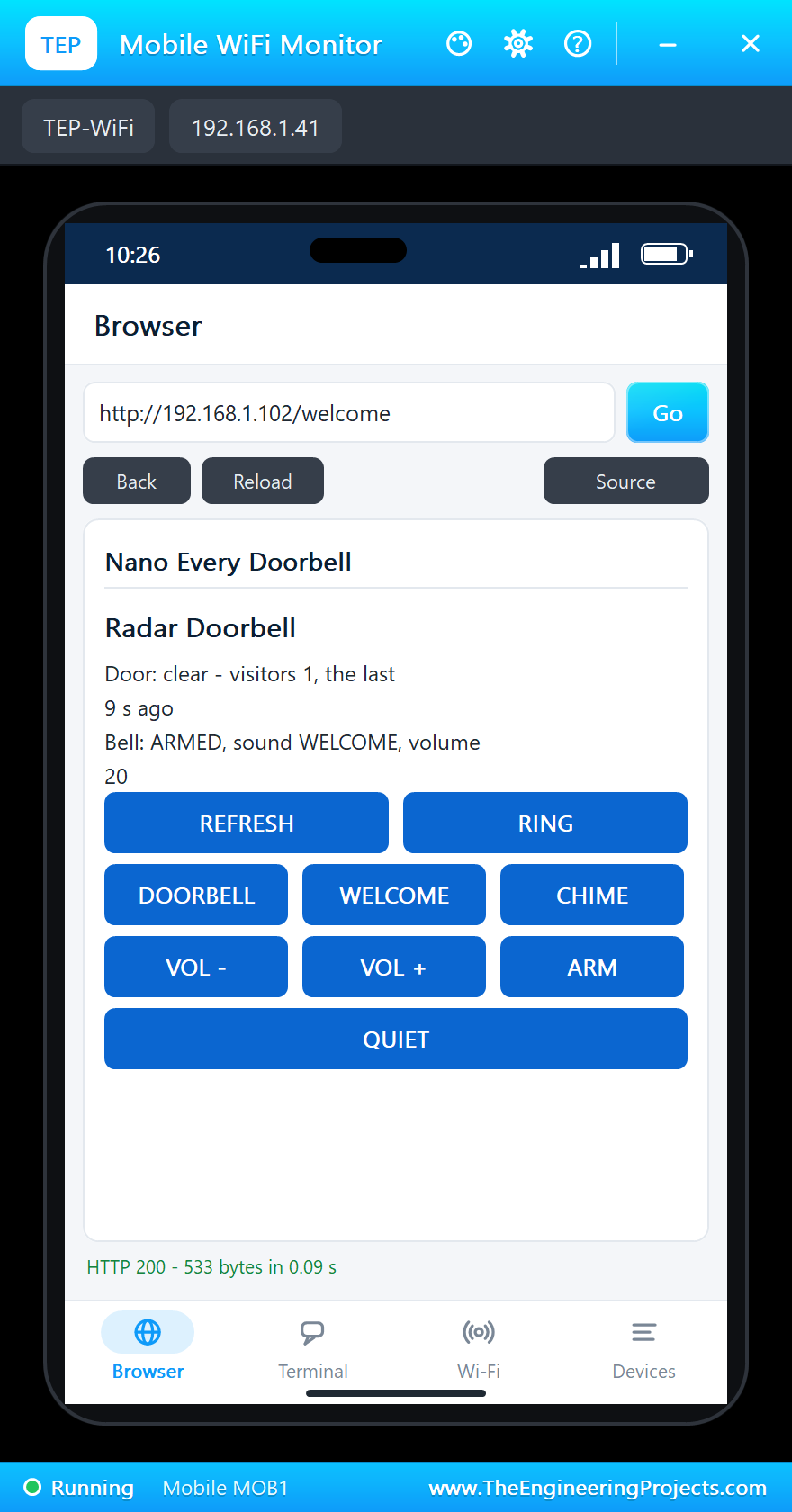
Tap WELCOME on the phone, then click WALK BY on the radar: someone walks across in front of the door - visitor #2, and this time the DFPlayer says WELCOME HOME:
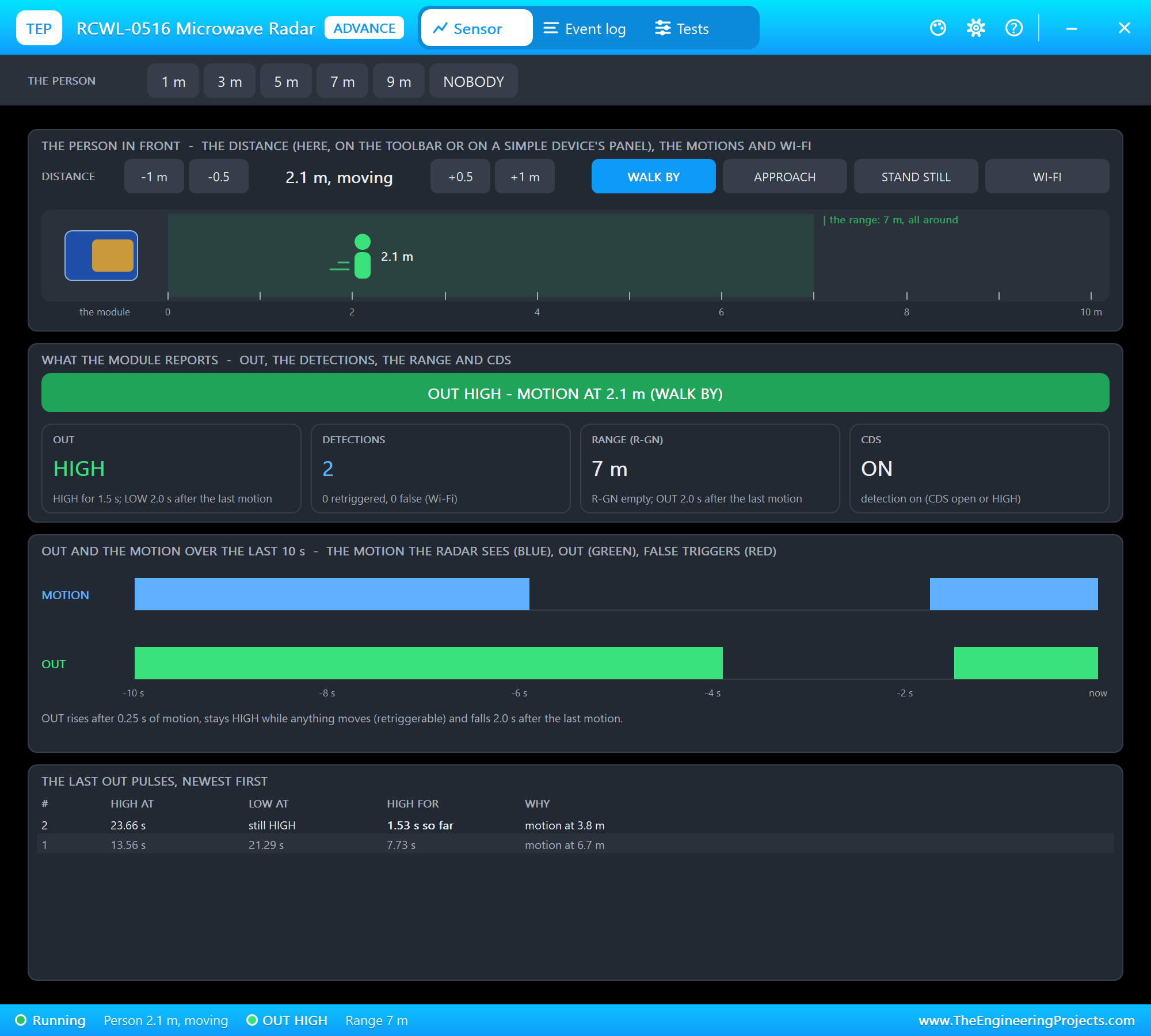
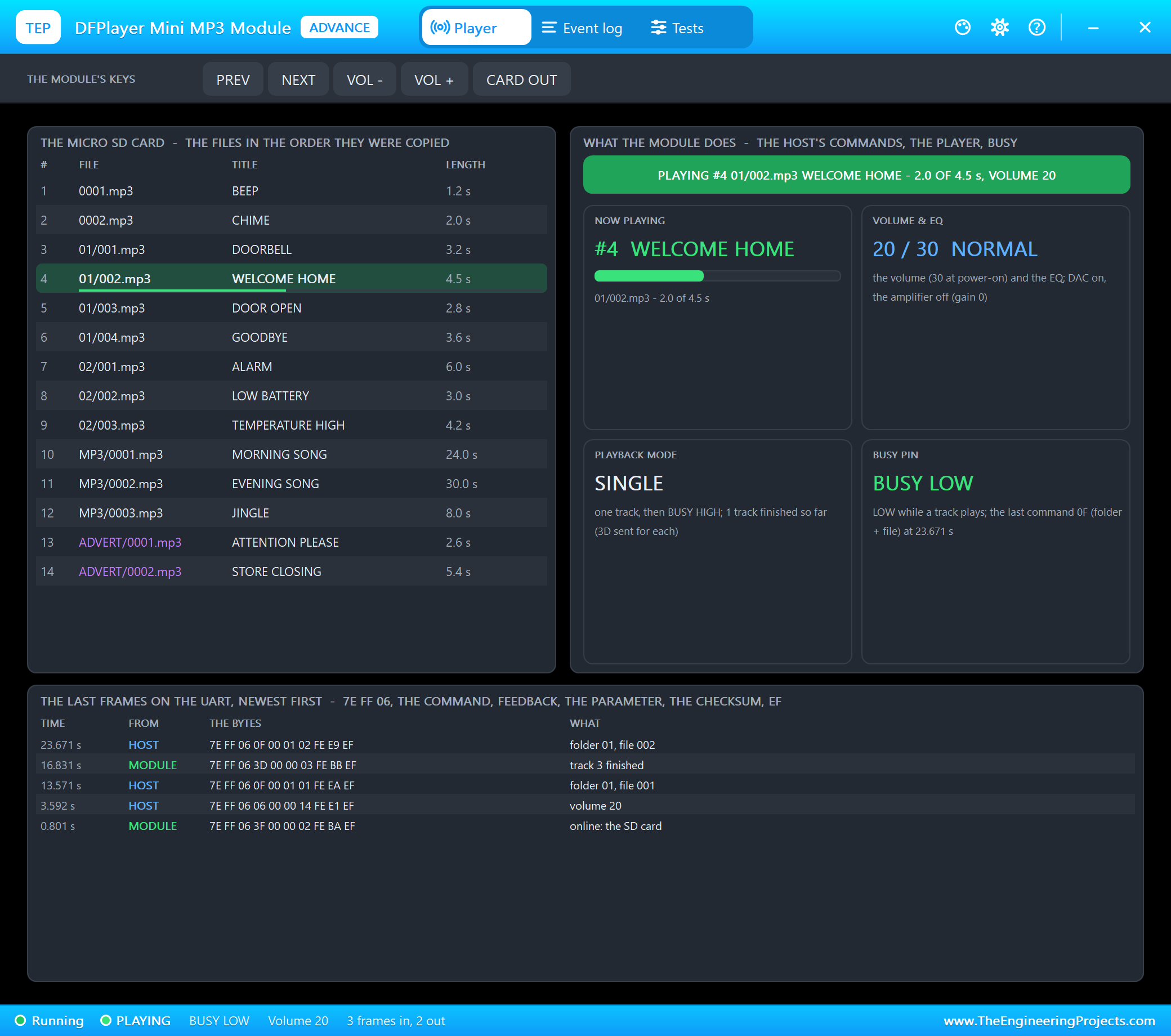
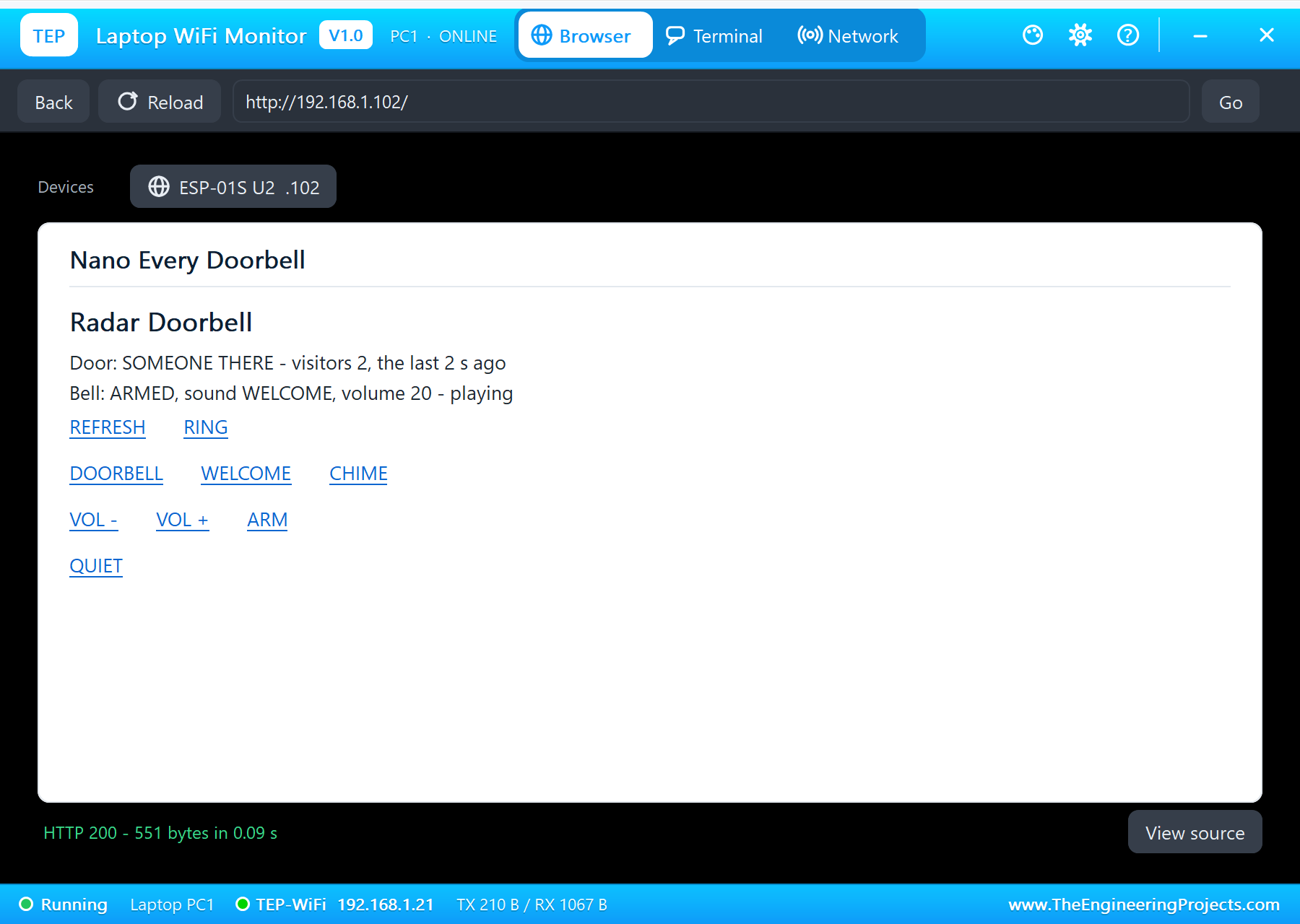
| Step | The radar | The board | The DFPlayer |
|---|---|---|---|
| Run | nobody, OUT LOW | Wi-Fi joined, L off | the card online, volume 20 |
| APPROACH | a person coming, OUT HIGH | visitor #1, L on | DOORBELL (01/001.mp3) |
| WELCOME on the phone, WALK BY | a person crossing, OUT HIGH | visitor #2, L on | WELCOME HOME (01/002.mp3) |
The built-in serial monitor, in the look of our TEP Serial Monitor Advance for Proteus, logs every visitor, every chime and every page:
Page: /
Page: /
Visitor #1 at 13.6 s
Ding-dong: DOORBELL
Page: /
Door clear
Page: /welcome
Visitor #2 at 23.7 s
Ding-dong: WELCOME
Page: /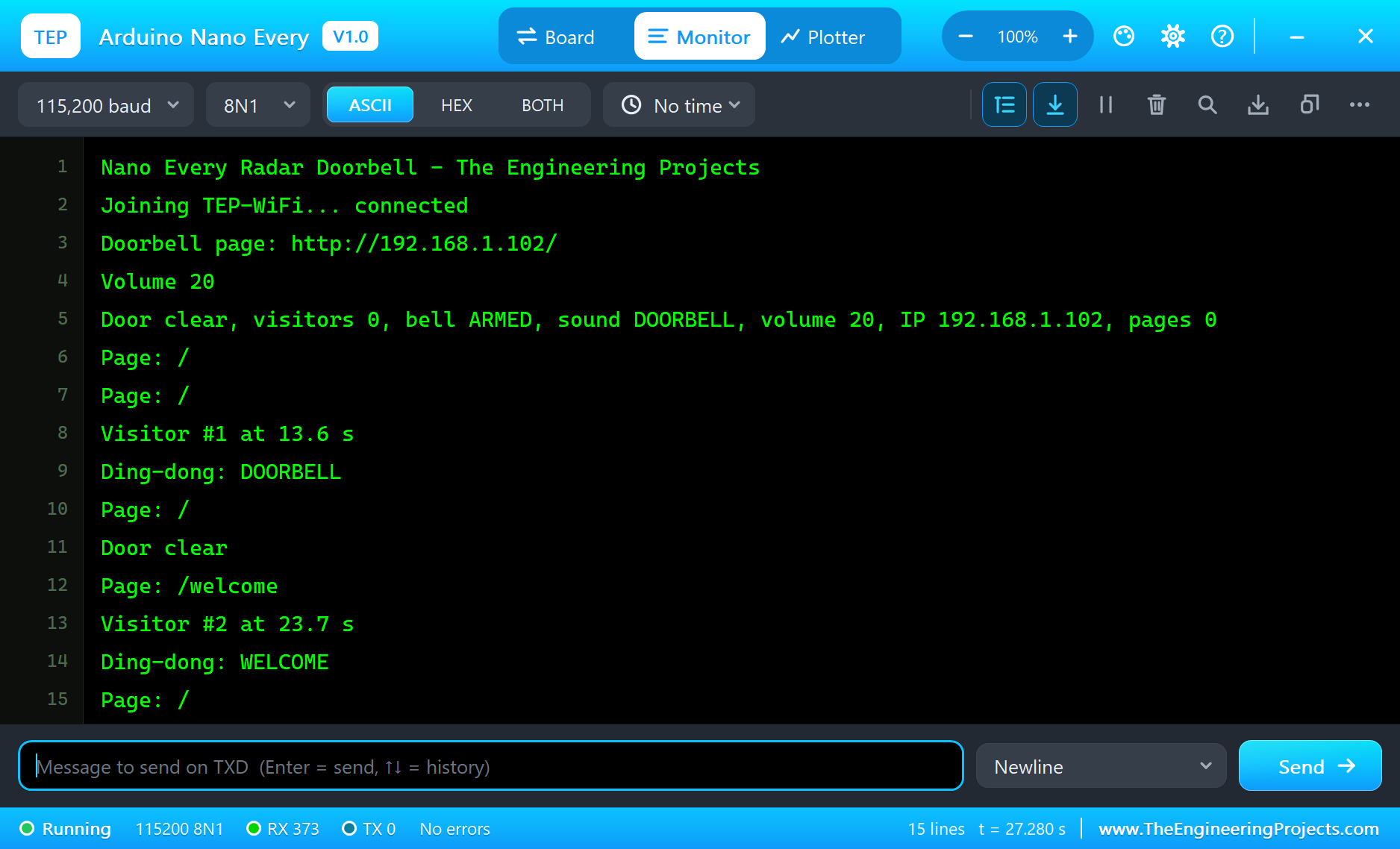
Try It Yourself
- Tap QUIET on the phone and walk by again: the visitor is counted, the bell stays silent.
- Tap RING to test the bell, VOL + and VOL - to change the volume by 5.
- Pull the card out on the DFPlayer's pop-up and ring: no sound - the module answers with an error the sketch ignores.
- Type
STATUSin the monitor, or an AT command such asAT+CIFSRfor the ESP-01S.
Ideas to Extend the Doorbell
- Send a message to a server on every visitor with AT+CIPSTART - the laptop's TCP terminal can be that server.
- Add a real push button on D5 for people who still press bells.
- Use the DFPlayer's ADVERT folder for a short "please wait" while music plays.
- Keep the visit times in an array and show the last ten on the page.
Your Own Sketches
Write the sketch in the Arduino IDE with the board Arduino Nano Every (TEP Proteus), use Sketch > Export Compiled Binary and set the board's PROGRAM property to the .hex. The same sketch compiles for a real Nano Every with the "Arduino megaAVR Boards" package - select "Arduino Nano Every" there and upload. The demo needs no extra library.
Things to Know Before Using a Real Nano Every
- The ESP-01S is a 3.3 V part: give it its own 3.3 V regulator (it draws up to 300 mA) and a divider (1 k / 2 k) between TX1 and its RXD; its TXD can go straight to RX0.
- The DFPlayer's RX: a 1 k resistor in series removes the hum many modules have on 5 V boards.
- The RCWL-0516 sees through walls: it may see people inside too - point its back to the house or put metal behind it.
- Serial is not Serial1: on the Nano Every the USB is Serial and D0 / D1 are Serial1 - sketches written for the old Nano that use Serial on D0 / D1 must change.
- Power: 7 to 21 V on VIN, or 5 V on the USB.
Properties of the Arduino Nano Every
| Property | What it does |
|---|---|
| PROGRAM | the sketch: a .hex from TEP Boards for Proteus (board "Arduino Nano Every") |
| MONITOR, BAUD, AUTOOPEN | the built-in serial monitor: on, its baud rate (115200), open at Run |
Troubleshooting
- The ESP-01S does not answer, NO POWER on its pop-up: its VCC needs a digital supply - the power terminal, as in the demo; TXD to RX0, RXD to TX1, Serial1.begin(115200).
- "Joining TEP-WiFi... FAILED": the sketch's SSID and password must match the ESP-01S's WIFISSID and WIFIPASS.
- No sound: the DFPlayer needs its card online before the first command; its RX on D4; check the volume.
- No visitor: the radar sees moving people only; OUT on D2.
- The page shows old values: use REFRESH; the monitors do not reload by themselves.
Limitations of the Simulation
- Your sketch gets 8 KB of RAM in the simulation and runs slower than on the ATmega4809 at 20 MHz with 6 KB.
- The ATmega4809's own peripherals (the event system, CCL, the TCA / TCB timers by register, UPDI) and the SAMD11 are not modelled; the two small LEDs in the middle are drawn, not driven.
- The router, the addresses and the windows are TEP additions.
- Arduino and Nano are trademarks of Arduino S.r.l., ATmega4809 a name of Microchip Technology; this library is not made or endorsed by Arduino, Microchip or Labcenter.
- Tested in Proteus 8.5 in October 2026 (the demo as shipped, about 28 s of simulation). Proteus 7 is not supported.
So, that was all about the Arduino Nano Every Library for Proteus. I hope it helps you build and test your Nano Every projects before you touch the hardware - the radar, the player and the Wi-Fi module in one simulation. If you have any questions, ask in the comments and I will help you out. Till the next tutorial, take care and have fun!

Comments
0