


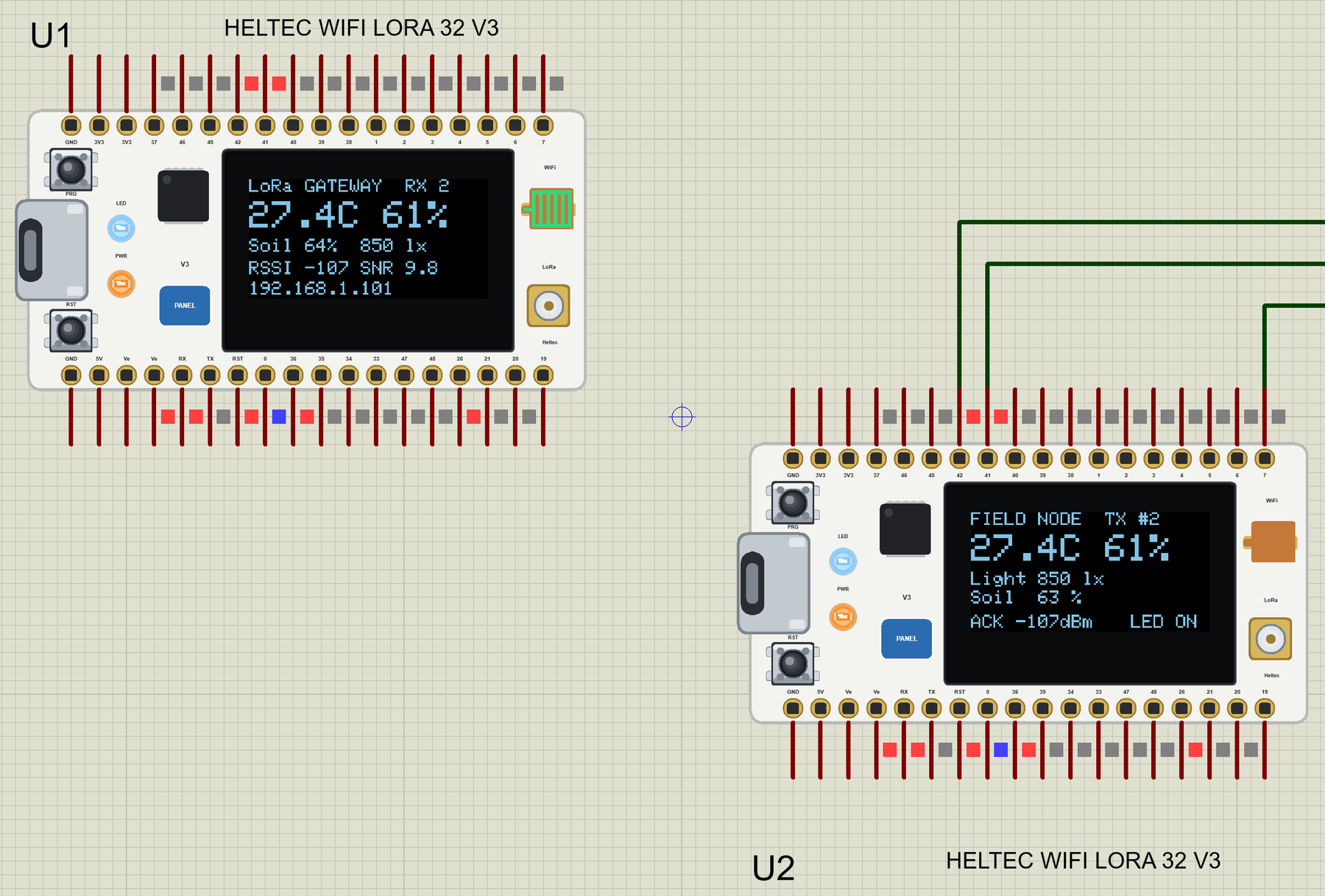
Heltec WiFi LoRa 32 V3 Library for Proteus: SX1262 LoRa + OLED


Hello friends, I hope you all are doing great. Today, I am going to share the Heltec WiFi LoRa 32 V3 Library for Proteus. The Heltec V3 is the little white board that so many LoRa projects start with: an ESP32-S3 with Wi-Fi, a Semtech SX1262 LoRa radio for links of kilometres, and a 0.96" OLED to show what is going on - all on one board the size of a matchbox. With this library it runs your Heltec V3 sketch in Proteus 8.5, radio and OLED included.
Heltec WiFi LoRa 32 V3 Library for Proteus
Latest version: V1.0 (October 2026, this tutorial)
Helping Tools
- Laptop WiFi Monitor: a laptop on the Wi-Fi of your design: a browser, a TCP / UDP terminal and ping
- Mobile WiFi Monitor: a smartphone that opens the pages of your board and sends it commands
- Serial Monitor Advance: a serial terminal window for the UART of your board
Because the radio lives inside the board, two Heltec boards in one design talk to each other. The demo uses that: a LoRa field node with a temperature and humidity sensor, a light sensor and a soil moisture probe sends its readings to a LoRa to Wi-Fi gateway, which shows them on its OLED and on a web page - and the page sends commands back to the node over LoRa.
NOTICE: Proteus has no ESP32-S3 or SX1262 model, so our team has put a lot of effort into building this board ourselves: the Heltec's pins, radio, OLED and LEDs are all our own model, and your sketch compiles with our free TEP Boards for Proteus add-on. Your feedback is the fuel that keeps us going, so please tell us what you think in the comments below or in the Heltec WiFi LoRa 32 V3 board of our forum. And if our free libraries help you, you can buy us a coffee. So, let's get started with the Heltec WiFi LoRa 32 V3 Library for Proteus:
What is the Heltec WiFi LoRa 32 V3?
Heltec Automation makes development boards for LoRa, and the WiFi LoRa 32 is their best-known one. The third version (V3) moved to Espressif's ESP32-S3 - two cores at 240 MHz, Wi-Fi and Bluetooth LE - and to Semtech's SX1262, the LoRa transceiver that replaced the older SX1276 / SX1278 family with lower current and more output power. A USB-C port with a CP2102 programs it, and a small battery connector with its charger lets it run from a LiPo cell in the field.
On top of the board sit the 0.96" OLED (an SSD1306 with 128 x 64 pixels, on its own I2C pins), two tiny buttons - PRG on GPIO0 and RST - a white LED on GPIO35, the IPEX socket for the LoRa antenna and a copper spring antenna for Wi-Fi. Two 18-pin headers bring out the rest. One detail matters for every sketch: the OLED is powered from Vext, a switched 3.3 V rail that GPIO36 turns on when it is LOW.
| Heltec WiFi LoRa 32 V3 | |
|---|---|
| Chip | ESP32-S3FN8: two Xtensa LX7 cores at 240 MHz, 8 MB flash in the chip, Wi-Fi, Bluetooth LE |
| LoRa | Semtech SX1262, 863 to 928 MHz versions, IPEX antenna socket |
| Display | 0.96" OLED, 128 x 64, SSD1306 at I2C address 0x3C (SDA 17, SCL 18, RST 21) |
| USB | USB-C with a CP2102 (Serial on GPIO43 / 44) |
| Power | 5 V from USB or a LiPo cell with the on-board charger; 3.3 V logic |
| Size | about 50 x 25 mm, two 18-pin headers |
Why LoRa?
Wi-Fi covers a house; LoRa covers a farm. It sends a few bytes at a time at a low data rate, but it reaches kilometres in the open with milliwatts of power, so a battery node can report for months. The usual pattern is the one in our demo: LoRa nodes out in the field, and one gateway near the building that passes their data to Wi-Fi and the internet.
Features of the Heltec WiFi LoRa 32 V3 Library for Proteus
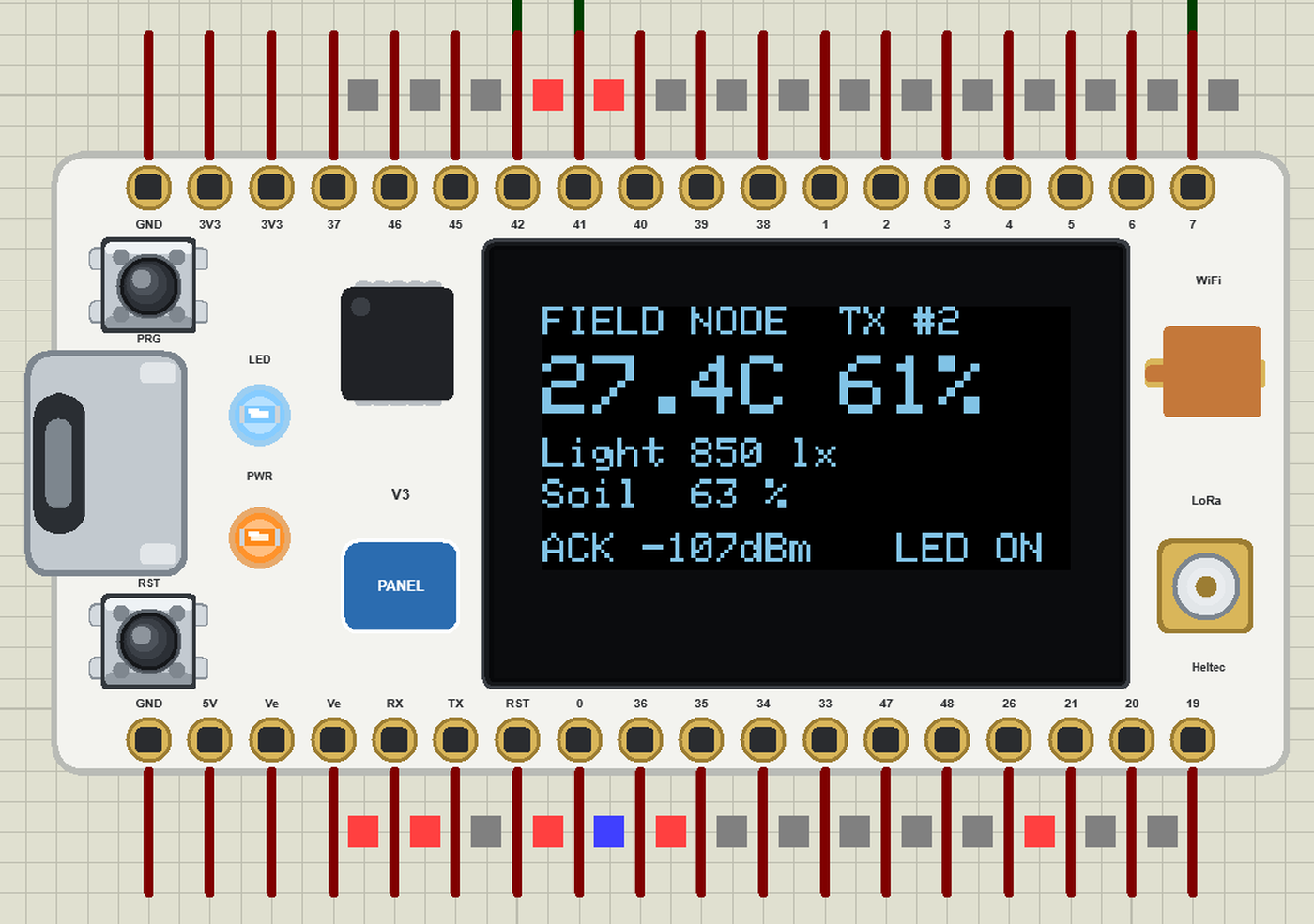
- The board as it looks: the white Heltec V3 with its two headers, the USB-C port, PRG and RST, the orange PWR LED and the white LED, the OLED, the IPEX socket and the Wi-Fi spring antenna.
- Your sketch: a .hex for "Heltec WiFi LoRa 32 V3 (TEP Proteus)" with the ESP32-S3's GPIO numbers and Heltec's names - LED, Vext, RST_OLED, SDA_OLED, SCL_OLED - with digitalWrite, analogRead, PWM, attachInterrupt, Serial, Serial1, Wire, WiFi and WebServer.
- The SX1262 inside: RadioLib talks to the board's radio on SPI as on the real board; two or more Heltec boards in one design hear each other, with the RSSI and SNR set by their distance.
- The OLED inside: Adafruit SSD1306 at 0x3C draws on the board's own display, powered by Vext and reset by RST_OLED.
- Wi-Fi: the board joins the simulated router, so a phone or a laptop in the design opens its pages.
- The serial monitor: the built-in monitor on the USB port with Monitor, Plotter and Board tabs - our TEP header, no Windows title bar.
- A complete package: about 4.1 MB with the board, the add-on, the AHT20, BH1750 and soil moisture libraries and the demo, without the source code of the models.
The Heltec WiFi LoRa 32 V3 in Proteus
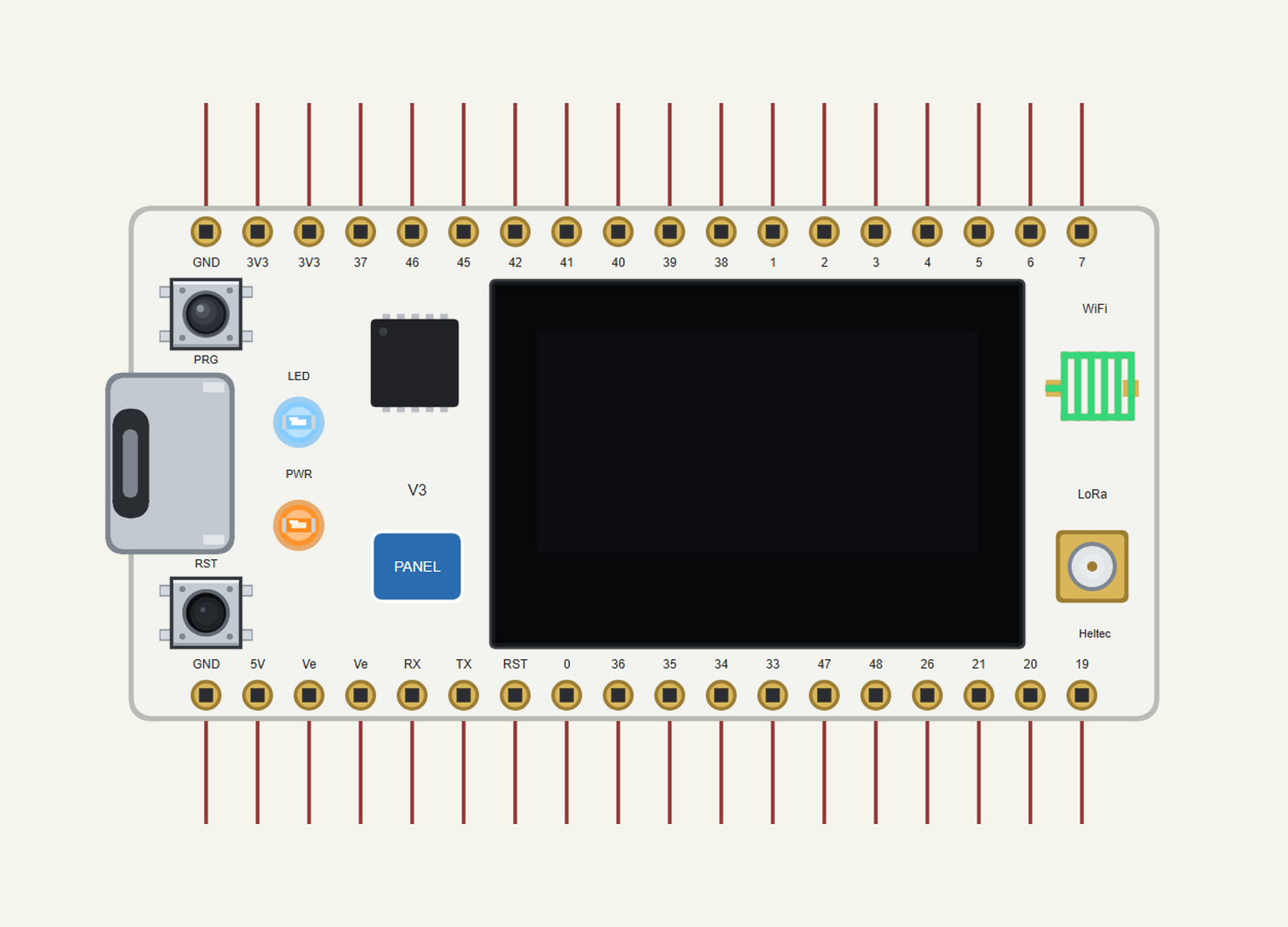
Search HELTEC in Pick Devices; the device HELTEC WIFI LORA 32 V3 is in TEPHELTECV3.LIB (Microprocessor ICs, ESP32 Boards), with the prefix U. The board lies with the USB-C port on the left: header J3 is the top row and J2 the bottom row, both read from the USB end, as on Heltec's pin map. Click the USB-C port to open the serial monitor, and the PANEL pad or the OLED for the board's panel.
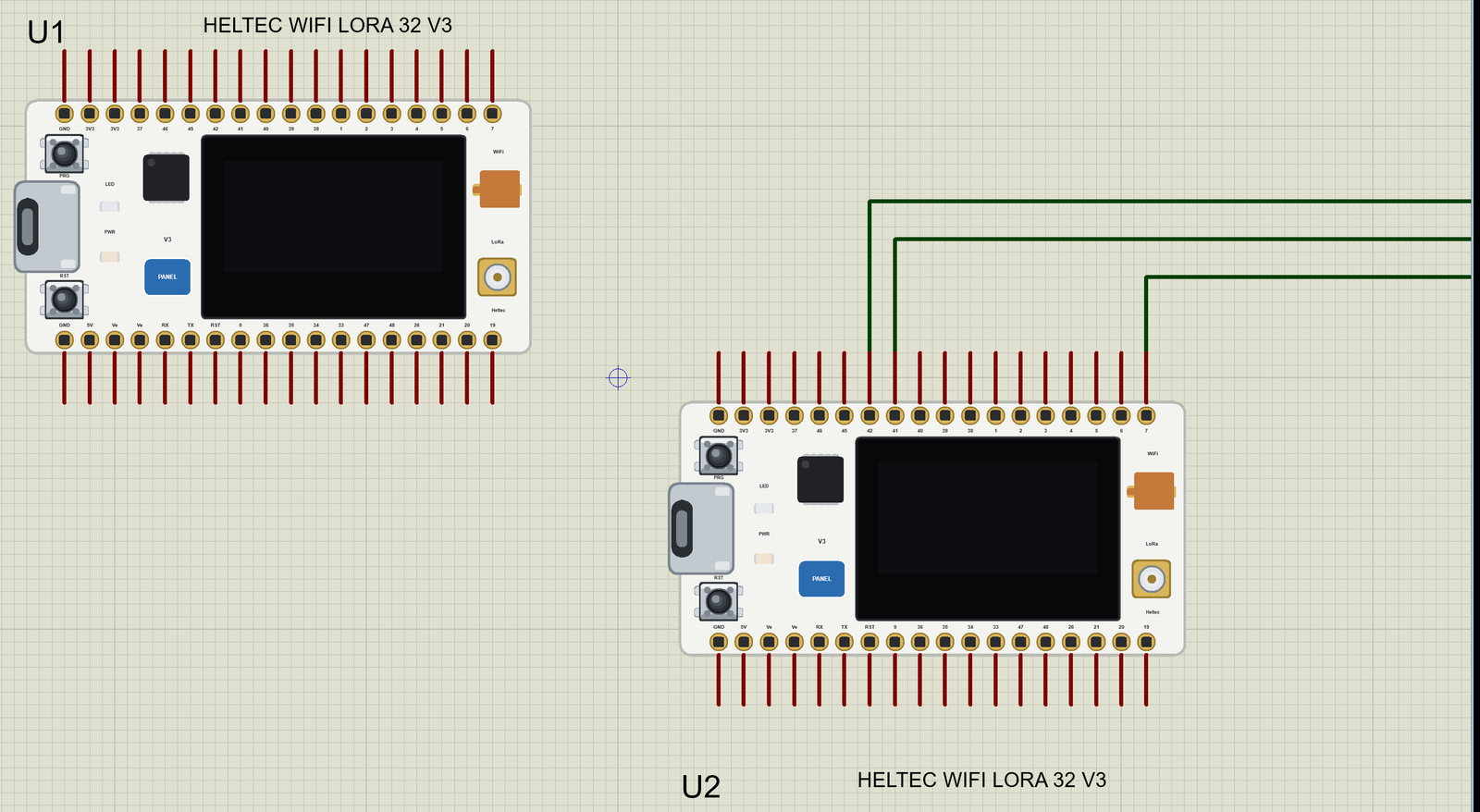
The Pins
| Pins | What the library does with them |
|---|---|
| 1 to 7 | GPIO, analogRead (0 to 4095 for 0 to 3.3 V), PWM, interrupt, touch pad |
| 19, 20 | GPIO, analogRead, PWM, interrupt |
| 21 | GPIO; also RST_OLED |
| 26, 33 to 40, 45, 46 | GPIO, PWM, interrupt; 35 is the white LED, 36 is Vext |
| 41 / 42 | Wire SDA / SCL |
| 47 / 48 | Serial1 TX / RX |
| TX 43 / RX 44 | Serial, the USB port and the board's monitor |
| 0 | PRG: LOW while the button is pressed |
| RST, 3V3, Ve, 5V, GND | reset, 3.3 V, the 3.3 V of Vext, 5 V, ground |
The radio and the OLED have no pins on the sheet. The SX1262 uses NSS 8, SCK 9, MOSI 10, MISO 11, RESET 12, BUSY 13 and DIO1 14, and the OLED SDA 17 and SCL 18 - inside the board, exactly as on the real one. That is also why any number of Heltec boards can share one design.
The Radio Inside the Board
The SX1262 in the board is the same model as in our SX1262 LoRa Library for Proteus: it takes RadioLib's commands, raises BUSY while it works, raises DIO1 when a packet has been sent or received, and times each packet by its real time on air. The boards in a design share one air, and the LORADIST property of each board says how far apart they are - from 10 m to 20 km. The RSSI and the SNR follow from the distance, and past the radio's sensitivity nothing arrives at all.
The OLED Inside the Board
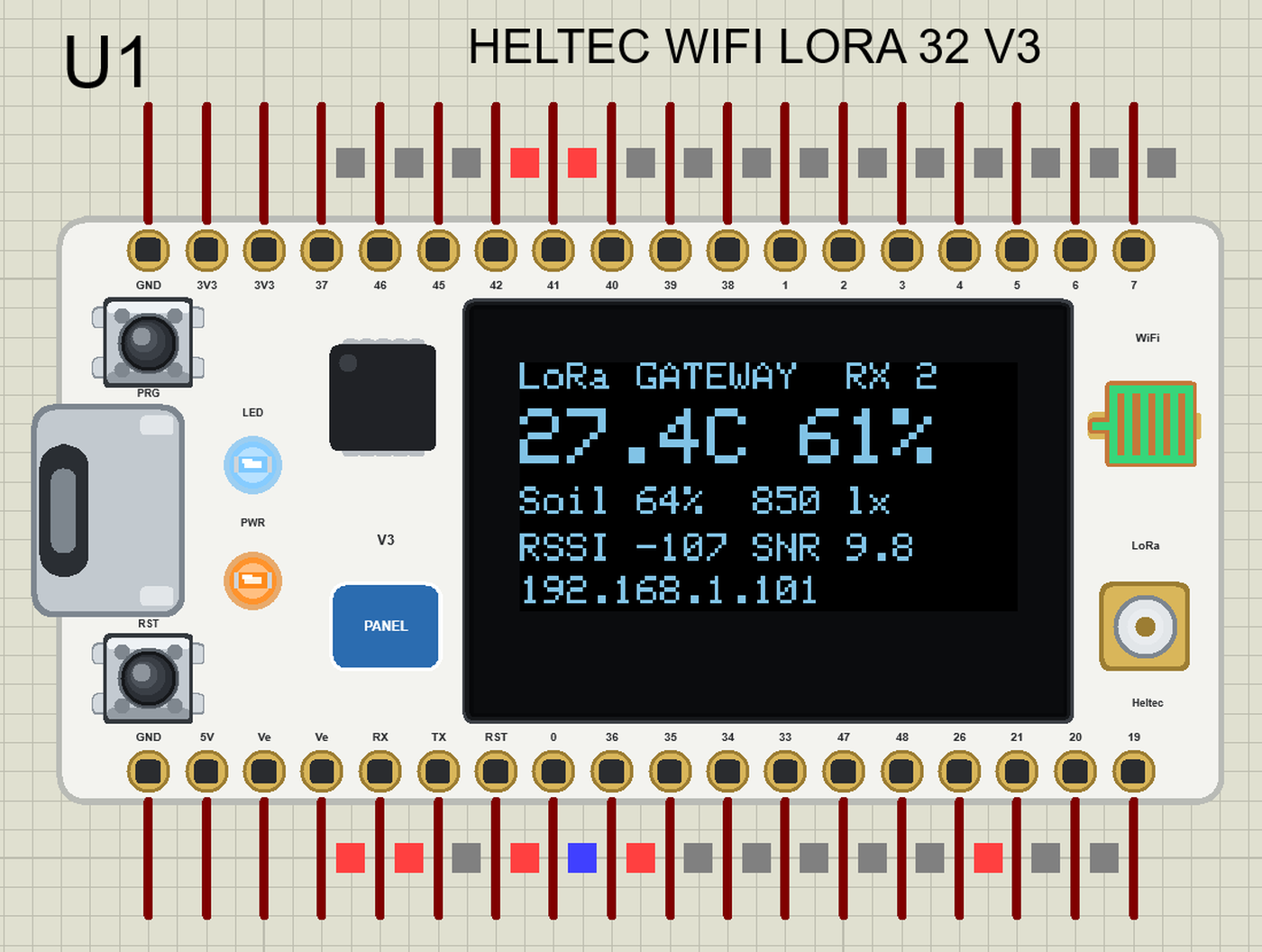
The OLED is an SSD1306 at I2C address 0x3C, as in our OLED SSD1306 Library for Proteus. Any Wire transmission to 0x3C goes to the board's display, which shows the pixels in the OLED's blue-white. Like the real panel it stays dark until Vext is on, and RST_OLED resets it:
  pinMode(Vext, OUTPUT); digitalWrite(Vext, LOW);           // Vext on: the OLED's power
  delay(100);
  Wire.begin(SDA_OLED, SCL_OLED);                           // the OLED
  if (!display.begin(SSD1306_SWITCHCAPVCC, 0x3C)) Serial.println(F("[NODE] OLED not found"));
Download Heltec WiFi LoRa 32 V3 Library for Proteus
Click the button below to download Heltec-WiFi-LoRa-32-V3-Library-for-Proteus-v1.0.zip (about 4.1 MB, without the source code of the models):
Heltec WiFi LoRa 32 V3 Library for Proteus V1.0- README.txt: installation, the demo, the pins, the properties, troubleshooting and the limits.
- Proteus Library Files:
TEPHELTECV3.LIBand the demo's parts:TEPAHT20.LIB,TEPBH1750.LIB,TEPCAPSOIL.LIB,TEPLAPTOP.LIBandTEPMOBILE.LIB. - Proteus Model Files:
TEPNET.DLL(the board, its radio and OLED, the laptop, the phone and the network),TEPAHT20.DLL,TEPBH1750.DLLandTEPCAPSOIL.DLL. - Arduino Code: the two demo sketches and the TEP Boards for Proteus add-on 1.32.0.
- Proteus Simulation: the demo project, its two HEX files and copies of the DLLs.
No Proteus yet? Read How to Download and Install Proteus 7 and 8. New to libraries? Follow How to Install a New Library in Proteus.
How to Install Heltec WiFi LoRa 32 V3 Library for Proteus
- Close Proteus and extract the whole zip file, for example to your Desktop.
- Copy the files from Proteus Library Files into the LIBRARY folder of Proteus.
- Copy the DLLs from Proteus Model Files into the MODELS folder, replacing an older TEPNET.DLL.
- Delete
TEPHELTECV3.IDXfrom the LIBRARY folder if it is there. - For your own sketches, copy Arduino Code\TEP Boards for Proteus\hardware into your Arduino sketchbook (Documents\Arduino) and restart the Arduino IDE; the board is Heltec WiFi LoRa 32 V3 (TEP Proteus). For the demo install RadioLib, Adafruit SSD1306, Adafruit GFX and Adafruit BusIO from the Library Manager.
- Start Proteus, press P and search for HELTEC.
Demo: a LoRa Field Monitor with a Wi-Fi Gateway
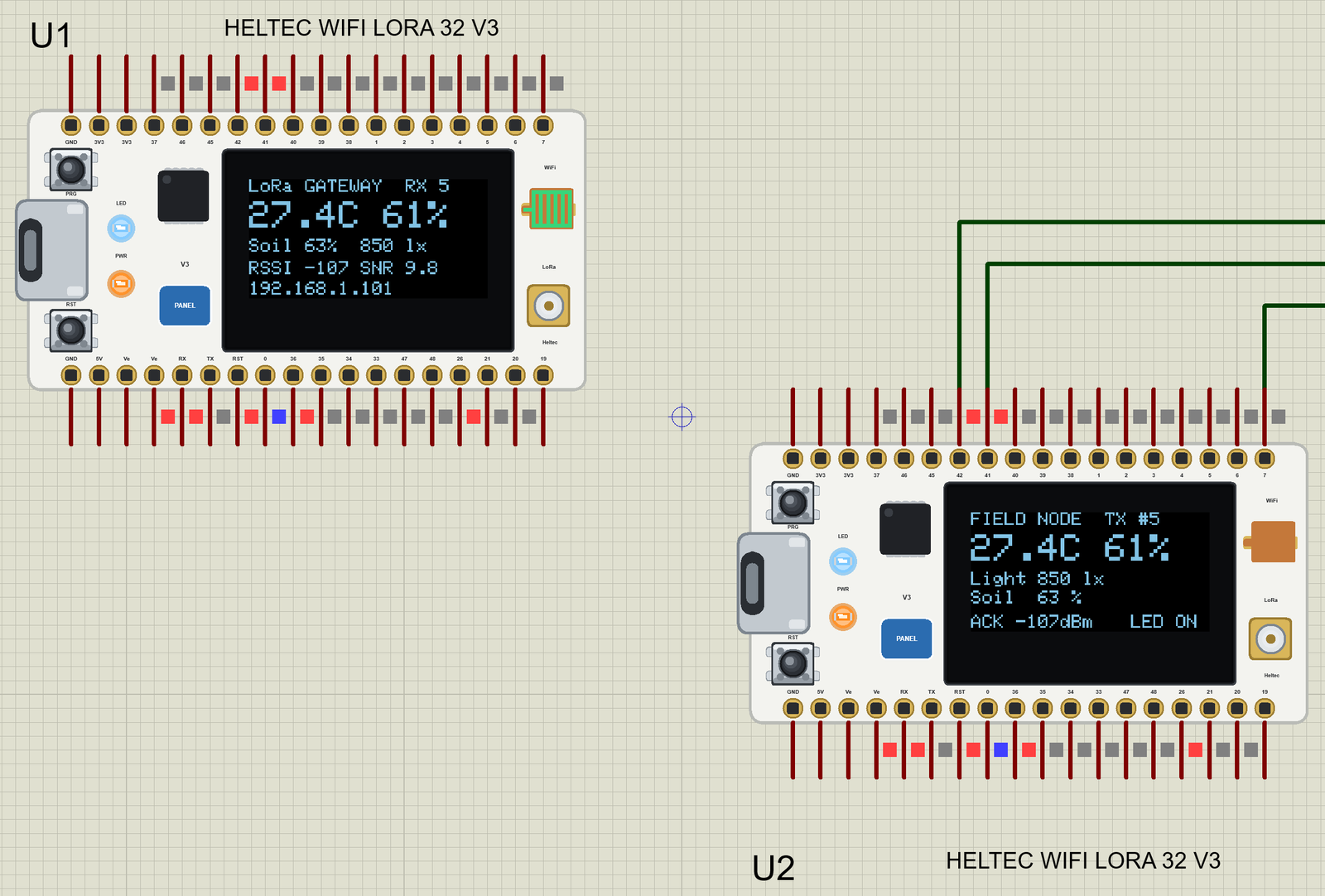
Picture a greenhouse or a field a few hundred metres from the house, too far for Wi-Fi. A battery node out there measures the air, the light and the soil and sends the numbers over LoRa; a gateway indoors receives them and puts them on Wi-Fi, where a phone can read them. Two Heltec V3 boards do both jobs, and this demo runs the pair in one simulation.
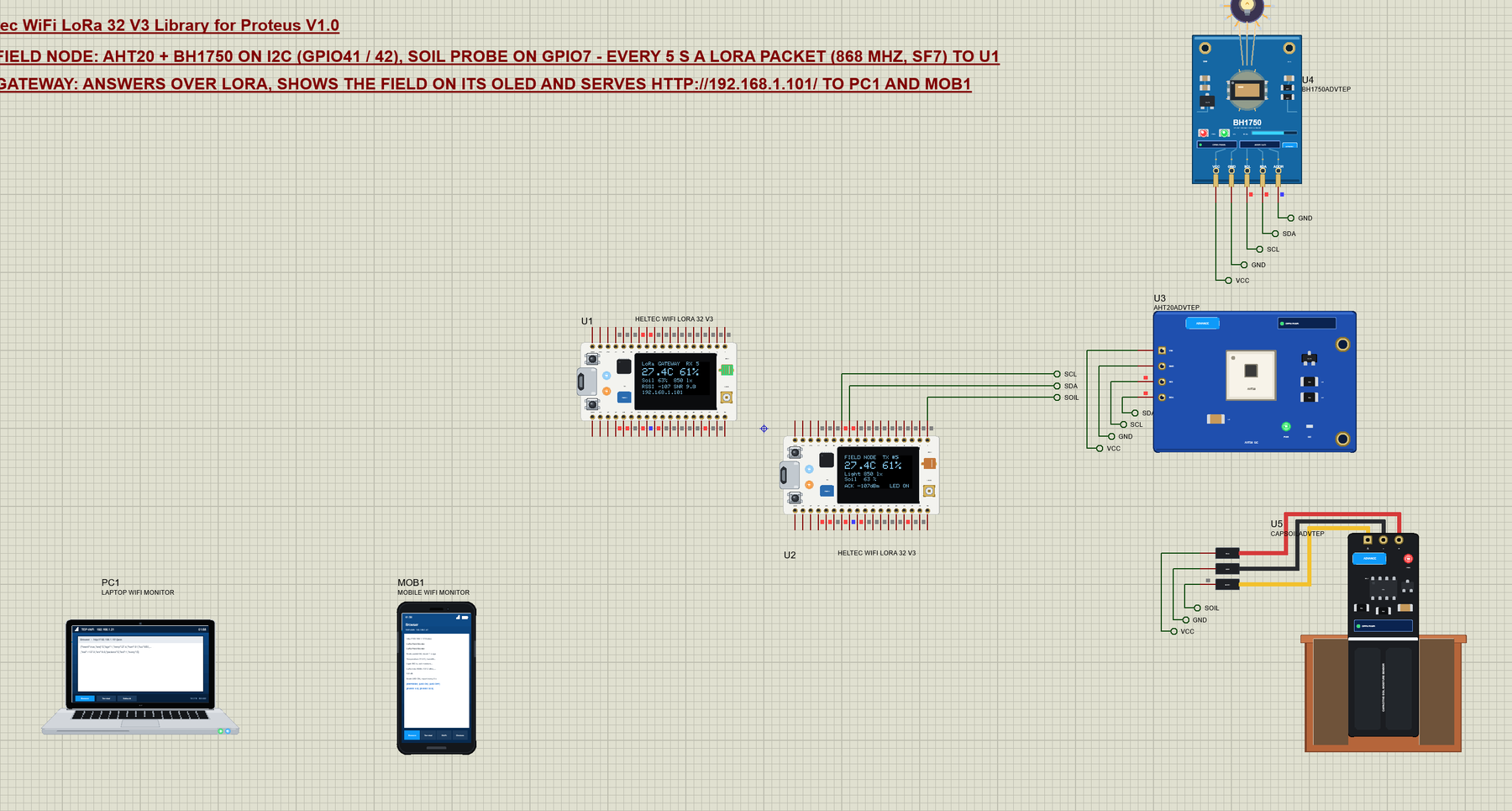
Open Heltec-LoRa-Field-Monitor.pdsprj. U1 is the gateway (Heltec_LoRa_Gateway.hex) and U2 the field node (Heltec_Field_Node.hex, LORADIST 1 km). U3 is the AHT20 from our AHT20 Sensor Library for Proteus, U4 the BH1750 from our BH1750 Light Sensor Library for Proteus and U5 the probe from our Capacitive Soil Moisture Sensor Library for Proteus - all three the Advance versions, which open their pop-up windows at Run. PC1 is the Laptop WiFi Monitor and MOB1 the Mobile WiFi Monitor.
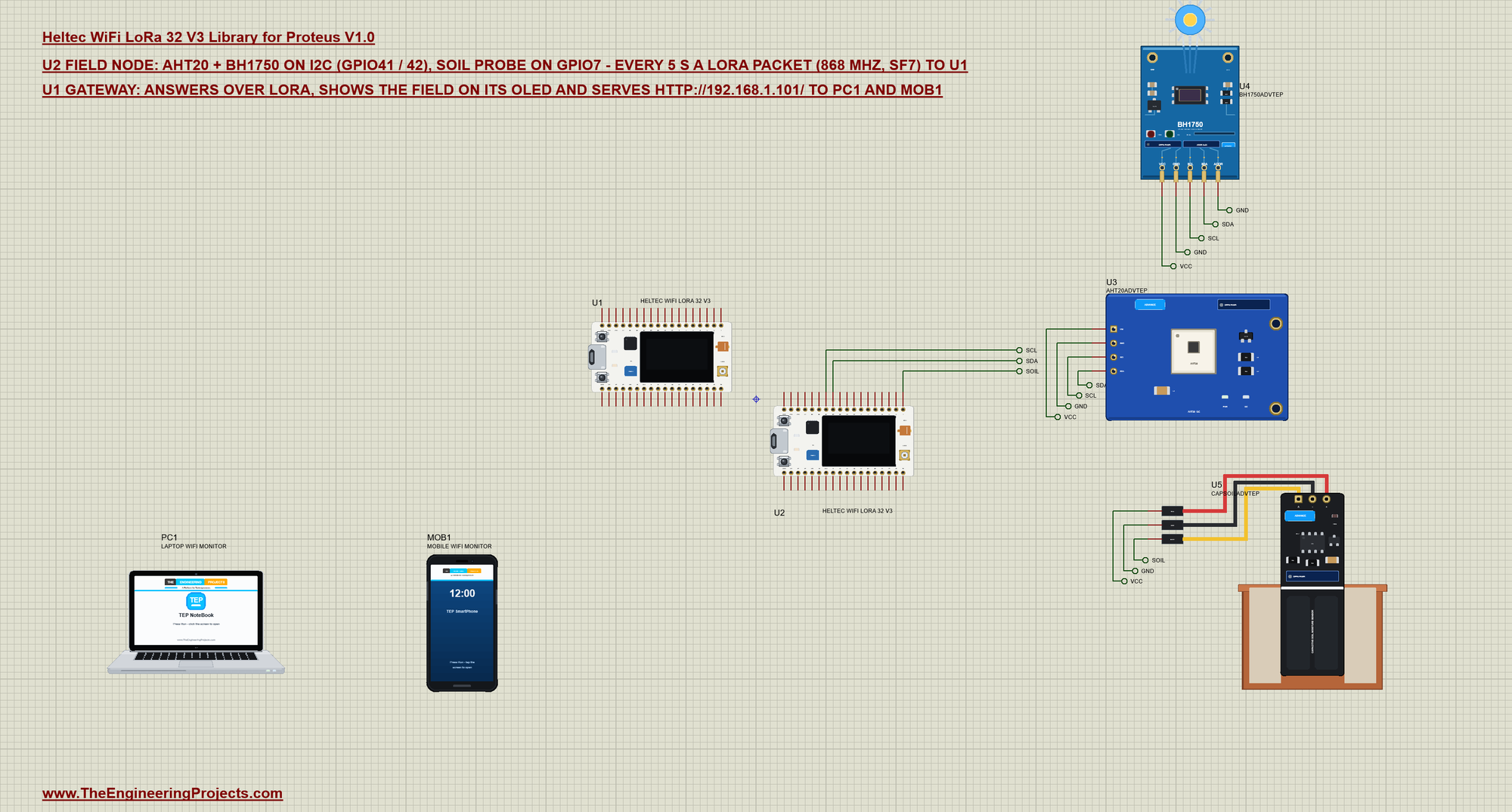
| Part | Pins | Node pins | Notes |
|---|---|---|---|
| AHT20 (U3) | SDA, SCL | GPIO41, GPIO42 | Wire1, address 0x38; VIN to VCC |
| BH1750 (U4) | SDA, SCL, ADDR | GPIO41, GPIO42, GND | address 0x23 |
| Soil probe (U5) | AOUT | GPIO7 | 2.54 V in air, 1.27 V in water |
| Gateway (U1) | none | LoRa to the node, Wi-Fi to PC1 and MOB1 |
The Field Node
The node reads the AHT20 and the BH1750 with a few lines of Wire each - no extra libraries - and the soil probe with analogRead. On the real board the OLED has its own I2C pins, so the sensors go on Wire1 (GPIO41 / 42), as Heltec's examples do. This is the AHT20: start a measurement, wait 80 ms, read six bytes and scale the two 20-bit values:
bool aht20Read() {
  Wire1.beginTransmission(AHT20_ADDR);
  Wire1.write(0xAC); Wire1.write(0x33); Wire1.write(0x00);  // trigger a measurement
  if (Wire1.endTransmission() != 0) return false;
  delay(80);
  if (Wire1.requestFrom(AHT20_ADDR, (uint8_t)7) < 6) return false;
  uint8_t d[7];
  for (int i = 0; i < 7; i++) d[i] = Wire1.available() ? Wire1.read() : 0;
  if (d[0] & 0x80) return false;                            // still busy
  uint32_t h = ((uint32_t)d[1] << 12) | ((uint32_t)d[2] << 4) | (d[3] >> 4);
  uint32_t t = ((uint32_t)(d[3] & 0x0F) << 16) | ((uint32_t)d[4] << 8) | d[5];
  humidity = h * 100.0 / 1048576.0;
  temperature = t * 200.0 / 1048576.0 - 50.0;
  return true;
}
Every 5 s - or at once when you press PRG - the node packs the readings into a short text and sends it with RadioLib. Short packets mean short time on air, which is what keeps a LoRa node's battery alive:
SX1262 radio = new Module(8, 14, 12, 13);                  // NSS, DIO1, RST, BUSY (the board's SX1262)
Adafruit_SSD1306 display(128, 64, &Wire, RST_OLED);
char packet[48];
snprintf(packet, sizeof packet, "N,%u,%d,%d,%ld,%d,%d", seq, (int)(temperature * 10 + (temperature < 0 ? -0.5 : 0.5)),
(int)(humidity + 0.5), (long)(lux + 0.5), soil, ledOn ? 1 : 0); int state = radio.begin(868.0, 125.0, 7, 5, RADIOLIB_SX126X_SYNC_WORD_PRIVATE, 14); // 868 MHz, BW 125 kHz, SF7, CR 4/5, +14 dBmThe Gateway
The gateway listens all the time. When a packet arrives it reads it, shows it on the OLED and answers within a few milliseconds with the commands the web page has set - the white LED of the node and its report interval:
  delay(30);                                                // the node is back in receive mode
  char answer[24];
  snprintf(answer, sizeof answer, "G,%u,%d,%d", s, ledCmd ? 1 : 0, everySec);
  state = radio.transmit(answer);
The page itself is a normal WebServer page with links. A link only changes a setting; the node gets it in the next answer:
void setCmd(bool led, int secs, const __FlashStringHelper* what) {
  ledCmd = led; everySec = secs;
  Serial.print(F("[GW] the page: ")); Serial.print(what); Serial.println(F(" (sent in the next answer)"));
  handleRoot();
  show();
}
void webLedOn() { setCmd(true, everySec, F("LED ON")); }
void webLedOff() { setCmd(false, everySec, F("LED OFF")); }
void webFast() { setCmd(ledCmd, 5, F("every 5 s")); }
void webSlow() { setCmd(ledCmd, 30, F("every 30 s")); }Back on the node, the answer is a few numbers after "G," - the node applies them and notes the gateway's signal strength:
  String text;
  int state = radio.readData(text);
  if (state != RADIOLIB_ERR_NONE || !text.startsWith("G,")) { radio.startReceive(); return; }
  unsigned ackSeq = 0; int led = 1, secs = 5;
  sscanf(text.c_str() + 2, "%u,%d,%d", &ackSeq, &led, &secs);
Run the Demo
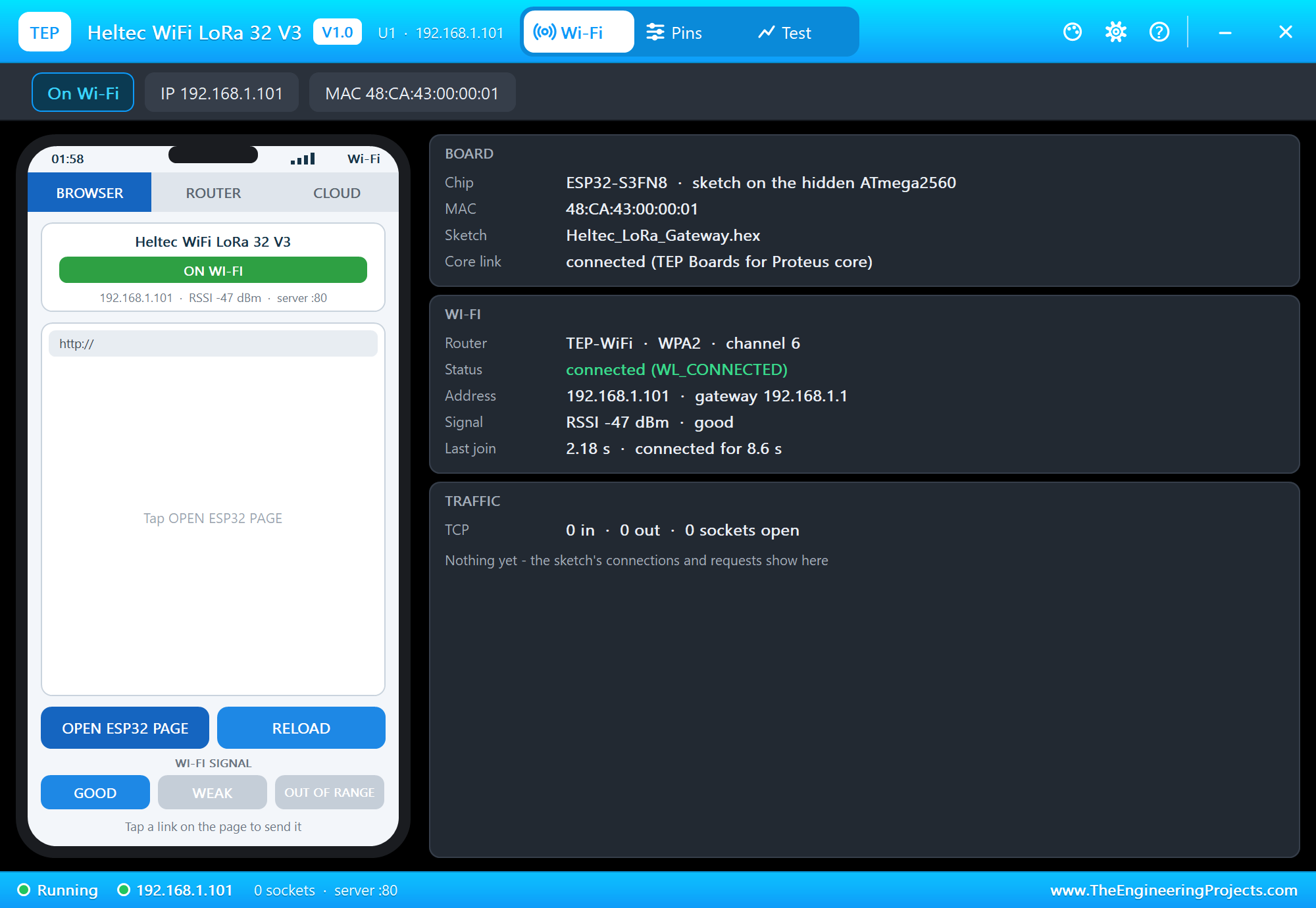
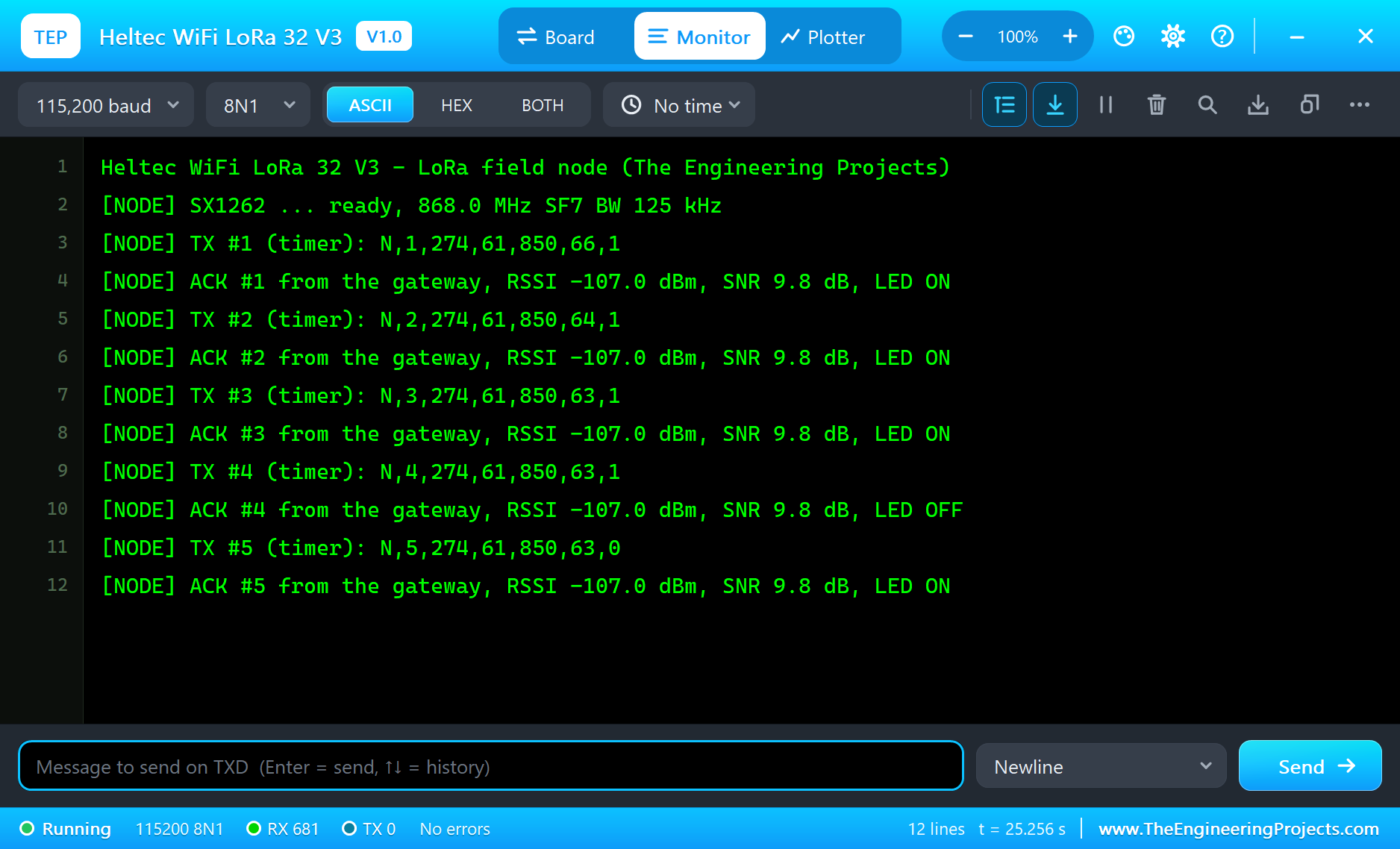
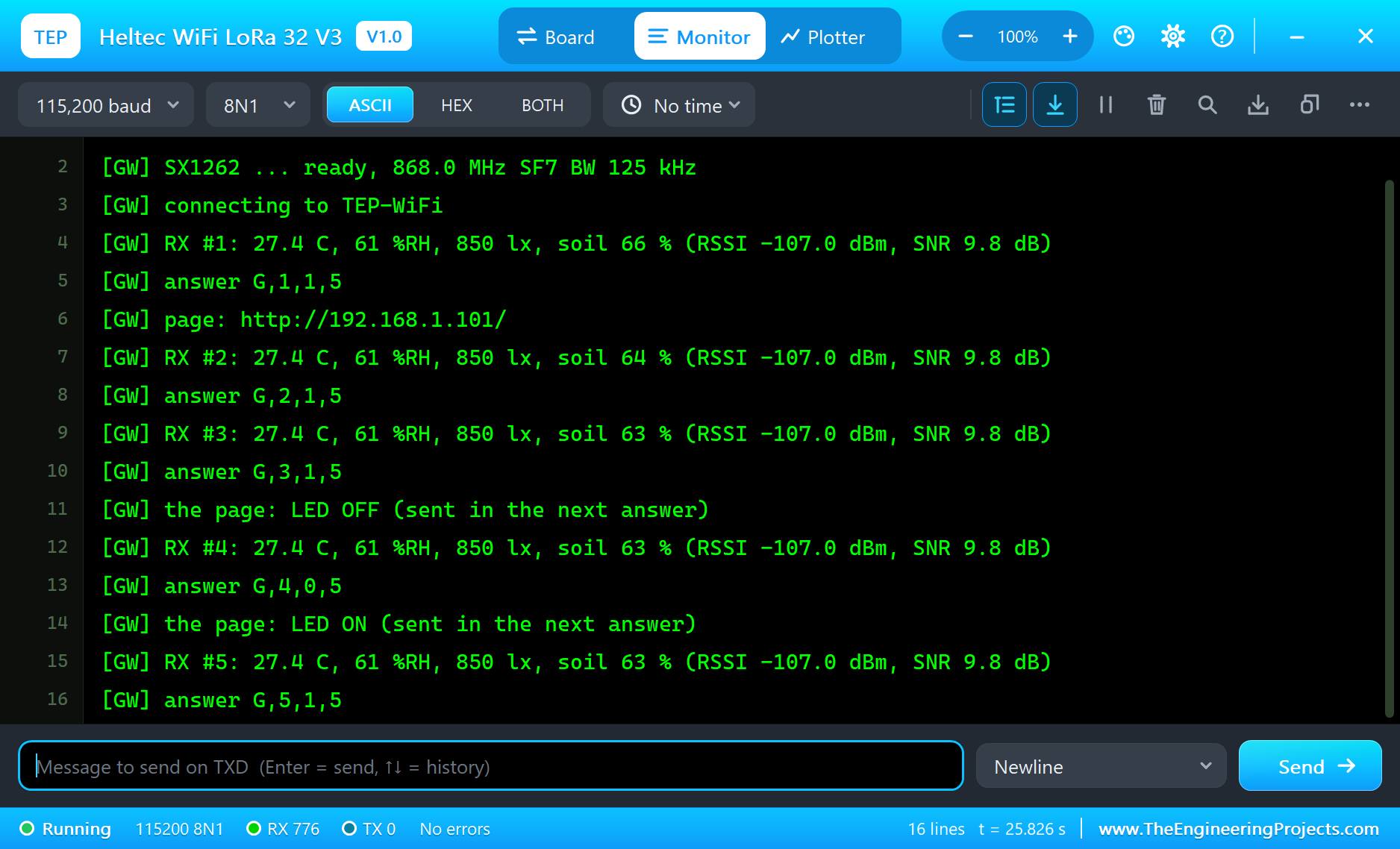
Press Run. Both monitors open. The node starts its radio and sends its first report; the gateway answers and joins TEP-WiFi:
Heltec WiFi LoRa 32 V3 - LoRa field node (The Engineering Projects)
[NODE] SX1262 ... ready, 868.0 MHz SF7 BW 125 kHz
[NODE] TX #1 (timer): N,1,274,61,850,66,1
[NODE] ACK #1 from the gateway, RSSI -107.0 dBm, SNR 9.8 dB, LED ON
[NODE] TX #2 (timer): N,2,274,61,850,64,1
[NODE] ACK #2 from the gateway, RSSI -107.0 dBm, SNR 9.8 dB, LED ON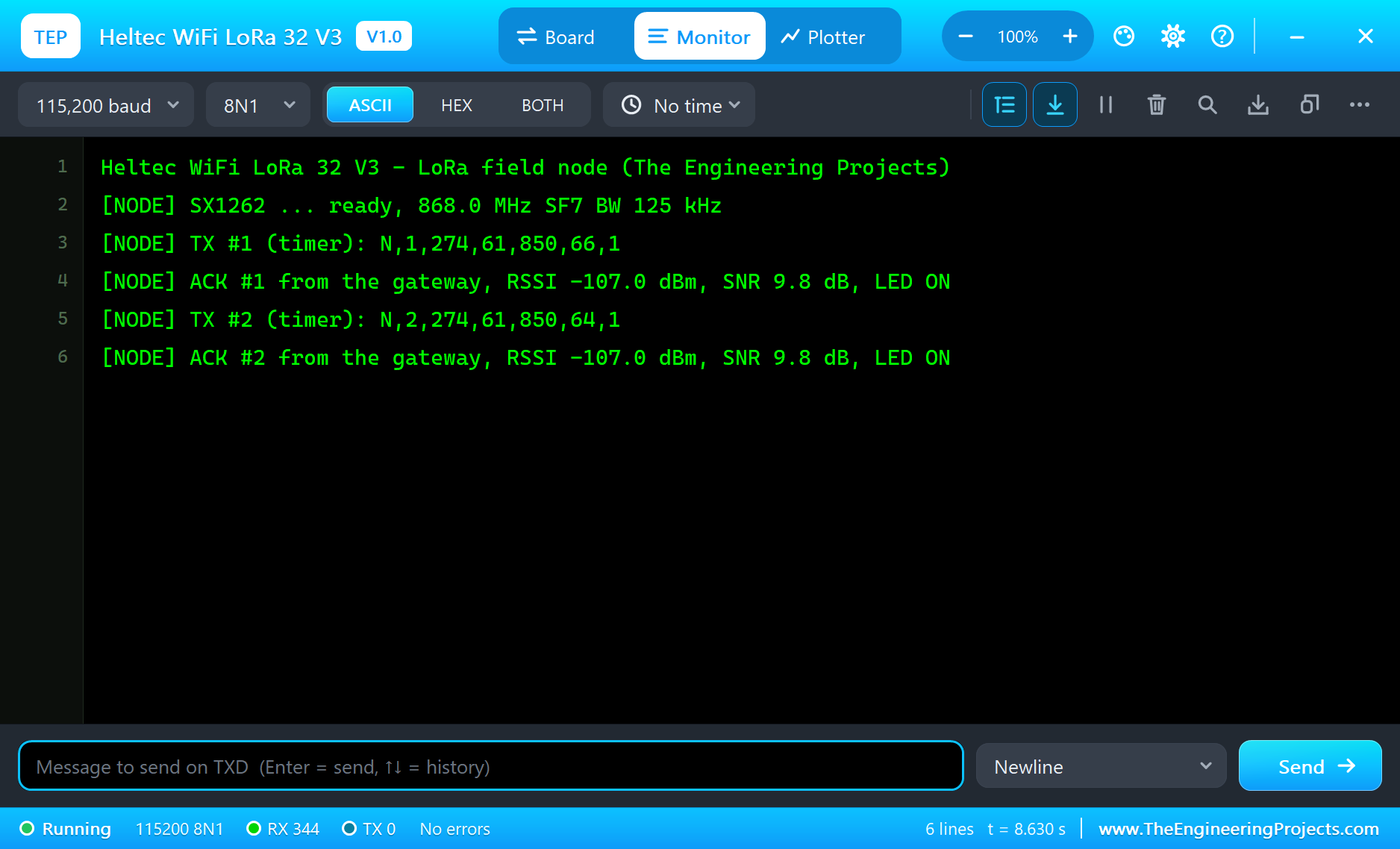
Heltec WiFi LoRa 32 V3 - LoRa to Wi-Fi gateway (The Engineering Projects)
[GW] SX1262 ... ready, 868.0 MHz SF7 BW 125 kHz
[GW] connecting to TEP-WiFi
[GW] RX #1: 27.4 C, 61 %RH, 850 lx, soil 66 % (RSSI -107.0 dBm, SNR 9.8 dB)
[GW] answer G,1,1,5
[GW] page: http://192.168.1.101/
[GW] RX #2: 27.4 C, 61 %RH, 850 lx, soil 64 % (RSSI -107.0 dBm, SNR 9.8 dB)
[GW] answer G,2,1,5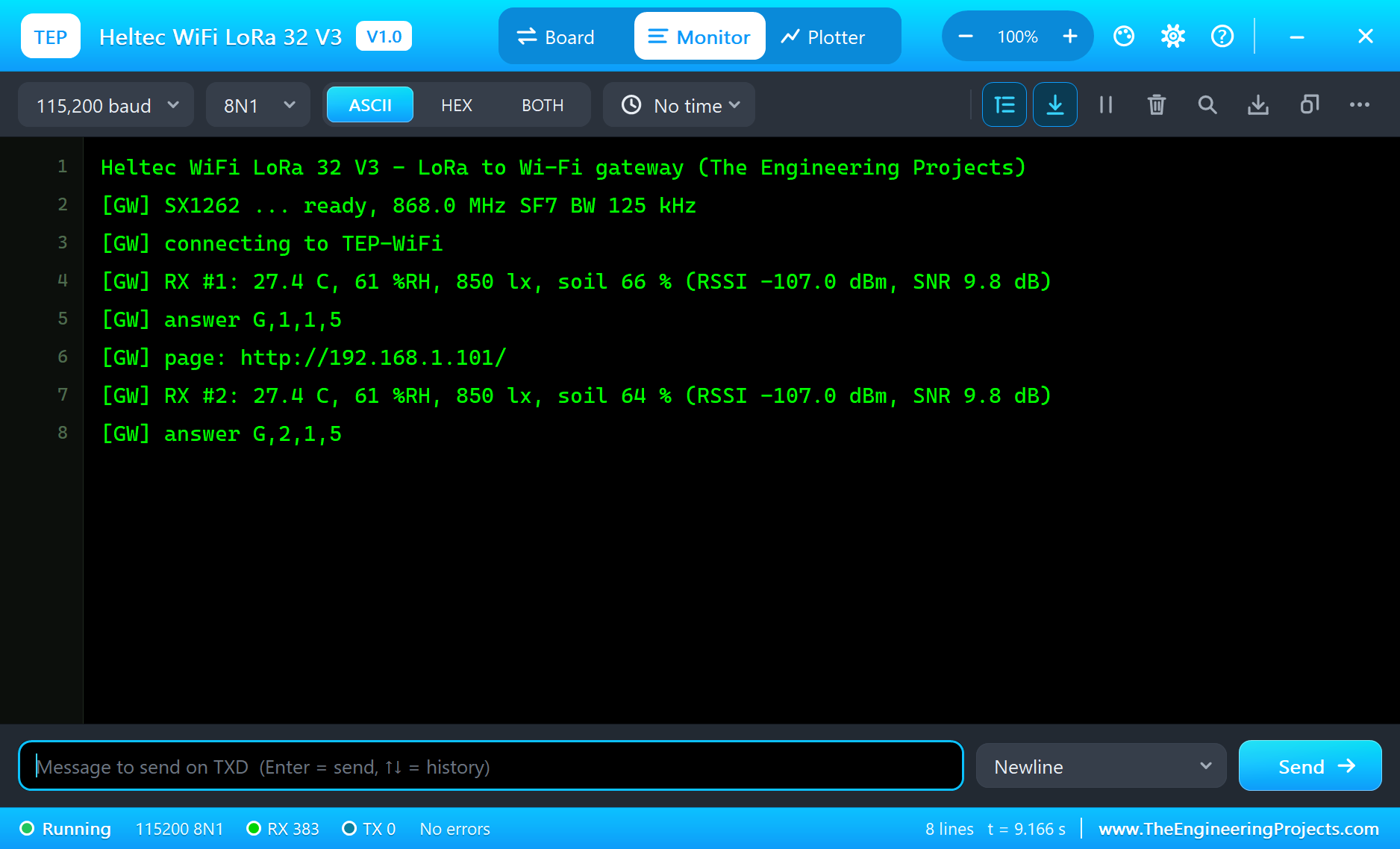
The Sensors' Pop-ups
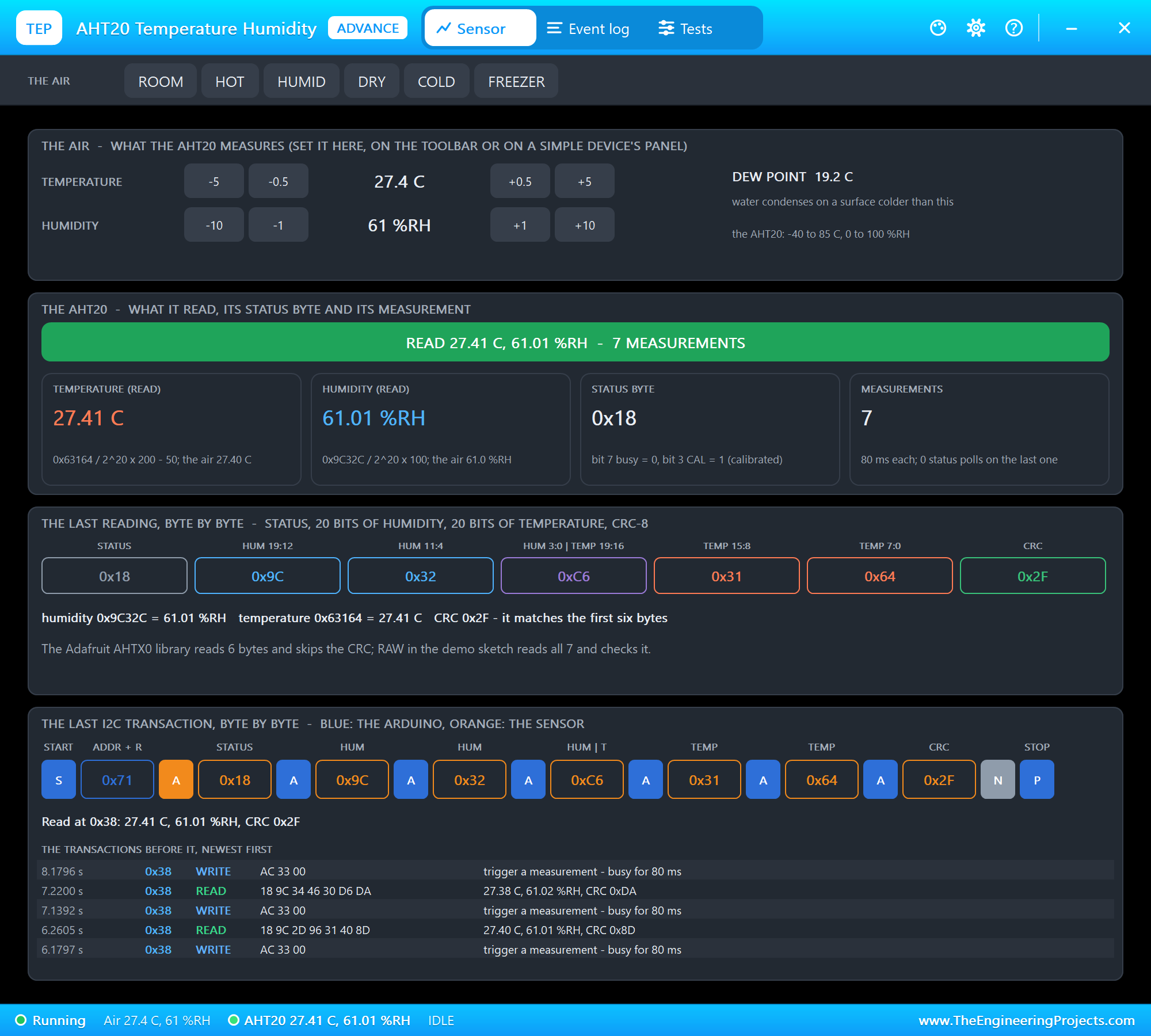
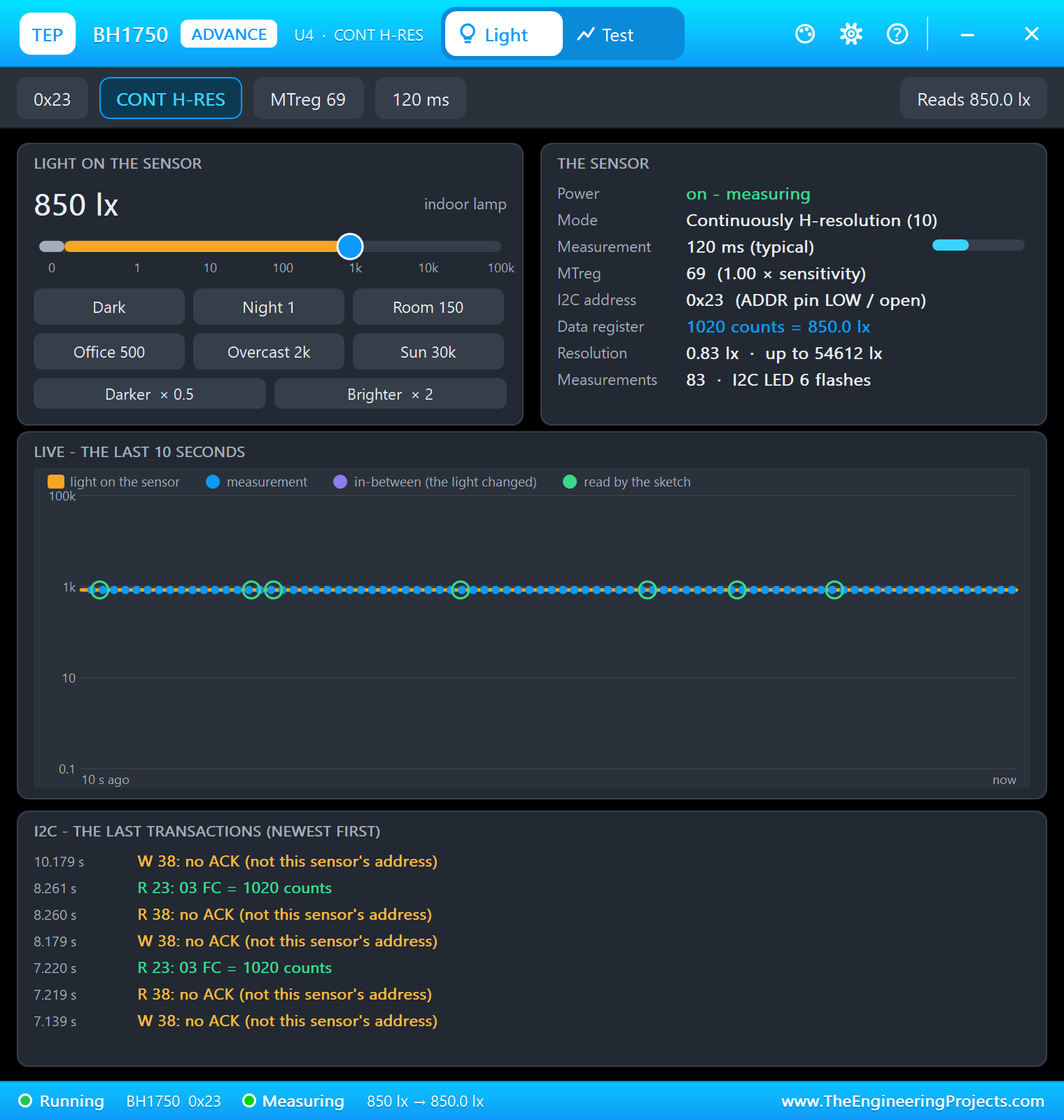
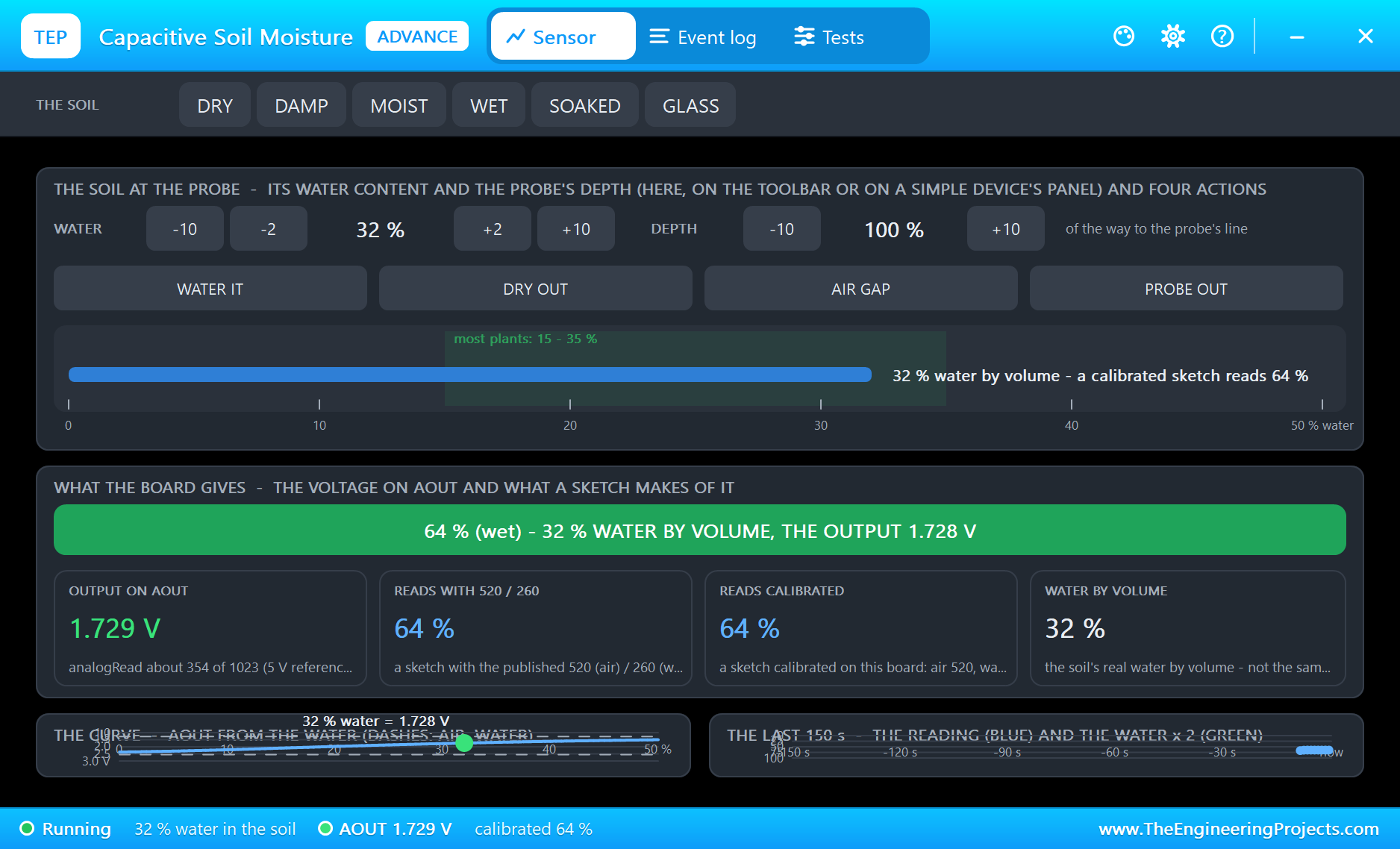
The Advance sensors show what they measure and let you change it. Change the temperature, the light or the soil's water and watch the next packet carry the new value:
Open the Page
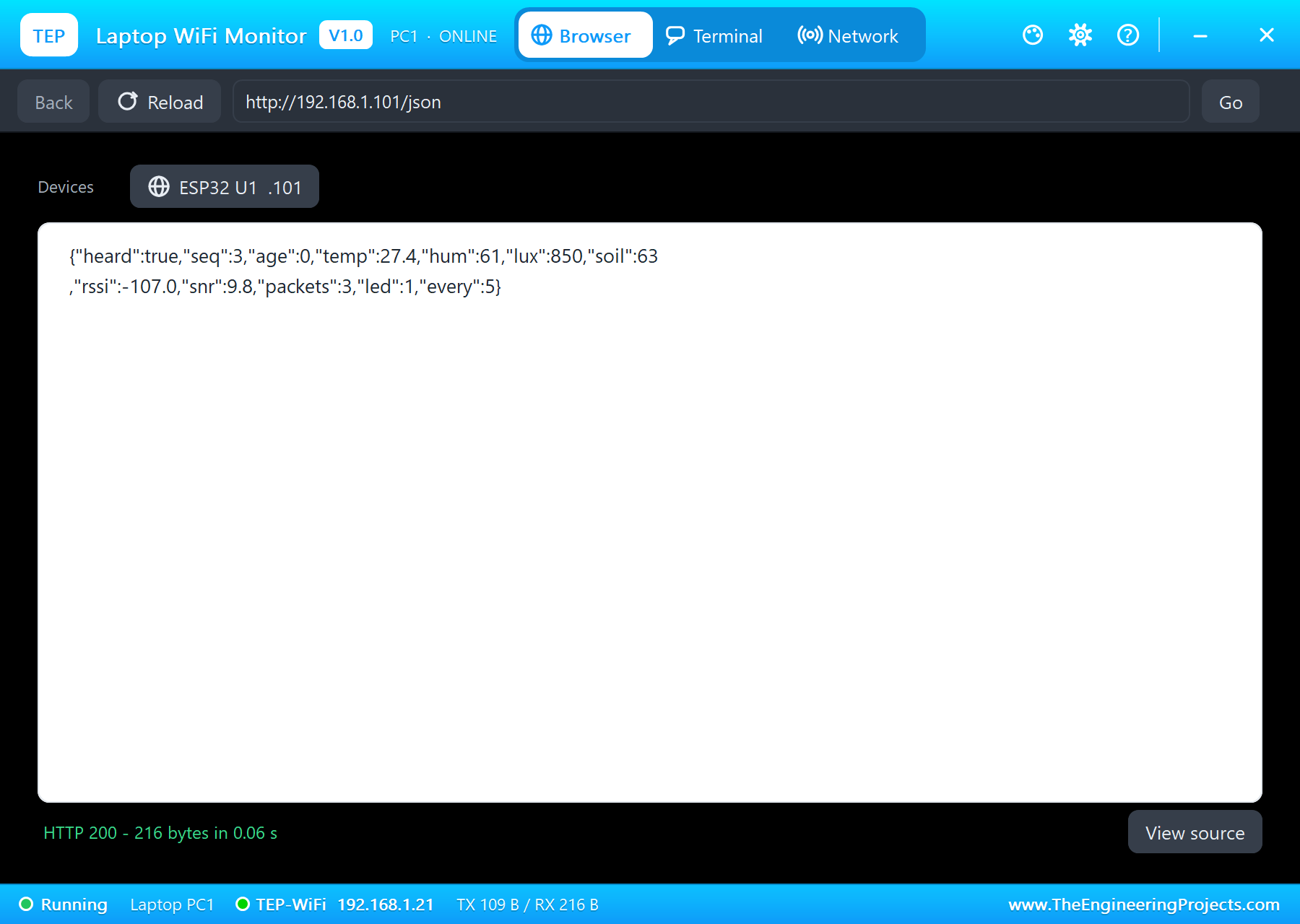
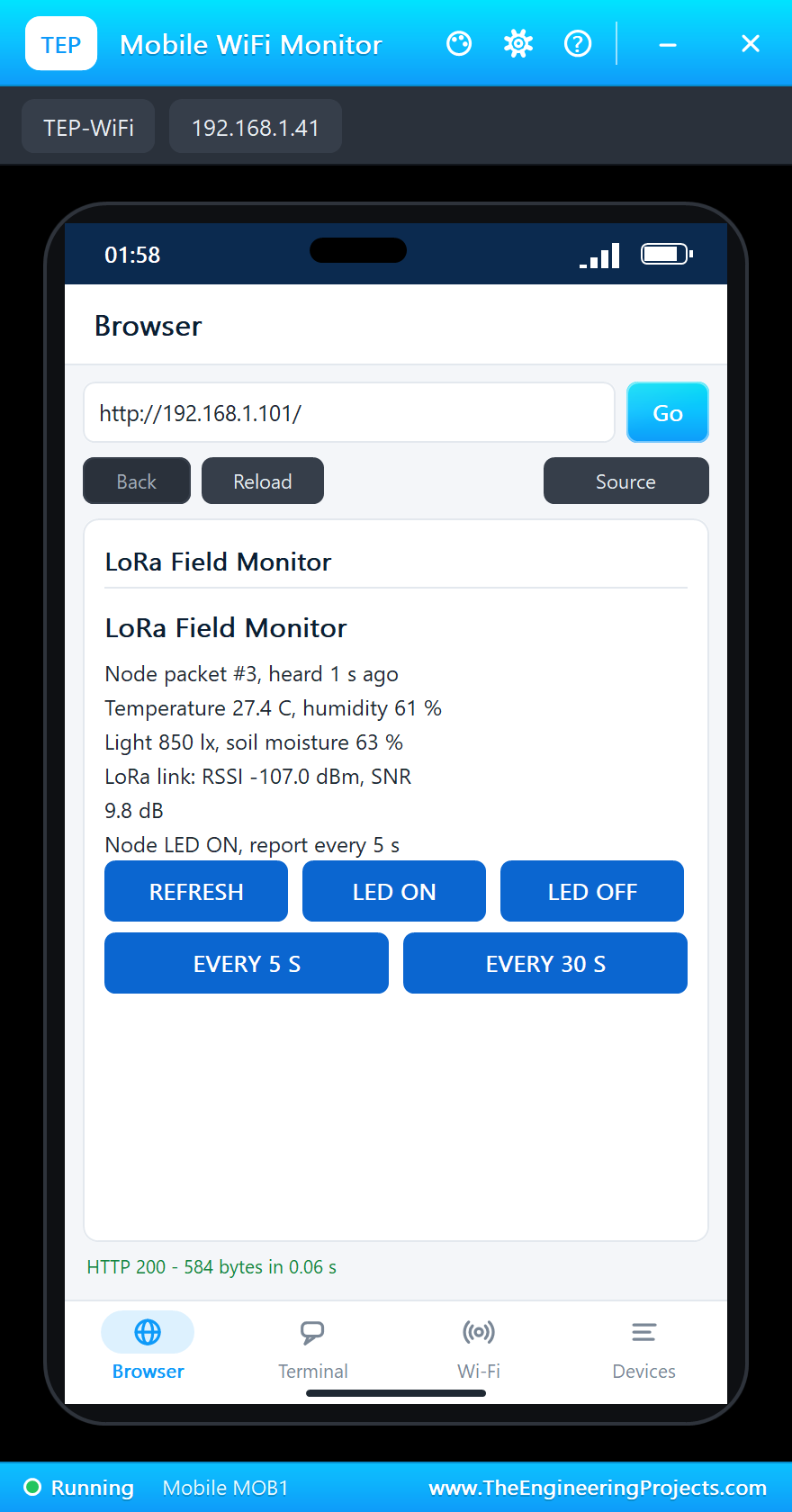
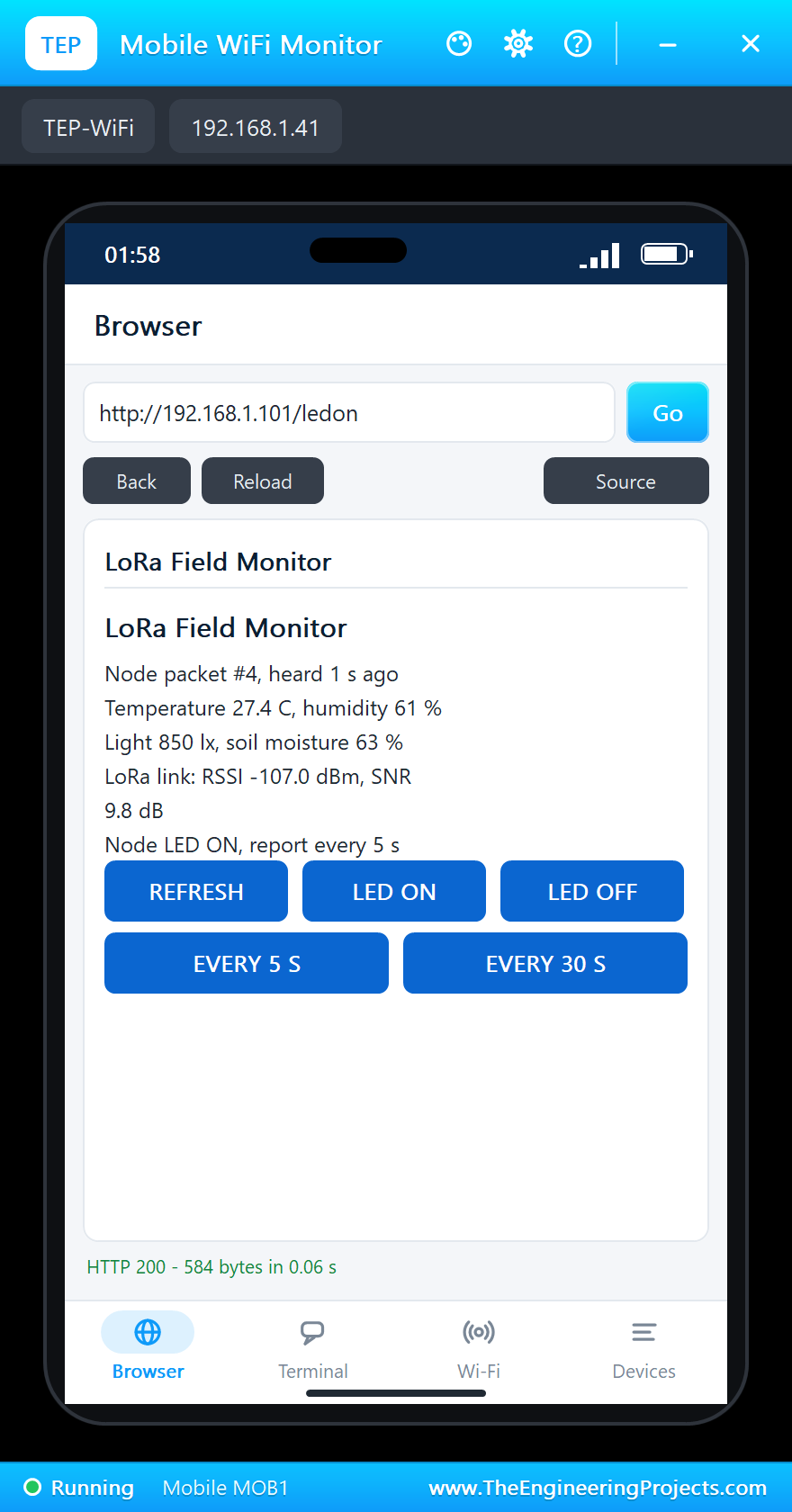
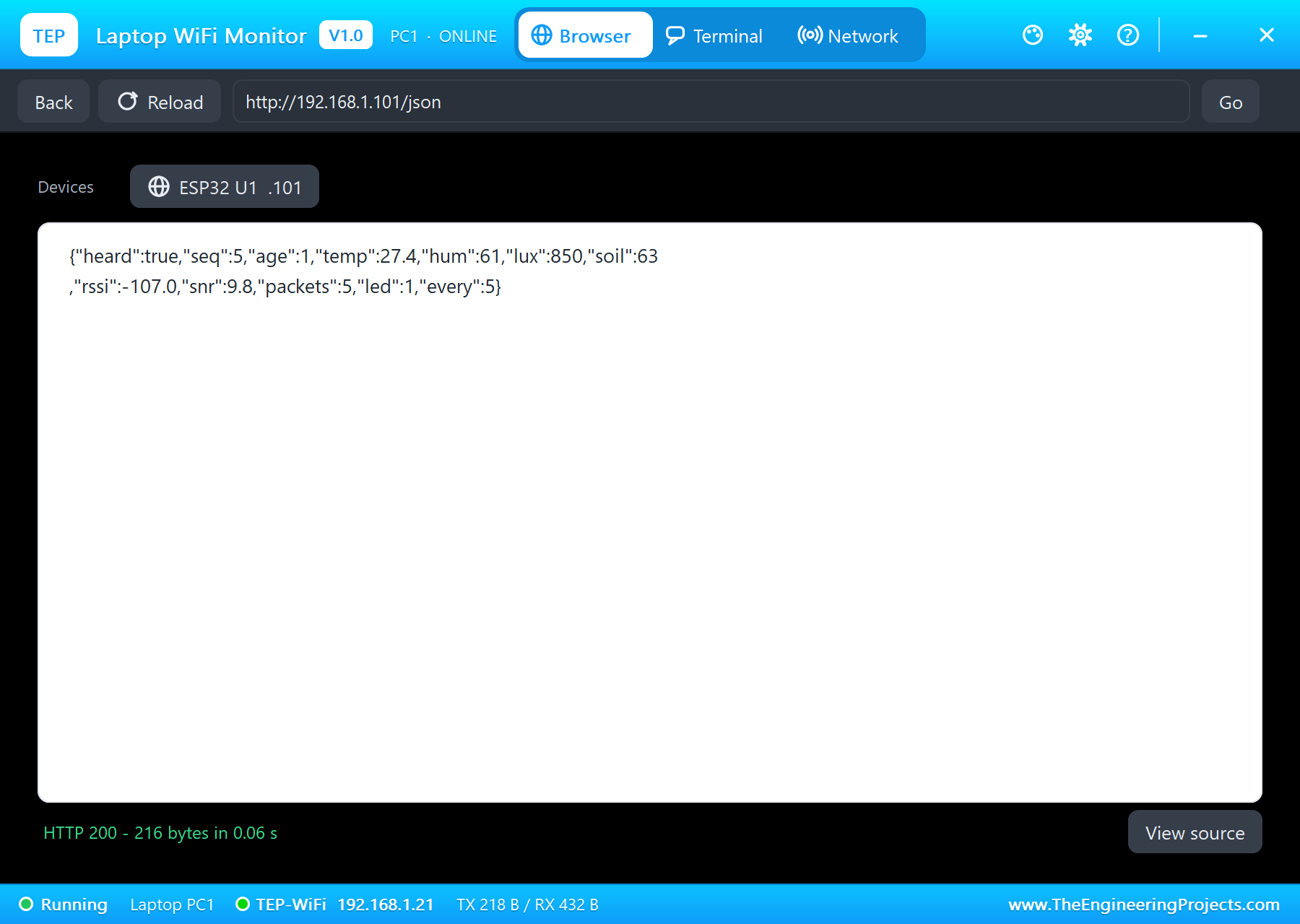
On the laptop click Browser and Go: it opens http://192.168.1.101/json. On the phone the same opens the page:
LoRa Both Ways: the LED from the Phone
Tap LED OFF. The gateway keeps the command, and with its next answer the node switches its white LED off:
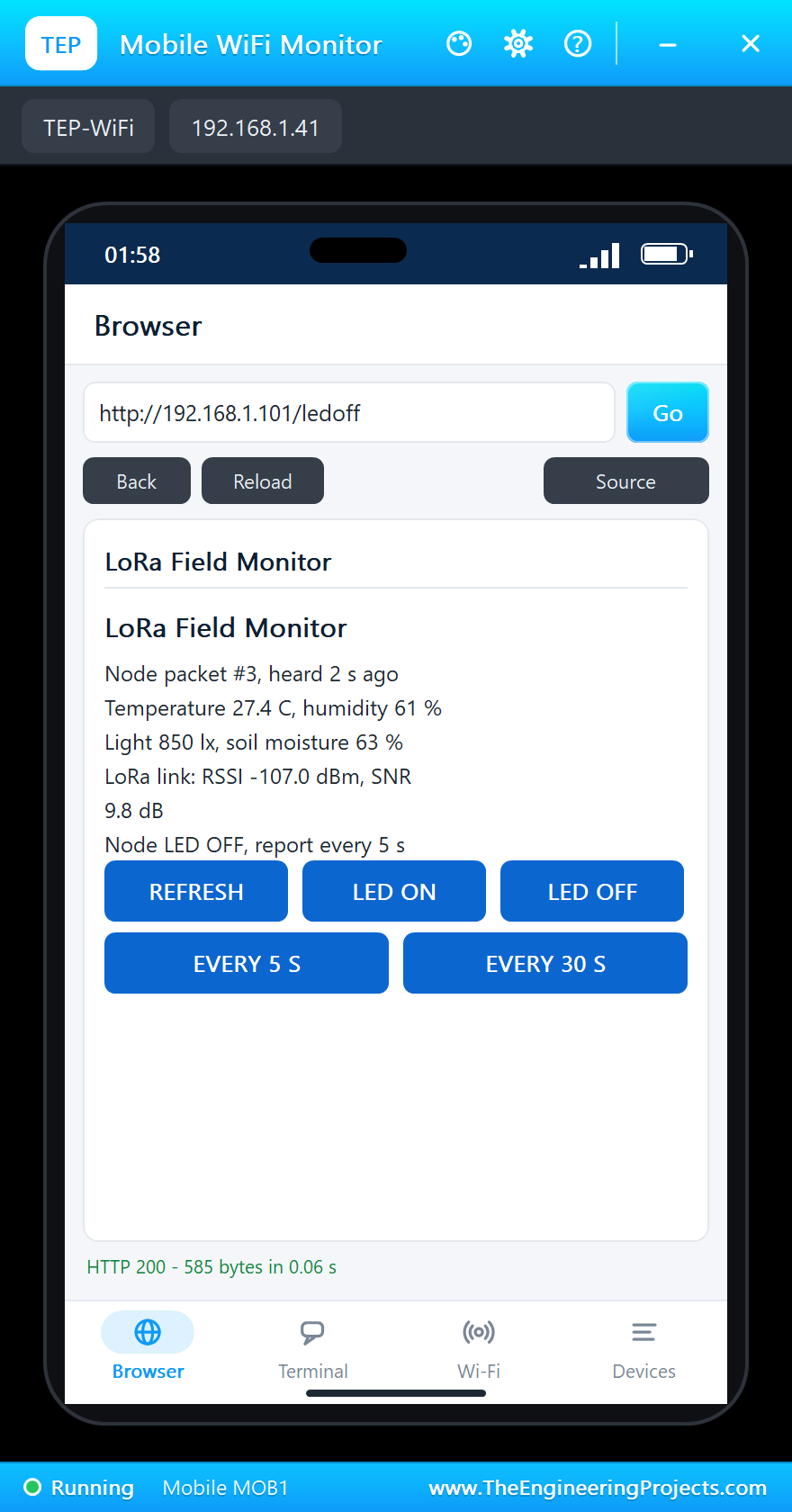
[GW] the page: LED OFF (sent in the next answer)
[NODE] TX #4 (timer): N,4,274,61,850,63,1
[GW] RX #4: 27.4 C, 61 %RH, 850 lx, soil 63 % (RSSI -107.0 dBm, SNR 9.8 dB)
[GW] answer G,4,0,5
[NODE] ACK #4 from the gateway, RSSI -107.0 dBm, SNR 9.8 dB, LED OFF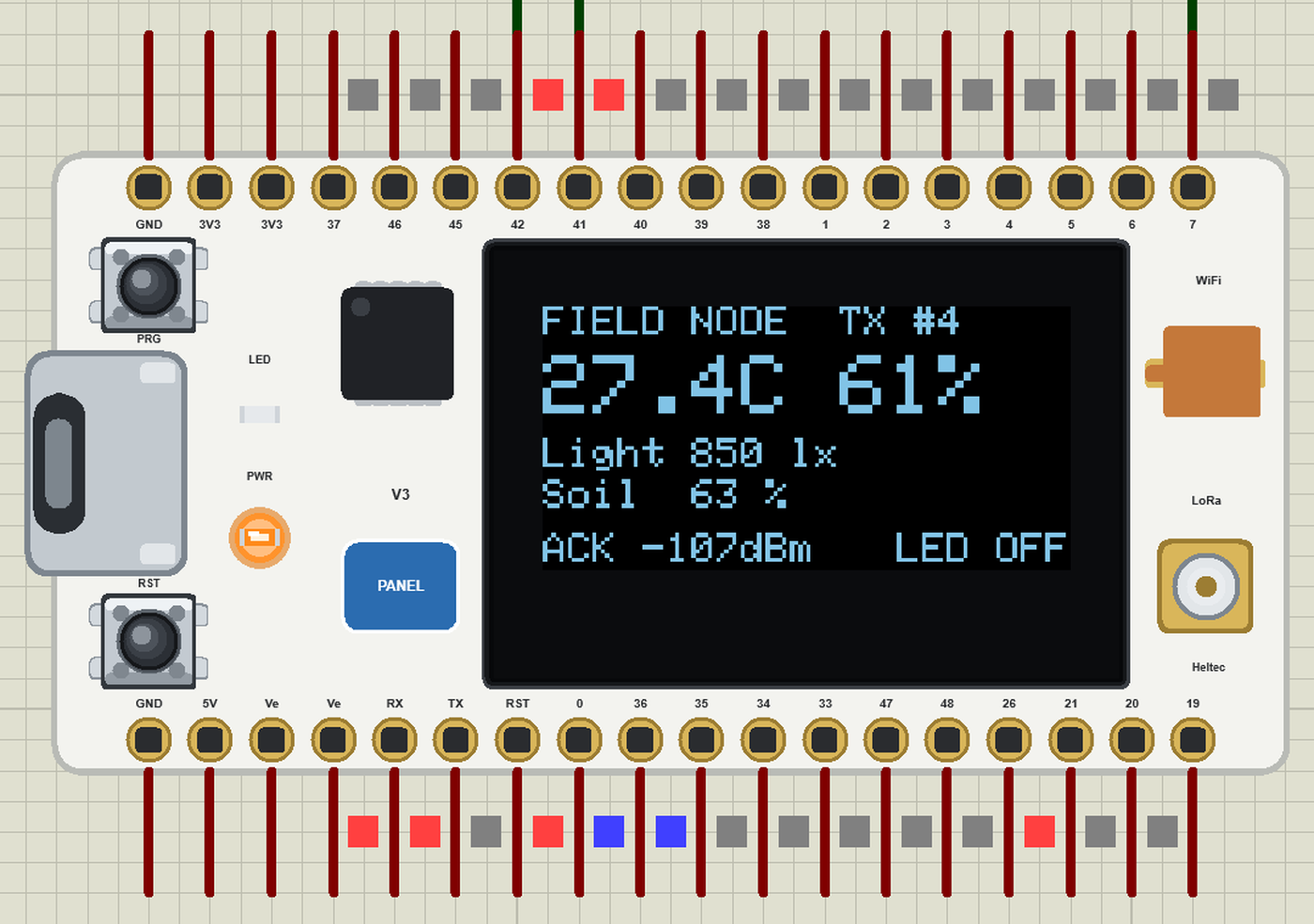
Tap LED ON and the LED comes back a few seconds later. EVERY 30 S slows the reports down the same way - the setting a real battery node would use.
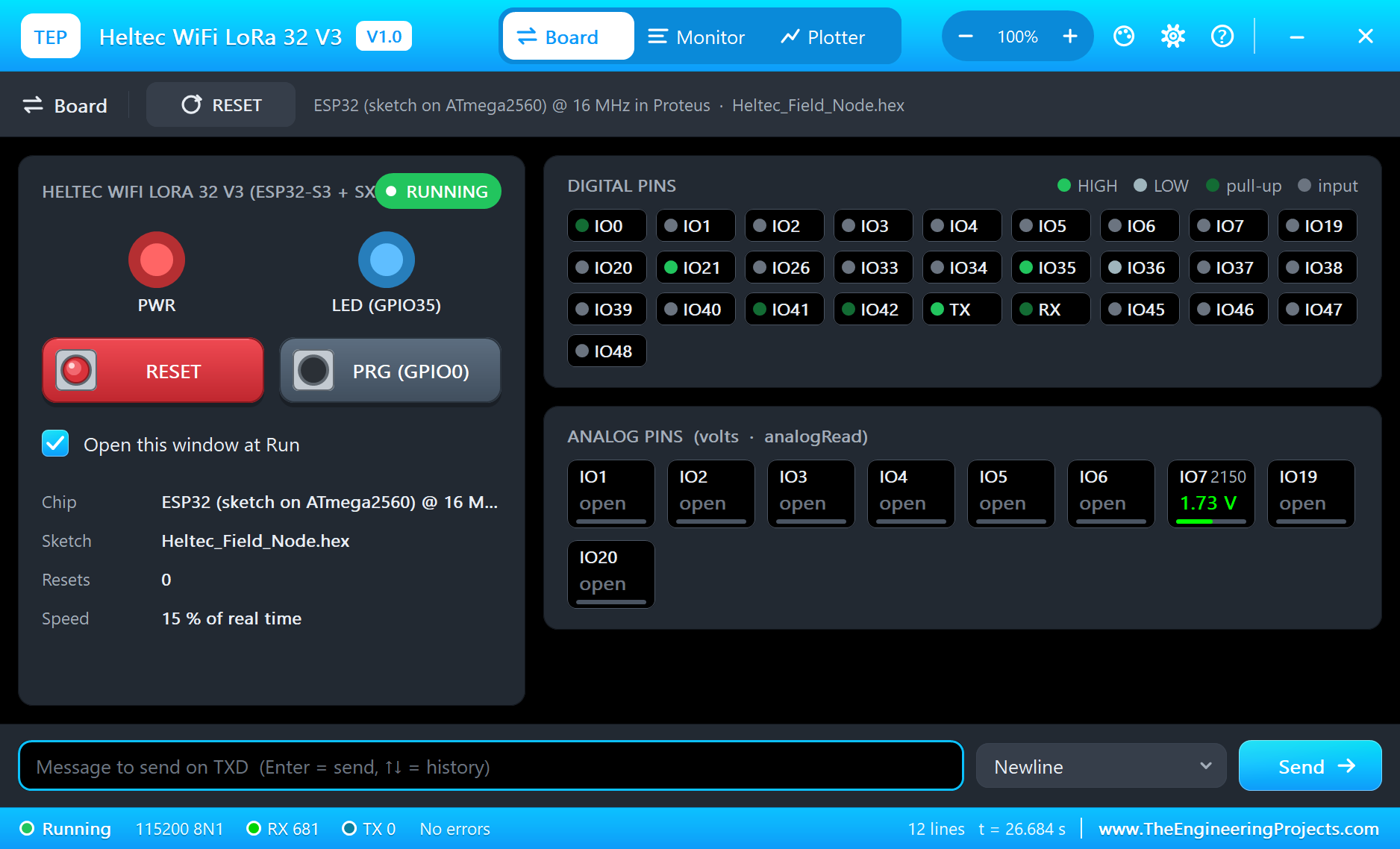
The built-in serial monitors, in the look of our TEP Serial Monitor Advance for Proteus, keep the whole conversation:
Try It Yourself
- Set the node's LORADIST to 10 km and run again: the RSSI drops; at 20 km the packets stop arriving.
- Press PRG on the node for a report at once, and PRG on the gateway for its second OLED page.
- Tap EVERY 30 S on the phone and watch the gap between the node's packets grow.
- Raise the spreading factor on both boards (radio.begin) and compare the time on air.
Ideas to Extend the Field Monitor
- Add a second node with its own number in the packet - the gateway can list both.
- Put a relay on the node for a valve and let the page water the field.
- Keep the last day of readings on the gateway and draw them on the page.
- Send the readings from the gateway to a server with HTTPClient.
Your Own Sketches
Write the sketch in the Arduino IDE with the board Heltec WiFi LoRa 32 V3 (TEP Proteus), use Sketch > Export Compiled Binary and set the board's PROGRAM property to the .hex. For a real Heltec V3 install the esp32 boards from Espressif, select "Heltec WiFi LoRa 32(V3)" and upload over USB - the same sketches, with the same pin numbers.
Things to Know Before Using a Real Heltec V3
- Antenna first: never transmit without the LoRa antenna on the IPEX socket - it can damage the SX1262.
- Your region's band: 868 MHz in Europe, 915 MHz in the Americas; buy the board version for your band and respect the duty-cycle rules.
- Vext: set GPIO36 LOW before you use the OLED or anything powered from the Ve pins.
- 3.3 V logic: the pins are not 5 V tolerant.
Properties of the Heltec WiFi LoRa 32 V3
| Property | What it does |
|---|---|
| PROGRAM | the sketch: a .hex from TEP Boards for Proteus (board "Heltec WiFi LoRa 32 V3") |
| LORADIST | the LoRa distance to the other boards: 10 m to 20 km |
| WIFISSID, WIFIPASS | the router in range: TEP-WiFi / 12345678 |
| MONITOR, BAUD, AUTOOPEN | the built-in serial monitor: on, its baud rate (115200), open at Run |
| TIME | the clock for NTP: the PC's or a fixed time |
Troubleshooting
- The OLED stays dark: Vext (GPIO36) LOW before display.begin(), address 0x3C.
- radio.begin() fails: the module is new Module(8, 14, 12, 13) - NSS, DIO1, RST, BUSY.
- No answer over LoRa: the same frequency, spreading factor, bandwidth and sync word on both boards; a shorter LORADIST.
- The page shows old values: use REFRESH; the monitors do not reload by themselves.
Limitations of the Simulation
- Your sketch gets 8 KB of RAM in the simulation and runs slower than on the ESP32-S3 at 240 MHz with 512 KB.
- Bluetooth, deep sleep, the battery charger and the ESP32-S3's registers are not modelled; one SPI bus (the radio) and one I2C bus (Wire1 is Wire).
- The radios of other model DLLs - our SX1262 and SX1278 modules - have their own air and do not hear the Heltec boards.
- The router, the addresses and the windows are TEP additions.
- Heltec is a trademark of Heltec Automation; this library is not made or endorsed by Heltec, Espressif, Semtech or Labcenter.
- Tested in Proteus 8.5 in October 2026 (the demo as shipped, about 27 s of simulation in 290 s on our PC with the three sensor pop-ups, both monitors and both tools open). Proteus 7 is not supported.
So, that was all about the Heltec WiFi LoRa 32 V3 Library for Proteus. I hope it helps you try your LoRa ideas before you put a single board in the field - a node, a gateway, a web page and a radio link between them in one simulation. If you have any questions, ask in the comments and I will help you out. Till the next tutorial, take care and have fun!

Comments
0