


130 DC Motor Library for Proteus V1.0 (Hobby Motor, 3-6V, PWM)


Hello friends, I hope you all are doing great. Today, I am going to share the new 130 DC Motor Library for Proteus V1.0. The 130 is the little silver motor that hides inside a thousand things: toy cars, hand fans, science-fair windmills, bubble machines and, behind a yellow gearbox, the TT motor of every robot-car kit. It has no gearbox of its own, so it spins fast - more than ten thousand RPM - and it is usually the very first motor anyone connects to a battery or an Arduino.
130 DC Motor Library for Proteus
Latest version: V1.0 (October 2026, this tutorial)
Helping Tools
- Serial Monitor Advance: a serial terminal window for the UART of your board
- Serial Monitor Expert: the serial monitor with extra debugging tools
- LCD Library for Proteus V3.0: 16x2, 20x4 and I2C LCDs to show your readings
Our model puts that motor into your Proteus circuit as a real analog part. Between its + and - pins it has the resistance of its winding, a back-EMF that grows with the speed, friction, the inertia of the rotor and any load you add, so it works with any driver - an L9110S, an L293D, an L298N, a transistor or a relay - and it draws the current a real 130 would. On the schematic an orange fan sits on its shaft and spins at the simulated speed. The demo runs on our Arduino UNO V4.0 with our L9110S driver and a potentiometer as the speed and direction knob.
NOTICE: a fast little motor is easy to draw and hard to simulate well. So we did not draw a spinning icon, we built the physics: the motor spins up in about a tenth of a second, slows down under load, coasts, brakes, stalls and takes its current from your circuit, and the fan on the sheet looks the way a spinning fan looks to your eye. It took our team a lot of hard work. Your feedback is the fuel that keeps us going, so please tell us what you think in the comments below or in the Motor Driver board of our forum. And if our free libraries help you, you can buy us a coffee. So, let's get started with the 130 DC Motor Library for Proteus V1.0:
What is the 130 DC Motor?
"130" is not a brand, it is a size: a small brushed DC motor with a can about 20 mm wide, flattened on two sides to 15 mm, about 25 mm long, with a 2 mm shaft at one end and two solder tabs at the other. Dozens of factories make it in versions for 1.5 V to 12 V; the most common one, and the one we modelled, is rated for 3 - 6 V. It has no gearbox, so its shaft turns as fast as the rotor: about 11,500 RPM with no load at 6 V.
| 130 DC motor (typical 3 - 6 V version) | |
|---|---|
| Supply | 3 - 6 V |
| No load | about 11,500 RPM and 70 mA at 6 V, about 5,500 RPM at 3 V |
| Stall | about 0.8 A and 36 g.cm at 6 V |
| Winding | about 7.5 ohm |
| Start-up | about 0.12 s to 90 % of its speed |
| Size | a 20 x 15 mm can about 25 mm long, a 2 mm shaft, no gearbox |
| Wires | two: + and -; swap them to swap the direction |
How a Brushed DC Motor Works
Inside the can, two curved magnets sit round a rotor with three coils. The current reaches the coils through two carbon brushes that rub on a split copper ring, the commutator, which switches the current from coil to coil as the rotor turns, so the rotor is always pulled onward. Two simple rules describe the whole motor. The torque is proportional to the current. And a spinning motor is also a generator: it makes a back-EMF that is proportional to its speed and pushes against the supply.
Those two rules explain everything you will see in the simulation. With no load the motor speeds up until its back-EMF almost equals the supply; then only a small current flows, just enough to beat the friction. Our model's back-EMF constant is 4.55 mV per radian per second, so at 6 V, with 70 mA through 7.5 ohm, the speed settles where 4.55 mV x speed = 6 V - 0.5 V: about 1,200 radians per second, which is 11,500 RPM. Hold the shaft and the back-EMF disappears; then only the winding resistance limits the current, 6 V / 7.5 ohm = 0.8 A. That is the stall current, and it is why a stalled motor gets hot.
The 130 Inside the TT Gear Motor
If you have a robot car, you already own a 130 motor: it is the silver can at the back of the yellow TT gear motor. Behind a 1:48 gearbox its 11,500 RPM become about 240 RPM at the wheel, and its 36 g.cm become close to 1.7 kg.cm before the losses of the plastic gears. The bare motor is the one to use when you want speed - a fan, a propeller, a spinning disc - and the geared one when you want force.
What's New in 130 DC Motor Library for Proteus V1.0
- A part of its own: the bare 130 motor, with no gearbox, ready for any driver.
- An analog motor model: the winding, the back-EMF, the friction, the inertia and a load - it takes real current from your circuit in both directions, driving and braking.
- The data of the real motor: about 11,500 RPM and 70 mA with no load at 6 V, 5,500 RPM at 3 V, a stall at about 0.8 A and 36 g.cm.
- A fan that spins on the schematic at the simulated speed - a translucent disc with the blades faint on it at speed - with CW / CCW LEDs.
- Loads in g.cm: a LOAD property, load buttons from 5 to 30 g.cm on the pop-up and a finger on the fan when you click it.
- A pop-up window with four pages - Motor, Graphs, Event log and Check - in the look of our serial monitor.
- Warnings: STALLED, OVER-VOLTAGE above 7.5 V and a reversal at speed with its current spike.
- A demo on our Arduino UNO V4.0 with our L9110S driver, a potentiometer and serial monitor commands.
The 130 DC Motor in Proteus
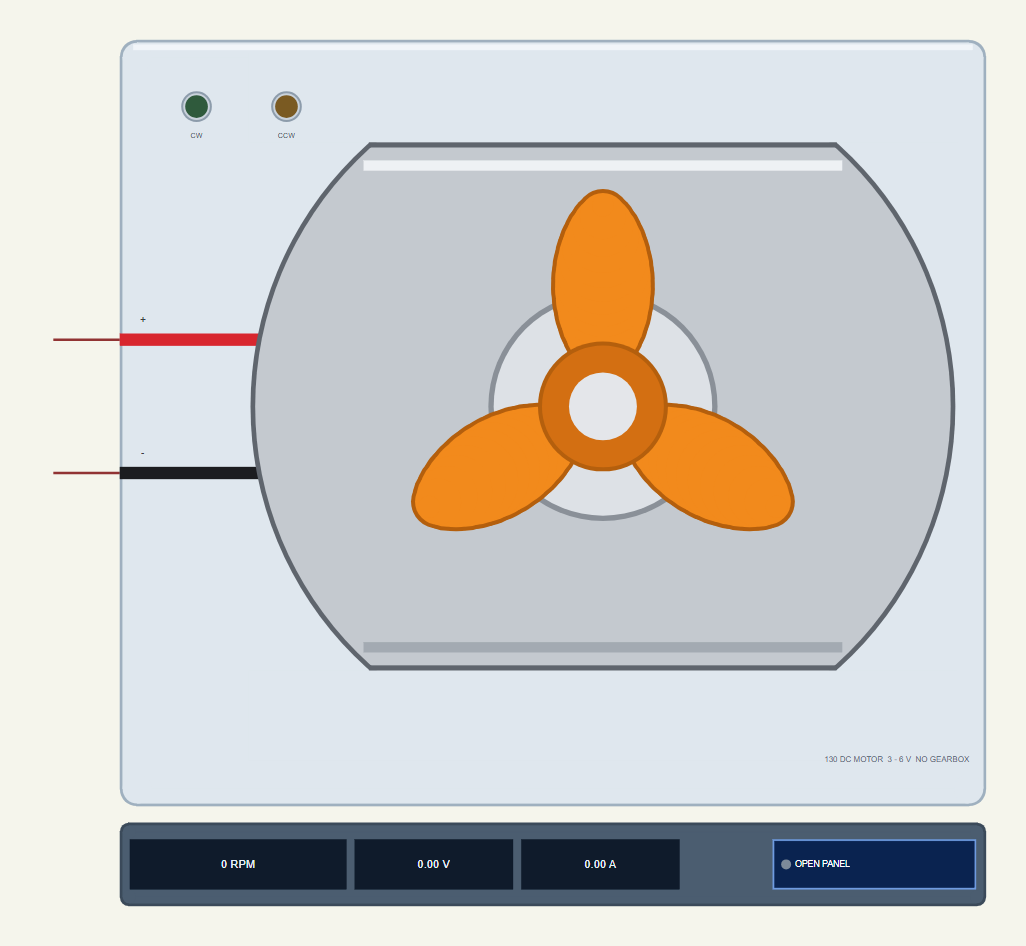
Search 130 in Pick Devices; the device MOTOR130TEP is in TEP130MOTOR.LIB (category Electromechanical, DC Motors) and its model is TEP130MOTOR.DLL. The motor is drawn from its shaft end at 2.6 times its real size: the silver can with its two flats, the bearing boss in the middle and an orange three-blade fan on the shaft. The red wire goes to the + pin and the black one to the - pin.
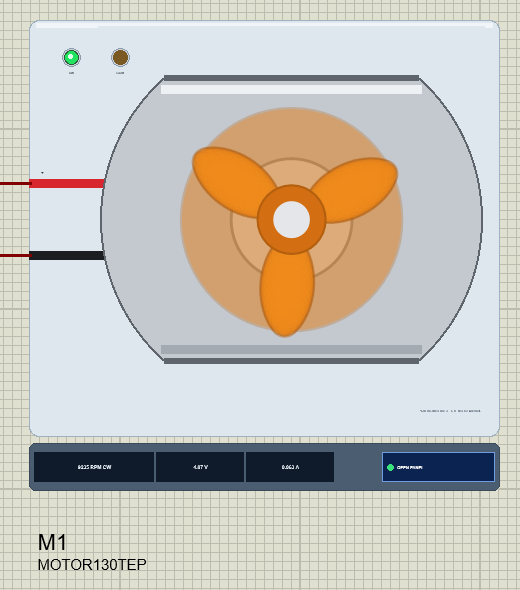
A fan at 9,000 RPM turns 150 times a second, far faster than a screen can show, so a drawing that simply rotated the blades would flicker or seem to turn backwards. Instead the library draws the fan the way your eye sees a real one: crisp blades when it is slow, and a translucent orange disc with the blades faint on it when it is fast. The fan only shows the turning; its air drag is not modelled, so use LOAD for a load. Two LEDs sit on the plate: CW (green) lights when + is above -, CCW (amber) the other way. The strip under the plate shows the speed with its direction, the average voltage, the current and the OPEN PANEL button. The plate, the LEDs, the strip and the fan are TEP additions.
The Pins and the Properties
| Pin | Wire | What the model does with it |
|---|---|---|
| + | red | one end of the winding; + above - turns the shaft clockwise (CW) |
| - | black | the other end; - above + turns it anticlockwise (CCW) |
| Property | Default | What it does |
|---|---|---|
| LOAD | 0 | a constant load on the shaft in g.cm (it stalls at about 36 g.cm at 6 V, 30 at 5 V) |
The loads of a motor this small are tiny, so the library counts them in gram-centimetres: 10 g.cm is a weight of ten grams hanging one centimetre from the shaft. Click the fan while the simulation runs and you put a finger on it - 10 g.cm. The pop-up's toolbar adds 5, 10, 20 or 30 g.cm on top; together with the finger they can stall the motor.
Download 130 DC Motor Library for Proteus
The download link of 130-DC-Motor-Library-for-Proteus-v1.0.zip (without the source code) will be added here soon. The zip file will contain:
- README.txt: installation, the demo, the wiring, the properties, real hardware, troubleshooting and the limits.
- Proteus Library Files:
TEP130MOTOR.LIBandArduinoV4TEP.LIBfrom our Arduino Library for Proteus V4.0. - Proteus Model Files:
TEP130MOTOR.DLLandTEPARDUINO.DLL. - Proteus Simulation:
130-DC-Motor-L9110S-ArduinoUnoV4.pdsprjandMotor130_Demo.hex. - Arduino Code:
Motor130_Demo.ino(no library needed).
Important: the demo's driver is not in this zip. Download our L9110S Motor Driver Library for Proteus and install it first; this package carries only the 130 motor and the Arduino UNO V4.0 the demo runs on.
No Proteus yet? Read How to Download and Install Proteus 7 and 8. New to libraries? Follow How to Install a New Library in Proteus.
How to Install 130 DC Motor Library for Proteus
- Close Proteus and extract the whole zip file, for example to your Desktop.
- Copy
TEP130MOTOR.LIBandArduinoV4TEP.LIBfrom Proteus Library Files into the LIBRARY folder of Proteus (usuallyC:\Program Files (x86)\Labcenter Electronics\Proteus 8 Professional\LIBRARY). - Copy
TEP130MOTOR.DLLandTEPARDUINO.DLLfrom Proteus Model Files into the MODELS folder. - For the demo, install our L9110S library the same way:
TEPL9110S.LIBinto LIBRARY andTEPL9110S.DLLinto MODELS. - Delete
TEP130MOTOR.IDXfrom the LIBRARY folder if it is there. - Start Proteus, press P and search for 130.
Tip: keep the Proteus Simulation folder together, because the project needs its .hex file beside it. The library is tested in Proteus 8.5; Proteus 7 is not supported.
The Demo Circuit
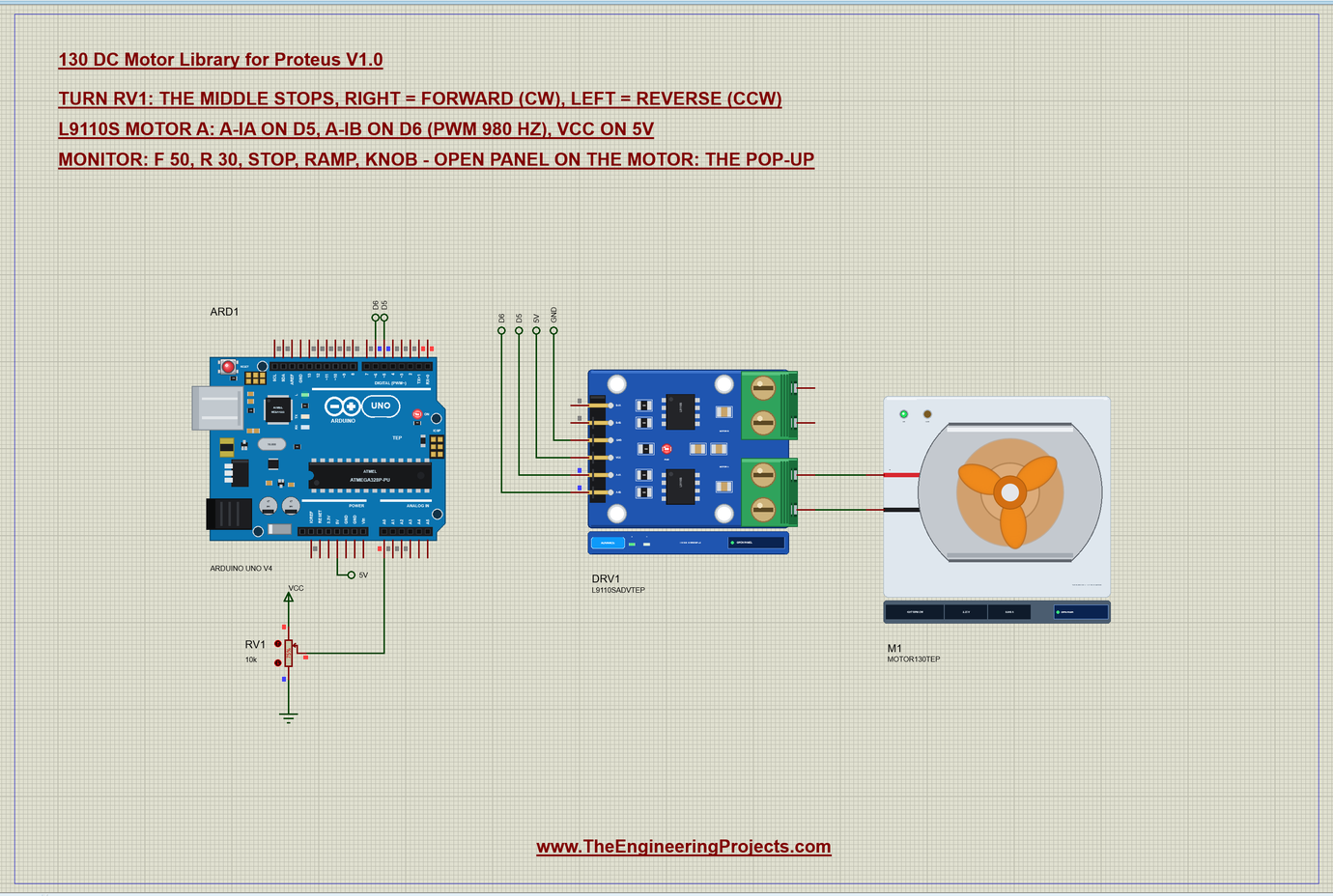
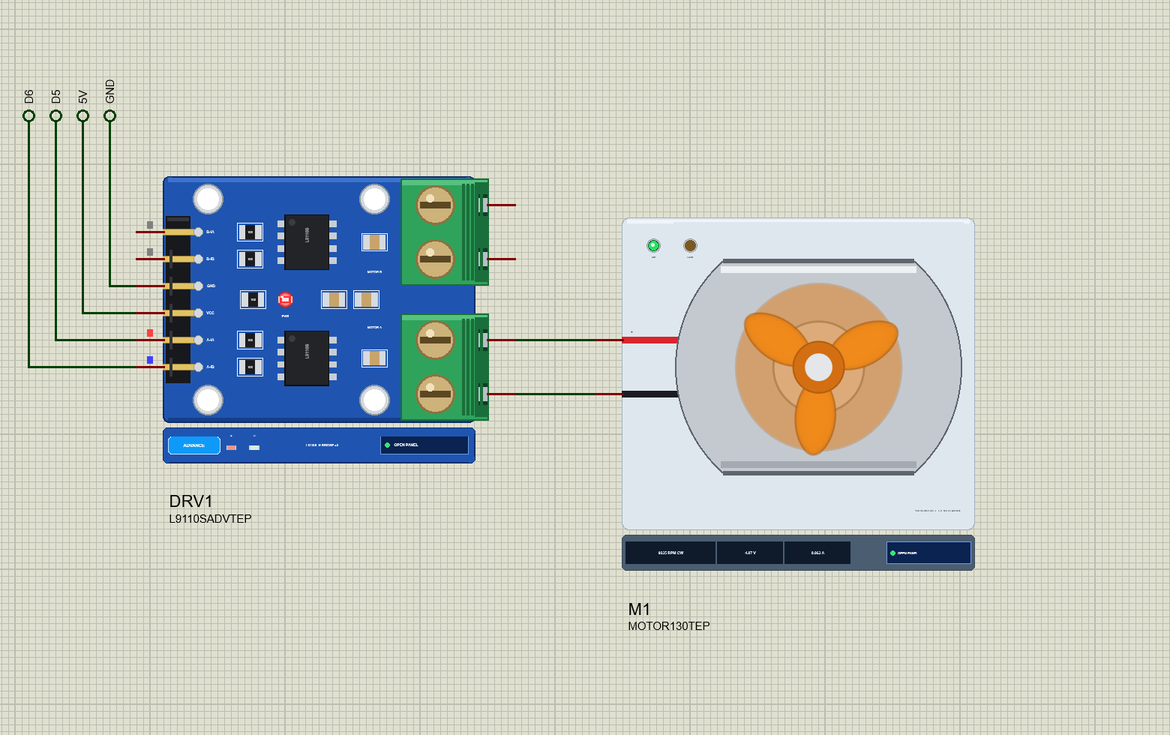
Open 130-DC-Motor-L9110S-ArduinoUnoV4.pdsprj. Like the other motor demos with a driver it is on an A3 sheet. ARD1 is an Arduino UNO V4.0 from our Arduino UNO Library for Proteus V4.0, running Motor130_Demo.hex with its serial monitor built in. DRV1 is the L9110S in its pop-up version, M1 is the 130 motor on the driver's MOTOR A terminal and RV1 is a 10k potentiometer on A0. Motor B of the driver is not used.
| From | To | Note |
|---|---|---|
| L9110S A-IA | D5 | PWM, 980 Hz |
| L9110S A-IB | D6 | PWM, 980 Hz |
| L9110S VCC | 5V | on a real robot: the battery, 2.5 - 12 V |
| L9110S GND | GND | common with the Arduino |
| MOTOR A | motor + (red) to A-OA, - (black) to A-OB | swap them to swap the directions |
| RV1 wiper | A0 | the ends of the pot on 5V and GND |
In Proteus the driver's header pins reach the UNO through net labels - D5, D6, 5V and GND - while the motor is wired straight to the terminal. Never wire a motor to an Arduino pin directly: a pin gives about 20 mA, and even a free-running 130 wants 70 mA, with almost a whole ampere for a moment at every start.
The Arduino Code
The demo needs no library. New to Arduino? Start with Arduino Tutorial for Beginners and Introduction to Arduino UNO; our older DC Motor Speed Control using Arduino tutorial drives a motor with a single transistor instead of a driver. The sketch keeps one signed number for the drive, from full reverse to full forward:
const int IA = 5, IB = 6, POT = A0;
enum Mode { KNOB, FIXED, RAMP };
Mode mode = KNOB;
int speedNow = 0;                     // -255 .. 255 (+ = forward)
One function turns that number into the two inputs of the L9110S. Forward is PWM on IA with IB at 0, reverse is PWM on IB with IA at 0, and zero sets both LOW, which shorts the motor through the driver and brakes it:
void drive(int s) {
  s = constrain(s, -255, 255);
  if (s > 0) { analogWrite(IB, 0); analogWrite(IA, s); }
  else if (s < 0) { analogWrite(IA, 0); analogWrite(IB, -s); }
  else { digitalWrite(IA, LOW); digitalWrite(IB, LOW); }
  speedNow = s;
}
Every change is printed with its direction, its percentage and its PWM value, so the monitor tells you exactly what the driver gets:
void report(const __FlashStringHelper* why) {
  Serial.print(why);
  if (speedNow == 0) Serial.println(F(" -> stop (IA LOW, IB LOW)"));
  else {
    Serial.print(speedNow > 0 ? F(" -> forward ") : F(" -> reverse "));
    Serial.print(abs(speedNow) * 100L / 255);
The pot is read every 20 ms. Its 0 - 1023 is mapped onto -255 to 255, and a dead zone round the middle makes the motor really stop there:
    int raw = analogRead(POT);
    if (abs(raw - lastKnob) >= 8) {
      lastKnob = raw;
      int s = map(raw, 0, 1023, -255, 255);
      if (abs(s) < 20) s = 0;                       // a dead zone round the middle
      drive(s);
Two of the commands need only one line each:
  if (!strcmp(s, "stop")) { mode = FIXED; drive(0); report(F("stop")); return; }
  if (!strcmp(s, "ramp")) { mode = RAMP; rampStep = 0; rampAt = millis(); Serial.println(F("Ramp: forward 0 -> 100 -> 0 %, reverse the same")); return; }
The ramp itself runs in loop() without delay(): 50 steps of 40 ms up and 50 down, first forward and then in reverse:
  } else if (mode == RAMP && millis() - rampAt >= 40) {   // 50 steps of 40 ms = 2 s each way
    rampAt = millis();
    int phase = rampStep / 50, k = rampStep % 50;
    int pct = phase % 2 == 0 ? k * 2 : 100 - k * 2;
    drive((phase < 2 ? 1 : -1) * (int)(pct * 255L / 100));
The HEX file is in the package. To change the sketch, open it in the Arduino IDE and export the compiled binary, as in How to get the HEX file from Arduino. It needs 5,646 bytes of flash (17 % of the UNO) and 258 bytes of RAM.
Running the Demo
Press Run. The UNO's serial monitor, the motor's pop-up and the L9110S's pop-up open over the schematic; move them aside. RV1 starts at 75 %, a quarter of the way right of the middle, so the motor runs forward at about half drive:
130 DC Motor demo - The Engineering Projects
L9110S: A-IA on D5, A-IB on D6. Turn the pot on A0: the middle stops, right = forward, left = reverse.
Commands: f 50 | r 30 | stop | ramp | knob | help
Pot 768 -> forward 49 % (PWM 127/255)
The fan spins up at once and turns into a disc. The motor settles at about 4,500 RPM CW with about 2.5 V on average across it and some 60 mA; as you click the arrows of RV1 the reading wanders by a few counts and the speed follows. The green CW LED on the motor and the motor-A LED on the driver are lit.
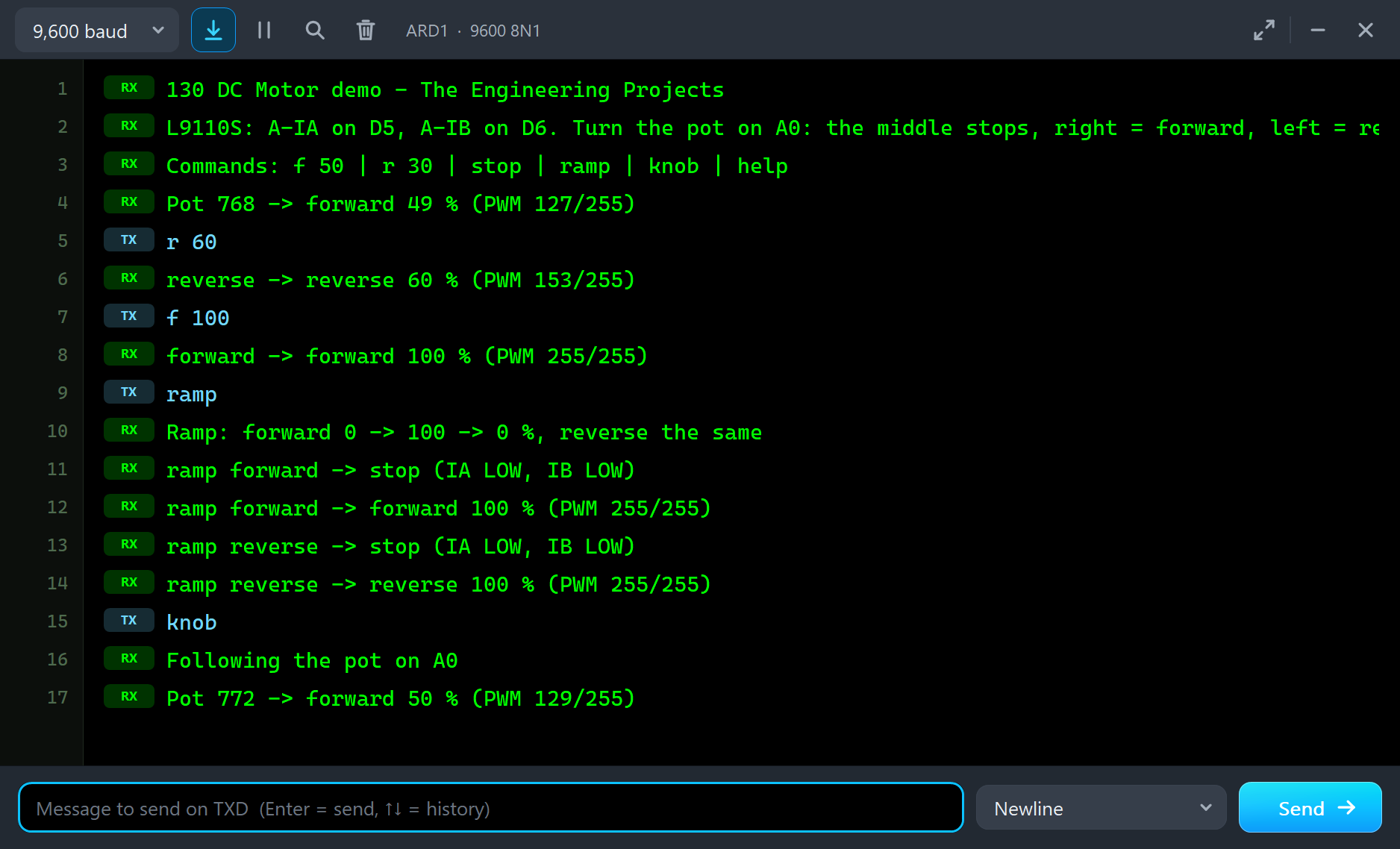
Type a command in the monitor and press Send. The pot is ignored until you type knob:
r 60
reverse -> reverse 60 % (PWM 153/255)
f 100
forward -> forward 100 % (PWM 255/255)
With r 60 the fan slows, stops and spins up the other way, to about 5,150 RPM CCW at -2.8 V, and the amber CCW LED takes over. With f 100 the motor gets everything the driver can give: 9,235 RPM CW at 4.87 V and 63 mA - 154 turns every second. That is less than the 11,500 RPM of the table because the demo runs from the UNO's 5 V, not from 6 V, and the L9110S keeps a little of it for itself.
| Type | What it does | What the run showed |
|---|---|---|
| f 50 | forward at 50 % | the speed follows the duty |
| r 30 | reverse at 30 % | r 60: about 5,150 RPM CCW at -2.8 V |
| stop | both inputs LOW: the motor brakes | the fan stops in a fraction of a second |
| ramp | 0 to 100 to 0 % forward, then reverse, 2 s each way | the speed, current and voltage on the Graphs page |
| knob | follow the pot on A0 again | back to about 4,500 RPM CW |
| help | the list of commands |
Then try ramp. The fan starts late - the friction has to be beaten before the rotor moves - and then the speed climbs with the voltage almost in a straight line, falls back, stops and repeats in reverse:
ramp
Ramp: forward 0 -> 100 -> 0 %, reverse the same
ramp forward -> stop (IA LOW, IB LOW)
ramp forward -> forward 100 % (PWM 255/255)
ramp reverse -> stop (IA LOW, IB LOW)
ramp reverse -> reverse 100 % (PWM 255/255)
knob
Following the pot on A0
Pot 772 -> forward 50 % (PWM 129/255)
The Pop-Up Window
At Run the motor opens TEP 130 DC Motor, a window in the look of our TEP Serial Monitor Advance for Proteus. It has four tabs - Motor, Graphs, Event log and Check - plus Settings and Help behind the gear and question mark icons, and the palette icon that switches the theme. If you close it, the OPEN PANEL button on the strip brings it back.
Motor
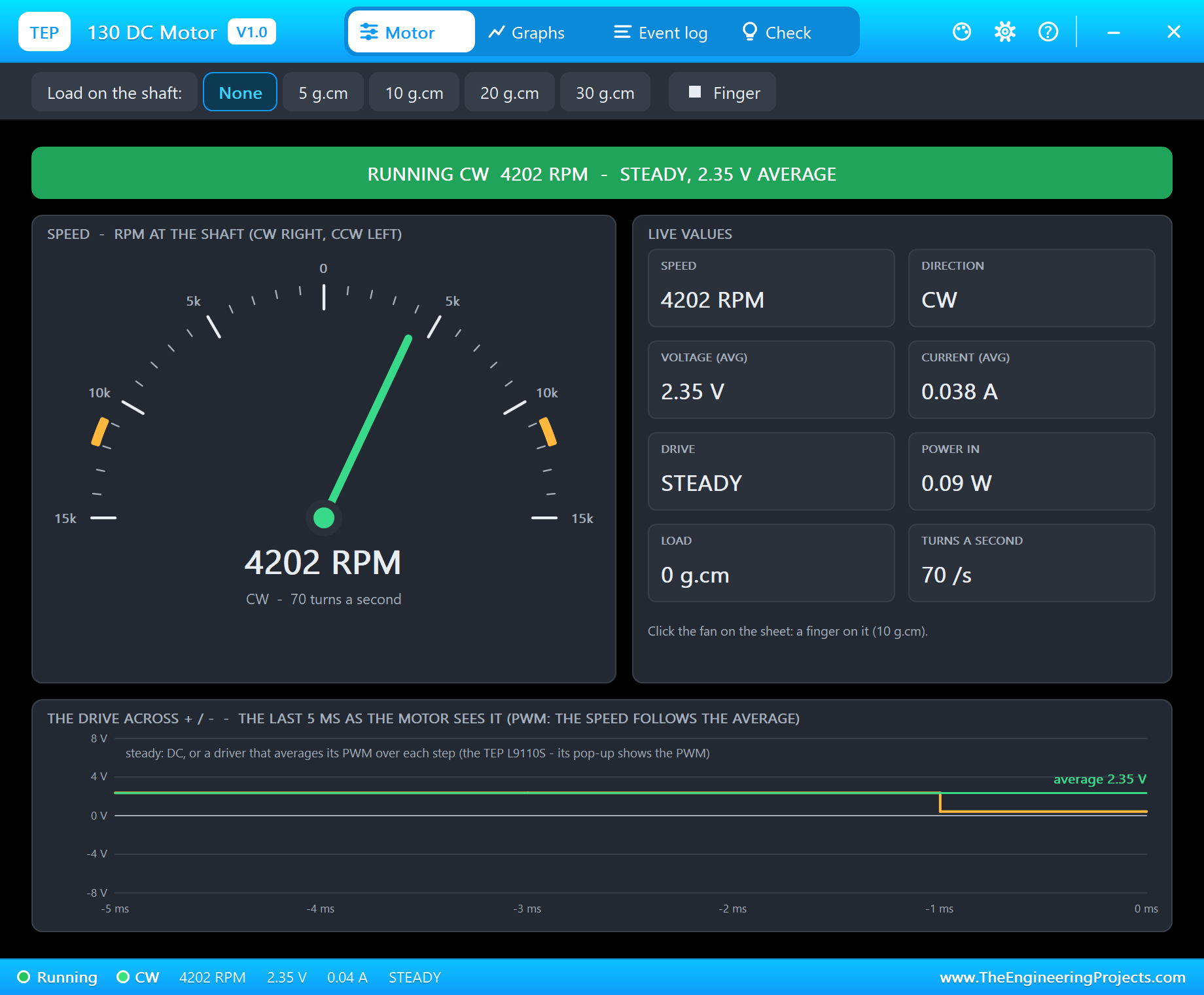
The banner says what the motor does in big letters: RUNNING CW or CCW, STOPPED, COASTING or BRAKING, STALLED or OVER-VOLTAGE. The gauge runs from 15,000 RPM CCW on the left to 15,000 RPM CW on the right, with the 6 V no-load speed marked in orange on both sides. The live values are the speed, the direction, the average voltage, the current, the drive, the power, the load and the turns a second. At the bottom, The drive across + / - draws the last 5 ms of the voltage the motor sees.
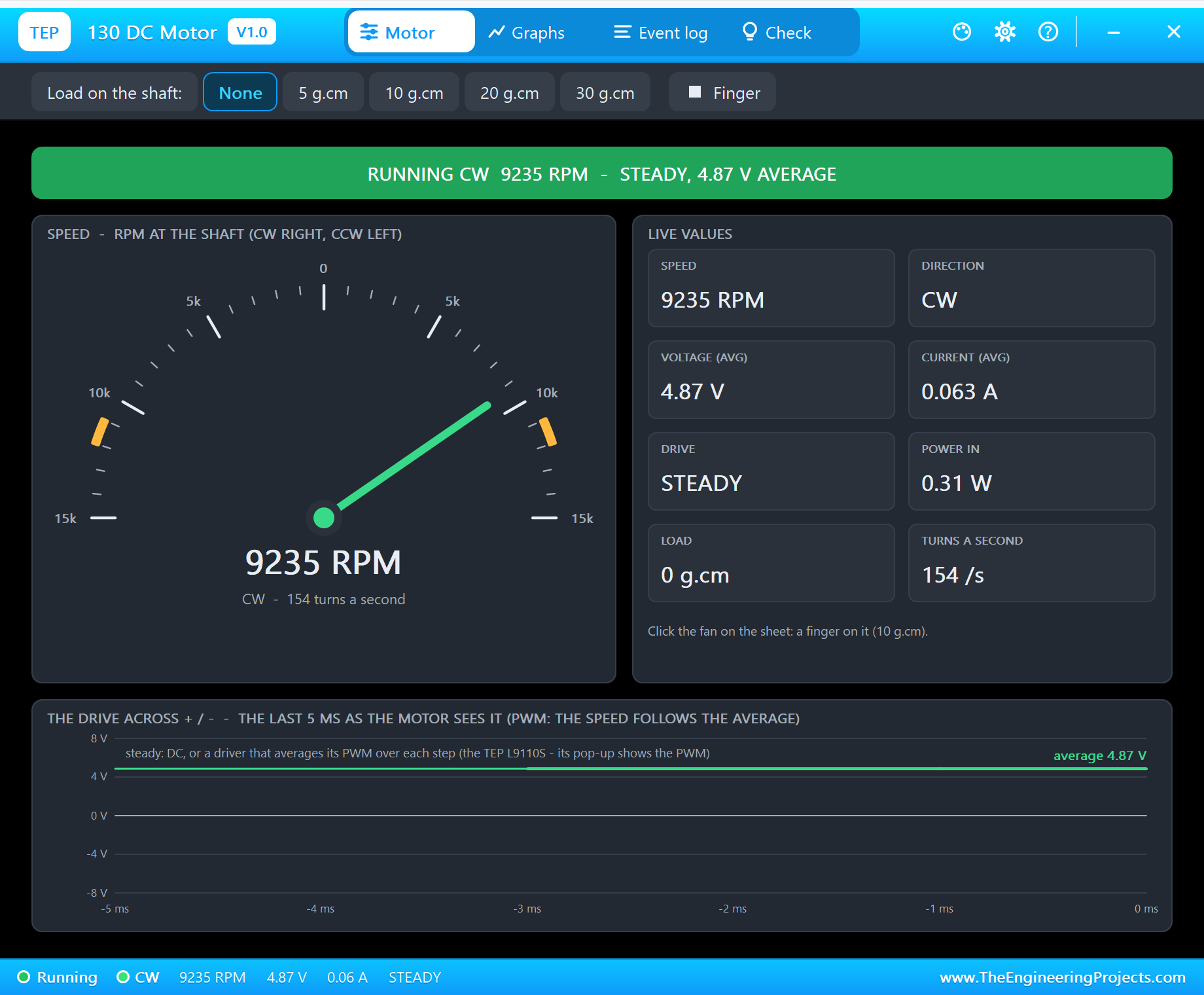
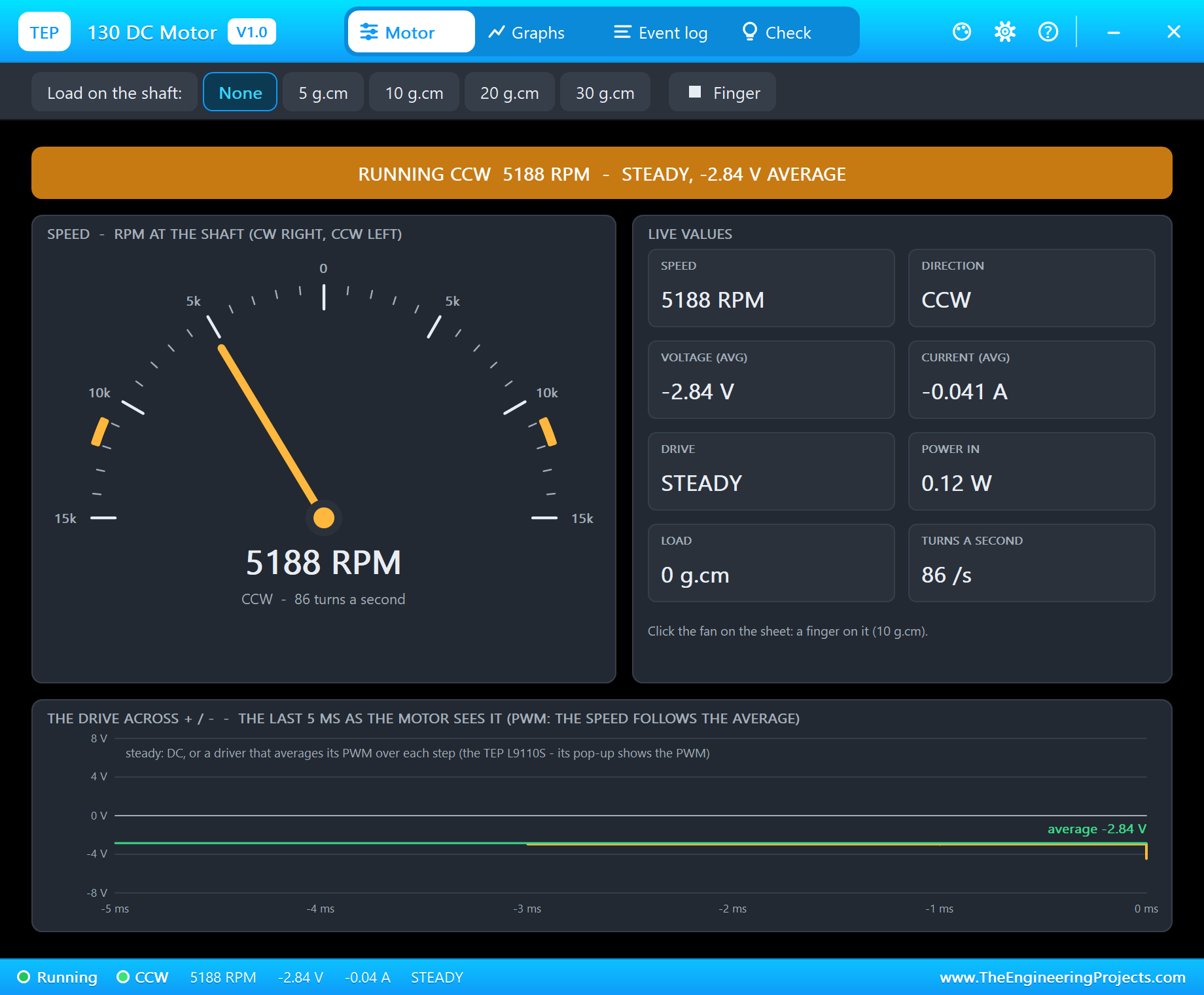
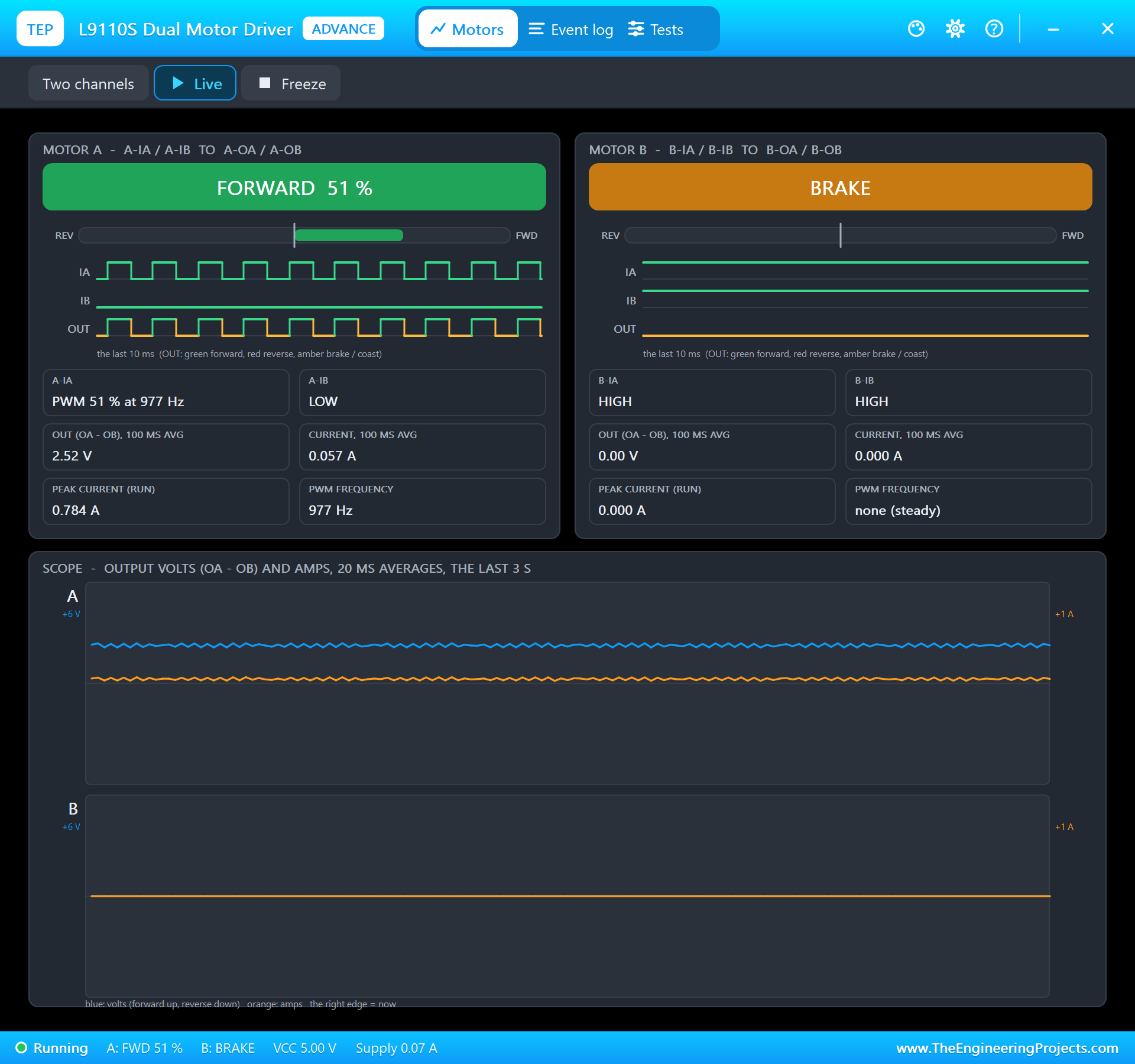
The drive tile says STEADY, and the reason is worth knowing. When a driver really switches, the motor sees the PWM and the pop-up shows its frequency, its duty and the square wave. Our L9110S model averages its PWM over each analog step of the simulation instead - that keeps the speed exact and the simulation fast - so the motor sees a steady average voltage. The PWM itself is on the driver's own pop-up:
Graphs
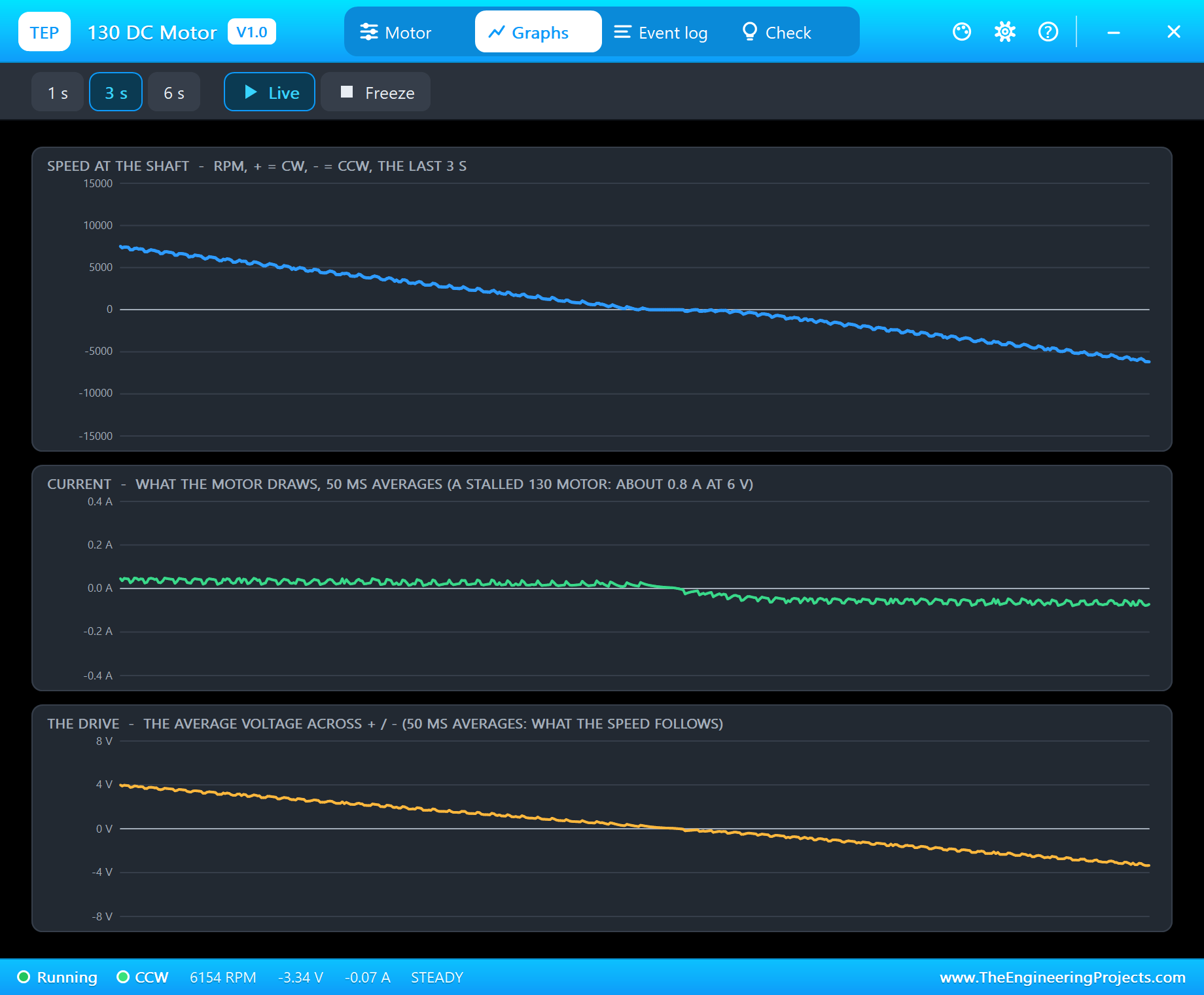
Graphs draws the speed, the current and the average voltage over the last 1, 3 or 6 seconds, as 50 ms averages. During the ramp the three curves fall together, cross zero and come back below it. The current stays tiny all the way, because a free-running 130 needs only a few tens of milliamps; it is a load or a sudden reversal that makes it jump.
A Stall
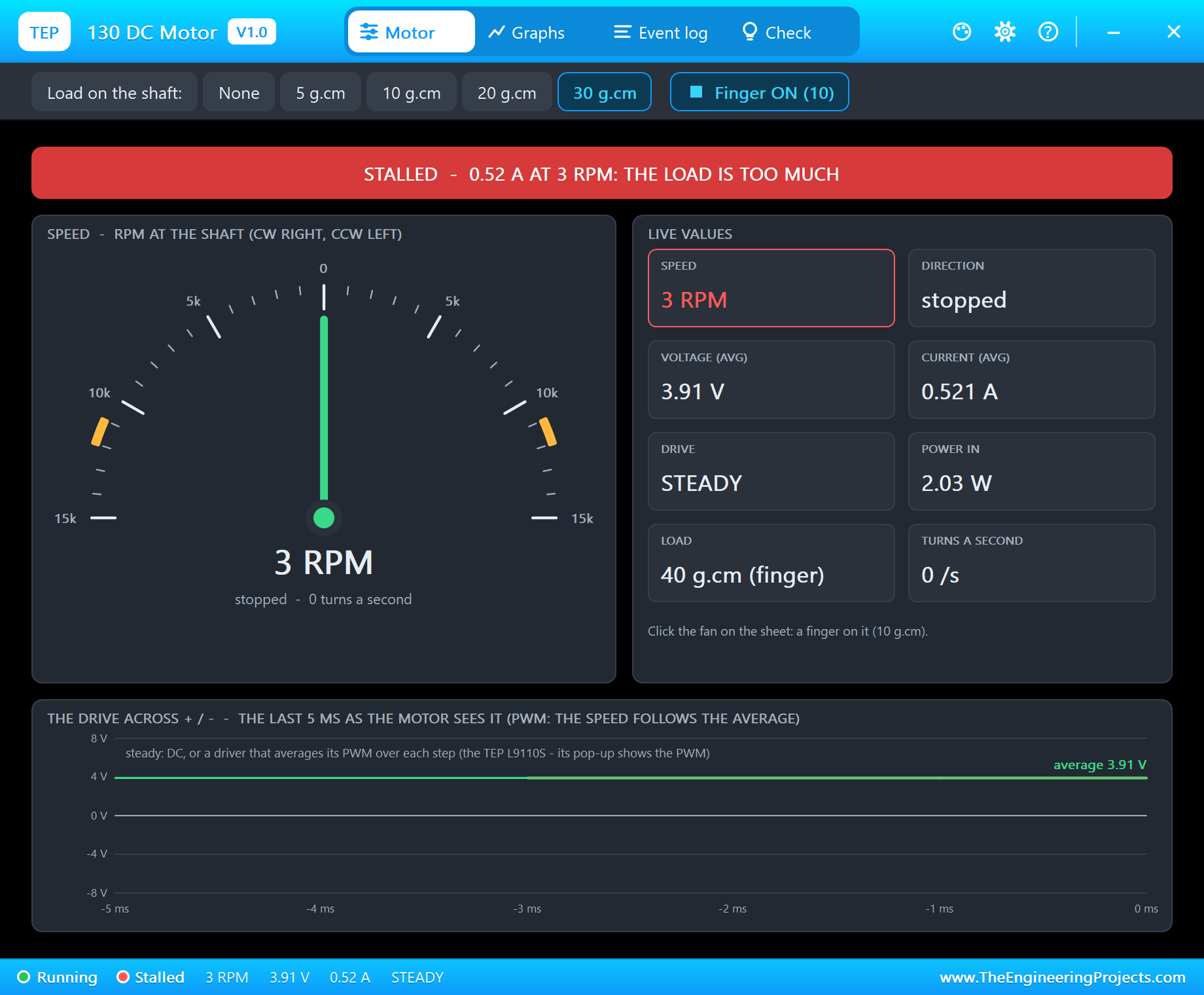
Type f 100, pick 30 g.cm on the toolbar and click the fan for the finger. That is 40 g.cm, more than the motor's stall torque, and the fan stops. The banner turns red: "STALLED - 0.52 A at 3 RPM: the load is too much". The voltage tells the rest: only 3.91 V is left across the motor, because the L9110S cannot hold its output up at that current. A stalled motor turns all its power into heat, so the Event log warns that it heats up.
Check
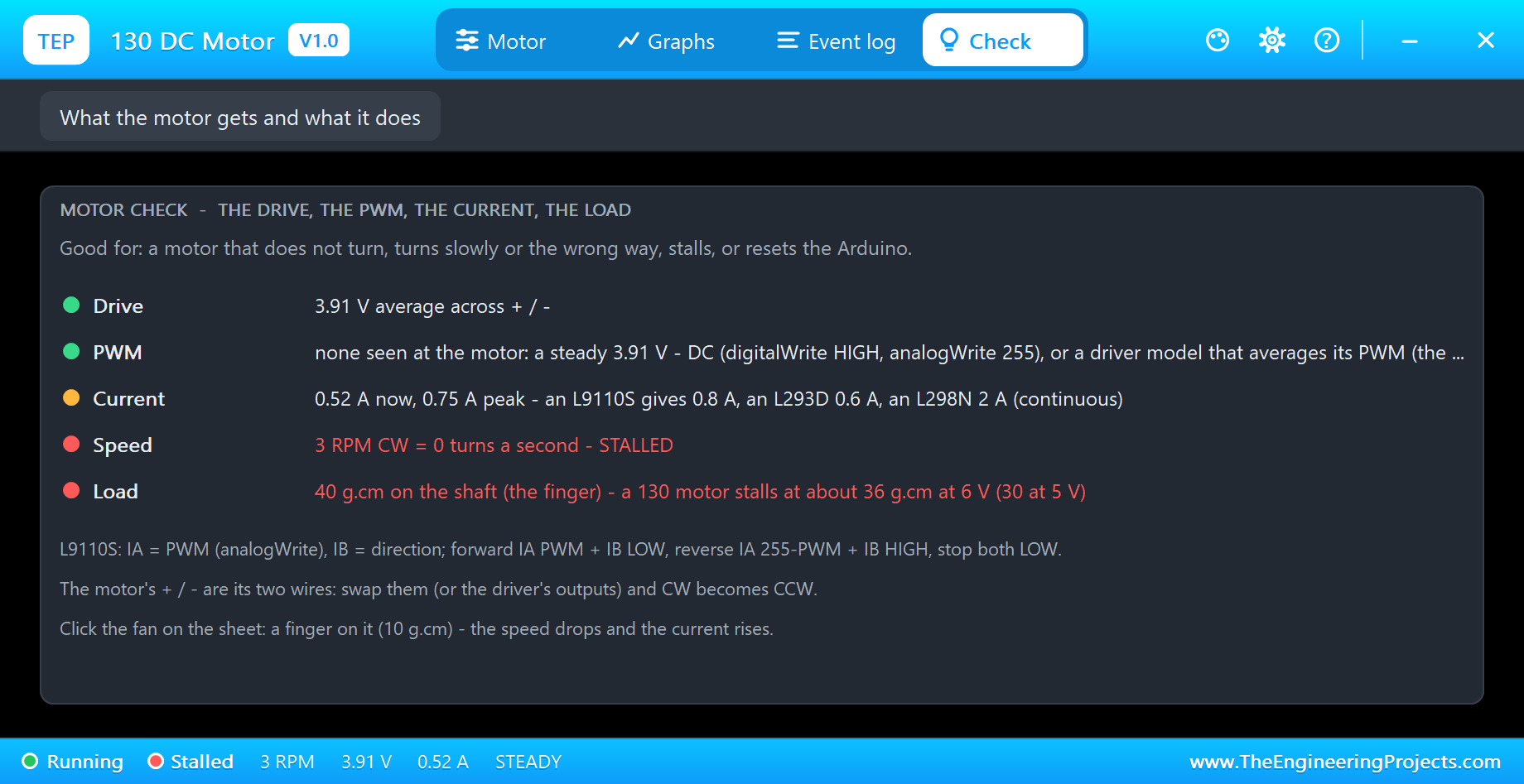
The Check page gives each condition a row and a verdict: green for fine, amber for check, red for wrong. The current row compares the motor with the common drivers - an L9110S gives 0.8 A, an L293D 0.6 A and an L298N 2 A continuously. The load row reminds you that a 130 stalls at about 36 g.cm at 6 V and 30 at 5 V. Under the rows are the L9110S wiring and the tips.
Event Log
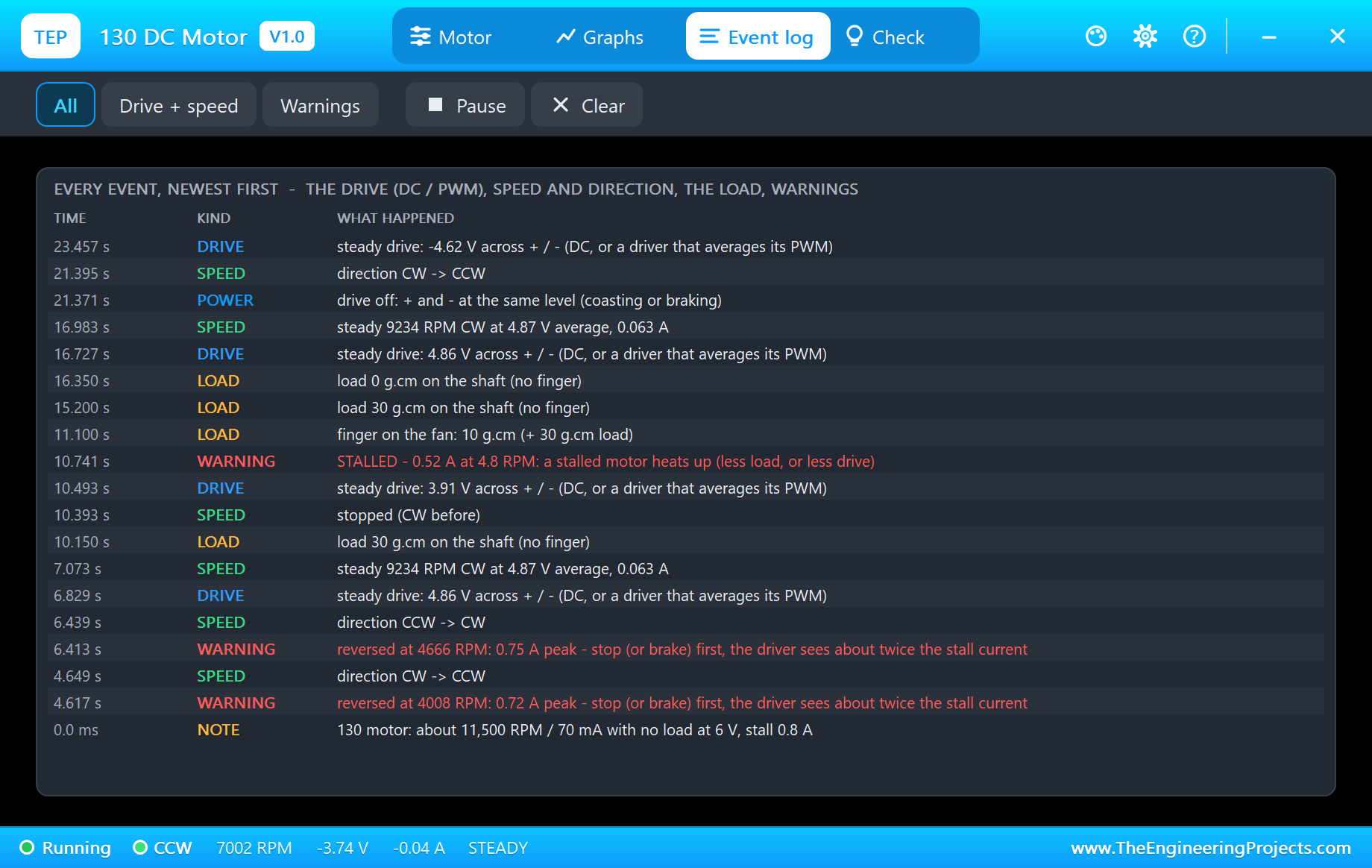
The Event log keeps the story of the run, newest first: every change of the drive, every steady speed - for example "steady 9234 RPM CW at 4.87 V average, 0.063 A" - every direction change, the loads and the warnings. Look at the two red lines from the start of the run: clicking RV1 from right to left of the middle reversed the motor at more than 4,000 RPM, and the log says "reversed at 4666 RPM: 0.75 A peak - stop (or brake) first, the driver sees about twice the stall current". Filter the log by drive and speed or by warnings, pause it or clear it.
Why a Reversal at Speed Is Hard on the Driver
That warning is the most useful thing the model teaches. At full speed the motor's back-EMF is almost as high as the supply. Reverse the driver at that moment and the supply and the back-EMF suddenly add up instead of cancelling: the winding sees nearly twice the supply, and the current jumps towards twice the stall current until the motor slows down. A real driver gets that spike every time a sketch flips the direction without stopping first. The cure is one line of code: stop, or brake, for a moment before you reverse.
How the Model Works
The motor is an analog part, solved by Proteus together with the driver. It keeps its speed in an extra internal node. At every analog step - 2 ms or less - the model takes the voltage across its pins, subtracts the back-EMF of the present speed, divides by the winding resistance for the current, turns the current into torque and moves the speed on by the torque minus the friction and the load, over the inertia. The angle of the fan is the speed added up. The current is part of the circuit, so a supply sags and a driver drops its voltage just as they would on the bench.
We checked it on a PC with 21 automatic tests: 11,500 RPM and 70 mA with no load at 6 V and 90 % of that speed in 0.12 s; 5,500 RPM at 3 V; the speed following PWM at 25, 50 and 75 %; a reversal at 5 V with a 1.25 A peak and its warning; a stall at 40 g.cm with 0.80 A, while 34 g.cm still turns and 20 g.cm gives 5,000 RPM; and the over-voltage warning at 9 V.
Troubleshooting
- The fan never turns and the pop-up says NO DRIVE: check the driver's inputs (both LOW = stop), its VCC, and that the motor wires sit on the driver's outputs.
- It turns the wrong way: swap + and -, or swap IA and IB in the sketch.
- STALLED: less load, or more drive.
- No fan, no driver or no monitor:
TEP130MOTOR.DLLis missing from MODELS, our L9110S library (TEPL9110S.LIB/.DLL) is not installed, orTEPARDUINO.DLLis missing; a closed monitor opens again with a click on the UNO's USB port. - The pop-up does not appear: click OPEN PANEL on the strip, or turn "Open the panel at Run" back on in its Settings.
Things to Know Before Using a Real 130 Motor
- Never from an Arduino pin: use a driver (L9110S, L293D, L298N) or a transistor with a flyback diode.
- Power: feed the driver from a battery - 2 to 4 AA cells - with GND common to the Arduino. A starting 130 takes 0.6 - 0.8 A for a moment, enough to reset an Arduino on USB.
- Noise: a 100 nF ceramic capacitor across the motor's terminals cuts the electrical noise of the brushes.
- Voltage drop: the L9110S is a bipolar chip and keeps some of the supply for itself; a MOSFET driver like the one in our TB6612FNG Motor Driver Library for Proteus wastes less.
- Direction: swap + and -, or the driver's outputs, and CW becomes CCW.
Limitations of the Simulation
- Not modelled: the winding inductance, the brushes' noise, the fan's air drag, heating and the differences between real motors.
- With the TEP L9110S the motor sees the PWM as its average, so the motor reports STEADY; the driver's pop-up shows the PWM.
- The plate, the LEDs, the strip, the fan and the finger are TEP additions.
- The model is our own, written from the typical data of the 3 - 6 V 130 motor; this library is not made or endorsed by Arduino or Labcenter.
- Licences: the demo HEX contains the Arduino AVR core 1.8.6 (LGPL); the sketch is included and the README gives the source link. The potentiometer is Proteus's own POT-HG.
- Tested in Proteus 8.5 in October 2026 with the demo as shipped: the knob, f, r, stop, ramp, the loads, the finger, the stall and all four pages of the pop-up. Proteus 7 is not supported.
So, that was all about the 130 DC Motor Library for Proteus V1.0. I hope it makes the back-EMF, the stall current and the reversal spike something you can see and measure before you build your fan, your propeller or your first toy car. If you have any questions, ask in the comments and I will help you out. Till the next tutorial, take care and have fun!

Comments
0