


4-Pin PC Fan Library for Proteus V1.0 (PWM, Tach, Arduino)


Hello friends, I hope you all are doing great. Today, I am going to share the new 4-Pin PC Fan Library for Proteus V1.0. The 4-pin fan is the cooling fan you find on every CPU cooler, in PC cases and power supplies, on 3D printers and in electronics enclosures. Unlike a plain DC fan, it has a controller inside: you give it 12 V, tell it how fast to run with a 25 kHz PWM signal on one wire, and it tells you how fast it really runs with pulses on another wire.
4-Pin PC Fan Library for Proteus
Latest version: V1.0 (November 2026, this tutorial)
Helping Tools
- Serial Monitor Advance: a serial terminal window for the UART of your board
- Serial Monitor Expert: the serial monitor with extra debugging tools
- LCD Library for Proteus V3.0: 16x2, 20x4 and I2C LCDs to show your readings
That makes it a great Arduino project - temperature-controlled cooling, a quiet enclosure fan, a fan tester - and this library lets you build it in Proteus first. The blades turn on the schematic at the simulated speed, the PWM is measured from its edges, the tach wire pulses twice a turn, and a click on the fan puts a finger on the blades. The demo runs on our Arduino UNO V4.0: Timer1 makes the 25 kHz PWM, an interrupt counts the tach, and the serial monitor prints the RPM every second.
NOTICE: a fan looks simple, but the details are what trip people up - the 25 kHz PWM that analogWrite cannot make, the open-collector tach that reads nothing without a pull-up, the minimum speed, the locked-rotor protection - so our team put a lot of effort into getting each of them right, and into blades that really turn on the sheet. Your feedback is the fuel that keeps us going, so please tell us what you think in the comments below or in the Motor Driver board of our forum. And if our free libraries help you, you can buy us a coffee. So, let's get started with the 4-Pin PC Fan Library for Proteus V1.0:
What is a 4-Pin PC Fan?
A PC fan is a small Brushless DC Motor motor with the blades fixed to its rotor. The magnets sit in the hub, the coils on the frame, and a little controller chip switches the coils in turn while a hall sensor watches the magnets go by. A 2-pin fan has only the power wires; a 3-pin fan adds the tach (the speed signal); and the 4-pin fan, defined by Intel's 4-wire PWM fan specification, adds a PWM input that sets the speed without touching the 12 V supply. That fourth wire is the reason the fan stays quiet at idle and spins up only when the processor gets hot.
| 120 mm 4-pin 12 V PC fan (the model) | |
|---|---|
| Supply | 12 V DC, about 0.15 A at full speed |
| Speed | 300 RPM (20 % duty or less) to 1,500 RPM (100 %) |
| PWM input | 25 kHz (21 - 28 kHz), a logic signal, pulled up inside the fan |
| Tach output | an open collector, 2 pulses a turn |
| Airflow and noise | 60 CFM and about 25 dBA at full speed |
| Protection | a locked rotor stops the drive; it retries every 3 s |
The Four Wires
The connector is keyed and the order is always the same. The colours are the common ones; some fans use other colours, but the pin order does not change:
| Pin | Wire | Signal |
|---|---|---|
| 1 | black | GND |
| 2 | yellow | +12V, the supply of the motor and its controller |
| 3 | green | TACH (sense): 2 pulses a turn, open collector |
| 4 | blue | PWM (control): 25 kHz, the duty sets the speed |
PWM at 25 kHz
The PWM wire is not a power wire. It is a logic input of the fan's controller, pulled up inside the fan, so an Arduino pin can drive it directly - no transistor, no MOSFET. The controller reads the duty cycle and turns it into a speed: in our model, 300 RPM at 20 % duty or less, 1,500 RPM at 100 %, and a straight line in between, so 40 % gives 600 RPM and 50 % gives 750 RPM. The specification asks for a frequency of 21 to 28 kHz - above hearing, so the coils do not whine. The Arduino's analogWrite runs at 490 Hz on pin 9, far below that, which is why the sketch sets up Timer1 itself.
Because of the pull-up, a broken or unconnected PWM wire means full speed: a safe failure for a cooling fan. And a fan following the specification never stops on PWM alone - at 0 % it keeps its minimum speed. To stop it completely you switch its 12 V.
The Tach Signal
The green wire is an open collector: a transistor inside the fan pulls it LOW while the hall sensor sees one pole of the rotor, and lets it float the rest of the time. You add the pull-up at your end - on an Arduino, simply INPUT_PULLUP. The fan gives two pulses for every turn, so the speed is the number of pulses in one second times 60 divided by 2, or simply times 30. A pull-up to 12 V would also work electrically, but it would put 12 V on the Arduino's pin, so never do that.
What's New in 4-Pin PC Fan Library for Proteus V1.0
- A fan with its own controller: the speed curve from the PWM duty, the internal pull-up (open = full speed) and the minimum speed of the Intel specification.
- The PWM measured: its frequency and duty from the edges, with a warning when it is outside 21 - 28 kHz.
- A real tach: an open collector with 2 pulses a turn, read by an Arduino interrupt exactly like a real fan.
- Realistic dynamics: the blades lag the target (1.2 s up, 2.5 s down), the supply decides whether the controller runs, and the top speed falls with a lower voltage.
- A locked rotor: click the fan and a finger stops the blades; the tach stops and the controller retries every 3 s, as real fans do.
- The fan laws: the current, the airflow in CFM and the noise in dBA follow the speed.
- Turning blades: seven swept blades turn on the sheet at the simulated speed and blur at speed.
- A pop-up window with four pages - Fan, Graphs, Event log and Check.
- A demo on our Arduino UNO V4.0: Timer1 at 25 kHz, the tach on an interrupt, the RPM every second, and commands to compare 25 kHz with analogWrite's 490 Hz. No driver is needed.
The 4-Pin PC Fan in Proteus
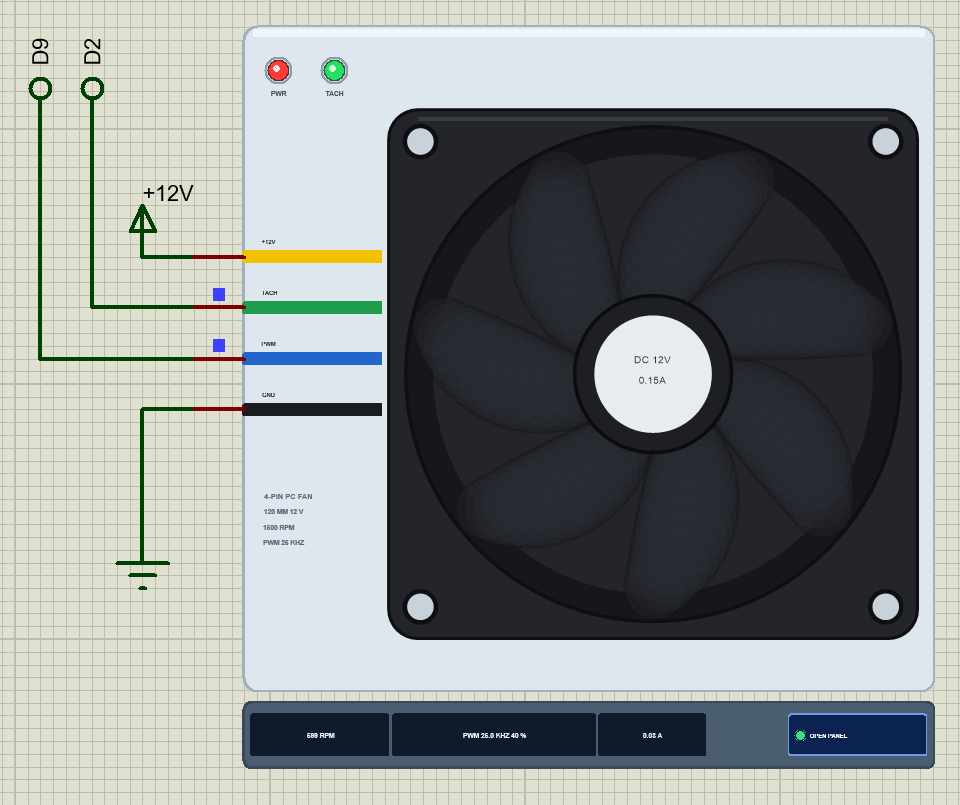
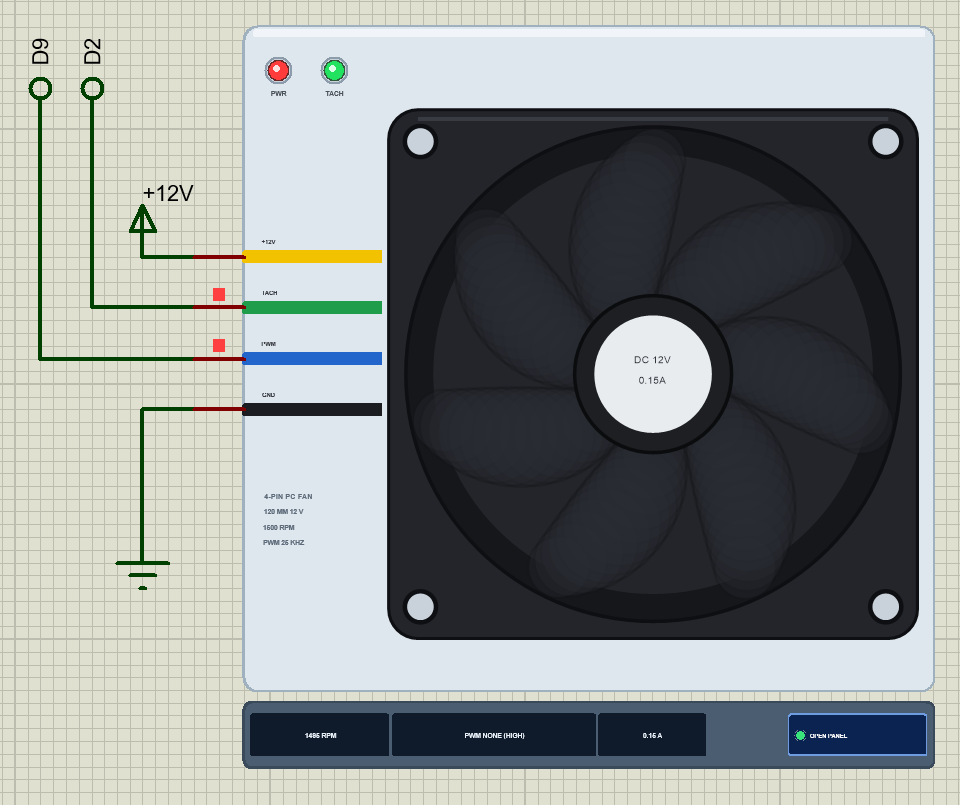
Search PC fan in Pick Devices; the device PCFAN4PINTEP is in TEPPCFAN.LIB (category Electromechanical, Fans) and its model is TEPPCFAN.DLL. The symbol shows the fan from the front: the black square frame with its four corner holes, the round opening, seven swept blades and the hub with its round "DC 12V 0.15A" label. The four wires come in from the left in their real colours - yellow, green, blue and black.
While the simulation runs, the blades turn at the simulated speed. A slow turn shows faint copies of the blades along the arc, and at speed the fan becomes a dark disc with the blades faintly on it - the way your eye sees a real fan. The strip under the plate gives the speed, the PWM and the current next to the OPEN PANEL button. The plate, its text, the strip and the two LEDs are TEP additions: PWR (red) lights with the 12 V, TACH (green) while the tach pulses.
| Pin | Type | What the model does with it |
|---|---|---|
| GND | analog | the return of the fan's current |
| +12V | analog | the supply: the controller starts at 7 V and runs down to 5 V; the fan draws its current here |
| TACH | digital | an open collector: LOW twice a turn, floating otherwise (no power: floating) |
| PWM | digital | the speed command: its duty is measured; open or HIGH = full speed |
One property changes the tach: TACHPULLUP is NO by default, an open collector as on the real fan. Set it to YES and the fan pulls the tach up itself (a weak HIGH), which is handy for a quick test without a pull-up. The model is a mixed one: the two supply pins are analog, so the fan works on any supply you build, and the two signal pins are digital.
Download 4-Pin PC Fan Library for Proteus
Click the button below to download 4-Pin-PC-Fan-Library-for-Proteus-v1.0.zip (about 1.2 MB, without the source code of the models):
4-Pin PC Fan Library for Proteus V1.0- README.txt: installation, the demo, the wiring, real hardware, troubleshooting and the limits.
- Proteus Library Files:
TEPPCFAN.LIBandArduinoV4TEP.LIBfrom our Arduino Library for Proteus V4.0. - Proteus Model Files:
TEPPCFAN.DLLandTEPARDUINO.DLL. - Proteus Simulation:
4-Pin-PC-Fan-ArduinoUnoV4.pdsprj,PCFan_Demo.hexand copies of the two DLLs. - Arduino Code:
PCFan_Demo.ino(no library needed).
No Proteus yet? Read How to Download and Install Proteus 7 and 8. New to libraries? Follow How to Install a New Library in Proteus.
How to Install 4-Pin PC Fan Library for Proteus
- Close Proteus and extract the whole zip file, for example to your Desktop.
- Copy
TEPPCFAN.LIBandArduinoV4TEP.LIBfrom Proteus Library Files into the LIBRARY folder of Proteus (usuallyC:\Program Files (x86)\Labcenter Electronics\Proteus 8 Professional\LIBRARY). - Copy
TEPPCFAN.DLLandTEPARDUINO.DLLfrom Proteus Model Files into the MODELS folder. The two Arduino files are the ones of our Arduino Library V4.0; if you have it, they are the same. - Delete
TEPPCFAN.IDXfrom the LIBRARY folder if it is there. - Start Proteus, press P and search for PC fan.
Tip: keep the Proteus Simulation folder together, because the project needs its .hex file and the DLLs beside it. The library is tested in Proteus 8.5; Proteus 7 is not supported.
The Demo Circuit
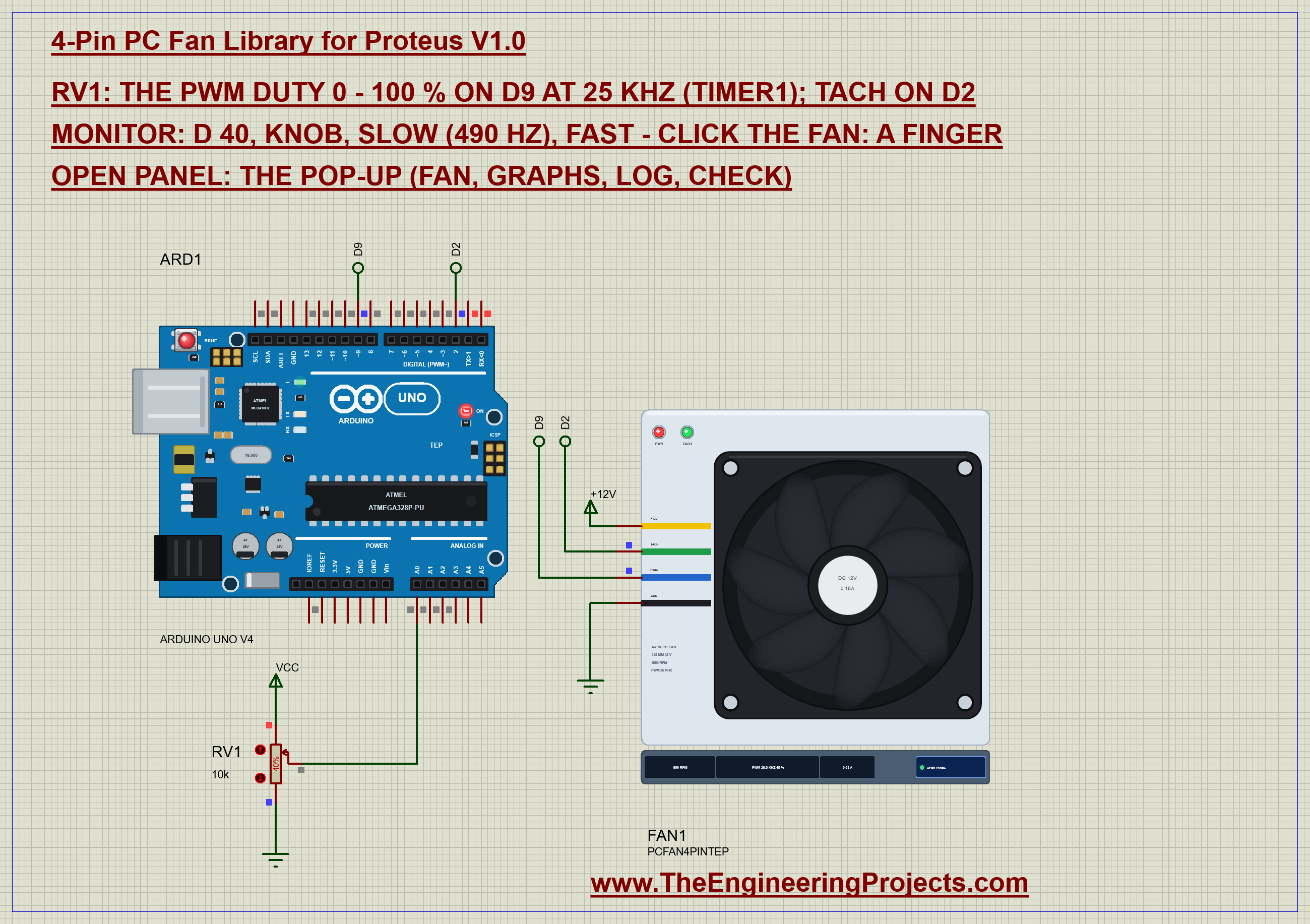
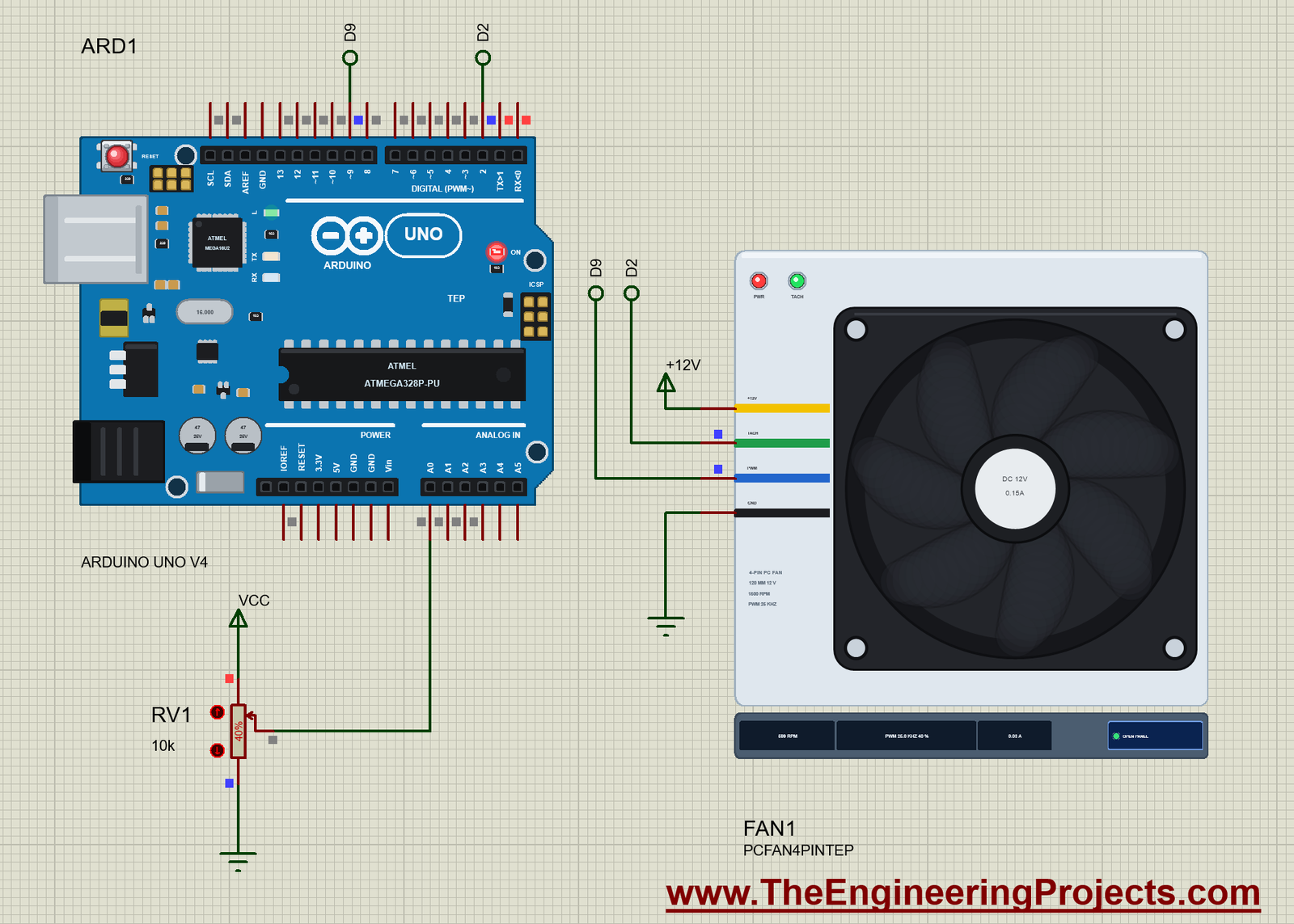
Open 4-Pin-PC-Fan-ArduinoUnoV4.pdsprj. ARD1 is an Arduino UNO V4.0 from our Arduino UNO Library for Proteus V4.0, running PCFan_Demo.hex with its serial monitor built in. FAN1 is the fan, its +12V pin on a +12V power terminal and its GND on ground. Its TACH goes to D2 and its PWM to D9 by the net labels above both parts. RV1 is a 10k potentiometer on A0 that sets the duty from 0 to 100 %; it starts at 40 %.
There is no driver in this circuit, and that is the nice thing about a 4-pin fan: the heavy current flows from the 12 V supply straight into the fan, and the Arduino only sends a logic signal and listens to one. On a real board, the 12 V supply's GND and the Arduino's GND must be joined, exactly as the ground symbols join them on the sheet.
| From | To | Note |
|---|---|---|
| Fan GND (black) | GND | common with the 12 V supply |
| Fan +12V (yellow) | a 12 V supply | not the Arduino's 5V |
| Fan TACH (green) | D2 (INT0) | INPUT_PULLUP in the sketch, or 10k to 5V |
| Fan PWM (blue) | D9 (OC1A) | Timer1 at 25 kHz |
| RV1 wiper | A0 | the duty, 0 - 100 % |
The Arduino Code
The demo needs no library. New to Arduino? Start with Arduino Tutorial for Beginners and Introduction to Arduino UNO. The first lines name the pins and the one number that makes 25 kHz:
const int PWM_PIN = 9, TACH_PIN = 2, POT = A0;
const int TOP = 639;                  // 16 MHz / (639 + 1) = 25 kHz
Timer1 counts the UNO's 16 MHz clock without a prescaler. In fast PWM mode 14 it counts from 0 up to ICR1 and starts again, so one PWM period is 640 clock ticks: 16,000,000 / 640 = 25,000 Hz. OC1A is pin D9, set at the start of each period and cleared when the count reaches OCR1A:
void timer25k() {                     // Timer1: fast PWM, TOP = ICR1, OC1A (D9) non-inverting, no prescaler
  TCCR1A = _BV(COM1A1) | _BV(WGM11);
  TCCR1B = _BV(WGM13) | _BV(WGM12) | _BV(CS10);
  ICR1 = TOP;
}
The duty in percent becomes a compare value between 0 and 639. One detail matters at 0 %: in fast PWM the pin would still go HIGH for one clock tick each period, so the sketch disconnects the pin from the timer and writes it LOW. In the slow mode it uses the ordinary analogWrite with 0 - 255:
void setDuty(int pct) {
  duty = constrain(pct, 0, 100);
  if (fast) {
    if (duty == 0) { TCCR1A &= ~_BV(COM1A1); digitalWrite(PWM_PIN, LOW); }    // 0 %: the pin LOW (fast PWM would leave a spike)
    else { TCCR1A |= _BV(COM1A1); OCR1A = (unsigned long)duty * (TOP + 1) / 100 - 1; }
  } else analogWrite(PWM_PIN, duty * 255 / 100);
}
At 100 % the compare value is 639, equal to TOP, and the pin simply stays HIGH - the fan sees no PWM at all and, because its input is pulled up anyway, runs at full speed. You will see that on the pop-up as "none (HIGH)". The slow command puts Timer1 back the way the Arduino core sets it up, 8-bit phase-correct PWM at 490 Hz:
void timerDefault() {                 // back to the Arduino's own setting: 8-bit phase-correct PWM, 490 Hz
  TCCR1A = _BV(WGM10);
  TCCR1B = _BV(CS11) | _BV(CS10);
}
Now the tach. The pin gets the UNO's internal pull-up, which turns the fan's open collector into a clean 0 / 5 V signal, and an interrupt on every falling edge counts the pulses:
  pinMode(TACH_PIN, INPUT_PULLUP);    // the tach is an open collector: this is its pull-up
  attachInterrupt(digitalPinToInterrupt(TACH_PIN), onTach, FALLING);
void onTach() { tachCount++; }Once a second the loop takes the count and clears it. The interrupts are switched off for the two instructions that read and reset the counter, so a pulse arriving at that moment cannot corrupt the 4-byte value:
  if (millis() - windowAt >= 1000) {  // one second of tach pulses
    windowAt += 1000;
    noInterrupts(); unsigned long n = tachCount; tachCount = 0; interrupts();
Two pulses a turn and sixty seconds a minute make the RPM equal to the count times 30. If two windows in a row bring no pulse at all, the sketch says the fan has stopped:
if (++quietSeconds == 2) Serial.println(F("TACH: no pulses for 2 s - the fan has stopped (blocked, or no 12 V?)")); Serial.print(n * 30); Serial.print(F(" RPM (")); Serial.print(n); Serial.println(F(" tach pulses in 1 s)"));Finally, the pot is mapped straight to the duty, and the two commands switch between the modes without losing the duty:
setDuty(map(raw, 0, 1023, 0, 100)); if (!strcmp(s, "slow")) { fast = false; timerDefault(); setDuty(duty); report(F("slow: ")); return; }
if (!strcmp(s, "fast")) { fast = true; timer25k(); setDuty(duty); report(F("fast: ")); return; }The same pulse-counting idea is used for the wheel encoder of our LM393 Speed Sensor Library for Proteus, and the basics of motor PWM are in our older DC Motor Speed Control using Arduino tutorial. The HEX file is in the package; to change the sketch, open it in the Arduino IDE and export the compiled binary, as in How to get the HEX file from Arduino. It needs 5,632 bytes of flash (17 % of the UNO) and 262 bytes of RAM.
Running the Demo
Press Run. The UNO's serial monitor and the fan's pop-up open over the schematic; move them aside. RV1 starts at 40 %, so the sketch sets a duty of 40 % at 25 kHz, the controller aims at 600 RPM and the blades spin up from rest. After 5.6 s the fan is steady, and from then on the monitor prints 600 RPM from 20 tach pulses every second. This is our test run with the commands typed in the monitor; the once-a-second RPM lines between the commands are left out, the last lines are as printed:
4-Pin PC Fan demo - The Engineering Projects
PWM on D9 at 25 kHz (Timer1), TACH on D2 (INPUT_PULLUP, 2 pulses a turn). The pot on A0 sets the duty.
Commands: d 40 | knob | slow | fast | help
Pot 410: duty 40 % at 25 kHz (Timer1)
duty 40 %: 600 RPM (20 tach pulses in 1 s)
d 100
duty 100 % at 25 kHz (Timer1)
d 10
duty 10 % at 25 kHz (Timer1)
slow
slow: duty 10 % at 490 Hz (analogWrite)
d 50
duty 50 % at 490 Hz (analogWrite)
fast
fast: duty 50 % at 25 kHz (Timer1)
TACH: no pulses for 2 s - the fan has stopped (blocked, or no 12 V?)
duty 50 %: 570 RPM (19 tach pulses in 1 s)
knob
Following the pot on A0
Pot 410: duty 40 % at 25 kHz (Timer1)
duty 40 %: 690 RPM (23 tach pulses in 1 s)
duty 40 %: 690 RPM (23 tach pulses in 1 s)
duty 40 %: 660 RPM (22 tach pulses in 1 s)
duty 40 %: 630 RPM (21 tach pulses in 1 s)
duty 40 %: 630 RPM (21 tach pulses in 1 s)
duty 40 %: 630 RPM (21 tach pulses in 1 s)
duty 40 %: 600 RPM (20 tach pulses in 1 s)
duty 40 %: 630 RPM (21 tach pulses in 1 s)
duty 40 %: 570 RPM (19 tach pulses in 1 s)
duty 40 %: 630 RPM (21 tach pulses in 1 s)
duty 40 %: 600 RPM (20 tach pulses in 1 s)
duty 40 %: 600 RPM (20 tach pulses in 1 s)
duty 40 %: 600 RPM (20 tach pulses in 1 s)
duty 40 %: 600 RPM (20 tach pulses in 1 s)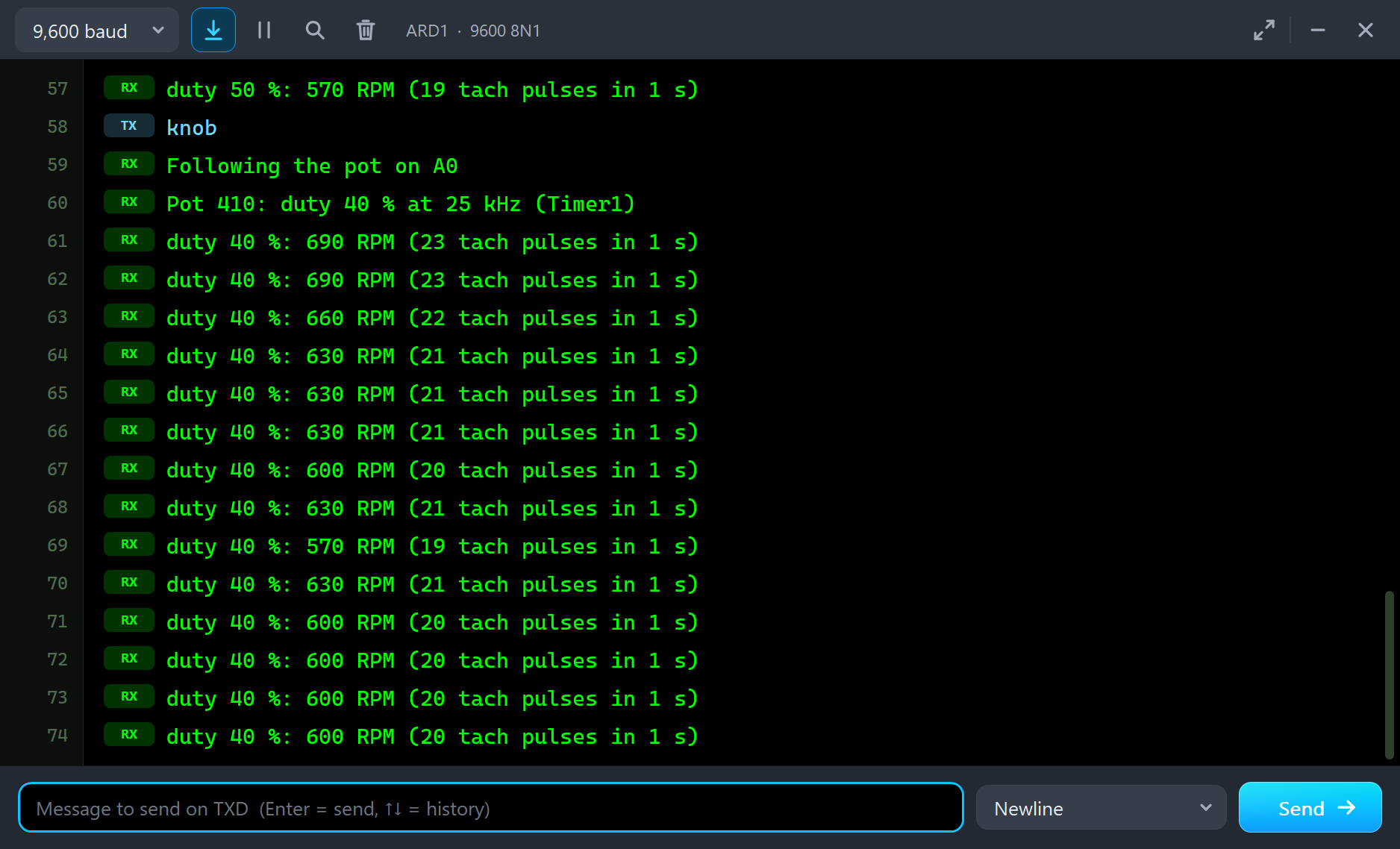
Look at the last lines. After knob the duty drops from 50 to 40 %, and the counted speed walks down - 690, 660, 630 - as the blades slow from 750 to 600 RPM with the air braking them. Then it settles at 600, with an odd 570 or 630 in between. That is not noise in the fan: the sketch counts whole pulses in a one-second window, so the result moves in steps of 30 RPM, and a window that starts just before or just after a pulse catches one more or one less. Counting over two seconds, or timing the period between pulses, gives a finer reading.
| Type | What it does | What the run showed |
|---|---|---|
| d 40 | duty 40 % (the pot is ignored until knob) | d 100: 1,500 RPM, 0.150 A, 60 CFM |
| d 10 | a duty below the fan's minimum | 300 RPM: it never stops on PWM |
| slow | analogWrite at 490 Hz | the out-of-spec warning; d 50 gives 747 RPM |
| fast | Timer1 at 25 kHz again | 50 % at 25 kHz: 750 RPM |
| knob | follow the pot again | RV1 at 40 %: 600 RPM |
The Pop-Up Window
At Run the fan opens TEP 4-Pin PC Fan, a window in the look of our TEP Serial Monitor Advance for Proteus. Its four tabs are Fan, Graphs, Event log and Check, with Settings and Help behind the gear and question mark icons. If you close it, OPEN PANEL on the strip brings it back.
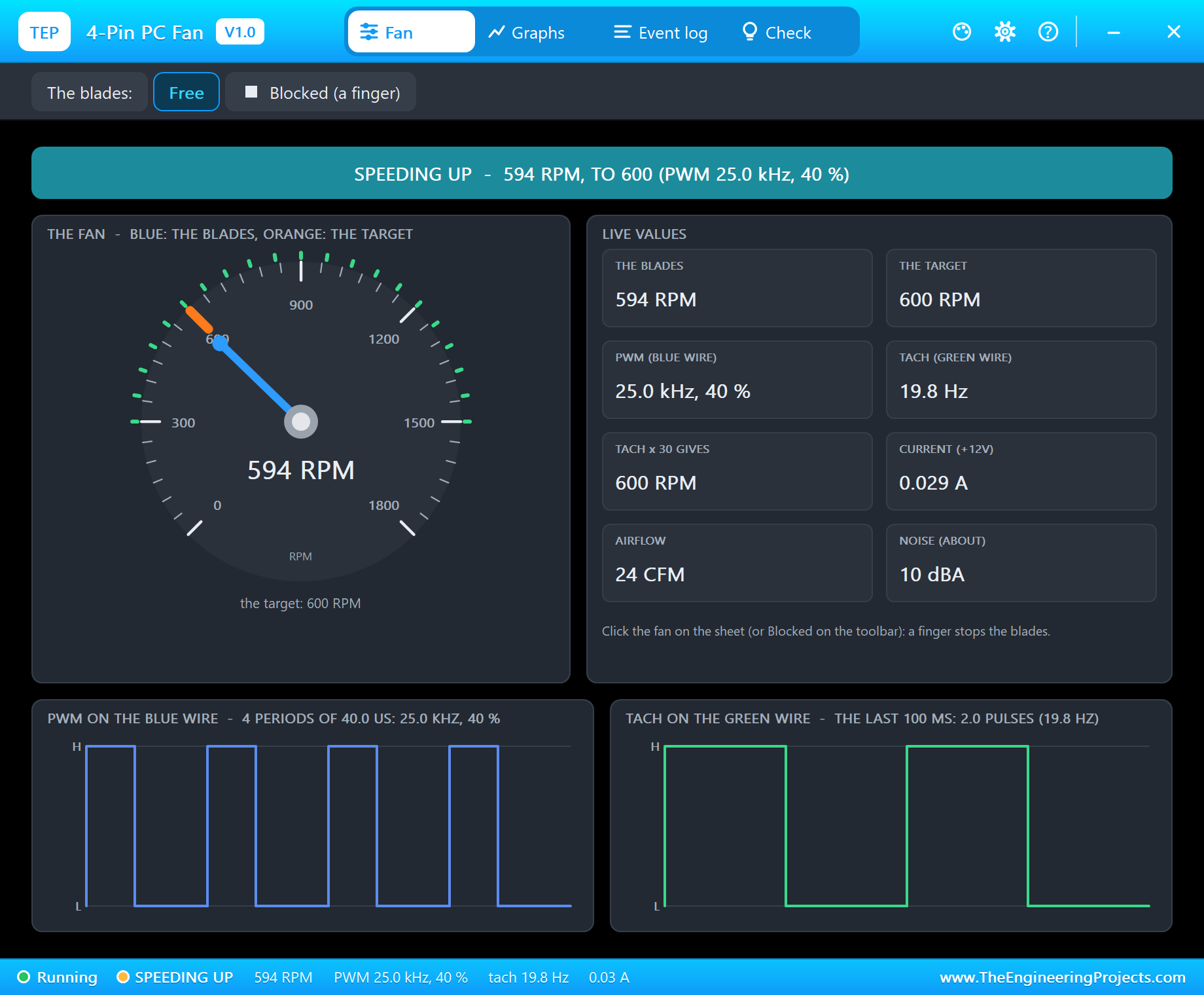
The banner gives the state in one line. The dial runs from 0 to 1,800 RPM with two needles: blue for the blades and an orange mark for the controller's target, so you can watch the blades catch up after every change. The live values are the blades, the target, the PWM, the tach in Hz, the RPM an Arduino computes from it, the current, the airflow and the noise. At the bottom are the two signals themselves: four periods of the PWM on the blue wire and the last 100 ms of the tach on the green wire.
Full Speed
Type d 100. As explained above, the pin now stays HIGH, and the Event log records "no PWM signal (HIGH or open: the fan pulls it up) - full speed, 1500 RPM". On the sheet the blades blur into a dark disc. After 4.9 s the fan is steady: "STEADY at 1500 RPM after 4.9 s - tach 50.0 Hz (2 a turn), 0.150 A, 60 CFM, about 25 dBA".
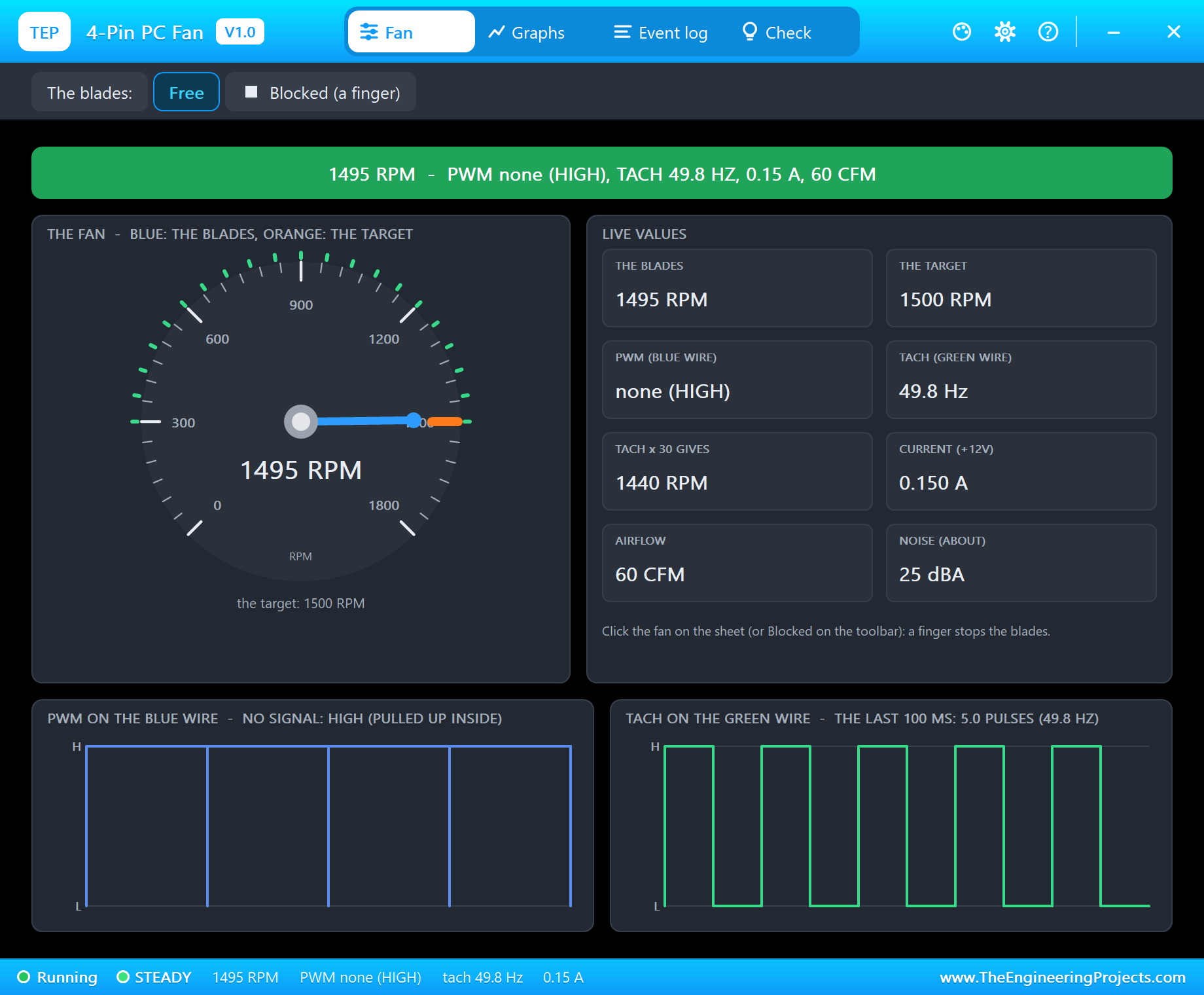
This is also what happens if the blue wire breaks: the fan runs flat out, which is noisy but keeps the processor cool. The current is now the fan's rated 0.15 A, five times the 0.029 A at 600 RPM - the fan laws say the power rises with the cube of the speed, so a fan at half speed uses only about an eighth of the power.
The Minimum Speed
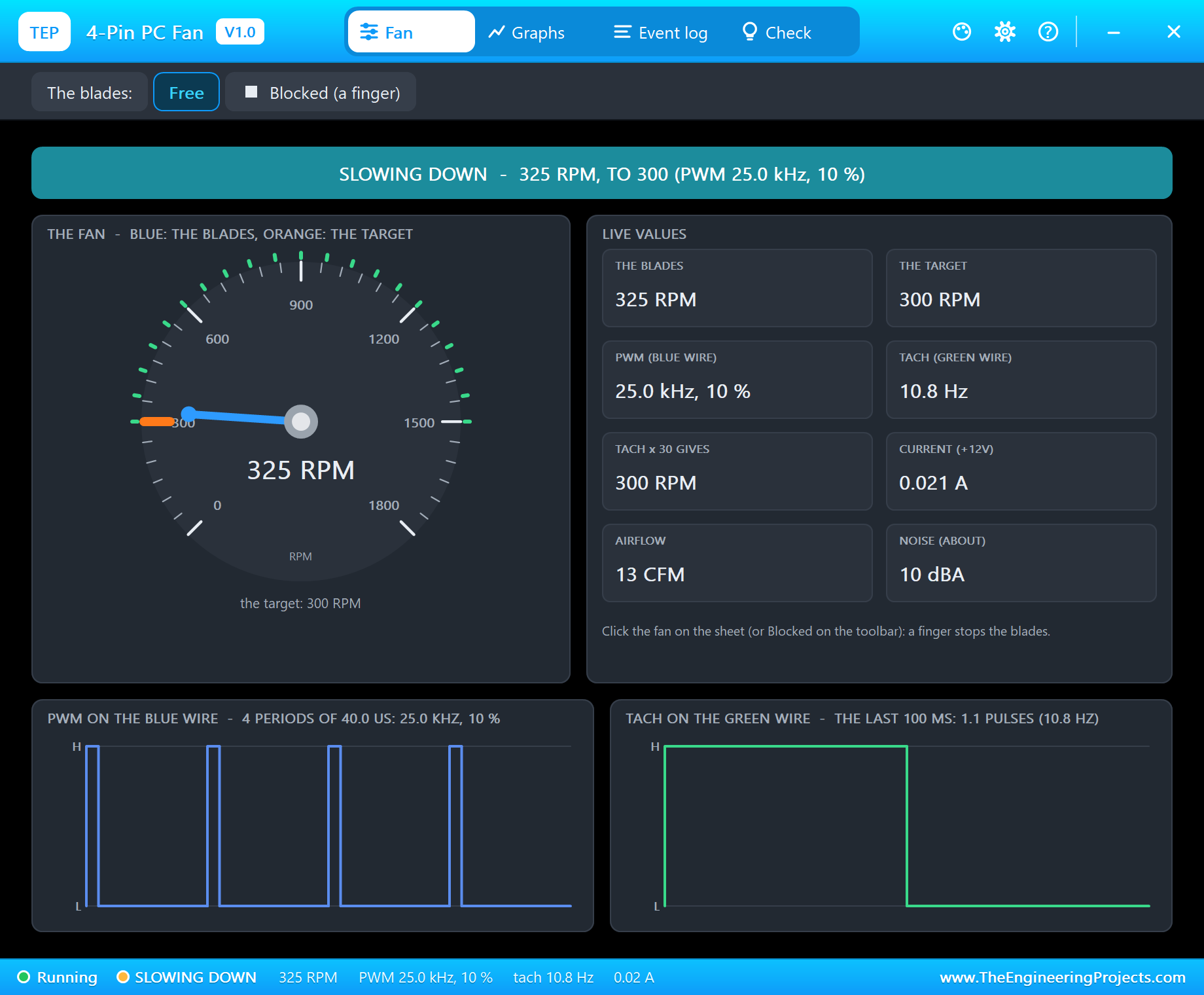
Type d 10. The Event log says "PWM 25.0 kHz, 10 % duty - the fan aims at 300 RPM (its minimum: it never stops on PWM)". The blades slow down to 300 RPM over several seconds - slower than they sped up, because only the air brakes them. Every duty from 0 to 20 % gives the same 300 RPM, which is worth knowing when you write a temperature curve: below 20 % you gain nothing.
analogWrite at 490 Hz
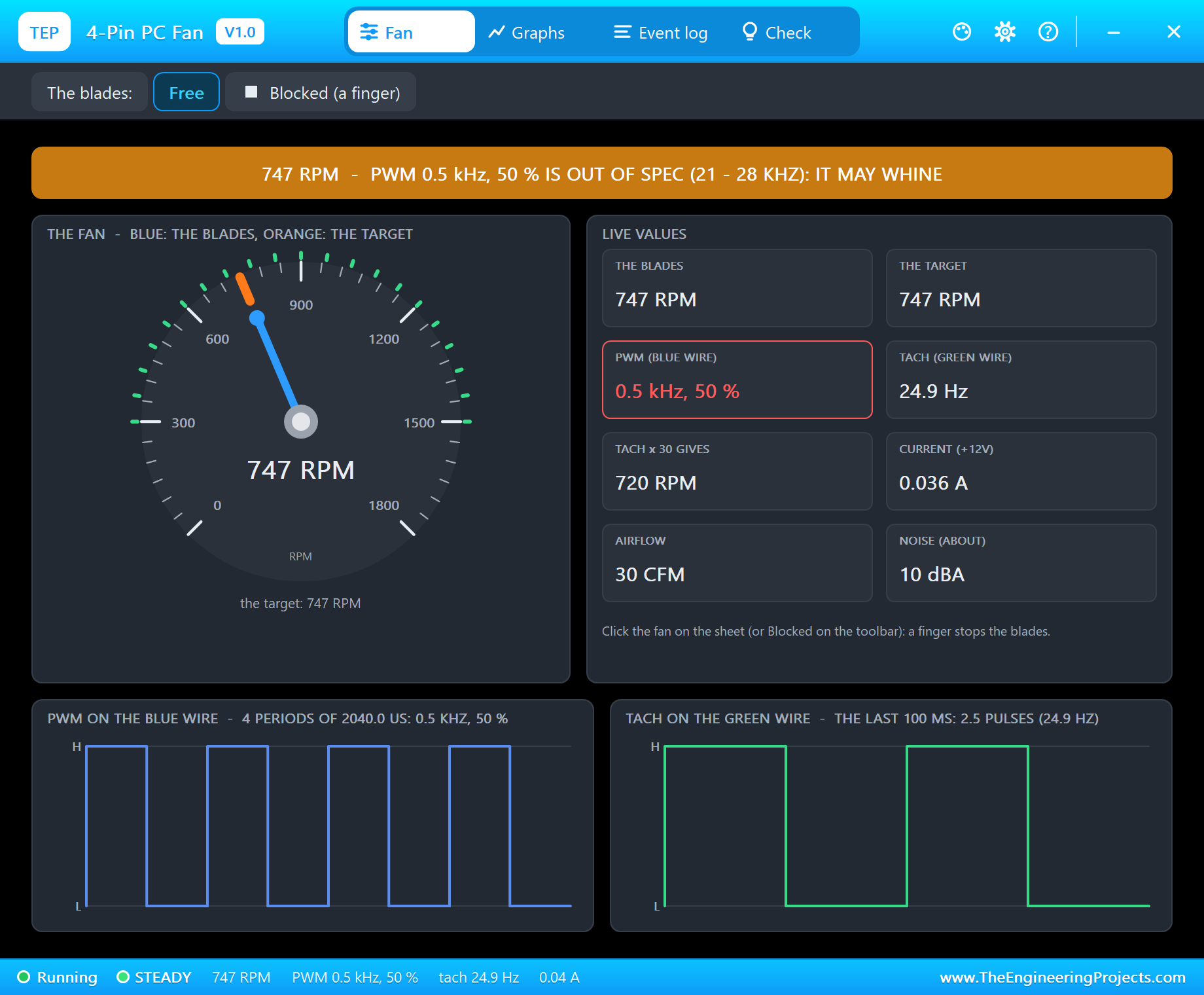
Type slow and then d 50. The sketch now uses analogWrite, and the pop-up warns at once: "PWM at 490 Hz is outside the fan's 21 - 28 kHz: it follows the duty, but a real fan may whine or hunt (Timer1 at 25 kHz fixes it)". The banner turns amber and the PWM value red. The fan still follows the duty - 49.8 % (127/255), 747 RPM - and many real fans do too, but some buzz audibly or let their speed wander at such a low frequency. Type fast and the same 50 % at 25 kHz gives 750 RPM with no warning.
A Locked Rotor
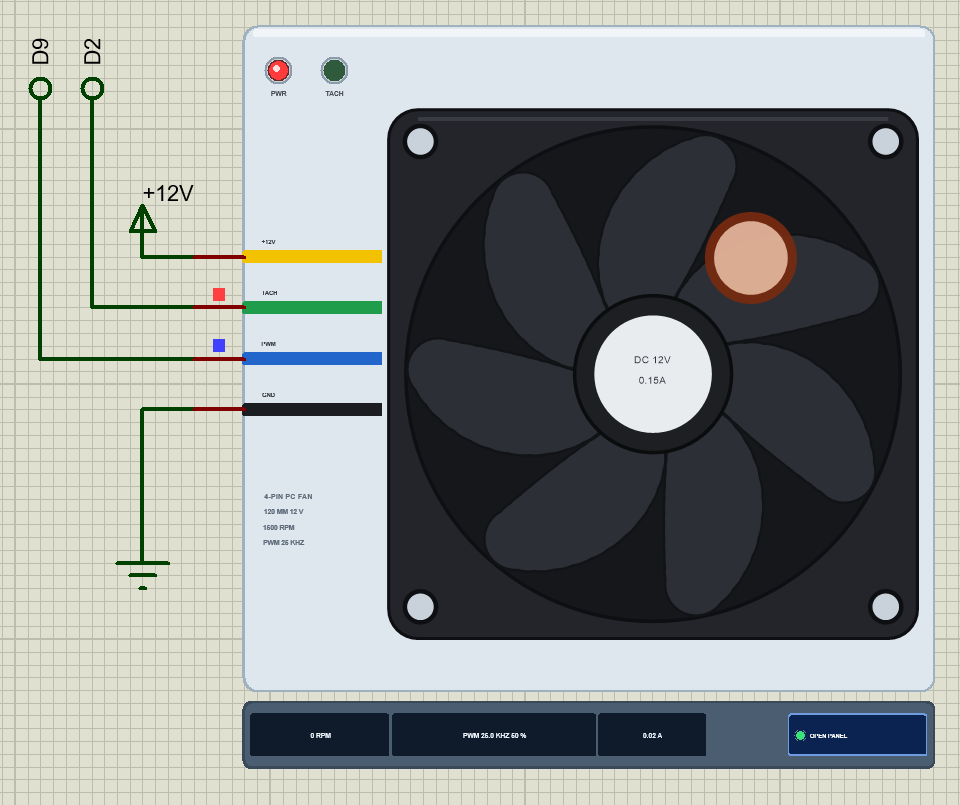
Click the fan on the sheet, or Blocked (a finger) on the pop-up's toolbar. A finger appears on the blades and they stop within a fraction of a second. The tach stops with them, and the controller does what a real fan does: "LOCKED ROTOR - the tach stopped: the controller cuts the drive and retries every 3 s". Two seconds later the sketch notices too and prints "TACH: no pulses for 2 s - the fan has stopped (blocked, or no 12 V?)".
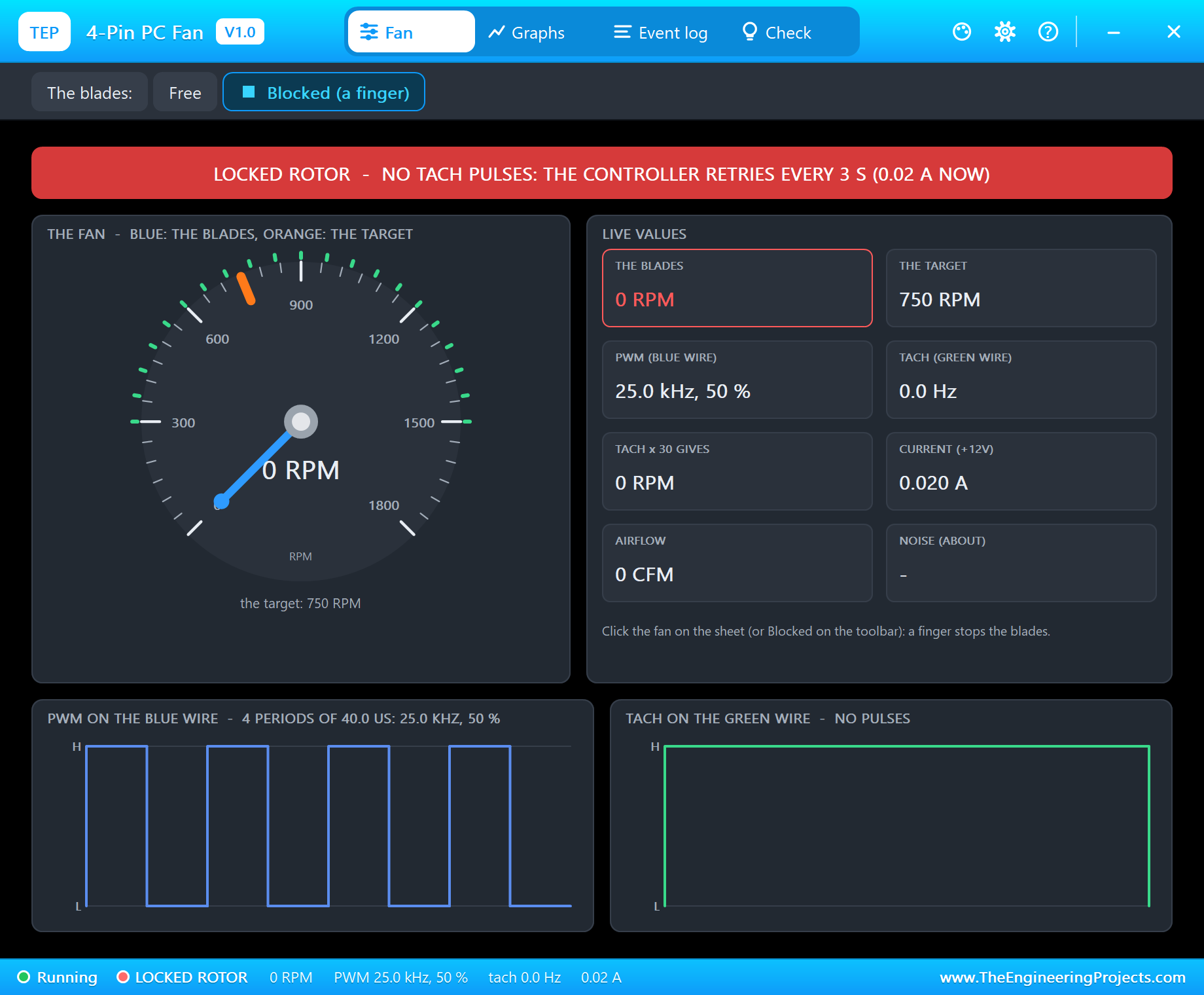
Click again to free the blades: "the rotor turns again: the controller restarts the fan", and the speed climbs back to the target. This is exactly the check a real project should make - a fan that reads 0 RPM while it is powered and commanded is a blocked or failed fan, and that deserves an alarm.
Graphs
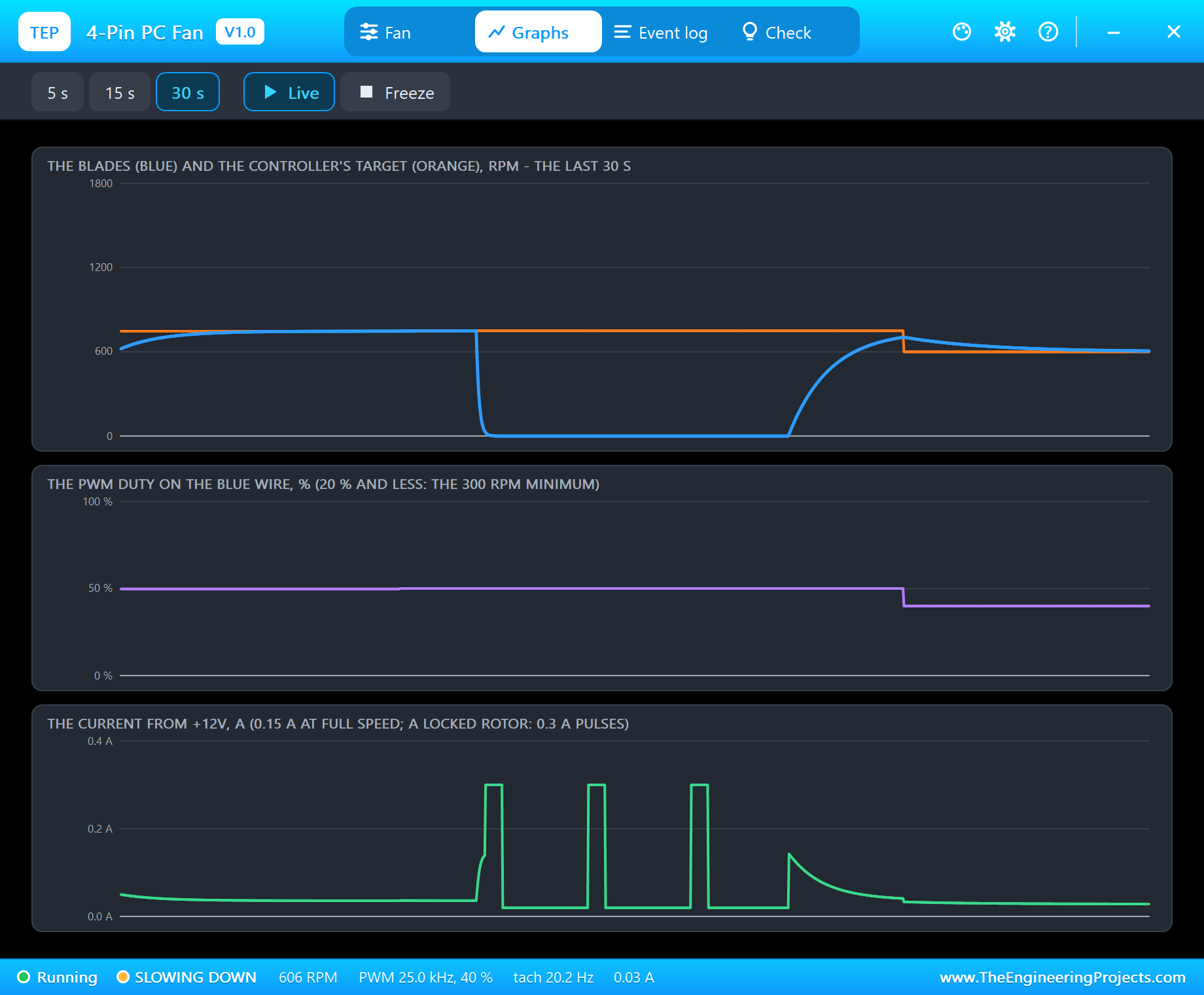
The Graphs page shows the last 5, 15 or 30 seconds in three plots: the blades (blue) against the target (orange), the PWM duty, and the current from +12V. Our capture tells the whole locked-rotor story: the speed falls to zero the moment the finger touches the blades, the current shows the controller's 0.3 A attempts every 3 s with 0.02 A between them, then the blades are freed, the current jumps as the motor accelerates, and the speed curves back up. At the end, knob lowers the duty to 40 % and the blades follow the orange line down to 600 RPM.
Event Log and Check
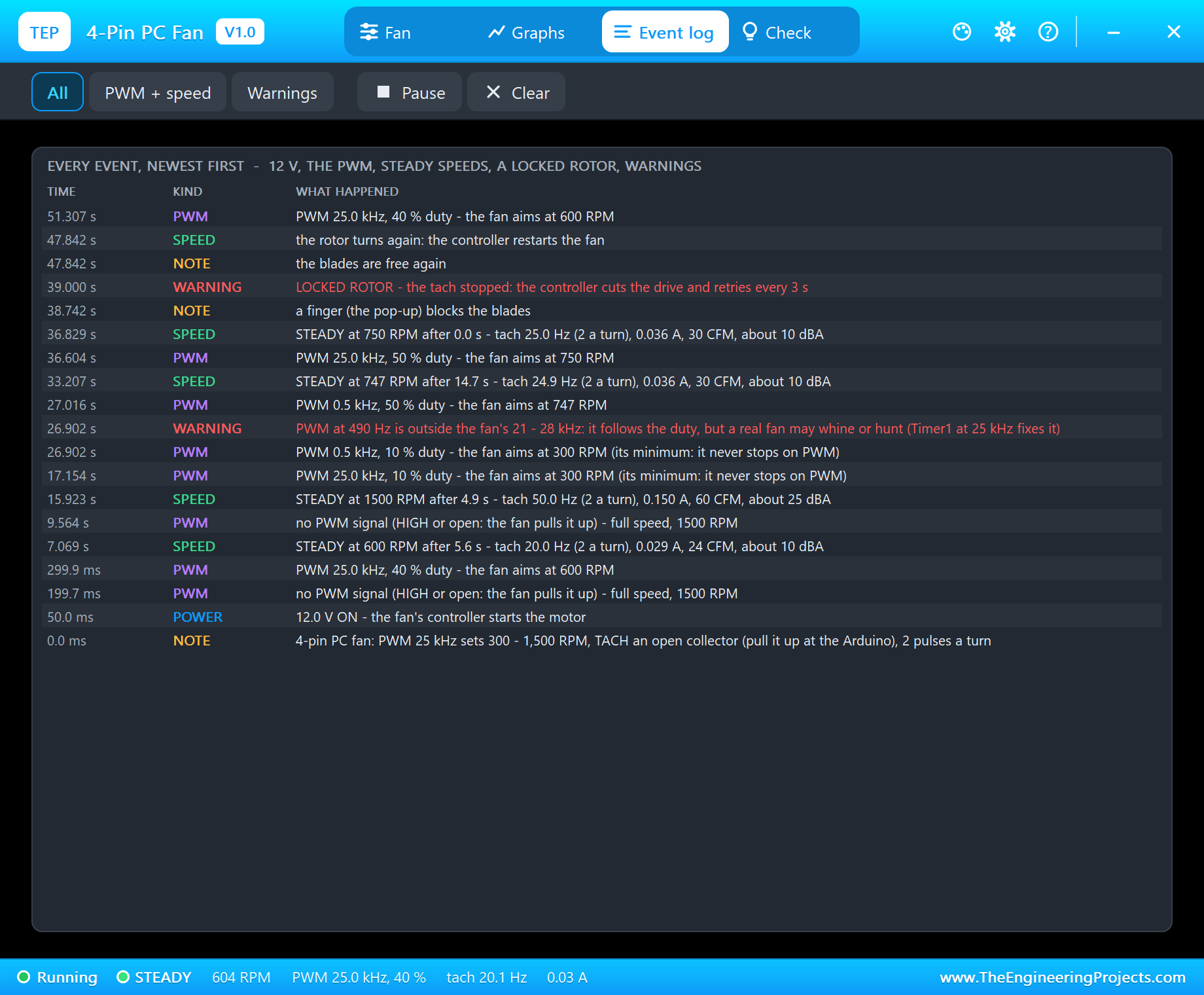
The Event log keeps every event with its simulation time: the 12 V turning on, every new PWM frequency and duty with the speed it asks for, every steady speed with the time it took, the tach rate, the current, the airflow and the noise, the missing PWM, the out-of-spec warning and the locked rotor with its restart. The filters show all events, only PWM and speed, or only the warnings.
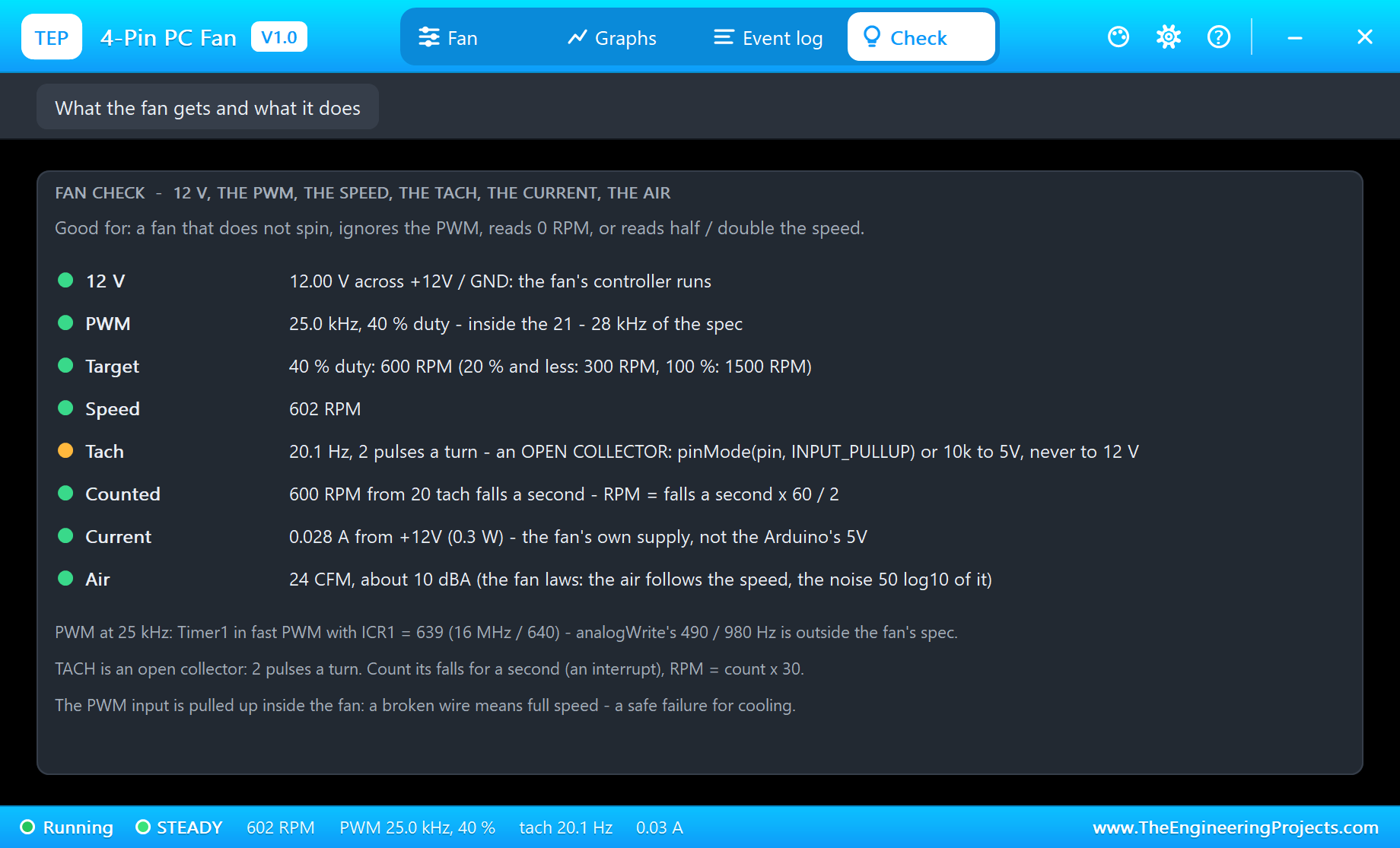
The Check page is made for the questions people ask about fans: why it does not spin, why it ignores the PWM, why the sketch reads 0 RPM, or half or double the speed. Each row has a verdict - 12 V, the PWM against the specification, the target, the speed, the tach, the RPM counted from it with the formula, the current and the air. The tach row stays amber on purpose: it reminds you that the open collector needs INPUT_PULLUP or 10k to 5V, and never a pull-up to 12 V.
How the Model Works
The fan is a mixed-mode part. Its +12V and GND pins are analog: the model reads the voltage across them and draws the fan's current from the supply, so it works with a battery, a regulator or a resistor in series just as well as with a power terminal. The controller starts at 7 V and keeps running down to 5 V; below 12 V the top speed falls in proportion - 9 V gives 1,125 RPM at 100 %. TACH and PWM are digital pins: the model timestamps every PWM edge to measure the period and the high time, averages them, and ignores a single odd period so that a duty change does not make the reading jump.
The blades follow the controller's target with a first-order lag of 1.2 s when speeding up and 2.5 s when slowing down, solved exactly between events. Each tach edge is predicted from the blades' angle and scheduled at the right moment, so the pulses are exact at any speed, with a 50 ms poll for the supply, the clicks and the log. The current is 0.02 A for the electronics plus 0.13 A times the speed cubed, the airflow follows the speed and the noise is 50 log10 of the speed ratio below 25 dBA.
We checked the model on a PC with 20 automatic tests: 600 RPM and a 20 Hz tach at 40 %, the RPM counted from the tach, 1,500 RPM with 0.150 A, 60 CFM and 25 dBA at 100 %, the time from 600 to 1,500 RPM, the 300 RPM minimum, full speed without PWM, the minimum with the PWM held LOW, 750 RPM and the warning at 490 Hz, a floating tach without 12 V, the locked rotor with its 0.30 A pulses and the restart, the open collector and the TACHPULLUP option, 1,125 RPM at 9 V, no start at 6 V and a stop at 4 V. The demo project was read back from disk and passed 57 checks of its parts, pins and wires.
Troubleshooting
- The fan never turns and the pop-up says NO 12 V: +12V is not on a 12 V supply or GND is open; under 7 V the controller does not start.
- Full speed whatever the duty: the PWM wire is open (the fan pulls it up) or the duty is 100 %.
- It never stops at 0 %: that is right - 300 RPM is the fan's minimum; switch its 12 V to stop it.
- The sketch reads 0 RPM: TACH has no pull-up (use
INPUT_PULLUP, or set TACHPULLUP to YES), or it is on a pin without an interrupt - use D2 or D3 on the UNO. - The RPM is half or double: the fan gives 2 pulses a turn, so the RPM is the pulses in one second times 30.
- PWM OUT OF SPEC on the pop-up: analogWrite's 490 Hz - use Timer1 at 25 kHz as the demo does.
- Nothing moves on the sheet, no UNO or no monitor:
TEPPCFAN.DLLorTEPARDUINO.DLLis missing from MODELS and the project folder; a closed monitor opens again with a click on the UNO's USB port.
Things to Know Before Using a Real 4-Pin PC Fan
- The tach pull-up goes to 5 V:
INPUT_PULLUP(20 - 50k inside the UNO) or 10k to 5V. A pull-up to 12 V would put 12 V on the Arduino's pin. - No transistor on the PWM wire: it is a logic input of the fan, pulled up inside; the Arduino's pin drives it directly.
- 25 kHz needs a timer: Timer1 gives 25 kHz on D9 and on D10 (a second fan with OCR1B). Taking over Timer1 stops the Servo library, but
millis()anddelay()keep working - they use Timer0. - Stopping: many 4-pin fans keep a minimum speed at 0 % duty, while some stop. To stop any fan, switch its 12 V with a logic-level MOSFET.
- Supply: a 12 V supply sized for the fan's rated current plus a margin for the start, with its GND joined to the Arduino's GND.
- Other fans: 2,000 or 3,000 RPM fans, fans with a different minimum and 5 V fans use the same wiring and the same code; only the numbers change.
Limitations of the Simulation
- Not modelled: the current ripple of each commutation, the fan's pressure curve (a filter or a heatsink in front of it), the noise spectrum, a 3-pin fan driven by switching its supply, and the differences between real fans.
- The fan is a 120 mm 12 V fan with a 300 - 1,500 RPM curve; other curves are not selectable.
- The plate, its text, the LEDs, the strip and the finger are TEP additions.
- The model is our own, written from the Intel 4-wire PWM fan specification and the typical data of 120 mm 12 V PC fans; this library is not made or endorsed by any fan maker, Intel, Arduino or Labcenter. For a brushed DC fan on a driver, see our 130 DC Motor Library for Proteus.
- Licences: the demo needs no Arduino library; the HEX file contains the Arduino AVR core 1.8.6 with LGPL-licensed code, and the sketch is included. The potentiometer is Proteus's own POT-HG.
- Tested in Proteus 8.5 in October 2026 with the demo as shipped: the pot, full speed, the minimum, 490 Hz and 25 kHz, a locked rotor and its restart, and the pop-up pages. Proteus 7 is not supported.
So, that was all about the 4-Pin PC Fan Library for Proteus V1.0. I hope it helps you build your fan controller - the 25 kHz PWM, the tach on an interrupt, the minimum speed and the stall alarm - before you wire the real one. If you have any questions, ask in the comments and I will help you out. Till the next tutorial, take care and have fun!

Comments
0