


JGY-370 Worm Gear Motor Library for Proteus V1.0 (12V, Self-Locking)


Hello friends, I hope you all are doing great. Today, I am going to share the new JGY-370 Worm Gear Motor Library for Proteus V1.0. The JGY-370 is the motor you find in curtain openers, rotisseries, camera pan heads, small lifts and winches: a 370-size DC motor on a worm gearbox, slow, strong and with one property that no ordinary gear motor has - it is self-locking. Whatever hangs on its shaft cannot turn it backwards, so a lifted load simply stays where it is when the power goes off.
JGY-370 Worm Gear Motor Library for Proteus
Latest version: V1.0 (October 2026, this tutorial)
Helping Tools
- Serial Monitor Advance: a serial terminal window for the UART of your board
- Serial Monitor Expert: the serial monitor with extra debugging tools
- LCD Library for Proteus V3.0: 16x2, 20x4 and I2C LCDs to show your readings
That property deserved a proper demonstration, so this library does not stop at the motor. On the sheet, its output shaft carries a winch drum with a rope and a weight, and the weight rises and falls with the simulation. Stop the motor and the weight stays in the air. Put 4 kg on the drum while it hangs there and it still does not move. The demo runs on our Arduino UNO V4.0 and drives the motor from 12 V through our separate L9110S library, with a potentiometer for up and down.
NOTICE: a worm gear motor in a simulator is only interesting if it behaves like a worm gear: slow, inefficient, strong and impossible to turn from the load side. Our team put a lot of effort into building that behaviour and a winch that shows it on the sheet. Your feedback is the fuel that keeps us going, so please tell us what you think in the comments below or in the Motor Driver board of our forum. And if our free libraries help you, you can buy us a coffee. So, let's get started with the JGY-370 Worm Gear Motor Library for Proteus V1.0:
What is the JGY-370 Worm Gear Motor?
JGY is the gearbox family: a rectangular metal gearbox with a worm gear inside, the output shaft sticking out of its face at a right angle to the motor. 370 is the motor: a brushed DC motor of the 370 size, mounted across the side of the gearbox. The worm on the motor shaft turns a wheel on the output shaft one tooth per turn, which gives large ratios in a small box. The family covers ratios from about 6 to 150 RPM at 12 V; this library is the 12 V 1:150 version, 40 RPM with no load, with a 6 mm D-shaft.
| JGY-370 12 V 1:150 (the model) | |
|---|---|
| Motor and gearbox | 370-size brushed DC motor on a worm gearbox, output at a right angle, 6 mm D-shaft |
| No load | 40 RPM and 50 mA at 12 V, about 19 RPM at 6 V |
| Rated | 30 RPM at 2 kg.cm, 0.6 A or less |
| Stall | 7.5 kg.cm and 1.7 A at 12 V |
| Gearbox | self-locking worm: about 16 % of the motor's torque reaches the load |
| Wires | + red, - black |
Why a Worm Is Self-Locking
A worm gear works by sliding. The thread of the worm pushes the teeth of the wheel sideways, and every bit of torque it passes on presses the teeth together and creates friction. That is why worm gears are inefficient: in this model the friction grows to 5.25 times the load torque, so only about 16 % of the motor's torque does useful work. But the same friction is what makes the gear self-locking. If the load tries to turn the wheel backwards, the friction it creates is larger than the push it can give, and nothing moves - in engineering terms, the backward efficiency is below zero.
The model follows exactly this logic, and the data of the real motor fits it: with the friction from the 50 mA of no load and the 5.25 factor, 2 kg.cm on the shaft gives 29.3 RPM at 0.49 A (the data says 30 RPM at 0.6 A or less), and the stall comes at 7.5 kg.cm and 1.7 A. One more consequence surprises many people: lowering a weight with a worm gear also needs power, because the weight cannot drive the gear down by itself. The motor drives it down, with less current than it needs to lift it.
What's New in JGY-370 Worm Gear Motor Library for Proteus V1.0
- A 12 V worm gear motor with real current: the winding, the back-EMF, the friction and the inertia from any driver, PWM or DC, either way.
- Self-locking: the worm's friction grows with the load, so the load can never turn it backwards - with the driver braking, with no drive at all, with any weight.
- A winch on the sheet: a 10 mm drum, a rope and a weight that rises and falls from the floor to the drum, with its weight written on it.
- Weights and stalls: WEIGHT and HEIGHT properties and weight buttons from 0.5 to 4 kg on the pop-up; a stall when the weight is too heavy and when it reaches the drum.
- A pop-up window with four pages - Motor, Graphs, Event log and Check - and a HOLDING status for the self-locking.
- It names the problems: a stall, a stall at the top, an over-voltage above 15 V and a reversal at speed.
- A winch demo on our Arduino UNO V4.0 and our L9110S driver: the pot for up and down, and commands to lift, lower and stop.
The JGY-370 in Proteus
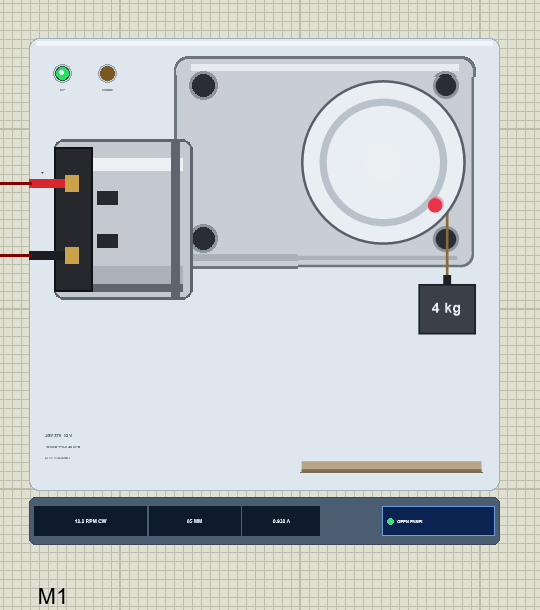
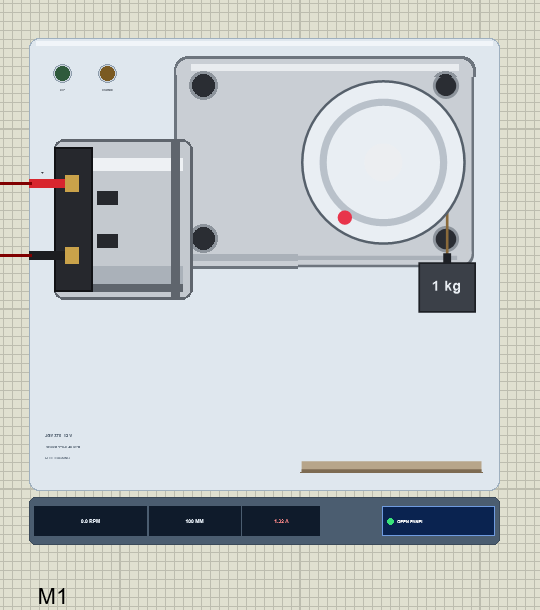
Search JGY in Pick Devices; the device JGY370MOTORTEP is in TEPJGY370.LIB (category Electromechanical, DC Motors) and its model is TEPJGY370.DLL. It shows the motor from its output shaft at 0.9 times its real size: the silver gearbox face with four M3 holes, the 370 motor across its side with its black end cap and two terminals, and on the 6 mm D-shaft the winch drum with a red mark. The rope comes off the drum and holds a weight block over a strip of floor. While the simulation runs, the drum turns and the weight moves; the strip under the plate gives the speed with its direction, the weight's height in millimetres and the current, next to the OPEN PANEL button.
The plate, the drum, the rope, the weight, the floor and the LEDs are TEP additions; the real motor has none of them. The two LEDs show the direction: UP (green) while it lifts and DOWN (amber) while it lowers.
| Pin | Wire | What the model does with it |
|---|---|---|
| + | red | the motor, analog: positive on + turns the drum clockwise, which lifts the weight |
| - | black | the motor's other terminal |
Two properties set the scene: WEIGHT is the weight on the rope in kg (default 1), and HEIGHT is where it starts, in mm above the floor (default 0). The drum has a 10 mm radius, so 1 kg on the rope is 1 kg.cm on the shaft, and the 100 mm from the floor to the drum take 1.6 turns.
Download JGY-370 Worm Gear Motor Library for Proteus
Click the button below to download JGY-370-Worm-Gear-Motor-Library-for-Proteus-v1.0.zip (about 1.2 MB, without the source code of the models):
JGY-370 Worm Gear Motor Library for Proteus V1.0- README.txt: installation, the demo, the wiring, real hardware, troubleshooting and the limits.
- Proteus Library Files:
TEPJGY370.LIBandArduinoV4TEP.LIBfrom our Arduino Library for Proteus V4.0. - Proteus Model Files:
TEPJGY370.DLLandTEPARDUINO.DLL. - Proteus Simulation:
JGY-370-Worm-Motor-L9110S-ArduinoUnoV4.pdsprj,JGY370_Demo.hexand copies of the two DLLs. - Arduino Code:
JGY370_Demo.ino(no library needed).
The driver is a separate library: this package holds only the motor and the UNO. The demo drives the motor through our L9110S motor driver, which has its own download - get it from our L9110S Motor Driver Library for Proteus and install it first, or the demo opens without its driver.
No Proteus yet? Read How to Download and Install Proteus 7 and 8. New to libraries? Follow How to Install a New Library in Proteus.
How to Install JGY-370 Worm Gear Motor Library for Proteus
- Close Proteus and extract the whole zip file, for example to your Desktop.
- Copy
TEPJGY370.LIBandArduinoV4TEP.LIBfrom Proteus Library Files into the LIBRARY folder of Proteus (usuallyC:\Program Files (x86)\Labcenter Electronics\Proteus 8 Professional\LIBRARY). - Copy
TEPJGY370.DLLandTEPARDUINO.DLLfrom Proteus Model Files into the MODELS folder. The two Arduino files are the ones of our Arduino Library V4.0; if you have it, they are the same. - Install our L9110S Motor Driver library the same way from its own zip:
TEPL9110S.LIBinto LIBRARY andTEPL9110S.DLLinto MODELS. - Delete
TEPJGY370.IDXfrom the LIBRARY folder if it is there. - Start Proteus, press P and search for JGY.
Tip: keep the Proteus Simulation folder together, because the project needs its .hex file and the DLLs beside it. The library is tested in Proteus 8.5; Proteus 7 is not supported.
The Demo Circuit
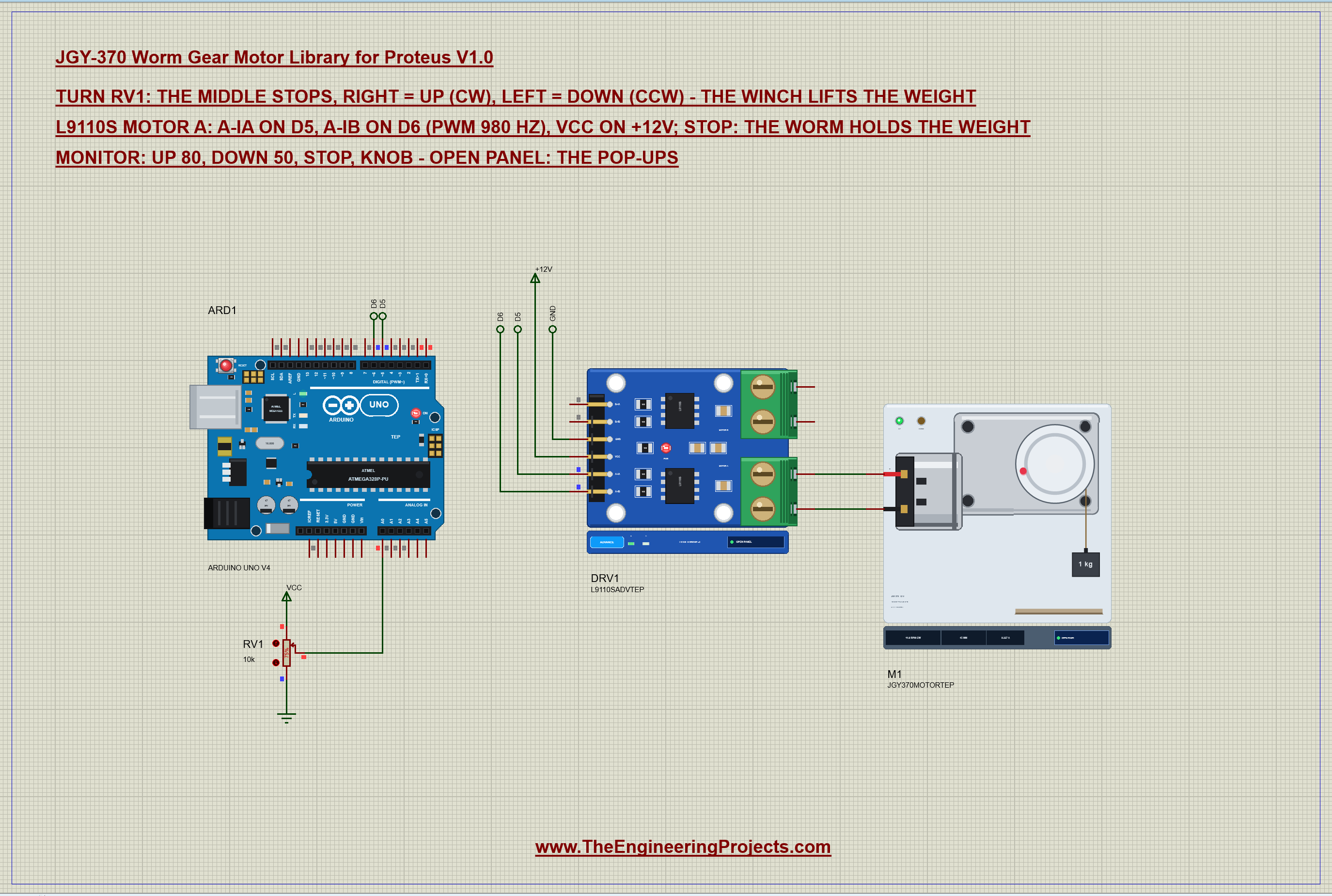
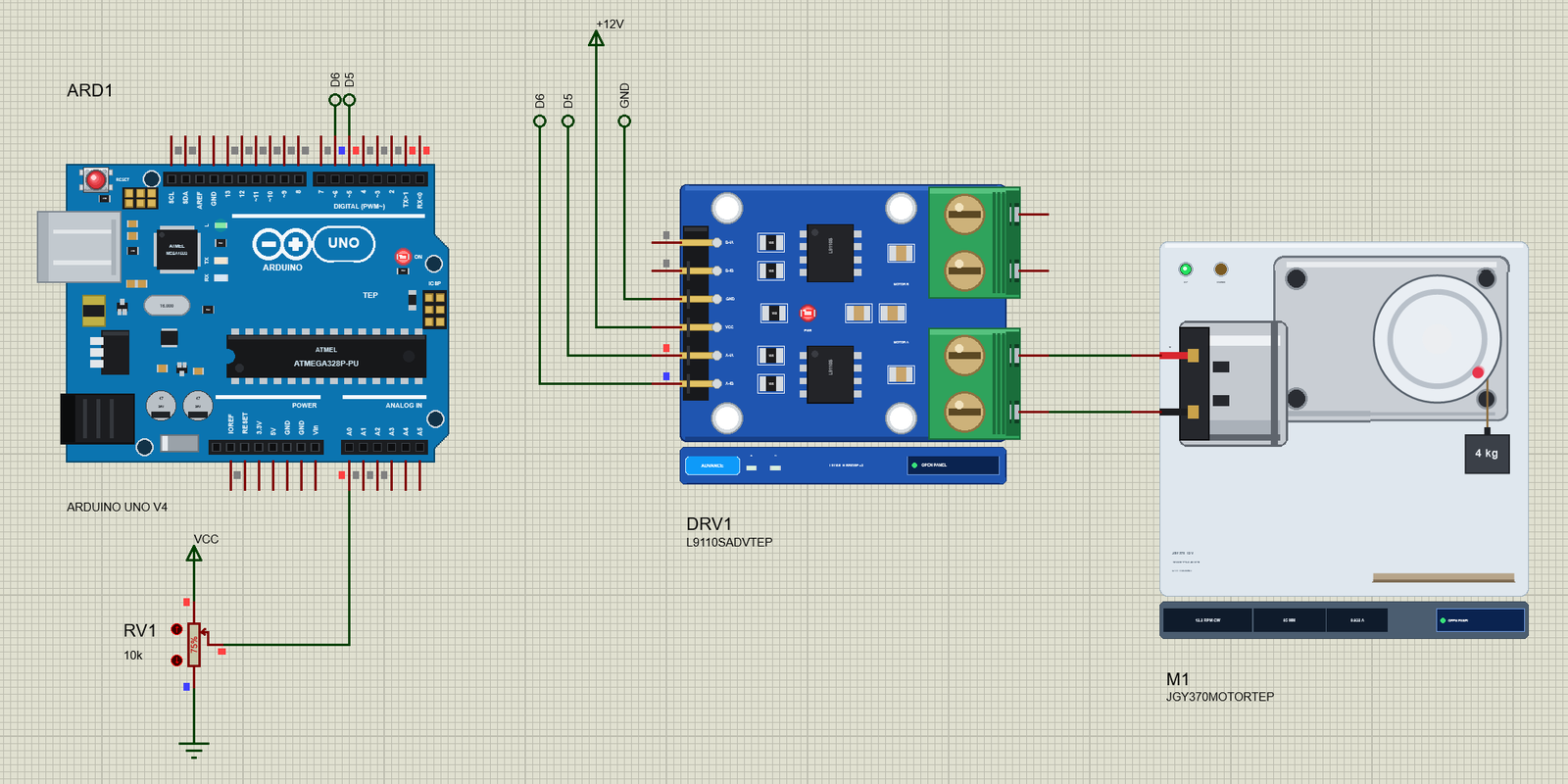
Open JGY-370-Worm-Motor-L9110S-ArduinoUnoV4.pdsprj. ARD1 is an Arduino UNO V4.0 from our Arduino UNO Library for Proteus V4.0, running JGY370_Demo.hex with its serial monitor built in. DRV1 is the L9110S driver in its pop-up version. M1 is the JGY-370 on the driver's MOTOR A, with 1 kg on its rope. RV1 is a 10k potentiometer on A0: the middle stops the winch, right lifts and left lowers. The sheet is A3, because the UNO, the driver and the winch do not fit an A4 sheet legibly.
This is a 12 V motor, so the driver's VCC sits on a +12V power terminal. The L9110S takes 2.5 to 12 V on VCC, and its inputs stay 5 V logic, so the UNO drives them directly.
| From | To | Note |
|---|---|---|
| L9110S A-IA | D5 | PWM 980 Hz: up |
| L9110S A-IB | D6 | PWM 980 Hz: down |
| L9110S VCC | +12V | the motor supply, 2.5 - 12 V |
| L9110S GND | GND | common with the Arduino |
| JGY-370 + / - | L9110S A-OA / A-OB | MOTOR A |
| RV1 wiper | A0 | the speed and the direction |
The Arduino Code
The demo needs no library. New to Arduino? Start with Arduino Tutorial for Beginners and Introduction to Arduino UNO. Three pins are all it uses:
const int IA = 5, IB = 6, POT = A0;In setup() both driver inputs become outputs and the motor starts stopped:
  pinMode(IA, OUTPUT); pinMode(IB, OUTPUT);
  drive(0);
One function drives the L9110S: PWM on one input and LOW on the other, so the sign of the number is the direction - positive lifts, negative lowers, zero puts both inputs LOW and brakes the motor:
void drive(int s) {
  s = constrain(s, -255, 255);
  if (s > 0) { analogWrite(IB, 0); analogWrite(IA, s); }
  else if (s < 0) { analogWrite(IA, 0); analogWrite(IB, -s); }
  else { digitalWrite(IA, LOW); digitalWrite(IB, LOW); }
  speedNow = s;
}
The commands up and down take a percentage and turn it into a signed PWM value:
  if (!strncmp(s, "up", 2) || !strncmp(s, "down", 4)) {
    const bool up = s[0] == 'u';
    int pct = constrain(atoi(s + (up ? 2 : 4)), 0, 100);
stop just drives zero. Notice what the sketch does not need: a brake, a counterweight or a loop that keeps pushing against the load. The worm holds it, and the sketch says so:
if (!strcmp(s, "stop")) { mode = FIXED; drive(0); report(F("stop")); return; } if (speedNow == 0) Serial.println(F(" -> stop: the worm holds the weight"));With a spur gearbox, the same sketch would need a holding current or a mechanical brake, or the weight would pull the motor round and run down. Here the stop command is enough. The pot is read in the loop: its 0 - 1023 becomes -255 to 255, with a dead zone round the middle so the winch really stops there, and knob hands the control back to it:
      int s = map(raw, 0, 1023, -255, 255);
      if (abs(s) < 20) s = 0;                       // a dead zone round the middle
if (!strcmp(s, "knob")) { mode = KNOB; lastKnob = 9999; Serial.println(F("Following the pot on A0")); return; }The open-loop basics of motor speed control are in our older DC Motor Speed Control using Arduino tutorial. The HEX file is in the package; to change the sketch, open it in the Arduino IDE and export the compiled binary, as in How to get the HEX file from Arduino. It needs 5,158 bytes of flash (16 % of the UNO) and 254 bytes of RAM.
Running the Demo
Press Run. The UNO's serial monitor and the pop-ups of the motor and the L9110S open over the schematic; move them aside. RV1 starts at 75 %, so the winch lifts the 1 kg weight off the floor at about half speed: 10.8 RPM at 5.21 V and 0.23 A. This is the whole session of our test run, as the monitor printed it, with the commands typed in it:
JGY-370 Worm Gear Motor winch demo - The Engineering Projects
L9110S: A-IA on D5, A-IB on D6. Turn the pot on A0: the middle stops, right = up, left = down.
Commands: up 80 | down 50 | stop | knob | help
Pot 768 -> up 49 % (PWM 127/255)
stop
stop -> stop: the worm holds the weight
up 100
up -> up 100 % (PWM 255/255)
down 100
down -> down 100 % (PWM 255/255)
up 100
up -> up 100 % (PWM 255/255)
down 60
down -> down 60 % (PWM 153/255)
stop
stop -> stop: the worm holds the weight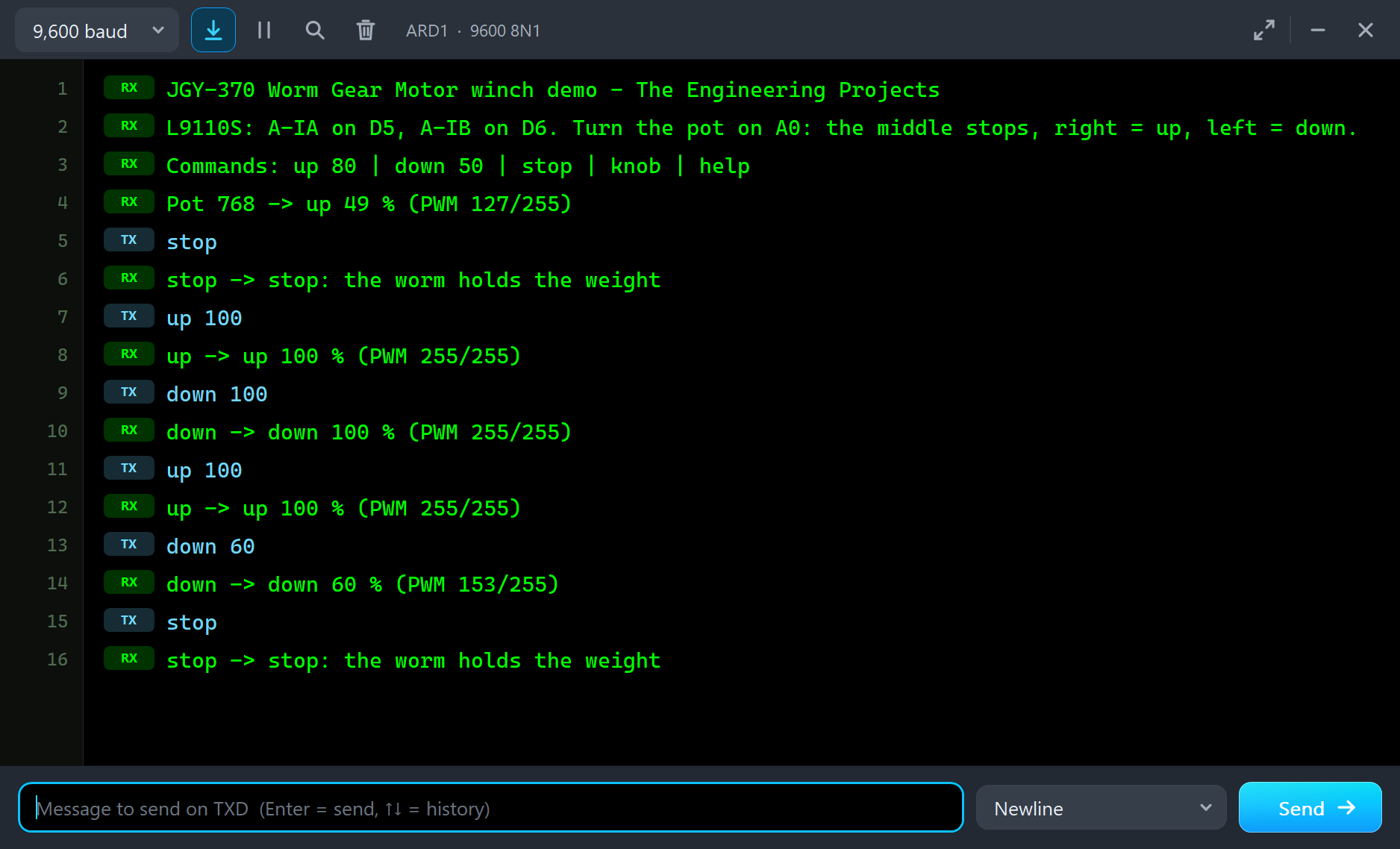
| Type | What it does | What the run showed |
|---|---|---|
| up 80 | lift at 80 % (the pot is ignored until knob) | up 100 with 4 kg: 12.2 RPM at 10.13 V, 0.93 A |
| down 50 | lower at 50 % | down 100 with 4 kg: 21.0 RPM at -10.69 V, 0.65 A |
| stop | both inputs LOW: the motor brakes, the worm holds | holding 1.0 kg at 71 mm |
| knob | follow the pot again | the pot's speed and direction |
The Pop-Up Window
At Run the motor opens TEP JGY-370 Worm Gear Motor, a window in the look of our TEP Serial Monitor Advance for Proteus. Its four tabs are Motor, Graphs, Event log and Check, with Settings and Help behind the gear and question mark icons. If you close it, OPEN PANEL on the strip brings it back.
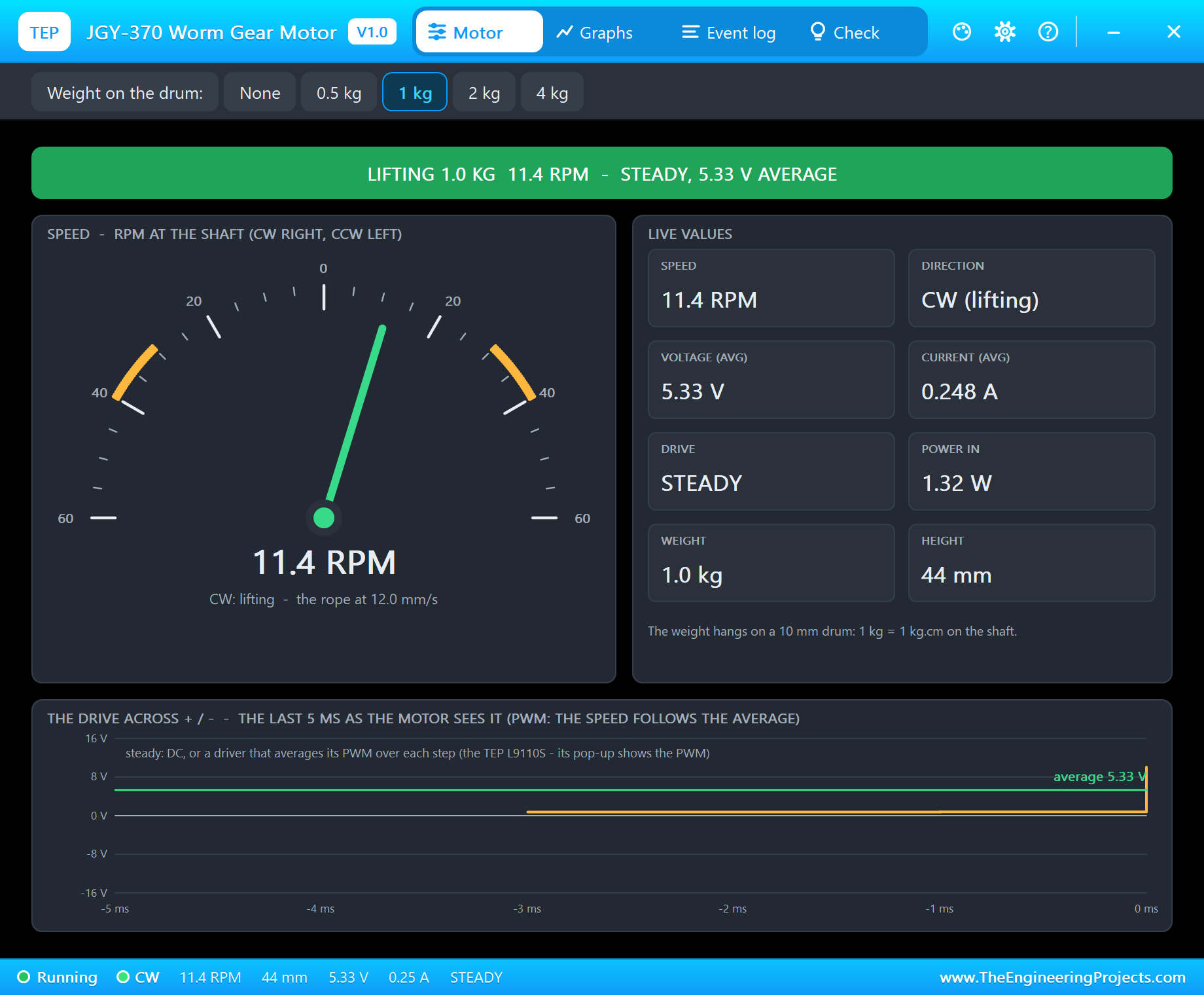
The banner gives the state in one line - here "LIFTING 1.0 KG" with the speed and the drive. The gauge runs from 60 RPM down (left) to 60 RPM up (right), with the band from the rated 30 RPM to the no-load 40 RPM marked, and shows the rope's speed in mm/s under the needle. The live values are the speed, the direction, the average voltage, the current, the drive, the power, the weight and its height. The toolbar hangs None, 0.5, 1, 2 or 4 kg on the rope.
Self-Locking: Stop and Let Go
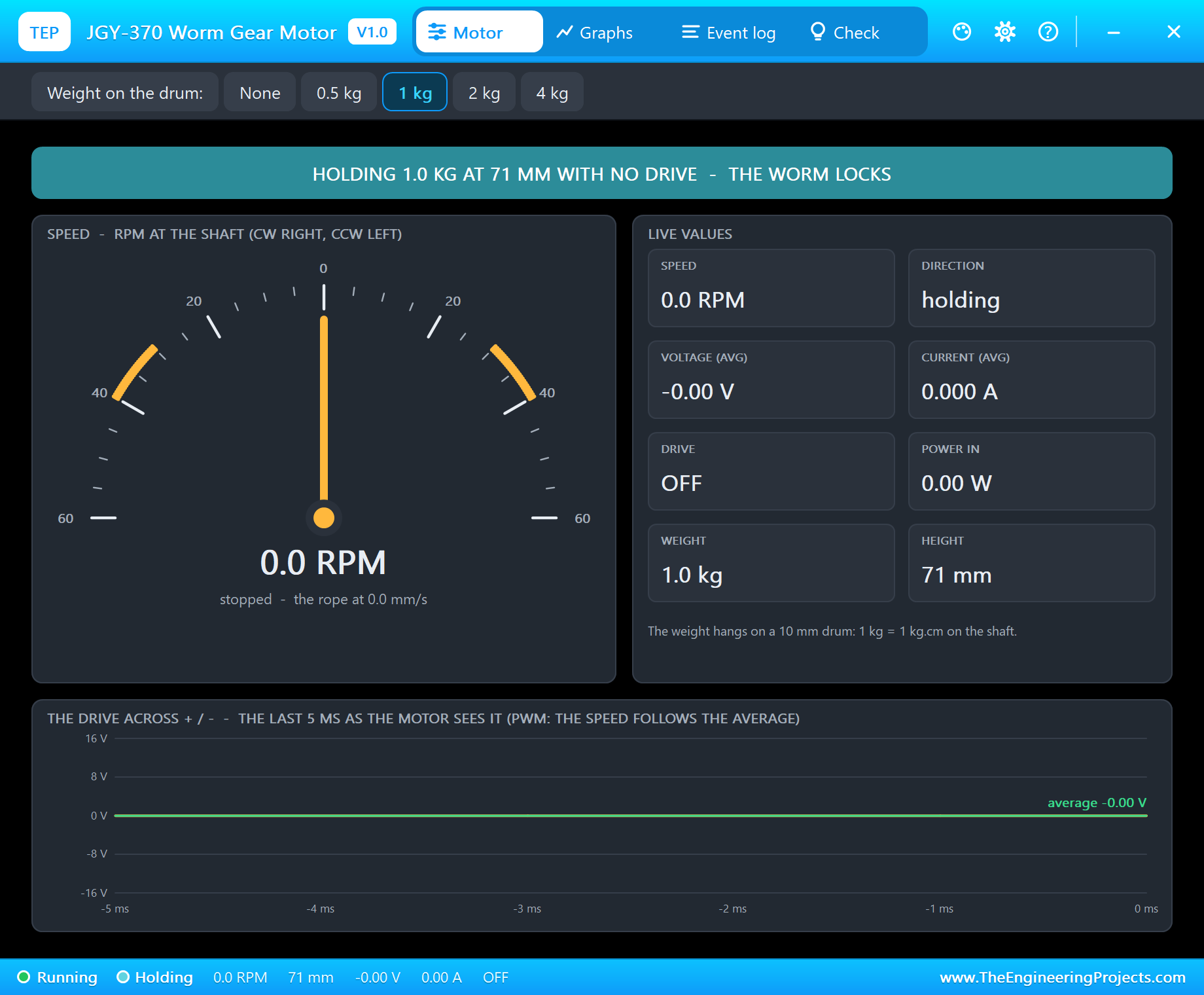
Type stop while the weight is in the air. The drive goes off, the current drops to zero, and the weight stays exactly where it was. A moment later the banner turns teal: "HOLDING 1.0 KG AT 71 MM WITH NO DRIVE - THE WORM LOCKS", and the Event log adds "holding 1.0 kg at 71 mm with no drive - the worm locks (self-locking)".
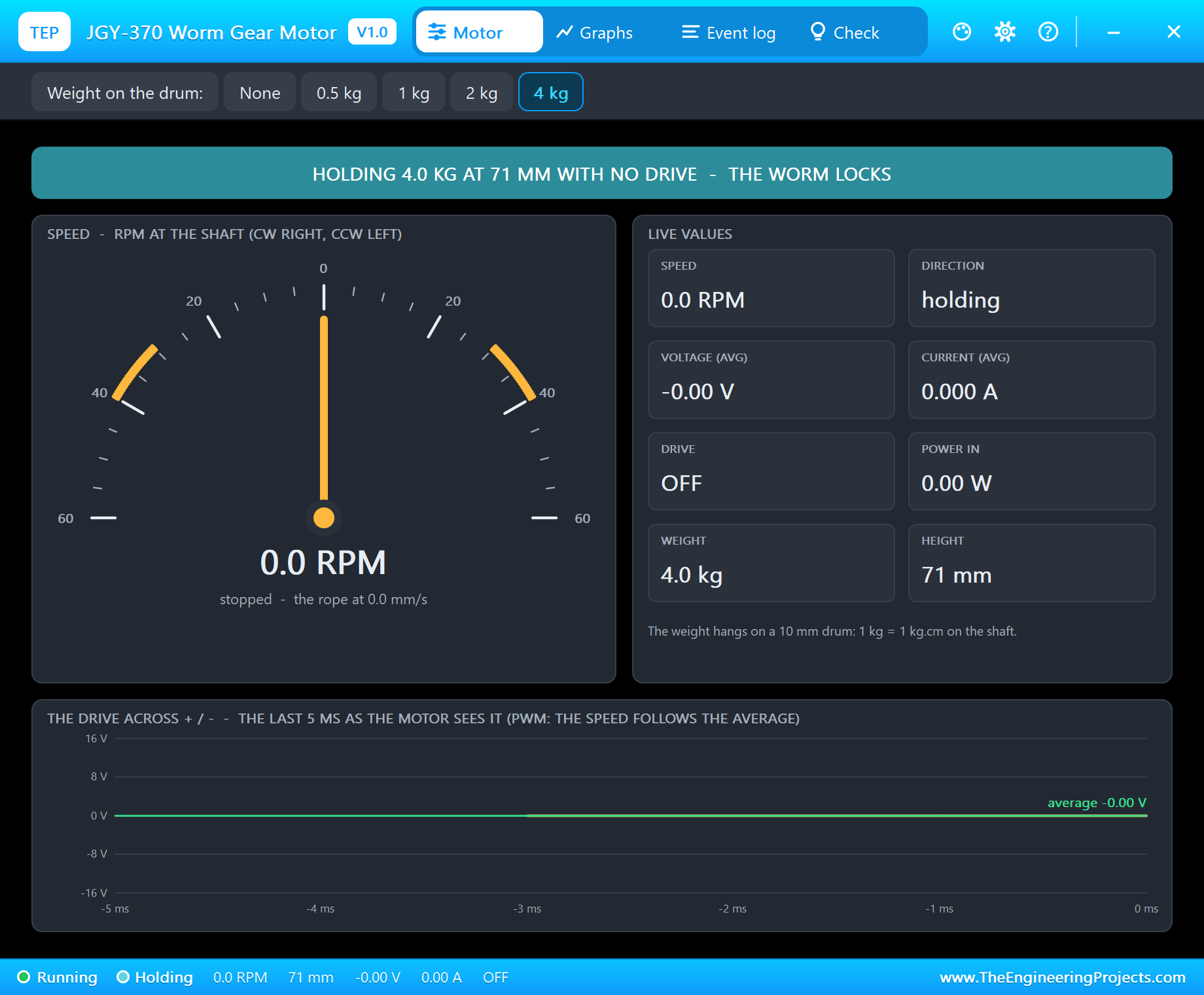
Now click 4 kg on the toolbar while the motor is off. Four times the weight on the rope, and still nothing moves: the height stays at 71 mm and the current at 0 A. With an ordinary spur gearbox the weight would now turn the motor backwards and run down to the floor - our host tests check exactly that, with the worm's friction switched off, and the weight falls.
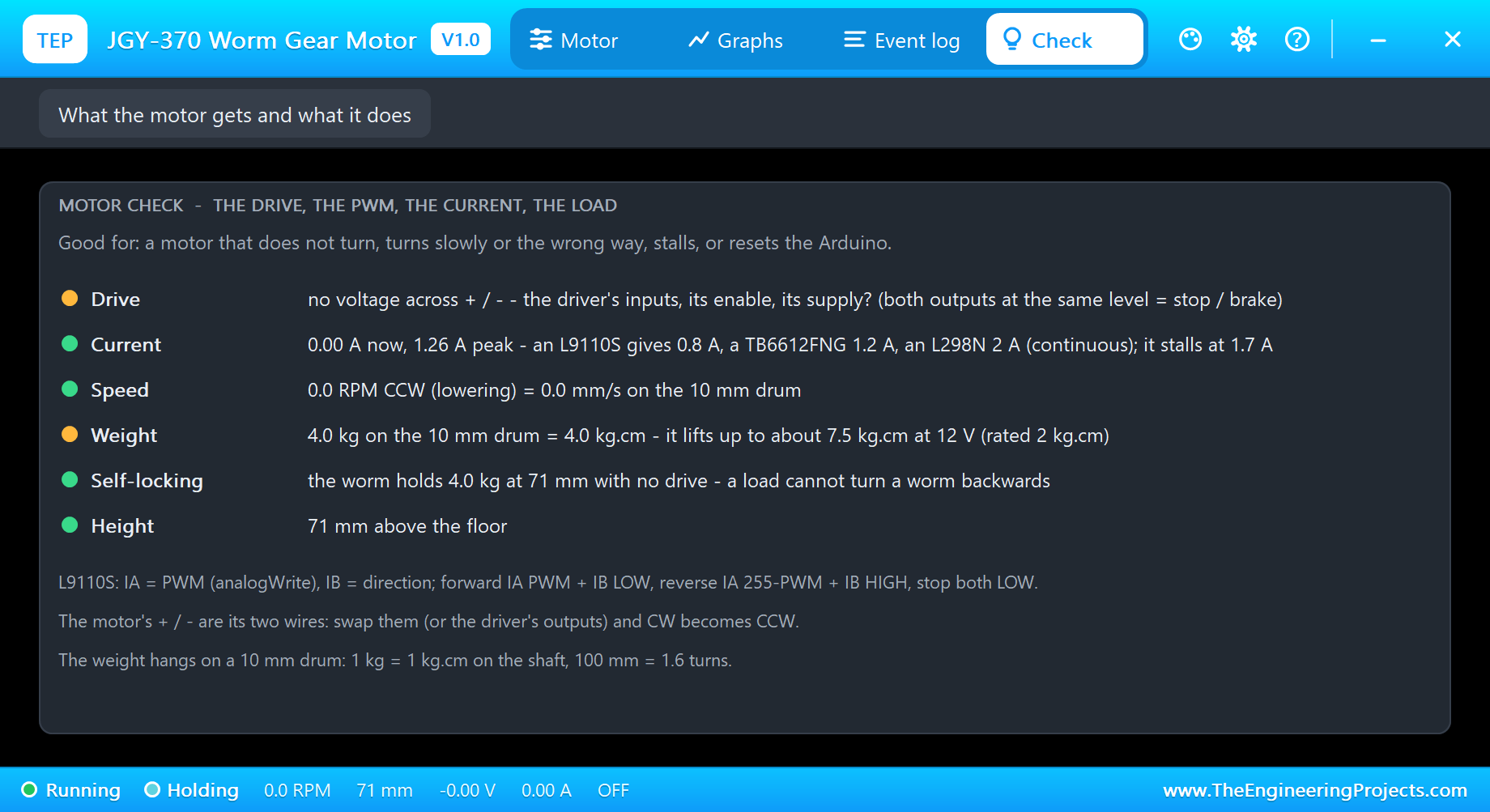
The Check page puts it in rows with a verdict each: the drive (none), the current, the speed, the weight - amber, because 4 kg.cm is above the rated 2 kg.cm - the self-locking row in green, "the worm holds 4.0 kg at 71 mm with no drive", and the height.
Lifting and Lowering 4 kg
Type up 100 with the 4 kg still on: "steady 12.2 RPM CW (lifting) at 10.13 V average, 0.933 A". The current is almost twice the rated 0.6 A, and the L9110S loses 1.9 V in its switches at 0.93 A, which is why the motor sees 10.13 V and not 12. A JGY-370 working this hard wants a stronger driver, as the end of this article explains.
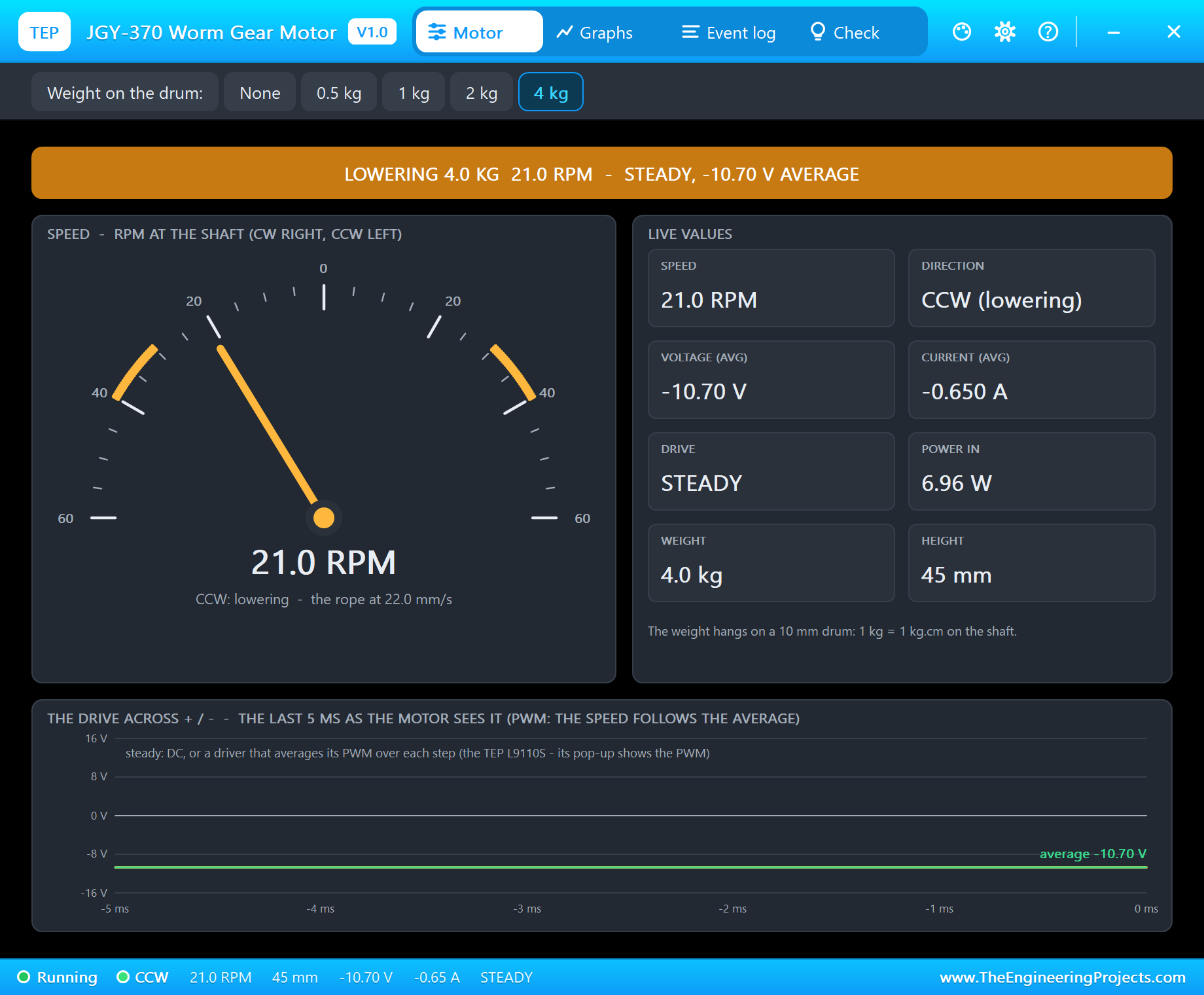
Then down 100: "steady 21.0 RPM CCW (lowering) at -10.69 V average, -0.650 A". Two things are worth a look. The weight goes down faster than it went up, because now gravity helps the motor a little. But the motor still draws 0.65 A: a self-locking worm cannot be back-driven, so the motor must drive the weight down, too.
The Top of the Rope
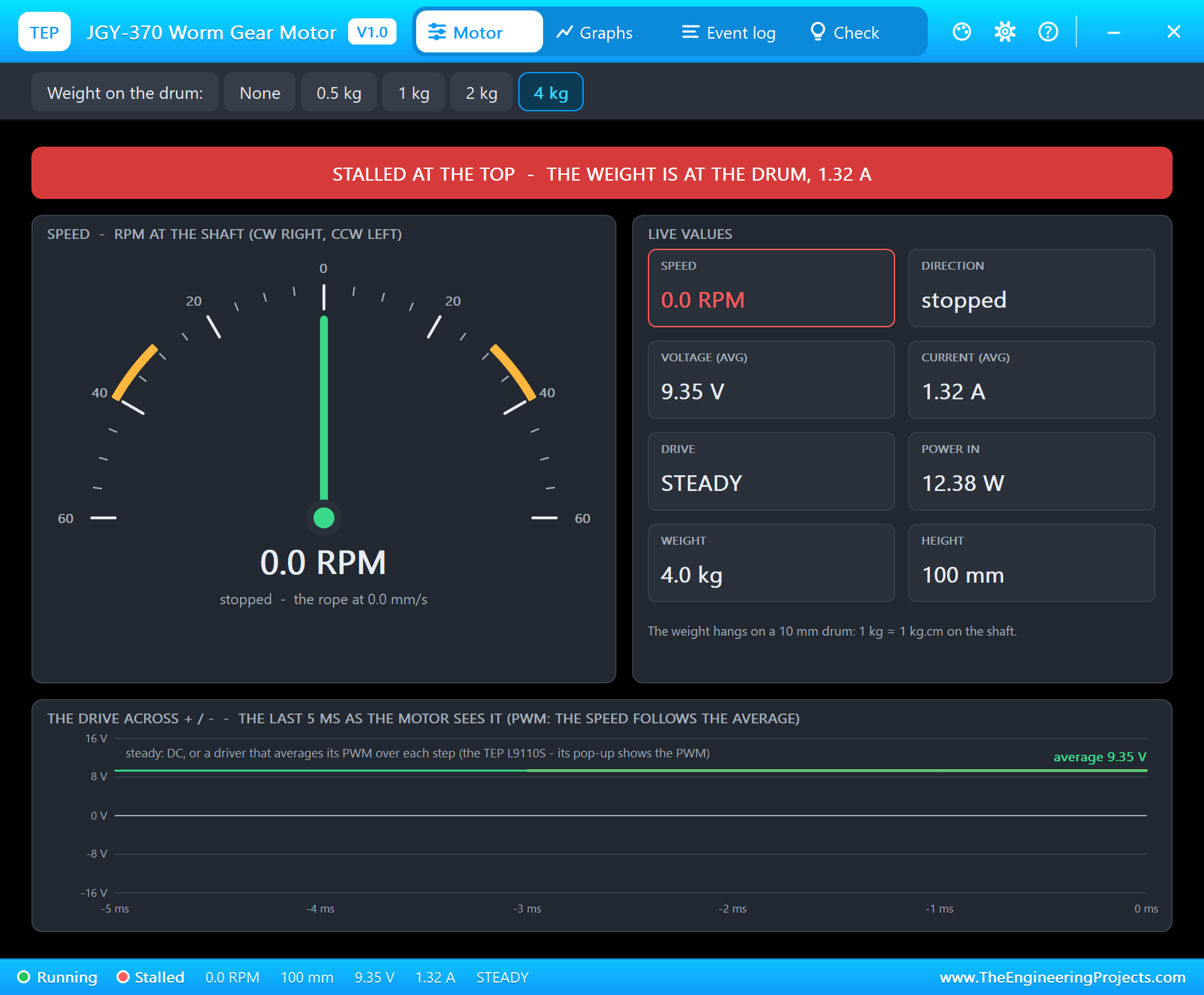
Keep lifting and the weight reaches the drum at 100 mm. There is nowhere to go, the shaft stops and the motor stalls. A real winch without a limit switch does exactly this, and keeps pulling its stall current until somebody notices.
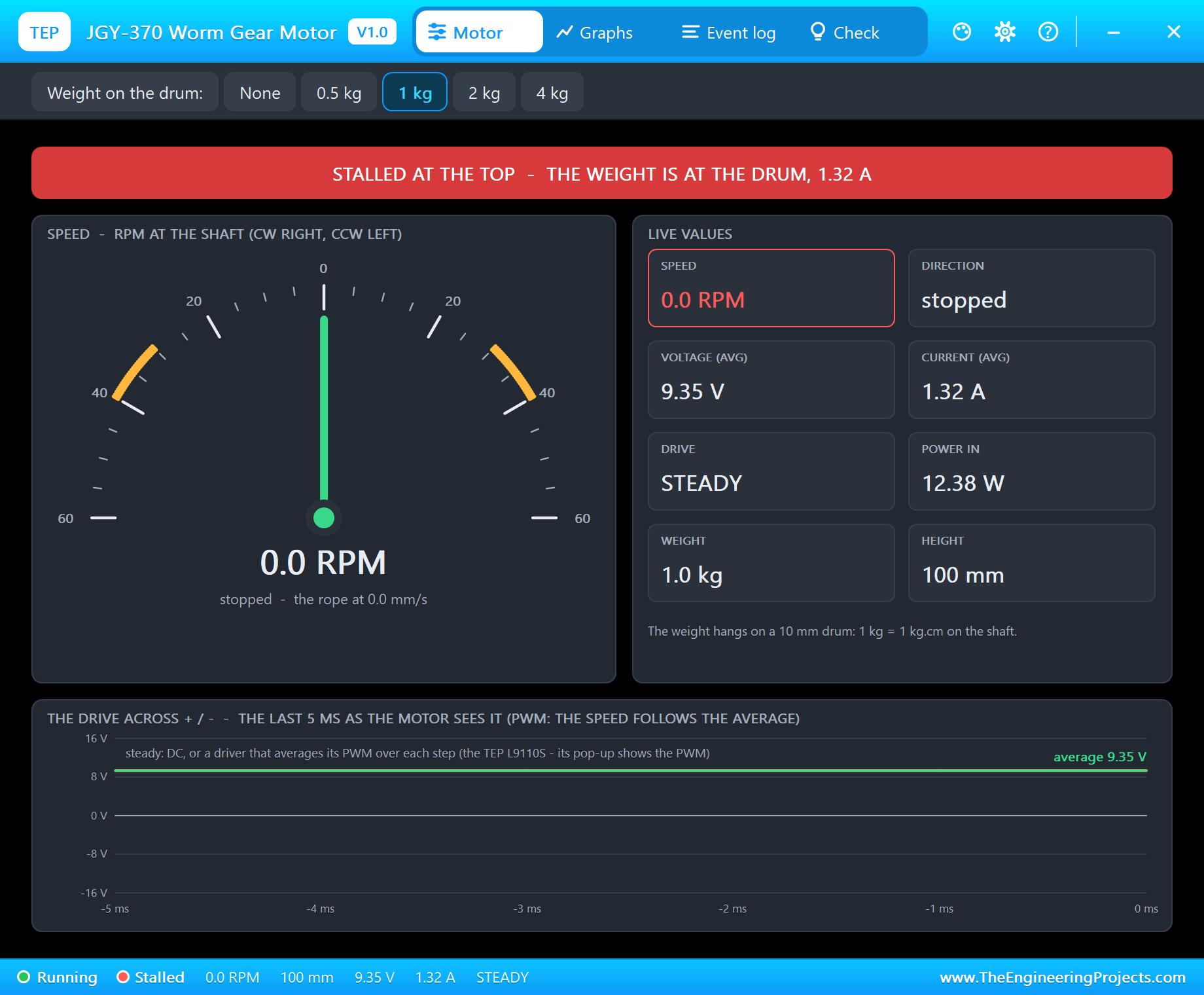
The pop-up says "STALLED AT THE TOP - THE WEIGHT IS AT THE DRUM, 1.32 A", and the Event log adds "a limit switch stops a winch here". The 1.32 A is the stall current through the L9110S, which drops almost 3 V at that current; on a stiff 12 V supply it would be 1.7 A.
Graphs and Event Log
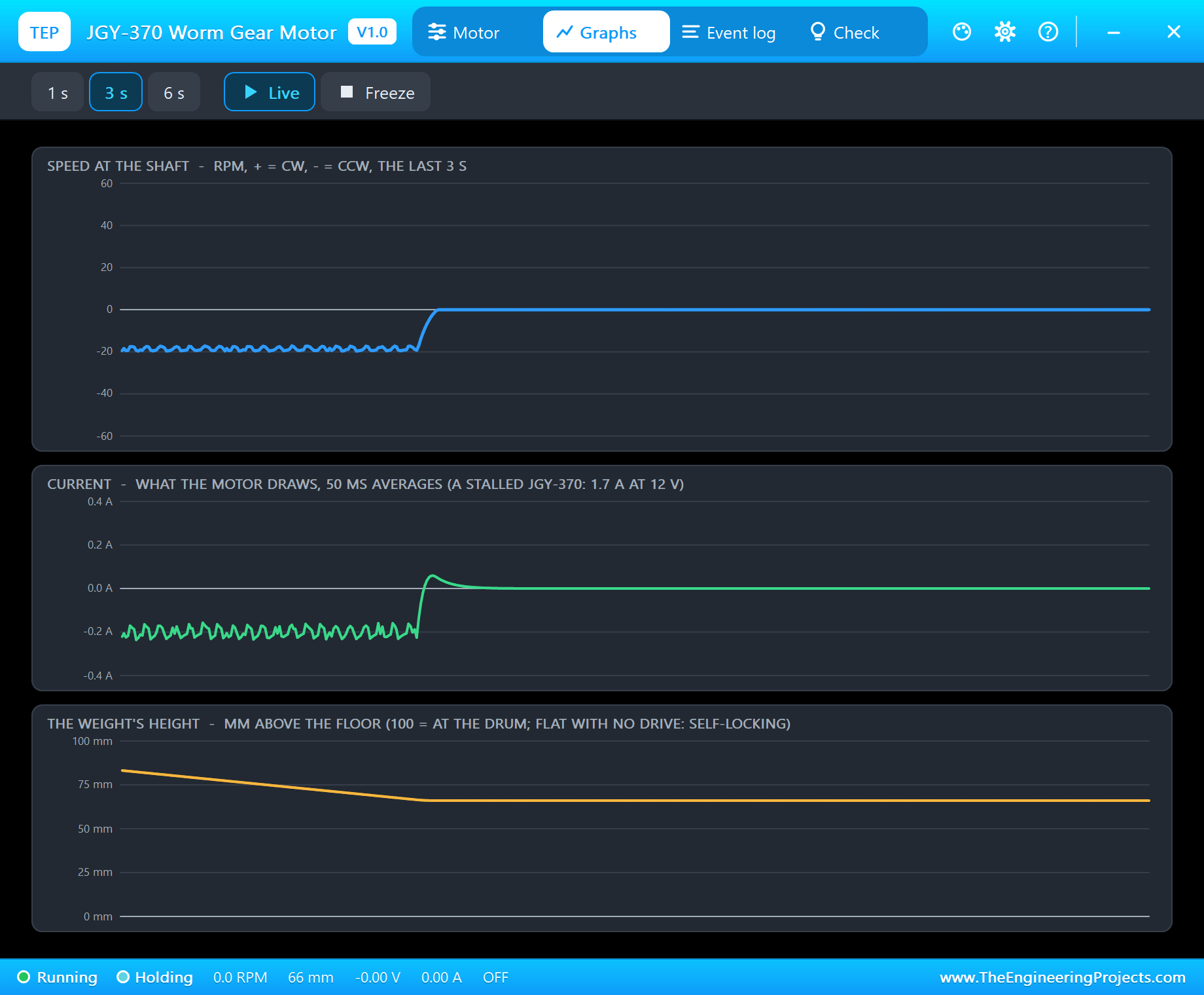
The Graphs page draws the speed, the current and the weight's height over the last 1, 3 or 6 seconds. This is the end of the run: down 60, then stop. The speed and the current go to zero, and the height line simply goes flat at 66 mm - the self-locking as a graph. The small ripple while it lowers is the L9110S averaging its PWM.
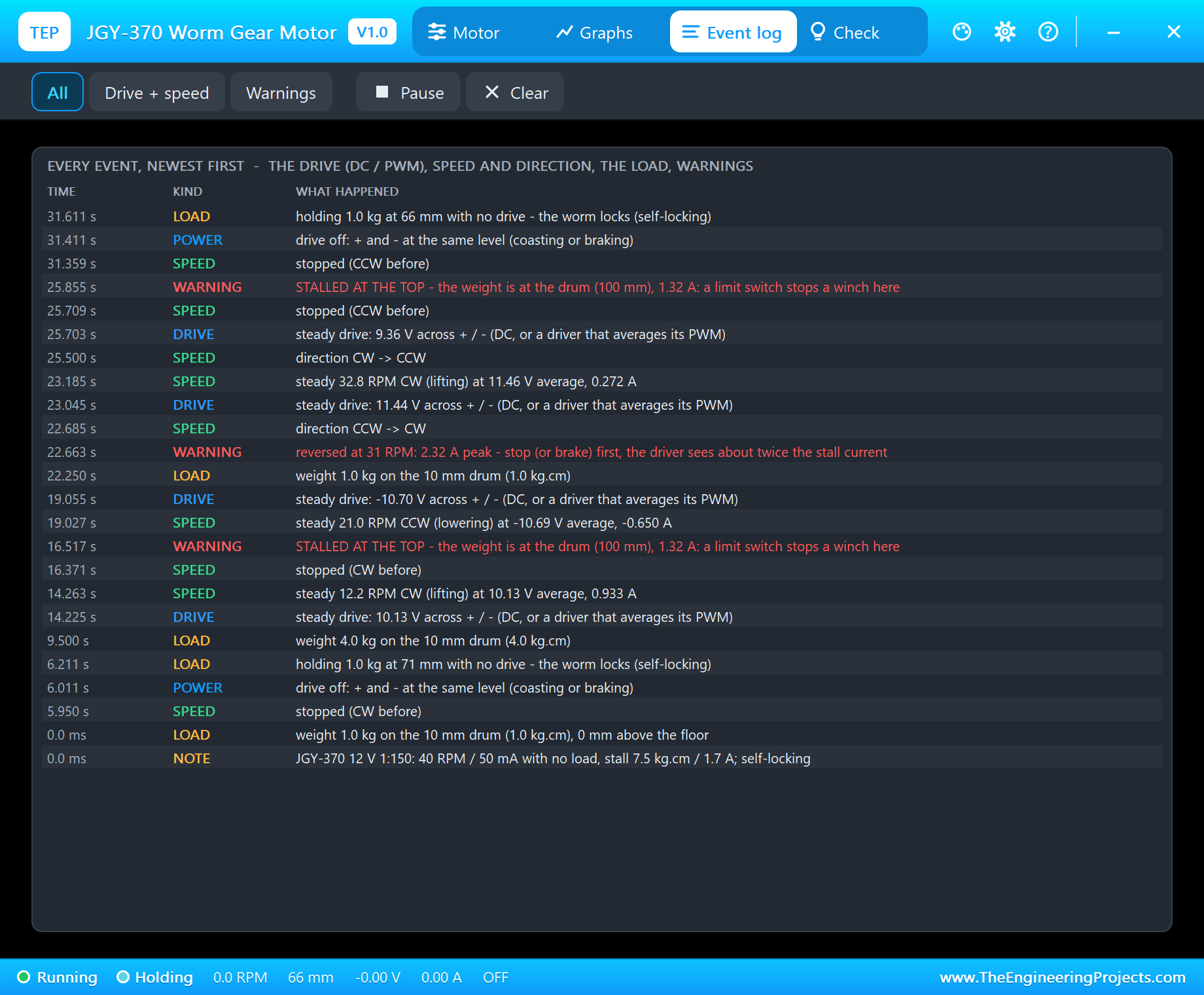
The Event log is the winch's diary, newest first: every steady speed with "lifting" or "lowering", the weights, the holds, the two stalls at the top and a reversal warning - "reversed at 31 RPM: 2.32 A peak" - from the moment we typed up 100 while it was still going down. Filters show only the drive and speed or only the warnings.
How the Model Works
The motor is solved by Proteus's analog engine: its speed is an internal node computed together with the driver from the winding resistance, the back-EMF, the friction, the inertia and the load, in analog steps of 2 ms or less. The worm is a friction that grows with the torque on the shaft. The weight is a torque of its own - the kg times g times the 10 mm of the drum - that always pulls downwards while the rope is taut, and disappears when the weight lies on the floor. At the drum a stiff stop takes over.
The demo runs at about 0.25 x real time on a desktop PC: 32 seconds of simulation took about 2 minutes. We checked the model on a PC with 19 automatic tests: 40.0 RPM and 52 mA at 12 V, 29.3 RPM and 0.49 A with 2 kg.cm, 19.4 RPM at 6 V, 8 kg stalling at 1.70 A while 7 kg still lifts at 2.6 RPM, 4 kg held for 2 seconds with the motor shorted and with it open (0.02 mm of creep), the same gearbox without the worm's friction letting it run down to the floor, lowering 2 kg at 32.7 RPM and 0.35 A, and the stop at the drum.
Why the Motor Says STEADY
Our L9110S model does not switch the motor on and off a thousand times a second; in each analog step it hands the motor the average of its PWM. The speed is exactly what the PWM gives, and the simulation runs much faster. So the motor's Drive tile reads STEADY, while the UNO's 980 Hz PWM is on the L9110S's own pop-up.
Troubleshooting
- The shaft never turns and the pop-up says NO DRIVE: the driver's inputs (both LOW = stop), its VCC, or the motor wires on the wrong outputs.
- No driver in the project: install our L9110S library (
TEPL9110S.LIB/TEPL9110S.DLL) - it is not in this package. - Slow, about half speed: the driver's VCC is on 5 V, not 12 V.
- It lifts when it should lower: swap the motor's wires, or A-IA and A-IB.
- STALLED: less weight, or more drive. STALLED AT THE TOP: lower it.
- No weight on the sheet: the weight is set to None - the drum turns and the rope winds empty.
- Nothing moves on the sheet, no UNO or no monitor:
TEPJGY370.DLLorTEPARDUINO.DLLis missing from MODELS and the project folder; a closed monitor opens again with a click on the UNO's USB port.
Things to Know Before Using a Real JGY-370
- The driver: the JGY-370 takes 0.6 A or less at its rated load and 1.7 A stalled at 12 V. The L9110S (0.8 A, 1.5 A peak) suits the rated load; for a winch that may stall, use a TB6612FNG (1.2 A, 3.2 A peak) from our TB6612FNG Motor Driver Library for Proteus or an L298N.
- End stops: a winch needs a limit switch at the top and at the bottom, or a timer. Driven into its stop, the motor draws its stall current and strains its gears.
- Self-locking is not a brake: it holds a load at rest and while driven. Do not rely on it to catch a moving heavy load, and never stand under a lifted load.
- Do not stall it for long: the gearbox can be damaged.
- Know your motor: JGY-370s come in many ratios, from about 6 to 150 RPM at 12 V. This one is the 1:150, 40 RPM version. For a faster motor with an encoder, see our JGB37-520 Encoder Gear Motor Library for Proteus.
Limitations of the Simulation
- Not modelled: the winding inductance, the gear backlash and wear, the rope's stretch and swing, the worm's lower friction when it moves fast or is well greased (a real self-locking can weaken with vibration), heating, and the differences between real motors.
- The motor is the 12 V 1:150 JGY-370; other ratios are not selectable.
- The plate, the drum, the rope, the weight, the floor, the LEDs and the strip are TEP additions.
- The model is our own, written from the typical data of the 12 V 1:150 JGY-370 worm gear motor; this library is not made or endorsed by Arduino or Labcenter.
- Licences: the demo needs no Arduino library; the HEX file contains the Arduino AVR core 1.8.6 with LGPL-licensed code, and the sketch is included. The potentiometer is Proteus's own POT-HG. The L9110S driver is our separate library.
- Tested in Proteus 8.5 in October 2026 with the demo as shipped: the pot, lifting and lowering 1 and 4 kg, holding with no drive, the stall at the top and the pop-ups. Proteus 7 is not supported.
So, that was all about the JGY-370 Worm Gear Motor Library for Proteus V1.0. I hope it helps you design your winch, opener or lift - and its limit switches - before the first weight goes up on the bench. If you have any questions, ask in the comments and I will help you out. Till the next tutorial, take care and have fun!

Comments
0