


Coin Vibration Motor Library for Proteus V1.0 (ERM, 3V, Arduino)


Hello friends, I hope you all are doing great. Today, I am going to share the new Coin Vibration Motor Library for Proteus V1.0. The coin vibration motor is the tiny flat disc that buzzes in your phone, your smart watch, your fitness band and your game pad. It is only 10 mm across and 2.7 mm thick, it runs on 3 V, and it is the easiest way to give a project a sense of touch: a buzz when a button is pressed, a pattern when a message arrives, a pulse that counts the seconds.
Coin Vibration Motor Library for Proteus
Latest version: V1.0 (October 2026, this tutorial)
Helping Tools
- Serial Monitor Advance: a serial terminal window for the UART of your board
- Serial Monitor Expert: the serial monitor with extra debugging tools
- LCD Library for Proteus V3.0: 16x2, 20x4 and I2C LCDs to show your readings
In Proteus, our new library makes this little motor visible: the can shakes on the schematic as hard as it vibrates, and its pop-up tells you the vibration in Hz and in G on the device it is glued to, and how fast every buzz starts and stops. The demo runs on our Arduino UNO V4.0 and drives the motor through our separate L9110S library, with a potentiometer for the strength and commands for buzzes, patterns and a brake.
NOTICE: a vibration motor is all about how it feels, and a simulator cannot touch anything. So our team put a lot of effort into showing the feeling instead: the vibration on the sheet, the G on the mass it shakes and the time of every start and stop. Your feedback is the fuel that keeps us going, so please tell us what you think in the comments below or in the Motor Driver board of our forum. And if our free libraries help you, you can buy us a coffee. So, let's get started with the Coin Vibration Motor Library for Proteus V1.0:
What is a Coin Vibration Motor?
A coin vibration motor is a small brushed DC motor built flat. Inside its steel can, a tiny rotor carries a weight that is deliberately off-centre - an eccentric rotating mass, which is why these motors are called ERM motors. When the rotor spins, the off-centre weight pulls the can round in a circle many times a second, and whatever the motor is stuck to shakes with it. The common size is called "1027": 10 mm in diameter and 2.7 mm thick, with a self-adhesive foam pad on the back and two thin wires, red for + and black for -.
| 10 mm coin ERM vibration motor (the model) | |
|---|---|
| Rated voltage | 3 V (about 2.5 - 3.8 V) |
| Speed at 3 V | about 12,000 RPM = 200 Hz of vibration |
| Current | 70 mA running, about 100 mA to start |
| Start voltage | under 1 V (about 0.85 V) |
| Vibration | 0.8 G on 100 g at 3 V (a small remote) |
| Timing | 90 % of its speed in about 70 ms, a stop in about 30 ms |
Hz, G and the Mounting Mass
Two numbers describe a vibration. The first is the frequency: one shake per turn of the rotor, so 12,000 RPM is 200 shakes a second, 200 Hz. The second is the strength, given in G: how hard the device is shaken compared with gravity. The eccentric's force grows with the speed squared, so half the speed gives only a quarter of the force. And the same force shakes a light part harder than a heavy one: the motor that gives 0.8 G in a 100 g remote gives about 2 G in a 40 g fitness band and only 0.16 G in a 500 g tool handle. That is why this library asks for the mass it is mounted on.
Start and Stop Times
For haptics, the speed of the response matters as much as the strength. A short "tick" only feels crisp if the motor spins up quickly and stops quickly. A coin motor reaches 90 % of its speed in about 70 ms and, with its wires shorted by the driver, drops to under 10 % in about 30 ms. A short reverse pulse at the end of a buzz brakes it actively and halves that stop time - a trick that haptic drivers use all the time, and one you can try in the demo.
What's New in Coin Vibration Motor Library for Proteus V1.0
- A real coin ERM motor: the winding, the back-EMF, the friction and the inertia of the rotor and its eccentric mass, from any driver - an L9110S, a transistor, a MOSFET, PWM or DC.
- The vibration in numbers: the frequency in Hz and the strength in G on the mass it is mounted in.
- A shaking symbol: the can doubles as far apart as the vibration, with up to three blue arcs on each side.
- Haptic timing: every start is timed to 90 % of the speed and every stop to under 10 %, and a stop braked by a reverse pulse is marked as such.
- The mounting mass: the MOUNT property and buttons from 40 to 500 g on the pop-up.
- A pop-up window with four pages - Motor, Graphs, Event log and Check.
- A demo on our Arduino UNO V4.0 and our L9110S driver: the pot for the strength, and commands for buzzes, a notification pattern, a pulse and the brake.
The Coin Vibration Motor in Proteus
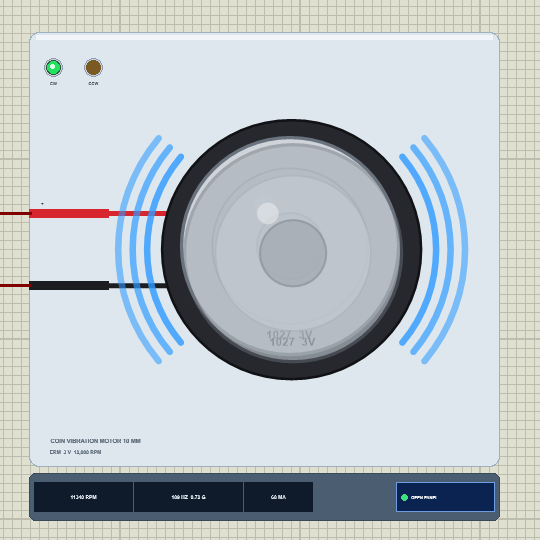
Search coin or vibration in Pick Devices; the device COINVIBTEP is in TEPCOINVIB.LIB (category Electromechanical, DC Motors) and its model is TEPCOINVIB.DLL. It shows the motor from the top at 3 x its real size: the black foam pad, the silver can with its rolled edge, the raised centre and the "1027 3V" marking, and the thin red and black leads running to the + and - pins.
While the simulation runs, the can shakes. At rest it is one sharp disc; as the motor speeds up, it turns into a double image whose two copies move further apart the stronger the vibration, and blue arcs appear on both sides - one arc for a gentle buzz, three for a strong one. The strip under the plate gives the speed in RPM, the vibration in Hz and G and the current in mA, next to the OPEN PANEL button. The plate, the arcs, the LEDs and the strip are TEP additions; the CW (green) and CCW (amber) LEDs show the turning direction.
| Pin | Wire | What the model does with it |
|---|---|---|
| + | red | the motor, analog: positive on + turns it clockwise |
| - | black | the motor's other terminal |
One property sets the scene: MOUNT is the mass the motor shakes, in grams - the device it is glued in. The default is 100 g, a small remote or a game pad. An ERM vibrates the same either way round, so the polarity only decides which LED lights.
Download Coin Vibration Motor Library for Proteus
Click the button below to download Coin-Vibration-Motor-Library-for-Proteus-v1.0.zip (about 1.2 MB, without the source code of the models):
Coin Vibration Motor Library for Proteus V1.0- README.txt: installation, the demo, the wiring, real hardware, troubleshooting and the limits.
- Proteus Library Files:
TEPCOINVIB.LIBandArduinoV4TEP.LIBfrom our Arduino Library for Proteus V4.0. - Proteus Model Files:
TEPCOINVIB.DLLandTEPARDUINO.DLL. - Proteus Simulation:
Coin-Vibration-Motor-L9110S-ArduinoUnoV4.pdsprj,CoinVibration_Demo.hexand copies of the two DLLs. - Arduino Code:
CoinVibration_Demo.ino(no library needed).
The driver is a separate library: this package holds only the coin motor and the UNO. The demo drives it through our L9110S motor driver, which has its own download - get it from our L9110S Motor Driver Library for Proteus and install it first, or the demo opens without its driver.
No Proteus yet? Read How to Download and Install Proteus 7 and 8. New to libraries? Follow How to Install a New Library in Proteus.
How to Install Coin Vibration Motor Library for Proteus
- Close Proteus and extract the whole zip file, for example to your Desktop.
- Copy
TEPCOINVIB.LIBandArduinoV4TEP.LIBfrom Proteus Library Files into the LIBRARY folder of Proteus (usuallyC:\Program Files (x86)\Labcenter Electronics\Proteus 8 Professional\LIBRARY). - Copy
TEPCOINVIB.DLLandTEPARDUINO.DLLfrom Proteus Model Files into the MODELS folder. The two Arduino files are the ones of our Arduino Library V4.0; if you have it, they are the same. - Install our L9110S Motor Driver library the same way from its own zip:
TEPL9110S.LIBinto LIBRARY andTEPL9110S.DLLinto MODELS. - Delete
TEPCOINVIB.IDXfrom the LIBRARY folder if it is there. - Start Proteus, press P and search for coin.
Tip: keep the Proteus Simulation folder together, because the project needs its .hex file and the DLLs beside it. The library is tested in Proteus 8.5; Proteus 7 is not supported.
The Demo Circuit
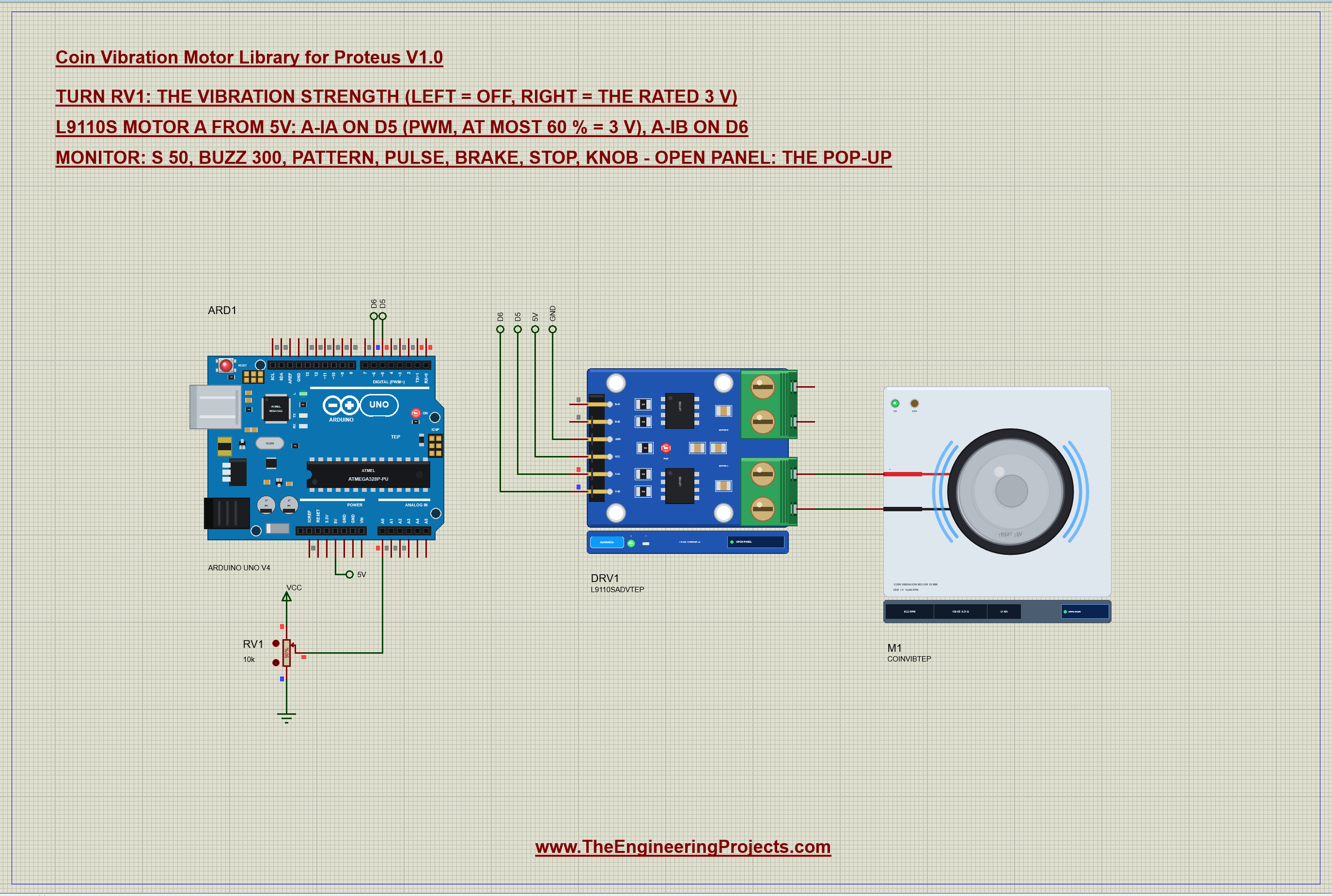
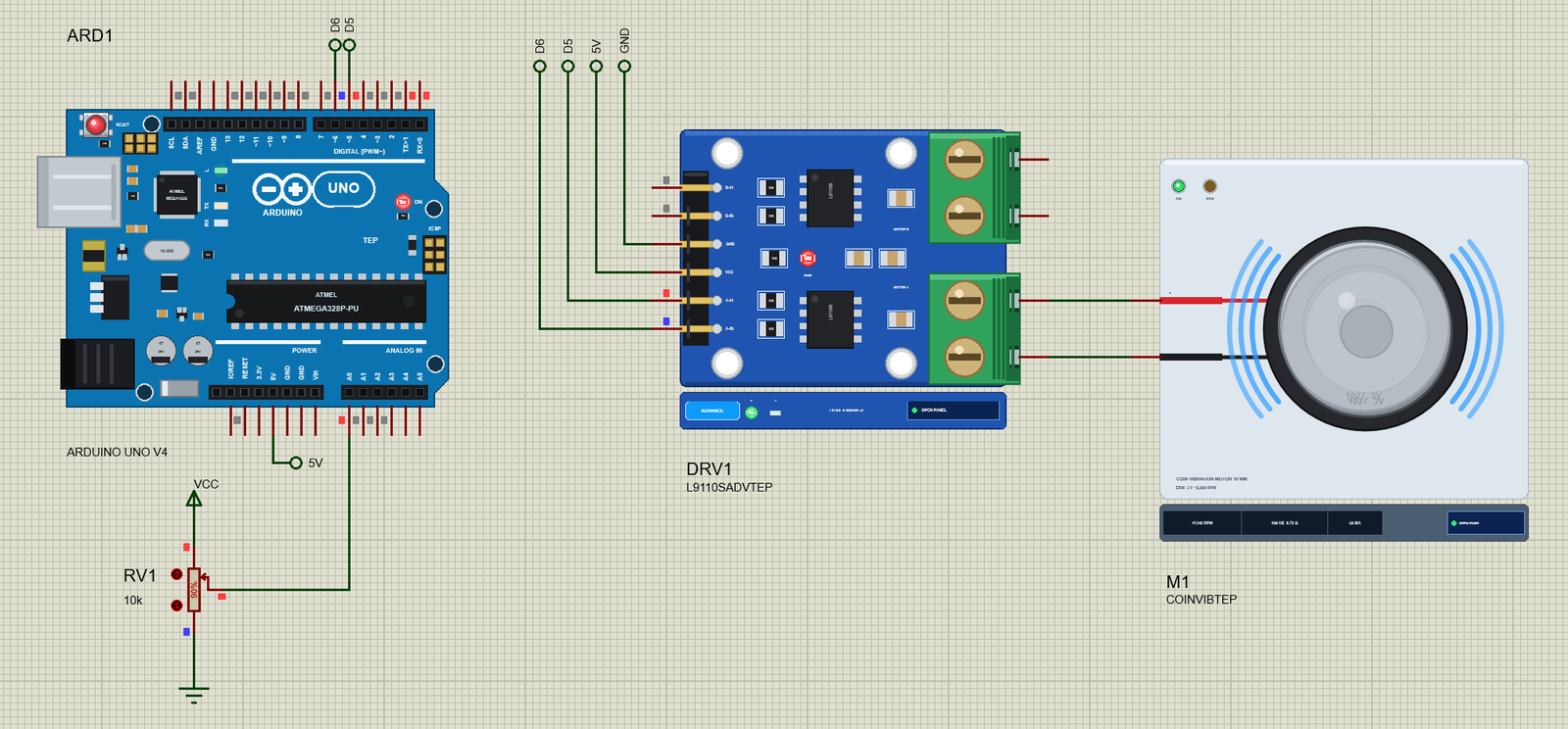
Open Coin-Vibration-Motor-L9110S-ArduinoUnoV4.pdsprj. ARD1 is an Arduino UNO V4.0 from our Arduino UNO Library for Proteus V4.0, running CoinVibration_Demo.hex with its serial monitor built in. DRV1 is the L9110S driver in its pop-up version, powered from the UNO's 5V. M1 is the coin motor on the driver's MOTOR A. RV1 is a 10k potentiometer on A0 that sets the vibration strength: left is off, right is the full rated 3 V.
Why a driver for such a small motor? Because 70 mA running and about 100 mA at every start is far more than the 20 mA an Arduino pin is meant to give. The L9110S handles it easily, and as an H-bridge it can also drive the motor backwards for a moment - which is exactly what the brake needs. One more detail: the L9110S runs from 5 V, but the motor is rated 3 V, so the sketch never goes over 60 % PWM - 60 % of 5 V is a 3 V average.
| From | To | Note |
|---|---|---|
| L9110S A-IA | D5 | PWM 980 Hz: the strength |
| L9110S A-IB | D6 | LOW; the brake's reverse pulse |
| L9110S VCC / GND | 5V / GND | the driver and the motor supply |
| L9110S A-OA / A-OB | motor + / - | the coin motor |
| RV1 wiper | A0 | the vibration strength |
The Arduino Code
The demo needs no library. New to Arduino? Start with Arduino Tutorial for Beginners and Introduction to Arduino UNO. The pins and the two limits come first - the highest PWM value that keeps the motor at its rating, and the length of the brake pulse:
const int IA = 5, IB = 6, POT = A0;
const int MAX_PWM = 153;              // 60 % of 5 V = 3.0 V average: the coin motor's rated voltage
const int BRAKE_MS = 12;              // the reverse pulse: long enough to stop it, too short to spin it the other way
In setup() both pins become outputs and the motor starts off:
  pinMode(IA, OUTPUT); pinMode(IB, OUTPUT);
  off();
One function sets the strength as a percentage of the rated voltage. A-IB is held LOW and A-IA gets the PWM, scaled so that 100 % is the 153 of MAX_PWM and never the full 255:
void drive(int pct) {                 // forward at pct % of the rating
  pct = constrain(pct, 0, 100);
  digitalWrite(IB, LOW);
  if (pct == 0) digitalWrite(IA, LOW);
  else analogWrite(IA, (int)(pct * (long)MAX_PWM / 100));
  strength = pct;
}
Switching it off is where the brake lives. With the brake off, both inputs go LOW, the L9110S shorts the motor's wires and the motor stops in about 30 ms. With the brake on, A-IB first gets the same 60 % PWM for 12 ms - a short push backwards - and only then both go LOW:
void off() {                          // the end of a buzz: a short reverse pulse first if the brake is on, then both LOW
  if (brakeOn && strength > 0) { digitalWrite(IA, LOW); analogWrite(IB, MAX_PWM); delay(BRAKE_MS); }
  digitalWrite(IA, LOW); digitalWrite(IB, LOW);
  strength = 0;
}
Why exactly 12 ms? We tried it on the model before writing the sketch: 10 ms leaves the motor still turning, 12 ms stops it in about 11 ms, and 15 ms or more starts spinning it the other way, which would feel like a second little buzz. A buzz is then just full strength, a wait and off():
void buzz(int ms) {
  drive(100); delay(ms); off();
}
The pattern command plays a notification - three short buzzes and a long one - and pulse ramps the strength up and down in steps of 2 % every 20 ms, which feels like a slow heartbeat:
    for (int k = 0; k < 3; k++) { buzz(120); delay(120); }
    buzz(500);
for (int k = 0; k <= 100; k += 2) { drive(k); delay(20); }
for (int k = 100; k >= 0; k -= 2) { drive(k); delay(20); }Finally, the pot is read in the loop. Its left end is a clear "off", and the rest of the travel maps to 1 - 100 % strength:
      int pct = raw < 40 ? 0 : map(raw, 40, 1023, 1, 100);     // the left end: off
      if (pct == 0) off(); else drive(pct);
The basics of PWM speed control are in our older DC Motor Speed Control using Arduino tutorial. The HEX file is in the package; to change the sketch, open it in the Arduino IDE and export the compiled binary, as in How to get the HEX file from Arduino. It needs 7,488 bytes of flash (23 % of the UNO) and 285 bytes of RAM.
Running the Demo
Press Run. The UNO's serial monitor and the pop-ups of the coin motor and the L9110S open over the schematic; move them aside. RV1 starts at 90 %, so the motor buzzes at 89 % strength: about 9,500 RPM, 158 Hz and 0.50 G on its 100 g. This is the whole session of our test run, with the commands typed in the monitor:
Coin Vibration Motor demo - The Engineering Projects
L9110S from 5 V: A-IA on D5 (PWM, at most 60 % = 3 V), A-IB on D6. The pot on A0 sets the strength.
Commands: s 50 | buzz 300 | pattern | pulse | brake | stop | knob | help
Pot 922: strength 89 % (PWM 136/255 = 2.67 V average)
s 100
strength 100 % (PWM 153/255 = 3.00 V average)
pattern
pattern: 3 short buzzes + 1 long (a notification)
pattern done
brake
brake ON: every buzz ends with a 12 ms reverse pulse
pattern
pattern: 3 short buzzes + 1 long (a notification)
pattern done
pulse
pulse: the strength 0 to 100 % and back in 2 s
pulse done
knob
Following the pot on A0
Pot 922: strength 89 % (PWM 136/255 = 2.67 V average)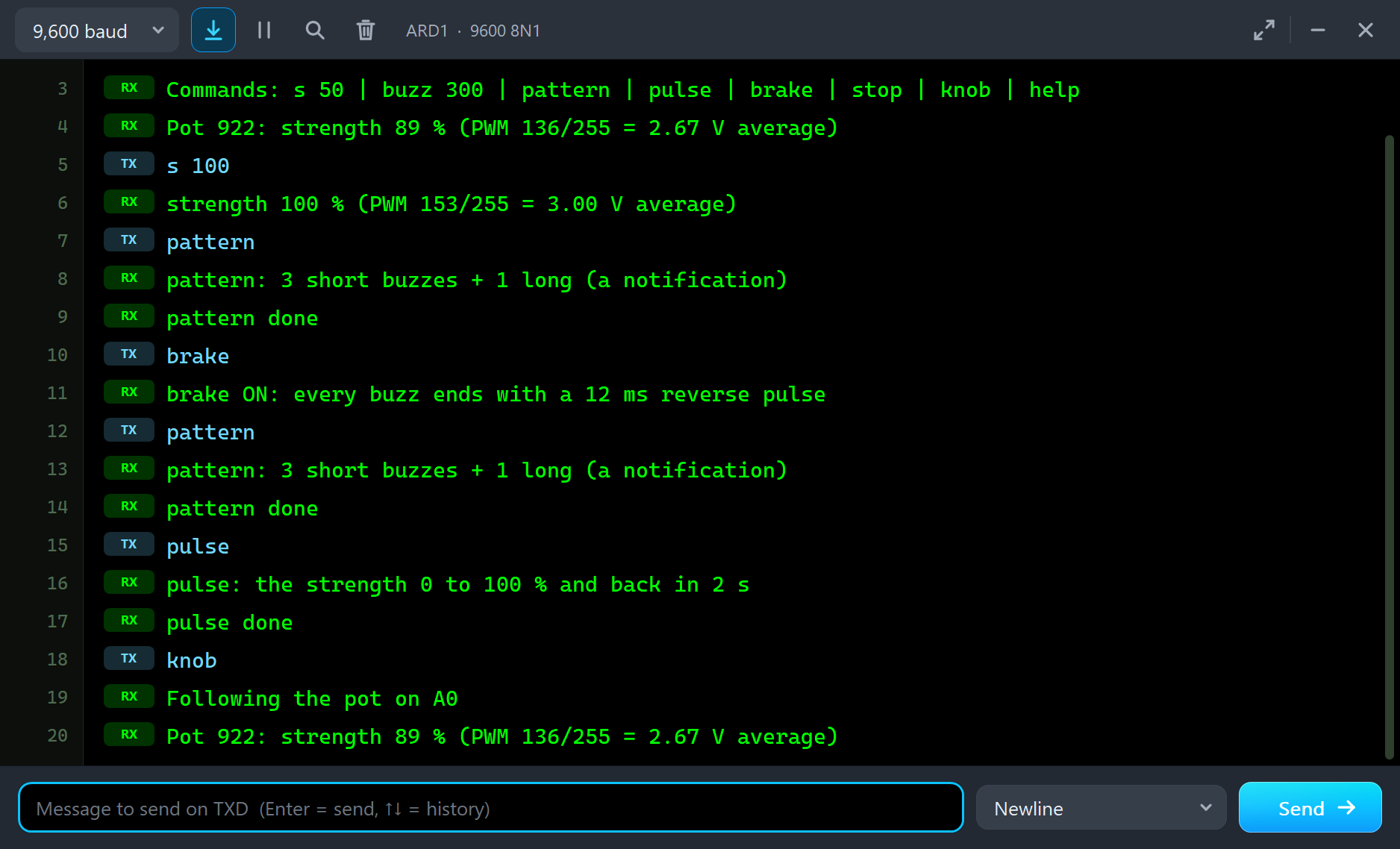
| Type | What it does | What the run showed |
|---|---|---|
| s 50 | strength 50 % of the 3 V rating (the pot is ignored until knob) | s 100: 11,243 RPM, 0.70 G on 100 g, 67 mA |
| buzz 300 | one buzz of 300 ms at full strength | 90 % of the speed in 72 - 76 ms |
| pattern | 3 short buzzes and 1 long one | every stop in 30 ms |
| brake | every buzz ends with a 12 ms reverse pulse (again: off) | every stop in 12 ms |
| pulse | the strength 0 to 100 % and back in 2 s | the G follows on the Graphs page |
| stop / knob | both inputs LOW / follow the pot again | the pot's strength |
The Pop-Up Window
At Run the motor opens TEP Coin Vibration Motor, a window in the look of our TEP Serial Monitor Advance for Proteus. Its four tabs are Motor, Graphs, Event log and Check, with Settings and Help behind the gear and question mark icons. If you close it, OPEN PANEL on the strip brings it back.
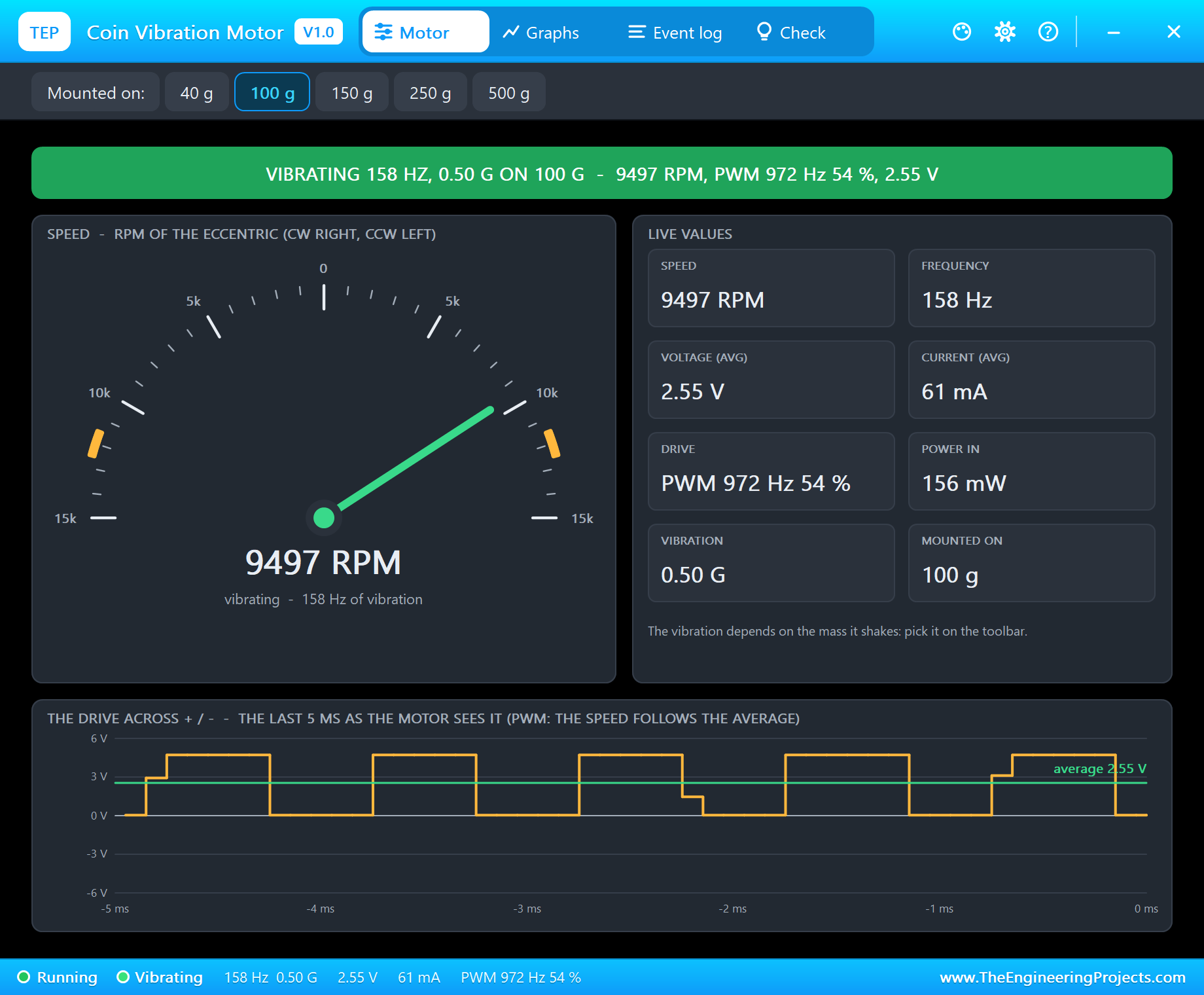
The banner gives the state in one line - "VIBRATING 158 HZ, 0.50 G ON 100 G" with the speed and the drive. The gauge runs from 15,000 RPM one way to 15,000 RPM the other, with the 3 V speed marked by amber bands. The live values are the speed, the frequency, the average voltage, the current, the drive, the power, the vibration and the mass it is mounted on. At the bottom, the drive across the motor over the last 5 ms: the UNO's 980 Hz PWM passed on by the L9110S, with its 2.55 V average.
The Rated 3 V
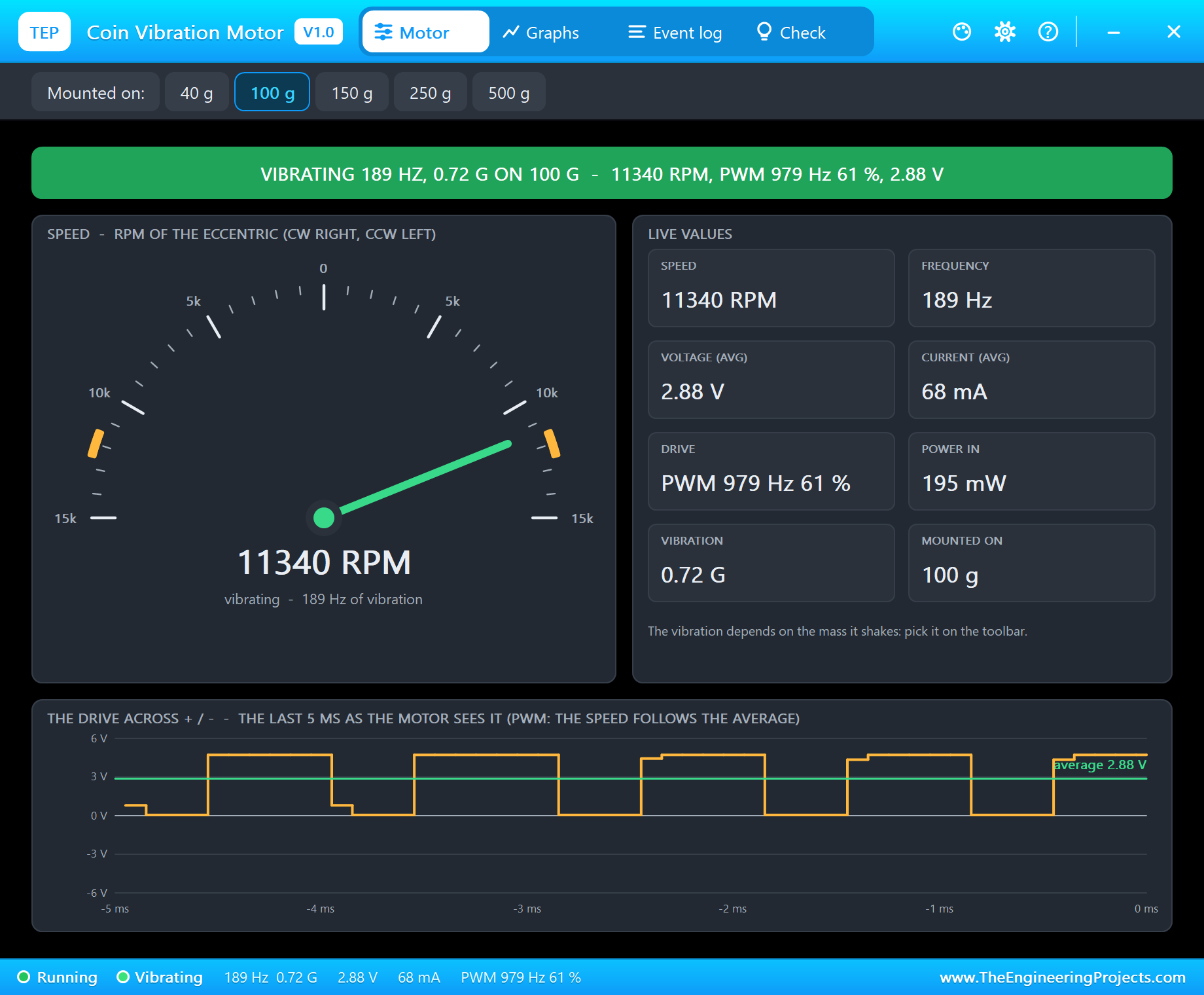
Type s 100. The sketch writes PWM 153, a 3.00 V average, and the motor runs at about 11,300 RPM - 189 Hz of vibration with 0.72 G and 68 mA. The Event log records it as "steady 11243 RPM = 187 Hz, 0.70 G on 100 g, at 2.86 V average, 67 mA". Why 2.86 V and not 3.00? The two switches of the L9110S drop a little of the voltage - a real driver does the same, and it is one of the things you only notice in a full simulation.
The Same Motor, Different Devices
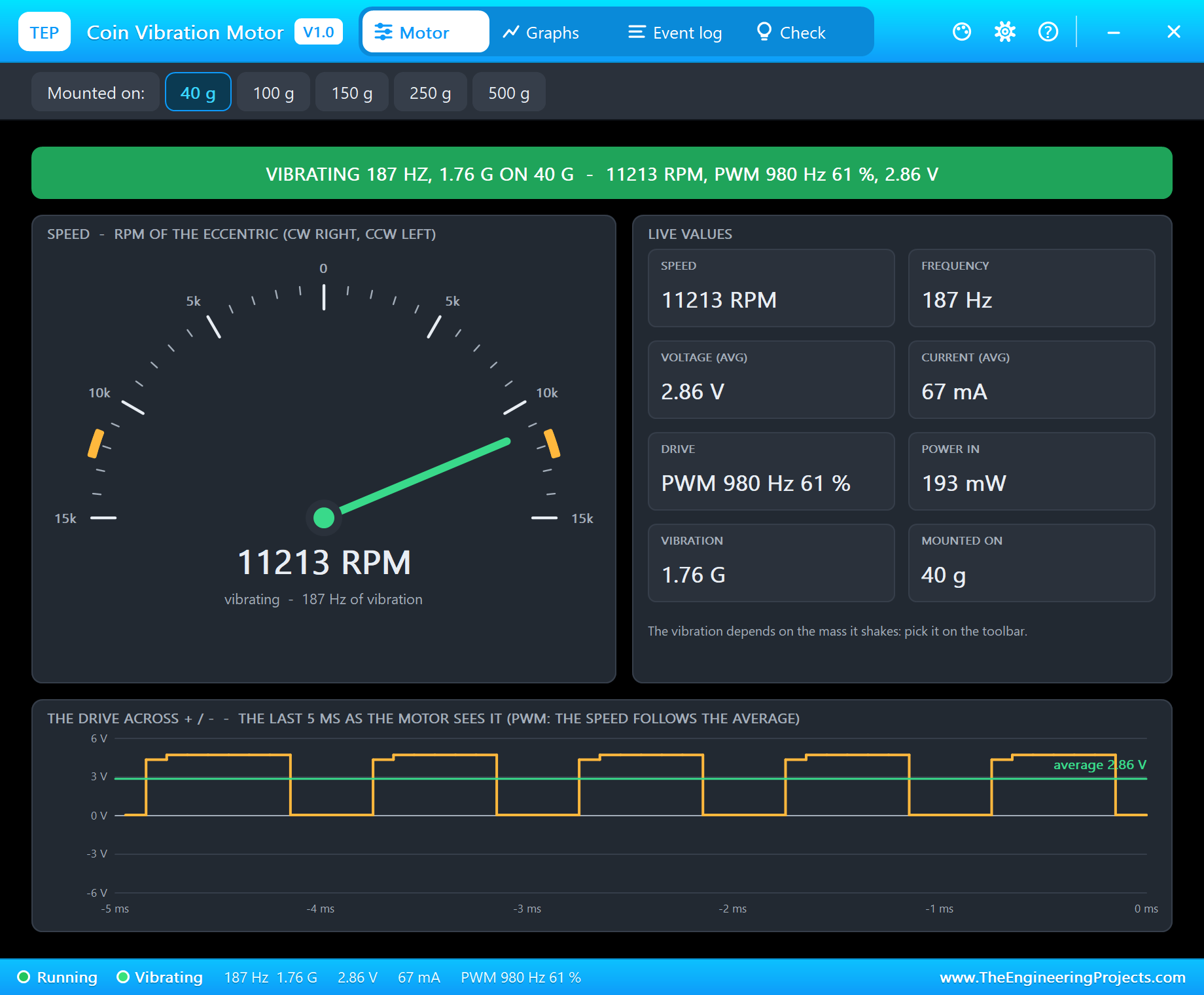
Now click 40 g on the toolbar. Nothing changes in the speed or the current - the motor does not know what it is glued to - but the vibration jumps to 1.76 G. That is the feeling of a light fitness band, where a coin motor gives a strong, almost harsh buzz.
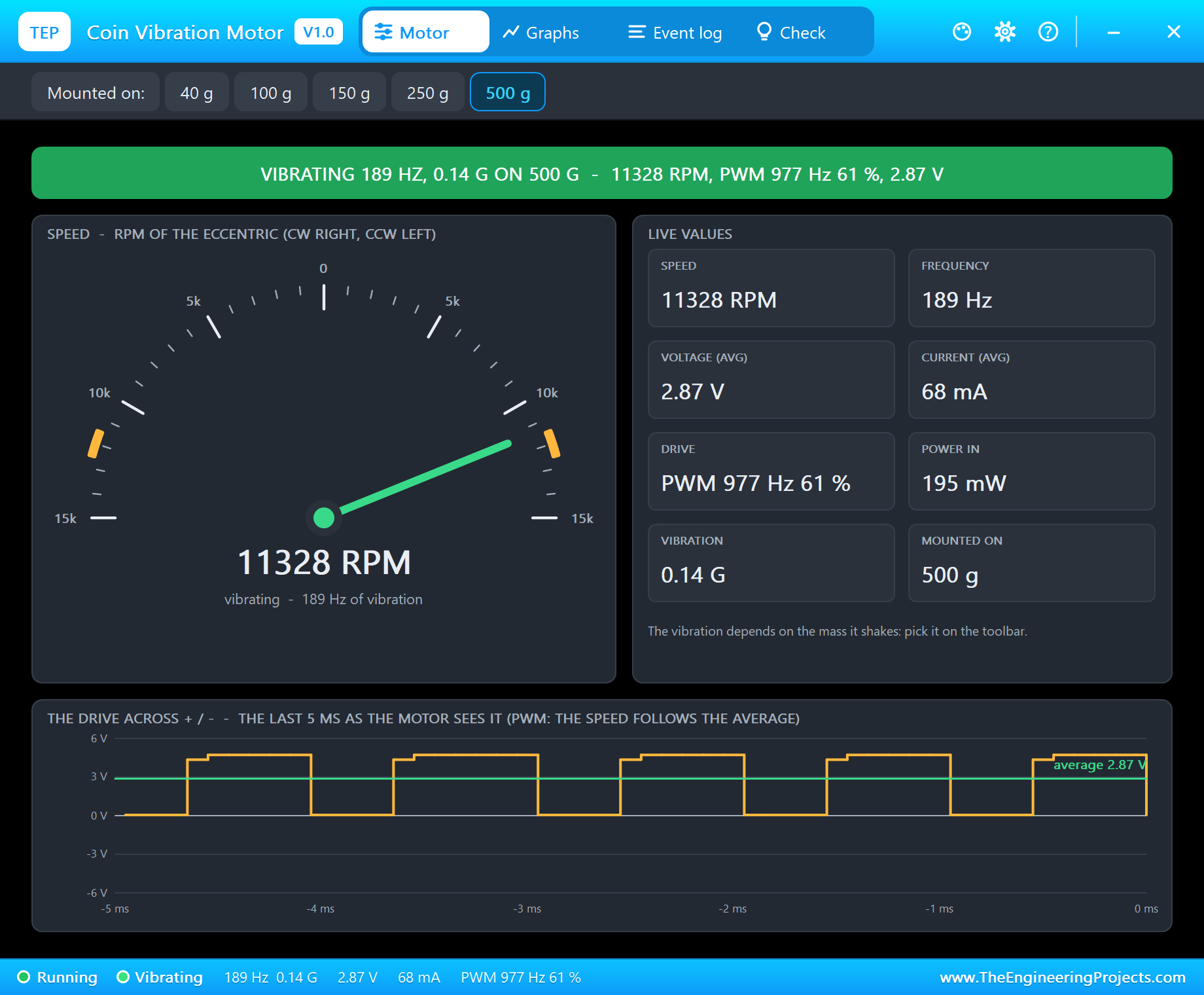
Click 500 g and the same motor gives only 0.14 G, hard to feel in a tool handle or a big game controller. This is the main lesson of the pop-up: pick the motor for the device. A heavy product needs a bigger ERM, a cylinder motor with a larger weight, or several coins.
Starts, Stops and the Brake
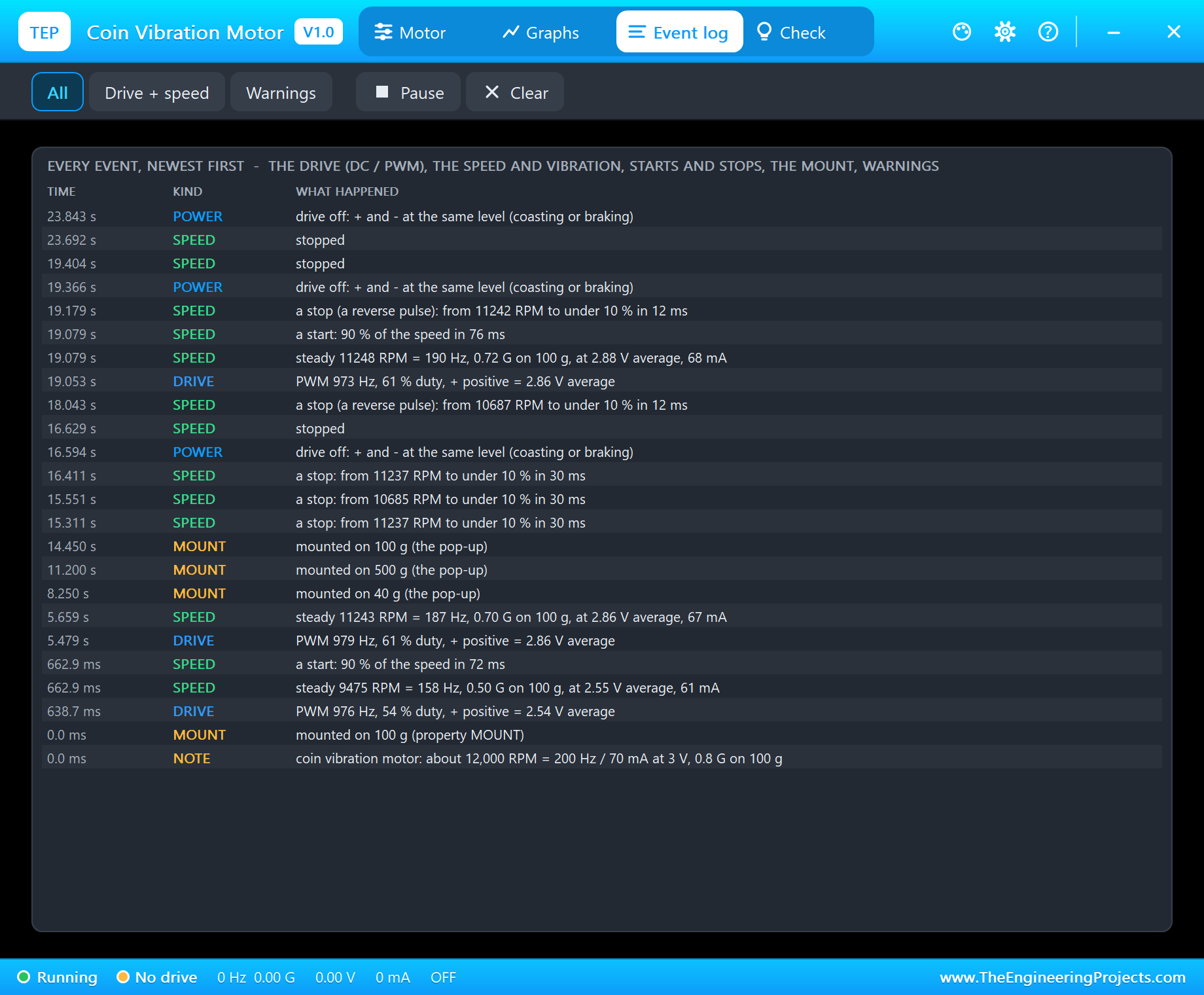
The Event log is the motor's diary, newest first. At the start, "a start: 90 % of the speed in 72 ms". The first pattern gives "a stop: from 11237 RPM to under 10 % in 30 ms" for each buzz. Then brake and the pattern again: "a stop (a reverse pulse): from 11242 RPM to under 10 % in 12 ms". The same motor, the same buzz, and a stop more than twice as fast - which you would feel as a crisp tick instead of a soft fade.
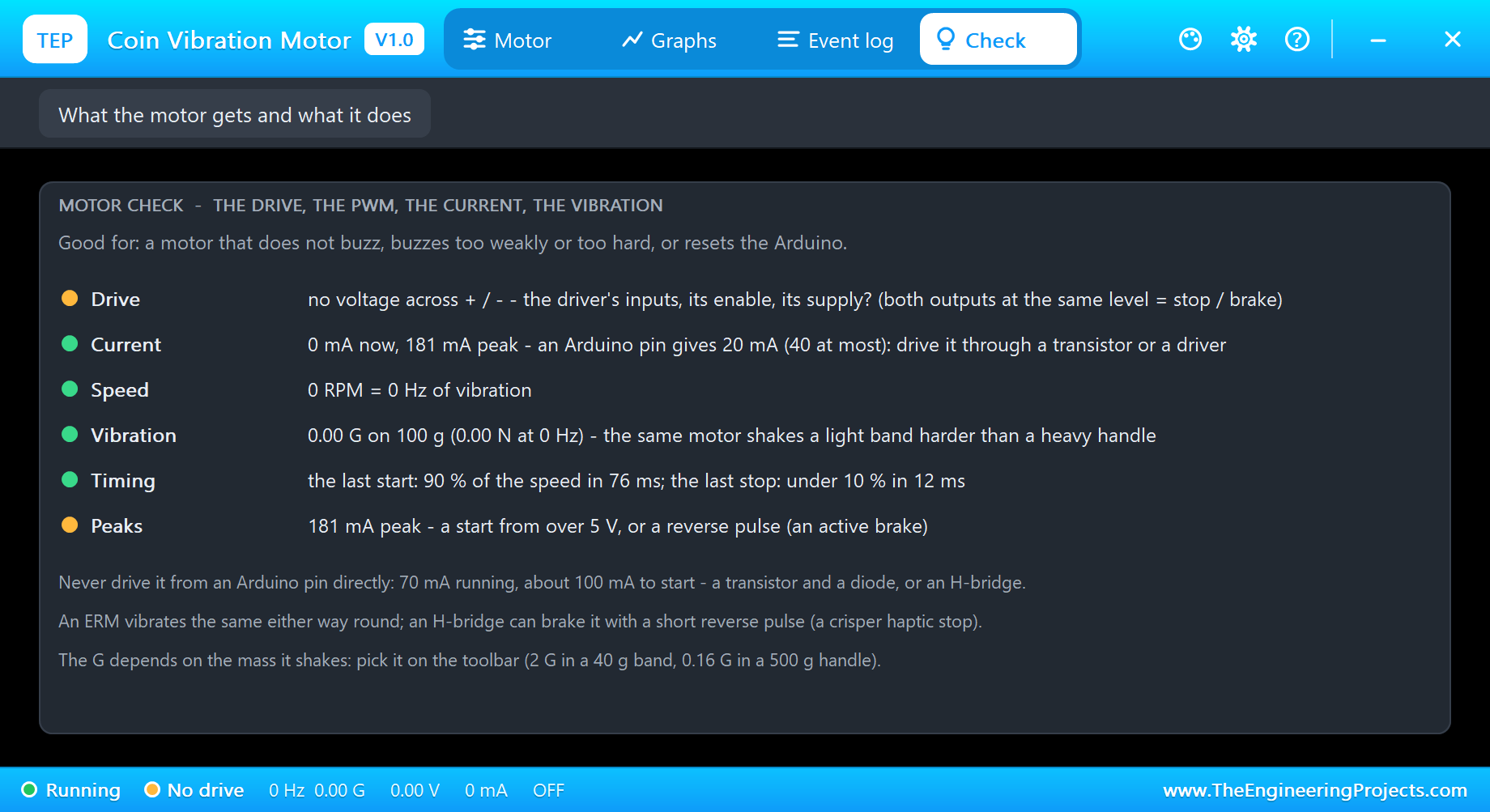
The Check page sums it up in rows with a verdict each: the drive, the current against an Arduino pin, the speed, the vibration, the timing - "the last start: 90 % of the speed in 76 ms; the last stop: under 10 % in 12 ms" - and the peaks. The amber peak row shows 181 mA: the moment the reverse pulse meets the spinning motor, more than twice its running current.
Graphs
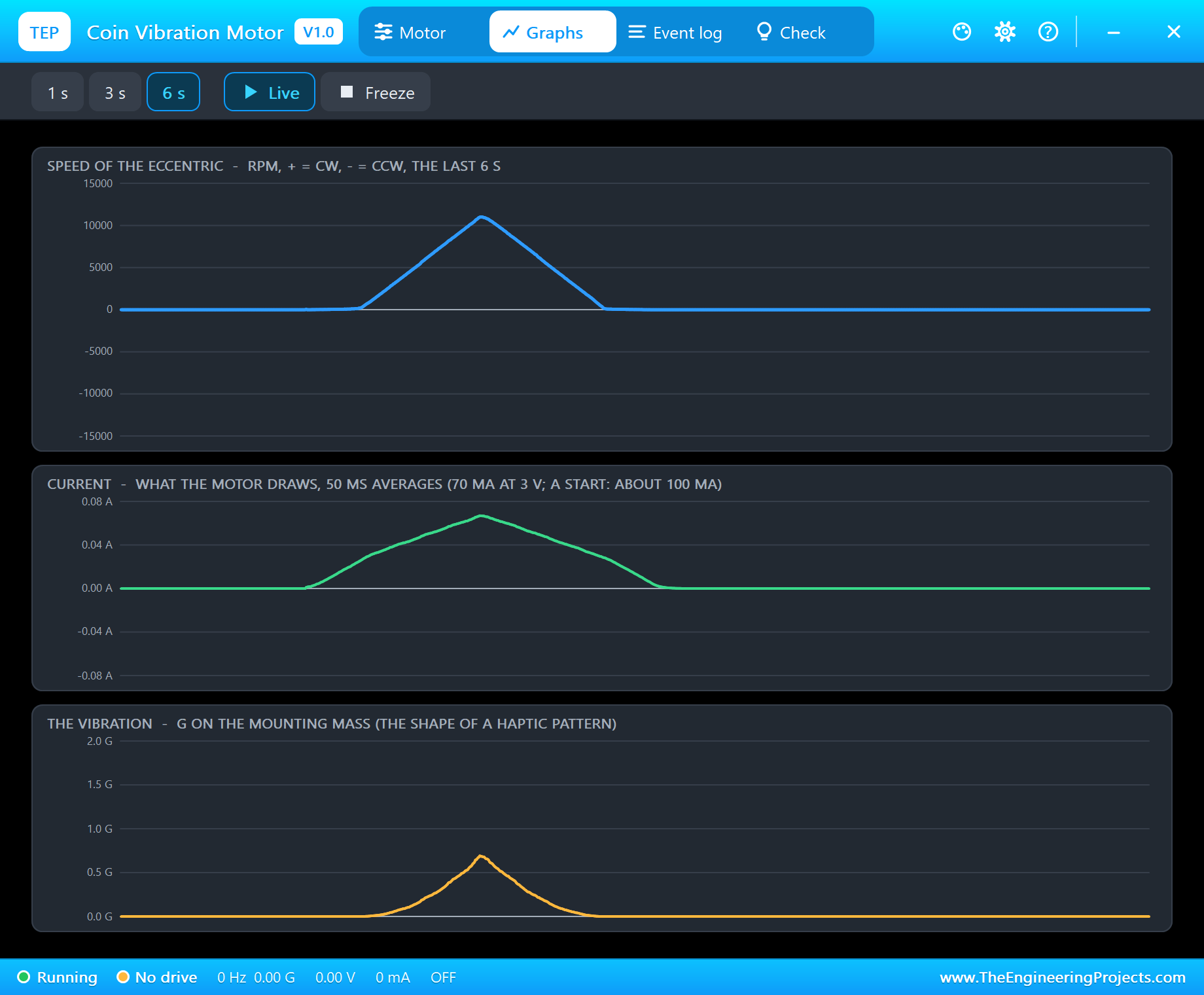
The Graphs page draws the speed, the current and the vibration over the last 1, 3 or 6 seconds. During pulse the speed rises and falls almost in a straight line, but the G curve is a sharper peak: the force grows with the speed squared, so the low half of the ramp hardly shakes at all. Keep that in mind when you design a soft fade - a linear PWM ramp does not feel linear.
What the Driver Sees
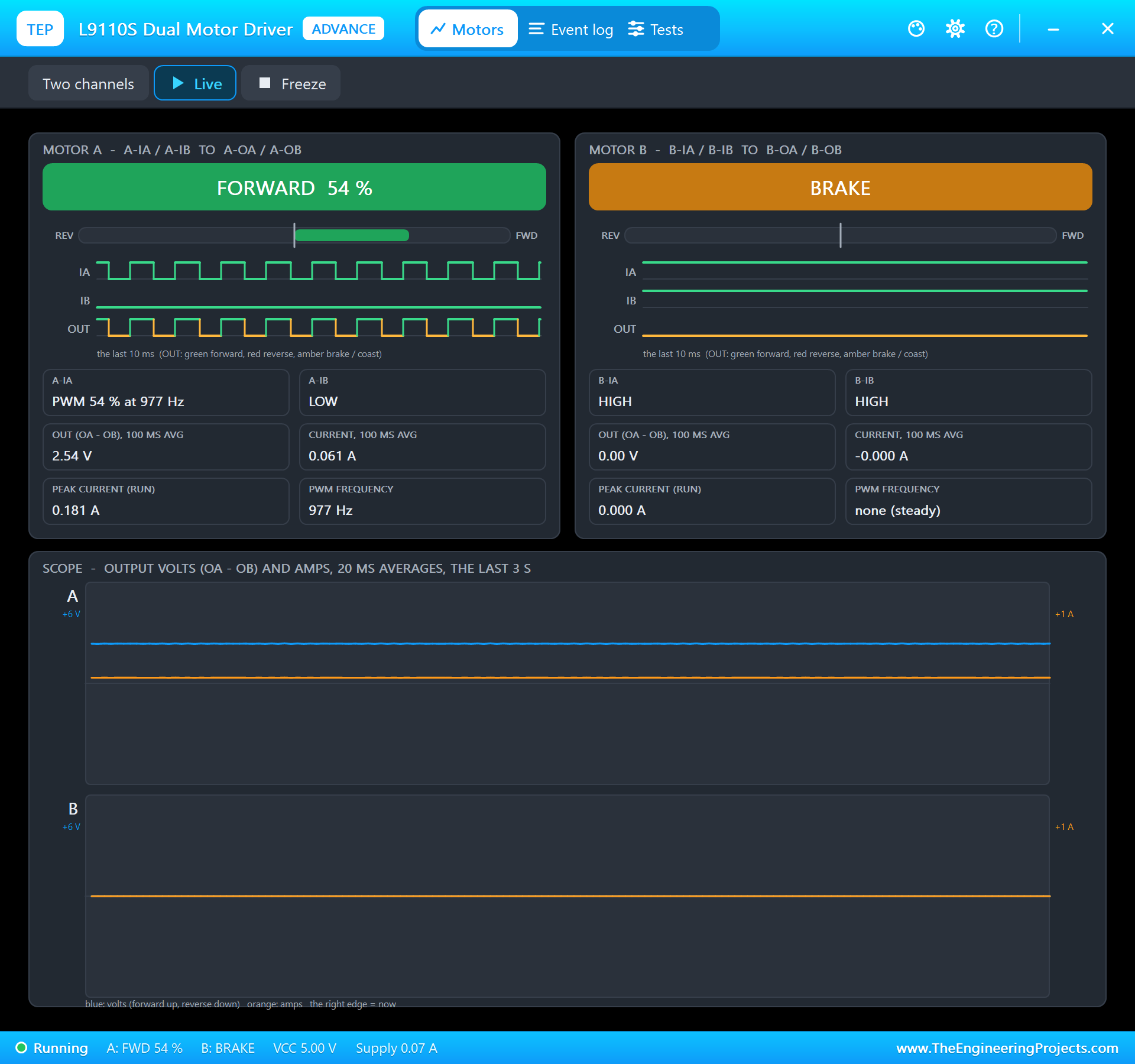
Our L9110S has its own pop-up, and here it shows MOTOR A: FORWARD 54 %, A-IA with PWM 54 % at 977 Hz and A-IB LOW, 2.54 V and 61 mA out. It is a good place to check the wiring when the motor does not buzz - you see at once whether the inputs arrive. Our earlier 130 DC Motor Library for Proteus uses the same driver for a toy motor with a fan, if you want to compare a bigger load.
How the Model Works
The coin motor is solved by Proteus's analog engine: its speed is an internal node computed together with the driver from the winding resistance of 30 ohm, the back-EMF, the friction and the inertia of the rotor and its eccentric mass. The vibration is then simple physics: the eccentric's force is its mass times its radius times the speed squared, and dividing it by the mounting mass and by gravity gives the G.
A coin rotor is so light that it follows anything slower than about 30 ms. That is why the model keeps the analog steps at 0.1 ms or less: the L9110S then passes on the real 980 Hz pulses, and the motor averages them as a real one does. The demo runs at about a quarter of real time on a desktop PC: 29 seconds of simulation took about 2 minutes.
We checked the model on a PC with 29 automatic tests: 12,000 RPM, 70 mA and 0.80 G on 100 g at 3 V, the start in 72 ms, the stop in 32 ms and with a 12 ms reverse pulse in 12 ms without turning the other way, 6,400 RPM at 2 V, 2.0 G on 40 g and 0.16 G on 500 g, PWM at 980 Hz found with its duty, 60 % of 5 V giving the 3 V speed without a false over-voltage, no start at 0.6 V and a start at 1.2 V, and the over-voltage warning at 4.5 V.
Troubleshooting
- The can never shakes and the pop-up says NO DRIVE: the driver's inputs (both LOW means stop), its VCC, or the motor's leads on the wrong outputs.
- It does not start at a low strength: a coin motor needs about 0.85 V, so under about 30 % strength it does not turn. Real haptic code starts every buzz with a short kick at full strength for this reason.
- OVER-VOLTAGE: more than 4 V average across it - keep the PWM at 60 % or less from 5 V.
- No driver in the project: install our L9110S library (
TEPL9110S.LIB/TEPL9110S.DLL) - it is not in this package. - Nothing moves on the sheet, no UNO or no monitor:
TEPCOINVIB.DLLorTEPARDUINO.DLLis missing from MODELS and the project folder; a closed monitor opens again with a click on the UNO's USB port.
Things to Know Before Using a Real Coin Vibration Motor
- Never from a pin: 70 mA running and about 100 mA to start. Use a driver such as the L9110S or DRV8833, a haptic driver such as the DRV2605L, or an NPN transistor or logic-level MOSFET with a 1N4148 diode across the motor.
- Keep it at 3 V: from 5 V, limit the PWM to 60 %, or feed it from a 3.3 V rail.
- Mounting: stick it flat with its foam pad to the part that should shake, close to where the hand touches it; the lighter that part, the stronger the buzz.
- Patterns: short buzzes of 50 - 200 ms with pauses feel clearer than one long buzz; a reverse pulse makes the end crisp.
- Noise: a 100 nF ceramic capacitor across the leads cuts the brushes' electrical noise.
- The leads are thin: solder them carefully and give them strain relief - they break easily where they leave the can.
Limitations of the Simulation
- Not modelled: the winding inductance, the brushes' noise, the resonance of the part it is glued to, the sound, heating and the differences between real motors.
- The vibration is given as the eccentric's force on a rigid mounting mass; real products damp and amplify some frequencies.
- The plate, the arcs, the LEDs and the strip are TEP additions.
- The model is our own, written from the typical data of 10 mm 3 V coin ERM motors; this library is not made or endorsed by Arduino or Labcenter.
- Licences: the demo needs no Arduino library; the HEX file contains the Arduino AVR core 1.8.6 with LGPL-licensed code, and the sketch is included. The potentiometer is Proteus's own POT-HG. The L9110S driver is our separate library.
- Tested in Proteus 8.5 in October 2026 with the demo as shipped: the pot, the rated 3 V, the mass buttons, the pattern with and without the brake, the pulse and the pop-ups. Proteus 7 is not supported.
So, that was all about the Coin Vibration Motor Library for Proteus V1.0. I hope it helps you plan your next haptic project - the driver, the voltage, the patterns and the brake - before the first motor is glued in. If you have any questions, ask in the comments and I will help you out. Till the next tutorial, take care and have fun!

Comments
0