


Quartz Clock Movement Library for Proteus V1.0 (Arduino)


Hello friends, I hope you all are doing great. Today, I am going to share the new Quartz Clock Movement Library for Proteus V1.0. Turn over almost any wall clock and you find the same small black box behind the dial: a quartz tick movement, about 56 mm square, with an AA cell and a knob for setting the time. Inside it a crystal counts the seconds, and a tiny stepping motor, the Lavet motor, turns the hands one second at a time.
Quartz Clock Movement Library for Proteus
Latest version: V1.0 (November 2026, this tutorial)
Helping Tools
- Serial Monitor Advance: a serial terminal window for the UART of your board
- Serial Monitor Expert: the serial monitor with extra debugging tools
- LCD Library for Proteus V3.0: 16x2, 20x4 and I2C LCDs to show your readings
Makers love to take that motor over. Cut the two tracks from the chip, solder two wires to the coil, and an Arduino becomes the clock: it can set the hands by itself, run a slave clock from a time server, make a clock run backwards or tick only when you want. This library puts that hacked movement into Proteus. Its coil sits between two pins, A and B, with its real resistance and inductance, and the model counts a step for each correct pulse, misses the wrong ones and tells you why, and turns the hour, minute and red second hands on your schematic. The demo drives it from an Arduino UNO V4.0 with two pins and one resistor.
NOTICE: the Lavet motor looks simple - one coil, two wires - but it only moves when the pulses are right, and on a real clock a wrong pulse is silent: the hands just fall behind. Our team put a lot of effort into making this model show you exactly what the coil gets and what the rotor does with it. Your feedback is the fuel that keeps us going, so please tell us what you think in the comments below or in the Motor Driver board of our forum. And if our free libraries help you, you can buy us a coffee. So, let's get started with the Quartz Clock Movement Library for Proteus V1.0:
What is a Quartz Clock Movement?
A quartz clock movement is the complete mechanism behind a clock face. The common "tick" movement has three parts: a small board with a 32,768 Hz quartz crystal and a chip that divides it down to one pulse a second, a stepping motor, and a plastic gear train that carries the motor's steps to the second, minute and hour hands. A crown at the back turns the gear train by hand to set the time. Everything runs on one 1.5 V cell for a year or more, because the motor only takes a short pulse once a second.
| Quartz clock movement (the model) | |
|---|---|
| Size | the 56 mm square tick movement of wall clocks |
| Motor | a Lavet stepping motor: one coil and a two-pole magnet rotor |
| Coil | 230 ohm and 0.25 H - a 1.5 V coil |
| A step | a pulse of the opposite polarity to the last one, at least 2.5 mA for 8 ms |
| Step rate | one a second to tick; up to about 30 a second when racing (the rotor needs 25 ms a step) |
| Face | a 12-hour face from property START plus the steps |
| Pins | A and B, the two ends of the coil |
The Lavet Stepping Motor
The Lavet motor was invented for watches and is still in almost every analog quartz clock. A U-shaped iron stator carries one coil; between its two poles sits a small rotor, a disc magnet with one north and one south pole. The stator's pole gap is not quite symmetrical, so the magnet rests in one of two positions. A pulse through the coil magnetises the stator, pushes the rotor half a turn on to the other rest position, and the gear train turns that half turn into one second on the dial. The rotor needs about 25 ms to swing across.
Why the Pulses Must Alternate
Here is the part that catches everyone out. The rotor is a magnet, so the next pulse has to be the opposite polarity to the last one: if a positive pulse moved the rotor, it now sits where a positive pulse wants it to be, and a second positive pulse just holds it there. That is why the clock chip drives the coil from two pins - one HIGH and the other LOW for a few tens of milliseconds, a second later the other way round. Send two pulses of the same polarity and you lose a second; send pulses that are too short or too weak and you lose them all; send them too quickly while racing the hands and the rotor misses the ones that come while it is still turning.
Taking Over the Coil
Open the movement and you find the coil's two thin wires soldered to the board, next to the chip. Cut the two tracks between the chip and the coil, solder two wires to the coil's pads, and the movement no longer keeps time by itself - it does exactly what your pulses tell it. The coil is made for 1.5 V, about 200 - 250 ohm, so two Arduino pins drive it through one series resistor and no driver at all. The model is built around exactly this setup.
What's New in Quartz Clock Movement Library for Proteus V1.0
- A part of its own: the quartz movement with its dial, its hands and the coil between A and B.
- The real coil: 230 ohm and 0.25 H in the circuit, so pins, transistors or an H-bridge drive it.
- The real step rule: alternating pulses, 2.5 mA for 8 ms, the rotor's 25 ms swing.
- Missed steps with their reason: the same polarity again, too short or weak, too early.
- The face: property START plus the steps, the hands turning on the schematic, the second hand swinging through each step.
- The crown: set the hands from the pop-up without a single step, like the knob at the back.
- A pop-up window with four pages - Clock, Graphs, Event log and Check - and the coil current drawn live.
- An A4 demo on our Arduino UNO V4.0: two pins, one resistor, a sketch that ticks, races and sets the time.
The Quartz Clock Movement in Proteus
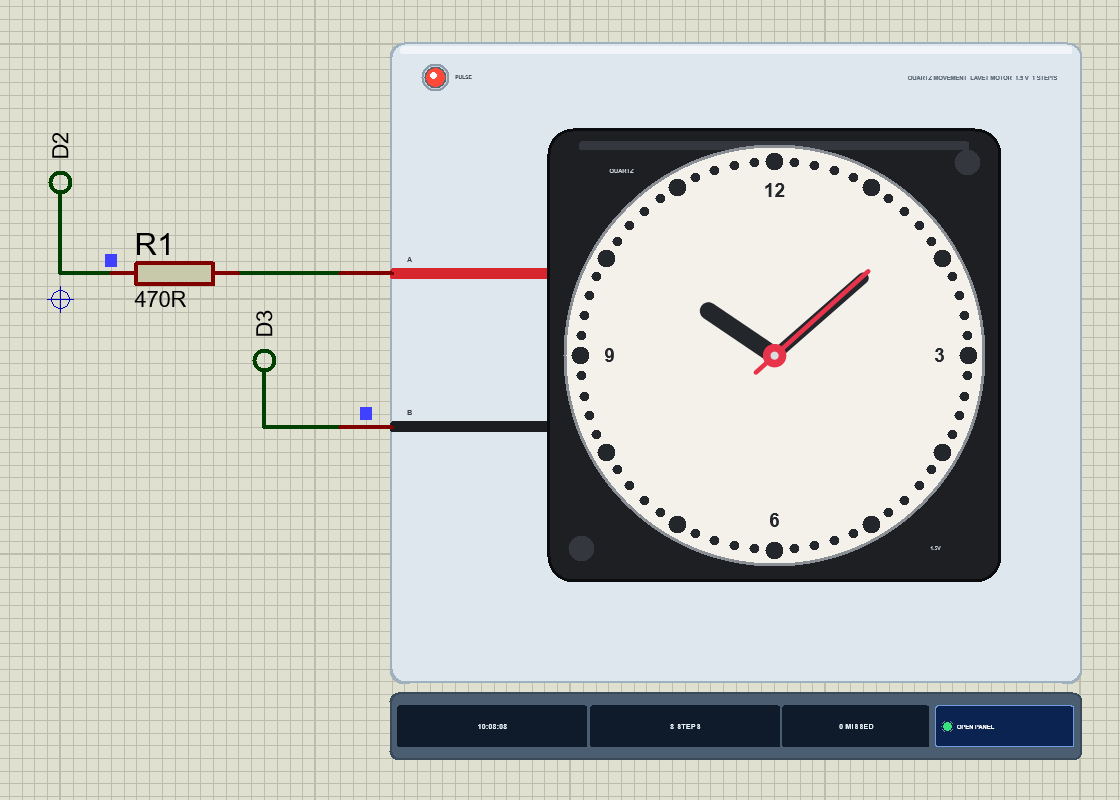
Search quartz in Pick Devices; the device QCLOCKTEP is in TEPQCLOCK.LIB (category Electromechanical, Motors) and its model is TEPQCLOCK.DLL. It is drawn from the front: the black square case with its QUARTZ label and corner pins, a dial with minute dots and the numbers 12, 3, 6 and 9, and the red and black coil wires running to the pins A and B on the left.
At Run the hour, minute and red second hands turn to the face's time. The PULSE LED lights green for a positive pulse (A to B) and red for a negative one (B to A), and stays lit for 0.4 s so you can see each tick. Under the plate the strip shows the time on the face, the steps, the missed steps and the OPEN PANEL button. The plate, the LED, the rating line and the strip are TEP additions; the real movement has none of them.
The Pins and the Property
| Pin | What the model does with it |
|---|---|
| A | one end of the coil (the red wire): D2 through R1 in the demo |
| B | the other end (the black wire): D3 in the demo; the coil works either way round |
| Property | Default | What it does |
|---|---|---|
| START | 10:08:00 | the time on the face at the start, h:mm:ss (the clock makers' favourite) |
There is no "speed" or "load" to set: a tick movement only does what its coil gets. The pop-up's crown chips set the hands while the simulation runs.
Download Quartz Clock Movement Library for Proteus
Click the button below to download Quartz-Clock-Movement-Library-for-Proteus-v1.0.zip (about 1.2 MB, without the source code of the models):
Quartz Clock Movement Library for Proteus V1.0- README.txt: installation, the demo, the wiring, the property, real hardware, troubleshooting and the limits.
- Proteus Library Files:
TEPQCLOCK.LIBandArduinoV4TEP.LIBfrom our Arduino Library for Proteus V4.0. - Proteus Model Files:
TEPQCLOCK.DLLandTEPARDUINO.DLL. - Proteus Simulation:
Quartz-Clock-Movement-ArduinoUnoV4.pdsprj,Clock_Demo.hexand copies of the two DLLs. - Arduino Code:
Clock_Demo.ino(no library needed).
No Proteus yet? Read How to Download and Install Proteus 7 and 8. New to libraries? Follow How to Install a New Library in Proteus.
How to Install Quartz Clock Movement Library for Proteus
- Close Proteus and extract the whole zip file, for example to your Desktop.
- Copy
TEPQCLOCK.LIBandArduinoV4TEP.LIBfrom Proteus Library Files into the LIBRARY folder of Proteus (usuallyC:\Program Files (x86)\Labcenter Electronics\Proteus 8 Professional\LIBRARY). - Copy
TEPQCLOCK.DLLandTEPARDUINO.DLLfrom Proteus Model Files into the MODELS folder. The two Arduino files are the ones of our Arduino Library V4.0; if you have it, they are the same. - Delete
TEPQCLOCK.IDXfrom the LIBRARY folder if it is there. - Start Proteus, press P and search for quartz.
Tip: keep the Proteus Simulation folder together, because the project needs its .hex file and the DLLs beside it. The library is tested in Proteus 8.5; Proteus 7 is not supported.
The Demo Circuit
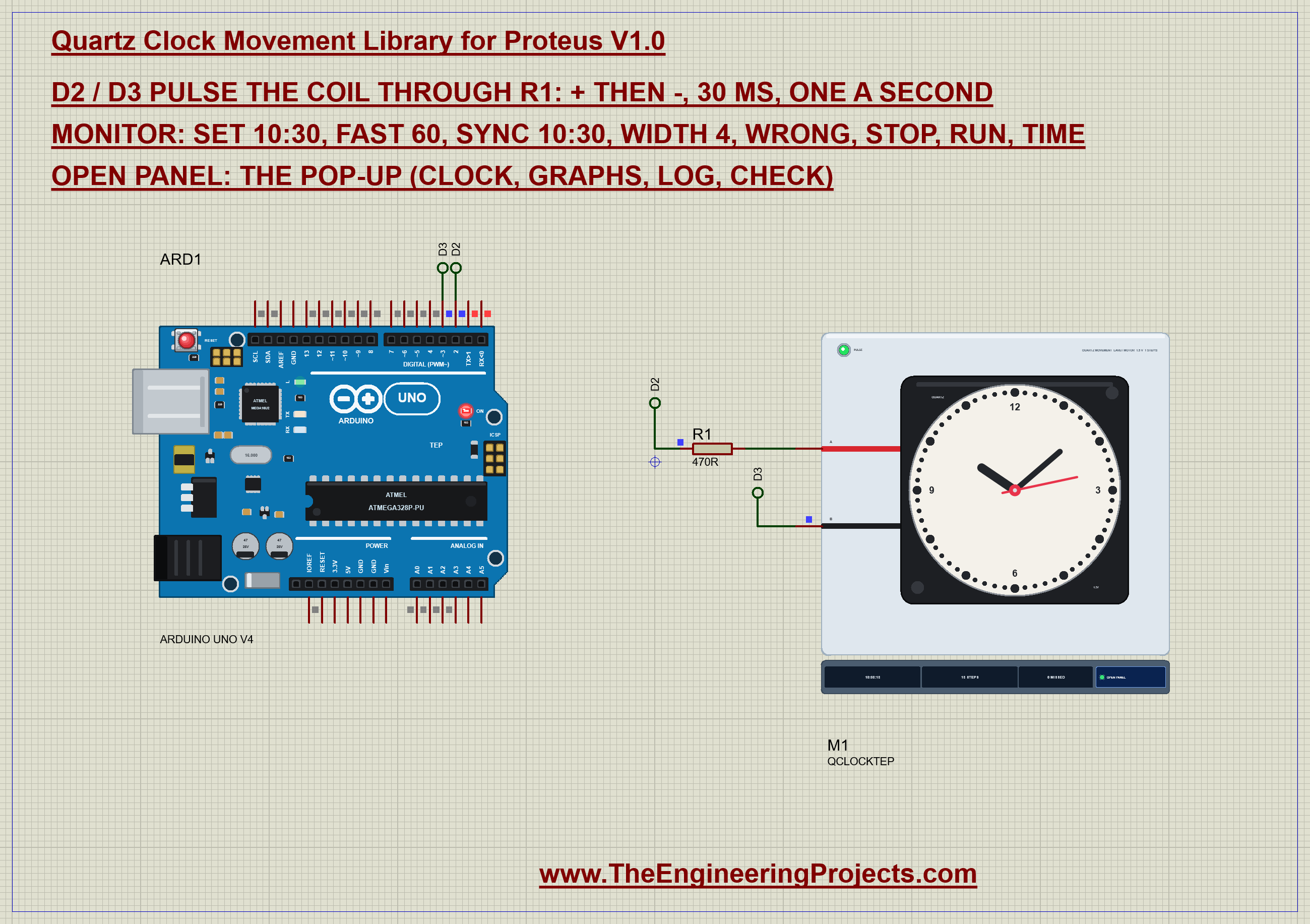
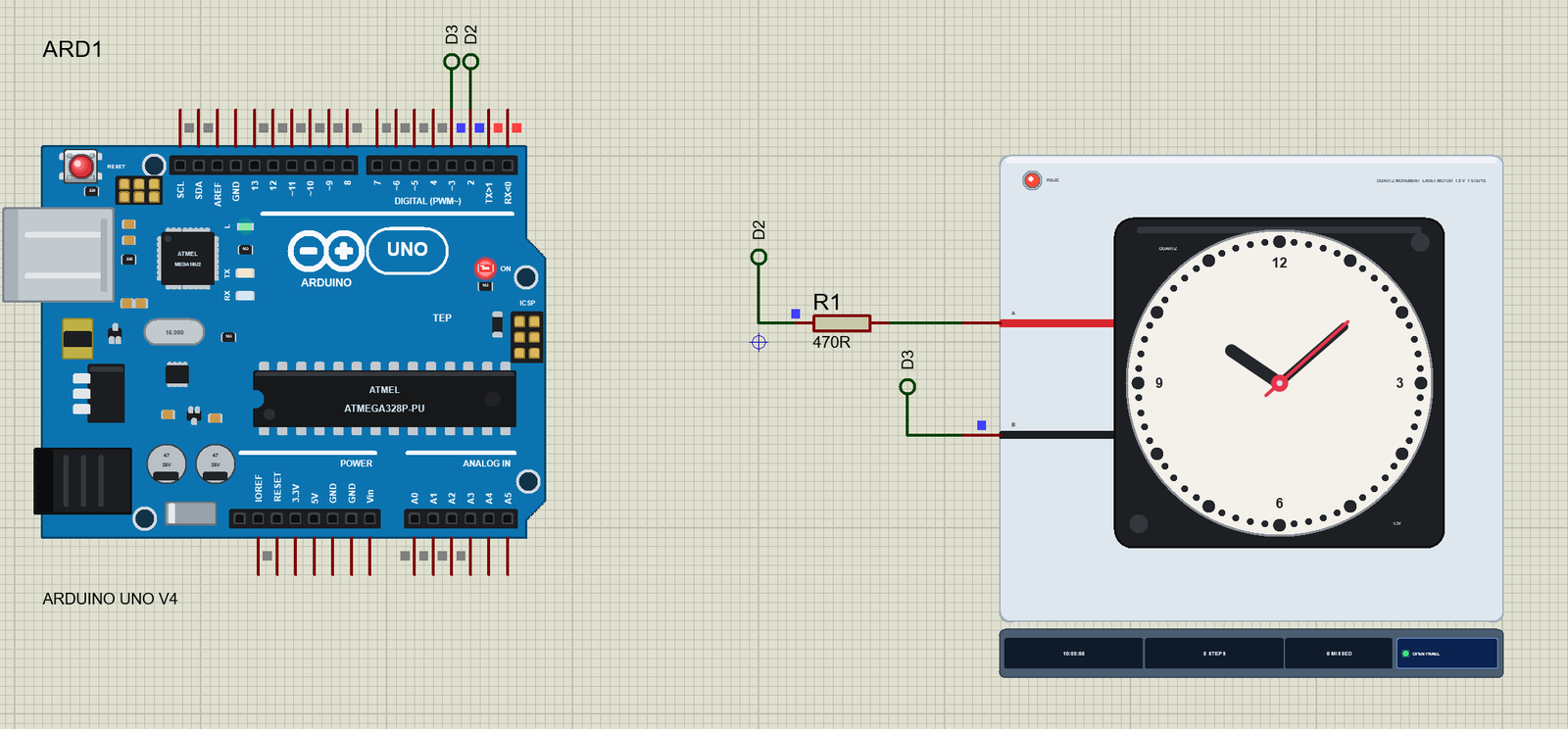
Open Quartz-Clock-Movement-ArduinoUnoV4.pdsprj. ARD1 is an Arduino UNO V4.0 from our Arduino UNO Library for Proteus V4.0, running Clock_Demo.hex with its serial monitor built in. R1 is a plain 470R resistor and M1 is the movement. The circuit is small, so it sits on an A4 sheet.
| Part | Pin | Goes to |
|---|---|---|
| Arduino UNO | D2 | R1 (470R), then the movement's A |
| Arduino UNO | D3 | the movement's B |
| Movement | A and B | the two ends of the coil - no ground, no supply |
Why a Resistor?
The coil is a 1.5 V coil. Straight on two 5 V pins it would take more than 20 mA and run at three times its voltage - it would still step, but the model warns you, and a real coil gets warm. With 470R in series the pulse is about 7 mA and the coil sees about 1.6 V, close to what its own AA cell gives it. Anything from 470R to 1k works from 5 V; from a 3.3 V board use about 220R. Both pins are LOW between the pulses, so the coil is short-circuited through the resistor and the rotor holds its place.
The Arduino Code
The sketch needs no library. New to Arduino? Start with Arduino Tutorial for Beginners and Introduction to Arduino UNO. Two pins drive the coil:
const byte COIL_A = 2, COIL_B = 3; // D2 -> R1 (470R) -> A; D3 -> BOne small function sets the polarity: positive, negative, or both pins LOW:
void coil(int8_t p) {                         // +: A positive (D2 HIGH, D3 LOW); -: B positive; 0: both LOW
  digitalWrite(COIL_A, p > 0 ? HIGH : LOW);
  digitalWrite(COIL_B, p < 0 ? HIGH : LOW);
}
A step is one pulse of the next polarity. The sketch then flips the polarity for the next step and adds one second to its own count of the face, because a clock movement cannot report where its hands are:
void step(unsigned int w) {                   // one second on: the next polarity, then flip it
  startPulse(pol, w);
  pol = -pol;
  faceSec = (faceSec + 1) % 43200L;
}
The pulse ends in loop() without delay(), so the serial monitor stays responsive. When its time is up both pins go LOW:
if (inPulse && (long)(now - pulseEnd) >= 0) { coil(0); inPulse = false; }Once a second the clock ticks with the normal 30 ms pulse:
  if (running && (long)(now - nextTick) >= 0) {
    step(widthMs);
    nextTick += 1000;
To set the time the hands have to race forward - a movement only turns one way. The sketch sends shorter pulses, 20 a second, well apart for the rotor's 25 ms swing:
const unsigned int RACE_MS = 50, RACE_WIDTH = 12; // racing: a 12 ms pulse every 50 ms (the rotor needs about 25 ms a step) step(min(widthMs, RACE_WIDTH));
nextRace = now + RACE_MS;set 10:30 works out how many steps lie between its count and the target on a 12-hour face and races them:
race((t - faceSec + 43200L) % 43200L);wrong sends one pulse of the same polarity as the last one on purpose, and still counts it - just like a sketch with a bug:
    startPulse(-pol, widthMs);                // the same polarity as the last pulse: the rotor is already there
    faceSec = (faceSec + 1) % 43200L;         // the sketch believes it stepped
And sync 10:30 tells the sketch what the hands show after someone turned the crown:
faceSec = t; toRace = 0;The HEX file is in the package. To change the sketch, open it in the Arduino IDE and export the compiled binary, as in How to get the HEX file from Arduino. It needs 8,688 bytes of flash (27 % of the UNO) and 309 bytes of RAM.
Running the Demo
Press Run. The UNO's serial monitor and the movement's pop-up open over the schematic; move them aside. The sketch starts with its own idea of the time, the same 10:08:00 as the movement's START:
Quartz Clock Movement demo - The Engineering Projects
The coil between D2 (through R1, 470R) and D3: a 30 ms pulse a second, + then -.
The hands at 10:08:00
Commands: set 10:30 | fast 60 | sync 10:30 | width 30 | wrong | stop | run | time | help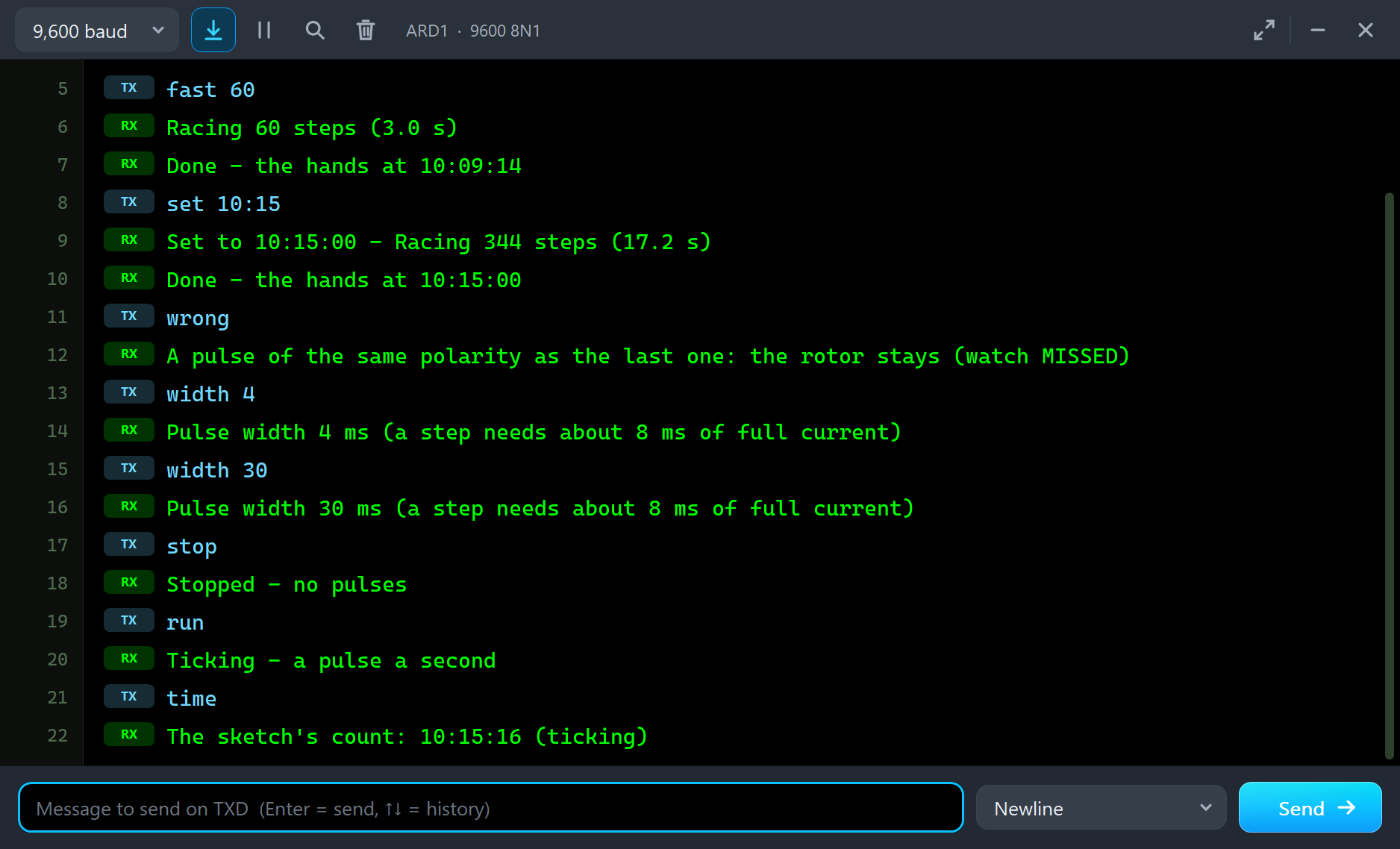
From 1.3 s the hands tick once a second. Each pulse peaks at 6.8 mA with 1.55 V on the coil and lasts about 31 ms (the 30 ms of the pin plus the coil's decay), and the PULSE LED flashes green and red in turn.
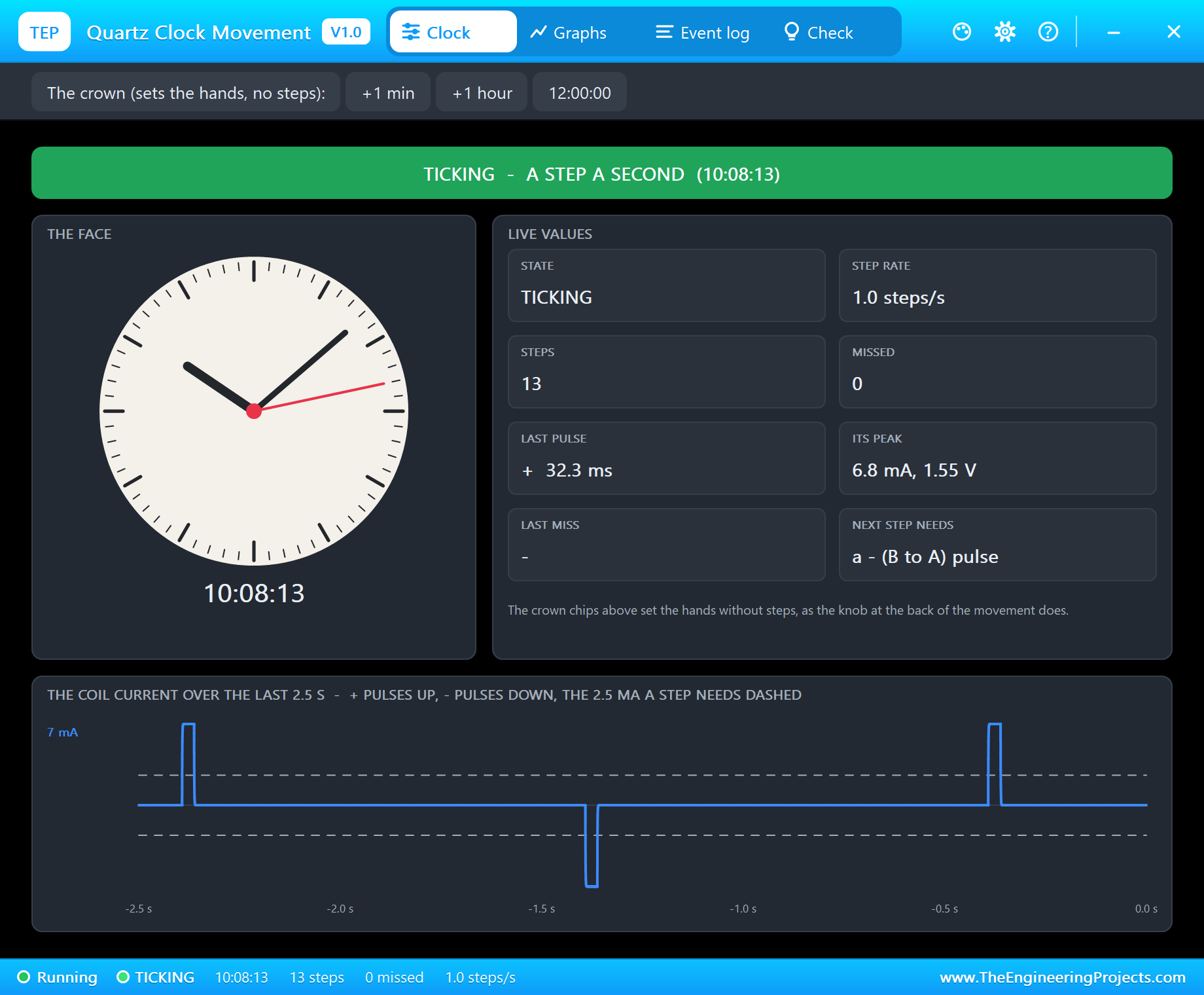
The pop-up has the look of our TEP Serial Monitor Advance for Proteus and four tabs: Clock, Graphs, Event log and Check. The Clock page shows the state in big letters, the face, eight live values and, at the bottom, the coil current over the last 2.5 s. The dashed lines mark the 2.5 mA a step needs in each direction, so you see at a glance that every pulse is strong enough and that they alternate. The NEXT STEP NEEDS card tells you which polarity the rotor is waiting for.
Setting the Time: Racing the Hands
Type fast 60 and then set 10:15:
fast 60
Racing 60 steps (3.0 s)
Done - the hands at 10:09:14
set 10:15
Set to 10:15:00 - Racing 344 steps (17.2 s)
Done - the hands at 10:15:00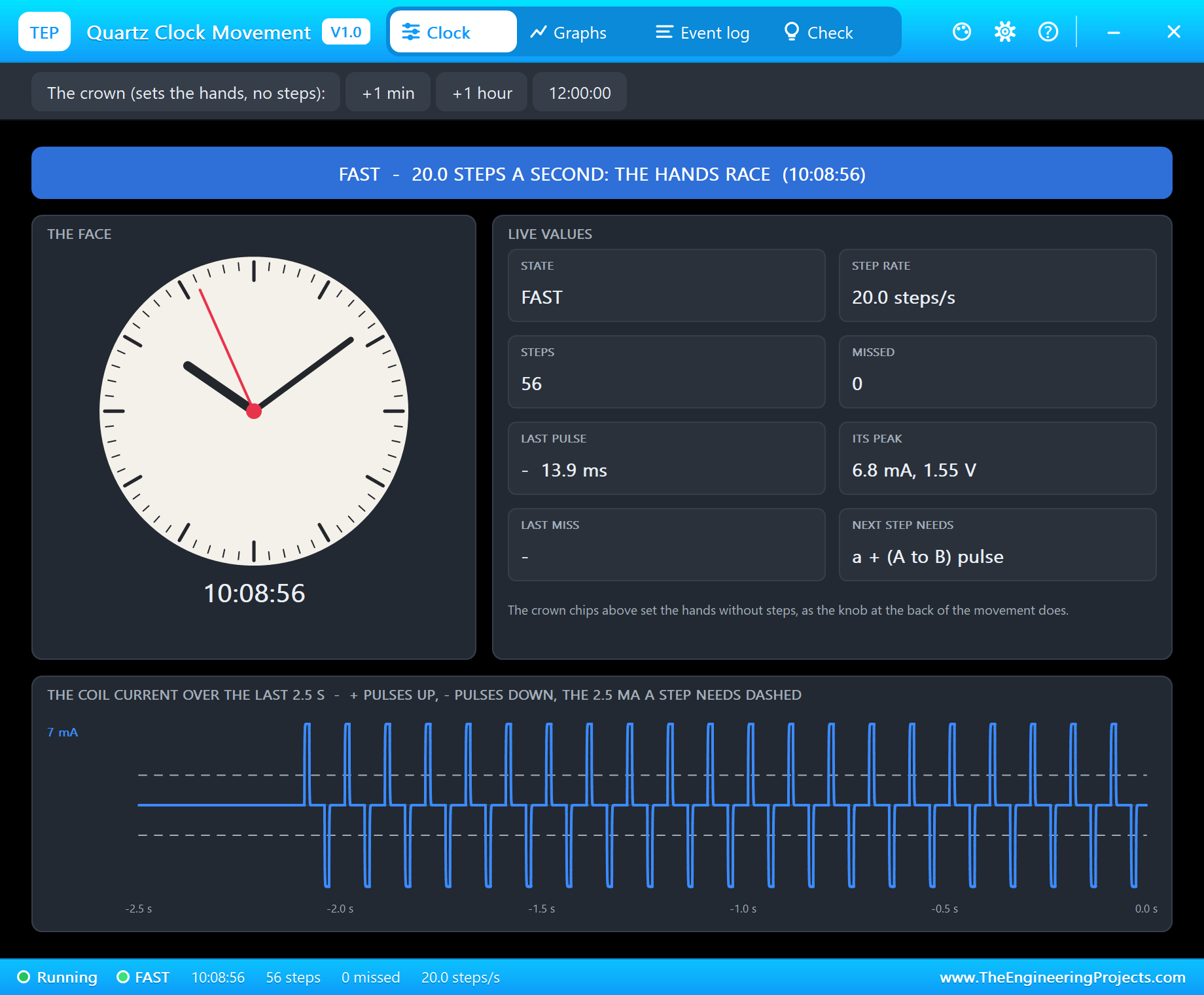
The state turns to FAST as soon as the steps come faster than about 1.6 a second, and the log reads "FAST - more than a step a second (the hands racing)". At 20 steps a second the second hand turns a full circle every three seconds; the 344 steps to 10:15 take 17.2 s. Each racing pulse is only 12 ms, still above the 8 ms a step needs, and they come every 50 ms, safely after the rotor's 25 ms swing. When the target is reached the sketch says so and the hands tick on from 10:15:00.
Missed Steps: Three Ways to Lose a Second
Now the interesting part - doing it wrong. Type wrong, then width 4, and after a few seconds width 30:
wrong
A pulse of the same polarity as the last one: the rotor stays (watch MISSED)
width 4
Pulse width 4 ms (a step needs about 8 ms of full current)
width 30
Pulse width 30 ms (a step needs about 8 ms of full current)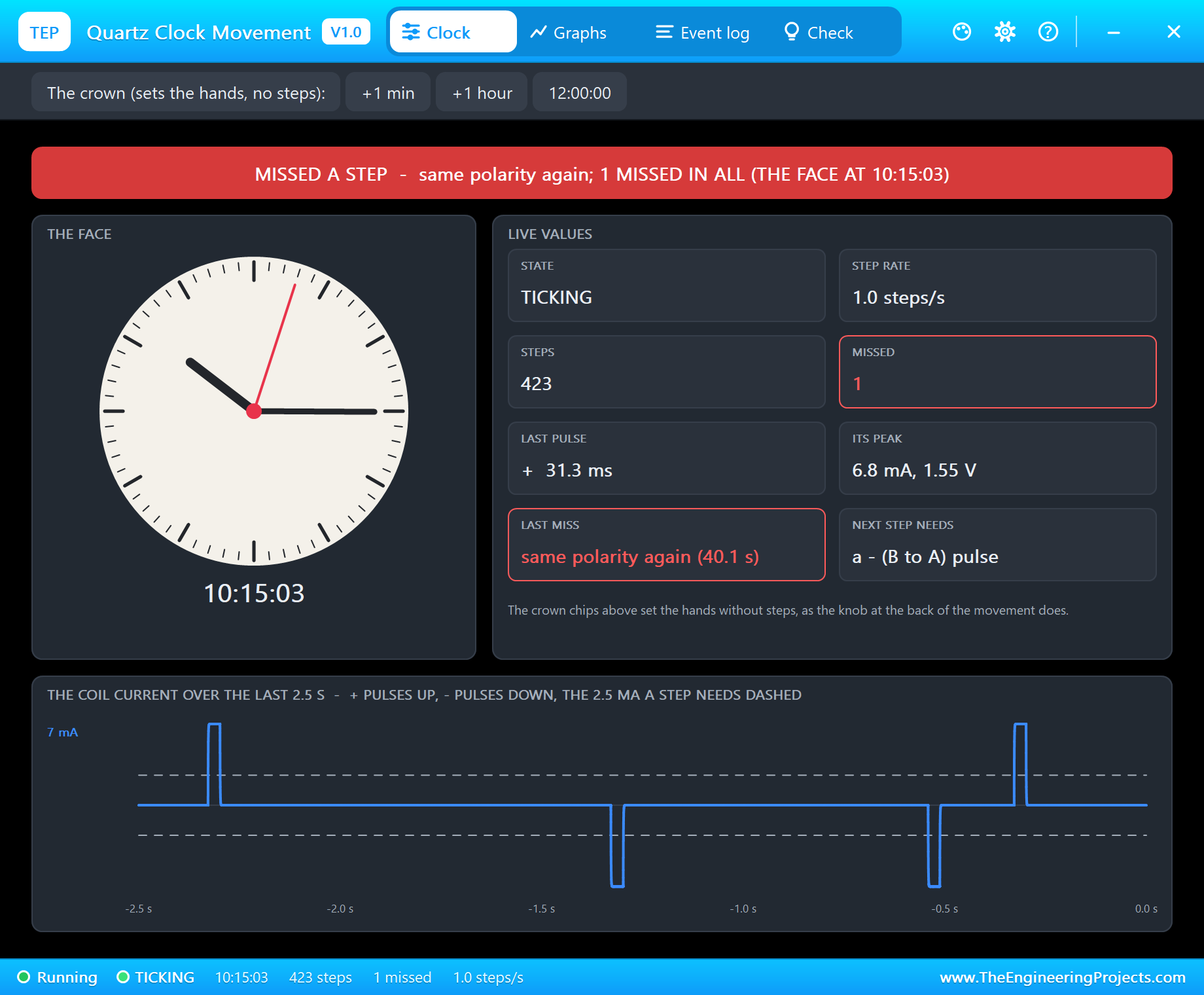
wrong sends a second negative pulse right after a negative step. The coil current looks perfectly healthy - 6.8 mA, the right length - but the rotor is already where a negative pulse wants it, so nothing turns. The bar goes red, the LAST MISS card says "same polarity again", and the log reads "MISSED - the same polarity again (- B to A): the rotor is already there (pulses alternate)". The next normal pulse is positive, so the clock simply ticks on, one second behind.
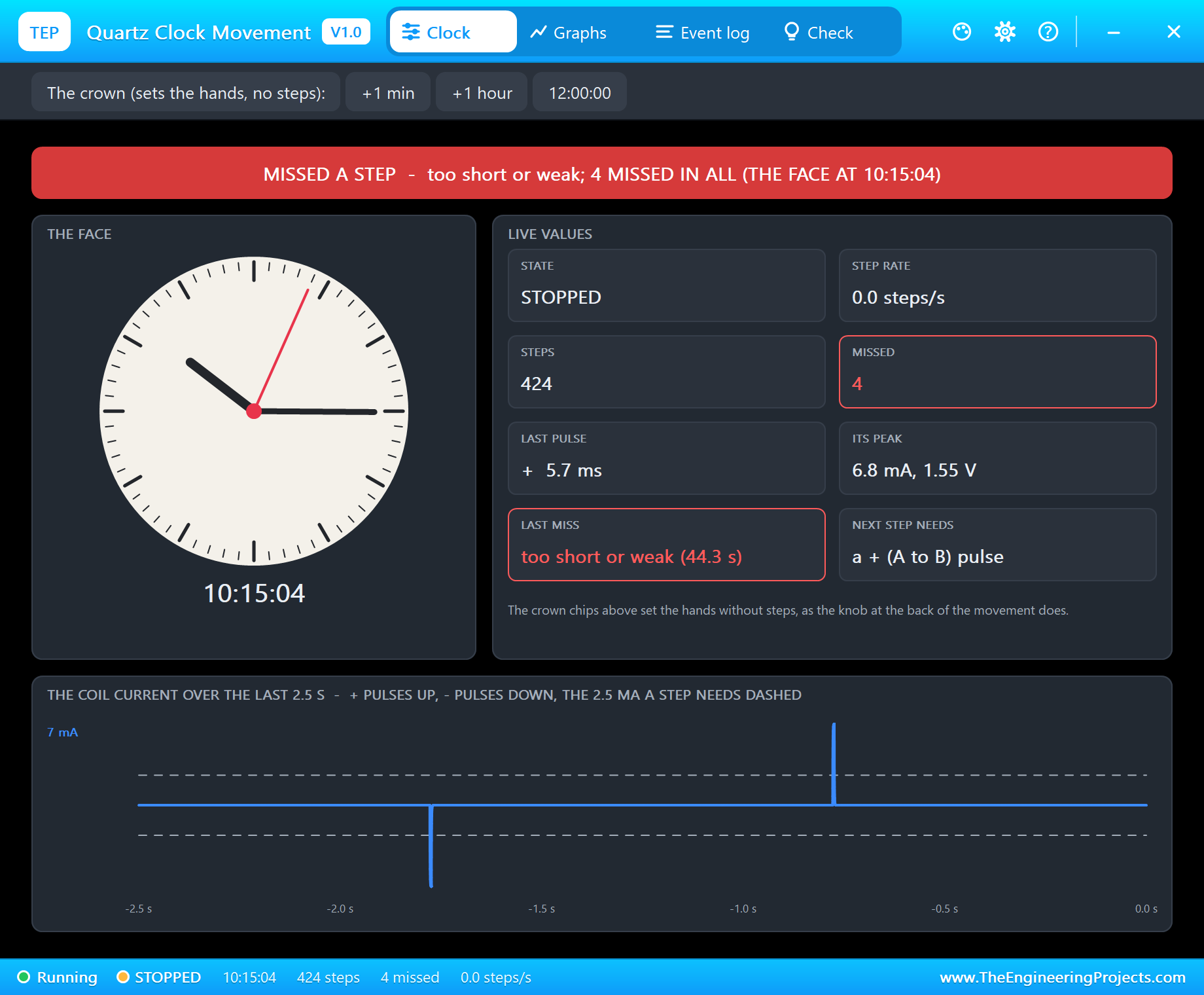
With width 4 the pin is HIGH for 4 ms, which with the coil's decay makes a 5.7 ms pulse. That is less than the 8 ms of full current the rotor needs, so every pulse is missed: "MISSED - 5.7 ms, 6.8 mA: too short or weak (a step needs 2.5 mA for 8 ms)". After 2.5 s without a step the state becomes STOPPED. Four pulses were lost before width 30 brought the ticking back. The same miss happens with a strong enough pulse that is too weak - a series resistor of a few kohm keeps the current under 2.5 mA.
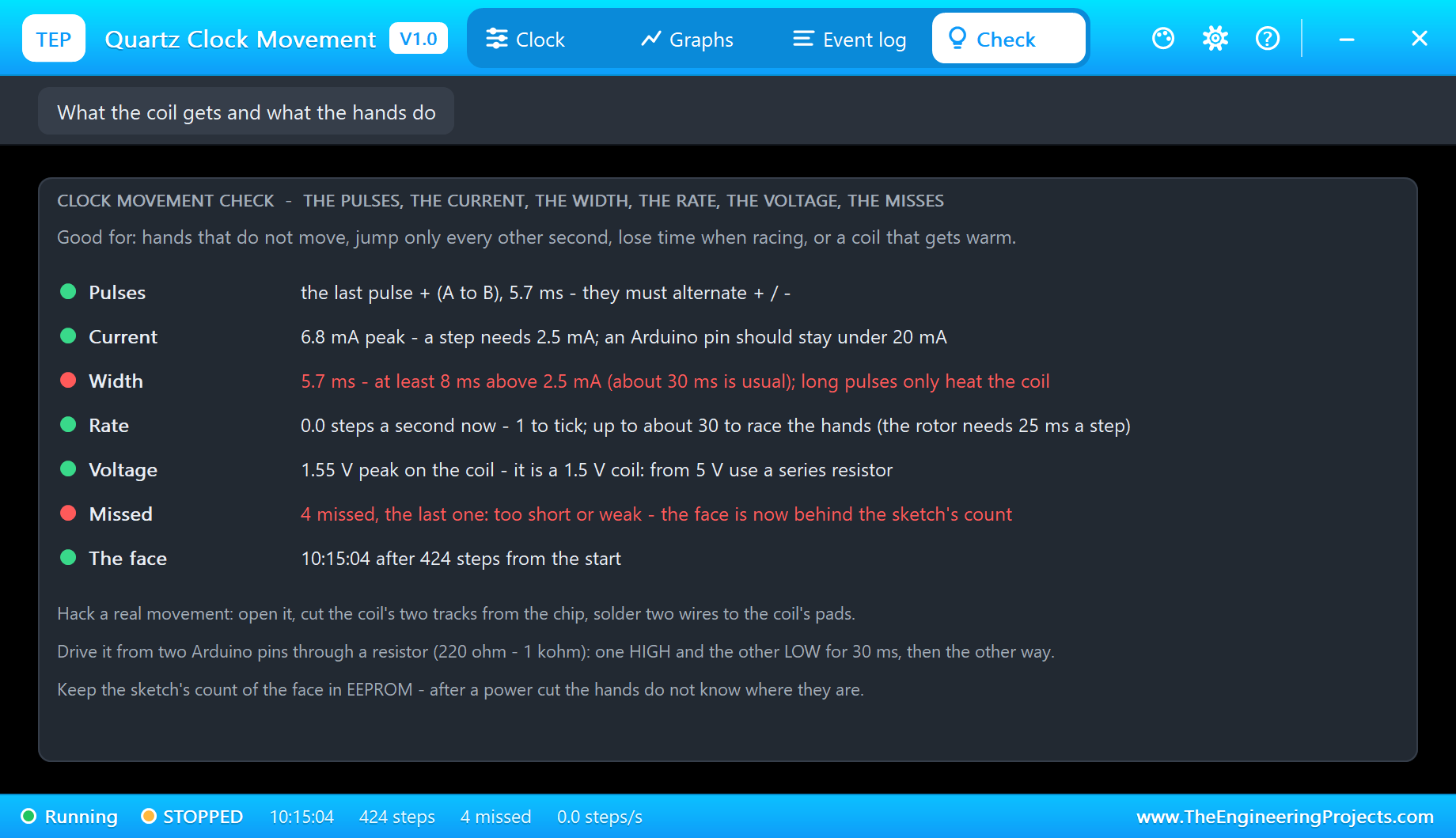
The Check page goes through the pulses, the current, the width, the rate, the voltage and the misses, and says what to change: here the width is red because the pulses are under 8 ms, and the misses are red because the face is now behind the sketch's count. The third way to lose a step is to race too fast: a pulse that comes within 33 ms of the last step finds the rotor still turning and is missed as "too early".
Note also a subtle effect: after an odd number of missed pulses, the sketch's idea of the next polarity and the rotor's are out of step, and the next good pulse is missed too ("same polarity again"). That is why a real clock that once lost a pulse can suddenly tick only every other second, and why the polarity matters more than the timing.
Stop, Run and the Sketch's Own Count
stop
Stopped - no pulses
run
Ticking - a pulse a second
time
The sketch's count: 10:15:16 (ticking)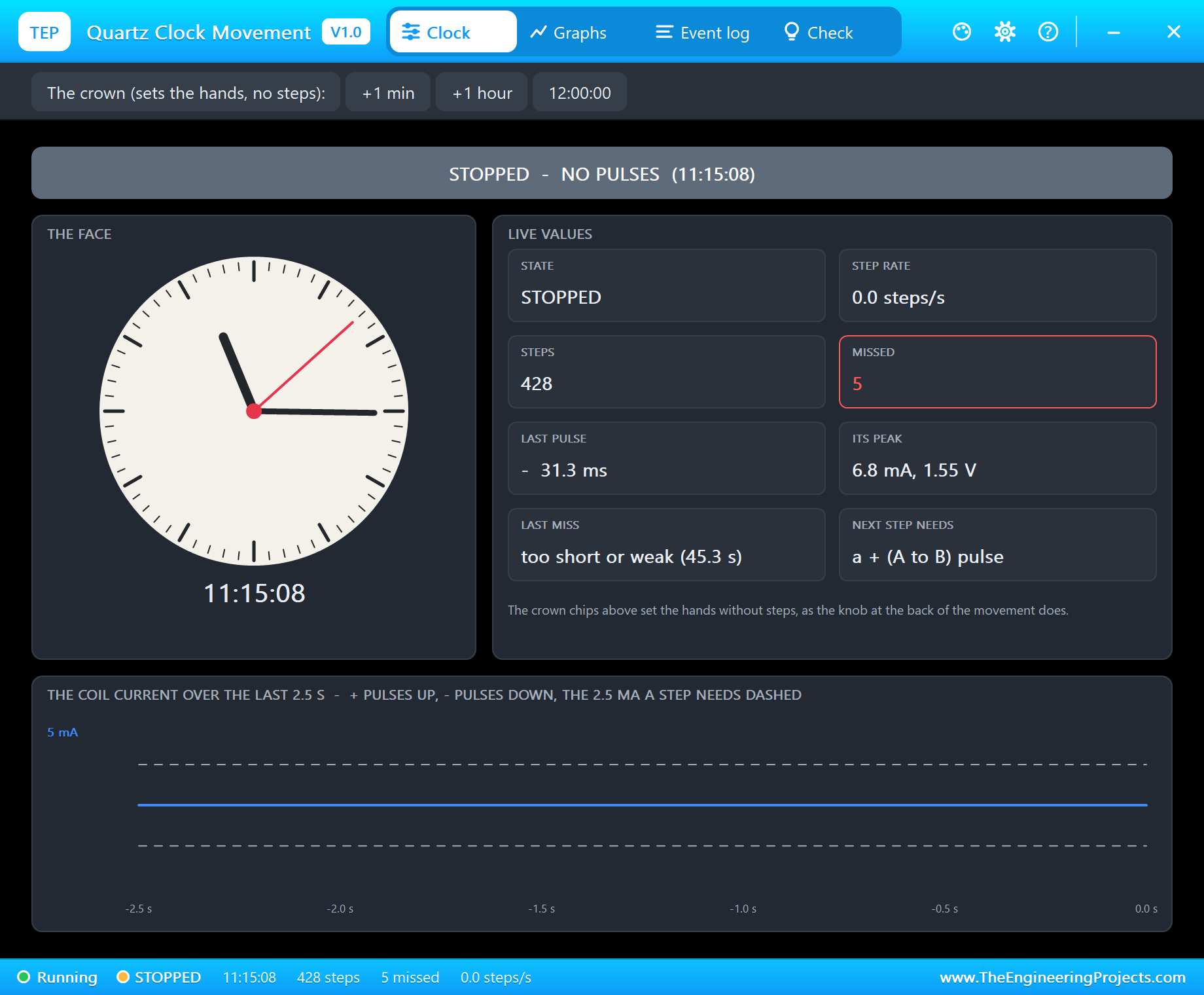
stop ends the pulses, and after 2.5 s the movement reports STOPPED; run starts the ticking again. time prints what the sketch believes the hands show: 10:15:16. Now look at the face.
The Crown, and Why Clocks Need a Sync
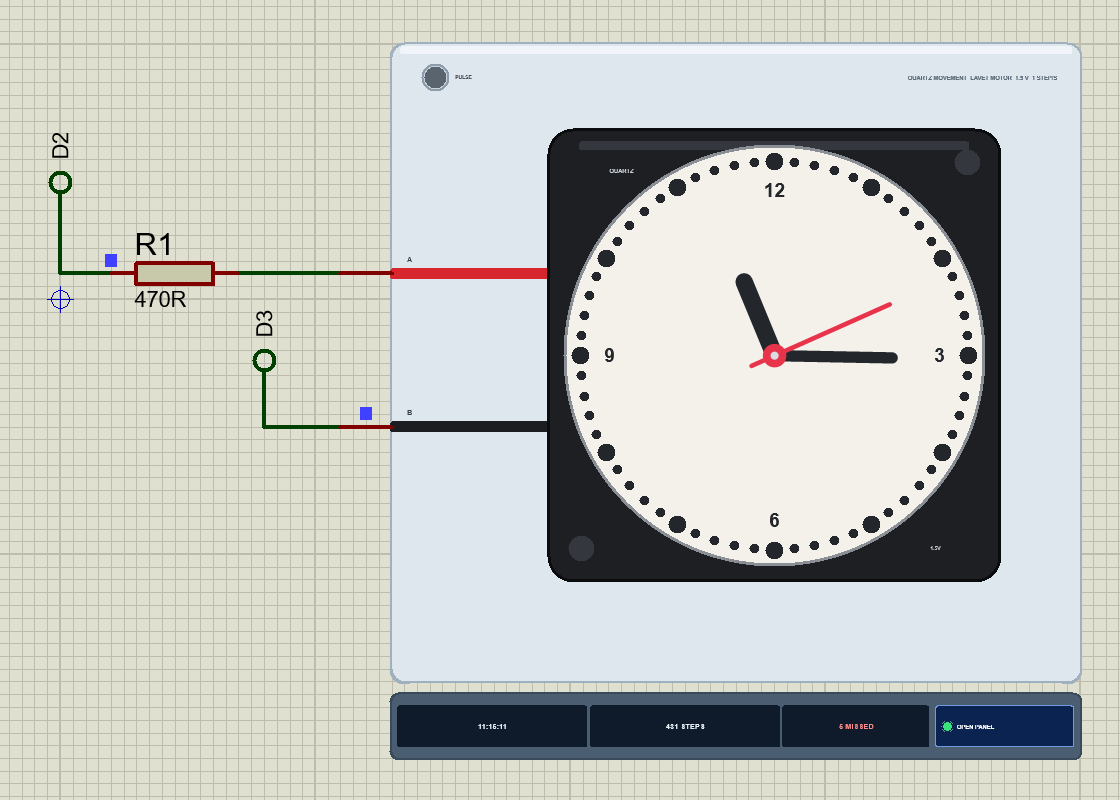
Earlier in the run we clicked the pop-up's +1 hour crown chip, which turned the hands from 10:15:07 to 11:15:07 without a single step - just like the knob at the back of a real movement. The face now shows 11:15:11, while the sketch still believes 10:15:16: one hour that it never knew about, and five seconds lost to the five missed pulses. A real hacked clock has exactly this problem, because nothing tells the Arduino where the hands really are. The answer is to keep the count in EEPROM, to set the hands once by hand, and to tell the sketch with sync 11:15 - or to fit a small sensor that sees the hour hand pass 12.
Graphs, Log and Check
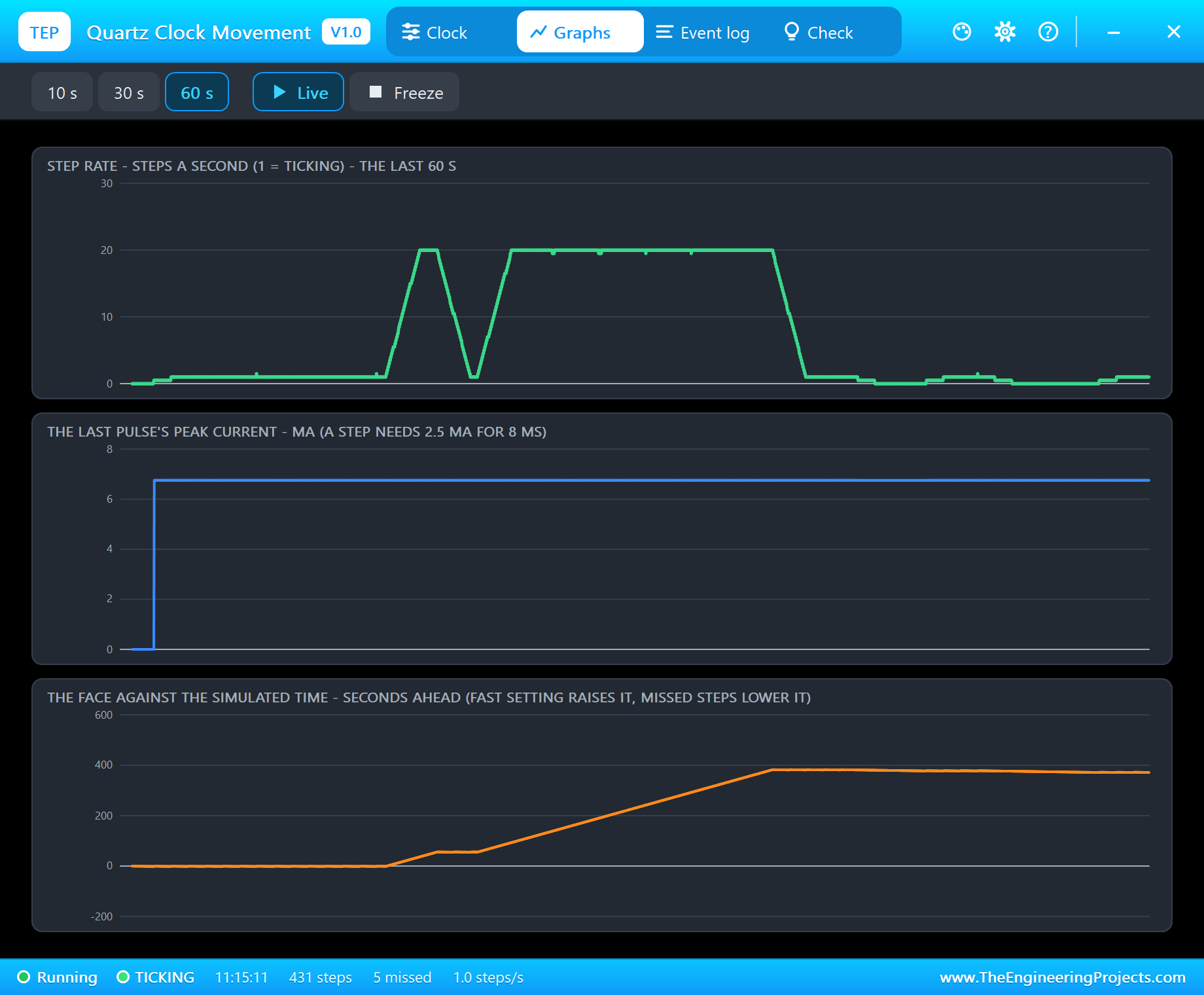
Graphs draws the step rate, each pulse's peak current and the face against the simulated time, over the last 10, 30 or 60 s. In this run the rate sits at 1 while ticking, climbs to 20 twice for fast 60 and set 10:15, and drops to 0 for the short pulses and the stop. The bottom graph is the clock's accuracy: it rises while the hands race ahead of real time, and every missed step pulls it down one second. The crown is not counted here - it moves the start, not the steps.
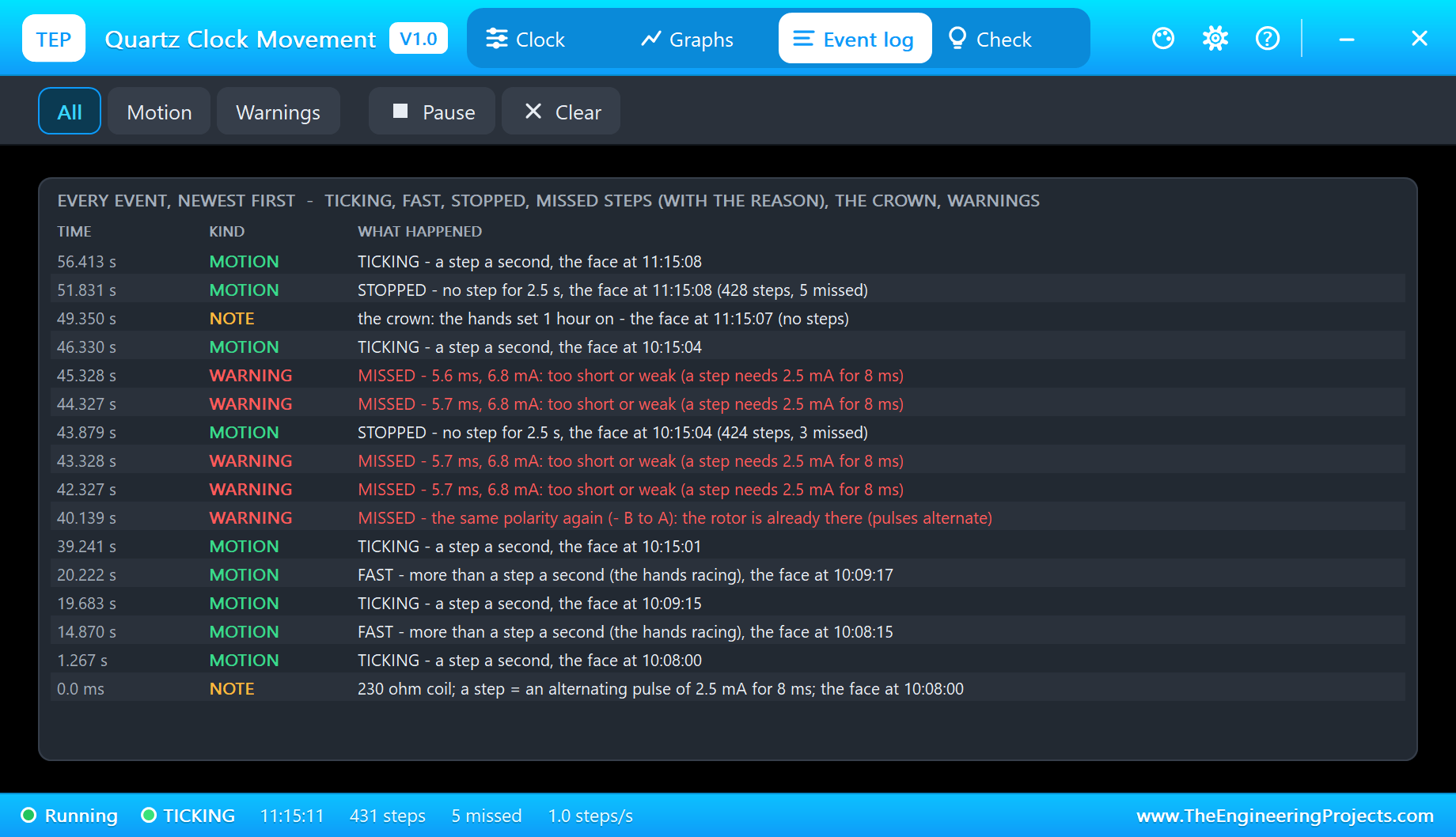
The Event log keeps every change of state with the face's time, every missed step with its reason and the numbers behind it, the crown, and the warnings - a coil straight on 5 V, or a coil left on for half a second. Filters show the motion or the warnings alone, and Pause freezes the list while you read it.
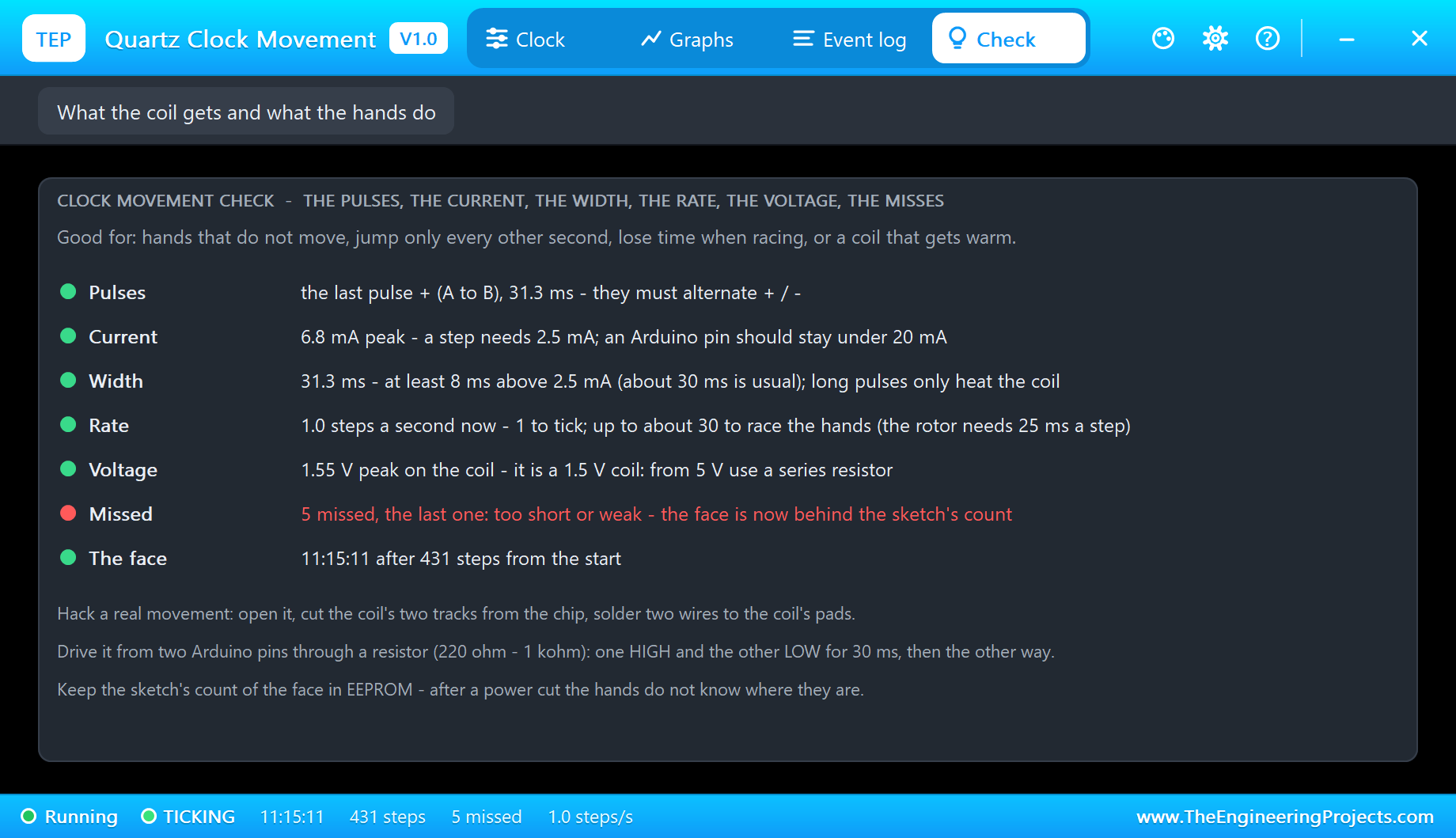
At the end the Check page is green except for the misses, and its tips sum up the real build: how to hack a movement, how to drive it from two pins through a resistor, and why the count belongs in EEPROM.
How the Model Works
The coil is in the circuit as its backward-Euler companion over the analog step - a conductance and a source - so the resistor and the pins see a real inductive load: the current rises with a time constant of about 0.4 ms (0.25 H over the coil's 230 ohm plus R1), and the terminals show a short kick of about 3 V at each switch. The analog step is held to 0.5 ms while a current flows and for 50 ms after, and to 2 ms at rest. The model watches only the current: the over-voltage warning uses the coil's own drop, current times 230 ohm, so the inductive kick at each switch never sets it off.
A pulse starts when the current passes 0.5 mA and ends when it falls back. A step needs 8 ms of at least 2.5 mA in one direction; then the polarity is compared with the last step and the time with the rotor's swing. A good pulse adds a second to the face and starts the second hand's 25 ms swing; a bad one is counted as missed with its reason. The run state comes from the steps of the last 2 s, and the face is simply START plus the steps on a 12-hour dial, plus whatever the crown added.
We checked the model on a PC with 37 automatic tests: from 5 V through 470 ohm the coil takes 7.1 mA at 1.6 V; ten alternating pulses give ten steps and move the face ten seconds; the same polarity twice, a 4 ms pulse and a 1.7 mA pulse are missed; 12 ms pulses every 50 ms give 20 steps a second, but every 20 ms the rotor is still turning and pulses are lost; the warnings fire once; the start time is kept; and every event text fits the log. The demo project is read back from disk with 33 checks.
If you like small motors driven straight from Arduino pins, our X27.168 Speedometer Gauge Library for Proteus is a close cousin: a tiny stepper in a car gauge, also running without a driver. And the Micro Linear Stepper Motor Library for Proteus shows a two-phase stepper turning a lead screw.
Troubleshooting
- The hands do not move (STOPPED): no pulses - A or B not connected, the sketch stopped, or both pins HIGH.
- They move only every other second: the pulses do not alternate - swap the pins' roles at each pulse. The Check page says "two pulses of the same polarity".
- Every step missed, too short or weak: a pulse under 8 ms, or under 2.5 mA (too big a series resistor).
- The face falls behind when racing: the pulses come faster than about 30 a second.
- The over-voltage warning: the coil is straight on 5 V - add the series resistor.
- No hands, no UNO or no monitor:
TEPQCLOCK.DLLorTEPARDUINO.DLLis missing from MODELS and the project folder; a closed monitor opens again with a click on the UNO's USB port. - No pop-up: click OPEN PANEL on the strip, or turn "Open the panel at Run" back on in its Settings.
Things to Know Before Hacking a Real Movement
- Open it carefully: the case clips apart; lift out the small board, cut the two tracks from the chip to the coil (or take the chip out) and solder two thin wires to the coil's pads. Put it back without the AA cell.
- Use a resistor: 470R - 1k from 5 V, about 220R from 3.3 V. An Arduino pin gives the few mA easily.
- Find its pulse width: most movements step with 20 - 50 ms pulses; if yours misses, try width 50.
- Only tick movements: silent "sweep" movements drive their motor with fast pulses all the time - this model is a tick movement.
- Remember the hands: keep the count in EEPROM, because after a power cut the hands do not know where they are.
Limitations of the Simulation
- Not modelled: the rotor's back-EMF and its bounce, a load on the hands, the gear backlash and sweep movements.
- The plate, the PULSE LED, the rating line and the strip are TEP additions.
- The model is our own, written from the typical data of quartz clock movements and their Lavet stepping motors; this library is not made or endorsed by any clock maker, Arduino or Labcenter.
- Licences: the demo HEX contains the Arduino AVR core 1.8.6 (LGPL); the sketch is included and the README gives the source link.
- Tested in Proteus 8.5 in October 2026 with the demo as shipped: ticking, fast 60, set 10:15, wrong, width 4, the crown, stop and run, time, and all four pages of the pop-up. Proteus 7 is not supported.
So, that was all about the Quartz Clock Movement Library for Proteus V1.0. I hope it helps you build the clock you have in mind - one that sets itself, one that runs backwards, or one that ticks only when you tell it to - and that it saves you a few lost seconds on the real movement. If you have any questions, ask in the comments and I will help you out. Till the next tutorial, take care and have fun!

Comments
0