


TB6600 Stepper Motor Driver Library for Proteus V1.0 (Arduino)


Hello friends, I hope you all are doing great. Today, I am going to share the new TB6600 Stepper Motor Driver Library for Proteus V1.0. The TB6600 is the black box with a heat sink that you find next to almost every hobby CNC router, laser cutter and large 3D printer. It drives a bipolar stepper motor with up to 3.5 A per coil from a 9 - 42 V supply, its DIP switches set the microsteps and the current, and its inputs are optocoupled, so an Arduino drives it with three wires: PUL, DIR and ENA.
TB6600 Stepper Motor Driver Library for Proteus
Latest version: V1.0 (November 2026, this tutorial)
Helping Tools
- Serial Monitor Advance: a serial terminal window for the UART of your board
- Serial Monitor Expert: the serial monitor with extra debugging tools
- LCD Library for Proteus V3.0: 16x2, 20x4 and I2C LCDs to show your readings
This library brings the TB6600 module into Proteus. It reads PUL, DIR and ENA through its optocouplers in either wiring, counts every pulse in its translator, drives the two coils toward their microstep currents as a chopper does, and tells you what it sees: the step rate, the coil current vector, the supply current, and the pulse timing - whether your pulses are long enough and your DIR changes early enough. A pop-up window shows the DIP switches and lets you flip them while the simulation runs. The demo runs on our Arduino UNO V4.0 with our NEMA 23 motor on 24 V.
NOTICE: most stepper problems are driver problems - a pulse too short, a DIR that changes too late, DIP switches that do not match the sketch, an input wired the wrong way round. So we built a driver that checks all of them while it runs and says what it found. Our team put a lot of effort into it. Your feedback is the fuel that keeps us going, so please tell us what you think in the comments below or in the Motor Driver board of our forum. And if our free libraries help you, you can buy us a coffee. So, let's get started with the TB6600 Stepper Motor Driver Library for Proteus V1.0:
What is the TB6600 Stepper Motor Driver?
The TB6600 stepper driver is a module built around a TB6600HG chip: two full H-bridges, one for each coil of a bipolar stepper, a translator that turns step pulses into coil currents, and a chopper that holds those currents at the value you set. The module wraps it in an aluminium housing that doubles as a heat sink, adds optocouplers on the control inputs and a six-way DIP switch for the settings, and brings everything out on two green screw terminal blocks.
| TB6600 stepper driver module (the model) | |
|---|---|
| Supply | 9 - 42 V DC on VCC and GND (24 V is the usual choice) |
| Output current | 0.5 - 3.5 A per coil in eight settings (0.7 - 4.0 A peak) |
| Microsteps | full, 1/2, 1/4, 1/8, 1/16 and 1/32 - up to 6400 pulses a turn of a 1.8 degree motor |
| Inputs | PUL, DIR and ENA, each an optocoupler with a + and a - terminal, 5 V signals |
| Timing | PUL at least 2.5 us HIGH and LOW; DIR at least 5 us before the pulse |
| Motor | a bipolar stepper on A+ A- and B+ B-, usually a NEMA 23 or a large NEMA 17 |
Optocoupled Inputs: Common Cathode or Common Anode
Each of the three inputs is the LED of an optocoupler between a + terminal and a - terminal. The input is ON when current flows through that LED, from + to -. There are two ways to wire it. In common cathode all the - terminals go to GND and the Arduino drives the + terminals: a HIGH pin is ON. In common anode all the + terminals go to 5V and the Arduino drives the - terminals: a LOW pin is ON. Both work; the sketch just has to know which. Our model works out the wiring of each input by itself and shows it on its Check page.
PUL, DIR and ENA
PUL is the step input: every pulse moves the translator one microstep. DIR sets the direction of the next pulses. ENA is the enable input with an inverted sense: when ENA is ON, the outputs are switched off and the motor is free. Left unconnected, ENA is OFF and the driver stays enabled, which is why many projects never wire it. Pulses that arrive while the driver is disabled still move the translator - the shaft just does not follow.
The DIP Switches
The six switches set the two things a driver must know about its motor. SW1 - SW3 choose the microsteps; SW4 - SW6 choose the current, which should be the rated current of the motor. The module's label prints both tables:
| Microsteps | SW1 SW2 SW3 | Pulses a turn (1.8 degree motor) |
|---|---|---|
| Full | ON ON OFF | 200 |
| 1/2 | ON OFF ON | 400 |
| 1/4 | ON OFF OFF | 800 |
| 1/8 | OFF ON OFF | 1600 |
| 1/16 | OFF OFF ON | 3200 |
| 1/32 | OFF OFF OFF | 6400 |
| Current | Peak | SW4 SW5 SW6 |
|---|---|---|
| 0.5 A | 0.7 A | ON ON ON |
| 1.0 A | 1.2 A | ON OFF ON |
| 1.5 A | 1.7 A | ON ON OFF |
| 2.0 A | 2.2 A | ON OFF OFF |
| 2.5 A | 2.7 A | OFF ON ON |
| 2.8 A | 2.9 A | OFF OFF ON |
| 3.0 A | 3.2 A | OFF ON OFF |
| 3.5 A | 4.0 A | OFF OFF OFF |
A Current Chopper
A stepper coil has a resistance of about an ohm, so a steady 24 V across it would burn it. The TB6600 instead switches the full supply across the coil until the current reaches its target, then lets it decay, thousands of times a second. The current rises fast, at about the supply voltage over the coil's inductance, so the motor keeps its torque to higher speeds; and the supply gives far less current than the coils carry, because the driver works like a switching regulator. In microstep mode the two targets are the cosine and sine of the microstep angle times the peak current, which turns the magnetic field smoothly.
What's New in TB6600 Stepper Motor Driver Library for Proteus V1.0
- The TB6600 module: PUL, DIR and ENA with their optocouplers, VCC and GND, the outputs A+ A- B+ B-.
- Either wiring: common cathode or common anode, found by the model for each input.
- The DIP switches: full to 1/32 microsteps and eight current settings, as properties and as chips on the pop-up while it runs.
- A chopper on the outputs: each coil driven toward its microstep current as fast as the supply allows, the supply current from the power the coils take.
- Timing checks: the shortest PUL pulse against 2.5 us, the DIR set-up against 5 us, pulses while disabled.
- A pop-up window with four pages - Driver, Graphs, Event log and Check - and the coil current vector drawn live.
- An A3 demo on our Arduino UNO V4.0 with our NEMA 23 motor on 24 V and a potentiometer.
The TB6600 in Proteus
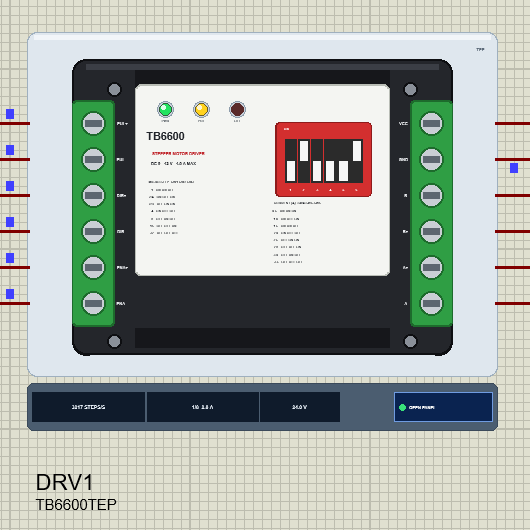
Search TB6600 in Pick Devices; the device TB6600TEP is in TEPTB6600.LIB (category Electromechanical, Motor Drivers) and its model is TEPTB6600.DLL. It is drawn from above: the black aluminium housing with its cooling grooves and mounting holes, the white label, the red DIP switch with its two tables, and the two green terminal blocks - the signal block on the left and the power block on the right. At Run the DIP sliders move to the settings.
Three LEDs sit on the label: PWR (green) while the supply is on, PUL (yellow) while pulses arrive and OFF (red) while ENA switches the outputs off. Under the plate the strip shows the step rate, the setting and VCC, and the OPEN PANEL button. The plate, the LEDs and the strip are TEP additions; the real module has none of them.
The Pins and the Properties
| Pin | What it is |
|---|---|
| PUL+ / PUL- | the step input (an optocoupler): a pulse = one microstep |
| DIR+ / DIR- | the direction input (an optocoupler) |
| ENA+ / ENA- | the enable input (an optocoupler): ON = the outputs off |
| VCC / GND | the motor supply, 9 - 42 V |
| A+ / A- | coil A of the motor |
| B+ / B- | coil B of the motor |
| Property | Default | What it does |
|---|---|---|
| MICROSTEP | 8 | 1, 2, 4, 8, 16 or 32 - the DIP switches SW1 - SW3 |
| CURRENT | 2.8 | 0.5, 1.0, 1.5, 2.0, 2.5, 2.8, 3.0 or 3.5 A - the DIP switches SW4 - SW6 |
Download TB6600 Stepper Motor Driver Library for Proteus
Click the button below to download TB6600-Stepper-Motor-Driver-Library-for-Proteus-v1.0.zip (about 1.2 MB, without the source code of the models):
TB6600 Stepper Motor Driver Library for Proteus V1.0- README.txt: installation, the demo, the wiring, the DIP tables, real hardware, troubleshooting and the limits.
- Proteus Library Files:
TEPTB6600.LIBandArduinoV4TEP.LIBfrom our Arduino Library for Proteus V4.0. - Proteus Model Files:
TEPTB6600.DLLandTEPARDUINO.DLL. - Proteus Simulation:
TB6600-Stepper-Driver-NEMA23-ArduinoUnoV4.pdsprj,NEMA23_TB6600_Demo.hexand copies of the two DLLs. - Arduino Code:
NEMA23_TB6600_Demo.ino(no library needed).
Important: the NEMA 23 motor of the demo is not in this package. It is our separate NEMA 23 Stepper Motor Library for Proteus: download it from its own article and install its TEPNEMA23.LIB and TEPNEMA23.DLL first, then this library.
No Proteus yet? Read How to Download and Install Proteus 7 and 8. New to libraries? Follow How to Install a New Library in Proteus.
How to Install TB6600 Stepper Motor Driver Library for Proteus
- Close Proteus and extract the whole zip file, for example to your Desktop.
- Copy
TEPTB6600.LIBandArduinoV4TEP.LIBfrom Proteus Library Files into the LIBRARY folder of Proteus (usuallyC:\Program Files (x86)\Labcenter Electronics\Proteus 8 Professional\LIBRARY). - Copy
TEPTB6600.DLLandTEPARDUINO.DLLfrom Proteus Model Files into the MODELS folder. The two Arduino files are the ones of our Arduino Library V4.0; if you have it, they are the same. - For the demo, install our NEMA 23 library the same way:
TEPNEMA23.LIBinto LIBRARY andTEPNEMA23.DLLinto MODELS. - Delete
TEPTB6600.IDXfrom the LIBRARY folder if it is there. - Start Proteus, press P and search for TB6600.
Tip: keep the Proteus Simulation folder together, because the project needs its .hex file and the DLLs beside it. The library is tested in Proteus 8.5; Proteus 7 is not supported.
The Demo Circuit
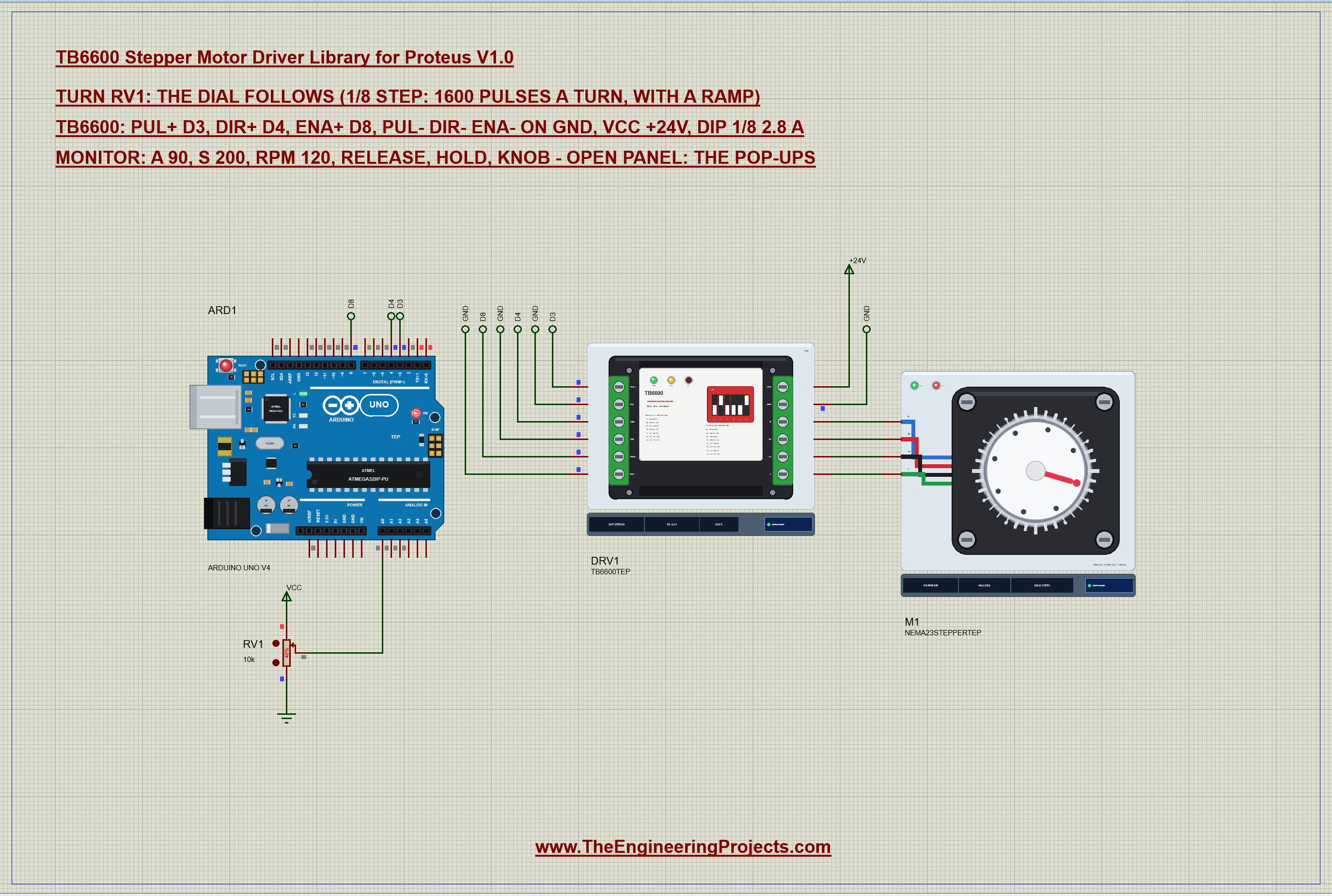
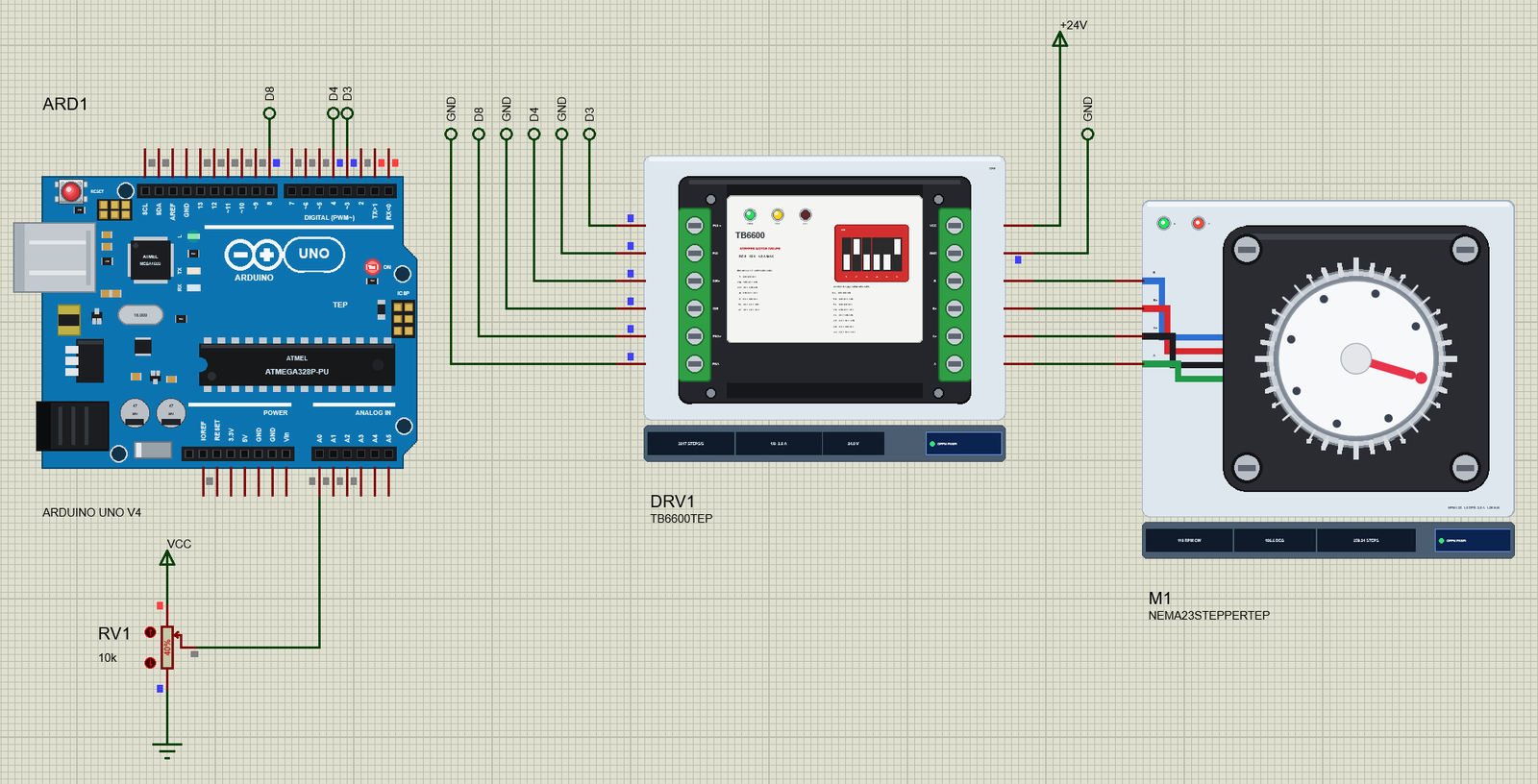
Open TB6600-Stepper-Driver-NEMA23-ArduinoUnoV4.pdsprj. ARD1 is an Arduino UNO V4.0 from our Arduino UNO Library for Proteus V4.0, running NEMA23_TB6600_Demo.hex with its serial monitor built in. DRV1 is the TB6600, on a +24V power terminal, at 1/8 microsteps and 2.8 A. M1 is the NEMA 23 from our separate NEMA 23 library, its coils straight on the driver's outputs. RV1 is a 10k potentiometer on A0: the motor's dial follows it from 0 to 360 degrees.
| TB6600 | Arduino UNO / motor | Note |
|---|---|---|
| PUL+ | D3 | one pulse = one microstep |
| DIR+ | D4 | the direction |
| ENA+ | D8 | LOW = the driver on |
| PUL- DIR- ENA- | GND | common cathode |
| VCC, GND | +24V, GND | the motor supply, 9 - 42 V |
| A+ / A- | black / green | coil A of the NEMA 23 |
| B+ / B- | red / blue | coil B of the NEMA 23 |
In Proteus each control wire reaches the UNO through a net label, and each - terminal has its own GND label, so the staircase of wires on the left of the driver stays readable. The motor's four wires run straight to the power block in neat rows, and the +24V terminal sits above the VCC pin.
The Arduino Code
The demo needs no library: it makes the PUL pulses itself, with an acceleration ramp. New to Arduino? Start with Arduino Tutorial for Beginners and Introduction to Arduino UNO; our older Stepper Motor Speed Control using Arduino tutorial explains stepper speed control too. The pins come first, and the microsteps must match the DIP switches:
const byte PUL = 3, DIR = 4, ENA = 8, POT = A0;
const int MICROSTEPS = 8;                     // as set on the TB6600's DIP switches (SW1 - SW3)
const int FULL_STEPS = 200;                   // per turn (1.8 deg)
The top speed and the acceleration are two numbers:
float rpm = 120, accel = 3.0; // top speed, acceleration in turns/s^2Four small helpers turn the microsteps into pulses per turn, a top speed, an acceleration and an angle:
long perTurn() { return (long)FULL_STEPS * MICROSTEPS; }
float maxSpeed() { return rpm * perTurn() / 60.0; }
float stepsPerS2() { return accel * perTurn(); }
float toDeg(long p) { return p * 360.0 / perTurn(); }
In setup() the three pins become outputs and ENA+ goes LOW. In common cathode a LOW + pin leaves the optocoupler dark, ENA is OFF, and the TB6600 is enabled:
void setup() {
  pinMode(PUL, OUTPUT); pinMode(DIR, OUTPUT); pinMode(ENA, OUTPUT);
  digitalWrite(ENA, LOW);                     // ENA+ LOW: the optocoupler off, the TB6600 enabled
While it follows the knob, the sketch reads A0 every 50 ms and maps it to a target between 0 and one turn less a microstep:
    int raw = analogRead(POT);
    if (abs(raw - lastPot) > 4) {
      lastPot = raw;
      target = map(raw, 0, 1023, 0, perTurn() - 1);
The ramp speeds up by the acceleration and slows down in time to stop on the target:
  // the ramp: speed up by accel, slow down in time to stop on the target
  float a = stepsPerS2();
  if (!moving) { moving = true; speed = 0; nextStep = now; }
  float stopDist = speed * speed / (2 * a);
  if (abs(togo) <= stopDist + 1) speed = max(sqrt(max(speed * speed - 2 * a, 0.0f)), sqrt(2 * a) * 0.5f);
  else speed = min(sqrt(speed * speed + 2 * a), maxSpeed());
And this is the part the TB6600 cares about. DIR must settle at least 5 us before the pulse that uses it, so after a change of direction the sketch waits 10 us. The pulse itself must be at least 2.5 us long, so the sketch holds PUL HIGH for 5 us:
  int d = togo > 0 ? LOW : HIGH;              // DIR optocoupler off = forward (the dial clockwise)
  if (d != dirNow) { digitalWrite(DIR, d); dirNow = d; delayMicroseconds(10); }   // the TB6600 wants DIR 5 us before PUL
  digitalWrite(PUL, HIGH); delayMicroseconds(5); digitalWrite(PUL, LOW);          // at least 2.5 us
  position += togo > 0 ? 1 : -1;
  nextStep += (unsigned long)(1e6 / speed);
release and hold switch ENA. ENA+ HIGH lights the ENA optocoupler, and the TB6600 switches its outputs off:
  if (!strcmp(s, "release")) { mode = FIXED; target = position; digitalWrite(ENA, HIGH); enabled = false; Serial.println(F("Released: the TB6600 is off (ENA+ HIGH)")); return; }
  if (!strcmp(s, "hold")) { digitalWrite(ENA, LOW); enabled = true; Serial.println(F("Holding: the TB6600 is on (ENA+ LOW)")); return; }
The HEX file is in the package. To change the sketch, open it in the Arduino IDE and export the compiled binary, as in How to get the HEX file from Arduino. It needs 9,012 bytes of flash (28 % of the UNO) and 303 bytes of RAM. The AccelStepper library drives a TB6600 the same way in its DRIVER mode.
Running the Demo
Press Run. The UNO's serial monitor and the two pop-ups - the driver's and the motor's - open over the schematic; move them aside. The TB6600's log starts with the supply and the DIP switches: "POWER ON - VCC 24.0 V", "MICROSTEP 1/8 - SW1 SW2 SW3 = OFF ON OFF" and "CURRENT 2.8 A (2.9 A peak) - SW4 SW5 SW6 = OFF OFF ON". RV1 starts at 40 %:
NEMA 23 + TB6600 demo - The Engineering Projects
TB6600: PUL+ D3, DIR+ D4, ENA+ D8 (PUL- DIR- ENA- on GND); 1/8 step: 1600 pulses a turn. The dial follows the pot on A0.
Commands: a 90 | s 200 | rpm 120 | release | hold | knob | help
Pot 410 -> target 640 steps (1/8) = 144.0 deg
At 144.0 deg - holding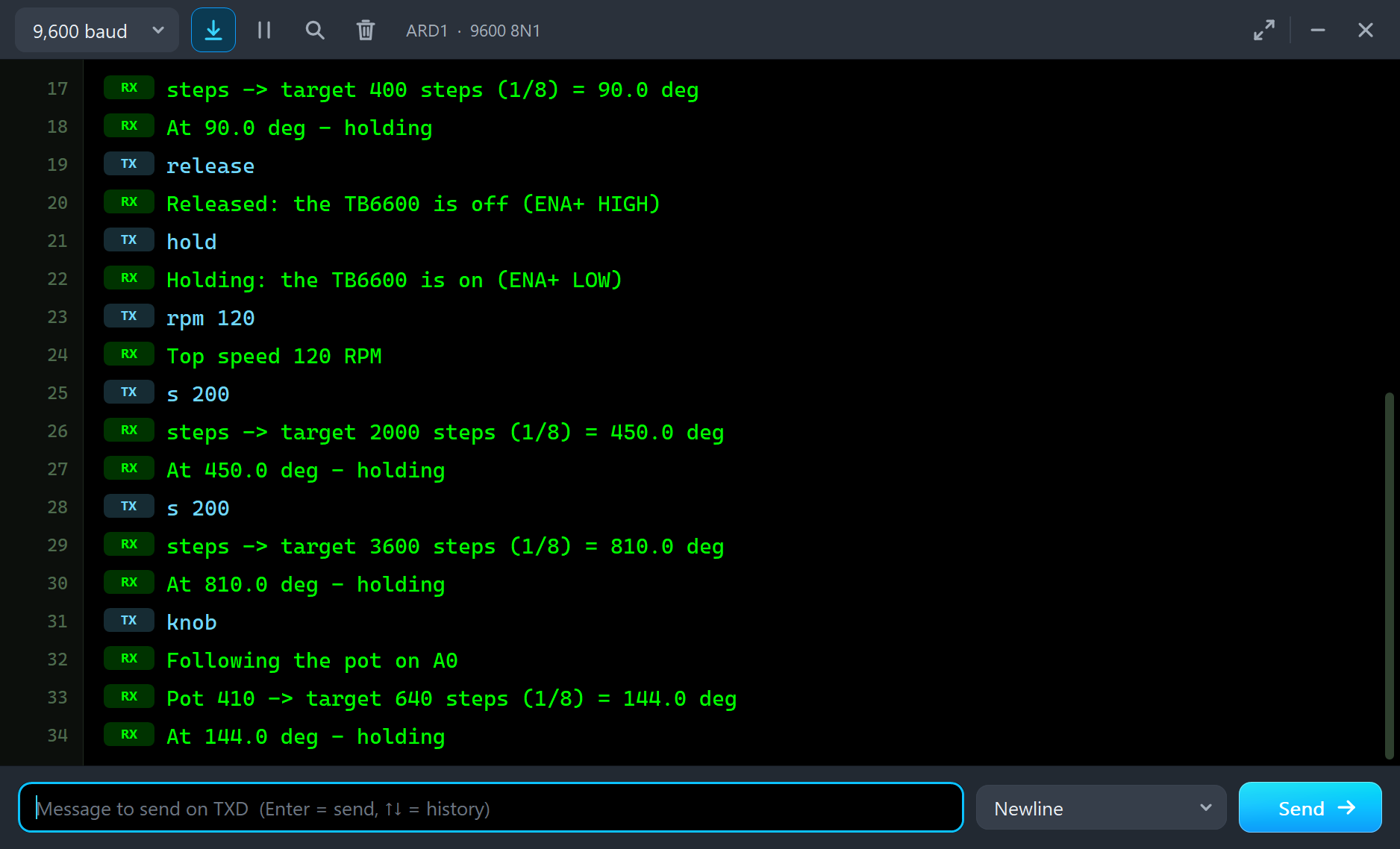
The driver receives 640 pulses, the motor turns to 144 degrees and holds. Type a few moves into the monitor and press Send after each:
a 90
angle -> target 400 steps (1/8) = 90.0 deg
At 90.0 deg - holding
rpm 120
Top speed 120 RPM
s 400
steps -> target 3600 steps (1/8) = 810.0 deg
At 810.0 deg - holding
rpm 300
Top speed 300 RPM
s -400
steps -> target 400 steps (1/8) = 90.0 deg
At 90.0 deg - holding| Type | What it does | What the TB6600 saw |
|---|---|---|
| a 90 | go to that angle and stay | the pulses back to 400 steps |
| s 200 | 200 FULL steps from here (minus goes back); 200 = one turn | s 400: 3200 pulses at about 3200 a second |
| rpm 120 | the top speed, 1 - 600 RPM | 120 RPM; with rpm 300 a short move peaked at 3907 steps/s (146 RPM) |
| release / hold | ENA+ HIGH / LOW | DISABLED, 0 A / HOLDING again |
| knob | follow the pot on A0 again | the pulses to 640 steps |
| help | the list of commands |
The Pop-Up Window
At Run the driver opens TEP TB6600 Stepper Driver, a window in the look of our TEP Serial Monitor Advance for Proteus. It has four tabs - Driver, Graphs, Event log and Check - plus Settings and Help behind the gear and question mark icons. If you close it, the OPEN PANEL button on the strip brings it back.
Driver
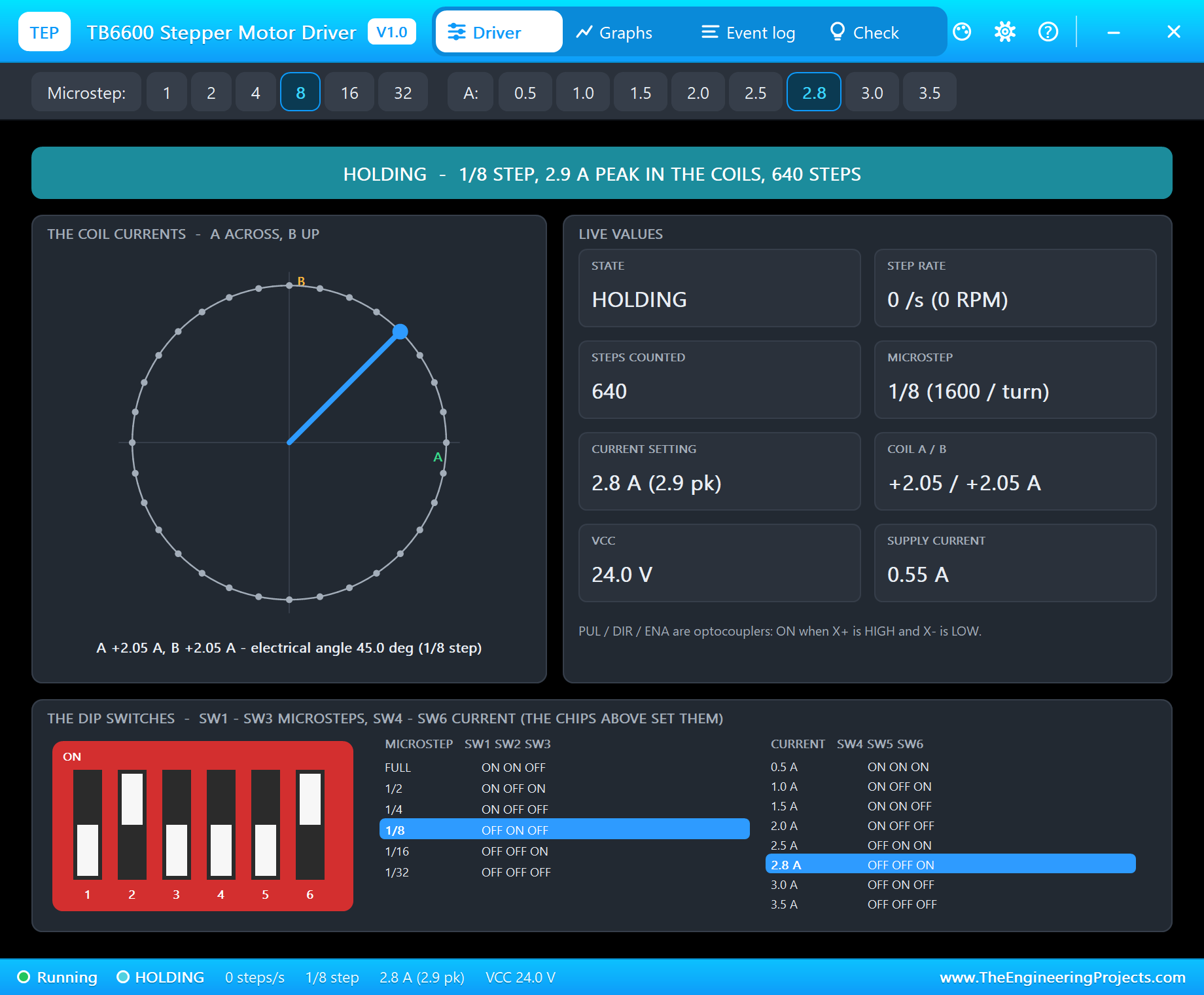
The banner gives the state: RUNNING with the step rate, the RPM of a 200-step motor, the microsteps, the peak current and DIR; HOLDING; DISABLED; or NO POWER. The circle draws the coil current vector - coil A across, coil B up. The live values are the state, the step rate, the steps counted, the microsteps, the current setting, the two coil currents, VCC and the current from the supply. At the bottom the DIP switch card shows the six sliders and highlights the active rows of both tables.
Holding at 640 steps, the electrical angle is 45 degrees and both coils carry +2.05 A: the 2.9 A peak times the cosine and sine of 45 degrees. The supply gives only 0.55 A at 24 V for it, because the chopper turns a high voltage and a small current into a low voltage and a big one.
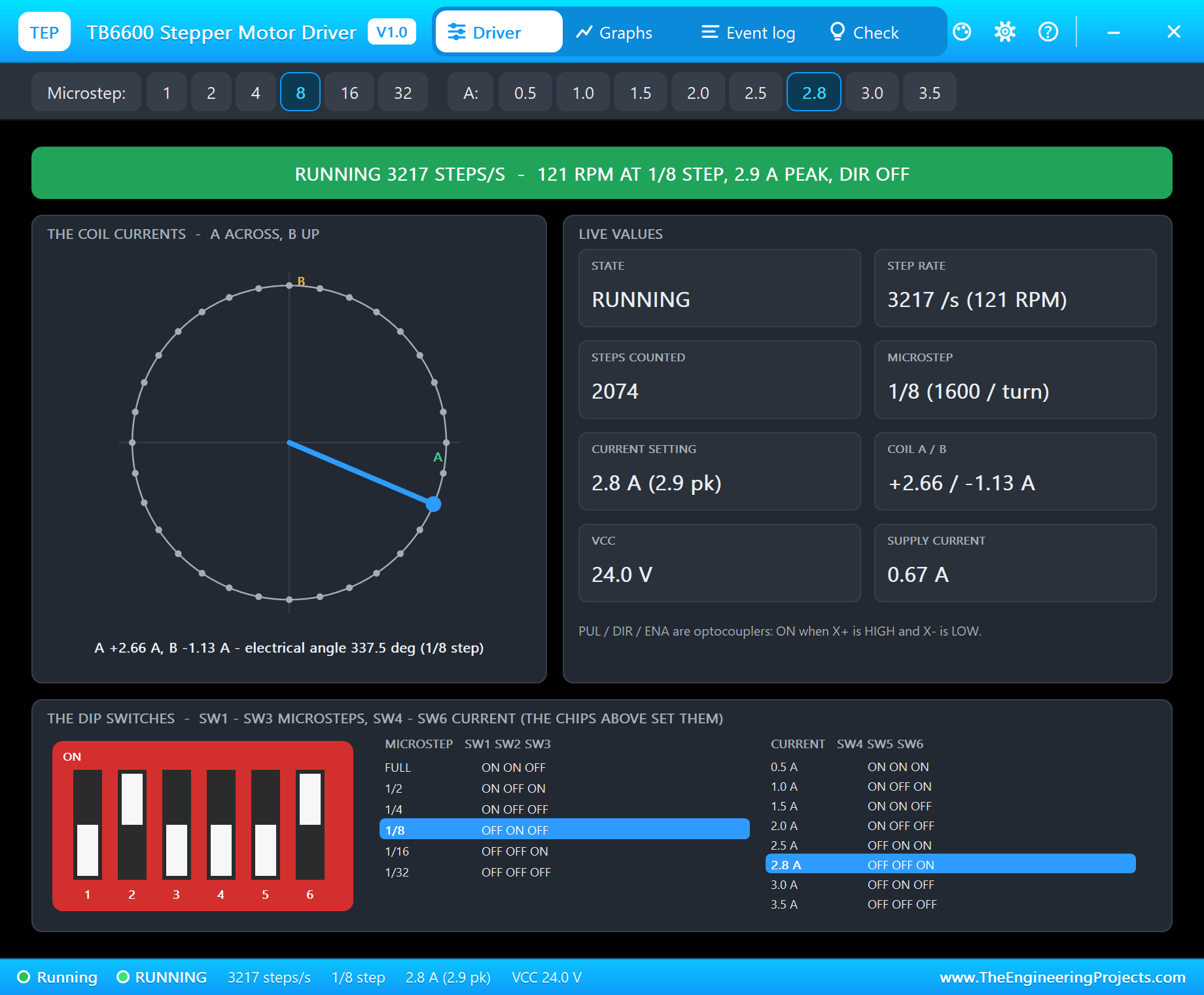
Type rpm 120 and s 400, and the page shows the driver at work: about 3200 pulses a second, which at 1/8 step is 120 RPM. The vector turns round its circle, here caught at 337.5 degrees with coil A at +2.66 A and coil B at -1.13 A, and the supply current rises to 0.67 A as the motor does work.
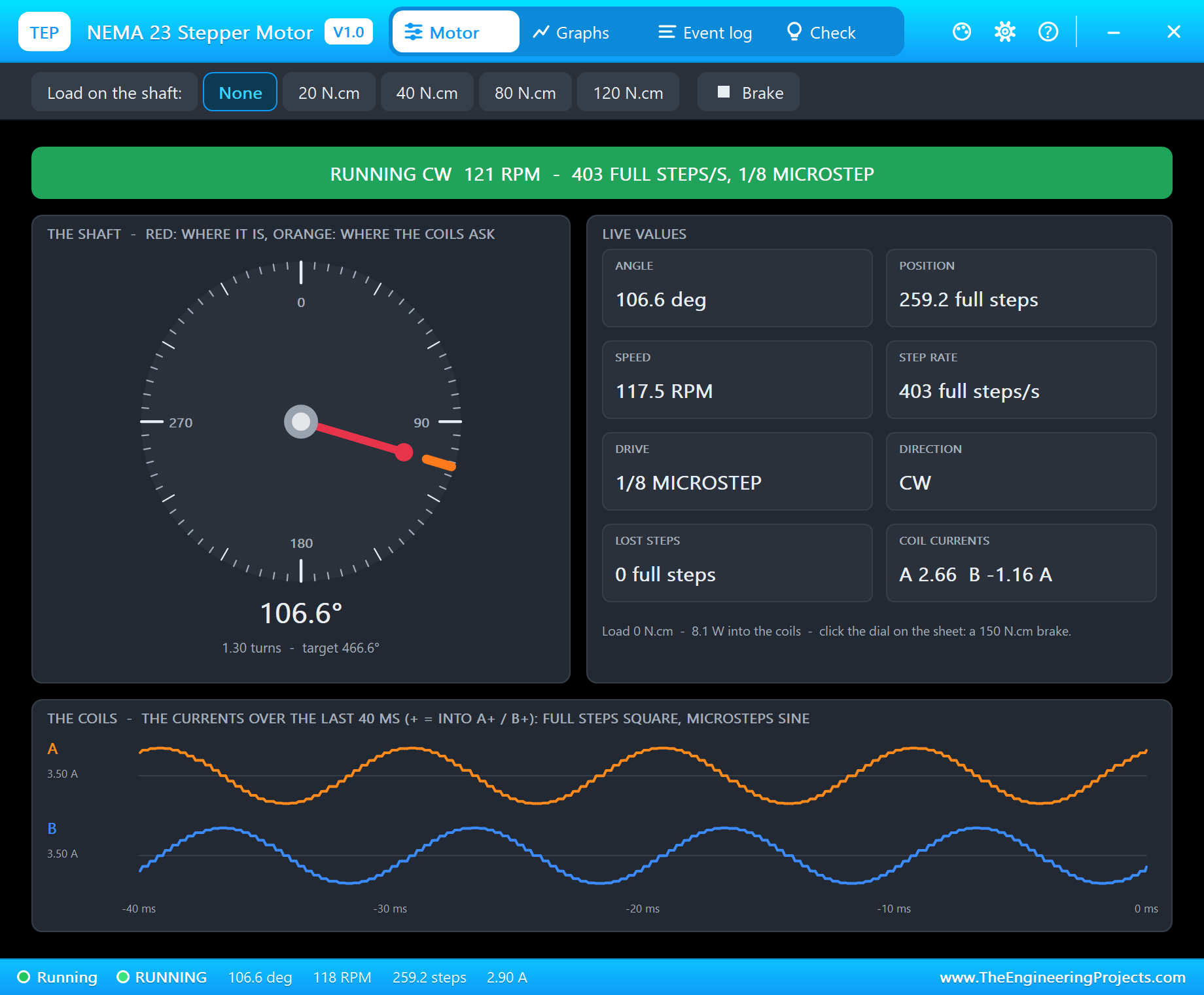
The motor's own pop-up sees the other side. It knows nothing about the TB6600; it reads the drive from the currents in its coils and finds 1/8 MICROSTEP at 403 full steps a second. Its chart of the last 40 ms shows what the chopper makes of the pulses: a clean sine and cosine, a quarter of a cycle apart.
Graphs
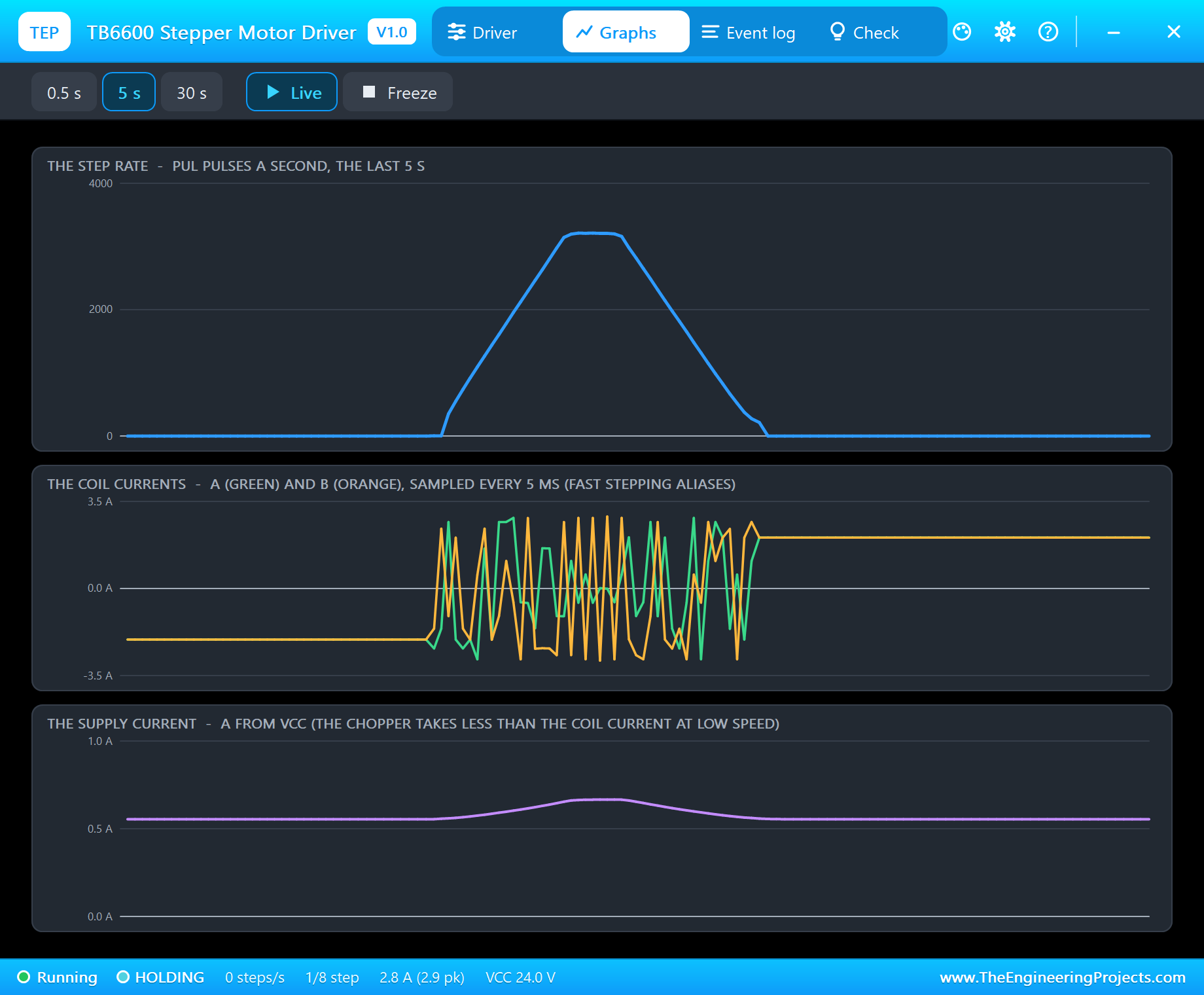
Graphs draws the step rate, the two coil currents and the supply current over the last 0.5, 5 or 30 seconds. A ramped move is a trapezoid in the step rate: up at the acceleration, flat at the top speed, down to a stop. The coil currents are sampled every 5 ms, so at speed they alias into a busy band; the supply current shows a small bump while the motor works. Freeze holds the page.
ENA: Release and Hold
Type release and the sketch takes ENA+ HIGH:
release
Released: the TB6600 is off (ENA+ HIGH)
hold
Holding: the TB6600 is on (ENA+ LOW)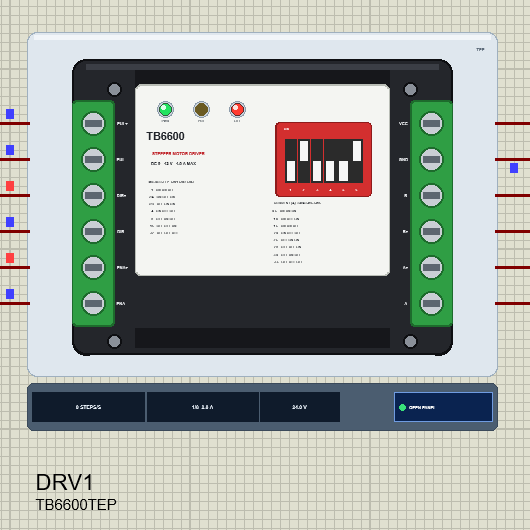
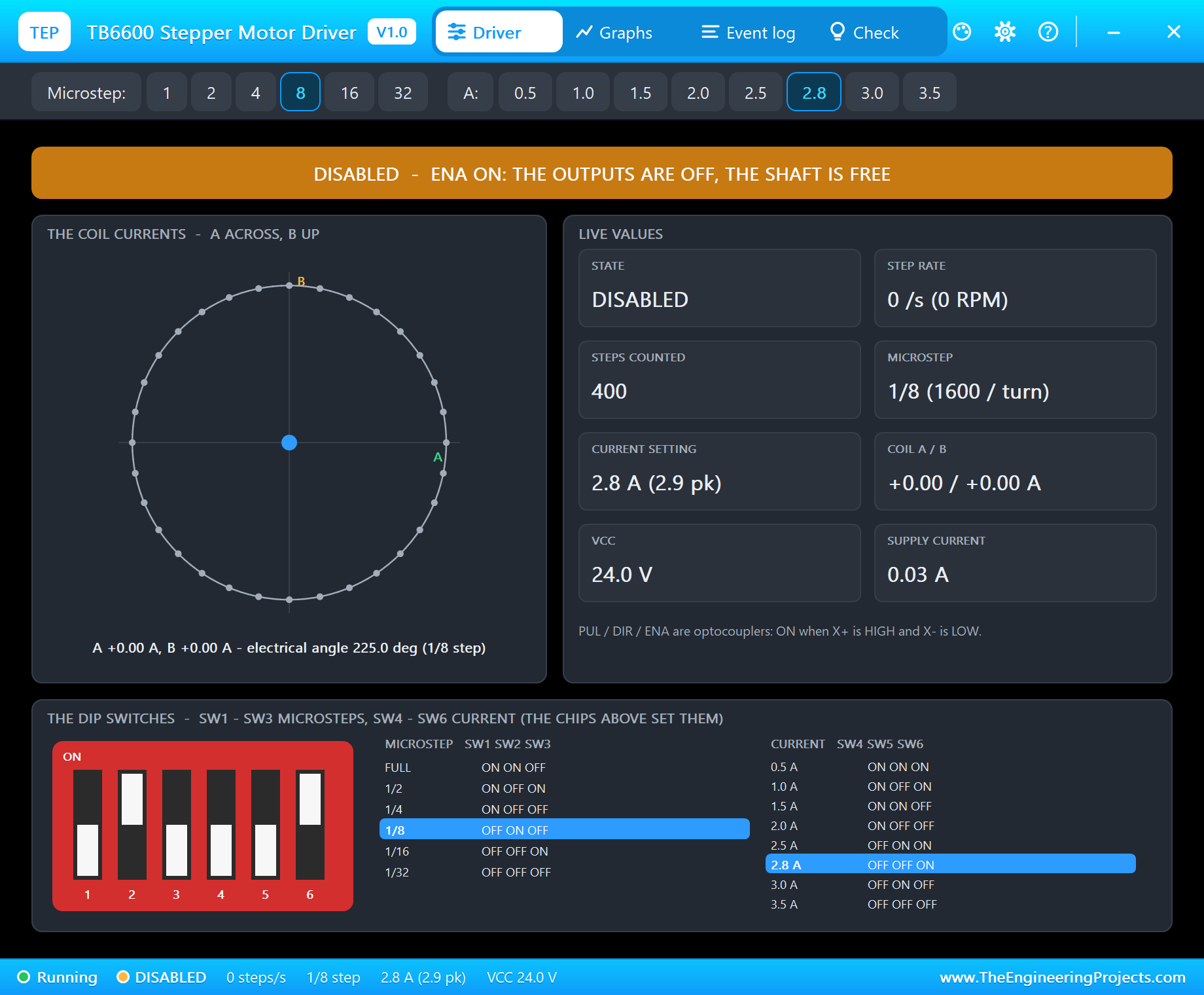
The banner turns orange: DISABLED. The coil currents fall to 0 A, the supply current to the module's own 0.03 A, and the red OFF LED lights on the schematic. A real NEMA 23 held at 2.8 A gets warm, so a machine that waits often disables its drivers - but then nothing holds the axis. If the sketch sent pulses now, the TB6600 would still count them, as the real module does, and the Check page would warn that the translator moved while the shaft did not. hold brings the outputs back.
Microsteps on the DIP Switches
The sketch counts pulses; the TB6600 decides how far each pulse turns the shaft. They must agree. Click 16 on the Microstep row of the pop-up - the same as setting SW1 - SW3 to OFF OFF ON - and the log says "MICROSTEP 1/16 - SW1 SW2 SW3 = OFF OFF ON: 3200 steps a turn". Now send one more turn:
rpm 120
Top speed 120 RPM
s 200
steps -> target 2000 steps (1/8) = 450.0 deg
At 450.0 deg - holding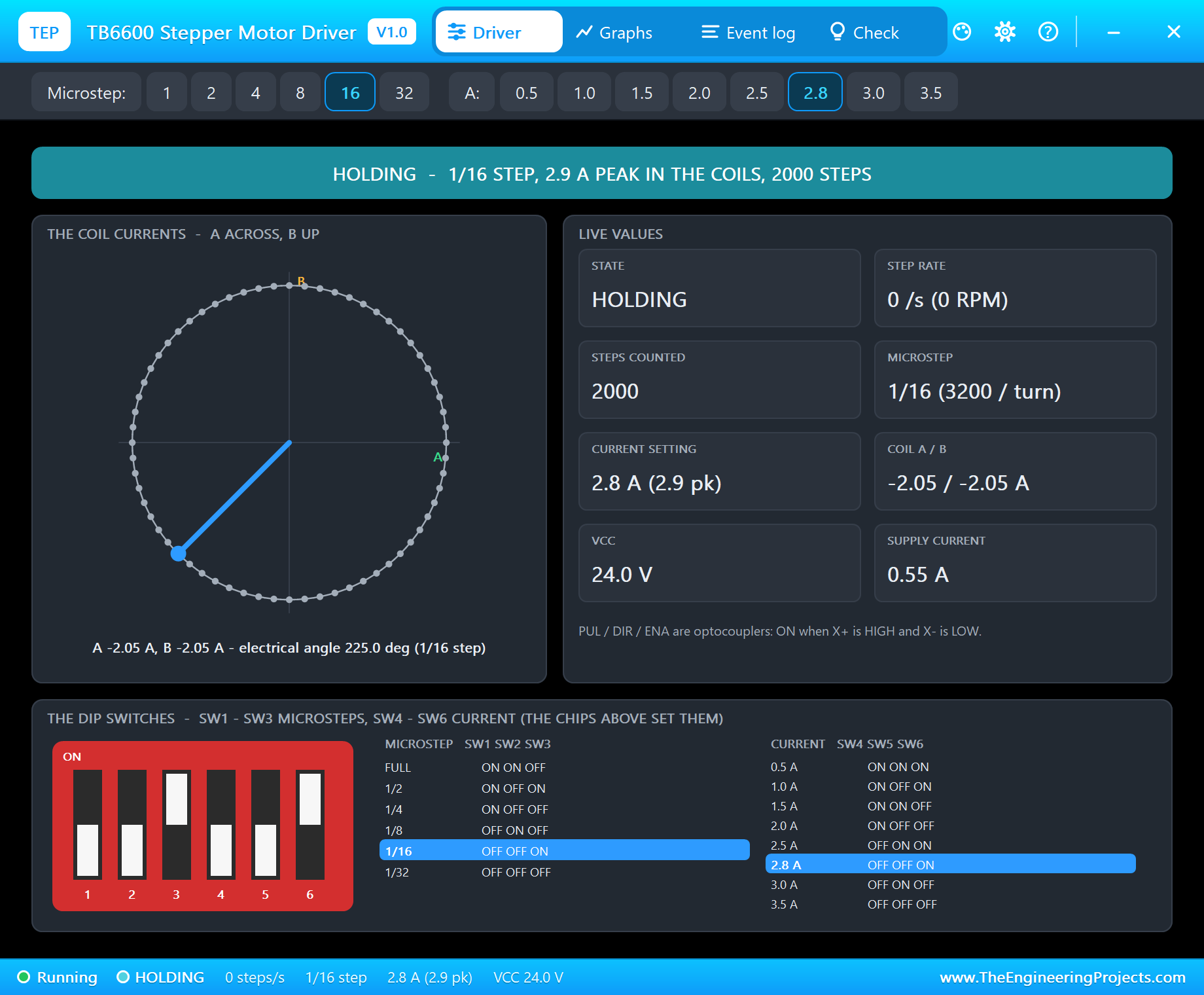
The sketch sends 1600 pulses and believes the shaft turned once. The TB6600 now needs 3200 pulses a turn, so the motor turns only half a turn. On a real machine this is the classic mistake of an axis that moves half or twice the distance it should: the DIP switches and the sketch's MICROSTEPS differ. Set them together, with the power off.
A Driver Never Knows
Set the TB6600 back to 1/8, click the NEMA 23's dial for its 150 N.cm brake and send another turn:
s 200
steps -> target 3600 steps (1/8) = 810.0 deg
At 810.0 deg - holding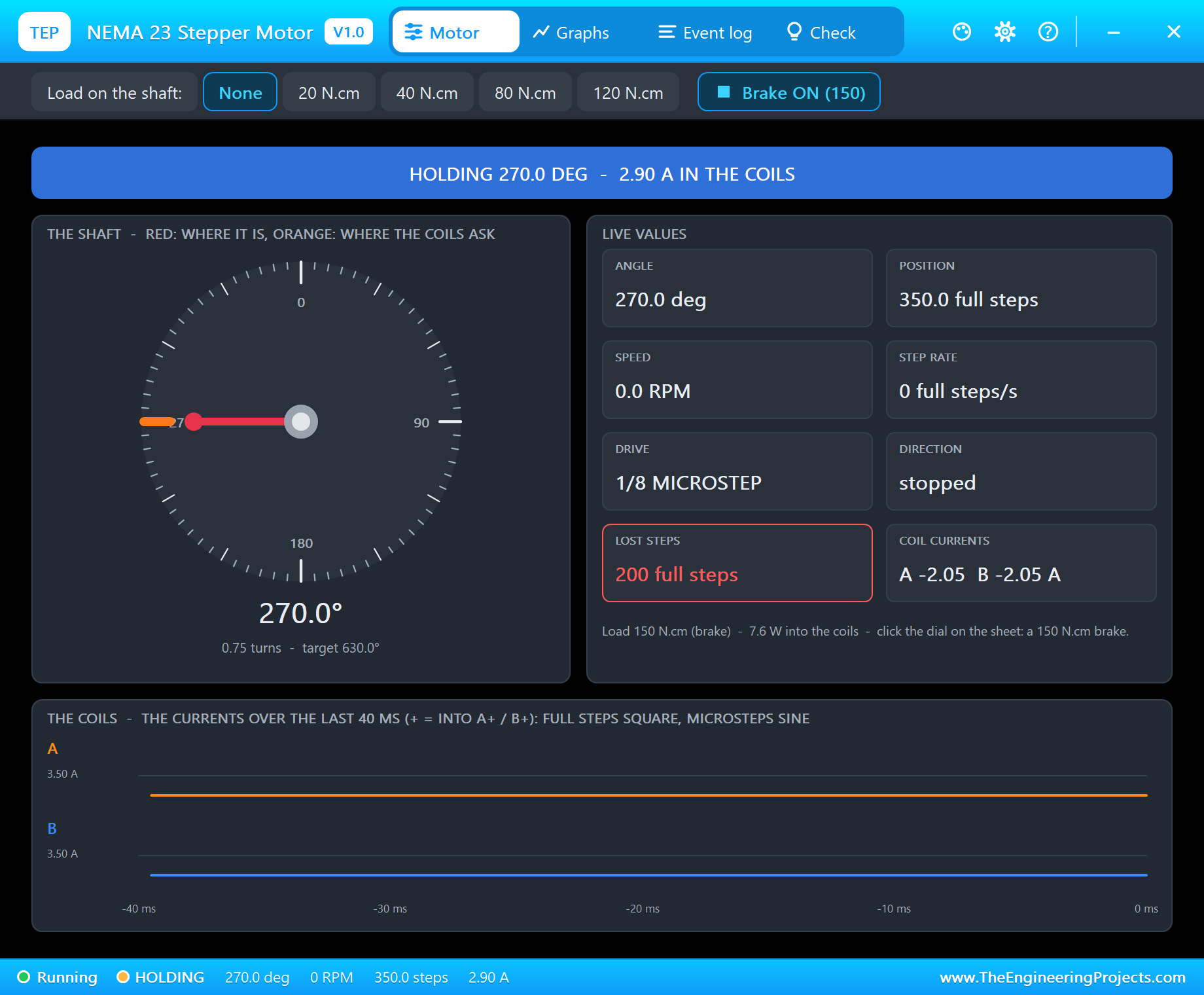
The TB6600 does everything right: 1600 pulses, the field turned a full turn, the full current in the coils. But the brake is stronger than the motor, so the rotor slips tooth after tooth and the NEMA 23 counts 200 full steps lost. The driver cannot tell - a TB6600 has no idea where the shaft is - and neither can the sketch, which reports "At 810.0 deg - holding". That is why CNC machines home every axis against a limit switch when they start, and why the motor's current setting and the ramp matter so much.
Event Log
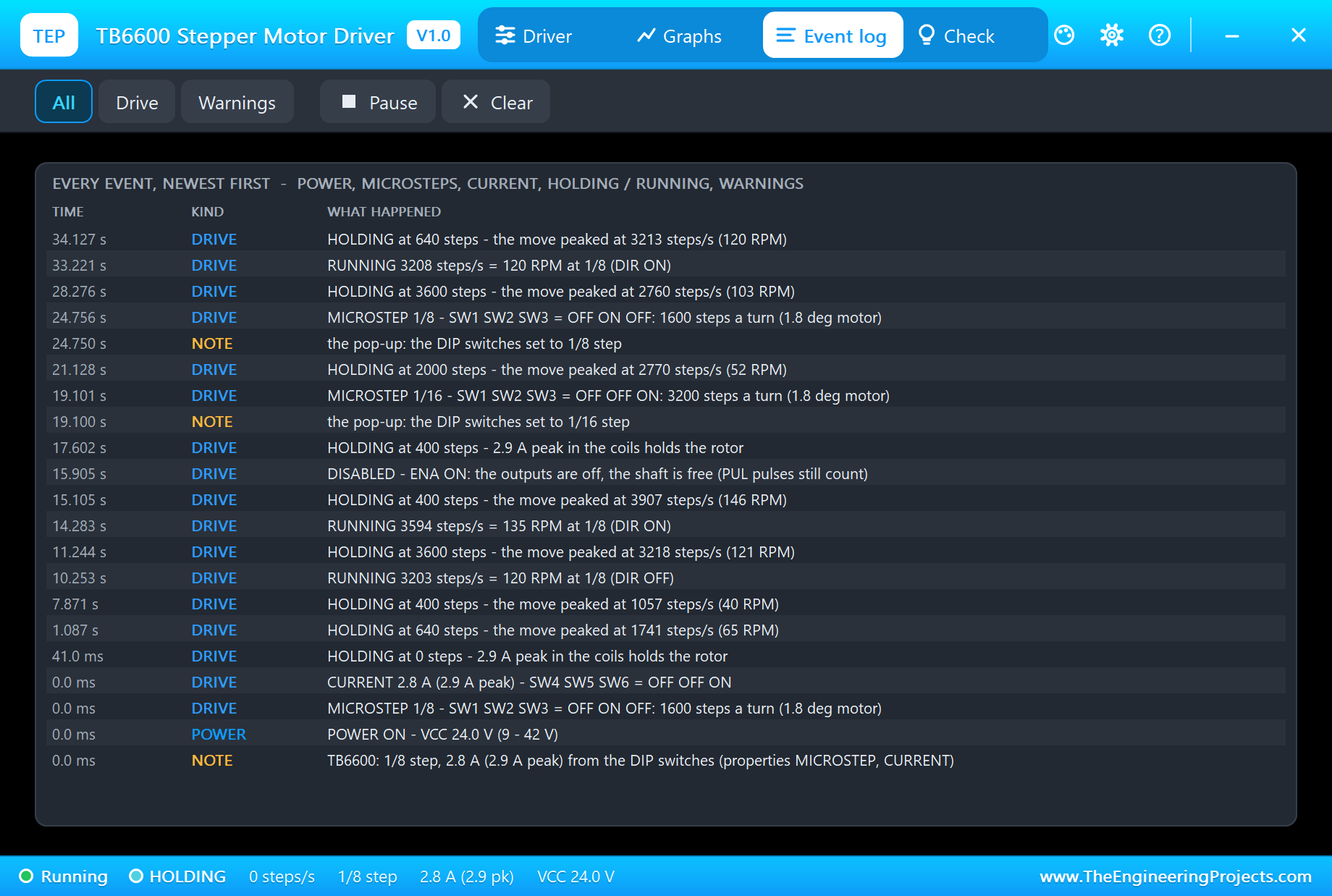
The Event log keeps the run: the supply ("POWER ON - VCC 24.0 V (9 - 42 V)"), the DIP switches, every run ("RUNNING 3208 steps/s = 120 RPM at 1/8 (DIR ON)") and every hold ("HOLDING at 640 steps - the move peaked at 3213 steps/s (120 RPM)"), the changes made on the pop-up, DISABLED and the warnings. Filter it by drive or warnings, pause it or clear it.
Check: the Pulse Timing
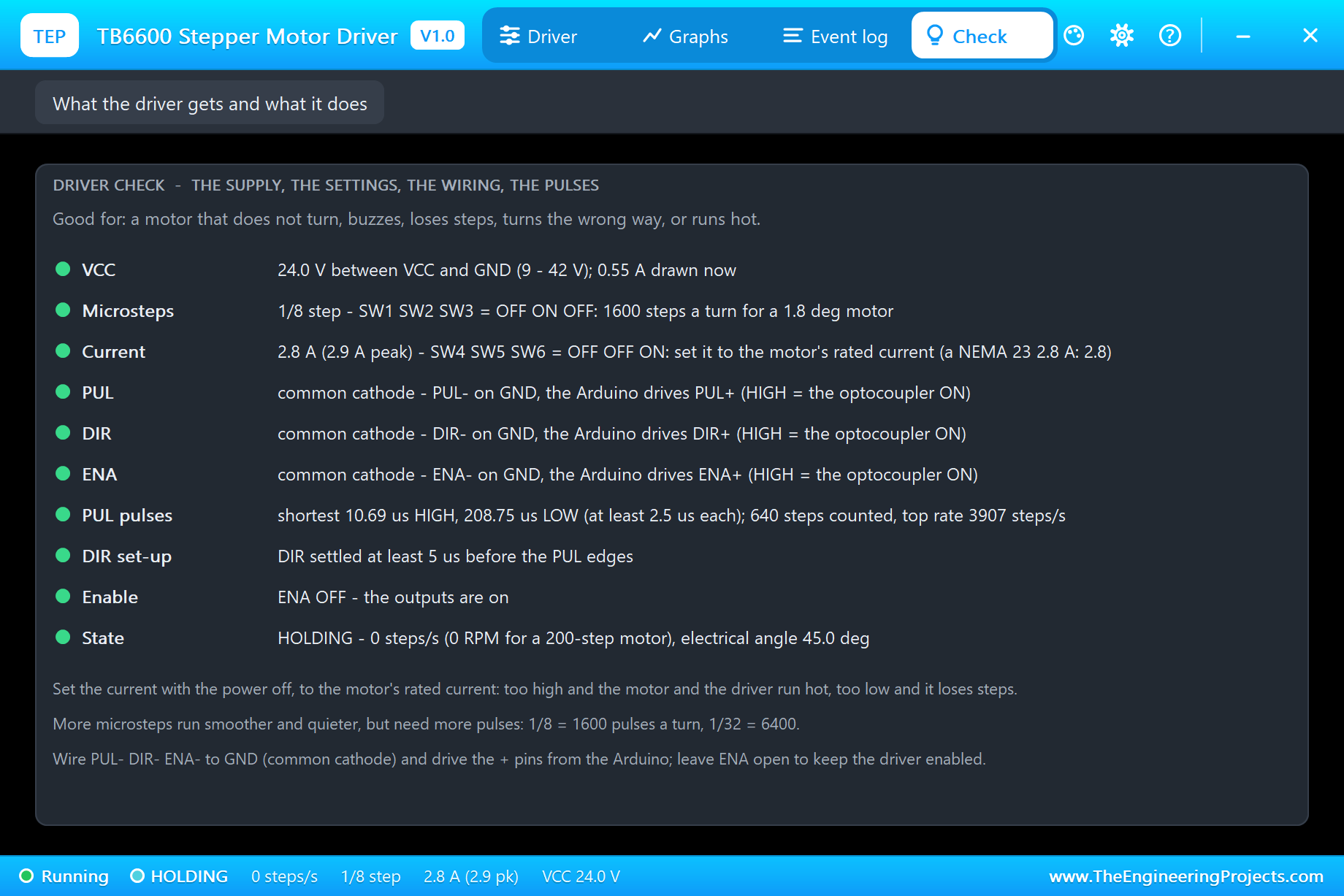
The Check page is the one to open when a motor does not turn, buzzes, loses steps, turns the wrong way or runs hot. It lists the supply (24.0 V, 0.55 A drawn), the microsteps and the current with their switch positions, the wiring of PUL, DIR and ENA (common cathode, each one), the shortest PUL pulse (10.69 us HIGH against the 2.5 us minimum - digitalWrite itself takes a few microseconds), the top rate (3907 steps a second), the DIR set-up (settled at least 5 us before the pulses), Enable and the state. A pulse that is too short or a DIR that changes too late turns its row red, and the log says how short or how late.
How the Model Works
The TB6600 model is a mixed one. Its six signal terminals are digital pins: each optocoupler is ON when its + pin is HIGH and its - pin LOW, every PUL rising edge is a step and the timing of every edge is measured. Its power terminals are analog: each output sits at VCC / 2 through 20 kohm with diodes to VCC and GND, and each coil pair is a current source of the chopper's target behind 1 kohm. The diodes clamp it to the supply, so the coil current rises at about VCC / L, as a chopper's does, and a fast motor's back-EMF takes it away. The supply current is the power the coils take plus the bridge losses and the module's own 0.03 A, divided by VCC.
We checked the logic on a PC with 24 automatic tests: 1/8 and 2.8 A from the DIP switches give 2.9 A peak, 1600 pulses at 1/8 make a turn and 6400 at 1/32, 1000 pulses a second are 37.5 RPM, common cathode and common anode are both found, ENA ON leaves no current but still counts the pulses, a 1 us pulse and a 2 us DIR set-up are warned, full step drives both coils at the peak, 7.5 V is off and 45 V is warned. The demo project is read back from disk with 90 checks of its parts, pins and wires.
The TB6600 is our second stepper driver. Our A4988 / DRV8825 Stepper Motor Driver Library for Proteus covers the small drivers of 3D printers, and our NEMA 17 Stepper Motor Library for Proteus is the smaller motor; our standalone motors are coil models, so the driver and the motor can be mixed as on a real bench.
Troubleshooting
- NO POWER: VCC is under 9 V (the module switches on from 8.5 V) or not wired.
- HOLDING, but the motor never moves: no pulses arrive - the Check page shows the wiring (PUL- on GND for common cathode) and the steps counted.
- DISABLED: ENA is ON (ENA+ HIGH in common cathode) - take it LOW or leave ENA unconnected.
- It turns half or twice the angle: the sketch's microsteps and the DIP switches (MICROSTEP) differ.
- Warnings on the Check page: PUL pulses under 2.5 us or DIR changing less than 5 us before a pulse - make the pulses longer and wait after DIR.
- No motor in Pick Devices: install our NEMA 23 library (
TEPNEMA23.LIB/TEPNEMA23.DLL). - No driver, no UNO or no monitor:
TEPTB6600.DLLorTEPARDUINO.DLLis missing from MODELS and the project folder; a closed monitor opens again with a click on the UNO's USB port.
Things to Know Before Using a Real TB6600
- Set the switches with the power off: SW4 - SW6 to the motor's rated current, SW1 - SW3 to the sketch's microsteps.
- Never connect or disconnect the motor while VCC is on: the voltage spike destroys the driver.
- A real supply: 24 V with a few amps to spare for a NEMA 23; the Arduino's 5V never powers the motor.
- Heat: the module gets warm at high currents - keep the heat sink free and the air moving.
- 5 V signals: the inputs want 5 V; a 3.3 V board may need a buffer or a 3.3 V compatible module.
Limitations of the Simulation
- Not modelled: the chopper's switching ripple (the averaged current is used), the decay modes, heat and the over-temperature cut-off, the real input current limits of the optocouplers.
- The plate, the LEDs and the strip are TEP additions.
- The model is our own, written from the typical data of TB6600 driver modules; this library is not made or endorsed by Toshiba, any module maker, Arduino or Labcenter.
- Licences: the demo HEX contains the Arduino AVR core 1.8.6 (LGPL); the sketch is included and the README gives the source link. The potentiometer is Proteus's own; the NEMA 23 motor is our separate library.
- Tested in Proteus 8.5 in October 2026 with the demo as shipped: the knob, a 90, two turns at 120 RPM and back at rpm 300, release and hold, 1/16 from the pop-up, the motor's brake, knob, all four pages of the pop-up and the motor's pop-up. Proteus 7 is not supported.
So, that was all about the TB6600 Stepper Motor Driver Library for Proteus V1.0. I hope it helps you get the wiring, the switches and the pulse timing right in the simulation, so the real driver works the first time it is powered. If you have any questions, ask in the comments and I will help you out. Till the next tutorial, take care and have fun!

Comments
0