


12V Holding Electromagnet Library for Proteus V1.0 (Arduino)


Hello friends, I hope you all are doing great. Today, I am going to share the new 12V Holding Electromagnet Library for Proteus V1.0. If you have ever built a pick-and-place gripper, an electromagnetic door holder, a sorting machine or an escape-room lock with an Arduino, you have probably used this part: the small round 12 V holding electromagnet, a shiny steel pot about the size of a coin stack with an M4 stud on top. Power it and it grabs a steel plate; cut the power and it lets go.
12V Holding Electromagnet Library for Proteus
Latest version: V1.0 (November 2026, this tutorial)
Helping Tools
- Serial Monitor Advance: a serial terminal window for the UART of your board
- Serial Monitor Expert: the serial monitor with extra debugging tools
- LCD Library for Proteus V3.0: 16x2, 20x4 and I2C LCDs to show your readings
This library puts that magnet into Proteus as a part of its own. Its coil is in the circuit, it pulls on a steel plate that carries a load, and the plate falls onto the table when the pull is not enough. It also does the things that surprise people with real magnets: it drops a load through a thin coat of paint, it lets go a little late, and a light plate can stay stuck after the power is off. The demo drives it from an Arduino UNO V4.0 through our L9110S driver, which can also send the short reverse pulse that cures the sticking.
NOTICE: an electromagnet looks like the simplest part there is - a coil that becomes a magnet. Our team put a lot of effort into building one that behaves like the real thing: the coil and its changing inductance, the pull that falls with every fraction of a millimetre, the load, the release time and the magnetism the steel keeps. Your feedback is the fuel that keeps us going, so please tell us what you think in the comments below or in the Motor Driver board of our forum. And if our free libraries help you, you can buy us a coffee. So, let's get started with the 12V Holding Electromagnet Library for Proteus V1.0:
What is a 12V Holding Electromagnet?
A holding electromagnet (also sold as a "lifting magnet" or "solenoid electromagnet") is a coil wound inside a steel pot. The pot has a solid core in the middle and a steel wall around the coil, and both end flush at the bottom face. When current flows, the core and the wall become two magnetic poles side by side, and a steel plate laid across them closes the magnetic circuit. That is why it holds so well for its size - and why it only holds what touches it.
The common one is the 25 mm "P25/20" size: 25 mm across, 20 mm tall, an M4 thread on top for mounting. Sellers list it as "5 kg" or "50 N", which is its pull straight down on a thick, clean steel plate. Our model follows that size:
| 12 V holding electromagnet, P25/20 type (the model) | |
|---|---|
| Coil | 41 ohm: 0.29 A and 3.5 W at 12 V, either polarity |
| Holding force | about 50 N (5 kg) at 0.29 A on clean steel; half of it through 0.5 mm of paint |
| Inductance | 1.58 H with the plate on the face, 0.21 H without it |
| Residual pull | about 2 N with the coil off, after a full current |
| Properties | VOLTAGE 12 or 24, LOAD (kg) |
Why the Gap Matters So Much
The magnetic circuit of a pot magnet is almost all steel; the only air in it is the tiny gap between the face and the plate. Air is about a thousand times harder for a magnetic field to cross than steel, so that gap decides nearly everything. Make it half a millimetre wider - a coat of paint, a bit of rust, a burr - and the pull halves. Lift the plate a few millimetres and almost nothing is left. A holding magnet is not a crane magnet: it does not reach out and grab, it holds what is put on it.
Why It Does Not Let Go at Once
Two things delay the release. First, the coil is an inductor: when the driver switches it off, its current does not stop, it dies away over tens of milliseconds, and the magnet keeps pulling until it is weak enough. Second, the steel itself keeps a little magnetism - the residual magnetism. It is small, only a few percent of the full pull, but on a light plate it is enough to keep it stuck with no power at all. Real machines clear it with a short pulse of current the other way.
What's New in 12V Holding Electromagnet Library for Proteus V1.0
- A part of its own: the zinc-plated magnet hanging from an aluminium arm by its stud and nut, the red and black wires, and a wooden table under it.
- A real coil in the circuit: 41 ohm and an inductance that falls from 1.58 H to 0.21 H when the plate leaves.
- A real pull: with the current squared, the gap, a paint layer and the iron's saturation.
- A plate and a load: it falls onto the table when the pull is less than its weight; Put back sets it on the face again.
- Residual magnetism: a light plate stays stuck with the coil off, a short reverse pulse clears it, and a pulse that is too strong turns the core over.
- A pop-up window with four pages - Magnet, Graphs, Event log and Check - with load chips from 0.1 kg to 8 kg.
- An A3 demo on our Arduino UNO V4.0 with our L9110S on 12 V: on, off, the release pulse and a hold PWM.
The 12V Holding Electromagnet in Proteus
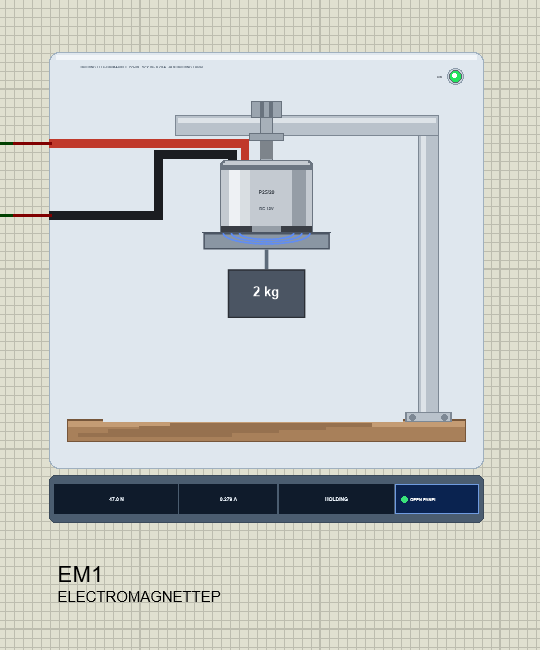
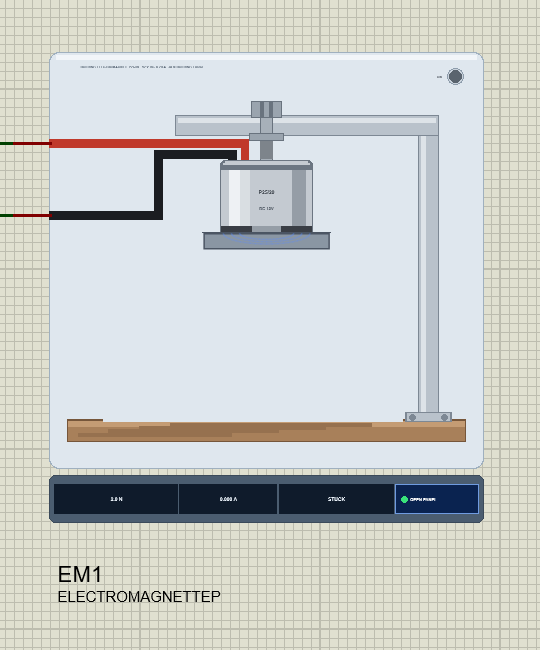
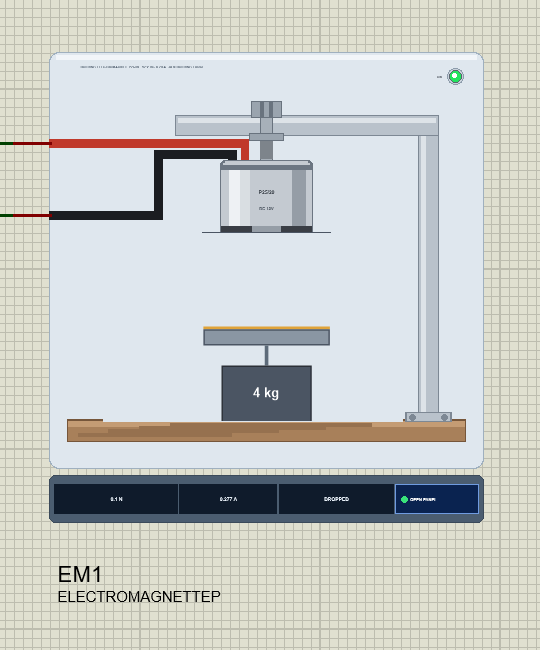
Search electromagnet in Pick Devices; the device ELECTROMAGNETTEP is in TEPMAGNET.LIB (category Electromechanical, Motors) and its model is TEPMAGNET.DLL. It is drawn from the side: the zinc-plated pot hanging from an aluminium arm by its M4 stud and nut, the arm's post standing on a wooden table, and the red and black wires running from the top of the magnet to the + and - pins.
Under the face hangs the steel plate with its load on a hook, the mass written on the block. At Run the model repaints this scene: blue field lines appear while the magnet pulls, and the plate drops onto the table when it lets go. The ON LED lights green while current flows, and the strip under the plate shows the pull, the current, the state and the OPEN PANEL button. The plate, the LED, the steel plate and its load, the field lines, the rating line and the strip are TEP additions; the real magnet has none of them.
The Pins and the Properties
| Pin | What the model does with it |
|---|---|
| + | the coil's first wire (red) |
| - | the coil's second wire (black) - either polarity holds |
| Property | Default | What it does |
|---|---|---|
| VOLTAGE | 12 | the coil: 12, or 24 for a 24 V magnet |
| LOAD | 2 | the plate and its load, in kg (0.05 to 20) |
Download 12V Holding Electromagnet Library for Proteus
Click the button below to download 12V-Holding-Electromagnet-Library-for-Proteus-v1.0.zip (about 1.2 MB, without the source code of the models):
12V Holding Electromagnet Library for Proteus V1.0- README.txt: installation, the demo, the wiring, the properties, real hardware, troubleshooting and the limits.
- Proteus Library Files:
TEPMAGNET.LIBandArduinoV4TEP.LIBfrom our Arduino Library for Proteus V4.0. - Proteus Model Files:
TEPMAGNET.DLLandTEPARDUINO.DLL. - Proteus Simulation:
12V-Holding-Electromagnet-L9110S-ArduinoUnoV4.pdsprj,Magnet_Demo.hexand copies of the DLLs. - Arduino Code:
Magnet_Demo.ino(no library needed).
Good to know: the demo's driver is our L9110S Motor Driver, a separate library that is not in this zip. Download it from its own article, the L9110S Motor Driver Library for Proteus, and install TEPL9110S.LIB and TEPL9110S.DLL the same way.
No Proteus yet? Read How to Download and Install Proteus 7 and 8. New to libraries? Follow How to Install a New Library in Proteus.
How to Install 12V Holding Electromagnet Library for Proteus
- Close Proteus and extract the whole zip file, for example to your Desktop.
- Copy
TEPMAGNET.LIBandArduinoV4TEP.LIBfrom Proteus Library Files into the LIBRARY folder of Proteus (usuallyC:\Program Files (x86)\Labcenter Electronics\Proteus 8 Professional\LIBRARY). - Copy
TEPMAGNET.DLLandTEPARDUINO.DLLfrom Proteus Model Files into the MODELS folder. The two Arduino files are the ones of our Arduino Library V4.0; if you have it, they are the same. - Install the L9110S Motor Driver library the same way if you do not have it yet.
- Delete
TEPMAGNET.IDXfrom the LIBRARY folder if it is there. - Start Proteus, press P and search for electromagnet.
Tip: keep the Proteus Simulation folder together, because the project needs its .hex file and the DLLs beside it. The library is tested in Proteus 8.5; Proteus 7 is not supported.
The Demo Circuit
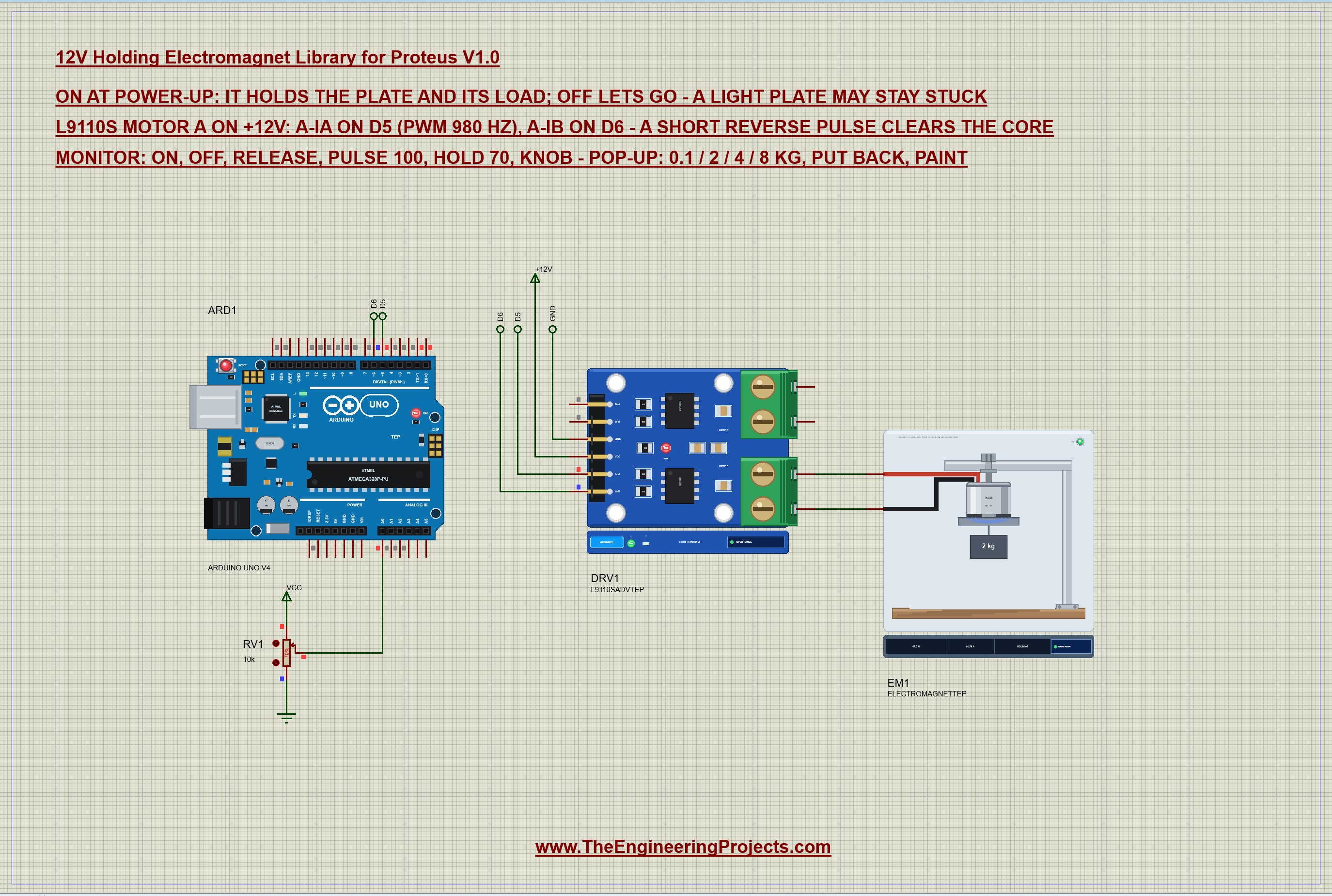
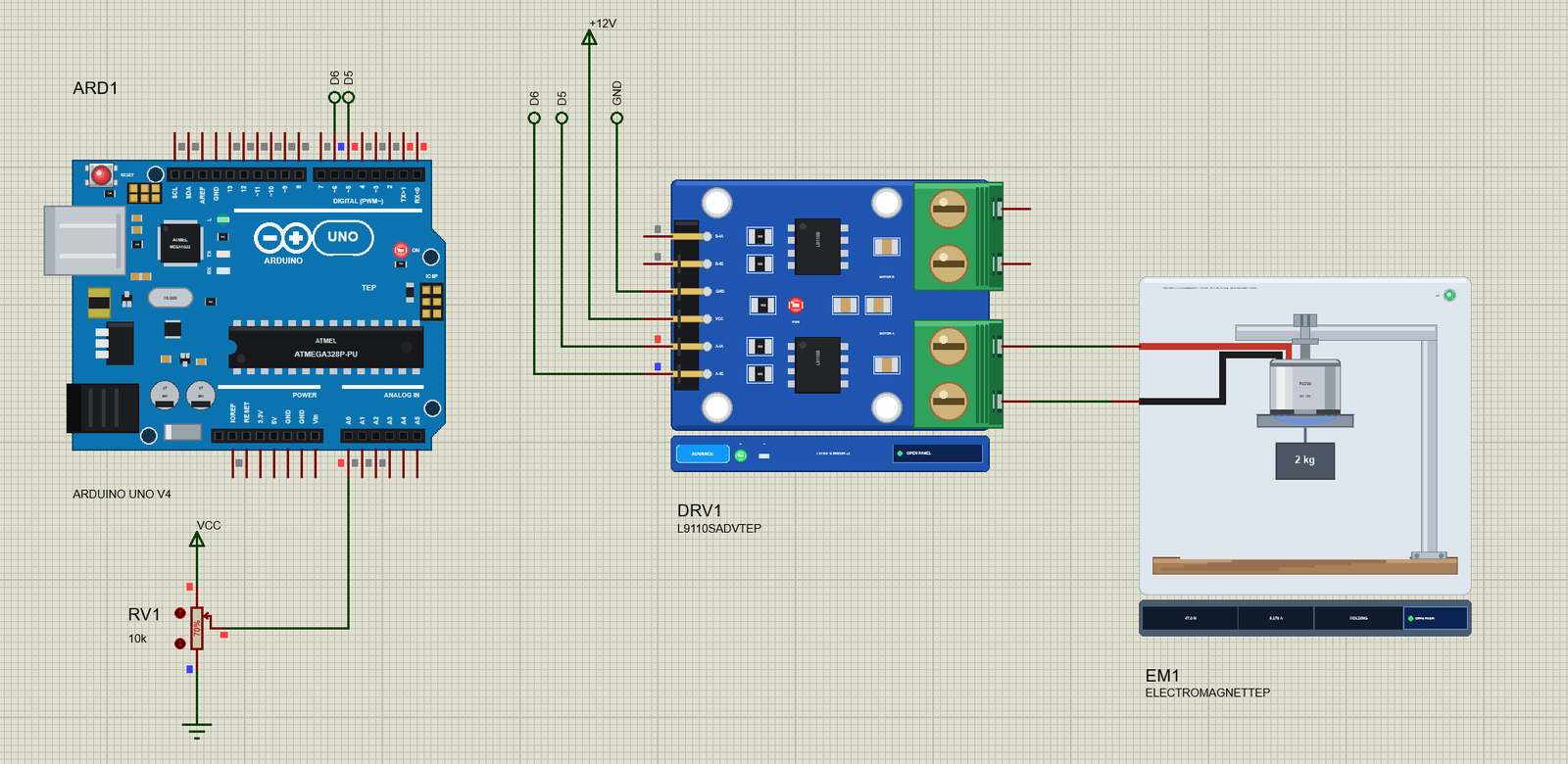
Open 12V-Holding-Electromagnet-L9110S-ArduinoUnoV4.pdsprj. ARD1 is an Arduino UNO V4.0 from our Arduino UNO Library for Proteus V4.0, running Magnet_Demo.hex with its serial monitor built in. DRV1 is our L9110S driver in its pop-up version, on a +12V supply. EM1 is the magnet on the driver's motor A outputs, with a 2 kg load, and RV1 is a 10k pot on A0 for a hold PWM you can turn by hand.
| Part | Pin | Goes to |
|---|---|---|
| L9110S | A-IA, A-IB | D5 (PWM), D6 (the reverse pulse) - by net labels |
| L9110S | VCC, GND | +12V, ground |
| L9110S | A-OA, A-OB | the magnet's + and - (straight wires) |
| RV1 | wiper | A0 |
Why an L9110S?
The magnet draws about 0.3 A at 12 V - far more than an Arduino pin can give - and, being a coil, it kicks back when it is switched off. A relay or a MOSFET with a 1N4007 diode across the coil would do for on and off. The L9110S does more: it is an H-bridge, so it can drive the coil both ways. That is what lets the sketch send the short reverse pulse that clears the residual magnetism, and its PWM input lets it hold the magnet on less power. Its own diodes catch the coil's kick.
The Arduino Code
The sketch needs no library. New to Arduino? Start with Arduino Tutorial for Beginners and Introduction to Arduino UNO. The pins and the release pulse come first:
const byte IA = 5, IB = 6, KNOB = A0;
const unsigned int PULSE_MS = 150;             // the reverse pulse
const int RELEASE_PCT = 35;                    // about a third of the voltage, reversed, clears the core
One function drives the coil forward: a PWM on A-IA with A-IB held LOW. At 0 % both inputs are LOW and the coil's current dies away through the driver:
void drive(int pct) {                          // forward: A-IA PWM, A-IB LOW; 0 = both LOW
  pct = constrain(pct, 0, 100);
  digitalWrite(IB, LOW);
  analogWrite(IA, (int)(pct * 255L / 100));
  drivePct = pct;
}
A holding magnet usually starts holding at power-up, so setup() switches it on before anything else:
drive(100); // on at power-up: it holdsThe Reverse Pulse
The second function swaps the inputs for a moment: A-IA LOW and a PWM on A-IB drive the coil the other way for 150 ms, then both inputs go LOW again:
void pulse(int pct) {                          // reversed: A-IA LOW, A-IB PWM for PULSE_MS, then both LOW
  pct = constrain(pct, 0, 100);
  analogWrite(IA, 0);
  analogWrite(IB, (int)(pct * 255L / 100));
  delay(PULSE_MS);
  analogWrite(IB, 0);
release uses it at 35 %, about a third of the voltage, which is enough to undo the residual magnetism without magnetizing the core the other way. pulse 100 lets you try a full-strength pulse to see why that matters:
  if (!strcmp(s, "release")) { knob = false; Serial.print(F("Release - ")); pulse(RELEASE_PCT); return; }
  if (!strncmp(s, "pulse ", 6)) { knob = false; pulse(atoi(s + 6)); return; }
On, Off and a Hold PWM
  if (!strcmp(s, "on")) { knob = false; drive(100); Serial.print(F("On - ")); report(); return; }
  if (!strcmp(s, "off")) { knob = false; drive(0); Serial.println(F("Off - IA LOW, IB LOW: the current dies away, the magnet lets go")); return; }
hold 70 drives the magnet forward with a PWM instead of full voltage:
  if (!strncmp(s, "hold ", 5)) {
    knob = false; holdPct = constrain(atoi(s + 5), 0, 100);
    drive(holdPct); Serial.print(F("Hold PWM - ")); report();
and knob hands that PWM to RV1, read in the loop and reported when it moves:
    const int k = (int)((long)analogRead(KNOB) * 100 / 1023);
    if (abs(k - lastKnob) >= 2) {
The HEX file is in the package. To change the sketch, open it in the Arduino IDE and export the compiled binary, as in How to get the HEX file from Arduino. It needs 6,736 bytes of flash (21 % of the UNO) and 289 bytes of RAM.
Running the Demo
Press Run. The UNO's serial monitor, the magnet's pop-up and the L9110S's pop-up open over the schematic; move them aside. The sketch switches the magnet on at once:
12V Holding Electromagnet demo - The Engineering Projects
L9110S on 12 V: A-IA on D5 (PWM), A-IB on D6 (the reverse pulse). RV1 on A0: the hold PWM.
On - drive 100 % = 12.0 V average
Commands: on | off | release | pulse 100 | hold 70 | knob | status | help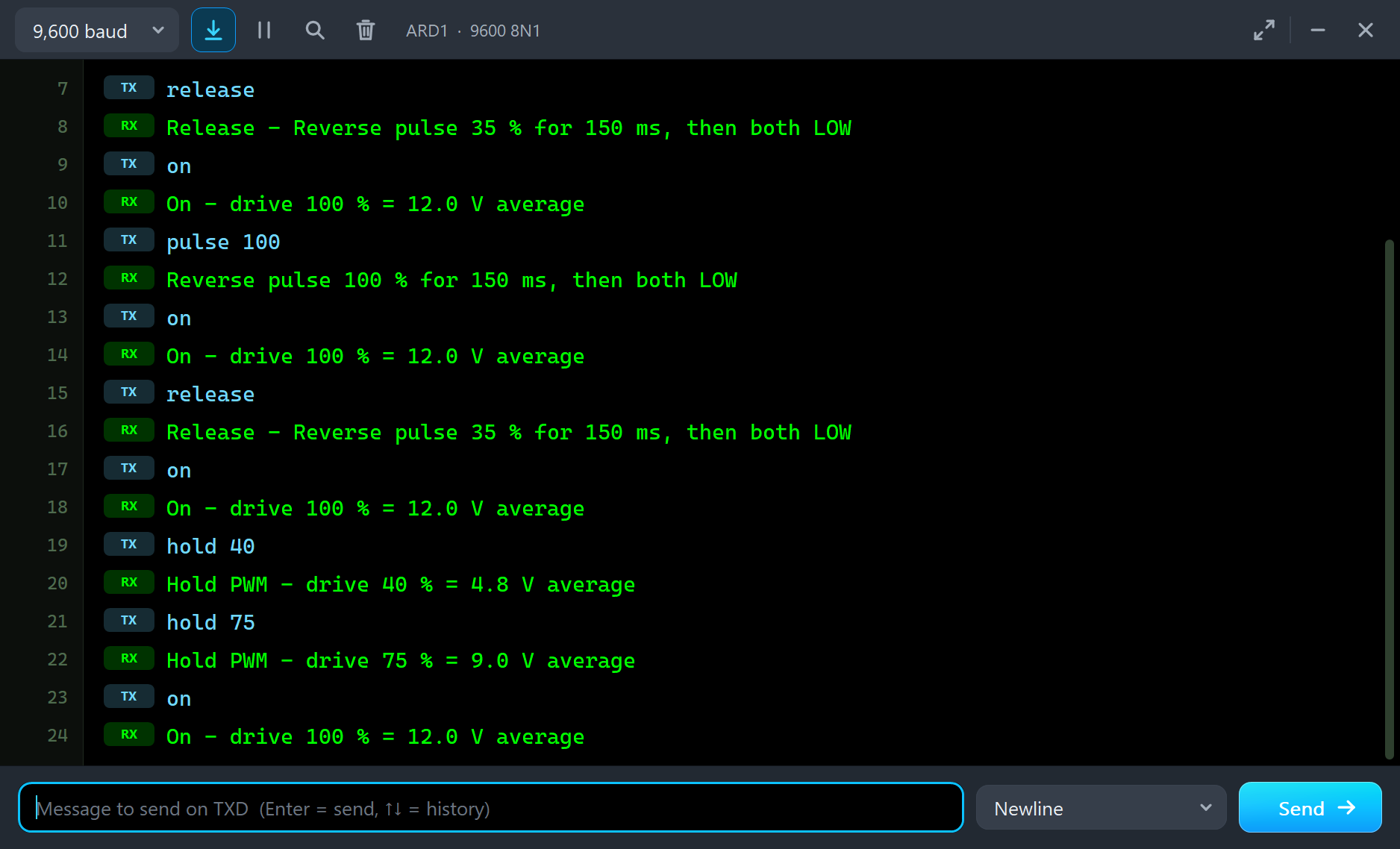
Holding 2 kg
Every run starts with the plate on the face, the way a person would put it there, and a hand holds it for half a second while the coil's current builds up. Then the magnet takes the weight:
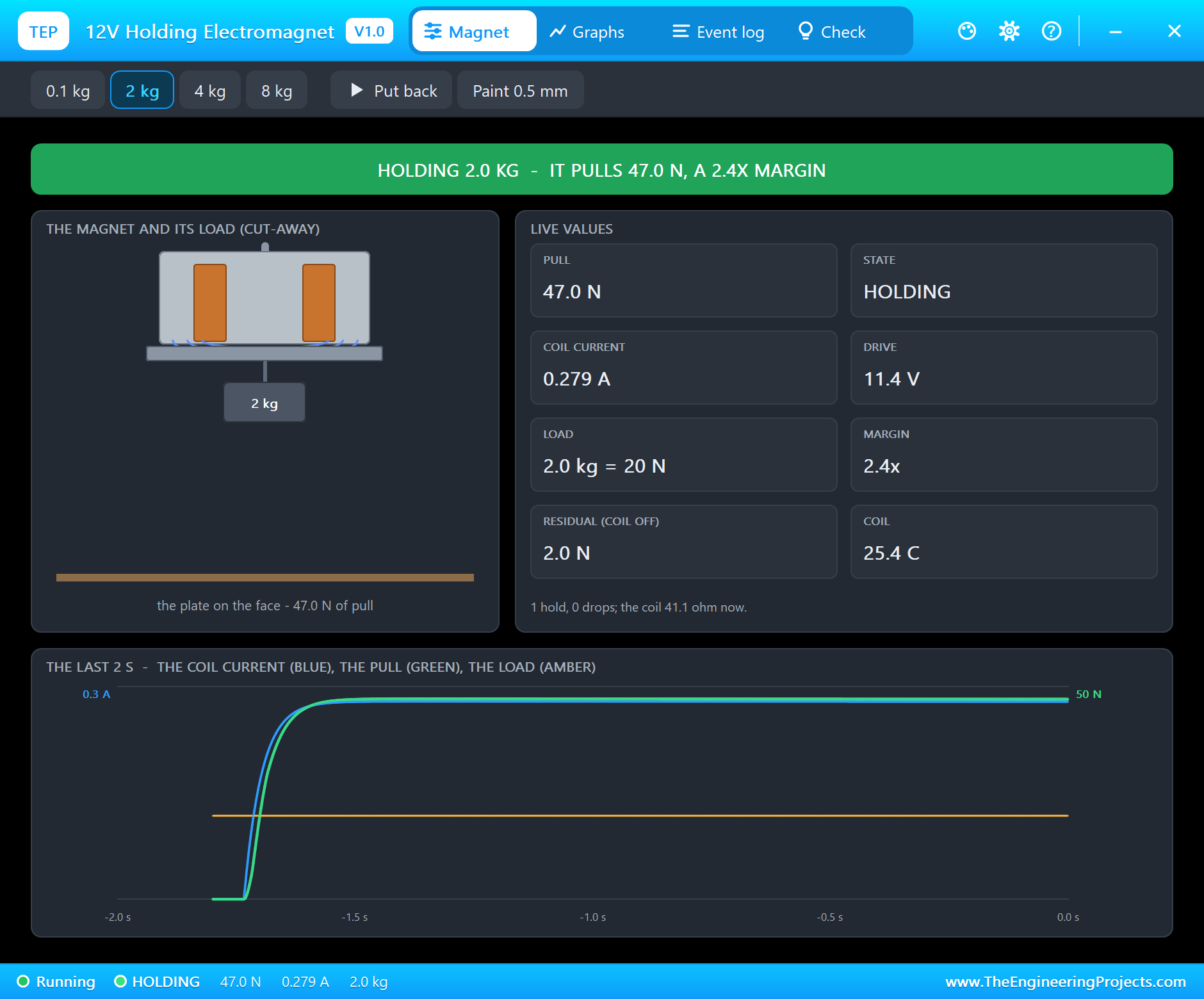
The log: "HOLDING 2.0 kg (19.6 N) - it pulls 47.1 N on the face: a 2.4x margin". The coil gets 11.44 V through the driver and draws 0.279 A, so it pulls a little less than the 50 N it would at a full 12 V. The pop-up has the look of our TEP Serial Monitor Advance for Proteus and four tabs: Magnet, Graphs, Event log and Check. The Magnet page shows the state in big letters, a cut-away of the pot with its coil, the plate and the load, and eight live values: the pull, the state, the coil current, the drive, the load, the margin, the residual pull and the coil's temperature. The trace at the bottom shows the last 2 seconds of the coil current, the pull and the load's weight.
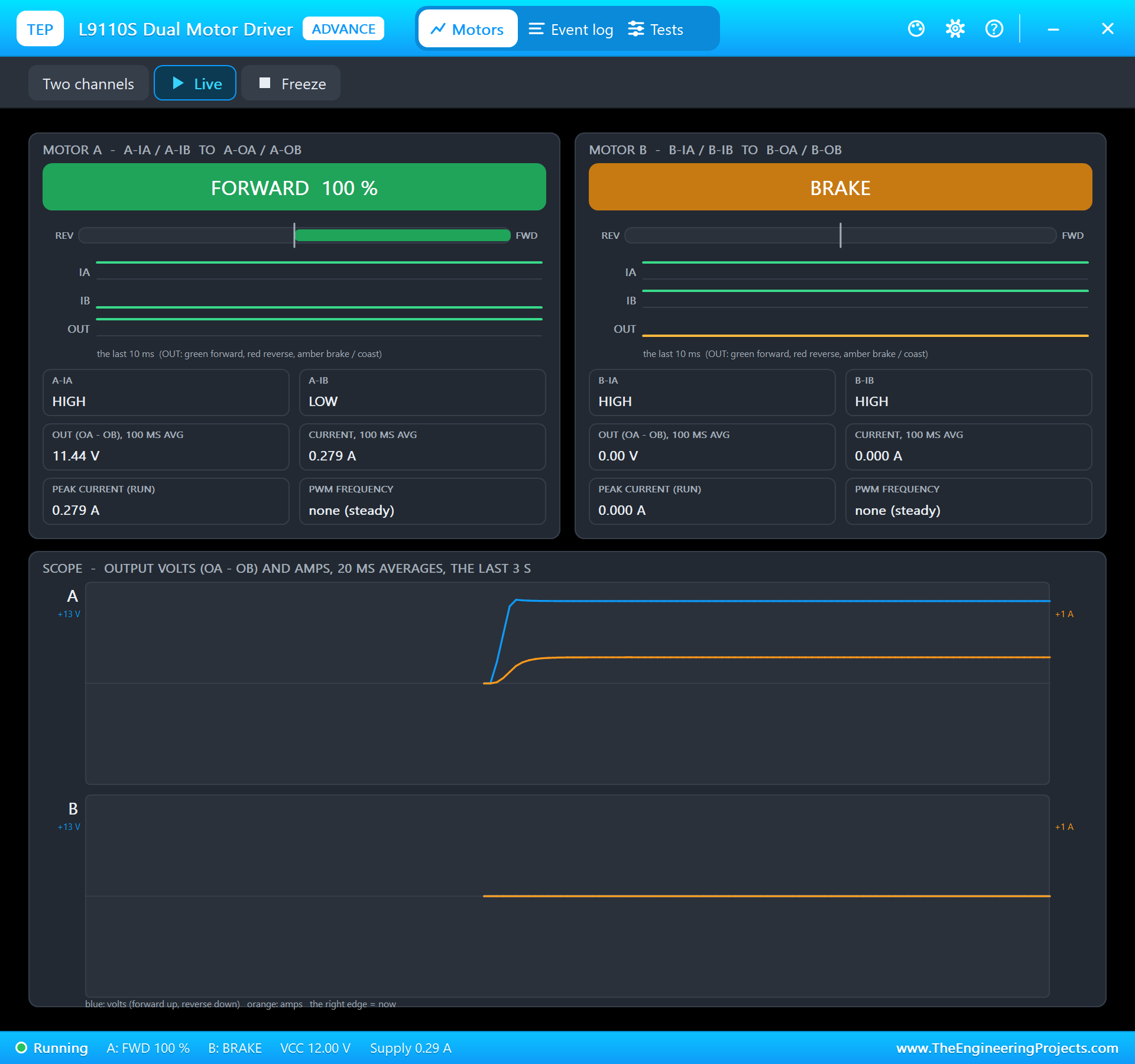
The L9110S's pop-up sees the same from the driver's side: "FORWARD 100 %" on motor A, 11.44 V and 0.279 A on its output, a steady drive with no PWM. Motor B shows BRAKE: its inputs are not wired, and the board's pull-ups hold them HIGH.
Switching It Off
off
Off - IA LOW, IB LOW: the current dies away, the magnet lets go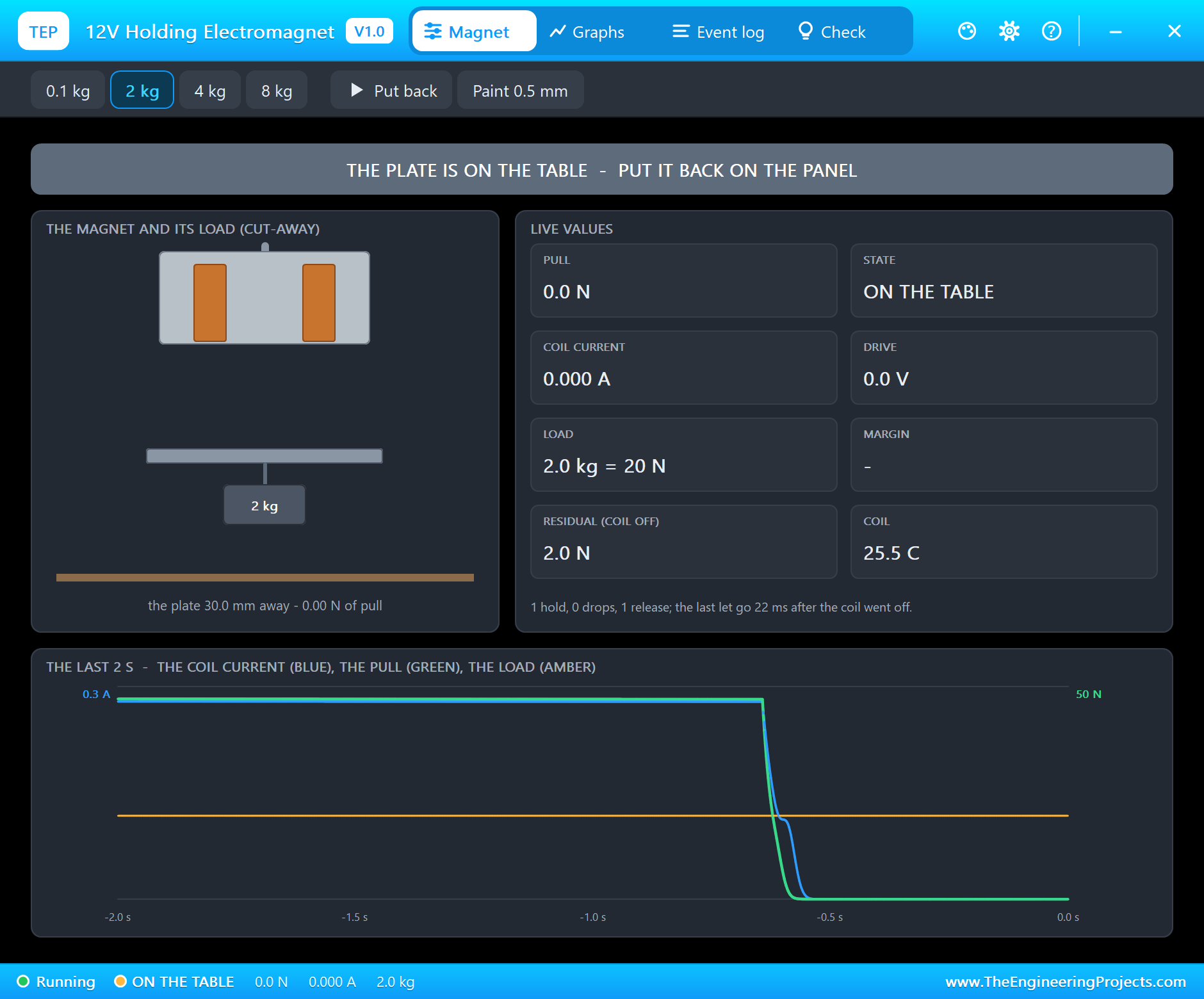
The plate does not fall the instant the coil goes off: "RELEASED - the plate let go 22 ms after the coil went off (its current had to die away)". With both inputs LOW the L9110S shorts the coil, so its current decays slowly, and the magnet keeps the load until the pull drops under 19.6 N. For a gripper that drops parts on a conveyor, those 22 ms are part of the timing.
A Light Plate That Sticks
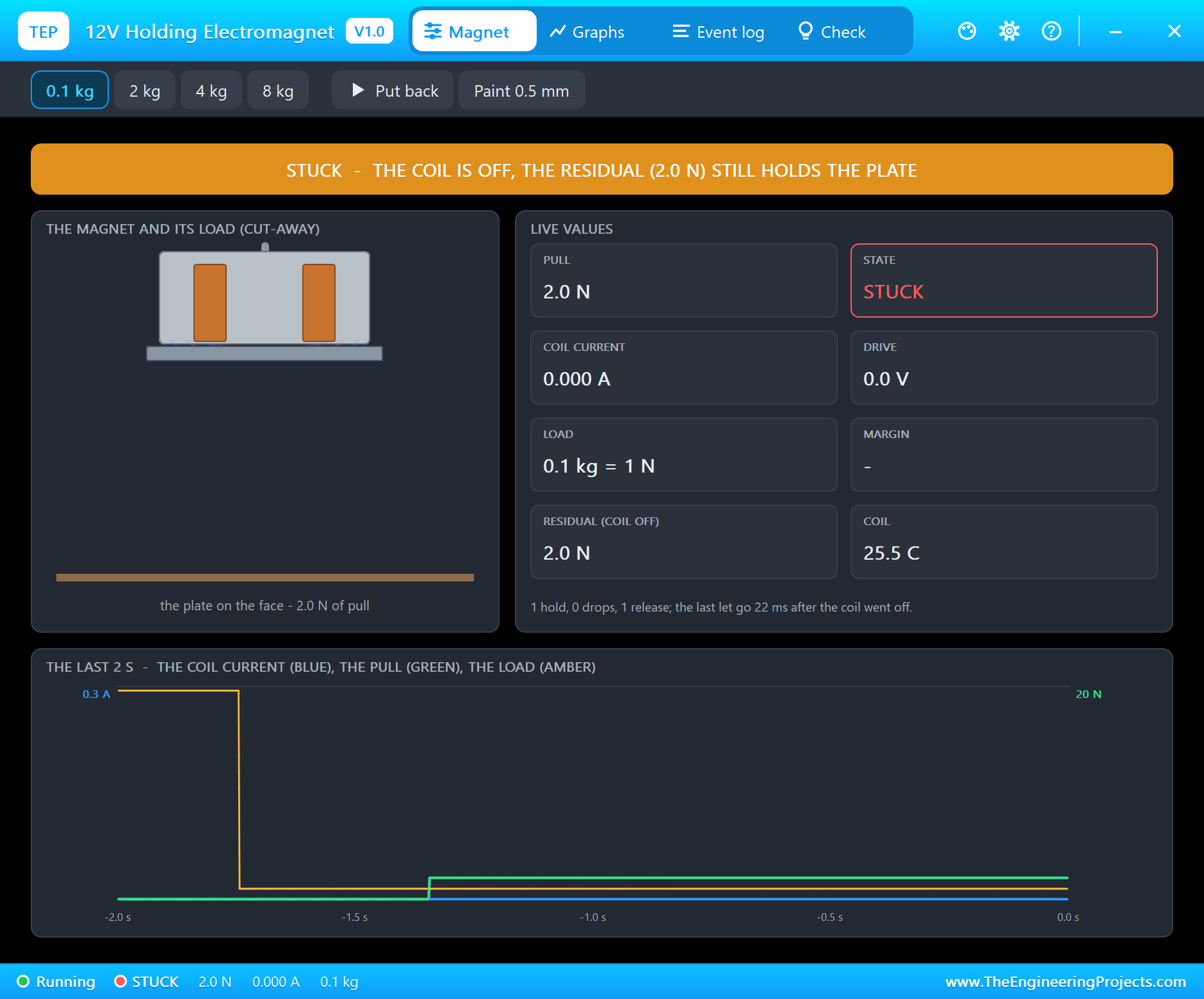
Now click 0.1 kg on the magnet's pop-up - a thin bracket, say - and then Put back, with the coil still off:
Half a second later the hand lets go, and the plate stays where it is: "STUCK - the coil is off, but the core's residual magnetism (2.0 N) holds the 0.1 kg plate". The steel remembers the full current it carried a moment ago. Two newtons is nothing against the 2 kg load, but a 0.1 kg plate weighs only about 1 N, so it hangs on.
The Release Pulse
release
Release - Reverse pulse 35 % for 150 ms, then both LOW
release sends 35 % the other way for 150 ms. The reverse current cancels the steel's magnetism, and the plate drops almost at once: "RELEASED - the plate let go 3 ms after the reverse pulse began: it cleared the residual". At the end of the pulse the log adds what is left: "RESIDUAL CLEARED - a 148 ms reverse pulse (0.130 A at its peak): 0.14 N of residual pull left". Small parts machines and robot grippers do exactly this.
Too Strong a Pulse
So why not simply reverse the full 12 V? Put the plate back with the magnet on, and try it:
on
On - drive 100 % = 12.0 V average
pulse 100
Reverse pulse 100 % for 150 ms, then both LOW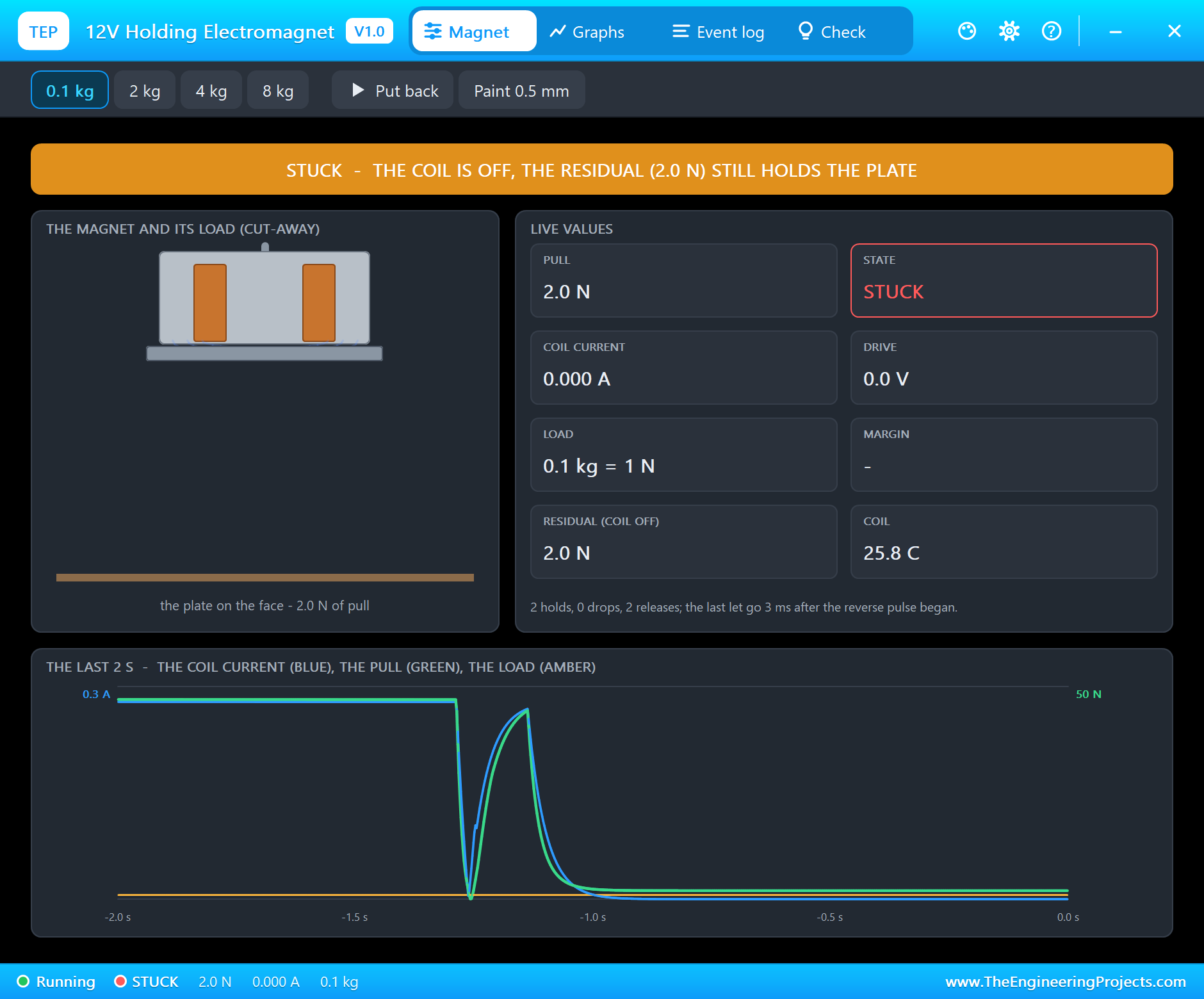
The full pulse does not clear the core, it turns it over: "REMAGNETIZED - the reverse pulse (0.269 A at its peak) was too strong: the core now holds 2.0 N the other way". When the coil goes off, the plate is STUCK again on 2.0 N of residual pull - magnetized the other way round this time. The Check page keeps a red Residual row for it: "a reverse pulse too strong magnetized the core the other way (2.0 N)". The cure is simple: switch it on, and release it with the 35 % pulse. That release went through in the demo: "RELEASED - the plate let go 53 ms after the holding current ended (a reverse pulse cleared the residual)".
How Much Can It Hold?
Switch it on, choose 4 kg and click Put back:
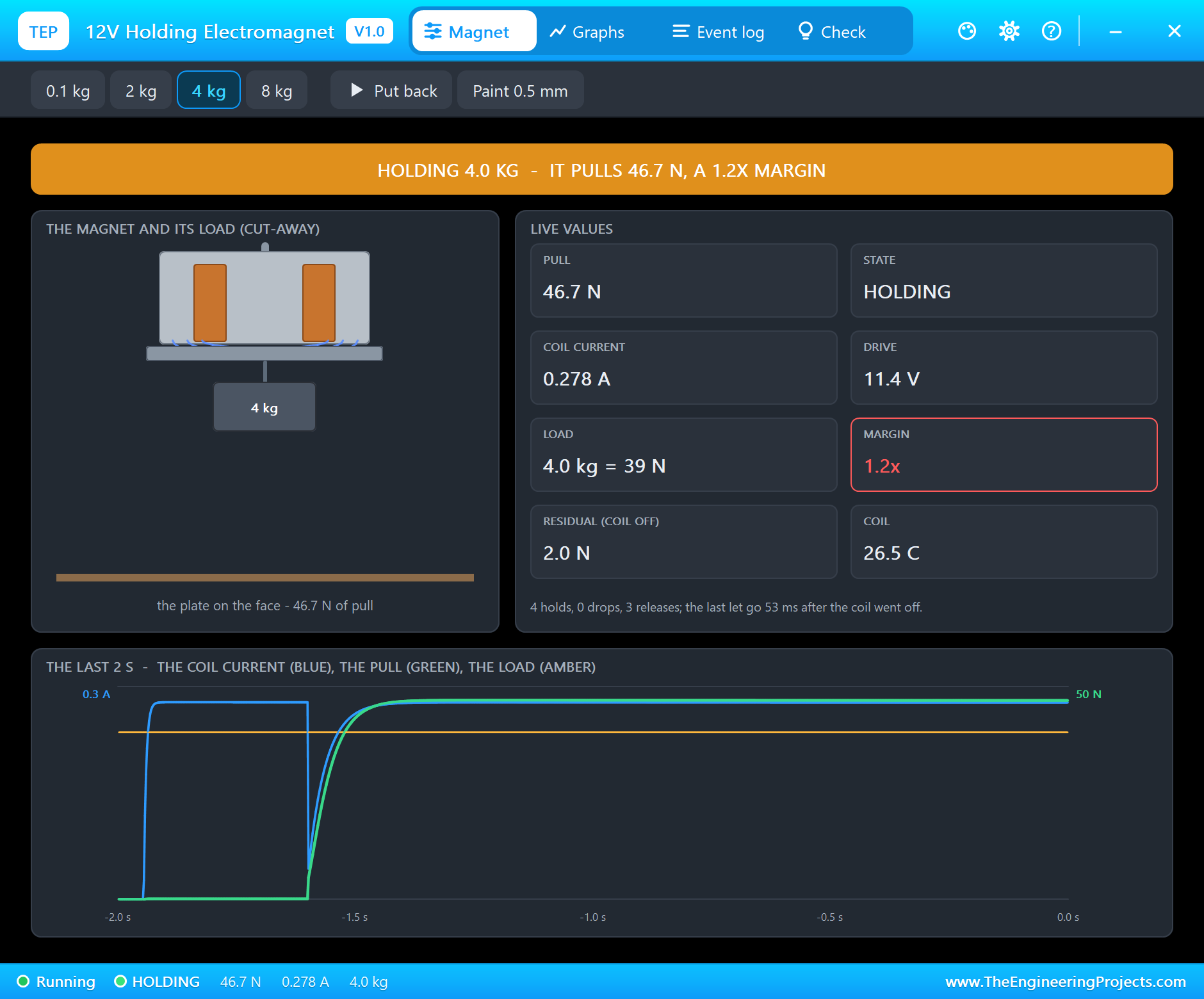
It holds: "HOLDING 4.0 kg (39.2 N) - it pulls 46.8 N on the face: a 1.2x margin - little to spare". The status line turns amber, because a 1.2x margin is a magnet working at its limit. The rating of 5 kg is for perfect conditions, and the next test shows how quickly those go.
A Coat of Paint
Click Paint 0.5 mm. It puts half a millimetre of paint between the face and the plate:
The load drops at once, with the coil still powered: "DROPPED - through the 0.5 mm gap it pulls 23.3 N, less than 4.0 kg (39.2 N); clean steel: 46.7 N". Half a millimetre took half of the pull. This is the most common reason a real magnet "is weaker than its rating": painted or powder-coated steel, a rusty plate, or a plate that does not lie flat.
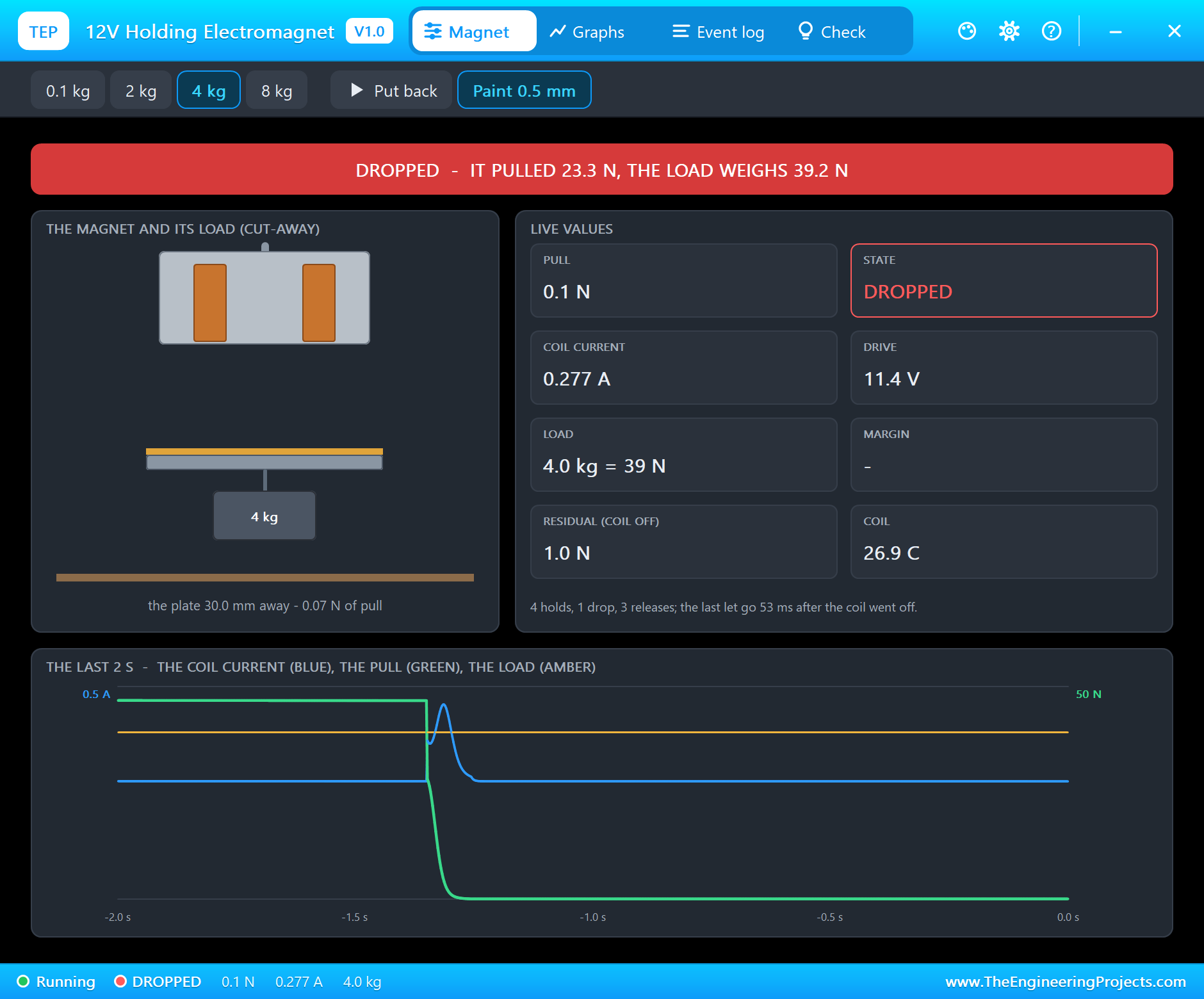
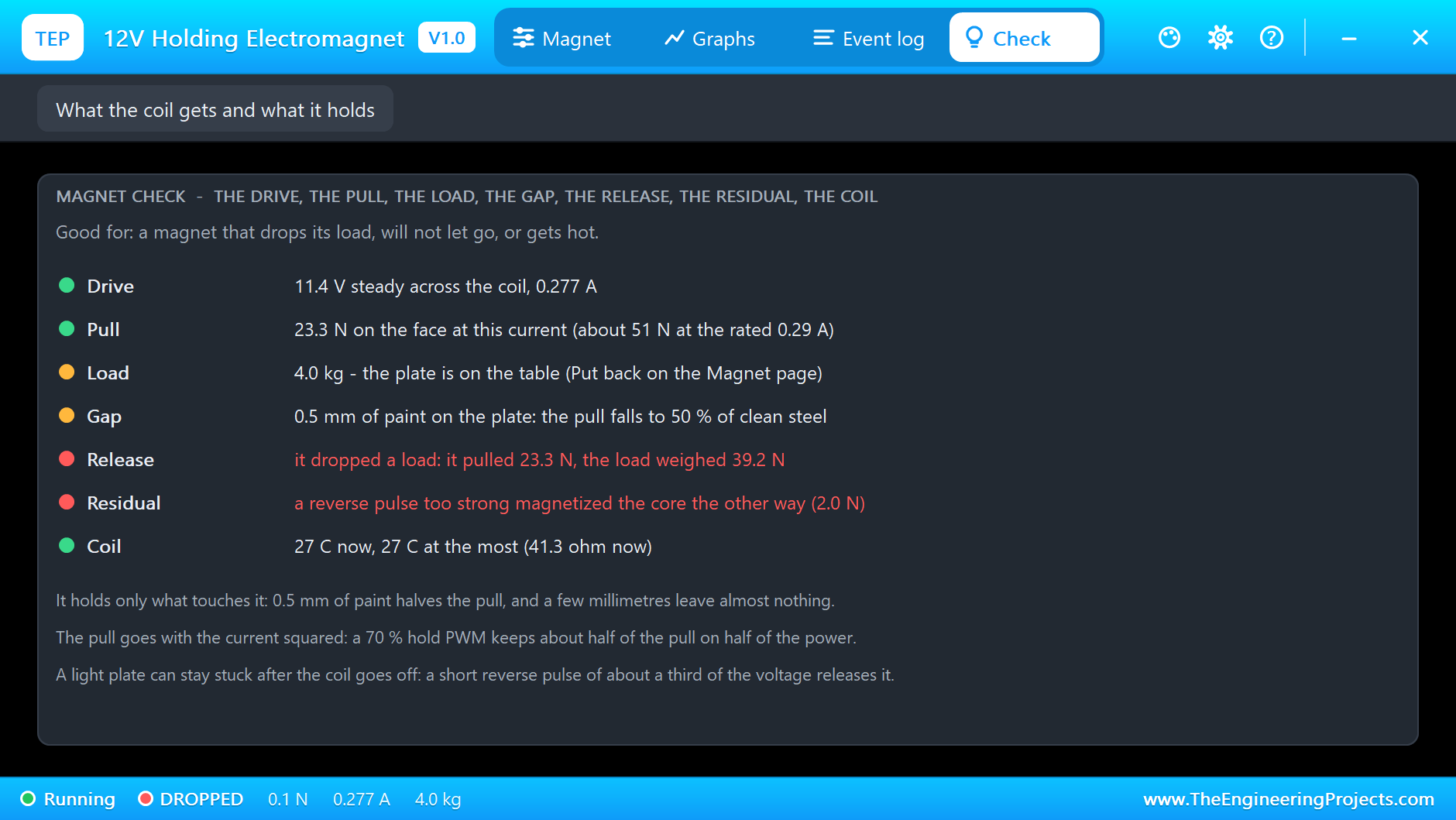
The Check page goes through the drive, the pull, the load, the gap, the release, the residual and the coil, each with a coloured dot. Here the Gap row says what the paint costs - "0.5 mm of paint on the plate: the pull falls to 50 % of clean steel" - and the Release row in red keeps the drop: "it dropped a load: it pulled 23.3 N, the load weighed 39.2 N". The Event log adds why the plate stays on the table: "the plate is 30 mm away: the magnet pulls 0.07 N there - it holds only what touches it".
Too Heavy
Click Paint again to remove it, choose 8 kg and Put back. As soon as the hand lets go, the load falls: "DROPPED - 8.0 kg (78.5 N) is more than its 46.5 N pull (0.277 A, 11.45 V)". No surprise there - but notice that the magnet never even tried: a holding magnet has no reserve, it either holds or it does not.
Holding on Less Power
A magnet held on for hours wastes 3 W as heat. Can a PWM hold it on less, like the "kick and hold" of a solenoid valve? Back to 2 kg, Put back, and try 40 %:
hold 40
Hold PWM - drive 40 % = 4.8 V average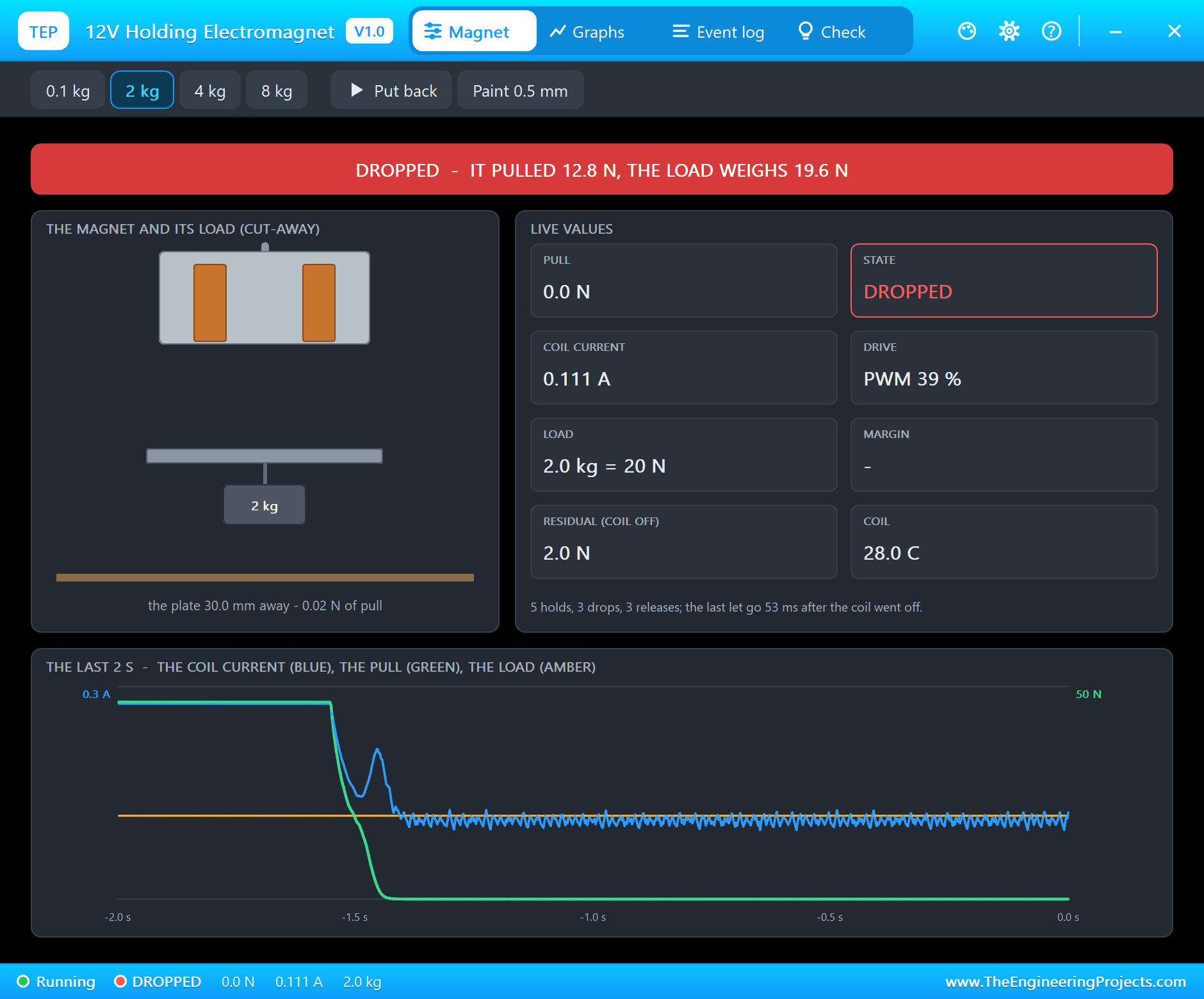
It drops: "DROPPED - the 39 % PWM hold (0.111 A) pulls 12.8 N, less than 2.0 kg (19.6 N)". The PWM measured 39 %. The reason is the square: the pull goes with the current squared, so 40 % of the current gives far less than 40 % of the pull - here 12.8 N instead of about 46 N. Unlike a solenoid, a holding magnet has no gap to close first: it needs its pull all the time.
hold 75
Hold PWM - drive 75 % = 9.0 V average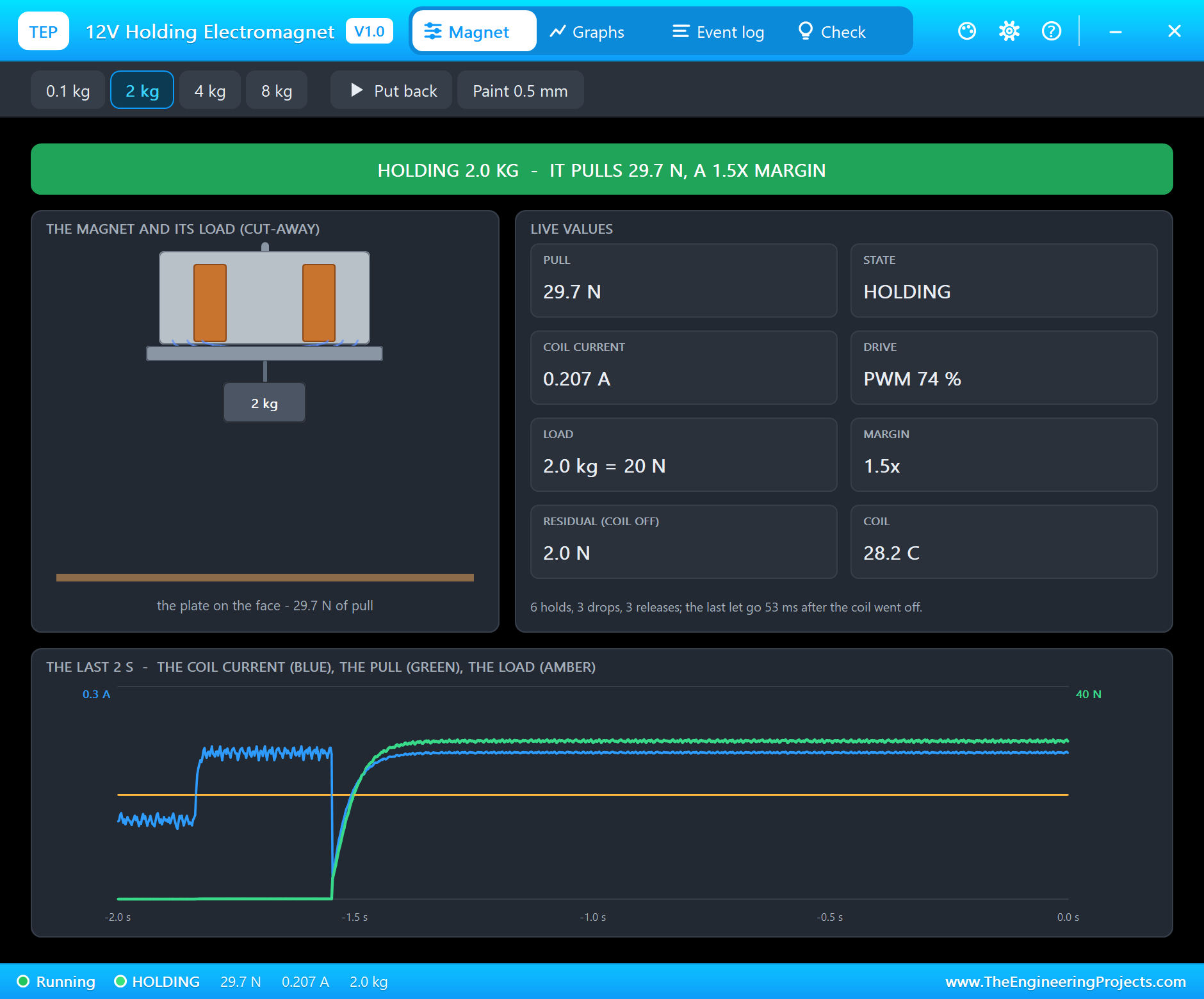
At 75 % it holds again: "HOLDING 2.0 kg (19.6 N) - it pulls 29.8 N on the face: a 1.5x margin", and the log shows the drive "PWM 976 Hz, 74 % duty = 8.58 V average, 0.207 A (1.78 W)" - a little over half of the power. That is the honest trade-off: a hold PWM saves power only if the load is well under the magnet's rating.
Graphs and the Log
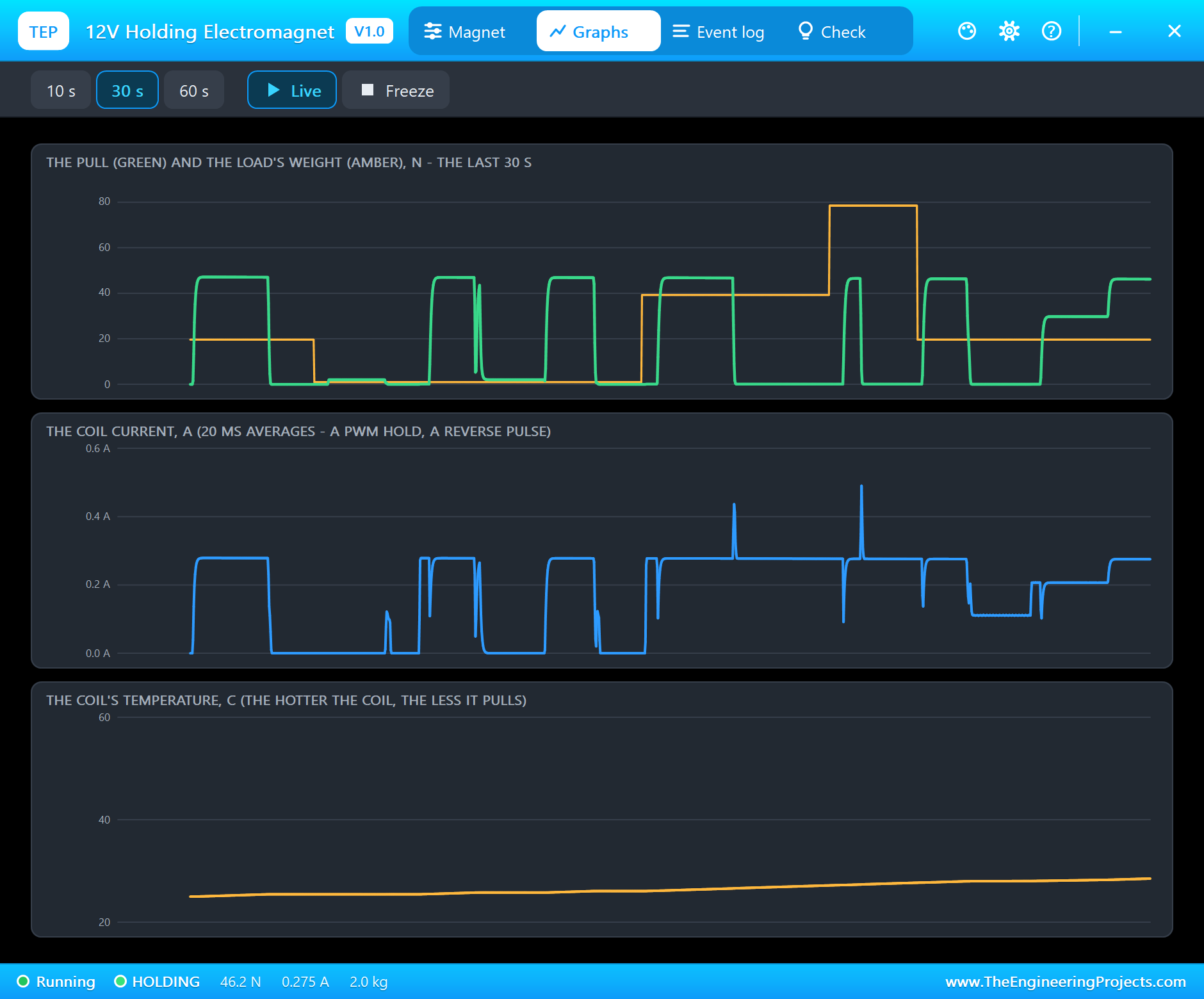
Graphs draws the pull against the load's weight, the coil current and the coil's temperature over the last 10, 30 or 60 seconds. Wherever the green pull line falls below the amber weight line, the plate is on the table. The current graph shows the short spike each time a plate falls off with the coil on: the inductance drops, and the coil's current jumps up for a moment. The coil warmed from 25 C to 29 C over the whole run.
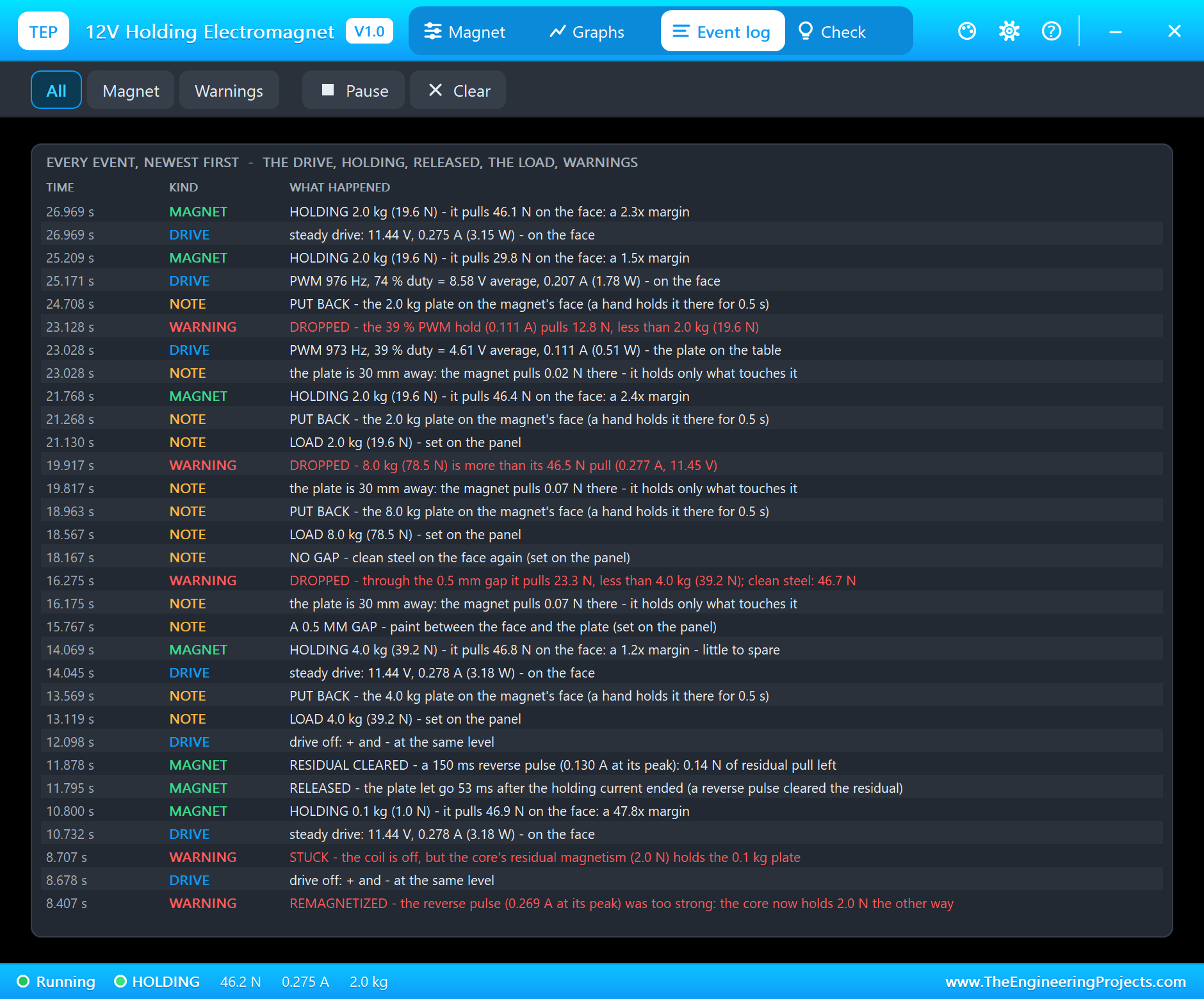
The Event log keeps every hold with its margin, every drop and release with its numbers, the reverse pulses, the drive changes with their PWM frequency, duty and power, and the load and gap changes. Filter it to Magnet or Warnings, pause it, or clear it. Two more warnings you may meet: HOT when the coil passes 90 C, and OVER-VOLTAGE when it gets more than its rating.
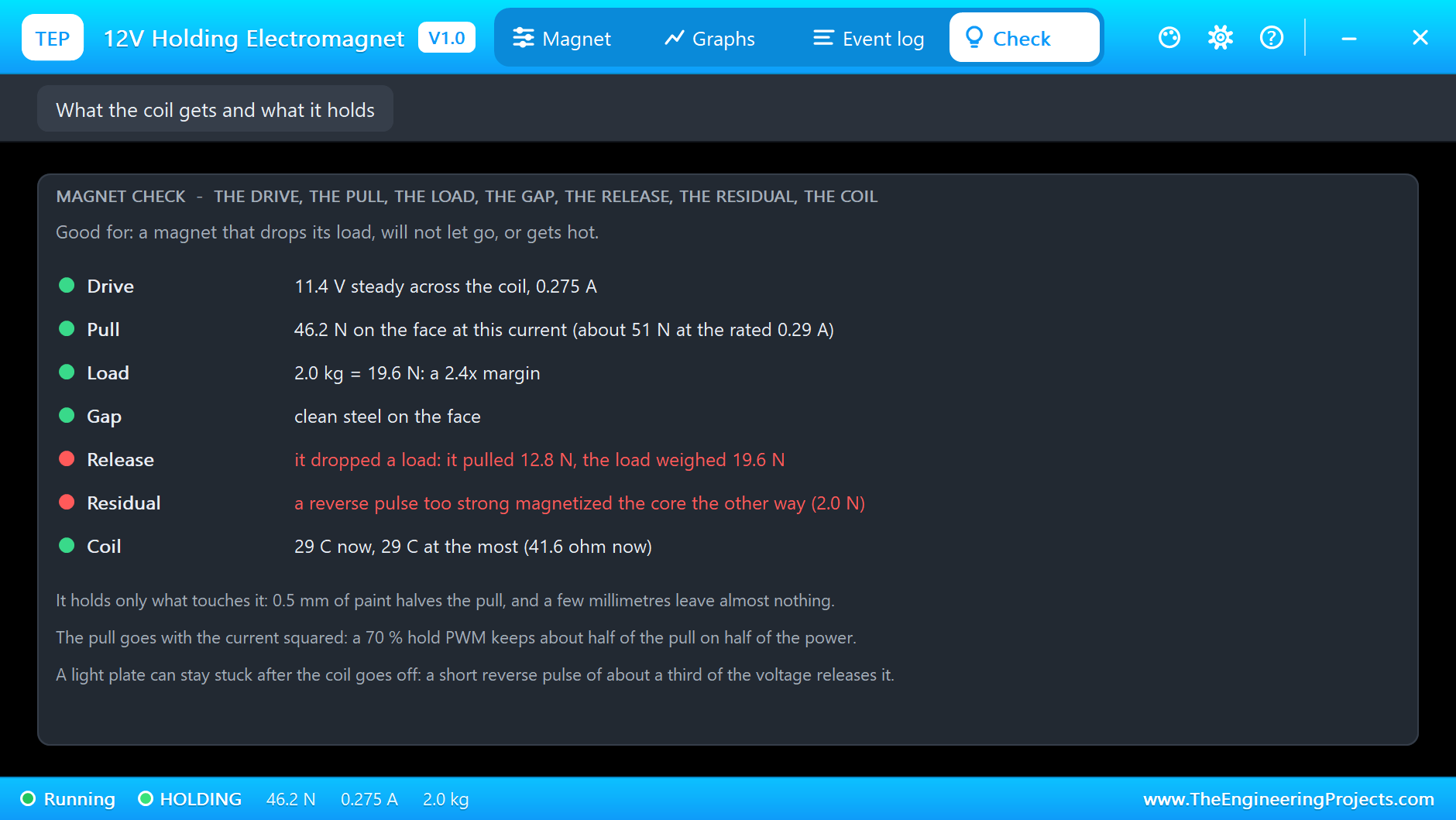
At the end of the run the Check page sums it up: the magnet back on full voltage, 46.2 N on the face and a 2.4x margin on the 2 kg load; the Release row in red remembers the last drop ("it pulled 12.8 N, the load weighed 19.6 N"), the Residual row the remagnetized core, and the coil is at 29 C.
How the Model Works
The coil sits between + and - as 41 ohm with an inductance that depends on the gap between the face and the plate: 1.58 H with the plate on the face, 0.21 H with it on the table. At every analog step the model puts a conductance and a current source into the circuit for it, worked out from the coil's magnetic flux, so the driver and the coil are solved together. That is also why the current jumps when a plate falls off: the flux tries to stay, and with less inductance that takes more current.
The pull is worked out from the current and the gap; above the rated current the iron saturates. The steel's residual magnetism follows a simple hysteresis "play": a full current leaves about 2 N, a reverse current of about a third clears it, a stronger one turns it over. The plate and its load feel the pull and their weight in sub-steps of at most 50 us, and the coil warms with the current and cools to the air. The analog step is held to 0.2 ms while current flows or the plate moves.
We checked the model on a PC with 19 automatic tests: 50.9 N at the rated current on clean steel, 25.4 N through 0.5 mm and 2.00 N of residual pull; 2 kg held at 47.1 N with a 2.4x margin and released 22.0 ms after the coil went off; a 0.1 kg plate stuck on the residual, cleared by a 35 % reverse pulse and turned over by a full one; 4 kg held with a 1.20 margin and dropped through 0.5 mm of paint; 8 kg dropped; a 40 % hold drops 2 kg and a 75 % hold keeps it; twenty minutes on 12 V take the coil to 78 C; and a 24 V magnet on 24 V pulls the same. The demo project is read back from disk with 69 checks.
Troubleshooting
- Nothing happens and nothing is logged: no voltage across + and -, or the driver has no +12V.
- DROPPED: the load weighs more than the pull - a lighter load, full voltage, no paint gap, or a bigger magnet.
- STUCK: the residual magnetism holds a light plate with the coil off - send a short reverse pulse with release.
- REMAGNETIZED: the reverse pulse was too strong - switch the magnet on, then use release.
- The plate stays on the table: a holding magnet does not pull from 30 mm - click Put back on the pop-up.
- The magnet is not simulated:
TEPMAGNET.DLLis missing from MODELS and from the project folder. - No driver: install our L9110S library (
TEPL9110S.LIBandTEPL9110S.DLL). - No UNO or no monitor:
TEPARDUINO.DLLis missing; a closed monitor opens again with a click on the UNO's USB port. - No pop-up: click OPEN PANEL on the magnet's strip, or turn "Open the panel at Run" on in its Settings.
Things to Know Before Wiring a Real Holding Electromagnet
- Use a driver: a P25/20 draws about 0.3 A at 12 V - an L9110S, an L298N, a DRV8833, a MOSFET module or a relay, never an Arduino pin.
- Catch the kick: with a relay or a single MOSFET, fit a 1N4007 across the coil, its cathode on +. An H-bridge driver has its own diodes, and it can send the reverse pulse.
- Rate for the worst case: the holding force is for thick, clean, flat steel touching the whole face. Paint, rust, thin sheet or a curved surface take much of it away - plan for at least twice the weight.
- It holds, it does not lift from a distance: the part has to be brought to the face.
- Sideways is weaker: a magnet holds far less when the load pulls along the face than straight down.
- Heat: held on for a long time it runs warm, and a warm coil pulls less.
Limitations of the Simulation
- Not modelled: a plate that only partly covers the face, sideways (shear) loads, eddy currents, the plate's own thickness and steel grade.
- The plate, the ON LED, the steel plate and its load, the field lines, the rating line and the strip are TEP additions.
- The model is our own, written from the typical data of 12 V 25 mm holding electromagnets; this library is not made or endorsed by any magnet maker, Arduino or Labcenter.
- Licences: the demo HEX contains the Arduino AVR core 1.8.6 (LGPL); the sketch is included and the README gives the source link. The L9110S driver of the demo is our separate library.
- Tested in Proteus 8.5 in October 2026 with the demo as shipped: holding 2 kg, off, a stuck light plate, the release pulse, a full reverse pulse, 4 kg, a paint gap, 8 kg, two hold PWMs, and all four pages of the pop-up. Proteus 7 is not supported.
So, that was all about the 12V Holding Electromagnet Library for Proteus V1.0. I hope it helps you with your gripper, your door holder or your sorting machine - and that a well-measured release pulse keeps your plates from sticking. If you have any questions, ask in the comments and I will help you out. Till the next tutorial, take care and have fun!

Comments
0