


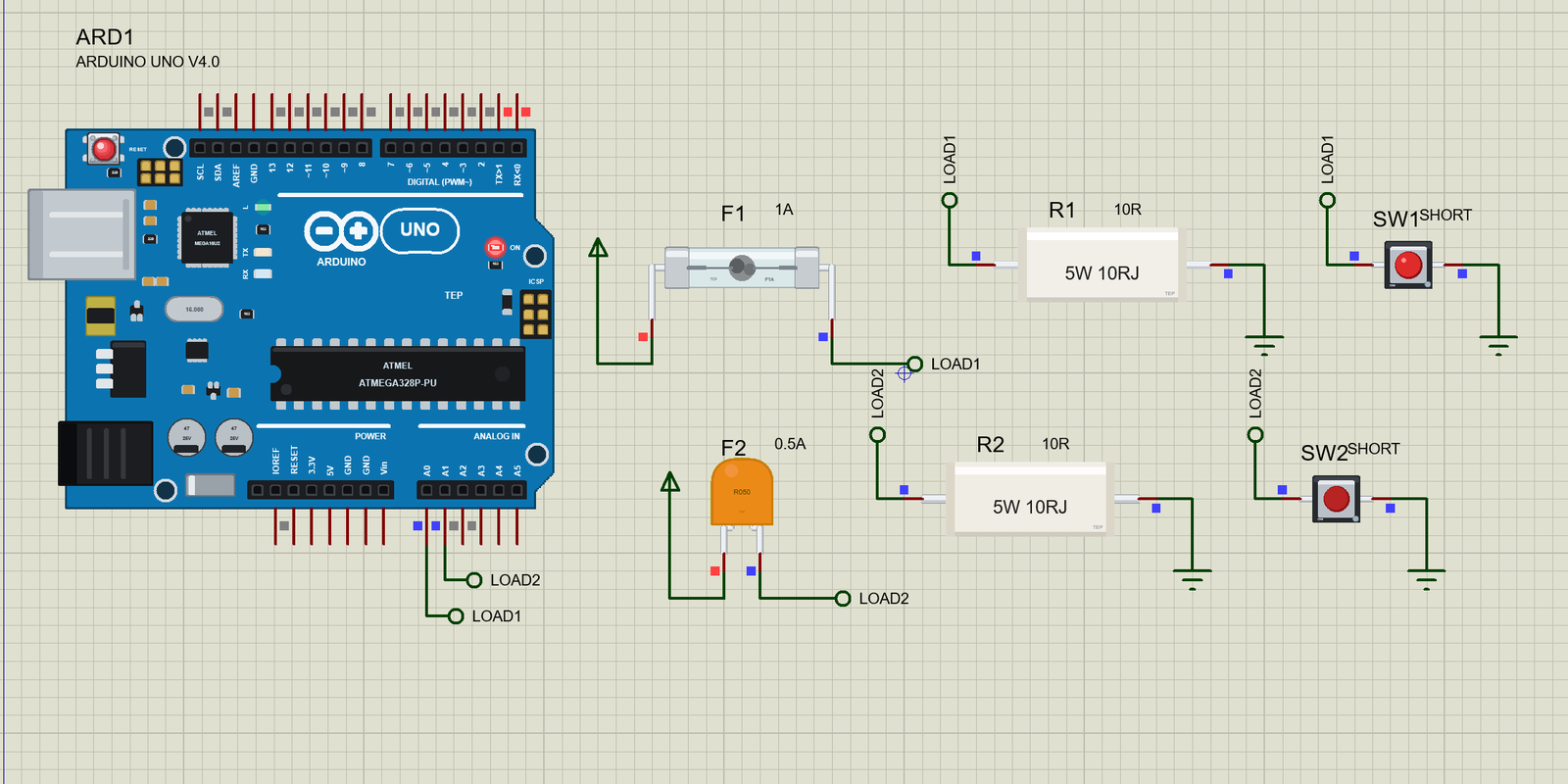
Fuse Library for Proteus: 5x20 Glass Fuse and Resettable PTC


Hello friends, I hope you all are doing great. Today, I am going to share the new Fuse Library for Proteus. A fuse is the cheapest and most important safety part in almost every circuit: a thin wire that carries the normal current all day long and melts in an instant when something goes wrong. Behind it, the wiring, the supply and the board are saved from a short circuit that could heat them until they smoke.
Fuse Library for Proteus
Latest version: V1.0 (November 2026, this tutorial)
Helping Tools
- Serial Monitor Advance: a serial terminal window for the UART of your board
- Serial Monitor Expert: the serial monitor with extra debugging tools
- LCD Library for Proteus V3.0: 16x2, 20x4 and I2C LCDs to show your readings
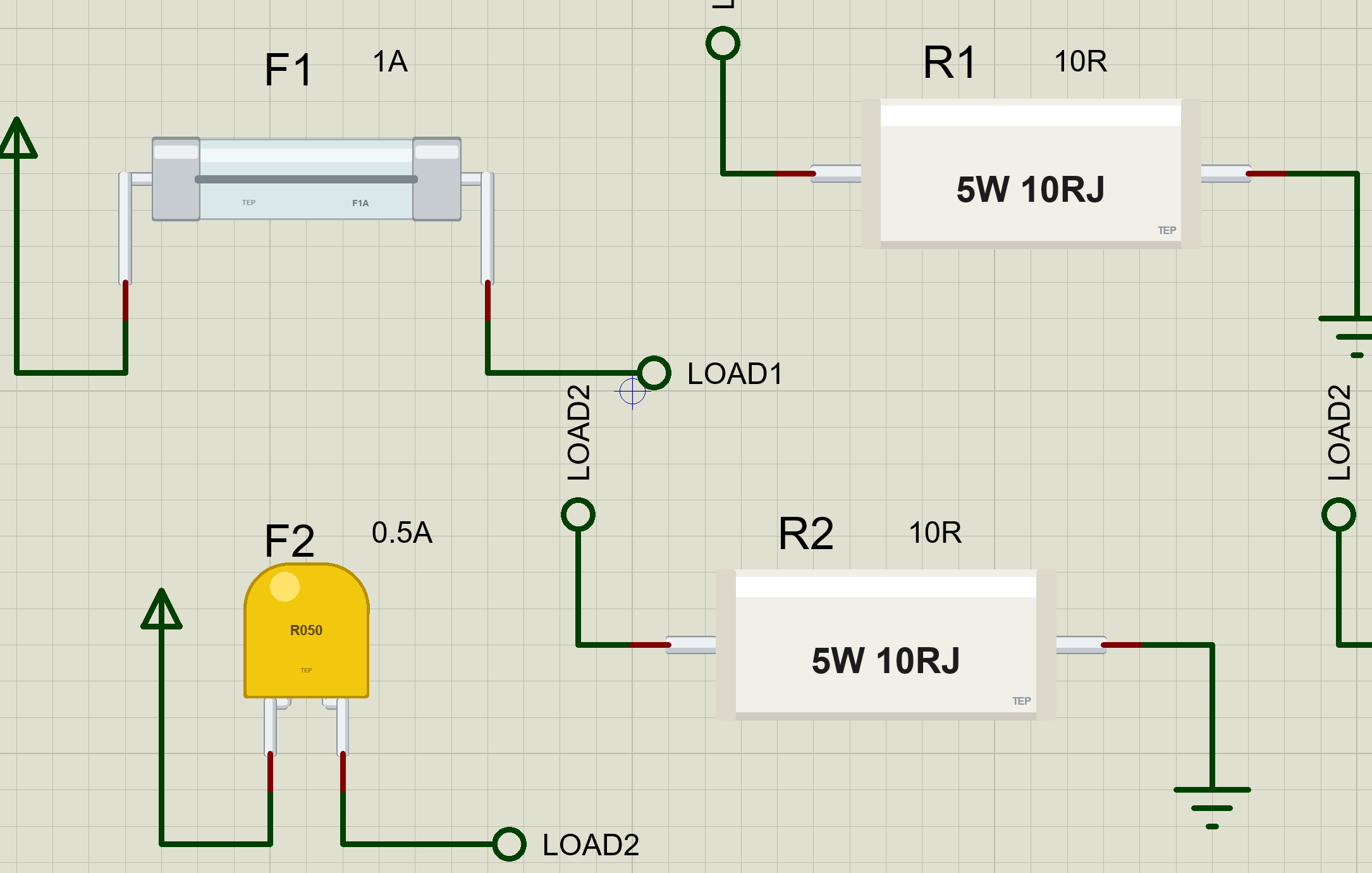
Our library has two fuses, at true scale: the classic 5 x 20 mm glass fuse, marked F1A, with the wire you can see through the glass, and a resettable PTC fuse, the little yellow disc you find on USB ports and battery packs. At Run, the glass fuse really blows: too much current for too long and its wire melts in the middle, right on the sheet, and the fuse stays open until you fit a new one. The PTC trips and resets by itself. The pop-up draws the time against current curve and shows how close each part is to giving up. In the demo, a push button shorts the load behind each fuse while an Arduino watches both loads.
NOTICE: Our team has put a lot of effort into these small parts: the bodies, the animation and the pop-ups are all our own design, and you get them free. Your feedback is the fuel that keeps us going, so please tell us what you think in the comments below or in the Fuse board of our forum. And if our free libraries help you, you can buy us a coffee. So, let's get started with the Fuse Library for Proteus:
What is a Fuse?
A fuse is a deliberate weak point in a circuit. It is a short piece of wire or metal strip, sized so that the normal current warms it only a little, while a fault current heats it past its melting point. When it melts, the circuit opens and the current stops. The fuse is destroyed, and that is the whole idea: it is far cheaper to replace a fuse than a burnt cable, a supply or a complete board.
The heat in the wire is the current squared times its resistance, so a fuse responds to I squared: twice the current makes four times the heat. The wire also needs time to warm up, and that gives every fuse its typical behaviour. A small overload takes seconds or minutes to melt it, while a dead short does it in milliseconds. Fuse makers draw this as a time against current curve, and choosing a fuse is mostly a matter of reading that curve.
| Feature | The glass fuse | The resettable PTC |
|---|---|---|
| Style | 5 x 20 mm glass cartridge, pigtail leads | radial disc, in the style of the Bourns MF-R050 |
| Rating | F1A: 1 A, fast-acting | hold 0.5 A, trip 1.0 A |
| Cold resistance | 0.1 ohm | 0.4 ohm |
| After a fault | open for good: fit a new one | resets by itself once it cools |
| In the library | FUSEGLASS5X20TEP | FUSEPTCTEP |
The 5 x 20 mm Glass Fuse
The 5 x 20 mm glass cartridge is the fuse inside power supplies, amplifiers, test meters and the plug-in holders of countless devices. It is a glass tube 5 mm across and 20 mm long, with a nickel-plated cap on each end and the wire running straight through the middle, so you can see at a glance whether it is still whole. The rating is printed on a cap: F1A means a fast-acting fuse rated at 1 A, usually with a voltage such as 250V beside it. Our part is the pigtail version, with a lead on each cap, so it sits on a board like a resistor.
Fast and Slow: IEC 60127
The international standard for these miniature fuses is IEC 60127. It says how quickly a fuse must blow at a few multiples of its rating, and gives each speed a letter. F is quick-acting, for electronics that a surge would harm. T is time-lag, also called slow-blow, for loads that draw a big current for a moment when they start: motors, lamps, transformers and the large capacitors at the input of a supply. A T fuse rides through that inrush and still opens on a real fault.
The standard also says what a fuse must survive. A 5 x 20 mm fuse must carry 1.5 times its rating for an hour without blowing, and must blow at 2.1 times its rating, within 30 minutes for an F fuse. In between, it may do either. So a 1 A fuse is not a switch that opens at 1.01 A. It is a part that will never trouble a circuit drawing 1 A, and will reliably open on a fault.
| Current | IEC 60127, F | Our F fuse | IEC 60127, T | Our T fuse |
|---|---|---|---|---|
| 2.75 x the rating | 10 ms to 2 s | 0.35 s | 0.2 s to 10 s | 1.3 s |
| 4 x the rating | 3 ms to 0.3 s | 0.13 s | 40 ms to 3 s | 0.48 s |
| 10 x the rating | under 20 ms | 18 ms | 10 ms to 0.3 s | 68 ms |
How Our Model Melts the Wire
Inside the model, the fuse has a heat state that follows the square of the current, as a multiple of its rating, with a time constant: 0.4 s for an F fuse and 1.5 s for a T fuse. The wire melts when that heat reaches 2.1 squared, so the fuse never blows below about 2.1 times its rating, and above it the time falls steeply with the current. The table above shows where that lands: inside the IEC 60127 windows at every point. The normal current warms the fuse a little, too. At half its rating, the heat sits about 6 % of the way to blowing, so a fuse that has been working for a while blows a touch sooner than a cold one.
The Resettable PTC Fuse
A PTC resettable fuse, often called a polyfuse, works in a completely different way. It is a disc of polymer filled with carbon particles. Cold, the carbon chains touch and the disc conducts with a small resistance. As it heats, the polymer expands and pulls the chains apart, and at its trip temperature the resistance jumps by thousands of times. The current falls to a trickle, but that trickle still heats the disc, so it stays tripped for as long as the fault and the supply are there.
Remove the fault or the power, and the disc cools, shrinks and conducts again. There is no fuse to replace. That is why PTCs guard USB ports, battery packs, loudspeakers and anything a user might short by mistake. The price is speed and precision: a PTC is slower than a fast fuse, its resistance after a reset is a little higher than before, and it never opens completely.
Hold, Trip and the MF-R050
A PTC has two currents instead of one rating. The hold current is the most it carries forever without tripping; the trip current is the least that trips it for sure. Between them, it may do either, depending on the temperature around it. Our part follows the Bourns MF-R050: hold 0.5 A, trip 1.0 A, about 0.4 ohm cold, and about 0.75 W while tripped. Its datasheet gives a maximum time to trip of 4 seconds at 2.5 A, and our model trips in 4.0 s at that current.
While tripped, the model keeps the PTC at the resistance that burns its 0.75 W from the voltage across it, which is exactly how the real disc behaves: hot enough to stay tripped, no hotter. If the circuit can no longer feed that power, the disc cools for a moment and resets.
Choosing a Fuse
For a glass fuse, start from the normal current and pick a rating about 1.5 times higher, then check that the wire it protects can carry that rating. Use a T fuse for loads with an inrush. Check that its voltage rating is above the supply, and that its breaking capacity is above the biggest current the supply could push into a short. Glass fuses have a low breaking capacity, so mains inputs and big batteries often call for ceramic fuses instead. For a PTC, pick a hold current above the normal current at the hottest temperature it will see, and check its maximum voltage and current against the supply.
Where They Are Used
Glass fuses sit at the mains input of power supplies, in the back of amplifiers, inside multimeters and in the holders of chargers and appliances. PTC fuses protect USB ports, battery packs, small motor drives, LED strips and loudspeakers. Many products use both: a glass fuse for the faults that should never happen, and a PTC for the ones a user can cause.
Features of the Fuse Library for Proteus
- The real look, at true scale: a 5 x 20 mm glass tube with silver caps, its wire and F1A marking, and a yellow PTC disc printed R050, each with our small TEP signature.
- The glass fuse blows on the sheet: its wire melts in the middle and stays open after the fault, until you fit a new one.
- The PTC trips and resets: its disc turns orange as it heats, holds its trip power while the fault lasts, and resets by itself when the circuit cannot keep it hot.
- I squared timing: a big short opens them in milliseconds, a small overload in seconds, on the IEC 60127 shape for the glass fuse.
- Fast or slow: the glass fuse is F or T with one property.
- A pop-up for every fuse: the state, the part drawn large, the time against current curve with the present current on it, eight live values, graphs, an event log and a check page.
- A complete package: about 1.9 MB with the library, our Arduino UNO V4.0, our power resistors and push buttons and the demo, without the source code of the models.
The Fuses in Proteus
The devices are FUSEGLASS5X20TEP and FUSEPTCTEP in TEPFUSE.LIB, under Miscellaneous, Fuses, with the prefix F and the model TEPFUSE.DLL. Search FUSE in Pick Devices. Each has two pins, 1 and 2; a fuse does not care which way the current flows.
The Properties
| Property | What it does |
|---|---|
| Rating, A (VALUE) | 1A for the glass fuse; 0.5A, the hold current, for the PTC |
| Characteristic (glass) | F (fast) or T (slow) |
| Cold resistance, ohm | 0.1 for the glass fuse, 0.4 for the PTC |
| Trip current, A (PTC) | 1.0 |
| Power while tripped, W (PTC) | 0.75 |
Every run starts again from the properties, with a whole fuse and a cold PTC.
Download Fuse Library for Proteus
Click the button below to download Fuse-Library-for-Proteus-v1.0.zip (about 1.9 MB, without the source code of the models):
Fuse Library for Proteus V1.0- README.txt: installation, the demo, the properties, troubleshooting and the limits.
- Proteus Library Files:
TEPFUSE.LIB,TEPPOWERRES.LIB,TEPBUTTON.LIBand ourArduinoV4TEP.LIB. - Proteus Model Files:
TEPFUSE.DLL,TEPPOWERRES.DLL,TEPBUTTON.DLLandTEPARDUINO.DLL. - Arduino Code: the demo sketch.
- Proteus Simulation: the demo project, its HEX file and copies of the DLLs.
No Proteus yet? Read How to Download and Install Proteus 7 and 8. New to libraries? Follow How to Install a New Library in Proteus.
How to Install Fuse Library for Proteus
- Close Proteus and extract the whole zip file, for example to your Desktop.
- Copy the files from Proteus Library Files into the LIBRARY folder of Proteus.
- Copy the files from Proteus Model Files into the MODELS folder.
- Delete
TEPFUSE.IDXfrom the LIBRARY folder if it is there. - Start Proteus, press P and search for FUSE.
Demo: Two Protected Loads
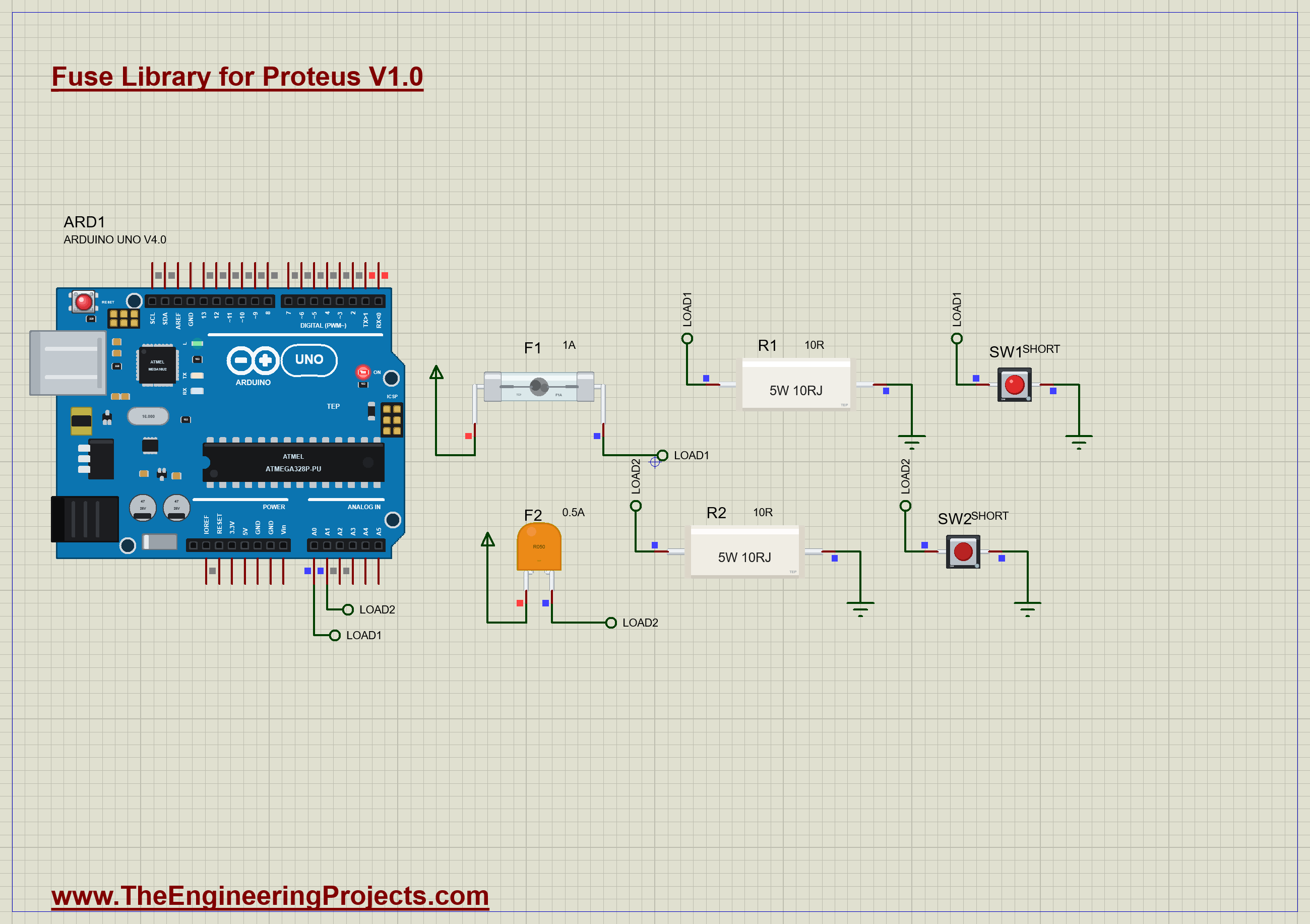
Each fuse guards one load. F1, the glass F1A fuse, feeds R1, a 10 ohm, 5 W resistor, from the 5 V rail: about 0.5 A, half the rating of the fuse. SW1, a push button from the load to ground, is the fault: press it and the load is shorted. F2, the PTC, feeds R2 in the same way, with SW2 as its short. The voltage behind each fuse goes to an analog input, LOAD1 to A0 and LOAD2 to A1, so the sketch can tell whether each load still has power. Open Fuse-Watch-ArduinoUnoV4.pdsprj. It runs on our Arduino UNO Library for Proteus V4.0, with its built-in monitor, the same window as our TEP Serial Monitor Advance for Proteus. The loads come from our Power Resistor Library for Proteus, and the buttons from our Push Button Library for Proteus.
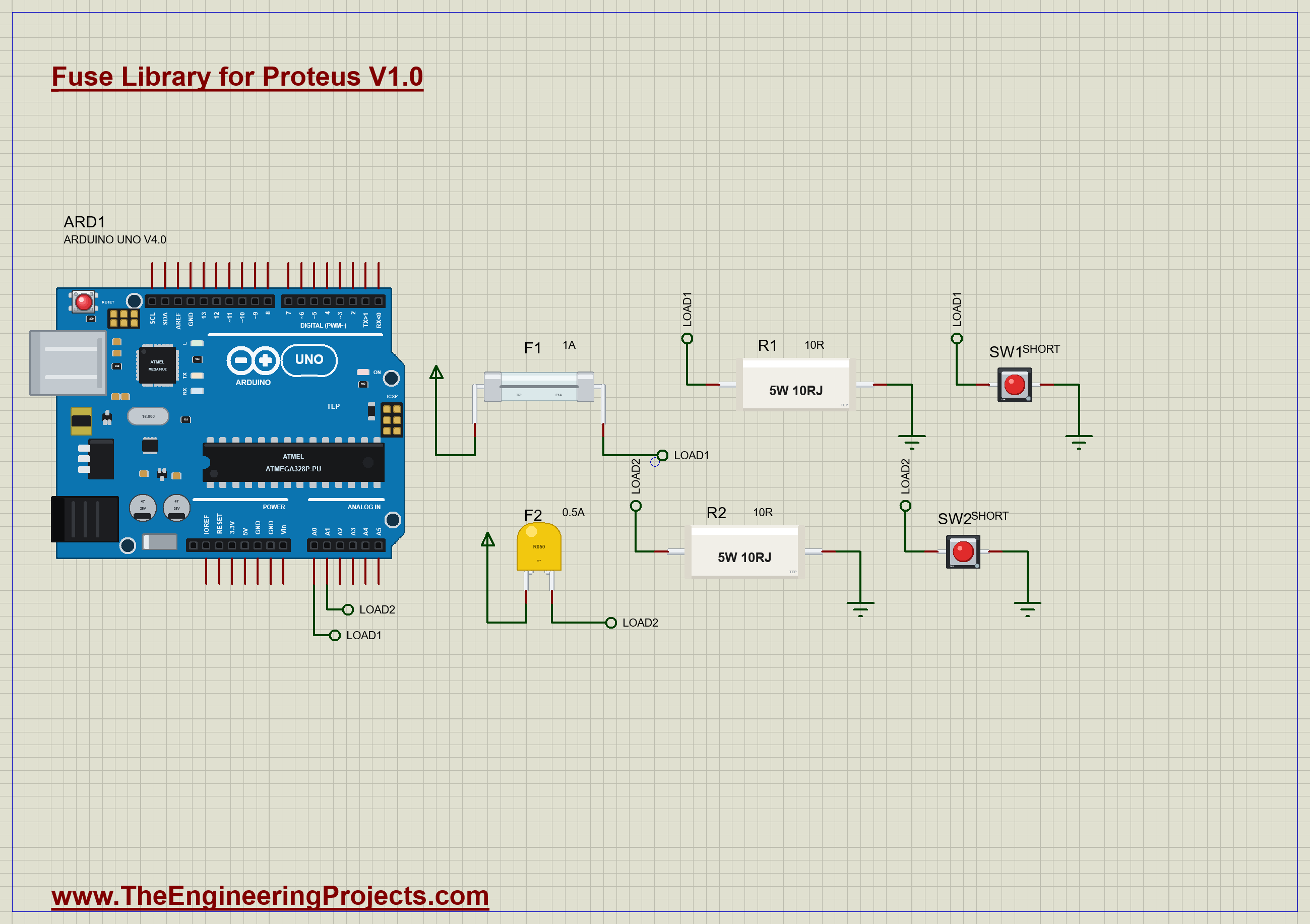
| Part | Connection | Job |
|---|---|---|
| F1 (glass, F1A) | +5V to LOAD1 | protects load 1 |
| R1 (5 W, 10R) | LOAD1 to GND | load 1, about 0.5 A |
| SW1 (push button) | LOAD1 to GND | the short on load 1 |
| F2 (PTC, 0.5 A) | +5V to LOAD2 | protects load 2 |
| R2 (5 W, 10R) | LOAD2 to GND | load 2, about 0.5 A |
| SW2 (push button) | LOAD2 to GND | the short on load 2 |
| ARD1 A0, A1 | LOAD1, LOAD2 | watches both loads |
The Sketch
The sketch reads the voltage behind each fuse with the ADC, scaled to volts:
float volts(byte pin) {
  return analogRead(pin) * 5.0 / 1023;
}
Near 5 V, the load is fed. Near 0 V, it is not, either because it is shorted or because its fuse is open. The current follows from the 10 ohm load, and the verdict is a single comparison against 4 V:
Serial.print(v > FED_V ? F(" A - powered") : F(" A - NO POWER"));The loop prints both loads whenever either voltage moves by more than 0.05 V, at most twice a second, so the monitor stays readable while a PTC cools.
Run the Demo
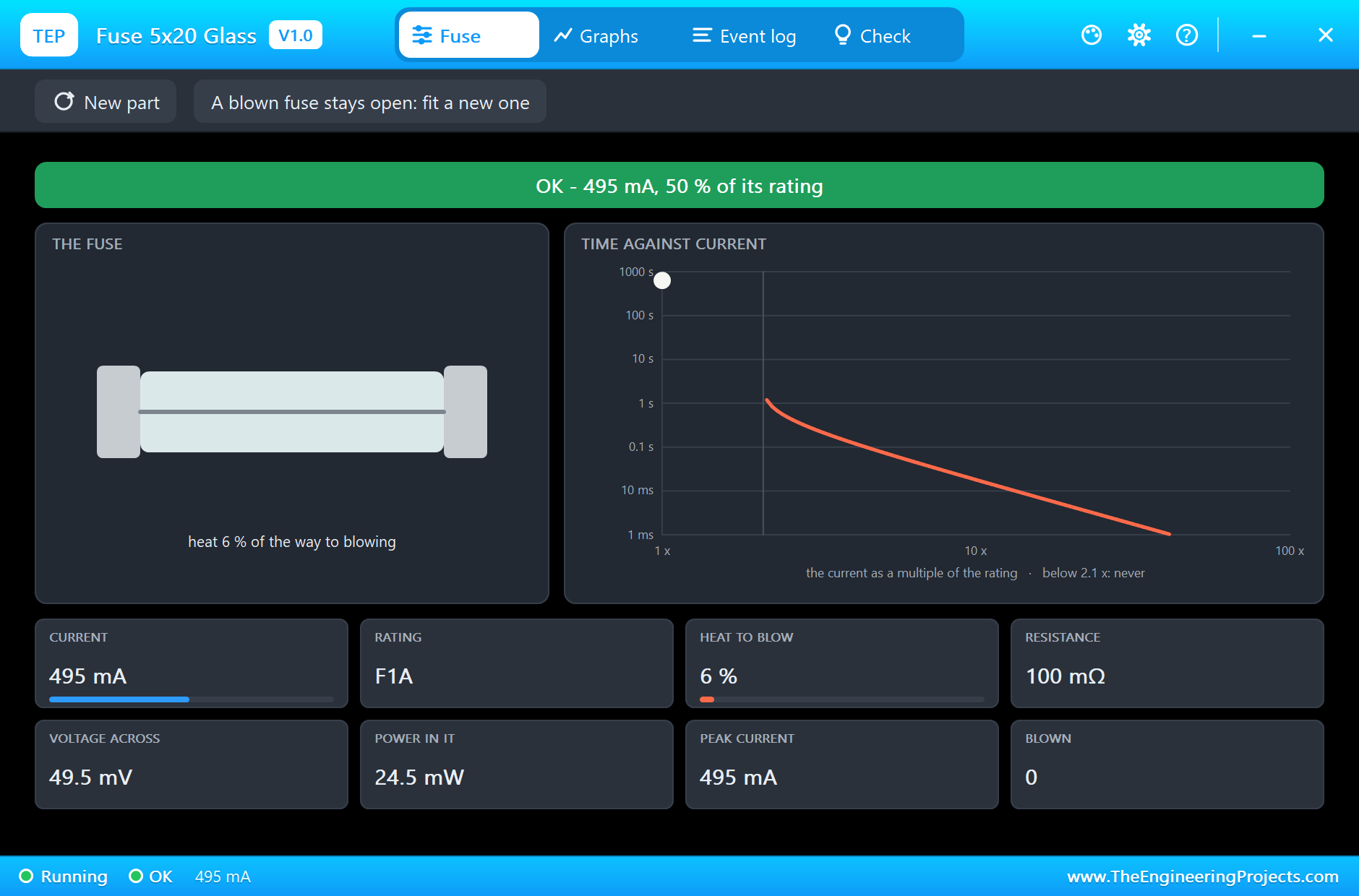
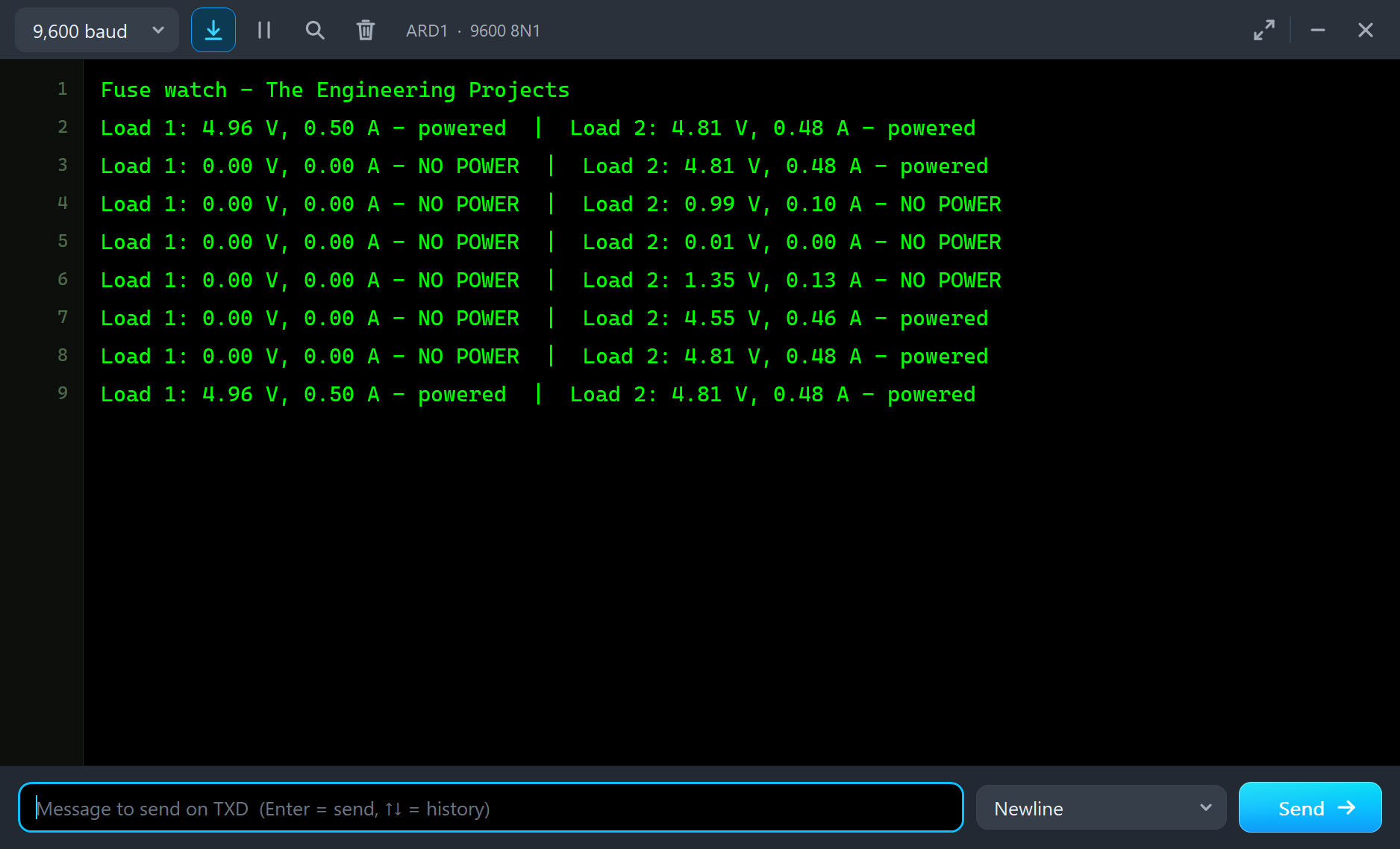
Press Run. Both loads are fed: load 1 at 4.96 V and 0.50 A, load 2 at 4.81 V and 0.48 A. Load 2 is a little lower because the PTC's 0.4 ohm drops 0.19 V, against the glass fuse's 50 mV. Click the small dot on F1 to open its pop-up. The banner reads OK at 50 % of its rating, and the heat bar sits at 6 %. The white dot of the present current is pinned at the top left of the curve, because at half its rating this fuse would never blow:
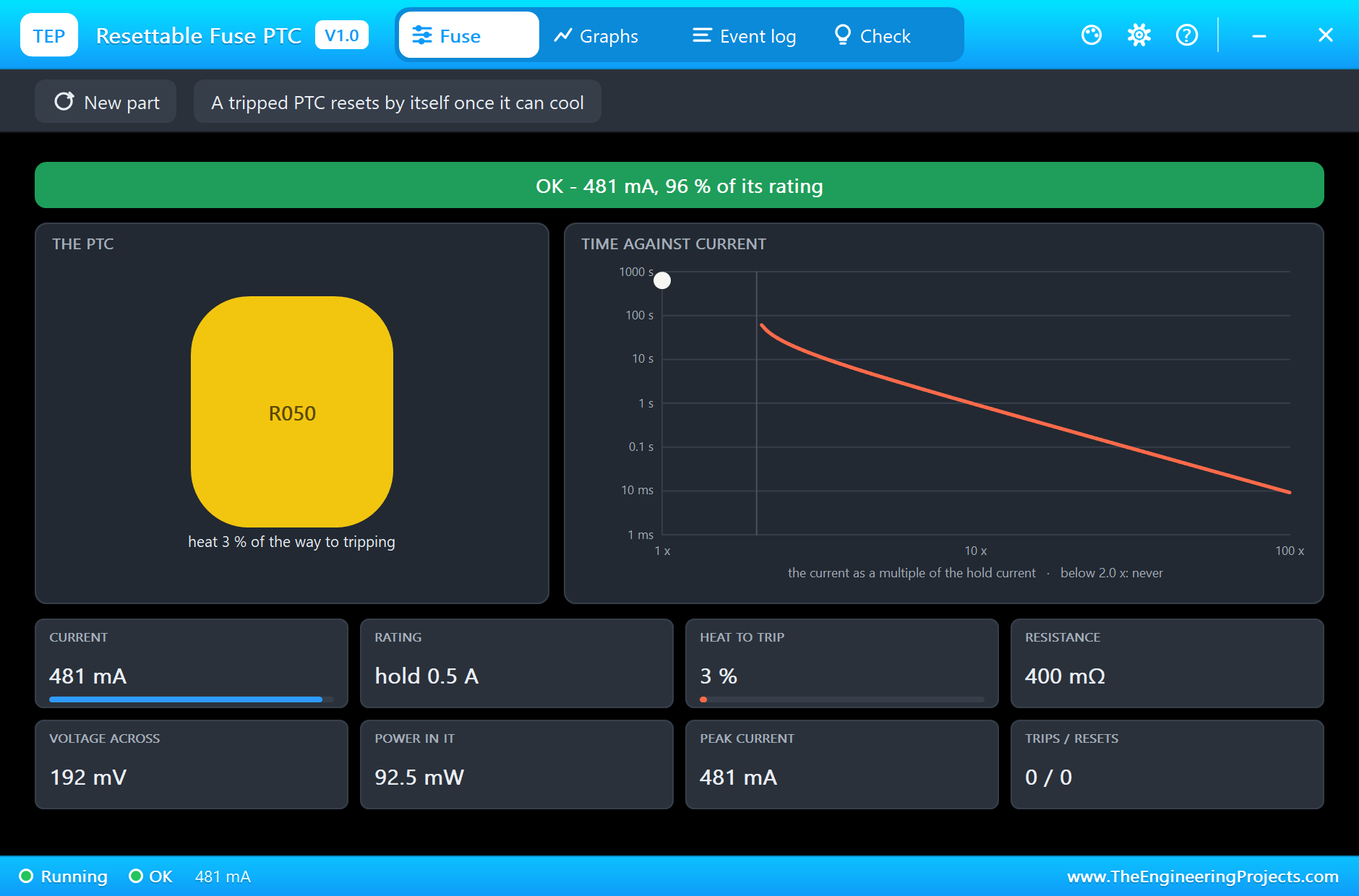
The PTC's pop-up shows the same for load 2: 481 mA, 96 % of its hold current, its disc still yellow:
A Short on Load 1
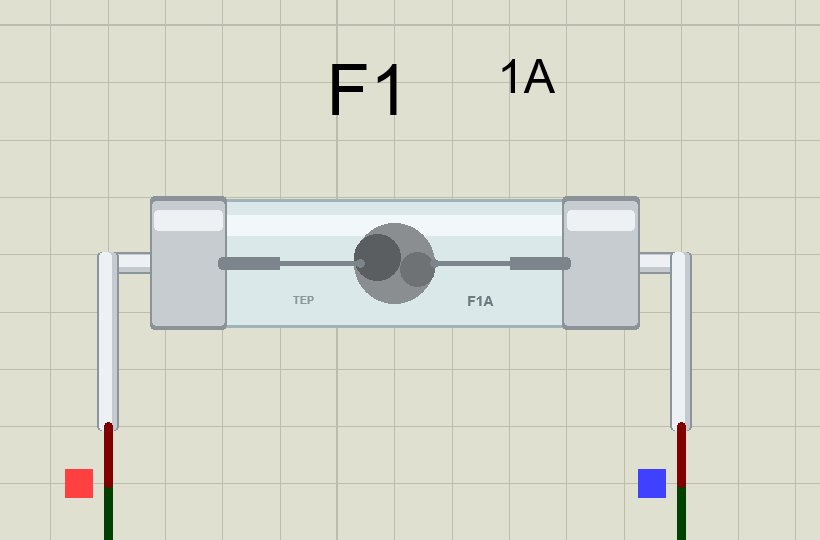
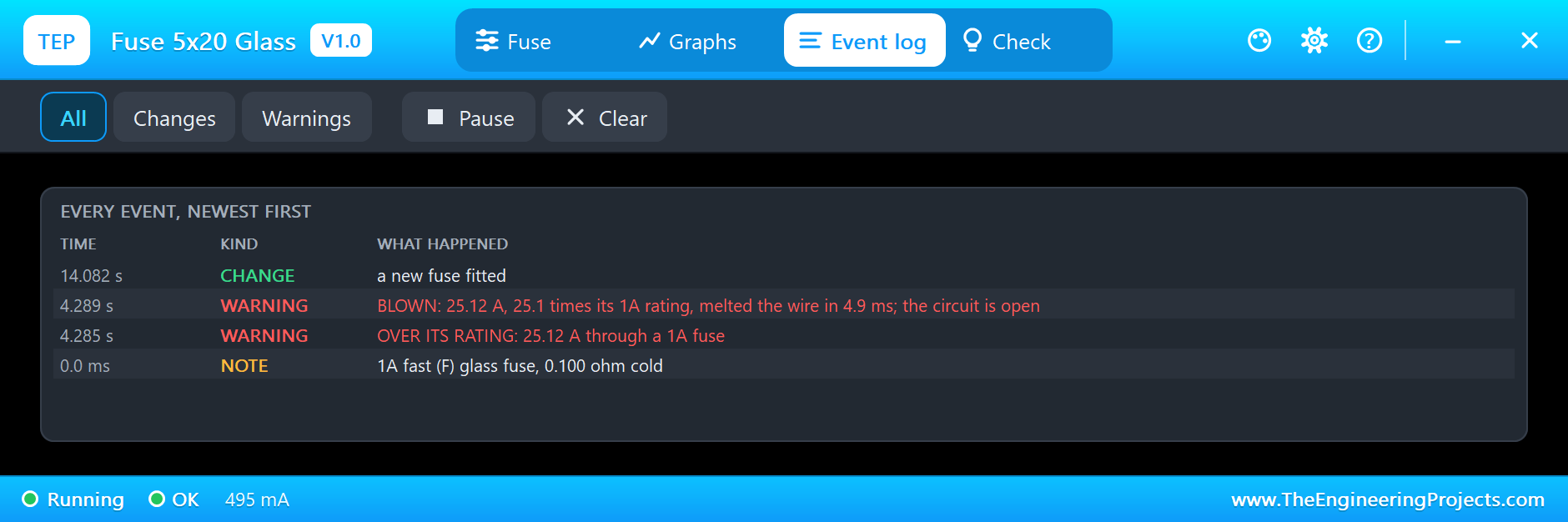
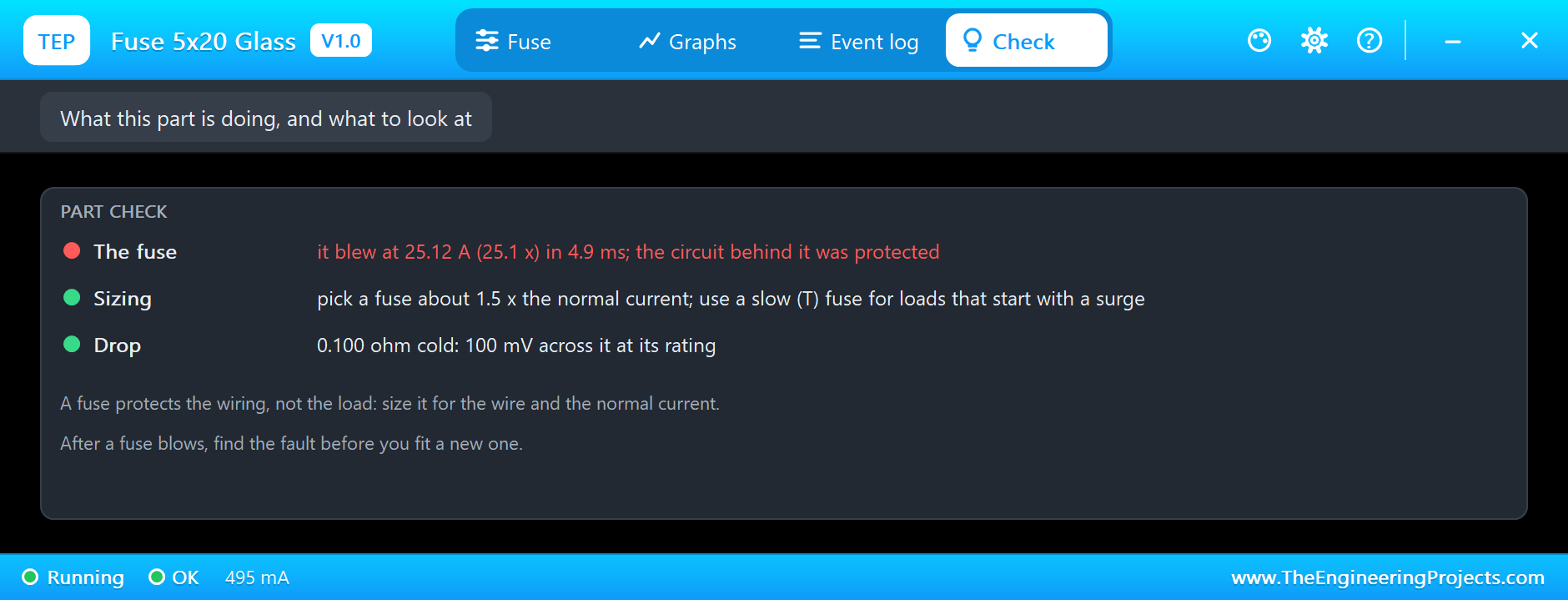
Now press SW1. The load is shorted, and only the fuse, the button and the wiring limit the current: 25.1 A, more than 25 times the rating of the fuse. From its warm start, a steady 25 A would melt the wire in about 3 ms. Our push button bounces like a real one, so the short came and went a few times as the contacts closed, and the wire melted 4.9 ms after the first contact. On the sheet, the middle of the wire is gone and the glass is smudged around the gap:
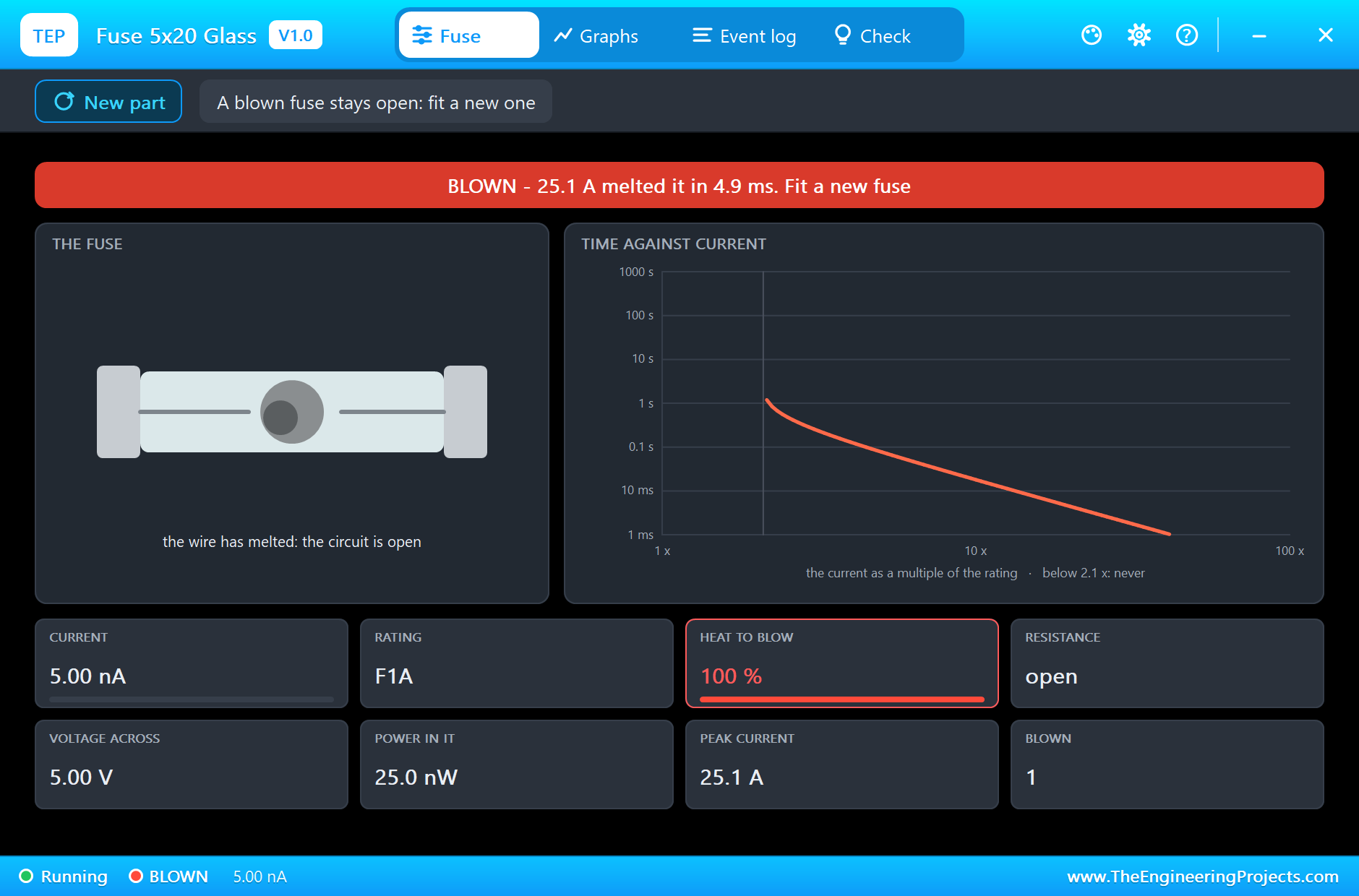
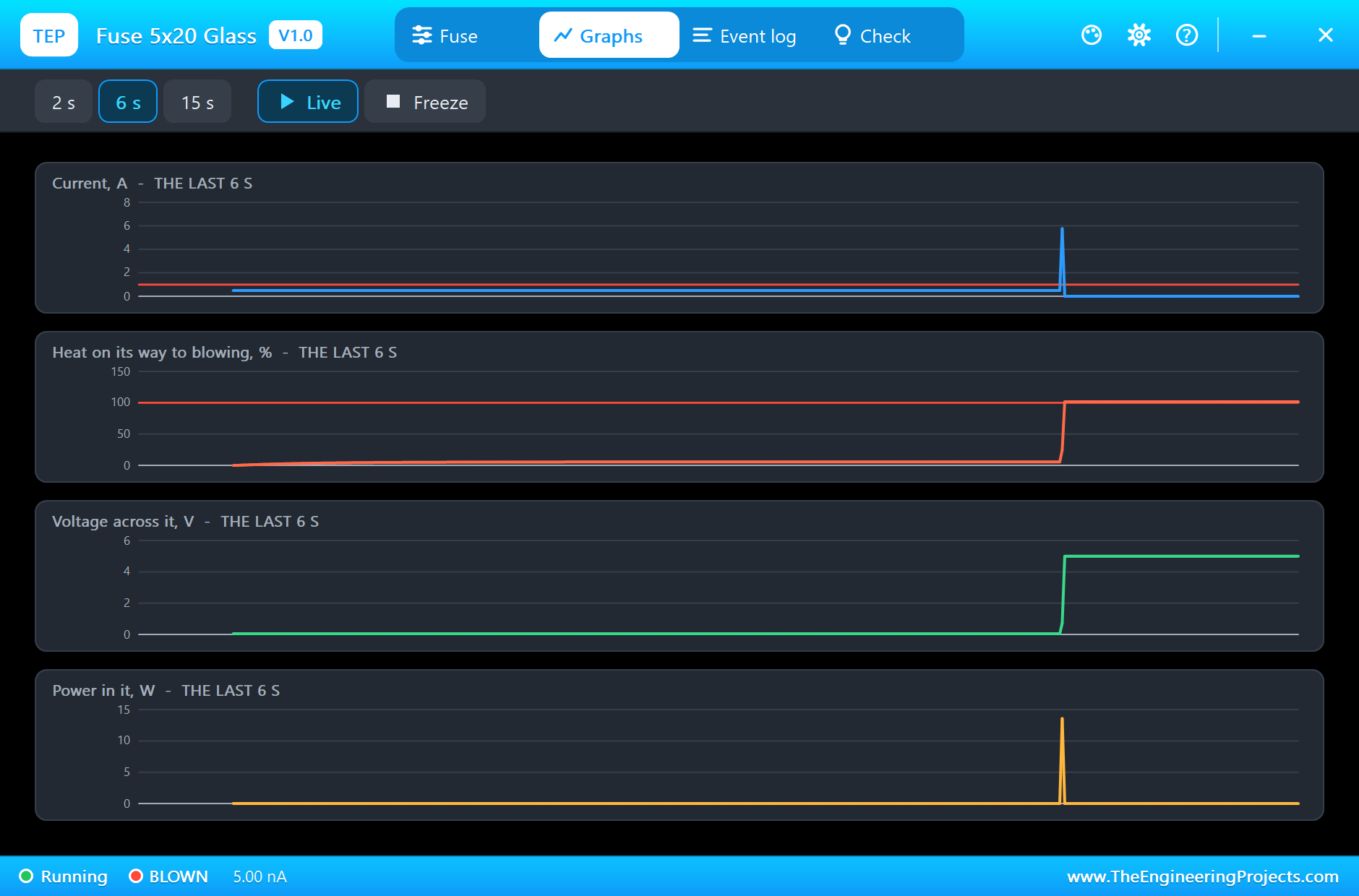
The fuse now holds the whole 5 V across itself, and load 1 has nothing: the monitor prints 0.00 V, NO POWER. The supply, the wiring and the button were protected; the fuse paid the price. The Graphs page shows the spike of current, the heat climbing to 100 % in an instant, and the voltage across the fuse jumping to 5 V as it opened:
A Short on Load 2
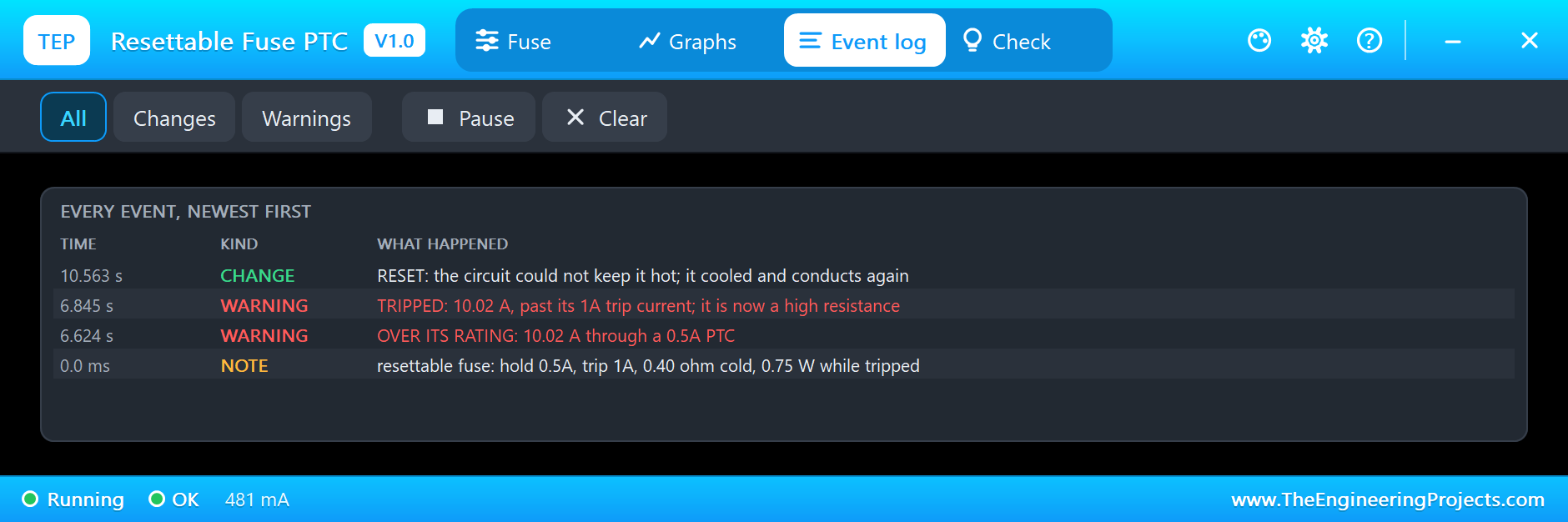
Now hold SW2 down. The PTC sees 10 A, 20 times its hold current, and heats. After 0.22 s it trips: its resistance shoots up, its disc turns orange on the sheet, and it settles at 33.1 ohm, passing 0.150 A with 4.99 V across it. That is 0.75 W, exactly the power it needs to stay hot. Here is the complete circuit, truly running, with F1 still blown and F2 tripped:
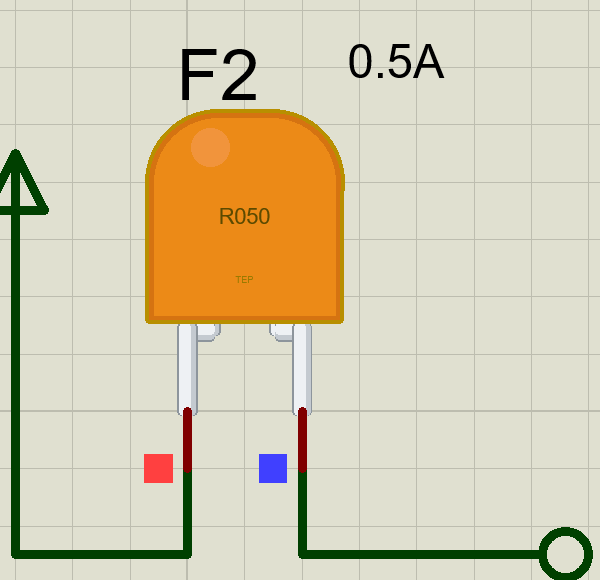
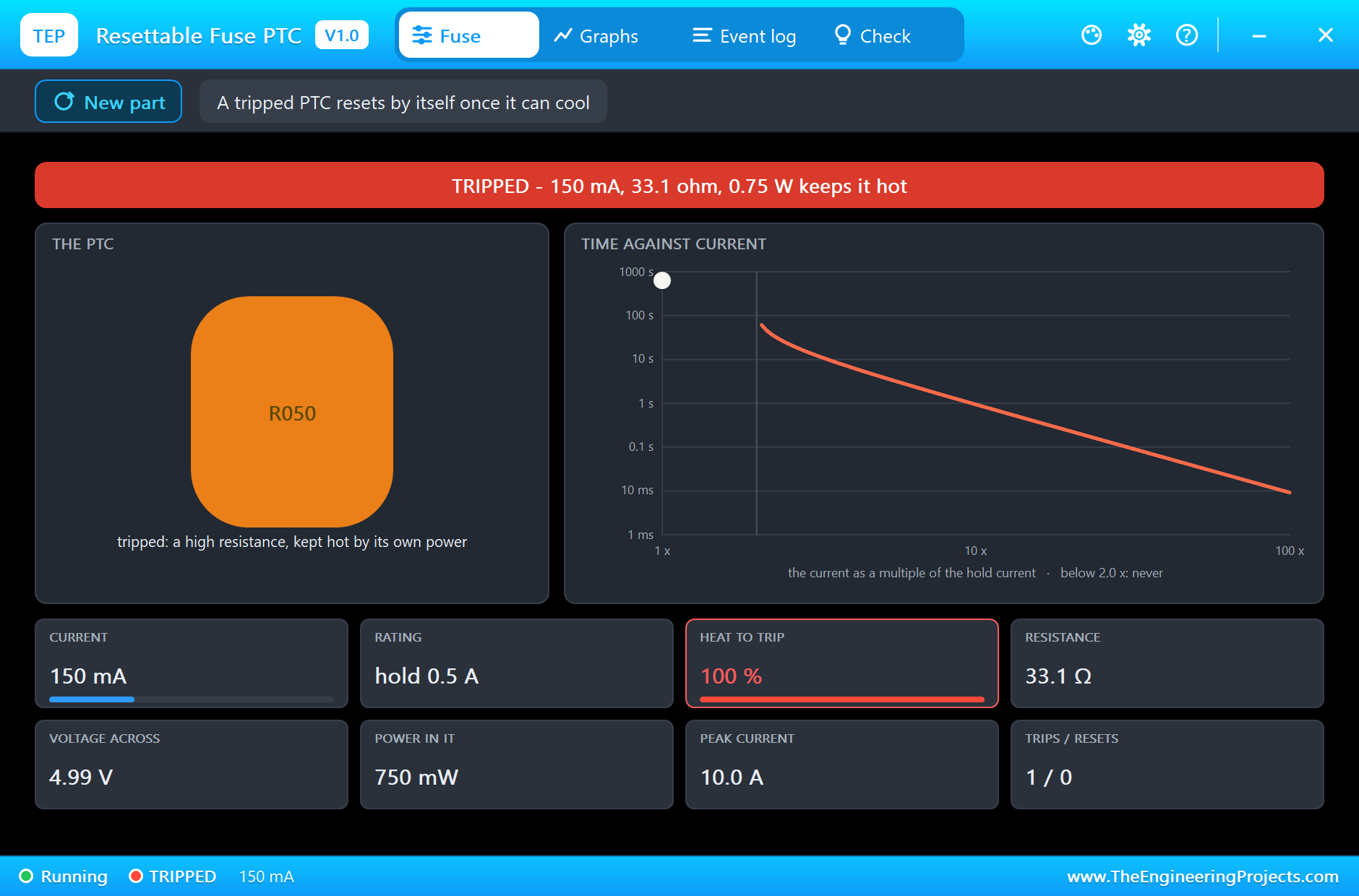
A tripped PTC still passes a little current, which is the main difference from a blown fuse. Here that is 150 mA into a dead short, harmless for the supply and the wiring.
Letting Go
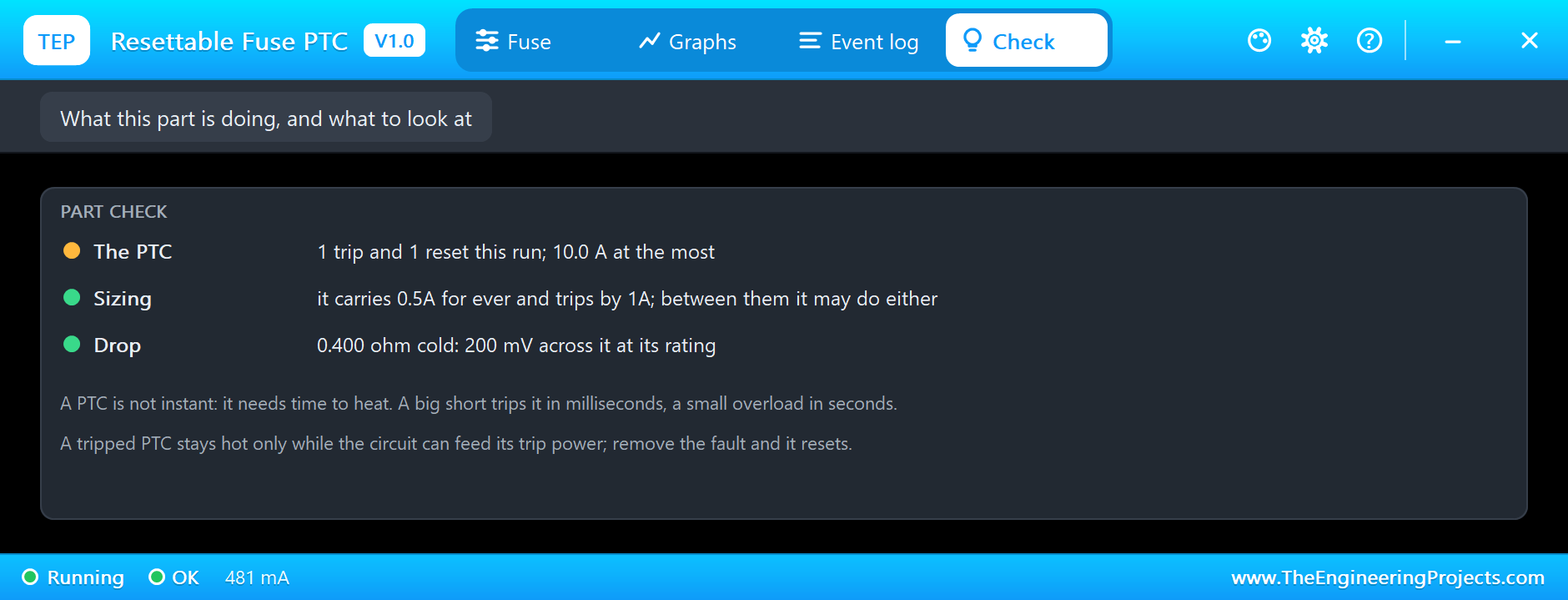
Release SW2. The short is gone, and the PTC is now in series with the 10 ohm load again. From 5 V through 10 ohm, the most power the PTC could ever take is 0.625 W, when its resistance equals the load's. That is less than the 0.75 W it needs, so it cannot stay hot. It cools, and a moment later it resets by itself. Load 2 comes back to 4.81 V. The Graphs page shows the whole story: the current low while tripped, the heat falling back after the reset, and the voltage across the PTC dropping from 5 V to 0.19 V:
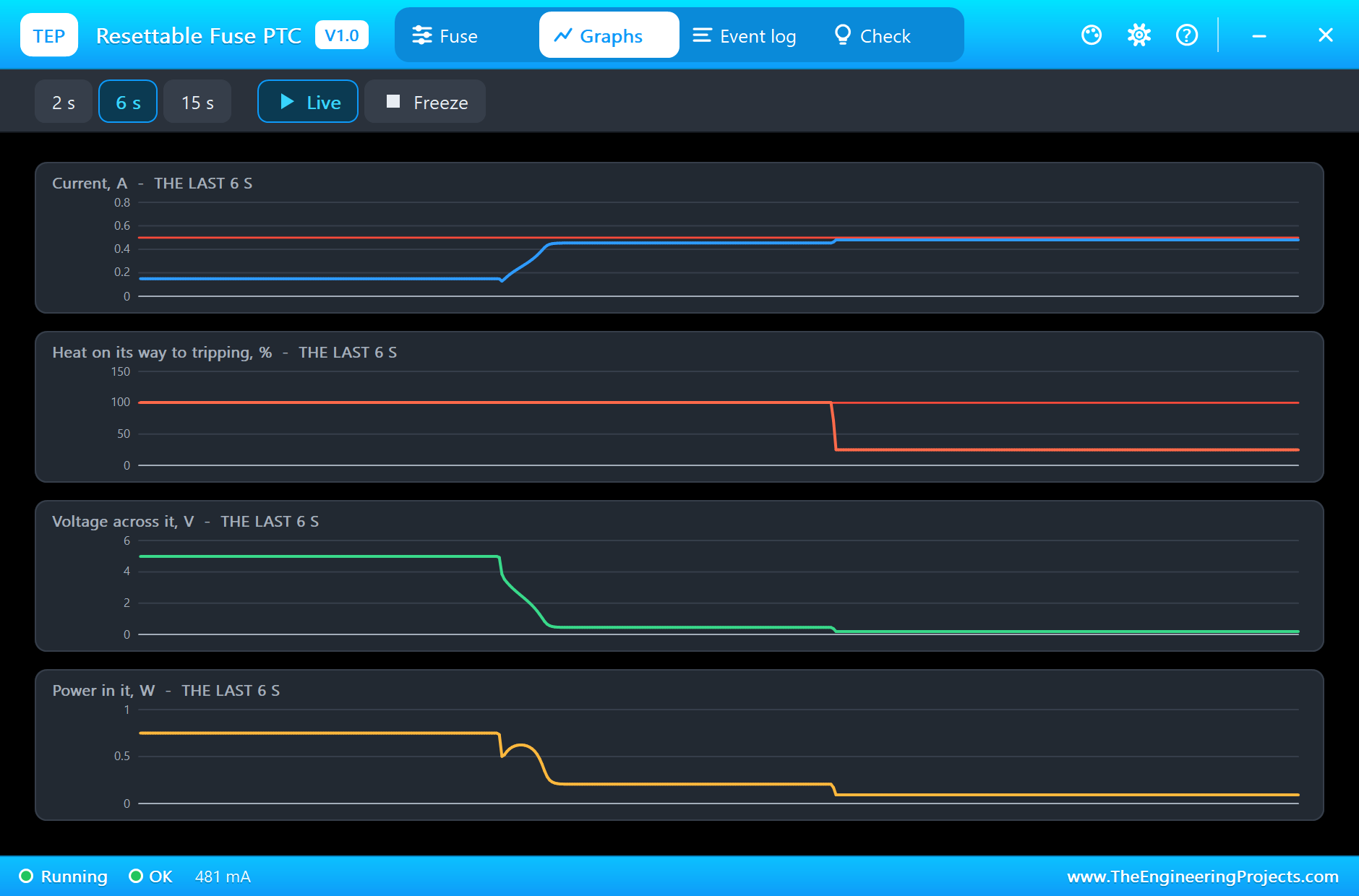
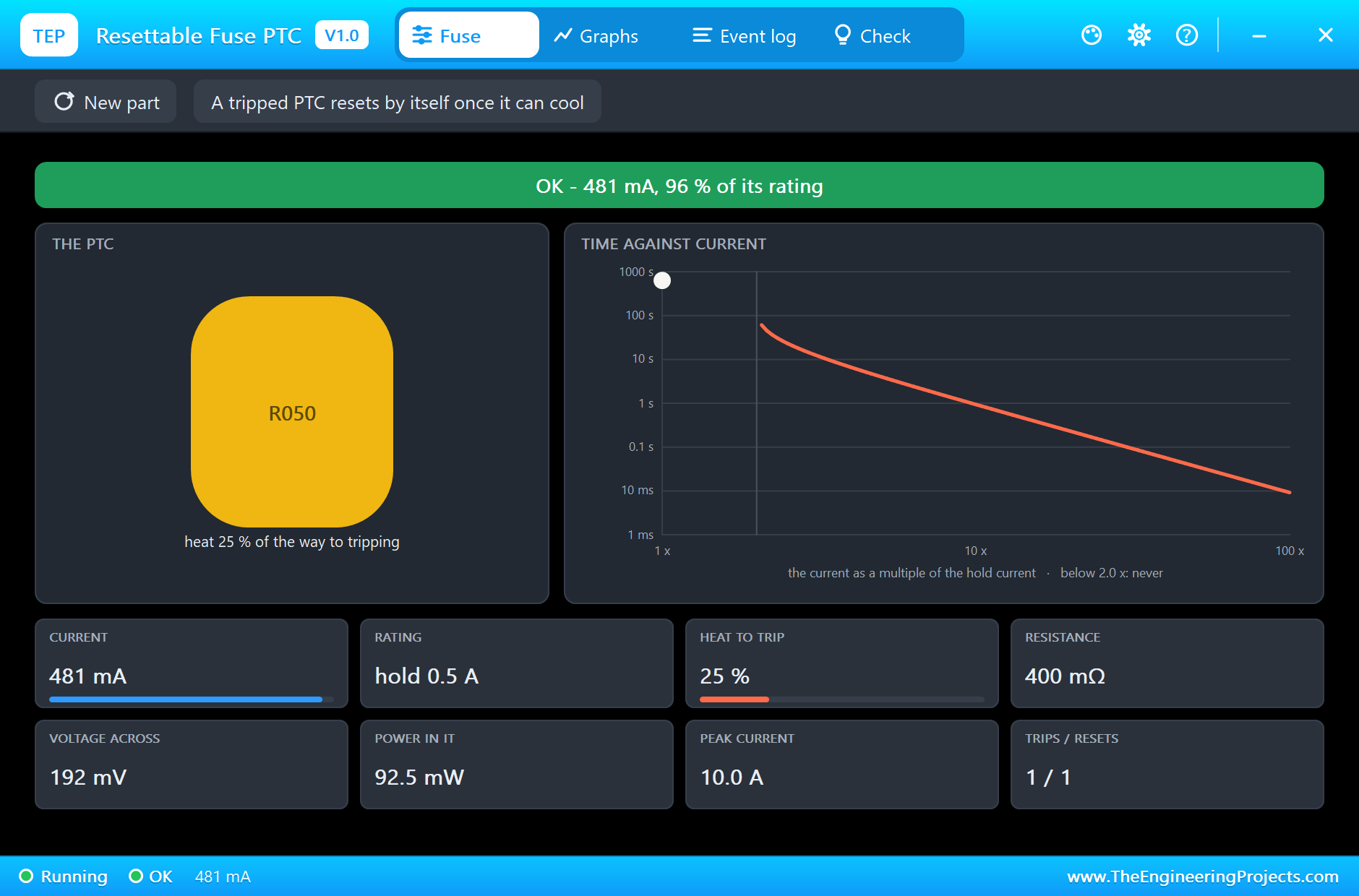
After the reset the heat bar still shows 25 %: the disc is warm, so a second fault soon after would trip it sooner. The tile at the bottom right counts one trip and one reset.
A New Fuse
Back to F1. A blown glass fuse never mends itself, so its pop-up has a New part chip. Click it, and a new fuse is fitted: the wire is whole again on the sheet, and load 1 is back at 4.96 V. The monitor printed every step of the run:
The Log and the Check Page
The Event log records each overload once, however much the button bounces, then the blow or the trip and the reset, with the current and the time:
The Check page explains what happened and gives advice on sizing: for the glass fuse, the current that blew it and how fast; for the PTC, the trips and resets, and what its hold and trip currents mean:
Try It Yourself
- Set F1 to T (slow) in its properties, and compare the time it takes to blow.
- Change F1's rating to 0.2A, and watch it blow about half a second after you press Run.
- Hold SW2 for longer, and check that the PTC stays tripped for as long as you hold it.
- Raise R2 to 33 ohm, and see how the PTC behaves with a smaller load.
- Press SW2 twice quickly, and see the warm PTC trip sooner the second time.
Ideas to Extend the Demo
- Light a red LED when a load loses its power, and a green one while it is fed.
- Count the trips of the PTC and print a warning after three.
- Switch a load off with a MOSFET when its voltage drops, as a smart fuse would.
- Add a small motor as a load, and find which fuse survives its starting current.
Your Own Sketches
The demo sketch is in the zip file, and you can change it in the Arduino IDE. New to Arduino? Start with our Arduino Tutorial for Beginners. Export the compiled binary, and set the UNO's PROGRAM property to the new file. Our guide on How to get the HEX file from Arduino shows you where the file ends up.
Things to Know Before Using a Real Fuse
- A fuse protects the wiring and the supply: size it for the wire it feeds and about 1.5 times the normal current.
- Use a slow fuse for an inrush: motors, lamps and big capacitors need T fuses.
- Find the fault first: after a fuse blows, fix the cause before you fit a new one, and never a bigger one.
- Check the voltage and the breaking capacity: both must cover the supply.
- A PTC is no fast fuse: it needs time to heat and never opens completely; it suits low voltages and faults that clear themselves.
Troubleshooting
- The fuse blows at once on Run: the load takes more than about twice its rating. Check the load, or use a bigger or slow fuse.
- It never blows: the current never passes about 2.1 times its rating, or the short is not a short; check the button's wiring.
- The PTC never resets: the circuit can still feed its trip power. Remove the fault, or the power.
- The pop-up shows OVERLOAD with a time: that is how long the fuse will last at this current.
- The part is not simulated:
TEPFUSE.DLLis missing from MODELS and from the project folder.
Limitations of the Simulation
- The arc as the wire parts is left out: the fuse opens at once.
- The voltage and breaking ratings are not checked.
- The temperature around the part does not change its rating.
- Arduino is a name of Arduino; this library is not made or endorsed by Arduino or Labcenter.
- Tested in Proteus 8.5 in November 2026 (the demo as shipped). Proteus 7 is not supported.
So, that was all about the Fuse Library for Proteus. I hope it helps you protect your circuits, and see exactly what happens when a short strikes, before it happens on a real board. If you have any questions, ask in the comments and I will help you out. Till the next tutorial, take care and have fun!

Comments
0