


Hand Crank Generator Library for Proteus Simulation


Hello friends, I hope you all are doing great. Today, I am going to share the new Hand Crank Generator Library for Proteus Simulation, the next library of our renewable energy series. If you have searched for a Proteus simulation of a hand crank generator, the little emergency generator that makes electricity from nothing more than your own arm, this library brings it into Proteus: the handle, the hand that turns it, the generator and its load, all solved together.
Hand Crank Generator Library for Proteus Simulation
Latest version: V1.0 (November 2026, this tutorial)
Helping Tools
- Serial Monitor Advance: a serial terminal window for the UART of your board
- Serial Monitor Expert: the serial monitor with extra debugging tools
- LCD Library for Proteus V3.0: 16x2, 20x4 and I2C LCDs to show your readings
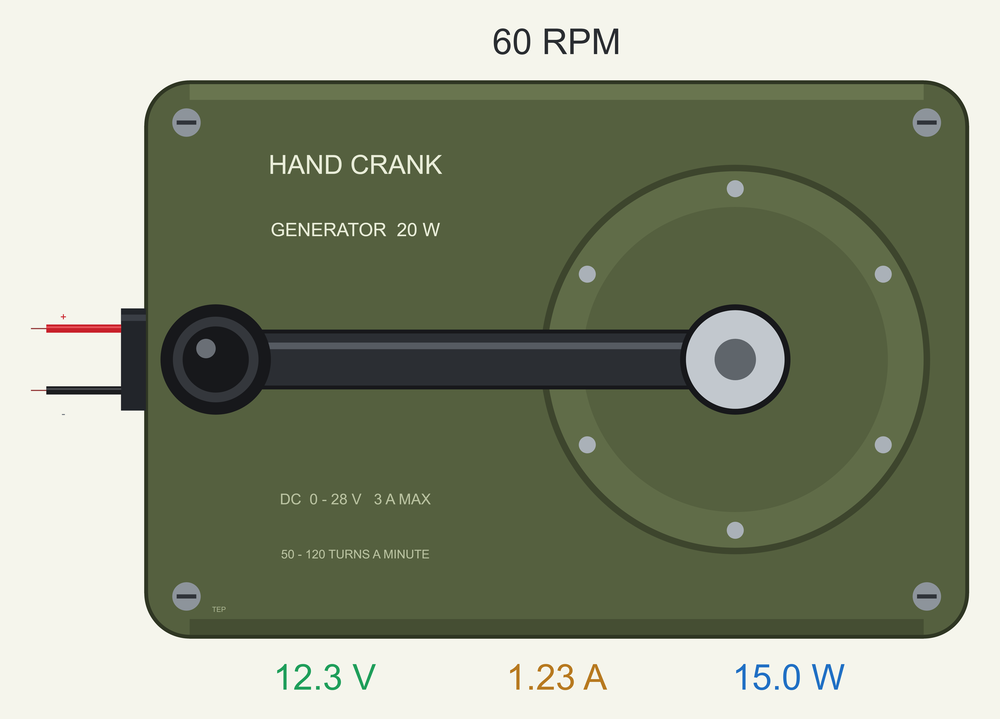
The generator is drawn at its true size, and at run time it writes its cadence above itself and its volts, amps and watts under itself on your sheet. The simulation model gives a voltage that follows the cadence, fitted to the two working points the sellers publish, and adds what a listing never tells you: the load pushes back on the handle, and a hand has only so much strength, so a heavy load slows the handle down. In the demo an Arduino reads the generator through our INA219 while the cadence changes in steps.
NOTICE: Our team has put a lot of effort into these small parts: the bodies, the animation and the pop-ups are all our own design, and you get them free. Your feedback is the fuel that keeps us going, so please tell us what you think in the comments below or in the Motor Driver board of our forum. And if our free libraries help you, you can buy us a coffee. So, let's get started with the Hand Crank Generator Library for Proteus Simulation:
What is a Hand Crank Generator?
A hand crank generator is a small generator with a handle. Inside the housing a gear turns a permanent-magnet generator many times for every turn of the handle, and the generator gives a DC voltage at its output for as long as you keep turning. There is no fuel, no sun and no wind to wait for, which is why these generators sit in emergency kits, in camping gear and in field radios: when every battery is flat, an arm is still there.
The model of this library is the 20 W generator sold for exactly that: a metal housing about the size of a thick paperback, a folding crank on one side and a direct DC output that can reach about 28 V. It is also a favourite of school and university projects on human power, because it lets you feel electricity. Turn it with nothing connected and the handle spins almost freely. Connect a lamp and the handle pushes back. That push is the whole lesson of energy conversion, and it is the heart of this simulation too.
| 20 W hand crank generator (the sellers' listings) | |
|---|---|
| Power | 20 W |
| Output | direct DC, not regulated, up to about 28 V and 3 A |
| Cadence | 50 to 120 turns of the handle a minute |
| At 50 turns a minute | 11.8 V at 0.9 A |
| At 60 turns a minute | 12.5 V at 1.2 A |
| Size | about 127 x 86 x 88 mm |
| Weight | about 0.8 kg |
| Housing | metal, with a folding crank |
How the Cadence Becomes Voltage
A permanent-magnet generator gives a voltage that is proportional to its speed: turn it twice as fast and the voltage doubles. That voltage sits behind the resistance of the generator's own winding, so the output falls a little for every ampere the load draws. Electrically, then, a hand crank generator is a voltage source behind a resistor, and the source follows the cadence.
No maker's datasheet is published for this generator, but the sellers give two working points: 11.8 V at 0.9 A with 50 turns a minute, and 12.5 V at 1.2 A with 60. Two points are enough to find both unknowns. They give 0.48 V for every turn a minute and 13.5 ohm inside, and those two figures are the simulation model. As a check, 60 turns a minute with nothing connected come out at 28.8 V, and the listings say "up to 28 V".
A source behind a resistor gives the most power to a load equal to its own resistance. At 60 turns a minute that is 15.4 W into 13.5 ohm, at half of the no-load voltage. A lighter load takes less power at a higher voltage, a heavier load takes less power at a lower voltage. The pop-up of this library draws that load line all the time, with a ring at the matched point and a dot where your circuit is working. The output goes through the generator's rectifier, so no current can flow back: a battery on the output cannot turn the handle.
Why a Heavy Load is Hard to Turn
Energy cannot appear from nowhere. Every watt the load takes, and every watt lost in the winding, has to come from the hand. In a generator the current makes a torque that works against the motion, and the constant that links the two is the same one that links the speed to the voltage. For this generator it comes to 4.58 newton metres on the handle for every ampere, plus about 0.3 newton metres of friction in the gear.
So the load decides how hard the handle is to turn. With nothing connected only the friction is left. With a 10 ohm load at 60 turns a minute the hand must give almost 6 newton metres, which is a push of about 74 newtons on the 80 mm crank, the weight of seven and a half kilograms. A short circuit asks for the most torque of all and delivers nothing.
The simulation therefore has a hand as well as a generator. The hand brings the handle up to the cadence you ask for, and it gives a limited torque, the HAND property, 7 newton metres as shipped. If the load asks for more than that, the handle slows down until the torque of the load and the strength of the hand agree. This is exactly what happens on a real bench: you cannot turn a heavily loaded generator as fast as an unloaded one, however much you want to.
Features of the Hand Crank Generator Library for Proteus Simulation
- The generator at true scale: the olive metal housing, 127 x 86 mm, with its gear cover, the 80 mm crank and its knob, and the red and black leads; at run time the cadence is written above it and the volts, amps and watts under it.
- The sellers' two points: 0.48 V for every turn a minute behind 13.5 ohm, which gives 11.8 V at 0.9 A with 50 turns a minute and 12.5 V at 1.2 A with 60.
- A hand with a limit: the load's current makes the torque on the handle, and a hand that cannot give it turns slower.
- No current back in: the rectifier blocks it, so a battery or a charged capacitor on the output is safe.
- The cadence in your hands: the CRANK property (turns a minute, or DEMO), chips in the pop-up (stop, 30, 60, 90, 120 turns a minute) and three strengths of hand.
- A pop-up: the crank turning with the hand's push, the load line with the working point and the matched point, eight live values, graphs, an event log and a check page.
- A complete package: about 1.3 MB with the library, our Arduino UNO V4.0 and the demo, without the source code of the model.
The Hand Crank Generator in Proteus
The device is HANDCRANK20WTEP in TEPCRANK.LIB, under Electromechanical > Generators, with the prefix HC and the analog model TEPCRANK.DLL. Search HANDCRANK in Pick Devices. Its two pins are on the left, at the ends of the leads: the red + and the black -. The properties are CRANK (the cadence in turns a minute, 0 to 150, or DEMO for the cadence profile) and HAND (the most torque the hand gives, 2 to 12 newton metres). The symbol is drawn to the generator's true size against our Arduino UNO, so its housing is almost twice as long as the board.
Download Hand Crank Generator Library for Proteus Simulation
Click the button below to download Hand-Crank-Generator-Library-for-Proteus-v1.0.zip (about 1.3 MB, without the source code of the models):
Hand Crank Generator Library for Proteus V1.0- README.txt: installation, the demo, the wiring, troubleshooting and the limits of the simulation.
- Proteus Library Files:
TEPCRANK.LIBandArduinoV4TEP.LIB. - Proteus Model Files:
TEPCRANK.DLLandTEPARDUINO.DLL. - Arduino Code: the demo sketch.
- Proteus Simulation: the demo project, its HEX file and copies of the DLLs.
No Proteus yet? Read How to Download and Install Proteus 7 and 8. New to libraries? Follow How to Install a New Library in Proteus.
How to Install Hand Crank Generator Library for Proteus Simulation
- Close Proteus and extract the whole zip file, for example to your Desktop.
- Copy the files from Proteus Library Files into the LIBRARY folder of Proteus.
- Copy the files from Proteus Model Files into the MODELS folder.
- Delete
TEPCRANK.IDXfrom the LIBRARY folder if it is there. - The demo also uses our INA219 Current Sensor Library for Proteus: install it from its own package (it is not in this zip).
- Start Proteus, press P and search for HANDCRANK.
Proteus Simulation of the Hand Crank Generator with Arduino
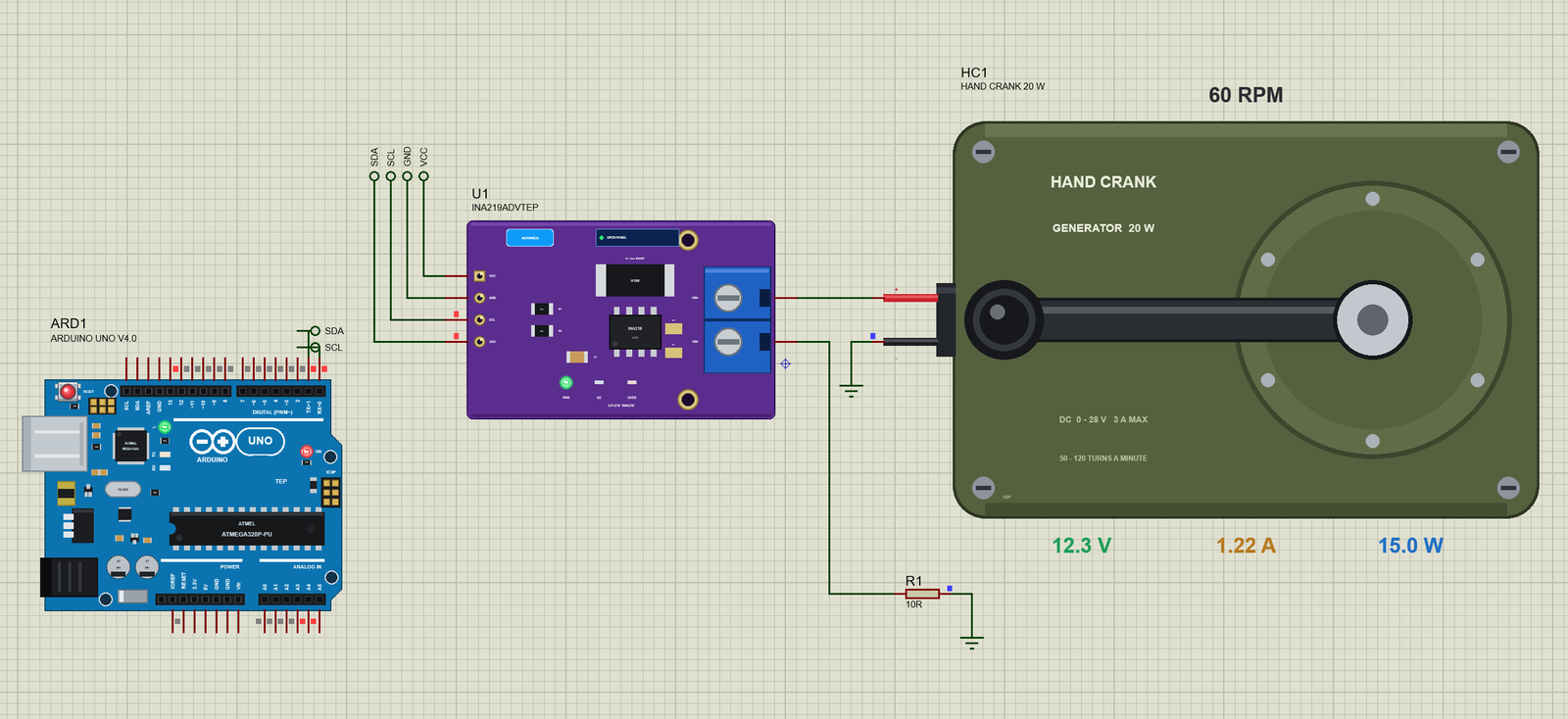
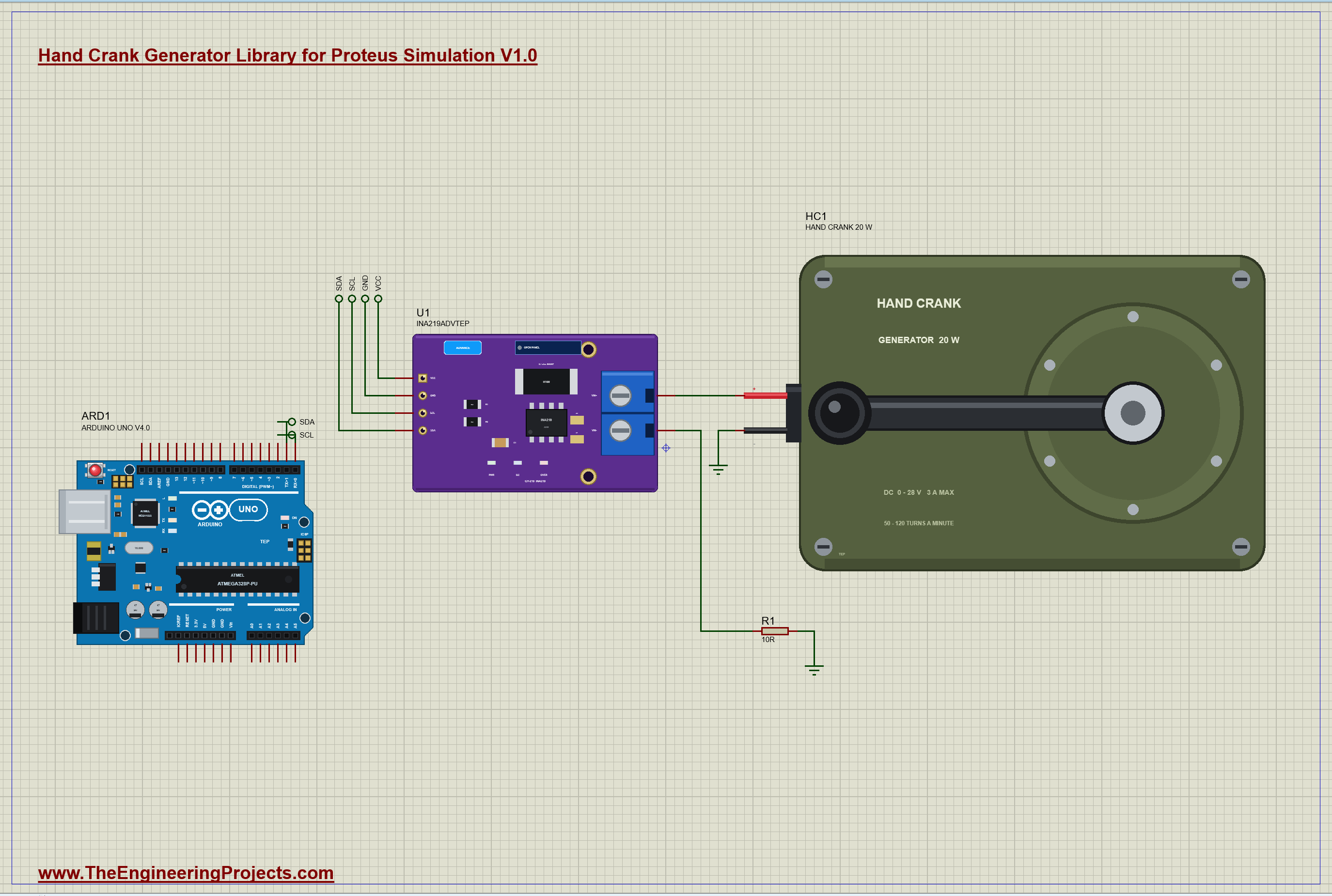
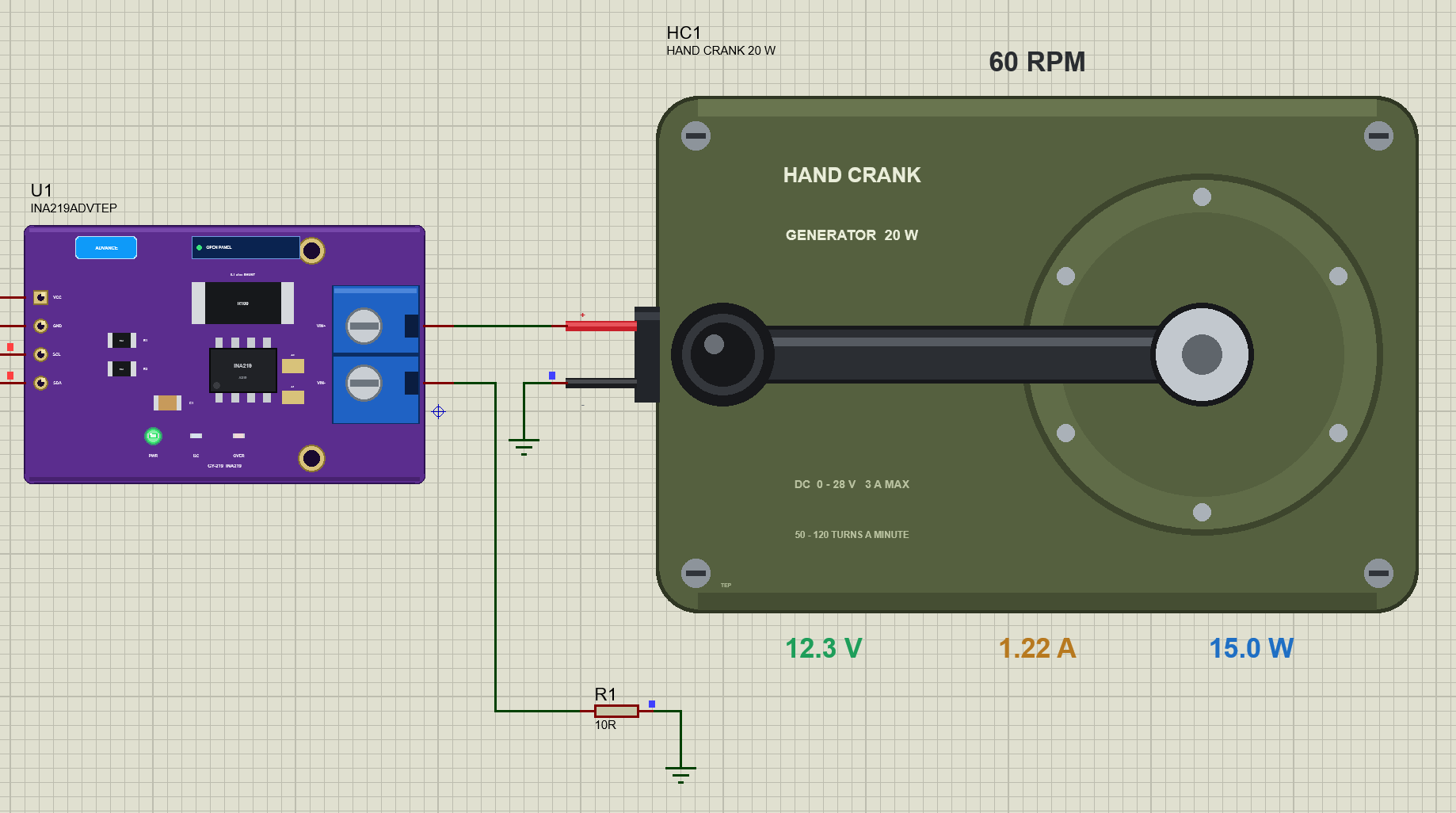
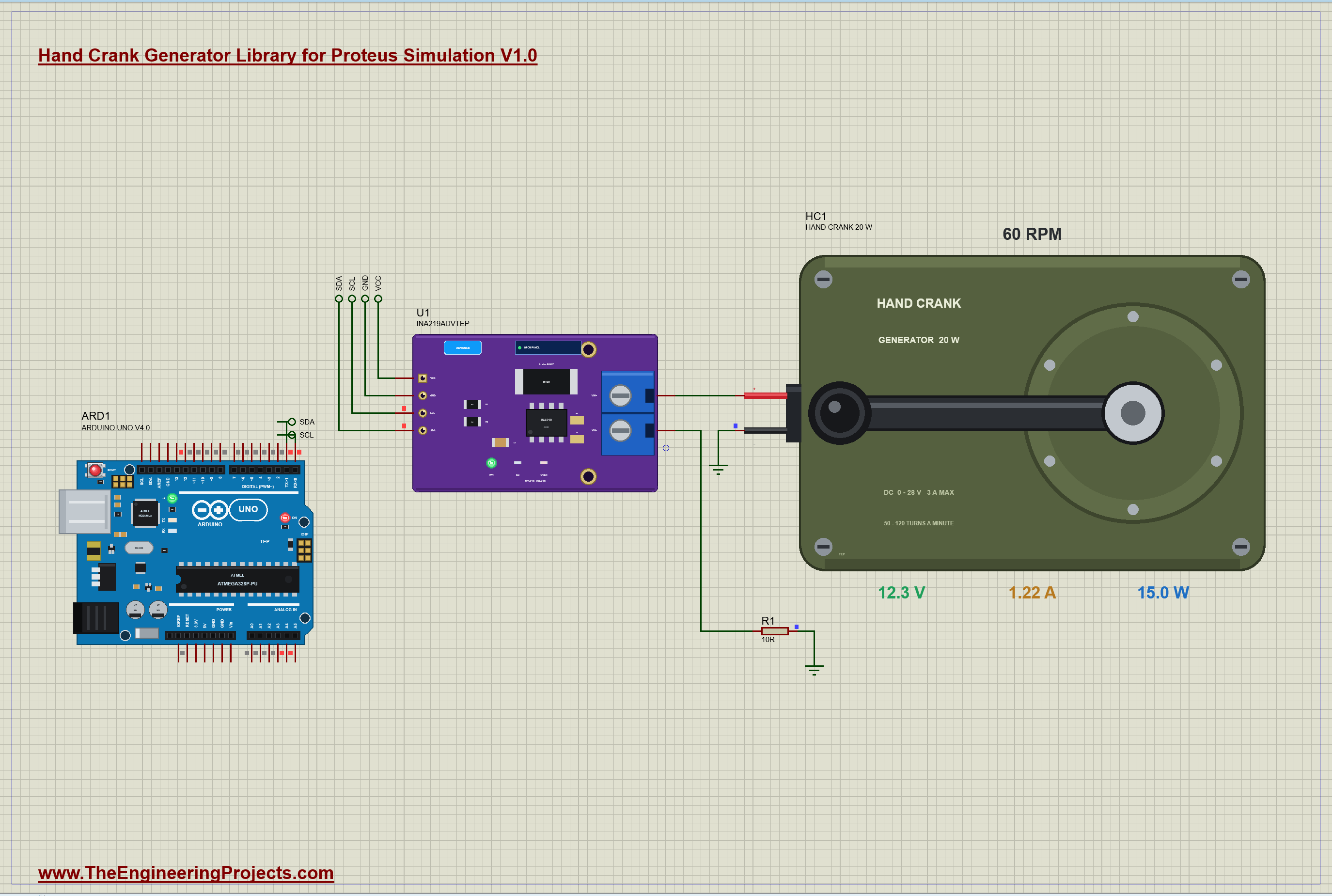
The demo has our Arduino UNO Library for Proteus V4.0 with its built-in monitor, the same window as our TEP Serial Monitor Advance for Proteus, on an A3 sheet, because the generator is a large part. The generator, HC1, feeds a 10 ohm load resistor (R1) through the 0.1 ohm shunt of our INA219 (U1, its pop-up version). With 10 ohm the generator works close to the sellers' second point at 60 turns a minute. The INA219 talks to the UNO on A4 and A5. HC1's CRANK is DEMO and its HAND is 7: the hand turns the handle at 30 turns a minute from 0.3 s and at 60 from 2.3 s, it is asked for 90 from 4.3 s, it goes back to 60 at 6.3 s and lets go at 8.3 s. Open CRANK-Generator-INA219-ArduinoUnoV4.pdsprj.
The Sketch
The sketch reads the INA219's two voltage registers straight over I2C, with no library: the bus register in 4 mV steps and the shunt register in 10 microvolt steps:
  const float busV = ((uint16_t)readReg(0x02) >> 3) * 0.004;    // 4 mV a step: the load's volts
  const float shuntV = readReg(0x01) * 0.00001;                 // 10 uV a step
The current is the shunt's voltage over its 0.1 ohm, and the generator's own voltage is the bus plus the shunt's drop:
  float amps = shuntV / SHUNT_OHM;
  float volts = busV + shuntV;                                   // the generator's own volts
There is no speed sensor on the handle, and the sketch does not need one. The generator gives 0.48 V for every turn a minute and loses 13.5 ohm times its current inside, so the cadence can be worked out from the electricity alone:
const int rpm = (int)((volts + INSIDE_OHM * amps) / VOLTS_PER_RPM + 0.5);The energy collected so far is simply the power added up over time, and the LED on pin 13 lights while the generator gives 12 V or more, enough to charge a 12 V battery:
if (lastAt) joules += watts * (now - lastAt) / 1000.0; // energy = power x timeAfterwards you can type best for the most power seen so far, reset to forget it and the energy, or rate 1000 to report once a second.
Hand Crank Generator Simulation Results
Open the project and press Run. The demo runs about 10 simulated seconds; with the pop-up open and the pictures being taken it took under three minutes on our PC. Click the generator for its pop-up. Every number below comes from one simulation run, the demo exactly as it ships.
A Slow Hand: 30 Turns a Minute
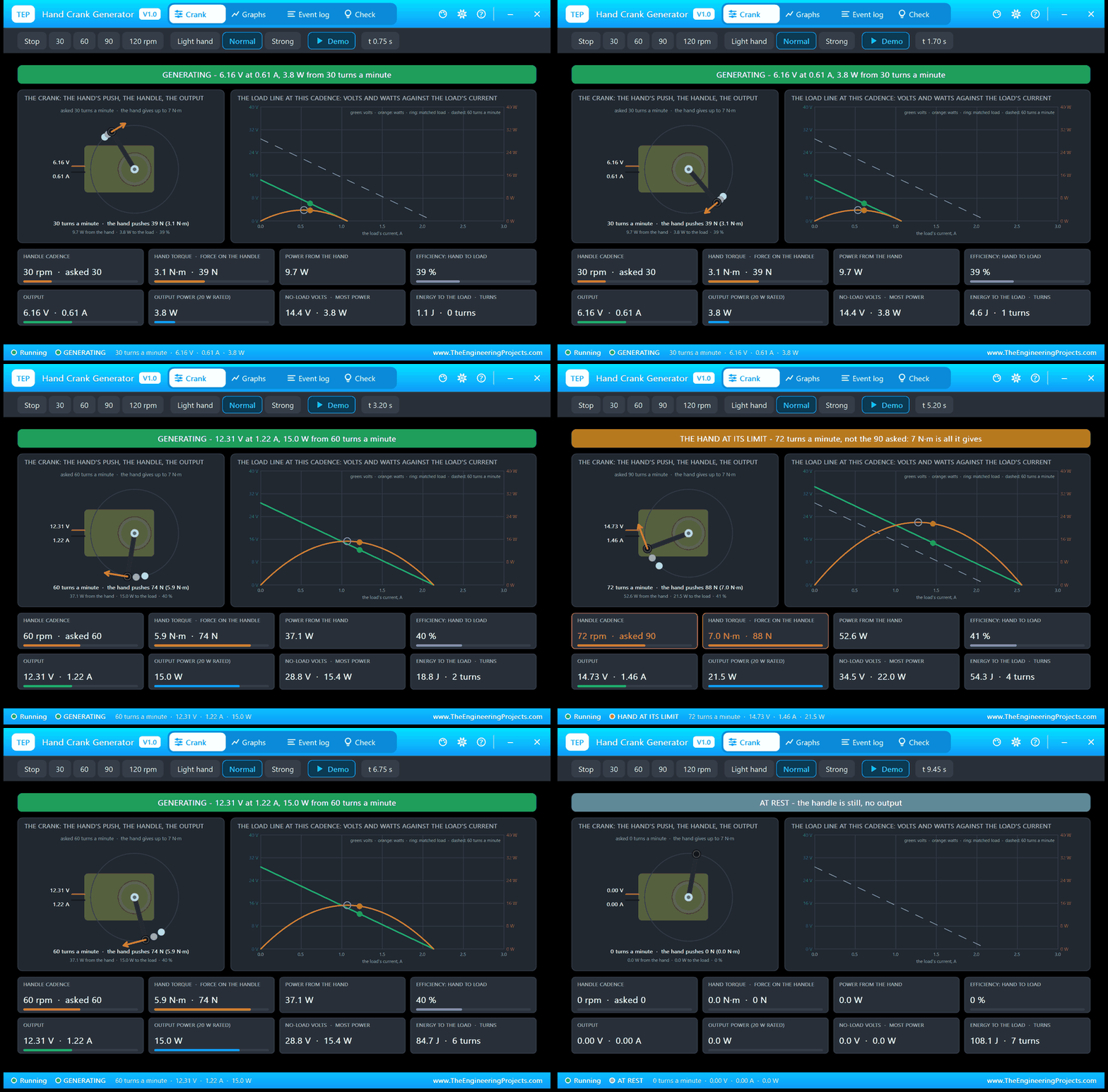
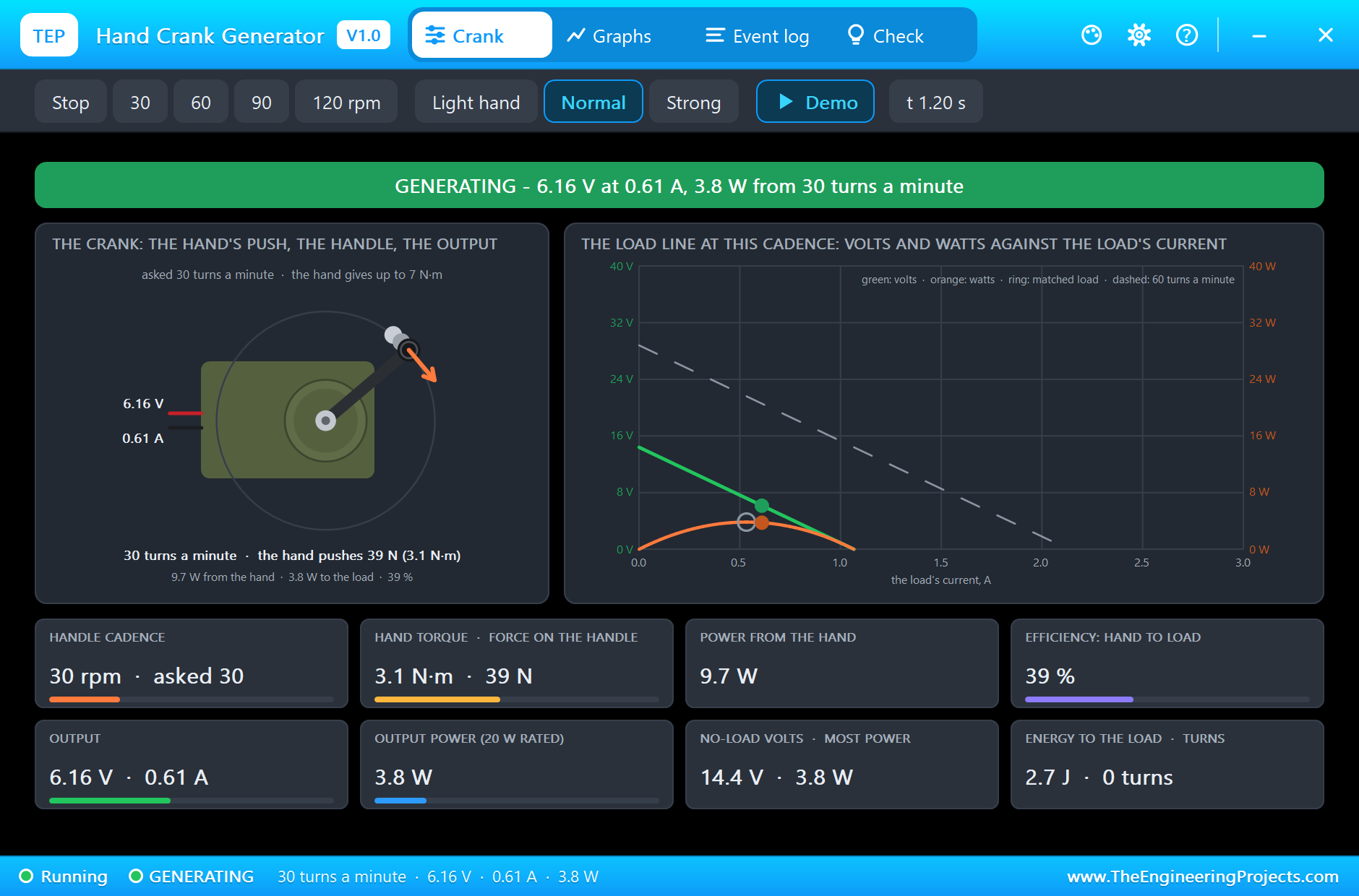
At 0.3 s the hand starts turning, and a quarter of a second later the handle is at 30 turns a minute, one turn every two seconds. Inside the generator that makes 14.4 V. The 10 ohm load and the shunt draw 0.61 A, so 6.16 V are left at the output: 3.8 W. The hand gives 3.1 newton metres for it, a push of 39 newtons on the knob, and 9.7 W of power. Only 39 % of the hand's work reaches the load; the rest heats the winding and the gear. The Event log records the settled point at 0.89 s. In the picture the orange arrow at the knob is the hand's push, and on the load line the dot sits to the right of the ring: the load is a little heavier than the matched one.
A Steady Hand: 60 Turns a Minute
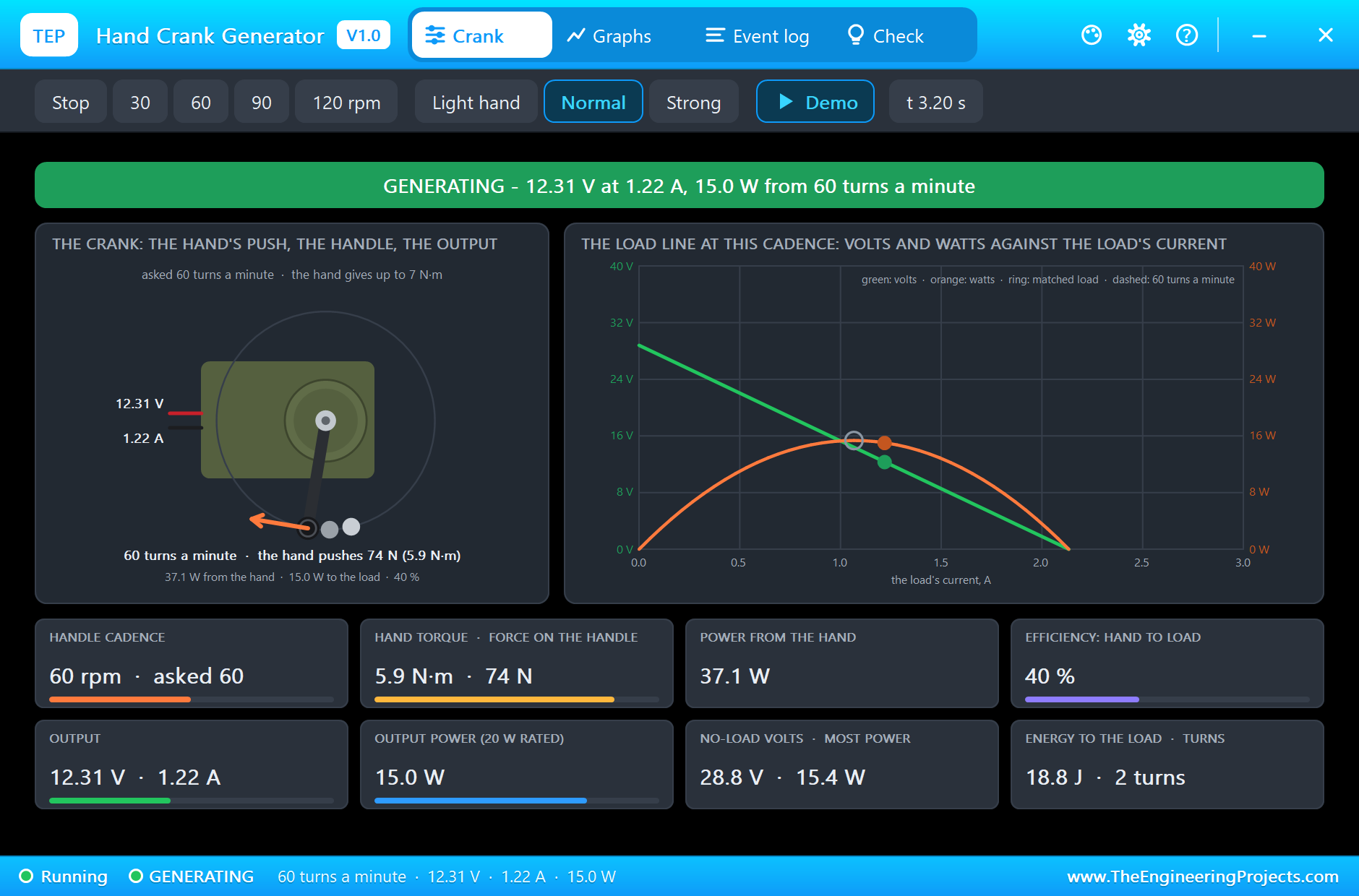
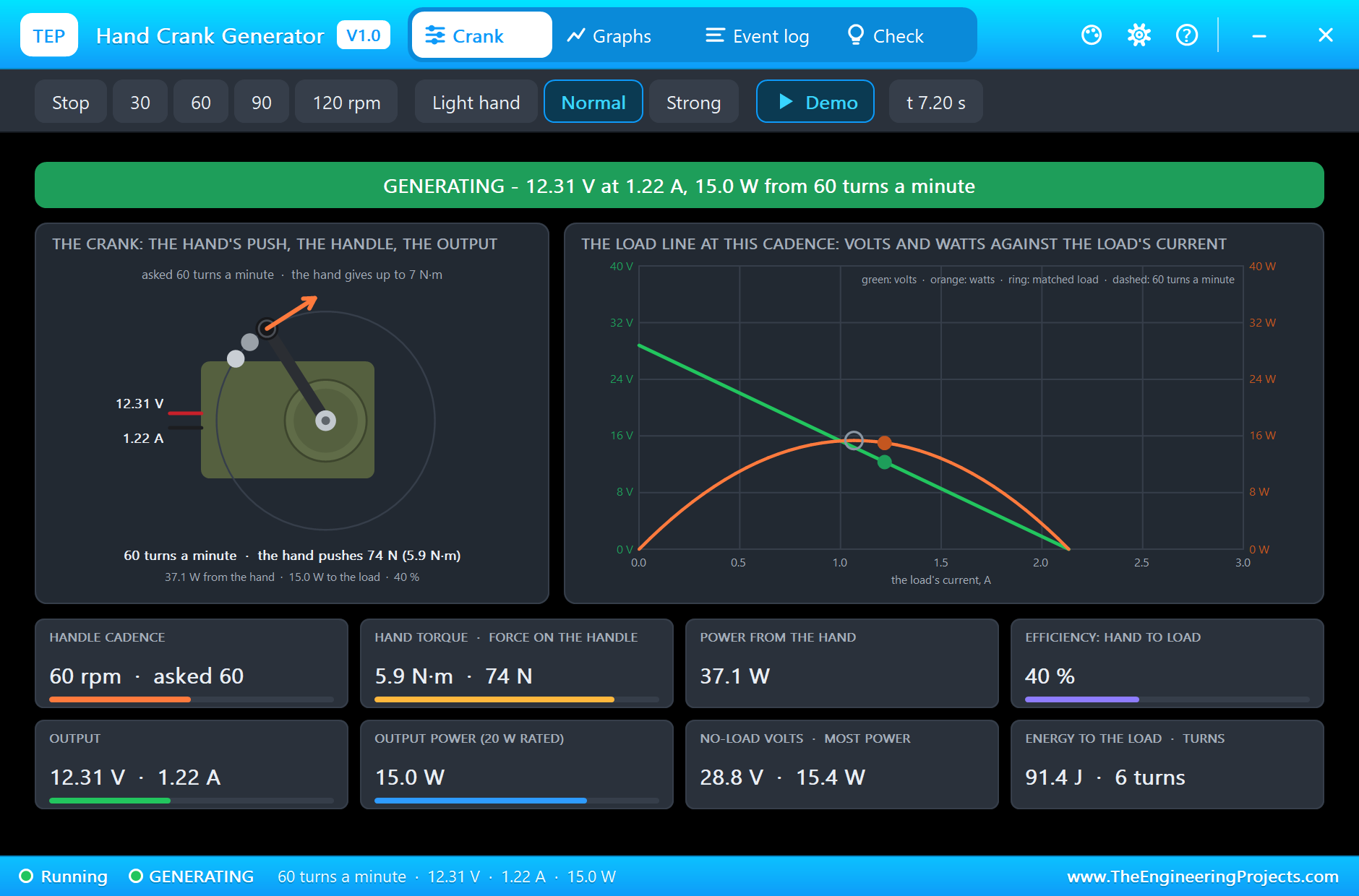
At 2.3 s the hand speeds up to 60 turns a minute, one turn every second. The voltage inside doubles to 28.8 V, the current doubles to 1.22 A, and the output is 12.31 V: 15.0 W, four times the power of before, because both the voltage and the current have doubled. This is the sellers' second point, 12.5 V at 1.2 A, within a few percent. The price is in the hand: 5.9 newton metres, 74 newtons on the knob and 37.1 W, for an efficiency of 40 %. The seventh tile says a matched load would take 15.4 W at this cadence, so the 10 ohm resistor is getting nearly all there is. The UNO's LED is lit now: the output has passed 12 V.
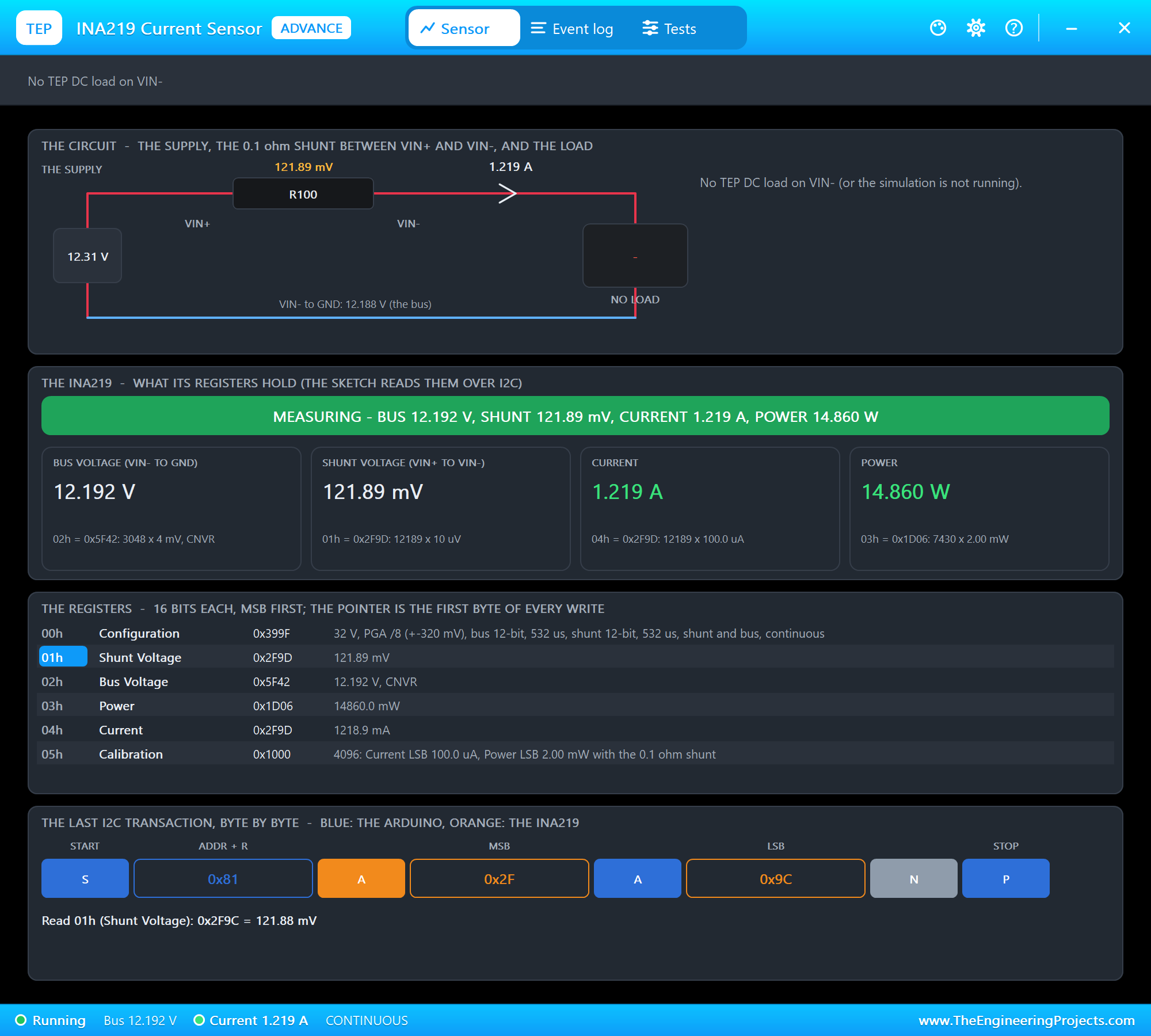
The INA219's own pop-up agrees: 12.31 V at the supply, 121.89 mV across the 0.1 ohm shunt, 12.192 V on the bus after it and 1.219 A, read from its registers by the sketch over I2C. Its Power register shows 14.860 W, a little less than the generator's own figure, because the INA219 multiplies the current by the bus voltage after the shunt.
Asking for 90: The Hand at Its Limit
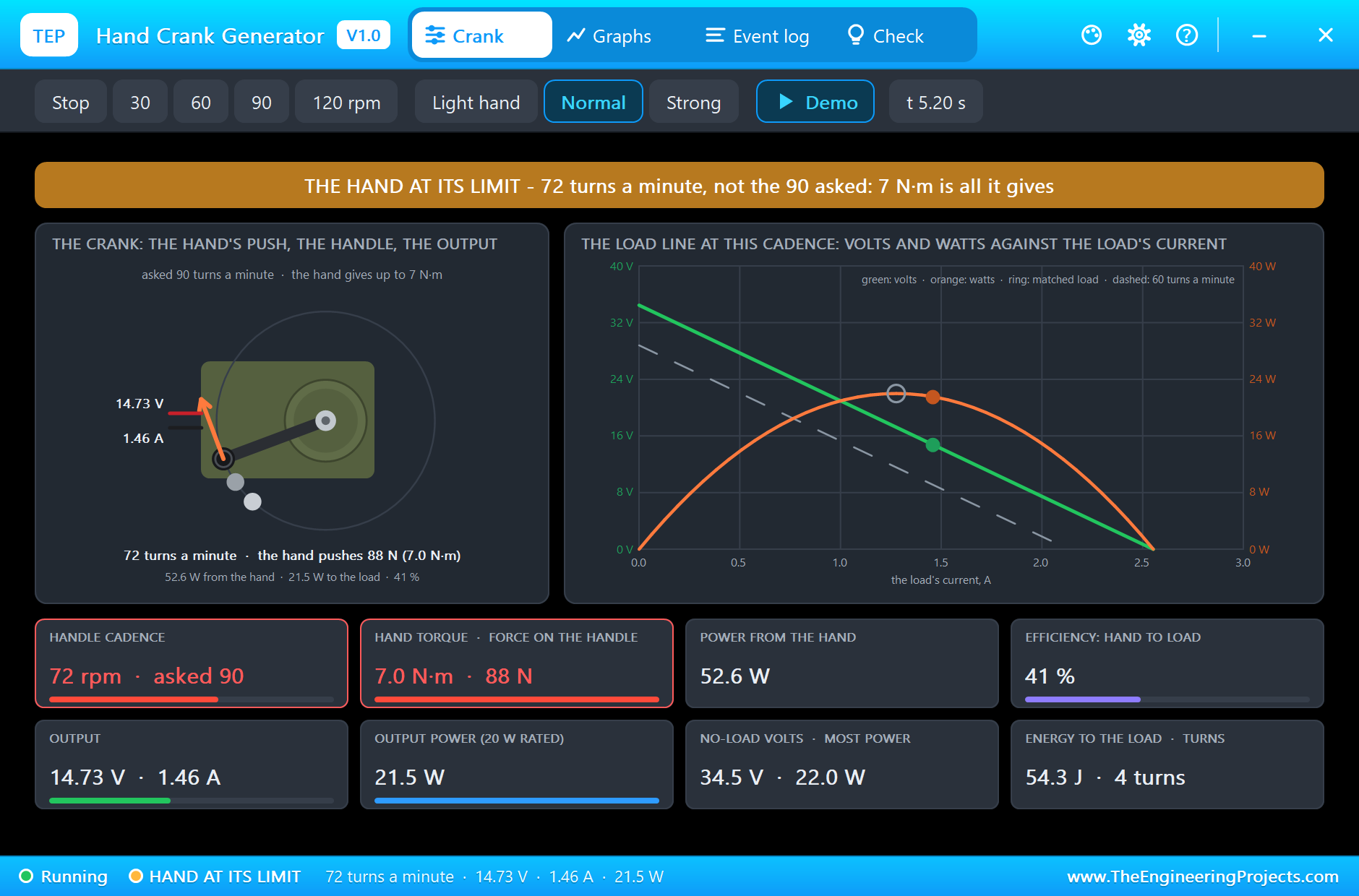
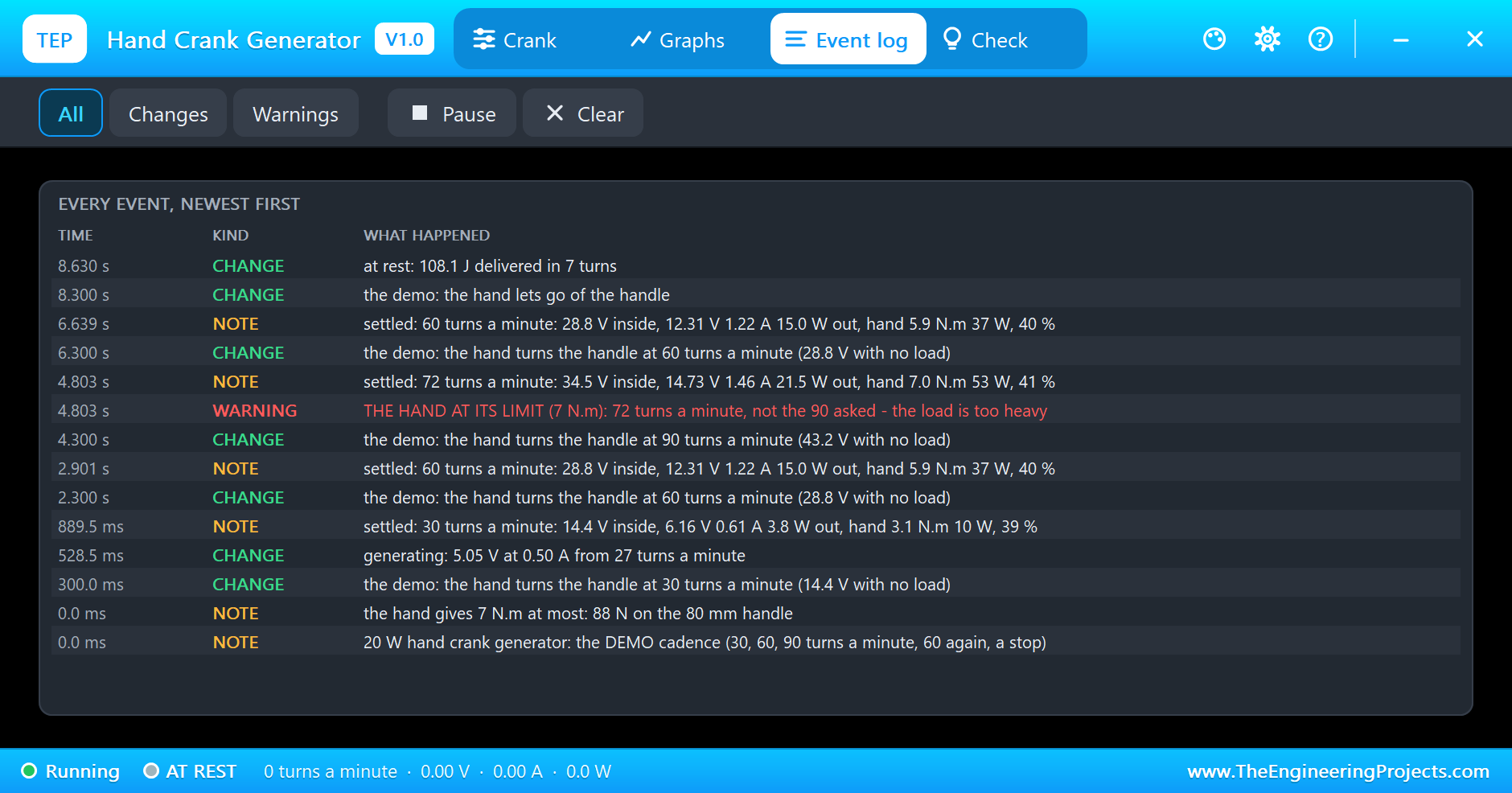
At 4.3 s the demo asks for 90 turns a minute. With this load, 90 turns a minute would need 8.7 newton metres, and the hand has 7. So the handle speeds up only until the load's torque equals the hand's strength, and settles at 72 turns a minute. The banner turns amber, THE HAND AT ITS LIMIT, and the Event log writes the warning at 4.803 s. The generator makes 34.5 V inside and delivers 14.73 V at 1.46 A: 21.5 W, just past its 20 W rating. The hand is giving 7.0 newton metres, 88 newtons on the knob, and 52.6 W, which is about all a person can keep up with one arm. So the 20 W on the label is no accident: it is roughly what one hand can push through this generator.
Back to 60, Then the Hand Lets Go
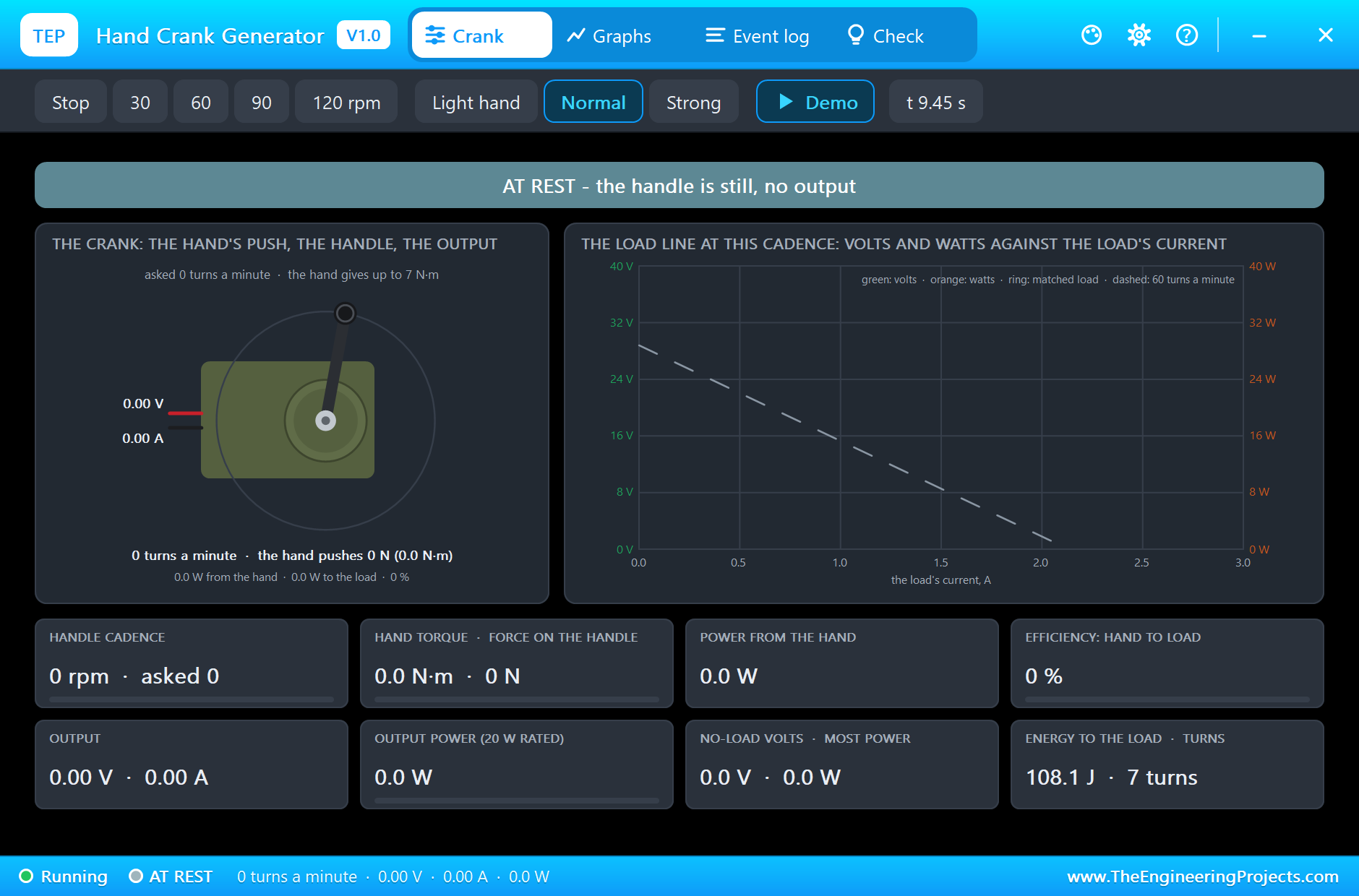
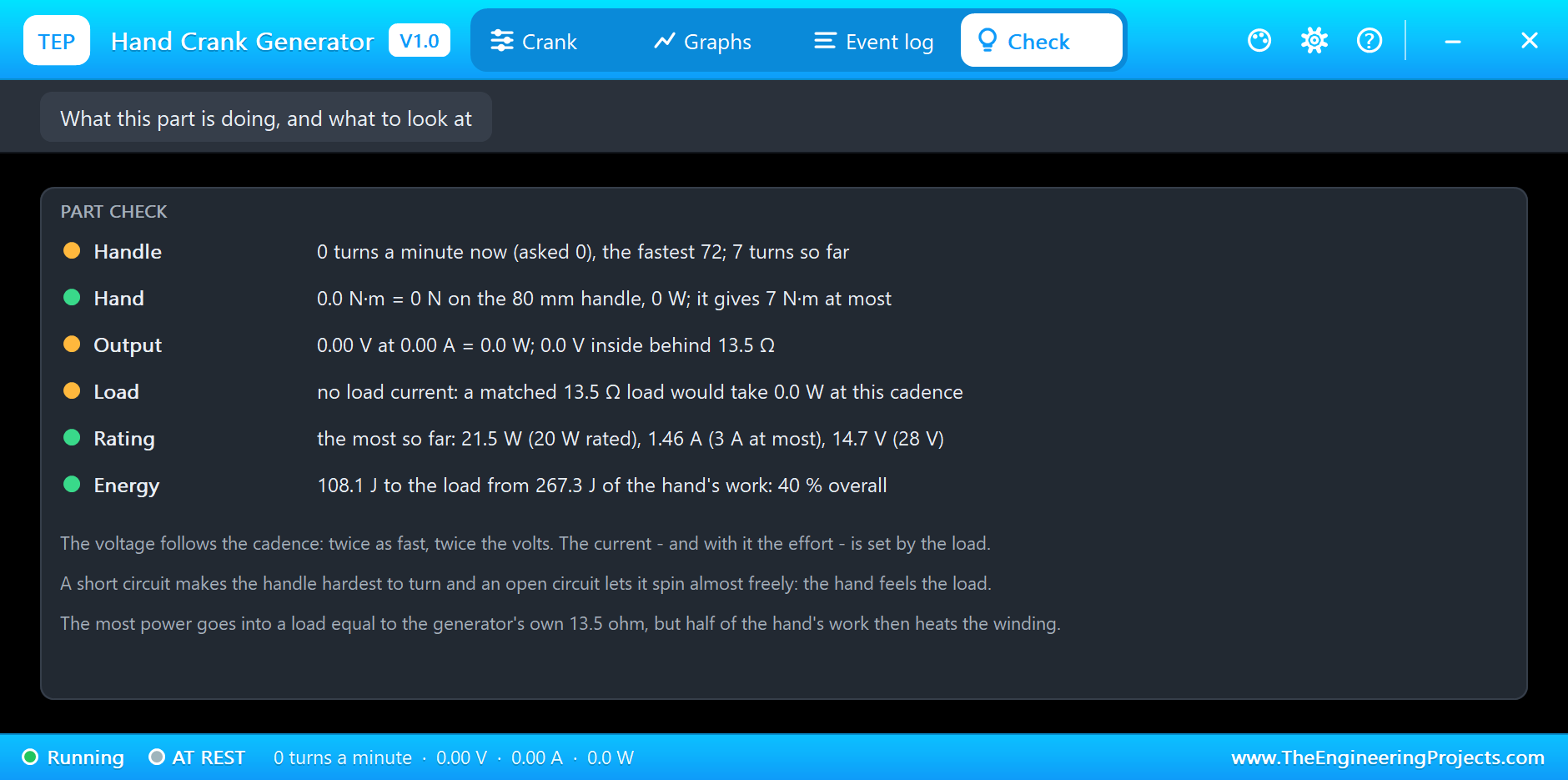
At 6.3 s the hand eases off to 60 turns a minute. It does not brake; it simply pushes less, and the load slows the handle within a fraction of a second. The same settled point as before returns: 12.31 V at 1.22 A, 15.0 W. At 8.3 s the hand lets go. With 10 ohm on the output the generator is its own brake, so the handle stops almost at once, the voltage falls to zero and the LED goes out. By then the load has received 108.1 J in about 7 turns of the handle, from 267.3 J of the hand's work: 40 % overall.
The Graphs, the Event Log and the Check Page
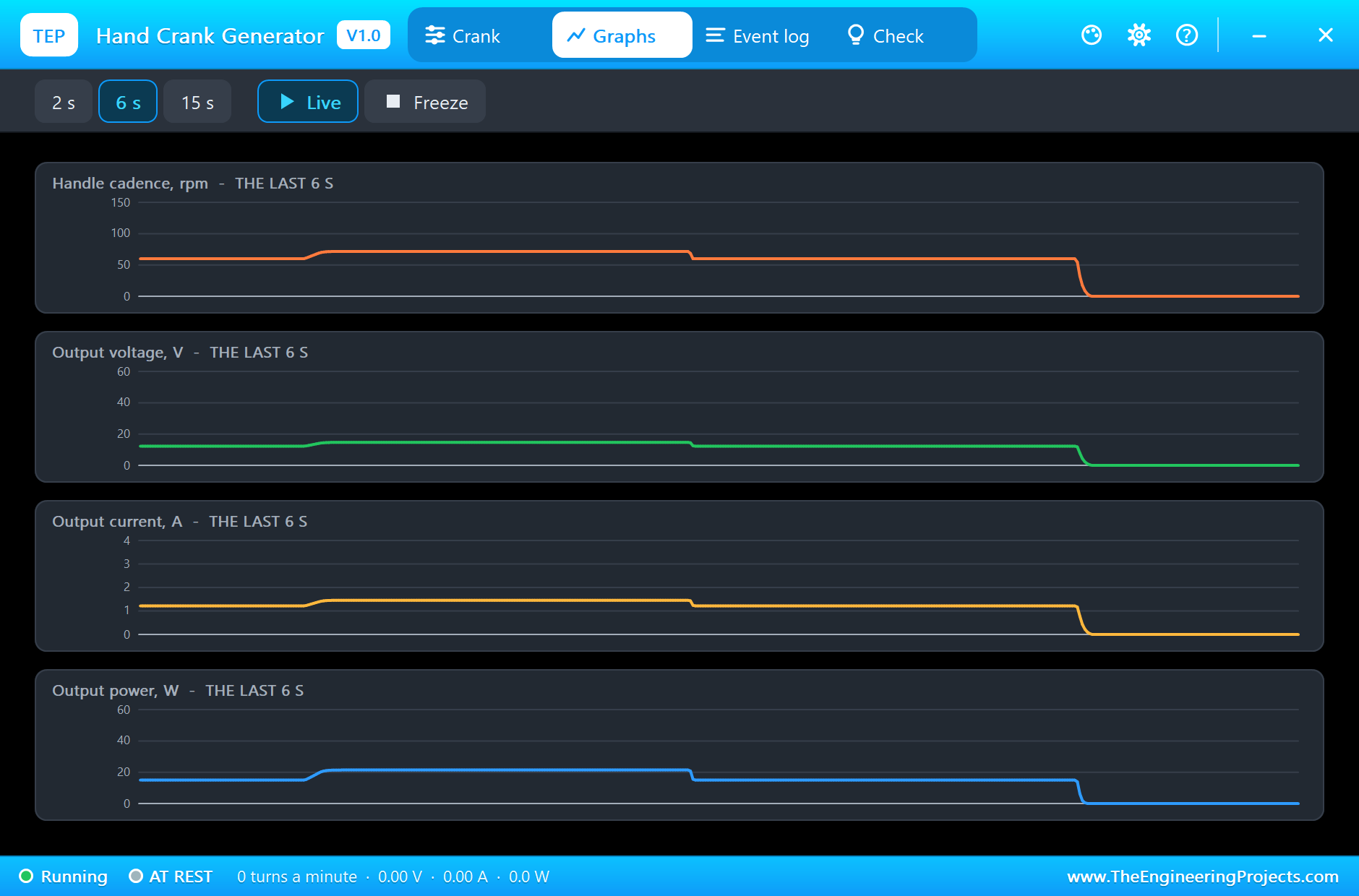
The Graphs page plots the cadence, the output voltage, the output current and the output power over the last 2, 6 or 15 simulated seconds. Our picture was taken at the end of the run over the last 6 seconds: the hand held at its limit at 72 turns a minute, the return to 60 and the stop. Between 60 and 72 turns a minute the cadence rises by a fifth and the power by more than two fifths. The Event log keeps every change of the cadence, a settled point for each of them with the voltage inside, the output, the hand's torque and power and the efficiency, and the warning when the hand reached its limit. The Check page sums up the handle, the hand, the output, the load, the rating and the energy.
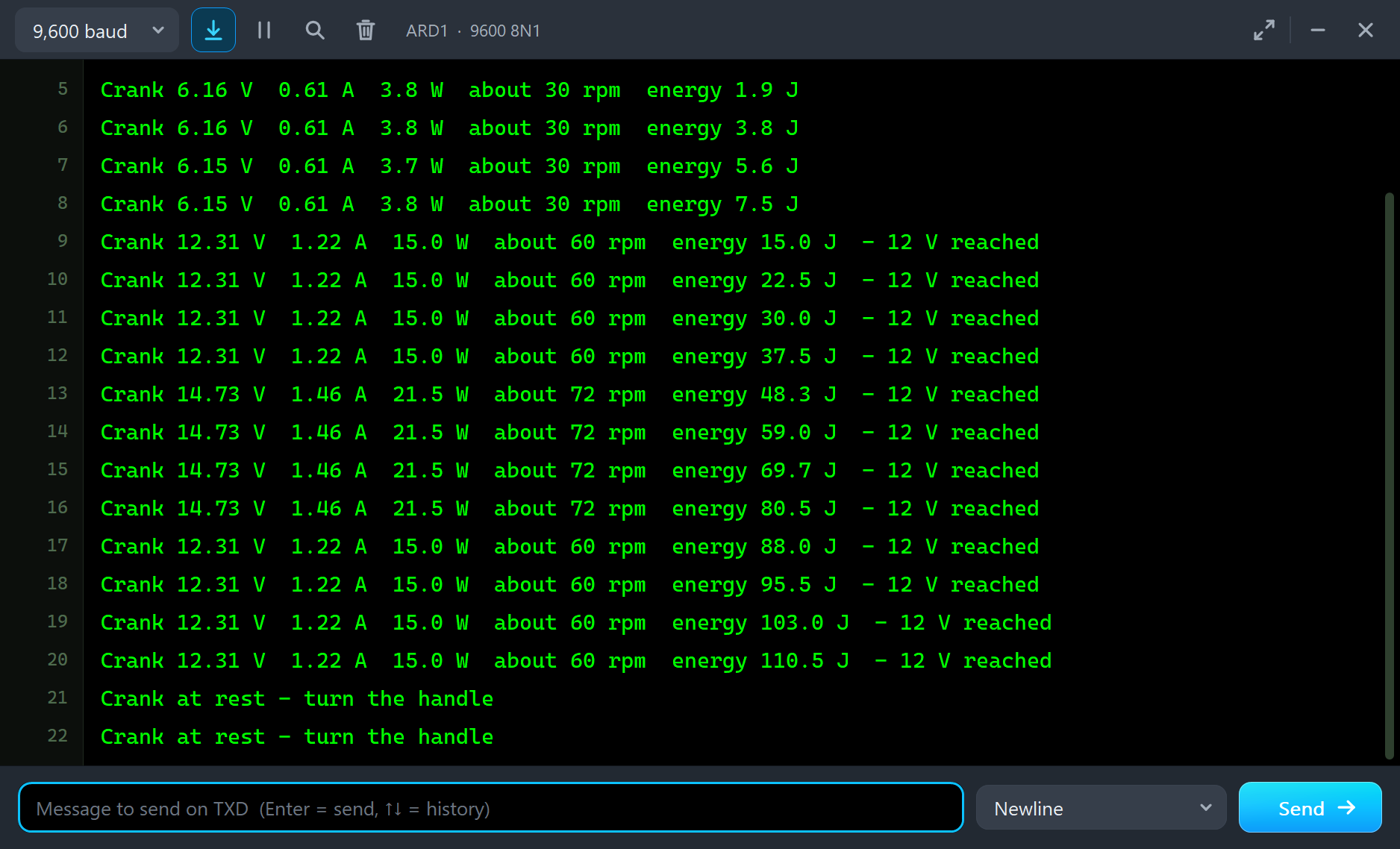
The monitor tells the same story from the Arduino's side, one line every half second, with the cadence the sketch has worked out from the volts and the amps alone: about 30, 60 and 72 turns a minute, the same as the generator's own readout. By the time the hand lets go the sketch has counted 110.5 J of energy, enough to run a 1 W LED lamp for almost two minutes.
Try It Yourself
- Click Strong in the pop-up while 90 turns a minute are asked: with 10 newton metres the hand reaches 90, and the output passes 30 W, well over the rating.
- Click Light hand at 60 turns a minute and watch the cadence fall until 4 newton metres are enough.
- Change R1 to 47 ohm: the handle turns easily, the voltage rises past 22 V at 60 turns a minute and the efficiency climbs.
- Change R1 to 1 ohm: almost a short circuit. The hand is at its limit at about 44 turns a minute, and only 2 W reach the load.
Ideas to Extend the Demo
- Add a 12 V battery and a charge controller behind the generator, and count how many turns one percent of charge costs.
- Put a large capacitor on the output and see how it smooths the voltage when the cadence changes.
- Let the sketch show the cadence on an LCD, so that the person at the handle can hold 60 turns a minute.
Your Own Sketches
The demo sketch is in the zip file, and you can change it in the Arduino IDE. New to Arduino? Start with our Arduino Tutorial for Beginners. Export the compiled binary, and set the UNO's PROGRAM property to the new file. Our guide on How to get the HEX file from Arduino shows you where the file ends up.
Things to Know Before Using a Real Hand Crank Generator
- The output is not regulated: it follows the cadence and can pass 28 V with a light load, so check what your load can take. The INA219's bus input stops at 26 V.
- Hold it down: clamp the generator to a table or use its strap; a heavy load pushes back on the handle.
- Use a power resistor: 10 ohm at 15 W needs a 25 W resistor, or use a 12 V car lamp as the load.
- Turn steadily: the voltage rises and falls with every change of pace; a battery or a large capacitor smooths it.
- Add a regulator for electronics: for 5 V or for charging a battery, put a regulator or a charge controller behind the generator.
Troubleshooting
- No output: the handle is at rest; CRANK is 0, or Stop was clicked in the pop-up.
- Fewer turns a minute than asked: the hand is at its limit; the load is too heavy for it. Raise HAND, or the load's resistance.
- OVER ITS RATING: more than 20 W or 3 A at the output; a real generator's winding would overheat. Use a lighter load.
- More than 28 V: a fast handle with a light load. That is real; the output is not regulated.
- No reverse current with a battery on the output: the rectifier blocks it, as in the real generator.
- The part is not simulated:
TEPCRANK.DLLis missing from MODELS and from the project folder.
Limitations of the Simulation
- The electrical side is fitted to the sellers' two published points; no maker's datasheet is published for this generator, so 0.48 V for every turn a minute and 13.5 ohm are our fit.
- The mechanical figures are ours: the friction, the inertia of the turning parts, the 80 mm crank, and a hand that speeds up by 120 turns a minute each second and never brakes.
- Not modelled: the ripple of the rectified output, the noise and backlash of the gear, the heating of the winding, a hand that tires or pushes unevenly around the circle, and the 5 V USB socket some of these generators add. An output over the rating is reported, not simulated.
- Arduino is a name of Arduino; this library is not made or endorsed by Arduino, Labcenter or any generator maker.
- Tested in Proteus 8.5 in November 2026 (the demo as shipped). Proteus 7 is not supported.
So, that was all about the Hand Crank Generator Library for Proteus Simulation. I hope it helps you try a human-powered project in a simulation before you clamp a real generator to your desk: a voltage that follows the cadence, a load that pushes back on the handle, a hand with a limit, and a pop-up that shows every newton and every watt in between. If you have any questions, ask in the comments and I will help you out. Till the next tutorial, take care and have fun!

Comments
0