


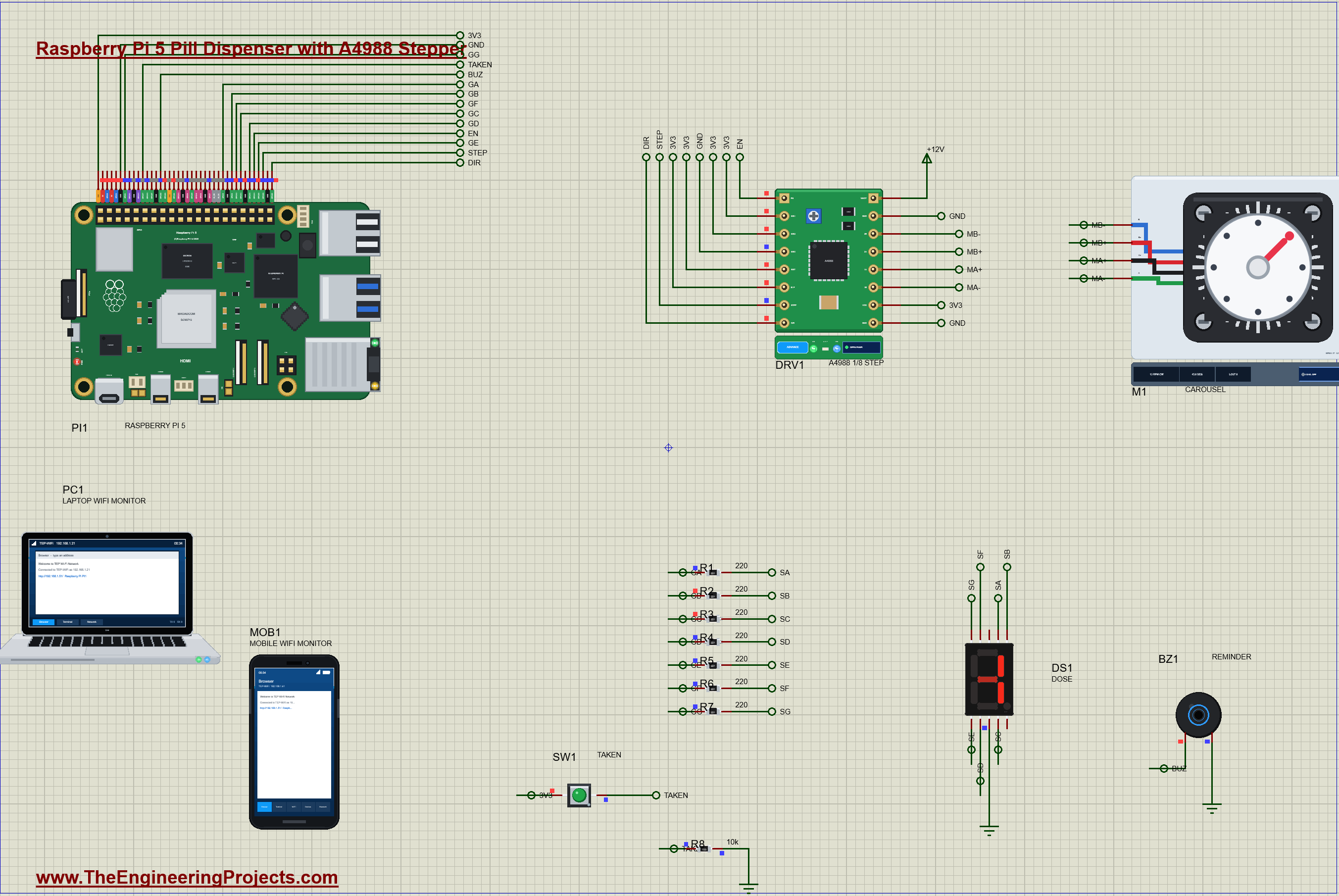
Raspberry Pi 5 Pill Dispenser with A4988 Stepper (Proteus Simulation)


Hello friends, I hope you all are doing great. Today, I am going to share the Raspberry Pi 5 Pill Dispenser with A4988 Stepper (Proteus Simulation), the forty-eighth project of our IoT Projects series. If you have searched for a Proteus simulation of a stepper motor with a Raspberry Pi, an A4988 driver controlled from Python, or a smart medicine dispenser that reminds a patient and warns a carer, here is a complete one. A Raspberry Pi 5 turns an 8-compartment carousel with a NEMA 17 stepper at each dose time, shows the dose number on a 7-segment digit, beeps until the patient presses TAKEN, reports a missed dose on a web dashboard, and lets a carer silence the reminder or refill the carousel from a laptop or a phone.
Forgetting a dose, or taking it twice, is one of the most common problems for people on regular medicines, and automatic dispensers solve it by giving exactly one dose at exactly the right time. In this tutorial, we will go through the circuit, see how a stepper motor moves in exact steps and why microstepping makes it smoother, drive it through an A4988 with STEP, DIR and EN, count the microsteps for one compartment, light a 7-segment digit segment by segment, read a bouncing button, run a day of doses with a time limit, walk through the Python program, and then run the simulation through a whole day: a dose taken on time, a dose missed and taken late, a refill, and a last dose. At the end, you can download the project with the program and every library file.
NOTICE: Our team has put a lot of effort into this project: the circuit, the code and every part in the simulation are our own work, and you get them all free. Your feedback is the fuel that keeps us going, so please tell us what you think in the comments below. And if our free projects help you, you can buy us a coffee. So, let's get started with the Raspberry Pi 5 pill dispenser in Proteus simulation:
What Does This Pill Dispenser Do?
- Gives each dose on time: at 08:00, 14:00 and 20:00 the carousel turns one compartment to the outlet.
- Exact positions: a NEMA 17 stepper through an A4988 at 1/8 step: 200 microsteps for one compartment, 45 degrees.
- Shows the dose: a 7-segment digit with the dose number, - when all is well, E for a missed dose.
- Reminds and confirms: the buzzer beeps until the TAKEN button is pressed.
- Warns the carer: 30 minutes without TAKEN is a MISSED dose on the digit and the dashboard; a late TAKEN is still recorded, marked late.
- SILENCE and REFILL: a carer can stop the beeping or turn the carousel back to the empty compartment from a laptop or a phone.
It is a great project for learning stepper motors and their drivers, GPIO outputs and inputs from Python, timing and state in a real device, and a little product design: what should a dispenser do when nobody presses the button? In the simulation, the A4988's pop-up shows its state, the microstep mode, the position it has counted and the coil currents, the NEMA 17 turns a dial on the sheet, the 7-segment pop-up shows which segments are lit and their currents, the button's pop-up shows its contact bounce, and the buzzer's pop-up shows each beep.
Components Used in the Proteus Simulation
All the parts come from our Proteus libraries, each with its own tutorial. The project zip at the end includes every LIB and DLL file and the TEPPi Python runtime.
| Part | Proteus device | Library post | Connection |
|---|---|---|---|
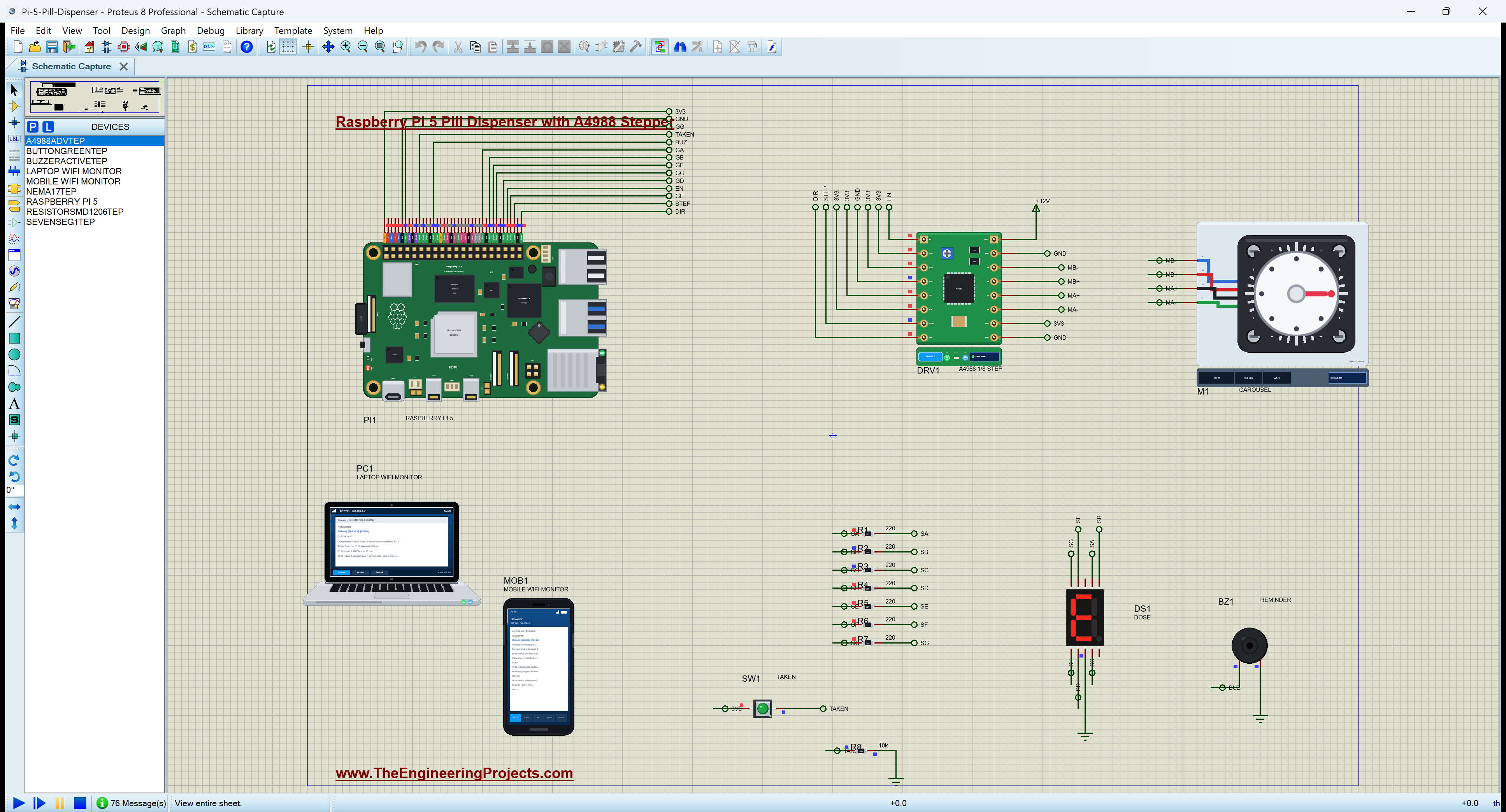
| Raspberry Pi 5 | RASPBERRY PI 5 | Raspberry Pi 5 Library for Proteus | PI1, Ethernet 192.168.1.51 |
| A4988 stepper driver | A4988ADVTEP | A4988 / DRV8825 Stepper Driver Library for Proteus | DRV1, STEP GPIO20, DIR GPIO21, EN GPIO16 |
| NEMA 17 stepper with a dial | NEMA17TEP | A4988 / DRV8825 Stepper Driver Library for Proteus | M1, the carousel |
| 7-segment digit | SEVENSEG1TEP | 7-Segment Display Library for Proteus | DS1, common cathode, red |
| SMD resistors 1206 | RESISTORSMD1206TEP | SMD Resistor Library | R1 - R7 220 ohm, R8 10 kohm |
| Push button | BUTTONGREENTEP | Push Button Library | SW1, TAKEN, GPIO17 |
| Active buzzer | BUZZERACTIVETEP | Active Buzzer Library | BZ1, GPIO22 |
| Laptop WiFi Monitor | LAPTOP WIFI MONITOR | Laptop WiFi Monitor | PC1 |
| Mobile WiFi Monitor | MOBILE WIFI MONITOR | Mobile WiFi Monitor | MOB1 |
The A4988 and the NEMA 17 come from one library: the driver board of 3D printers and the 1.8 degree motor it usually drives. The seven segment resistors are tiny 1206 SMD chips, which keep the circuit compact; they are ordinary resistors in a surface-mount case.
Proteus Simulation of the Pill Dispenser: the Circuit
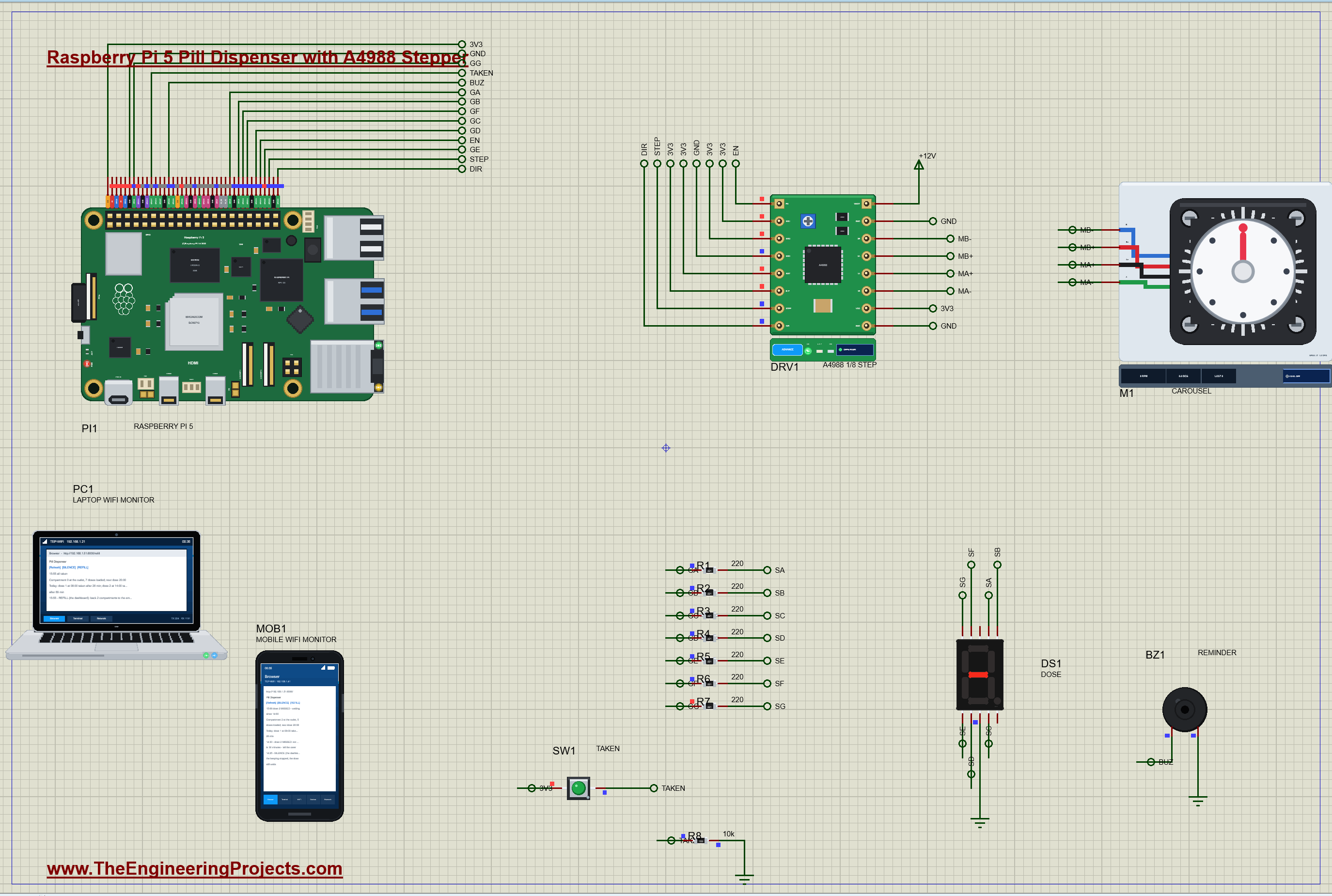
| Part | Pins | Raspberry Pi 5 / other |
|---|---|---|
| DRV1 A4988 | STEP / DIR / EN | GPIO20 (pin 38) / GPIO21 (pin 40) / GPIO16 (pin 36) |
| DRV1 A4988 | MS1, MS2 / MS3 / RST, SLP, VDD | 3V3 / GND / 3V3 |
| DRV1 A4988 | VMOT / 1A 1B 2A 2B | +12V / the NEMA 17's A+ A- B+ B- |
| DS1 digit | A B C D E F G / COM | GPIO5, 6, 13, 19, 26, 12, 4 through R1 - R7 (220 ohm) / GND |
| SW1 TAKEN | 1 / 2 | 3V3 / GPIO17 (pin 11), R8 10 kohm to GND |
| BZ1 buzzer | + / - | GPIO22 (pin 15) / GND |
The A4988's logic runs from the Pi's 3.3 V (VDD) and its motor supply from 12 V (VMOT): the two grounds are joined, and the Pi never touches the motor current. MS1 and MS2 tied high and MS3 low select eighth steps; RST and SLP tied high keep the driver awake, and EN, active low, is left to the program. Each segment of the common-cathode digit is lit by driving its pin high through its own resistor, and the button pulls GPIO17 up to 3.3 V against a 10 kohm pull-down.
How the Pill Dispenser Works
A Stepper Motor Moves in Exact Steps
A stepper motor has two coils and a toothed rotor. Energise the coils in a fixed order and the rotor jumps from one stable position to the next: 200 full steps a turn, 1.8 degrees each, for the NEMA 17. Count the steps and you know where the shaft is, without any sensor, as long as the motor never stalls. That is why steppers move 3D printer heads, camera sliders and, here, a carousel of pill compartments. Full steps are jerky and noisy, so drivers microstep: they set the two coil currents to intermediate values along a sine and a cosine, so the magnetic field, and the rotor, turns in smaller steps.
The A4988: STEP, DIR and EN
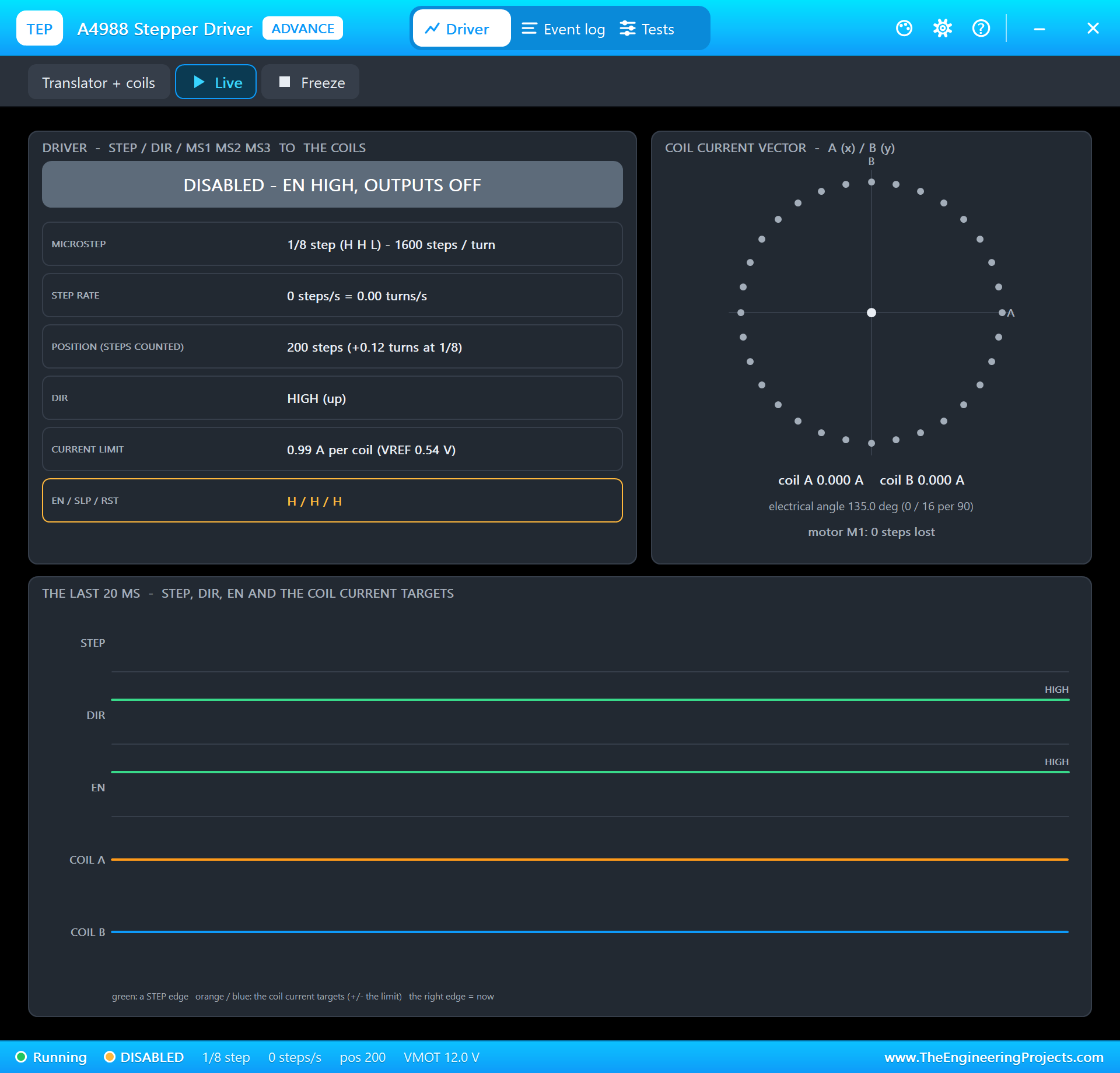
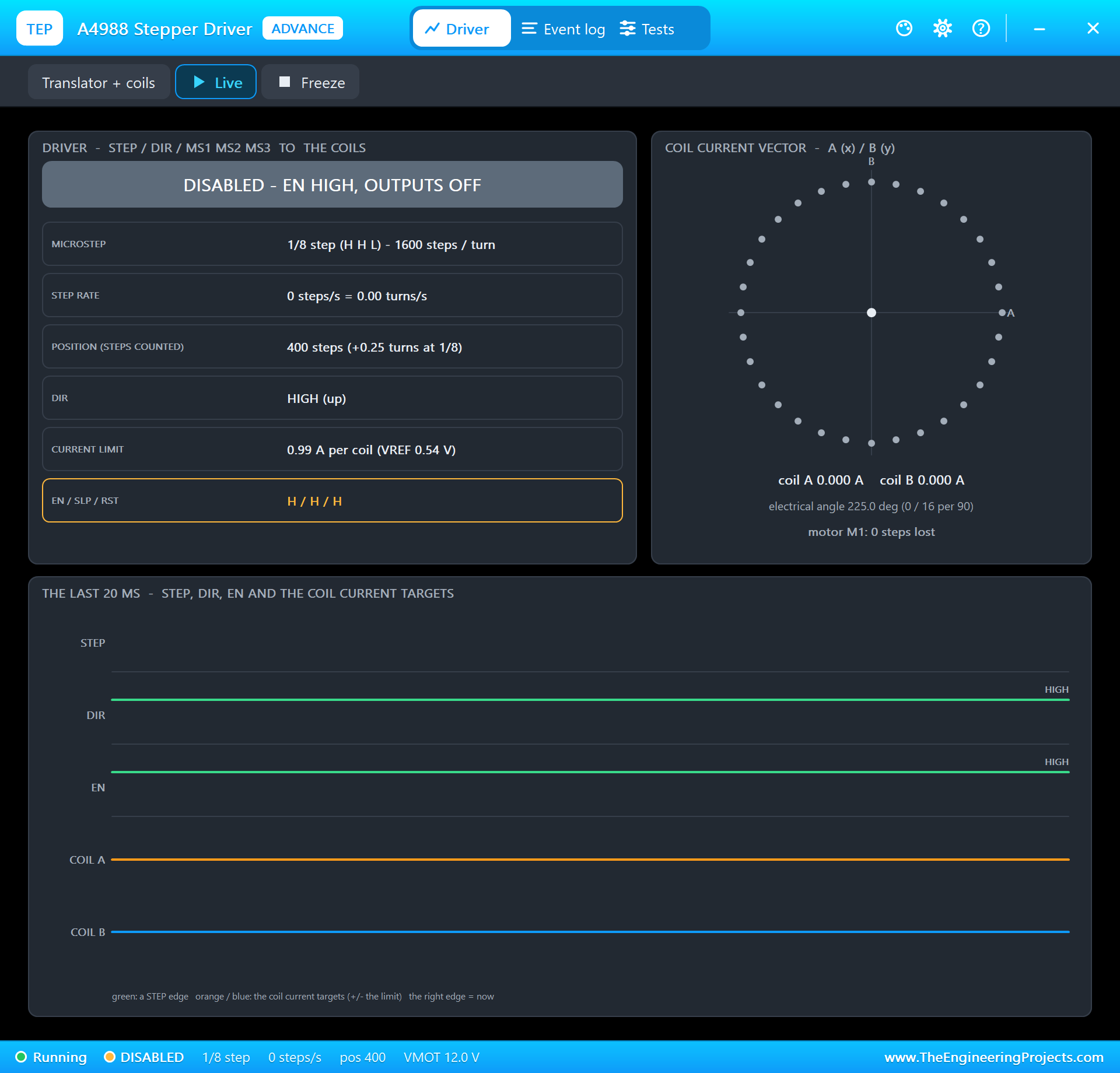
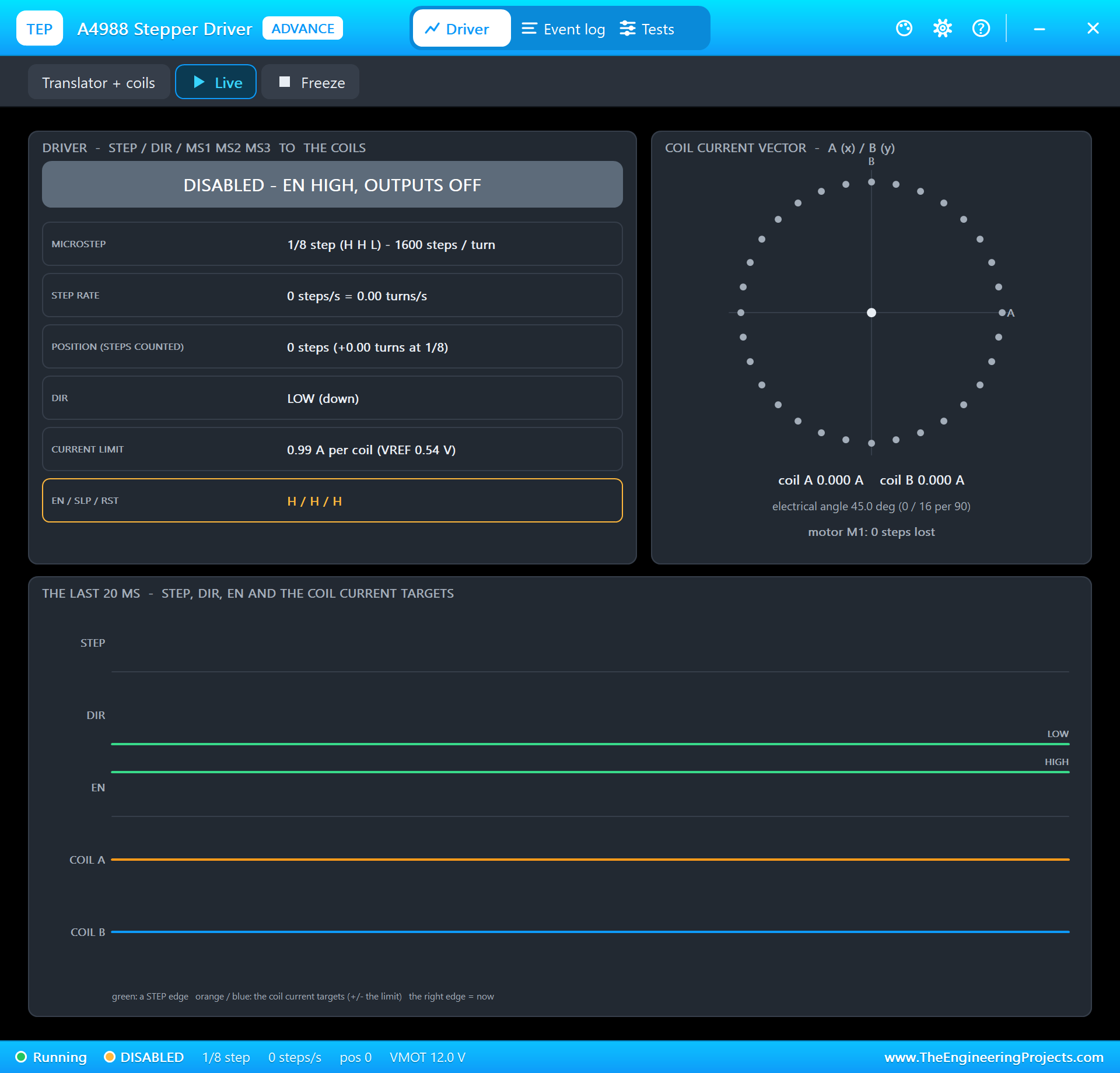
The A4988 does all the coil work. Every rising edge on STEP moves the motor one microstep, in the direction set by DIR; EN low turns the outputs on, EN high turns them off. Its chopper holds the coil current at a limit set by a voltage, VREF: I = VREF / (8 x Rsense), and with the board's 0.068 ohm sense resistors the 0.54 V here gives 0.99 A per coil. With MS1 and MS2 high and MS3 low it makes eighth steps: 8 x 200 = 1600 microsteps a turn. The program leaves EN high between doses: no holding current, so the motor and the driver stay cool and the 12 V supply idles; the carousel's own detent keeps it in place.
Worked example: 8 compartments in 1600 microsteps is 1600 / 8 = 200 microsteps a compartment, 360 / 8 = 45 degrees. At 800 microsteps a second the move takes 200 / 800 = 0.25 s, half a turn a second, gentle enough not to throw the pills about.
Exactly 200 Edges
Counting steps is only as good as the count of STEP edges. The program makes them with a hardware-timed square wave, 800 Hz, and stops it half a period after the 200th rising edge: the edges come every 1.25 ms, so stopping at 199.5 periods leaves no room for a 201st. An early version that asked for "200 pulses" got 201 now and then, a quarter of a degree too far each time, and an error that adds up over a week of doses is exactly what a dispenser must not have. In the run below, after five moves forward and back, the A4988 counted 200 microsteps from home: exactly one compartment.
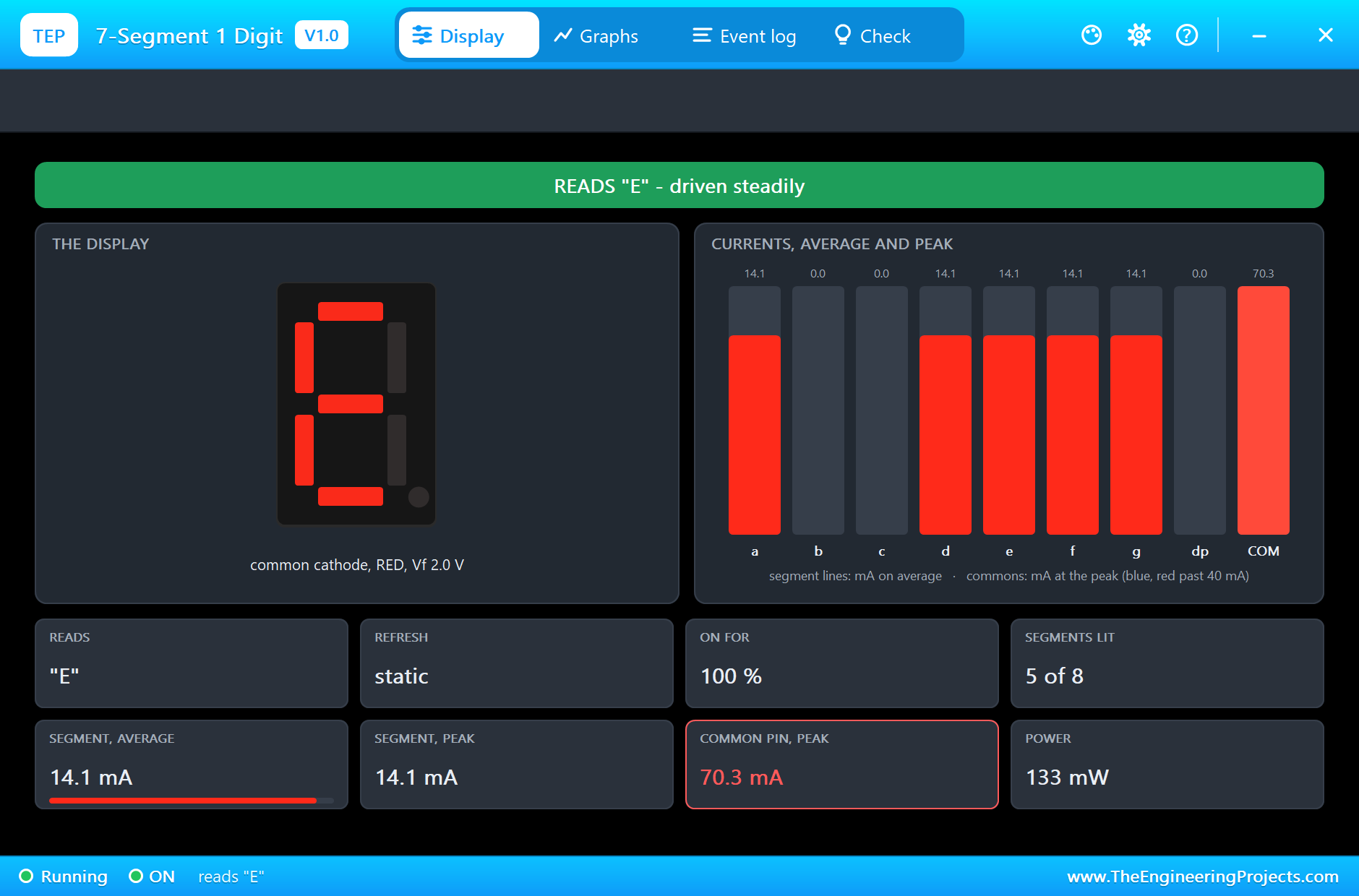
A 7-Segment Digit, Segment by Segment
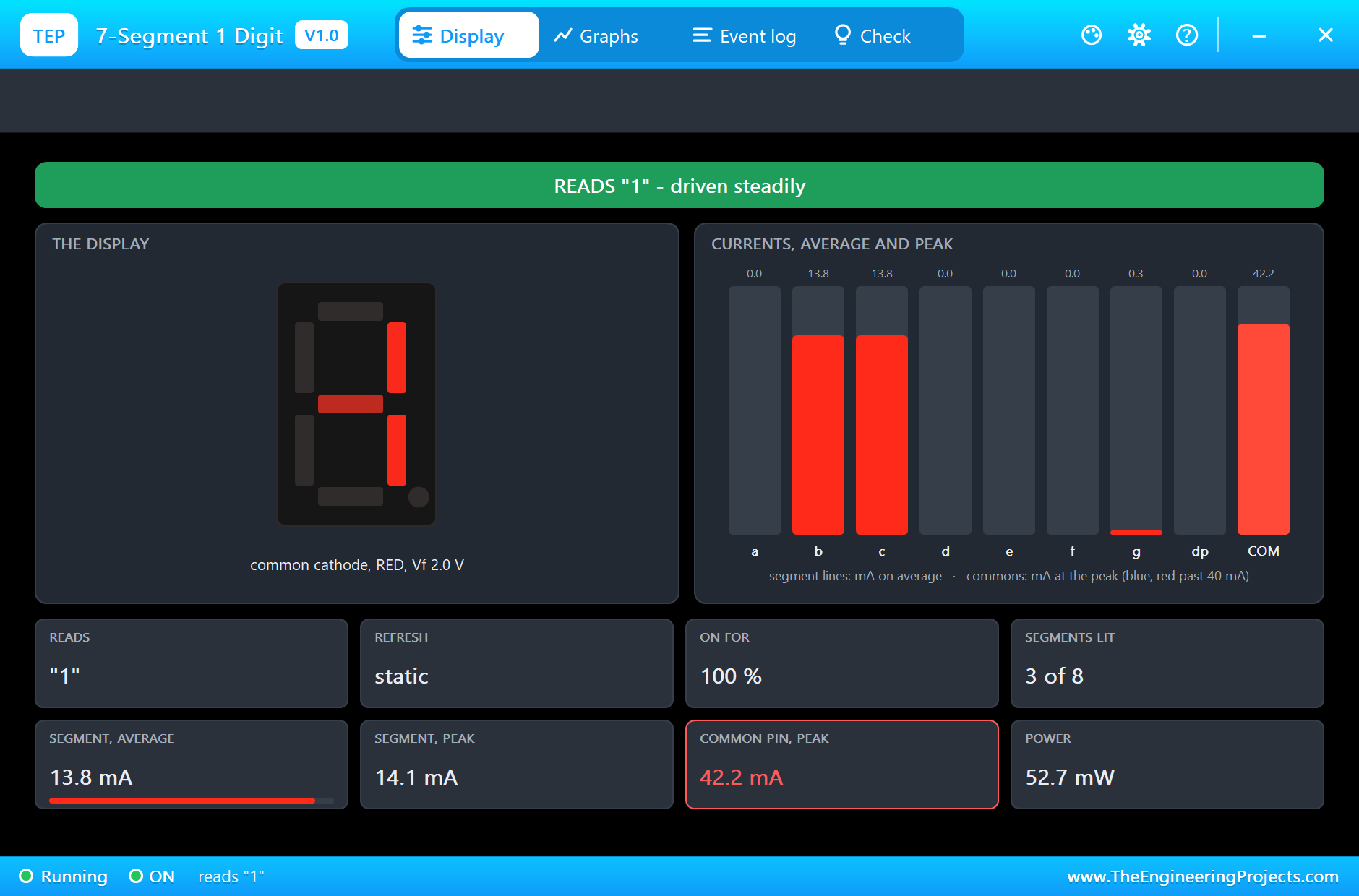
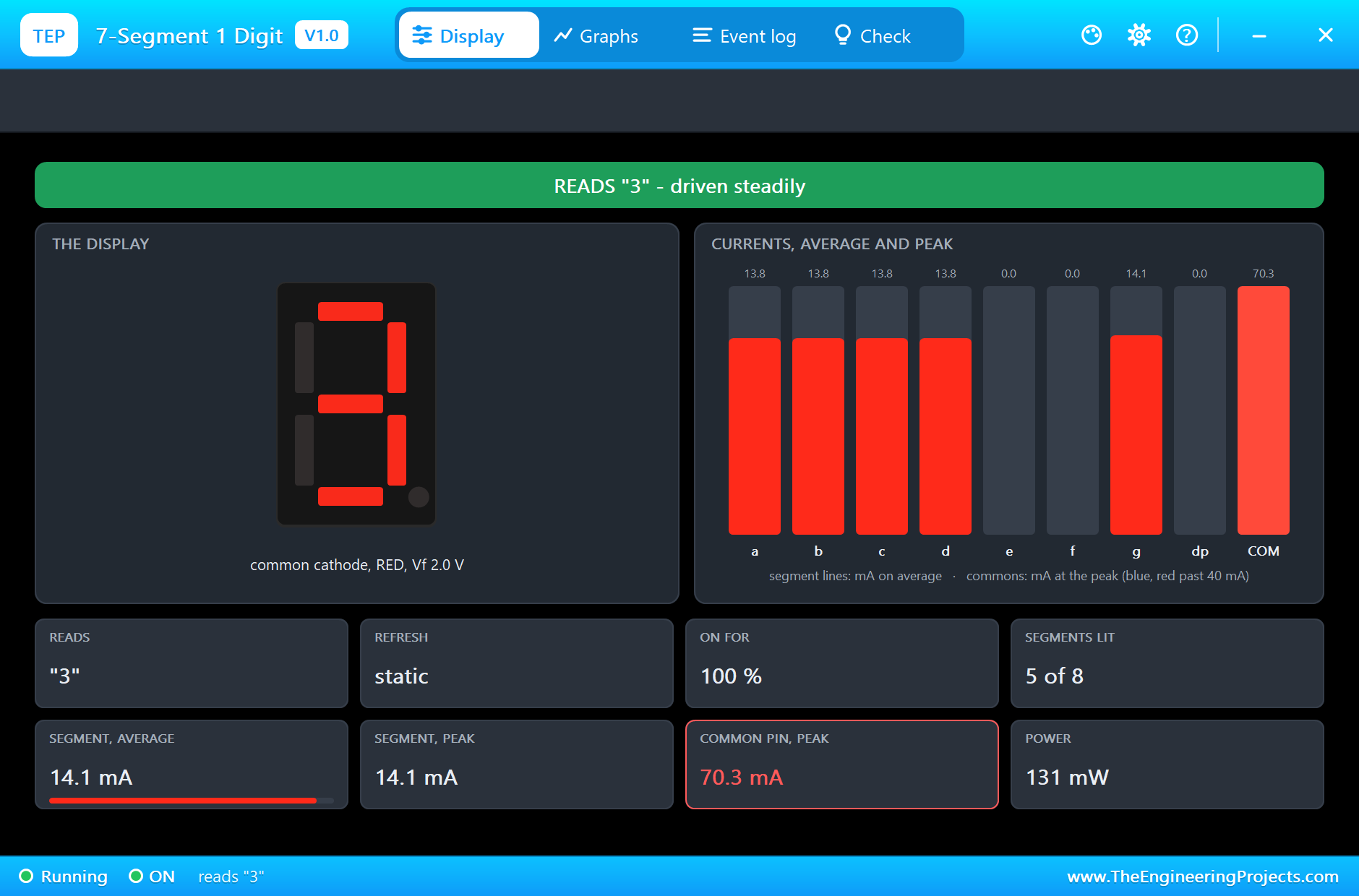
A 7-segment digit is seven LEDs in the shape of an eight, a to g, with one common pin. On this common-cathode digit the common goes to ground and each segment lights when its pin is driven high through a resistor. The program keeps a small table of which segments make each character: 1 is b and c, 3 is a, b, c, d and g, E is a, d, e, f and g, and the - sign is g alone. On a real Pi's 3.3 V pins a red segment takes (3.3 - 2.0) / 220 = 5.9 mA, so even an 8 lighting all seven segments draws about 41 mA from the Pi: within its limits, which is why the resistors are 220 ohm and not smaller.
Reading a Bouncing Button
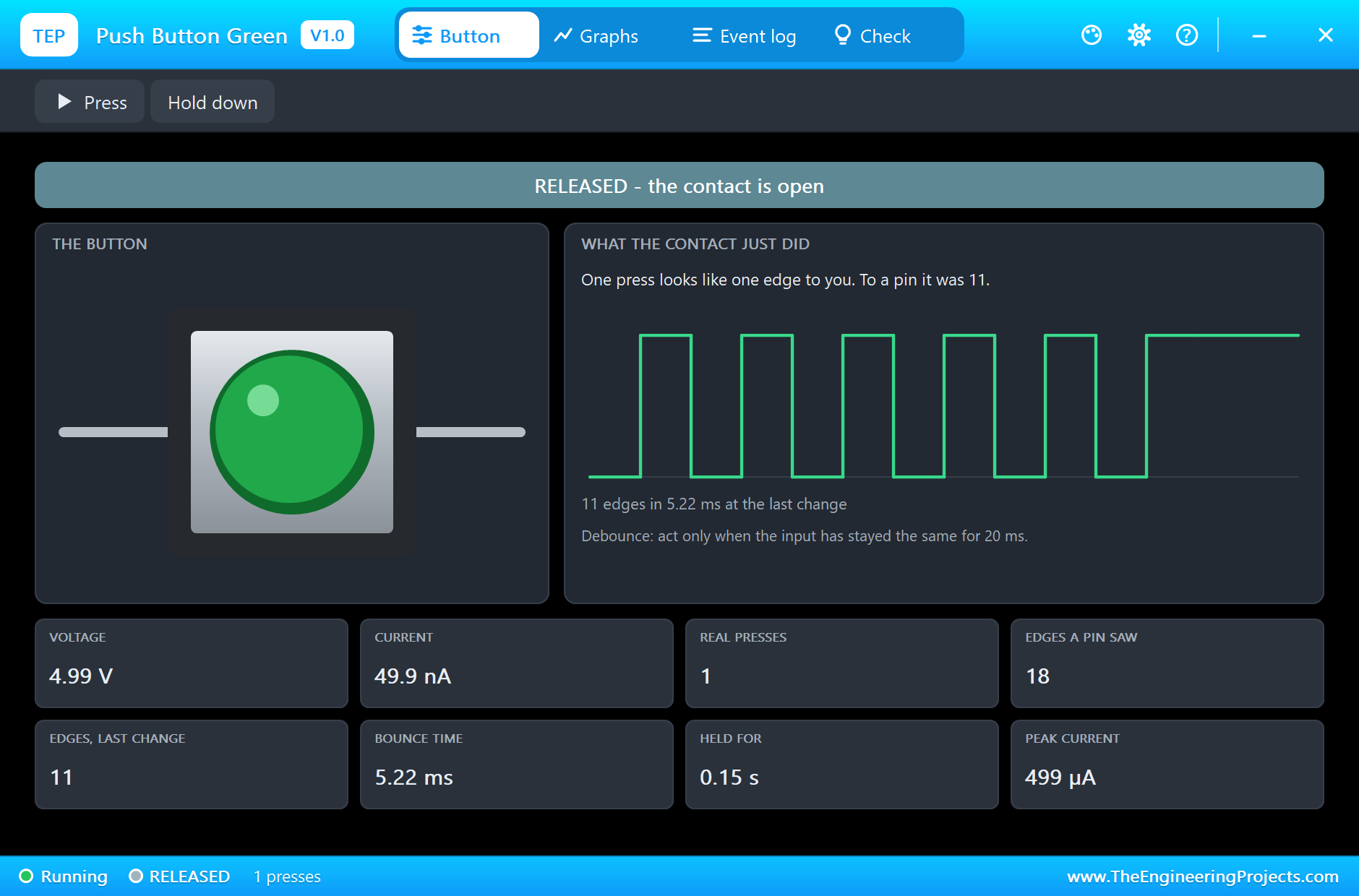
A push button's contacts do not close cleanly: for a few milliseconds they bounce, open and closed, many times. In the run the TAKEN button made 11 edges in 5.2 ms for a single press. The program reads the button every 20 ms, so it sees one press, and after a press it waits for the release before it carries on, so one press can never count twice. R8 pulls the input low while the button is open, so the pin never floats.
A Day of Doses
The schedule is a list of times: 08:00, 14:00 and 20:00. When a dose falls due the program turns the carousel, shows the dose number, and beeps a short beep every 0.4 s until TAKEN is pressed. If 30 minutes pass first, the dose is MISSED: the digit shows E, the buzzer gives one long beep, and the dashboard tells the carer. Missing a dose does not throw it away: the patient can still take it, and the record says "taken late, after 89 min", which is what a carer or a doctor needs to know. SILENCE stops the beeping without marking anything, for a carer who is already on the way. REFILL turns the carousel back to the empty compartment once it has been filled, but only when no dose is waiting.
The day runs faster in the simulation: the program's clock goes 720 times faster than real time, 12 minutes of the day for every second, so the 30-minute limit is 2.5 seconds and the whole day fits in a minute and a quarter. On a real dispenser CLOCK is 1 and the times are the Pi's own clock. The beeps stay in real seconds.
The Python Code Explained
The whole program is included in the download. It needs no extra library: lgpio for the GPIO and the timed square wave, threading and http.server for the dashboard. At the top are the pins, the clock, the doses and the steps:
STEP, DIR, EN = 20, 21, 16 # the A4988 (BCM numbers)DOSES = [8 * 60, 14 * 60, 20 * 60] # minutes of the day
MISS_MIN = 30 # a dose not taken after 30 minutes: MISSED
SLOTS, STEPS_SLOT, STEP_HZ = 8, 200, 800 # 8 compartments; 1/8 step: 200 microsteps = 45 degrees; 800 microsteps a secondGLYPHS = {'0': 'abcdef', '1': 'bc', '2': 'abdeg', '3': 'abcdg', '4': 'bcfg', '5': 'acdfg', '6': 'acdefg', '7': 'abc', '8': 'abcdefg',Turning the Carousel
A move sets DIR, enables the driver, runs the square wave for exactly n edges and disables the driver again:
    lgpio.gpio_write(chip, DIR, 1 if slots > 0 else 0)
    lgpio.gpio_write(chip, EN, 0); time.sleep(0.002)          # the driver on, the coils energised
lgpio.tx_pwm(chip, STEP, STEP_HZ, 50) # a square wave on STEP: a rising edge every 1.25 ms
time.sleep((n - 0.5) / STEP_HZ) # stopped half a period after the n-th rising edge: exactly n microsteps
lgpio.tx_pwm(chip, STEP, 0, 0) lgpio.gpio_write(chip, EN, 1) # off again: the detent of the carousel holds itThe Digit
lgpio.gpio_write(chip, g, 1 if 'abcdefg'[k] in on else 0)The Dose Loop
A dose falls due when its time has come and no other dose is waiting; then the carousel turns and the dose number goes up on the digit:
if k not in given and now >= d and waiting is None: turn(1)While it waits, the button is read first, then the time limit, then the reminder beep:
if lgpio.gpio_read(chip, TAKEN): # the button: taken (late if already missed) elif not missed and now - since >= MISS_MIN: beep(0.08) # the reminder: a short beep every 0.4 s, the button read in betweenThe program's day clock is the real time since the start, scaled by CLOCK:
return START + (time.monotonic() - T0) * CLOCK / 60.0The pages are / (the dashboard), /silence, /refill and /data (everything as JSON). The dashboard puts its links first and stays short, because the WiFi Monitors show one screen of a page. The Pi's terminal prints the state every second and every event.
How to Run the Proteus Simulation
- Download the project zip below and install the library files and the TEPPi folder (the steps are under the download button).
- Open Pi-5-Pill-Dispenser.pdsprj from the Proteus Simulation folder. Keep pill_dispenser.py and the DLL files next to it.
- Press Play. The day starts at 07:00; at 08:00 the carousel turns, the digit shows 1 and the buzzer beeps.
- Press the TAKEN button (its cap, or Press on its pop-up) within 30 minutes of the day, or wait and see the dose MISSED.
- Open the Laptop or the Mobile WiFi Monitor and press Go for the dashboard, with SILENCE and REFILL.
Simulation Results: the Pill Dispenser in Proteus
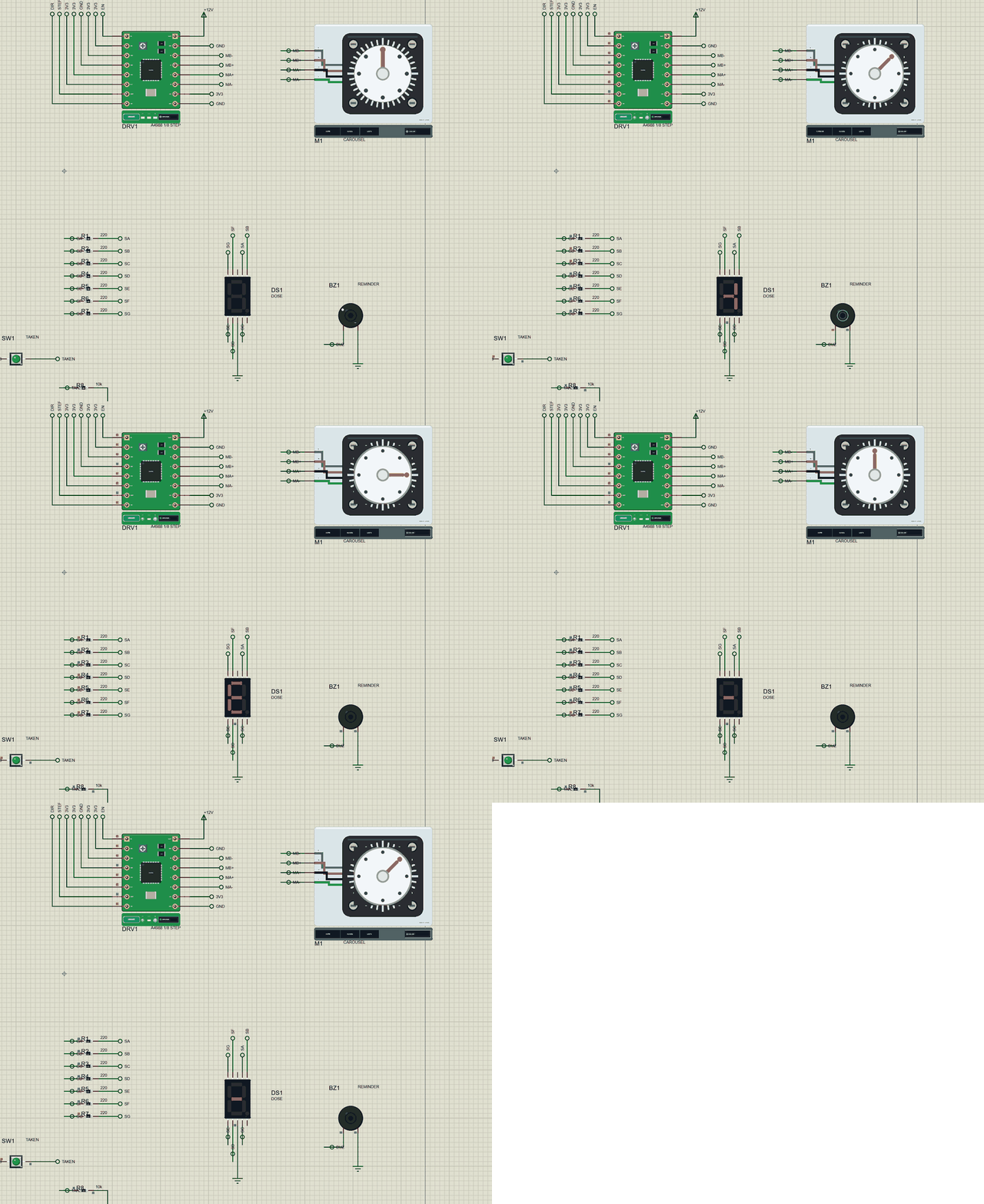
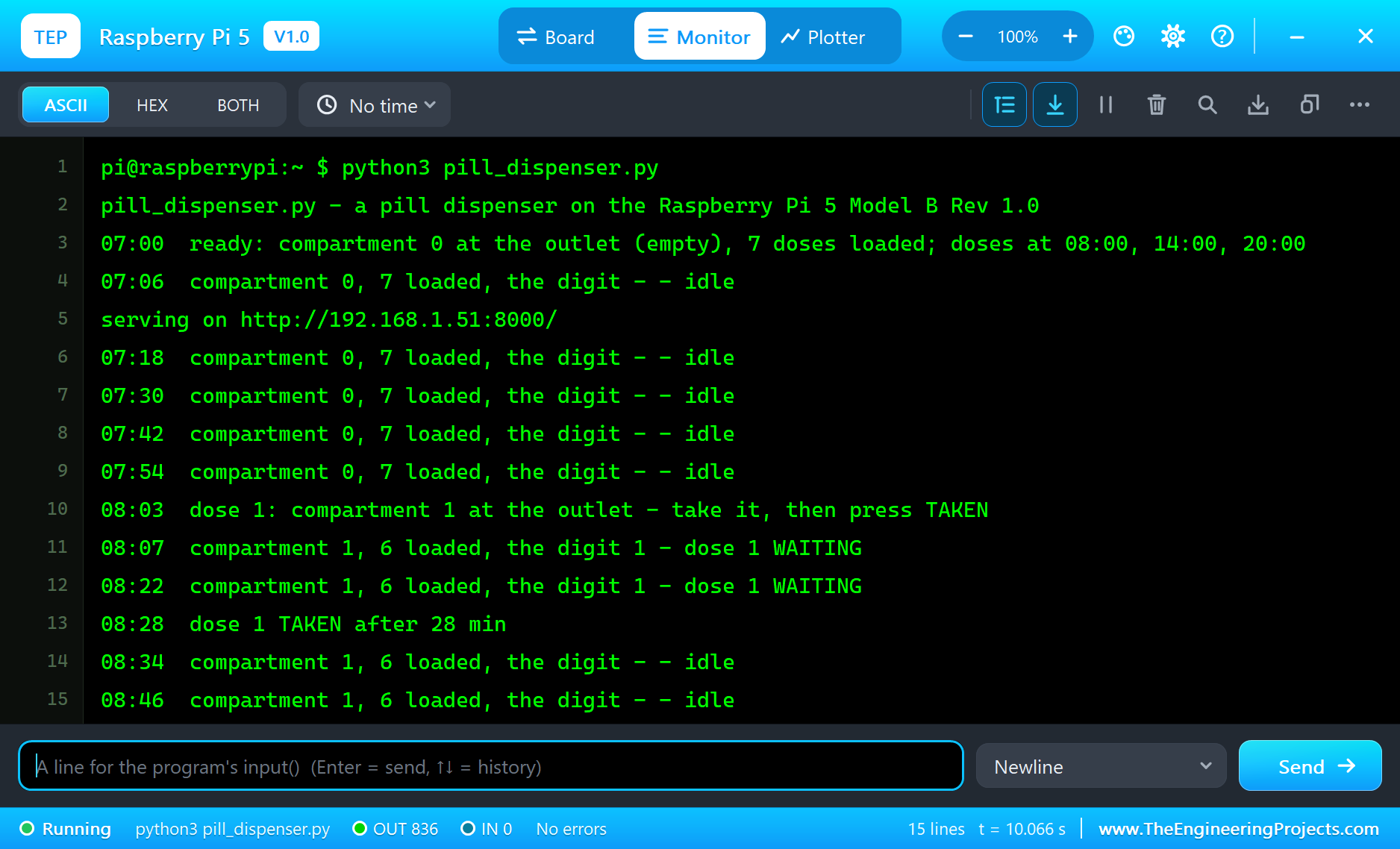
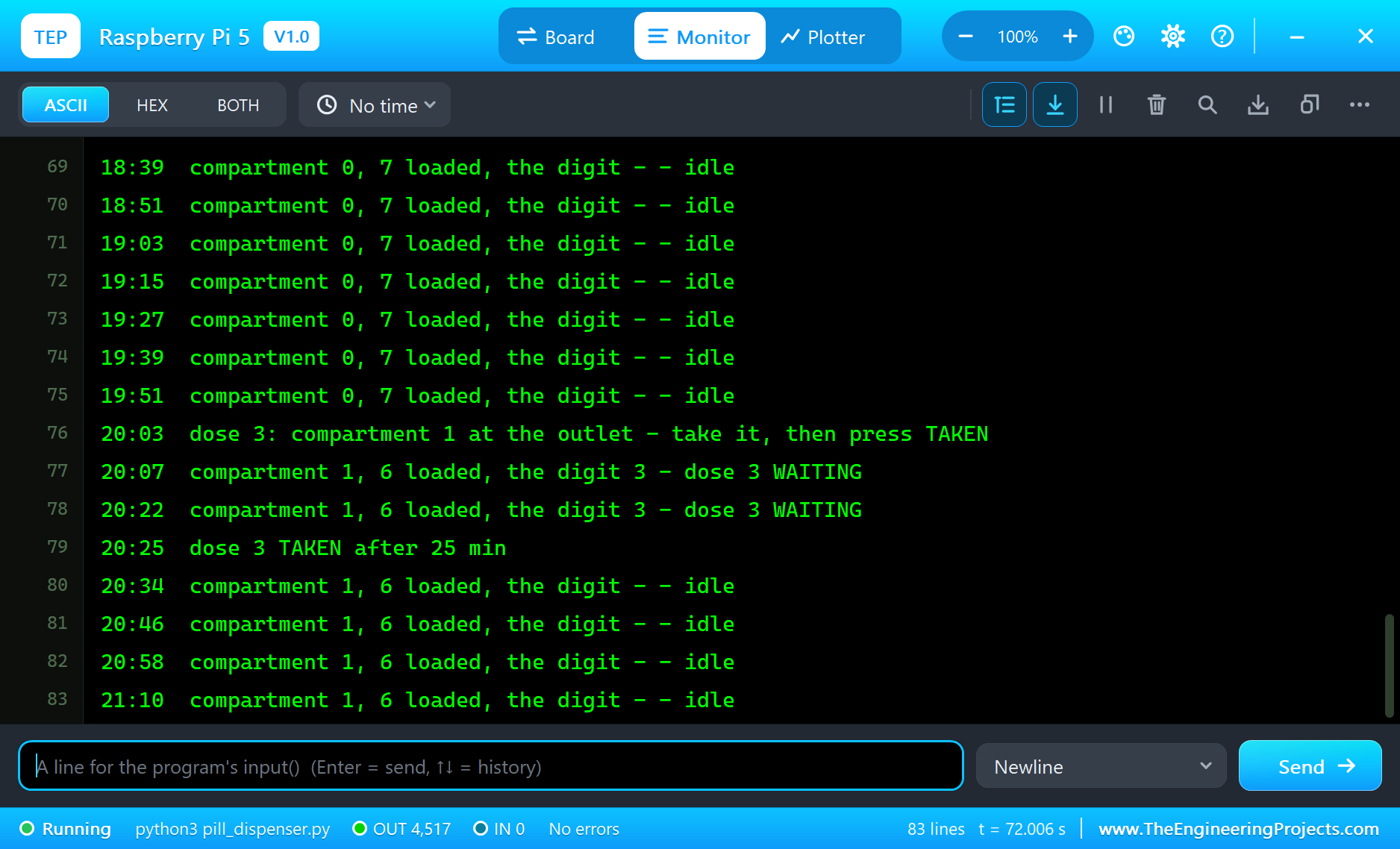
Here is the run that made the screenshots of this tutorial, 72.2 seconds of simulation for a day from 07:00 to 21:00. The times below are the program's day clock, as it printed them on the Pi's terminal; the parts' numbers come from their pop-ups.
08:00: Dose 1, Taken
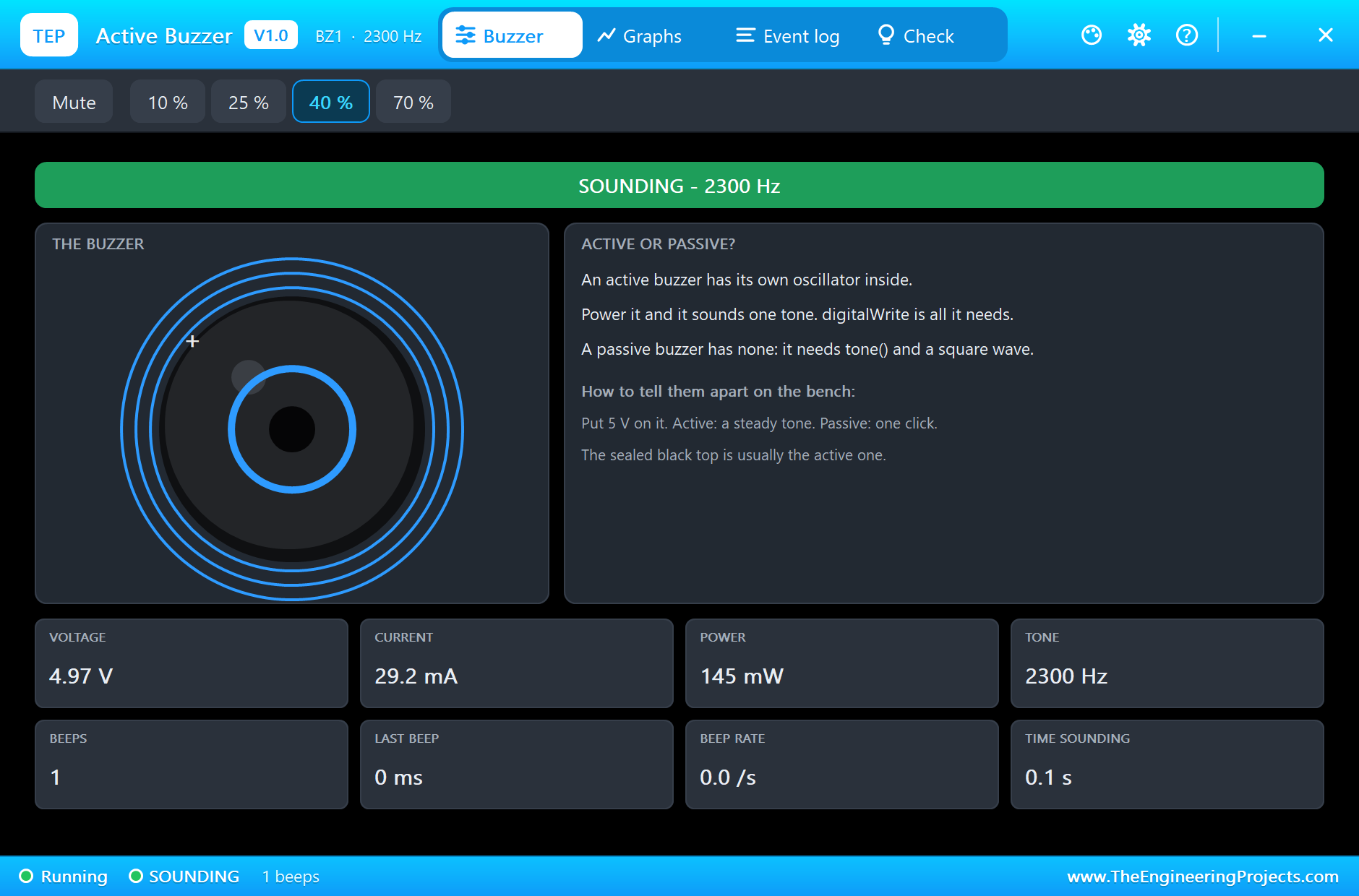
At 07:00 the program reports "ready: compartment 0 at the outlet (empty), 7 doses loaded" and the digit shows -. At 08:00 dose 1 falls due: the carousel turns one compartment, and at 08:03 the program reports "dose 1: compartment 1 at the outlet - take it, then press TAKEN". The A4988's pop-up shows the move done: 1/8 step, 1600 steps a turn, the position 200 microsteps, DIR high, and DISABLED again with EN high, no current in the coils; the NEMA 17's dial on the sheet stands at 45 degrees. The digit reads "1" with segments b and c lit, and the buzzer is caught sounding, 2300 Hz. At 08:28, two minutes before the limit, TAKEN is pressed: "dose 1 TAKEN after 28 min". The button's pop-up shows the press: 11 edges in 5.22 ms, held for 0.15 s, one real press.
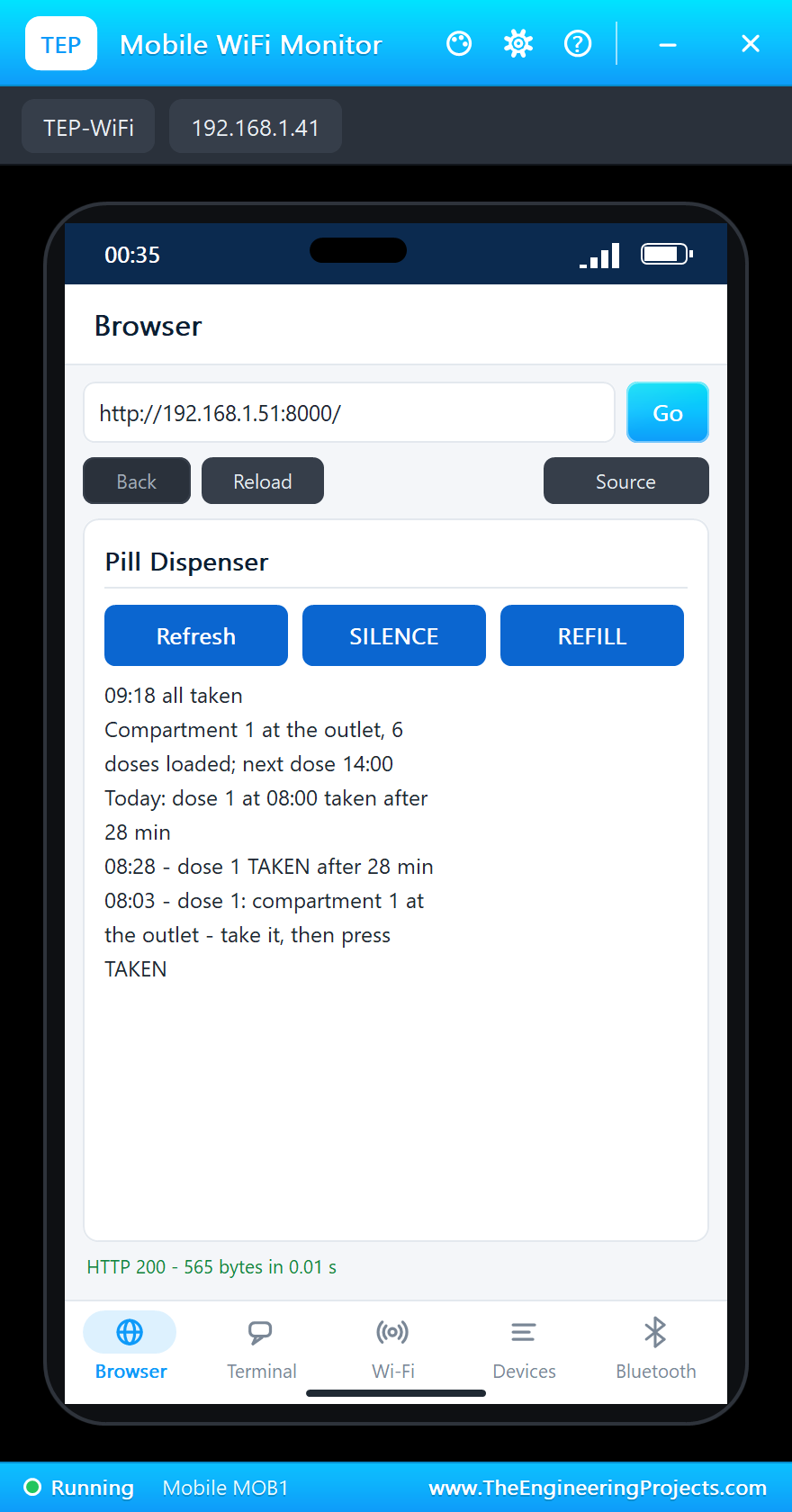
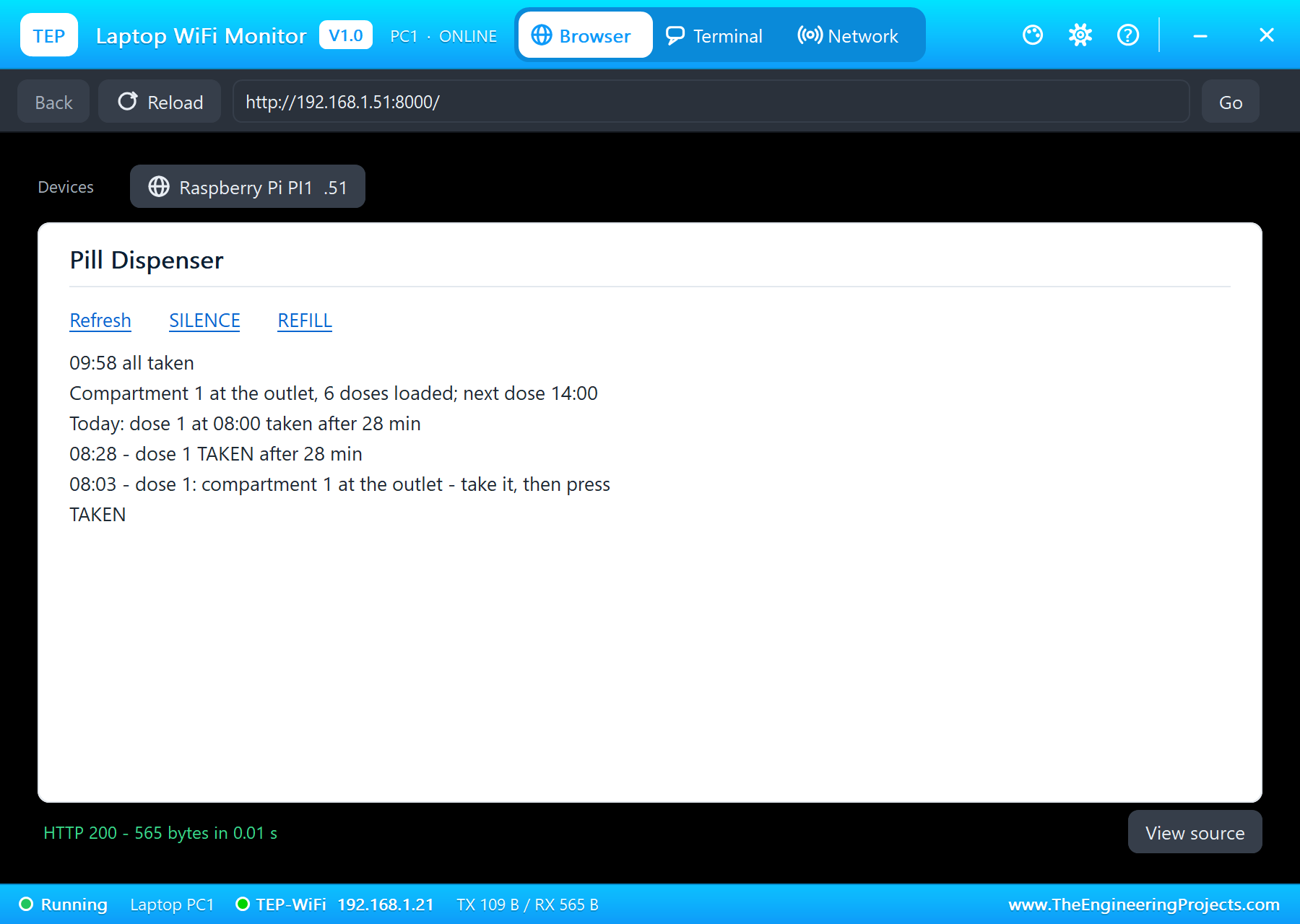
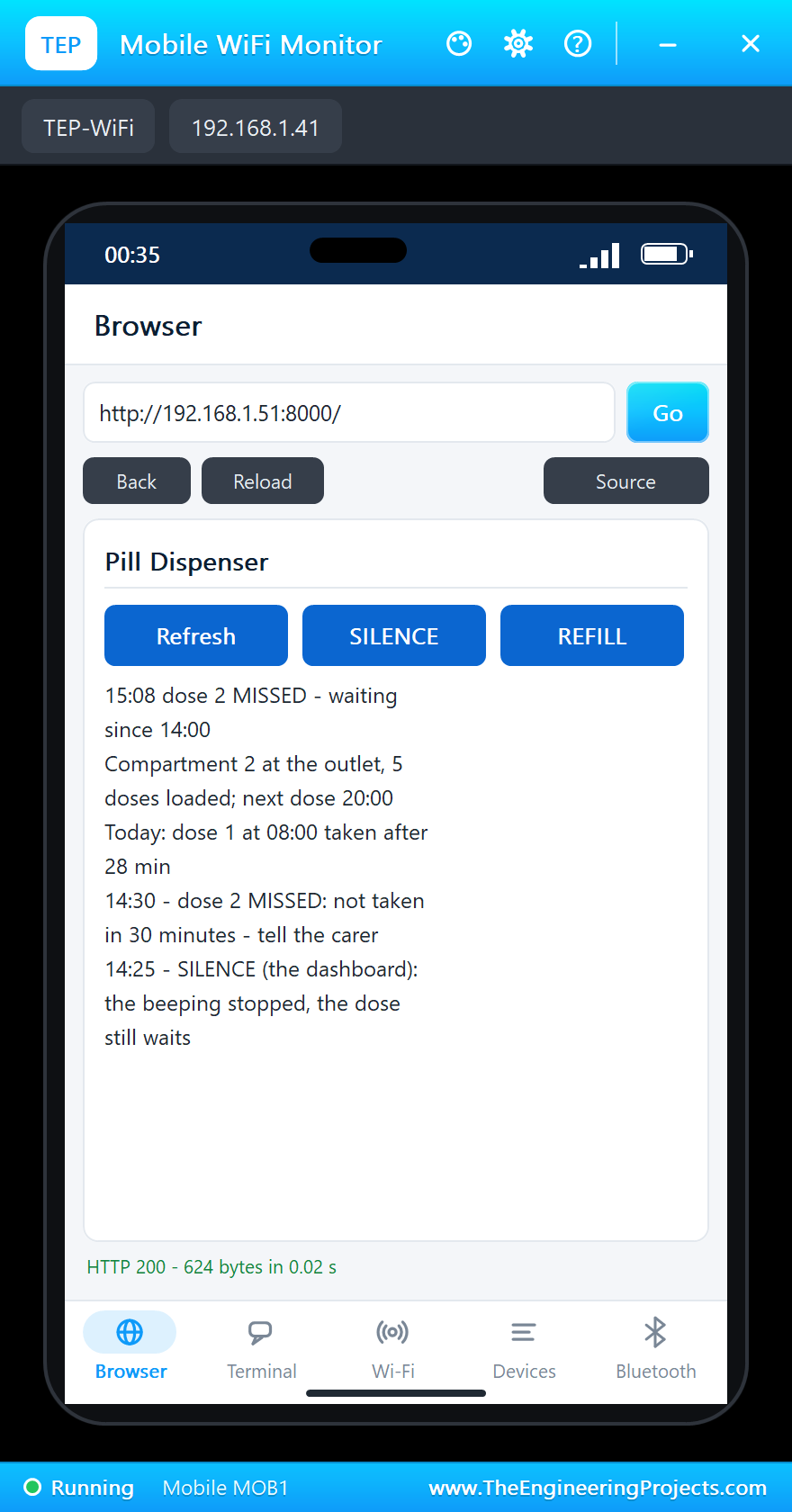
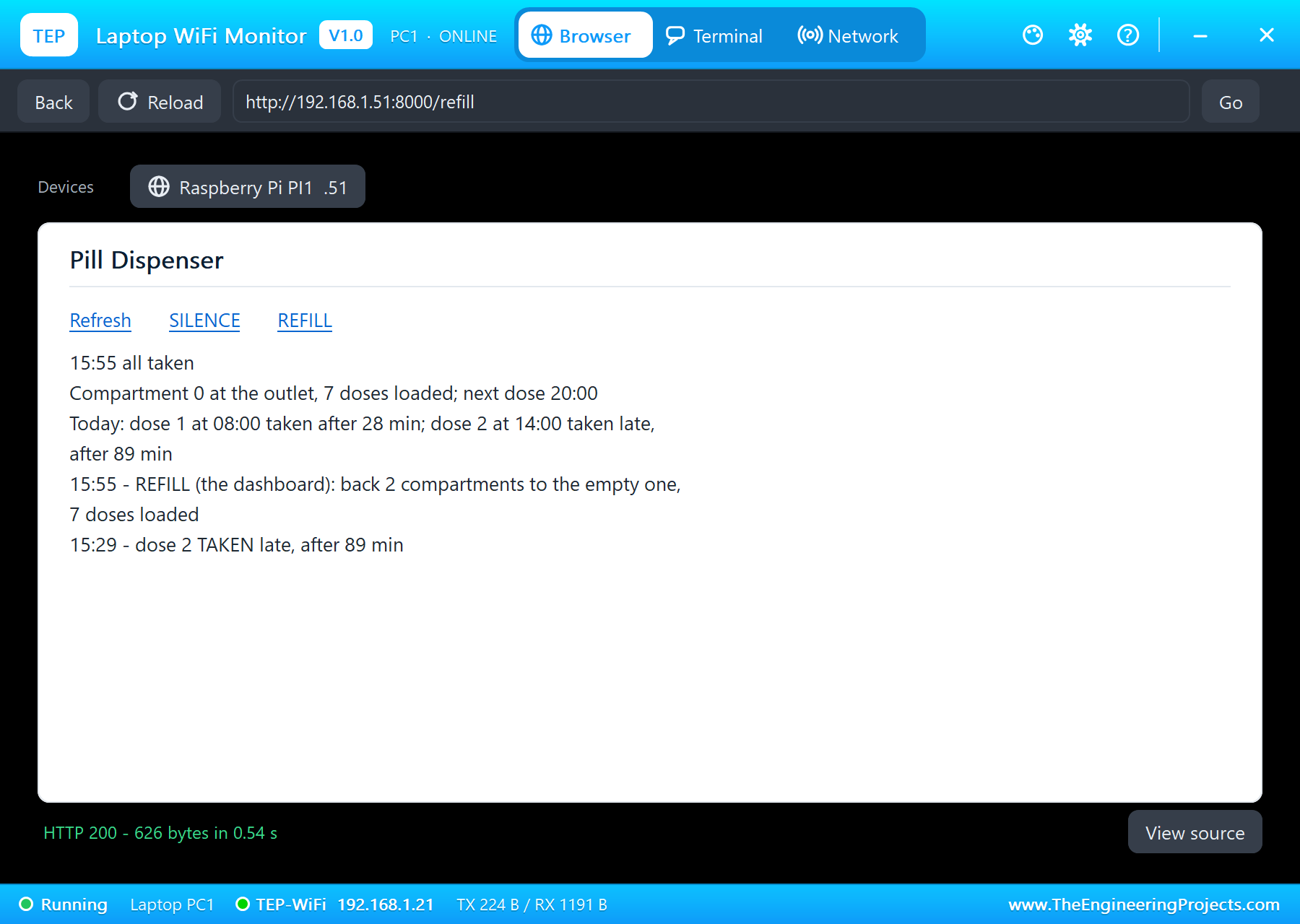
The dashboard shows the same: all taken, compartment 1 at the outlet, 6 doses loaded, the next dose at 14:00, and today's record, "dose 1 at 08:00 taken after 28 min".
14:00: Dose 2, Silenced and Missed
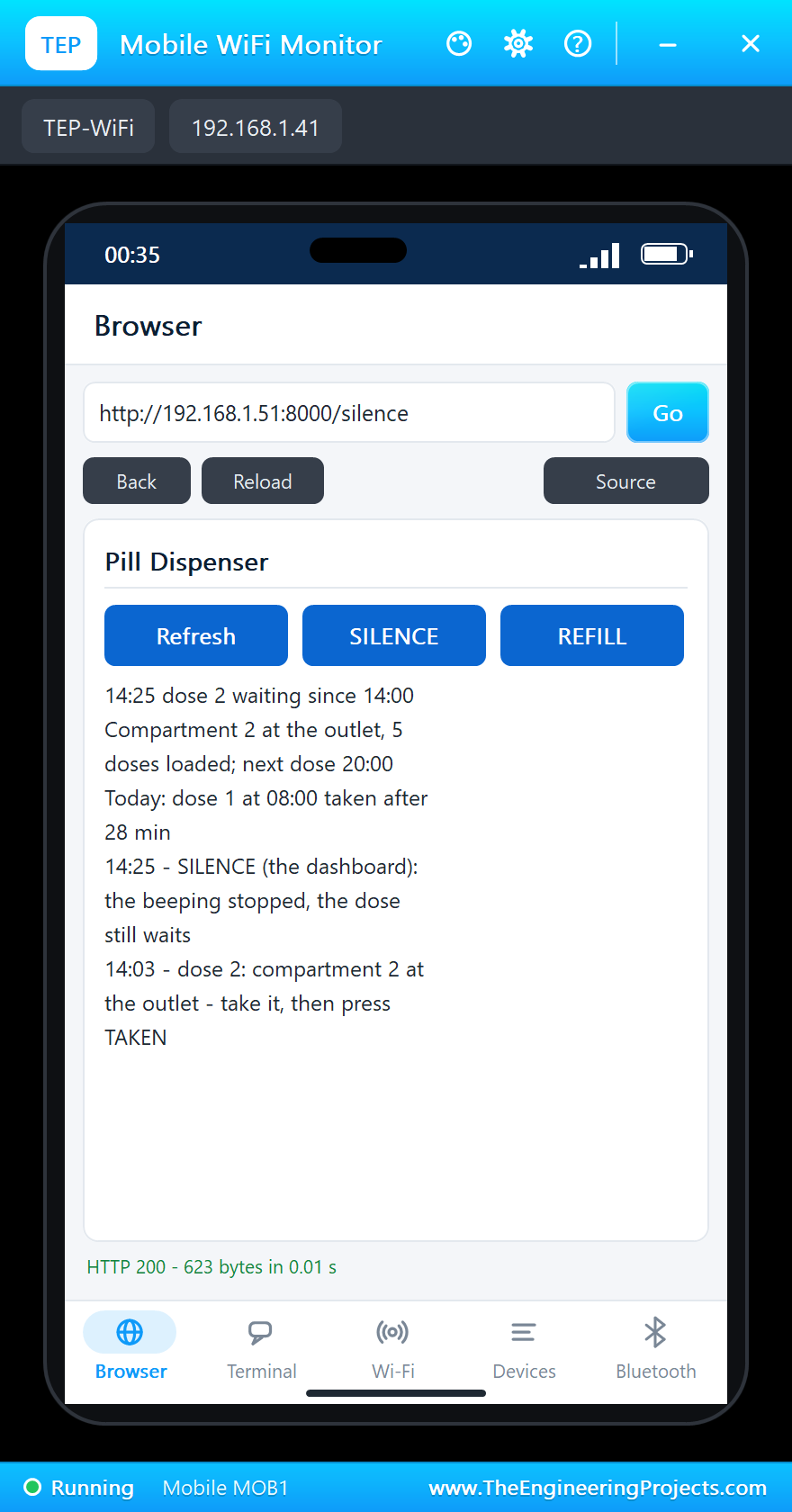
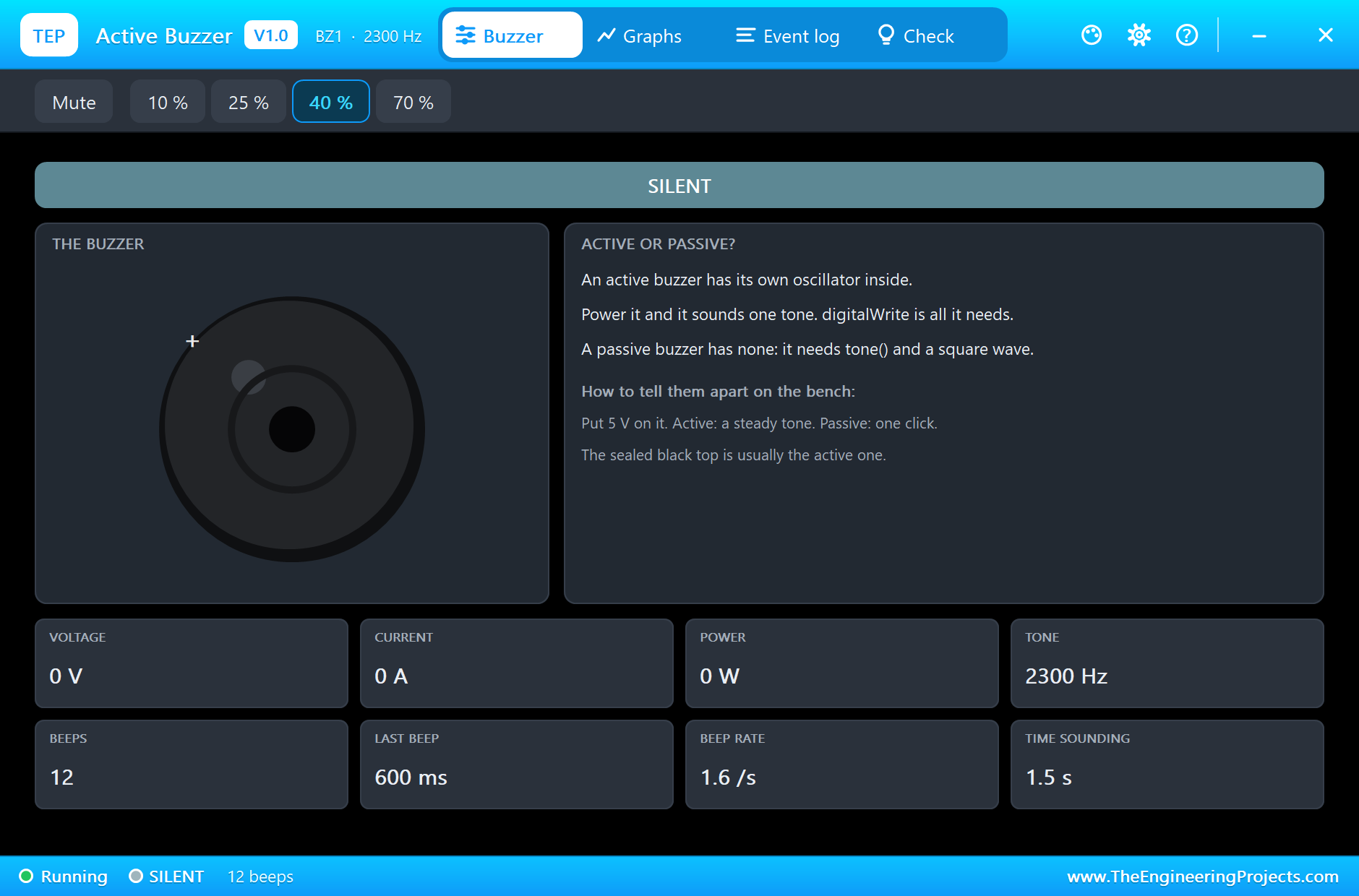
At 14:00 dose 2: the carousel turns to compartment 2 and the A4988 now counts 400 microsteps. At 14:25 a carer presses SILENCE on the phone: "the beeping stopped, the dose still waits". Nobody presses TAKEN, and at 14:30 "dose 2 MISSED: not taken in 30 minutes - tell the carer": the digit shows E (segments a, d, e, f and g), the buzzer gives one 600 ms beep, and the phone's dashboard says "dose 2 MISSED - waiting since 14:00". At 15:29 the patient finally takes it: "dose 2 TAKEN late, after 89 min".
REFILL
At 15:55 REFILL on the laptop: "back 2 compartments to the empty one, 7 doses loaded". The A4988 turns the motor back 400 microsteps with DIR low, and its count returns to 0; the dial stands at 0 again.
20:00: Dose 3
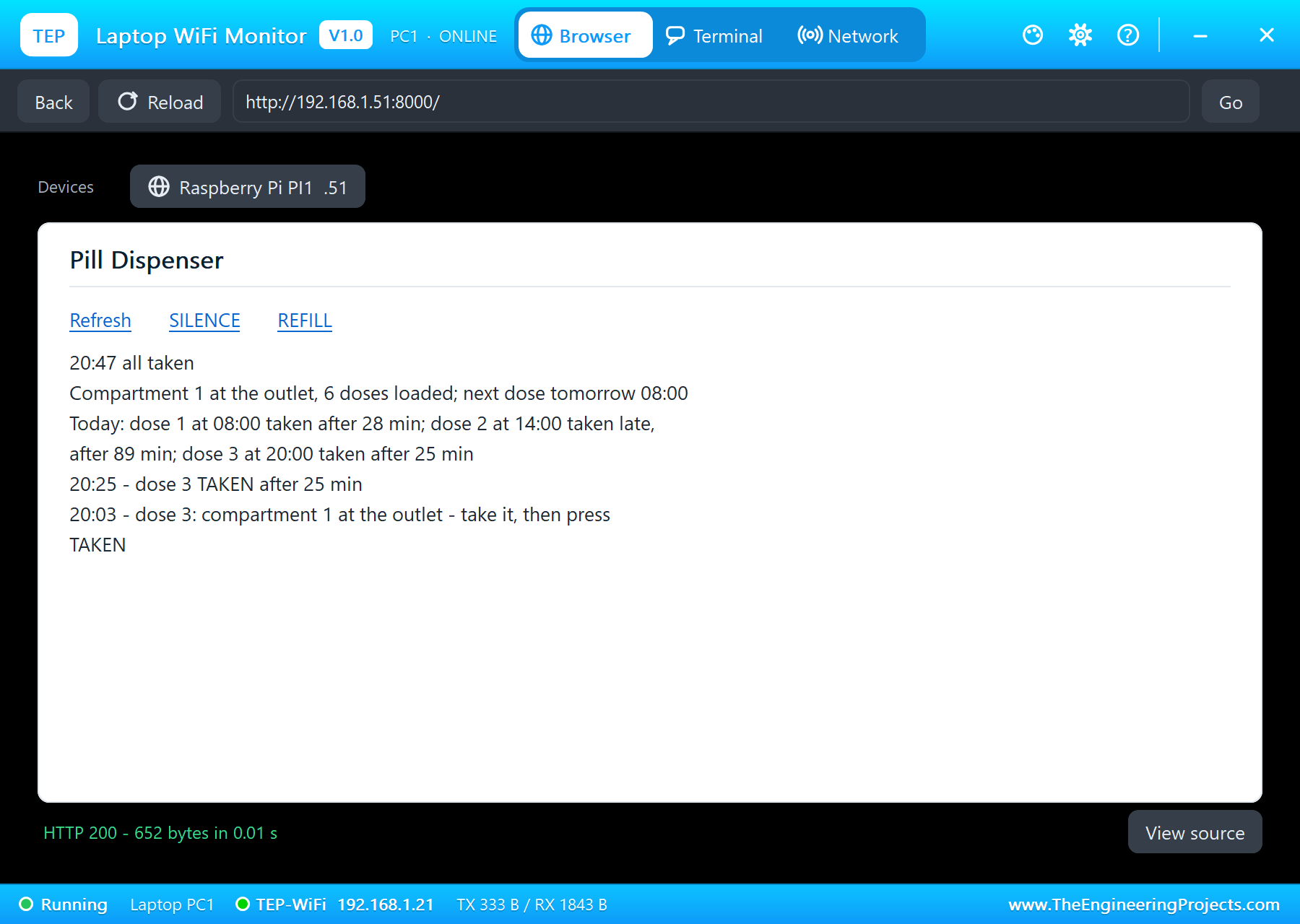
At 20:00 dose 3 turns the carousel one compartment from the refilled home, the digit shows "3" (segments a, b, c, d and g), and at 20:25 "dose 3 TAKEN after 25 min". The day's record on the dashboard: dose 1 taken after 28 min, dose 2 taken late after 89 min, dose 3 taken after 25 min, and the next dose tomorrow at 08:00. The A4988's count at the end is 200 microsteps: exactly one compartment from home after five moves forward and back, not a step lost.
The Numbers of the Run
| What | Result |
|---|---|
| One compartment | 200 microsteps at 1/8 step, 0.25 s, 45 degrees |
| Dose 1 (08:00) | taken after 28 minutes |
| Dose 2 (14:00) | silenced at 14:25, MISSED at 14:30, taken late after 89 minutes |
| REFILL (15:55) | back 400 microsteps to the empty compartment |
| Dose 3 (20:00) | taken after 25 minutes |
| The position at the end | 200 microsteps: not a step lost |
| Simulation | 72.2 s of simulation for a day of doses |
Download the Project Files
Click the button below to download Raspberry-Pi-5-Pill-Dispenser-A4988-Stepper-Proteus-Simulation-v1.0.zip (about 14.2 MB, without the source code of the models):
Raspberry Pi 5 Pill Dispenser with A4988 Stepper in Proteus Simulation V1.0- Proteus Simulation: Pi-5-Pill-Dispenser.pdsprj, the program pill_dispenser.py and copies of the models.
- Python Code: pill_dispenser.py, the complete program.
- Proteus Library Files: the LIB files of the Raspberry Pi 5, the A4988 and the NEMA 17, the 7-segment digit, the SMD resistors, the push button, the active buzzer and the two WiFi Monitors.
- Proteus Model Files: the DLL models and the TEPPi folder, the Python 3.11 and the runtime that the Pi board runs.
- README.txt: the installation steps, the properties, the test results and the links to every library post.
No Proteus yet? Read How to Download and Install Proteus 7 and 8. New to libraries? Follow How to Install a New Library in Proteus.
How to Install the Project Files
- Close Proteus and extract the whole zip file, for example to your Desktop.
- Copy the files from Proteus Library Files into the LIBRARY folder of Proteus.
- Copy everything in Proteus Model Files, the DLL files and the TEPPi folder, into the MODELS folder.
- Start Proteus and open the project from the Proteus Simulation folder.
Changing the Code
The program is plain Python 3: edit pill_dispenser.py beside the project and press Play again; the Pi board runs the new file. The dose times, the time limit, the steps per compartment and the clock are at the top. The same program runs on a real Raspberry Pi 5 with Raspberry Pi OS and lgpio, with CLOCK = 1. For our other Pi 5 project for health care, which checks temperatures at a door, see the Raspberry Pi 5 Temperature Screening Gate.
Ideas to Extend the Project
- Add a home sensor (a hall sensor or a slot switch) and find compartment 0 at power-up instead of assuming it.
- Detect that the pills were really taken with a light gate at the outlet, not only the button.
- Send the MISSED alert to the carer's phone by e-mail or a messaging service.
- Lock the carousel so that no dose can be taken early, and log every dose to a file.
- Add a second carousel for medicines on a different schedule.
- Read the dose times from the dashboard instead of the program.
From Simulation to Real Hardware
- Set VREF for your motor: turn the A4988's trimmer until VREF = 8 x Rsense x the current you want; check the sense resistors on your board.
- Add a capacitor on VMOT: 47 to 100 uF close to the driver protects it from voltage spikes; never unplug the motor while it is powered.
- Find home: a real dispenser must know where compartment 0 is after a power cut; add a sensor.
- Keep the pills dry and clean: food-safe compartments and a lid over the carousel.
- Treat it as a helper: this project is for learning; medicine dispensers for patients are regulated medical devices.
Troubleshooting
- The carousel does not turn: EN must go low, VMOT needs 12 V, and SLP and RST must be high.
- It turns too far or too little: check MS1, MS2 and MS3: 1/8 step needs 200 microsteps a compartment.
- A wrong character: the segment pins a to g are in the wrong order, or the digit is common anode.
- TAKEN is not seen: the button must go to 3.3 V, and R8 must pull GPIO17 down.
- The terminal cannot start Python: the TEPPi folder is not in the MODELS folder.
Limitations of the Simulation
- The day runs 720 times faster than real time on the program's clock; the beeps and the motor run at their real speed.
- The simulated Pi's GPIO pins drive full 5 V logic levels, so the segment and buzzer currents in the pop-ups are higher than a real Pi's 3.3 V pins would give (14 mA a segment here, about 6 mA on a real Pi).
- The NEMA 17 turns without a load or a carousel; the dial shows the shaft.
- The network is simulated: the dashboard travels between the Pi and the two monitors inside Proteus; the times in this tutorial are the program's day clock.
- Raspberry Pi is a trademark of Raspberry Pi Ltd. This project is not made or endorsed by them, by Labcenter or by the maker of the A4988, and it is not a medical device.
So, that was all about the Raspberry Pi 5 Pill Dispenser with A4988 Stepper (Proteus Simulation). I hope it helps you understand how a stepper motor moves in exact steps, how an A4988 turns STEP edges into microsteps, why the count of edges must be exact, how a 7-segment digit is lit, how to read a bouncing button, and how a small device can keep a schedule and tell someone when it is not kept, all tested in a simulation before you build a real dispenser. More IoT projects with the ESP32 and the Raspberry Pi 5 are coming in this series. If you have any questions, ask in the comments and I will help you out. Till the next tutorial, take care and have fun!

Comments
0