


Project Files of DS3218 Servo Motor Library for Proteus V1.0 (20kg Digital Servo)
 Libraries
 Code
Code Projects
 Simulation
ds3218-servo-motor-tep-v1-0-aae66bf0c52a4ed79b0c19a8b1fee727.zip
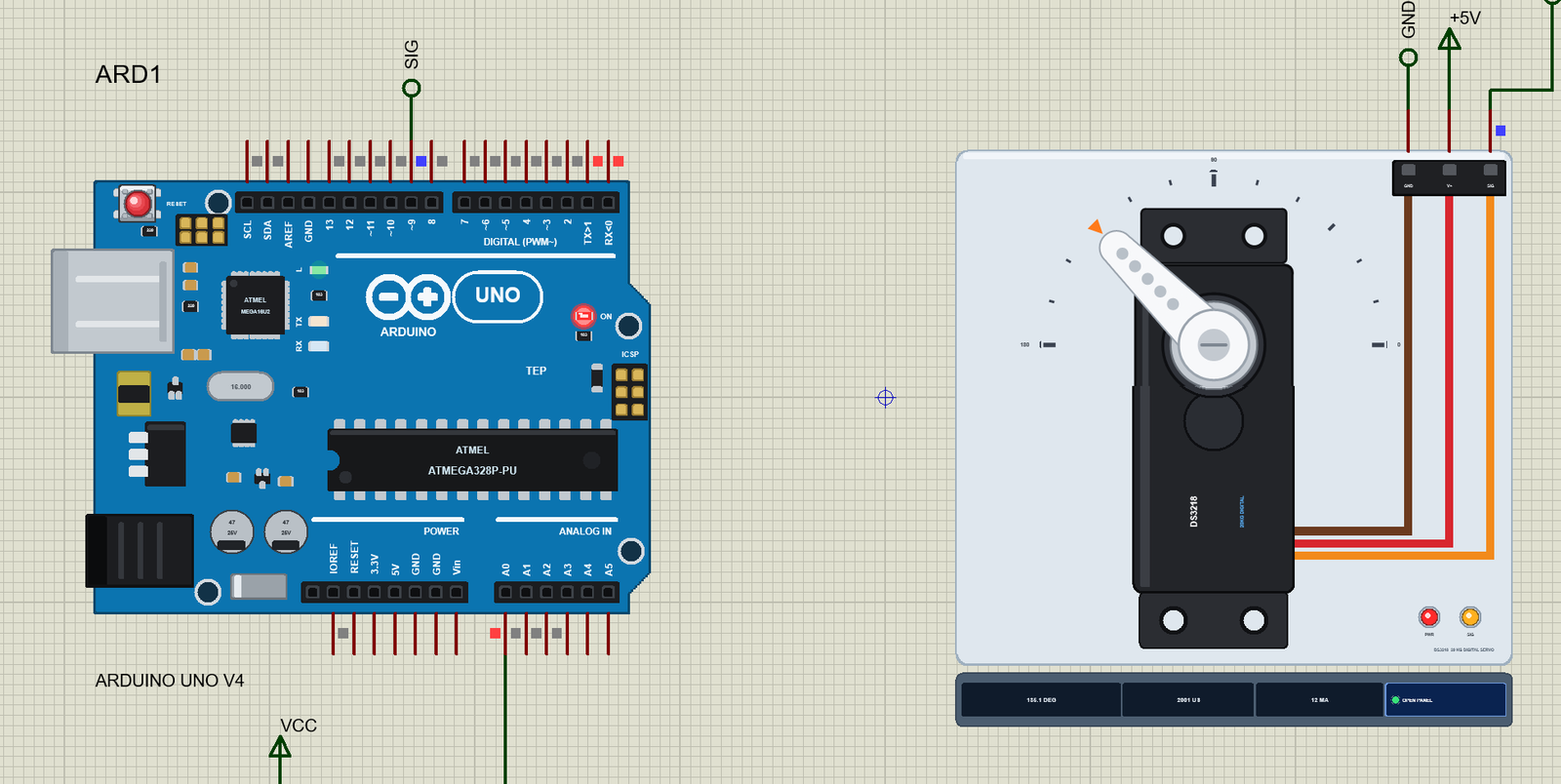
DS3218 Servo Motor Library for Proteus V1.0
DS3218 Servo Motor Library for Proteus V1.0 comes as a ZIP archive of 10 files (1.2 MB, 2.6 MB unpacked) holding Proteus library files, simulation model DLLs, a Proteus simulation, an Arduino sketch and compiled HEX firmware.
- LIBProteus library
- DLLProteus model
- DSNProteus simulation
- INOArduino sketch
- HEXHEX firmware
Description
DS3218-Servo-Motor-Library-for-Proteus-v1.0.zip with the DS3218 20 kg digital servo in Proteus (500 - 2500 us, a turning horn, the torque and current from the supply, stalls and droop; TEPDS3218.LIB and TEPDS3218.DLL), our Arduino UNO V4.0, the A4 demo project with its Servo.h sketch and a README.

File Structure
 File Structure
5.2 KB201.9 KB25 KB883.5 KB296 KB22.9 KB19.1 KB883.5 KB296 KB19.2 KBGallery12 images from the tutorialOpen the tutorial
 Gallery12 images from the tutorial
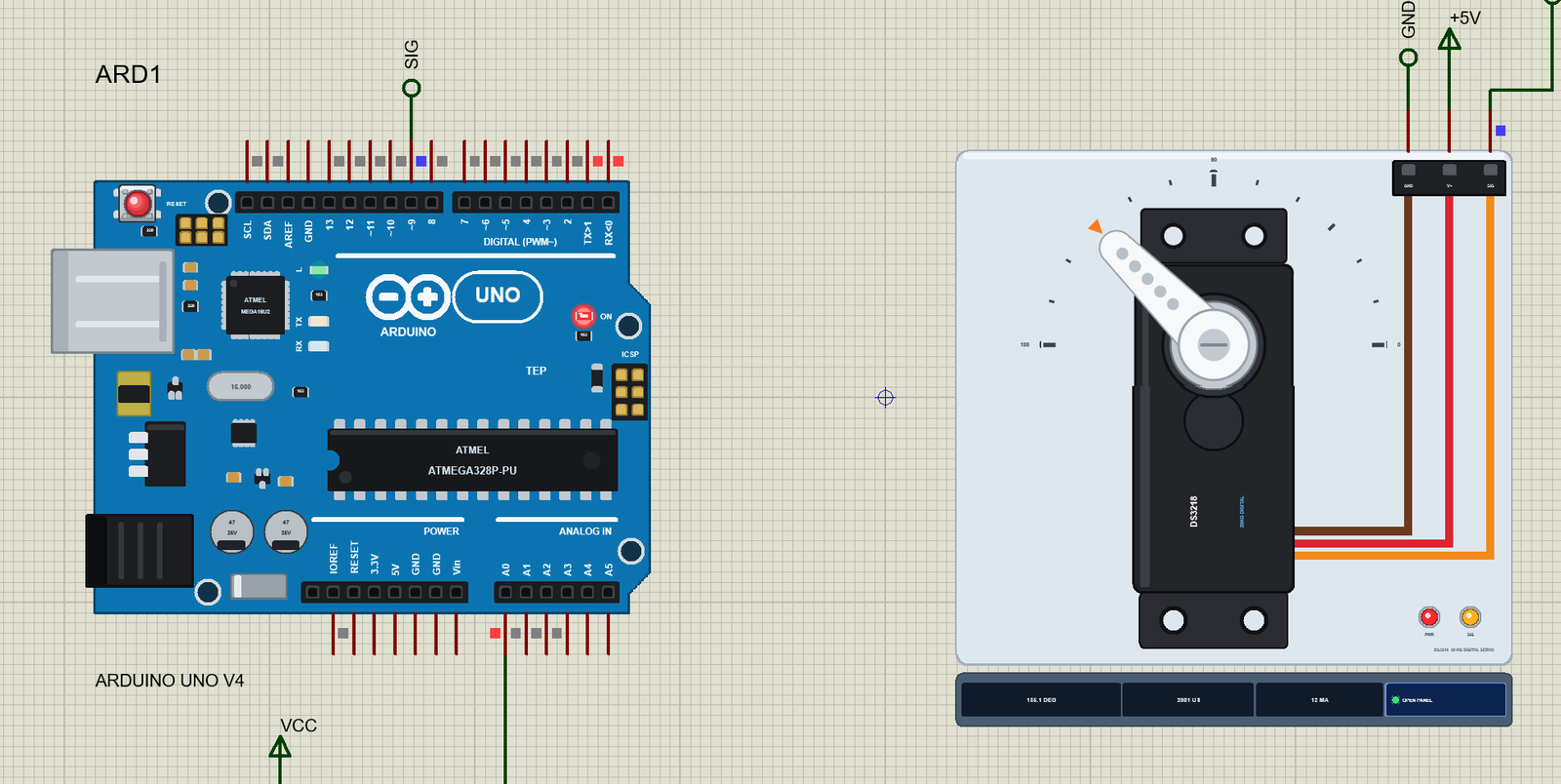
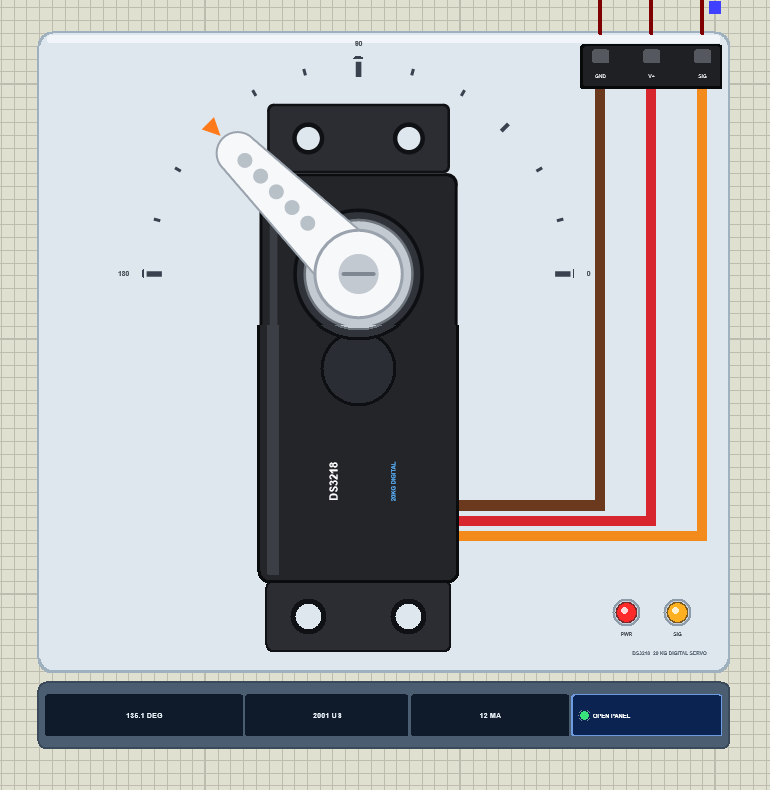
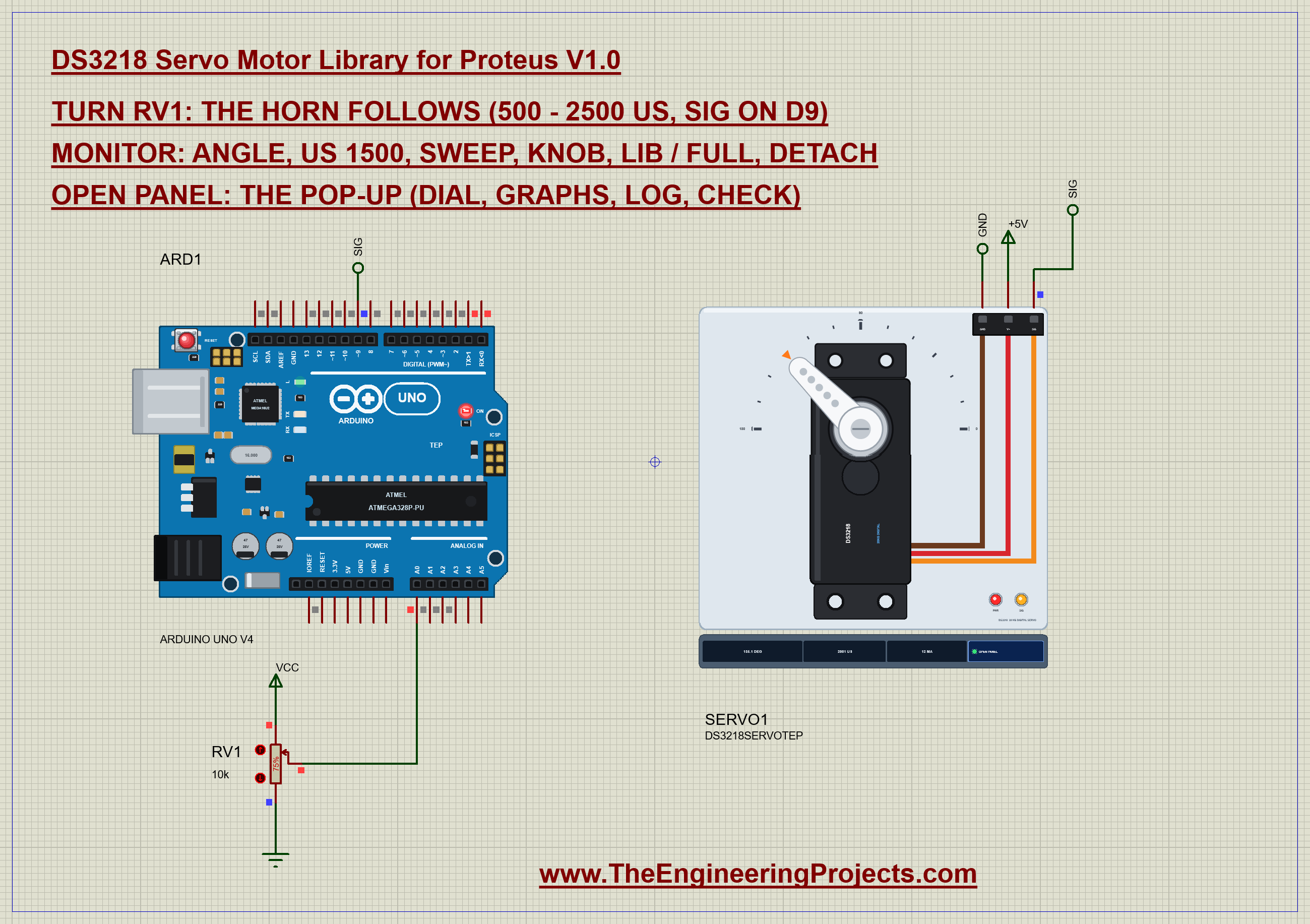
The circuit, the board and the results as they appear in DS3218 Servo Motor Library for Proteus V1.0 (20kg Digital Servo). Open an image for its full size.
README
 README
DS3218 SERVO MOTOR LIBRARY FOR PROTEUS - V1.0 (the DS3218 20 kg digital servo with a turning horn and a pop-up panel)
Designed by The Engineering Projects
www.TheEngineeringProjects.com
IMPORTANT LINKS
Article (read it first - pictures, step by step, every feature explained):
https://www.theengineeringprojects.com/2026/10/ds3218-servo-motor-library-for-proteus-v1-0.html
Report a bug or suggest a feature (our forum):
https://www.theengineeringprojects.com/forum/category/motor-driver-proteus-library
The demo runs on our Arduino UNO V4.0 (included) - working LEDs, RESET and a
built-in serial monitor, no Virtual Terminal to wire - its own article:
https://www.theengineeringprojects.com/2026/10/arduino-uno-library-for-proteus-v40.html
Support us (the libraries are free):
https://www.theengineeringprojects.com/donate
FILE STRUCTURE
DS3218-Servo-Motor-TEP-v1.0/
|-- Proteus Library Files/
| |-- ArduinoV4TEP.LIB 201.9 KB TEP Arduino boards V4.0 (UNO) -> LIBRARY
| |-- TEPDS3218.LIB 25.0 KB the library -> LIBRARY folder
|-- Proteus Model Files/
| |-- TEPARDUINO.DLL 883.5 KB the Arduino board model -> MODELS folder
| |-- TEPDS3218.DLL 296.0 KB the model -> MODELS folder
|-- Proteus Simulation/
| |-- DS3218_Servo_Demo.hex 19.1 KB the demo firmware
| |-- DS3218-Servo-Motor-ArduinoUnoV4.pdsprj 22.9 KB the demo project
| |-- TEPARDUINO.DLL 883.5 KB copy of the board model
| |-- TEPDS3218.DLL 296.0 KB copy of the model
|-- Arduino Code/
| |-- DS3218_Servo_Demo/DS3218_Servo_Demo.ino 5.2 KB the demo sketch (source of the .hex)
|-- README.txt ~20.3 KB this file
Total: 2.59 MB (unzipped). The C++ source code of the models is not included.
WHAT IS IT?
A simulation model of the DS3218, the 20 kg standard-size digital servo with
metal gears of robot arms, legged robots and RC models. Our own model, not a
symbol on top of Proteus's motor:
* Its range: 500 - 2500 us = 0 - 180 deg (properties PULSE_MIN / PULSE_MAX).
The Arduino Servo library's attach(pin) sends 544 - 2400 us, and on a
DS3218 that is only 4 - 171 deg: use attach(pin, 500, 2500). The demo
shows both.
* A digital servo: it takes pulses at 50 Hz up to 333 Hz; a dead band of 3 us
(0.27 deg). Pulses count from 300 to 3000 us.
* Inside: the position loop, the DC motor (1.37 ohm, back-EMF), the driver's
current limit (4.13 A), the metal gearbox, the horn's inertia, end stops at
-8 and 188 deg. The horn turns at the real speed: about 380 deg/s with no
load at 5 V - 60 deg in about 0.17 s with the start and the slow-down, 0.13
s at 6.8 V.
* The torque: 19 kg.cm at 5 V and 21.5 kg.cm at 6.8 V - the data sheet's two
points. Above about 5.7 V the driver's current limit holds the torque.
* The current comes from V+ in the circuit: about 12 mA at rest, up to about
3.7 A when it starts or stalls at 5 V - a probe or an ammeter on V+ shows
it. A real DS3218 needs its own supply.
* Like most servos it is driven only while pulses come: after detach() the
horn holds by the gears' friction. A pulse beyond the range pushes the horn
against its end stop (and draws stall current).
* The load: property LOAD (kg.cm), the load buttons on the pop-up (5 - 20
kg.cm), or a click on the horn: a 25 kg.cm brake - more than a DS3218 can
give: it stalls. A load it can carry holds the horn a degree or two short -
the loop's droop - and the pop-up says so.
* The mistakes it names: no power or a low V+, SIG stuck HIGH, fast PWM
(analogWrite) instead of servo pulses, pulses faster than 333 Hz, a pulse
beyond the range, a stall.
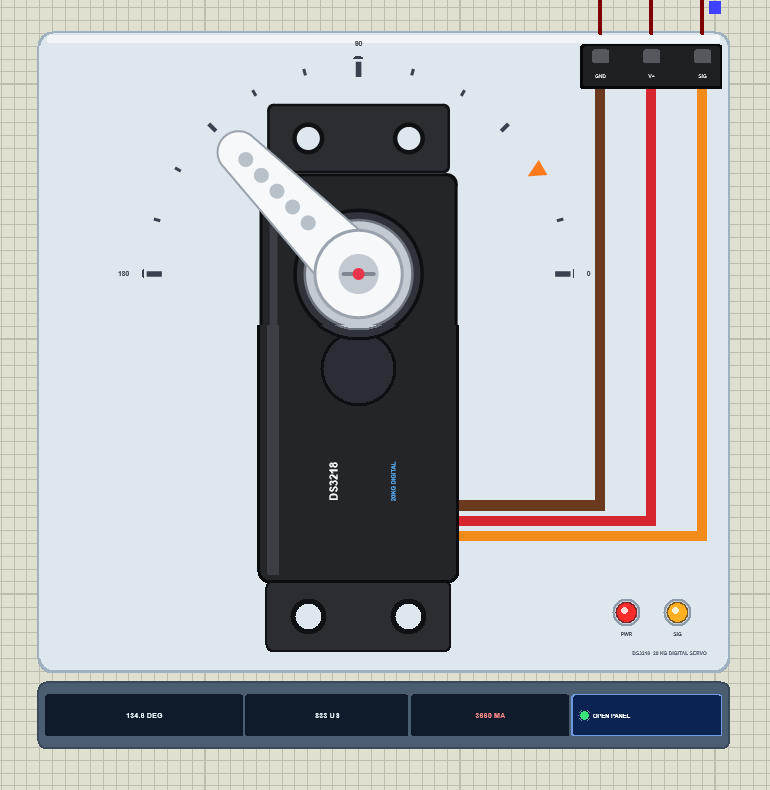
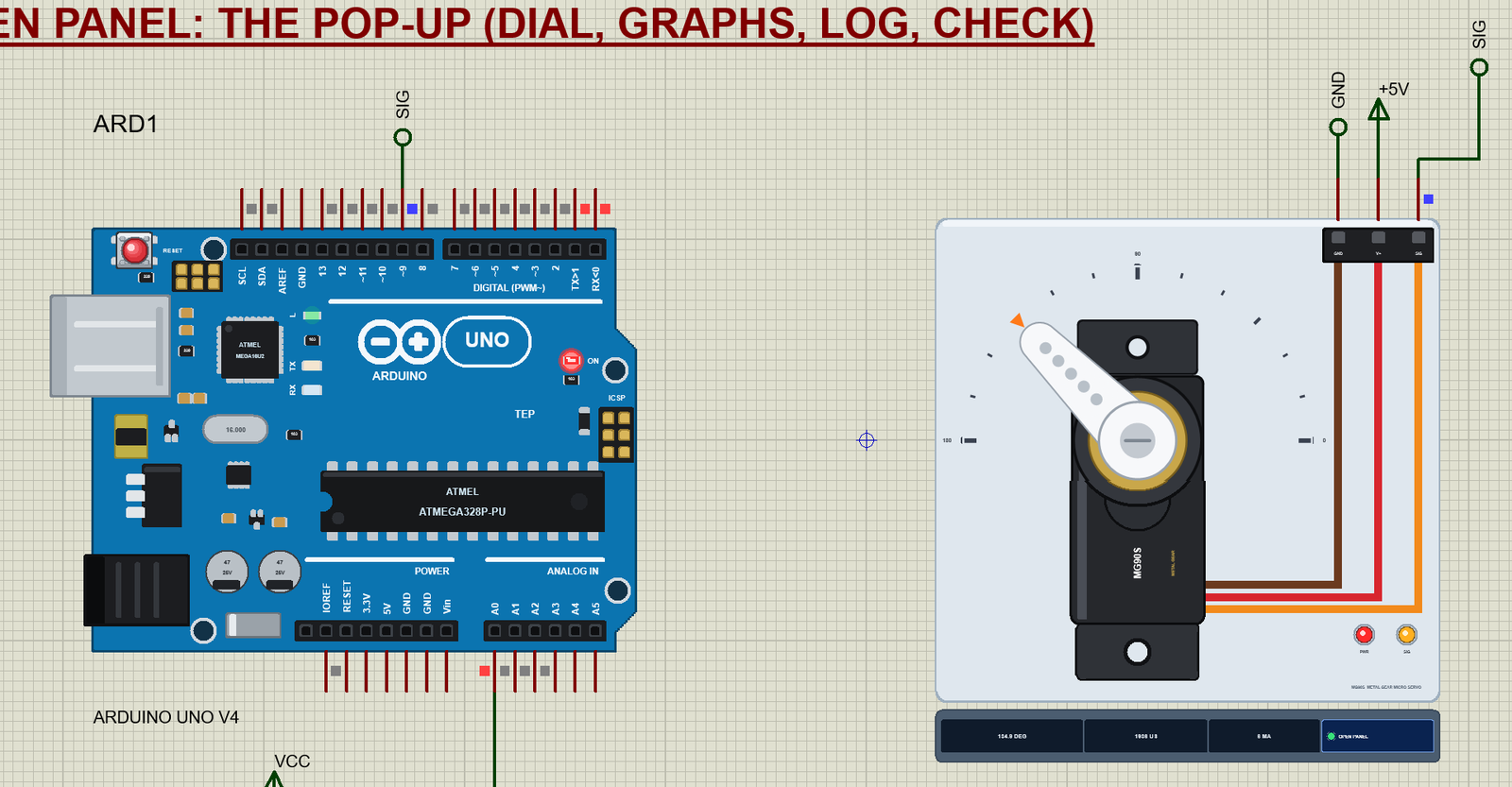
The symbol looks like the real servo seen from the top: the black body with its
two mounting ears and its labels, the silver 25T spline round the output shaft,
the white single-arm horn, the brown / red / orange cable to its plug (GND, V+,
SIG). The horn turns on the schematic to the simulated angle; an orange marker
on the 0 - 180 deg scale shows the angle the pulses ask for. The plate, the
scale, the PWR and SIG LEDs and the strip under the plate (ANGLE, PULSE, CURRENT
and OPEN PANEL) are TEP additions; the real servo has none of them.
ONE DEVICE (search "DS3218" or "servo" in Pick Devices):
DS3218SERVOTEP "DS3218 Servo Motor V1.0" (category Electromechanical >
Servo Motors), model TEPDS3218.DLL
The pop-up panel "TEP DS3218 Servo Motor" opens at Run (and with OPEN PANEL
on the strip) - the look of the TEP Serial Monitor. Tabs Servo, Graphs, Event
log and Check; gear and ? icons for Settings and Help; the palette icon
switches the theme:
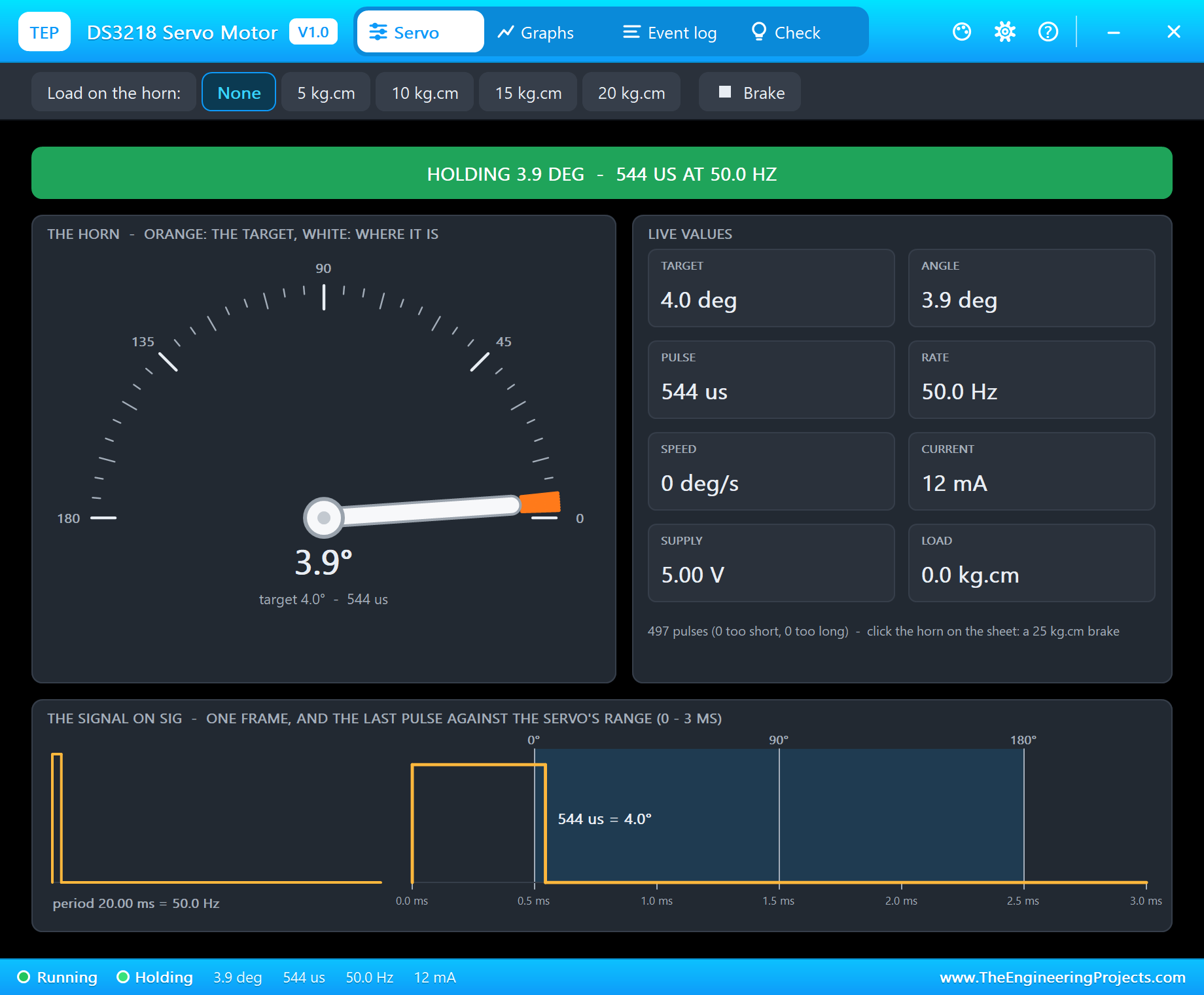
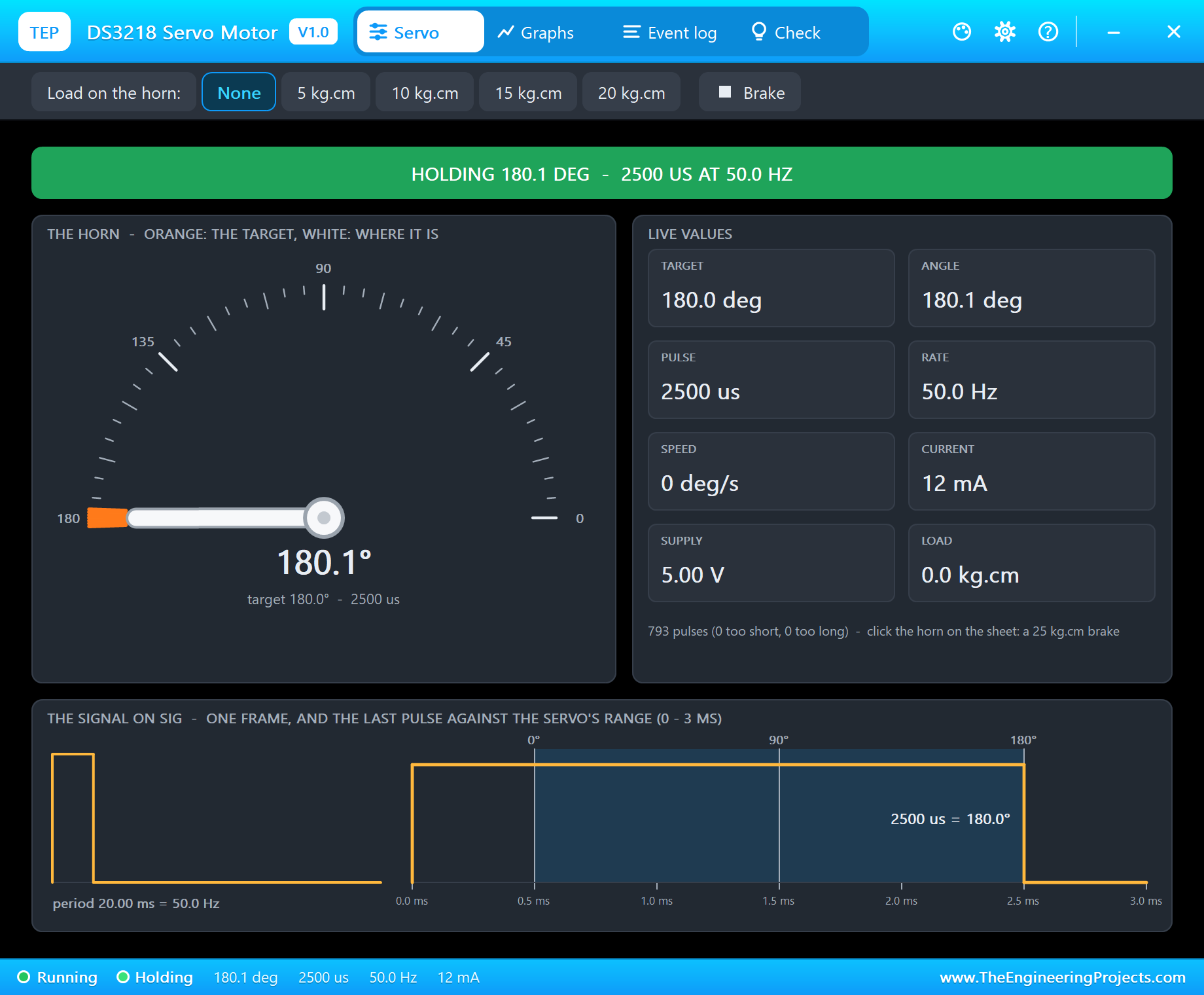
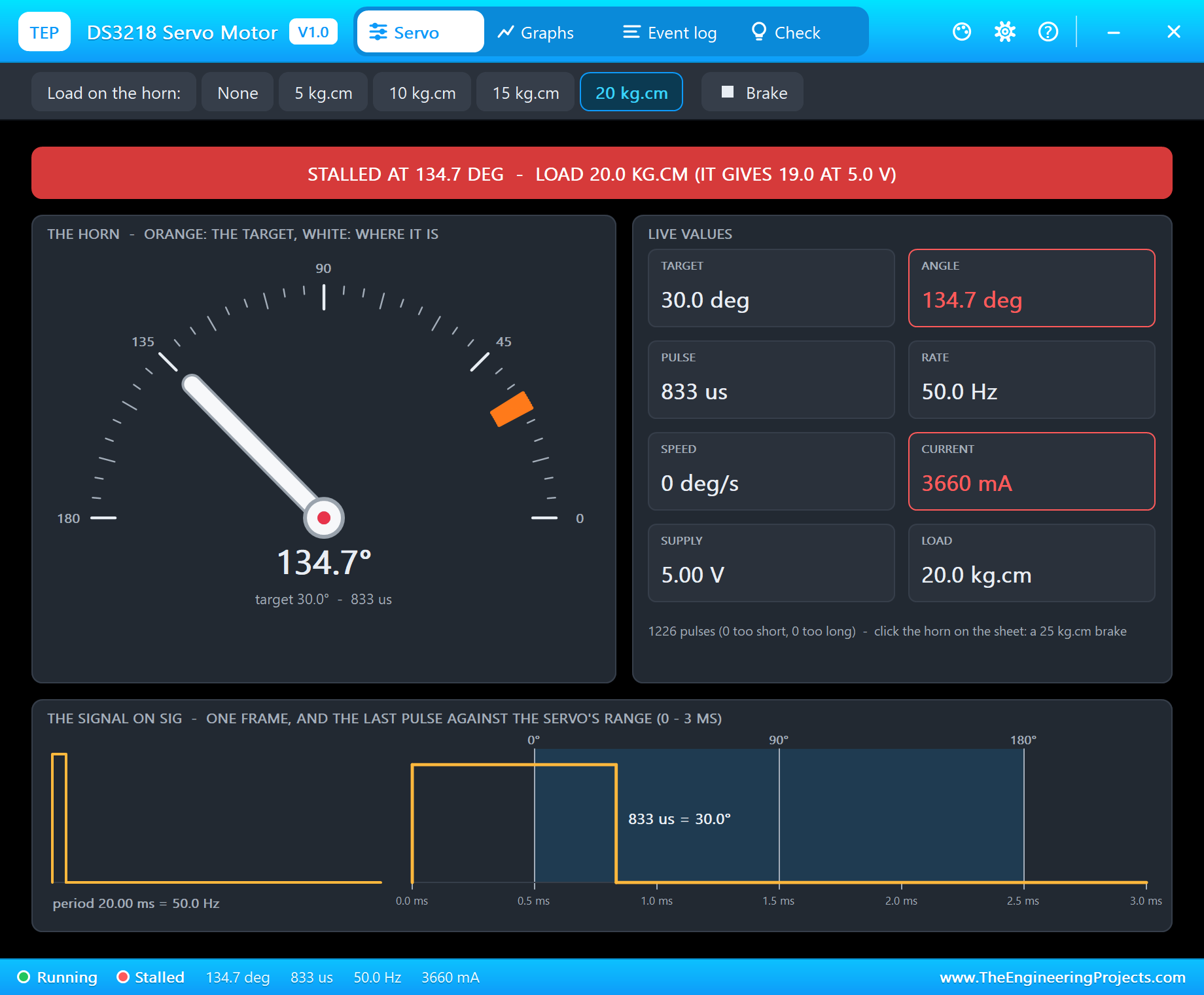
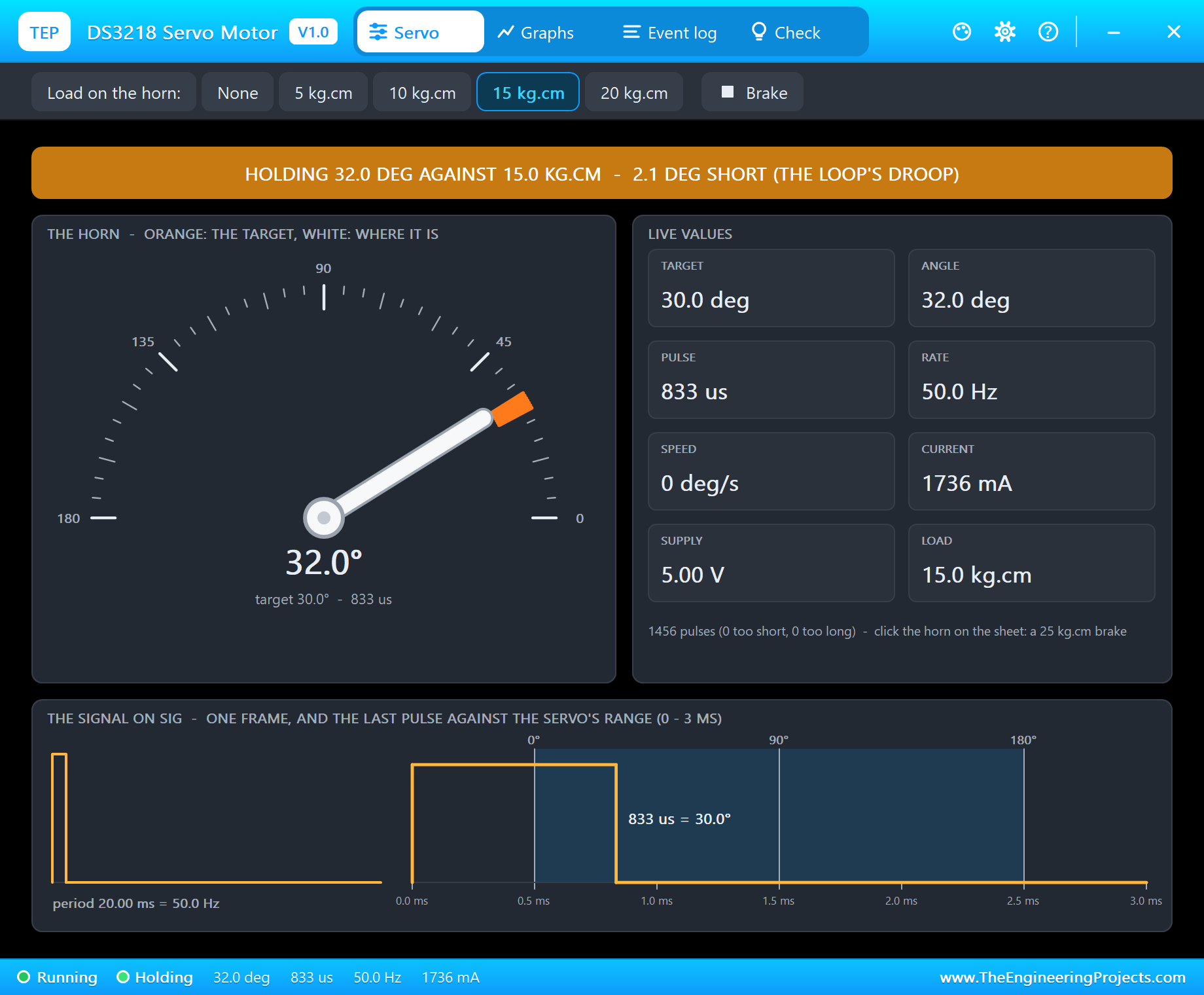
Servo the state in big letters (HOLDING / MOVING / HOLDING AGAINST
A LOAD / NO PULSES / STALLED / NO POWER), the dial - the orange
target and the white horn -, the live values (target, angle,
pulse, rate, speed, current, supply, load), the signal: one frame
and the last pulse against the 0 / 90 / 180 deg marks. The
toolbar: the load on the horn (None, 5, 10, 15, 20 kg.cm) and the
25 kg.cm brake.
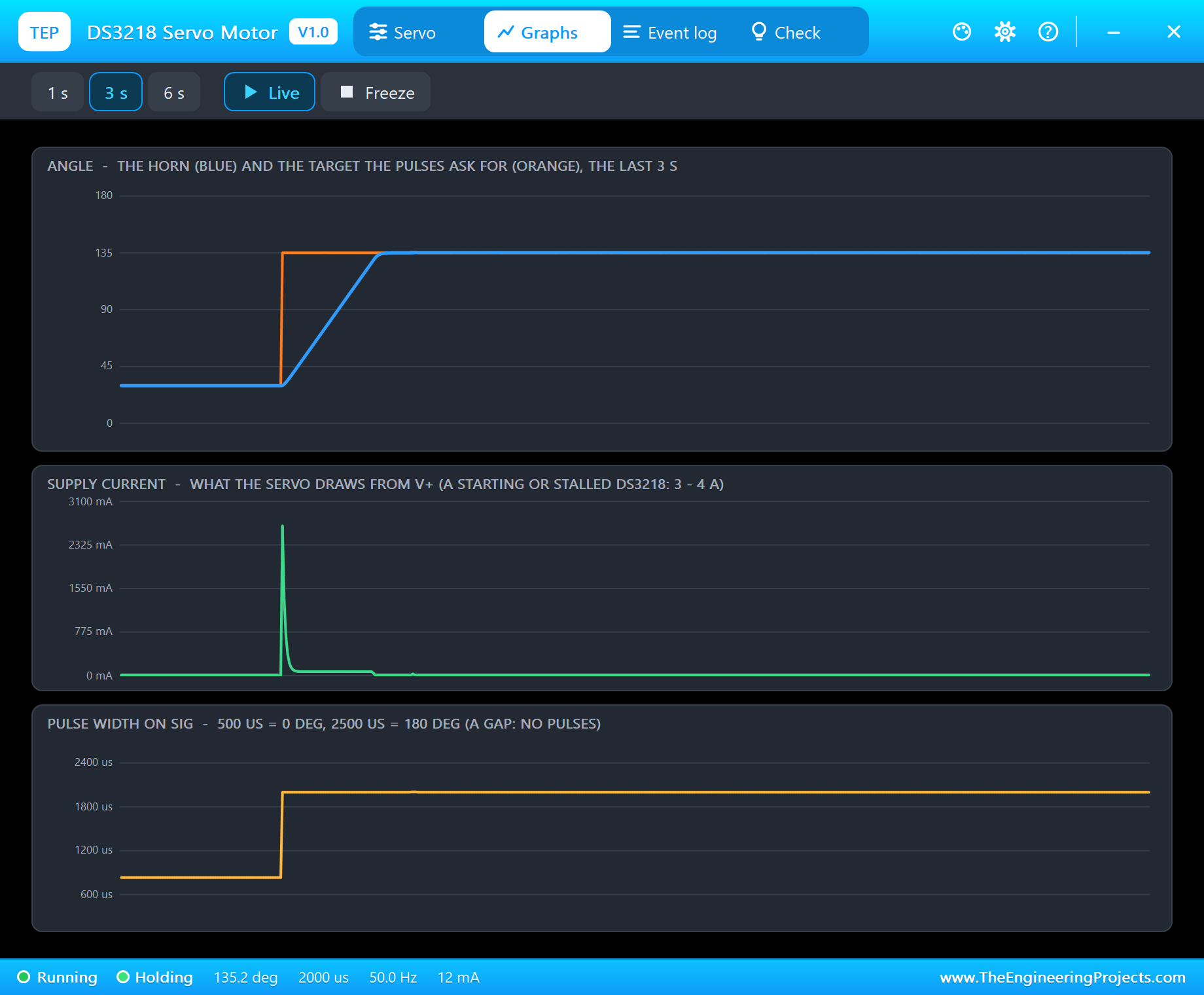
Graphs the angle (the horn and the target), the supply current and the
pulse width over the last 1, 3 or 6 s. Live / Freeze.
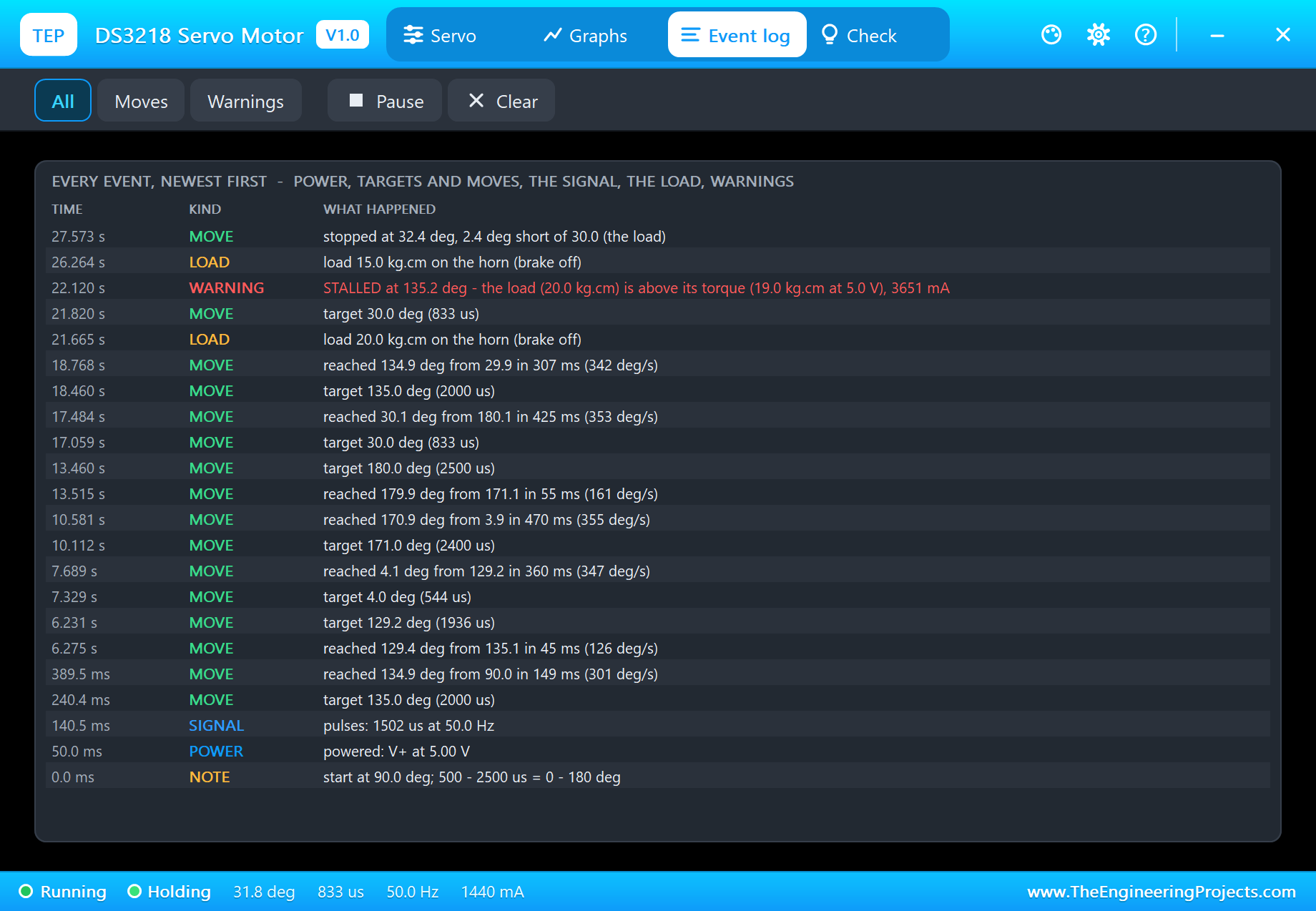
Event log power, every new target and every move with its time and speed
("reached 30.1 deg from 180.1 in 425 ms"), a move stopped short
by the load, the signal, the load, the warnings; filters All /
Moves / Warnings, Pause, Clear
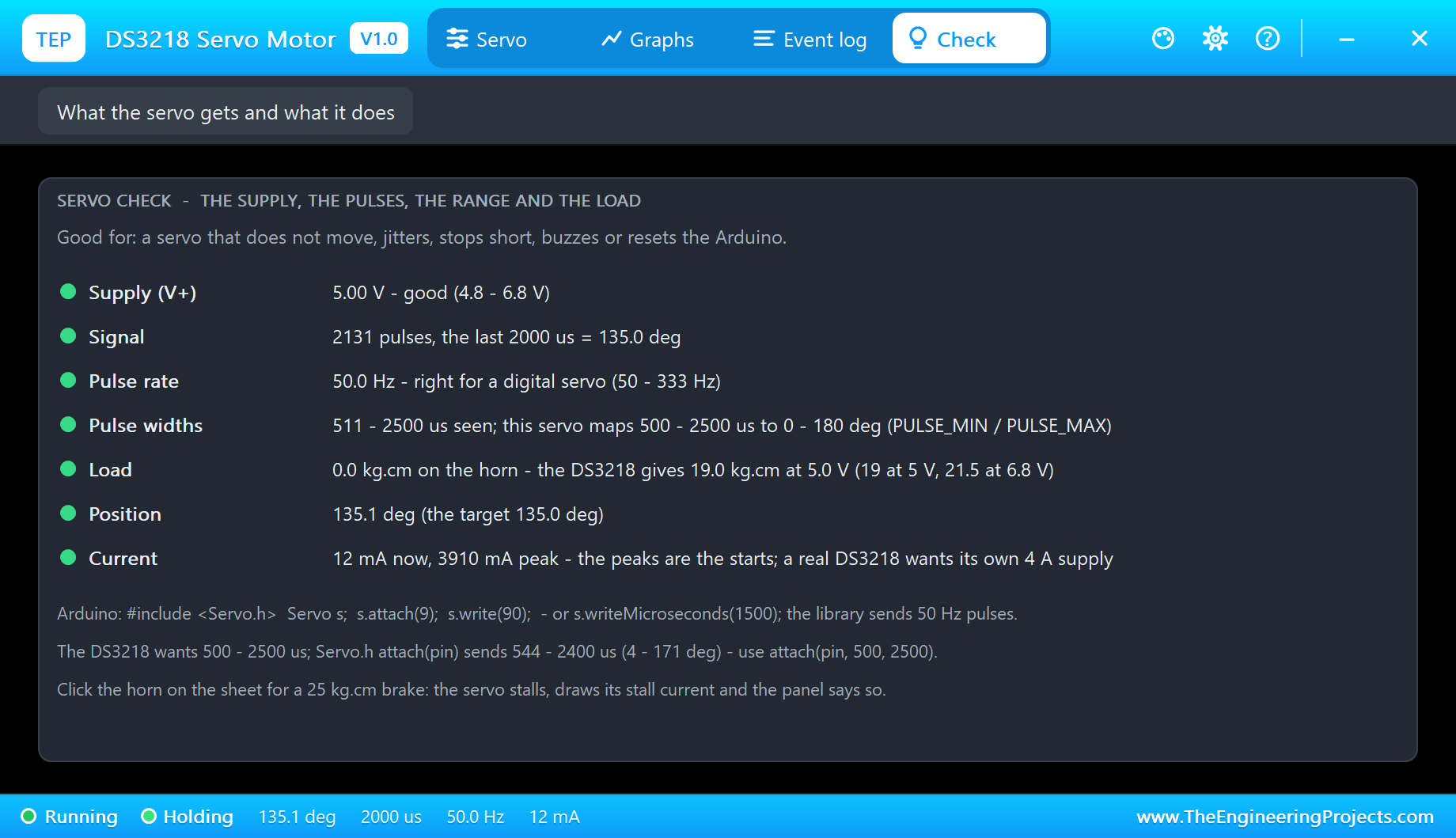
Check Good for: a servo that does not move, jitters, stops short,
buzzes or resets the Arduino - the supply, the signal, the pulse
rate, the pulse widths seen against the servo's range, the
range, the load against the torque at this supply, the position
and the current, each with a verdict (green = fine, amber =
check, red = wrong)
Settings theme, text size, open at Run, window size
Help report a bug, suggest a feature, article, updates, donate,
forum; Copy diagnostics for a bug report
TEST STATUS
V1.0: verified in Proteus 8.5 on 30 Oct 2026 (the demo project as shipped: an
A4 sheet, an Arduino UNO V4.0 with its built-in monitor, the DS3218 on D9, RV1
on A0 at 75 %; the pop-up open).
What the runs showed (the horn's angle as the model computed it):
* The project loads and starts cleanly: "attach(9, 500, 2500): the DS3218's
0 - 180 deg", "Pot 768 -> Angle 135 deg -> pulse 2000 us"; "reached 134.9
deg from 90.0 in 149 ms (301 deg/s)", 135 deg held at 12 mA.
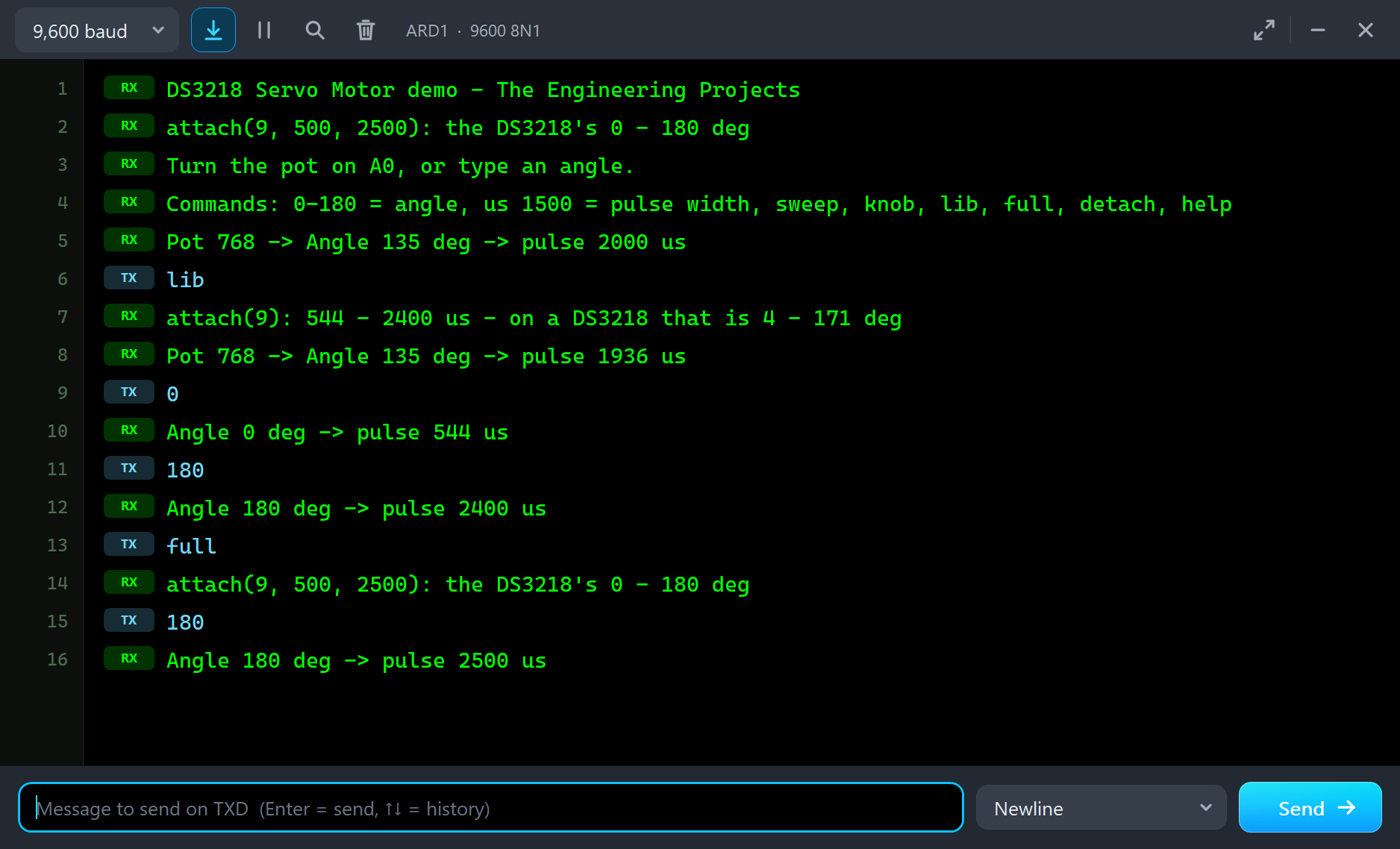
* lib (Servo.h's attach(9)): "attach(9): 544 - 2400 us - on a DS3218 that is
4 - 171 deg"; the pot's 135 deg became 1936 us = 129.2 deg; typed 0: 544 us,
the horn at 3.9 deg ("reached 4.1 deg from 129.2 in 360 ms (347 deg/s)");
typed 180: 2400 us, 171.0 deg ("reached 170.9 deg from 3.9 in 470 ms (355
deg/s)").
* full (attach(9, 500, 2500)) and 180: 2500 us, "reached 179.9 deg from
171.1 in 55 ms"; then 30: 833 us, "reached 30.1 deg from 180.1 in 425 ms
(353 deg/s)"; knob: "reached 134.9 deg from 29.9 in 307 ms (342 deg/s)".
* The load (the pop-up's chips) at 5 V: 20 kg.cm and 30 asked - the horn did
not move: "STALLED at 135.2 deg - the load (20.0 kg.cm) is above its torque
(19.0 kg.cm at 5.0 V), 3651 mA" (the pop-up: 3660 mA). 15 kg.cm: the horn
went down and "stopped at 32.4 deg, 2.4 deg short of 30.0 (the load)"; the
pop-up: "HOLDING 32.0 DEG AGAINST 15.0 KG.CM - 2.1 DEG SHORT (THE LOOP'S
DROOP)", 1736 mA.
* sweep: the horn followed the target 1 deg every 15 ms from 0 to 180 deg
and back.
* knob again: 135 deg; the Check page all green - "50.0 Hz - right for a
digital servo (50 - 333 Hz)", "the DS3218 gives 19.0 kg.cm at 5.0 V (19 at
5 V, 21.5 at 6.8 V)", "12 mA now, 3910 mA peak".
* The pop-up: Servo, Graphs (1 / 3 / 6 s), Event log, Check - all four pages
followed the run.
Plus automatic checks on a PC, 0 failed: 30 on the servo (write(0 - 180)
with 500 - 2500 us lands within 0.4 deg; attach(pin)'s 544 / 2400 us = 3.9 /
171.1 deg; 60 deg in 0.172 s at 5 V with the settling, 0.130 s at 6.8 V; top
speed 381 deg/s; no overshoot; 12 mA at rest; 15 kg.cm gets there within the
droop (2.2 deg); 20 kg.cm stalls at 5 V and gets through at 6.8 V; 25 kg.cm
stalls at 3661 mA; 333 Hz pulses work; no pulses = no drive; 2800 us = the end
stop; analogWrite pulses ignored; SIG stuck HIGH found; 2.5 V = dead;
detach() holds undriven; the Sweep example followed within 1.4 deg); 6 on the
pop-up pages rendered; the demo project read back from disk (51 checks:
devices, pins, wires, labels, no wire through a part, no wire crossing).
INSTALLATION (about 2 minutes)
1. Close Proteus. Extract the WHOLE ZIP to a normal folder (e.g. Desktop).
2. Copy everything in "Proteus Library Files" (TEPDS3218.LIB, and our Arduino
library V4.0, ArduinoV4TEP.LIB, with the ARDUINO UNO V4.0 used by the demo)
to the LIBRARY folder of Proteus, for example:
C:\Program Files (x86)\Labcenter Electronics\Proteus 8 Professional\LIBRARY
(on some PCs: C:\ProgramData\Labcenter Electronics\Proteus 8 Professional\
LIBRARY - use the folder that already holds Proteus's own .LIB files).
3. Copy TEPDS3218.DLL and TEPARDUINO.DLL from "Proteus Model Files" to the
MODELS folder (...\Proteus 8 Professional\MODELS).
ArduinoV4TEP.LIB and TEPARDUINO.DLL are the files of our Arduino Library
V4.0 - if you have it, they are the same.
4. Delete TEPDS3218.IDX from the LIBRARY folder if it is there (Proteus makes
a new index).
5. Start Proteus. In Pick Devices (P) search "DS3218".
RUN THE DEMO
"Proteus Simulation\DS3218-Servo-Motor-ArduinoUnoV4.pdsprj" (an A4 sheet) -
keep the .hex file and the two DLLs beside the project.
ARD1: Arduino UNO V4.0 running DS3218_Servo_Demo.hex (the Arduino Servo
library), its serial monitor built in (window "TEP Arduino UNO - ARD1").
SERVO1: the DS3218 - SIG on D9 (by the SIG net label), V+ on the +5V power
terminal (Proteus' 5 V rail), GND.
RV1: a 10k potentiometer (POT-HG) on A0 - the Knob example: turn it and the
horn follows.
1. Press Run. The monitor and the servo's pop-up open (move them aside -
they open over the schematic). The horn goes to the pot's angle (RV1 at
75 %: 135 deg = 2000 us).
2. Type lib in the monitor and press Enter or Send, then 0 and 180: the horn
stops at 4 and 171 deg - Servo.h's defaults. Type full and 180: 180 deg.
3. On the pop-up pick 20 kg.cm and type 30: STALLED - more than the 19 kg.cm
a DS3218 gives at 5 V. Pick 15 kg.cm: it moves, and holds a degree or two
short. Click the horn for the 25 kg.cm brake (again to release).
4. Try sweep, knob, us 2800 (beyond the range) and detach - see THE DEMO
SKETCH; and the pop-up's Graphs, Event log and Check.
Closed a window? The monitor: click the UNO's USB port; the pop-up: OPEN PANEL.
WIRING (the same in Proteus and on a real board)
DS3218 wire Arduino UNO
brown (GND) GND (and the servo supply's minus)
red (V+) a 5 - 6.8 V supply of 4 A or more - NOT the Arduino's 5V
orange (SIG) D9 (any digital pin: the Servo library makes the pulses
with Timer1)
Potentiometer the ends to 5V and GND, the wiper to A0
In the sketch (Arduino Servo library, installed with the Arduino IDE):
#include <Servo.h>
Servo servo;
servo.attach(9, 500, 2500); // D9: 50 Hz pulses, 0 - 180 deg = 500 - 2500 us
servo.write(90); // 1500 us
servo.writeMicroseconds(1500); // or the pulse itself
REAL HARDWARE:
* A DS3218 draws up to 3 - 4 A when it starts or stalls: give it its own
5 - 6.8 V supply (a 2S LiPo through a 6 V regulator, or a 6 V 5 A adapter),
GND common with the Arduino. On the Arduino's 5V it resets the board.
* Use attach(pin, 500, 2500): with attach(pin) the horn never reaches 0 or 180.
* Some DS3218s are the 270 deg version: the same 500 - 2500 us cover 270 deg.
Set PULSE_MIN / PULSE_MAX to your servo's range (the model is the 180 deg
one).
* analogWrite() is not a servo signal (980 Hz PWM): use the Servo library.
THE DEMO SKETCH ON THE SERIAL MONITOR (DS3218_Servo_Demo V1.0, 9600 baud)
0 - 180 go to that angle and stay (the pot is ignored until knob)
us 1500 writeMicroseconds(1500), 400 - 2900 us - try 2800: beyond the
servo's range, the horn hits its end stop (the Servo library
clamps writeMicroseconds() to the attach() limits, so the
sketch re-attaches with attach(9, 400, 2900) for a pulse
outside them)
sweep 0 -> 180 -> 0 deg, 1 deg every 15 ms (the Sweep example),
then back to the pot
knob follow the pot on A0 again (the Knob example)
lib attach(9): the Servo library's 544 - 2400 us (4 - 171 deg here)
full attach(9, 500, 2500): the DS3218's 0 - 180 deg (the default)
detach stop the pulses - the horn is no longer driven
help the list
EXPECTED MONITOR OUTPUT
DS3218 Servo Motor demo - The Engineering Projects
attach(9, 500, 2500): the DS3218's 0 - 180 deg
Turn the pot on A0, or type an angle.
Commands: 0-180 = angle, us 1500 = pulse width, sweep, knob, lib, full, detach, help
Pot 768 -> Angle 135 deg -> pulse 2000 us
PROPERTIES (double-click the part > Edit Properties)
PULSE_MIN the pulse for 0 deg in us (default 500, the DS3218's)
PULSE_MAX the pulse for 180 deg in us (default 2500)
START the horn's angle at the start in deg (default 90)
LOAD a constant load on the horn in kg.cm (default 0; the DS3218 gives
19 kg.cm at 5 V, 21.5 kg.cm at 6.8 V)
Every run starts again from the properties. The demo's UNO (ARDUINO UNO V4.0):
PROGRAM DS3218_Servo_Demo.hex, MONITOR YES (the built-in monitor), BAUD 9600,
AUTOOPEN YES, BOOTLOADER YES.
LINKS.INI (OPTIONAL)
The Help page cards of the pop-up open web pages. To point them somewhere else
without a new DLL, put a text file named links.ini next to TEPDS3218.DLL with
lines KEY=URL, for example:
ARTICLE=https://www.theengineeringprojects.com/...
Keys: WEBSITE, FORUM, BUG_REPORT, FEATURE_REQUEST, ARTICLE, USER_GUIDE,
UPDATE_CHECK, DONATE. Only http:// and https:// links are used; lines starting
with # are comments.
TROUBLESHOOTING
* The horn never reaches 0 or 180 deg: the sketch uses attach(pin) - use
attach(pin, 500, 2500), or set PULSE_MIN / PULSE_MAX to 544 / 2400.
* The horn never moves and the pop-up says NO POWER: V+ is not connected or
below 3 V (a DS3218 wants 4.8 - 6.8 V).
* WAITING FOR PULSES / no pulses: SIG is on another pin than the sketch's
attach(), or the sketch never called attach() / write().
* "SIG stays HIGH" or "pulses under 300 us": digitalWrite() or analogWrite() on
the SIG pin - use the Servo library.
* The horn stops a degree or two short: a load it can carry - HOLDING AGAINST
A LOAD. Under load a real servo droops too.
* STALLED: the load is above the torque at this supply (19 kg.cm at 5 V), or the
brake - the orange ring round the hub.
* The part is not simulated / the horn never turns: TEPDS3218.DLL is missing
from MODELS and from the project folder. No UNO / no monitor window:
TEPARDUINO.DLL is missing, or click the UNO's USB port.
* The pop-up does not appear: click OPEN PANEL on the strip, or turn "Open the
panel at Run" on its Settings page back on.
BUG REPORTS AND FEATURE REQUESTS
Please post them in our forum with a screenshot, the Serial Monitor text, the
simulation log and the pop-up's Copy diagnostics text:
https://www.theengineeringprojects.com/forum/category/motor-driver-proteus-library
SUPPORT US
This library is free. If it saves you time, please support our work:
https://www.theengineeringprojects.com/donate
WEBSITE
https://www.theengineeringprojects.com/
LICENCES AND THIRD-PARTY NOTES
* The servo model (TEPDS3218.DLL), the symbol and artwork and the Arduino
Library V4.0 (ArduinoV4TEP.LIB / TEPARDUINO.DLL, with its built-in TEP Serial
Monitor Advance) are made by The Engineering Projects. The model is an
independent implementation written from the typical data of the DS3218
servo. The model uses only standard Windows libraries; no Visual C++
redistributable is needed.
The C++ source code is not included.
* Arduino UNO V4.0 (ArduinoV4TEP.LIB / TEPARDUINO.DLL, our Arduino Library
V4.0 - its microcontroller is Proteus's own AVR model): The Engineering
Projects, https://www.theengineeringprojects.com/2026/10/arduino-uno-library-for-proteus-v40.html
* The potentiometer is Proteus's own POT-HG.
* The demo sketch uses the Arduino Servo library 1.2.2 (LGPL 2.1, Arduino:
https://github.com/arduino-libraries/Servo), installed with the Arduino IDE.
The .hex file is built from the demo sketch, the Servo library and the
Arduino AVR core 1.8.6, which include LGPL-licensed code; their source code
is available at https://github.com/arduino-libraries/Servo/tree/1.2.2 and
https://github.com/arduino/ArduinoCore-avr/tree/1.8.6
* Proteus is a product of Labcenter Electronics and is not included. Arduino is
a trademark of Arduino SA. DS3218 is a DSSERVO product.
This library is not made or endorsed by DSSERVO, Arduino or Labcenter.
REBUILDING THE FIRMWARE (OPTIONAL)
The HEX file is supplied; Arduino IDE is not needed to run the demo. To edit the
sketch, open Arduino Code\DS3218_Servo_Demo\DS3218_Servo_Demo.ino (the Servo
library comes with the Arduino IDE), select Arduino Uno and use Sketch > Export
Compiled Binary. Replace the simulation's .hex with the exported HEX. The
sketch needs 6,938 bytes of flash (21 % of the UNO) and 319 bytes of RAM.
MODEL SCOPE AND LIMITS
Modelled: the DS3218's pulse decoding (300 - 3000 us, 50 - 333 Hz), the drive
while pulses come (about 22 ms after each pulse), the position loop with its
dead band, the motor (resistance, back-EMF), the driver's current limit, the
metal gearbox, inertia, friction, end stops, the current from V+, the torque
and the speed from the supply (4.8 - 6.8 V; 3 V and less: nothing moves), a
load torque, the droop under a load, stalls.
How it runs: Proteus runs the digital side (the Arduino's pulses) before each
analog step; the servo keeps every SIG edge with its time and integrates its
motor and horn over each step from that history, in 50 us steps, with analog
steps of 1 ms or less.
Not modelled: the digital servo's programmable options (its own range, speed,
fail-safe), the variations from part to part, gear play, heating and damage
from a wrong supply (the model only warns). The 270 deg DS3218 and continuous
rotation servos are other parts - the DS3218 here is the 180 deg servo.
VERSION
TEP DS3218 Servo Motor library V1.0 (Oct 2026). Device DS3218SERVOTEP
(TEPDS3218.LIB / TEPDS3218.DLL). Demo sketch DS3218_Servo_Demo V1.0 (Arduino
Servo library 1.2.2). Demo board: ARDUINO UNO V4.0 (TEP Arduino Library V4.0)
with its built-in serial monitor.Development1 release
 Development1 release
-
V1.0DS3218 Servo Motor Library for Proteus V1.0this page
V1.0 is the only release in the Download Center so far. When a newer version is published, it appears above with its own download page.
Installation8 steps
 Installation8 steps
From the download to a working project, in order. The steps follow what the package contains.
You will need
- Proteus Design SuiteProteus 8 or newer (Labcenter), on Windows
- Arduino IDE1.8 or 2.x, with the board of the tutorial chosen under Tools → Board
- Any archive toolWindows, macOS and Linux extract ZIP files on their own
Steps
- 1
Extract the archive
Right-click ds3218-servo-motor-tep-v1-0-aae66bf0c52a4ed79b0c19a8b1fee727.zip and choose Extract All (or open it with 7-Zip or WinRAR) into a folder you can find again. Keep its folder structure (DS3218-Servo-Motor-TEP-v1.0) as it is.
- 2
Copy the library files into Proteus
Move ArduinoV4TEP.LIB and TEPDS3218.LIB and the files into the LIBRARY folder of your Proteus installation: C:\Program Files (x86)\Labcenter Electronics\Proteus 8 Professional\LIBRARY for Proteus 8, or the matching Proteus 7 folder. Older versions keep it under ProgramData\Labcenter Electronics. If Proteus is open, close it first.
- 3
Add the simulation model
Copy TEPARDUINO.DLL and TEPDS3218.DLL into the MODELS folder next to LIBRARY, so the component can run, not only be drawn.
- 4
Restart Proteus and place the component
Start Proteus, open a schematic, press P (Pick Devices) and search for the component by the name used in the tutorial. It appears with its pins ready to wire.
- 5
Open the sketch in the Arduino IDE
Open DS3218_Servo_Demo.ino, select your board and port under Tools, then Verify. Sketch → Export Compiled Binary writes the HEX file a simulation needs.
- 6
Load the HEX file
In Proteus double-click the microcontroller, set Program File to DS3218_Servo_Demo.hex and run the simulation. For real hardware, flash the same file with your programmer.
- 7
Open the example simulation
Open DS3218-Servo-Motor-ArduinoUnoV4.pdsprj in Proteus to see the wiring exactly as in the tutorial. Check the controller's Program File path, then press Play.
- 8
Follow the tutorial
DS3218 Servo Motor Library for Proteus V1.0 (20kg Digital Servo) explains every connection and setting in order; keep it open beside the files while you build.
FAQs9 questionsContact TEP
 FAQs9 questions
How do I download DS3218 Servo Motor Library for Proteus V1.0?
Wait for the 30-second guest countdown on this page, then press the download button; the file comes straight from our storage. Members who are logged in skip the wait. If the browser opens the file instead of saving it, use its Save as option. The download link is made for you when the countdown ends and works for 15 minutes; a saved or shared link stops working, so share this page instead.
What is inside the archive?
DS3218 Servo Motor Library for Proteus V1.0 comes as a ZIP archive of 10 files (1.2 MB, 2.6 MB unpacked) holding Proteus library files, simulation model DLLs, a Proteus simulation, an Arduino sketch and compiled HEX firmware. Open the File Structure tab for the full list of 10 files.
What should I do if the download does not start?
Check the browser's download list first; an ad blocker or a company firewall can also hold it back, so try another browser or network. If the file arrives incomplete, download it again. For an installation problem, read the Install tab or tell us in the comments with your software version and the exact error message.
Is this file free?
Yes. Every file in the TEP Download Center is free for learning, personal and student projects. If you share it, link back to this page or the tutorial so others find the latest version.
How do I check that the file arrived complete?
Compare its SHA-256 with the one on this page, fe8158dbd8d1683a1ea90cd4aec545a0a2fd1078ae7dd0822786636592aee40e. In PowerShell run Get-FileHash "ds3218-servo-motor-tep-v1-0-aae66bf0c52a4ed79b0c19a8b1fee727.zip"; on macOS or Linux run shasum -a 256 "ds3218-servo-motor-tep-v1-0-aae66bf0c52a4ed79b0c19a8b1fee727.zip". The same value means the file is exactly the one in our storage; a different one means the download broke off, so download it again.
Do I need WinRAR to open the ZIP file?
No. Windows, macOS and Linux open ZIP archives on their own (Extract All, or double-click). WinRAR and 7-Zip work too. Extract the whole archive before using the files.
Where do I put the LIB and IDX files?
Both files go into the LIBRARY folder of your Proteus installation (Proteus 8: C:\Program Files (x86)\Labcenter Electronics\Proteus 8 Professional\LIBRARY; Proteus 7 has the same folder under its own name). Restart Proteus afterwards and search for the component with P.
Which Proteus version does the library need?
The tutorial names the Proteus version the library was made and tested with. Most TEP libraries work in Proteus 7 and Proteus 8; if the component does not appear after a restart, check that both the LIB and the IDX file were copied and that Proteus was fully closed while copying.
How do I get the HEX file into the simulation?
Compile the sketch in the Arduino IDE (Sketch → Export Compiled Binary gives you the HEX next to the sketch), then in Proteus double-click the board, set Program File to that HEX and run.
Members skip the wait. Log in or join TEP.

- 0Total downloads
- 4%Popularity
- ProteusCategory
- 0Comments
- ssyedzainnasirUploaded by
- 31 Oct 2026Uploaded at


 SHA-256
fe8158dbd8d1683a1ea90cd4aec545a0a2fd1078ae7dd0822786636592aee40e


 Need help with this file?
 Tags
TagsRelated Proteus
All Proteus tutorials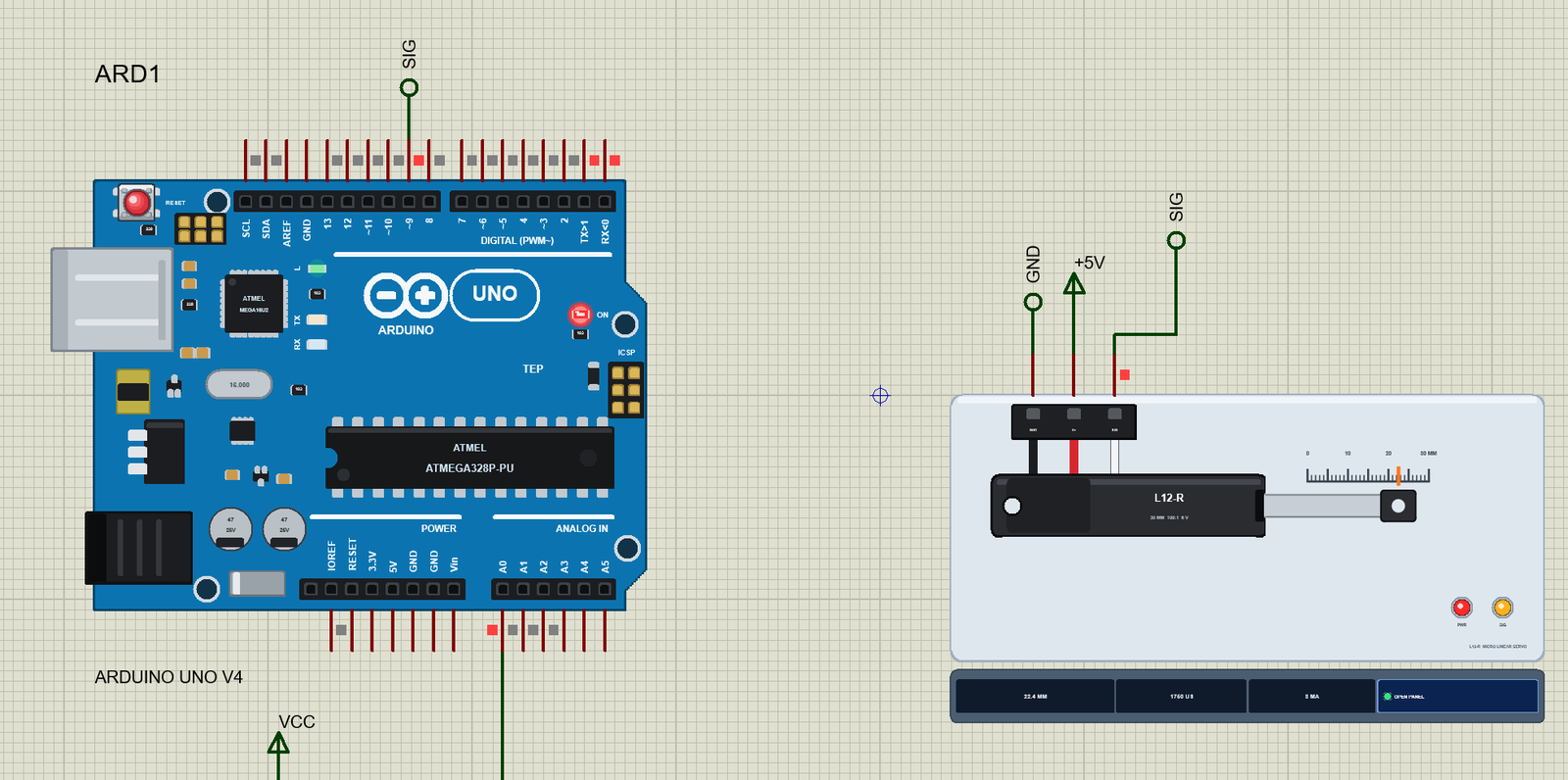

More Servo Motor project files
All Servo Motor tutorials


Comments
0